GUIDE
Residential Proxies for Twitter Scraping in 2026: Real Prices, the Mislabeling Scam, and the Cheaper Shortcut
Live June 2026 per-IP prices for static residential and ISP proxies (Decodo, Webshare, Bright Data, IPRoyal, Oxylabs and more), the datacenter-IP-sold-as-ISP scam, and the math on running a pool versus calling an API for X data.
Per our own spec, 70 of 123 endpoints bill $0.0008, 26 are free, and 27 sit between $0.0016 and $0.01. Every price ships inside our published OpenAPI document as an x-cost-usd field, so any figure in this post can be checked against the contract that bills it rather than taken on trust.

For static residential and ISP proxies in June 2026, the two cheapest per-IP entries are Decodo at $0.27 and Webshare at $0.30, Oxylabs at $2.10 is the premium choice, and Bright Data at $0.90 fits teams willing to clear KYC. [Source: vendor pricing pages, June 2026] The bigger point: when you specifically want X data and not the open web, a per-call read API deletes the whole proxy layer and usually undercuts a pool once IP fees, bandwidth, and upkeep are added in.
TL;DR: Every figure below came off the vendor's own live page in June 2026, not lifted from a review blog. Per IP for static and ISP, Decodo ($0.27) and Webshare ($0.30) sit at the bottom, Oxylabs ($2.10) at the top, Bright Data ($0.90, KYC-gated) in the middle. [Source: vendor pricing pages, June 2026] The two things that actually cost buyers money appear on no pricing page: datacenter IPs sold as residential ("fake ISP"), and reviews that are paid for. And if X data is what you are after, the lowest-effort, lowest-cost move is to skip the pool and read through an API.
Anyone scraping X (formerly Twitter) with their own code at real volume runs into the same brick wall eventually. One IP firing thousands of requests gets throttled, then challenged, then locked out. The textbook answer is to buy proxies and spread the load over many residential or ISP addresses so no single one looks abusive. That turns the problem into a shopping question, which is exactly where most guides quit being useful, because they are written either by the proxy vendors themselves or by affiliate sites paid to rank them.
Two things set this guide apart. The prices are real, pulled from live vendor pages in June 2026, so you are weighing today's numbers rather than a figure a review site copied in 2024. And it does not take for granted that you need proxies in the first place. For open-web scraping you do. For X data, a cheaper layer exists, and we run the actual numbers on it. If the read path is all you came for, our rundown of the best ways to scrape and read tweets puts the approaches side by side, and the Twitter API cost guide holds the full spend model.
The three options you are really picking between
Start with the vocabulary, because the labels hide the decision that matters. A residential proxy sends your request through an address tied to a genuine home internet connection, so the destination sees what reads like a regular household rather than a server in a rack. An ISP proxy, often labeled static residential, splits the difference: it lives in a datacenter for speed and uptime, but the address is registered to a consumer ISP, so it shows a residential-looking ASN while behaving like a steady server IP.
The split that governs your budget is sticky against rotating. Static residential and ISP give you one fixed address that survives across sessions, sold per IP per month, and that is what holds up for long logged-in work or anything that has to keep one identity over time. Rotating residential deals you a fresh address on each request out of a big pool, almost always billed per gigabyte of traffic. X scrapers usually want the sticky kind for authenticated sessions and the rotating kind for bulk anonymous reads, and because the two ride completely separate billing models, this is the first place naive comparisons fall apart.
Buy the wrong one and it shows immediately. Rotate an IP in the middle of a sticky session and your identity flips mid-task, which trips detection. Lean on a small sticky pool for a high-rotation bulk pull and you burn through those few addresses until they all get flagged as a group. Sticky (static residential or ISP) is for anything carrying an identity forward: a login, a request chain that should read as one consistent person, or a flow where rotating the address would itself look off. You rent these per IP, hold them for the month, and treat each as a stable persona. Decodo, Webshare, IPRoyal, and Oxylabs all sell that tier, and it is the right call when you read from authenticated state or run Twitter advanced search operators against a session that has to persist. Rotating residential is for high-volume anonymous reads where a new address every request keeps any single one from stacking up a ban-worthy request count, which suits bulk public pulls such as feeding a Twitter sentiment analysis pipeline tens of thousands of tweets where you never log in.
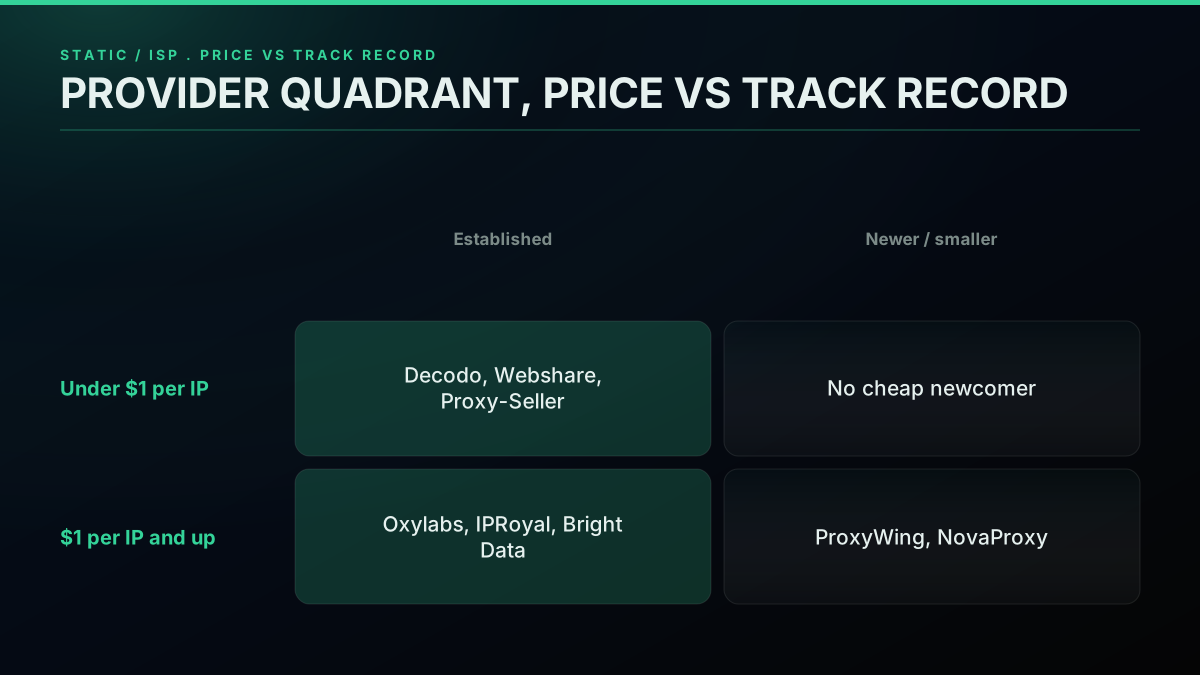
What every provider actually charges (June 2026, off live pages)
Below is the full field, each price read straight off the vendor's live page in June 2026. Confirm current numbers yourself before you buy, since tiers move often, but this is the genuine landscape at time of writing. [Source: each provider's public pricing page, captured June 2026]
| Provider | Static / ISP price | Bandwidth | Billing | Notes |
|---|---|---|---|---|
| Webshare | $0.30/IP (20 IPs = $6/mo), to $0.24/IP at volume | 250 GB on entry plan, uncapped higher up | per-IP | Lowest sticker. Trust issue and bandwidth cap, see below. |
| Decodo | shared from $0.27/IP (about $0.47 at 10 IPs); dedicated from $2/IP | Uncapped | per-IP | Strongest value at scale; 3-day trial. |
| Proxy-Seller | $0.75 to $0.90/IP, region-dependent | Uncapped | per-IP | Cheap and uncapped; per-region stock, no rotation. |
| Bright Data | $0.90 to $1.30/IP, or $2.5 to $5/GB | metered or per-IP | both | KYC plus business verification; some targets gated. |
| IPRoyal | $1.80/IP per 30 days (longer terms about $2.40/IP) | Uncapped | per-IP | Uncapped static tier; long sticky sessions. |
| Oxylabs | from $2.10/IP | Uncapped, fair-use | per-IP | Premium reliability, priced for scale. |
| ProxyWing | $3/IP, to $2.0/IP at volume | Uncapped | per-IP | Smaller shop; thin independent data. |
| Rayobyte | $5/IP, to $4.60/IP at volume | Uncapped | per-IP | Ethics-led; support reportedly patchy. |
| NovaProxy | $6.99/IP per month, dedicated | Uncapped, soft-throttled | per-IP | Newer; testimonials live on its own site only. |
| DataImpulse | $1/GB, to $0.80/GB ($5 min) | metered | per-GB | Rotating residential, not static. Socket-level billing. |
| ProxyEmpire | $2.85 to $5.71/GB, static resi | metered | per-GB | Static product is GB-priced, not per-IP. |
| NetNut | $99 / 7 GB ($14.4/GB), to $4.5/GB | metered | per-GB | Enterprise-leaning, traffic-billed. |
| Proxy4U | PAYG packs from $9.9, no expiry | metered | per-GB | Rotating residential PAYG; no static-ISP per-IP product. |
Lined up as one per-IP ladder for static ISP, cheapest first: Decodo $0.27, Webshare $0.30, Proxy-Seller $0.75, Bright Data $0.90, IPRoyal $1.80, Oxylabs $2.10, ProxyWing $2 to $3, Rayobyte $4.60, NovaProxy $6.99. [Source: vendor pricing pages, June 2026] The remaining four (NetNut, DataImpulse, ProxyEmpire, Proxy4U) bill by the gigabyte, a separate model you cannot lay on the same per-IP line at all.
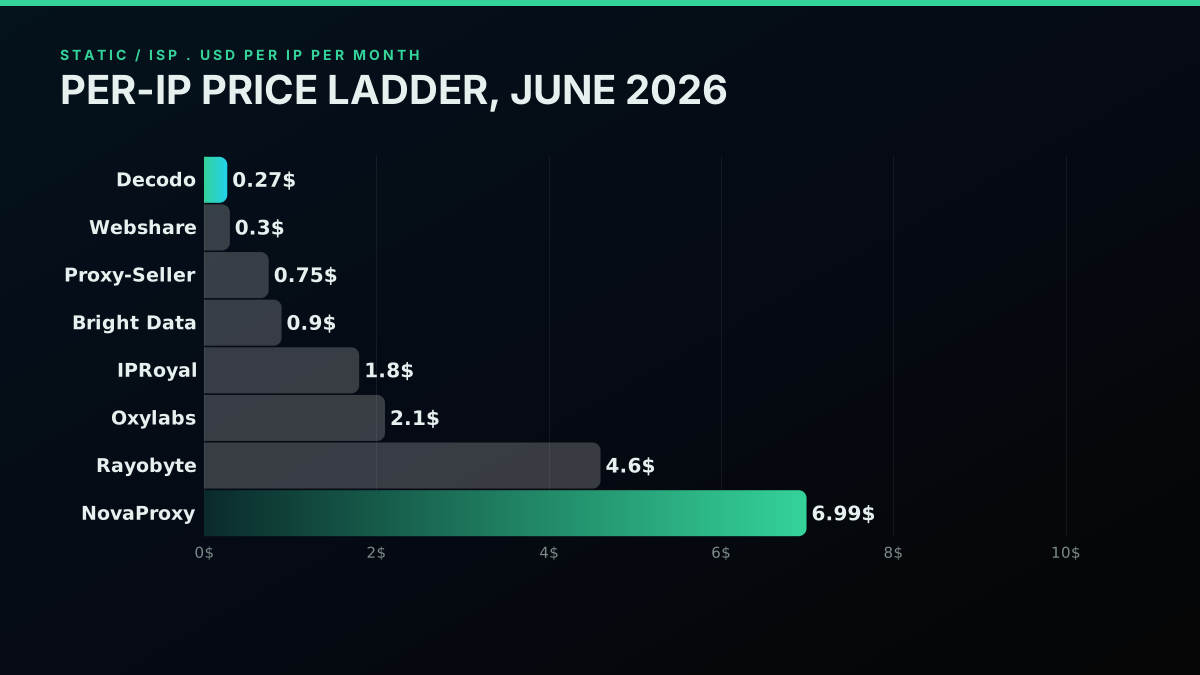
Reading the field, vendor by vendor
Decodo carries the best price-to-quality on the list: shared ISP from $0.27 per IP with uncapped bandwidth, climbing to roughly $0.47 at 10 IPs, plus a dedicated tier from $2 ([Source: vendor pricing page, June 2026]). It draws the most organically positive r/proxies mentions for ISP pools, which counts for more than it sounds given how seeded those threads run, and its 3-day trial lets you run the ASN and fraud checks below before parting with a cent.
Webshare owns the lowest sticker at $0.30 per IP ([Source: vendor pricing page, June 2026]), but the budget plan stops bandwidth at 250 GB and reliability is the price you pay. Its trust problem is the most-repeated cautionary story in the community, covered in the next section.
Proxy-Seller is quietly one of the cheaper uncapped options at $0.75 to $0.90 per IP ([Source: vendor pricing page, June 2026]), a fine secondary or independent supplier, with the caveats being no rotation and per-region stock.
Bright Data runs cheaper per IP than its enterprise image suggests at $0.90 to $1.30 ([Source: vendor pricing page, June 2026]), with serious scale and a compliance bent. The drag is onboarding: KYC and business verification up front, and some targets locked for new accounts until you pass.
IPRoyal sits mid-field at $1.80 per IP ([Source: vendor pricing page, June 2026]), uncapped on the static tier with long sticky sessions. Sentiment has skewed mixed-to-negative lately (more on that below), though the static product is the better-regarded half of its range.
Oxylabs is the premium seat at $2.10 per IP ([Source: vendor pricing page, June 2026]), with high success rates and uncapped fair-use bandwidth. It earns its price mainly at scale.
ProxyWing, NovaProxy, and Proxy4U are smaller or newer. Their prices verify ($2 to $3 per IP, $6.99 per IP, and PAYG from $9.9, [Source: vendor pricing pages, June 2026]), but independent community data is thin and most testimonials sit on their own sites, so tread carefully.
Rayobyte leans ethics-first yet runs pricey for ISP at $4.60 to $5 per IP ([Source: vendor pricing page, June 2026]). The community read is roughly "solid budget brand, support comes and goes."
NetNut, DataImpulse, and ProxyEmpire bill by the gigabyte. NetNut is enterprise ($99 / 7 GB minimum). DataImpulse is genuinely cheap rotating residential at $1/GB ([Source: vendor pricing pages, June 2026]), but socket-level billing eats gigabytes quickly. ProxyEmpire's static product is GB-priced at $2.85 to $5.71/GB.
Start building with TwitterAPIs
$0.0008 a call, about $0.04 per 1,000 tweets at 20 tweets a page. $0.50 free credits. No credit card required.
The two costs that never reach a pricing page
The numbers above are the easy part. The expensive surprises are the ones no vendor prints.
Datacenter IPs wearing an ISP label
This is the single most important thing in the guide, and it is on no pricing page: a big share of the loudest r/proxies complaints are about "fake ISP" proxies, meaning datacenter addresses sold as residential or ISP. The accusation does not stay on one sketchy budget brand. It has been made in public against cheap sellers and premium ones alike.
The most-cited warning is unsparing about Webshare:
webshare.io residential proxy is a scam!
The poster is precise: "every single IP is a datacenter IP on a host that is known for fraud/abuse." Yet the same shape recurs at the opposite end of the ladder. One r/proxies user who bought supposedly dedicated ISP proxies from Oxylabs reported that "most of them show up as datacenter or VPN/proxy on multiple IP checkers" (thread). Another, after two years on IPRoyal, wrote that "the proxies they sell under the name 'ISP proxies' are actually datacenter proxies, sold at a much higher price." None of these are one-off gripes about a bad batch. They are the identical structural charge, raised independently against a budget brand, a mid-tier brand, and a premium brand, which points the finger at the supply chain rather than any one vendor.
That same Oxylabs thread also spells out the mechanism most plainly: a seller leases a subnet on an IP marketplace, rents a datacenter box on that network, and you end up with a datacenter address wearing an ISP costume. It clears a shallow ASN check and gets flagged the instant a target runs a real fraud score against it, the kind of datacenter and anonymous-IP signal an IP-intelligence database like MaxMind is built to expose. The reason the play works is that almost nobody checks. Buyers read the product page, see "residential" or "ISP," and treat the label as the product. The seller is wagering you will not push the IPs you get through an independent checker, and most days that wager wins.
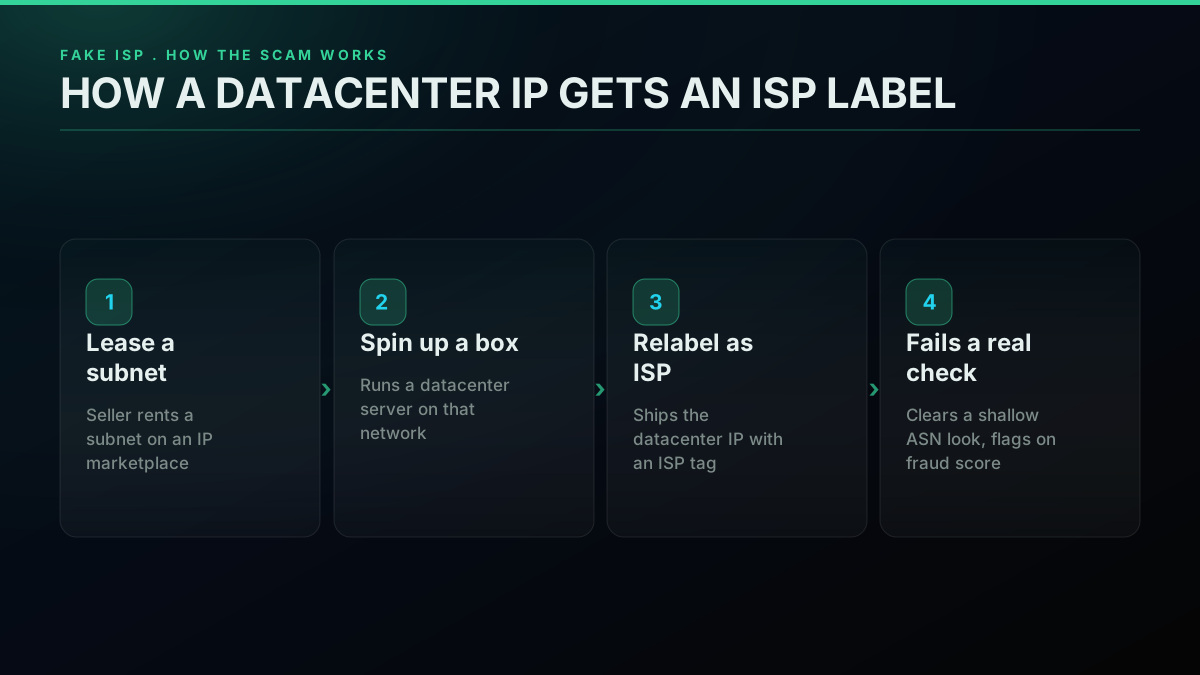
The frustrating part is that the problem ignores price. You might assume paying up buys you out of it, but complaints land on the cheapest and the priciest brands at about the same rate, because all of them can pull from the same resold-subnet supply. More money is not the fix; checking the IP is.
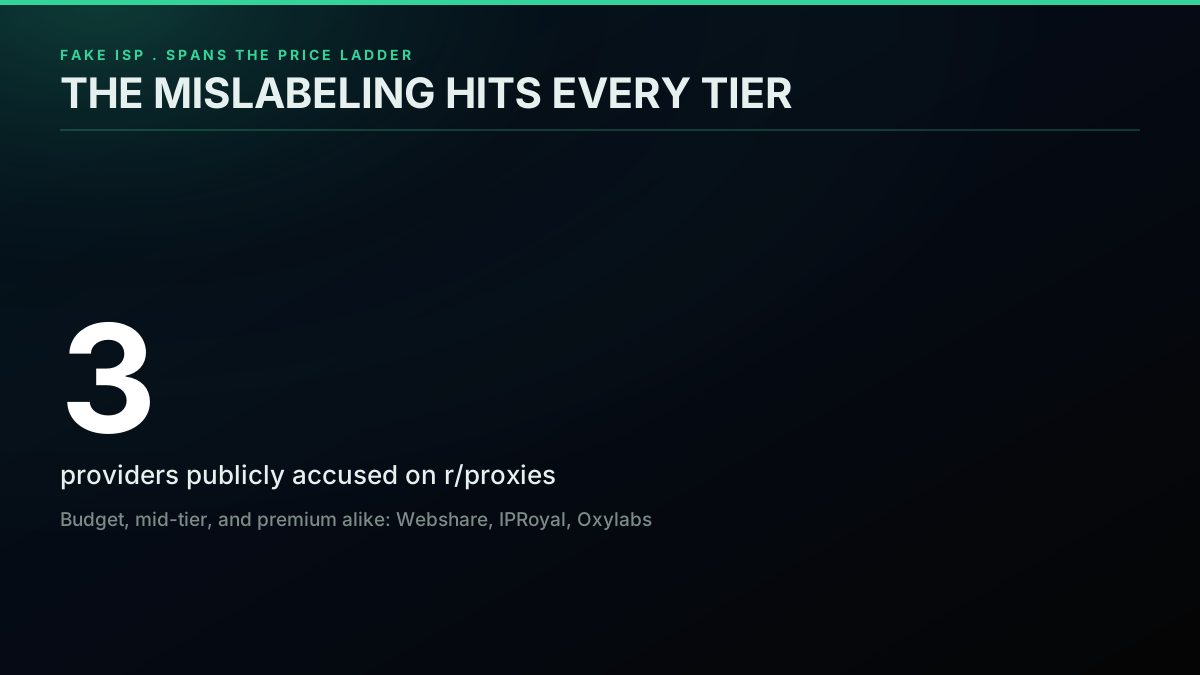
So the working rule is that the label on the box is not the product. Verify the ASN and fraud score of the actual IPs you receive, on a trial, before trusting any "residential" or "ISP" claim. The exact check sequence comes later in this guide.
Reviews you are not meant to trust
The second buried cost is informational. The proxy review ecosystem, Reddit included, runs heavily seeded. Best-provider threads fill up with deleted comments and throwaway accounts pushing no-name brands, and one vendor gets cheered in one place and torched in the next.
IPRoyal is the cleanest illustration of the split. On X, a verified user posts a glowing two-and-a-half-year endorsement:
https://x.com/Ibrahkiprotich/status/2021021531875557641
On r/proxies, a different two-year customer arrives at the opposite verdict in public:
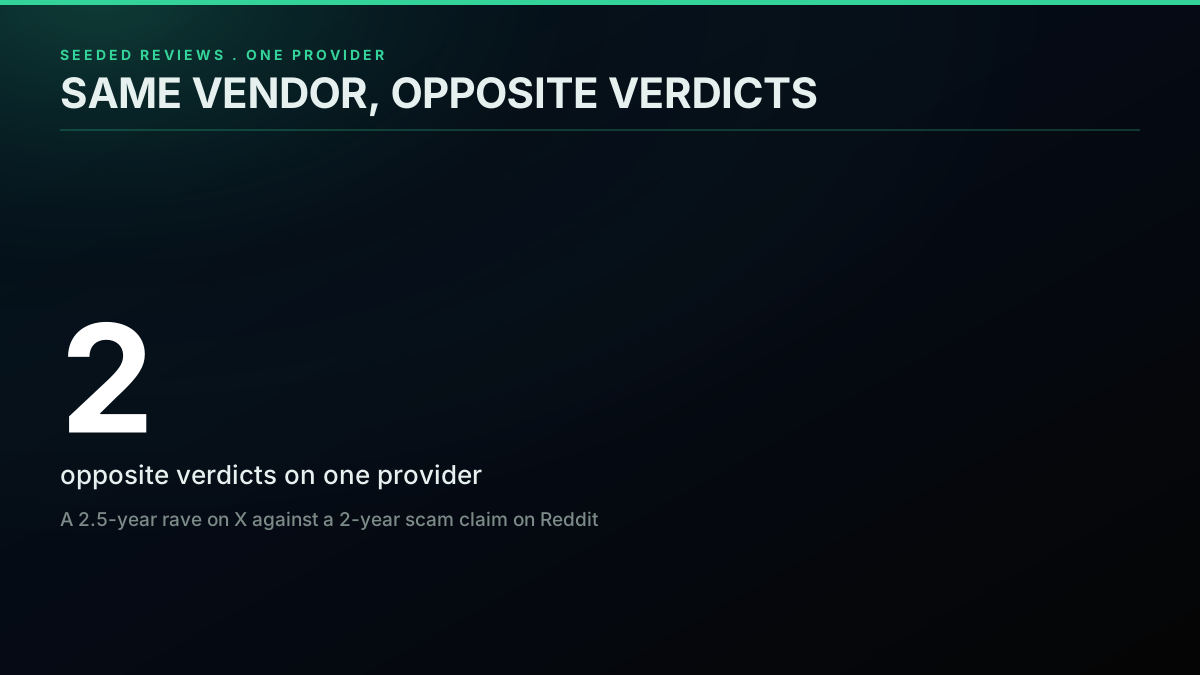
2 Years With IPRoyal and I Feel Completely Scammed. Looking for a New Proxy Provider
Same vendor, same tenure, violently opposite conclusions. That is not a tie to break by siding with one camp. It is the signal itself: no lone review source holds up, because seeded praise and seeded outrage are both cheap to mass-produce. The only review worth anything is the one you run yourself on a trial IP.
Per-IP and per-GB are not the same number
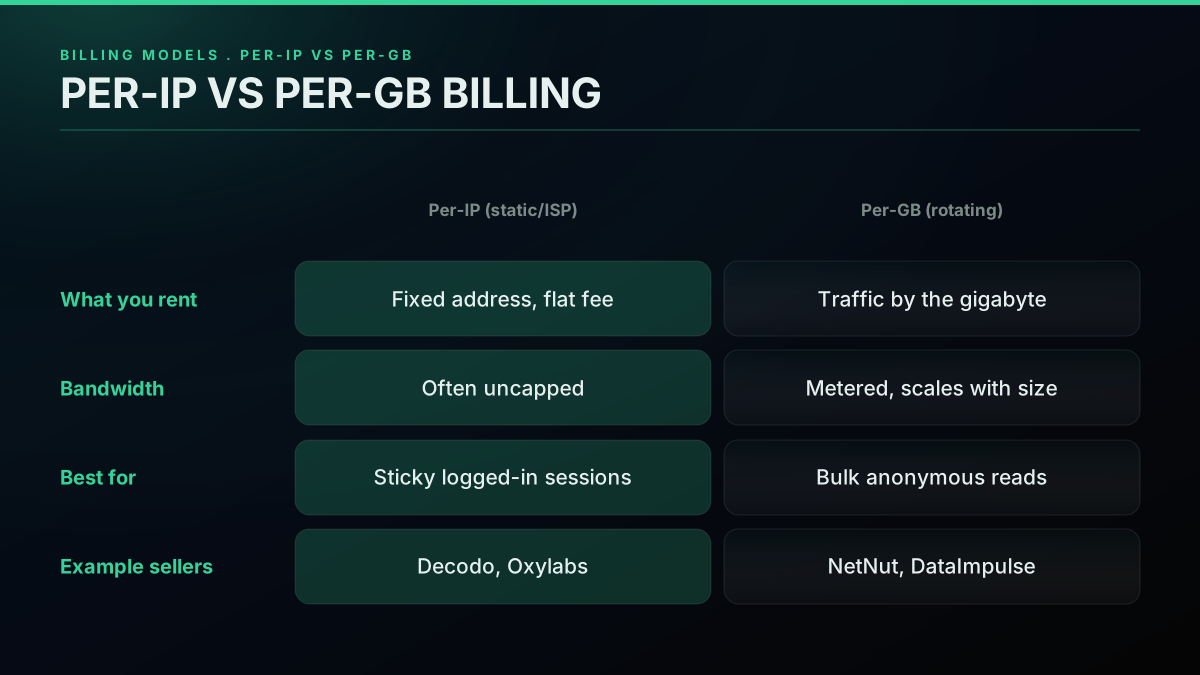
Look again at the table and notice it carries two billing models that refuse to compare on a single figure. Per-IP sellers (Decodo, Webshare, IPRoyal, Oxylabs) rent you a fixed address for a flat monthly fee, often bandwidth-uncapped. Per-GB sellers (NetNut, DataImpulse, ProxyEmpire) rent you traffic, and you pay for every gigabyte that moves.
For scraping, per-GB is a trap unless you model traffic carefully. Socket-level billing, the kind DataImpulse uses, charges overhead you never see, and a scrape that pulls images, full pages, or fat JSON responses chews through gigabytes far quicker than the headline rate hints. A "cheap" per-gigabyte plan can outspend a flat per-IP plan once your real traffic shows up.
| Per-IP (static / ISP) | Per-GB (rotating) | |
|---|---|---|
| What you rent | A fixed address for a flat monthly fee | Traffic, billed per gigabyte |
| Bandwidth | Often uncapped | Metered, scales with response size |
| Example sellers | Decodo, Webshare, IPRoyal, Oxylabs | NetNut, DataImpulse, ProxyEmpire |
| Best for | Sticky logged-in sessions | Throwaway high-volume anonymous reads |
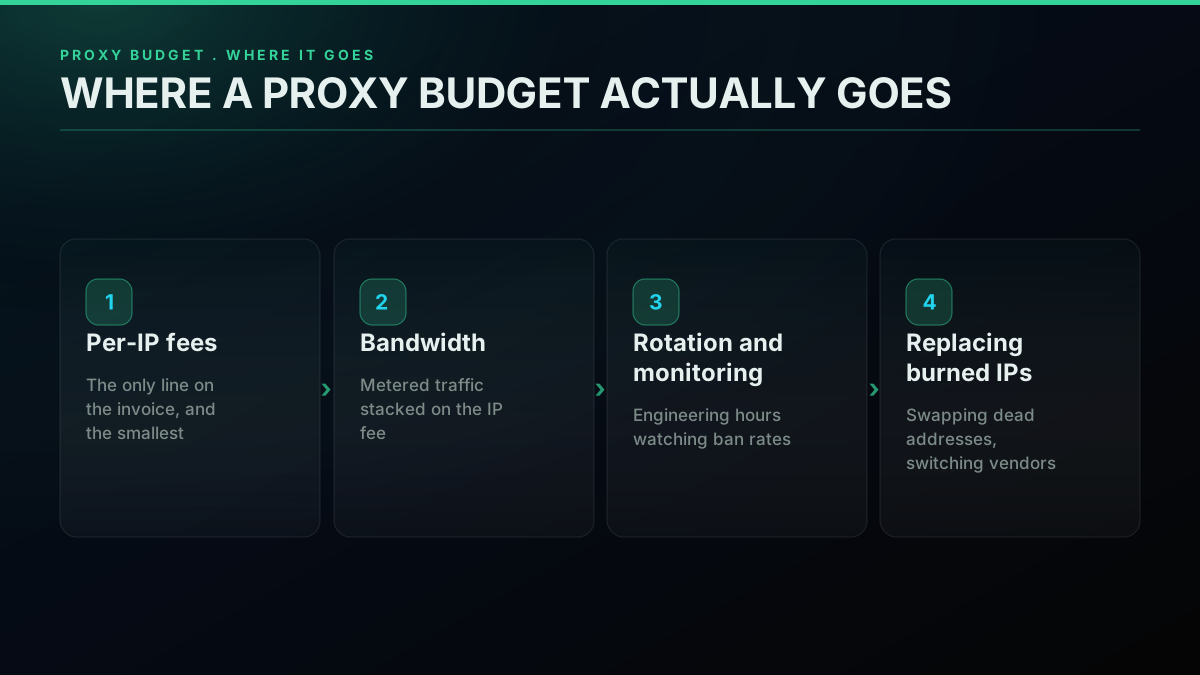
There is also a line item nobody quotes: where a production proxy budget really goes once a pool is live. It is not just the IP fee. It is bandwidth, the engineering hours to rotate and watch IPs, and the cost of replacing addresses that burn out on your target.
Before you commit to either model, lean on a no-card trial and validate against your real target. A recurring r/proxies thread keeps a running list of which providers offer free trials precisely because seasoned buyers refuse to pay before testing, and the top buying-advice thread is stacked with people who learned that the costly way.
Where proxies fit for X data, and where they vanish
Back up to why you reached for proxies at all. They are not the goal. They are a patch for one narrow problem: a target throttles or bans a single IP firing too many requests, and proxies fan the load so no one address looks abusive.
If you are scraping the open web, many sites, your own crawler, that patch is genuinely required and the comparison above is exactly your shopping list. But if X data is the end goal, the access problem is already solved one layer down. A read API hands you tweet text, author details, engagement counts, and timestamps through a single authenticated endpoint, and the vendor runs the IP infrastructure so you never touch a pool. For the record this is not a read-only product, the same surface carries write actions too (favorite, retweet, bookmark, follow and their reversals, delete, and posting a tweet), with the simple actions priced at $0.0008 per call and tweet creation at $0.0016, your own auth_token and ct0 passed per request and never stored, but for scraping the path you care about is the read side.
Here is the read path with no proxy anywhere in it, built on the requests library against the TwitterAPIs search endpoint:
import requests

API_KEY = "YOUR_API_KEY"
ROOT = "https://api.twitterapis.com"
client = requests.Session()
client.headers.update({"Authorization": f"Bearer {API_KEY}"})

# Pull public tweets for a query. Zero proxies, zero IP rotation.
hits = client.get(
    f"{ROOT}/twitter/tweet/advanced_search",
    params={"query": "isp proxy datacenter", "count": 20, "product": "Top"},
).json()

matches = hits.get("tweets", [])
print(f"returned {len(matches)} tweets")
for row in matches[:3]:
    print(row["author"]["username"], "->", row["text"][:80])
That is the whole access layer. One bearer token, one REST call, JSON back. No residential IPs to rent, no ASN to vet, no ban rate to babysit. Need account-level data instead of search? The shape does not change:
curl -s "https://api.twitterapis.com/twitter/user/info?userName=twitterapis" \
  -H "Authorization: Bearer YOUR_API_KEY"
When a query overflows one page, the response ships a next_cursor. You walk the pages by handing the cursor back and stop when it comes back null or empty, no IP rotation in sight, because scaling the access layer is not your job:
def collect(query, page_cap=10):
    out, cursor, page = [], None, 0
    while page < page_cap:
        args = {"query": query, "count": 20, "product": "Latest"}
        if cursor:
            args["cursor"] = cursor
        body = client.get(f"{ROOT}/twitter/tweet/advanced_search", params=args).json()
        out.extend(body.get("tweets", []))
        cursor = body.get("next_cursor")
        if not cursor:
            break
        page += 1
    return out
Grabbing one account's recent posts is the same shape on the user/tweets endpoint, again cursor-paged with no pool to run:
recent = client.get(
    f"{ROOT}/twitter/user/tweets",
    params={"userName": "twitterapis", "count": 20},
).json().get("tweets", [])
Because paged results overlap at the seams, dedupe on tweet id before storing anything, the same as you would with any scraper, except there is no proxy ban to design around when a page retries:
known, clean = set(), []
for row in matches:
    tid = row["id"]
    if tid not in known:
        known.add(tid)
        clean.append(row)
Error handling collapses to one status check instead of a ban-recovery state machine, because there is no IP to burn and swap:
reply = client.get(
    f"{ROOT}/twitter/tweet/advanced_search",
    params={"query": "isp proxy datacenter", "count": 20, "product": "Top"},
)
if reply.ok:
    matches = reply.json().get("tweets", [])
elif reply.status_code == 429:
    time.sleep(2)  # passing rate limit, plain backoff
else:
    raise RuntimeError(f"TwitterAPIs error {reply.status_code}: {reply.text[:200]}")
The code is not the point, and it is not meant to be clever. The point is that the entire body of work proxies exist to prop up, rotating IPs, tracking ban rates, proving your "residential" addresses are not flagged datacenter ones, simply never appears. Even strong practitioners pour real effort into sourcing proxy supply for direct scraping, as security researcher Bill Demirkapi noted while hunting residential IPs for a heavily-defended target:
https://x.com/BillDemirkapi/status/1944540134944145747
You can prove the read path out before paying anything, since the free tier ships $0.50 in credits, roughly 625 calls or about 12,500 tweets, enough to run real queries and confirm the shape fits. For the full endpoint set and the patterns that hold call volume down, see our TwitterAPIs best practices guide and the Python Twitter API tutorial. Coming off the official API? The Twitter API v2 vs TwitterAPIs comparison covers the move, how to get a Twitter API key walks setup, and the complete Twitter API tutorial wires the endpoints together. For why direct scraping is harder than it looks, Cloudflare's own bot detection docs explain the fingerprinting that flags residential IPs, and the IPXO IP marketplace is where a lot of that resold subnet supply starts.
The cheapest pay-as-you-go Twitter API. Try it free.
$0.0008 a call, about $0.04 per 1,000 tweets at 20 tweets a page. $0.50 free credits. No credit card required.
Running the numbers: a pool versus an API
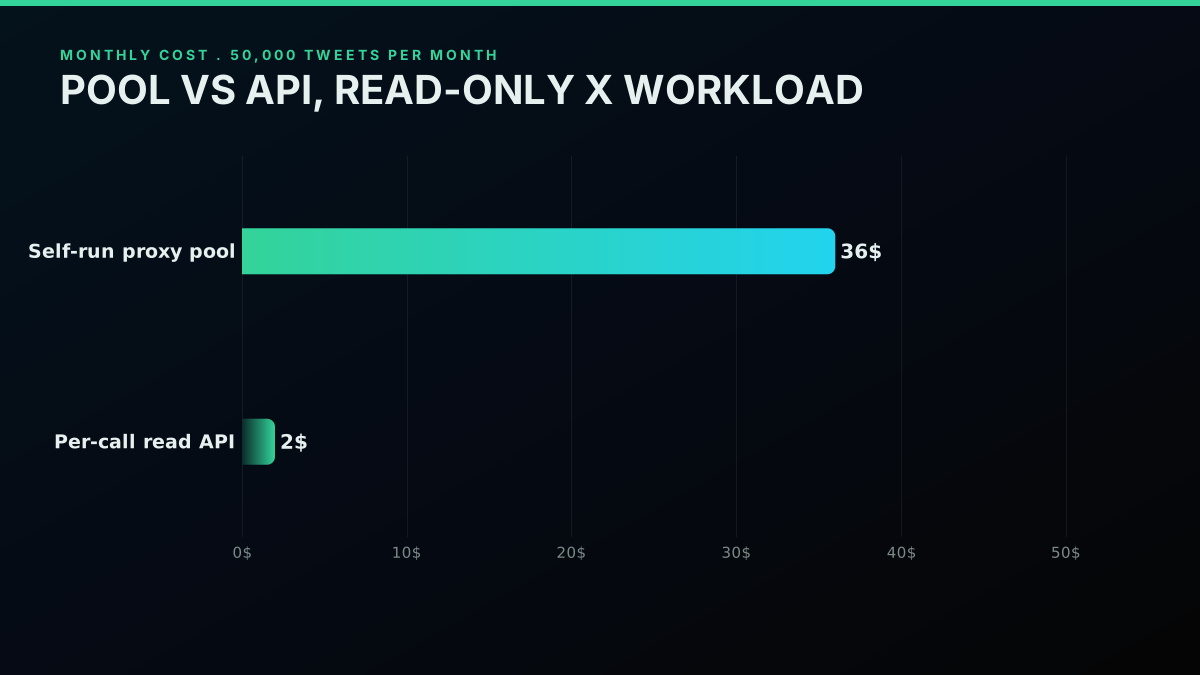
Take a 50,000-tweet-per-month read workload. A 20-IP static residential pool at IPRoyal's $1.80 per IP ([Source: vendor pricing page, June 2026]) is an estimated $36 a month before bandwidth, plus the hours to build the scraper, rotate IPs, track ban rates, and replace dead addresses. Read the same volume through a per-call API at $0.0008 (about 20 tweets per call) and you are at roughly $2 a month: 50,000 tweets divided by 20 is 2,500 calls, times $0.0008 is $2.00, the same number you get from the $0.04-per-1,000-tweets read rate. No IP fees, no metered traffic, no pool to keep alive. For a read-only X workload the API is dramatically cheaper than the pool and strips out the maintenance entirely.
| For 50,000 tweets/month | Self-run static-residential pool | Per-call read API (TwitterAPIs) |
|---|---|---|
| Access cost | 20 IPs at $1.80 each = ~$36/mo before bandwidth | 2,500 calls at $0.0008 = ~$2/mo |
| Bandwidth | Metered on top | None |
| Maintenance | Build, rotate, watch ban rates, replace dead IPs | None |
| Fake-ISP exposure | Yes, until every IP is verified | None, you never hold an IP |
Walk the proxy route in full: you rent a static-residential pool to run your own X scraper. Twenty IPs at $1.80 each (IPRoyal static tier, [Source: vendor pricing page, June 2026]) is an estimated $36 a month before bandwidth. Add the engineering to build and maintain the scraper, rotate IPs, watch ban rates, and replace burned addresses. Add the risk that a slice of those "ISP" IPs are datacenter addresses that flag on day one. The IP fee is the smallest piece of the real bill.
Walk the API route: at $0.0008 per call, reading 50,000 tweets through TwitterAPIs lands near $2 a month (2,500 calls times $0.0008), with no IP fees, no metered traffic, no pool upkeep, and no fake-ISP exposure since you never hold an IP. For a read-only X workload the API beats a $36-and-up pool on price and always on maintenance once engineering time enters the sum. The Twitter API cost guide carries the full workload-by-workload model if you want to drop in your own volumes.
The reason the headline IP fee flatters the proxy route is that the fee is the part that lands on an invoice. The parts that never hit an invoice are the larger ones: the days of engineering to build a scraper that outlasts X's anti-bot defenses, the standing work to rotate IPs and watch ban rates, the dead time when a batch of "ISP" IPs turns out to be flagged datacenter addresses and you have to switch vendors, and the opportunity cost of a senior engineer babysitting proxy plumbing instead of shipping product. A pool that reads as an estimated $36 a month on the page is rarely $36 a month in practice once a person has to keep it breathing.
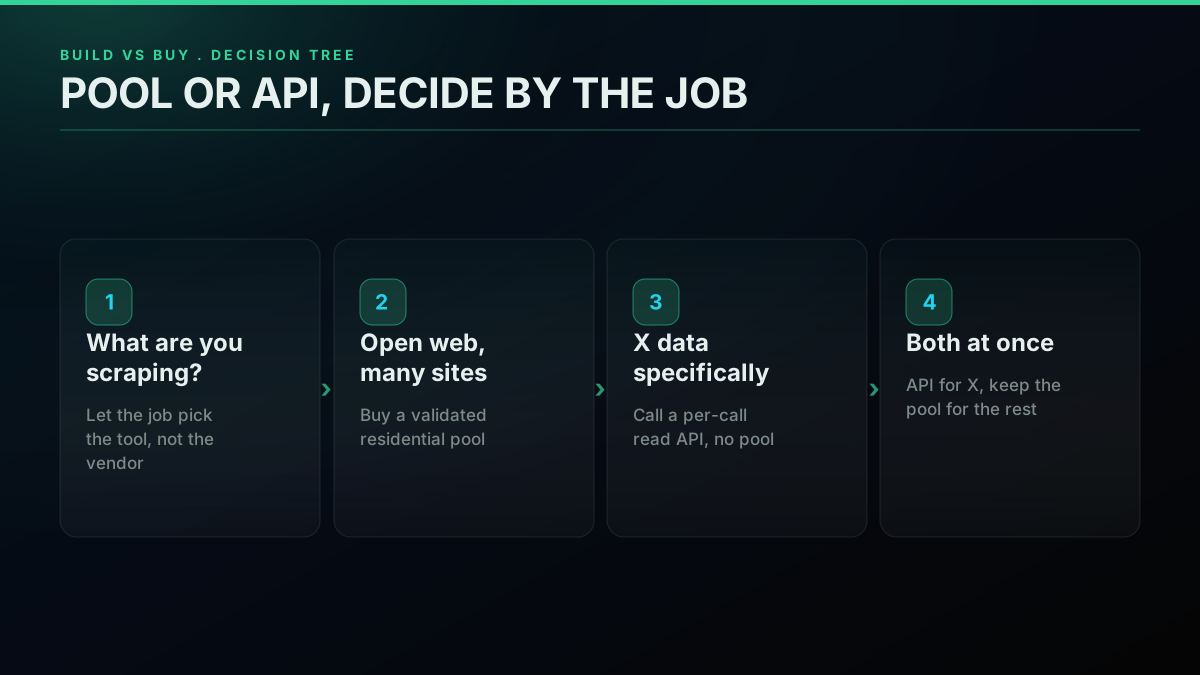
There is a second case where the pool wins, and it is worth saying out loud: if you scrape many sites and not only X, you are buying open-web access infrastructure that an X-specific API cannot stand in for, and a validated residential pool is the right purchase. The call is not "proxies bad, API good." It is "fit the tool to the job," and the job decides. For a single-platform X read workload the API erases a whole category of work. For a sprawling multi-site crawl the pool is the foundation. If your build spans both, the usual pattern is to run the API for X data and keep the pool for everything else, so you are not paying the X-scraping tax on top of an API that already handles it.
The community senses this without naming it. The buyer in the top "looking to buy" thread on r/proxies describes exactly what an API ships: "high speeds, stable connections and IP pool large enough to never get the same IP again, and most importantly, the IP's should be clean." That is a description of solved access infrastructure, which is precisely what you rent when you call an API instead of assembling a pool.
For a neutral third-party tour of the provider field before you decide, this Cybernews review is a reasonable starting point:
https://www.youtube.com/watch?v=dDBOqQvzEt4
The pre-purchase checklist
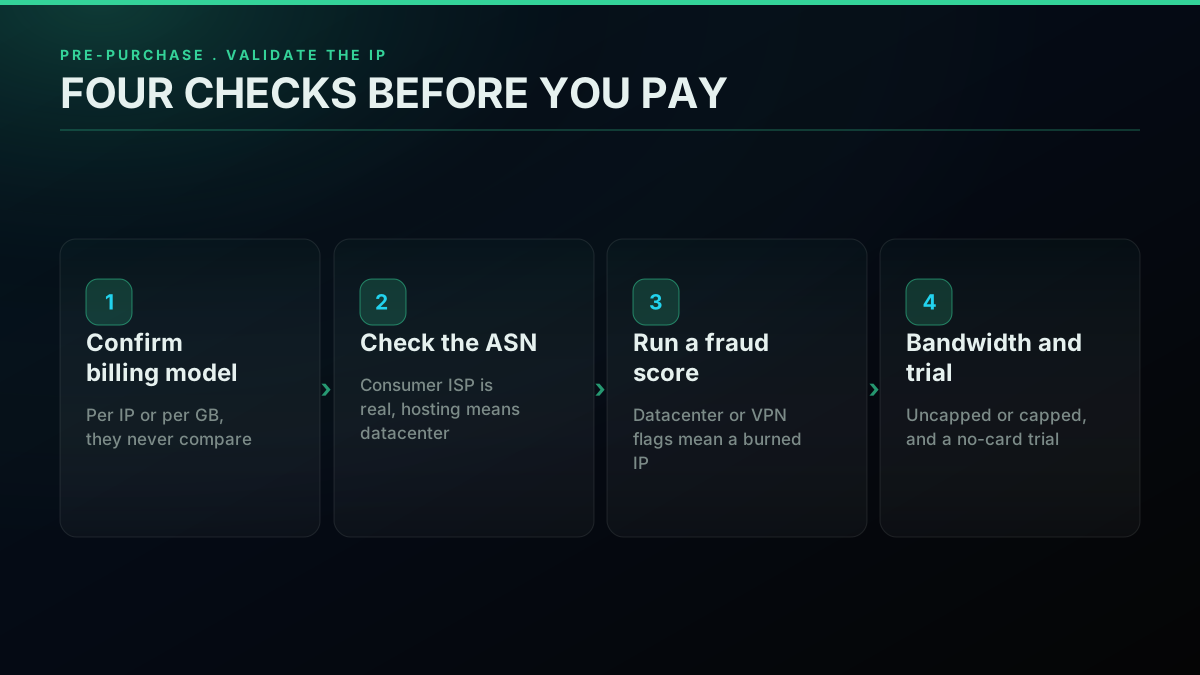
Before any money changes hands with a proxy vendor, run four checks on a trial IP: confirm the billing model (per IP against per gigabyte, which do not compare on one number), look the IP's ASN up at ipinfo.io to confirm it resolves to a consumer ISP and not a hosting provider, push the IP through a fraud-score checker like Scamalytics to confirm it is not already flagged, and confirm whether bandwidth is uncapped or limited before you scale.
First, pin down which billing model you are actually buying, per IP (static or ISP) or per gigabyte (rotating). They never compare on one number, and vendors blur the line deliberately.
Second, take a trial IP and look up its ASN with a tool like ipinfo.io. A real ISP proxy resolves to a consumer ISP's ASN. A datacenter IP resolves to a hosting provider's ASN no matter what the page calls it. This one check catches most fake-ISP reselling before you have spent a cent.
Third, run that same IP through a fraud-score or proxy-detection checker such as Scamalytics or IPQualityScore. If it reads as datacenter, VPN, or proxy across multiple checkers, it will flag on a real target regardless of the label, and a high score means the IP is already burned on the exact platforms you care about. Test a handful of trial IPs, not one, because vendors can serve clean IPs to a trial and dirtier ones to paying volume.
Fourth, confirm whether bandwidth is uncapped or limited, and whether a no-card trial exists so you can do all of the above before paying.
So, build or buy?
The decision forks cleanly into two jobs. Open-web scraping across many sites, where a validated residential pool is the right foundation, and X data specifically, where a per-call read API erases the proxy layer. For the open-web job, Decodo or Proxy-Seller give the best value with uncapped bandwidth, Oxylabs covers premium reliability, and Bright Data covers enterprise compliance. For X data, an API at $0.0008 per call takes IP fees, fake-ISP risk, and pool upkeep out of the equation.
If you scrape the open web across many sites with your own crawler, you need proxies, and the value picks are Decodo or Proxy-Seller for uncapped per-IP, Oxylabs if you want premium reliability at scale, and Bright Data if you want a vetted enterprise vendor and can clear KYC. Validate every IP before you commit.
If X data is the goal, the pool is undifferentiated infrastructure cost: per-IP fees, fake-ISP risk, ban-rate maintenance, and rotation logic, all to fix an access problem the API already fixes. Read through a per-call API, pay $0.0008 per call, and put your engineering into product rather than proxy plumbing. The best ways to scrape and read tweets guide and how to scrape tweets walk the read path end to end, and if you are switching off a marketplace scraper, the Apify Twitter scraper vs TwitterAPIs and RapidAPI Twitter alternative comparisons cover the move. Coming off another vendor? The migrate from twitterapi.io to TwitterAPIs guide is the step-by-step, and for specific jobs the Twitter trends API and export Twitter followers walkthroughs apply the same proxy-free pattern to real workloads. For the wider context on why platforms keep nudging scrapers toward proxies, the Electronic Frontier Foundation's writing on scraping and access is a useful neutral primer.
Bottom line
On live June 2026 pricing, the cheapest per-IP static and ISP proxies are Decodo ($0.27) and Webshare ($0.30) [Source: vendor pricing pages, June 2026], with Webshare trading reliability and bandwidth for the number. Decodo or Proxy-Seller give the best value at uncapped bandwidth, IPRoyal owns the best static sticky sessions, and Oxylabs is the premium pick at scale. But two costs never land on a pricing page: datacenter IPs sold as residential, and seeded reviews that make any single recommendation worthless. Verify the ASN and fraud score of the IPs you actually receive, and treat every review as potentially planted.
And before you buy a pool at all, ask what you are truly after. If it is X data, the proxy layer is the wrong purchase. An API solves the access problem for $0.0008 per call with no IPs to manage and no fake-ISP exposure, which is why a read-only X workload is cheaper and simpler that way once maintenance is counted. The proxy market is real and useful, but it is also full of mislabeled inventory and bought reviews, so the discipline holds whichever route you pick: verify what you actually receive, price the full cost including upkeep, and fit the tool to the job. Start with the pricing page and the cost calculator, then decide whether you are in the proxy business or the product business.
// sources
Where these numbers come from
Each row is a figure in this post and the artefact it was read from. Prices and limits on this platform move, so check the date on the source before you plan against it.
- MaxMind GeoIP2 Precision Insights
- The class of IP-intelligence database the post says exposes a mislabeled proxy, the datacenter and anonymous-IP signals that a real fraud score surfaces even when a shallow ASN check passes.
- IPXO IP marketplace
- The marketplace type named in the mislabeling mechanism, where a seller leases a subnet, rents a datacenter box on that network, and resells the address as residential or ISP.
- ipinfo.io ASN lookup
- The tool named in the first verification step, looking up a trial IP's ASN to see whether it resolves to a consumer ISP or to a hosting provider.
- Internet service provider reference
- Backs the distinction the ASN check turns on, that a genuine ISP proxy resolves to a consumer ISP while a datacenter IP resolves to a hosting provider whatever the product page calls it.
- Scamalytics IP fraud check
- One of the two fraud-score checkers named in the third verification step, used to see whether an IP already reads as datacenter, VPN or proxy before you pay for a pool.
- IPQualityScore proxy detection
- The second proxy-detection checker in that step, supporting the advice to test several trial IPs because a high score means the address is already burned on the target platforms.
Frequently Asked Questions
Reading live vendor pages in June 2026, the two lowest static and ISP per-IP entries are Decodo (shared from $0.27 per IP, roughly $0.47 once you take 10 IPs, bandwidth uncapped) and Webshare ($0.30 per IP). The catch with Webshare is that its budget plan stops at 250 GB of traffic and its IPs get reported as flagged on harder targets, so Decodo wins on value once you scale because there is no bandwidth ceiling.
Only when you point your own scraper straight at X. The whole job of a proxy is to fan requests across many addresses so the target never sees one IP behaving abusively. When X data itself is the goal, and not the open web, a read API deletes that layer: the vendor owns the access infrastructure and you hit a REST endpoint, paying per call rather than per IP plus bandwidth plus the labour of keeping a pool clean.
Because the best-provider threads on r/proxies are seeded heavily. Deleted comments, fresh throwaway accounts boosting no-name brands, and the same vendor cheered in one thread and branded a scam in the next. So do not crown a winner off a recommendation post. Test the specific IPs that land in your account and assume every review you read, Reddit included, might be planted by a vendor.
Bright Data costs less per IP than its enterprise image implies, roughly $0.90 to $1.30, and it brings real scale plus compliance. The friction is signup: KYC and business verification are required, and certain targets stay locked for fresh accounts until you pass. If you want a vetted enterprise vendor and can clear that, it holds up. If you just need X data without sitting in a verification queue, a per-call API gets you moving faster.
Static residential and ISP both hand you one address that holds steady from session to session, sold per IP each month, which is the model you want when a login has to persist. Rotating residential gives you a different address on every request out of a shared pool and bills per gigabyte. Pick per-IP static or ISP when sessions need to stay sticky, per-GB rotating for throwaway high-volume reads. Comparing the two on a single price is the budgeting error people make most often.
It is a datacenter address dressed up and sold as residential or ISP. r/proxies users keep describing the same play: someone leases a subnet off an IP marketplace, spins up a datacenter box on that network, and ships you a datacenter IP wearing an ISP label. The accusation has landed on budget sellers and premium ones alike. The defense is simple. Run any IP you actually receive through an ASN lookup and a fraud-score checker before you believe the product page.
Twenty static-residential IPs at $1 to $2 each lands around $20 to $40 a month before bandwidth, and that ignores the hours spent rotating, watching ban rates, and swapping out dead IPs. A read API such as TwitterAPIs charges $0.0008 per call (about 20 tweets per call), with no IP rental, no metered traffic, and nothing to maintain. For a read-only X job the API almost always comes out cheaper once labour is in the sum, and there is no fake-ISP exposure because you never touch a pool.
Four things. One, the billing model, per IP (static or ISP) against per gigabyte (rotating), since the two never compare on one number. Two, the ASN and fraud score of a trial IP, to catch a datacenter address in disguise. Three, whether bandwidth is uncapped or limited. Four, whether a no-card trial exists so you can verify first. And if X data is the real target, price a per-call API route before you commit to any pool.
Check out similar blogs
More guides on the Twitter/X API, scraping, and pricing.

Twitter Scraping, Best Practices for Production in 2026
Production-grade Twitter scraping patterns, retry logic, pagination, proxy strategy, rate-limit handling, and cost optimization for any third-party API.

Scrape Full Tweet History of Any Account in 2026 (Beyond the 3,200 Limit)
Why the X timeline stops at 3,200 tweets and how to pull an account's full history with date-window search, cursor pagination, and dedup. Live-tested code in Python and curl.

Apify Twitter Scraper vs TwitterAPIs: The Real 2026 Numbers
The honest 2026 breakdown of Apify Twitter Scraper against the TwitterAPIs REST API: what each billing model really costs per 1,000 tweets, latency, failure modes, and a 60-minute bake-off you can run before you commit.

Best Twitter Scraper 2026: API, Browser and Python Compared
Compare the best Twitter scrapers in 2026, official API, third-party APIs, browser scrapers, and Python libraries. What works, what gets you sued, what each costs.
X Starts Billing API Expansions on Nov 22: What One Request Costs Now
From November 22, X bills every object an API expansion returns. What changes, how the forum answers conflict, and what one request costs before and after.
The X Chat API in v2.169: Group Endpoints and What a DM Really Costs
X shipped a full set of X Chat endpoints in API v2.169: groups, admins, invites and members. What you can build on encrypted chat, and the real cost per DM.
Grok Bot Reads X Without API Credits Now. When You Still Need an X Data API
Grok Bot can now search, read and monitor X without X API credits. What the docs confirm, what they leave out, and five jobs that still need an X data API.
What a Twitter Scraper API Bills Per Job: Profiles, Followers, Replies and Search
A rate card for twitter scraper api jobs by data type. What 10,000 profiles, followers, following, replies and search results each bill, on live rates.