GUIDE
Twitter API Cost in 2026: The Total-Cost-of-Ownership Breakdown
What the Twitter / X API actually costs in 2026 once you count unit rate, volume, and waste. Seven cost drivers, a three-line estimate worksheet, and three real bills.
Per our own spec, 70 of 123 endpoints bill $0.0008, 26 are free, and 27 sit between $0.0016 and $0.01. Every price ships inside our published OpenAPI document as an x-cost-usd field, so any figure in this post can be checked against the contract that bills it rather than taken on trust.

TL;DR: The Twitter API has no free read tier in 2026. On the official X API a standard post read is $0.005, an owned-account read is $0.001, a plain post is $0.015, and a post with a link is $0.200. Third-party providers flatten that: TwitterAPIs bills $0.0008 per call returning about 20 tweets, which is $0.04 per 1,000 tweets. Your real bill is unit rate times volume plus a waste multiplier, and the waste is where most budgets break. This guide walks all three variables and the seven cost drivers that decide which side of a 100x gap you land on.
Your Twitter API bill is not a number on a rate card. It is a small equation: the unit rate you pay per call, the number of calls you make, and the fraction of that spend that returns nothing useful. Most cost guides publish the first term and stop. That is why the rate card and the invoice so rarely agree. Two teams collecting the same data, at the same volume, on the same provider, routinely see bills that differ by 40 percent, because one of them architected around the waste and the other did not.
This is the total-cost-of-ownership version of the question. If what you want first is the rate card rather than the equation, the X API cost price sheet puts every official tier and every third-party vendor into one unit and works a monthly bill end to end. Not "what is the sticker price" but "what will this actually cost us to run for a year, and which decisions move the number the most." We start with the three variables that set the bill, publish the 2026 rate card normalized to one comparable unit, then work through the seven cost drivers that separate a cheap pipeline from an expensive one. At the end there is a three-line worksheet you can run in under a minute and three real monthly bills reverse-engineered line by line. For how those per-call rates compare with the official X API on a single page, see the Uneed launch write-up.
If you only want the provider ranking by price per 1,000 tweets, that lives in the Twitter API cost benchmark and the cheapest Twitter API ranking. If you want the headline tiers and an interactive calculator, use the pricing page and the Twitter API cost calculator. This guide assumes you have seen the rate card and want to understand the machinery underneath it.
The three variables that set your Twitter API bill
Every Twitter API bill reduces to three terms: the unit rate per call, your monthly call volume, and a waste multiplier that captures empty results, retries, and duplicate fetches. The unit rate is the single biggest lever, ranging from $0.005 on the official X API standard read down to $0.0008 on TwitterAPIs. Volume is the term you control most directly through caching and batching. The waste multiplier, usually between 1.1 and 1.6, is the one nobody prices, and it is where identical workloads diverge into different bills.
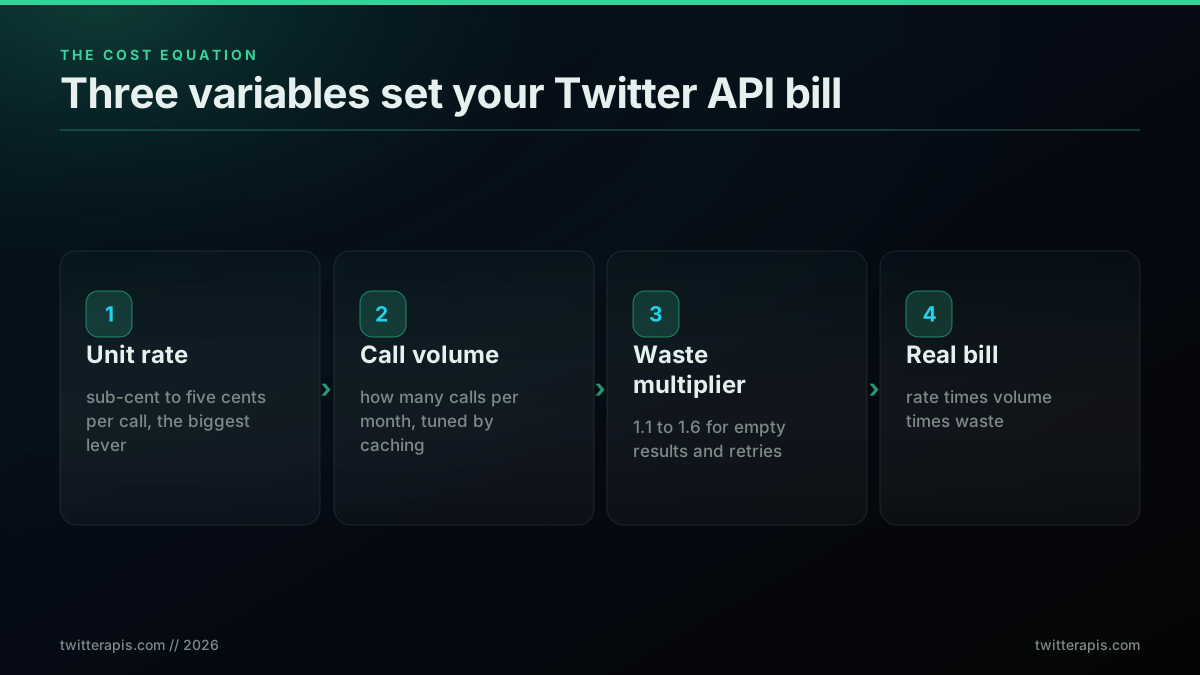
Think of the three terms as knobs with very different travel. The unit rate has a range of more than 100x across providers, so choosing the provider is the decision that dominates everything else. Once the provider is fixed, volume becomes the lever you tune through engineering: how aggressively you cache, whether you batch reads into fewer larger calls, and how often your jobs re-fetch data that has not changed. Waste is the quiet term. It does not appear on any rate card, yet a poorly architected pipeline can pay 60 percent more than a careful one for exactly the same delivered data.
The reason this framing matters is that teams optimize the wrong knob. They negotiate volume discounts or shave a few thousand calls off a job while paying a unit rate that is approximately 100x higher than it needs to be. The correct order of operations is unit rate first, volume second, waste third. Get the provider right and a sloppy pipeline is still cheap. Get the provider wrong and no amount of caching will save you, because you are multiplying every saved call by a rate that was never competitive. The rest of this guide is organized around exactly that: nail the rate, then drain the waste.
It also explains why two published cost estimates for the "same" workload can differ by an order of magnitude and both be honest. One estimate prices the naive volume at the sticker rate and stops. Another prices the same volume at a flat provider's rate, after caching collapses the duplicate reads and batching collapses the per-item calls, and lands at a fraction of the first. Neither is wrong; they are measuring different points on the same three-variable surface. When you read any Twitter API cost claim, including the ones in this guide, the useful question is always which unit rate, which volume assumption, and which waste factor produced the number, because change any one of the three and the headline moves. The discipline of naming all three is what turns a cost estimate from a marketing figure into something you can actually budget against, and it is the habit this entire guide is trying to build.
The 2026 rate card, normalized to one number
Comparing Twitter API providers is hard because they publish in different units: per resource, per credit, per 1,000 tweets, or per monthly subscription. Normalized to cost per 1,000 tweets, the 2026 field runs from $0.04 on TwitterAPIs to about $5.00 on the official X API standard read rate, a 125x spread. The official X API bills per resource ($0.005 read), twitterapi.io bills per credit (100,000 credits per dollar), Apify actors bill per result, and Bright Data bills per successful record. Getting them onto one axis is the only way to compare honestly.
Here is the field on a single normalized unit, with prices verified against each provider's public listing in mid-2026: TwitterAPIs, twitterapi.io, Apify, Bright Data, and the X API.
| Provider | Per 1,000 tweets | Billing unit | Free credits | Notes |
|---|---|---|---|---|
| TwitterAPIs | $0.04 | flat per call ($0.0008, ~20 tweets) | $0.50 | 600 req/min per key, no subscription |
| twitterapi.io | $0.15 | credits (100k = $1) | $0.10 | 15 credits per read |
| Apify (xquik) | $0.15 | per delivered row | $5/month platform | newer low-cost actor |
| Apify (kaitoeasyapi) | $0.25 | per result | $5/month platform | cheapest mainstream actor |
| Apify (apidojo V2) | $0.40 | per result | $5/month platform | 30 to 80 tweets/sec |
| Bright Data (scrape) | $1.50 | per successful record | 5,000/month | $0.75 first 3 months with promo |
| Bright Data (dataset) | $2.50 | per record | trial | prebuilt datasets |
| Official X API (owned read) | ~$1.00 | per resource ($0.001) | none | your own account only |
| Official X API (standard read) | ~$5.00 | per resource ($0.005) | none | search, timelines, third-party |
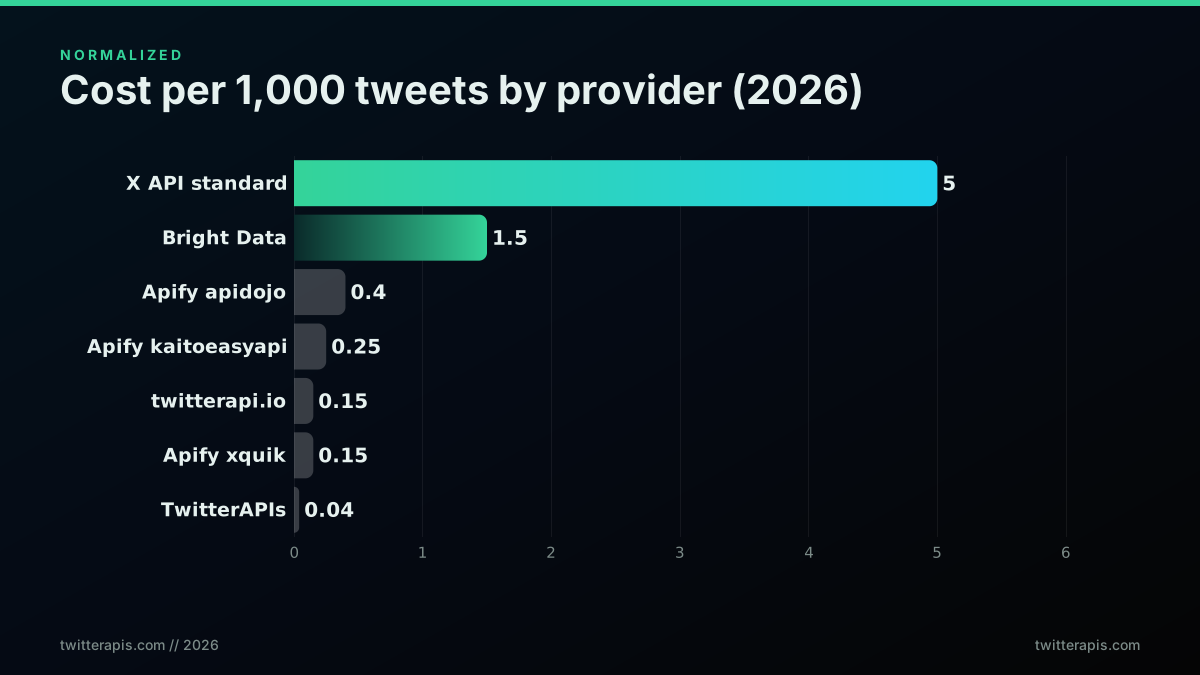
Two structural facts jump out of the normalized view. First, the official X API is not one price, it is two: the $0.001 owned-read rate that only applies to your own account, and the $0.005 standard rate for everything else. Conflating them is the most common mistake in Twitter API budgeting, because the cheap rate is the one X advertises and the expensive rate is the one you actually pay for search and monitoring. Second, the scraper marketplaces cluster in a middle band from $0.15 to $0.40 that looks cheap next to the official API but is still four to ten times a flat per-call provider once you account for their per-result billing, which the next sections unpack.
The per-1,000-tweets number is the honest headline, but it hides the billing unit, and the billing unit is where the surprises live. A flat per-call provider charges the same whether a call returns 1 tweet or 20. A per-result marketplace charges by what it delivers. A credit provider meters every read against a balance. Those three models produce wildly different effective rates on the same workload, which is why the rest of this guide is about drivers, not sticker prices. For the official rate card in full, X publishes it at docs.x.com/x-api/getting-started/pricing, and the shift to this model was covered when X announced the pay-per-use pilot.
One more subtlety hides inside the free-credit column, and it changes how you read the whole table. The official X API has no free read tier at all in 2026, so any evaluation you run against it spends real money from the first request. Every third-party provider on the list hands out some trial allowance, but the shapes differ: TwitterAPIs seeds $0.50 of credits usable across any endpoint, twitterapi.io starts you with $0.10, and the scraper marketplaces bundle a monthly platform allowance rather than a one-time credit. For a team still choosing, the free tier is not a rounding error, it is the budget you get to validate the integration before committing, and a credit you can spend on the exact endpoints your product uses is worth more than a platform allowance locked to one vendor's actor. Read the free column as "how much can I learn before I pay," not as a marketing giveaway, and it becomes a real input to the decision.
Cost driver one: the read and write split most estimates get wrong
The single largest structural error in Twitter API estimates is treating all operations as one rate. Reads and writes are priced on different logic, and within writes the spread is enormous. On the official X API a standard read is $0.005, a user-profile read is $0.010, a plain post is $0.015, and a post with a URL is $0.200. On TwitterAPIs the model is flatter but still tiered: $0.0008 covers every read, the nine simple write actions, and media upload, tweet creation and DM send are $0.0016, and full thread expansion is $0.004. Estimating your bill from a single blended rate will miss the truth by a wide margin if your workload leans toward writes or toward premium reads.
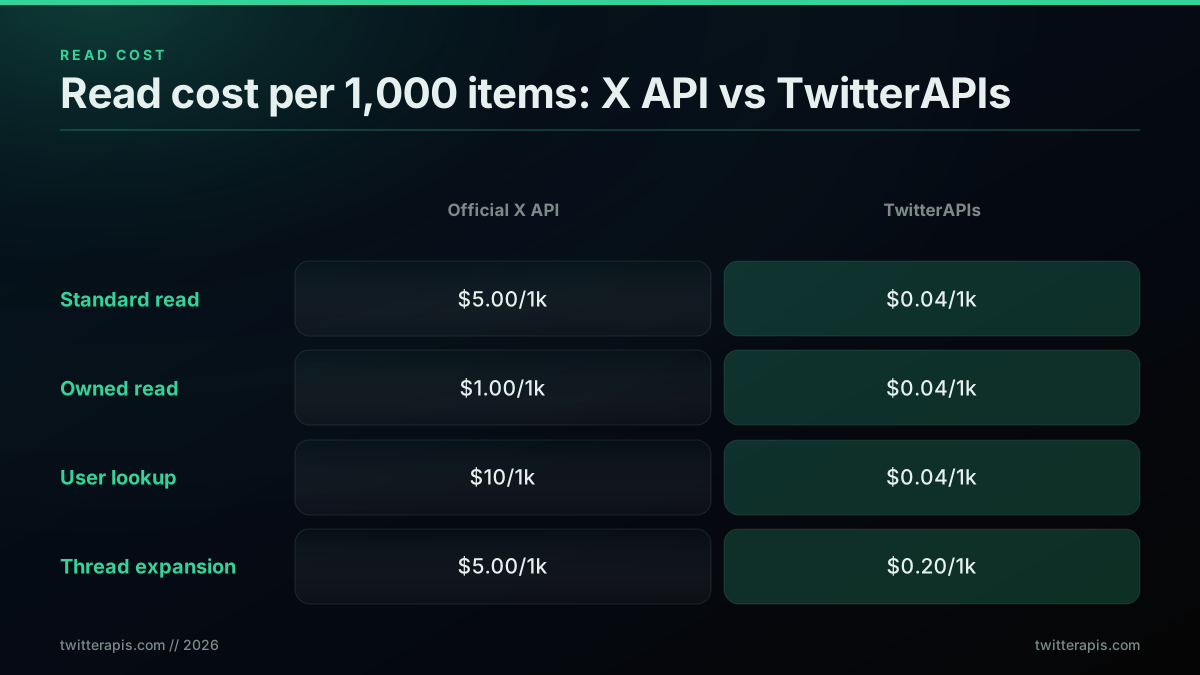
TwitterAPIs prices per endpoint rather than as a flat line, which matters once your workload is not pure search. The catalog is 123 data endpoints, 72 reads and 51 writes. Standard reads and the nine simple write actions, favorite and unfavorite, retweet and unretweet, bookmark and unbookmark, follow and unfollow, plus delete, along with media upload, all bill at $0.0008 per call. Only three read paths carry a premium: direct message reads at $0.0016, full account history pagination at $0.0024, and full thread expansion at $0.004. Tweet creation and DM send are the premium writes at $0.0016. Write actions use a bring-your-own token that you pass per request and that is never stored, and DM send runs on that same model, so account-to-account messaging is covered without the official API.
| Operation | Official X API | TwitterAPIs |
|---|---|---|
| Standard post read | $0.005 | $0.0008 (~20 tweets) |
| Owned-account read | $0.001 | $0.0008 (~20 items) |
| User profile lookup | $0.010 | $0.0008 |
| Plain post create | $0.015 | $0.0016 |
| Post create with URL | $0.200 | $0.0016 |
| Thread expansion | $0.005 per read | $0.004 |
| Direct message read | $0.010 | $0.0016 |
The lesson is to model your operation mix, not a single rate. A monitoring pipeline that is 95 percent reads prices very differently from an automation tool that publishes hundreds of posts a day, and both price differently from a tool that expands long threads. If you know your endpoint distribution, you can predict the bill to within a few percent. If you assume one blended rate, you will be wrong by a multiple. For the endpoint-level detail on how many items each call returns, which directly changes your effective rate, the Twitter API rate limit guide and the advanced search operators reference both matter more than they look.
The read and write split also shapes which provider is right for you in ways the headline rate hides. A product whose core loop is reading data it does not own, most analytics and monitoring tools, is punished hardest by the official API's $0.005 standard read and rewarded most by a flat sub-cent read. A product whose core loop is publishing, a scheduling tool or an autoresponder, is instead exposed to the write tiers, where the official API's plain-post rate is survivable but the URL-post rate is not. And a product that expands long conversations, a thread reader or an archival tool, lives on the premium thread tier, which is the one place a flat provider still charges a visible multiple of its base rate. Knowing which of those three shapes your product is tells you where to look on every rate card before you compare a single number, and it is the difference between an estimate that survives contact with your first invoice and one that does not.
Cost driver two: per-call versus per-result billing, the density trap
The billing unit changes your effective cost more than the sticker rate does. A flat per-call provider bills the same for a call that returns 1 tweet or 20, so its effective cost per tweet falls as density rises. A per-result marketplace bills for every item it delivers, so density does not help you at all. This is the density trap: a scraper listed at $0.25 per 1,000 tweets and a flat provider listed at $0.0008 per call look close on paper, but the flat provider's effective rate improves with every additional tweet a call returns, while the marketplace's does not.
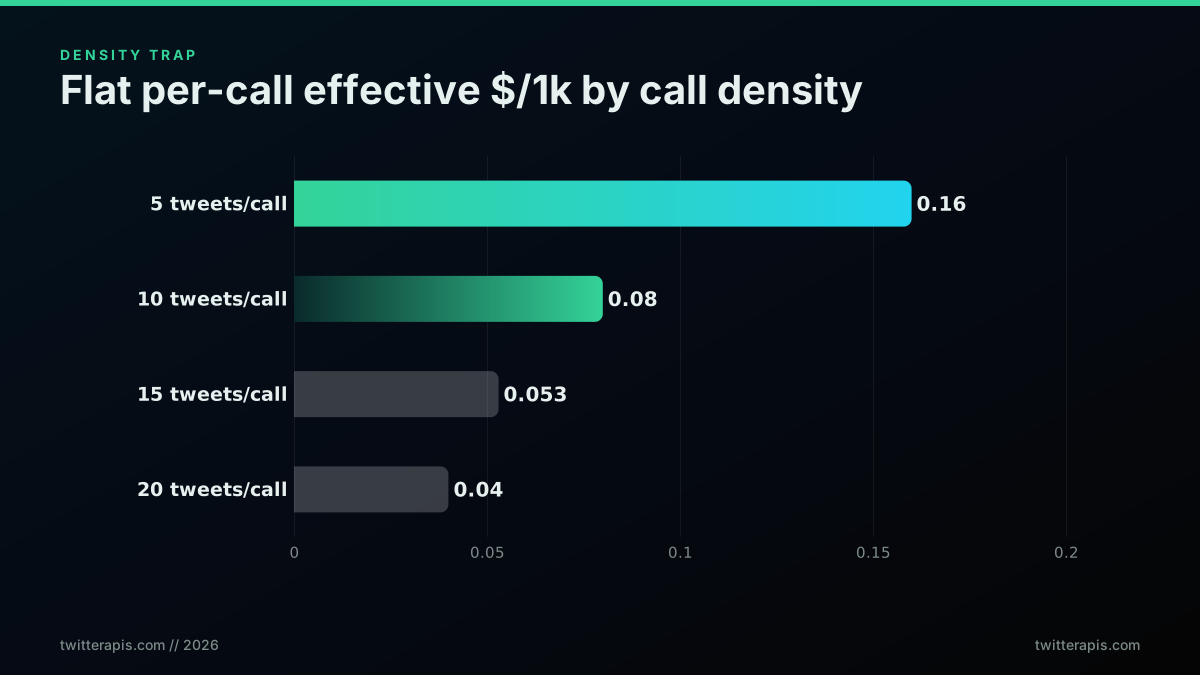
Work the arithmetic. TwitterAPIs bills $0.0008 per call and a search call returns roughly 20 tweets. That is $0.00004 per tweet, or $0.04 per 1,000. If a call returned only 10 tweets, the effective rate would double to $0.08 per 1,000, and at 5 tweets it would be $0.16. Density is doing real work in that number. On a per-result marketplace, by contrast, the rate is fixed to what is delivered: if you request 1,000 tweets you pay for 1,000 tweets, and there is no density dividend because the unit is the tweet, not the call. This is why flat per-call pricing tends to win at scale even against marketplaces that look cheaper per 1,000 on the rate card.
The trap has a second edge for anyone doing narrow queries. If your searches are specific and return only a handful of matches per call, a flat per-call provider's effective rate rises, because you are paying a full call for a thin result. In that regime a per-result marketplace can be competitive, since you only pay for the few items you actually get. The practical rule: broad, high-yield queries favor flat per-call pricing, and narrow, low-yield queries narrow the gap. Most real monitoring and enrichment workloads are broad enough that flat pricing wins, but it is worth knowing which regime you are in before you commit. The best Twitter API for scraping comparison walks the density math across several providers.
There is a way to tilt the density math in your favor regardless of provider: request the largest page your endpoint allows and paginate deliberately rather than firing many small calls. On a flat per-call provider, a call that returns 20 tweets costs the same as one that returns 2, so every additional item on the page is free margin against the fixed call cost. Teams that leave pagination at a small default are quietly doubling or tripling their effective per-tweet rate for no reason. The fix is a one-line change to your request parameters, and it compounds across every job you run. When you are pricing a workload, always compute the effective rate at the real page size your integration uses, not the theoretical maximum the provider advertises, because the gap between the two is pure waste that never shows up on the rate card.
Cost driver three: minimum charges and empty-result billing
Empty results are not free, and this quietly wrecks low-yield workloads. On the official X API a search that returns zero tweets still consumes a post-read credit, because the meter bills the request, not the payload. Credit-based providers apply per-call minimums: twitterapi.io charges 15 credits for an individual lookup even when nothing comes back, and 150 credits for a list endpoint. TwitterAPIs charges its flat $0.0008 per call regardless of result count. If your job polls niche queries that frequently return nothing, empty-result billing can be the majority of your spend.
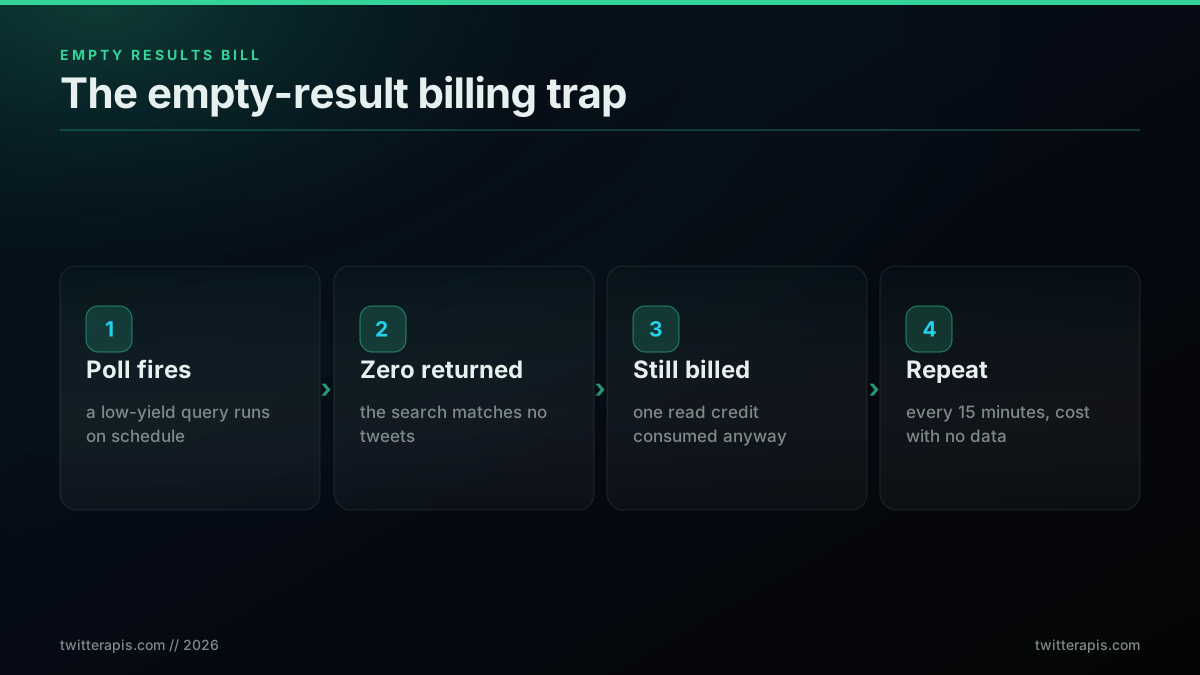
This driver hits a specific shape of workload hardest: scheduled polling of low-volume queries. Picture a brand monitor tracking 200 small accounts for new mentions, checking every 15 minutes. Most of those checks find nothing, because small accounts do not post every quarter hour. On a provider that bills empty results, you are paying full freight for thousands of no-op calls a day. The fix is architectural, not commercial. Batch your low-yield queries into fewer, wider calls. Lengthen the poll interval on quiet accounts. Use a cheaper streaming or webhook path where one exists. The rate card cannot save you here; only the schedule can.
There is a subtle interaction with the density trap from the previous section. A flat per-call provider that bills empty results at the same $0.0008 is still cheap in absolute terms, because the floor is so low, but its effective cost per delivered tweet on a low-yield job climbs sharply. A credit provider with a 15-credit minimum has a higher floor per empty call. And the official X API, with a $0.005 floor per empty standard read, is the most punishing of the three for low-yield polling. If your workload is inherently sparse, brand monitoring on niche terms, competitor tracking on small accounts, the provider floor matters as much as the headline rate, and a flat sub-cent floor is worth a great deal.
The defense against empty-result billing is to make your polls smarter, not just cheaper per call. Instead of blindly re-running a query on a fixed interval, track when each query last returned something and back off the ones that keep coming up empty, checking a quiet account once a day rather than once a quarter hour. Where the platform supports it, a since-id or cursor lets you ask only for what is new since your last successful pull, so a query that finds nothing costs one thin call rather than a full re-scan. And consolidating several narrow monitors into one broader query, then filtering the results locally, turns dozens of low-yield calls into a handful of high-yield ones. None of this changes the rate card, but it can cut the empty-result share of your bill from the majority of your spend to a rounding error, which is the whole point of treating waste as an engineering problem rather than a pricing one.
Start building with TwitterAPIs
$0.0008 a call, about $0.04 per 1,000 tweets at 20 tweets a page. $0.50 free credits. No credit card required.
Cost driver four: the three-million-read ceiling and the enterprise cliff
The official X API pay-per-use tier ends abruptly at three million post reads per monthly billing cycle. There is no gradual upgrade path above it. Once you hit the ceiling you cannot buy more credits at the pay-per-use rate; you must contract Enterprise access, and X publishes no price for it, so crossing the cap opens a sales conversation rather than a rate card. That means the practical cost curve on the official API is not a smooth line but a cliff: you climb from a few thousand dollars of pay-per-use spend straight to an unquoted enterprise contract with nothing in between. Third-party providers have no equivalent ceiling.
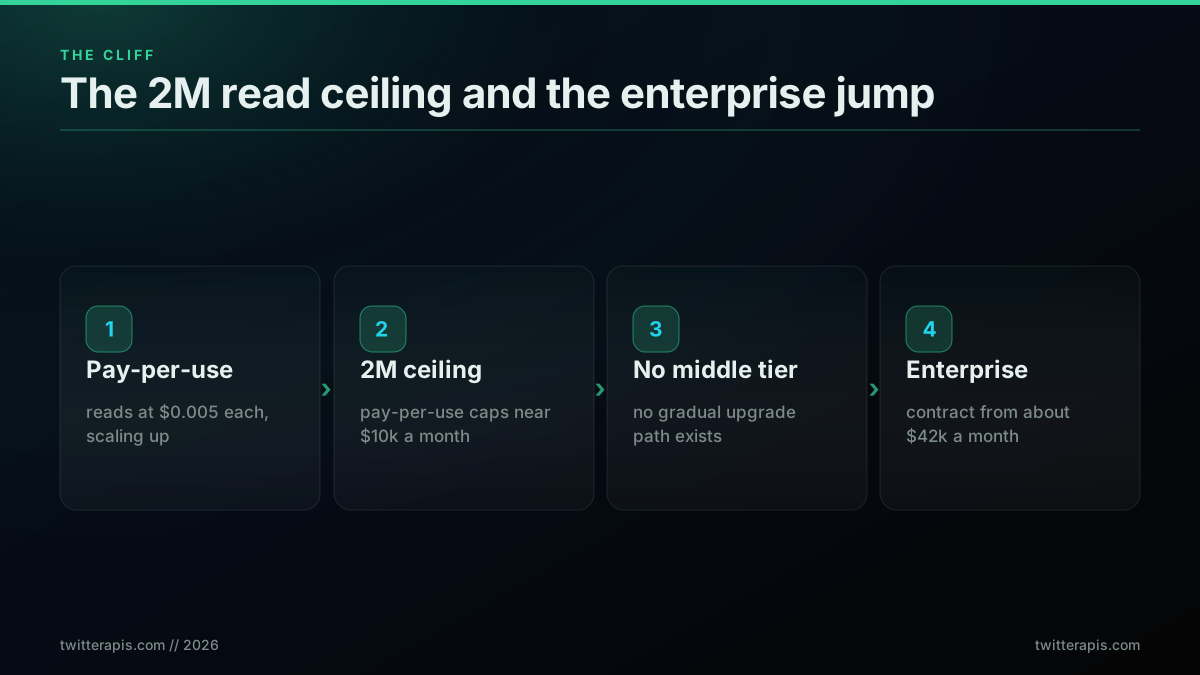
The cliff is dangerous precisely because it is invisible until you hit it. A pipeline growing steadily at, say, 2.8 million reads a month feels fine on pay-per-use. Then a breaking-news event or a viral moment pushes the workload over three million mid-cycle, and the pay-per-use tap shuts off. You cannot simply pay more to keep going; you either wait for the next billing cycle or enter an enterprise procurement cycle that takes weeks of sales calls and a multi-month commitment. For any workload with spiky demand, news aggregation, event monitoring, financial sentiment, the ceiling is a real operational risk, not just a pricing footnote.
This is where the total-cost lens changes the decision. On paper, a workload at 1.5 million reads a month looks affordable on the official API. In practice, you are one viral spike away from a hard stop, and the only insurance is an enterprise contract that costs an order of magnitude more than your steady-state usage. A flat per-call provider with no monthly read ceiling removes that tail risk entirely: the bill scales linearly through three million, ten million, and beyond, with no cliff and no renegotiation. When you are budgeting a growing product, the absence of a ceiling is worth pricing in even if you never expect to reach three million reads, because the whole point of a spike is that you did not expect it.
The cliff also has a hidden cost beyond the price jump: the time and organizational friction of crossing it. An enterprise contract is not a checkout button, it is a procurement process, with sales calls, a data-handling review, a legal pass over the agreement, and usually a minimum commitment measured in months. For a small team, that process alone can consume weeks of founder or engineering attention at exactly the moment a traffic spike means you have the least of it to spare. The financial cliff is visible on the rate card; the operational cliff is not, and it is often the one that actually hurts. A provider whose cost curve has no discontinuity lets you scale on engineering time alone, which is why the absence of a ceiling reads as a feature to anyone who has been through an emergency enterprise negotiation once.
Cost driver five: proxy and infrastructure add-ons
Scraper marketplaces advertise a per-result rate, but the rate is frequently not the whole bill. Apify actors run on Apify's platform, which meters compute, and several Twitter actors add residential-proxy costs billed per gigabyte on top of the per-result price. Bright Data's model is pay-per-successful-record, which is cleaner, but its lowest promotional rate of $0.75 per 1,000 records applies only for the first three months before reverting to $1.50, and its prebuilt datasets start at $2.50 per 1,000. The sticker rate on a marketplace is the floor, not the ceiling, and the add-ons are where the real number hides.
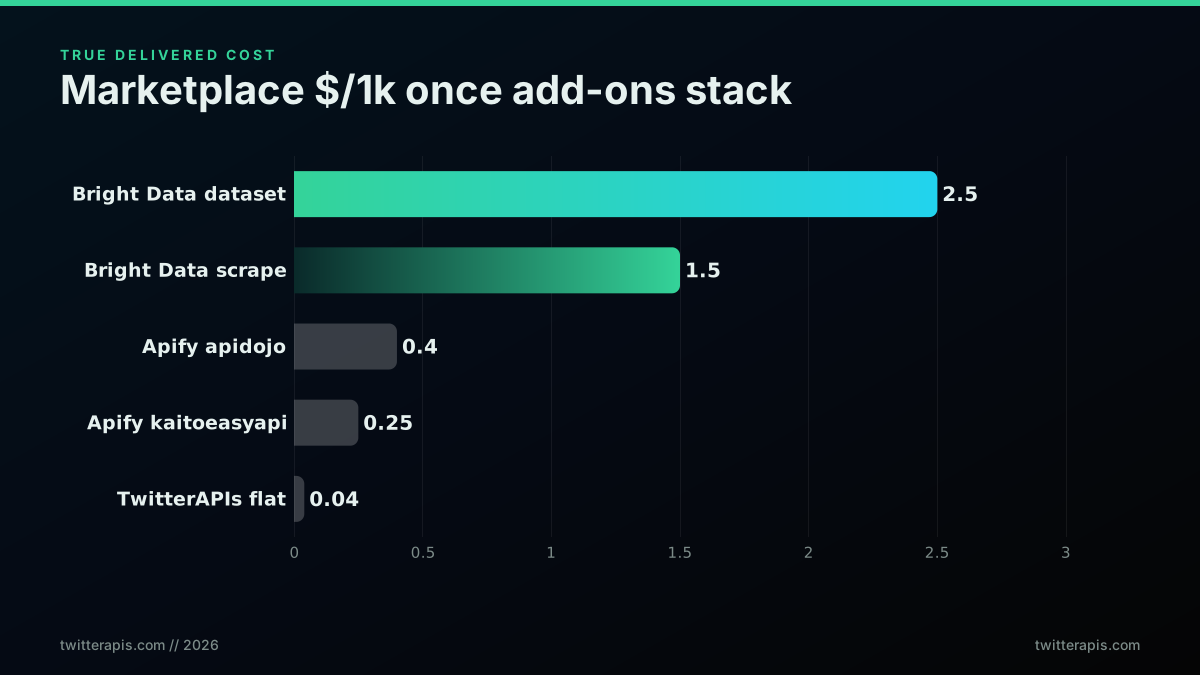
The mechanics differ by provider, so read the fine print rather than the headline. On Apify, the apidojo Tweet Scraper V2 lists at $0.40 per 1,000 tweets, the kaitoeasyapi scraper at $0.25, and the newer xquik X Tweet Scraper at $0.15 per delivered row. Those are pay-per-result and generally do not stack a separate proxy fee, but they run inside Apify's platform, which offers $5 a month of free credits and then meters usage. Bright Data's Twitter scraper now includes 5,000 records a month free, then bills per successful record, with the details laid out in the Bright Data scraper documentation. The common thread is that the delivered cost is the advertised rate plus whatever platform, proxy, or compute the actor consumes.
For a total-cost estimate, treat any marketplace rate as a starting point and add a realistic platform overhead, then compare against a flat per-call provider that bundles infrastructure into a single number. A flat provider like TwitterAPIs has no separate proxy line, no per-gigabyte add-on, and no compute meter: the $0.0008 per call is the whole cost. That simplicity is itself a feature when you are forecasting a budget, because a single per-call number is trivially predictable, while a per-result rate plus proxy plus compute is three moving parts you have to model. The Apify Twitter scraper versus TwitterAPIs head-to-head and the best residential proxies for Twitter scraping guide both break down where the proxy costs actually land.
Self-hosted scraping deserves a mention here because it is the option teams reach for when the marketplace rates look high, and it is almost always a false economy once you count the add-ons properly. Running your own scraper means renting a residential-proxy pool, because datacenter IPs are blocked quickly, and residential bandwidth is billed per gigabyte at rates that add up fast on tweet payloads. It means maintaining the scraping logic against a target that changes its markup and its anti-bot defenses without notice, which is a standing engineering commitment, not a one-time build. And it means absorbing the failure rate yourself: blocked requests, retries, and partial results that a managed provider simply does not bill you for. Once you total the proxy bandwidth, the maintenance hours, and the failure overhead, the do-it-yourself path frequently costs more per delivered tweet than a managed flat-rate API, with far more operational risk. The add-on trap is not unique to marketplaces; it is the whole reason a bundled per-call rate is worth paying for.
Cost driver six: engineering time, the invisible line item
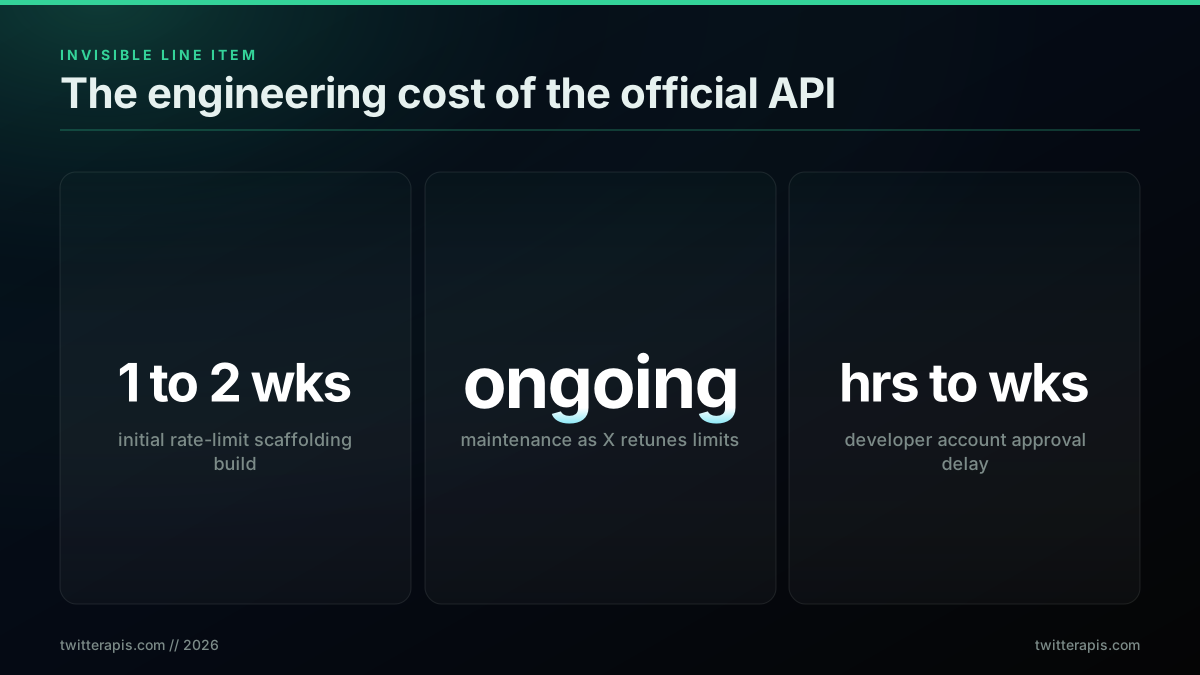
The most underpriced cost of the official X API is not on the invoice, it is on your payroll. Building a production pipeline against the official API means writing retry logic with exponential backoff, per-endpoint request queueing, header parsing for rate-limit resets, and graceful handling of 429 responses across job restarts. Engineers typically spend one to two weeks building that scaffolding the first time, then keep maintaining it as X adjusts the limits. At a loaded engineering cost, that first build alone can dwarf several months of API fees, and the maintenance never fully stops.
Rate-limit engineering is the tax that never appears on a rate card. The official X API enforces per-endpoint limits that vary by access level and operation, so a real pipeline needs a token-bucket or leaky-bucket layer, backoff that respects the reset header, and idempotent job restarts so a mid-run 429 does not corrupt your data or double-bill you. This is genuine distributed-systems work, and it is fragile, because the limits are a moving target. Every time X retunes a limit, someone on your team spends a day chasing the new behavior. A provider with one flat rate ceiling and no per-endpoint windows turns that whole subsystem into a simple call loop, which is often the single biggest total-cost difference between the official API and a flat reseller.
There is a second engineering cost that hits before you write any pipeline code: the developer-account approval queue. The official X API requires an application, approval times range from hours to weeks, and X rejects applications it deems competitive, including social-media management tools and alternative clients. Even approved accounts often start with limited access that broadens only after manual review. That is dead time on your roadmap, and dead time is a cost. Third-party providers skip it entirely: you sign up with a Google account and get a key in seconds. When you are pricing total cost of ownership, count the weeks, not just the dollars. The how to get a Twitter API key walkthrough and the Python Twitter API tutorial both show how much of that scaffolding you can avoid.
The way to put a real number on engineering time is to price it the same way you price the API: rate times quantity. Take your team's loaded hourly cost, multiply by the hours the official-API scaffolding will consume in its first build, then add a monthly maintenance allowance for the inevitable limit changes. For a mid-level engineer, a two-week rate-limit build is easily several thousand dollars of loaded cost, and the maintenance tail adds a day or two most months. Set that total next to the actual API fees and the comparison often flips: a team that saved a few hundred dollars a month by choosing the cheapest-looking option spent far more than that difference building the retry infrastructure the cheap option required. The provider that lets you delete an entire subsystem is not just simpler, it is measurably cheaper once the payroll line is on the same spreadsheet as the API line.
Cost driver seven: the URL-post surcharge and other line-item landmines
Some of the biggest surprises on a Twitter API bill come from single line items that look trivial until you multiply them by volume. The headline landmine is the official X API's $0.200 charge for any post that contains a URL, against $0.015 for a plain post, a 1,233 percent premium. There is no stated rationale on the price list. The practical effect is that any product doing automated link posting, newsletter promotion, scheduled shares, branded short links, pays dramatically more than a text-only poster for the same number of posts. Audit this one endpoint before it becomes your largest line.
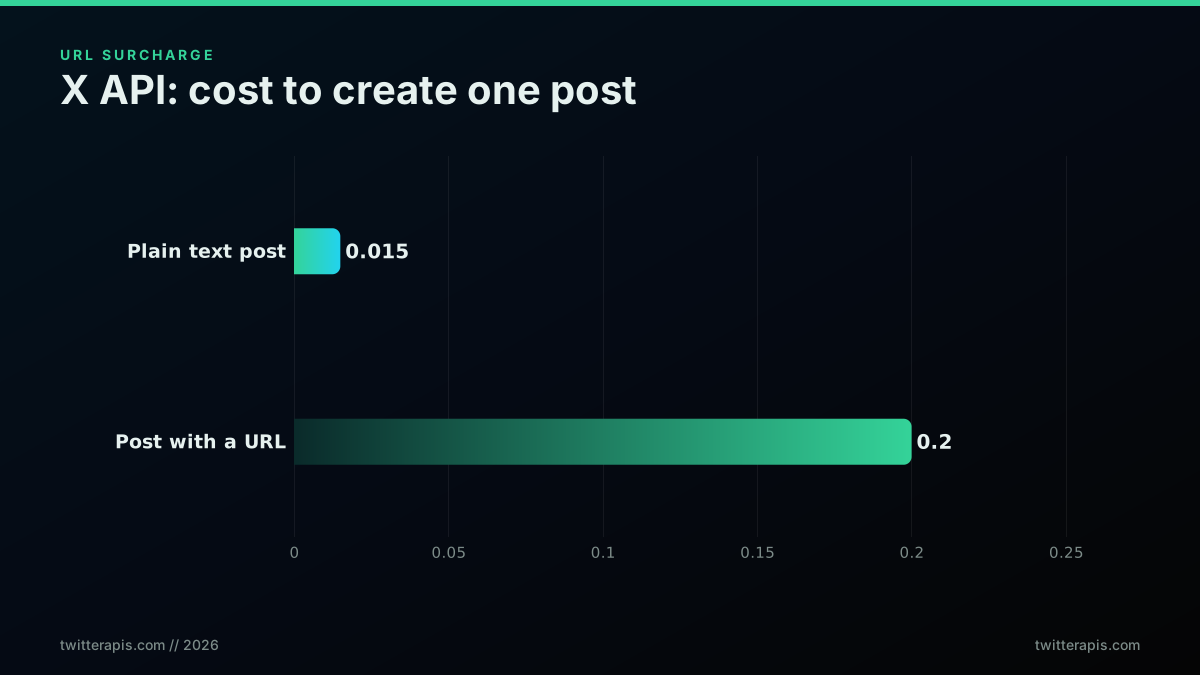
Run the numbers on a realistic posting bot. One hundred link posts a day is $20 a day on the official API, roughly $600 a month, purely because each post carries a URL. The identical volume of plain-text posts is an estimated $1.50 a day, roughly $45 a month. That is a 13x swing driven by a single field in the payload. If your product's job is to distribute links, and many automation products exist precisely to do that, the URL surcharge is not a footnote, it is the dominant term in your write budget. On TwitterAPIs, tweet creation is a flat $0.0016 whether or not the post carries a link, so the surcharge simply does not exist, which is a material difference for any link-posting workload.
The URL charge is the loudest landmine but not the only one. Owned-account reads at $0.001 are cheap, but user-profile lookups at $0.010 are ten times a standard read, so an enrichment job that resolves thousands of profiles can cost more than the tweet reads it enriches. Direct-message reads bill at the higher $0.010 tier on the official API. Deletions and unfollows are billed operations, not free cleanup. The pattern is consistent: the operations you think of as incidental are often the expensive ones, and a bill built on "reads are cheap" assumptions can be blindsided by the writes and lookups around them. The safest habit is to price every distinct operation your product performs, not just the one you think of as the main workload.
The landmine pattern is worth stating as a general principle because it repeats across every provider, not just the official API. Any pricing model has a headline operation that everyone quotes and a set of adjacent operations that are quietly more expensive, and cost surprises almost always come from the adjacent ones. On the official API it is the URL post and the profile lookup; on a credit provider it is the list-endpoint minimum; on a marketplace it is the proxy add-on. The discipline that protects you is the same everywhere: enumerate every distinct call your product makes in a normal day, look up the exact rate for each one, and multiply. It takes twenty minutes and it turns the single most common cause of a blown API budget, an incidental operation nobody priced, into a line you saw coming. A flat per-call provider is easier to audit this way precisely because there are fewer adjacent tiers to miss, which is a real if unglamorous total-cost advantage.
Build your own estimate: a three-line worksheet
You can forecast a Twitter API bill in under a minute with three lines. Line one, sum your monthly calls by operation type. Line two, multiply each operation count by that operation's unit rate and add them up, giving a raw monthly cost. Line three, multiply the raw cost by a waste factor between 1.1 and 1.6 depending on how much empty-result polling and retry your architecture does. The result is a realistic bill, not a rate-card fantasy. The worked example below shows a mid-sized monitoring workload priced this way on both the official X API and TwitterAPIs.
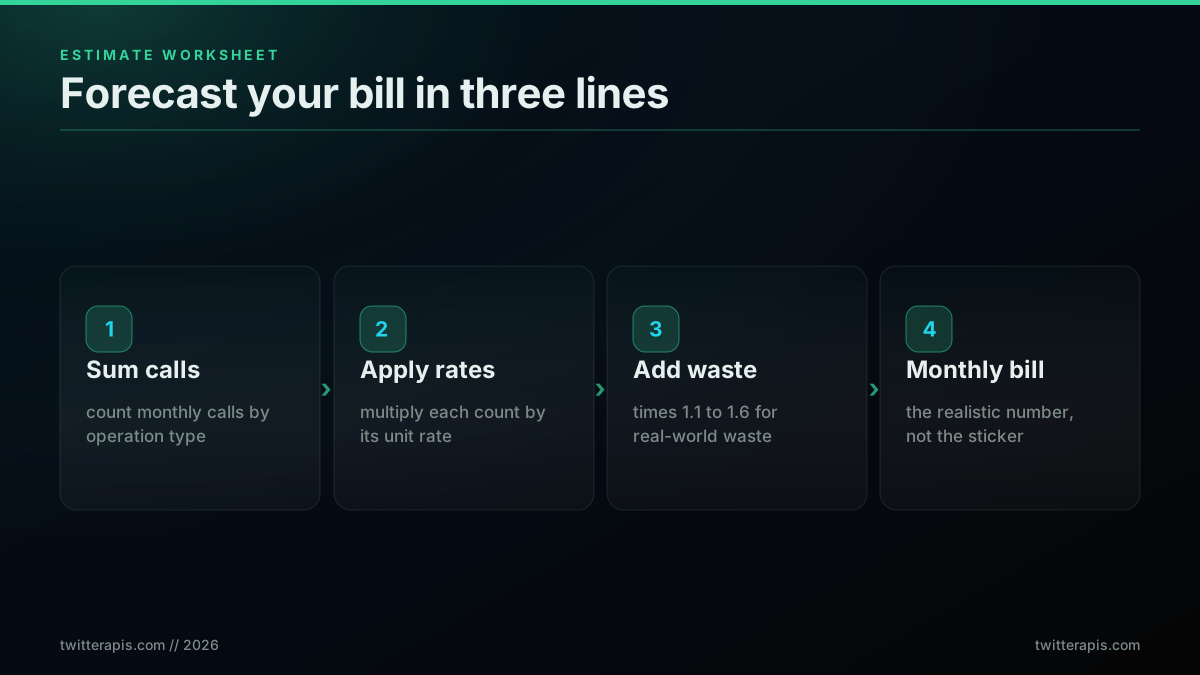
Take a concrete workload: 300,000 post reads, 20,000 user lookups, and 3,000 plain post creates per month, a typical mid-stage monitoring and enrichment tool. On the official X API the raw cost is 300,000 times $0.005 plus 20,000 times $0.010 plus 3,000 times $0.015, which is $1,500 plus $200 plus $45, or $1,745 before waste. On TwitterAPIs the reads collapse into calls, since each call returns about 20 tweets: 15,000 read calls times $0.0008 plus 20,000 lookups times $0.0008 plus 3,000 creates times $0.0016, which is $12 plus $16 plus $4.80, or $32.80 before waste. Apply a 1.2 waste factor to both and you get an estimated $2,094 on the official API against about $39 on TwitterAPIs.
The worksheet makes the density and unit-rate effects concrete. Notice that on the official API the reads are billed per resource, so 300,000 tweets is 300,000 charges. On a flat per-call provider those same 300,000 tweets arrive in roughly 15,000 calls, so you are billed 15,000 times, not 300,000. That collapse from resources to calls is most of the gap, and it is why the flat model wins so decisively on read-heavy work. Keep a small spreadsheet with one row per operation type and the two rate columns, and you can re-price any workload change in seconds. When you want the exact figure with DM and thread tiers included, the Twitter API cost calculator does the arithmetic for you, and the per-endpoint rates live on the pricing page.
If you would rather run the worksheet in code than in a spreadsheet, the whole model is a dozen lines. The function below takes your monthly operation counts and returns both bills side by side plus the savings, so you can drop it into a planning script and re-run it whenever your volume assumptions change.
def estimate_bill(post_reads, user_lookups, post_creates, waste=1.2):
    # Official X API: billed per resource
    x_api = post_reads * 0.005 + user_lookups * 0.010 + post_creates * 0.015
    # TwitterAPIs: reads collapse into calls of ~20 items at $0.0008
    read_calls = post_reads / 20
    twitterapis = read_calls * 0.0008 + user_lookups * 0.0008 + post_creates * 0.0016
    return {
        "x_api_usd": round(x_api * waste, 2),
        "twitterapis_usd": round(twitterapis * waste, 2),
        "savings_pct": round((1 - twitterapis / x_api) * 100, 1),
    }

# Mid-stage monitoring workload
print(estimate_bill(post_reads=300_000, user_lookups=20_000, post_creates=3_000))
# -> {'x_api_usd': 2094.0, 'twitterapis_usd': 39.36, 'savings_pct': 98.1}
Draining the waste multiplier: caching, deduplication, and batching
The waste multiplier is the only one of the three cost variables you improve purely through engineering, and on most real pipelines it is worth a 20 to 40 percent reduction in the bill. Waste is every credit you spend that does not return data you keep: an empty-result poll, a duplicate fetch of a resource that has not changed, a retry after a rate-limit rejection, or a call that returns 20 tweets when your job only needed one. Three techniques drain most of it, caching, deduplication, and batching, and none of them touch the unit rate or the provider you chose.
Caching is the highest-leverage move because so much Twitter data is stable within a day. A user's follower count, bio, and recent tweets do not change every minute, so a dashboard that re-fetches the same 500 profiles every 30 minutes is paying for the same data 48 times a day. A local cache keyed on the resource id with a time-to-live of a few hours collapses that to a handful of fetches. On any provider that bills per call, that is a direct multiplier on the volume term, and it is often the single largest saving available. The pattern below shows the shape: check the cache first, fetch only on a miss, and store the result with a timestamp.
import time

_cache = {}
CACHE_TTL = 3 * 3600  # 3 hours

def cached_fetch(resource_id, fetch_fn):
    now = time.time()
    hit = _cache.get(resource_id)
    if hit and now - hit["at"] < CACHE_TTL:
        return hit["data"], "cache"
    data = fetch_fn(resource_id)  # only this path spends a credit
    _cache[resource_id] = {"data": data, "at": now}
    return data, "api"
Deduplication is the sibling of caching for jobs that process overlapping result sets. Two keyword searches for related terms will return many of the same tweets, and if your pipeline processes each result independently you may enrich the same author or expand the same thread multiple times inside one run. A seen-set keyed on tweet id or author id, checked before any secondary call, removes that duplicate spend. Batching is the third lever: where an endpoint accepts multiple ids in one call, group your lookups so you pay one call for twenty resources instead of twenty calls for one each. Together these three habits move the waste multiplier from the high end of the 1.1 to 1.6 range toward the low end, and on a large pipeline that swing alone can be the difference between one budget tier and the next. The TwitterAPIs best practices guide collects the full set of patterns.
The cheapest pay-as-you-go Twitter API. Try it free.
$0.0008 a call, about $0.04 per 1,000 tweets at 20 tweets a page. $0.50 free credits. No credit card required.
Three real monthly bills, reverse-engineered
Rate cards are abstract; bills are concrete. Here are three anonymized monthly workloads, reverse-engineered operation by operation, so you can see where the money actually goes. Each is a real shape of product, a sentiment dashboard, an influencer discovery tool, and a news aggregator, priced on the official X API and on TwitterAPIs at the volumes those products genuinely run. The gap between the two columns is not a marketing figure, it is arithmetic applied to a real operation mix, and it ranges from a few hundred dollars a month to the difference between a viable product and an impossible one.
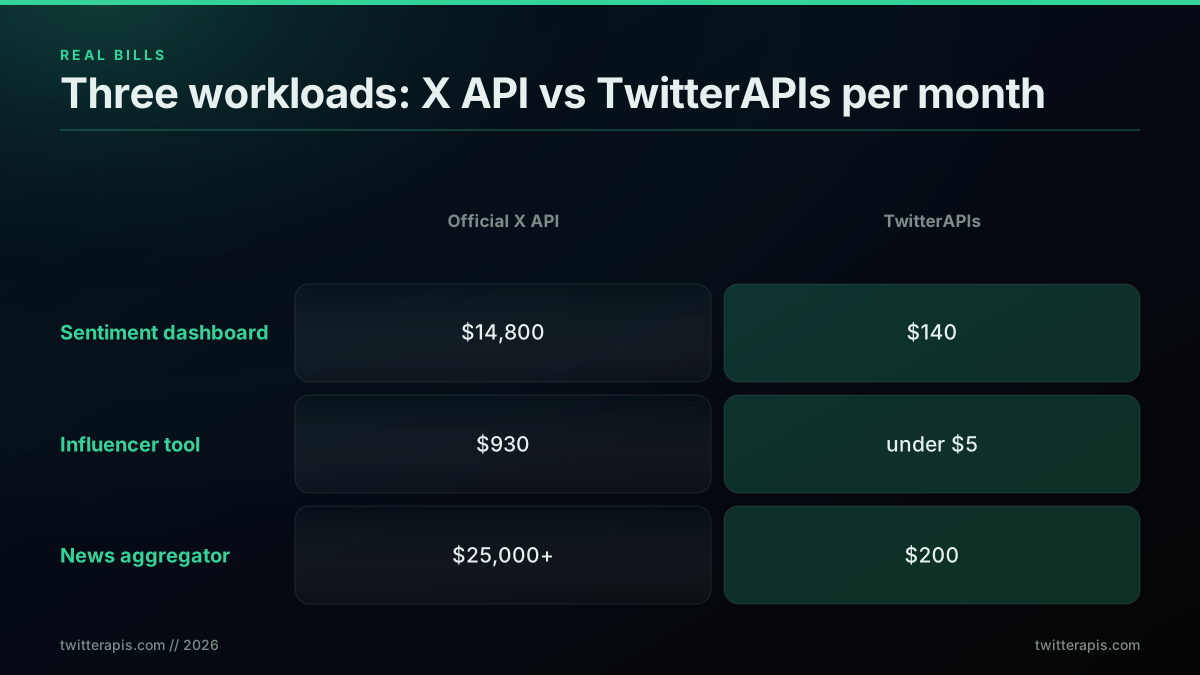
Bill one, a brand sentiment dashboard. The product polls 20 tracked keywords every 30 minutes and pulls roughly 100 tweets per keyword poll, which is about 96,000 tweet reads per day, or 2.9 million per month, plus 30,000 monthly user lookups to enrich unique authors. On the official X API that workload stays just under the three-million-read ceiling, so it is payable at pay-per-use rates, an estimated $14,800 a month. On TwitterAPIs the 2.9 million reads arrive in about 145,000 calls at $0.0008, roughly $116, plus $24 of lookups, for about $140 a month. A $99-per-month monitoring product cannot exist on the official API at this volume, because the data alone exceeds the subscription price per customer.
Bill two, an influencer discovery tool. Two hundred active users a day each run about 20 keyword searches, 50 profile lookups, 100 follower-sample reads, and 200 recent-tweet reads, which sums to roughly 6,000 searches, 50,000 lookups, 20,000 follower reads, and 40,000 tweet reads a month. On the official X API that is about $30 of search plus $500 of profile lookups plus $200 of follower reads plus $200 of tweet reads, roughly $930 a month, dominated by the $0.010 profile-lookup tier. On TwitterAPIs the same mix collapses to a few dollars per category because lookups and reads share the $0.0008 floor and reads batch into calls, landing under $5 a month. For an early-stage tool with thin margins, that is the difference between profit and loss on every user.
Bill three, a news aggregator. The app pulls breaking-news tweets across 50 topic categories every minute, then caches and dedupes aggressively so realistic monthly reads after deduplication are 5 to 8 million rather than the naive 100-million-plus. At 5 million reads the official X API is firmly in Enterprise territory, comfortably past an estimated $25,000 a month of equivalent usage. On TwitterAPIs 5 million reads is roughly 250,000 calls at $0.0008, about $200 a month. For a free or freemium news product, the official API is mathematically incompatible with the business model, while the flat per-call rate keeps the data cost below the noise floor of the rest of the stack. The Twitter sentiment analysis in Python walkthrough shows what one of these pipelines looks like end to end.
When the official X API is genuinely the cheaper choice
The honest answer is that the official X API is not always the expensive option. For reads of your own account, X now bills $0.001 per resource, and for a handful of use cases the official API is either cheaper or simply the only option. If your workload is dominated by owned-account data, your own tweets, your own followers, your own direct messages, the $0.001 owned-read rate is competitive, and for capabilities like consent-bound OAuth, filtered streams, and signed compliance contracts, no reseller can substitute at any price. The break-even is narrow, but it is real, and pretending otherwise would be dishonest.
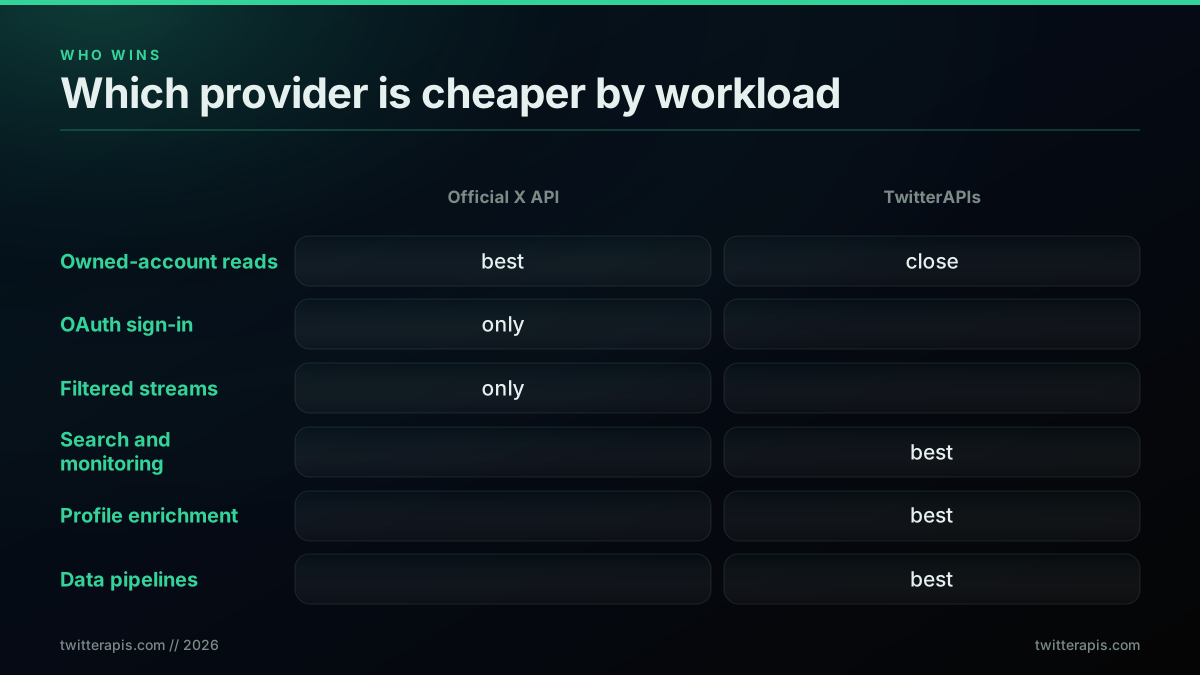
Choose the official X API when at least one of these is true. You sign users in with their own X accounts and act on their behalf, which requires the consent-bound OAuth flow that a third-party API cannot legally replicate. Your workload is heavily owned-account reads where the $0.001 rate applies, though note that even here TwitterAPIs is fractionally cheaper per call and returns about 20 items per call rather than one. You have a compliance obligation that data be sourced under a signed enterprise agreement. Your product depends on filtered streams or firehose-equivalent real-time access, which resellers serving REST endpoints do not offer. Or you spend heavily on xAI inference and the tiered credit kickback, 10 to 20 percent of monthly X API spend, meaningfully offsets your bill.
For everything else, and everything else is most of the market, a flat per-call third-party API wins on total cost by a factor of 5 to 125. Research, analytics, monitoring, dashboards, content applications, sentiment systems, competitive intelligence, and training-data pipelines all read data the team does not own, which is exactly where the official API is most expensive and where a flat reseller is most efficient. The decision is not ideological, it is a match between workload shape and pricing model: owned and consent-bound work leans official, everything third-party leans reseller. Map your operation mix against the matrix above and the answer is usually unambiguous. If you are unsure which side of the line you fall on, the Twitter API v2 versus TwitterAPIs comparison lays out the capability differences that decide it.
The owned-account case is worth showing in code, because it is the one place the official API is genuinely competitive and the boundary is easy to cross by accident. Reads of your own tweets and your own followers bill at $0.001, but the moment your job resolves a profile you do not own or searches a term across the network, you are back on the $0.005 standard tier. The example below keeps strictly to owned reads on the official client, and the comment marks exactly where a call would tip into the expensive tier.
import os
import tweepy

client = tweepy.Client(bearer_token=os.environ["X_BEARER_TOKEN"])

# Owned reads: $0.001 per resource on the official X API
my_tweets = client.get_users_tweets(id="YOUR_USER_ID", max_results=100)
my_followers = client.get_users_followers(id="YOUR_USER_ID", max_results=1000)

# Reading OTHER users' data leaves the $0.001 owned tier and bills at $0.005;
# for non-owned reads a flat per-call provider at $0.0008 (~20 items) wins.
Keep the owned-account boundary explicit in your code and you can run a hybrid stack that uses the official API for the narrow set of workloads where it is cheapest and a flat provider for everything else, which is often the true cost-optimal architecture rather than an all-or-nothing choice.
Migration cost: what switching actually takes
Switching off the official X API is cheaper than most teams fear, because the code surface is small and well-defined. The bulk of a migration is three mechanical changes: point the base host at the new provider, swap the authorization header to a Bearer key, and remap a handful of endpoint paths. The one genuine work item is the response shape, which is denormalized, author inline and all fields returned by default, rather than the normalized v2 envelope, so your parser needs a one-time adjustment. If Twitter access already runs through a single client module in your codebase, this is often a one-file change plus a few hours of parser work, not a rewrite.
Here is the same search request on both APIs, showing the host and auth swap that covers most of the migration surface.
# Official X API: $0.005 per tweet read, requires explicit field expansion
curl "https://api.x.com/2/tweets/search/recent?query=AI+lang:en&max_results=10&tweet.fields=created_at,public_metrics&expansions=author_id" \
  -H "Authorization: Bearer $X_BEARER_TOKEN"

# TwitterAPIs: $0.0008 per call, ~20 tweets, all fields returned by default
curl "https://api.twitterapis.com/twitter/tweet/advanced_search?query=AI+lang:en&product=Latest" \
  -H "Authorization: Bearer $TWITTERAPIS_KEY"
A short cost-tracking client makes the savings visible while you cut over, so you can watch the per-call cost fall in real time rather than waiting for the next invoice.
import os
import requests

API_KEY = os.environ["TWITTERAPIS_KEY"]
COST_PER_CALL = 0.0008  # flat per-call rate, ~20 tweets returned

def search_with_cost(query, max_pages=10):
    headers = {"Authorization": f"Bearer {API_KEY}"}
    total_tweets, total_cost, cursor = 0, 0.0, None
    for page in range(max_pages):
        params = {"query": query, "product": "Latest"}
        if cursor:
            params["cursor"] = cursor
        r = requests.get(
            "https://api.twitterapis.com/twitter/tweet/advanced_search",
            params=params, headers=headers, timeout=15,
        )
        r.raise_for_status()
        data = r.json()
        tweets = data.get("tweets", [])
        total_tweets += len(tweets)
        total_cost += COST_PER_CALL
        cursor = data.get("next_cursor")
        if not cursor:
            break
    per_tweet = total_cost / total_tweets if total_tweets else 0
    print(f"{total_tweets} tweets across {page + 1} calls, ${total_cost:.4f} total, ${per_tweet:.6f}/tweet")
    return total_tweets, total_cost

search_with_cost("AI min_faves:500 lang:en since:2026-01-01")
The same pattern in JavaScript is even shorter, because modern runtimes ship fetch as a global and every field comes back by default, so there is no expansion parameter to configure.
const API_KEY = process.env.TWITTERAPIS_KEY;
const COST_PER_CALL = 0.0008;

async function searchWithCost(query) {
  const params = new URLSearchParams({ query: query, product: "Latest" });
  const res = await fetch(
    `https://api.twitterapis.com/twitter/tweet/advanced_search?${params}`,
    { headers: { Authorization: `Bearer ${API_KEY}` } },
  );
  const data = await res.json();
  const tweets = data.tweets || [];
  const perTweet = tweets.length ? COST_PER_CALL / tweets.length : 0;
  console.log(`${tweets.length} tweets, $${COST_PER_CALL}/call, $${perTweet.toFixed(6)}/tweet`);
  return tweets;
}

searchWithCost("from:elonmusk min_faves:1000 since:2026-01-01");
The migration cost is genuinely measured in hours, and it pays back inside the first month at almost any non-trivial volume. The Python examples here lean on the standard requests library for raw HTTP, and the owned-account official-API path uses tweepy. In JavaScript the native Fetch API ships as a global in modern Node.js runtimes, so no extra HTTP dependency is required, and response parsing needs nothing beyond the Python JSON module. The one topic worth reading before you cut over is rate limiting, since the retry-and-backoff patterns collected in the Stack Overflow twitter-api tag are exactly the scaffolding a flat provider lets you delete. For the full endpoint mapping, the migrate from twitterapi.io to TwitterAPIs guide and the Node.js Twitter API tutorial cover the details.
Setting an annual budget and cost alerts
A budget is easier to defend when it is expressed per customer rather than in total, because that is the number a pricing decision actually needs. The same logic applies when the alternative is a seat licence rather than an API, which is why we put what you actually pay for Twitter data across Sprout Social and Brandwatch into one per-1,000 unit. Our per-user cost of goods sold model turns the per-call rates on this page into a monthly figure per seat, and shows the gross margin each seat price leaves you.
Once you have picked a provider and drained the obvious waste, the last piece of total cost of ownership is governance: setting a monthly ceiling, projecting it across a year, and alerting before you blow through it. The official X API gives you one built-in guardrail, a spending cap in the Developer Console that blocks requests once the monthly limit is reached, which protects you from runaway bills but also silently halts your product mid-month if you set it too low. A flat per-call provider makes the projection easier because the cost is linear and predictable, but you still want an alert before a traffic spike turns into an invoice surprise.
The right way to budget a growing pipeline is to project forward from your current burn rate rather than backward from last month's bill. Take your average daily spend, multiply by your expected growth rate, and sum across twelve months to get an annual figure that accounts for the fact that a product at 100,000 calls a month today may be at 500,000 by year end. That forward projection is what tells you whether you will hit the official API's three-million-read ceiling before your fiscal year closes, which is exactly the kind of cliff you want to see coming a quarter in advance rather than discovering mid-spike. A short helper that tracks running spend and fires an alert at a threshold is enough to keep the meter honest.
class BudgetMeter:
    def __init__(self, monthly_cap_usd, cost_per_call=0.0008):
        self.cap = monthly_cap_usd
        self.cost = cost_per_call
        self.spent = 0.0

    def record(self, calls=1):
        self.spent += calls * self.cost
        pct = self.spent / self.cap
        if pct >= 0.9:
            print(f"ALERT: ${self.spent:.2f} is {pct:.0%} of the ${self.cap} cap")
        return self.spent

meter = BudgetMeter(monthly_cap_usd=200)
# ... call meter.record() after each API call in your pipeline ...
Budget governance also changes which provider is the safer choice, independent of the headline rate. A workload that is comfortable at an estimated $150 a month today but growing 30 percent a quarter will cross $400 a month within a year, and on the official API a read-heavy version of that workload can brush the three-million-read ceiling and trigger a forced Enterprise conversation long before the dollar figure looks alarming. A flat per-call provider has no monthly read ceiling and no conversion event, so the annual projection is simply the monthly figure times your growth curve, with no discontinuity to plan around. When you are setting a budget you can defend to a finance team, the predictability of a linear cost curve is worth real money on its own, because a number you can forecast is a number you can approve.
What developers are saying about Twitter API cost
The cost gap is not a spreadsheet abstraction; it shapes what developers can ship, and the frustration surfaces publicly every time X reprices. The most-cited complaint before the pay-per-use redesign was the 25x jump from the $200 Basic tier straight to the $5,000 Pro tier with nothing in between, and one widely-shared post asked X directly for a pay-per-use option in the middle. That request became the dominant ask from indie developers and small teams.
https://x.com/jackfriks/status/1927188530146558238
The pricing history traces back to the original moves that ended free read access and introduced paid tiers, announced by the platform's developer account at the time.
https://x.com/XDevelopers/status/1621026986784337922
The tiered-access launch that followed set the Basic, Pro, and Enterprise structure that developers spent the next two years reacting to, and it is the direct ancestor of the pay-per-use model in place today.
https://x.com/XDevelopers/status/1641222782594990080
On the community forums the recurring themes are the disappearance of a usable free tier and sticker shock at the enterprise floor. The $42,000-per-month number from the 2023 tiered plan in particular has become a running reference point whenever anyone weighs whether to build on the official API at all, even though X publishes no Enterprise price today.
I mean, it’s one API, Michael. What could it cost? $42,000?
Source: r/ProgrammerHumor thread
The free-tier frustration is just as common. Developers who expected to prototype against a free read tier find there is no longer one, which pushes most early testing onto third-party providers that hand out trial credits. The full picture of where free access stands lives in the is the Twitter API free guide.
Unable to access X API free tier.
The same debate plays out among web developers weighing whether the official plans make sense for a small product at all, and the running verdict is that they rarely do below enterprise scale.
Twitter API plans are a joke!
For anyone who would rather watch the setup than read a rate card, this walkthrough covers pulling Twitter data without paying the monthly official floor, which is the practical version of the cost decision this guide models.
https://www.youtube.com/watch?v=lEo7IAgj0UY
And this one walks through a keyword scrape end to end, the exact workflow most monitoring and sentiment products are pricing when they run the numbers above.
https://www.youtube.com/watch?v=e4EnyPQ0Aps
Try TwitterAPIs free
TwitterAPIs seeds every new account with $0.50 in free credits at signup, with no credit card required. That covers roughly 625 calls or about 12,500 tweets across any endpoint, enough to test search, user lookups, follower exports, and write operations before you commit any budget. Get your API key and run the three-line worksheet against your own workload.
For an exact figure against your projected volumes, use the Twitter API cost calculator. For a feature-by-feature look at how a flat per-call provider compares to the largest credit-based alternative, see TwitterAPIs vs twitterapi.io, and for the head-to-head against the RapidAPI marketplace listings, the RapidAPI Twitter alternative comparison covers the platform-fee math.
The single takeaway to carry out of this guide is that the sticker rate is only the first of three numbers. Nail the unit rate by choosing the right provider for your workload shape, keep the volume honest with caching and batching, and hold the waste multiplier down with smarter polling, and the bill you actually pay will track the estimate you wrote. Do that and Twitter API cost stops being a surprise on an invoice and becomes a line you can forecast, defend, and scale with confidence.
Pricing verified in mid-2026 against the official X API pricing page, the X pay-per-use pricing pilot announcement, and public listings from twitterapi.io, Apify, and Bright Data. Official X API rates ($0.005 read, $0.001 owned read, $0.010 lookup, $0.015 post, $0.200 URL post) are X's published figures, not TwitterAPIs rates. TwitterAPIs rates ($0.0008 standard, $0.0016 create and DM reads, $0.0024 full history, $0.004 thread, $0.04 per 1,000 tweets, $0.50 free credits) reflect the current per-endpoint model. Third-party prices reflect publicly listed rates and may change.
// sources
Where these numbers come from
Each row is a figure in this post and the artefact it was read from. Prices and limits on this platform move, so check the date on the source before you plan against it.
- X API pay-per-use pricing page
- The official rate card the opening summary is drawn from: $0.005 for a standard post read, $0.001 for an owned-account read, $0.015 for a plain post, and $0.200 for a post carrying a link.
- X Developer Community pay-per-use pricing pilot announcement
- The announcement behind the shift to per-resource pay-per-use billing, which is the model every cost driver in this guide is calculated against.
- twitterapi.io pricing page
- Backs the credit billing model in the normalization section, where reads are metered against a balance at 100,000 credits per dollar rather than charged per resource.
- Bright Data Twitter scraper product page
- Source for the promotional $0.75 per 1,000 records rate that applies only for the first three months before reverting to $1.50, the example the post uses for sticker rates that are the floor and not the ceiling.
- Apify apidojo Tweet Scraper V2 listing
- The listing the $0.40 per 1,000 tweets pay-per-result rate is read from, in the section separating a marketplace headline rate from platform compute and proxy add-ons.
- X Developer Console
- Backs the governance section: the official API spending cap lives in the console and blocks requests once the monthly limit is reached, which is the built-in guardrail the post says can also halt a product mid-month.
Frequently Asked Questions
There is no single number, because your bill is a unit rate multiplied by your call volume plus the waste your architecture leaks. On the official X API the meter reads $0.005 for a standard post read, $0.001 for a read of your own account, $0.010 for anything tied to a user profile, $0.015 to publish a plain post, and $0.200 to publish a post that carries a link. A third-party provider such as TwitterAPIs flattens that to $0.0008 per call returning roughly 20 tweets, which lands at $0.04 per 1,000 tweets. Two teams pulling identical data can still see a 5x gap between them depending on how much of their spend is empty results, duplicate fetches, and failed retries.
For data you do not own, search results, brand mentions, competitor timelines, follower graphs, a third-party API is between 5x and 125x cheaper than the official X API standard read rate. The official API only closes the gap in one case: reads of your own account, which X now bills at $0.001 per resource. Even there, TwitterAPIs is fractionally cheaper at $0.0008 per call, and each call returns about 20 items rather than one. The official API wins on cost only when you also need something a reseller cannot provide, such as consent-bound OAuth or a signed compliance contract.
Three silent multipliers do it. First, empty results still bill: a search that returns zero tweets consumes a read credit on the official API, so low-yield polling burns money for nothing. Second, per-result billing on scraper marketplaces means a query that matches 5,000 tweets costs five times a query that matches 1,000, regardless of how many you actually use. Third, failed and retried requests on the official API can each carry a charge, so aggressive retry logic against a rate limit quietly inflates the meter. None of these show up on a rate card, which is why the sticker price and the invoice rarely match.
Less than teams expect, because the code surface is small. Most migrations change the base host from api.x.com to a provider host, swap the auth header to a Bearer key, and remap a handful of endpoint paths. The response shape differs, denormalized with the author inline and every field returned by default rather than the normalized v2 envelope, so you adjust your parser once. If your codebase already routes Twitter calls through a single client module, this is often a one-file change plus a few hours of parser work, not a rewrite. The migration cost is real but it is measured in hours, and it pays back inside the first month at almost any volume.
Use three inputs. Take your monthly call volume, multiply by the per-call unit rate of the provider you are pricing, then add a waste multiplier between 1.1 and 1.6 to cover empty results, retries, and duplicate fetches. A pipeline making 200,000 reads per month on TwitterAPIs at $0.0008 per call is 200,000 times $0.0008, which is $160, times a 1.2 waste factor, roughly $192. The same 200,000 reads on the official X API at the $0.005 standard read rate is $1,000 before waste. The unit rate dominates the arithmetic, so pick the provider first and tune the volume second.
Not for reading data. X removed meaningful free read access on February 9, 2023, and the write-only free quota that remained, 1,500 posts per month, is gone too: pay-per-use has no free tier, so every read and every post bills. If you want to prototype against real reads without paying, you rely on trial credits from third-party providers. TwitterAPIs seeds every new account with $0.50 in credits at signup with no card required, enough for roughly 625 calls or about 12,500 tweets, which is plenty to validate an integration before you commit any budget.
The official X API bills $0.200 to create any post that contains a URL, against $0.015 for a plain text post. That is a 1,233 percent premium on a single line item, and the price list does not explain the reasoning. It mostly hits automated posting: a bot sharing 100 links a day runs about $20 a day, roughly $600 a month, while the same volume of text-only posts is about $45 a month. If your product schedules link posts, newsletter promotions, or branded short links at volume, audit that one endpoint before it quietly becomes the largest line on your bill.
Check out similar blogs
More guides on the Twitter/X API, scraping, and pricing.
X Starts Billing API Expansions on Nov 22: What One Request Costs Now
From November 22, X bills every object an API expansion returns. What changes, how the forum answers conflict, and what one request costs before and after.
The X Chat API in v2.169: Group Endpoints and What a DM Really Costs
X shipped a full set of X Chat endpoints in API v2.169: groups, admins, invites and members. What you can build on encrypted chat, and the real cost per DM.
Grok Bot Reads X Without API Credits Now. When You Still Need an X Data API
Grok Bot can now search, read and monitor X without X API credits. What the docs confirm, what they leave out, and five jobs that still need an X data API.
What a Twitter Scraper API Bills Per Job: Profiles, Followers, Replies and Search
A rate card for twitter scraper api jobs by data type. What 10,000 profiles, followers, following, replies and search results each bill, on live rates.

TwitterAPIs Is Live on Uneed: A $0.0008 Twitter API With No Developer Account
TwitterAPIs launched on Uneed today. What the pay-per-call Twitter API costs next to the official X API, how a Uneed launch day actually works, and what founders say one delivers.
Build a Crypto Twitter Tracker in Python: Watch a KOL List and Catch Contract Addresses
A runnable Python watcher that polls a named list of crypto accounts, pulls every new post, finds EVM and Solana addresses, and alerts you, with the monthly bill for 25 and 100 accounts.
Watching 50 X Accounts: What Every Poll Cadence Actually Bills
Every monitoring page sells you an interval and calls it real time. None of them prices it. Here is what a one minute, fifteen minute and daily poll across a fixed fifty account roster costs per month, and the route where the watch itself bills nothing.

Why X Advanced Search Misses Posts You Know Exist (2026)
A query that returns nothing is not proof that nothing exists. We searched for 17 posts confirmed to exist, published between 2015 and 2026, and measured which query forms found them and which did not.