GUIDE
Twitter API Node.js Tutorial 2026: Fetch Tweets in 10 Lines
The 2026 Node.js Twitter API tutorial: fetch tweets in 10 lines with fetch or axios, no SDK and no OAuth dance. Search, profiles, cursor pagination, retries, async, and real per-call costs in working code.
Per our own spec, 70 of 121 endpoints bill $0.0008, 24 are free, and 27 sit between $0.0016 and $0.01. Every price ships inside our published OpenAPI document as an x-cost-usd field, so any figure in this post can be checked against the contract that bills it rather than taken on trust.
Most Node.js Twitter API tutorials you find in 2026 start the same way: open the X developer portal, create a Project, create an App, generate four kinds of tokens, add a payment method, then install a 40-kilobyte SDK before you write a single line of business logic. By the time the boilerplate runs, you have not fetched a single tweet.
This guide does it the other way around. You get a working tweet fetch in ten lines first, then the setup story, then the production patterns. Every snippet runs on Node 18 or later using the global fetch that ships with the runtime, so there is no dependency to install for the read path. Every endpoint is real, every price is current as of June 2026, and the whole tutorial stays read-only: search, profiles, timelines, followers, and replies, the parts a Node service actually reads most.

Josh Pigford
@Shpigford
Pulling a late night to build out a portion of a @maybe marketing tool we’re launching tomorrow. Will probably end up paying someone to hop on a video call to walk my dumb face through stuff it (Node + Twitter API).
That reaction is common. A working founder, comfortable in Node, still finds the Twitter API integration confusing enough to consider hiring help. The friction is not Node. It is the official setup path. Skip it and the integration becomes a single HTTP call.
TL;DR: Node 18 and later ship a global
fetch, so you can call the Twitter API with zero dependencies. On the official X API you still need a developer account, an App, and a Bearer token, plus pay-per-use credits at about $0.005 per read. On a direct pay-per-call API like TwitterAPIs you sign up with email, setTWITTERAPIS_KEY, andGET https://api.twitterapis.com/twitter/tweet/advanced_search?query=YOUR_QUERYwith oneAuthorizationheader. Search is $0.0008 per call and returns up to 20 tweets, about $0.04 per 1,000 tweets on a full page, and new accounts get $0.50 in free credits with no card. The rest of this guide is search, profiles, pagination, retries, async, and cost, all in working Node.
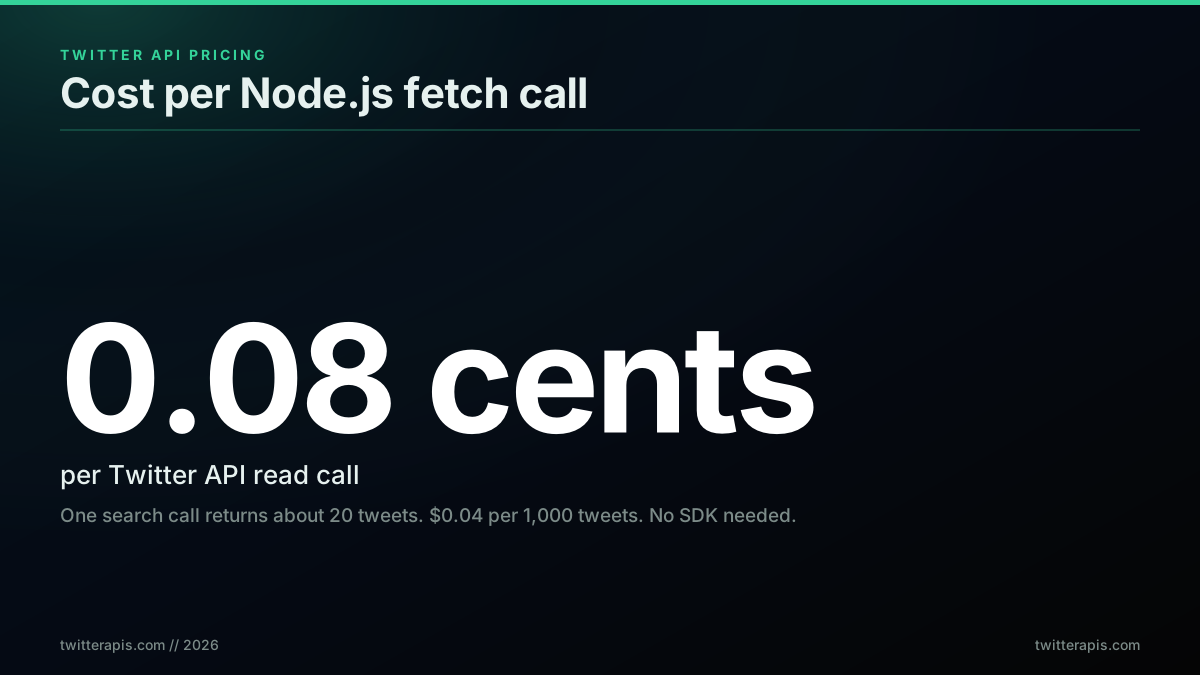
What one Twitter API read costs from Node.js in 2026, per the pricing page
What You Need to Call the Twitter API from Node.js in 2026
You need three things: Node 18 or later, an API key, and one HTTP request. Node 18 added a global fetch implementation, so you do not install node-fetch, axios, or any Twitter SDK to read data. The API key is a Bearer token. On the official X API you generate it in the developer console after creating a Project and an App. On a direct API you copy it from a dashboard after an email signup. The request itself is a GET with an Authorization: Bearer YOUR_KEY header.
That is the whole dependency list for the read path. The reason older tutorials feel heavy is that they conflate two separate problems: authentication and the HTTP call. Authentication on the official API is genuinely involved because it gates write access and acts on behalf of users. The HTTP call is trivial. This guide keeps the two apart so you see how little code the data side actually takes.
Check your Node version first, because the global fetch is the one prerequisite that trips people up:
node --version
# v18.x or higher means fetch is built in. Below 18, upgrade Node.
The global fetch landed as a stable feature in Node 18 and is documented in the Node.js fetch release notes and the MDN Fetch API reference. If you are on an older runtime, upgrade rather than reaching for a polyfill. Everything below assumes Node 18 or later.
The two API surfaces you can target from Node are the official X API at api.x.com and direct pay-per-call providers at their own hosts. The official API is the source of truth and supports write actions through OAuth. A direct API reads X data and returns it through a flat REST surface with one key. For the read-heavy work most Node services do, dashboards, monitors, lead enrichment, AI input pipelines, the direct path is faster to ship and far cheaper per read. The full language-agnostic background lives in the complete Twitter API tutorial, and the Twitter API alternatives page lays out when each surface is the right call.
Twitter API Node.js Quickstart: Fetch Tweets in 10 Lines
Here is the smallest useful program. It searches recent tweets for a keyword and prints the text and timestamp of each result. It uses only the global fetch, reads the key from an environment variable, and runs on any Node 18 or later install.
// search.mjs , run with: node search.mjs
const API_KEY = process.env.TWITTERAPIS_KEY;

const params = new URLSearchParams({ query: "node.js", product: "Latest" });

const res = await fetch(
  `https://api.twitterapis.com/twitter/tweet/advanced_search?${params}`,
  { headers: { Authorization: `Bearer ${API_KEY}` } }
);

if (!res.ok) throw new Error(`HTTP ${res.status}`);
const { tweets } = await res.json();

for (const t of tweets) {
  console.log(`[${t.created_at}] ${t.text.slice(0, 120)}`);
}
Ten lines of logic. No SDK, no OAuth handshake, no two-step user-ID lookup. The query parameter takes the full Twitter search-operator syntax, and product set to Latest returns reverse-chronological results. The response carries a tweets array where every object already exposes text, created_at, favorite_count, and retweet_count at the top level, so there is no expansion block to join by ID.
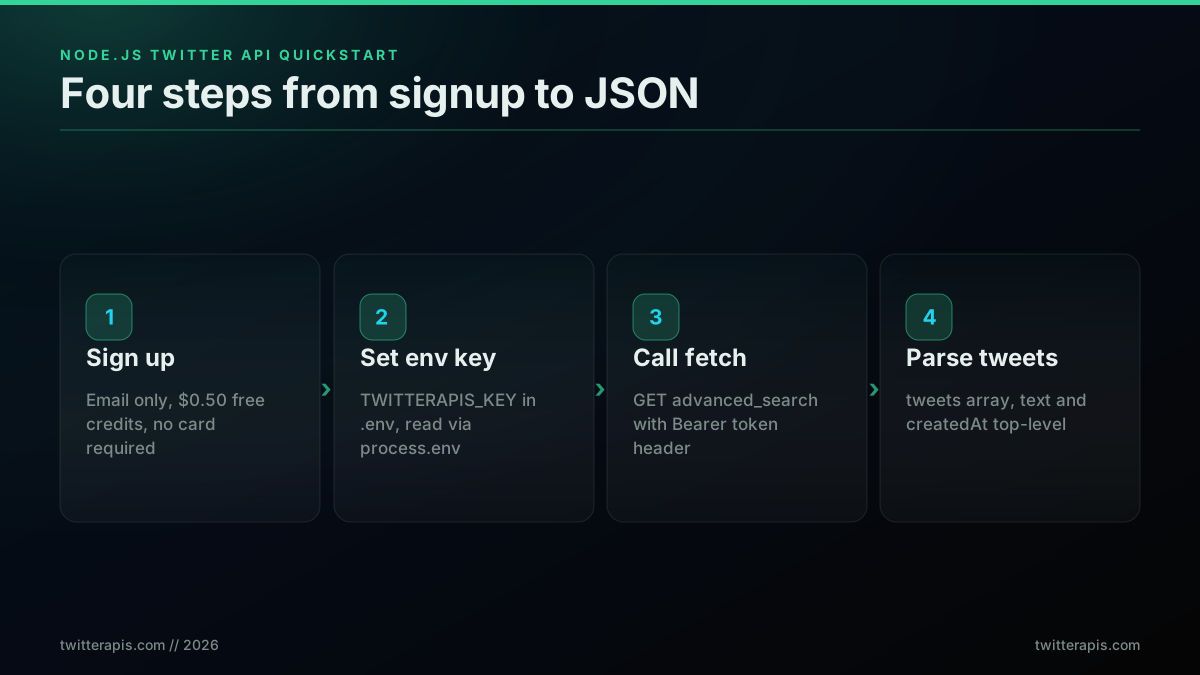
The four-step Node.js quickstart, signup to parsed JSON
To run it, you need a key in your environment. Get one in under a minute at the signup page, which issues $0.50 in free credits with no card, then export it:
export TWITTERAPIS_KEY="your_key_here"
node search.mjs
If you would rather use the official X API for this same query, the call shape is similar but the host, the query parameter names, and the response shape differ, and you need a Bearer token from the console first. The how to get a Twitter API key walkthrough covers the console path step by step, including the common rejection patterns. For the keyword syntax itself, the Twitter advanced search operators guide documents from:, since:, min_faves:, filter:, and the rest.
Setting Up Your Node.js Project and API Key Safely
Set up the project so the API key lives in the environment, never in source. The pattern is a .env file that you add to .gitignore, loaded either by Node's built-in --env-file flag on recent versions or by the dotenv package on older ones. Reading the key with process.env.TWITTERAPIS_KEY means the same code runs in local, staging, and production without edits, and the secret never lands in your git history.
Start a project and create the files:
mkdir twitter-node && cd twitter-node
npm init -y
# add "type": "module" to package.json to use top-level await and import
echo "TWITTERAPIS_KEY=your_key_here" > .env
echo ".env" >> .gitignore
echo "node_modules" >> .gitignore
On Node 20.6 and later you can load the file natively with no dependency, using the built-in --env-file flag documented in the Node.js CLI reference:
node --env-file=.env search.mjs
A small shared client module keeps the base URL, the header, and the key in one place so the rest of your code stays clean:
// client.mjs
const BASE = "https://api.twitterapis.com";
const API_KEY = process.env.TWITTERAPIS_KEY;

if (!API_KEY) {
  throw new Error("TWITTERAPIS_KEY is not set. Add it to your .env file.");
}

export async function apiGet(path, params = {}) {
  const url = `${BASE}${path}?${new URLSearchParams(params)}`;
  const res = await fetch(url, {
    headers: { Authorization: `Bearer ${API_KEY}` },
  });
  if (!res.ok) {
    throw new Error(`Twitter API ${res.status} on ${path}`);
  }
  return res.json();
}
The throw-on-missing-key check matters more than it looks. The single most common first failure in Node Twitter integrations is a request that silently sends Authorization: Bearer undefined because the environment variable name was misspelled or the .env file was not loaded. Failing loudly at startup turns a confusing 401 into a clear configuration error. Never paste the key directly into the code, and never log the full Authorization header, since logs are the most common place secrets leak. The TwitterAPIs best practices guide covers key rotation and log hygiene in more depth.
fetch vs axios: Which HTTP Client to Use for the Twitter API
Use the global fetch for small scripts and serverless functions, and reach for axios when you are building a service that needs shared configuration, interceptors, and per-request timeouts. Both make the same call. The difference is how much boilerplate they remove as the codebase grows. fetch is built into Node 18 and later, so it adds zero dependencies, but you check response.ok and call response.json() yourself. axios parses JSON automatically, throws on non-2xx by default, and lets you define a single configured instance.
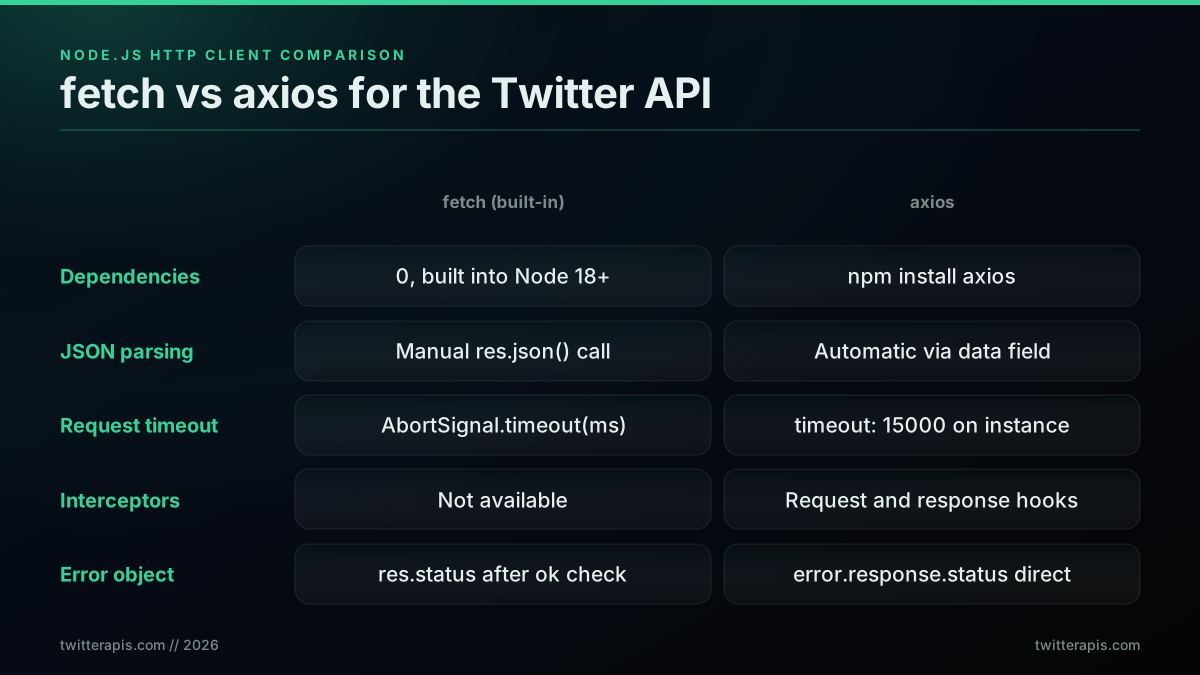
fetch versus axios for Twitter API calls in Node.js
Here is the same search with axios, including a configured instance that carries the base URL and the header so individual calls stay short:
// client-axios.mjs
import axios from "axios";

export const x = axios.create({
  baseURL: "https://api.twitterapis.com",
  headers: { Authorization: `Bearer ${process.env.TWITTERAPIS_KEY}` },
  timeout: 15000,
});

// usage
const { data } = await x.get("/twitter/tweet/advanced_search", {
  params: { query: "node.js", product: "Latest" },
});
for (const t of data.tweets) console.log(t.created_at, t.text.slice(0, 100));
Notice three things axios does for free that fetch makes you do by hand: it parses the JSON body into data, it applies the 15-second timeout per request, and it carries the base URL and header on every call through the instance. The axios error object also exposes error.response.status directly, which is cleaner than reading res.status after a manual ok check. The library and its options are documented in the axios repository.
The honest recommendation: if your integration is a few calls in a script or a serverless handler, fetch is the better choice because it ships with the runtime and there is nothing to maintain. If you are standing up a long-lived service with retries, central error handling, and a shared timeout policy, axios interceptors remove enough boilerplate to earn the dependency. Both are correct. The rest of this guide uses plain fetch so every snippet runs with nothing installed.
Start building with TwitterAPIs
$0.0008 a call, about $0.04 per 1,000 tweets at 20 tweets a page. $0.50 free credits. No credit card required.
Searching Tweets by Keyword in Node.js
The search endpoint is GET /twitter/tweet/advanced_search. It takes a query parameter that accepts the full Twitter operator syntax and a product parameter set to Latest for chronological results or Top for engagement-ranked results. It returns a tweets array plus the next_cursor field you use for pagination. Each tweet object is flattened, so text, created_at, favorite_count, and retweet_count are all top-level and need no expansion join.
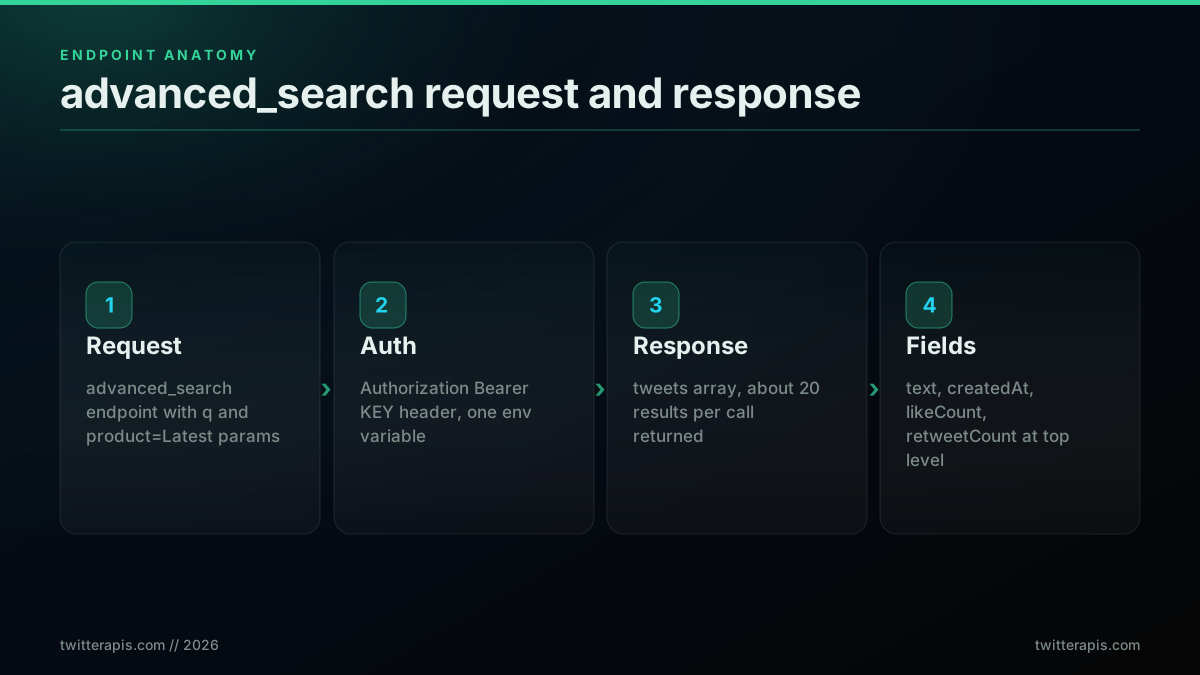
Anatomy of an advanced_search request and response
A reusable search function built on the shared client:
import { apiGet } from "./client.mjs";

export async function searchTweets(query, product = "Latest") {
  const body = await apiGet("/twitter/tweet/advanced_search", {
    query: query,
    product,
  });
  return body.tweets ?? [];
}

// Find recent tweets from a specific account that contain links
const results = await searchTweets("from:vercel filter:links");
for (const t of results) {
  console.log(`♥ ${t.favorite_count}  ↻ ${t.retweet_count}  ${t.text.slice(0, 80)}`);
}
The query string is where most of the power lives. from:handle scopes to one account, since:2026-01-01 and until:2026-02-01 bound a date range, min_faves:100 filters by engagement, lang:en restricts language, and -filter:replies drops replies. A query like openai min_faves:500 since:2026-06-01 lang:en returns only high-engagement English posts about OpenAI from June onward. The full operator list, including the date-chunking pattern for deep historical sweeps, is in the advanced search operators guide, and the hosted Twitter search API page documents the endpoint parameters.
A real response object looks like this, truncated for readability:
{
  "tweets": [
    {
      "id": "1797234567890123456",
      "text": "Shipped a new inference endpoint, 30ms p99",
      "created_at": "Wed Jun 25 14:23:01 +0000 2026",
      "favorite_count": 87,
      "retweet_count": 12,
      "reply_count": 4,
      "author": { "username": "somedev", "name": "Some Dev", "followers_count": 4200 }
    }
  ],
  "next_cursor": "DAABCgABF7..."
}
The flattened shape is the part Node developers tend to appreciate most after the official v2 API. There is no includes block to cross-reference and no expansions parameter to remember. The author object is inline on every tweet, so you read t.author.username directly instead of joining a separate users array by author_id.
Getting a User Profile and Their Recent Tweets
Two endpoints cover the user side: GET /twitter/user/info for a profile and GET /twitter/user/tweets for a timeline. Both take a single userName parameter, no numeric ID lookup first. The profile call returns a user object with name, username, followers_count, description, created_at, and verified. The timeline call returns a tweets array shaped like the search results. This is one round trip where the official API needs two, because it resolves username to ID separately.
import { apiGet } from "./client.mjs";

export async function getProfile(userName) {
  const body = await apiGet("/twitter/user/info", { userName });
  return body.user;
}

export async function getUserTweets(userName) {
  const body = await apiGet("/twitter/user/tweets", { userName });
  return body.tweets ?? [];
}

const profile = await getProfile("paulg");
console.log(`${profile.name} , ${profile.followers_count} followers`);
console.log(`Bio: ${profile.description}`);
console.log(`Verified: ${profile.verified ? "yes" : "no"}`);

const recent = await getUserTweets("paulg");
for (const t of recent.slice(0, 5)) {
  console.log(`${t.created_at}  ${t.text.slice(0, 80)}`);
}
On the official X API the same profile-then-timeline pattern is two calls because you first hit GET /2/users/by/username/:username to turn the handle into a numeric ID, then GET /2/users/:id/tweets to read the timeline. Halving the round trips matters when you are enriching a list of thousands of accounts, both for latency and for cost. If your goal is the follower graph rather than the timeline, the Twitter followers API returns profiles per call with cursor pagination, and the export followers walkthrough shows the full export loop in code.
Want to use X(twitter API) or scrape twitter data for fetching tweets
That thread captures the entry confusion well: a Node developer who knows what data they want but cannot tell whether the API or a scraper is the right tool, and cannot find a tutorial that just shows the call. The single-parameter userName lookups above are the answer to that question.
Cursor Pagination in Node.js
Pagination uses a cursor. Every response includes a next_cursor string. To read more than one page, pass next_cursor back as the cursor parameter on the next request, and stop when next_cursor comes back null or empty. Always add a maxPages cap so a runaway cursor cannot loop forever and burn credits. This same pattern works across search, followers, and replies because they all return the same cursor fields.
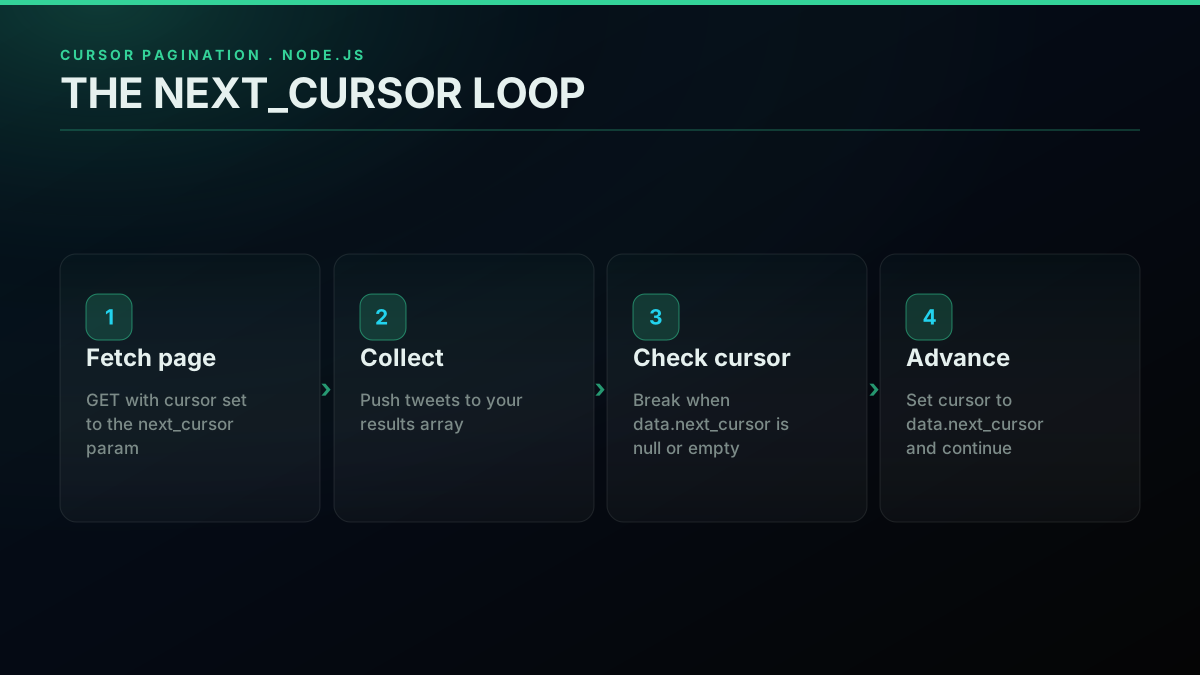
Cursor pagination loop driven by next_cursor
const API_KEY = process.env.TWITTERAPIS_KEY;
const BASE = "https://api.twitterapis.com";

async function paginate(path, params, maxPages = 10) {
  const all = [];
  let cursor = null;

  for (let page = 0; page < maxPages; page++) {
    const query = new URLSearchParams({ ...params });
    if (cursor) query.set("cursor", cursor);

    const res = await fetch(`${BASE}${path}?${query}`, {
      headers: { Authorization: `Bearer ${API_KEY}` },
    });
    if (!res.ok) throw new Error(`HTTP ${res.status}`);
    const data = await res.json();

    const items = data.tweets ?? data.users ?? [];
    all.push(...items);

    cursor = data.next_cursor;
    if (!cursor) break;
  }
  return all;
}

// Read up to 10 pages of search results
const tweets = await paginate(
  "/twitter/tweet/advanced_search",
  { query: "from:nodejs", product: "Latest" },
  10
);
console.log(`Fetched ${tweets.length} tweets across pages`);
Two rules keep pagination safe. First, stop when next_cursor comes back null or empty, since TwitterAPIs returns no continuation flag and the empty cursor is the end-of-results signal. Second, the maxPages cap is a hard budget guard. Without it, a bug that never checks next_cursor will page until your credits run out. The official X API uses the same idea with different names: it returns meta.next_token and you pass it back as pagination_token, looping until next_token is absent. The mechanics are identical, only the field names change.
Handling Errors and Retries in Node.js
Production code retries on 429 and 5xx and fails fast on every other 4xx. A 429 is a rate-limit signal and a 5xx is a transient upstream error, so both are worth retrying with a delay. A 400, 401, or 403 is a client mistake that will return the same result on retry, so retrying wastes time and credits. The clean pattern is exponential backoff with a ceiling, applied only to the retryable status codes, with the Retry-After header respected when the server sends it.
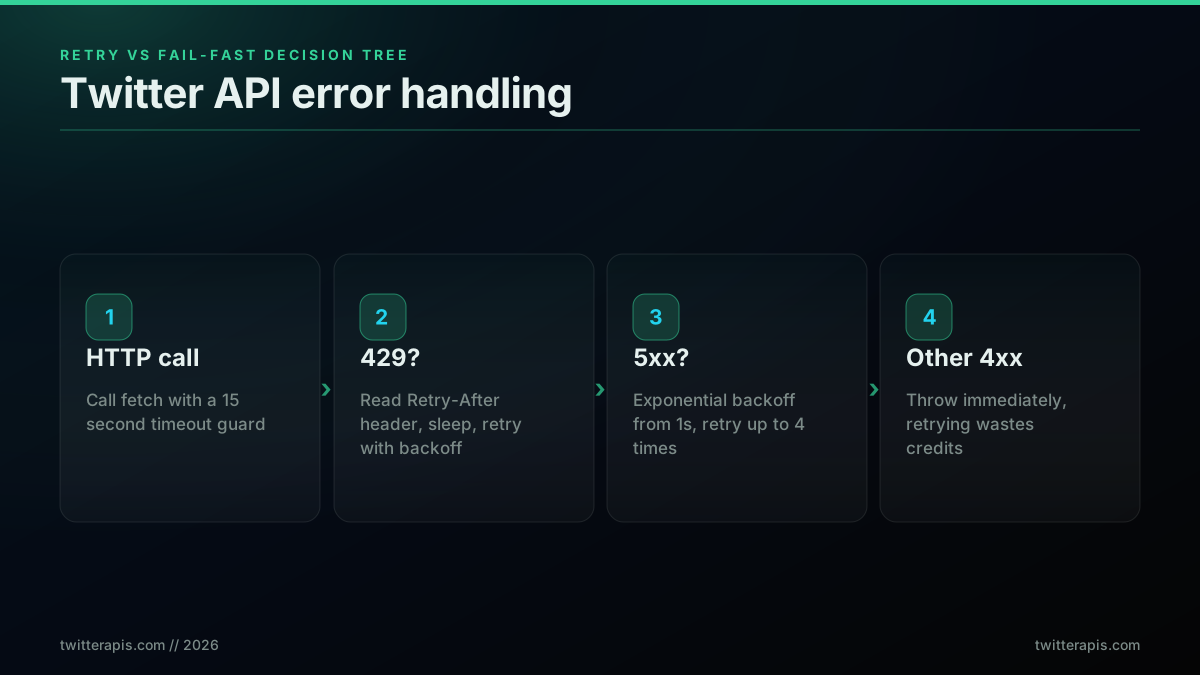
Error decision tree, when to retry and when to fail fast
const API_KEY = process.env.TWITTERAPIS_KEY;

const sleep = (ms) => new Promise((r) => setTimeout(r, ms));

export async function fetchWithRetry(url, maxRetries = 4) {
  let delay = 1000;

  for (let attempt = 0; attempt < maxRetries; attempt++) {
    let res;
    try {
      res = await fetch(url, {
        headers: { Authorization: `Bearer ${API_KEY}` },
        signal: AbortSignal.timeout(15000),
      });
    } catch (err) {
      // network error or timeout: retry with backoff
      if (attempt === maxRetries - 1) throw err;
      await sleep(delay);
      delay *= 2;
      continue;
    }

    if (res.status === 429) {
      const retryAfter = Number(res.headers.get("retry-after")) || delay / 1000;
      await sleep(retryAfter * 1000);
      delay *= 2;
      continue;
    }
    if (res.status >= 500) {
      await sleep(delay);
      delay *= 2;
      continue;
    }
    if (!res.ok) {
      // 4xx other than 429: do not retry
      throw new Error(`Twitter API ${res.status}`);
    }
    return res.json();
  }
  throw new Error("Exhausted retries");
}
Three details make this reliable. The AbortSignal.timeout(15000) guards against a hung connection that would otherwise stall the loop forever, a real risk on any network call. The Retry-After header is read first on a 429 and only falls back to the backoff delay if absent, which respects the server's own pacing. And the non-retryable 4xx path throws immediately, so a bad query or a revoked key surfaces as an error instead of four pointless retries. A direct API has no platform-level call ceiling on most endpoints, so 429 is rare, but the official X API enforces per-endpoint windows and returns x-rate-limit-remaining and x-rate-limit-reset headers that you log and pace against. The full per-endpoint table is in the rate limit guide and the hosted rate limits reference.
Running Twitter API Calls Concurrently with Promise.all
Node is single-threaded but its I/O is non-blocking, so independent API calls run concurrently when you launch them together with Promise.all. Map an array of usernames to an array of promises, then await the whole array. Five profile lookups that take one second each finish in about one second in parallel instead of five in series. On a direct API with no per-endpoint rate window, this scales to dozens of concurrent requests cleanly.
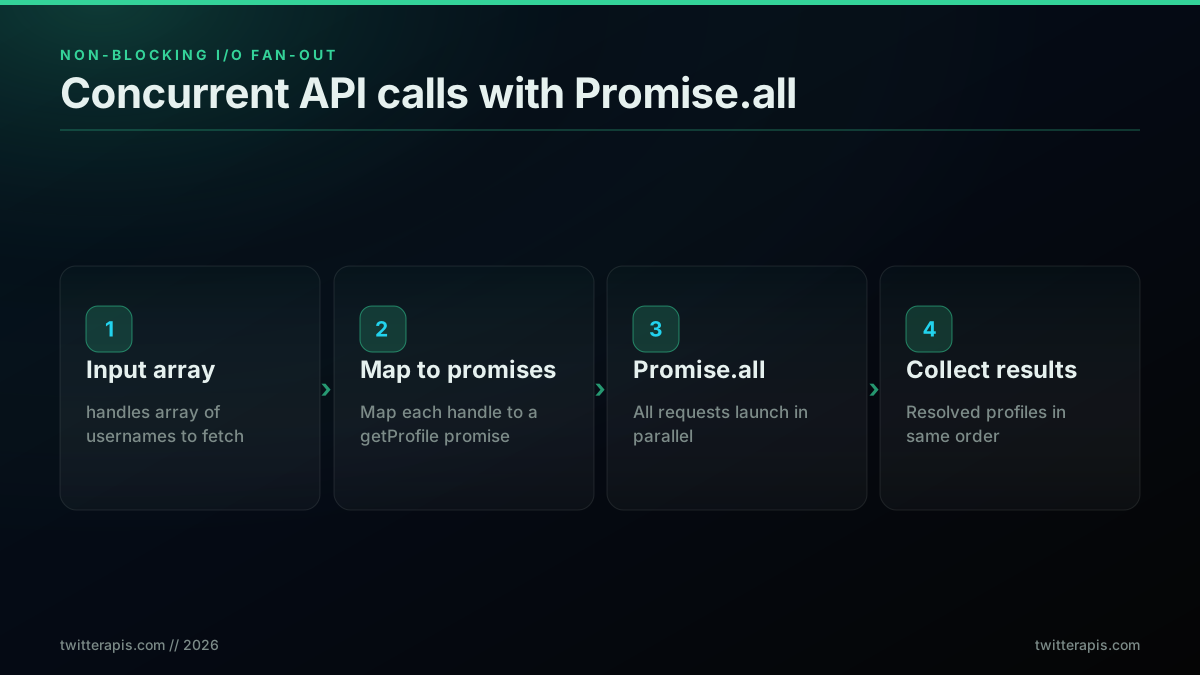
Concurrent profile fetches with Promise.all
import { getProfile } from "./users.mjs";

const handles = ["elonmusk", "naval", "paulg", "patio11", "sama"];

const profiles = await Promise.all(handles.map((h) => getProfile(h)));

for (const p of profiles) {
  console.log(`${p.name} , ${p.followers_count} followers`);
}
For larger batches you want a concurrency limit so you do not launch ten thousand requests at once and exhaust sockets or, on the official API, trip the rate window. A small batching helper keeps a fixed number of requests in flight:
async function mapWithLimit(items, limit, fn) {
  const results = [];
  for (let i = 0; i < items.length; i += limit) {
    const batch = items.slice(i, i + limit);
    results.push(...(await Promise.all(batch.map(fn))));
  }
  return results;
}

// Enrich 10,000 handles, 20 at a time
const enriched = await mapWithLimit(allHandles, 20, getProfile);
Promise.all itself is documented in the MDN Promise.all reference. The pattern above is the practical version: concurrency for speed, a batch limit for safety. On the official X API you would also track the per-endpoint window across the batch to keep the burst inside the limit, which is exactly the kind of bookkeeping a direct API removes for read workloads.
The cheapest pay-as-you-go Twitter API. Try it free.
$0.0008 a call, about $0.04 per 1,000 tweets at 20 tweets a page. $0.50 free credits. No credit card required.
Twitter API Node.js Cost: What Each Call Actually Costs
A standard read call costs $0.0008 and returns about 20 tweets, which is $0.04 per 1,000 tweets. The deeper full-thread read is $0.004 per call. New accounts get $0.50 in free credits, around 625 calls, with no credit card. For comparison, the official X API charges roughly $0.005 per post read on its pay-per-use tier, documented on the X API pay-per-usage pricing docs, so reading 1,000 tweets is about $5 and a million is about $5,000. For the read-heavy work a Node service does, a direct API is roughly 100 times cheaper per read.
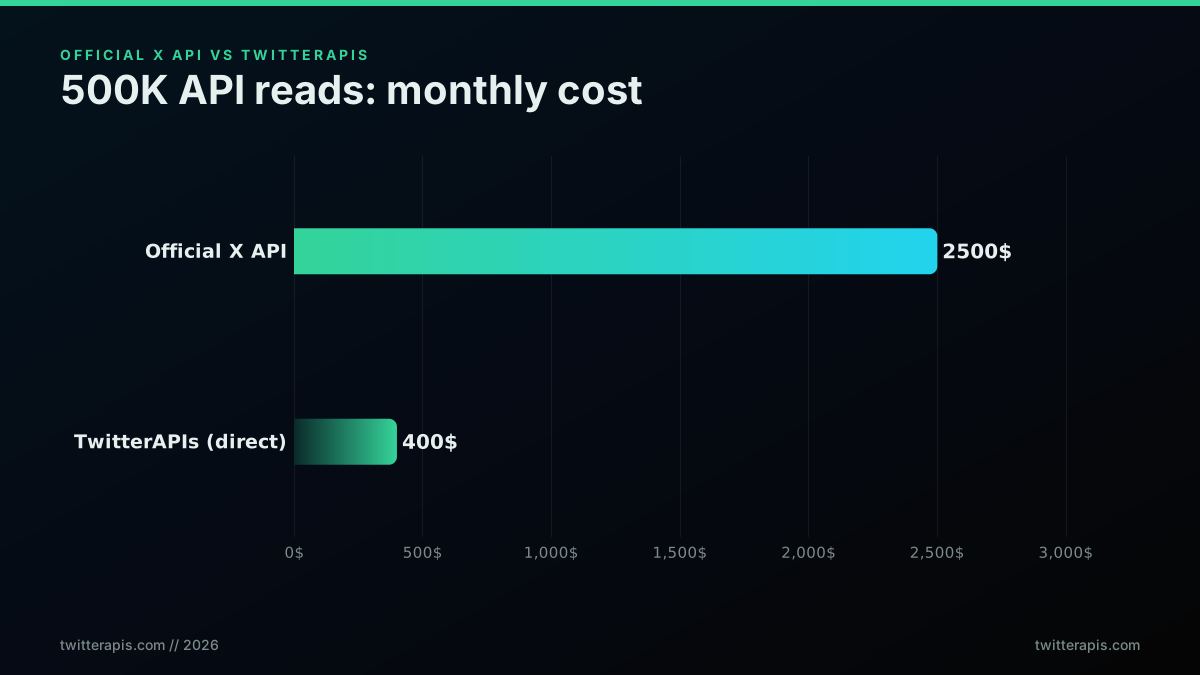
Monthly cost for 500K reads, official versus direct API
Here is how the read endpoints used in this guide price out, per the TwitterAPIs pricing page:
| Endpoint | What it returns | Cost per call |
|---|---|---|
tweet/advanced_search | Keyword or operator search results | $0.0008 |
user/info | A full user profile | $0.0008 |
user/tweets | A user's recent timeline | $0.0008 |
user/followers | A page of followers | $0.0008 |
tweet/replies | Replies to a tweet | $0.0008 |
tweet/thread | A full thread in one call | $0.004 |
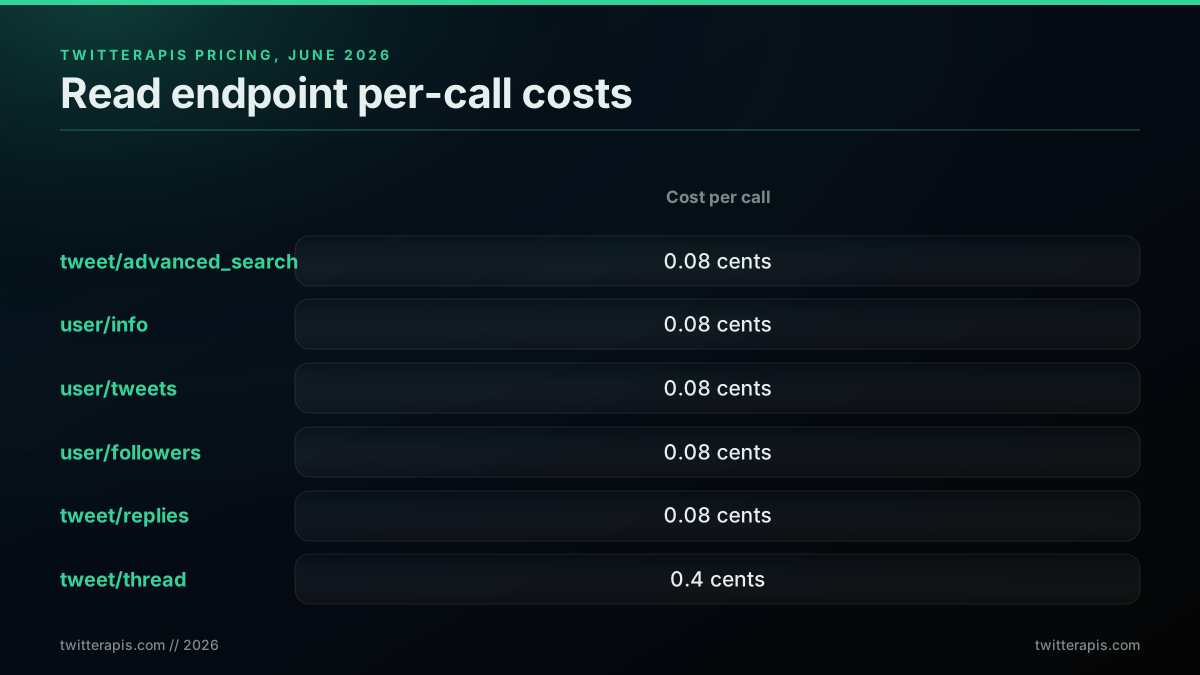
Per-call cost of the read endpoints used in this guide
The cost gap is the thing Node developers keep running into when they price the official API for a polling service.

Harshil Tomar
@Hartdrawss
Your brain cannot comprehend how expensive a vibe coded app gets when real users show up. A free Supabase tier handles 500 rows. You can prototype on it in a weekend. 50,000 users hitting your API costs $1,200/month before you write a single line of feature code. That is 3,500…

The same dynamic shows up in developer threads about Twitter data specifically. On r/webscraping a developer wrote that the $100 per month official plan (X API pricing) "just isn't reasonable" and asked for a reliable Node.js workaround, and on r/datasets another called the official API "a complete mess" before moving to a third-party scraper. The pattern is consistent: the per-read price is fine at small volume and painful for any service that polls. Other direct providers exist in this space, including twitterapi.io and the Apify Tweet Scraper, though their per-result and compute billing models price differently from a flat per-call read. Model your own numbers in the Twitter API cost calculator before you ship a loop, and the cost breakdown and cost benchmark posts walk through how the rates compound at team scale. If you are weighing whether any paid tier is worth it, the is the Twitter API free explainer covers the free-adjacent paths.
Node.js Twitter API SDK vs Raw fetch: When to Use Each
Use the twitter-api-v2 SDK when you target the official API and need OAuth and managed pagination. Use raw fetch when you want a thin, auditable call against a flat REST surface. The SDK is excellent at what it does: typed methods, OAuth 1.0a and 2.0 helpers, and built-in paginators that hide the cursor bookkeeping. The cost is a dependency in your tree and an abstraction layer between your code and the wire. Raw fetch is the opposite tradeoff: nothing to install, full visibility into the request, and you write the small amount of pagination code yourself.
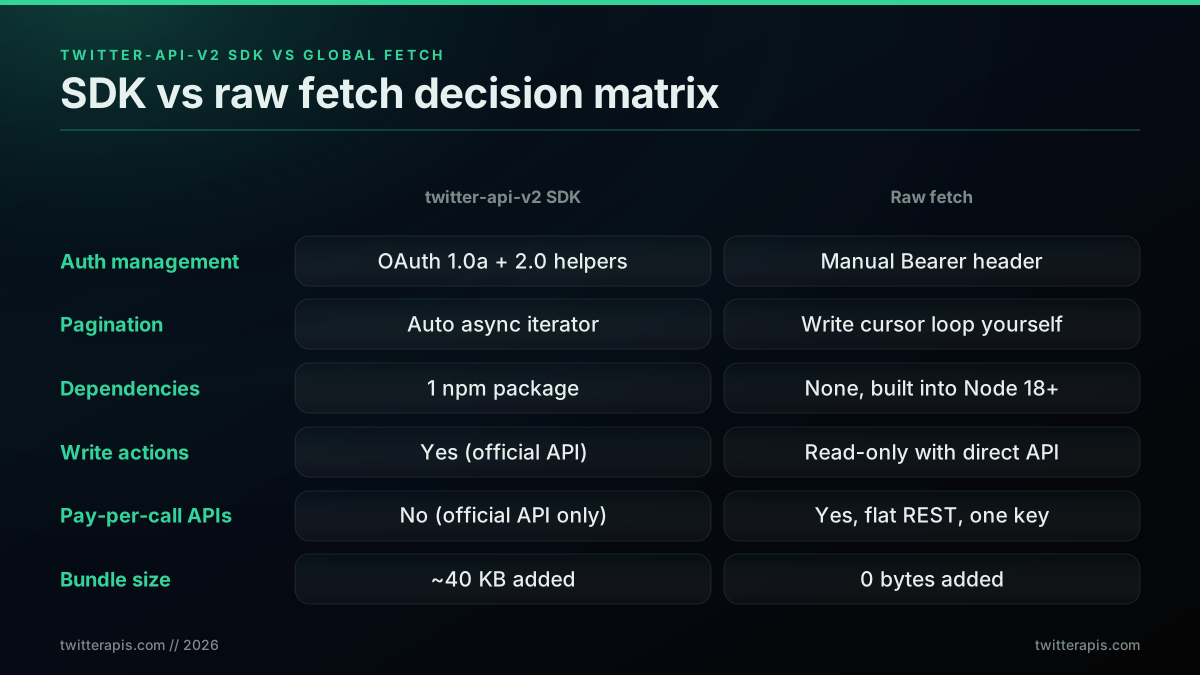
SDK versus raw fetch, a decision matrix
The most popular Node client for the official API is twitter-api-v2, documented in the plhery/node-twitter-api-v2 repository and published on npm as twitter-api-v2. It is the right tool when you need user-context OAuth and write actions on the official API. A minimal read with it looks like this:
import { TwitterApi } from "twitter-api-v2";

const client = new TwitterApi(process.env.X_BEARER_TOKEN);
const ro = client.readOnly;

const result = await ro.v2.search("node.js", {
  "tweet.fields": ["created_at", "public_metrics"],
});
for await (const tweet of result) {
  console.log(tweet.created_at, tweet.text.slice(0, 80));
}
Compare that to the raw fetch quickstart at the top of this guide. The SDK version is shorter on the auth and pagination lines because the client manages the Bearer token and the async iterator handles the cursor. The raw version is shorter overall, has nothing to install, and returns flattened JSON you read directly. Neither is wrong. The deciding question is whether you want the SDK to own auth and pagination state, in which case use twitter-api-v2 on the official API, or whether you want a thin call against a pay-per-call direct API, in which case raw fetch is enough. The Tweepy comparison makes the same SDK-versus-direct argument on the Python side, and the official versus direct comparison lays out the full tradeoff.
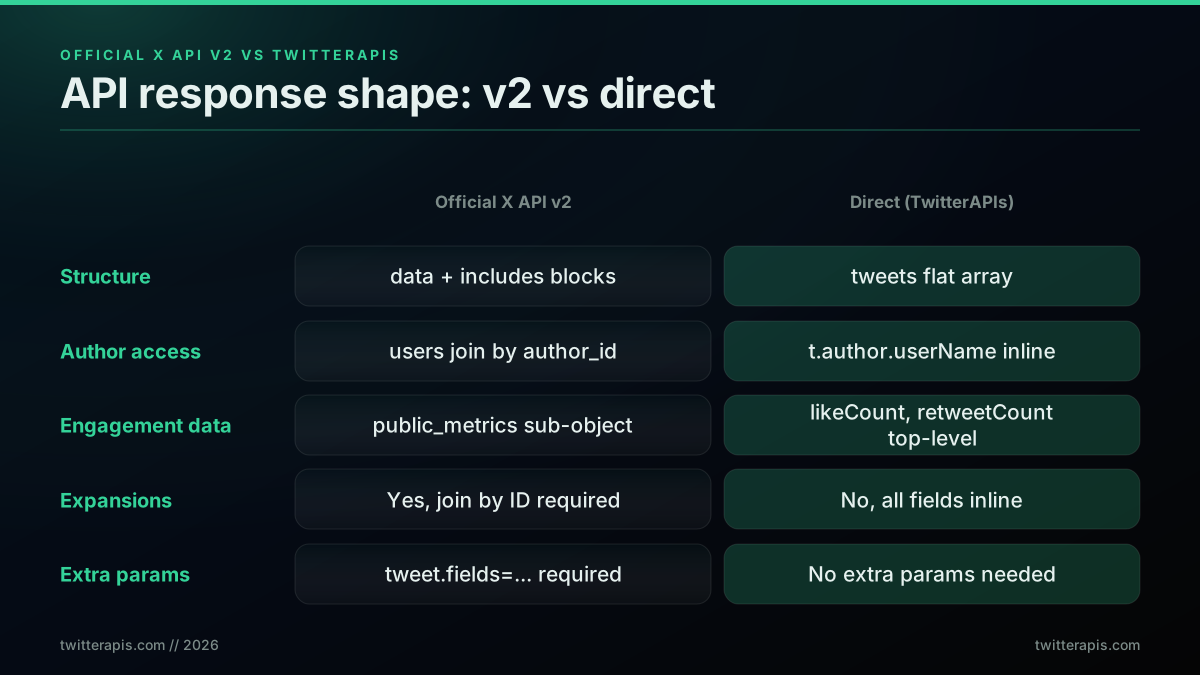
Normalized v2 response versus flattened direct response
Common Mistakes and Production Patterns
Five mistakes account for most of the silent failures in Node Twitter integrations: sending an undefined key because the env var was misnamed, hardcoding a fixed page count instead of stopping when next_cursor comes back empty, retrying non-retryable 4xx errors, skipping a request timeout so a hung connection stalls the process, and re-fetching the same profile on every iteration instead of caching it. Each one is cheap to prevent and expensive to debug after it ships.
The undefined-key failure is the most common first bug. A misspelled variable name sends Authorization: Bearer undefined, which returns a 401 that looks like an auth problem when it is really a configuration problem. The startup guard in the client module above turns it into a clear error. The pagination bug is the most expensive: a loop that ignores next_cursor can either end early and miss data or loop forever and burn credits, which is why stopping when next_cursor comes back empty plus a maxPages cap is the safe combination.
Caching is the pattern that saves the most money at scale. A user profile changes rarely, so caching profile responses for a few minutes removes a large share of calls in any pipeline that touches the same accounts repeatedly. A simple in-memory map with a timestamp is enough for a single process:
const cache = new Map();
const TTL = 5 * 60 * 1000; // 5 minutes

export async function getProfileCached(userName) {
  const hit = cache.get(userName);
  if (hit && Date.now() - hit.at < TTL) return hit.value;

  const value = await getProfile(userName);
  cache.set(userName, { value, at: Date.now() });
  return value;
}
For multi-process services, swap the map for Redis with the same TTL logic. The broader production checklist, key rotation, log hygiene, request deduplication, date-range chunking for large search jobs, lives in the best practices guide. If your goal is a full automation rather than a read pipeline, the Twitter bot build guide covers the architecture, and the use cases page maps common Node workloads to the right endpoints. Teams running agentic workflows often wire the same read surface through the MCP server so an assistant can call it directly.
Request deduplication is the other pattern worth encoding from day one. If a pipeline fans out and multiple branches request the same profile at the same time, a naive implementation fires a separate API call per branch. A small in-flight map collapses them to one shared promise, then deletes the entry when it settles so the next real request goes to the API fresh:
const inflight = new Map();

export function deduped(key, fn) {
  if (inflight.has(key)) return inflight.get(key);
  const p = fn().finally(() => inflight.delete(key));
  inflight.set(key, p);
  return p;
}

// Two concurrent callers for "paulg" share one API call
const profile = await deduped("paulg", () => getProfile("paulg"));
Monitoring your spend is the last pattern worth embedding early. Log the endpoint, the cursor position, and the response item count on every call. At volume that log tells you which pipelines consume the most credits, which cursors run deep, and where to apply caching first. A thin middleware wrapper on the shared apiGet module captures everything without touching business logic, and it costs nothing when credits are plentiful and is invaluable when they are not. If you are moving an existing project off a different provider, the migrate from twitterapi.io guide maps the endpoint renames and cursor-field differences so the switch takes hours rather than days.
The cost question comes up repeatedly when developers size a Node.js read service. The per-call model is transparent but the compounding numbers across a full month of polling surprise teams that are used to flat subscription APIs:
[deleted by user]
That question is exactly where the per-call model wins for read workloads: the cost scales with actual usage rather than a flat monthly floor, so a service that polls lightly pays little and a service that polls heavily pays proportionally. The cost calculator on the pricing page lets you plug in your actual call volume before you commit to an architecture.
For developers who learn faster from a screen recording than from docs, this walkthrough builds a Node.js integration against the v2 API end to end:
Watch this Node.js Twitter API walkthrough on YouTube
Where to Go Next
This guide covered the full read path in Node.js: the prerequisites, a ten-line quickstart, project and key setup, the fetch versus axios choice, keyword search, profile and timeline reads, cursor pagination, retries, concurrency, cost, and the SDK-versus-raw-fetch decision. The links below go deeper on each path.
- For the Python version of every pattern here, read the Python Twitter API tutorial.
- For the language-agnostic foundation including auth and pricing history, read the complete Twitter API tutorial.
- For per-endpoint rate limits and the production pacing playbook, read the rate limit guide.
- For monthly cost projections at your specific call volume, use the cost calculator.
- For when a direct API beats the official one, read the marketplace and alternatives comparison and the trends API guide for a worked read pipeline.
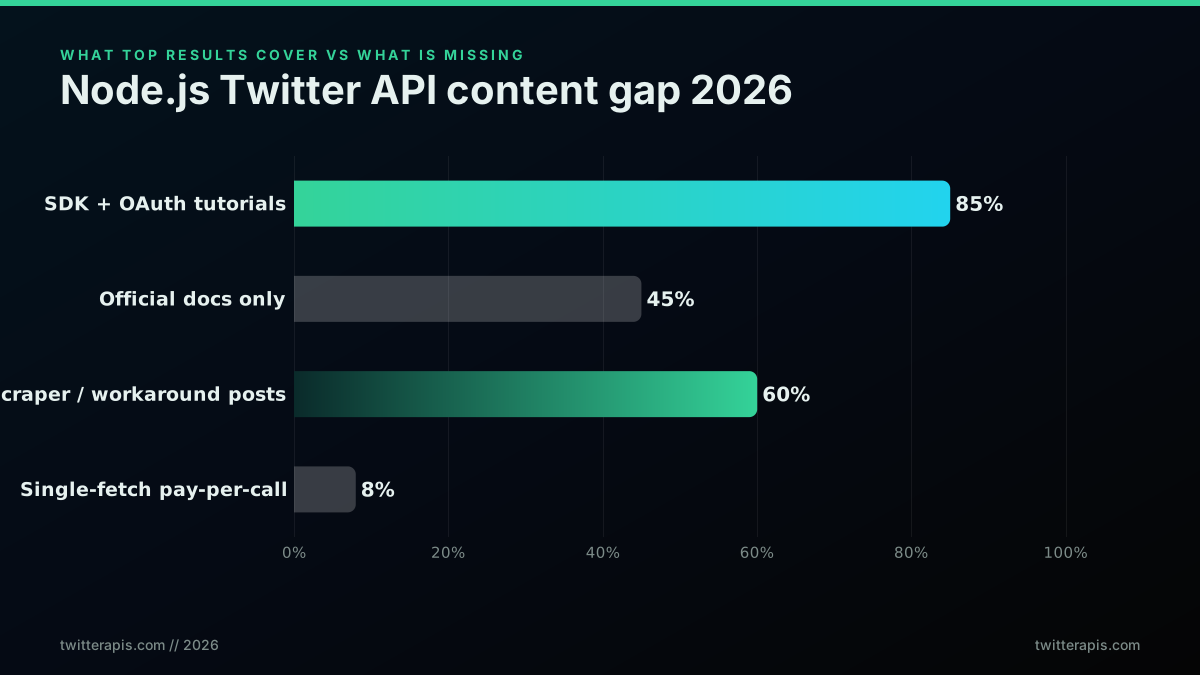
The Node.js Twitter API content gap in 2026
Get Your API Key and Make Your First Node.js Call
The fastest path from this guide to working code is the direct API. Sign up at the signup page, get $0.50 in free credits with no credit card, copy your Bearer key into TWITTERAPIS_KEY, and run:
const res = await fetch(
  "https://api.twitterapis.com/twitter/user/info?userName=elonmusk",
  { headers: { Authorization: `Bearer ${process.env.TWITTERAPIS_KEY}` } }
);
const { user } = await res.json();
console.log(user.name, "followers:", user.followers_count);
Under a minute from signup to first JSON response. The Twitter API Node.js client is this same code as a reference page, with pagination, rate limits and error handling in one place. For per-call rates across every read endpoint, see the pricing page, and grab a key directly from the Twitter API key page.
// sources
Where these numbers come from
Each row is a figure in this post and the artefact it was read from. Prices and limits on this platform move, so check the date on the source before you plan against it.
- Node.js v18 release announcement for fetch
- The source for the claim that global fetch landed as a stable feature in Node 18, which is why the tutorial assumes Node 18 or later and rejects a polyfill.
- Node.js CLI env-file flag reference
- Backs the dependency-free env loading step, where the built-in flag reads the file natively on Node 20.6 and later.
- axios repository
- Documents the three behaviours the post credits to axios over raw fetch: JSON body parsing into data, a per-request timeout, and a base URL plus header carried on every call through the instance.
- MDN Promise.all reference
- The concurrency primitive behind the batched parallel-fetch pattern, where a batch limit caps the burst.
- X API pay-per-usage pricing docs
- The source for the roughly $0.005 per post read comparison figure, which is what puts reading 1,000 tweets near $5 and a million near $5,000 in the cost section.
- node-twitter-api-v2 repository
- Documents the most popular Node client for the official API, the tool the post recommends specifically when you need user-context OAuth and write actions.
Frequently Asked Questions
The fastest path in 2026 is a single HTTP request. On the official X API you create a developer account, a Project, an App, and a Bearer token, then call api.x.com endpoints with the global fetch built into Node 18 and later. On a pay-per-call direct API like TwitterAPIs you skip the developer console entirely: sign up with an email, copy a Bearer key into TWITTERAPIS_KEY, and send GET requests to api.twitterapis.com with one Authorization header. No SDK is required in either case because Node ships fetch natively. Search costs $0.0008 per call against the direct API, and the response comes back already flattened so you read tweet.text and tweet.created_at without walking expansion blocks.
For the official X API, twitter-api-v2 by plhery is the most complete community client, with typed methods, OAuth helpers, and built-in paginators. It is the right choice when you need OAuth 2.0 user context and write actions on the official API. For straight read workloads you often do not need any library at all: Node 18 and later ships a global fetch, so a plain GET against the endpoint is enough and keeps your dependency tree clean. The decision is simple. Reach for twitter-api-v2 when you want the SDK to manage auth and pagination state for you. Use raw fetch or axios when you want a thin, auditable call and a pay-per-call direct API that returns flattened JSON.
On a pay-per-call direct API, each standard read call is $0.0008 and returns about 20 tweets, which works out to $0.04 per 1,000 tweets. Deeper reads such as the full thread endpoint are $0.004 per call. New accounts get $0.50 in free credits, around 625 calls, with no credit card. On the official X API a post read is roughly $0.005 each, so 1,000 tweets is about $5 and a million is about $5,000. For read-heavy Node services such as dashboards, monitors, and enrichment pipelines, the direct API is roughly 100 times cheaper per read. Plug your own call volume into the cost calculator before you ship a polling loop.
Both work. The global fetch built into Node 18 and later needs no dependency, returns a promise, and is enough for most read workloads once you check response.ok and parse response.json(). axios adds quality-of-life features that matter at scale: automatic JSON parsing, a baseURL and default-headers instance, request and response interceptors, per-request timeouts, and a clearer error object that carries the status code. Use fetch for small scripts and serverless functions where you want zero dependencies. Use axios when you are building a service with retries, shared headers, and central error handling, since the interceptor model removes a lot of boilerplate.
Yes. Node is single-threaded but its I/O is non-blocking, so you fan out independent requests with Promise.all and they run concurrently. Map an array of usernames to an array of fetch promises and await Promise.all on the array. Five serial profile lookups that take five seconds finish in well under two seconds in parallel. On a direct API with no per-endpoint rate window this scales cleanly to dozens of concurrent requests. On the official X API you add a concurrency limit, often with a small semaphore, so a burst does not trip the per-window rate limit and return 429s across the batch.
For the official X API, yes. Every call against api.x.com requires a developer account, an approved Project and App, a payment method on file, and an OAuth 2.0 Bearer token before line one of your Node code runs. For a direct third-party API you do not. With TwitterAPIs you sign up with email only, copy a Bearer key from the dashboard, and start calling read endpoints immediately on $0.50 of free credits, which is roughly 625 calls, with no project, no app review, and no card. The tradeoff is that a direct API reads X data through the provider rather than from X itself, which is fine for read-heavy workloads like search, profile lookups, and follower exports.
Use the global fetch that Node 18 and later includes. Build a URLSearchParams object with your query, pass an Authorization header with your Bearer key, await the response, and read response.json(). Against TwitterAPIs the search endpoint is GET https://api.twitterapis.com/twitter/tweet/advanced_search with a query parameter and a product parameter set to Latest or Top. The response has a tweets array where each item exposes text, created_at, favorite_count, and retweet_count directly. That is the entire integration: ten lines, zero dependencies, and one round trip per page.
A direct API like TwitterAPIs uses cursor pagination. Every response includes a next_cursor string. Pass next_cursor back as the cursor parameter on the next request and stop when next_cursor comes back null or empty. Wrap that in a while loop with a maxPages safety cap so a runaway cursor never burns credits. The official X API uses the same idea with a different field name: it returns meta.next_token and you pass it back as pagination_token, looping until next_token is absent. Always stop when the cursor comes back empty, and always cap the page count.
Retry only on 429 and 5xx, and fail fast on other 4xx errors because they will not fix themselves on retry. On a 429 read the Retry-After header when present and sleep that long, otherwise use exponential backoff starting at one second and doubling up to a ceiling. The official X API also returns x-rate-limit-remaining and x-rate-limit-reset headers per 15-minute window, so log the remaining count and pace your calls. A direct API like TwitterAPIs has no platform-level call ceiling on most endpoints, so the same loop that makes one call works for thousands, but you still wrap network timeouts and transient 5xx upstream errors in a retry for correctness.
Check out similar blogs
More guides on the Twitter/X API, scraping, and pricing.

Twitter API Tutorial 2026: The Complete Developer Guide
The 2026 Twitter API tutorial built after the pricing collapse. Auth, endpoints, code, rate limits, real costs, and the alternative when official gets too expensive.
How to Get Everyone Who Retweeted a Tweet via API (2026)
Pull the full list of accounts that reposted any tweet with a real 2026 API. Runnable Python and Node.js, cursor pagination for the whole list, a real amplifier ranking over live data, a bot filter, and the honest per-call cost.
How to Get All Replies to a Tweet via API (2026)
Pull the replies under any tweet with a real 2026 API. Runnable Python and Node.js, cursor pagination, the conversation_id tail sweep for the long tail, nested replies-to-replies, signal-versus-noise filtering over live data, and the honest per-call cost.
Twitter API Pagination 2026: How next_token Works (and a Simpler Alternative)
How Twitter API pagination works in 2026. The official next_token loop explained field by field, a simpler single-cursor alternative, runnable Python and Node code, and the real per-call cost of a paginated pull.
How to Search Tweets by Hashtag via API 2026 (Python + Node.js)
Search tweets by hashtag with a real 2026 API in Python and Node.js. Runnable code for the hashtag operator, engagement filters, cursor pagination, deduping retweets, counting authors, and the real per-call cost.
Connect Twitter/X to n8n Without Fighting the Official API (2026)
Two working ways to get Twitter/X data into n8n: a polling HTTP Request node and a native webhook push, both with runnable code, no OAuth handshake either way.

How to Get Image URLs from X Tweets via API in 2026 (Full Resolution, Python and Node)
Pull image URLs out of X tweets with runnable Python and Node.js, then get the full-resolution original instead of the scaled copy the API hands you by default. Measured on 14 live images, with the video poster-frame trap and the per-call cost.
Twitter API Authentication in 2026: OAuth, Bearer Tokens, and Fixing 401
How Twitter (X) API authentication works in 2026: the four credential types, OAuth 1.0a versus OAuth 2.0, generating and using a bearer token, runnable Python and Node.js, and a fix for every 401 Unauthorized and 403 error, plus the one-header alternative.