GUIDE
How to Get Everyone Who Retweeted a Tweet via API (2026)
Pull the full list of accounts that reposted any tweet with a real 2026 API. Runnable Python and Node.js, cursor pagination for the whole list, a real amplifier ranking over live data, a bot filter, and the honest per-call cost.
Per our own spec, 70 of 121 endpoints bill $0.0008, 24 are free, and 27 sit between $0.0016 and $0.01. Every price ships inside our published OpenAPI document as an x-cost-usd field, so any figure in this post can be checked against the contract that bills it rather than taken on trust.

Getting the list of accounts that reposted a tweet sounds like it should be one line of code, and in the app it is one tap. Turning that into a dataset you can rank, filter, and store is where it gets interesting, because the X interface shows you a scrollable list with no count and no export, and the endpoint that answers the question is buried under a developer account and a paid tier. This guide gets you the full list in ten lines, pages every account past the first screen, and then does the useful part: ranking your real amplifiers and filtering out the noise.
Everything below was run against the live API before publishing, and the numbers in the amplifier section come from a real pull, not a hypothetical. Here is the exact tweet the examples analyze, a product launch that picked up a healthy repost count:

GitHub
@github
The GitHub Copilot app is now available on every Copilot plan. 🎉 No plan? You can still build, just bring your own key. 🔑 Here's how to set it up. https://t.co/bqifDxF0x3

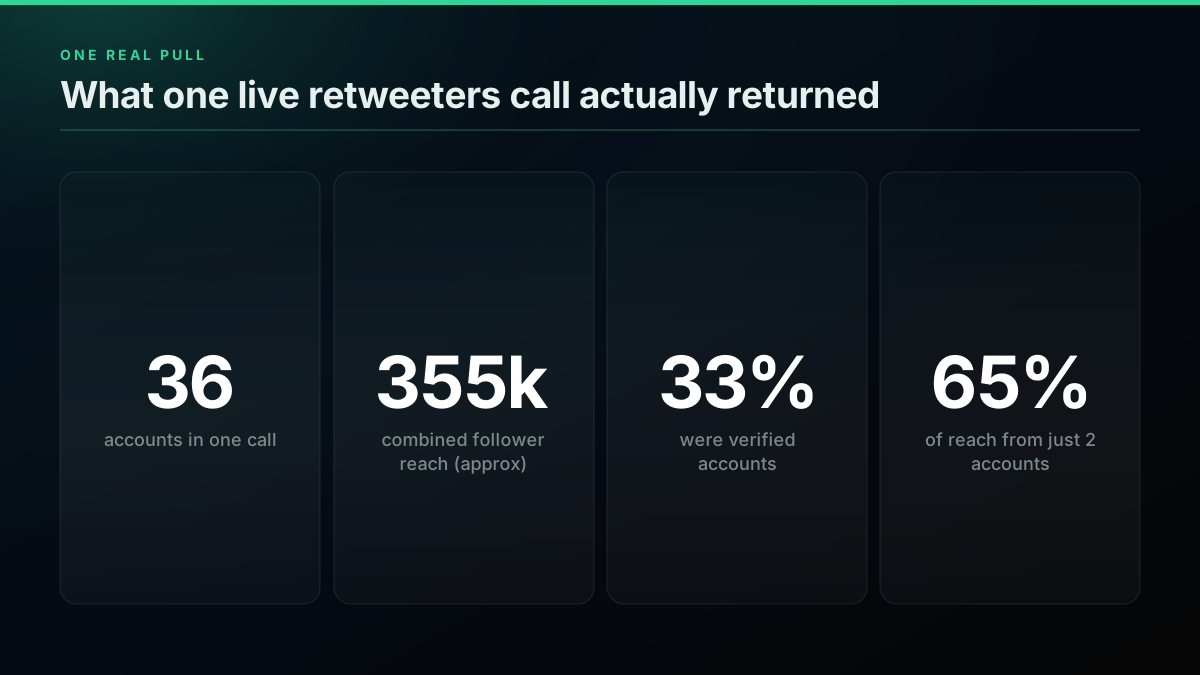
Pulling the accounts that reposted that launch took one call and returned 36 profiles plus a cursor for the rest, and sorting them by follower count surfaced a small set of large accounts doing most of the amplification. That is the workflow this guide teaches end to end.
TL;DR: To get everyone who retweeted a tweet, send the tweet id to a retweeters endpoint. On a pay-per-call API like TwitterAPIs you
GET https://api.twitterapis.com/twitter/tweet/retweeterswithid=<tweetId>and anAuthorization: Bearerheader. The response is ausersarray of full profiles plus anext_cursorstring for paging. Each call is $0.0008, and new accounts get $0.50 in free credits with no card. Loop on the cursor to collect the full list, sort byfollowers_countto rank your amplifiers, and filter obvious bots before you report reach. The official X API answers the same question atGET /2/tweets/:id/retweeted_by, but needs a developer account, an OAuth app, and paid access.

What one retweeters call returns, and what it costs
What Does Getting a Tweet's Retweeters via API Actually Mean in 2026?
Getting a tweet's retweeters means fetching the accounts that reposted it, as structured data rather than a scrollable UI list. A retweet, now labeled a repost, rebroadcasts a post to a follower's timeline, so the set of reposters is a real audience: the people who put their name and their reach behind your content. An API returns that set as an array of user profiles you can count, rank, store, and join against other data. The endpoint answers one precise question, "which accounts reposted this tweet id," and returns their profiles with follower counts attached.
Three surfaces can serve that question in 2026, and they differ in access far more than in mechanics. The official X API v2 retweeted_by endpoint works and pages cleanly, but sits behind a developer account, an OAuth app, and paid access. A direct pay-per-call API answers the same query over plain HTTP with one key and no console. The third option, opening the repost list by hand in the app, gives you a glance but no count, no export, and no way to script it. This guide uses the direct path for the runnable examples and shows the official v2 equivalent alongside so you can choose.
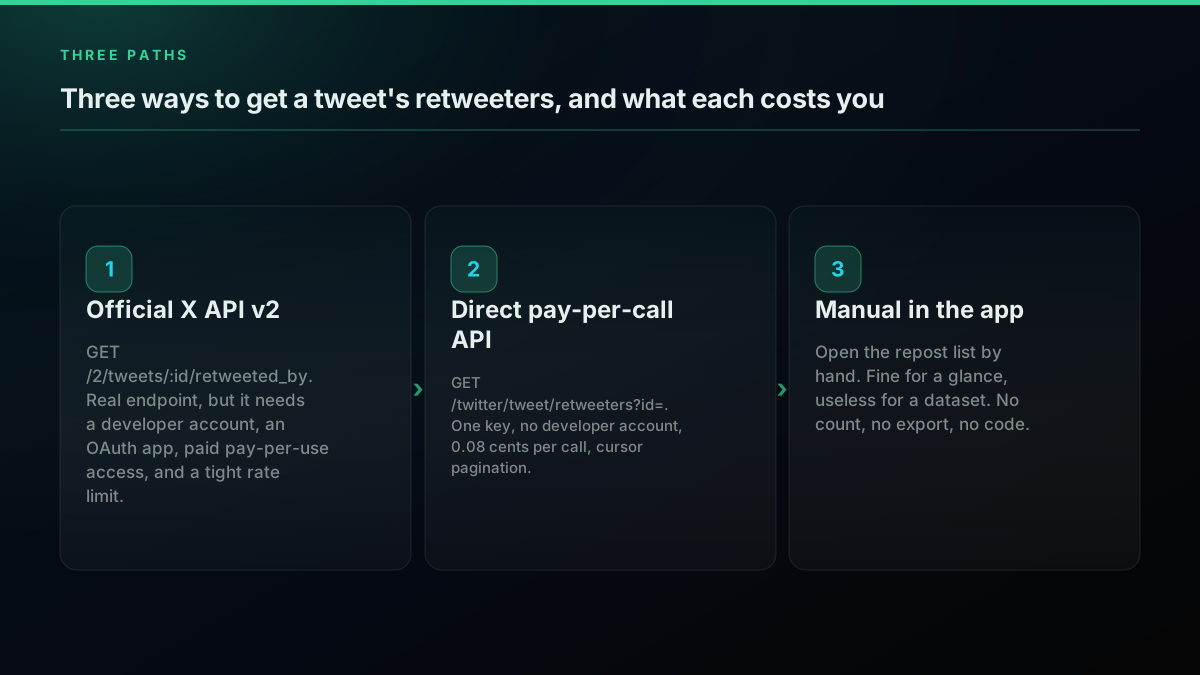
Three ways to get retweeters, and what each one costs you
The practical thing to hold onto is that a retweeter list is paged, not returned whole. One call gives you a page of accounts and a next_cursor; a tweet with thousands of reposts is a loop over that cursor. Keep that model in mind and the rest of this guide is mechanical: fetch a page, follow the cursor, then rank and filter what you collected. For the broader read patterns that surround this endpoint, the complete Twitter API tutorial covers auth and pagination language-agnostically, and the pagination guide goes deep on cursor mechanics.
One distinction trips people up more than any other, so it is worth stating plainly: a repost and a quote tweet are not the same thing, and they do not come from the same place. A repost rebroadcasts your tweet unchanged, and the accounts that did it are exactly what the retweeters endpoint returns. A quote tweet wraps your post inside a new one with added commentary, and those live in the search timeline rather than a dedicated endpoint. If you want a complete picture of who amplified a post, the reposters are the precise, complete list, and the quote tweets are a best-effort search on top of it. This guide focuses on the exact list, because that is the number a launch report can stand behind, and it is the set the interface hides behind an unscrollable count. Getting it as data is the difference between "the tweet got 36 reposts" and "these are the 36 accounts, ranked by the reach they actually added."
How Do You Get a Tweet's Retweeters in 10 Lines of Python?
The fastest working retweeters call in Python is a single GET request. Put the tweet id in the id parameter, send your key in an Authorization header, and read the users array off the JSON. There is no OAuth handshake, no numeric-id lookup, and no SDK to install. The one dependency is the requests library, and even that is optional if you prefer the standard library.
# retweeters.py , run with: python retweeters.py
import os
import requests

API_KEY = os.environ["TWITTERAPIS_KEY"]
TWEET_ID = "2074574687942946819"

resp = requests.get(
    "https://api.twitterapis.com/twitter/tweet/retweeters",
    params={"id": TWEET_ID},
    headers={"Authorization": f"Bearer {API_KEY}"},
    timeout=15,
)
resp.raise_for_status()
users = resp.json()["users"]

for u in users:
    print(f'@{u["username"]:20} {u["followers_count"]:>8,} followers  {u["name"]}')
Ten lines, no SDK. The id parameter is the tweet id, the only required input. Every user object in the response is flat: username, name, followers_count, following_count, verified, and description are all there without an expansion join, which is what makes the amplifier ranking later a one-line sort. The response also carries a next_cursor string, which is how you page past the first screen of accounts.
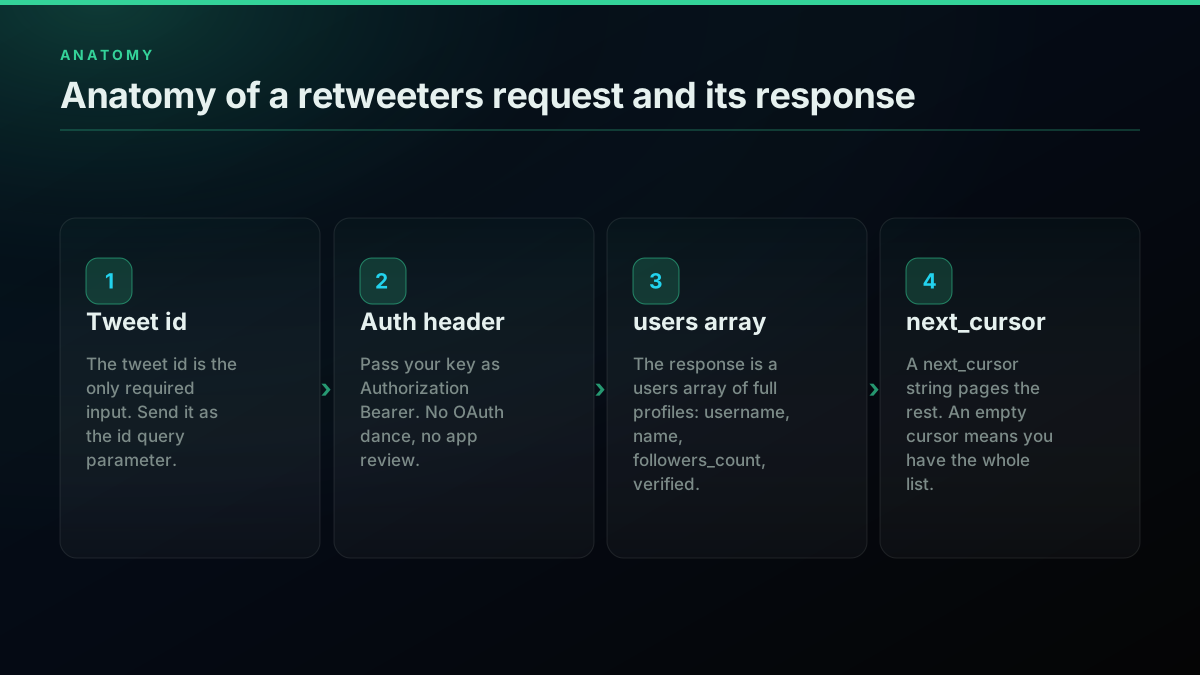
Anatomy of a retweeters request and its response
To run it, put a key in your environment. Sign up in under a minute at the signup page, which issues $0.50 in free credits with no card, then export the key and run:
export TWITTERAPIS_KEY="your_key_here"
python retweeters.py
The read-only nature of this call is the point: fetching who reposted a tweet touches no write scope and needs no elevated permission. That is exactly the access developers keep asking for when they only need to read public engagement data:
Free X/Twitter API Endpoint or scraping for read only?
That question, read-only access without the console overhead, is the whole reason a direct API exists. For the auth and key background in the same style, the how to get a Twitter API key guide walks the official console path, and the Python Twitter API tutorial covers the surrounding read patterns.
How Do You Get the Same Retweeters in Node.js?
Node.js needs no SDK for this either. Node 18 and later ship a global fetch, so a plain GET with a URLSearchParams query string and an Authorization header is the whole integration. The id parameter carries the tweet id exactly as in Python, and the response shape is identical, so the two languages stay in lockstep and you can port a script between them without changing the logic.
// retweeters.mjs , run with: node retweeters.mjs
const API_KEY = process.env.TWITTERAPIS_KEY;
const TWEET_ID = "2074574687942946819";

const params = new URLSearchParams({ id: TWEET_ID });

const res = await fetch(
  `https://api.twitterapis.com/twitter/tweet/retweeters?${params}`,
  { headers: { Authorization: `Bearer ${API_KEY}` } }
);

if (!res.ok) throw new Error(`HTTP ${res.status}`);
const { users } = await res.json();

for (const u of users) {
  console.log(`@${u.username} ${u.followers_count.toLocaleString()} followers ${u.name}`);
}
URLSearchParams handles the URL encoding, and the response destructures straight to a users array where each item exposes username, name, and followers_count at the top level. The global fetch used here is documented in the MDN Fetch API reference, and URLSearchParams in the MDN URLSearchParams reference. The two calls are deliberately the same four steps.
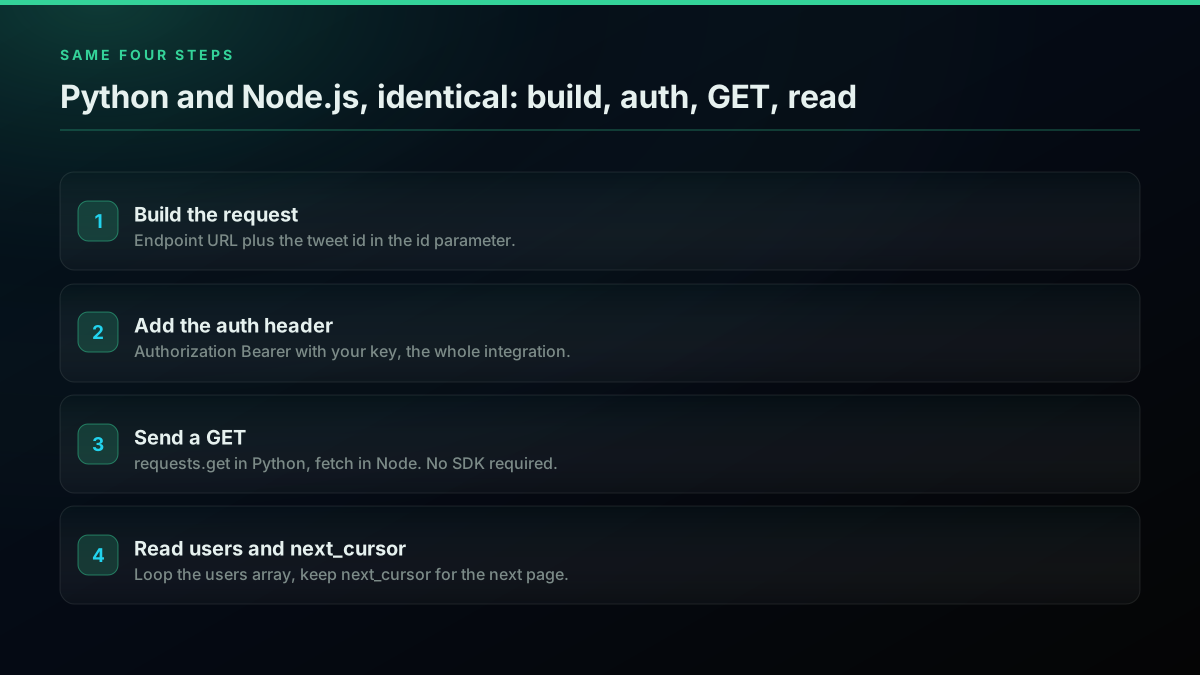
Python and Node.js retweeters call, same four steps
Run it with a key in the environment, using Node's built-in env-file flag so there is nothing to install:
node --env-file=.env retweeters.mjs
The full Node read path, including axios, retries, and concurrency, is covered in the Twitter API Node.js tutorial, which this retweeters guide builds on directly.
How Do You Page the Full Retweeter List with a Cursor?
One call returns a page of accounts, so to collect everyone who reposted a tweet you page with a cursor. Every response carries a next_cursor string, and you pass it back as the cursor parameter on the next request until it comes back empty. Always add a page cap so a runaway loop on a viral tweet cannot burn credits. This is the core loop behind every full retweeter pull, amplifier report, and audience export in this guide, and it is the same cursor pattern the pagination guide covers for other endpoints.
Here is the Python version, collecting every account that reposted a tweet up to a page budget:
import os, requests

API_KEY = os.environ["TWITTERAPIS_KEY"]
BASE = "https://api.twitterapis.com/twitter/tweet/retweeters"

def all_retweeters(tweet_id, max_pages=50):
    users, cursor = [], None
    for _ in range(max_pages):
        params = {"id": tweet_id}
        if cursor:
            params["cursor"] = cursor
        r = requests.get(BASE, params=params,
                         headers={"Authorization": f"Bearer {API_KEY}"}, timeout=15)
        r.raise_for_status()
        data = r.json()
        users.extend(data["users"])
        cursor = data.get("next_cursor")
        if not cursor or not data["users"]:
            break
    return users

reposters = all_retweeters("2074574687942946819")
print(f"Collected {len(reposters)} accounts")
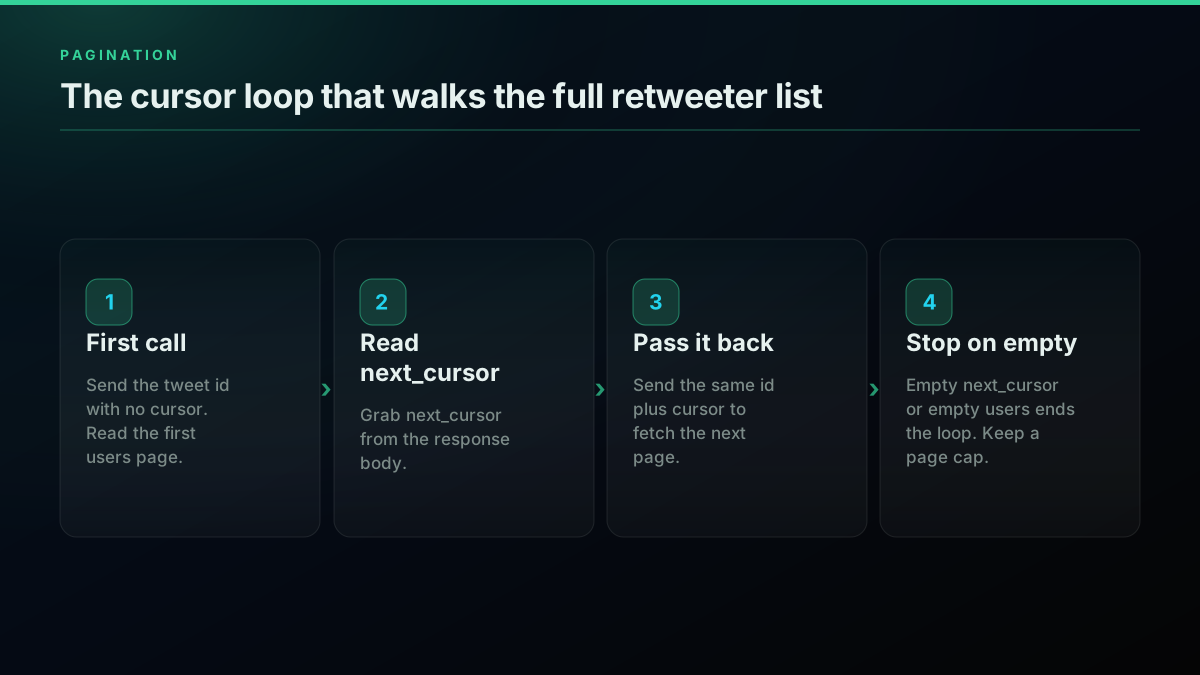
The cursor loop that walks the full retweeter list
The Node.js version is the same loop with fetch:
const API_KEY = process.env.TWITTERAPIS_KEY;
const BASE = "https://api.twitterapis.com/twitter/tweet/retweeters";

async function allRetweeters(tweetId, maxPages = 50) {
  const all = [];
  let cursor = null;
  for (let page = 0; page < maxPages; page++) {
    const params = new URLSearchParams({ id: tweetId });
    if (cursor) params.set("cursor", cursor);

    const res = await fetch(`${BASE}?${params}`, {
      headers: { Authorization: `Bearer ${API_KEY}` },
    });
    if (!res.ok) throw new Error(`HTTP ${res.status}`);
    const data = await res.json();

    all.push(...data.users);
    cursor = data.next_cursor;
    if (!cursor || data.users.length === 0) break;
  }
  return all;
}
Two rules keep a pull safe. Stop when next_cursor is empty or the page returns no accounts, whichever comes first, and cap max_pages as a hard budget so a bug can never page forever. Dedupe as you go by keying accounts on their user id, since the same account can occasionally surface on two pages, and a dict keyed by u["id"] collapses those for free during the loop. For a viral tweet with a large repost count, this loop is where the real cost lives, so pace it and log the running total. The rate limit guide covers the pacing side, and the best practices guide collects the production checklist.
For very large pulls, add checkpointing so a run you interrupt does not start over. Writing each page of accounts to disk as it arrives, along with the last next_cursor you consumed, means a crashed or paused job resumes from the cursor it left off at instead of re-paging from the top and re-spending credits. The same checkpoint file doubles as your dedupe store across restarts. A tweet from a large account can hold tens of thousands of reposters, and at a page of accounts per call that is a long, resumable loop rather than a single request, so treat it like any other batch job: cap it, log it, and make it restartable. If you only need a sample of the reach rather than a full census, cap max_pages low and sort what you have, since the largest amplifiers tend to repost early and land near the top of the first pages anyway.
Start building with TwitterAPIs
$0.0008 a call, about $0.04 per 1,000 tweets at 20 tweets a page. $0.50 free credits. No credit card required.
How Do You Rank Your Top Amplifiers from the Retweeter List?
Ranking your amplifiers is a sort, not a second set of calls, because every user object already carries followers_count. The raw retweet number on a tweet tells you how many accounts reposted it, but not who actually moved reach, and those are very different questions. Sort the collected list by follower count, take the top ten, and you have your real amplifier list from data you already paged. The same list keyed by verification status or account type answers a dozen follow-on questions without another request.
def rank_amplifiers(reposters, top=10):
    ranked = sorted(reposters, key=lambda u: u["followers_count"], reverse=True)
    total_reach = sum(u["followers_count"] for u in reposters)
    for u in ranked[:top]:
        share = u["followers_count"] / total_reach * 100
        print(f'@{u["username"]:20} {u["followers_count"]:>9,}  ({share:4.1f}% of reach)')
    return ranked

rank_amplifiers(reposters)
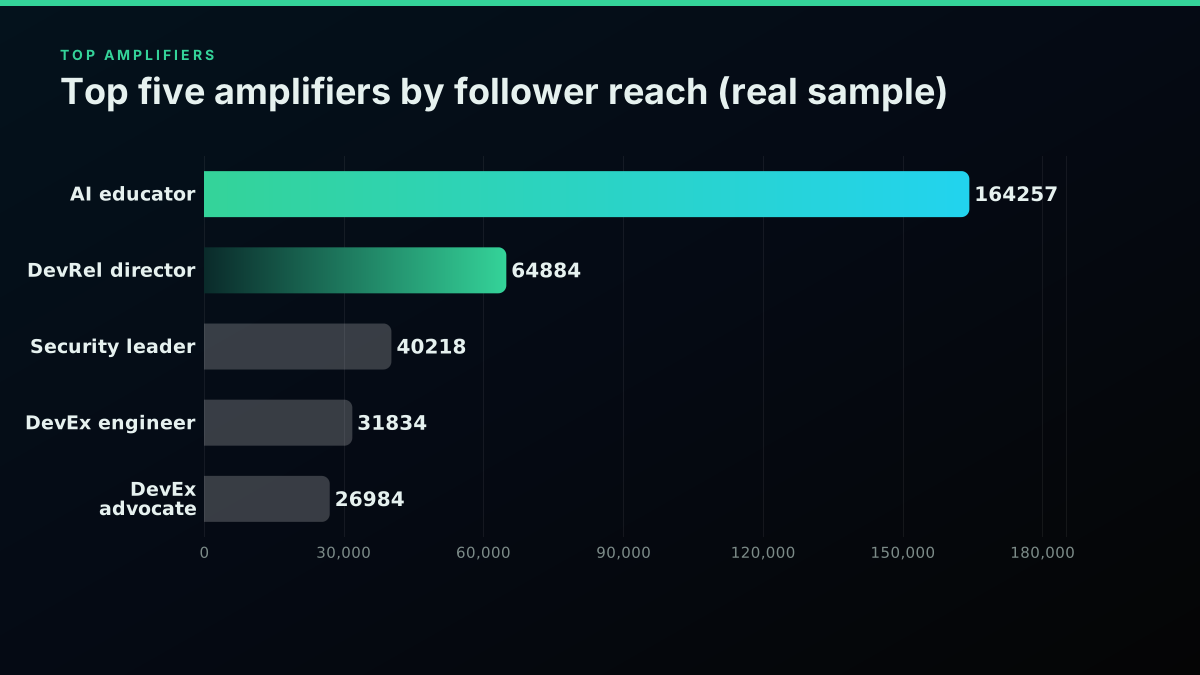
Run against the real 36-account pull from the launch tweet above, this ranking told a clear story. The combined follower reach of all 36 reposters was about 355,000, but it was not evenly spread. The single largest amplifier, an AI-education account, carried 164,257 followers on its own, and the top two accounts together held roughly 65 percent of the total reach. Below them sat a long tail of small accounts. That is the number a raw "36 reposts" count hides completely.
What one live retweeters call actually returned
Charting the top accounts by follower reach makes the concentration obvious: a handful of large amplifiers, then a steep drop. Several of the biggest reposters were developer-relations and security leaders at large tech companies, which is exactly the kind of signal a launch team wants surfaced, and which never appears in an aggregate count.
Top five amplifiers by follower reach in the real sample
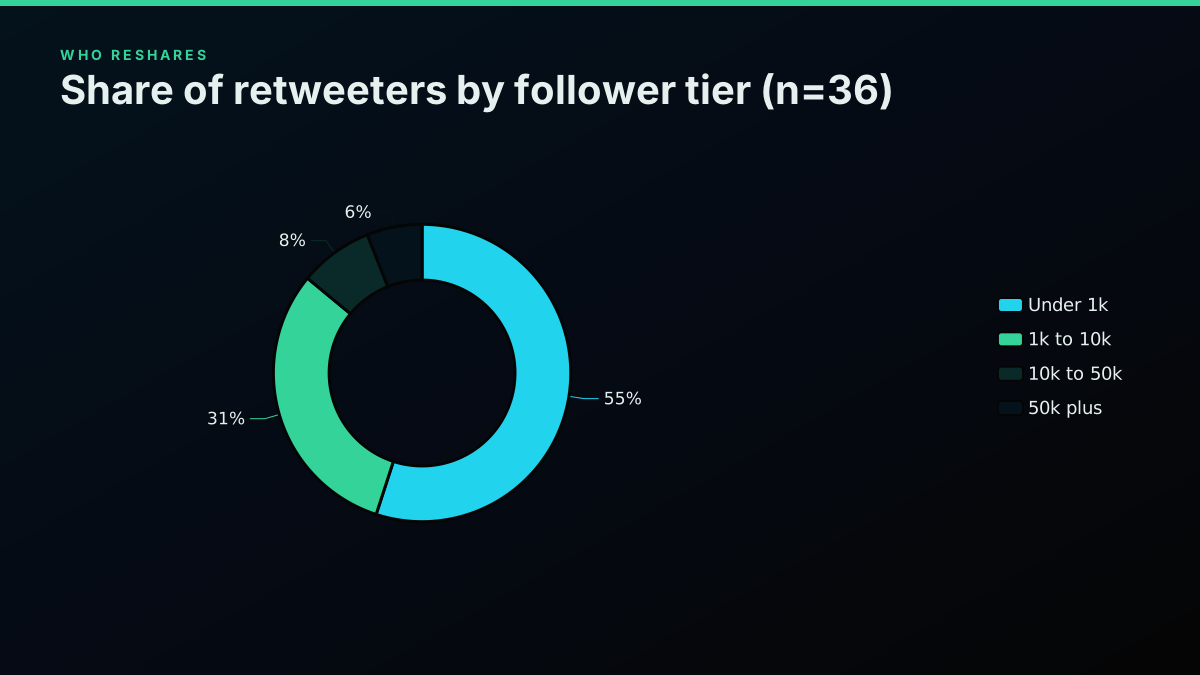
The distribution matters as much as the leaderboard. Of the 36 accounts, about 55 percent had under 1,000 followers, 31 percent sat between 1,000 and 10,000, and only two accounts crossed 50,000. That long tail is normal and healthy, but it means "reach" and "repost count" are not interchangeable, and a report that treats them as equal will mislead. For turning this same account list into sentiment or topic signal, the Twitter sentiment analysis in Python walkthrough starts from exactly this kind of user set, and to pull each amplifier's own recent posts the export Twitter followers guide uses the same paged pattern.
Share of retweeters by follower tier in the sample
A second ranking is worth computing while the list is in memory: reposters who are verified, and reposters whose own bio marks them as relevant to your product. Because each user object carries verified, is_blue_verified, and a description string, you can filter the amplifier list to accounts a launch team actually cares about without another call. Sorting the verified subset by follower count, or keyword-matching the description field for a role or industry, turns a raw repost list into a targeted outreach list in a couple of lines. That is the compounding value of pulling the full profiles instead of just a count: the same data answers "who has reach," "who is verified," and "who is in my space" from one paged pull.
How Do You Export the Retweeter List to CSV?
Exporting the retweeter list to CSV is the step that turns an API pull into something a marketing or research team can actually use, and it is a few lines on top of the pagination loop. Each user object is already flat, so you pick the fields you care about, write one row per account, and hand off a file that opens in any spreadsheet. Doing the export in the same script that pages the list keeps the whole job to one run, and writing the header once means the file is ready for a pivot table or a join the moment it lands.
import csv

def export_retweeters_csv(reposters, path="retweeters.csv"):
    fields = ["username", "name", "followers_count", "following_count", "verified"]
    with open(path, "w", newline="", encoding="utf-8") as f:
        writer = csv.DictWriter(f, fieldnames=fields, extrasaction="ignore")
        writer.writeheader()
        for u in sorted(reposters, key=lambda x: x["followers_count"], reverse=True):
            writer.writerow(u)
    print(f"Wrote {len(reposters)} rows to {path}")

export_retweeters_csv(reposters)
Sorting the rows by follower count before writing means the file opens with your biggest amplifiers at the top, which is usually what a reviewer wants to see first. From here the same data feeds anything downstream: a spreadsheet for a campaign readout, a join against your CRM to see which reposters are already customers, or a filter for verified accounts to build an outreach shortlist. The paged loop and this writer are the whole pipeline, so a scheduled version that re-pulls a tweet's reposters every hour and rewrites the file is a cron job away. The export Twitter followers guide covers the larger follower-list version of this exact job, and the best practices guide has the production notes for running it on a schedule.
How Do You Filter Bots and Low-Quality Retweeters?
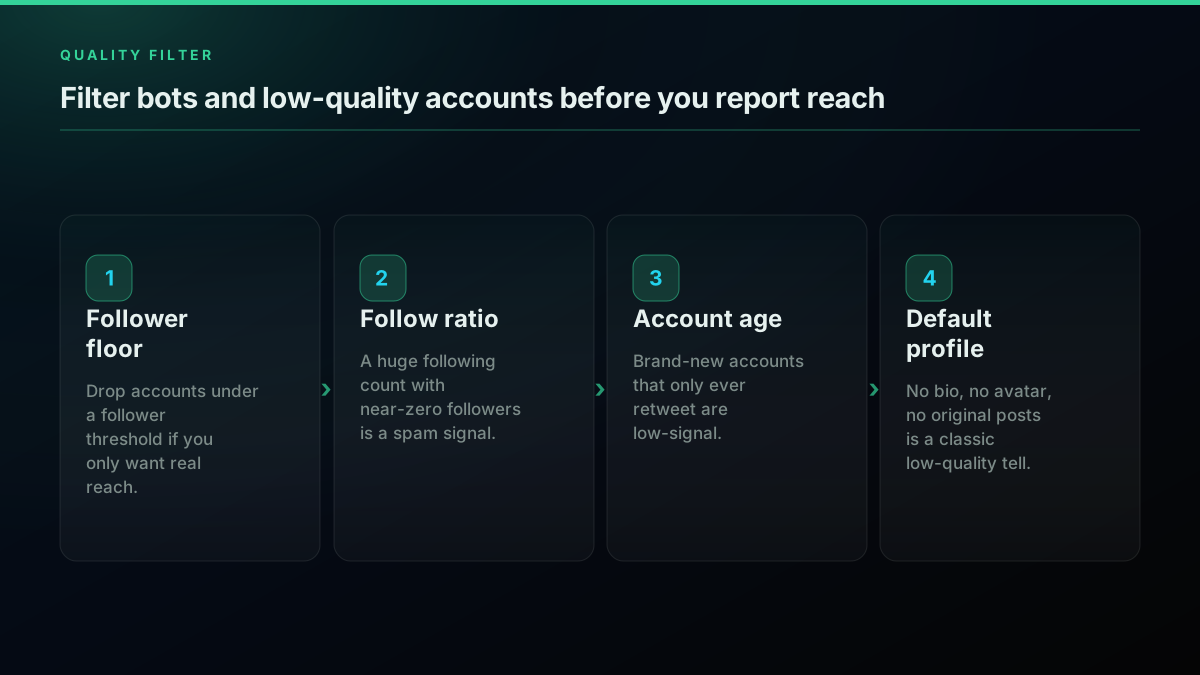
Before you report an amplifier list, filter the accounts that inflate it. Reposts attract engagement pods, giveaway accounts, and outright bots, and every one of them lands in the raw list next to your real audience. The user object gives you enough signal to filter cheaply: a follower floor drops accounts too small to matter for reach, a high following-to-followers ratio flags spam behavior, a brand-new account that only ever retweets is low-signal, and an empty profile with no bio, avatar, or original posts is a classic tell. None of these are perfect on their own, so combine them.
def is_low_quality(u):
    followers = u.get("followers_count", 0)
    following = u.get("following_count", 0)
    ratio = following / max(followers, 1)
    return (
        followers < 30            # too small to add reach
        or ratio > 50             # follows thousands, followed by almost none
        or not u.get("description")  # empty bio
    )

real = [u for u in reposters if not is_low_quality(u)]
print(f"{len(real)} of {len(reposters)} reposters look real")
Filter bots and low-quality accounts before you report reach
Tune the thresholds to your tolerance rather than treating them as fixed law, because a strict filter on a small tweet can drop real supporters, while a loose one on a giveaway repost lets the noise back in. In the 36-account sample, 12 of the accounts, about 33 percent, were verified, which is a useful secondary signal though not a guarantee on its own. For a deeper treatment of separating real accounts from automated ones, the Twitter bot detection guide goes past these heuristics, and the same filtering feeds naturally into a Twitter bot build that acts only on real accounts.
What Does Pulling a Tweet's Retweeters Actually Cost?
A retweeters call is $0.0008, and one call returns a page of accounts, so the cost of a full pull scales with the repost count, not with a flat fee. The 50-repost launch tweet in this guide was about two calls, roughly $0.0016 to pull in full. A viral tweet with 5,000 reposts is on the order of a hundred-plus paged calls, which is still cents, around an estimated $0.11, rather than dollars. New accounts get $0.50 in free credits, enough to pull the retweeters of hundreds of ordinary tweets before you add a card. That is the entire cost model, and it is why an amplifier report stays a script instead of a purchase order.
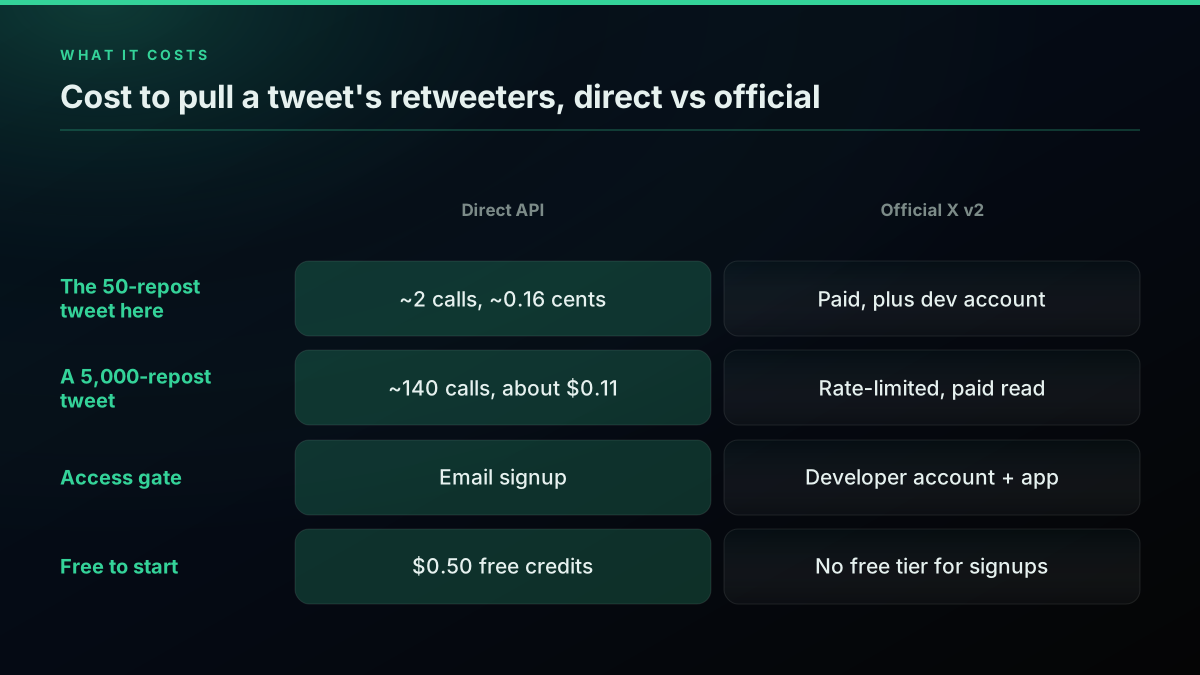
Cost to pull a tweet's retweeters, direct versus official
The official path prices the same job differently, and the gap is what pushes teams to look for a lighter read. The official X API pricing moved to pay-per-use, and user-tied reads sit above the base post-read rate, on top of a developer tier and the setup it requires. Developers feel that math directly:

Dragos Roua
@dragosroua
@yongfook I saw that when I tried the API myself, thought it was a mistake, turns out it wasn't, these are the prices. FWIW, there should be at least some sandbox with hard limits, just to test. Paying for doing 2 searches is just... cheap @elonmusk, you can do better than that!
That frustration is why the pay-as-you-go question comes up constantly in developer forums, where people are explicitly hunting for a metered third-party alternative to the official tiers:
Looking for Third-Party X API Providers with Pay-As-You-Go Pricing
The reason the per-call model matters for this job specifically is that retweeter counts are wildly uneven. Most tweets you will ever analyze have a handful of reposts, so a full pull is a call or two and rounds to nothing. The occasional viral post is the one that would blow a fixed quota, and the metered model charges you for exactly that spike and nothing more, with no monthly commitment sitting idle the rest of the time. That is a very different shape from a tier you pay for whether or not you use it. For a team running amplifier reports across many tweets, the bill tracks the actual repost volume you pulled, which is easy to forecast from the repost counts you can already see on each tweet before you spend a credit.
Model your own volume in the cost calculator before you commit to an architecture, and the Twitter API cost breakdown and cost benchmark posts show how the rates compound at team scale. If you are still deciding whether any paid path is worth it, the is the Twitter API free explainer covers the free-adjacent options, and the x API pricing change post tracks how the tiers shifted. Other providers exist in this space, including twitterapi.io and the Apify Get Retweeters actor, though their per-result and compute billing price a large pull differently from a flat per-call read.
The cheapest pay-as-you-go Twitter API. Try it free.
$0.0008 a call, about $0.04 per 1,000 tweets at 20 tweets a page. $0.50 free credits. No credit card required.
Official X API v2 retweeted_by: Access, Pagination, and Rate Limits
If you need the data to come from X itself, the official route is the v2 endpoint GET /2/tweets/:id/retweeted_by, with the tweet id in the path and a Bearer token in the header. It is a real, supported retweeters lookup that returns up to 100 accounts per page and pages with a pagination_token, so the "you cannot get past the first hundred" belief from older guides is out of date. The real constraints are access and pacing: you need a developer account, an approved app, an OAuth or Bearer token, and a paid tier, and the endpoint sits under a per-15-minute rate limit that a large retweeter list will hit.
import tweepy

client = tweepy.Client(bearer_token=os.environ["X_BEARER_TOKEN"])
resp = client.get_retweeters(
    id="2074574687942946819",
    max_results=100,
    user_fields=["public_metrics", "verified"],
)
for user in resp.data or []:
    print(user.username, user.public_metrics["followers_count"])
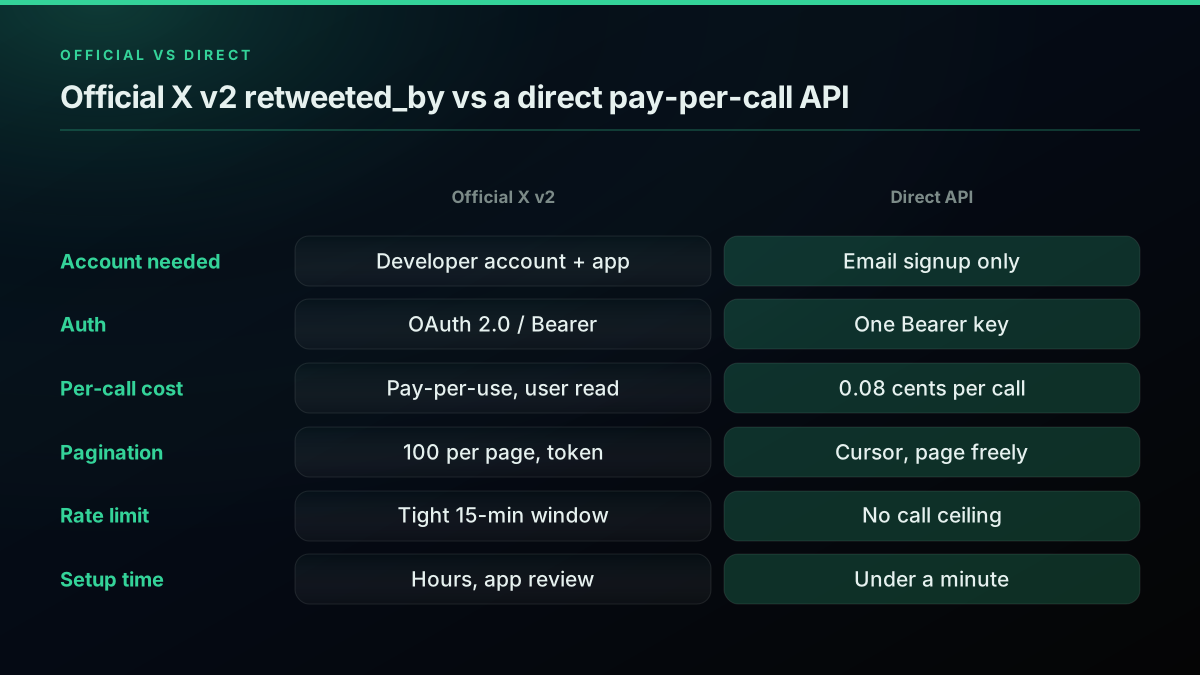
Official X v2 retweeted_by versus a direct pay-per-call API
Note the field differences from the direct call: the official response separates the account list from a meta object that carries the next_token and a result_count, and follower counts arrive nested under public_metrics rather than at the top level, so you request them explicitly with user_fields. Paging uses pagination_token passed back from meta.next_token, where the direct API uses a single cursor string. The mechanics are the same loop, only the field names and the setup around them change, which is the pattern across almost every endpoint when you compare the two surfaces. If you are choosing between them, the deciding factors are rarely the code and almost always access and cost: whether you can accept a developer account and a paid tier, and whether the data needs to come from X directly for a compliance reason.
The get_retweeters method is documented in the Tweepy Client reference, and the endpoint itself in the X API retweets reference. Pacing is the part people underestimate: pulling a large retweeter list past the rate window is a recurring question on the official forum, as in this X developer thread on getting more retweets than the rate limit allows, and the fix is to read the x-rate-limit-remaining and x-rate-limit-reset headers documented in the X API rate limits reference and back off against them. For a full side-by-side of the two surfaces on cost, access, and response shape, read the official X API vs third-party comparison and the decision guide.
For a practitioner walkthrough of pulling and working with Twitter user data in Python, this tutorial builds the pattern against the API step by step:
Watch this Python Twitter data walkthrough on YouTube
Common Retweeter API Mistakes
A handful of mistakes account for most of the wrong numbers in amplifier reports, and every one of them is cheap to avoid once you know it is there. The first is stopping pagination on a short page: a page with fewer results than you expected is not the end of the data, so treat an empty next_cursor as the stop signal and keep the max_pages cap as the hard budget. The second is not deduping across pages, which double counts an account that surfaces twice, so key accounts by user id in a set or dict as you page.
The third and most common mistake is counting retweeters as reach. In the real sample above, 36 reposts did not mean 36 comparable audiences, because two accounts held about 65 percent of the follower reach and most of the rest had under 1,000 followers each. A report that treats every reposter as an equal unit of reach will overstate the small accounts and understate the concentration at the top. The fourth is ignoring the rate limit on the official path: retweeted_by enforces a per-window limit, so pace against the response headers or a large pull will fail halfway with a 429. The last is trusting raw counts without a quality filter, since giveaway and bot accounts land in the list next to your real audience and inflate every number you report.
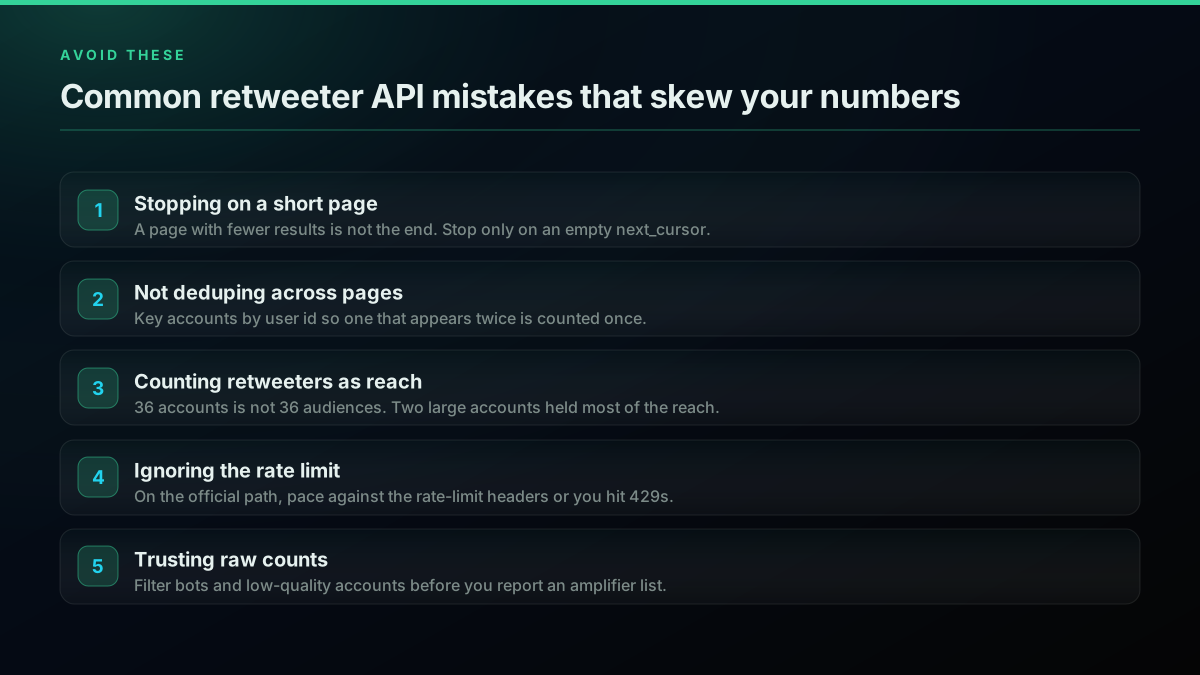
Common retweeter API mistakes that skew your numbers
Where to Go Next
This guide covered the full retweeters workflow: what the endpoint returns, a ten-line quickstart in Python and Node.js, cursor pagination for the complete list, ranking your real amplifiers over live data, filtering bots, the honest per-call cost, and the official v2 route with its access and rate-limit constraints. The links below go deeper on each branch.
- For the cursor mechanics behind the pagination loop, read the Twitter API pagination guide.
- For the complete Node read path with axios, retries, and concurrency, read the Twitter API Node.js tutorial.
- For the Python read patterns in the same style, read the Python Twitter API tutorial.
- For a real-time build on the same loop, read the monitor Twitter mentions guide and the how to scrape tweets guide.
- To expose this read to an assistant, wire it through the MCP server and see the alternatives comparison.
Get Your First Tweet's Retweeters in Under a Minute
The fastest path from this guide to working code is the direct API. Sign up at the signup page, get $0.50 in free credits with no credit card, copy your Bearer key into TWITTERAPIS_KEY, and run this against any tweet id:
import os, requests
r = requests.get(
    "https://api.twitterapis.com/twitter/tweet/retweeters",
    params={"id": "2074574687942946819"},
    headers={"Authorization": f"Bearer {os.environ['TWITTERAPIS_KEY']}"},
)
users = r.json()["users"]
top = sorted(users, key=lambda u: u["followers_count"], reverse=True)[:5]
print("Top amplifiers:", [f'@{u["username"]}' for u in top])
Under a minute from signup to a ranked amplifier list. For per-call rates across every read endpoint, see the pricing page, model your volume in the cost calculator, and grab a key directly from the signup page.
// sources
Where these numbers come from
Each row is a figure in this post and the artefact it was read from. Prices and limits on this platform move, so check the date on the source before you plan against it.
- X API v2 retweets introduction
- Backs the claim that the official retweeted_by endpoint answers the retweeters question and pages cleanly, while sitting behind a developer account, an OAuth app, and paid access.
- X API reference for GET tweets id retweeted_by
- The endpoint reference for the official v2 equivalent shown alongside the runnable direct-path examples.
- Tweepy Client reference
- Documents the get_retweeters method used in the official-API version of the retweeters pull.
- X API rate-limits reference
- The source for the x-rate-limit-remaining and x-rate-limit-reset headers the post says to read when pacing a large retweeter list past a rate window.
- X developer forum thread on pulling more retweets than the rate limit allows
- The forum thread cited as evidence that pacing a large retweeter pull past the window is a recurring problem, not an edge case.
- X API introduction
- Backs the pricing contrast in the cost section: the official path moved to pay-per-use and user-tied reads sit above the base post-read rate, on top of a developer tier.
Frequently Asked Questions
Send the tweet id to a retweeters endpoint. On a pay-per-call API like TwitterAPIs you call GET https://api.twitterapis.com/twitter/tweet/retweeters with id set to the tweet id and an Authorization Bearer header. The response returns a users array of full profiles plus a next_cursor string. Pass that cursor back to page through the rest of the list. On the official X API you call GET /2/tweets/:id/retweeted_by, which needs a developer account, an OAuth app, and paid access.
Yes. The v2 endpoint GET /2/tweets/:id/retweeted_by returns the accounts that reposted a tweet, up to 100 per page, and it pages with a pagination_token. The catch is access and pacing, not the endpoint. You need a developer account, an approved app, an OAuth or Bearer token, and a paid tier, and the endpoint sits under a per-15-minute rate limit that a large retweeter list will hit. The mechanics are the same as a direct API, only the setup and cost differ.
Pull the full retweeter list, then sort the accounts by follower count. Each user object in the response already carries followers_count, so ranking your amplifiers is a sort, not a second set of calls. In a real 50-repost sample the top two accounts held about 65 percent of the combined follower reach, which is why a raw retweet count overstates impact. Sort by followers, take the top ten, and you have your real amplifier list from data you already paged.
For the official X API, yes: every call needs a developer account, an approved app, a payment method, and an OAuth or Bearer token before your first request. For a direct third-party API you do not. With TwitterAPIs you sign up with an email, copy a Bearer key, and call the retweeters endpoint immediately on $0.50 of free credits, with no project, no app review, and no card. The tradeoff is that a direct API reads X data through the provider rather than from X itself.
You can get the full list, but not in a single call. One call returns a page of accounts and a next_cursor. To collect everyone who reposted, you loop: send the tweet id, read the users page, then send the same id with the cursor to fetch the next page, and stop when the cursor comes back empty. Always keep a page cap so a runaway loop cannot spend credits. A viral tweet with thousands of reposts is a series of paged calls, not one request.
On a pay-per-call API each retweeters call is $0.0008, and one call returns a page of accounts. A tweet with 50 reposts is about two calls, so roughly $0.0016 to pull in full. A viral tweet with 5,000 reposts is on the order of a hundred-plus calls, still cents rather than dollars. New accounts get $0.50 in free credits with no card. The official X API prices user-tied reads higher and gates the endpoint behind a paid developer tier.
Retweets, or reposts, have a dedicated endpoint that returns the accounts directly. Quote tweets do not have a single dedicated endpoint the same way. To approximate them you search for the tweet URL as a query, which surfaces posts that quoted it, though the search timeline caps how many results you can page and is not a complete census. For a full audience picture, treat reposters as the exact list and quote tweets as a best-effort search on top.
Check out similar blogs
More guides on the Twitter/X API, scraping, and pricing.
How to Get All Replies to a Tweet via API (2026)
Pull the replies under any tweet with a real 2026 API. Runnable Python and Node.js, cursor pagination, the conversation_id tail sweep for the long tail, nested replies-to-replies, signal-versus-noise filtering over live data, and the honest per-call cost.
How to Search Tweets by Hashtag via API 2026 (Python + Node.js)
Search tweets by hashtag with a real 2026 API in Python and Node.js. Runnable code for the hashtag operator, engagement filters, cursor pagination, deduping retweets, counting authors, and the real per-call cost.

Twitter API Tutorial 2026: The Complete Developer Guide
The 2026 Twitter API tutorial built after the pricing collapse. Auth, endpoints, code, rate limits, real costs, and the alternative when official gets too expensive.

How to Get Image URLs from X Tweets via API in 2026 (Full Resolution, Python and Node)
Pull image URLs out of X tweets with runnable Python and Node.js, then get the full-resolution original instead of the scaled copy the API hands you by default. Measured on 14 live images, with the video poster-frame trap and the per-call cost.
Twitter API Authentication in 2026: OAuth, Bearer Tokens, and Fixing 401
How Twitter (X) API authentication works in 2026: the four credential types, OAuth 1.0a versus OAuth 2.0, generating and using a bearer token, runnable Python and Node.js, and a fix for every 401 Unauthorized and 403 error, plus the one-header alternative.
Twitter API Pagination 2026: How next_token Works (and a Simpler Alternative)
How Twitter API pagination works in 2026. The official next_token loop explained field by field, a simpler single-cursor alternative, runnable Python and Node code, and the real per-call cost of a paginated pull.

Fetch a Full Twitter Thread via API in One Call (2026)
How to pull an entire Twitter thread, the root tweet plus every connected tweet in the chain, in a single API call with the tweet/thread endpoint, instead of walking replies by hand. Live-tested code in curl, Python, and Node.js, with the real per-call cost.

Twitter API Node.js Tutorial 2026: Fetch Tweets in 10 Lines
The 2026 Node.js Twitter API tutorial: fetch tweets in 10 lines with fetch or axios, no SDK and no OAuth dance. Search, profiles, cursor pagination, retries, async, and real per-call costs in working code.