GUIDE
How to Build a Twitter Bot in 2026: The Complete Guide
Build a Twitter bot in 2026 with no-code or Python. Working Tweepy code, auth explained, and the cheap path: $0.0008 a call, 20 tweets a page.
Per our own spec, 70 of 123 endpoints bill $0.0008, 26 are free, and 27 sit between $0.0016 and $0.01. Every price ships inside our published OpenAPI document as an x-cost-usd field, so any figure in this post can be checked against the contract that bills it rather than taken on trust.

Type "how to make a Twitter bot" into a search box and most of the first page walks you through a platform that stopped existing a while back. The tutorials hand over a free API key, send you to a developer.twitter.com console that has long since moved, and take for granted rate limits that were pulled years back. The dates expose them. The free public tier shut in February 2023, the subscription plans that took its place were scrapped in February 2026, and a bot you assemble today has next to nothing in common with the guides still ranking from the 2015-through-2022 stretch.
TL;DR: Every Twitter bot boils down to one four-beat routine: listen, decide, act, repeat. Three routes reach it, no-code (Make.com or Zapier, about 20 minutes, simple bots only), Python (Tweepy or bare
requests, total control), or Node.js. The thing that sets 2026 apart is not the coding, it is the data bill. The official X API charges $0.005 per read, so any bot reading in volume gets pricey in a hurry (a million reads comes to $5,000). The cheaper route is a relay provider: TwitterAPIs reads tweets at $0.04 per 1,000, carrying no monthly minimum and no X developer account to clear first. What follows is runnable code for both routes, the auth you truly need, retry handling, where to keep the bot alive, and how to stay within the rules.
Treat this as the edition matched to how the platform behaves today. A Twitter bot (an X bot, after the renaming) is a program that converses with X by itself: it fetches posts, runs rules or a model to pick an action, then posts, replies, likes, or follows. The loop, the cost math, and each code sample here are accurate to June 2026.
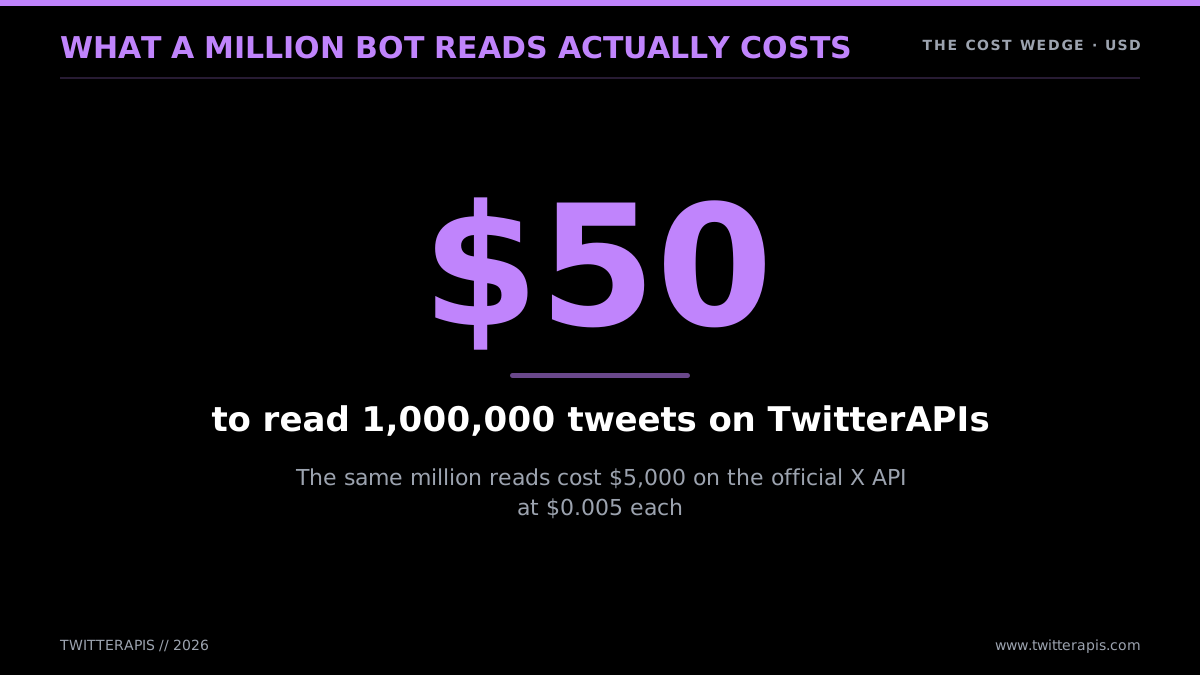
A million bot reads, costed two ways
Cost leads here deliberately, because the loudest gripe among bot builders these days is not syntax or auth, it is what it costs to reach the data in the first place. The people building say so plainly.
To run a bot, you mostly use twitter API, cause it's the easiest way. Twitter paywalled it, so you can not longer use it for free. It's 100% twitter's fault
@FRAMER_FRAMER, source (https://twitter.com/FRAMER_FRAMER/status/2056135855069110348)
Start With the Bill: Why Building Bots Changed in 2026
Ahead of any code, lock this in: getting at the data costs money now, and the official rate is high enough to wreck a sloppy design. X removed the free public API tier for new developers in February 2023. Paid subscription tiers came next (Basic at $100 a month, later $200, Pro at $5,000 a month) (X API pricing) and lasted until February 2026, when the company switched to metered, pay-per-use billing. Today every official call has a price tag: $0.005 to read a post, $0.015 to publish one, $0.20 for a post carrying a URL, $0.015 to fire a DM (X API pricing). There is no general free reading tier anywhere. That one shift is what makes the old tutorials misleading, they came out when reading was free.
Put that into bot terms. Say you spin up a brand-monitor that hunts every mention of your product across X. A mid-sized brand could pull in 50,000 mentions across a month. At $0.005 a read on the official API (X API pricing), that runs an estimated $250 a month merely to fetch the data, ahead of doing anything with it. Scale it into an agency tracking ten brands and you reach half a million reads, an estimated $2,500 a month. The numbers compound because monitoring, by its nature, reads a great deal.
There is a hard ceiling on top of the per-call charge. The official metered model limits you to 3 million reads in a monthly billing cycle. Go past it and your account flips to Enterprise, which X does not publish a price for and which goes through its sales team. For any bot running real monitoring or feeding an AI loop, 3 million reads vanishes quickly. A single agent trained on a busy keyword can burn through it alone.
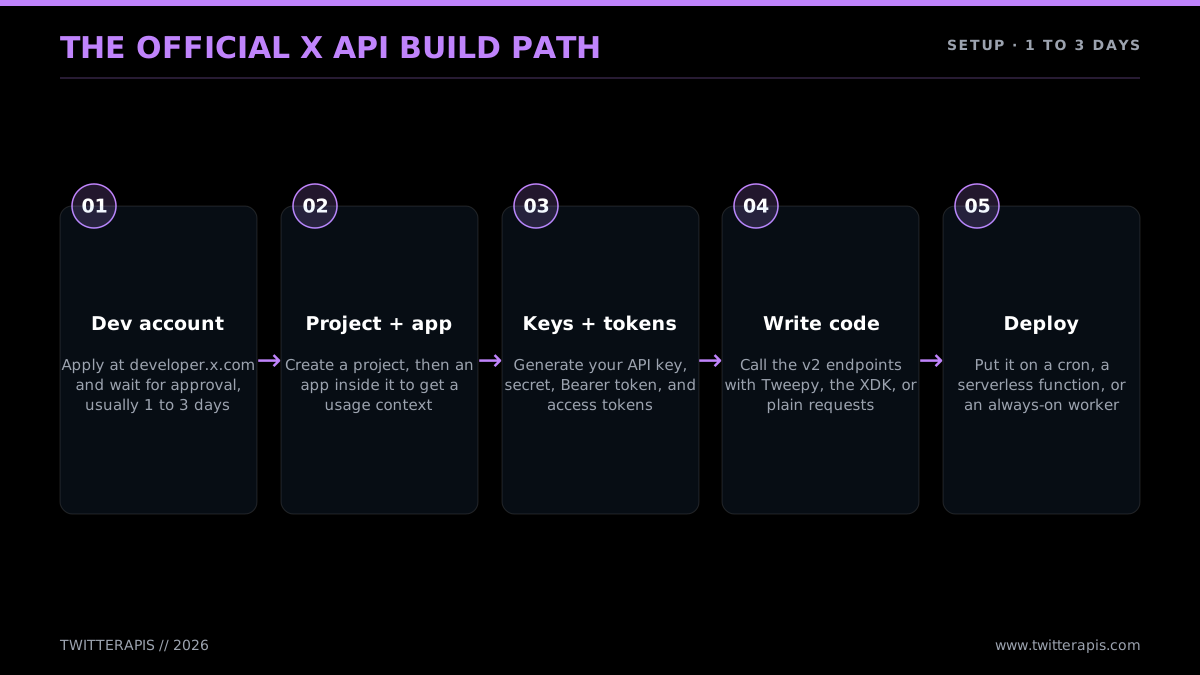
The official path, signup through deploy
There is also an onboarding toll piled onto the data bill. The official lane demands a developer account, a project, an app, a batch of generated keys, and a payment method on file before your very first call returns a thing. New accounts can languish in review for a day or longer in the unlucky cases. None of it is genuinely difficult, but it is friction, and it arrives before you have written a scrap of bot logic. If you take this route, the dedicated how to get a Twitter API key walkthrough handles the console screens one by one.
The cheaper lane clears both hurdles at once. A relay API like TwitterAPIs runs its own pipeline into X data and delivers it over a single REST surface. Reads cost $0.0008 per call, and each read call hands back around 20 tweets, which lands at roughly $0.04 per 1,000 tweets, so an estimated $40 per million versus $5,000 on the official API. No 3-million wall exists here; the only cap is your prepaid balance. And there is no developer account: sign up with an email, copy a Bearer token, and begin calling. For how the rates pile up at scale, the Twitter API cost guide and the provider-by-provider cheapest Twitter API ranking both dig in.
Seeing the per-call math, not just the per-million headline, helps. A read call runs $0.0008 and brings back about 20 tweets, which is where the $0.04-per-1,000 number originates. The free credit handed out at signup, $0.50, covers roughly 625 read calls, or about 12,500 tweets, plenty to build, test, and prove out a real bot before any of your own money goes in. Simple write actions are billed at $0.0008 per call, the same as reads, and posting a tweet at $0.0016 per call. For a bot that mostly reads, that leaves your testing budget effectively free and your steady-state cost driven almost entirely by read volume, the writes amount to noise until you are posting at scale.
That read gap registers more easily as a bar chart than as a sentence.
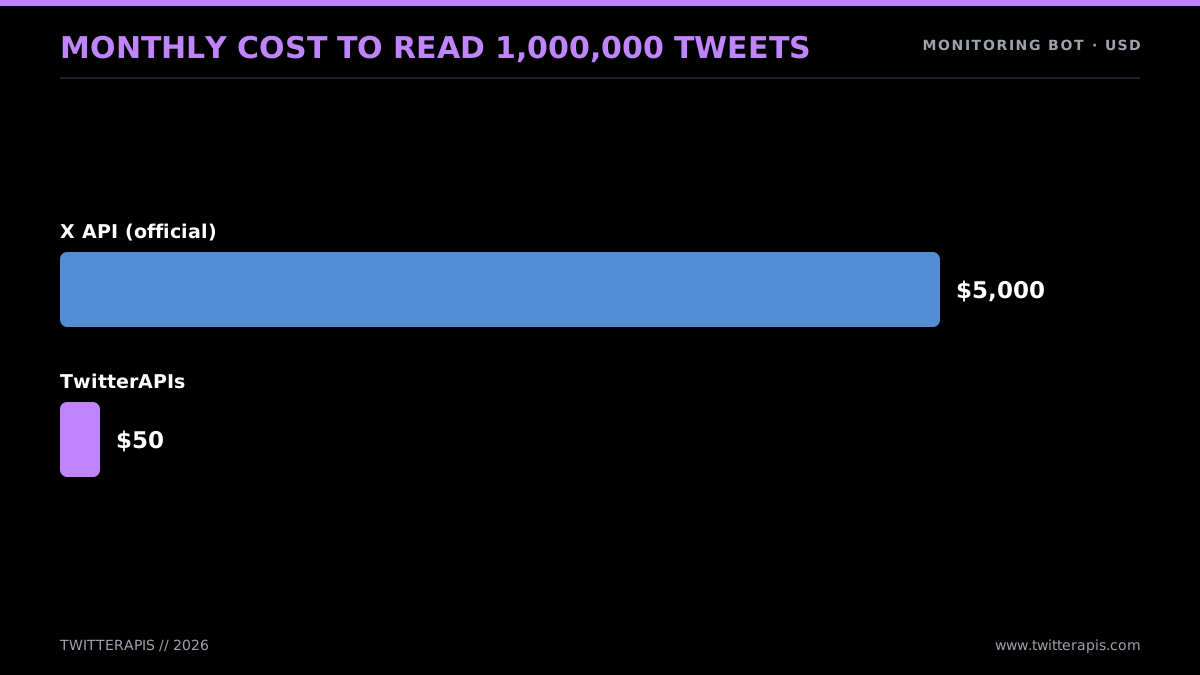
A month of a million tweets, compared
The people running into this wall are not quiet about it. Walk through any beginner programming community and the recurring question is some flavor of "how do I write a bot without paying for the Basic account."
Learning to write a bot for twitter without paying for basic account
Knowing why the price climbed is useful, because it signals whether the workaround lasts. X walled off the API in 2023 for two reasons: to shut down free-tier abuse (scraper farms, spam rings, fake-engagement networks) and to start a revenue stream. The pricing history lives in X's own developer platform announcements, and the policy thinking threads through the broader X automation rules. What a builder should take away: the steep price is a chosen position, not a bug due to revert, so building around read cost is a standing discipline rather than a temporary fix. A bot designed on the premise that reads are expensive will still be correct two years out.
So the planning rule is straightforward. Nail down your read volume before anything else. A write-only bot posting a handful of times a day pays negligible per-call cost on the official API, and the developer-account headache is a one-off. A bot reading at any genuine volume (monitoring, AI feeds, lead detection) is ruled by the data layer, where a per-1,000-tweet provider sits 10 to 100 times under official. Whether the API qualifies as "free" at all gets answered in full in is the Twitter API free; the brief answer is no, and the way out is cheap reads.
How a Bot Actually Works: One Loop, Four Shapes
Peel off the libraries and a Twitter bot is a single idea on repeat: a program that operates on X with no human tapping the keys. It logs in as an account (its own, or one it is allowed to run), then runs through four beats. It takes in a signal (a timer going off, a new mention, a keyword turning up in search). It works out what to do, by rule or by model. It acts, whether posting, replying, liking, retweeting, or following. Then around it goes again. That is the whole idea. Everything beyond it is detail. And yes, building one still pays in 2026; all that shifted is that data now costs money, so the smart move is to rein in that cost from the first line.
The "still worth it" question is fair, because the economics turned over. Pre-2023 a bot cost nothing past its server. With a free API, people pushed out thousands of toys: hourly tweeters, quote bots, art bots, weather bots. Most went quiet once the free tier closed. What carries on in 2026 are bots with a purpose that pays the data bill: a support reply bot, a brand-alert bot, an agent that reads a feed and reacts, a distribution bot pumping out a publishing pipeline's output.
The honest read is that the bar went up. A bot now has to justify its invoice. That suits serious builders, since it cleared out the clutter, and since the cost problem has a tidy fix. Reading data is the costly part, and reading data is precisely what a cheap relay API solves. Reads that would total an estimated $5,000 a month on the official API come to $50 on a per-1,000-tweet provider. The build does not change. Only the bill does.
The categories that made it through the reset all earn their place. A few of them cover most of what ships today:
- Support and acknowledgement. A bot that picks up every brand mention, replies "we are on it," and passes the thread to a person. The reply runs itself; the fix does not. Light on reads (poll mentions) and light on writes (one reply apiece), so it stays cheap on either lane.
- Brand and competitor watch. A bot that sweeps for any mention of your product, your rivals, or a category term, and alerts a team channel when it counts. Heavy on reads by design, which is why scaled-up teams mind the read price.
- Intent and lead detection. A bot that tracks buying signals (folks complaining about a competitor, requesting a recommendation, flagging a relevant event) and drops them into a CRM. Read-heavy, and worth enough to warrant the spend when reads are cheap.
- Content distribution. A bot that ships a pipeline's output: new posts, new videos, new releases. Heavy on writes, light on reads, cheap.
- AI agents. The fastest-climbing category. A bot that feeds X data into a language model and acts on whatever returns, a self-running account that reads, reasons, and posts. The heaviest read volume of any kind, and therefore the most exposed to data cost.
If your idea falls into one of those, go build it, and your one real choice is holding the data layer cheap. If your idea is a gimmick that reads heavily with no commercial payoff, the 2026 math works against you, which is exactly why the toy era closed.
The reassuring part for first-timers is that the build itself is not the tough part. People wondering how hard it is tend to overrate it, as this beginner thread shows.
How hard would a Twitter bot be to make?
Here is that loop, free of any language or platform:
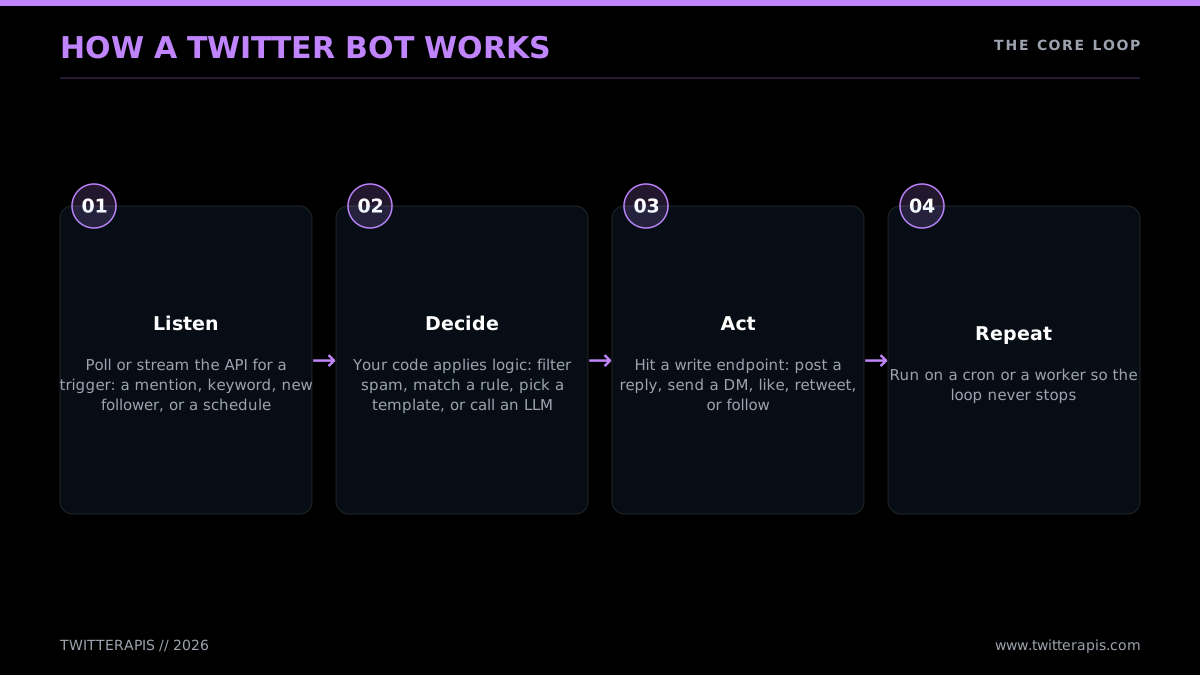
The one loop beneath every bot
- Listen. Something sets it off: a cron tick, a new mention, a keyword in search, a fresh RSS item, an incoming webhook.
- Decide. Your code applies its rules. A scheduled bot pulls the next post off the queue. A reply bot judges whether a mention deserves an answer and writes one. An AI bot sends the input to a model and reads what comes back.
- Act. Your code hits the API to post, reply, like, retweet, or follow.
- Repeat. The script cycles in place, or exits and is fired again on the next schedule tick.
Code those four beats and you have a bot. The libraries (Tweepy, the X SDK, a relay-API client) merely make each beat shorter. If you want the underlying interface nailed down first, the Twitter API tutorial for 2026 covers every endpoint family the loop above reaches.
Thinking in terms of the loop rather than some tutorial's exact code matters because the loop is the piece that holds still while everything around it churns. Endpoints get renamed, auth picks up a new method, pricing swings from free to subscription to metered, and whichever library you favor goes in and out of style. None of that reaches the loop. A bot from 2015 and one from 2026 both listen, decide, act, and repeat. So when you hit an old guide, and you will, since page one skews old, split the loop logic (almost always still good) from the scaffolding around it (the URLs, the price assumptions, the auth screens, almost always outdated). The job of this guide is to wrap current detail around that unchanging loop.
A neat way to fix the loop in your head is to see it as four design questions. What rouses the bot (the trigger)? What does it examine once awake (the read)? What rule or model selects the action (the logic)? What does it carry out (the write)? Answer those four and the bot is completely specified. The code is just those answers rendered in Python or JavaScript.
A terminology note, since it catches people out. Twitter turned into X in 2023, and the official API is the "X API" today. Yet the search term, the libraries, and most public chatter still lean heavily on "Twitter bot" and "Twitter API." This guide uses both. Take "X API" to mean "the official API the company runs," and "Twitter bot" to mean "the thing you are building."
Four archetypes that cover almost everything
Almost every bot on X reduces to one of four shapes: the scheduled poster, the reply/mention bot, the search/monitor bot, and the AI agent. What separates them is what wakes them, which calls they depend on, the auth they require, and how much effort they take to ship. Settling on the shape up front keeps you from over-building, since a scheduled poster wants none of the listening machinery a monitor needs.
From simplest to most demanding:
- Scheduled poster. Puts out content on a timer: a daily quote, an hourly stat, a "new post" announcement pulled from an RSS feed. Write-only, with no listening loop. The simplest bot to ship and the perfect first project.
- Reply / mention bot. Looks for mentions of an account and answers them: a support acknowledgement, a "thanks for the follow" responder, a command bot that acts when you @-mention it with a keyword. Wants read (to spot mentions) plus write (to reply).
- Search / monitor bot. Combs all of X for keywords, hashtags, or topics and responds: alerting, logging to a database, liking, or replying. Brand watch, lead detection, competitor tracking. Read-heavy, and the type where data cost stings most, because monitoring means a lot of reading.
- AI agent. Takes an input (a mention, a feed, a trend), feeds it to a language model, and acts on the result: an AI reply bot, a thread summarizer, a generator. Read plus write with a model call slotted in the middle. The most complex, with the highest ceiling.
The grid below pairs each shape with its primary call, the auth it requires, and rough build effort.
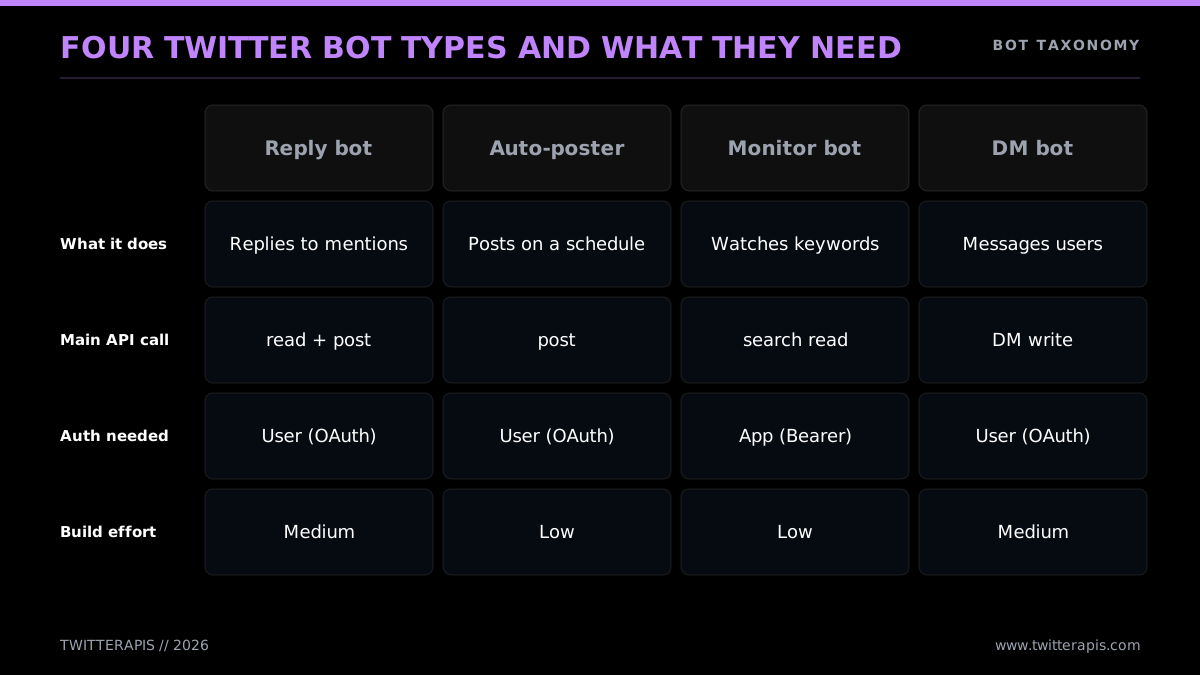
Each of the four shapes and its requirements
Notice the trajectory: both effort and cost climb as you shift from posting toward monitoring. A scheduled poster sends a few writes a day. A monitor can send tens of thousands of reads a day. That spread is the entire reason this guide keeps returning to read pricing. If your bot is a monitor or an agent, the data layer is your largest recurring cost, and the one most worth tuning before you write a thing.
A second division is worth grasping early: read bots versus write bots. Reading (search, fetch mentions, look up a profile) gets by on the simplest auth, an app-level token. Writing (post, reply, like, follow) acts for an account and calls for user-context auth. A scheduled poster only writes but acts as one fixed account, so its auth is simple. A monitor only reads, so its auth is simple as well. The reply and AI bots do both, and that is where auth gets interesting. The authentication section deals with all of it.
The question asked most often here, over and over on the X developer community forum, is a version of the alexallsides thread: a builder wants a bot that catches mentions and replies in real time, and asks which plan covers that. The answer is that you need read access (for the mentions) and write access (for the reply), and the cheapest path to both is the relay lane, where a single Bearer token handles reads while writes carry the acting account's own session. The plan argument that dominated 2024 is largely moot today, with the subscription plans gone; it is a per-call question now, and per-call is exactly where a cheaper provider comes out ahead.
To ground the four, here is each one as an actual project, with the call doing the heavy lifting:
- Scheduled poster in practice. You hold a list of posts (a file, a Google Sheet, a database), and a timer kicks off the script. Each run grabs the next item and calls the post-create endpoint. The "tweets a fact every hour" accounts are exactly this. Its only state is "which post comes next," and its only call is a write. Since it reads nothing, the data bill is tiny: 24 posts a day works out to 720 writes a month, around an estimated $7 on the official API.
- Reply/mention bot in practice. The script checks for posts tagging the bot's handle, skips the ones already answered, and publishes a reply. A support team runs this to acknowledge every customer mention inside a minute, then hand off to a human. The read side stays light (a poll every couple of minutes); the write side grows with how often people tag you.
- Search/monitor bot in practice. The script runs a query (a brand name, a hashtag, a competitor handle) on a loop and reacts to each fresh hit: logging it, firing a Slack alert, liking it, or replying. This is the type most apt to shock you on the invoice, because search reads grow in step with how much conversation your query matches. A busy keyword can hand back thousands of results in an hour, and on the official API every one of them is a billed read.
- AI agent in practice. The script takes an input (a mention, a trend, a feed), passes the text to a model with a prompt, and publishes the output. An AI reply bot fields niche questions; a summarizer compresses long threads on request; a content bot spins a news item into a take. It is a reply or monitor bot with a model call in the "decide" beat, so it carries the read cost of whatever feeds it.
This taxonomy pays off because it tells you, before a line of code, which costs you are in for. Posting is cheap. Listening is cheap. Searching at scale, on the official API, is not. That one fact should drive your design: tighten queries, cache whatever you can, and choose a data source priced for the volume your bot really reads.
Three Ways to Build It: No-Code, Python, Node
Three realistic build lanes exist in 2026, and the right one follows how much custom logic your bot needs. No-code tools (Make.com, Zapier) shine for simple trigger-action bots and ask for zero programming. Python is the go-to whenever there is real logic, an AI step, or volume involved, since it carries the deepest set of Twitter libraries and the cleanest syntax for the loop. Node.js is the strong choice once your stack already runs on JavaScript. All three wind up hitting the same API in the end; what varies is how much control and effort each one asks of you.
The honest framing: no-code is no toy, but it has a ceiling. It excels at "push this RSS feed to X" or "retweet anything carrying this hashtag." The instant you need branching logic, a model call, a database lookup, or volume, you outgrow it and rewrite in code. So if you sense your bot will grow more complex, starting in Python spares you a migration down the line.
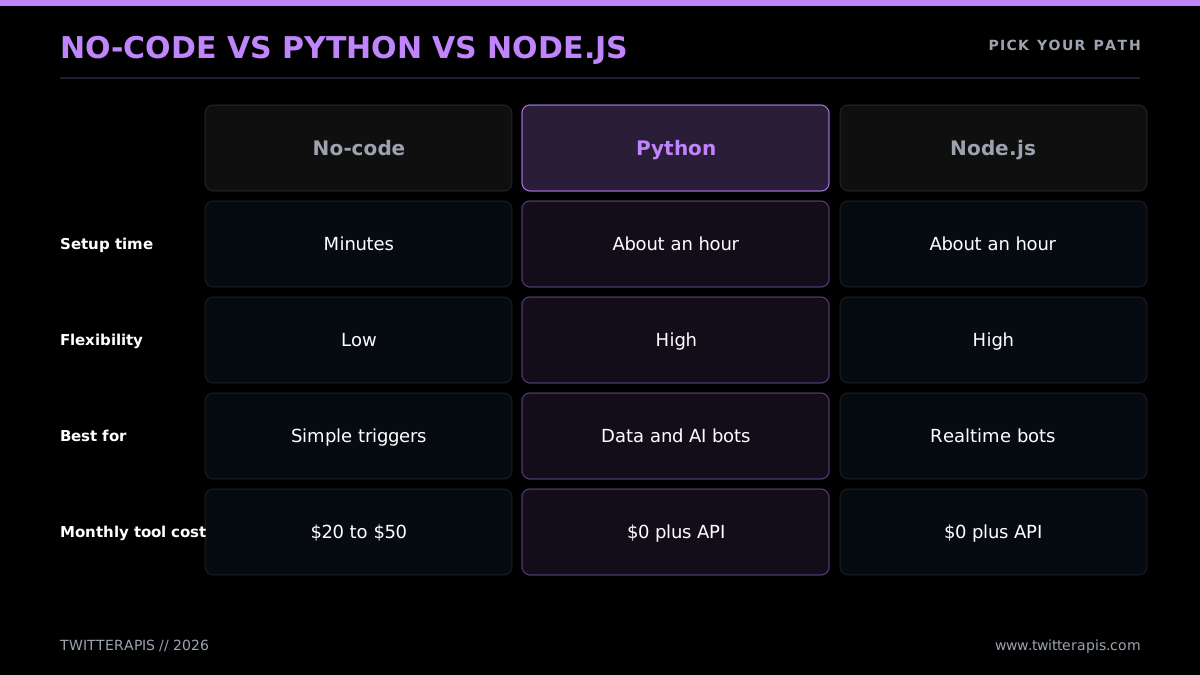
Fit the lane to the bot
The no-code lane
A no-code platform connects an X account to a trigger and an action. Put in Make.com or Zapier terms:
- Start a scenario (Make) or a Zap (Zapier).
- Drop in a trigger module: a schedule, a fresh RSS item, a Google Sheet row, a webhook.
- Drop in an X action module: create a post, reply, retweet.
- Link your X account through OAuth when it asks.
- Feed the trigger data into the post template.
- Flip it on.
That gets you a working bot in under thirty minutes with no code. The platform takes care of the API calls and the OAuth handshake. Your cost is the platform subscription plus whatever the X account's posting runs. The constraint is that you operate inside the platform's modules; dipping into custom logic or hitting an arbitrary API mid-flow means upgrading tiers and wrestling the UI. Make and Zapier are the two mainstream platforms here, and both surface the same trigger-action model; Zapier's X integration documents the module set.
There is a subtler no-code wall worth naming: these platforms call the official X API beneath the surface, so they take on its cost and access tier. A no-code monitor reading heavily can rack up the same data bill a coded one would, only with less visibility for you. For write-only scheduled bots that read nothing, that does not matter. For anything reading at volume, no-code does not sidestep the cost problem; it merely conceals it.
No-code is the right opening move when your bot is truly simple, you would rather not run hosting, and your read volume sits close to zero. For everything else, code wins, both for the control and for the option of aiming your reads at a cheaper source.
A word on AI-assisted building, since the most common 2026 question is whether you even type the code yourself. You need not begin from an empty file. An AI assistant will turn out a working Tweepy or requests bot from a plain-language description in seconds, and that is a fair way to start. The "I built a Twitter bot with ChatGPT and zero programming experience" write-ups are genuine; the approach works. What the AI will not handle is deciding your read volume, wiring in real credentials safely, covering the rate-limit and error paths the happy path glosses over, or picking where the bot runs. Treat the generated code as a rough draft of the loop, then layer the auth, cost, and hosting decisions from this guide on top. That division of labor (the AI handles the loop, the engineering judgment is yours) is where bot-building honestly stands in 2026.
The Python lane
Python has been the default Twitter-bot language for ten years, for two reasons. First, library depth: Tweepy is far and away the most-used Twitter library, and plain requests covers the rest. Second, AI tooling: if your bot needs a model, every major LLM ships a first-class Python SDK. The loop, listen-decide-act, fits into a few dozen lines of Python. The full language-specific walkthrough lives in the Python Twitter API tutorial; the remainder of this guide leans Python for the same reasons.
If you would sooner start from working code, Tweepy keeps runnable examples in its GitHub (tweepy/tweepy) repository, and a GitHub search for "twitter bot" turns up hundreds of open-source starters across Python and Node. Skim a couple before you build; plenty predate the paid API and will steer you wrong on cost, though the loop structure they show still holds. The code below targets the 2026 reality, so lean on it as the reference and treat the older repos as structure only.
The Node.js lane
If your stack already runs JavaScript, Node.js is a solid pick. The API is HTTP, so fetch works out of the box, and the community libraries have matured. Node does well for bots living inside an existing web app or handling webhooks event-style. Versus Python, the trade is a thinner Twitter-specific library scene and a slightly less developed AI-SDK story, though both gaps keep narrowing.
The contrarian path worth a mention: some builders bypass the API altogether and pilot a real browser with Selenium or Playwright, automating the X web interface as though a person were clicking. That avoids API cost but swaps it for nonstop upkeep against X's frontend changes and a steeper suspension risk.
Twitter a.k.a X bot
For most builders the browser route is shakier than it appears. A relay API gives you the cost relief that drives people toward Selenium, minus the chore of scraping a live frontend. Plenty of builders test both before settling, like this one who ran the same bot through Selenium and then Tweepy.

will
@W8pars
Day 50 #100DaysOfCode Today I built a twitter bot! I used Selenium as a webdriver to handle the bot's actions (made it run a speedtest to complain about slow speeds). I also decided to try out Tweepy API to handle the same actions. #python #programming #CodeNewbie
The sections ahead build the bot in Python and show both the official-API and the relay-API version of every call.
Start building with TwitterAPIs
$0.0008 a call, about $0.04 per 1,000 tweets at 20 tweets a page. $0.50 free credits. No credit card required.
From Fifteen Lines to an AI Agent: Writing the Bot
A reply bot makes the ideal second project (after a scheduled poster) because it exercises the entire loop: read to surface mentions, decide which deserve an answer, write a reply. The build is brief. You install a library, load credentials, poll for new mentions on a timer, keep track of the ones you have already handled so you never reply twice, and post a response to each new one. Below is the full, runnable code three ways: Tweepy against the official API, plain requests against the official API, and plain requests against the TwitterAPIs relay API.
Warm-up: a scheduled poster in fifteen lines
Ahead of the reply bot, here is the most basic complete bot, because it is the right first thing to ship and it confirms your credentials work. A scheduled poster reads nothing and posts a single item per run. Set it on a timer (the hosting section covers GitHub Actions cron) and it tweets on schedule indefinitely.
import os
import json
import tweepy

bot = tweepy.Client(
    consumer_key=os.environ["X_API_KEY"],
    consumer_secret=os.environ["X_API_SECRET"],
    access_token=os.environ["X_ACCESS_TOKEN"],
    access_token_secret=os.environ["X_ACCESS_SECRET"],
)

# queue.json holds a list of strings; cursor.txt remembers our place
with open("queue.json") as fh:
    queue = json.load(fh)

try:
    with open("cursor.txt") as fh:
        pos = int(fh.read().strip())
except (FileNotFoundError, ValueError):
    pos = 0

bot.create_tweet(text=queue[pos % len(queue)])

with open("cursor.txt", "w") as fh:
    fh.write(str((pos + 1) % len(queue)))
That is a working bot. It loads a queue of posts, sends the next one, and moves the cursor forward so the run after it posts a different item. Since nothing is read, the data bill is the write alone ($0.015 per post on the official API). User-context credentials are all it requires, because it acts as one fixed account. Ship it, watch it post, then graduate to the reply bot, which bolts on the listening loop.
First the design, then that code. A reply bot must never respond to the same mention twice. The usual trick is to store the ID of the most recent mention you have processed (the since_id) and pull only mentions newer than it on each poll. Save that ID to a file or database so a restart does not reply across the whole history again.
Setup
Install the library and put your credentials in environment variables. Never bake keys into the script.
pip install tweepy requests
export X_BEARER_TOKEN="your_bearer_token"
export X_API_KEY="your_consumer_key"
export X_API_SECRET="your_consumer_secret"
export X_ACCESS_TOKEN="your_access_token"
export X_ACCESS_SECRET="your_access_secret"
Because a reply bot writes, it needs user-context credentials (the consumer key/secret plus the access token/secret), not the read-only Bearer Token alone. The authentication section explains the reason.
Reply bot: Tweepy (official API)
Tweepy wraps the official X API and handles the OAuth signing on your behalf. This is the tightest official-API version.
import os
import time
import tweepy

# One client carries both the app token (reads) and the user context (writes)
bot = tweepy.Client(
    bearer_token=os.environ["X_BEARER_TOKEN"],
    consumer_key=os.environ["X_API_KEY"],
    consumer_secret=os.environ["X_API_SECRET"],
    access_token=os.environ["X_ACCESS_TOKEN"],
    access_token_secret=os.environ["X_ACCESS_SECRET"],
)

# Look up our own user id a single time
MY_ID = bot.get_me().data.id

CURSOR_PATH = "cursor_id.txt"


def read_cursor():
    try:
        with open(CURSOR_PATH) as fh:
            return int(fh.read().strip())
    except (FileNotFoundError, ValueError):
        return None


def write_cursor(value):
    with open(CURSOR_PATH, "w") as fh:
        fh.write(str(value))


def answer_new_mentions():
    cursor = read_cursor()
    page = bot.get_users_mentions(
        MY_ID,
        since_id=cursor,
        max_results=20,
        tweet_fields=["author_id", "text"],
    )
    incoming = page.data or []
    # Process oldest first so the cursor advances cleanly
    for mention in reversed(incoming):
        message = "Got your mention. A teammate will jump in shortly."
        bot.create_tweet(text=message, in_reply_to_tweet_id=mention.id)
        write_cursor(mention.id)
        print("answered", mention.id)


if __name__ == "__main__":
    while True:
        try:
            answer_new_mentions()
        except tweepy.TooManyRequests:
            print("rate limited, sleeping 15 min")
            time.sleep(15 * 60)
        except Exception as err:
            print("error:", err)
        time.sleep(120)  # poll every 2 minutes
That is a finished reply bot. It polls every two minutes, fetches mentions newer than the last one it handled, answers each, and stores the cursor. Tweepy throws TooManyRequests on a 429 so you can back off. Tweepy's own docs sit at docs.tweepy.org for the complete client reference.
Reply bot: plain requests (official API)
If you would prefer not to add Tweepy, the same bot in plain requests lays out exactly what travels over the wire. Posting requires OAuth 1.0a signing, which is miserable by hand, so this version leans on the small requests-oauthlib helper for the write while keeping reads on the Bearer Token.
import os
import time
import requests
from requests_oauthlib import OAuth1

BEARER = os.environ["X_BEARER_TOKEN"]
SIGNER = OAuth1(
    os.environ["X_API_KEY"],
    os.environ["X_API_SECRET"],
    os.environ["X_ACCESS_TOKEN"],
    os.environ["X_ACCESS_SECRET"],
)

# Resolve our own user id
account_id = requests.get(
    "https://api.x.com/2/users/me",
    headers={"Authorization": f"Bearer {BEARER}"},
).json()["data"]["id"]

cursor = None


def check_mentions():
    global cursor
    query = {"max_results": 20, "tweet.fields": "author_id"}
    if cursor:
        query["since_id"] = cursor
    resp = requests.get(
        f"https://api.x.com/2/users/{account_id}/mentions",
        headers={"Authorization": f"Bearer {BEARER}"},
        params=query,
    )
    resp.raise_for_status()
    for item in reversed(resp.json().get("data", [])):
        requests.post(
            "https://api.x.com/2/tweets",
            auth=SIGNER,  # user-context auth is required to post
            json={
                "text": "Got your mention. A teammate will jump in shortly.",
                "reply": {"in_reply_to_tweet_id": item["id"]},
            },
        )
        cursor = item["id"]
        print("answered", item["id"])


if __name__ == "__main__":
    while True:
        try:
            check_mentions()
        except Exception as err:
            print("error:", err)
        time.sleep(120)
Reads leave with the Bearer Token; the post leaves signed with OAuth 1.0a. That divide, app auth for reads and user auth for writes, is the single most important thing to internalize about official-API bots.
Reply bot: TwitterAPIs (direct API)
On the relay lane, reads take one Bearer header. Writes take that same header plus the acting account's own session, you supply an auth_token and ct0 on each write request, and the provider keeps neither. You sign up, copy an API key, and call api.twitterapis.com. No OAuth signing, no developer console.
import os
import time
import requests

API_KEY = os.environ["TWITTERAPIS_KEY"]
HEADERS = {"Authorization": f"Bearer {API_KEY}"}
USERNAME = "your_bot_handle"

# Bring-your-own session for write actions; sent per request, never stored
SESSION = {
    "auth_token": os.environ["X_AUTH_TOKEN"],
    "ct0": os.environ["X_CT0"],
}

cursor = None


def check_mentions():
    global cursor
    # No dedicated mentions endpoint here: search for replies to our handle
    resp = requests.get(
        "https://api.twitterapis.com/twitter/tweet/advanced_search",
        headers=HEADERS,
        params={"query": f"to:{USERNAME}", "product": "Latest"},
    )
    resp.raise_for_status()
    for item in reversed(resp.json().get("tweets", [])):
        if cursor and item["id"] <= cursor:
            continue
        requests.post(
            "https://api.twitterapis.com/twitter/tweet/create",
            headers=HEADERS,
            json={
                "text": "Got your mention. A teammate will jump in shortly.",
                "replyToTweetId": item["id"],
                **SESSION,
            },
        )
        cursor = item["id"]
        print("answered", item["id"])


if __name__ == "__main__":
    while True:
        try:
            check_mentions()
        except Exception as err:
            print("error:", err)
        time.sleep(120)
Same loop, same logic. Reads ride a single header, and writes tack your account's session onto the body, which the provider relays without retaining. Two points to flag. TwitterAPIs offers no dedicated mentions endpoint, so you read replies to your handle through advanced_search with a to: operator, the same call the monitor below uses. And the dm/send endpoint covers direct messages at $0.0016 per call, so a bot that must message users runs that on the same key as its other writes. For exact endpoint paths, parameter names, and the write-action conventions, the TwitterAPIs best practices guide is the reference. The reads here bill at $0.04 per 1,000 tweets, so a reply bot polling every two minutes and catching a few mentions costs cents a month.
Turning the reply bot into a monitor
A search/monitor bot is the reply bot with one read swapped out. Rather than fetching your mentions, you search the whole of X for a keyword and act on the matches. Replace the read with a search call and leave the rest of the loop intact:
import os
import requests

HEADERS = {"Authorization": f"Bearer {os.environ['TWITTERAPIS_KEY']}"}

# Monitor: search the whole platform instead of fetching mentions
resp = requests.get(
    "https://api.twitterapis.com/twitter/tweet/advanced_search",
    headers=HEADERS,
    params={"query": "your brand name", "product": "Latest"},
)
for hit in resp.json().get("tweets", []):
    # decide: log it, alert, like, or reply
    print(hit.get("created_at"), (hit.get("text") or "")[:80])
Search is where read volume, and with it cost, climbs. The advanced search operators guide shows how to narrow a query so you read fewer, more relevant tweets, the cheapest optimization available. For a monitor that scores sentiment on what it surfaces, see the Twitter sentiment analysis in Python walkthrough.
A monitor is seldom the entire product. Builders attach the same read loop to competitor analysis, influencer discovery, and lead routing, as in this Python and Tweepy automation project.

Leo | Websites & Automation
@GrowthWithLeo
Hey everyone! I’m working on an exciting project - a Twitter automation bot called BrandElevator It’s built with Python and Tweepy it’s designed to help with tasks like fetching tweets, analyzing competitors, and identifying influencers. [THREAD]
Adding the model step (the AI agent)
The AI agent is the same loop with a model dropped into the "decide" beat. The script reads an input, hands it to an LLM, and posts the answer. Here is an AI reply bot: it finds mentions, asks a model to write a reply, and posts it. The model call uses a generic chat-completion shape that any major provider's SDK follows.
import os, time, requests

X_HEADERS = {"Authorization": f"Bearer {os.environ['TWITTERAPIS_KEY']}"}
SESSION = {"auth_token": os.environ["X_AUTH_TOKEN"], "ct0": os.environ["X_CT0"]}
USERNAME = "your_bot_handle"
handled = set()


def compose(prompt_text):
    # Generic LLM SDK shape: send a prompt, read text back
    out = requests.post(
        "https://api.your-llm-provider.com/v1/chat/completions",
        headers={"Authorization": f"Bearer {os.environ['LLM_KEY']}"},
        json={
            "model": "your-model",
            "messages": [
                {"role": "system", "content": "Reply helpfully in under 240 characters."},
                {"role": "user", "content": prompt_text},
            ],
        },
    )
    return out.json()["choices"][0]["message"]["content"][:240]


def cycle():
    resp = requests.get(
        "https://api.twitterapis.com/twitter/tweet/advanced_search",
        headers=X_HEADERS, params={"query": f"to:{USERNAME}", "product": "Latest"},
    )
    for item in resp.json().get("tweets", []):
        if item["id"] in handled:
            continue
        handled.add(item["id"])
        draft = compose(item["text"])
        requests.post(
            "https://api.twitterapis.com/twitter/tweet/create",
            headers=X_HEADERS,
            json={"text": draft, "replyToTweetId": item["id"], **SESSION},
        )
        print("AI-answered", item["id"])


if __name__ == "__main__":
    while True:
        cycle()
        time.sleep(120)
The model call is the only addition. Everything else (the poll, the dedup, the reply) matches the plain reply bot exactly. That is the reward of building up from the simplest shape: each new type adds precisely one piece. An agent watching a busy feed is also the priciest type to run, because model cost piles on top of read cost, one more reason to keep reads cheap. A modern assistant can scaffold code like this from a one-line prompt, which is what people mean when they ask whether ChatGPT can build a bot. It writes the loop; you bring the credentials, the error handling, and the host.
Want to watch an AI reply bot come together end to end, from the prompt through to a deployed account answering mentions? This walkthrough does precisely that, layered on top of an LLM.
Watch an end-to-end build of an AI Twitter bot using LLMs
Making Sense of Authentication
Auth is the part of bot-building that snags people most, so here is the clean model. The official X API gives you three methods, and which one you need hinges on a single question: does your bot act for a user, or merely read public data? Bearer Token (OAuth 2.0 app-only) reads public data and is the simplest. OAuth 1.0a acts as one fixed account (posting) and is what most older bots run on. OAuth 2.0 PKCE is the modern flow for apps acting for many users under scoped permissions. The relay lane works differently again: reads carry one Bearer header, and writes attach the acting account's session per request.
Framed by action type, the choice is almost mechanical.
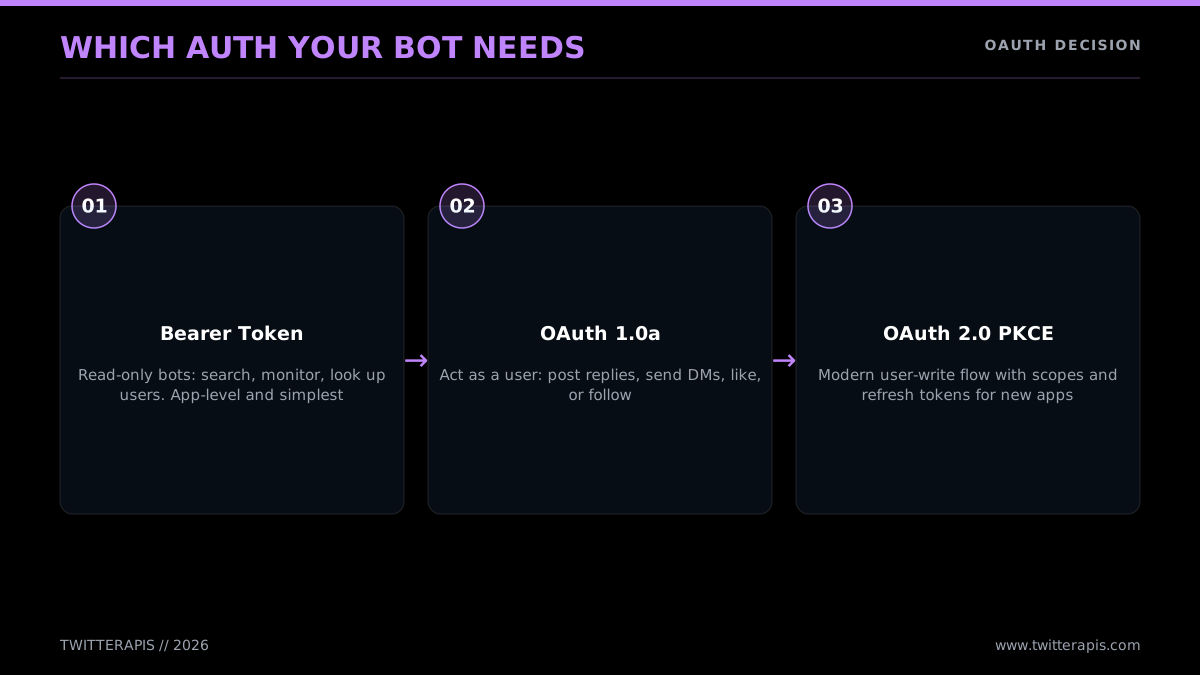
The auth your bot genuinely needs
Bearer Token (OAuth 2.0 app-only)
This is the simplest credential. Mint a single Bearer Token in the developer console, save it, and send it as a header on every request:
curl "https://api.x.com/2/tweets/search/recent?query=python" \
  -H "Authorization: Bearer $X_BEARER_TOKEN"
A Bearer Token authenticates your app rather than a user. The public data it can pull covers search, user and profile lookups, public timelines, and mentions of a public account. What it cannot do is post, reply, like, retweet, or message, since each of those acts as a user. A monitor or a read-only analytics bot wants nothing beyond it. It is the right default for any read-only bot.
OAuth 1.0a (user context, single account)
When your bot posts as a single specific account (its own), OAuth 1.0a is the well-worn path. It wants four values: the consumer key and secret (your app) plus the access token and secret (the account you operate as). Every write gets cryptographically signed with all four. Doing that signing by hand is fiddly, which is why the libraries exist:
from requests_oauthlib import OAuth1
import requests, os

signer = OAuth1(
    os.environ["X_API_KEY"], os.environ["X_API_SECRET"],
    os.environ["X_ACCESS_TOKEN"], os.environ["X_ACCESS_SECRET"],
)
requests.post(
    "https://api.x.com/2/tweets",
    auth=signer,
    json={"text": "Posted by my bot"},
)
This is the auth a scheduled poster or a single-account reply bot uses for its writes. The access token and secret you generate in the console map to your own account, so the bot posts as you. Most tutorials you have run across use this flow.
OAuth 2.0 PKCE (modern, multi-user write)
If you are building a product where many users link their X accounts and your bot acts for each of them (a scheduling SaaS, say), OAuth 2.0 PKCE is the right flow. The user clicks "Connect with X," gets sent to X's authorization server, approves the precise scopes your app requests (post but not read DMs, for example), and your backend trades the returned code for a per-user access token plus a refresh token. You keep the access token, refresh it when it expires, and hit the API as that user. The PKCE mechanism is the OAuth standard set out in RFC 7636, and X's own implementation is documented at docs.x.com. Scoped permissions and refresh tokens are why you pick PKCE over OAuth 1.0a for new multi-user apps.
The flow breaks into three parts. First, assemble the authorization URL and route the user to it, keeping the PKCE verifier on the server:
import base64, hashlib, os, secrets, urllib.parse

CLIENT_ID = os.environ["X_CLIENT_ID"]
REDIRECT = "https://yourapp.com/callback"

# PKCE: a random verifier and its SHA-256 challenge
verifier = secrets.token_urlsafe(64)
challenge = base64.urlsafe_b64encode(
    hashlib.sha256(verifier.encode()).digest()
).decode().rstrip("=")

query = urllib.parse.urlencode({
    "response_type": "code",
    "client_id": CLIENT_ID,
    "redirect_uri": REDIRECT,
    "scope": "tweet.read tweet.write users.read offline.access",
    "state": secrets.token_urlsafe(16),
    "code_challenge": challenge,
    "code_challenge_method": "S256",
})
print("Send the user to:", f"https://x.com/i/oauth2/authorize?{query}")
# Store `verifier` keyed by `state` so the callback can retrieve it
Second, inside your callback handler, trade the returned code for tokens:
import requests

tokens = requests.post(
    "https://api.x.com/2/oauth2/token",
    data={
        "grant_type": "authorization_code",
        "code": code_from_callback,
        "redirect_uri": REDIRECT,
        "client_id": CLIENT_ID,
        "code_verifier": verifier,  # the one you stored
    },
).json()
access_token = tokens["access_token"]
refresh_token = tokens["refresh_token"]  # because of the offline.access scope
Third, call the API as that user, refreshing whenever the access token lapses:
# Post on the user's behalf
requests.post(
    "https://api.x.com/2/tweets",
    headers={"Authorization": f"Bearer {access_token}"},
    json={"text": "Posted via PKCE on the user's behalf"},
)

# When the access token expires, mint a new one
fresh = requests.post(
    "https://api.x.com/2/oauth2/token",
    data={
        "grant_type": "refresh_token",
        "refresh_token": refresh_token,
        "client_id": CLIENT_ID,
    },
).json()
That is the full PKCE dance. It has more moving parts than OAuth 1.0a, but it earns you per-user scopes and refresh tokens, which a multi-tenant product requires. For a single-account bot, leave it alone; OAuth 1.0a is simpler and does the job.
The direct-API shortcut
The auth section runs shorter for a TwitterAPIs bot because there is hardly anything to choose. That one Authorization: Bearer YOUR_KEY header authorizes every read and write endpoint. Reads want only that header. Writes append the acting account's auth_token and ct0 to the request, passed per call and never held by the provider, so you skip the OAuth flow and the two-credential split altogether. For a builder who simply wants to ship, that strips out the most common source of setup errors. The full official-API auth reference, PKCE flow with code included, is in the Twitter API tutorial.
The bring-your-own-session model on the write side is worth grasping, because it shifts where the risk lives. Rather than you handing long-lived OAuth tokens to a third party, the relay provider takes the acting account's auth_token and ct0 per call, uses them for that one write, and holds onto neither. As a mental model, think of it as passing a single-use key through rather than leaving a copy behind, your session never sits in someone else's store between requests. That keeps the read path and the write path cleanly apart: reads carry only the provider API key, and account-level credentials show up purely on the writes that genuinely act as the account. For a single-account bot you load those two values from environment variables just as you load the API key, and rotate them on whatever schedule you rotate any session credential.
A safety note that belongs with auth: handle every credential like a password. Never commit keys to git, never drop them into a screenshot, and keep them in environment variables or a secrets manager. A leaked token lets anyone operate as your bot's account.
Skip the Developer Account Entirely
Building a Twitter bot does not require an X developer account. The official API insists on one (a project, an app, generated keys, a payment method), but a relay API skips the lot. With TwitterAPIs you register using an email, copy a Bearer token off the dashboard, and call api.twitterapis.com straight away with one Authorization header. No console, no app review, no OAuth setup, no approval queue. For read-heavy bots it is far cheaper as well: reads cost $0.0008 per call (roughly 20 tweets a call, about $0.04 per 1,000 tweets) with no monthly floor and no 3-million-read ceiling. Billing is metered: you pay for whatever your bot reads or writes, and new accounts open with $0.50 in free credits, good for around 625 read calls or roughly 12,500 tweets to test on.
Knowing the surface before you commit helps. The relay lane exposes 123 endpoints, split 72 read and 51 write. The 72 read endpoints cover the calls a bot truly depends on, single tweet and full thread lookups, user info and timelines, followers and following, search, and the rest, each priced at the flat $0.0008 per call. The 51 write actions cover engagement, posting, and messaging alike, favorite and unfavorite, retweet and unretweet, bookmark and unbookmark, follow and unfollow, delete, tweet creation, media upload, and DM send, with the simple actions billed at $0.0008 per call, the same as reads, while creating a tweet or sending a DM is $0.0016 per call. This lane also carries a dm/send endpoint, so a bot that has to message users can do it on the same key rather than bolting on a separate integration. Knowing the catalog ahead of time tells you exactly which calls are on hand before you design.
This counts most for two groups: beginners who slam into the developer-account wall and give up, and teams whose bots read enough that the official per-call price takes over. Both gain a faster, cheaper path. The recurring beginner question, caught in the Quora thread "What are the steps to creating a free Twitter bot?", is really asking "how do I build one without the developer-account and payment friction," and the relay-API signup is the cleanest answer. Setup runs three steps.
- Register at twitterapis.com with an email. No card needed to start, plus $0.50 in credits to test with.
- Grab your Bearer token off the dashboard.
- Hit the API with
Authorization: Bearer YOUR_KEY.
Here is the complete first call, a user lookup, across three languages.
Python
import os
import requests

API_KEY = os.environ["TWITTERAPIS_KEY"]

resp = requests.get(
    "https://api.twitterapis.com/twitter/user/info",
    params={"userName": "elonmusk"},
    headers={"Authorization": f"Bearer {API_KEY}"},
)
resp.raise_for_status()
account = resp.json()["user"]
print(account["name"], "followers:", account["followers_count"])
Node.js
const API_KEY = process.env.TWITTERAPIS_KEY;

const reply = await fetch(
  "https://api.twitterapis.com/twitter/user/info?userName=elonmusk",
  { headers: { Authorization: `Bearer ${API_KEY}` } }
);
if (!reply.ok) throw new Error(`HTTP ${reply.status}`);
const { user: account } = await reply.json();
console.log(account.name, "followers:", account.followers_count);
curl
curl "https://api.twitterapis.com/twitter/user/info?userName=elonmusk" \
  -H "Authorization: Bearer $TWITTERAPIS_KEY"
That is the entire onboarding. Hold it up against the official path, where that same first call presumes you have already stood up a project, an app, generated a Bearer Token, and attached a payment method. The dedicated how to get a Twitter API key guide details that console flow if you want it; this path swaps it for an email signup.
A complete monitor on this lane is simply the search call wrapped in a loop:
import os, time, requests

HEADERS = {"Authorization": f"Bearer {os.environ['TWITTERAPIS_KEY']}"}
handled = set()


def watch(query):
    resp = requests.get(
        "https://api.twitterapis.com/twitter/tweet/advanced_search",
        headers=HEADERS,
        params={"query": query, "product": "Latest"},
    )
    resp.raise_for_status()
    for hit in resp.json().get("tweets", []):
        if hit["id"] in handled:
            continue
        handled.add(hit["id"])
        print("NEW:", hit["created_at"], hit["text"][:100])


if __name__ == "__main__":
    while True:
        watch("your brand name")
        time.sleep(300)  # every 5 minutes
One caveat deserves a plain statement. A relay API is never the system of record; that role belongs to X. A relay vendor runs its own connection into X data and hands it back over a steady REST interface, and that arrangement is precisely the reason it can charge a sliver of what the official meter charges per read. Across nearly everything people actually build (watching mentions, sniffing out leads, powering AI feeds, crunching analytics, pushing content out) pulling data through a vendor is completely adequate, since being the authoritative origin was never the requirement, getting the data cheaply was. Going straight to the official endpoint earns its keep in one situation: when the bot has to operate as an audited first-party application acting for end users at the platform tier, think of a compliance-bound product obligated to hit X itself. Outside that, the relay route stands up faster and bills lower, and nothing stops you from wiring a slim official hookup for the handful of writes that truly demand it while every read flows through the cheaper vendor. Pairing the two that way (inexpensive reads off a relay, official writes only where the rules force them) is a perfectly ordinary and smart shape for a bot you intend to run seriously.
To settle whether the relay route or the official API is the better fit, the head-to-head Twitter API v2 vs TwitterAPIs writeup lays the coverage and cost side by side. Migrating off a marketplace product instead? The RapidAPI Twitter alternative and Apify Twitter scraper vs TwitterAPIs pieces walk through those specific moves.
Not Crashing on Rate Limits and 429s
Sooner or later every bot bumps into a rate limit, and one that falls over the moment it sees a 429 has no business in production. The official X API scopes its caps per endpoint inside rolling 15-minute windows. Recent search, for one, permits 450 calls every 15 minutes under user auth and 300 under app-only auth. Step over the cap and the response comes back as a 429 carrying an x-rate-limit-reset header, a Unix timestamp marking the moment your window frees up again. Firing off an immediate retry is the wrong instinct. Pull that reset value, pause until it passes, and lean on exponential backoff once failures stack, so your bot is not pounding the endpoint and digging itself deeper.
Picture it as a small four-stage cycle: issue the request, inspect what came back in the headers, pause if you got throttled, and try again.
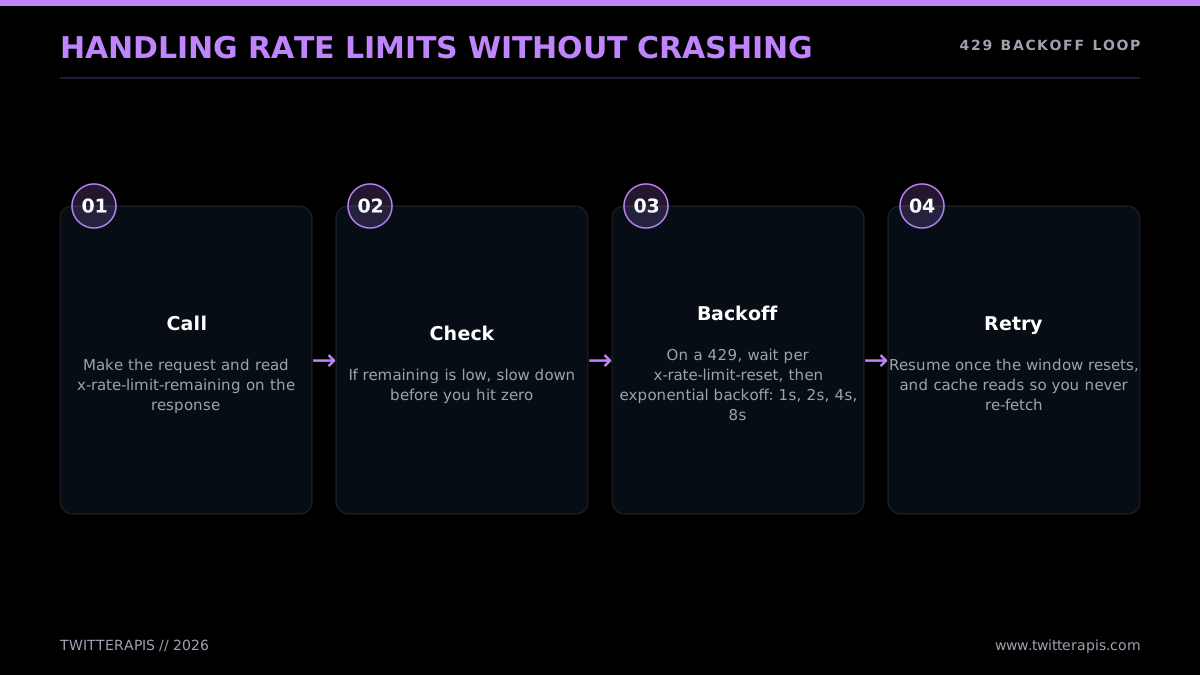
Weathering 429s without dropping the bot
Below is a drop-in retry helper aimed at the official API. When a reset header is there it obeys it; when it is missing the helper degrades to plain exponential backoff.
import time
import requests


def get_with_backoff(url, headers, params=None, attempts=5):
    delay = 1
    for _ in range(attempts):
        resp = requests.get(url, headers=headers, params=params)
        if resp.status_code == 429:
            reset = resp.headers.get("x-rate-limit-reset")
            if reset:
                wait = max(int(reset) - int(time.time()), 1)
            else:
                wait = delay
                delay = min(delay * 2, 60)  # 1, 2, 4, 8, ... capped at 60s
            print(f"429, waiting {wait}s")
            time.sleep(min(wait, 60))
            continue
        resp.raise_for_status()
        return resp.json()
    raise RuntimeError("retries exhausted")
Three working habits keep a bot living well under its caps instead of slamming into them over and over:
- Track the budget on every response. Read
x-rate-limit-remainingas each reply lands. As it approaches zero, ease off ahead of the limit rather than letting the 429 stop you. - Spread the load. If your allowance is 450 search calls per quarter-hour, blowing all 450 in the opening 30 seconds is a mistake. Stretch them out over the whole window.
- Hold onto what stays put. A profile barely shifts, so keep it cached for minutes. A posted tweet's text never changes, so cache it forever. Each response you reuse is a billed call you skipped.
A few figures are worth committing to memory, since they govern how quickly your loop is allowed to spin. Recent search caps at 450 calls per 15-minute window on user auth, 300 on app-only. Reading a user timeline gives you a lot more headroom. Publishing tops out around 200 posts in a 15-minute window. What that means in practice: a reply bot checking mentions on a two-minute beat barely touches its allotment, whereas a monitor hammering search inside a tight loop can empty the search window in well under sixty seconds. So the loop to throttle is the search one, not the poll. The complete per-endpoint breakdown plus the production playbook live in the Twitter API rate limit guide, and X publishes its own figures at the official rate limits reference.
Here is the identical retry approach expressed in Node.js, for anyone on a JavaScript stack:
async function getWithBackoff(url, headers, attempts = 5) {
  let delay = 1000; // ms
  for (let i = 0; i < attempts; i++) {
    const reply = await fetch(url, { headers });
    if (reply.status === 429) {
      const reset = reply.headers.get("x-rate-limit-reset");
      const waitMs = reset
        ? Math.max(Number(reset) * 1000 - Date.now(), 1000)
        : (delay = Math.min(delay * 2, 60000));
      console.log(`429, waiting ${Math.round(waitMs / 1000)}s`);
      await new Promise((r) => setTimeout(r, Math.min(waitMs, 60000)));
      continue;
    }
    if (!reply.ok) throw new Error(`HTTP ${reply.status}`);
    return reply.json();
  }
  throw new Error("retries exhausted");
}
The behavior mirrors the Python one: respect the reset header where it exists, otherwise keep doubling the backoff, and ceiling the pause so no lone 429 ever freezes the bot for over a minute.
Relay APIs treat all of this differently, and that makes your code simpler. TwitterAPIs sets one flat ceiling of 600 calls a minute per key rather than a 15-minute bucket that differs per endpoint; below that, what bounds you is your prepaid balance. The vendor swallows the upstream throttling headaches on your behalf. You still want reasonable retry handling for the occasional flaky network call, but you are no longer architecting around X's per-endpoint windows, which deletes an entire category of bot bugs.
The cheapest pay-as-you-go Twitter API. Try it free.
$0.0008 a call, about $0.04 per 1,000 tweets at 20 tweets a page. $0.50 free credits. No credit card required.
Keeping a Bot Alive Around the Clock
Your bot does its job only while the process is alive, which means you need somewhere to run it that does not go dark. Three choices, sorted by how non-stop the bot has to be. GitHub Actions costs nothing and fits scheduled bots on a timer beautifully, running your script on a cron and sleeping in between. Serverless cron (AWS Lambda, Google Cloud Functions, Vercel Cron) is the natural home for event-driven bots that wake on a schedule or an inbound webhook. A modest VPS (an estimated $5 a month, for example on DigitalOcean, Hetzner, or Fly.io) is the move for a bot holding a continuous listening loop open. Fit the host to the shape of the loop and you dodge both downtime and money wasted on idle compute.
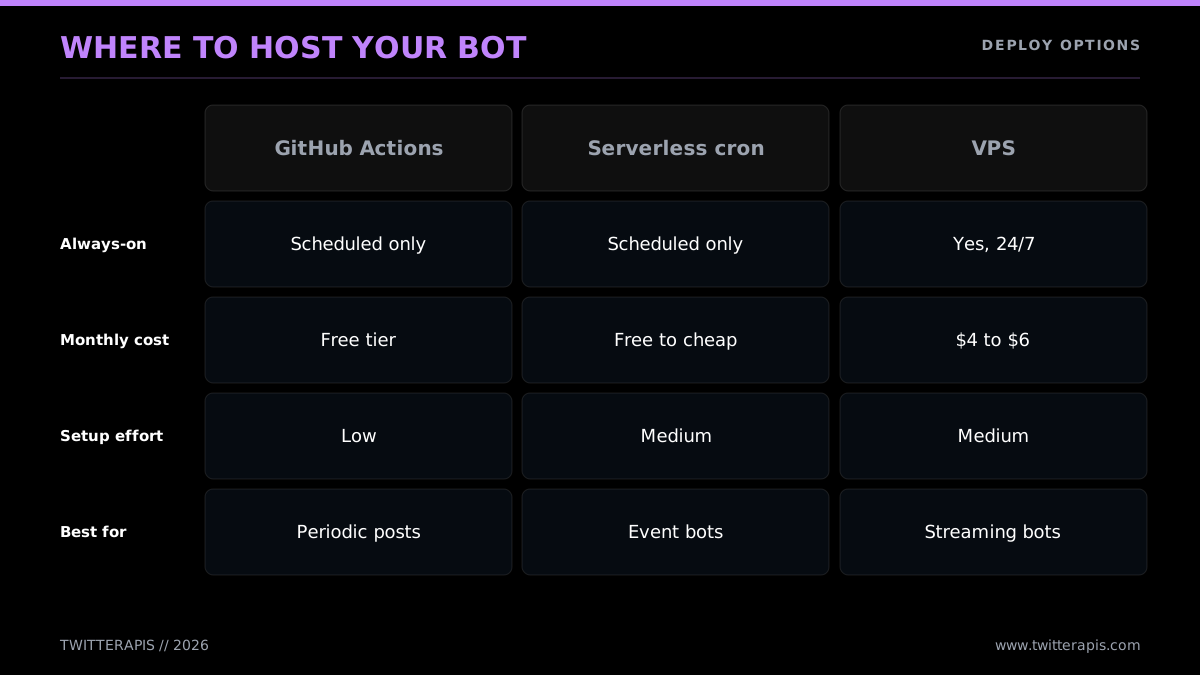
Picking a home for a round-the-clock bot
GitHub Actions (free, for scheduled bots)
For a timer-driven bot (a scheduled poster, a monitor that wakes hourly), nothing beats GitHub Actions as a free host. Drop your script into a repo, add a workflow file carrying a cron schedule, and tuck your keys away as encrypted repository secrets. GitHub fires the script on cue and bills nothing for public repos so long as you stay inside its generous free-minute allotment.
# .github/workflows/bot.yml
name: twitter-bot
on:
  schedule:
    - cron: "0 * * * *"   # top of every hour
  workflow_dispatch:        # allow manual runs too
jobs:
  run:
    runs-on: ubuntu-latest
    steps:
      - uses: actions/checkout@v4
      - uses: actions/setup-python@v5
        with:
          python-version: "3.12"
      - run: pip install requests
      - run: python bot.py
        env:
          TWITTERAPIS_KEY: ${{ secrets.TWITTERAPIS_KEY }}
Add TWITTERAPIS_KEY (or your X tokens) under the repo's Settings, then Secrets and variables, then Actions. Both the cron syntax and the secrets workflow are spelled out in the GitHub Actions scheduled-events docs. Worth knowing: GitHub's scheduled runs can drift by a few minutes when the platform is busy, so do not bank on second-level timing.
Serverless cron (Lambda, Cloud Functions, Vercel)
When a bot is event-driven, webhook-answering ones especially, a serverless function slots in cleanly. Ship the bot as a function, fire it from a schedule or a webhook, and you are charged purely for the time it executes. That works for a reply bot that stirs when X pushes it an event, or a monitor ticking over every few minutes. The cost is cold-start lag plus a deployment learning curve that varies by platform.
A serverless bot is essentially your loop body with the while True stripped off. The scheduling comes from the platform, so every invocation makes a single pass and then quits. Here is what an AWS Lambda handler for a monitor looks like:
import os, requests

HEADERS = {"Authorization": f"Bearer {os.environ['TWITTERAPIS_KEY']}"}


def handler(event, context):
    resp = requests.get(
        "https://api.twitterapis.com/twitter/tweet/advanced_search",
        headers=HEADERS,
        params={"query": "your brand name", "product": "Latest"},
    )
    resp.raise_for_status()
    hits = resp.json().get("tweets", [])
    # do something durable: write to DynamoDB, push to SQS, send a Slack alert
    return {"statusCode": 200, "count": len(hits)}
Hook up an EventBridge rule (or a Vercel Cron entry) to invoke handler on a few-minute cadence, and keep your keys as encrypted environment variables. The one structural shift from the VPS approach: serverless functions forget everything between runs, so any "did I already see this tweet" state has to sit in an outside store (a database, a key-value cache) rather than a Python set. That amnesia is the detail that most often catches people porting a loop bot over to serverless.
A small VPS (for continuous bots)
When your bot keeps a permanent while True loop running (a live monitor that has to react inside a minute), a little virtual server is the steadiest place to put it. An estimated $5-a-month box running your script behind a process manager survives crashes and reboots without dropping the bot:
# On the VPS, keep the bot running and restart it if it dies
pip install requests tweepy
nohup python bot.py > bot.log 2>&1 &
# Better: a systemd service or pm2 for auto-restart on reboot
In production, package the script as a systemd unit (or reach for pm2 on Node) so it comes back up on its own. The VPS hands you total control and a bill you can predict, with the catch that you are now responsible for a server.
Let the bot type from earlier pick the host for you: put scheduled bots on GitHub Actions, event bots on serverless, and always-on monitors on a VPS. All three are cheap (free up to a few dollars a month), which is worth keeping in mind next to the data layer, where the actual money goes.
A quick way to decide: ask how promptly the bot has to act. If "once an hour" or "once a day" suffices, run it on GitHub Actions cron and skip servers entirely. If "within a few minutes of something happening" is the requirement, scheduled serverless handles it. Only when the bar is "within seconds, non-stop" should you spin up an always-on VPS, since it is the one option that keeps a process resident and watching. Plenty of bots people assume need a dedicated server hum along fine on a free cron, and grabbing a VPS first is a classic over-build. Begin with the cheapest host that clears your latency requirement and climb the ladder only once you have measured that you have to.
Whatever host you land on, two operational habits will spare you pain. One, log every action the bot performs to a file or a logging service, so when something falls over you can reconstruct what it did and when. Two, wire an alert (a Slack ping, an email) to two triggers: the bot going down, and its spend punching through a threshold. A bot you cannot watch is a bot that will eventually blindside you, and those surprises usually arrive on the invoice.
Staying on the Right Side of X's Rules
X permits automation, yet a sharp boundary separates a useful bot from one that ends up suspended, and landing on the right side of it is largely common sense backed by a handful of firm rules. Here is what X actually requires: flag the account as automated, steer clear of spam (no repeated replies, no blanket mentioning), do not manufacture engagement (no bulk follows, bulk likes, or synchronized posting meant to trick the ranking), never run the same text across a fleet of accounts, and stay under the rate limits. A bot serving content people find genuinely useful, reacting to an unambiguous trigger, and keeping a measured pace is in the clear. The ones that draw enforcement are the bots firing unsolicited replies or farming follower counts through mass actions.
The checklist underneath sorts the usual behaviors into safe and suspendable along the axes that count: how fast you post, what you post, whether you disclose, your auth, and who you target.
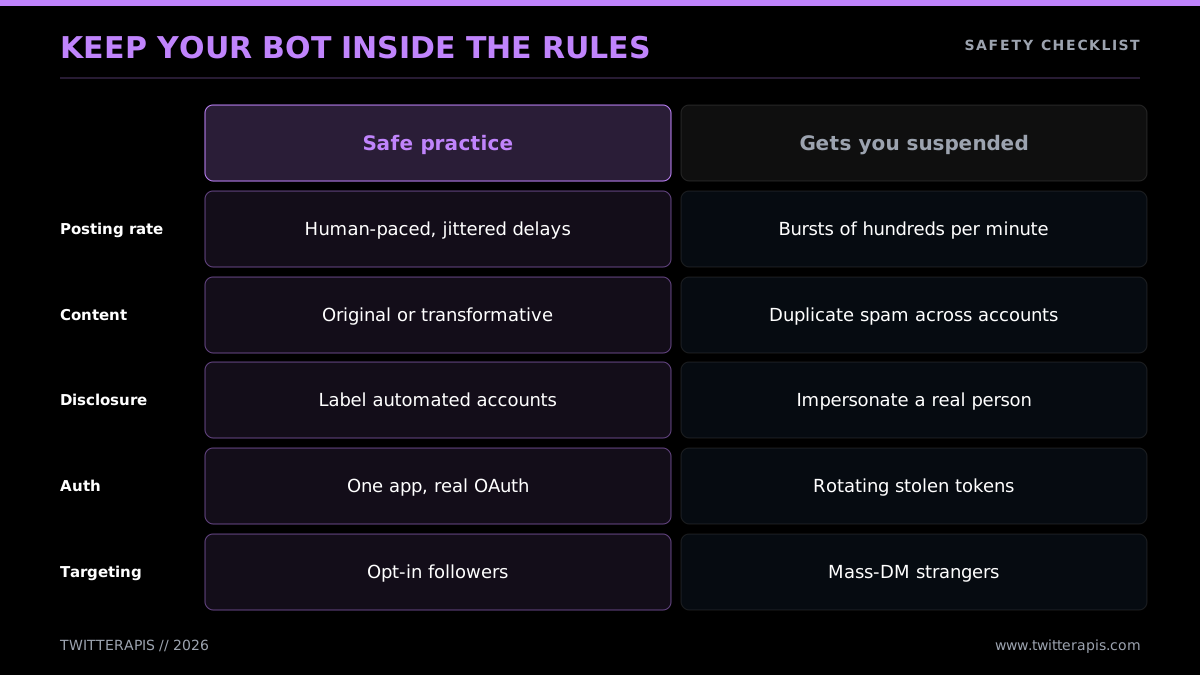
Staying clear of the suspension line
The hard rules to bake in from the very first commit:
- Say it is a bot. Make the automation plain, whether in the bio or in the posts themselves. Concealed automation posing as a person is the quickest path to a suspension.
- Keep the pace human. Do not machine-gun a reply to every mention in milliseconds, do not rack up hundreds of likes a minute, do not run follow-then-unfollow cycles. Acting at human speed is acting safely. The rate-limit code from the last section pulls double duty as safety code.
- Never repeat yourself. Pumping out the same text again and again, or the same text across several accounts, registers as spam with X's detection. Mix up what you publish.
- Quit gaming the ranking. Mass-following for reciprocation, engagement pods, and orchestrated boosting are flatly against the rules and are caught reliably.
- Break without noise. A bot trapped in a retry loop that tweets an error every couple of seconds will get flagged. Trap the error, back off, and write it to a log instead of posting it.
The platform's detection runs deeper than most builders give it credit for. X reads behavioral fingerprints, how your timing clusters, how fast you act, how alike your posts are, to flag automation that crosses the line. Everything that is and is not permitted is laid out in full in the X automation and developer policy; give it one read before you ship, because the boundary between fine and bannable is set there, not inside any tutorial. The Twitter bot detection guide takes those signals into practical territory, handy both for keeping your own bot clean and for seeing how the platform reasons about automation.
A handful of particular behaviors are worth flagging, because builders step over the line without noticing:
- Churning follows and unfollows. Following a thousand accounts to harvest follow-backs and then cutting the ones who did not return the favor is among the most dependably caught patterns there is. Skip it.
- Carbon-copy replies in bulk. Pushing the identical reply to fifty mentions inside a tight window reads as spam no matter how well-meaning. Reword each one, or throttle replies down to a human cadence.
- Synchronized posting across accounts. Operating a cluster of bot accounts that publish the same content on a timer counts as platform manipulation. A single account putting out original material is fine.
- Cold DMs. Messaging strangers who never once engaged with your account is the fastest road to both a suspension and a spam report. Save messages for people who opted in or reached out first.
- Shrugging off the 429. A bot that keeps pounding an endpoint after a throttle response is not merely buggy, it tells X the account is acting up. The backoff code from the rate-limit section counts as a compliance measure, not only a stability one.
The stance that keeps a bot out of trouble is easy to put into words: act like a quick, helpful person, not a machine trying to brute-force scale. Disclose, slow down, vary the output, honor the limits, and a bot can run for years untouched.
A note that brushes up against the law: when your bot gathers or retains information about users, honor the agreement you signed and whatever privacy regulations apply. A read-only monitor saving public posts into a database of your own is routine; turning around and selling scraped personal information is another thing entirely. Build toward the use case you would be comfortable defending.
What It Really Costs to Run
Every figure here reflects June 2026: the official numbers come from the X API docs and the metered-billing announcements, and the TwitterAPIs numbers from twitterapis.com/pricing. Both sides have repriced more than once since 2023, so write off any older guide's figures as stale and confirm the live pages before you set a budget.
A bot runs up two kinds of cost: hosting and data. Hosting stays cheap and predictable (nothing on GitHub Actions, a few dollars a month on a VPS). Data is the line that lurches across orders of magnitude with how much your bot reads, and it is where picking official versus relay settles your bill. A write-only scheduled poster reads next to nothing and rounds to cents on either route. A read-hungry monitor or agent can run into the thousands a month on the official API and a sliver of that on a per-1,000-tweet vendor. Rule of thumb: once your bot reads at any meaningful volume, the data layer dominates everything, so that is what you optimize first.
Trace the official ladder for a read-heavy bot. At $0.005 a read, the cost ramps up sharply as your monitoring widens.
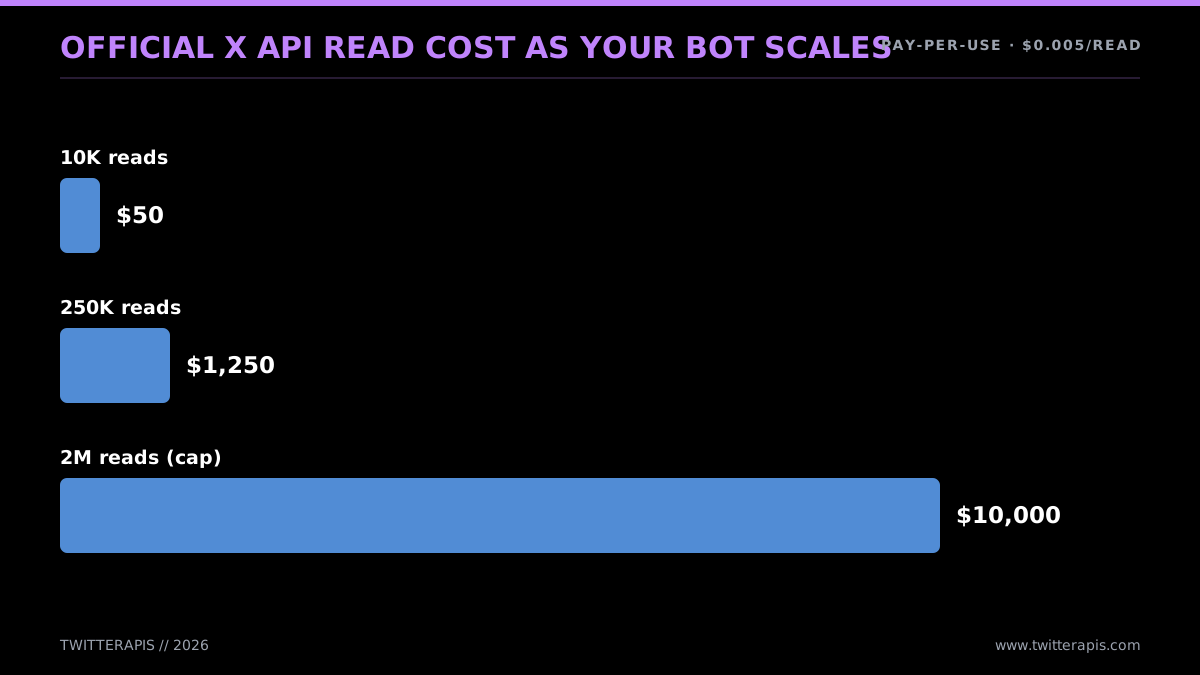
How official read cost grows with scale
Now run those same volumes through the relay lane at $0.04 per 1,000 tweets. Identical curve, wildly different scale.
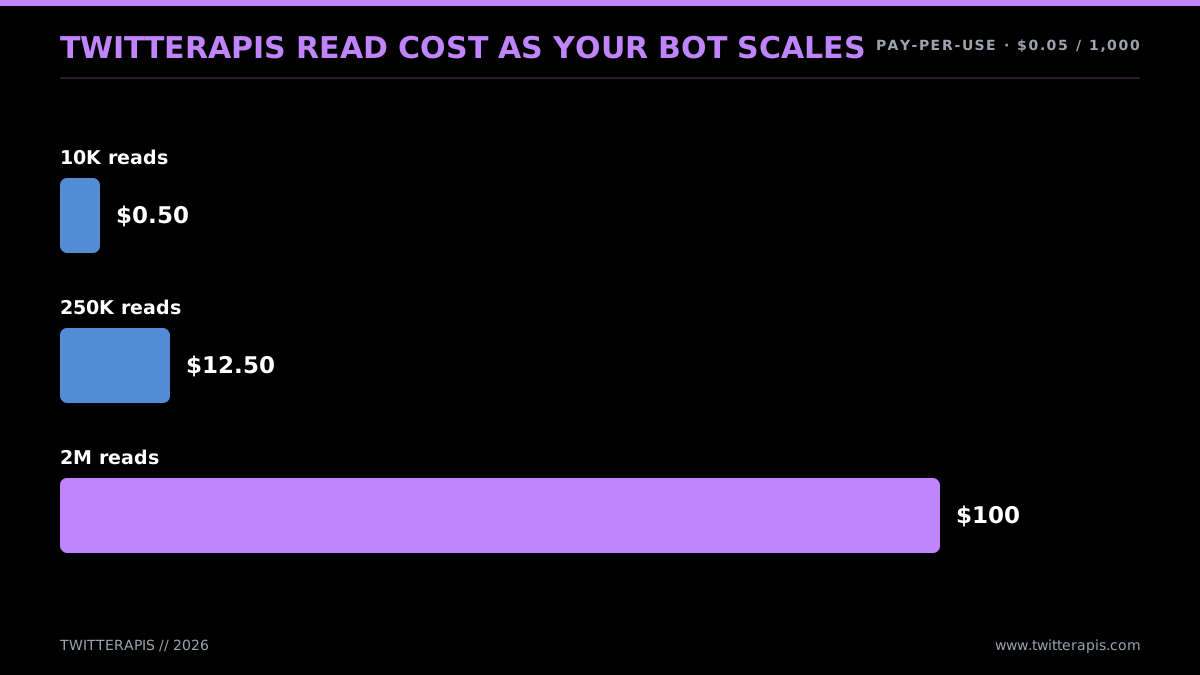
Identical volume, priced on TwitterAPIs
Worked monthly numbers, hosting and data combined:
- Scheduled poster (write-only, five posts daily). Hosting: free via GitHub Actions. Data: roughly 150 post-creates monthly at $0.015 apiece, about an estimated $2.25 on the official API. All in: a couple of bucks. The official API is perfectly fine for this; the developer-account dance is a one-and-done cost.
- Reply bot (mention polling, light traffic). Hosting: free or a few dollars. Data: a few thousand reads monthly alongside a few hundred replies. Maybe an estimated $20 to $50 on the official API. Through TwitterAPIs the reads fall to pennies (writes run $0.0016 each), leaving the writes as the bulk of the bill.
- Brand monitor (50,000 reads monthly). Hosting: a few dollars on a VPS. Data: an estimated $250 on the official API at $0.005 a read (X API pricing), against an estimated $2.00 on TwitterAPIs at $0.04 per 1,000. On the relay route the data layer comes in 100 times cheaper.
- AI agent (1,000,000 reads monthly). Hosting: minor. Data: an estimated $5,000 on the official API, which also puts you a third of the way to the 3-million wall that kicks you onto Enterprise pricing. On TwitterAPIs it is an estimated $40, with no wall at all. Here the decision is not even close.
The shape is consistent: hosting is a rounding error, and the data layer is where the call gets made. For posting-heavy bots the official per-write price is tiny and either route is fine. For reading-heavy bots a per-1,000-tweet API runs 10 to 100 times cheaper and wipes out the 3-million ceiling completely. The complete cost arithmetic, with a vendor-by-vendor comparison, sits in the Twitter API cost benchmark, and the cheapest Twitter API ranking shows where the true per-1,000-tweet cost falls across eight providers.
The one cost mistake every new builder makes
One failure mode never surfaces as an error code and always surfaces on the invoice: the runaway loop. A polling bug (ticking every 100 milliseconds when you meant every 60 seconds), a retry loop missing its backoff, or a search query so wide it pulls thousands of results per call can silently chew through hundreds of dollars in credits across a weekend before you catch it. Nothing crashes; the bot simply reads, and reads, and reads some more. On the official API at $0.005 a read (X API pricing), a loop running flat out can drain an estimated $50 an hour while nobody is looking.
Three safeguards head this off, and every reading bot you build should carry all three:
- A firm spend cap. Put a daily or monthly ceiling in your provider dashboard so a runaway loop slams into a wall rather than your bank balance. The official console and the relay vendors both let you do this.
- An in-code budget breaker. Count the calls this run has made and stop once it passes a sensible line. A monitor that ought to make 100 reads an hour but is sitting at 10,000 has a bug; the code should halt and alert rather than plow ahead.
- A narrow query. The cheapest optimization going is reading fewer, more relevant tweets. Searching "support" hands you the entire platform; searching "your-product-name support broken" hands you only the posts you care about. Tightening the query at the source trims reads, and trimming reads trims cost directly. The advanced search operators guide is your reference for sharpening queries.
Why the runaway danger shrinks on a cheaper source comes down to arithmetic: the same bug that bleeds $50 an hour at $0.005 a read (X API pricing) bleeds cents an hour at $0.04 per 1,000. Put the safeguards in either way, but a slip-up's blast radius is an order of magnitude smaller when reads are cheap. That is an underdiscussed upside of the price gap: it is not just your steady-state bill, it is how badly a mistake can bite.
Should your bot need trend data or follower exports, the Twitter trends API guide and the export Twitter followers via API guides walk through those particular calls, and the Twitter followers API page documents the endpoint directly. For the wider story of how X's pricing ended up where it is in 2026, read the X API pricing change explainer.
To see a live bot work start to finish before you build yours, this walkthrough follows a bot operating a profile around the clock:
Watch a recent walkthrough of a Twitter bot that runs a profile 24/7
Where to Take It From Here
You now hold the full map: the loop sitting under every bot, the four shapes and what each demands, the 2026 cost reality, the three build lanes, runnable reply and monitor code against both the official and the relay API, the three auth methods and the moment for each, rate-limit handling, hosting, the safety rules, and the cost math. The decision tree is short. Choose your shape, choose no-code when it is simple or Python when it is not, and choose the official API when your bot only writes or the cheaper relay API when it reads at any volume.
To dig further into whichever path your bot follows:
- For the underlying interface in full, the Twitter API tutorial for 2026 is the pillar that sits beside this guide.
- For Python code spanning Tweepy, the X SDK, plain
requests, and the relay path, read the Python Twitter API tutorial. - To get the official credential, work through how to get a Twitter API key.
- On the cost question specifically, read the Twitter API cost guide and the Twitter API cost benchmark.
- To settle on a data source, compare the best Twitter API for scraping, look at how to scrape tweets, and weigh Twitter API v2 vs TwitterAPIs.
The quickest route from this guide to a live bot is the relay lane. Register at twitterapis.com with an email, grab your Bearer token, and fire the first call:
import requests

resp = requests.get(
    "https://api.twitterapis.com/twitter/user/info",
    params={"userName": "elonmusk"},
    headers={"Authorization": "Bearer YOUR_KEY"},
)
print(resp.json()["user"]["name"])
Pay-as-you-go, no monthly minimum, no developer account, and $0.50 in free credits to begin with. The pricing page carries the complete rate card spanning read and write operations.
// sources
Where these numbers come from
Each row is a figure in this post and the artefact it was read from. Prices and limits on this platform move, so check the date on the source before you plan against it.
- X API pricing page
- Backs both halves of the cost history in the opening: the Basic at $100 a month, later $200, and Pro at $5,000 a month subscription tiers, and the metered rates that replaced them, $0.005 to read a post, $0.015 to publish, $0.20 for a post carrying a URL, and $0.015 per DM.
- X API rate limits reference
- The source for the loop-pacing figures the post says to memorize: recent search at 450 calls per 15-minute window on user auth and 300 on app-only, and publishing at around 200 posts per 15-minute window.
- RFC 7636, OAuth 2.0 PKCE
- The standard behind the multi-user flow the post recommends for a product where many users link their X accounts, including per-user access and refresh tokens.
- X OAuth 2.0 authorization code documentation
- The platform implementation of that PKCE flow, including the scope grants the post describes such as post access without DM read.
- Tweepy client documentation
- The client reference for the reply-bot code in the post, including the TooManyRequests exception it raises on a 429 so the loop can back off.
- GitHub Actions scheduled events documentation
- Backs the cron syntax and repository secrets workflow the post uses to schedule a bot, and the warning that scheduled runs can drift by a few minutes.
Frequently Asked Questions
Writing the code costs nothing. Keeping the bot alive does, because every call to the data has a price attached. The free public X API tier closed in February 2023, subscription tiers followed, and in February 2026 the official API switched to per-call billing: $0.005 to read a post and $0.015 to publish one. If your bot only pulls a few thousand posts a month, the bill stays in single dollars. The real savings come from how you source the data, and TwitterAPIs prices tweet reads at $0.0008 a call, about $0.04 per 1,000 tweets on a full 20-tweet page, with no monthly minimum, which lets a lightweight bot run for pocket change.
Reach for a visual automation platform such as Zapier or Make.com. You link an X account, choose what sets the bot off (a timer, a fresh RSS entry, a matched keyword), and choose the response (a post, a reply, a like), and the platform fires the API calls behind the scenes. For something like post-on-a-schedule or retweet-on-keyword, this is the quickest route there is. The ceiling shows up the moment you want branching logic, an AI step, or serious volume, and that is your cue to switch to Python.
Read volume is what decides the number. A bot that only publishes a few posts a day barely registers on the official API. The cost balloons once a bot starts monitoring keywords or mentions: at the official rate of $0.005 per read, a million reads lands you at $5,000. Move that same million through TwitterAPIs and it comes to $40, since reads are billed at $0.04 per 1,000 tweets. Add hosting on GitHub Actions or a modest VPS and you are looking at anywhere from nothing to a few dollars a month.
An AI assistant will happily turn a sentence into a functioning bot in a couple of minutes. Spell out the trigger and the action ("thank anyone who mentions me") and out comes working Tweepy or requests code. The gotcha is that a lot of what it generates is built around the old free API. From there the rest is on you: plug in real credentials, deal with rate limits and errors, and decide where the thing runs. The model hands you the loop, but shipping it is your job.
They are, provided you stay inside X's automation rules. What gets accounts suspended is bulk aggressive behavior: mass-following, mass-liking to juice the algorithm, spamming mentions, fake engagement, or pushing the same content across a network of accounts. The bots that survive do the opposite: they label themselves as automated, fire only on a clear trigger, post something people actually want, and never exceed the rate limits. Disclosure plus restraint is the whole compliance story.
If you go through the official X API, you do. Nothing returns a response until you have set up a developer account, spun up a project and an app, generated your keys, and attached a payment method, and that whole sequence can eat an afternoon. A third-party API lets you sidestep every step of it. On TwitterAPIs you register with an email, grab a Bearer token, and hit api.twitterapis.com using a single Authorization header. There is no console to navigate, no app review to wait on, and no project to configure.
Most people reach for Python, and for good reason. It carries the deepest pool of Twitter libraries (Tweepy being the headline one), reads cleanly when you express the listen-decide-act loop, and brings the richest AI and data toolkit if your bot needs to call an LLM. If your codebase already lives in JavaScript, Node.js is a solid alternative. Underneath it all the API is just HTTP, so anything that can issue a GET and a POST will do the job, but for newcomers Python clears the path with the least resistance.
Start with a scheduled-post bot. With no listening loop to babysit, it is write-only and carries the least logic of any bot you can build. You keep a list of posts, fire the script on a timer (the GitHub Actions cron is free), and send one out per run. The obvious follow-up is a reply bot, which simply bolts a listen step on top: it polls for mentions and responds to each new one. Full code for both sits further down this guide.
Check out similar blogs
More guides on the Twitter/X API, scraping, and pricing.
Twitter API Authentication in 2026: OAuth, Bearer Tokens, and Fixing 401
How Twitter (X) API authentication works in 2026: the four credential types, OAuth 1.0a versus OAuth 2.0, generating and using a bearer token, runnable Python and Node.js, and a fix for every 401 Unauthorized and 403 error, plus the one-header alternative.

Twitter API Tutorial 2026: The Complete Developer Guide
The 2026 Twitter API tutorial built after the pricing collapse. Auth, endpoints, code, rate limits, real costs, and the alternative when official gets too expensive.
Connect Twitter/X to n8n Without Fighting the Official API (2026)
Two working ways to get Twitter/X data into n8n: a polling HTTP Request node and a native webhook push, both with runnable code, no OAuth handshake either way.

How to Track a Tweet's Performance in Real Time with the X API
Poll a tweet's engagement counts over time with the X API, compute a views-to-likes ratio, and read the quote-tweet layer to tell an organically growing launch tweet from a boosted one. Tested Python and curl.

How to Get Image URLs from X Tweets via API in 2026 (Full Resolution, Python and Node)
Pull image URLs out of X tweets with runnable Python and Node.js, then get the full-resolution original instead of the scaled copy the API hands you by default. Measured on 14 live images, with the video poster-frame trap and the per-call cost.
The X Direct Messages API in 2026: Reading, Sending, and the Six Things It Will Not Do
A working guide to the X Direct Messages API: why an API key alone cannot read a DM, what a conversation id refers to, and the limits nobody documents.
What You Can Build With the Twitter/X API: 20+ Real Use Cases (2026)
A 2026 field guide to what you can actually build with the Twitter/X API: 24 real use cases across listening, monitoring, audience graph, research, and bots, each mapped to the endpoint that powers it and the real per-call cost.
How to Get Everyone Who Retweeted a Tweet via API (2026)
Pull the full list of accounts that reposted any tweet with a real 2026 API. Runnable Python and Node.js, cursor pagination for the whole list, a real amplifier ranking over live data, a bot filter, and the honest per-call cost.