GUIDE
Twitter Scraping, Best Practices for Production in 2026
Production-grade Twitter scraping patterns, retry logic, pagination, proxy strategy, rate-limit handling, and cost optimization for any third-party API.
Per our own spec, 62 of 109 endpoints bill $0.0008, 24 are free, and 23 sit between $0.0016 and $0.01. Every price ships inside our published OpenAPI document as an x-cost-usd field, so any figure in this post can be checked against the contract that bills it rather than taken on trust.

A Twitter scraper that worked in 2024 is almost certainly broken today. Three things changed at once. The official X API switched to metered pricing that starts north of $5 per 1,000 tweets (X API pricing). The community libraries that reverse-engineered Twitter's private frontend, snscrape chief among them, stopped tracking the web app's changes. And the headless-browser route now trips IP-level throttling inside the first hour of a real job.
What follows is not an introduction. It is the set of engineering habits that decide whether your pipeline finishes a million-tweet pull cleanly or stalls halfway through with duplicate rows and a stack of 429 responses. The habits are stack-agnostic: they hold whether you run them through TwitterAPIs, a homegrown scraper sitting behind a proxy pool, or a different vendor entirely.
TL;DR: Production Twitter scraping in 2026 comes down to five habits: retry only transient codes (429, 502, 503), page with cursors until next_cursor comes back empty, cache profiles to avoid re-buying data, dedupe on tweet ID across workers, and keep API keys in the environment. Against a REST API like TwitterAPIs at $0.0008 a call, about $0.04 per 1,000 tweets on a full 20-tweet page, they hold a million-tweet pull together.
Already scraping and want the deep cuts? Keep reading. If you are still at the starting line, the how to scrape tweets walkthrough and the best Twitter scraper comparison are better first stops. Product details and pricing live on the Twitter scraper page.
Every code sample below targets the TwitterAPIs REST surface, where reads run $0.0008 per call (roughly 20 tweets back, so $0.04 per 1,000 tweets), but swap the base URL and the patterns carry straight over to any provider.
Who This Is For: Developer API Teams Running Scrapers in Production
The habits below are written for a specific reader, and it is worth naming them so you can tell quickly whether this is your guide.
Developer API teams are the primary audience: the two-to-ten person groups who own a data pipeline as part of a product rather than as a research project. The distinguishing feature is that someone is paged when the collector stops, and that the bill shows up on a budget somebody defends. Every rule here is chosen because it either prevents a page or reduces that bill.
Data and research teams running periodic collection get most of the value, with one shift in emphasis. Completeness matters more to you than latency, so the deduplication and partial-success sections are the load-bearing ones and the concurrency section matters less.
Solo builders and indie developers shipping a product on top of X data will find the caching, cost and key-handling sections pay for themselves fastest. Skip the proxy section unless you are running write actions.
Who this is not for: anyone making their first API call. The starting-line material is linked above and this guide assumes you already have a collector that works and are trying to keep it working at volume.
One thing every one of those groups shares: the expensive failures are not the loud ones. A collector that crashes gets fixed the same day. A collector that quietly returns 80 percent of the matching posts produces a dataset that loads, charts and reports cleanly while being wrong by an amount nobody can measure. That asymmetry is why so many of the rules below are about detecting incompleteness rather than about handling errors.
1. Match the Endpoint to the Job Before You Write Code
The single cheapest optimization happens before your first request: picking the right endpoint. TwitterAPIs exposes 109 endpoints (65 read, 44 write), and several read pairs look interchangeable while returning different data at the same price. Reach for the wrong one and you pay full freight for an incomplete answer.
Two examples that bite people constantly. user/info hands back the core profile fields, name, bio, follower count, while user/about returns the same fields plus the account creation date, location, and username history. They cost the same, so when you need account history, calling the lighter endpoint just means a second round trip. On the follower side, user/followers (v1) and user/followers_v2 page identically, about 70 records on the first page and fewer after that, so there is no page-size or cost advantage either way. What separates them is the response: v2 attaches a fuller profile object, including the DM-eligibility metadata that outreach pipelines actually use, and has the more consistent cursor.
Profile lookup: info versus about
| Field group | user/info | user/about |
|---|---|---|
| Cost per call | $0.0008 | $0.0008 |
| Core profile | Returned | Returned |
| Account history | Not included | Returned (created-at, location, handle history) |
Use user/info for a fast name-and-count lookup; reach for user/about only when the account's history matters.
The decision table that saves the most credits
| What you want | Reach for | The mistake that costs you |
|---|---|---|
| Tweets matching a keyword | tweet/advanced_search | Looping user/tweets over a list of accounts |
| One account's latest posts | user/tweets | Wrapping it in a from:user search query |
| A full follower export | user/followers_v2 (richer records, same page size) | v1, unless you are already built against its shape |
| A DM-outreach shortlist | user/followers_v2 (DM signals) | v1, which drops the DM-eligibility fields |
| Account creation and history | user/about | user/info, which omits the history block |
| Every reply under a tweet | tweet/replies | A conversation_id:ID search, which is patchier |
For a column-by-column map of these endpoints against the official X API, the Twitter API v2 vs TwitterAPIs comparison lays them side by side.
2. Walk Pages With Cursors, Never With a Counter
Most read endpoints hand back about 20 records and a next_cursor string for pagination. You feed next_cursor back in as the cursor parameter on the following request, and you keep going until next_cursor comes back null or empty. That empty cursor is the only correct stop signal. Hardcode a fixed number of pages and any dataset that varies in size will get silently chopped off at the end.
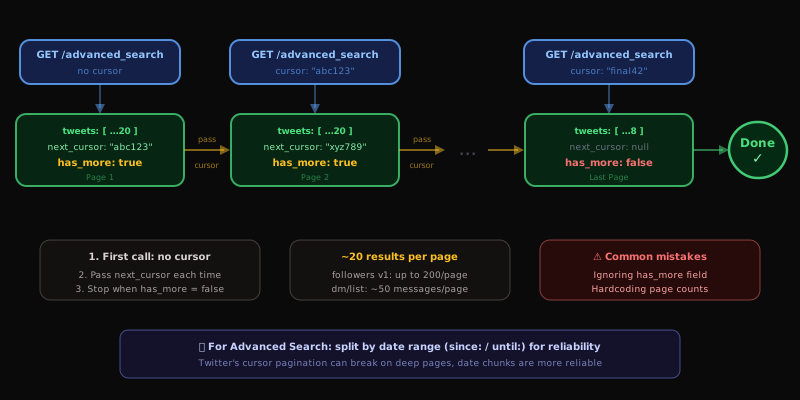
Page sizes by endpoint
| Endpoint | Records per call | Pagination field |
|---|---|---|
user/followers | ~70 | next_cursor |
user/following | ~70 | next_cursor |
user/followers_v2 | ~70 | next_cursor |
user/following_v2 | ~70 | next_cursor |
tweet/advanced_search | ~20 tweets | next_cursor |
tweet/replies | ~20 replies | next_cursor |
user/tweets | ~20 tweets | next_cursor |
user/tweets_and_replies | ~20 tweets | next_cursor |
user/likes | ~20 tweets | next_cursor |
user/media | ~20 posts | next_cursor |
user/home_timeline | ~20 tweets | next_cursor |
user/bookmark_search | ~20 tweets | next_cursor |
user/search | ~20 users | next_cursor |
user/verified_followers | ~20 | next_cursor |
user/followers_you_know | ~20 | next_cursor |
list/members | ~20 members | next_cursor |
Chunking a deep Advanced Search
Cursor paging on tweet/advanced_search has been verified clean across consecutive pages: no repeated tweet IDs, IDs descending monotonically by snowflake, so the duplicate-results bug that hit this endpoint earlier in 2026 is gone. You can trust a deep cursor chain.
That said, once a single query runs past 50 pages, splitting it into date windows with the since: and until: operators usually pulls faster and parallelizes cleanly, because each window gets its own independent cursor chain:
query=AI lang:en since:2026-01-01 until:2026-01-07query=AI lang:en since:2026-01-07 until:2026-01-14query=AI lang:en since:2026-01-14 until:2026-01-21- ...continuing across your full range
Separate windows can run on separate workers at the same time. For minute-by-minute targets like a breaking-news term, add a timestamp to the operators:
query=from:elonmusk since:2026-01-01_12:00:00_UTC until:2026-01-01_18:00:00_UTC
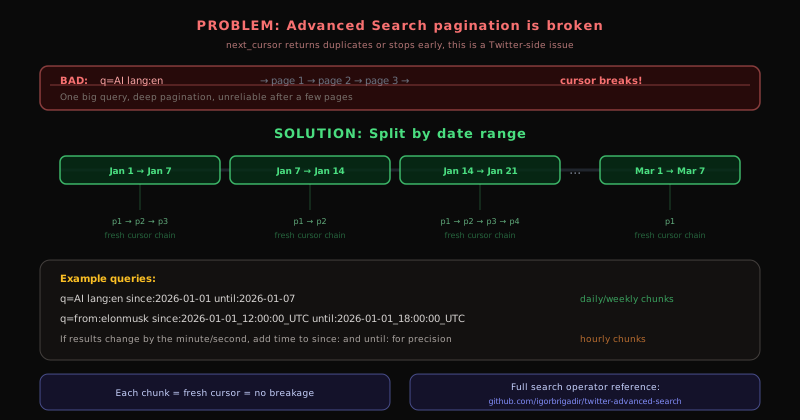
The same windowing trick is the backbone of a historical backfill, walked through in the scrape tweet history API guide, and of paging an oversized follower list, covered in the export Twitter followers guide. For the complete operator vocabulary that goes in the query string, the canonical twitter-advanced-search reference on GitHub is the one to bookmark.
Windowing does not apply to every cursor chain, though. An engagement list has no date axis to split on, so a viral post's repost list is one sequential chain you have to walk to the end. The retweeter list guide shows that loop with a page cap and a running cost figure, which is the shape to copy whenever the only stop condition you have is an empty next_cursor.
Four ways pagination goes wrong
- Ignoring the empty
next_cursor. TwitterAPIs signals the end of results by returningnext_cursornull or empty, so a loop that never checks it either runs forever or retries a dead cursor. - Baking in a page count. Stop when
next_cursorcomes back empty, but keep amax_pagesceiling as a runaway guard. - Hammering pages back to back. A short delay between calls (200ms is plenty) keeps an aggressive loop under the rate ceiling.
- Throwing away cursors on a crash. Persist the current cursor and a mid-run failure resumes instead of restarting from page one.
3. Retry the Transient Failures, and Only Those
Every networked job hits the occasional blip: a dropped connection, an upstream hiccup, a momentary rate ceiling. Skip retries and you lose data to noise. Retry indiscriminately and you turn a one-second stumble into a self-inflicted outage. The discipline is knowing which status codes are worth a second attempt.
| Status | What it means | Worth retrying? |
|---|---|---|
429 | Rate ceiling hit | Yes, after a pause |
502 | Upstream gateway failure | Yes, after a pause |
503 | Service briefly down | Yes, after a pause |
200 | Request succeeded | No, you have the data |
400 | Malformed request | No, fix the parameters |
401 | Bad key or auth_token | No, fix the credentials |
404 | User or tweet is gone | No, it does not exist |
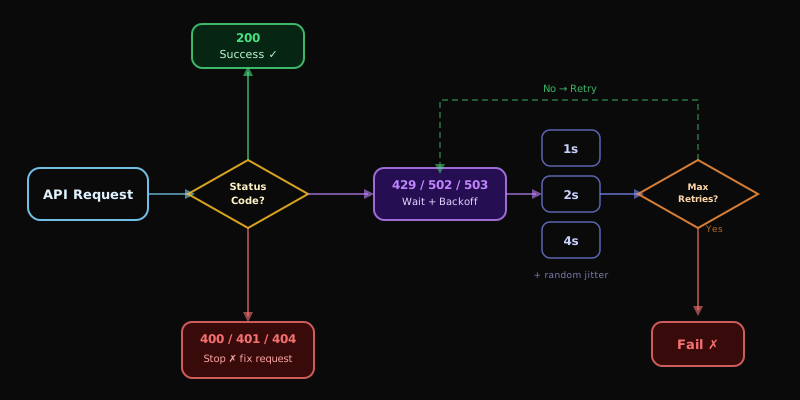
Spread retries out with jitter
Picture 100 workers all tripping the same rate ceiling in the same second. With a fixed backoff they all wake up and fire again at the same instant, a thundering herd that re-triggers the limit they were waiting out. Sprinkling a random fraction of a second onto each delay scatters the retries so they no longer collide.
Honor Retry-After when the server sends it
A 429 frequently arrives with a Retry-After header naming the exact pause the upstream wants. The MDN page on HTTP 429 documents the header and its semantics. Reading that value when it is present, and only falling back to your own doubling schedule when it is absent, unblocks the job faster and is far kinder to the upstream than a blind exponential loop. The classifier in section 7 reads the header directly.
Stop retrying the dead ends
Retrying a 401 three times just spends three calls confirming your key is still wrong. Retrying a 404 will not resurrect a deleted tweet. Transient codes only: 429, 502, 503, and raw network timeouts. For the endpoint-level view of where the rate ceilings actually bind, the Twitter API rate limit guide breaks down the windows that matter when you are sizing a retry budget.
This is exactly the wall a lot of developers hit when they try to roll their own. The pain shows up clearly in this thread:
How Can I Scrape Tweets Without Using the Twitter API?
The minimal loop
Pagination, retry, and backoff in one tight function:
import os
import time
import requests

SESSION = requests.Session()
SESSION.headers["Authorization"] = f"Bearer {os.environ['TWITTERAPIS_KEY']}"
SEARCH_URL = "https://api.twitterapis.com/twitter/tweet/advanced_search"
TRANSIENT = (429, 502, 503)


def pull_tweets(query: str, page_cap: int = 10) -> list[dict]:
    harvested: list[dict] = []
    page_token = None

    for _ in range(page_cap):
        qs = {"query": query, "product": "Latest"}
        if page_token:
            qs["cursor"] = page_token

        # up to three tries per page, doubling the wait on transient codes
        for attempt in range(3):
            resp = SESSION.get(SEARCH_URL, params=qs, timeout=15)
            if resp.status_code == 200:
                break
            if resp.status_code in TRANSIENT:
                time.sleep(2 ** attempt)
                continue
            resp.raise_for_status()

        payload = resp.json()
        harvested.extend(payload.get("tweets", []))

        page_token = payload.get("next_cursor")
        if not page_token:
            break

    return harvested


found = pull_tweets("AI min_faves:100 lang:en since:2026-01-01")
print(f"collected {len(found)} tweets")
Thirty-odd lines, and that is the whole reliable core.
4. Drop Duplicates Across Pages and Workers
Run at volume and the same tweet or profile will surface twice, across overlapping pages or across parallel workers reading adjacent windows. Leave it unhandled and your engagement counts inflate, your user stats double, and your store fills with redundant rows. A seen set in memory handles a single process; a Redis set handles a fleet.
import os
import requests

CLIENT = requests.Session()
CLIENT.headers["Authorization"] = f"Bearer {os.environ['TWITTERAPIS_KEY']}"
ENDPOINT = "https://api.twitterapis.com/twitter/tweet/advanced_search"


def collect_distinct(query: str, page_cap: int = 20) -> list[dict]:
    """Page through search results, keeping only first-seen tweet IDs."""
    already_seen: set[str] = set()
    distinct: list[dict] = []
    page_token = None

    while page_cap > 0:
        page_cap -= 1
        qs = {"query": query, "product": "Latest"}
        if page_token:
            qs["cursor"] = page_token

        reply = CLIENT.get(ENDPOINT, params=qs, timeout=15)
        reply.raise_for_status()
        block = reply.json()

        for tweet in block.get("tweets", []):
            tweet_id = tweet.get("id")
            if tweet_id and tweet_id not in already_seen:
                already_seen.add(tweet_id)
                distinct.append(tweet)

        page_token = block.get("next_cursor")
        if not page_token:
            break

    return distinct
Going multi-process? Swap the in-memory set for a Redis SADD plus SISMEMBER so every worker checks the same membership table. The Redis SADD reference spells out why this works as a shared dedup primitive: adds are idempotent, lookups are O(1), and one key serves every worker at once.
5. Cache Profiles So You Stop Re-Buying the Same Data
Profile fields drift on a daily timescale, not a per-minute one. Follower counts, bios, and verification badges barely move between hours. Re-fetching an author's profile every time you encounter one of their tweets means paying $0.0008 over and over for a record that has not changed since this morning.
import time

_cache: dict[str, tuple[dict, float]] = {}
TTL_SECONDS = 3600  # refresh hourly


def profile_for(handle: str) -> dict:
    """Return a profile, served from cache while still fresh."""
    cached = _cache.get(handle)
    if cached:
        record, stored_at = cached
        if time.time() - stored_at < TTL_SECONDS:
            return record

    reply = CLIENT.get(
        "https://api.twitterapis.com/twitter/user/info",
        params={"userName": handle},
        timeout=15,
    )
    reply.raise_for_status()
    fresh = reply.json()["user"]
    _cache[handle] = (fresh, time.time())
    return fresh
In production, lift the cache out of process memory into Redis or Memcached so every worker shares it and you set the TTL once at the cache layer. As an illustrative model, an enrichment job touching 100,000 unique authors a day can fall from 100,000 profile lookups to under 20,000 by adding a 12-hour cache, roughly a 5x cut in credit burn with no loss of freshness for fields that move that slowly. For a single process, the standard-library functools.lru_cache decorator gives you the same memoization for free, which is precisely what the full template in section 9 uses on its lookup method.
6. Keep the Credit Bill Down
A read call costs $0.0008 and returns about 20 tweets. The write actions (the toggle operations covered in section 8) are priced separately at $0.0008 per call. Most of your spend is reads, so the savings live there. Six habits move the number more than anything else:
- Never re-fetch what you hold. Tweet IDs and profiles go in a local cache; check it before you spend a call.
- Treat
tweet/detailas a last resort. Ifadvanced_searchalready returned the tweet, do not pull it again by ID. - Pick the right follower version. Both versions page at about 70 records, so prefer
user/followers_v2for new work and keep v1 only where an integration is already built against its response shape. - Filter at the query. Operators like
min_faves:100discard low-signal tweets before they occupy a page slot you paid for. - Page with intent. Need the first 100 tweets? Cap at
max_pages = 5and stop. Only walk to the end when you genuinely need everything. - Batch the work. Process users in groups that share pagination state instead of one isolated lookup at a time.
What the math looks like at volume
| Tweets pulled | Read calls | Read cost | Typical use case |
|---|---|---|---|
| 1K | 50 | $0.04 | A quick check |
| 10K | 500 | $0.50 | A small dataset |
| 100K | 5,000 | $5.00 | A research pull |
| 1M | 50,000 | $50.00 | A full pipeline run |
Cost is the reason most teams leave the official API in the first place, and the headline rate is not the number that lands on your invoice. The cheapest Twitter API ranking puts eight providers next to each other on real per-1,000-tweet cost, which is what you actually pay.
The hunt for cheaper access is a recurring theme on developer timelines, and scraping-tool roundups go viral precisely because the official pricing sent everyone looking for an exit:
https://x.com/aiwithkhush/status/2068300454275224045
The community has also been frank about how much the ground shifted in the last year. This thread gathers several of the lessons teams learned the expensive way:
5 Surprising Truths About Web Scraping in 2026: Why You’ll Never Look at Data the Same Way Again
Start building with TwitterAPIs
$0.0008 a call, about $0.04 per 1,000 tweets at 20 tweets a page. $0.50 free credits. No credit card required.
7. Sort Errors Into Three Buckets
A scraper that runs unattended needs a single place that decides what each HTTP status means: a transient failure worth retrying, a permanent request error worth raising, or an account-level error worth paging a human about. Blur those categories and you get one of two failures, quiet data loss when you do not retry something you should, or wasted budget when you retry something you never could.
import os
import time
import logging
import requests

CLIENT = requests.Session()
CLIENT.headers["Authorization"] = f"Bearer {os.environ['TWITTERAPIS_KEY']}"

TRANSIENT = {429, 500, 502, 503, 504}
FATAL = {400, 401, 403, 404, 422}

log = logging.getLogger(__name__)


def fetch_classified(url: str, params: dict, tries: int = 3) -> dict:
    """Retry transient statuses; raise on fatal ones; return JSON on success."""
    backoff = 1.0
    for attempt in range(tries):
        reply = CLIENT.get(url, params=params, timeout=15)

        if reply.status_code == 200:
            return reply.json()

        if reply.status_code in FATAL:
            log.error("fatal %s on %s: %s", reply.status_code, url, reply.text[:200])
            reply.raise_for_status()

        if reply.status_code in TRANSIENT:
            pause = float(reply.headers.get("Retry-After", backoff))
            log.warning("transient %s, attempt %d, waiting %.1fs", reply.status_code, attempt + 1, pause)
            time.sleep(pause)
            backoff = min(backoff * 2, 60)
            continue

        log.error("unrecognized status %s: %s", reply.status_code, reply.text[:200])
        reply.raise_for_status()

    raise RuntimeError(f"out of retries for {url}")
Wrap this around any endpoint. The load-bearing rule is that a 401 (wrong key) and a 404 (missing record) must never loop, while a 429 or 502 almost always clears on the next attempt. Wire an alert onto the fatal bucket so a key expiry or an account suspension surfaces before it quietly drains a day of data.
8. Auth Tokens for Write Actions and Private Reads
A slice of the API needs more than your API key. Write actions and the endpoints that read a specific account's private surface require an auth_token, the Twitter session token bound to one logged-in account, alongside the matching ct0 value. You supply both on each request, and TwitterAPIs uses them in flight and discards them; nothing is stored. You obtain the pair by lifting the auth_token and ct0 cookies out of a logged-in browser session, or by calling POST /twitter/user_login with the account credentials.
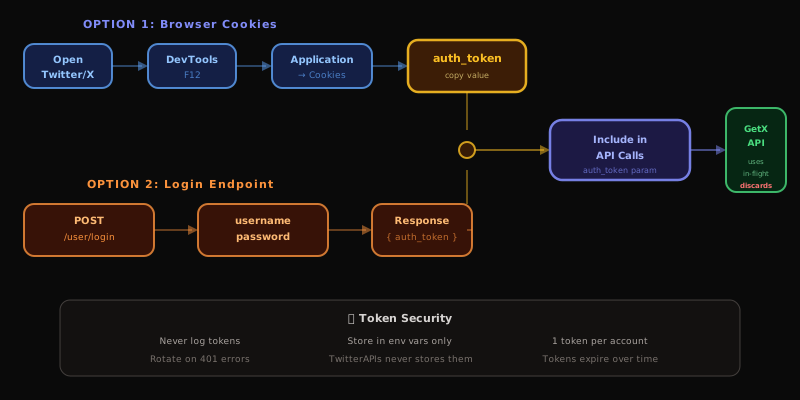
The 44 write actions cover four toggle pairs, each $0.0008 per call: favorite and unfavorite, retweet and unretweet, bookmark and unbookmark, follow and unfollow, plus delete and media upload at the same $0.0008, and tweet creation and DM send at $0.0016. The private reads (a user's own timeline, bookmarks, or likes) need the same session credentials because they expose data only that account can see.
Where the session token is required
| Endpoint | Session token? | Reason |
|---|---|---|
tweet/favorite | Required | Acts as a specific account |
tweet/retweet | Required | Acts as a specific account |
tweet/bookmark | Required | Writes to a private bookmark list |
user/follow | Required | Acts as a specific account |
user/home_timeline | Required | A personalized, per-account feed |
user/bookmark_search | Required | Reads private bookmarks |
user/likes | Required | Reads an account's liked tweets |
user/followers_you_know | Required | Needs the viewer's social graph |
Handling the tokens safely
- Treat them like passwords. Never write
auth_tokenorct0to a log. - Keep them in environment variables, never in committed source.
- Expect expiry. A
401on a write means the session lapsed; re-authenticate. - One pair per account. Do not reuse a single account's tokens across others.
- Nothing is persisted. TwitterAPIs uses the credentials per request and drops them.
9. Proxies for Write-Heavy Automation
A write action runs on Twitter as your account, using the session credentials from section 8. By default the request leaves TwitterAPIs's servers, so Twitter records the platform's IP rather than yours. For write-heavy automation, that shared origin is a pattern you may want to break up.
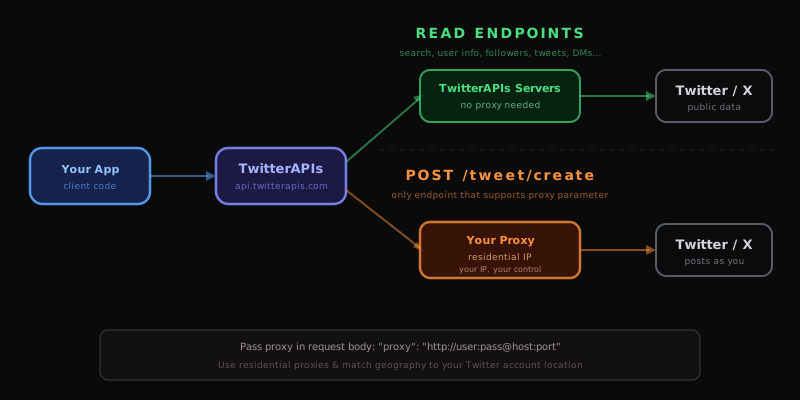
Routing your write traffic through your own residential proxy makes each action originate from an IP you control, which keeps a high-volume account from looking like it shares an address with thousands of others. A few rules earn their keep:
- Residential over datacenter. Datacenter ranges get flagged sooner.
- Rotate across accounts. Posting from several accounts behind one static IP links them.
- Match the geography. A US-based account should egress from a US IP.
- Prove it on one action first. Confirm the proxy works on a single write before a bulk run.
- Never cross-pollinate. Keep proxies isolated between accounts that should stay unconnected.
Reads do not need any of this. Search, profile lookups, and follower pulls fetch public data and write to no account, so spend the proxy budget on writes alone. If you are running a self-hosted scraper that genuinely needs a pool, the provider choice matters more than teams expect; the best residential proxies for Twitter scraping breakdown weighs pool size, geographic coverage, and the per-GB economics that decide whether self-hosting even undercuts a managed API.
10. Run Several Requests in Flight, Within a Cap
After retry, pagination, and caching are solid, throughput is the next lever. A loop that waits for each response before sending the next leaves most of your bandwidth idle, because the bottleneck is round-trip latency, not your CPU. The fix is bounded concurrency: several requests open at once, with a ceiling so you neither idle nor flood the upstream into rate limiting.
In Python the clean expression is an asyncio loop driving an httpx.AsyncClient, with a semaphore that caps in-flight requests at a fixed number, usually 5 to 20 against a managed API. That semaphore is the knob that matters most. Set it low and throughput suffers; set it high and you start collecting 429 responses, which pushes work onto the retry path and slows the whole job. Tune it empirically: start conservative, watch the error rate, and lift the cap only while 429 stays at zero.
Reuse one client across every request rather than spinning up a fresh one each call. A long-lived client keeps the connection pool warm and skips the TLS handshake per request, often a bigger win than another point of concurrency. Pair the cap with the same exponential backoff from section 3 so one worker's transient error never cascades through the pool. When you fan out across many accounts at once, say a follower-graph crawl, concurrency and dedup work together: workers pull separate cursors in parallel and write into one shared Redis set so the merged output stays unique. The same shape drives a Twitter bot built on the API, where reads and writes fan out against a fixed request budget. On a JavaScript stack, the Node.js Twitter API tutorial shows the equivalent p-limit pattern over fetch and axios.
11. Watch the Right Three Numbers
An unattended scraper has to announce when it is degrading, not only when it has stopped. Three rates tell that story: the success rate (share of requests returning 200), the retry rate (share that needed at least one retry), and the cost rate (credits per useful record). A retry rate that is quietly climbing is the earliest signal that something upstream is shifting, often before a single request fails outright.
Give every log line the endpoint, the status, the attempt number, and the cursor position. Structured logs make the incident question answerable in seconds: is this error spike concentrated on one endpoint or smeared across all of them? A single-endpoint spike usually points at an account or token problem; a broad spike points at an upstream outage or a rate ceiling you just walked into. Telling those two apart fast is the gap between a five-minute fix and an afternoon of guessing.
Alert on the fatal bucket and on sustained rate pressure, not on the lone transient blips the retry layer already swallows. A sane default pages when the 401 rate stays non-zero for over a minute (a credential or token fault) and warns when the 429 rate holds above a few percent for several minutes (your concurrency cap is too hot). Track credit burn against a daily budget so the classic runaway, a missing pagination stop-condition, gets caught by a spend alert long before it empties your balance. If your scraper also performs write actions, watch for account-level signals too; the Twitter bot detection guide covers the behavioral patterns that flag automation so you can keep write volume under the review thresholds. Reads and writes share infrastructure, and the Apify scraper comparison is a useful look at how a browser-based pipeline's observability differs from a REST API's, because the failure modes are not the same.
12. Store the Key in the Environment, Rotate It on Schedule
A production key never belongs in source. Keep TWITTERAPIS_KEY in an environment variable or a secrets manager, smoke-test it with a cheap call before you ship, rotate it on any 401 or any exposure in logs or version control, and keep a .env holding credentials out of git for good.
# put this in your shell profile or an uncommitted .env
export TWITTERAPIS_KEY="your-api-key-here"

# confirm the key answers before deploying
python3 -c "
import os, requests
reply = requests.get(
    'https://api.twitterapis.com/twitter/user/info',
    params={'userName': 'elonmusk'},
    headers={'Authorization': f\"Bearer {os.environ['TWITTERAPIS_KEY']}\"},
    timeout=10
)
print('OK' if reply.status_code == 200 else f'ERROR: {reply.status_code}')
"
A rotation runs in five steps: mint a new key in the dashboard, push it to every environment starting with staging, verify it in production with a test call, revoke the old key, then update any monitor watching for 401 (a spike there flags a rotation gap). Keep both keys live for a 24-hour overlap so a key cached somewhere in your stack does not cause a blip mid-rotation.
If a secrets manager is in play, AWS Secrets Manager, HashiCorp Vault, or GCP Secret Manager, store the key there and inject it at runtime through the SDK instead of a plain environment variable. Both AWS Secrets Manager and Vault support scheduled rotation and fine-grained access policies, so one rotation event reaches every consumer without a redeploy and leaves an audit trail of who read the secret and when. Rotate quarterly as a floor, or immediately whenever a key leaves the team, lands in source control by accident, or shows up in a log. Set a calendar reminder for the first of each quarter, and write each rotation into the ops runbook with the date, the reason, and who ran it; an undocumented rotation just creates doubt the next time you have to move under pressure.
For the end-to-end build of a production scraper, including the SDK wrapper, async patterns, and a tweepy migration path, see the Python Twitter API tutorial. For the operator syntax feeding the query parameter throughout this guide, see the Twitter search operators reference. For a full per-volume cost breakdown, including the owned-read versus standard-read split and real monthly bills at light, medium, heavy, and enterprise tiers, see the Twitter API cost guide.
13. The Whole Thing in One Class
Everything above folds into one reusable object: backoff retry on transient codes, cursor paging that stops when next_cursor comes back empty, tweet-ID dedup via a seen set, per-handle profile caching with lru_cache, and a clean split between transient and fatal statuses. Drop it into a project as your starting point.
import os
import time
import requests
from functools import lru_cache


class XScraper:
    ROOT = "https://api.twitterapis.com"
    TRANSIENT = {429, 500, 502, 503, 504}

    def __init__(self) -> None:
        self.http = requests.Session()
        self.http.headers["Authorization"] = f"Bearer {os.environ['TWITTERAPIS_KEY']}"
        self._seen: set[str] = set()

    def _call(self, path: str, params: dict, tries: int = 3) -> dict:
        wait = 1.0
        for attempt in range(tries):
            reply = self.http.get(f"{self.ROOT}{path}", params=params, timeout=15)
            if reply.status_code == 200:
                return reply.json()
            if reply.status_code in self.TRANSIENT:
                time.sleep(min(wait * 2 ** attempt, 60))
                continue
            reply.raise_for_status()
        raise RuntimeError(f"retries exhausted: {path}")

    def search(self, query: str, page_cap: int = 10) -> list[dict]:
        """Paginate a search, keeping only first-seen IDs."""
        out, token = [], None
        for _ in range(page_cap):
            qs = {"query": query, "product": "Latest"}
            if token:
                qs["cursor"] = token
            block = self._call("/twitter/tweet/advanced_search", qs)
            for tweet in block.get("tweets", []):
                if tweet["id"] not in self._seen:
                    self._seen.add(tweet["id"])
                    out.append(tweet)
            token = block.get("next_cursor")
            if not token:
                break
        return out

    @lru_cache(maxsize=1000)
    def profile(self, handle: str) -> dict:
        """Cached profile lookup."""
        return self._call("/twitter/user/info", {"userName": handle})["user"]


# usage
bot = XScraper()
batch = bot.search("AI min_faves:500 lang:en since:2026-01-01", page_cap=5)
author = bot.profile(batch[0]["author"]["username"])
print(f"{len(batch)} unique tweets, first author: {author['name']}")
To layer sentiment scoring on top of this collection step, see the Twitter sentiment analysis guide. For the full operator syntax behind the query argument, see the Twitter search operators reference.
The cheapest pay-as-you-go Twitter API. Try it free.
$0.0008 a call, about $0.04 per 1,000 tweets at 20 tweets a page. $0.50 free credits. No credit card required.
14. The Python Stack, and Why Not the Alternatives
For Twitter scraping in 2026, plain requests against TwitterAPIs is the stack worth defaulting to. One Bearer header, no OAuth dance, $0.0008 a read call, and every field comes back inline with no expansion parameters to manage. The requests documentation is the reference for the session reuse, timeouts, and connection-pool behavior you will lean on at scale. The competing approaches each carry a real tax: tweepy adds OAuth machinery you only need for user-delegated flows, snscrape is mostly broken after Twitter's 2023-2026 anti-scraping changes, and browser automation collects IP bans inside hours.
The fade of the old library route is well documented. Tools like twint existed specifically to read Twitter without the official API, and they spread widely right up until the anti-scraping changes made them unreliable:
https://x.com/akaclandestine/status/1946652340607447327
If a video helps, Rob Mulla's short walkthrough of scraping Twitter with snscrape is a clean demonstration of the library pattern that used to work, and a useful marker for why a maintained REST API replaced it for production:
https://www.youtube.com/watch?v=PUMMCLrVn8A
| Stack | Best fit | The catch |
|---|---|---|
requests + TwitterAPIs | Production scraping at any size | One Bearer header, no OAuth, $0.0008 a call for ~20 tweets |
tweepy + official X API | OAuth user-delegated flows | Rare for scraping; metered pricing runs ~100x the cost |
snscrape | Legacy projects only | Largely broken in 2026, most endpoints fail |
| Selenium / Playwright | Edge cases no API covers | IP bans within hours, proxy spend often beats API pricing |
The full Python tutorial covering search, profiles, followers, replies, pagination, retries, async with httpx, a tweepy migration path, and a drop-in SDK class is the How to Use the Twitter API with Python, 2026 Tutorial.
Can You Still Scrape Twitter in 2026?
Yes, at production scale, and the interesting question for anyone reading a best-practices guide is not whether it works but what it now costs to keep working. Three specific things changed and each one moved a line item rather than closing a door.
The unauthenticated surface closed. Collectors that read a public endpoint with no session stopped working in 2023. What replaced them all require a credential of some kind, so the first architectural decision is which credential you are willing to operate: a pool of X accounts, a funded first-party developer balance, or a vendor's bearer token.
Partial success became the dominant failure mode. This is the one that matters most for the patterns in this guide. A soft-limited session does not return an error, it returns fewer results, and every rule in this post about cursor termination, deduplication and the three error buckets exists because a silently short response is far more expensive than a loud failure. If you take one habit from this section, make it this: assert on what you expected to receive, not only on what came back.
The cost of running your own collection moved from the request line to the maintenance line. Proxy bandwidth, account replacement and repair hours are now the real bill for a self-operated scraper, and none of them appear on a pricing page. The reason this guide is written against a REST surface is not vendor preference, it is that the patterns are the same either way and the maintenance line is the term that actually differs.
So the state of play in 2026 is that scraping is entirely viable and the engineering has moved up a layer. You spend less time parsing HTML and more time on session ownership, partial-result detection, and cost per usable record.
How Does Twitter's Hidden API Work?
Behind the x.com web client sits an internal API that the site itself calls, and it is worth understanding because half the tooling in this space is built on it and because knowing how it works tells you why that tooling breaks.
What it is. When you load a timeline in a browser, the page does not receive server-rendered tweets. It calls internal GraphQL endpoints under a path shaped like /i/api/graphql/<queryId>/<OperationName> and renders the JSON. Those endpoints return the same objects a documented API would, which is why they are attractive, and they are not a public product, which is why they are fragile.
What a request needs. Three things travel together on every call: a bearer token that the web client ships, session cookies including auth_token, and an x-csrf-token header whose value must match the ct0 cookie. Miss the CSRF pairing and the call fails in a way that looks like an auth problem rather than a header problem, which is where most first attempts stall.
Why it breaks. The queryId in the path is tied to a specific client build. Ship a new web client and the identifier changes, so a collector pinned to yesterday's value starts returning errors against an endpoint that still exists. The response shape moves too, and it moves without a version tag or a changelog, because there is no contract to break. That is the actual maintenance burden behind every account-pool library: not writing the collector, but tracking a moving target with no notification.
What this means for a production pipeline. Reading a private surface directly is a legitimate engineering choice and it is an ongoing commitment rather than a one-time build. You are taking on identifier rotation, shape drift, session lifecycle and account attrition, permanently, in exchange for a near-zero per-call price. Every pattern in this guide still applies, and several of them, particularly the three error buckets and the partial-success checks, matter considerably more when nothing you are calling has a documented contract.
The reason this section is here rather than a walkthrough of how to call those endpoints is that the mechanics are the easy part and the maintenance is the whole cost. Decide on the commitment before you write the collector.
How to Choose the Right Twitter Scraper
The patterns in this guide are stack-agnostic on purpose, but the stack still has to be chosen. Four questions decide it, and they are worth answering in order.
Does a person or a live system wait on the response? If yes, you need a synchronous interface, which rules out managed scraping platforms whatever their price or reliability. A job-and-poll architecture cannot sit behind a request a user is waiting on.
Would a missing 5 percent change your answer? For research, compliance work, or anything where completeness is the point, success rate outranks unit cost and a provider with a measured completion figure is worth its premium. For a feed or a dashboard, it usually is not.
Who repairs the collector? This is the question that decides most real builds and it is the one least often asked out loud. A self-operated scraper is a standing engineering commitment measured in hours per month, forever. A vendor relationship converts that into a line item. Neither is wrong, but pricing the first as though it were free is.
Do you need write actions? Posting, replying, direct messages and authenticated actions on behalf of a user are a different capability with a different access model. Many pipelines carry the cost of a write-capable setup for a single scheduled job that could be split out.
One anti-pattern deserves naming because it is common and expensive: choosing on the per-call price alone. The per-call price is the smallest term in the total for most teams under a million records a month. Failure rate, maintenance hours and the cost of a silently incomplete dataset are all larger, and only the first of those appears on anyone's pricing page.
How to Scrape Tweets (X Posts) With Python: The Minimal Correct Loop
Every pattern in this guide compresses into one short program, and it is worth seeing them together rather than as fourteen separate rules. This is the shape a correct collector takes: bounded query, cursor termination, typed error handling, and deduplication on ID.
import os, time, random, requests

ROOT = "https://api.twitterapis.com"
HEADERS = {"x-api-key": os.environ["TWITTERAPIS_KEY"]}
TRANSIENT = {429, 502, 503}

def get(path, params, attempts=5):
    """Retry only the transient codes, with jittered backoff."""
    for n in range(attempts):
        r = requests.get(f"{ROOT}{path}", params=params, headers=HEADERS, timeout=30)
        if r.status_code == 200:
            return r.json()
        if r.status_code not in TRANSIENT:
            r.raise_for_status()          # 400/401/404 are dead ends, do not retry
        wait = min(2 ** n, 30) + random.random()
        time.sleep(float(r.headers.get("Retry-After", wait)))
    raise RuntimeError(f"{path} still failing after {attempts} attempts")

def scrape(query, page_cap=500):
    """Walk pages until the cursor stops, deduping on tweet id."""
    seen, out, cursor, pages = set(), [], None, 0
    while pages < page_cap:
        params = {"query": query, "product": "Latest"}
        if cursor:
            params["cursor"] = cursor
        body = get("/twitter/tweet/advanced_search", params)
        batch = body.get("tweets", [])
        for t in batch:
            if t["id"] not in seen:       # dedupe across pages and workers
                seen.add(t["id"])
                out.append(t)
        cursor = body.get("next_cursor")
        pages += 1
        if not cursor or not batch:       # stop on the cursor, never on a counter
            break
    return out, pages

tweets, pages = scrape("web3 lang:en min_faves:10 since:2026-08-01")
print(f"{len(tweets)} unique tweets across {pages} pages")
Four things in that loop are the whole guide. The retry set is a whitelist rather than a catch-all, so a 401 fails immediately instead of being retried five times against a dead key. The backoff carries jitter, so parallel workers do not resynchronize into a thundering herd. Termination is on the cursor and on an empty batch, never on a hardcoded page count. And deduplication happens on ID at insert time, because pagination overlaps at page boundaries more often than people expect.
What is deliberately not in it: no proxy on the read path, no unbounded concurrency, and no key in the source. Add concurrency by running several scrape calls with disjoint date windows rather than by racing workers over the same cursor, which is the one parallelization that does not produce duplicates.
A Note on Legality
Pulling publicly visible Twitter/X data is generally not a federal crime in the United States. The Ninth Circuit's 2022 decision in hiQ Labs v. LinkedIn held that scraping public web data does not violate the Computer Fraud and Abuse Act (CFAA), and that reasoning gets applied broadly to other public-web cases.
"Not a CFAA violation" is not the same as "frictionless," though:
| What you are doing | Where the law stands | What actually happens |
|---|---|---|
| Reading public profiles, tweets, search | Generally fine under hiQ Labs | IP blocks within hours, proxy costs climb |
| Behind-login content (timelines, bookmarks) | Needs authentication, a different access path | Suspension exposure, fragile sessions |
| Re-syndicating what you collected | Depends on jurisdiction | Personal-data rules (PDPL/GDPR/CCPA) kick in |
| Building ML/AI training sets | Litigated case by case | New ground, get counsel for production work |
The cleanest way to skip the infrastructure question entirely is to put a third-party Twitter data API in front of it, so the only terms you operate under are the provider's developer agreement. For anything specific to your own use case, talk to a lawyer rather than a guide.
The One-Screen Cheat Sheet
Five rules carry most of the reliability: retry only 429, 502, and 503 (never 400/401/404); reserve proxies for write actions and leave reads direct; stop pagination when next_cursor comes back empty, never on a hardcoded count; keep session tokens in the environment and rotate on a 401; and cache aggressively so you never buy the same record twice.
| Area | Do this | Not this |
|---|---|---|
| Retries | Back off on 429, 502, 503 | Retry 400, 401, 404 |
| Proxies | Route write actions through your IP | Proxy your read traffic |
| Pagination | Stop when next_cursor is empty | Hardcode a page count |
| Auth tokens | Keep in env vars, rotate on 401 | Paste them into source |
| Cost | Cache and pre-filter with operators | Re-fetch data you already hold |
Start Scraping the Right Way
TwitterAPIs hands you $0.50 in free credits at signup, about 625 read calls, roughly 12,500 tweets, with no card required. That is enough room to run every pattern in this guide and stand up a working scraper before you commit a cent.
- Sign up at twitterapis.com
- Grab your API key from the dashboard
- Read the full API documentation for per-endpoint parameters and response schemas
For more depth, see Twitter API v2 vs TwitterAPIs, the Twitter API cost guide, the Python Twitter API tutorial, and the Twitter advanced search operators guide for the query construction that pairs with the scraping loop above.
Best-practice patterns verified against live TwitterAPIs endpoints May 2026. hiQ Labs v. LinkedIn precedent sourced from the Ninth Circuit opinion (2022). Rate-limit and pricing data from the official X API pricing page as of May 2026.
// sources
Where these numbers come from
Each row is a figure in this post and the artefact it was read from. Prices and limits on this platform move, so check the date on the source before you plan against it.
- X API pricing page
- Source of the metered official rate the post opens on, north of $5 per 1,000 tweets, and the pricing basis for its cost-optimization math.
- MDN HTTP 429 status reference
- Documents the Retry-After header and its semantics, backing the rule that a retry layer should read that value when present and only fall back to its own doubling schedule when it is absent.
- Redis SADD command reference
- Backs the multi-process dedup design, that set adds are idempotent and membership lookups are O(1), so one key can serve every worker as a shared dedup table.
- Python functools.lru_cache documentation
- The single-process memoization used by the template's lookup method, behind the modelled drop from 100,000 profile lookups a day to under 20,000 with a 12-hour cache.
- twitter-advanced-search operator reference
- The canonical operator vocabulary the post points to for building the q string used in the time-windowing and backfill patterns.
- Ninth Circuit opinion in hiQ Labs v. LinkedIn
- The primary court document behind the legal precedent the post cites when discussing what public-data collection is permitted.
Frequently Asked Questions
Scraping public Twitter/X data is generally not a federal crime in the US under the hiQ Labs v. LinkedIn precedent, where the Ninth Circuit ruled that scraping public web data does not fall under the Computer Fraud and Abuse Act. The simpler path for most production use cases is a third-party Twitter data API that runs the infrastructure layer for you. For specific legal questions about your own use case, consult a qualified lawyer rather than relying on a general guide.
Technically yes: browser automation with Puppeteer or Playwright can read Twitter's web UI. In practice it is increasingly unreliable in 2026 because Twitter's anti-scraping defenses detect headless browsers, fingerprint requests, and rate-limit by IP within hours. Self-hosted scrapers also incur rotating residential-proxy costs of roughly $5 to $15 per GB that frequently exceed third-party API pricing for the same volume of data.
Direct browser scraping hits per-IP rate limits within minutes. The official X API enforces 15-minute and 24-hour windows per endpoint and returns 429 Too Many Requests when you exceed them. A managed third-party API like TwitterAPIs has one flat ceiling of 600 requests a minute and 20 concurrent per key, so your throughput is governed by a single number and your credit balance rather than a different per-endpoint window on every route.
A Twitter API (official or third-party) returns structured JSON through documented HTTP endpoints, and the provider handles authentication, retries, anti-bot defenses, and rate limits on your behalf. Scraping refers to extracting data directly from the rendered Twitter web UI using browser automation or HTML parsing. APIs are far more reliable; a scraper breaks every time Twitter ships a UI change to its frontend.
For most production workloads, TwitterAPIs is the most cost-effective option at $0.04 per 1,000 tweets ($0.0008 per call returning roughly 20 tweets), about 100x cheaper than the official X API standard read rate. Open-source tools like snscrape are largely broken in 2026 after Twitter's anti-scraping updates. Self-hosted browser automation with Selenium or Playwright hits IP-level rate limits within hours, and the rotating-proxy costs often exceed third-party API pricing for the same data volume.
Costs vary significantly by approach: $5 to $10 per 1,000 tweets on the official X API standard read rate, $0.04 per 1,000 tweets on TwitterAPIs, $0.15 per 1,000 on twitterapi.io, $0.25 to $0.40 per 1,000 on Apify scrapers, and $0 plus proxy costs for self-hosted scrapers, which typically works out to $1 to $5 per 1,000 tweets once you account for residential-proxy spend.
Largely no. The maintainers paused active development in 2023, and most endpoints (search, user timelines, followers) are unreliable or fully broken after Twitter tightened its anti-scraping defenses. For a working Python alternative, send requests against a maintained REST API instead of relying on a library that reverse-engineers Twitter's private frontend, which breaks every time the web app ships a change.
Check out similar blogs
More guides on the Twitter/X API, scraping, and pricing.

Scrape Full Tweet History of Any Account in 2026 (Beyond the 3,200 Limit)
Why the X timeline stops at 3,200 tweets and how to pull an account's full history with date-window search, cursor pagination, and dedup. Live-tested code in Python and curl.
How to Track a Tweet's Performance in Real Time with the X API
Poll a tweet's engagement counts over time with the X API, compute a views-to-likes ratio, and read the quote-tweet layer to tell an organically growing launch tweet from a boosted one. Tested Python and curl.

How to Get Image URLs from X Tweets via API in 2026 (Full Resolution, Python and Node)
Pull image URLs out of X tweets with runnable Python and Node.js, then get the full-resolution original instead of the scaled copy the API hands you by default. Measured on 14 live images, with the video poster-frame trap and the per-call cost.
Twitter API Authentication in 2026: OAuth, Bearer Tokens, and Fixing 401
How Twitter (X) API authentication works in 2026: the four credential types, OAuth 1.0a versus OAuth 2.0, generating and using a bearer token, runnable Python and Node.js, and a fix for every 401 Unauthorized and 403 error, plus the one-header alternative.
How to Get Everyone Who Retweeted a Tweet via API (2026)
Pull the full list of accounts that reposted any tweet with a real 2026 API. Runnable Python and Node.js, cursor pagination for the whole list, a real amplifier ranking over live data, a bot filter, and the honest per-call cost.
How to Get All Replies to a Tweet via API (2026)
Pull the replies under any tweet with a real 2026 API. Runnable Python and Node.js, cursor pagination, the conversation_id tail sweep for the long tail, nested replies-to-replies, signal-versus-noise filtering over live data, and the honest per-call cost.
Twitter API Pagination 2026: How next_token Works (and a Simpler Alternative)
How Twitter API pagination works in 2026. The official next_token loop explained field by field, a simpler single-cursor alternative, runnable Python and Node code, and the real per-call cost of a paginated pull.
How to Search Tweets by Hashtag via API 2026 (Python + Node.js)
Search tweets by hashtag with a real 2026 API in Python and Node.js. Runnable code for the hashtag operator, engagement filters, cursor pagination, deduping retweets, counting authors, and the real per-call cost.