GUIDE
How to Build a Twitter (X) Chatbot on an API in 2026
Build a Twitter/X chatbot that watches @mentions and auto-replies via an API. The two endpoints, a full poll-filter-generate-reply loop in Python, real per-call cost, and an honest read on X's automation rules.
A Twitter chatbot is not the sci-fi thing the name suggests. It is a small program that watches for people tagging your account and answers each one on its own. Someone posts "hey @yourbrand, is the API down?" and a well-built bot replies within seconds with a status link, threaded right under their post. That is the whole job, and today it comes down to two API calls glued together in a loop: one to read the mentions, one to post the reply. This guide builds that bot end to end in Python, with the real per-call cost, and a straight answer on what X's rules do and do not let a reply bot do.
TL;DR: A Twitter/X chatbot runs one loop: poll the mentions endpoint on a timer, filter to mentions you have not handled, generate a reply with a template or an LLM, then post it with a create-tweet call whose
in_reply_topoints at the original post. On a pay-per-call API the read is 0.0008 dollars and each posted reply is 0.0016 dollars, so a bot polling once a minute and answering 500 mentions a day costs about 59 dollars a month, most of it the polling. Signup includes 0.50 dollars in free credits with no card. The one hard rule: reply on a clear trigger, disclose the bot, and never mass-reply to people who did not tag you, which is what gets accounts suspended.
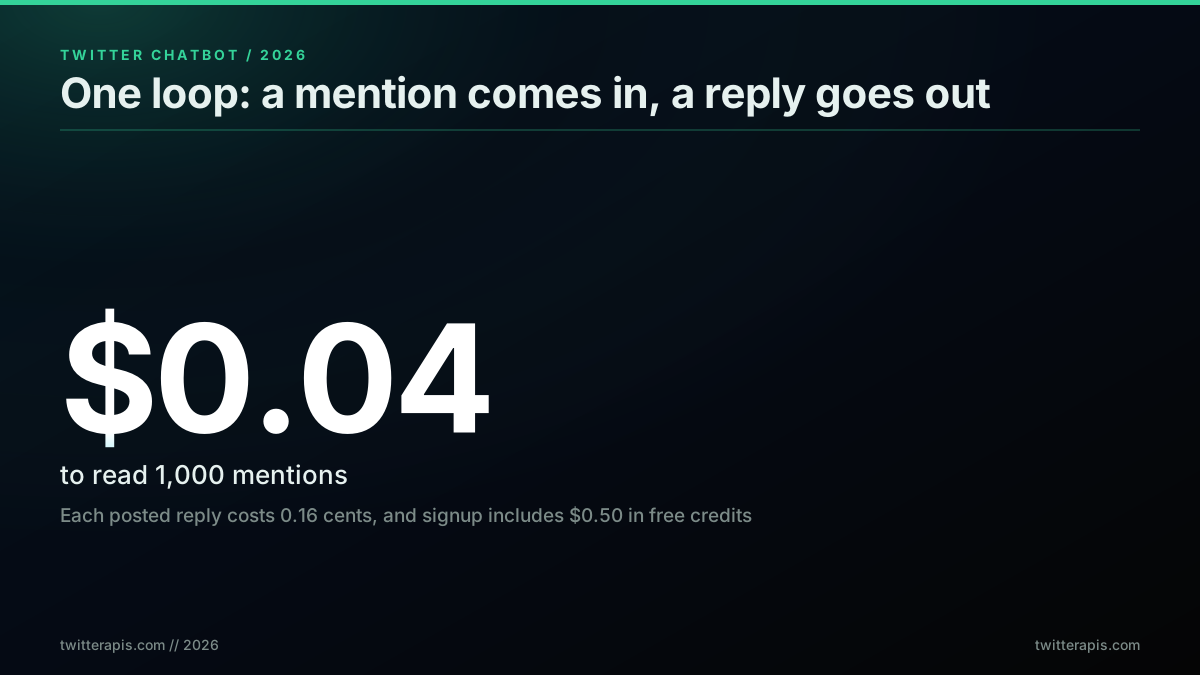
The whole economy of a chatbot in one line: cheap reads, slightly pricier writes
This is the write-side companion to two guides you may already have read. The complete Twitter bot guide surveys every kind of bot and the real-time mention monitor covers detecting mentions and alerting a human. Both stop at the point where a person still has to type the reply. This guide picks up exactly there and closes the loop: turning a detected mention into a posted answer, automatically.
What a Twitter Chatbot Actually Is
A Twitter chatbot is an automated account that reads posts directed at it and responds without a human in the loop for each reply. The modern version is a conversational responder: it watches mentions, understands what each one is asking, and answers in context. This is a narrower and more useful thing than a scheduled-post bot that fires the same tweet on a timer, and it is different again from a monitor that only detects mentions and pings a human. A chatbot detects, decides, and acts, all three, and the acting is the part that makes it a chatbot rather than a dashboard.
The builders shipping these today treat them as stateful agents, not scripts. A modern reply bot remembers who it has talked to and keeps a thread of context per user, which is a long way from the mad-libs bots of the last decade.
complete X bot autonomy system (12 modules):
@aurora_ventures view on X
That framing, a system of modules with memory rather than a single script, is where reply bots have landed. You do not need twelve modules to start, but the mental model is right: a chatbot is a loop with state. The loop is what we build first, and everything else, memory, an LLM, hosting, hangs off it. If you have never called the API at all, the complete API tutorial and the how to get an API key guide cover the request layer this bot sits on.
The Architecture: Four Moves From Mention to Reply
Every reply bot, no matter how sophisticated, is the same four moves on repeat. Poll for new mentions. Filter down to the ones you should answer. Generate the reply text. Post it. Get those four right and the bot works; everything past that is refinement. Here is the shape before we write any code.
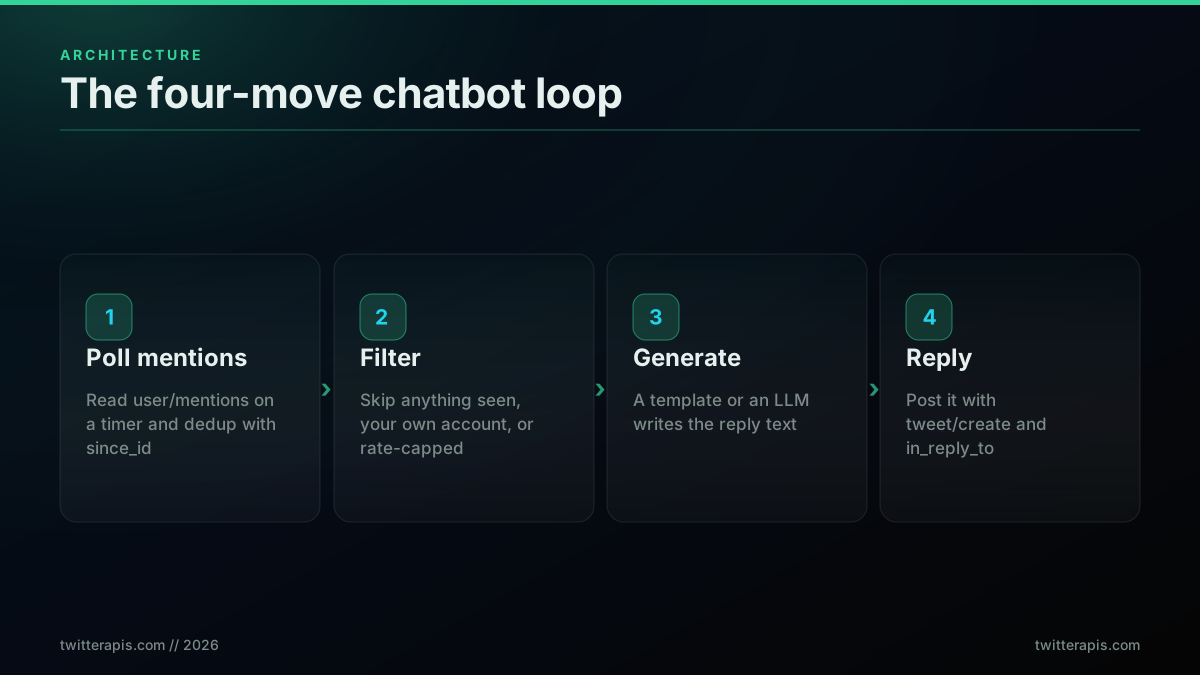
Every reply bot is these four moves on repeat
The first move, polling, is a read: you ask the API for recent posts that tag your handle and pass since_id so you only get new ones. That read layer is covered in depth in the mention monitoring guide, so this guide keeps the polling short and spends its detail on the three moves that guide skips: filtering, generating, and posting. The second move, filtering, is where a helper and a spammer part ways, because it decides who does and does not deserve a reply. The third, generating, is where a template or a language model turns the mention into an answer. The fourth, posting, is the write call that most tutorials gloss over because until recently writes were the expensive, awkward part. The gkamradt twitter-reply-bot repo is the canonical open-source version of exactly this loop, and it is worth reading alongside this guide as a reference implementation.
The Two Endpoints That Do the Work
A reply bot needs exactly two endpoints, and confusing them is the most common early mistake. The read endpoint returns the mentions of your handle. The write endpoint posts a reply. On a pay-per-call API these map to user/mentions and tweet/create, and they are priced differently because reading is cheaper than writing.
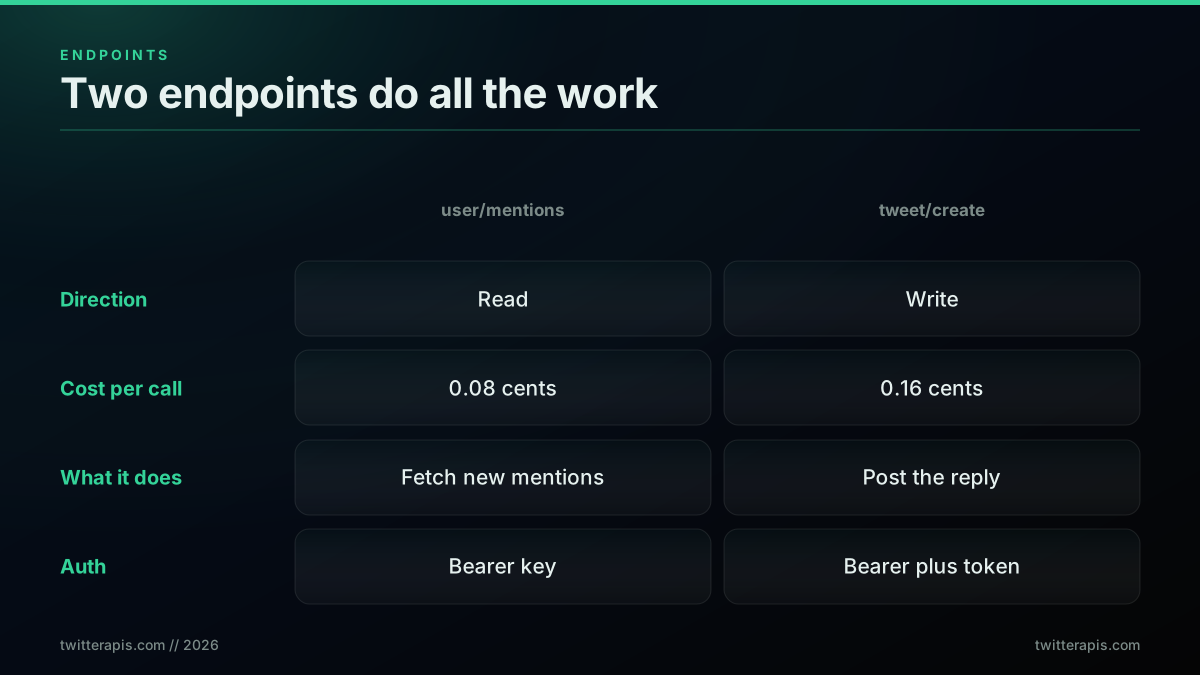
Two endpoints, one reads and one writes, do all the work
The read endpoint, user/mentions, returns the most recent posts that tag a given account, and it costs 0.0008 dollars per call, the same as every other read on the API. Each call returns about 20 posts, so on a per-post basis it works out to roughly 0.04 dollars per 1,000 tweets. The write endpoint, tweet/create, posts a tweet, and a reply is just a tweet with an in_reply_to id attached. It is one of the premium endpoints at 0.0016 dollars per call, double the read rate, because publishing is a heavier operation than reading. Those two numbers are the entire cost model of a chatbot: you pay 0.0008 dollars every time you look for work and 0.0016 dollars every time you answer. For the full per-endpoint breakdown and how it compares across providers, see the Twitter API cost page and the cost benchmark.
The auth differs between the two, and this catches people out. The read only needs your API key in a Bearer header. The write needs that key plus a session token for the account that will post, an auth_token and ct0 pair that you pass with the request and that is never stored, because the API posts as your account, not its own. We will use both below.
Move One: Poll for New Mentions
Polling is the read half of the loop, and the goal is to fetch only mentions you have not seen. The pattern is to keep the highest mention id you have processed and pass it back as since_id on the next call, so the API filters server-side and you never re-download old posts. Confirm the endpoint works with a single call before you wrap it in a loop.
curl -s "https://api.twitterapis.com/twitter/user/mentions?username=yourbrand" \
  -H "Authorization: Bearer YOUR_API_KEY"
# Returns recent mentions as JSON.
# HTTP 401 means a bad or missing key; 402 means out of credits.
The response is already flattened, so you read the fields straight off each object. A single mention looks like this, and the three fields that matter for a bot are id for dedup, text for the reply logic, and author so you know who you are answering.
{
  "tweets": [
    {
      "id": "2071806356164902939",
      "text": "hey @yourbrand is the API down right now?",
      "created_at": "Thu Jul 03 04:01:42 +0000 2026",
      "author": { "username": "a_customer", "followers_count": 1820 }
    }
  ],
  "next_cursor": "cur-8f21ba..."
}
Here is the poll function. It is deliberately thin, because the interesting work happens in the three moves after it.
import requests

API = "https://api.twitterapis.com/twitter"
KEY = "YOUR_API_KEY"        # from twitterapis.com/signup
HANDLE = "yourbrand"        # the account the bot watches

def get_mentions(since_id=None):
    params = {"username": HANDLE}
    if since_id:
        params["since_id"] = since_id
    r = requests.get(f"{API}/user/mentions",
                     headers={"Authorization": f"Bearer {KEY}"},
                     params=params, timeout=30)
    r.raise_for_status()
    return r.json().get("tweets", [])
That is the whole read side. The same call in Node.js and in raw requests for other languages is covered in the Python tutorial and the Node.js tutorial. Note that a mentions poll uses the Python requests library and nothing more; you do not need a heavy SDK for the read. One thing to size up front is how often you can safely poll, because the read endpoint carries its own limits; the per-endpoint ceilings and the headers that report your remaining budget are laid out in the rate limit guide, and a 30-second interval sits comfortably inside them for a single handle.
Start building with TwitterAPIs
$0.0008 a call, about $0.04 per 1,000 tweets at 20 tweets a page. $0.50 free credits. No credit card required.
Move Two: The Filter That Decides Who Gets a Reply
Filtering is the move that keeps your bot on the right side of both good taste and X's rules, and skipping it is how reply bots get accounts suspended. Before you generate a single reply, every mention runs a gauntlet of skip rules. The default answer is do not reply; a mention has to earn an answer.
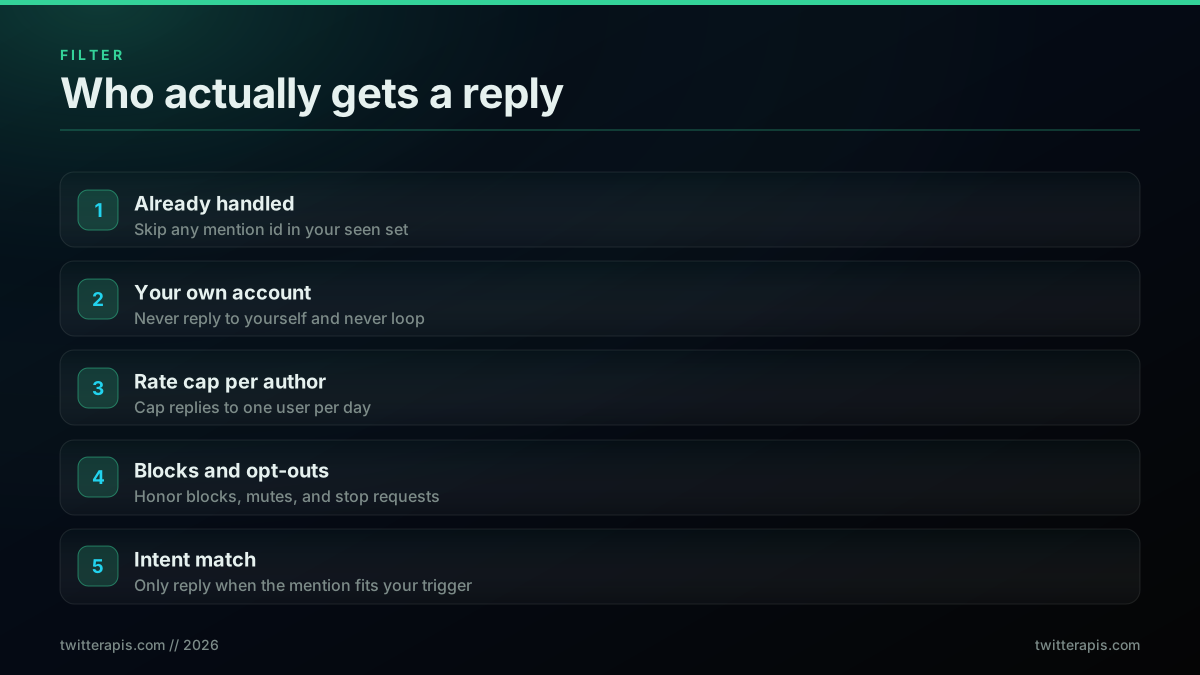
The filter is what separates a helper from a spammer
Five rules cover almost every case. First, skip anything already handled, checked against a durable seen set so a restart never double-replies. Second, never reply to your own account, or the bot answers its own replies and loops forever. Third, cap replies per author per day, so one person cannot pull your bot into an endless back-and-forth and so you never look like you are harassing someone. Fourth, honor blocks, mutes, and stop requests, because a reply to someone who has opted out is both rude and against the rules. Fifth, match intent: only reply when the mention actually fits what your bot is for, which for a support bot means a question and not a passing mention of your name. Here is the filter in code.
import re

SEEN = set()            # load this from disk at startup (see hardening below)
REPLIED_TODAY = {}      # author -> count, reset daily
BLOCKED = {"a_troll", "opted_out_user"}
TRIGGER = re.compile(r"\b(down|help|how|error|broken|\?)\b", re.I)

def should_reply(tweet):
    author = tweet["author"]["username"].lower()
    if tweet["id"] in SEEN:            return False   # already handled
    if author == HANDLE.lower():        return False   # never reply to self
    if author in BLOCKED:               return False   # opted out or blocked
    if REPLIED_TODAY.get(author, 0) >= 1: return False # one reply per author per day
    if not TRIGGER.search(tweet["text"]): return False # intent must match
    return True
The TRIGGER regex is the crudest possible intent check, and for many bots it is enough. If your bot answers open-ended questions, you can replace the regex with a cheap classification call, but resist the urge to reply to everything. The advanced search operators reference is useful here too, because if you also track brand-keyword mentions without the @ handle, the same filter logic applies to that stream. A tight filter is not a limitation; it is the feature that keeps the bot welcome.
Move Three: Generate the Reply
Generating the reply text is where you choose between two paths, and the right answer is usually both. A template is a fixed string, optionally with a slot or two filled in. A language model writes a fresh reply per mention. Templates are free, instant, and predictable; models are flexible but cost money, add latency, and can go off script. Choose per intent, not once for the whole bot.
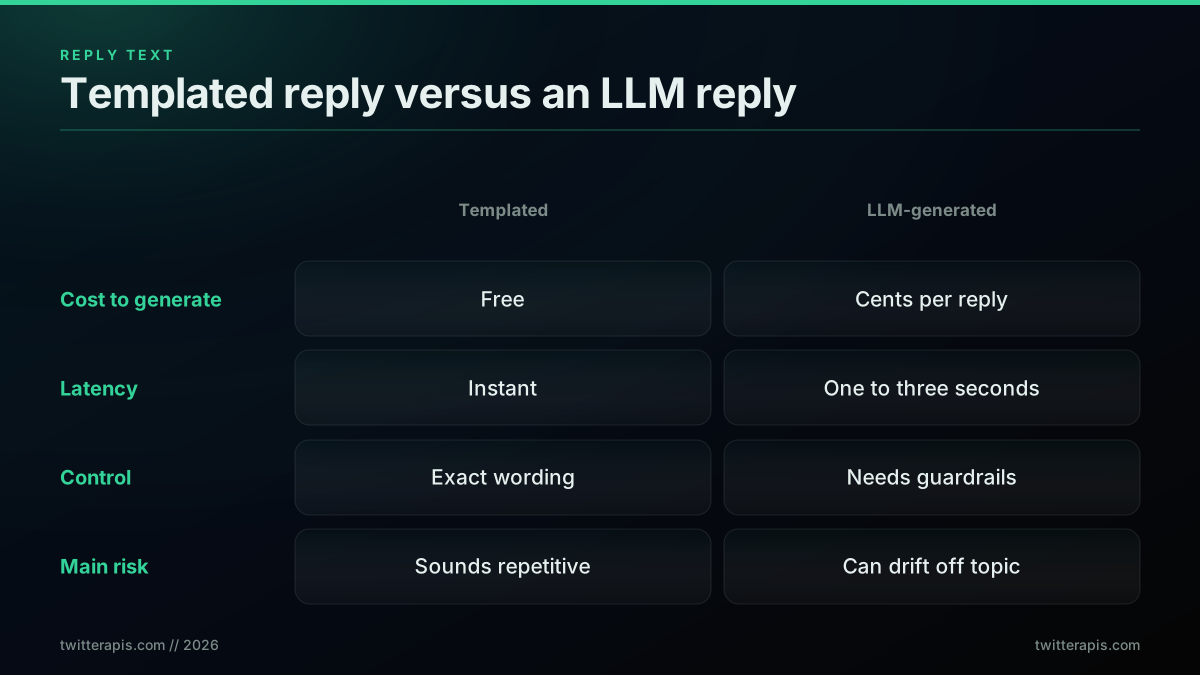
Template or model: pick per intent, not once for the whole bot
For known intents, a template is the correct tool. A support acknowledgement, a status link, a "thanks for flagging, we are on it" does not need a language model, and using one only adds cost and risk. Here is the templated path.
TEMPLATES = {
    "down":  "Thanks for the heads up. Live status is at status.yourbrand.com and we post updates there first.",
    "help":  "Happy to help. The docs cover most setups at docs.yourbrand.com, and reply here if you are still stuck.",
    "default": "Thanks for tagging us. A human will follow up shortly.",
}

def templated_reply(text):
    t = text.lower()
    if "down" in t or "error" in t or "broken" in t:
        return TEMPLATES["down"]
    if "help" in t or "how" in t:
        return TEMPLATES["help"]
    return TEMPLATES["default"]
For open-ended questions where a canned line would read as tone-deaf, an LLM earns its cost. The pattern is to pass the mention text plus a tight system prompt and cap the output length so it fits a tweet. This works with the OpenAI chat API or the Anthropic messages API; here is the shape.
from openai import OpenAI
client = OpenAI()

SYSTEM = ("You are the support bot for yourbrand on X. Reply in under 240 "
          "characters, friendly and concrete. If you are unsure, say a human "
          "will follow up. Never invent facts, prices, or links.")

def llm_reply(mention_text):
    resp = client.chat.completions.create(
        model="gpt-4o-mini",
        messages=[{"role": "system", "content": SYSTEM},
                  {"role": "user", "content": mention_text}],
        max_tokens=80, temperature=0.4,
    )
    return resp.choices[0].message.content.strip()[:270]
Two guardrails are not optional once a model writes the words. The system prompt forbids inventing facts and links, and the code hard-trims to a safe length. Without both, a model will eventually post something wrong or oversized, and the bot posts it under your name. The safe default is a template for anything you can enumerate and a tightly-constrained model only for the genuine long tail.
In practice the safest rollout is staged. Run the model in shadow mode first, where it generates a reply and logs it but does not post, and read a day or two of its output next to the real mentions. You will quickly see which intents it handles well and which produce hedged or off-topic answers, and you can route those intents back to templates before a single model reply ever goes public. Only once the shadow log looks boringly correct do you let the model post, and even then a per-day cap on model replies keeps a bad prompt change from turning into a bad day. If you want the bot to score sentiment before deciding tone, the same text you already pulled feeds the sentiment analysis workflow.
Move Four: Post the Reply
Posting is the write move, and it is a single call to tweet/create with one field that turns a tweet into a reply: in_reply_to_tweet_id. Set it to the id of the mention you are answering, and X threads your reply under their post. Omit it and you post a standalone tweet into your own timeline, which is the number-one reason a "reply bot" appears to do nothing useful.
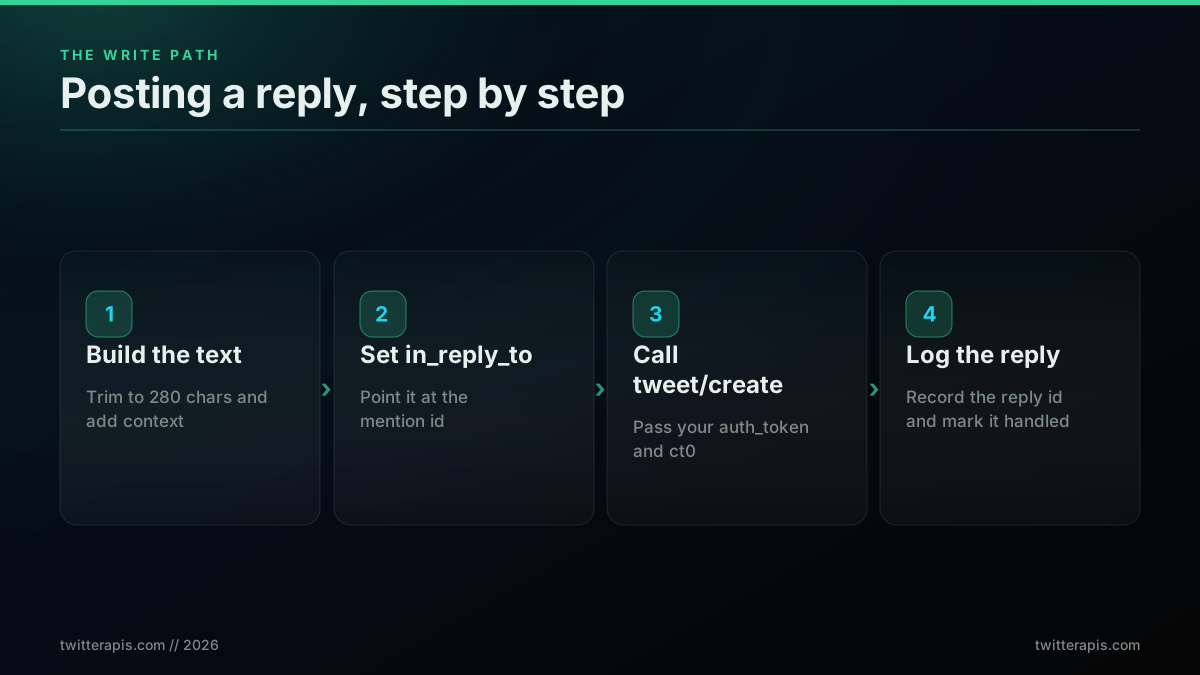
Posting a reply is four small steps, and the last one matters most
The write needs your account's session credentials, an auth_token and ct0, because the API posts as your account. You pass them per request and they are never stored, which is what lets the bot act as you without handing over your password. Here is the post function.
AUTH_TOKEN = "YOUR_X_AUTH_TOKEN"   # your account session token
CT0 = "YOUR_X_CT0"                 # your account csrf token

def post_reply(text, in_reply_to_id):
    payload = {
        "text": text,
        "in_reply_to_tweet_id": in_reply_to_id,
        "auth_token": AUTH_TOKEN,   # sent per request, never stored
        "ct0": CT0,
    }
    r = requests.post(f"{API}/tweet/create",
                      headers={"Authorization": f"Bearer {KEY}"},
                      json=payload, timeout=30)
    r.raise_for_status()
    return r.json()["tweet_id"]           # the id of the reply you just posted
The fourth step in the diagram, logging the reply id, is the one people skip and regret. Record that you replied, and to which mention, before you consider the job done, so a crash after posting cannot make the bot post again. That single habit is the difference between a bot that occasionally double-replies and one that never does. The per-endpoint rate limits that govern how fast you can post are in the rate limits guide, and reaching for Tweepy instead of raw requests is fine too if you already use it, though the write here is simple enough that a plain POST is clearer.
Putting It Together: The Full Chatbot Loop
With all four moves written, the loop that runs them is short. It polls, filters each mention, generates a reply, posts it, and records what it did, then sleeps and repeats. The state that makes it safe, the seen set and the since_id, persists to disk so a restart resumes cleanly.
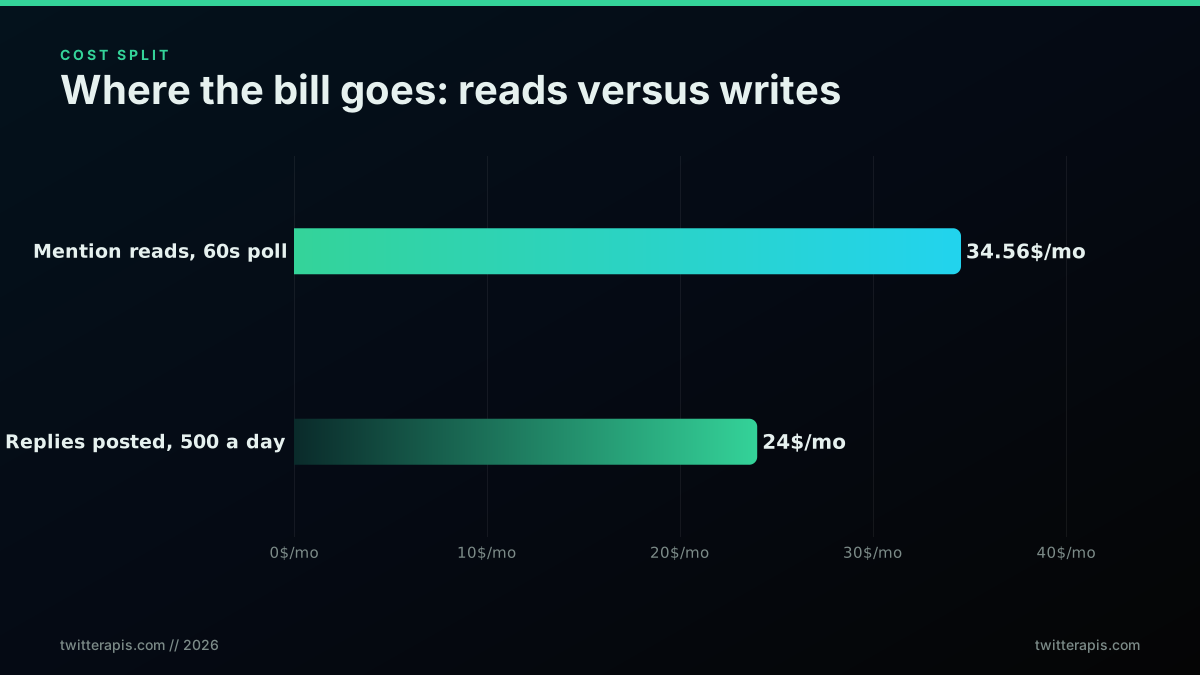
Where the money actually goes: the poll, not the replies
That cost split is worth pausing on before the code: for a busy bot, the polling dominates the bill, not the replies, because you poll constantly and reply selectively. Here is the assembled loop.
import time, json, os

INTERVAL = 30          # seconds between polls
STATE_FILE = "bot_state.json"

def load_state():
    if os.path.exists(STATE_FILE):
        s = json.load(open(STATE_FILE))
        return s.get("since_id"), set(s.get("seen", []))
    return None, set()

def save_state(since_id, seen):
    json.dump({"since_id": since_id, "seen": list(seen)[-5000:]},
              open(STATE_FILE, "w"))

def run():
    since_id, seen = load_state()
    SEEN.update(seen)                # restore the durable dedup set
    while True:
        try:
            for t in reversed(get_mentions(since_id)):   # oldest first
                since_id = max(since_id or "0", t["id"], key=int)
                if not should_reply(t):
                    SEEN.add(t["id"]); continue
                reply = templated_reply(t["text"])       # or llm_reply(...)
                SEEN.add(t["id"])                         # record BEFORE posting
                save_state(since_id, SEEN)
                post_reply(reply, t["id"])
                author = t["author"]["username"].lower()
                REPLIED_TODAY[author] = REPLIED_TODAY.get(author, 0) + 1
        except requests.HTTPError as e:
            print("api error, backing off:", e)
            time.sleep(INTERVAL * 2)
        save_state(since_id, SEEN)
        time.sleep(INTERVAL)

run()
The ordering is deliberate. The bot adds a mention to the seen set and saves state before it posts, not after, so if the post call fails the mention is still marked handled and never triggers a duplicate on the next pass. That is the opposite of the intuitive order, and it is correct: a missed reply is a small problem, a double reply is a public one. Where you run this loop is covered near the end; for now, note that it is a normal long-lived Python process.
The cheapest pay-as-you-go Twitter API. Try it free.
$0.0008 a call, about $0.04 per 1,000 tweets at 20 tweets a page. $0.50 free credits. No credit card required.
What It Costs to Run a Twitter Chatbot
Chatbot cost is two numbers added together: what you spend polling for mentions and what you spend posting replies. On a pay-per-call API, reads are 0.0008 dollars per call and replies are 0.0016 dollars each, and the poll interval plus the reply volume set the total. There is no subscription, so you can tune the bill directly.
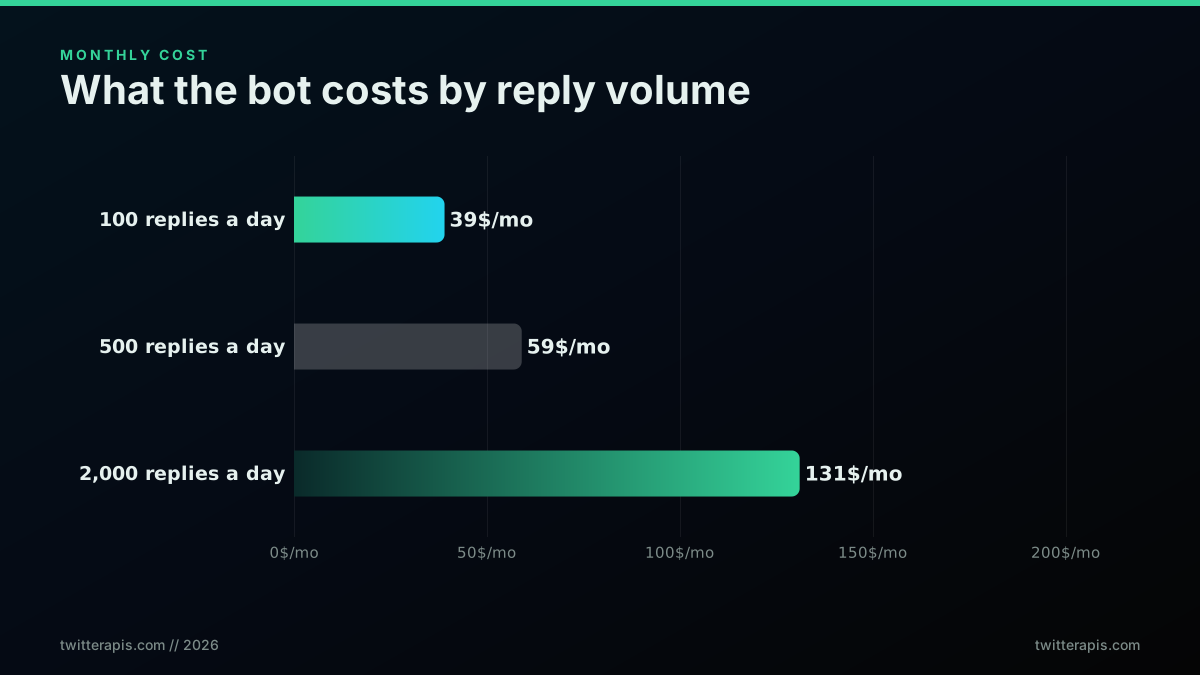
Monthly cost scales gently with reply volume
Work the arithmetic and the numbers are small. Polling once every 60 seconds is about 43,200 calls a month, which at 0.0008 dollars per call is about 34.56 dollars, and that figure does not change with how many replies you post. On top of that, replies are 0.0016 dollars each: 100 a day is about 4.80 dollars a month, 500 a day is about 24 dollars, and 2,000 a day is about 96 dollars. Add the two and a standard bot, 60-second poll plus 500 replies a day, is about 59 dollars a month. Compare that to the official X API, which charges 0.005 dollars to read and 0.01 dollars to publish, roughly six times more per read and over six times more per reply, and the pay-per-call gap widens with every call. The free credits of 0.50 dollars cover all of your building and testing, and you can estimate any scenario with the cost calculator.
The founders shipping these bots confirm the pressure that makes per-call pricing matter: at any real volume the cost of touching the data, not the code, is what constrains the design. A bot that had to ration its own calls under the old flat tiers can instead tune one number, the poll interval, and pay only for what it does. For a fuller picture of how the per-call model compares to marketplace and subscription pricing, the API alternatives page lays out the options.
It is worth being precise about why the old free path cannot run this bot at all, because the asymmetry surprises people. Posting a reply, the write half, was the one thing the old official free tier allowed, and that tier is now gone, so a reply bills $0.015 on pay-per-use. Reading mentions, the other half, never had a free path: fetching the posts that tag you is a paid read, which is the wall covered in is the Twitter API free. Free to post but paid to read is a direct artifact of the pricing changes traced in the X API pricing change writeup, and it is exactly where a chatbot, which must do both, ran out of runway on the old official free tier. A pay-per-call read is what closes that gap, because the polling, not the posting, is the recurring cost, and paying pennies per poll keeps the whole loop in single-digit-dollar territory.
Staying Inside X's Automation Rules
This is the section most tutorials skip, and it is the one that keeps your account alive. Reply bots are allowed on X, but only inside the automation rules, and the line is not subtle. A bot that replies when someone tags it, stays within rate limits, labels itself as automated, and posts genuinely useful and varied answers is fine. A bot that blasts unsolicited replies at people who never mentioned it, repeats the same message at volume, or hides that it is a bot is breaking the rules and will eventually be suspended. If your bot belongs inside a private thread rather than the public timeline, X's new X Chat API exposes group, admin and bot endpoints for encrypted direct messages.
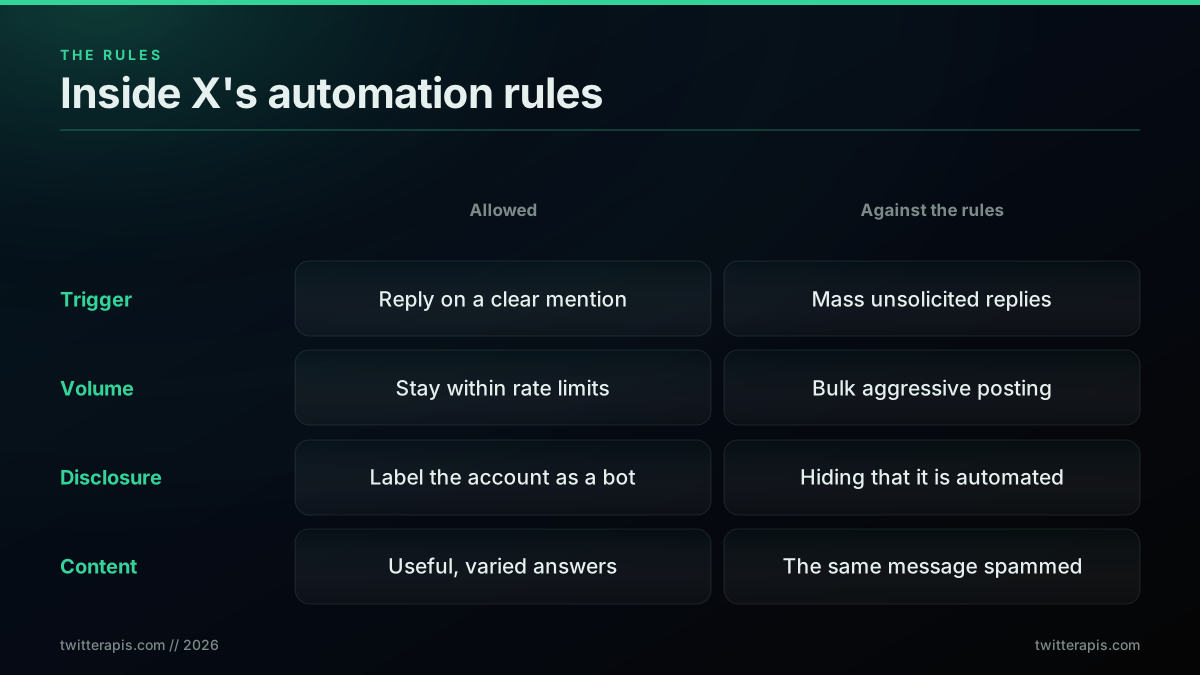
The line between a compliant bot and a suspended one
The failure mode is easy to spot from the outside, which is exactly why it is dangerous. People notice a robotic reply bot fast, and the reaction is mockery, not engagement.
One founder's take, via @BrentColman on X:

Brent & Fred's Excellent Adventure
@BrentColman
100% convinced @loblaws has a reply bot that is crawling twitter and auto replying to anything that mentions its name and inflation cycling through the same several messages. 😂
That is the anti-pattern in one post: a bot that auto-replies to any mention of the brand name, cycling the same few canned messages. It reads as spam because it is spam, and it is the reason the filter section above exists. The compliant version does four things differently. It fires only on a clear trigger, a genuine @mention with a question, not any stray use of your name. It stays under the rate limits, so it never floods. It discloses that the account is automated, usually in the bio. And it varies its replies enough that they do not read as a loop of three strings. Do those four and a reply bot is a support asset; skip them and it is a suspension waiting to happen. Do not build a bot that replies to people who did not ask for it, and do not use a bot to fake engagement, both are against the rules and both are obvious.
There is a second reason to keep replies varied and genuinely human, beyond the written rules: X actively flags mechanical behavior, and the signals it watches for are the same ones a person notices. Identical text sent in bursts, replies with no real relationship to the post, and a reply-to-everything cadence are exactly the patterns described in the bot detection guide, and a reply bot that trips them risks a limit on the whole account rather than a single removed post. That is the useful surprise here: building for the reader and building for the platform's detectors turn out to be the same job, so the honest version of the bot is also the durable one. The broader operational defaults live in the best practices guide.
Production Hardening: The Failures That Bite
A demo replies once and prints. A production chatbot runs for months without double-replying, losing its place on a crash, posting something unsafe, or going silent under rate limits. Four failure modes account for nearly every incident, and each has a standard fix.
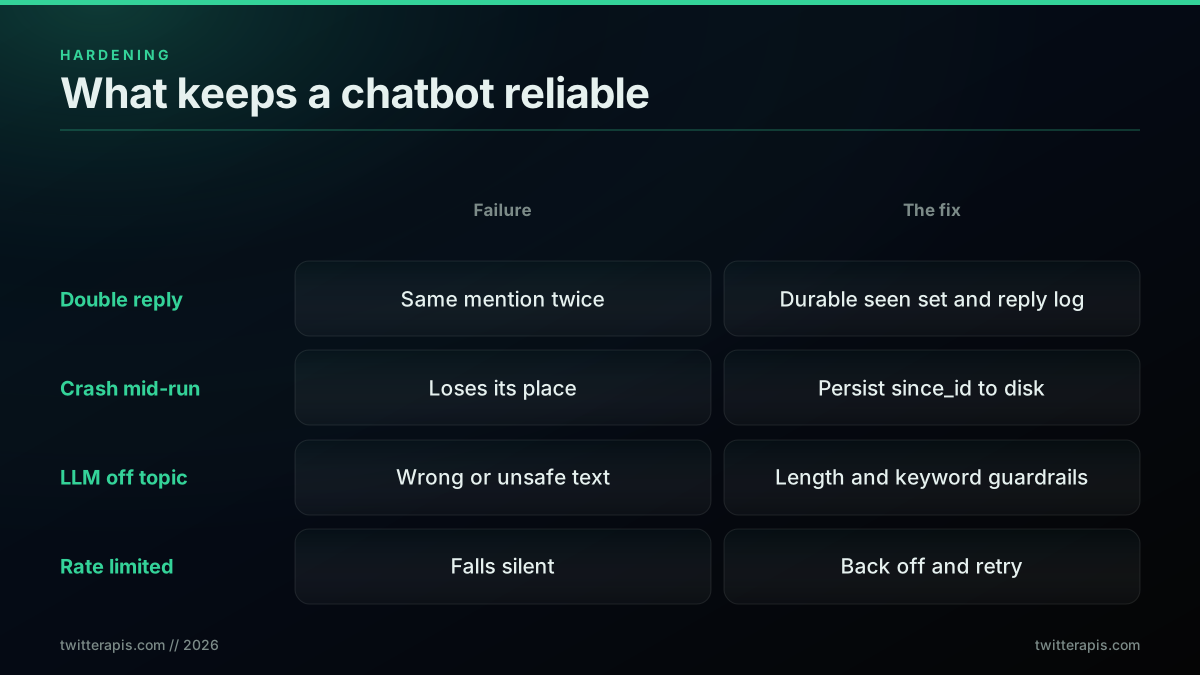
Four failure modes and the fix for each
First, the double reply, the most visible failure, is prevented by a durable seen set and a reply log written before you post, as the loop above does. Second, a crash mid-run loses the bot's place unless since_id is persisted to disk; because it is, a restart passes the last saved id and the API replays only the mentions posted while the bot was down, so an outage costs a short delay and nothing more. Third, an LLM going off topic is contained by the length and content guardrails in the generate step, plus an optional human-review queue for the first few days so you see what it wants to post before it posts. Fourth, a rate limit, an HTTP 429, means back off: double the interval, retry, then ease back once calls succeed. Wrap every call in a try or except that treats a 429 as "slow down" rather than "crash." Builders keep rediscovering that running unattended is the real challenge, not the first successful reply.
[Python][Twitter API] How can I get my twitter bot to work on its own? If that's possible?
The question in that thread, how to get a bot to work on its own, is the whole production problem in one line, and the answer is durable state plus a place to run. Where you run it matters less than that it runs continuously with state that survives restarts. A long-lived poll loop fits a small always-on process supervised by systemd or a container, while an interval check fits a cron schedule or a serverless timer, and a light scheduler like schedule is enough for many bots. The only hard requirement is that the durable since_id and seen set survive a restart. A walkthrough of the same build, from the mentions read to the posted reply, is worth watching before you wire it into your own stack.
https://www.youtube.com/watch?v=6FLeguySZLc
The video covers the reply-bot shape end to end, which is useful background on the moving parts you have just assembled.
The Funnel: Why Most Mentions Never Get a Reply
A healthy chatbot replies to a minority of the mentions it sees, and that is a feature. The filter is meant to drop most of what comes in: retweets, passing name-drops, things you already answered, people who opted out. Watching the funnel is how you know the filter is tuned right.
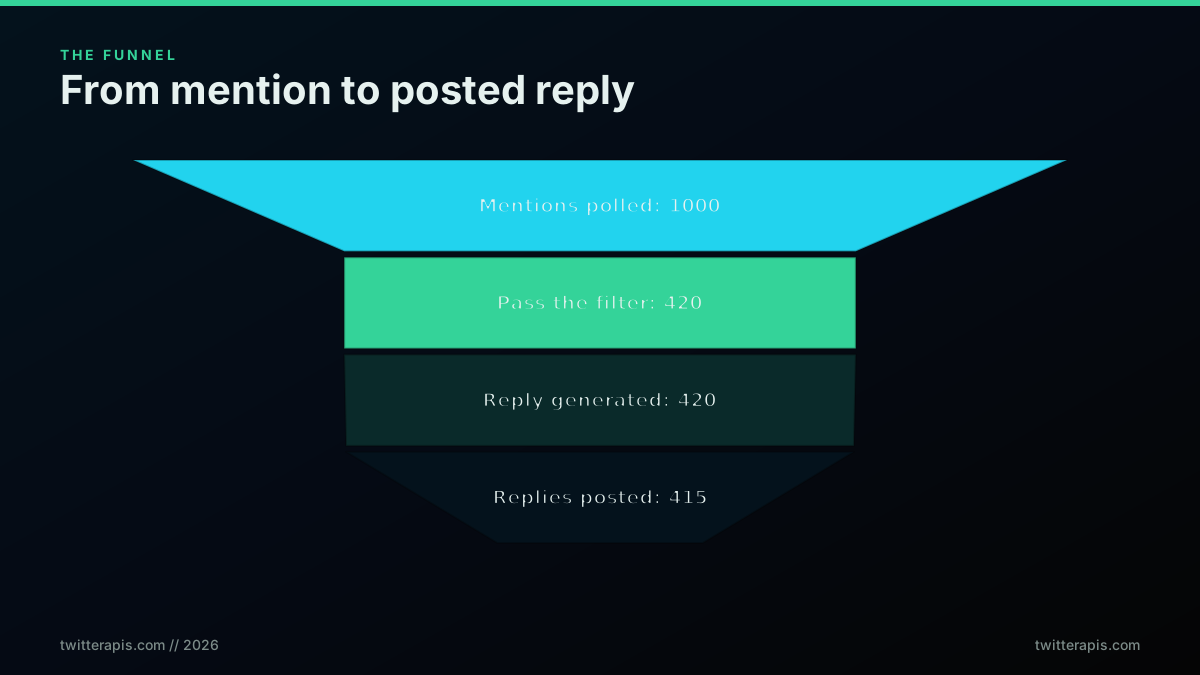
Most mentions never reach the reply step, and that is by design
If your bot replies to nearly everything it polls, the filter is too loose and you are drifting toward the spam pattern. If it replies to almost nothing, the trigger is too tight and real questions are slipping through. The gap between "generated" and "posted" in the funnel should be tiny, only the odd post failure, and if it widens you have a write problem to chase. This is the same paginated-read plus selective-write shape that other jobs reuse; the Tweepy pattern that many builders start from is the same loop with a different action at the end.
How to make a Twitter bot with Tweepy
That thread is a good reminder that the reply loop is not new; what changed recently is the cost of the read and the write underneath it, which is why the pricing keeps coming back into this guide.
Where to Go Next
You now have the full chatbot: the two endpoints, the four-move loop, a filter that keeps it welcome, both reply-generation paths, the write call that threads answers correctly, the real cost by volume, an honest read on the rules, and the production habits that let you leave it running. The decision in front of you is which intents to template and which, if any, to hand to a model, and how tight to set the poll.
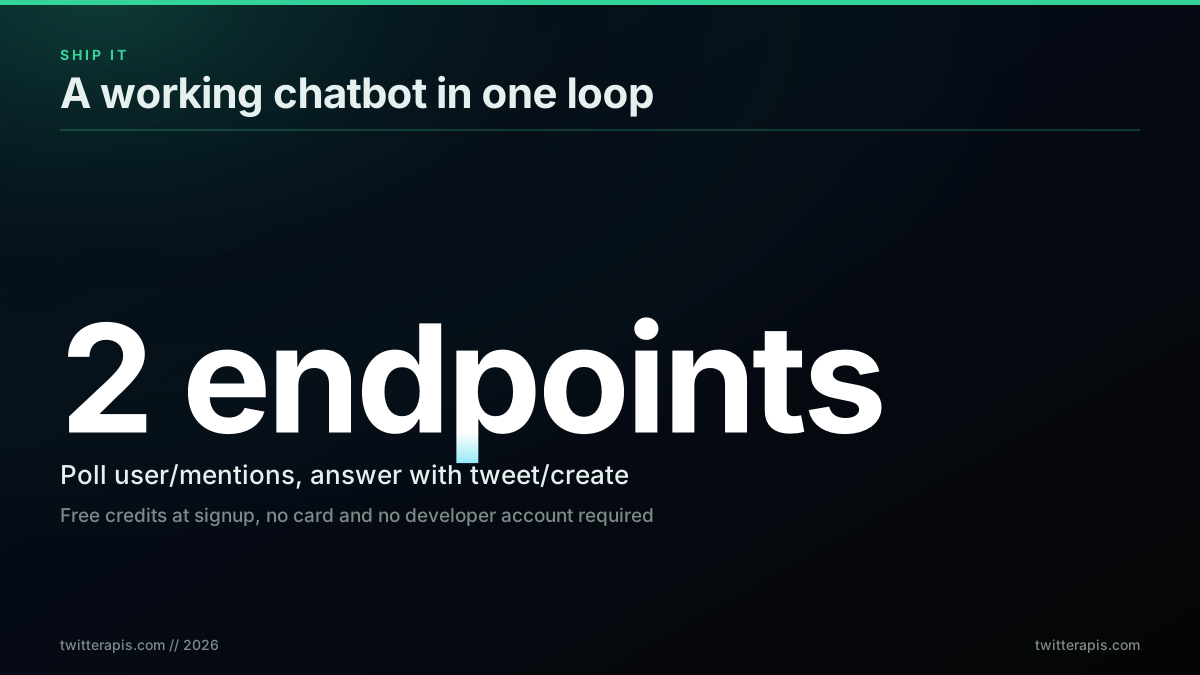
Two endpoints, one loop, running on free credits this afternoon
Start with a key from twitterapis.com/signup, point the loop at your handle, and reply with templates only until you trust the filter, then add a model for the long tail. If you would rather have an AI agent run the whole loop through natural language instead of this Python, the Twitter MCP server wraps these same endpoints as tools. And if you only need the detection half without the replies, the mention monitor is the read-only version of this build. Either way, the loop is the same four moves, and you can have the first version answering real mentions on free credits this afternoon.
// sources
Where these numbers come from
Each row is a figure in this post and the artefact it was read from. Prices and limits on this platform move, so check the date on the source before you plan against it.
- X API mentions endpoint
- The read half of the bot loop, the endpoint polled on a timer with since_id so only new mentions come back.
- OpenAI chat completions API reference
- One of the two model APIs the reply-generation step is written against, where the mention text plus a tight system prompt is capped to tweet length.
- Anthropic messages API reference
- The alternative model API for the same generation step, shown as interchangeable with the OpenAI path in the reply pattern.
- Tweepy documentation
- The optional SDK path for the write call, offered as an alternative to the plain POST the post prefers for posting a reply.
- systemd service unit manual
- Backs the deployment option for a long-lived poll loop that must run continuously with state surviving restarts.
- crontab file format manual page
- The scheduling option for the interval-check shape of the bot, the alternative to an always-on supervised process.
Frequently Asked Questions
A Twitter chatbot is a program that reads posts on X and replies on its own. The common shape watches your @mentions and answers each one. Under the hood it runs a four-step loop: poll a mentions endpoint on a timer, filter out anything it has already handled or should skip, generate the reply text with a template or a language model, then post that reply with a create-tweet call that points back at the original post. The read and the write are two separate API calls, and the loop repeats forever.
Two costs add up: polling for mentions and posting replies. On a pay-per-call API, reads are 0.0008 dollars per call and each posted reply is 0.0016 dollars. A bot that polls once a minute and posts 500 replies a day runs about 59 dollars a month total, most of it the polling. The official X API is far higher at 0.005 dollars to read and 0.01 dollars to publish. Signup on the pay-per-call side includes 0.50 dollars in free credits, enough to build and test the whole loop for nothing.
Start with templates and add a language model only where it earns its place. A template is free, instant, and says exactly what you wrote, which is perfect for support acknowledgements or FAQ answers. An LLM writes context-aware replies but costs a few cents each, adds a second or two of latency, and can drift off topic, so it needs length limits and content guardrails before you let it post. A common pattern is a template for known intents and an LLM only for open-ended questions.
Yes. Wrapping the same endpoints as tools lets an AI agent poll mentions, decide, and reply through natural language instead of hand-written code, which is what an MCP server exposes. The endpoints underneath are identical: a mentions read and a create-tweet write. The agent approach trades some control for flexibility and is a good fit when replies are open-ended. For a fixed job like acknowledging support mentions, the plain Python loop in this guide is simpler, cheaper, and easier to reason about.
Two. A read endpoint that returns new mentions of your handle, and a write endpoint that posts a reply. On a pay-per-call API these are user/mentions for the read at 0.0008 dollars per call, and tweet/create for the reply at 0.0016 dollars per call. The reply is a normal create-tweet request with an in_reply_to id set to the mention you are answering, which is what threads your answer under their post instead of posting it into the void.
They are allowed inside X's automation rules. A bot that replies when someone tags you, stays within rate limits, labels itself as automated, and posts useful and varied answers is fine. What gets accounts suspended is the opposite: mass unsolicited replies to people who never tagged you, the same message spammed at volume, and hiding that the account is a bot. The compliant pattern is reply on a clear trigger, disclose, vary the content, and honor blocks and opt-outs.
Keep a durable record of every mention id you have already handled and check it before you reply. Two layers do the job: pass since_id on each poll so the API only returns posts newer than the last one you saw, and keep a seen set of processed ids on disk or in a database. Because the record survives restarts, a crash or a deploy never causes a double reply. Write the id to the record before you post, not after, so a failure mid-post cannot cause a repeat.
Check out similar blogs
More guides on the Twitter/X API, scraping, and pricing.

How to Track a Tweet's Performance in Real Time with the X API
Poll a tweet's engagement counts over time with the X API, compute a views-to-likes ratio, and read the quote-tweet layer to tell an organically growing launch tweet from a boosted one. Tested Python and curl.
How to Get Image URLs from X Tweets via API in 2026 (Full Resolution, Python and Node)
Pull image URLs out of X tweets with runnable Python and Node.js, then get the full-resolution original instead of the scaled copy the API hands you by default. Measured on 14 live images, with the video poster-frame trap and the per-call cost.
Twitter API Authentication in 2026: OAuth, Bearer Tokens, and Fixing 401
How Twitter (X) API authentication works in 2026: the four credential types, OAuth 1.0a versus OAuth 2.0, generating and using a bearer token, runnable Python and Node.js, and a fix for every 401 Unauthorized and 403 error, plus the one-header alternative.
How to Get Everyone Who Retweeted a Tweet via API (2026)
Pull the full list of accounts that reposted any tweet with a real 2026 API. Runnable Python and Node.js, cursor pagination for the whole list, a real amplifier ranking over live data, a bot filter, and the honest per-call cost.
How to Get All Replies to a Tweet via API (2026)
Pull the replies under any tweet with a real 2026 API. Runnable Python and Node.js, cursor pagination, the conversation_id tail sweep for the long tail, nested replies-to-replies, signal-versus-noise filtering over live data, and the honest per-call cost.
Twitter API Pagination 2026: How next_token Works (and a Simpler Alternative)
How Twitter API pagination works in 2026. The official next_token loop explained field by field, a simpler single-cursor alternative, runnable Python and Node code, and the real per-call cost of a paginated pull.
How to Search Tweets by Hashtag via API 2026 (Python + Node.js)
Search tweets by hashtag with a real 2026 API in Python and Node.js. Runnable code for the hashtag operator, engagement filters, cursor pagination, deduping retweets, counting authors, and the real per-call cost.
Fetch a Full Twitter Thread via API in One Call (2026)
How to pull an entire Twitter thread, the root tweet plus every connected tweet in the chain, in a single API call with the tweet/thread endpoint, instead of walking replies by hand. Live-tested code in curl, Python, and Node.js, with the real per-call cost.