GUIDE
How to Search Tweets by Hashtag via API 2026 (Python + Node.js)
Search tweets by hashtag with a real 2026 API in Python and Node.js. Runnable code for the hashtag operator, engagement filters, cursor pagination, deduping retweets, counting authors, and the real per-call cost.
Per our own spec, 70 of 121 endpoints bill $0.0008, 24 are free, and 27 sit between $0.0016 and $0.01. Every price ships inside our published OpenAPI document as an x-cost-usd field, so any figure in this post can be checked against the contract that bills it rather than taken on trust.
Search "get tweets by hashtag" and most of the code you find no longer runs. The top Python tutorials call the Tweepy Cursor over api.search or the v1.1 search/tweets endpoint, both retired, and the official documentation page that still ranks is for the deprecated v1.1 standard search. The rest are vendor pages that show you a button, not a request. In 2026 a Twitter API search by hashtag is still simple, but the working path changed, and almost nobody has written it down for both Python and Node.js.
This guide fixes that. You get a working hashtag search in ten lines first, in Python and in Node.js, then the operator set, pagination for a full campaign sweep, deduping retweets, counting unique authors, error handling, and the real per-call cost. Every code sample was run against the live API before publishing, so the parameter names and response fields match what you will actually get back. The whole tutorial stays read-only, the part a hashtag job needs most.

Dwayne
@CtrlAltDwayne
The X API is still stupidly expensive for anyone building anything real. They're so paranoid about it being used for model training data from competitors they've made it unusable for everyone else too. https://t.co/iFbO3znNeF

That frustration is the backdrop to every hashtag project in 2026. The data is public, the search is trivial, and the official pricing makes a routine campaign pull feel like a budget decision. The rest of this guide shows the read path that keeps it a line of code instead.
TL;DR: To search tweets by a hashtag, send the hashtag as a query operator. On a pay-per-call API like TwitterAPIs you
GET https://api.twitterapis.com/twitter/tweet/advanced_searchwithquery=%23yourtagand anAuthorization: Bearerheader. The response has atweetsarray and anext_cursorstring for paging. Each call is $0.0008 and returns about 20 tweets, which is $0.04 per 1,000 tweets, and new accounts get $0.50 in free credits with no card. Combine the hashtag withmin_faves:,lang:,since:, and-filter:retweetsin the same query, page with the cursor, and track authors in a set to count uniques. The official X API v2 recent search does the same job but needs a developer account and paid access, and recent search only reaches back 7 days.
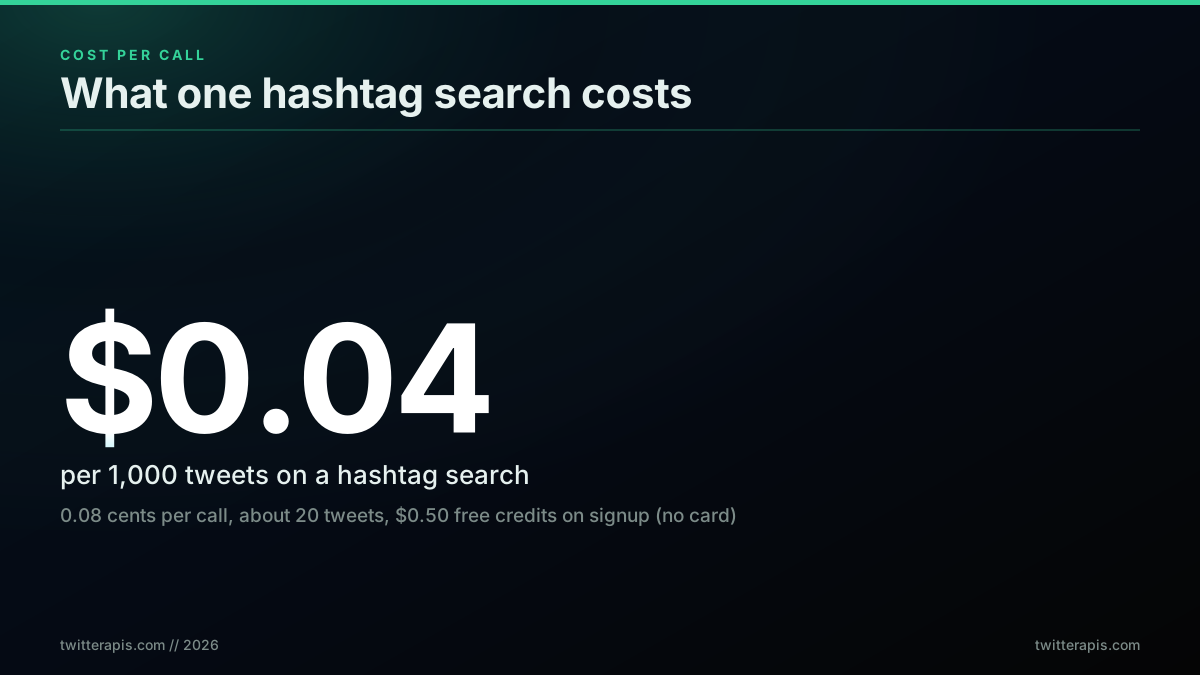
What one hashtag search call costs and returns in 2026
What Searching Tweets by Hashtag Actually Means in 2026
A hashtag search is a keyword search where the keyword is a hashtag token. You pass #yourtag to a search endpoint and get back the tweets that carry that tag, newest first. The hashtag is not a special parameter, it is an operator inside the ordinary search query, which means you can combine it with engagement, language, and date filters in the same string. That is the whole idea, and it has not changed. What changed is which endpoint answers the request.
Three surfaces can serve a hashtag search today, and only two of them work. The retired v1.1 search/tweets endpoint, which nearly every older tutorial uses, returns nothing now, so a Tweepy Cursor over api.search fails on modern credentials. The official X API v2 recent search endpoint works but sits behind a developer account and pay-per-use billing, and recent search only reaches back about 7 days. A direct pay-per-call API answers the same query over plain HTTP with one key and no console. This guide uses the direct path for the runnable examples and shows the official v2 equivalent alongside so you can choose.
The practical distinction that trips people up is recent versus archive. "Give me every tweet that ever used this hashtag" is not one call anywhere, because a popular tag holds millions of posts. Recent search covers a rolling window, and to go deeper you page backward through dated slices using since: and until:. Keep that model in mind and the rest of this guide is mechanical. For the full operator vocabulary behind the query string, the advanced search operators guide is the companion reference, and the complete Twitter API tutorial covers the auth and pricing background language-agnostically.
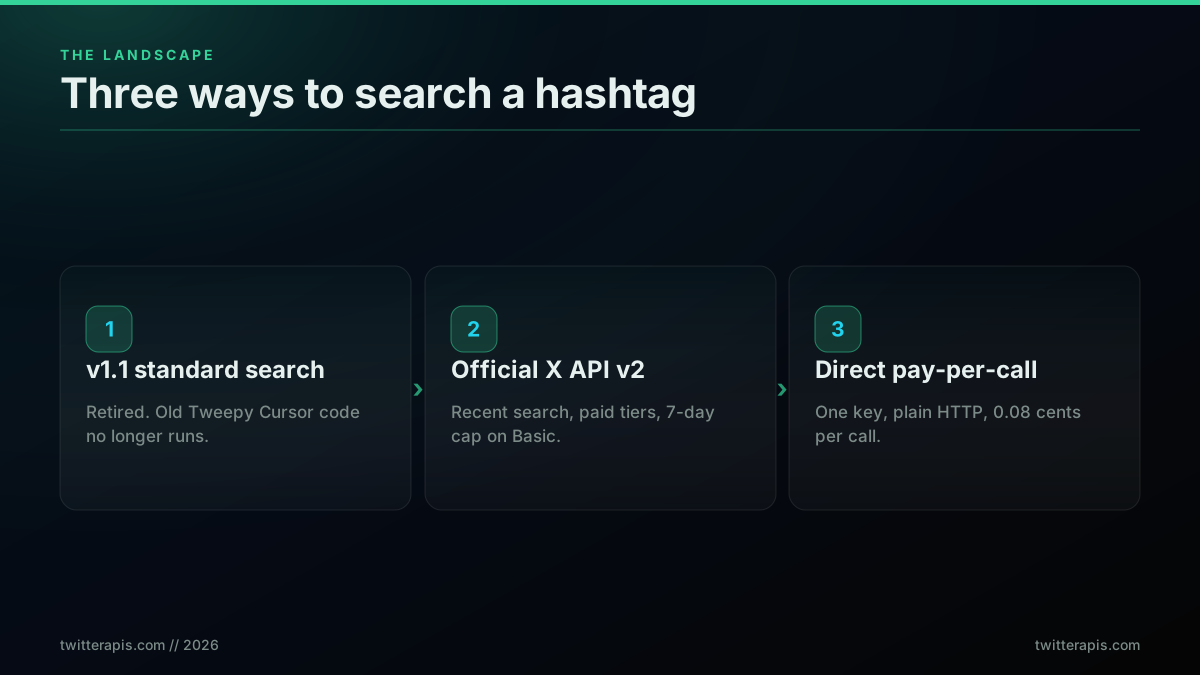
The three ways to search a hashtag, and which two still work
Search a Hashtag in 10 Lines with Python
The fastest working hashtag search in Python is a single GET request. Put the hashtag in the query parameter, send your key in an Authorization header, and read the tweets array off the JSON. You do not need Tweepy, OAuth, or a numeric ID lookup for this. The one dependency is the requests library, and even that is optional if you prefer the standard library.
# hashtag_search.py , run with: python hashtag_search.py
import os
import requests

API_KEY = os.environ["TWITTERAPIS_KEY"]

resp = requests.get(
    "https://api.twitterapis.com/twitter/tweet/advanced_search",
    params={"query": "#buildinpublic lang:en", "product": "Latest"},
    headers={"Authorization": f"Bearer {API_KEY}"},
    timeout=15,
)
resp.raise_for_status()
tweets = resp.json()["tweets"]

for t in tweets:
    print(f'[{t["created_at"]}] @{t["author"]["username"]}: {t["text"][:100]}')
Ten lines, no SDK. The query parameter takes the full search-operator string, so #buildinpublic lang:en matches English tweets tagged with that hashtag. The product field set to Latest returns reverse-chronological results, and Top returns engagement-ranked ones. Every tweet object is flat: text, created_at, favorite_count, retweet_count, and a nested author with username and followers_count are all there without an expansion join.
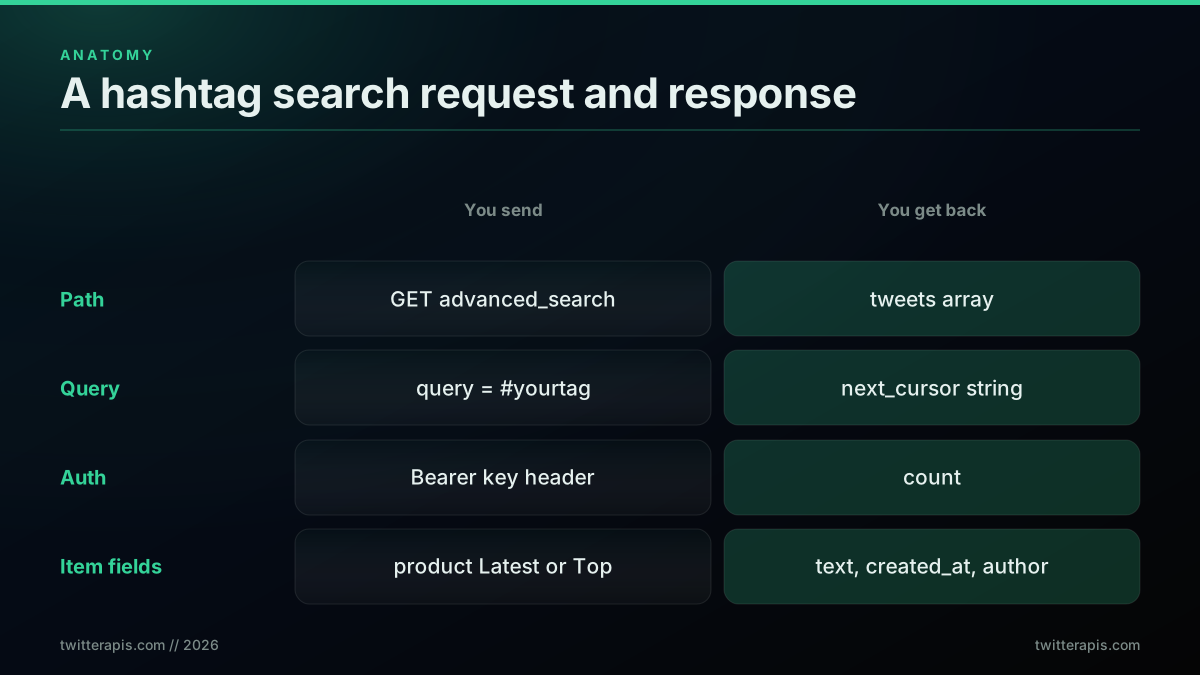
Anatomy of a Python hashtag search request and its response
To run it, put a key in your environment. Sign up in under a minute at the signup page, which issues $0.50 in free credits with no card, then export the key and run:
export TWITTERAPIS_KEY="your_key_here"
python hashtag_search.py
If you would rather use the official X API, the same search in Python goes through Tweepy's v2 Client.search_recent_tweets with a Bearer token from the developer console, and it returns only the last 7 days; older posts need the full-archive endpoint. The Tweepy client itself is documented in the Tweepy Client reference, and the console path for getting a token is walked through in the how to get a Twitter API key guide. The Python Twitter API tutorial covers the broader read patterns in the same style as this section.
The Same Hashtag Search in Node.js
Node.js needs no SDK for this either. Node 18 and later ship a global fetch, so a plain GET with a URLSearchParams query string and an Authorization header is the whole integration. The query parameter carries the hashtag operator exactly as in Python, and the response shape is identical, so the two languages stay in lockstep.
// hashtag-search.mjs , run with: node hashtag-search.mjs
const API_KEY = process.env.TWITTERAPIS_KEY;

const params = new URLSearchParams({
  query: "#buildinpublic lang:en",
  product: "Latest",
});

const res = await fetch(
  `https://api.twitterapis.com/twitter/tweet/advanced_search?${params}`,
  { headers: { Authorization: `Bearer ${API_KEY}` } }
);

if (!res.ok) throw new Error(`HTTP ${res.status}`);
const { tweets } = await res.json();

for (const t of tweets) {
  console.log(`[${t.created_at}] @${t.author.username}: ${t.text.slice(0, 100)}`);
}
URLSearchParams handles the URL encoding, so the hash symbol and the space in #buildinpublic lang:en are escaped correctly without any manual work. The response destructures straight to a tweets array, and each item exposes text, created_at, favorite_count, and the nested author object at the top level. The global fetch used here is documented in the MDN Fetch API reference, and URLSearchParams in the MDN URLSearchParams reference.
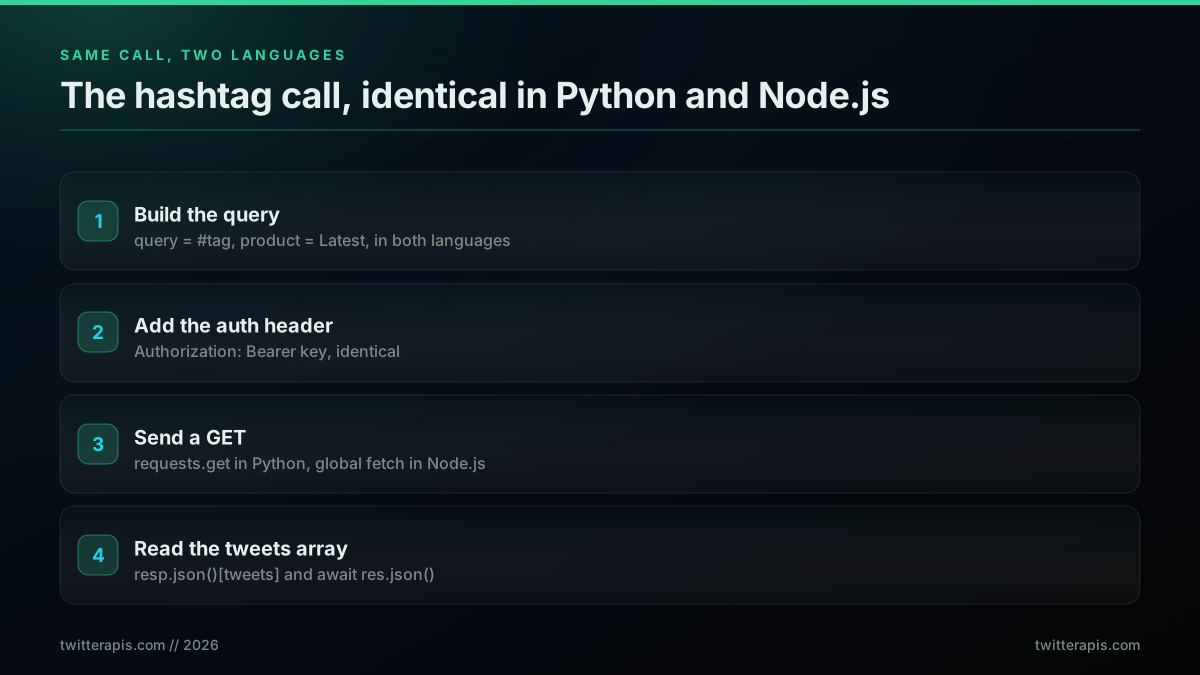
Python and Node.js hashtag search, same query, same response
Run it with a key in the environment, using Node's built-in env-file flag so there is nothing to install:
node --env-file=.env hashtag-search.mjs
The full Node read path, including axios, retries, and concurrency, is covered in the Twitter API Node.js tutorial, which this hashtag guide builds on directly.
The Hashtag Operator Set: Filter Before You Fetch
The power of a hashtag search is in the operators you stack next to the tag. Everything after #yourtag in the query string filters server side, so you pull fewer, better tweets and spend fewer credits than pulling everything and filtering in code. The four operators that matter most for a hashtag job are engagement gates, language, date bounds, and the retweet filter.
Here is a query that combines all four to find high-signal, English, original posts under a campaign hashtag in a date window:
#producthunt min_faves:100 lang:en -filter:retweets since:2026-06-01 until:2026-06-30
That single string does the work of a database query. min_faves:100 keeps only tweets with at least 100 likes, lang:en restricts to English, -filter:retweets drops retweets so you count original posts, and the since:/until: pair bounds the search to June 2026. You can swap min_faves: for min_retweets: to gate on amplification instead, or add filter:links to keep only tweets that share a URL. The operators run on the server, so a tight query is both faster and cheaper.
Two behaviors of the hashtag operator are worth knowing before you build reports on it. Hashtag matching is case insensitive, so #ProductHunt and #producthunt return the same set, which means you do not need to search casing variants separately. And a hashtag term matches the tag anywhere in the tweet, so a post that opens with the tag and one that buries it in a trailing block of tags both count. To track a campaign that runs under two tags at once, put both in the query so either one matches, for example #producthunt OR #buildinpublic, and the search returns the union. Reach for a bare keyword instead of the hash form only when you want to catch the term used both as a tag and as plain text, since python matches more loosely than #python.
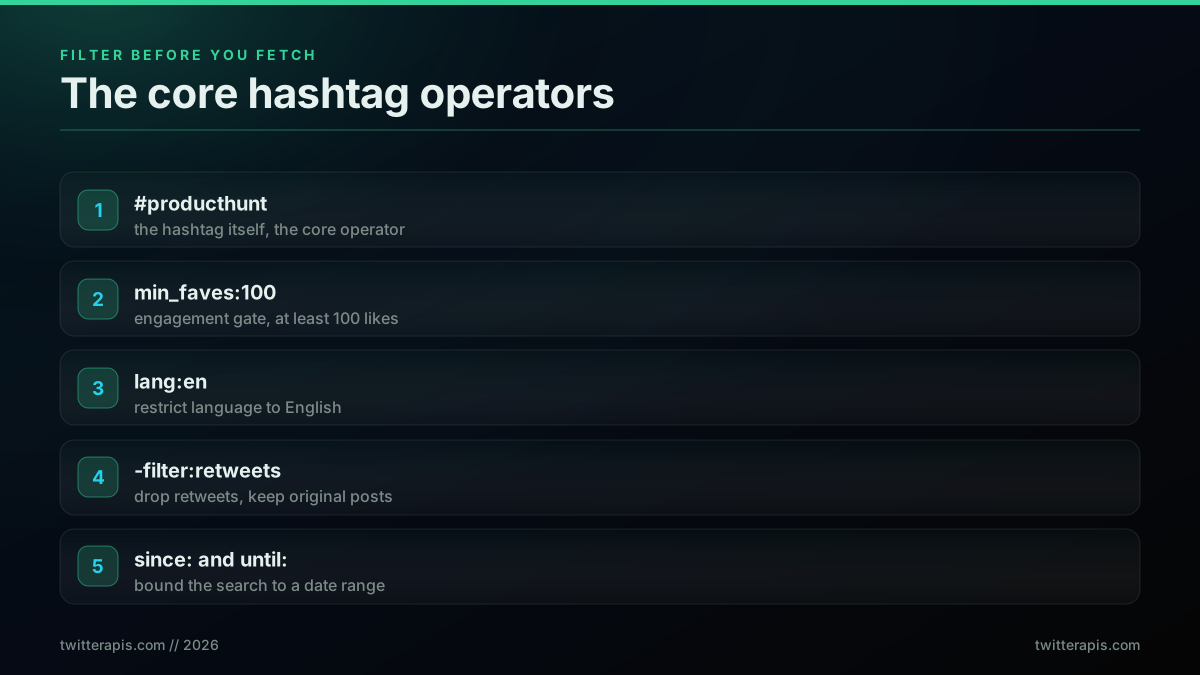
The four hashtag operators that do the most work
A common first hashtag project is pulling every tweet under a tag into a dataset for analysis, which is this operator query plus the pagination loop run to exhaustion:
Complete newcomer wants to scrape a shit ton of tweets from one hashtag into excel format - Can this work?
That newcomer question is the whole job in one line: the right query string, then the cursor loop below to walk every page until the tag is exhausted. The same query string and cursor loop feeds any dataset, monitor, dashboard, or alert. For the complete operator list, including the geo and proximity operators this section skips, see the advanced search operators guide.
Start building with TwitterAPIs
$0.0008 a call, about $0.04 per 1,000 tweets at 20 tweets a page. $0.50 free credits. No credit card required.
Paginate a Full Hashtag Sweep with a Cursor
One call returns about 20 tweets. To pull a full hashtag campaign you page with a cursor: every response carries a next_cursor string, and you pass it back as the cursor parameter on the next request until the cursor comes back empty. Always add a page cap so a runaway loop cannot burn credits. This is the core loop behind every hashtag export, count, and monitor in this guide.
Here is the Python version, collecting every tweet for a hashtag up to a page budget:
import os, requests

API_KEY = os.environ["TWITTERAPIS_KEY"]
BASE = "https://api.twitterapis.com/twitter/tweet/advanced_search"

def search_hashtag(tag, max_pages=25):
    all_tweets, cursor = [], None
    for _ in range(max_pages):
        params = {"query": f"#{tag} -filter:retweets", "product": "Latest"}
        if cursor:
            params["cursor"] = cursor
        r = requests.get(BASE, params=params,
                         headers={"Authorization": f"Bearer {API_KEY}"}, timeout=15)
        r.raise_for_status()
        data = r.json()
        all_tweets.extend(data["tweets"])
        cursor = data.get("next_cursor")
        if not cursor or not data["tweets"]:
            break
    return all_tweets

tweets = search_hashtag("buildinpublic")
print(f"Collected {len(tweets)} tweets")
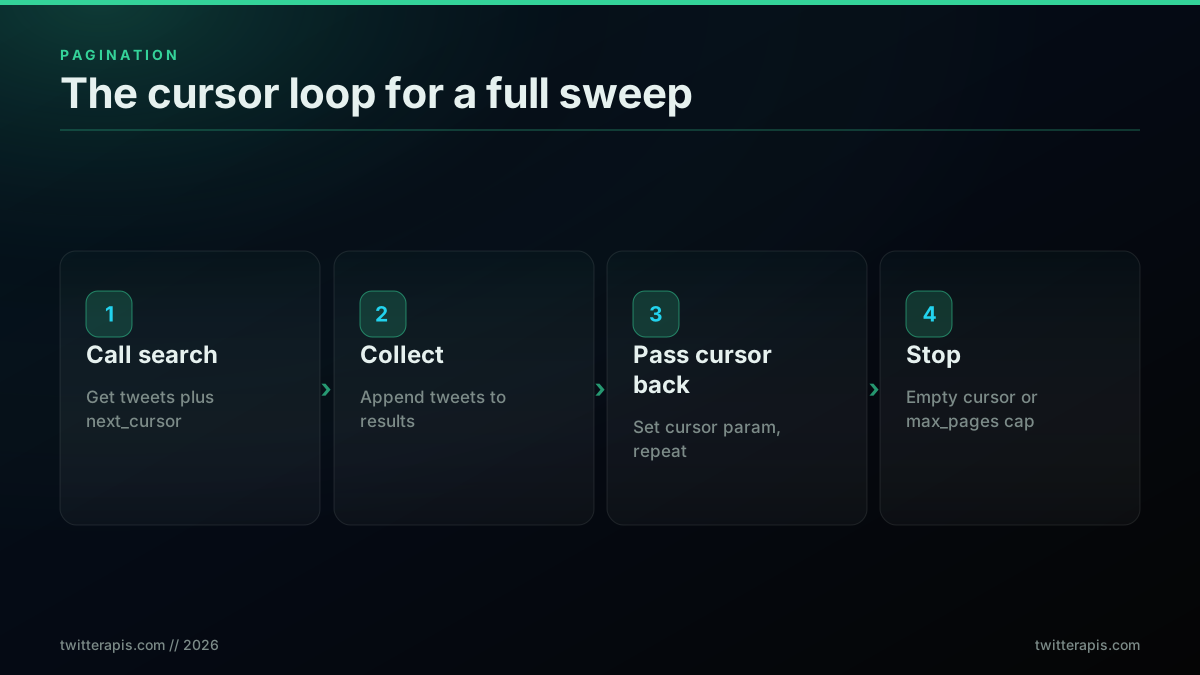
The cursor loop that walks a full hashtag campaign
The Node.js version is the same loop with fetch:
const API_KEY = process.env.TWITTERAPIS_KEY;
const BASE = "https://api.twitterapis.com/twitter/tweet/advanced_search";

async function searchHashtag(tag, maxPages = 25) {
  const all = [];
  let cursor = null;
  for (let page = 0; page < maxPages; page++) {
    const params = new URLSearchParams({ query: `#${tag} -filter:retweets`, product: "Latest" });
    if (cursor) params.set("cursor", cursor);

    const res = await fetch(`${BASE}?${params}`, {
      headers: { Authorization: `Bearer ${API_KEY}` },
    });
    if (!res.ok) throw new Error(`HTTP ${res.status}`);
    const data = await res.json();

    all.push(...data.tweets);
    cursor = data.next_cursor;
    if (!cursor || data.tweets.length === 0) break;
  }
  return all;
}

const tweets = await searchHashtag("buildinpublic");
console.log(`Collected ${tweets.length} tweets`);
Two rules keep a sweep safe. Stop when next_cursor is empty or the page returns no tweets, whichever comes first, and cap max_pages as a hard budget so a bug can never page forever. To walk a hashtag further back than the recent window, run this loop once per day with since: and until: bounding each pass, which keeps every page small and the spend predictable.
Date chunking is worth doing deliberately for any tag with real volume. A busy campaign hashtag can post tens of thousands of times a day, and a single unbounded sweep against it will page for a long time and be awkward to resume if it fails halfway. Splitting the job into one call sequence per day, with since:2026-06-14 until:2026-06-15 on the first pass and the previous day on the next, turns one long fragile run into a series of short independent ones. Each day is small enough to retry on its own, you can checkpoint progress between days, and you can parallelize across days if you need the whole month quickly. It also makes the cost legible: a known number of tweets per day times $0.0008 per twenty tweets is a spend you can predict before you start rather than discover when the credits run low. The per-endpoint pacing details are in the rate limit guide and the hosted rate limits reference.
Count Unique Authors and Dedupe Retweets
Raw tweet counts overstate a hashtag's reach because one loud account can post ten times and retweets echo the same content. The two numbers a campaign report actually needs are unique authors and deduplicated original tweets, and both fall out of the pagination loop for free, with no extra API calls. Track authors in a set as you page, and key tweets by id to collapse duplicates that appear across pages.
def hashtag_stats(tweets):
    authors = set()
    unique_by_id = {}
    for t in tweets:
        authors.add(t["author"]["username"])
        unique_by_id[t["id"]] = t
    return {
        "total_seen": len(tweets),
        "unique_tweets": len(unique_by_id),
        "unique_authors": len(authors),
    }

stats = hashtag_stats(search_hashtag("buildinpublic"))
print(stats)
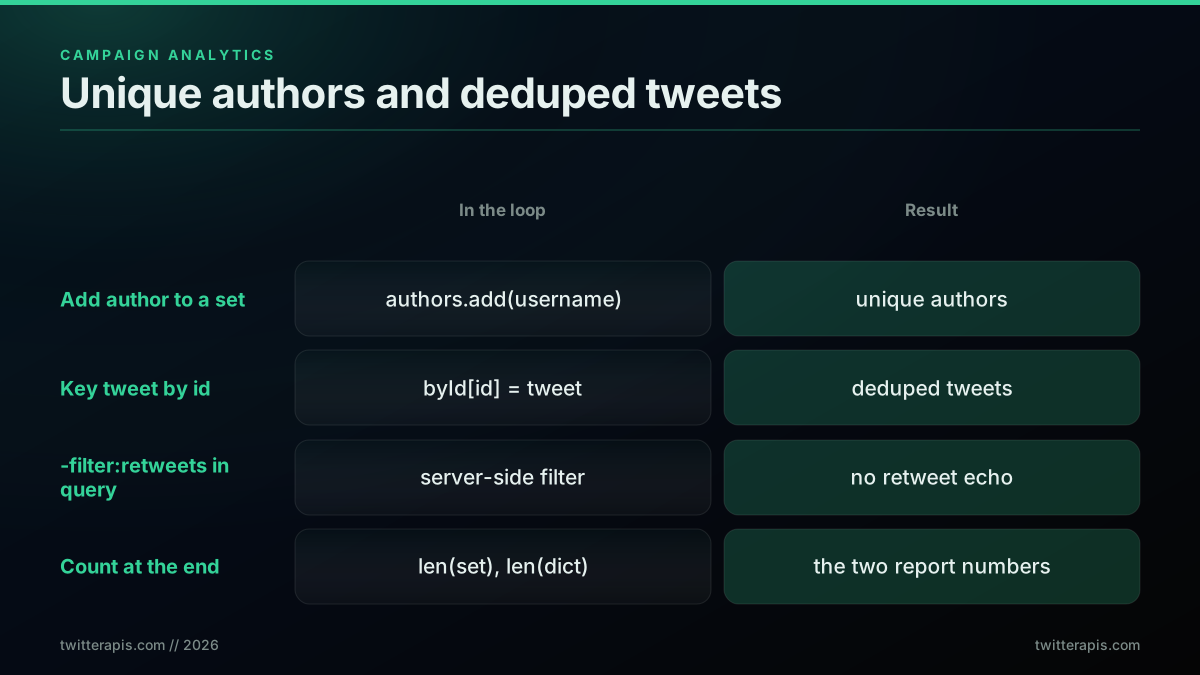
Unique authors and deduped tweets, computed in memory during the sweep
Two more numbers make a hashtag report useful, and both come from the same list. The top authors by post count tell you who is driving a tag, which you get by counting each author.username into a dictionary and sorting by frequency. The engagement leaders tell you which posts actually landed, which you get by sorting the deduplicated tweets on favorite_count and taking the top ten. Because both derive from the tweet list you already paged, they cost nothing beyond a sort. A campaign readout of total posts, unique authors, top five voices, and top five posts is four lines of counting on the data in memory, and it is far more honest than a raw post count that a handful of prolific accounts can quietly dominate.
The same idea in Node.js uses a Set for authors and a Map for id dedup:
function hashtagStats(tweets) {
  const authors = new Set();
  const byId = new Map();
  for (const t of tweets) {
    authors.add(t.author.username);
    byId.set(t.id, t);
  }
  return {
    totalSeen: tweets.length,
    uniqueTweets: byId.size,
    uniqueAuthors: authors.size,
  };
}
Adding -filter:retweets to the query already removes retweets at the source, so the id dedup then only collapses the rare case where the same original tweet surfaces on two pages. With authors in a set and tweets keyed by id, you have the two headline numbers for a hashtag report before you write a single line of charting code. If you are extending this into sentiment or topic analysis, the Twitter sentiment analysis in Python walkthrough starts from exactly this kind of tweet list, and to expand a tagged conversation into its full reply chain the fetch a full Twitter thread guide covers the one-call thread endpoint.
Handle Errors and Retries So a Long Sweep Finishes
A hashtag sweep can run for hundreds of calls, so it needs to survive a transient hiccup without losing the run. Retry on 429 and 5xx, which are rate limits and transient upstream errors, and fail fast on other 4xx codes, which are client mistakes that will not fix themselves on retry. Exponential backoff with a ceiling, wrapped around each request, is enough.
import time, requests

def get_with_retry(params, headers, max_retries=4):
    delay = 1.0
    for attempt in range(max_retries):
        try:
            r = requests.get(BASE, params=params, headers=headers, timeout=15)
        except requests.RequestException:
            if attempt == max_retries - 1:
                raise
            time.sleep(delay); delay *= 2; continue
        if r.status_code == 429 or r.status_code >= 500:
            time.sleep(delay); delay *= 2; continue
        r.raise_for_status()
        return r.json()
    raise RuntimeError("Exhausted retries")
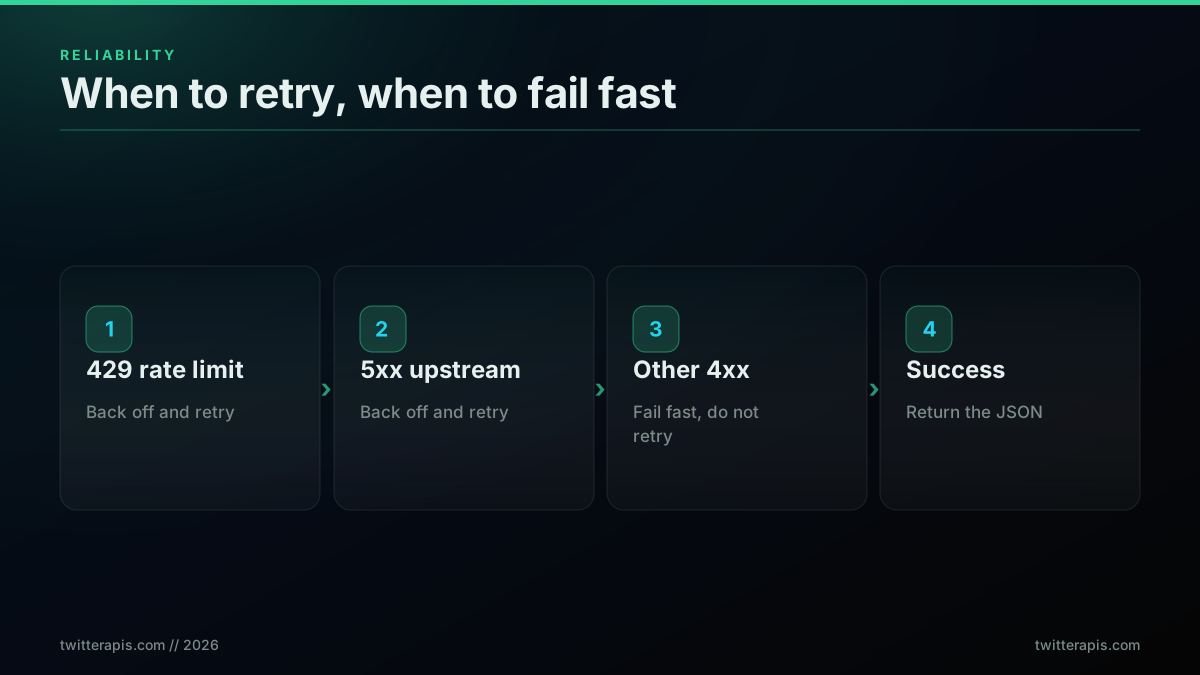
When to retry a hashtag request and when to fail fast
Drop get_with_retry in place of the raw requests.get inside the pagination loop and a long sweep survives the occasional blip. A direct pay-per-call API has no platform-level call ceiling on most read endpoints, so 429 is rare, but the retry still guards against network timeouts and transient 5xx errors from upstream. On the official X API the same loop matters more, because it enforces a per-window rate limit and returns x-rate-limit-remaining and x-rate-limit-reset headers you should log and pace against. The full production checklist lives in the best practices guide.
What a Hashtag Search Actually Costs
A hashtag search call is $0.0008 and returns about 20 tweets, which is $0.04 per 1,000 tweets. A campaign hashtag that produced 50,000 tweets in a week is roughly 2,500 calls, about an estimated $2.00 to pull in full. New accounts get $0.50 in free credits, around 625 calls or 12,500 tweets, with no credit card. That is the entire cost model, and it is the reason a routine hashtag pull stays a script instead of a purchase order.
The problem is the excessive cost of these APIs. Even though it's been lowered to pay-per-usage, it's still very expensive, for example, $5 for 1,000 post read requests. These feel like LLM-level costs, which we've come to expect
@ZypherHQ, source (https://twitter.com/ZypherHQ/status/2071877939252076918)
That $5 per 1,000 reads figure is the official rate developers keep running into. The official X API pricing charges about $0.005 per post read and bills search per post read with no free tier, so the same 50,000 tweet hashtag sweep is far more expensive. Here is how the two paths compare for that one-week campaign pull:
| Path | Access | Per-read cost | 50,000-tweet sweep |
|---|---|---|---|
| Direct pay-per-call (TwitterAPIs) | Email signup, $0.50 free credits | $0.0008 per call (about 20 tweets) | About $2.00 |
| Official X API v2 (pay-per-use) | Developer account, billed per use | About $0.005 per post read | About $250 |
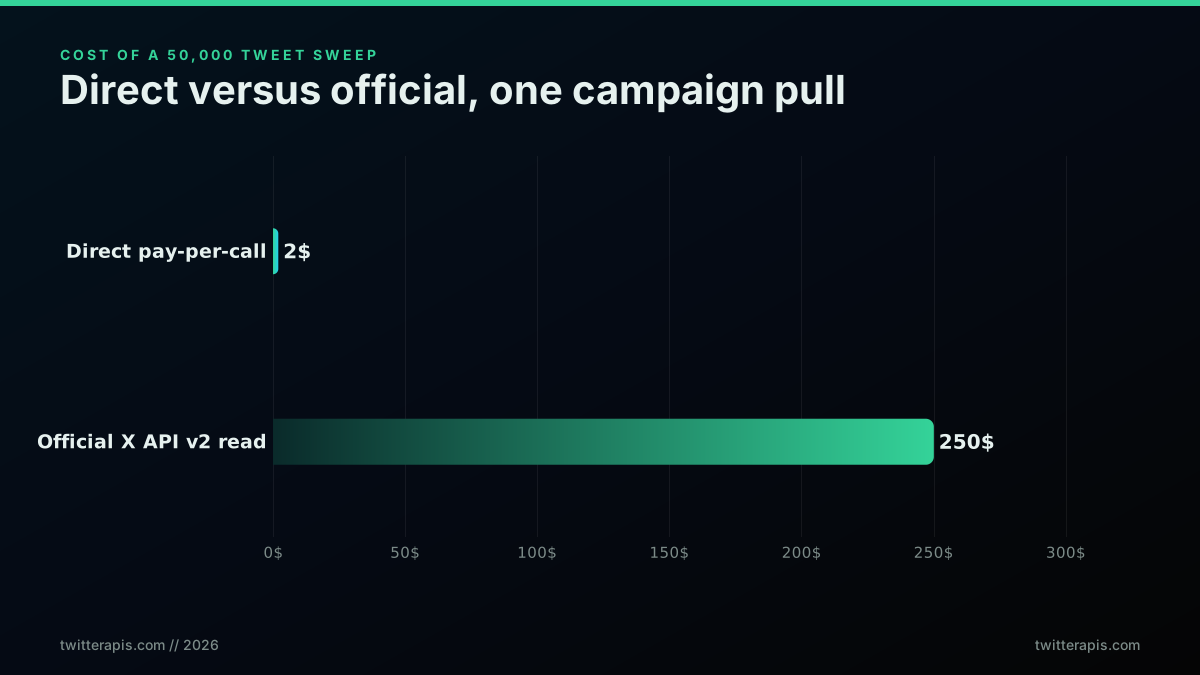
Cost of one 50,000 tweet hashtag sweep, direct versus official
The per-call read endpoints a hashtag job touches all price the same on the TwitterAPIs pricing page, with only the deep reads costing more:
| Endpoint | What it returns | Cost per call |
|---|---|---|
tweet/advanced_search | Hashtag or operator search results | $0.0008 |
user/info | An author profile | $0.0008 |
user/tweets | An author's recent timeline | $0.0008 |
tweet/replies | Replies under a tagged tweet | $0.0008 |
tweet/thread | A full thread in one call | $0.004 |
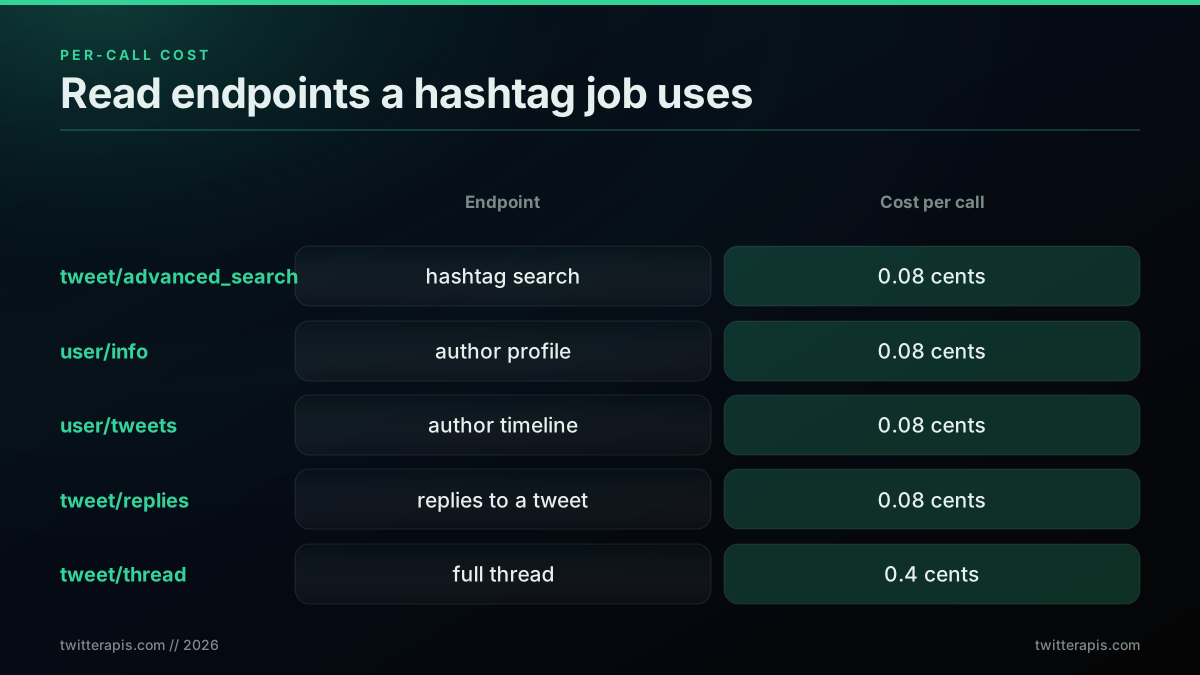
Per-call cost of the read endpoints a hashtag job uses
The cost gap is why so many hashtag projects that start on the official API end up looking for a lighter read path:
Free Twitter monitoring workflow for n8n (avoiding the $5k/month API)
Model your own hashtag volume in the cost calculator before you commit to an architecture, and the Twitter API cost breakdown and cost benchmark posts show how the rates compound at team scale. If you are still deciding whether any paid path is worth it, the is the Twitter API free explainer covers the free-adjacent options. Other providers exist in this space, including twitterapi.io and the Apify Tweet Scraper, though their per-result and compute billing models price a hashtag sweep differently from a flat per-call read.
The cheapest pay-as-you-go Twitter API. Try it free.
$0.0008 a call, about $0.04 per 1,000 tweets at 20 tweets a page. $0.50 free credits. No credit card required.
Official X API v2 Hashtag Search: The Tiers and the 7-Day Cap
If you need the data to come from X itself, the official route is the v2 recent search endpoint, GET /2/tweets/search/recent, with the hashtag in the query parameter and a Bearer token in the header. It is a real, supported hashtag search, with two constraints to plan around: every read bills on pay-per-use, and recent search reaches back only about 7 days. For anything older you need full-archive search.
import tweepy

client = tweepy.Client(bearer_token=os.environ["X_BEARER_TOKEN"])
resp = client.search_recent_tweets(
    query="#buildinpublic -is:retweet lang:en",
    tweet_fields=["created_at", "public_metrics"],
    max_results=100,
)
for tweet in resp.data or []:
    print(tweet.created_at, tweet.text[:100])
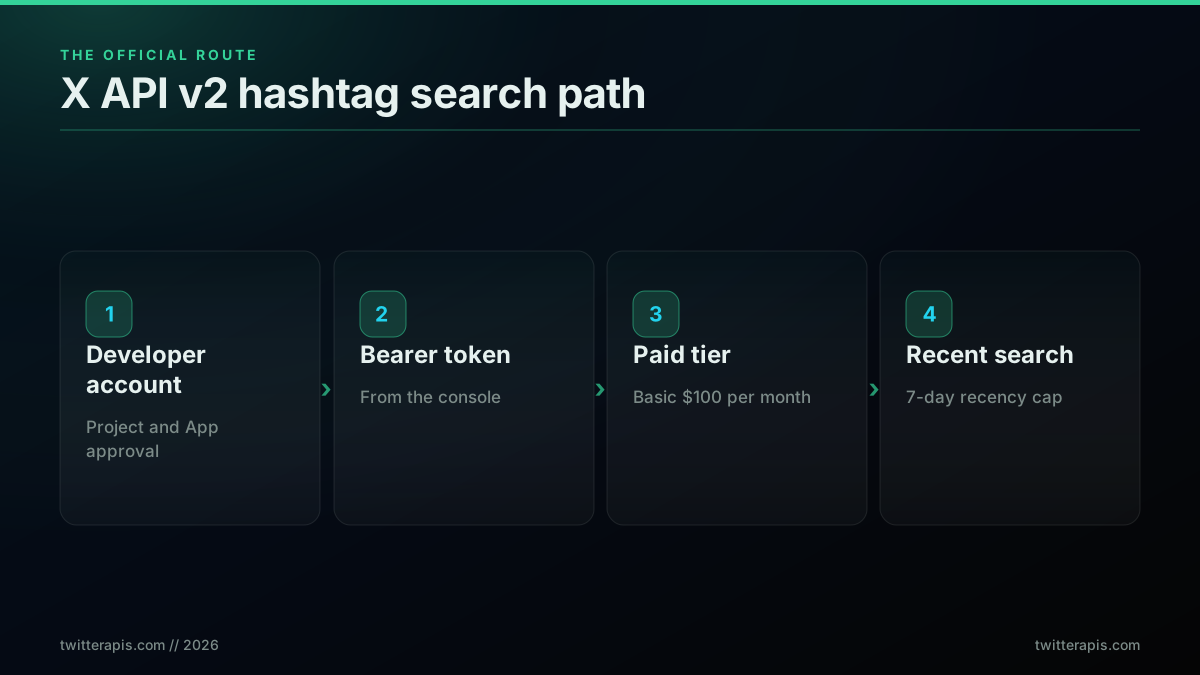
The official v2 hashtag search path and its 7-day recency limit
Note the operator differences: the official v2 query uses -is:retweet where the direct API uses -filter:retweets, and v2 pages with meta.next_token passed back as pagination_token rather than a cursor. The mechanics are the same, only the field names change. The official recent search rules are documented in the X API recent search reference. For a full side-by-side of the two surfaces on cost, operators, and response shape, read the official X API vs third-party comparison.
For a practitioner walkthrough of the Python hashtag pattern end to end, this tutorial builds it against the API step by step:
Watch this Python hashtag search walkthrough on YouTube
Putting It Together: A Real-Time Hashtag Monitor
A hashtag monitor is the search loop on a timer with a memory of what it has already seen. Poll the hashtag every few minutes with product set to Latest, keep the newest tweet id you have processed, and stop each poll when you reach it so you only act on new tweets. This is the pattern behind alerting, dashboards, and the live trackers earlier in this guide.
import time

def monitor_hashtag(tag, interval=180):
    seen_newest = None
    while True:
        tweets = search_hashtag(tag, max_pages=3)
        fresh = [t for t in tweets if seen_newest is None or t["id"] > seen_newest]
        for t in fresh:
            print(f'NEW @{t["author"]["username"]}: {t["text"][:80]}')
        if tweets:
            seen_newest = max(t["id"] for t in tweets)
        time.sleep(interval)
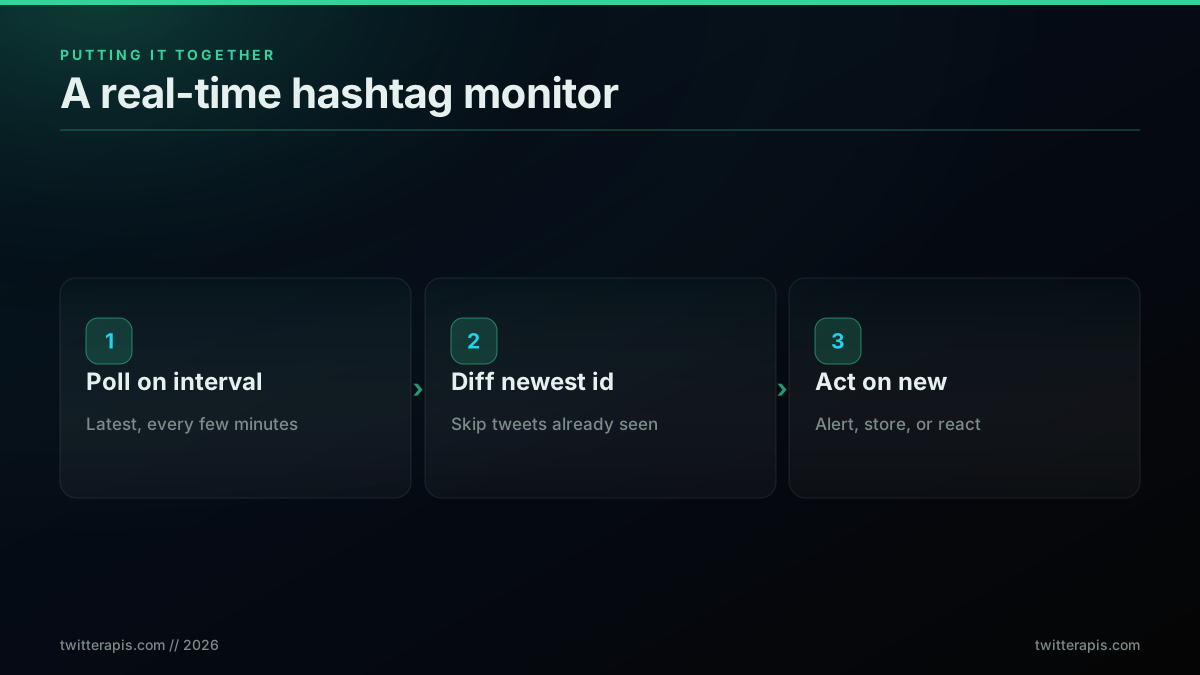
A hashtag monitor: poll, diff against the newest seen id, act on new tweets
One detail turns a demo monitor into a real one: persist the newest seen id somewhere outside the process. The in-memory seen_newest above resets to nothing on every restart, so a crash or a deploy makes the next poll treat the whole recent window as new and re-alert on tweets you already handled. Writing that id to a small file, a Redis key, or a single database row after each poll, and reading it back on startup, makes the monitor idempotent across restarts. For a tag you care about you also want the poll interval tuned to its rhythm: a slow tag is fine on a ten-minute poll, while a live-event hashtag may need one every thirty seconds, and the right number is whatever keeps you inside one page of new results per poll so you never miss a burst between checks.
Because a direct read API has no per-endpoint call ceiling, a three-minute poll runs comfortably within the free credits for a low-volume tag and scales linearly with your call budget for a busy one. For a brand hashtag you would fan this out across several tags, which is the same shape as watching for name mentions in the monitor Twitter mentions in real time guide, and for a full automation the Twitter bot build guide shows the surrounding architecture. Teams wiring this into an assistant often expose the same read through the MCP server so an agent can search a hashtag directly.
Common Hashtag Search Mistakes
A handful of mistakes account for most of the wrong numbers in hashtag reports, and every one of them is cheap to avoid once you know it is there. The first is forgetting to encode the hash symbol. In a raw URL the # starts a fragment, so a query sent as ?query=#python can arrive at the server as an empty search. Both URLSearchParams in Node and the params dictionary in requests encode it for you, which is the main reason the examples in this guide never hand-build the query string. If you ever construct the URL yourself, encode the tag to %23python explicitly.
The second mistake is counting retweets as reach. A single popular tweet under a campaign hashtag can be retweeted thousands of times, and if your query does not include -filter:retweets every one of those echoes lands in your result set and inflates the total. A hashtag that looks like 40,000 posts can be 6,000 originals and 34,000 retweets, which is a very different story for a campaign report. Decide up front whether you are measuring original participation or total amplification, and set the retweet filter to match.
The third is stopping pagination on the wrong signal. Reading until the tweets array is empty works, but stopping the instant a single page returns fewer than the full count does not, because a short page is not the end of the data. Treat an empty next_cursor as the end and keep the max_pages cap as the hard budget, exactly as the loop above does. The fourth is assuming recent search reaches further back than it does. On most surfaces, including the official API, a hashtag search only sees roughly the last 7 days, so a query for a campaign that ran last month returns nothing until you add a since: and until: window and page backward through the archive.
The last mistake is running an unfiltered query at scale and filtering in your own code. Every operator you can push into the query string runs on the server and shrinks the result set before it costs you a call, so a tight query with min_faves: and lang: is both cheaper and faster than pulling everything and discarding most of it locally. The best practices guide collects these into a pre-ship checklist, and the rate limit guide covers the pacing side.
Where to Go Next
This guide covered the full hashtag search path: what the search means in 2026, a ten-line quickstart in Python and Node.js, the operator set, cursor pagination for a full sweep, deduping and author counting, error handling, the real per-call cost, the official v2 route with its 7-day cap, and a real-time monitor. The links below go deeper on each branch.
- For the full operator vocabulary behind the query string, read the advanced search operators guide.
- For the complete Node read path with axios, retries, and concurrency, read the Twitter API Node.js tutorial.
- For the Python read patterns in the same style, read the Python Twitter API tutorial.
- For monthly cost projections at your specific hashtag volume, use the cost calculator and the alternatives comparison.
- For a real-time name-tracking build on the same loop, read the monitor Twitter mentions guide.
Search Your First Hashtag in Under a Minute
The fastest path from this guide to working code is the direct API. Sign up at the signup page, get $0.50 in free credits with no credit card, copy your Bearer key into TWITTERAPIS_KEY, and run:
import os, requests
r = requests.get(
    "https://api.twitterapis.com/twitter/tweet/advanced_search",
    params={"query": "#buildinpublic", "product": "Latest"},
    headers={"Authorization": f"Bearer {os.environ['TWITTERAPIS_KEY']}"},
)
print(len(r.json()["tweets"]), "tweets for #buildinpublic")
Under a minute from signup to a hashtag result set. For per-call rates across every read endpoint, see the pricing page, and grab a key directly from the signup page.
// sources
Where these numbers come from
Each row is a figure in this post and the artefact it was read from. Prices and limits on this platform move, so check the date on the source before you plan against it.
- X API v2 search introduction
- Backs the surface comparison: the v2 recent search endpoint works but sits behind a developer account and pay-per-use billing, and recent search reaches back only about 7 days.
- X API pricing page
- The source for the roughly $0.005 per post read figure and the paid-tier gating on search, which is what makes the 50,000 tweet hashtag sweep cost comparison work.
- Tweepy Client reference
- Documents the Client.search_recent_tweets call used in the official-API version of the hashtag search.
- MDN URLSearchParams reference
- Backs the encoding behaviour the Node example relies on, where the hash symbol and the space in a query like #buildinpublic lang:en are escaped without manual work.
- MDN Fetch API reference
- Documents the global fetch the Node.js hashtag example calls with no dependency installed.
- Node.js CLI env-file flag reference
- The built-in flag the post uses to run the example with an API key in the environment and nothing to install.
Frequently Asked Questions
Send the hashtag as a search operator to a search endpoint. On a pay-per-call API like TwitterAPIs you send GET https://api.twitterapis.com/twitter/tweet/advanced_search with query set to the hashtag string, for example query=%23buildinpublic, plus an Authorization Bearer header. The response returns a tweets array and a next_cursor string for paging. Each call is $0.0008 and returns about 20 tweets. On the official X API you use the v2 recent search endpoint with a query parameter, which needs a developer account, a Bearer token, and paid access, and returns only the last 7 days, with full-archive search as a separate endpoint.
Recent search covers roughly the last 7 days on most surfaces, the official X API included, where full-archive search is a separate endpoint billed per post. To go deeper you page backward with a cursor and a date range using since: and until: operators, walking the hashtag day by day until you hit your window. There is no single call that returns the entire lifetime of a popular hashtag, because the archive is enormous, so a full historical sweep is always a paginated loop over dated slices. Chunking by day also keeps each page small and your credit spend predictable.
Most hashtag tutorials from a few years ago call the Tweepy Cursor over api.search or the v1.1 standard search/tweets endpoint, which has been retired. Code written against the v1.1 standard search no longer runs. In 2026 you either move to the official v2 recent search endpoint through Tweepy Client, which needs paid access, or you call a direct pay-per-call search API with plain requests. Both paths are shown in this guide with runnable code, so you can pick the one that fits your budget and access.
Add -filter:retweets to the query so retweets never enter the result set, then track authors in a set as you page. For each tweet read author.username and add it to a Python set or a JavaScript Set, and the size of that set is your unique-author count when the sweep finishes. To dedupe on tweet identity instead, key a dictionary by tweet id so a tweet that appears on two pages is only counted once. Both patterns run in memory during the pagination loop and add no extra API calls.
The hashtag itself is the operator. Put the hash symbol in front of the term, so #python matches tweets that tag python. You combine it with other operators in the same query string: #python min_faves:50 filters to tagged tweets with at least 50 likes, #python lang:en restricts language, and #python -filter:retweets drops retweets so you count only original posts. On the TwitterAPIs advanced_search endpoint the whole string goes in the query parameter. The full operator reference is in the advanced search operators guide.
On a pay-per-call API each search call is $0.0008 and returns about 20 tweets, which is $0.04 per 1,000 tweets. A hashtag campaign that produced 50,000 tweets in a week costs about 2,500 calls, or roughly $2.00 to pull in full. New accounts get $0.50 in free credits, about 625 calls or 12,500 tweets, with no card. The official X API prices a post read at about $0.005 and gates search behind paid tiers, so the same 50,000 tweet sweep runs far higher before you add the monthly tier fee.
For the official X API, yes. Every v2 recent search call needs a developer account, an approved Project and App, a payment method, and a Bearer token before the first request. For a direct third-party API you do not. With TwitterAPIs you sign up with an email, copy a Bearer key, and call the search endpoint immediately on $0.50 of free credits, with no project, no app review, and no card. The tradeoff is that a direct API reads X data through the provider rather than from X itself, which is fine for read-only hashtag search and monitoring.
Yes. Engagement gates work inside the query string: min_faves:100 and min_retweets:25 keep only tweets that clear those thresholds, which is the fastest way to surface the loudest posts under a hashtag. Date bounds use since:2026-01-01 and until:2026-02-01 to window the search, and combining a date range with the hashtag is how you walk a campaign backward in time. These operators run server side, so filtering early means fewer pages, fewer calls, and lower spend than pulling everything and filtering in your code.
Check out similar blogs
More guides on the Twitter/X API, scraping, and pricing.

How to Get Everyone Who Retweeted a Tweet via API (2026)
Pull the full list of accounts that reposted any tweet with a real 2026 API. Runnable Python and Node.js, cursor pagination for the whole list, a real amplifier ranking over live data, a bot filter, and the honest per-call cost.
How to Get All Replies to a Tweet via API (2026)
Pull the replies under any tweet with a real 2026 API. Runnable Python and Node.js, cursor pagination, the conversation_id tail sweep for the long tail, nested replies-to-replies, signal-versus-noise filtering over live data, and the honest per-call cost.

Twitter API Tutorial 2026: The Complete Developer Guide
The 2026 Twitter API tutorial built after the pricing collapse. Auth, endpoints, code, rate limits, real costs, and the alternative when official gets too expensive.

How to Get Image URLs from X Tweets via API in 2026 (Full Resolution, Python and Node)
Pull image URLs out of X tweets with runnable Python and Node.js, then get the full-resolution original instead of the scaled copy the API hands you by default. Measured on 14 live images, with the video poster-frame trap and the per-call cost.
Twitter API Authentication in 2026: OAuth, Bearer Tokens, and Fixing 401
How Twitter (X) API authentication works in 2026: the four credential types, OAuth 1.0a versus OAuth 2.0, generating and using a bearer token, runnable Python and Node.js, and a fix for every 401 Unauthorized and 403 error, plus the one-header alternative.
Twitter API Pagination 2026: How next_token Works (and a Simpler Alternative)
How Twitter API pagination works in 2026. The official next_token loop explained field by field, a simpler single-cursor alternative, runnable Python and Node code, and the real per-call cost of a paginated pull.

Fetch a Full Twitter Thread via API in One Call (2026)
How to pull an entire Twitter thread, the root tweet plus every connected tweet in the chain, in a single API call with the tweet/thread endpoint, instead of walking replies by hand. Live-tested code in curl, Python, and Node.js, with the real per-call cost.
Twitter API Node.js Tutorial 2026: Fetch Tweets in 10 Lines
The 2026 Node.js Twitter API tutorial: fetch tweets in 10 lines with fetch or axios, no SDK and no OAuth dance. Search, profiles, cursor pagination, retries, async, and real per-call costs in working code.