GUIDE
Twitter API v2 vs TwitterAPIs: What Actually Differs in 2026
Twitter API v2 vs TwitterAPIs decoded across five real axes: unit price, access, auth, response shape, and throughput ceiling. Same data, different economics.
Per our own spec, 62 of 109 endpoints bill $0.0008, 24 are free, and 23 sit between $0.0016 and $0.01. Every price ships inside our published OpenAPI document as an x-cost-usd field, so any figure in this post can be checked against the contract that bills it rather than taken on trust.
The Twitter API v2 is the official REST interface that X publishes for reading and writing platform data: tweets, profiles, follower graphs, search results, and direct messages, delivered through a normalized JSON envelope and metered on a per-resource credit meter. TwitterAPIs is an independent REST service that reads the same public X data and returns it through a flatter, cheaper contract behind one Bearer header. The two products do not differ on the data itself. They differ on how you pay for it, how you get in the door, and how you authenticate, and those three seams decide which one belongs in your stack.
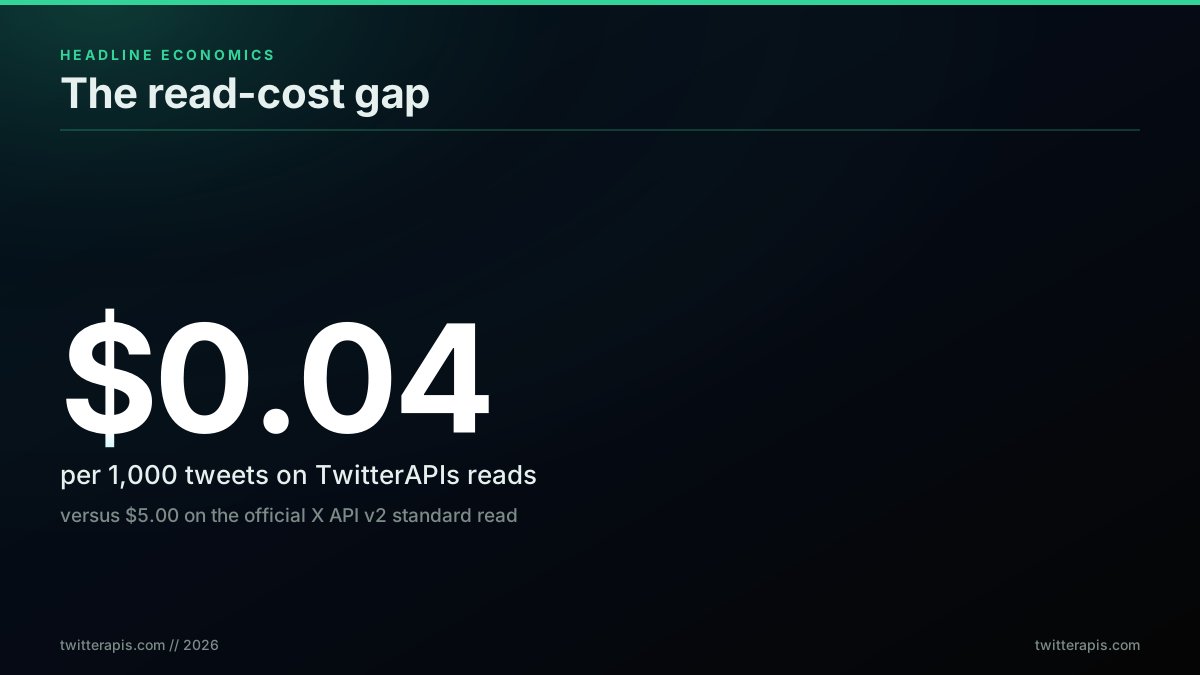
TL;DR: For read workloads the two APIs return the same X data, so the comparison is not a feature checklist, it is a cost-and-friction comparison. TwitterAPIs prices a read call at $0.0008 for roughly 20 tweets, an effective $0.04 per 1,000 tweets, against the official X API v2 standard read (X API pricing) at $0.005 per resource ($5.00 per 1,000 tweets), with a single Bearer header instead of OAuth 2.0 PKCE and no monthly read ceiling. The official X API v2 stays the right pick for user-delegated login, owned-account reads at the $0.001 rate, full-archive search, and regulated compliance.
Most head-to-head guides line the two APIs up feature by feature and let the reader tally checkmarks. That framing hides the decision. This one is built around the five axes where the two products genuinely diverge, each with the real 2026 numbers and a worked scenario, followed by a decision tree keyed to who you actually are.
The Same Bytes, Two Different Wrappers
Before any comparison is useful, one thing has to be clear: for public read data, both APIs are looking at the same X graph. A tweet's text, its author, its like and repost counts, the follower edges around an account, the results of a search query, all of that is the same underlying data whichever product you call. Neither one has a secret higher-fidelity feed. What you are actually choosing between is two commercial wrappers around identical bytes.
That reframes the whole exercise. If the payload is the same, then price, access friction, auth weight, response ergonomics, and throughput ceilings are the entire decision. Those are the five axes below. The one real data-capability split, and it is a genuine one, is user-delegated action: only the official API can operate as a signed-in end user, because only the platform can mint a token that speaks for a real account. Everything else is economics and ergonomics.
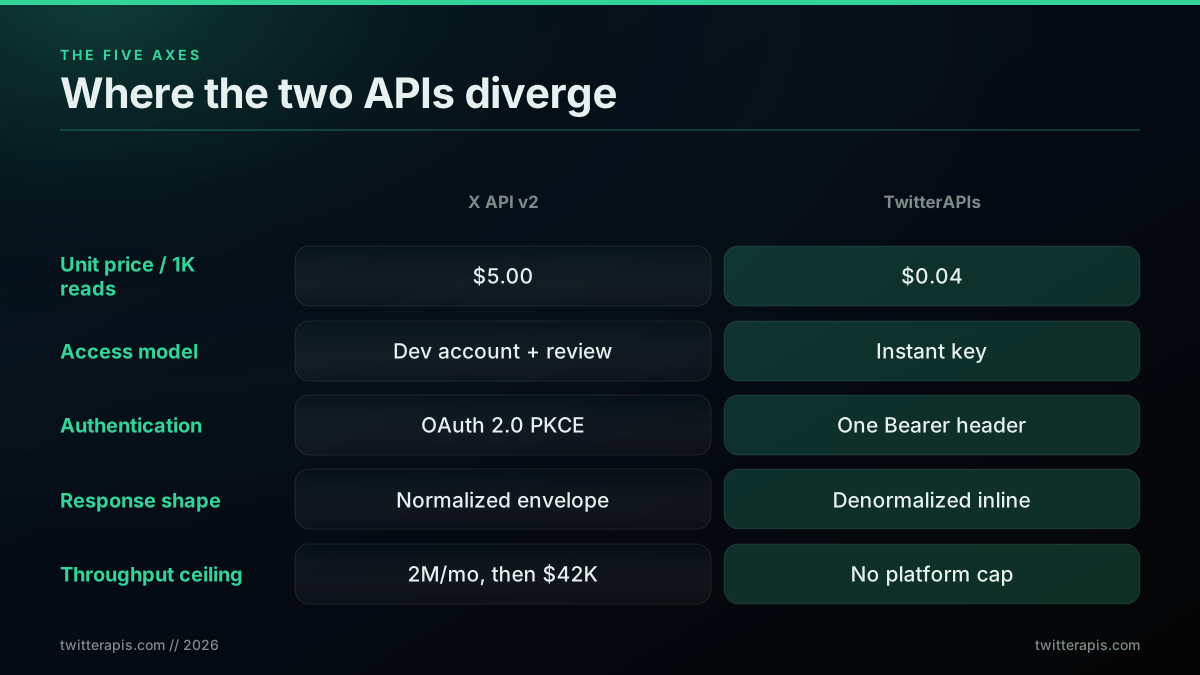
Read the rest of this guide as five passes over that grid, each one zooming into a single row with the arithmetic behind it.
What "Same Data" Actually Means
The claim that both APIs return the same bytes needs a boundary drawn around it, because it is easy to over-read. Both products are bound by the identical platform visibility rules. A protected account's posts are not readable through either one without authorized access, a deleted tweet vanishes from both, and neither can surface content the platform itself keeps hidden. What "same data" means precisely is narrower and more useful: for any public object either API can see, the field values are identical. The text is the same text, the author is the same author, the like and repost counts are the same counts, and the timestamps match. Neither product enriches those fields, and neither degrades them.
That boundary doubles as a buyer's test. Because a third-party read API is looking at the same public surface the platform exposes, no provider can legitimately deliver private, deleted, or hidden content. Any vendor advertising access to protected posts or deleted tweets is describing a policy violation rather than a feature, and that promise is a reason to walk away, not a reason to buy. The honest comparison stays strictly on price, access, authentication, response shape, and throughput over one shared public surface, which is exactly the ground the five axes cover.
Axis 1: Unit Economics
The largest practical gap between the two products is what a unit of data costs, and the gap is roughly two orders of magnitude on standard reads. The official X API v2 meters $0.005 per post resource (X API pricing), so 1,000 tweets is $5.00. TwitterAPIs prices a read call at $0.0008 and returns about 20 tweets per call, which lands at $0.04 per 1,000 tweets. At a modest 100,000 reads a month that is an estimated $500 on the official meter against $8 on the flat per-call rate.
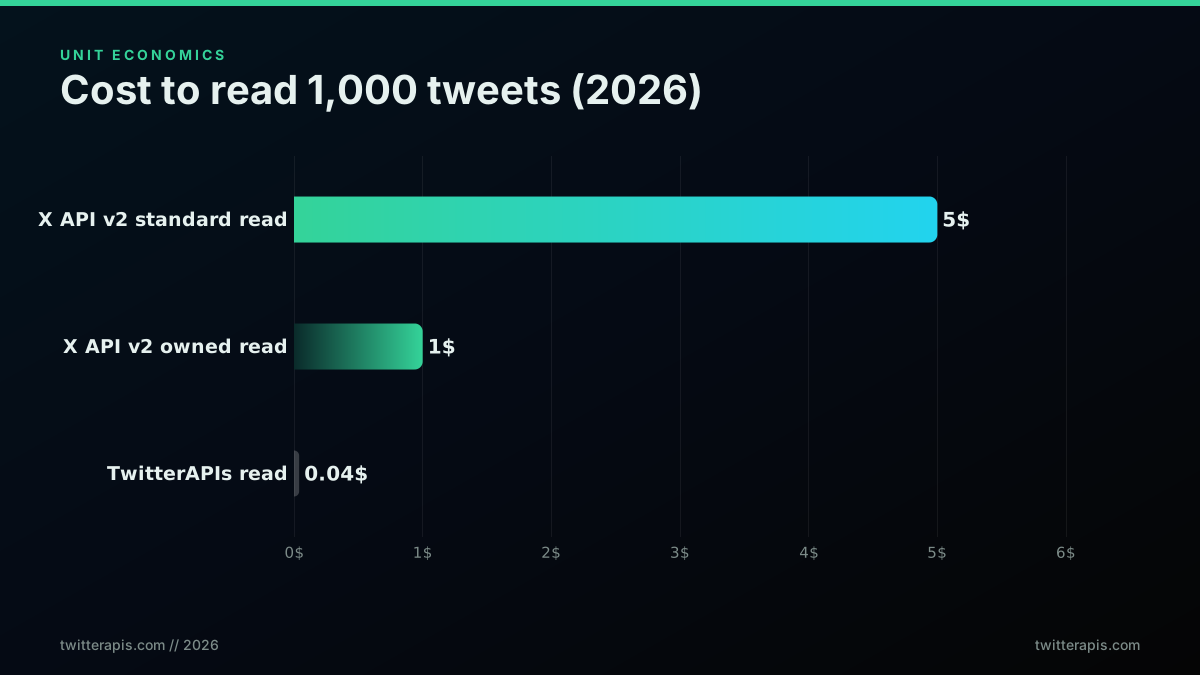
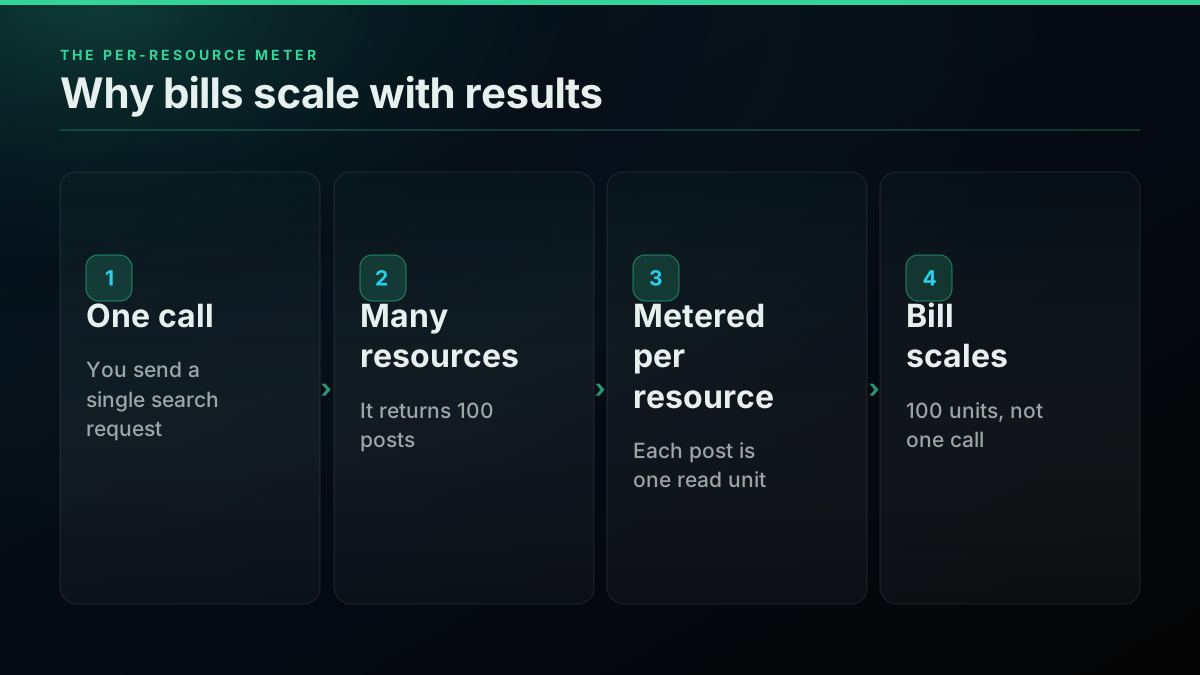
The mechanic underneath the sticker price matters more than the sticker price. X bills per resource returned, not per HTTP request, which is a subtle but expensive detail: a single search call that returns 100 posts is metered as 100 read units, and a large pagination sweep multiplies accordingly. A developer unpacking the June 2026 changes put the per-resource nuance plainly, that owned reads are counted per resource returned rather than per call:
https://x.com/karanb192/status/2071897558465855884
Per-resource metering is why real bills routinely overshoot back-of-envelope estimates. It also explains why practitioners describe the official search path as viable only for small lookups. One developer described spending roughly $15 (source) to search his own followers for investors, and noted that anything older than the recent window pushes you onto a Pro tier around $5,000 a month:
https://x.com/pwnies/status/2071983273560174663
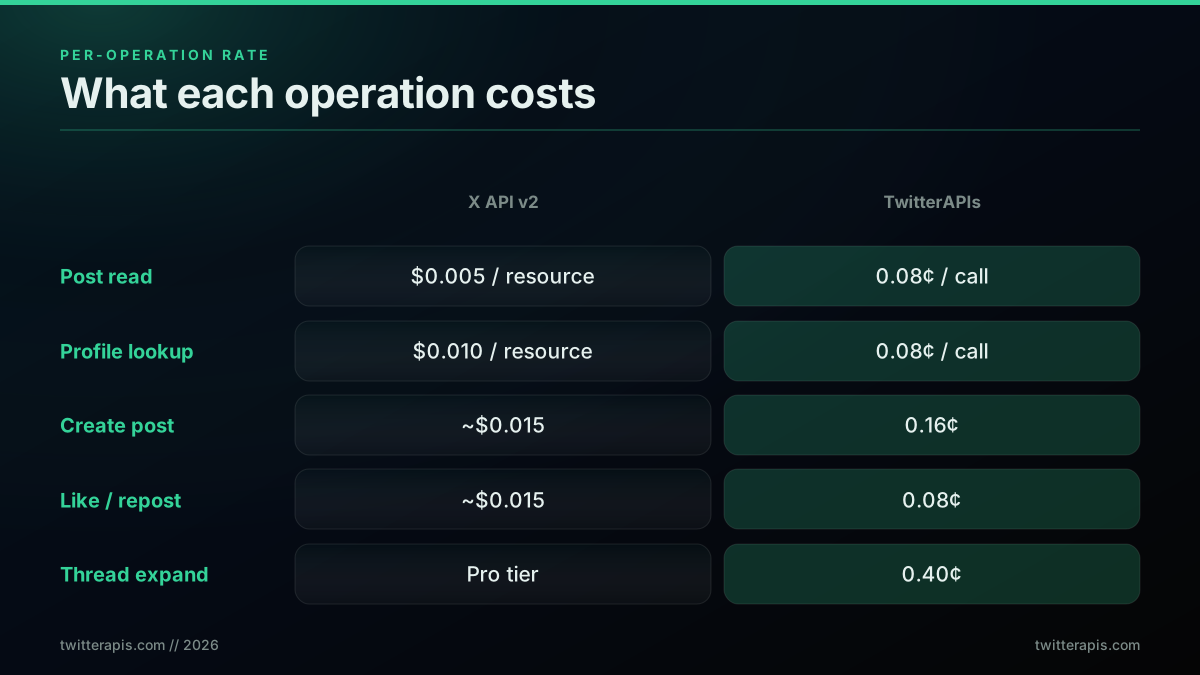
TwitterAPIs prices the other way, per call rather than per resource, so a 20-result read is one flat $0.0008 charge and not twenty. The nine simple write actions (favorite and unfavorite, repost and un-repost, bookmark and un-bookmark, follow and unfollow, delete) share that same $0.0008 rate, and so does media upload. Only a few operations sit on premium tiers: $0.0016 for tweet creation, DM reads, and DM send, $0.0024 for full user history, and $0.004 for full thread expansion. There are 109 data endpoints in total, 65 reads and 44 writes.
The per-resource meter has one more trap worth naming: low-yield polling. If a scheduled job hits search on a narrow query that often returns nothing, the official meter still charges for the request work, and those empty pulls accumulate. A flat per-call price makes that failure mode cheap by construction.
Put the two meters against a realistic monthly mix and the divergence compounds. The estimated cost ranges below, drawn from the X API pricing page, assume a mixed read workload, not a single-endpoint best case.
| Monthly read volume | X API v2 (per resource) | TwitterAPIs (per call) | Effective saving |
|---|---|---|---|
| 5,000 calls (light) | $25 to $75 | $5.50 | 85% to 93% |
| 50,000 calls (medium) | $250 to $750 | $55 | 78% to 93% |
| 500,000 calls (heavy) | $2,500 to $7,500 | $550 | 78% to 93% |
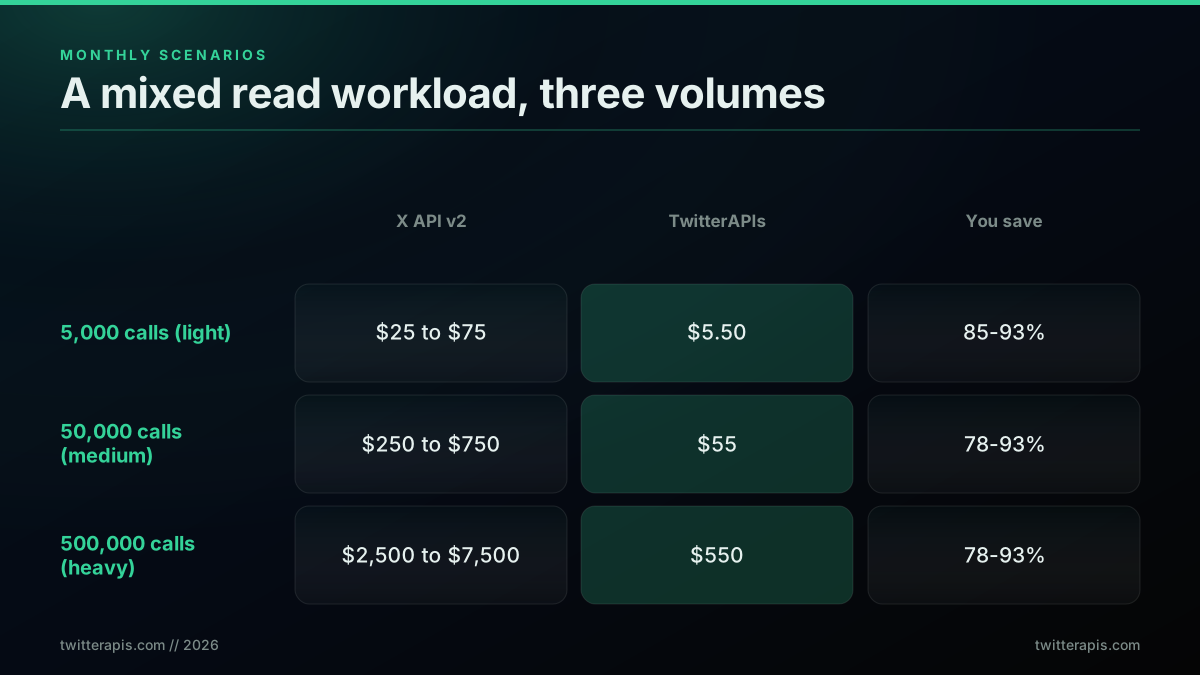
Figures for the official meter are drawn from the X API pricing page and X Developer Community reports; the per-resource counting behavior is confirmed in the practitioner threads above.
There is a second layer of cost the meter never prints. The official path bills you in dollars, but it also bills you in engineering time. A production integration against the credit meter usually ships a usage-tracking layer so a runaway job does not silently drain the balance, plus alerting on the three-million-read ceiling so a busy month does not stop the pipeline without warning. Those are real hours, and they recur as the pricing shifts. A flat per-call price with no monthly ceiling removes that whole category of work, which is why teams that price the decision only on the per-tweet number tend to understate the gap.
How Much Does the X (Twitter) API Cost in 2026?
Axis 1 gives the per-unit numbers. This section answers the question people actually type, which is what the bill comes to for a whole project rather than for one read.
The official X API meters per resource, so the honest answer is that it costs whatever your result volume multiplies out to. The published standard read rate is $0.005 per post read, which is $5.00 per 1,000 tweets. User lookups meter at $0.010 per resource, engagement actions such as likes, mutes and blocks at $0.001, and owned reads, meaning requests your own app makes for your own data, at $0.001. There are no subscriptions and no minimum spend on the pay-per-usage plan, and post reads are capped at 3 million per monthly billing cycle, which puts a ceiling of roughly $15,000 a month on reads alone before an Enterprise conversation.
Three project shapes, priced on that meter:
| Project | Monthly volume | Official X API v2 | TwitterAPIs |
|---|---|---|---|
| A sentiment dashboard on one topic | 20,000 post reads | approximately $100 | approximately $0.80 |
| A brand-monitoring tool across 50 accounts | 250,000 post reads | approximately $1,250 | approximately $10 |
| A scheduling product posting 3,000 times | 3,000 writes, low reads | approximately $45 plus link surcharge | approximately $4.80 |
The scheduling row is the one worth pausing on, because it is the case where the official API is genuinely competitive on writes and then loses on a detail nobody budgets for: a post carrying a URL meters differently from a plain post. If your product publishes links, price that separately rather than assuming the plain-post rate.
The number that decides most projects is not the rate at all. It is whether your workload is read-heavy or write-heavy. Read-heavy work is where the two orders of magnitude live. Write-heavy work is where the official API is the only option and the price is what it is.
Pay-Per-Use, in Plain English
The phrase appears on both pricing pages and means two different things, which is where most of the budgeting confusion comes from.
On the official X API, pay-per-use means per resource returned. The meter counts objects, not requests. One search call that returns 100 posts is billed as 100 read units. This is the single most important sentence in this post for anyone estimating a bill, because the natural mental model is per request and the natural mental model is wrong by whatever your page size happens to be.
On TwitterAPIs, pay-per-use means per call. The meter counts HTTP requests. One search call that returns 20 tweets is billed as one unit at $0.0008, the same as a call that returns two.
Put concretely: paginate 10,000 tweets at 100 results a page and the official meter records 10,000 units while a per-call meter records 100. Same data, same number of requests, two bills that differ by the page size.
Neither model is dishonest, and each has a case. Per-resource billing means you never pay for an empty response, which is fair on sparse queries. Per-call billing means a full page costs the same as an empty one, which rewards efficient pagination and punishes low-yield polling. Which one is cheaper for you is a property of your query shape, not a property of the vendor. If your queries usually come back full, per-call wins by roughly your page size. If your queries usually come back nearly empty, the gap narrows sharply.
The practical takeaway is to estimate in the unit your provider actually meters. A budget built in requests against a per-resource meter will be wrong by an order of magnitude, and it will be wrong in the expensive direction.
Is There a Free X (Twitter) API Tier?
Yes, and it is write-oriented rather than free access to the API in the sense most developers mean.
X's free access allows a capped volume of posts a month through the v2 POST /tweets endpoint and gives effectively no read access, per X's own API overview. That shape is deliberate: it is enough to let a bot post, and not enough to let anyone build a read product. If your project reads tweets at all, the free tier is not a starting point, it is a different product.
The comparison on the other side is a small starting credit rather than a free tier. TwitterAPIs includes approximately $0.50 of credit at signup with no card, which at $0.0008 a call is roughly 625 calls or about 12,500 tweets on paginated reads. That is a trial balance, not an ongoing free allowance, and it is honest to call it that.
So the accurate framing for a developer choosing between the two is that neither offers free reads at any volume that matters. What differs is what you can evaluate before paying. On the official API you need an approved developer account and a funded balance before your first read. On a per-call API you can run a real query in the first ten minutes and see the response shape before deciding anything.
What Changed in 2026 (Updated August 2026)
Two changes this year affect the comparison directly, and one non-change is worth stating because it keeps being assumed.
Pay-per-usage became the default for new X API developers. The tier structure that preceded it, Basic at $200 a month for roughly 10,000 reads and Pro at $5,000 a month for roughly 1 million, was closed to new signups. For small and bursty workloads this is a real improvement, because there is no monthly floor to buy past before making a first call. For read-heavy workloads it changed the shape of the bill without changing its size.
Owned reads dropped to $0.001 per resource, per the X API pricing changelog. That is a meaningful cut for any app reading its own account's data, and it narrows the gap specifically for owned-data workloads. It does not touch the general read rate, which is where most of the cost difference in this post lives.
What did not change is the access model. A developer account, a Project, a stated use case, and a review still sit between deciding to build and making a first call. That is Axis 2 and it is unaffected by any amount of repricing.
Everything else in this comparison holds as measured. Where a figure below carries a date, treat the date as part of the figure, because the official meter has moved twice in roughly three years and will move again.
Start building with TwitterAPIs
$0.0008 a call, about $0.04 per 1,000 tweets at 20 tweets a page. $0.50 free credits. No credit card required.
Did X Kill the Twitter API? What Changed Since 2023
No. It closed the version most developers had built on, and the current market exists because of that closure.
Twitter ended free API access in February 2023, and the following month announced the Free, Basic and Enterprise tier structure that left a wide gap between a nearly unusable free tier and enterprise pricing. Independent projects that had run on the old free quota stopped, and third-party clients were cut off. The Academic Research track, which had been the main route for researchers, was discontinued.
The 2026 shift to pay-per-usage, which Social Media Today covered as a usage-based access charge, softened the floor without lowering the rate.
The pattern is not unique to X. Reddit repriced its API in 2023 in a way that ended a generation of third-party clients, and the shape is the same: inexpensive access while an ecosystem is being built, a reprice once it is worth monetizing.
The useful conclusion is architectural rather than editorial. Put a thin internal interface in front of whichever provider you choose, so the provider is a configuration value rather than a dependency threaded through the codebase. Teams that did that handled the 2023 and 2026 changes in an afternoon. Teams that called a platform API directly from fifty call sites did not. That advice applies equally to the official API and to every alternative in this comparison, including this one.
Axis 2: Access Latency
The second axis is how long it takes to go from deciding to build to making a first authenticated call. On the official X API v2 this is not instant. Every app lives inside a Project in the developer console at console.x.com, each Project is tied to a stated use case, and a new developer account goes through a review that can clear in hours or stretch across several days. Only after approval do you configure auth and make a first call.
TwitterAPIs collapses that path. Signup issues a key, one header authenticates the request, and a first successful call is typically under five minutes with no review queue standing between the idea and the data.
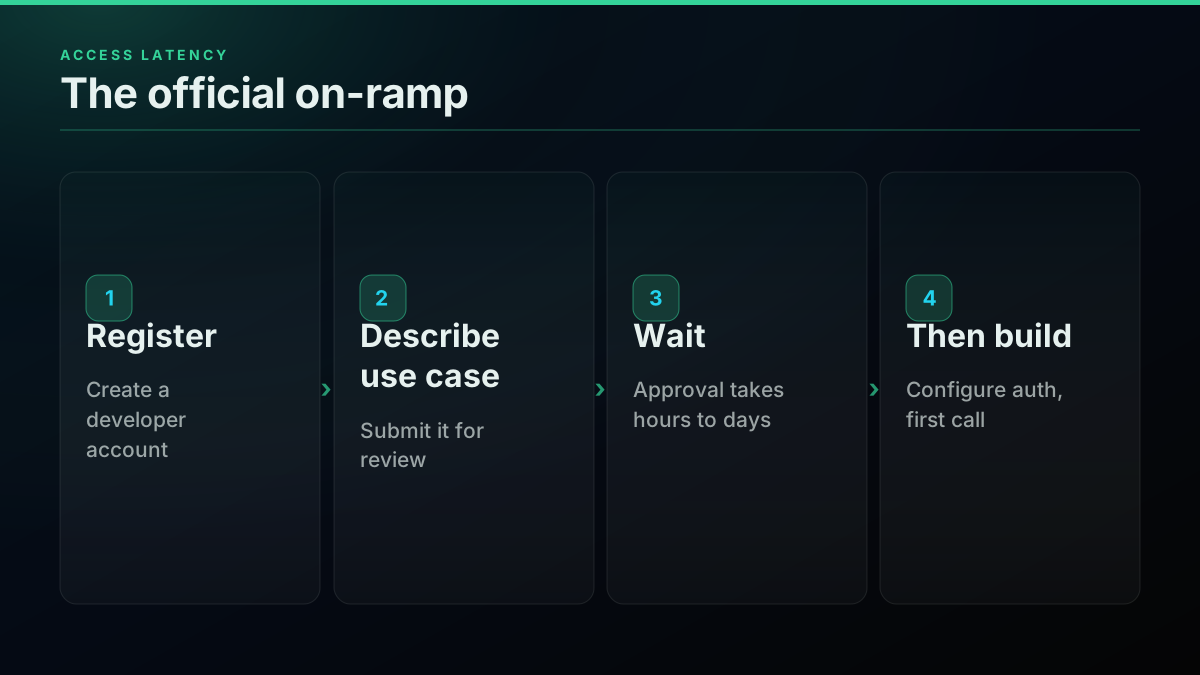
For a production system shipping to real users, a one-time approval wait is a footnote. For a prototype, an internal dashboard, or a weekend experiment, the approval delay can outlast the build, and that is exactly where the friction gap changes the decision.
Axis 3: The Authentication Surface
Authentication is where the two products feel most different day to day. The official X API v2 leans on OAuth 2.0 with PKCE for anything user-delegated, and that flow carries real weight: a registered app, one or more callback URLs, an authorization-code redirect through the browser, an access token that expires in two hours, a stored refresh token with auto-refresh logic, and a scope list you have to declare and re-consent when it changes. App-only Bearer auth covers reading public data with less ceremony, but it still sits behind the developer-account gate.
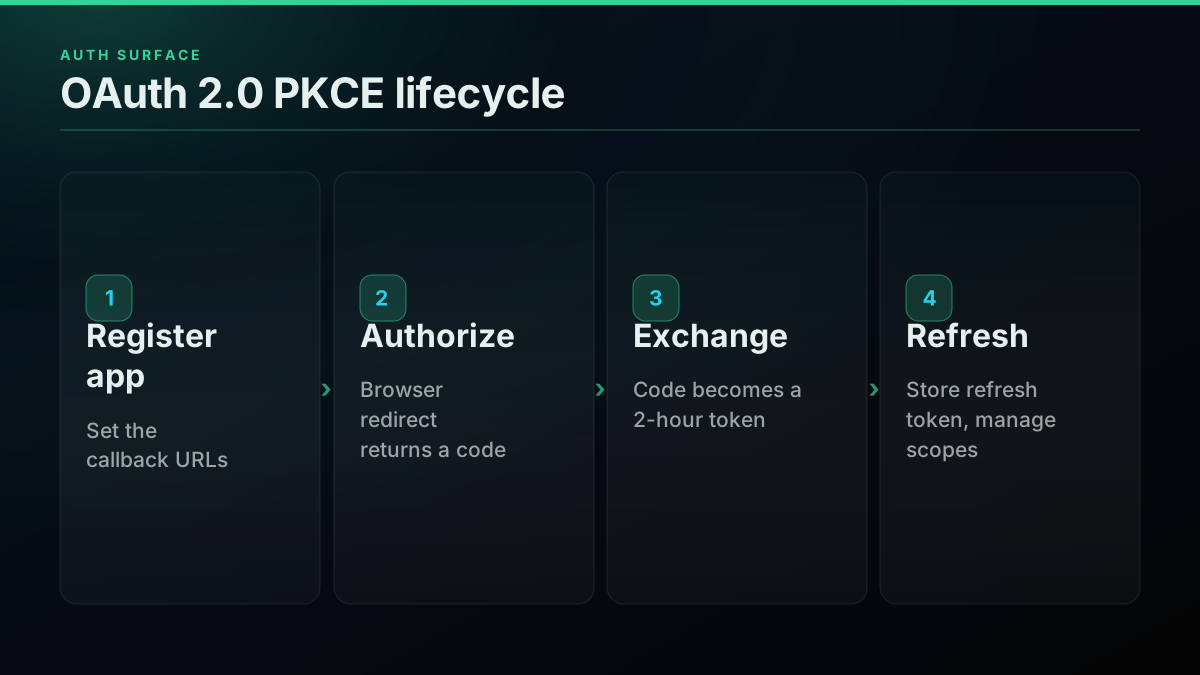
The OAuth path is not academic difficulty for its own sake; it exists because acting as a signed-in user demands it. But it is genuinely involved, and developers who wire it up tend to write the walkthrough afterward because the official docs leave gaps around the callback and token-exchange steps. If you want to see the full flow before deciding whether you need it, this walkthrough covers authentication with the X API v2 end to end, including the callback configuration and token exchange that a Bearer-only path skips:
https://www.youtube.com/watch?v=X-HZA8KrkII
TwitterAPIs authenticates every request with one header, Authorization: Bearer YOUR_API_KEY. There is no callback URL, no token expiry, no refresh loop, and no scope negotiation. Write actions use a bring-your-own approach: you pass an account's own auth_token and ct0 on the request itself, they are never stored server-side, and DM send works the same way, so sending direct messages does not require the official API. The standards behind both models are worth reading directly rather than through a vendor summary, PKCE in IETF RFC 7636, the Bearer scheme in RFC 6750, the Authorization header semantics on MDN, and the case for PKCE as the default for public clients on oauth.net.
curl -H "Authorization: Bearer YOUR_API_KEY" \
  "https://api.twitterapis.com/twitter/tweet/advanced_search?query=from:elonmusk"
The honest tradeoff sits here: because a Bearer key cannot mint a token that speaks for a signed-in user, TwitterAPIs cannot run the OAuth login itself. Consumer apps that let people sign in with their X account keep the official API for that one piece.
The Write Model, Compared
Reads dominate most Twitter data work, but writes are where the two products differ in kind, not just in price. On the official X API v2, writing on behalf of a user, posting, liking, or following, is exactly what OAuth 2.0 exists for: the end user authorizes your app, the platform mints a token scoped to their account, and your write carries that delegated authority. It is the correct model for a consumer product where the person taking the action is a signed-in user of your app.
TwitterAPIs handles writes with a bring-your-own-credential model instead. For the nine simple write actions, media upload, tweet creation, and DM send, you pass an account's own auth_token and ct0 on the request itself, the service performs the action as that account, and the credentials are never stored server-side. That design suits automation you own or operate: a scheduled poster, a bot account, an operations script acting as accounts you control, where there is no third-party end user to route through a consent screen. The operational consequence is that the two write models are not substitutes for each other. If your writes are user-delegated actions for signed-in customers, the official OAuth path is the fit. If your writes are automation on accounts you already control, the bring-your-own-token path is lighter and cheaper, and DM send runs on that same model, so account-to-account messaging is covered without an OAuth handshake.
Axis 4: The Response Contract
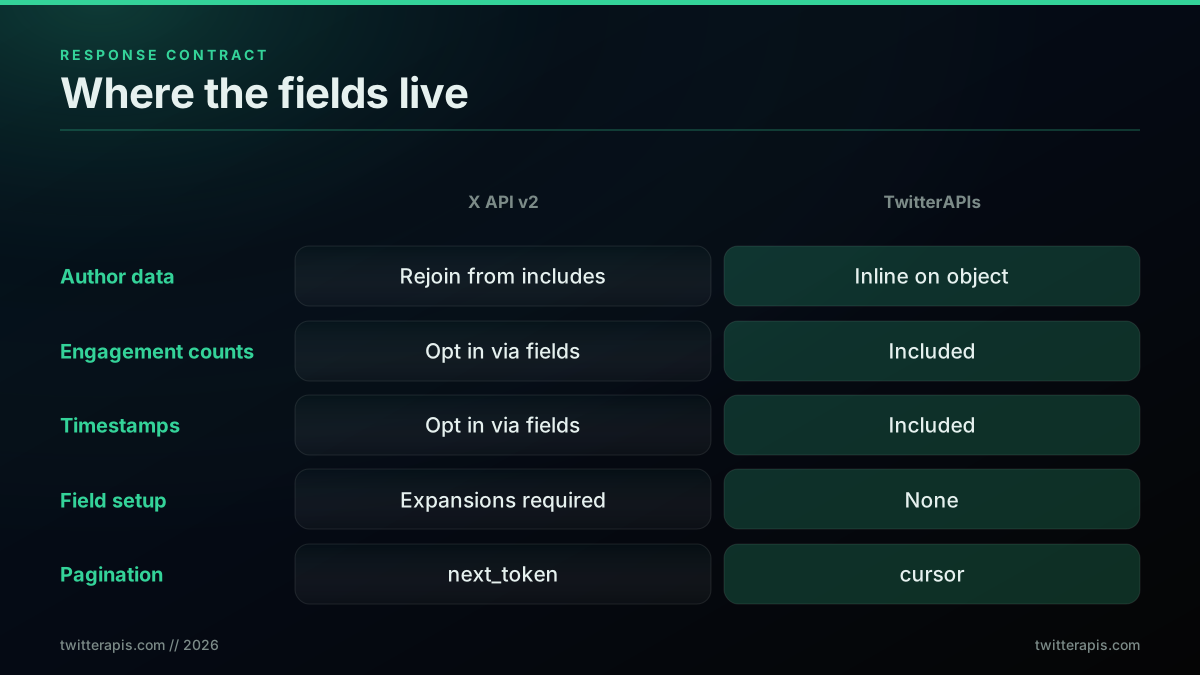
The fourth axis is the shape of what comes back, and it changes how much code you write around the data. The official X API v2 returns a normalized envelope of data, includes, and meta, and by default a tweet object carries only id and text. Everything else, timestamps, engagement counts, the author's name, is opt-in through tweet.fields, user.fields, and expansions, and related objects like the author land in the includes block where your code has to rejoin them by id. That design keeps payloads lean, but it hands you a field-selection and reassembly job on every call.
TwitterAPIs returns a denormalized object where every field is already inline. Each tweet carries its author, timestamp, and engagement counts on the object itself, pagination is a plain cursor, and there is no expansion system to learn.
{
  "count": 20,
  "next_cursor": "DAABCgABG...",
  "tweets": [
    {
      "id": "1234567890",
      "text": "Hello world",
      "author": { "name": "Elon Musk", "username": "elonmusk", "followers_count": 200000000 },
      "created_at": "Wed Mar 18 10:00:00 +0000 2026",
      "favorite_count": 5000,
      "retweet_count": 1200,
      "reply_count": 800
    }
  ]
}
Neither shape is wrong. The normalized envelope is efficient on the wire and gives you exact control over payload size, which some high-volume systems want. The denormalized shape removes the expansion learning curve and the join step, which most data pipelines prefer. The difference is where the work lives: in the official model you assemble the object, in the flat model the object arrives assembled.
The reassembly job sounds trivial until it is spread across a codebase. Every place that touches a tweet has to know that the author is not on the tweet, it is in includes.users, matched by author_id, and that a referenced or quoted post is another id to resolve out of includes.tweets. Miss one of those joins and a field reads as empty rather than throwing an error, which is why the most common official-API bug report is not a crash but silently missing author or metric data. The denormalized shape removes that class of bug entirely, because there is nothing to rejoin.
Axis 5: The Throughput Ceiling
The last axis is how hard you can push before the platform pushes back. The official X API v2 enforces per-endpoint limits on a 15-minute window that vary by auth type, and above those windows the pay-per-use plan holds a hard ceiling of 3 million post reads per monthly billing cycle. Cross the window limits and you get a 429 with reset headers, which means retry logic, exponential backoff, and request queuing in your code. Cross the monthly ceiling and requests stop until the next cycle.
| Endpoint | App (Bearer) | User (OAuth) |
|---|---|---|
| Recent search | 450 req / 15 min | 300 req / 15 min |
| Tweet lookup | 3,500 req / 15 min | 5,000 req / 15 min |
| User lookup | 300 req / 15 min | 900 req / 15 min |
| Post create | 10,000 / 24 hr | 100 req / 15 min |
The window numbers above are from the official rate-limit reference. The sharper edge is the monthly one. Once pay-per-use hits 3 million reads there is no gradual next tier, the path jumps to Enterprise, which X prices only by contract and does not publish, so a single viral spike that pushes you over the line can force an immediate move to a far more expensive plan. The 2023 reset that created this shape is still the loudest sore point in the operator community, and one system administrator's reaction became a lasting reference for the sticker shock:
Is Elon on crack? I'm not paying $42K PER MONTH for Twitter API access
The cost-cliff shape is the part that catches teams off guard, because there is no middle rung between the metered plan and the enterprise contract.
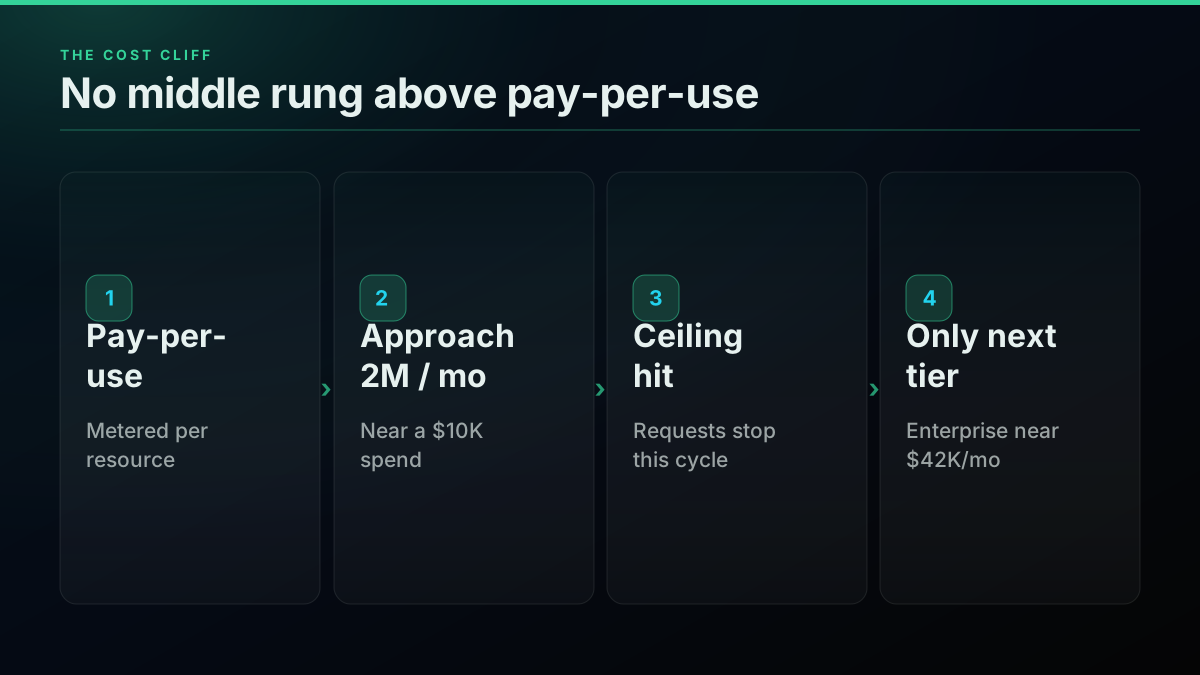
TwitterAPIs sets one flat ceiling of 600 requests a minute and 20 concurrent per key, and no monthly read ceiling, so throughput is bounded by one number rather than by tiered endpoint windows, and there is no retry-and-backoff scaffolding you are forced to write just to stay under a limit. A builder reacting to X's June 2026 MCP announcement captured why the ceiling, not the wiring, is the thing that burns people: the plumbing got easier while the cost-and-limit shape did not move.
https://x.com/Niki_Builds/status/2071963382601625834
Error Handling and Reliability
The two APIs also differ in how failure reaches your code, and that shapes how much defensive scaffolding you write. On the official X API v2, tripping a window limit returns a 429 Too Many Requests carrying x-rate-limit-remaining and x-rate-limit-reset headers, and a well-behaved client is expected to read those headers, back off, and reschedule. In practice every serious integration ships a rate-limit-aware queue, an exponential-backoff retry, and logic that tells a transient 429 apart from a hard 403 scope rejection. That machinery is not optional on the official path, and it is a standing maintenance line rather than a one-time cost, because the limits and their behavior shift over time.
On TwitterAPIs the reliability model is plainer because there is one rate ceiling to stay under rather than a per-endpoint window to trip. Errors return as ordinary HTTP status codes, a failed call is simply a failed call rather than a rate-limit event to decode, and there is no reset-header dance to implement. You still add sensible retry-on-network-error handling, exactly as you would for any HTTP dependency, but the specialized rate-limit state machine the official path forces is absent. For a small team, deleting that machinery is often a larger practical win than the per-call price difference itself, because it is engineering time that never has to be spent in the first place.
The cheapest pay-as-you-go Twitter API. Try it free.
$0.0008 a call, about $0.04 per 1,000 tweets at 20 tweets a page. $0.50 free credits. No credit card required.
Data Freshness and Historical Depth
Freshness is the axis most people assume separates the two products, and for live data it does not. Both read the same public graph, so a post published seconds ago is reachable through either API the moment it is public, and neither holds a latency advantage on current activity. The genuine split is historical depth. The official recent-search surface reaches back only a limited window, and pulling posts older than that window requires the full-archive endpoint, which sits behind the Pro and Enterprise tiers. For a monitoring dashboard, a sentiment tracker, or a bot watching current conversation, that gate never binds, because the work lives inside the recent window. For a longitudinal study reaching years into the past, full-archive access is a real requirement and one of the cleanest reasons to keep the official API in the stack. TwitterAPIs covers the same live and recent read surface, so where deep-archive retrieval matters the correct pattern is to pair a flat read API for current volume with the official full-archive tier for depth, rather than expecting either product to be a complete historical mirror on its own.
Endpoint Parity, Grouped by Job
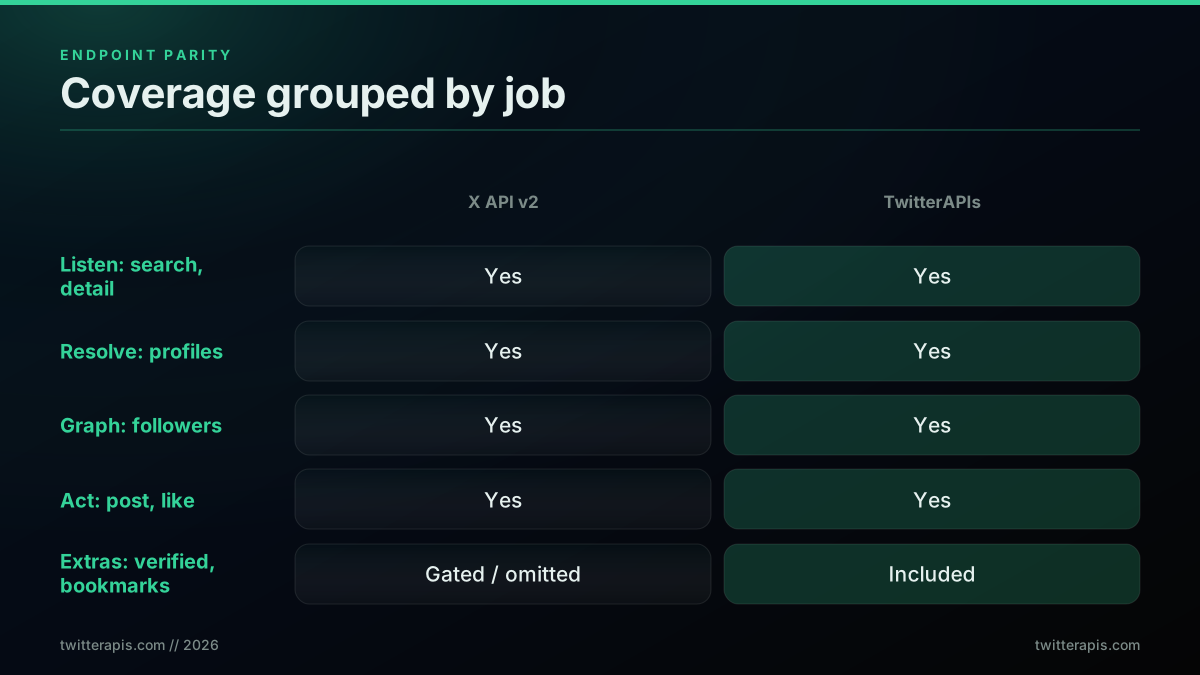
Feature matrices are easier to reason about when they are grouped by the job you are doing rather than listed alphabetically. Across the four jobs most data work falls into, listen, resolve, graph, and act, the two APIs cover the same ground, and TwitterAPIs adds a handful of read endpoints the official API makes hard to reach outside Enterprise.
| Job | Representative operation | X API v2 | TwitterAPIs |
|---|---|---|---|
| Listen | Search recent tweets | GET /2/tweets/search/recent | GET /twitter/tweet/advanced_search |
| Listen | Tweet detail by id | GET /2/tweets/:id | GET /twitter/tweet/detail |
| Resolve | Profile by handle | GET /2/users/by/username/:username | GET /twitter/user/info |
| Graph | Followers list | GET /2/users/:id/followers | GET /twitter/user/followers |
| Graph | Following list | GET /2/users/:id/following | GET /twitter/user/following |
| Act | Create a post | POST /2/tweets | POST /twitter/tweet/create |
| Act | Like a post | POST /2/users/:id/likes | POST /twitter/tweet/favorite |
The extras that lean toward the third-party side are the read endpoints X either gates or omits: verified-followers-only, mutual followers (followers you know), bookmark search, follow-relationship checks, and keyword user search. If your work depends on any of those, they change the build math on their own.
The Migration-Effort Model
Most people arriving at this comparison are not starting from zero, they are porting from one of three places, and the porting cost differs sharply by origin. Framing the move as effort rather than feature-count is the more useful lens.
Starting from legacy v1.1: the path to official v2 is the heaviest, because v1.1 used OAuth 1.0a, returned full fields by default, and paged with max_id. Moving to v2 means switching to OAuth 2.0 PKCE, adding explicit field expansions where v2 now returns only id and text, and re-plumbing pagination to next_token. The single most common bug in that migration is forgetting expansions and watching author and metric data vanish. Much of the v1.1 code still running is collection and analytics, which is precisely the work a flat read API absorbs with less rewrite.
Starting from the official v2: the move to a flat per-call API is mostly subtraction. You delete the expansion parameters, drop the includes reassembly, and replace the OAuth or app-Bearer setup with a single header, while the read semantics stay recognizable.
Starting from a third-party marketplace API: the mapping is usually endpoint-name and auth-header renaming, and the bigger win is escaping per-resource marketplace metering.
The reason so many collection and archival projects went looking for an alternative in the first place traces back to the February 2023 removal of free access, which the data-hoarding community tracked in real time as it happened:
Twitter will remove free access to the Twitter API from 9 Feb 2023. Probably a good time to archive notable accounts now.
The Same Job Written Both Ways
Prose comparisons blur; code does not. Here are three common tasks written against each API so the shape difference is concrete rather than described.
Paginate a user's recent tweets. On the official API you first resolve the handle to an id, then request the timeline with explicit fields and expansions, then rejoin the author out of includes:
import tweepy

client = tweepy.Client(bearer_token="YOUR_BEARER_TOKEN")
user = client.get_user(username="elonmusk").data
resp = client.get_users_tweets(
    user.id,
    max_results=100,
    pagination_token=None,
    tweet_fields=["created_at", "public_metrics"],
    expansions=["author_id"],
    user_fields=["name", "username", "verified"],
)
tweets = resp.data
On TwitterAPIs the handle is the parameter, the author arrives inline, and the cursor is in the response:
import requests

r = requests.get(
    "https://api.twitterapis.com/twitter/user/tweets",
    params={"userName": "elonmusk", "cursor": ""},
    headers={"Authorization": "Bearer YOUR_API_KEY"},
)
data = r.json()
tweets, cursor = data["tweets"], data.get("next_cursor")
Resolve a handle to a full profile. The official call returns lean fields unless you enumerate them; the flat call returns the populated profile object directly:
# X API v2
profile = client.get_user(
    username="elonmusk",
    user_fields=["public_metrics", "description", "verified", "created_at"],
).data

# TwitterAPIs
profile = requests.get(
    "https://api.twitterapis.com/twitter/user/info",
    params={"userName": "elonmusk"},
    headers={"Authorization": "Bearer YOUR_API_KEY"},
).json()
Pull the replies under a tweet. On the official API this is a filtered recent-search with the conversation id, which counts against search limits and per-resource metering; on TwitterAPIs it is a direct endpoint:
# TwitterAPIs
replies = requests.get(
    "https://api.twitterapis.com/twitter/tweet/replies",
    params={"tweetId": "1234567890"},
    headers={"Authorization": "Bearer YOUR_API_KEY"},
).json()["tweets"]
For side-by-side code across more endpoints, the Python Twitter API tutorial and the complete Twitter API tutorial run the same patterns end to end, and the Node.js tutorial covers the JavaScript equivalents.
A Decision Tree by Who You Are
The right answer depends less on a feature grid than on which builder you are. Four archetypes cover most of the traffic to a comparison like this.
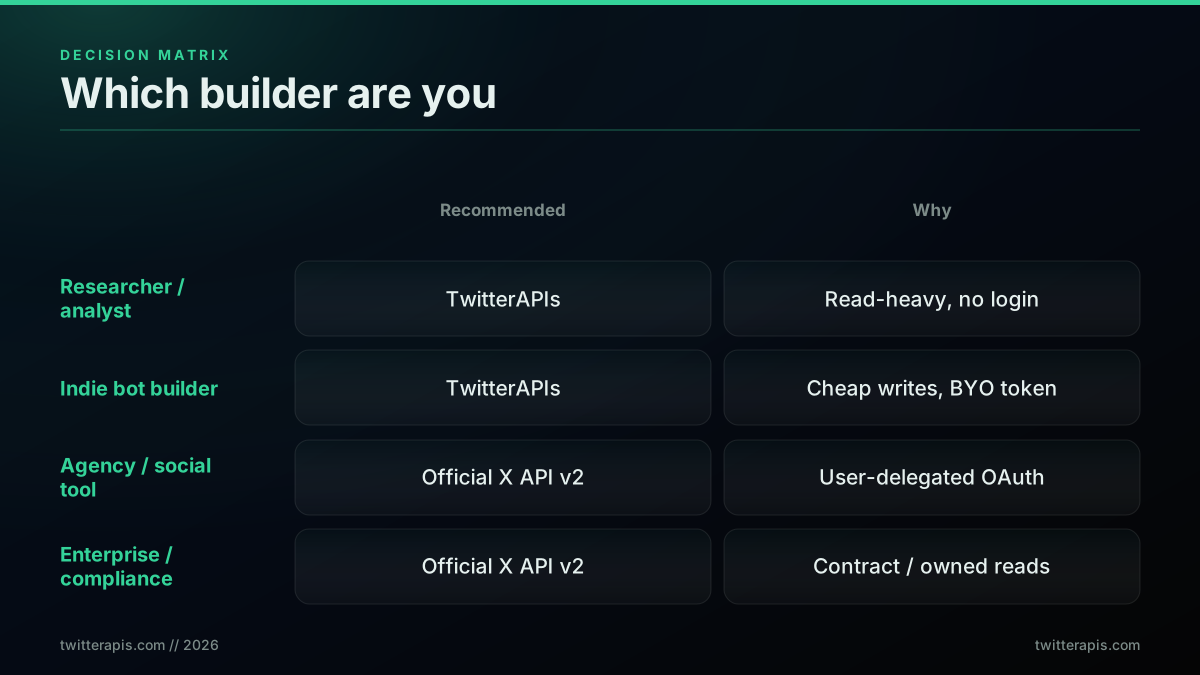
The researcher or analyst pulling search results, timelines, and follower sets for a dataset is the clearest fit for the flat read API: the work is read-heavy, the per-resource meter is the enemy, and there is no user-login requirement. The cost gap alone usually decides it.
The indie bot builder running a scheduled account, monitoring keywords, or auto-reposting is also a strong flat-API fit, since the nine simple write actions plus tweet creation, media upload, and DM send are covered at the low per-call rate and the bring-your-own token model keeps credentials out of a stored vault. A developer voicing the common frustration with the official plans captured why this cohort keeps shopping:
Twitter API plans are a joke!
The agency or social-management tool whose users sign in with their own X accounts is the one archetype that genuinely needs the official API, because user-delegated OAuth is non-negotiable when you act as a signed-in account you do not own.
The enterprise or compliance team with a legal requirement for a direct platform contract, or a heavy owned-account workload where the $0.001 owned-read rate applies, belongs on the official API for those specific reasons, not for raw read capability.
A cost-first way to settle it: estimate monthly read volume, multiply by $0.005 for the official standard read and by $0.00004 for the flat read, and if the official number clears your budget, the flat path is the answer. At 100,000 tweets a month the gap is about $500 against $8; at 1 million it is roughly $5,000 against $80. Plug real numbers into the cost calculator, and see the full worked ladder in the Twitter API cost breakdown and the cheapest Twitter API ranking.
Reading the Meter, One Concrete Month
Abstract per-call rates get real when you run a single month end to end. Take a mid-size social-listening workload: 60,000 search calls to track a set of keywords, 20,000 profile lookups to enrich the accounts behind the matches, and 20,000 timeline reads to pull recent context, for 100,000 read calls in the month. On the official X API v2, the point to hold onto is that the meter counts resources, not calls. If each search returns around 20 posts, those 60,000 searches alone meter as roughly 1.2 million post resources at $0.005 each (X API pricing), which is about $6,000 before the lookups and timeline reads are added, and it already draws down a meaningful share of the three-million-read monthly ceiling. On the flat per-call model, the same 100,000 calls price at $0.0008 each for $80, with no ceiling in sight and no resource multiplier, because a twenty-result call is a single charge.
The shape of that gap, an estimated $6,000-plus against $80 for the read core, is not a rounding difference, it is the per-resource multiplier meeting the flat per-call rate. It is also why the earlier scenario table shows savings clustering in the high-80s to low-90s percent range rather than landing on one fixed number: the exact figure depends on how many resources each call returns, and a workload heavy on wide search results widens the gap further. The practical rule is to estimate in resources, not in calls, when you price the official path, because that is how it bills, and to estimate in calls when you price the flat path, because that is how it bills.
Where the Official API Genuinely Wins
It is worth stating the official strengths plainly rather than waving them away. Owned-account analytics get the $0.001 owned-read rate, which is competitive for teams reading their own posts, followers, and DMs at volume. User-delegated login is only possible on the official API. Full-archive search beyond the recent window lives on Pro and Enterprise tiers. Filtered streaming and the compliance endpoints that regulated data governance requires are official-only. And a direct contractual relationship with the platform is sometimes a procurement requirement in its own right. None of those is a small thing for the teams that need them; they are simply not the profile of a read-heavy data pipeline.
Getting Started
If your workload is reads, research, monitoring, or a bot, the fastest way to settle the comparison is to measure it. TwitterAPIs grants $0.50 in credits at signup with no card on file, enough for roughly 625 standard calls, about 12,500 tweets, across all 109 endpoints including search, follower export, and the simple write actions. One header authenticates the first call, and you can benchmark real cost against your own volumes before committing anything.
For the money question in depth, read is the Twitter API free and the 2026 X API pricing change. For the limit math, the Twitter API rate limit guide works the windows in detail, and if you still want official access, how to get a Twitter API key covers the application. For read workloads, see exporting Twitter followers, the Twitter sentiment analysis walkthrough, the trends API guide, and building a Twitter bot. For operator coverage, the advanced search operators guide shows which engagement filters like min_faves: work where, and for production hygiene the scraping best practices guide covers retries and proxy strategy. If you are coming from another provider, the migration guide, the RapidAPI alternative guide, and the Apify scraper comparison map the moves, and the best Twitter API for scraping ranks the field.
Pricing and feature data sourced from the X API pricing page, the X Developer Community, the official rate-limit reference, and TwitterAPIs published rates, current as of July 2026. The Python paths lean on the requests and tweepy documentation; edge-case error handling is best cross-checked against the Twitter API tag on Stack Overflow. The April 2026 owned-read update is recorded in the X Developer Community announcement.
// sources
Where these numbers come from
Each row is a figure in this post and the artefact it was read from. Prices and limits on this platform move, so check the date on the source before you plan against it.
- X API pricing page
- The source for the official side of the unit-price comparison: $0.005 per resource on the standard read, which the post states as $5.00 per 1,000 tweets, and the $0.001 owned-account read rate.
- X API rate-limit reference
- Where the per-window numbers in the throughput section come from, and the backdrop for the monthly edge the post describes at 3 million reads with no gradual tier above it.
- RFC 7636, OAuth 2.0 PKCE
- The specification for the official auth model the post contrasts against a single Bearer header, with its callback URL, token expiry, refresh loop, and scope negotiation.
- RFC 6750, the OAuth 2.0 Bearer token scheme
- Defines the Bearer scheme behind the one-header authentication the post describes on the third-party side.
- MDN Authorization header reference
- Documents the header semantics for the Authorization Bearer line the post shows as the whole auth surface of a request.
- X Developer Community forum
- The practitioner threads the post names as its second source for the official meter, specifically the per-resource counting behavior and the April 2026 owned-read update.
Frequently Asked Questions
For read workloads, the underlying bytes are the same public X graph: the same tweets, profiles, follower edges, search results, and engagement counts. The divergence is not the data, it is the commercial and operational wrapper around it. The official X API v2 hands you that data through a metered, per-resource credit meter behind an OAuth-capable developer account, while TwitterAPIs hands you the same fields through a flat per-call price behind a single Bearer header. Where they genuinely part ways is user-delegated actions: only the official API can act as a signed-in end user.
X bills per resource returned, not per HTTP call, so a single search that returns 100 posts is metered as 100 read units. Public figures put a standard post read near $0.005, a profile lookup near $0.010, a plain post creation near $0.015, and engagement writes near $0.015. TwitterAPIs charges per call instead: $0.0008 for reads, the nine simple write actions, and media upload, $0.0016 for tweet creation, DM send, and DM reads, $0.0024 for full user history, and $0.004 for full thread expansion, so a 20-result read is one flat charge, not twenty.
Four cases: user-delegated OAuth, where an end user signs in with their own X account so your app can post or like on their behalf; owned-account analytics, where the $0.001 owned-read rate applies to your own data; full-archive search older than the recent window, which sits behind Pro and Enterprise tiers; and regulated compliance work that contractually requires a direct platform relationship. For collection, research, monitoring, and bots that read public data, TwitterAPIs is the cheaper and faster fit.
App-only Bearer auth covers reading public data, but it still requires a developer account and approval. The OAuth 2.0 PKCE flow only becomes mandatory when your app acts on behalf of a signed-in user: posting, liking, or following as them. That flow adds a registered callback URL, an authorization-code redirect, a two-hour access token, refresh-token storage, and scope management. If your system is a pipeline that reads public data, none of that machinery earns its keep, which is why a single Bearer header covers the same reads on TwitterAPIs.
The official X API v2 requires a developer account, a use-case description, and an approval wait that ranges from hours to several days, then OAuth or app configuration before the first authenticated call. TwitterAPIs issues a key at signup and needs one header, so a first successful call is typically under five minutes with no review queue. That gap matters most for prototypes and internal tools, where the approval delay can outlast the build itself.
On standard third-party reads the official X API v2 meters $0.005 per post resource, which is $5.00 per 1,000 tweets. TwitterAPIs prices a read call at $0.0008 and returns roughly 20 tweets per call, an effective $0.04 per 1,000 tweets, about 125x less per tweet. The April 2026 X update added a $0.001 owned-account read rate, but that discount is scoped to your own account's posts, followers, and DMs, so it does not touch the third-party read path most data teams live on.
No. X shut off free API access in February 2023 and never restored it, and by 2026 every request draws down a prepaid credit balance under the pay-per-use model. A new developer has to load credits before the first production call clears. TwitterAPIs takes the opposite stance: signup grants $0.50 in credits with no card on file, enough for roughly 625 standard calls, about 12,500 tweets, across all 109 endpoints, so you can measure real cost before spending anything.
For the read surface, search, tweet detail, replies, profiles, followers, following, timelines, likes, and media, the mapping is direct and the data matches. The nine simple write actions (favorite, unfavorite, retweet, unretweet, bookmark, unbookmark, follow, unfollow, delete), media upload, tweet creation, and DM send are also covered, using a bring-your-own auth token passed per request and never stored. The one thing that does not port is the OAuth login flow itself: a third-party Bearer key cannot impersonate a signed-in user, so consumer apps that need account login keep the official API for that piece.
Limits are per endpoint and per 15-minute window and vary by auth type: recent search runs about 450 requests per window on app Bearer auth and 300 on user OAuth, while lookups run far higher. Above the window limits, the pay-per-use plan caps at 3 million post reads per monthly billing cycle, after which requests stop until the next cycle or you move to Enterprise, which X does not publish a price for. TwitterAPIs sets one flat ceiling of 600 requests a minute and 20 concurrent per key, with no monthly read ceiling on top.
Check out similar blogs
More guides on the Twitter/X API, scraping, and pricing.
Twitter API Pagination 2026: How next_token Works (and a Simpler Alternative)
How Twitter API pagination works in 2026. The official next_token loop explained field by field, a simpler single-cursor alternative, runnable Python and Node code, and the real per-call cost of a paginated pull.
X API Cost in 2026: Every Tier and Alternative on One Sheet
X bills per resource in 2026. Here is every official rate and every vendor converted to one unit, dollars per 1,000 tweets, with a worked bill.
Twitter/X API Access Without a Developer Account: What Actually Works in 2026
The official X API still gates every call behind a reviewed developer account and OAuth 2.0. Here is what real developers use instead, and what each route actually costs.
Twitter Scraping in Python (2026): Pick a Route Before You Write Code
Four ways to collect X data in Python, priced honestly: the official X API v2 pay-per-use rate, an account-pool scraper, a headless browser, and a managed read API. What each one actually costs to run for a year.
How to Choose a Twitter/X API in 2026: The Complete Buyer's Guide
A decision framework for choosing a Twitter/X API in 2026: the seven criteria that actually matter (pricing model, data coverage, rate limits, auth, reliability, compliance, migration cost), a use-case decision tree, and where each path wins.
X API Pricing 2026: The True Cost of Official vs. Third-Party APIs
X API pricing in 2026: official pay-per-use costs vs third-party Twitter APIs, with a TCO calculator, compliance risk, and a use-case decision tree.
Twitter API Node.js Tutorial 2026: Fetch Tweets in 10 Lines
The 2026 Node.js Twitter API tutorial: fetch tweets in 10 lines with fetch or axios, no SDK and no OAuth dance. Search, profiles, cursor pagination, retries, async, and real per-call costs in working code.

Cheapest Twitter API 2026: 8 Providers Ranked by Real Per-1,000-Tweet Cost
Every major Twitter API provider ranked by what 1,000 tweets actually cost in 2026, measured from live pricing pages across three volume tiers, with the billing traps comparison posts leave out.