GUIDE
How to Choose a Twitter/X API in 2026: The Complete Buyer's Guide
A decision framework for choosing a Twitter/X API in 2026: the seven criteria that actually matter (pricing model, data coverage, rate limits, auth, reliability, compliance, migration cost), a use-case decision tree, and where each path wins.
Per our own spec, 70 of 121 endpoints bill $0.0008, 24 are free, and 27 sit between $0.0016 and $0.01. Every price ships inside our published OpenAPI document as an x-cost-usd field, so any figure in this post can be checked against the contract that bills it rather than taken on trust.
Choosing a Twitter/X API in 2026 is not a question of finding the single best one, because there is no single best one. It is a question of knowing what to weigh, then letting your own use case break the ties. Most buyer's guides skip that step and hand you a ranked list of providers, which is useless if you do not yet know what separates them. This guide fixes that. It walks the seven criteria that actually decide the choice (pricing model, data coverage, rate limits, authentication, reliability, compliance, and migration cost), gives you a decision tree by use case, and routes you to the deep dives when you want the numbers. By the end you will be able to look at any provider, including the official one, and say exactly why it fits your build or does not.
TL;DR: There is no single best Twitter/X API, so choose by weighing seven criteria against your workload: pricing model, data coverage, rate limits, authentication, reliability, compliance, and migration cost. The first fork is the official X API versus a third-party API. For read-heavy public-data work the third-party path usually wins on cost and setup: on a pay-per-call API like TwitterAPIs a standard read is $0.0008 per call and brings back up to 20 tweets (about $0.04 per 1,000 tweets on a full page), posting a tweet is $0.0016, full history is $0.0024, and full thread expansion is $0.004, with $0.50 in free signup credits and no card. Reach for the official API only when a specific need (ads, partner status) forces it.
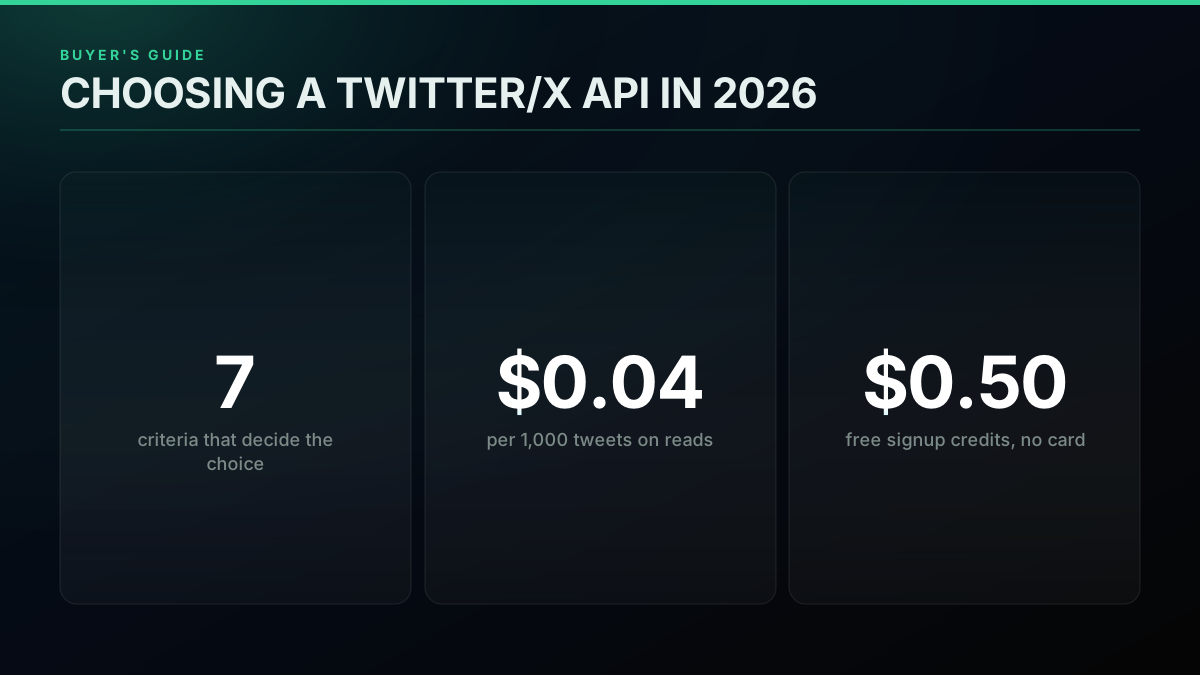
One decision, seven criteria, one honest cost benchmark
How Do You Choose a Twitter/X API in 2026?
You choose by scoring each option against seven criteria and weighting them by what your build actually stresses. The seven are pricing model, data coverage, rate limits, authentication and onboarding friction, reliability and maintenance burden, compliance and terms-of-service risk, and migration cost. A listening tool lives or dies on the first three because it makes thousands of cheap reads. A research archive is decided by coverage and history depth. A bot turns on write support, the auth model, and compliance. An agent workflow cares most about latency and a clean tool surface. The mistake is to compare on headline price alone, because the cost you feel later hides in rate-limit ceilings, onboarding time, scraper upkeep, and switching cost.
The weighting is the whole method. Give each criterion a rough importance for your build, from must-have to nice-to-have, then score each candidate one to five on the must-haves first. A coverage gap or a compliance blocker is disqualifying no matter how good the price, so those filter the field before anything else touches your shortlist. Among the survivors, the one or two criteria your workload leans on hardest break the tie. This keeps you out of the common trap of ranking on price and then discovering that the cheapest option cannot return the data you need or cannot legally do the thing you are building.
The demand for a clear answer here is not hypothetical. Search any developer forum and you find the same request, phrased almost identically, from someone who has hit the official platform's limits and wants a shorter list to evaluate.

Webby 🕸️
@webby_the_dev
I am looking for a private Twitter API because the official one has too many restrictions and is too expensive. If you know of any good alternatives, please let me know. #twitter #api #nodejs #developers #programmers #scraping
That is the whole buyer's journey in one post: restrictions plus cost push people off the default path, and then they need a way to evaluate what is left. The seven criteria below are that way. Read them once and the ranked lists elsewhere (including our own Twitter API alternatives comparison) become a lot easier to read, because you will know which column to look at first.
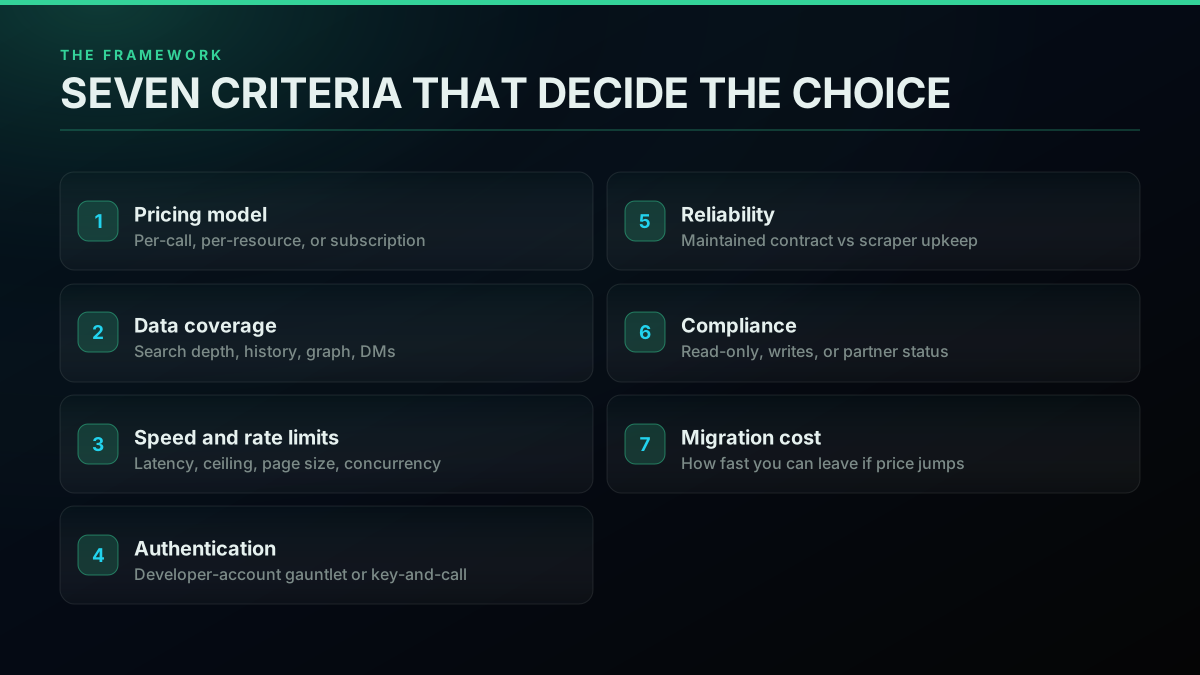
The seven criteria that decide a Twitter/X API choice
Start Here: The Official X API or a Third-Party API?
The first fork is the biggest one, and it is not really about features, it is about who you are buying from and what that costs you in money and friction. The official X API is the platform's own product: it reads data straight from X, it is the only path for a handful of privileged actions, and it gates access behind a developer account, app review, and paid tiers. A third-party API reads X data through a provider and sells it by the call, which trades the direct-from-source guarantee for a much lower price and no account gauntlet. Neither is universally correct; the fork exists because the two optimize for different buyers.
The reason the third-party market exists at all is that the platform has, for years, tightened who gets programmatic access and on what terms. This is not new; developers were reacting to it long before the current pricing era. A third option arrived in October 2026: Grok Bot reads public X without API credits, which suits questions more than pipelines.
Twitter finally details new API, screws third-party apps - again
That history is why the buyer's decision starts here: the official path is stable but expensive and gated, and the third-party path is cheaper and open but reads through an intermediary. In practice the call is a single question. If you need to post ads, hold official partner status, or take an action only the platform exposes, you need the official API, full stop. For everything else, meaning the vast majority of read-heavy public-data work, a third-party API is the standard, cost-effective choice. The mechanics of both paths are laid out in the official X API versus third-party guide, and the first practical difference you hit is how a single request looks:
# Third-party pay-per-call read: one key, one call, flat JSON back
curl -s "https://api.twitterapis.com/twitter/tweet/advanced_search?query=yourbrand" \
  -H "Authorization: Bearer $TWITTERAPIS_KEY"
Same data, no app review, no elevated-access petition. If you want the full economics of this fork narrated end to end, this walkthrough covers the unpriced enterprise gap that pushes so many teams off the official tier and onto a pay-per-call alternative.
Watch how the official X API enterprise gap pushes builders to pay-per-call alternatives on YouTube
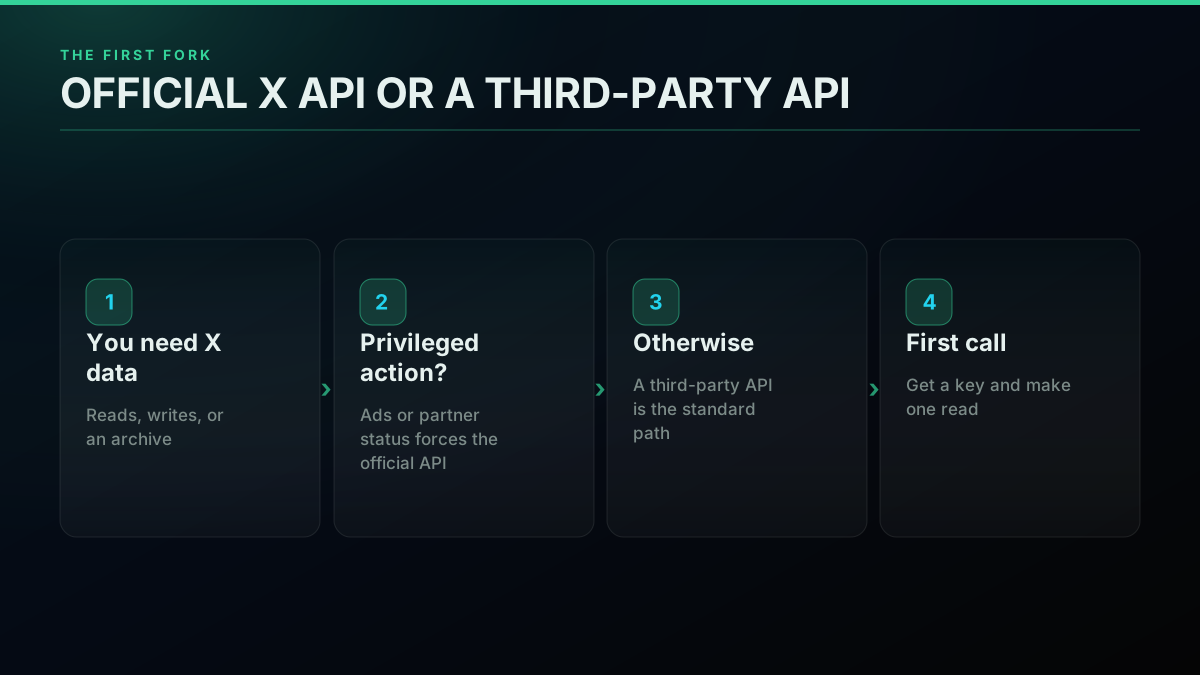
The first fork: official X API versus a third-party API
Criterion 1: The Pricing Model
Pricing model matters more than headline price, because the model decides how your bill behaves as your build grows. There are three models in this market. Per-call pricing meters every request, so you pay for exactly what you use and a dead experiment costs nothing once you stop calling. Per-resource pricing, which the official X API uses, charges for each unit of data returned. Subscription pricing charges a flat monthly fee for a tier regardless of whether you make ten calls or ten thousand, so an idea you are still testing costs as much as one in production. The model, not the sticker, is what turns a small integration into a surprise invoice.
The concrete numbers make the models legible. On a pay-per-call API, every standard read is $0.0008 per call and one search call returns roughly 20 tweets, so the effective rate is about $0.04 per 1,000 tweets. The premium tiers are narrow and only bite when you use them: posting a tweet is $0.0016, full account history is $0.0024, and full thread expansion is $0.004 per call, while simple write actions like following and liking stay at the standard $0.0008. Free signup credits of $0.50 cover about 12,500 tweets before you spend a dollar. For context, the official X API meters per resource and, per its own April 2026 pricing update, prices owned reads at $0.001 per resource on the pay-per-use plan with third-party reads higher, and it publishes no price at all for its enterprise contracts. Marketplace resellers such as twitterapi.io publish their own per-read rates, which is exactly the kind of number you should verify against a real pull before you trust it.
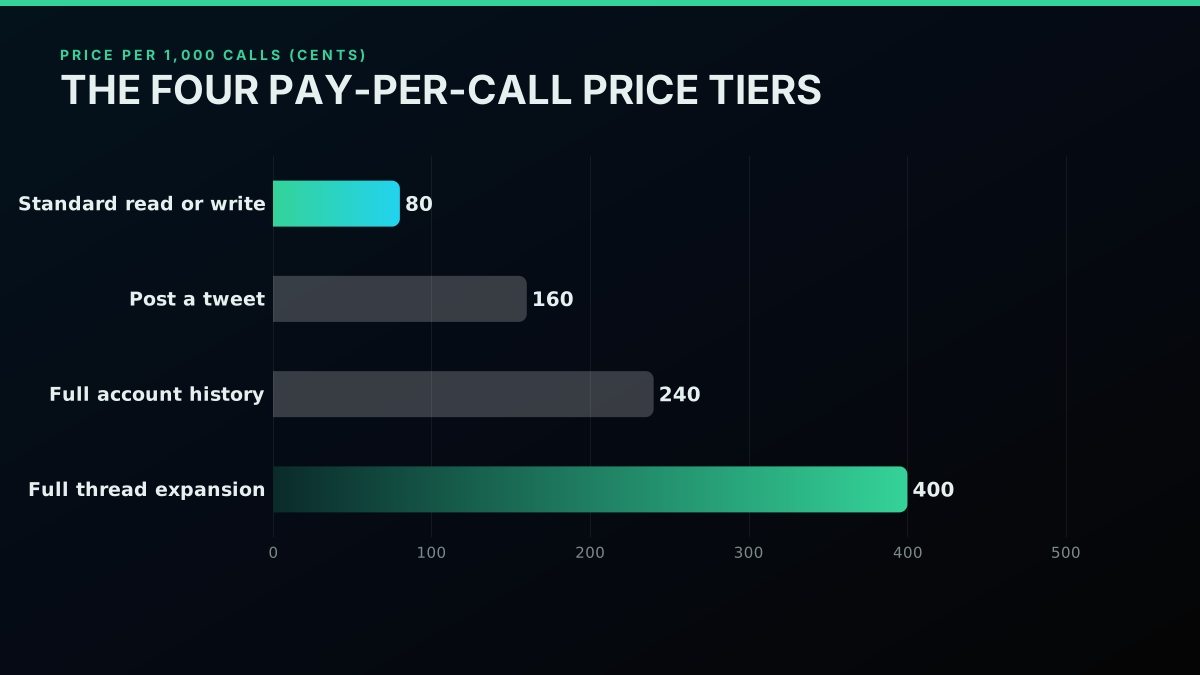
The four pay-per-call price tiers, per 1,000 calls
Cost pressure is the single most common reason developers change paths, and it shows up in public constantly. Founders describe skipping the official API's price entirely and building a workaround instead.

Brett
@BrettFromDJ
Soon you’ll be able to save design inspiration from X directly into GatherOS with a simple bookmark. Skipped X’s expensive API entirely. Built a Chrome extension that watches for bookmarks and sends them straight to the app instantly. https://t.co/t1RGvwOhBc

That instinct plays out at company scale too, where a pricing change can quietly kill a shipped feature.
Microsoft disables Xbox to Twitter sharing, likely due to API pricing
Before you commit, size the specific build. A short script does the arithmetic the pricing pages cannot, because it uses your real volume:
# Size a build before you buy: reads * rate = monthly cost
tweets_per_day = 5000
tweets_per_call = 20          # a search call returns roughly 20 tweets
read_rate = 0.0008           # standard per-call read
calls_per_day = tweets_per_day / tweets_per_call
monthly = calls_per_day * read_rate * 30
print(f"~${monthly:.2f}/month for {tweets_per_day} tweets/day")
The three pricing models line up cleanly once you see them side by side.
| Pricing model | How it bills | Best when | Watch out for |
|---|---|---|---|
| Per-call (pay as you go) | Per request, roughly 20 tweets per read | Read-heavy, variable, or experimental work | Track call volume so a runaway loop does not surprise you |
| Per-resource (official X API) | Per unit of data returned | You need direct-from-source or a privileged action | Higher unit price, deep archive gated to enterprise |
| Subscription tier | Flat monthly fee per tier | Steady, predictable, high-volume production | You pay the tier even when idle; overage jumps a tier |
For the full breakdown, the Twitter API cost explainer walks the math, the cheapest Twitter API ranking puts real per-1,000-tweet prices against eight providers, the cost benchmark shows first-party numbers, and the cost calculator sizes your own build in a browser.
Start building with TwitterAPIs
$0.0008 a call, about $0.04 per 1,000 tweets at 20 tweets a page. $0.50 free credits. No credit card required.
Criterion 2: Data Coverage
Coverage is the question of whether the provider can actually return the data your build needs, and it is where many cheap options quietly fail. The surface breaks into a few areas: search (recent and historical), user profiles and their timelines, full account history, the follower graph, replies and threads, and direct messages. A provider can be the cheapest per call and still be useless to you if it caps search at seven days when you need a month, or if it exposes timelines but not the follower graph. Coverage is a hard yes-or-no filter that you apply before you ever look at price, because the cheapest API that cannot return your data costs infinity.
A worked example makes the trap obvious. A brand-sentiment tool needs recent search plus replies; a compliance archive needs full history plus deleted-tweet visibility; an influencer-discovery tool needs the follower graph and user search. Same platform, three different coverage checklists, and a provider can ace one of them while failing another outright. Write yours down before you compare a single price.
Map your use case to the endpoints it needs and check each one exists. A scraping-grade provider should return search, user timelines, followers, replies, and history without gaps; the best Twitter API for scraping guide covers what that coverage looks like in practice, and the scrape tweet history guide shows the deep-archive pull specifically. The one call every coverage test starts from is search, because if search is clean the rest usually follows:
# Coverage probe: does search return what you expect, with pagination?
curl -s "https://api.twitterapis.com/twitter/tweet/advanced_search?query=from:someaccount&cursor=" \
  -H "Authorization: Bearer $TWITTERAPIS_KEY"
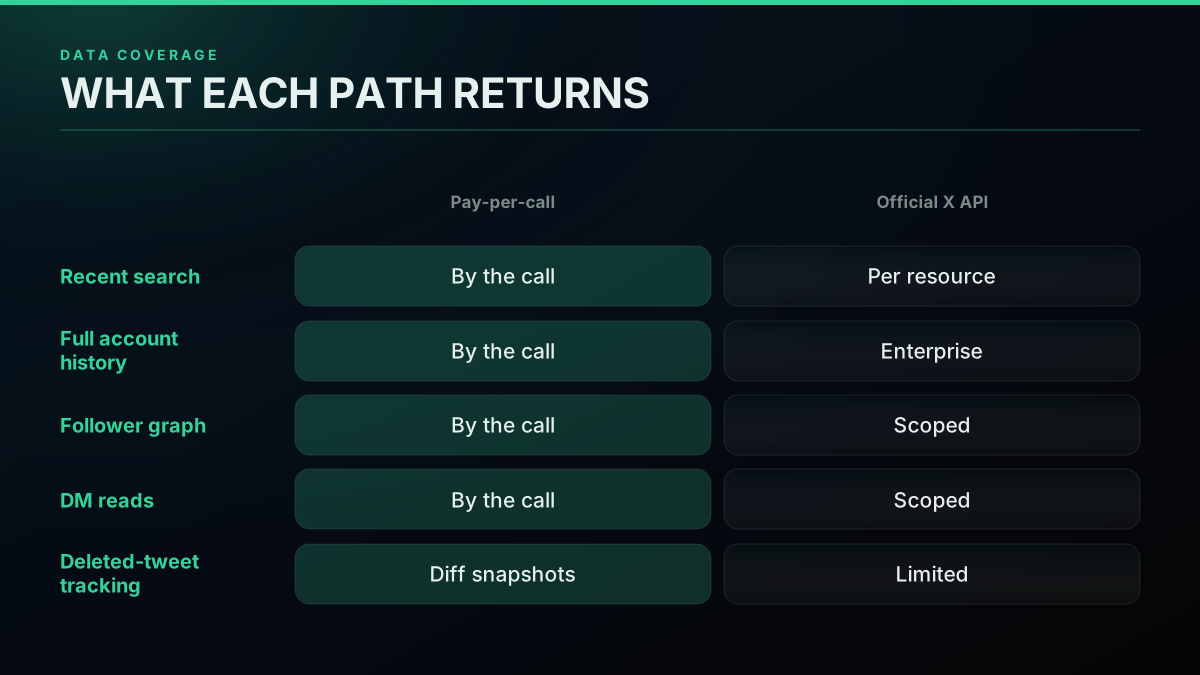
The coverage map: what each provider must actually return
Depth matters as much as breadth. Recent search is common; a full account archive and full thread expansion are where thinner providers stop. On a per-call model those deep reads are metered separately (full history at $0.0024, thread expansion at $0.004) precisely because they do more work, and you only pay the premium on the calls that need it. When you weigh coverage, list the endpoints your build touches, confirm each one exists on the provider, and only then compare the ones that survive on price.
Criterion 3: Speed and Rate Limits
Speed and rate limits decide whether your build can keep up with the data, and they are easy to overlook until a monitor falls behind. Four numbers matter: response latency (how long a single call takes), the rate-limit ceiling (how many requests per minute you are allowed), page size (how many results per call, which sets how many calls a job needs), and concurrency (how many requests you can run in parallel). A monitoring loop that polls every few seconds is bounded by the rate ceiling; a bulk export is bounded by page size and concurrency. The fastest Twitter API ranking measures real response times across providers so you are not guessing.
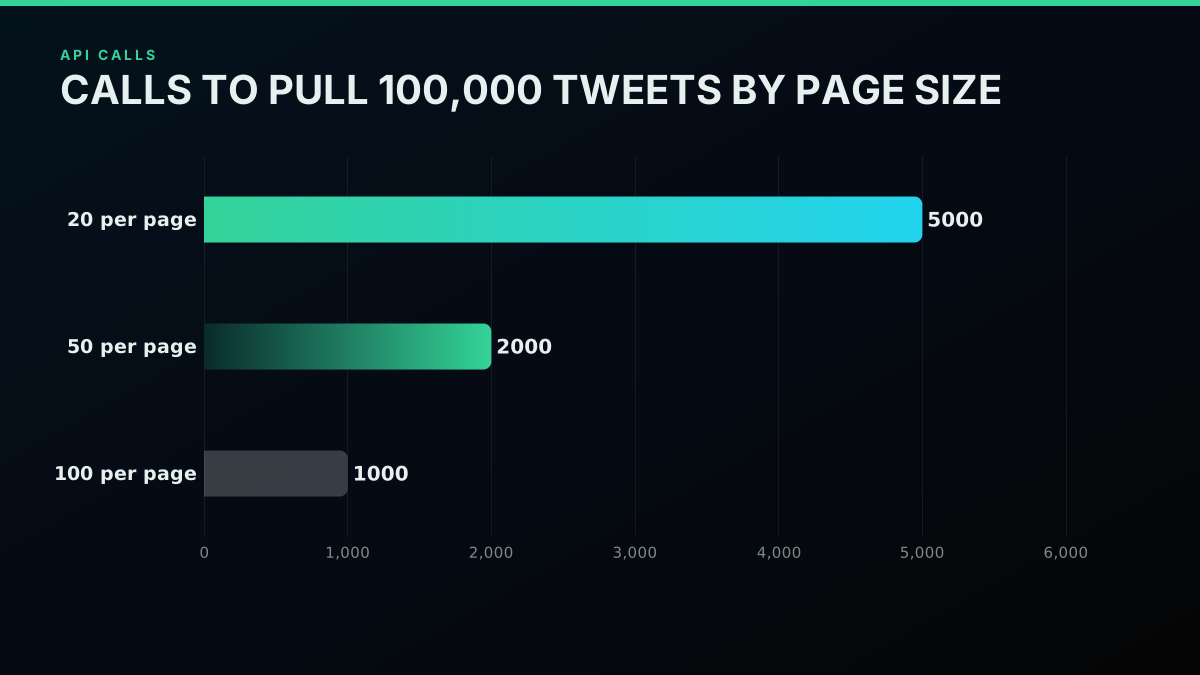
Why page size sets how many calls a big pull needs
The practical skill is respecting the ceiling gracefully. A well-behaved client backs off when it is throttled instead of hammering and getting blocked:
import time, requests

def get_with_backoff(url, headers, tries=5):
    delay = 1
    for _ in range(tries):
        r = requests.get(url, headers=headers)
        if r.status_code != 429:      # 429 = rate limited
            return r
        time.sleep(delay)             # wait, then retry
        delay *= 2                    # exponential backoff
    return r
Rate limits are also a place where the official and third-party paths differ in kind, not just degree. The official tiers gate throughput by plan, so a low tier can cap a real workload; a per-call API meters by the call and lets you scale reads by paying for them, which is a different failure mode (a bigger bill, not a hard wall). Size your poll interval and page size against the ceiling, and read the rate limits guide and the rate-limit reference before you set a cadence, because a sane interval is the difference between a useful monitor and a blocked one.
Criterion 4: Authentication and Onboarding Friction
Authentication is the criterion that decides how long it takes to go from signing up to your first successful call, and it is where the two paths diverge most sharply. The official path requires a developer account, an approved app, a payment method, and a Bearer token before your first request, plus review for elevated access. A direct pay-per-call API compresses that to signing up with an email, copying a key, and calling a read endpoint immediately. For a solo builder or a team validating an idea, that gap is measured in days versus minutes, and it is a real cost even though it never appears on an invoice.
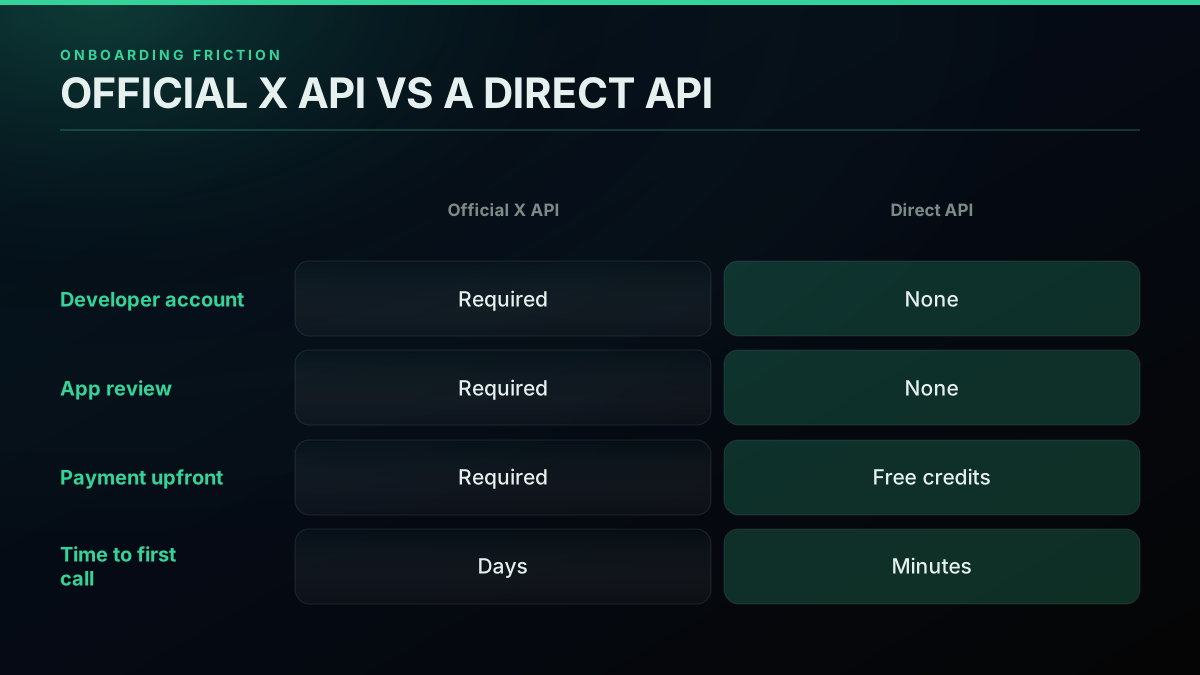
Onboarding friction: developer-account gauntlet versus key-and-call
The auth model also shapes what you can build and how safely. Reads need nothing but your key. Writes act on a real account, so a direct API takes a bring-your-own credential pair passed per request and never stored, which is why a hobbyist can ship a working action in an afternoon rather than after a week of app approvals. The mechanics look like a single header:
# Auth is a header, not a petition: key in, data out
curl -s "https://api.twitterapis.com/twitter/user/info?userName=someaccount" \
  -H "Authorization: Bearer $TWITTERAPIS_KEY"
If you want to see both onboarding paths end to end, the how to get a Twitter API key guide covers the official flow and the direct one side by side, the complete Twitter API tutorial walks setup in full, and the is the Twitter API free explainer covers what the free entry points actually get you. Weigh this criterion by how fast you need to move: if you are prototyping, onboarding friction may outrank even price.
Criterion 5: Reliability and Maintenance Burden
Reliability is the criterion that shows up as a bill you did not budget for: the ongoing engineering time to keep a data source working. A maintained API gives you a stable HTTP contract, flat JSON, and pagination that does not shift under you, so once your integration works it keeps working. A do-it-yourself scraper inverts that: it breaks whenever X changes its markup or tightens bot defenses, and keeping it alive means proxies, cookie rotation, and constant repair. This is the total cost of ownership gap that a per-call fee is buying down, and it is the single strongest argument for a maintained provider over a home-rolled one.
The failure mode is concrete and public. When an API price or access rule changes, the things built on top of it simply stop, sometimes years-old community tools that nobody is paid to fix.
@JagexClock has stopped working due to Twitter API price gouging - Voice of Seren tracking on RSWiki/elsewhere is broken until further notice
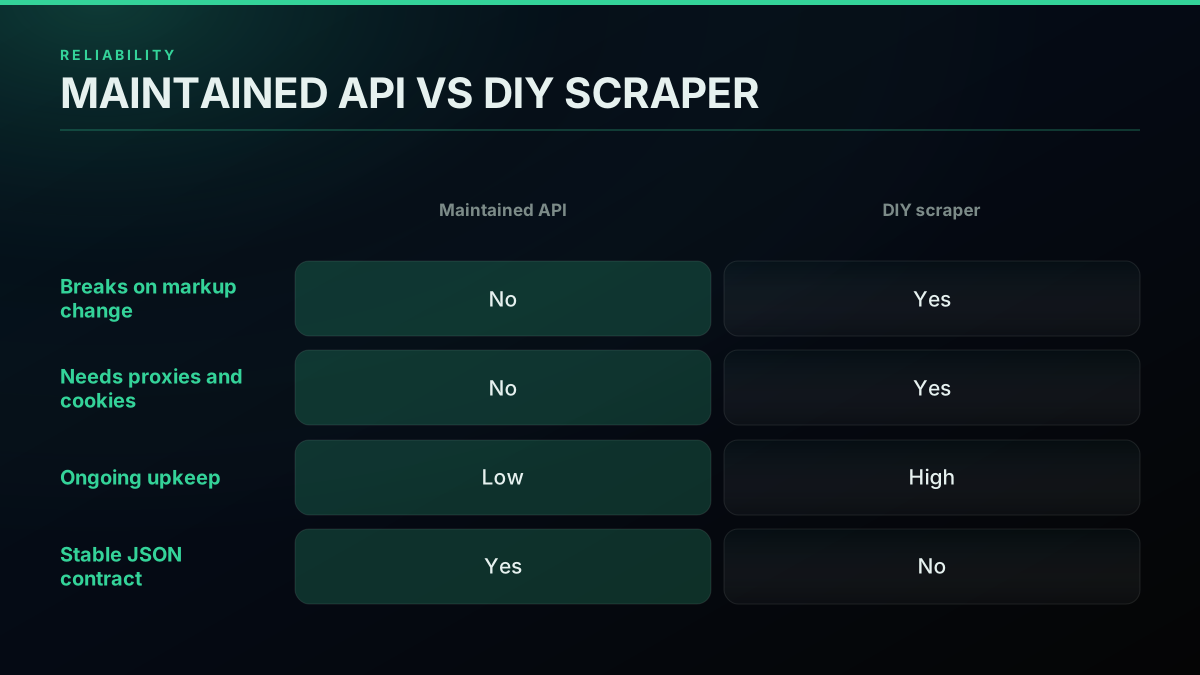
Reliability: a maintained API versus a do-it-yourself scraper
The maintenance question also applies to which library or tool you build on, since the open-source scraper landscape has churned hard: tools that worked one year stop the next. The tweepy versus twikit versus snscrape comparison lays out which are still viable and which are dead, and the broader lesson (that hidden upkeep is the real cost of a cheap-looking data source) applies to more than Twitter. This teardown of a data-API pricing trap makes the same point about total cost.
Watch a breakdown of hidden data-API pricing traps and total cost of ownership on YouTube
Weigh reliability by how long the build must live. For a throwaway one-off, a scraper is defensible. For anything that must run next month, a maintained API almost always wins on total cost even when the scraper looks free today.
The cheapest pay-as-you-go Twitter API. Try it free.
$0.0008 a call, about $0.04 per 1,000 tweets at 20 tweets a page. $0.50 free credits. No credit card required.
Criterion 6: Compliance and Terms-of-Service Risk
Compliance is the criterion that governs how much platform risk you are taking on, and it splits cleanly by what you are doing. Read-only access to public data is the lowest-risk activity and the bulk of real use. Write actions that operate a real account carry more risk and, on a direct API, run under a bring-your-own credential you supply per request. Anything requiring official partner status (paid ads, certain integrations) has terms-of-service requirements that only the official API satisfies. The point is not to treat all use as equally risky; it is to match your activity to the path whose compliance posture fits.
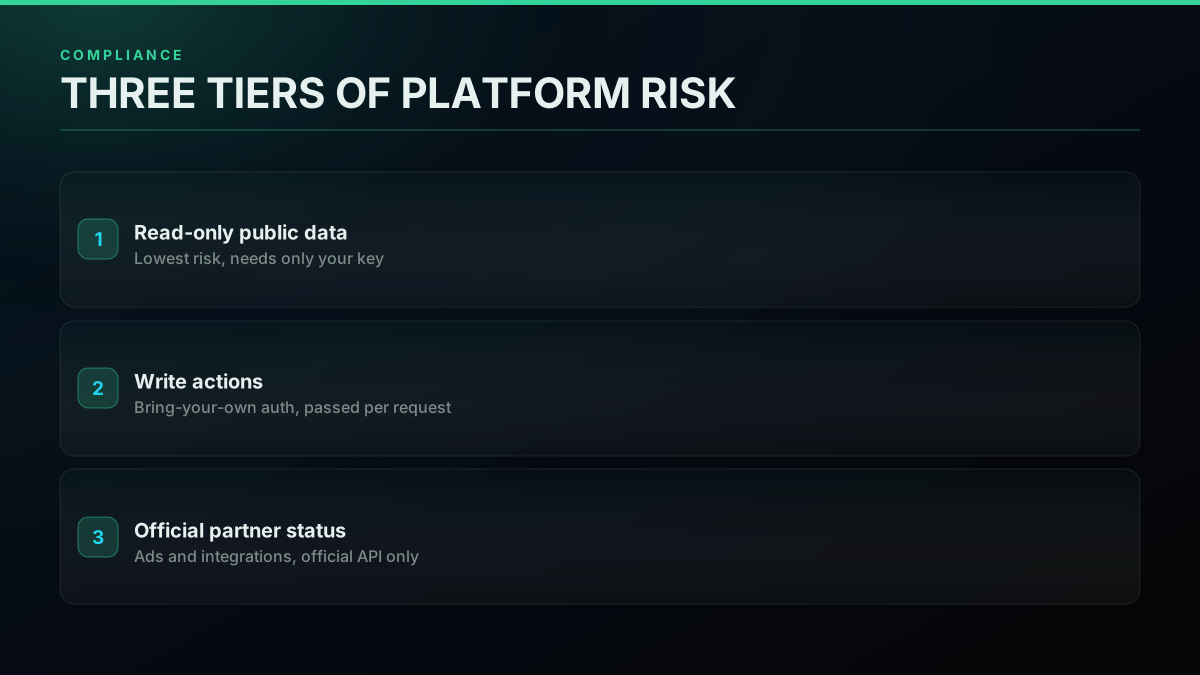
Compliance and ToS risk, mapped by what you are doing
The risk that catches builders off guard is not usually their own conduct, it is dependency risk: anything built on the platform can be changed or switched off by the platform. Experienced founders name this directly.

Kyle Gawley
@kylegawley
A painful reminder of platform risk for us all 😬 It makes business sense for Twitter to ban client clones, but it's bad news for third-party clients, and alarming for any product dependant on the Twitter API. https://t.co/iY2v2l1K3B
That warning, prompted by a wave of third-party client bans, and the earlier Microsoft integration that was pulled over pricing, are two sides of the same coin: whatever path you pick, you are building on someone else's platform. You cannot eliminate that risk, but you can size it. Keep read-only work read-only, pass write credentials per request rather than storing them, and choose a provider you can leave quickly, which is exactly the next criterion.
Criterion 7: Migration Cost and Lock-in
Migration cost is the criterion nobody thinks about until they have to switch, and it is worth thinking about first, because it is the thing that turns platform risk from fatal to survivable. Lock-in comes from proprietary SDKs, non-standard response shapes, and auth schemes you cannot replicate elsewhere. Low switching cost comes from the opposite: a plain REST contract, flat JSON that maps cleanly to any other provider, and standard cursor pagination. If two providers return the same shape, moving between them is a base-URL change; if one wraps everything in a bespoke client, moving is a rewrite. The tell is in the response body: open a provider's sample response and ask whether you could map its fields onto another provider's in an afternoon. If the answer is yes, your lock-in is low and your negotiating position with that vendor stays strong.
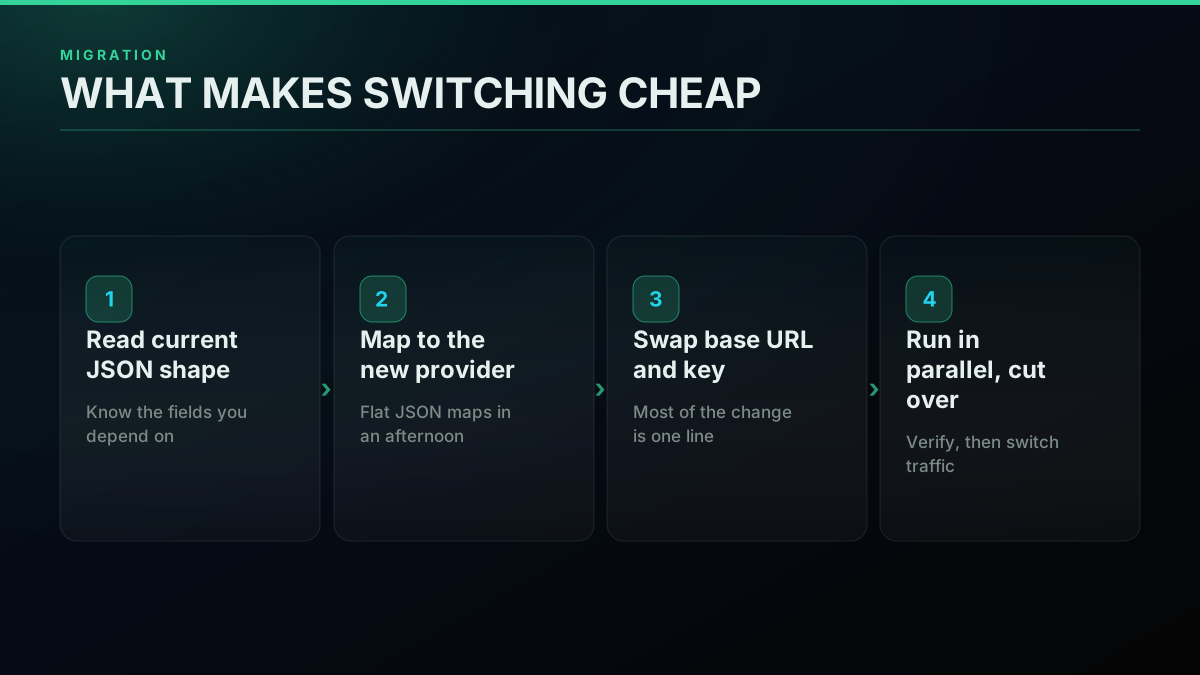
Migration cost: what makes switching cheap or expensive
In practice, a well-designed migration is small when the shapes are close:
# Low lock-in means a migration is mostly a base-URL swap
# before:
curl -s "https://api.old-provider.example/search?query=topic" -H "Authorization: Bearer $OLD_KEY"
# after:
curl -s "https://api.twitterapis.com/twitter/tweet/advanced_search?query=topic" -H "Authorization: Bearer $TWITTERAPIS_KEY"
Migration is not just a defensive concern; it is often the reason for the search in the first place, when a current provider raises prices or a marketplace listing changes terms. The migrate from twitterapi.io guide walks a real switch, the rapidapi Twitter alternative guide covers moving off a marketplace listing, and the X API pricing change explainer tracks the events that trigger these moves. Weigh this criterion by asking one question of any provider: if they doubled their price tomorrow, how many days would it take me to leave? A good answer is a small number.
The Provider Landscape: How the Options Stack Up
With the seven criteria in hand, the landscape sorts into four provider types, each optimizing for a different buyer. The official X API is the direct-from-source, high-compliance, high-cost option. A pay-per-call third-party API is the low-cost, low-friction option for read-heavy public-data work. A marketplace reseller (an API sold through an aggregator like RapidAPI or a general scraping platform such as Apify) sits in between, often convenient but with a pricing and reliability profile you have to verify per listing. A do-it-yourself scraper is the zero-license, maximum-maintenance option that only makes sense for one-offs. The four are not ranked; they are matched to jobs.
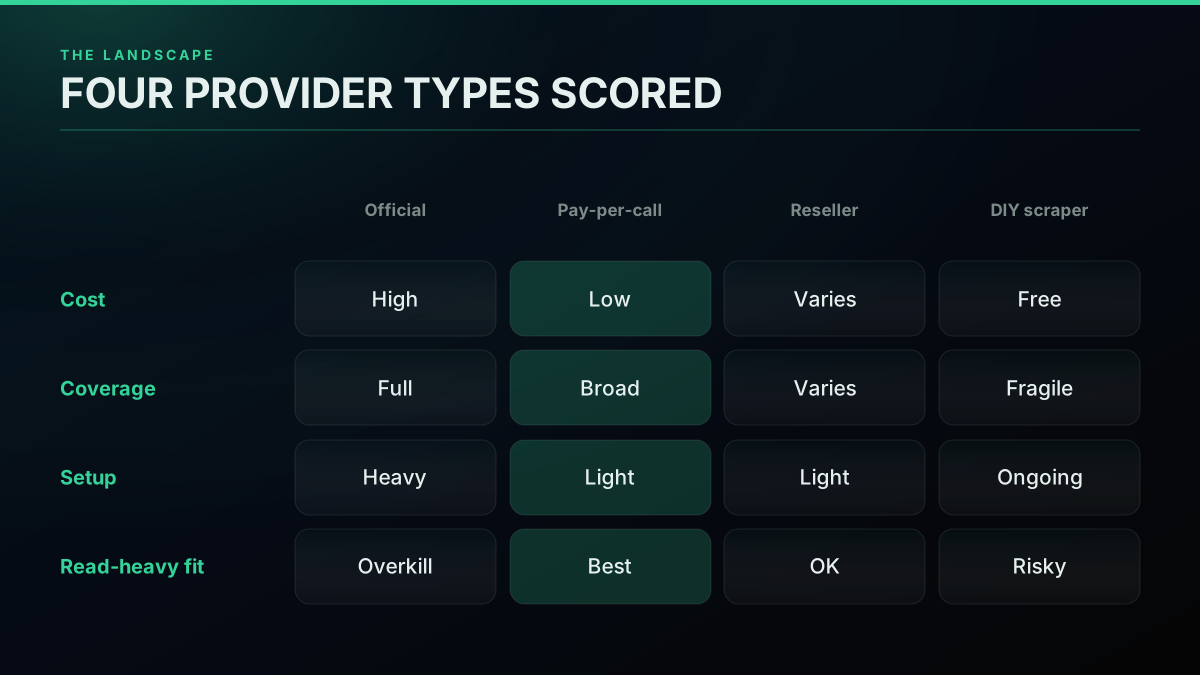
The provider landscape: four types, scored on what matters
Laid against the criteria, the tradeoffs are legible.
| Provider type | Pricing model | Setup friction | Best fit |
|---|---|---|---|
| Official X API | Per-resource, enterprise tiers | High (developer account, review) | Ads, partner status, direct-from-source |
| Pay-per-call third-party API | Per call, about $0.04 per 1,000 tweets | Low (email, key, call) | Read-heavy listening, monitoring, research |
| Marketplace reseller | Varies by listing; verify per pull | Low to medium | Convenience when a listing already fits |
| Do-it-yourself scraper | Free license, high upkeep | Medium, then ongoing | One-off pulls that never need to run twice |
For head-to-head numbers, the Apify scraper versus TwitterAPIs comparison and the Twitter API v2 versus TwitterAPIs comparison do the direct matchups, and the Twitter API alternatives page ranks the field on the same axes this guide uses. Whatever you shortlist, verify a provider's own claims against a real pull before you trust the marketing, because published rates and coverage do not always survive contact with your actual query.
The Decision: Which Twitter/X API Should You Choose?
The decision reduces to matching your dominant use case to the criterion that decides it, then reading the shortlist through that lens. If you are building listening or monitoring, pricing model and rate limits decide it, so a pay-per-call API with a generous read ceiling wins. If you are building a research archive, coverage and history depth decide it, so you filter first on whether the deep archive is even available. If you are building a bot, write support, the auth model, and compliance decide it. If you are building an AI agent workflow, latency and a clean tool surface decide it, which is why an MCP server that exposes the endpoints as agent-callable tools matters. Pick the branch, and the shortlist that survived your coverage filter sorts itself on the one or two criteria that actually apply.
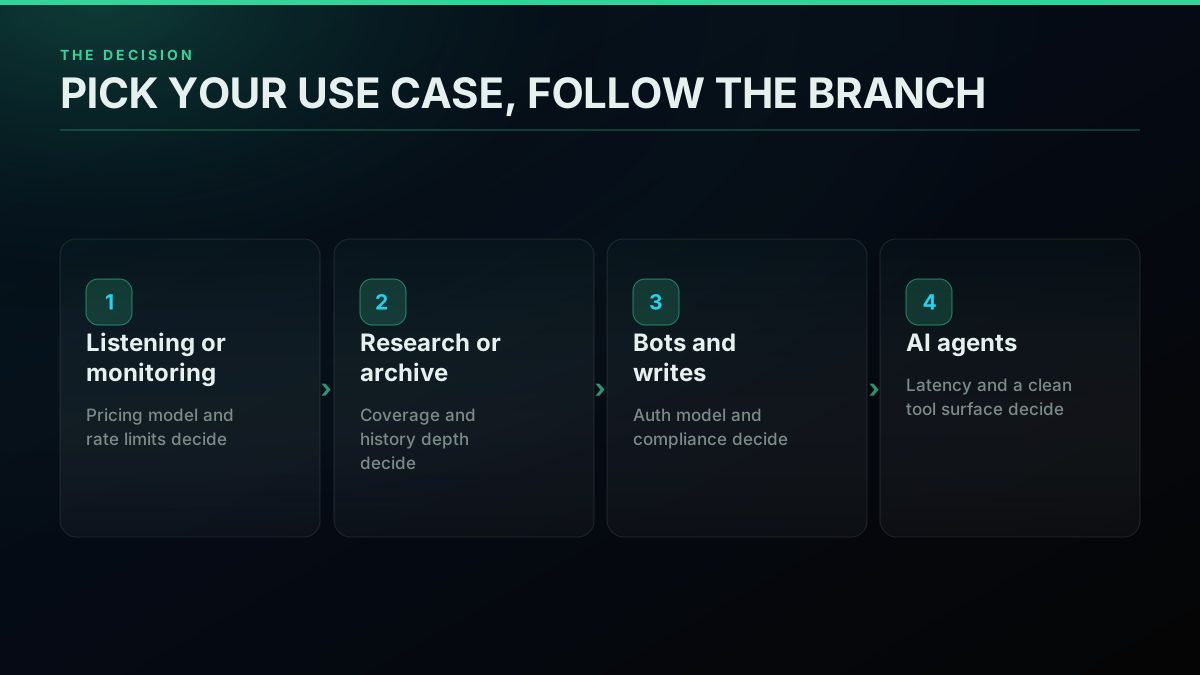
The decision tree: pick your use case, follow the branch
The practical on-ramp is to stop comparing and start testing, because a real call settles more arguments than a spec sheet. Sign up, get a key, and make one read against your actual query on the free credits:
# The tie-breaker is a real call, not a spec sheet
export TWITTERAPIS_KEY="your_key_here"
curl -s "https://api.twitterapis.com/twitter/tweet/advanced_search?query=yourbrand" \
  -H "Authorization: Bearer $TWITTERAPIS_KEY"
If the data looks right, the latency is acceptable, and the shape is easy to work with, you have your answer for that build, and you have spent nothing to get it. That is the through-line of this whole guide: there is no universally best Twitter/X API, only the one that scores highest on the criteria your use case cares about. Weigh pricing model, coverage, rate limits, auth, reliability, compliance, and migration cost; let your workload break the ties; and confirm the winner with a single call. For the ranked options once you know what to look for, the Twitter API alternatives comparison and the what you can build with the Twitter/X API use-case hub are the natural next reads, and the pricing page has every per-call tier in one place.
// sources
Where these numbers come from
Each row is a figure in this post and the artefact it was read from. Prices and limits on this platform move, so check the date on the source before you plan against it.
- X Developer Community April 2026 pricing update
- The platform announcement the post cites for the official per-resource metering change, including the owned-read rate of $0.001 effective April 20, 2026.
- X developer platform portal
- Backs the description of the official route in the first fork: a platform product gated behind a developer account, app review, and paid tiers.
- The Verge report on the 2023 third-party client ban
- The event behind the platform-risk criterion, where a rule change shut down third-party clients and showed that access can be withdrawn.
- Polygon report on the pulled Microsoft integration
- The second platform-risk case the post pairs with the client bans, an integration withdrawn over API pricing rather than over rules.
- RapidAPI marketplace
- The aggregator the post names when defining the marketplace-reseller provider type in its four-way sort, and the listing model whose pricing and reliability it says must be verified per listing.
Frequently Asked Questions
Choose by weighing seven criteria against your use case, not by picking the top of a list. The seven are pricing model (per-call versus subscription versus per-resource), data coverage (search depth, history, the follower graph, DMs), speed and rate limits, authentication and onboarding friction, reliability and maintenance burden, compliance and terms-of-service risk, and migration cost or lock-in. For most read-heavy jobs, a pay-per-call API wins on the first four and ties on the rest. On a per-call API like TwitterAPIs a standard read is $0.0008 per call, and a full page brings back about 20 tweets, so roughly $0.04 per 1,000 tweets, with $0.50 in free credits and no card. Start read-only, test on the free credits, and only reach for the official X API when a specific need (ads, official partner status) forces it.
A third-party pay-per-call API is almost always cheaper for reads. The official X API meters reads per resource and, per its own April 2026 pricing update, prices owned reads at $0.001 per resource on the pay-per-use plan with third-party reads higher, and it publishes no price at all for its enterprise tier. A per-call API that returns roughly 20 tweets for $0.0008 works out to about $0.04 per 1,000 tweets. The gap widens with volume, so cost matters most for high-read workloads and matters least for a tiny integration.
You can, but it is a maintenance decision, not a free one. Home-rolled scrapers break when X changes its markup or tightens bot defenses, and older tools stopped working reliably after the platform locked down. Running a scraper past a proof of concept means proxies, cookie rotation, and constant repair, which is real engineering time. A maintained pay-per-call API trades that recurring cost for a per-call fee and a stable JSON contract. For anything you plan to run more than once, the API usually wins on total cost of ownership even when the scraper looks free up front.
There is no single best; the right pick depends on the job. For read-heavy public-data work (listening, monitoring, research, audience export) a pay-per-call third-party API is the cost and setup winner. For posting ads or anything that needs official partner status, the official X API is the only path. For a one-off scrape a script can work, but it becomes a maintenance liability the moment you need it to run twice. The practical answer for most builders is the option that meters by the call, needs no developer-account review, and returns clean JSON, which is why the pricing and onboarding criteria decide most real choices.
Rank the criteria by what your build actually stresses. A listening or monitoring tool is dominated by pricing model and rate limits because it makes many cheap reads. A research archive is dominated by data coverage and history depth. A bot is dominated by write support, auth model, and compliance risk. An agent workflow cares about latency and a clean tool surface. Weigh pricing, coverage, rate limits, auth, reliability, compliance, and migration cost, then let your dominant workload break ties. Headline price is a starting point, not the decision.
On a pay-per-call model, a standard read is $0.0008 per call and one search call returns roughly 20 tweets, which works out to about $0.04 per 1,000 tweets. The premium tiers are narrow: posting a tweet is $0.0016, full account history is $0.0024, and full thread expansion is $0.004 per call, while the simple write actions like following and liking stay at the standard $0.0008. Free signup credits of $0.50 cover about 12,500 tweets before you pay anything. The official X API, by contrast, meters per resource at a higher rate and gates the deep archive behind an enterprise contract.
Check out similar blogs
More guides on the Twitter/X API, scraping, and pricing.
Build vs Buy: Should You Build Your Own Twitter/X Monitoring Tool? (2026)
Buying a listening seat costs $29 to $2,000 a month depending on the vendor. Building costs real engineering hours plus a data bill. Here is the real math behind the twitter monitoring tool build vs buy decision, priced both ways.
The Twitter API Developer Reference (2026): Endpoints, Rate Limits, Error Codes and Pagination
A single indexed reference for the Twitter/X API in 2026: the endpoint catalog, how authentication and bearer tokens work, the rate limits behind every 429, what error codes 401, 403, and 429 mean, cursor pagination, response shapes, and the real per-call cost of each call.

Cheapest Twitter API 2026: 8 Providers Ranked by Real Per-1,000-Tweet Cost
Every major Twitter API provider ranked by what 1,000 tweets actually cost in 2026, measured from live pricing pages across three volume tiers, with the billing traps comparison posts leave out.

How to Track a Tweet's Performance in Real Time with the X API
Poll a tweet's engagement counts over time with the X API, compute a views-to-likes ratio, and read the quote-tweet layer to tell an organically growing launch tweet from a boosted one. Tested Python and curl.
Twitter/X API Access Without a Developer Account: What Actually Works in 2026
The official X API still gates every call behind a reviewed developer account and OAuth 2.0. Here is what real developers use instead, and what each route actually costs.
What "Rate Limited" Actually Means on X (Every Limit, Measured)
"Sorry, you are rate limited" is one message covering two different systems: a consumer action ceiling and a developer API window. Here is what the term means, the current numbers for both, where it came from, and how long it actually lasts.
Auto-Posting to Twitter (X) in 2026: 7 Scheduler Tools vs the API, Priced Per Tweet
Every way to auto post to Twitter (X) in 2026, priced in one honest unit: cost per tweet. Seven scheduler tools with live pricing, X's own per-post API rate, the volume where each route wins, and what X's automation rules actually forbid.
What You Can Build With the Twitter/X API: 20+ Real Use Cases (2026)
A 2026 field guide to what you can actually build with the Twitter/X API: 24 real use cases across listening, monitoring, audience graph, research, and bots, each mapped to the endpoint that powers it and the real per-call cost.