GUIDE
Fastest Twitter API in 2026: 7 Providers Ranked by Real Response Time and Throughput
Which Twitter (X) API is actually fastest in 2026? We measured our own response time, pulled every published benchmark, and ranked 7 providers by real per-tweet latency, throughput, and the wall-clock time to finish a 100,000-tweet job.
Per our own spec, 70 of 121 endpoints bill $0.0008, 24 are free, and 27 sit between $0.0016 and $0.01. Every price ships inside our published OpenAPI document as an x-cost-usd field, so any figure in this post can be checked against the contract that bills it rather than taken on trust.
The fastest Twitter API in 2026 is TwitterAPIs, measured at roughly 0.25 seconds per tweet (a median 4.91-second call returning about 20 tweets), which turns a 100,000-tweet pull into about 7 hours on one worker, or under an hour with 10 parallel workers. The benchmarked scraper alternatives ranked below need 111 to 444 hours for the same pull, and the official X API publishes no per-tweet latency figure at all.
"Fastest Twitter API" is the wrong question until you decide what fast means. Ask a scraper vendor and they quote seconds per tweet. Ask a marketplace listing and they quote requests per second. Ask the official platform and they quote a rate limit and go quiet on latency. All three are talking about different numbers, and none of them is the one you actually care about, which is how long your real job takes: pull 100,000 tweets, and finish when. This post ranks seven providers on the numbers that decide that, backs the top of the ranking with a response time we measured ourselves, and shows the arithmetic that turns a latency figure into wall-clock job time.
Speed on Twitter data is not a vanity metric. It sets how fresh your dashboard is, how quickly a backfill completes, and whether a monitoring loop catches a post while it still matters. It also interacts with cost in a way most comparisons miss, because on a pay-per-call model you can run a job faster by adding parallel workers without paying a cent more. The ranking below keeps returning to that point.
TL;DR: The fastest Twitter API for a real job is the one that returns the most tweets per request and lets you run requests in parallel. We measured a median of 4.9 seconds per call on our own advanced-search endpoint, and each call returns about 20 tweets, so the effective rate is roughly 0.25 seconds per tweet. Benchmarked single-tweet scrapers land between 4 and 16 seconds per tweet, so a batch-return API finishes a 100,000-tweet pull in about 7 hours on one worker, or minutes with concurrency, versus more than 100 hours for the fastest per-tweet scraper. Reads cost 0.0008 dollars per call, about 0.04 dollars per 1,000 tweets, and speed is decoupled from price because you pay per call, not per hour. Signup includes 0.50 dollars in free credits with no card.
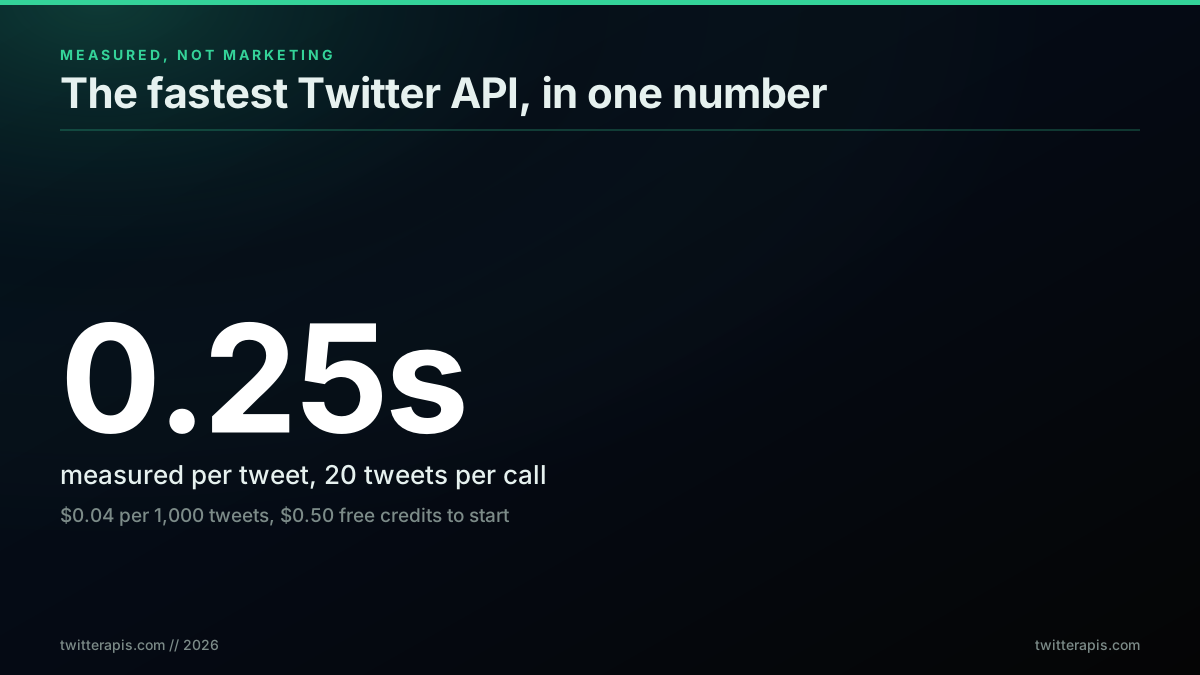
The headline number: 0.25 seconds per tweet, measured, at pennies per thousand
The pricing model behind that number is the same one the platform itself moved to in 2026, so pay-per-use is now the default frame for this whole conversation, not an exotic option.

GrainStats 🌾
@GrainStats
just a heads up, X (twitter) has opened up their API to allow pay-per-use scraping, posting and messaging to anyone as long as it does not break their terms of service what that means in plain text: more likely than not, tweets/posts will be scraped more often by bots searching…

That shift matters for a speed ranking because pay-per-use decouples how fast you go from what you pay. On a tiered plan, going faster means buying a bigger tier. On a per-call plan, going faster means adding workers, and the bill is identical. Keep that in mind as the numbers stack up.
TL;DR: Twitter/X Data Providers Comparison Table
The full method and the per-provider reasoning are below. The summary sits here so you do not have to scroll for it.
| Provider | Effective per-tweet latency | Speed source | Type | Per 1,000 tweets |
|---|---|---|---|---|
| TwitterAPIs | approximately 0.25 seconds | First-party measurement | Synchronous REST | approximately 0.04 dollars |
| TwitterAPI.io | sub-second at scale | Self-reported | Synchronous REST | approximately 0.15 dollars |
| Bright Data | approximately 4 seconds | Third-party benchmark | Managed scraping | approximately 1.50 dollars plus proxy |
| Zyte | approximately 8 seconds | Third-party benchmark | Managed scraping | Not compared here |
| Oxylabs | approximately 15 seconds | Third-party benchmark | Managed scraping | Not compared here |
| Decodo | approximately 16 seconds | Third-party benchmark | Managed scraping | Not compared here |
| Official X API v2 | No published figure | None published | First-party REST | approximately 5.00 dollars |
Three things to read carefully. The speed-source column is not decoration: only one row here is our own measurement, four are independent benchmarks, one is a vendor's own claim, and one has no number at all. Treat those as four different grades of evidence. The latency figures for the managed scraping rows are job times rather than response times, which is a different quantity from the top two rows even though the units match. And the cost column is included because speed decisions get made on budget, but it is sourced from the cheapest Twitter API ranking rather than measured here.
Quick Look: 7 Best Twitter API Alternatives, One Line Each
For anyone scanning rather than reading, here is each provider's verdict in a sentence.
- TwitterAPIs. Fastest effective rate in this ranking at roughly 0.25 seconds per tweet, because 20 tweets per call amortizes the round trip. No approval cycle, and concurrency costs nothing extra on a per-call meter.
- TwitterAPI.io. Reports sub-second per-tweet throughput at scale. The figure is self-reported rather than independently benchmarked, so treat it as a claim worth testing on your own workload.
- Bright Data. Around 4 seconds per tweet on an independent benchmark, and the best measured completion rate of any provider tested. The right pick when a data hole costs more than the wait.
- Zyte. Around 8 seconds per tweet benchmarked. A general-purpose scraping platform rather than a Twitter specialist, which is what the number reflects.
- Oxylabs. Around 15 seconds per tweet benchmarked. Strongest as a proxy network with scraping layered on, not as a low-latency data source.
- Decodo. Around 16 seconds per tweet benchmarked, the slowest measured here. Same category note as Oxylabs.
- Official X API v2. Publishes no latency figure at all, and caps throughput by tier rather than by performance. Ranked last on speed, and still the only option for writes, webhooks and compliance-sensitive work.
The gap between rows 1 and 6 is roughly 64x on effective per-tweet time, which is larger than most people expect and is almost entirely explained by tweets returned per call rather than by raw server speed.
What "Fastest Twitter API" Actually Means
Fastest is not one measurement. There are four distinct numbers that all get called speed, and confusing them is why vendor comparisons contradict each other. Per-tweet latency is the wall-clock time to get one tweet object into your database. Throughput is how many requests per second the service will accept from you. The monthly ceiling is the hard cap your tier allows before it stops serving you. Job time is how long a specific real workload takes end to end. Only the last one is a decision input, and it is derived from the first two.
The trap is quoting one number as if it were another. A provider that advertises 1,000 requests per second sounds fast, but if each request returns one tweet, its per-tweet throughput is far below an API that does 5 requests per second returning 20 tweets each. A benchmark that measures seconds per tweet is honest about latency but tells you nothing about how many of those you can run at once. You need the pair.
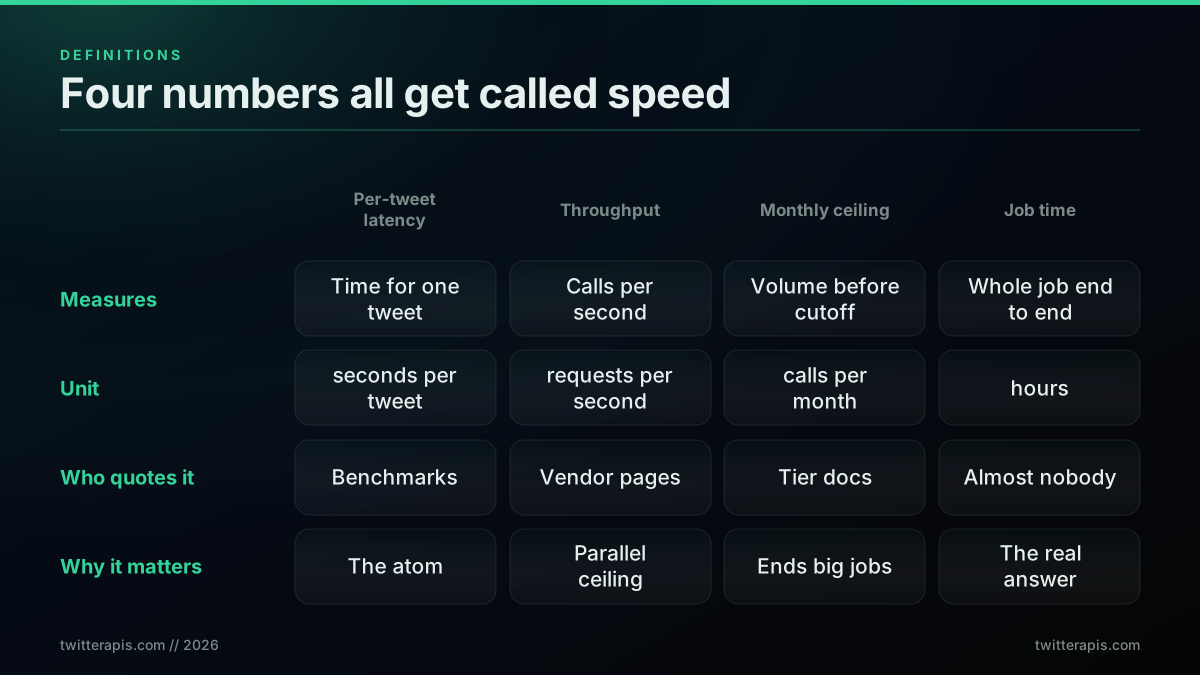
Four numbers get called speed, only one helps you choose
The community feels this confusion directly. The most common real-world question is not "what is your latency" but "how do I pull data at scale without the whole job dying," which is a job-time question dressed as a rate-limit question.
Best way to pull Twitter/X data at scale without getting rate limited to death?
That thread is the whole post in one line. The person does not care about a single request; they care whether the job finishes. So the ranking below leads with per-tweet latency, because it is the atom, then converts it to job time, which is the answer. For the pricing side of the same decision, our Twitter API cost benchmark and the cheapest Twitter API ranking normalize the money the same way this post normalizes time.
How We Measured Our Own Number
Every credible speed claim needs a method, so here is ours before any ranking. We called the live advanced-search endpoint twelve times in a warm loop, each call requesting a page of about 20 tweets for an English-language query, and recorded the total round-trip time for each. The result was a minimum of 4.49 seconds, a median of 4.91 seconds, a 90th percentile of 5.67 seconds, and a mean of 5.30 seconds per call. Because each call returns about 20 tweet objects with engagement counts and author data already parsed, the effective rate is roughly 0.25 seconds per tweet. The loop is small enough to reproduce in a few lines, timing the full round trip with the shell's own clock:
# 12 warm calls, record total round-trip time per call
for i in $(seq 1 12); do
  curl -s -o /dev/null -w "%{time_total}\n" \
    -H "x-api-key: $TWITTERAPIS_KEY" \
    "https://api.twitterapis.com/twitter/tweet/advanced_search?query=web3%20lang:en&product=Latest"
done | sort -n   # take the middle value as the median call time
Reporting the median and 90th percentile, not just the mean, matters because a single slow call (one of our twelve hit 9.7 seconds) drags the average without reflecting the typical response. The median is the honest center for a latency claim.
Two honesty notes. First, the search endpoint is the heaviest read path because it queries live results, so simpler reads such as a single tweet lookup or a user profile return faster than this. We benchmarked the slow path on purpose. Second, this is a first-party measurement of one provider, so we do not present competitor latency as our own measurement; the competitor numbers below are independent benchmarks or self-reported figures, each labeled as such.
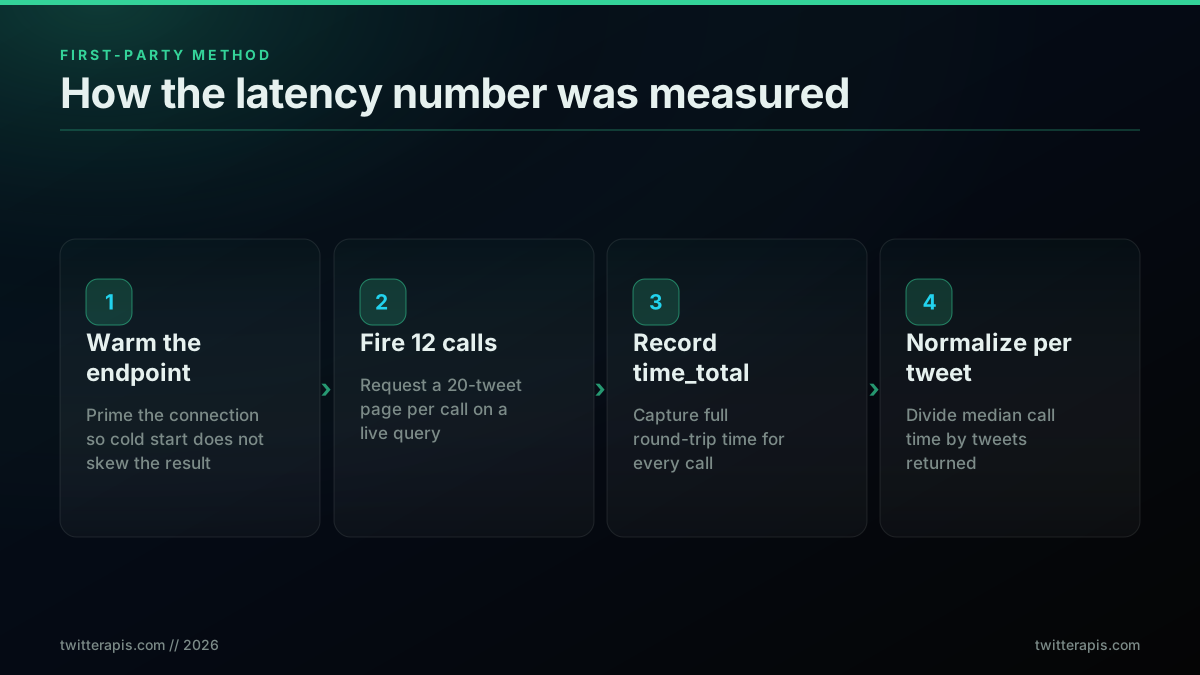
How the first-party latency number was measured
The reason this matters is that most speed rankings you find are built entirely on vendor marketing or a single third-party test. A provider publishing its own measured number with the method attached is rare, and it is the standard the rest of this ranking is held to. If a row says "self-reported," treat it as a claim, not a result. The raw response shape those calls return, and how to page through it, is covered in the complete Twitter API tutorial.
The Ranking: 7 Providers by Real Speed
Ranked by effective per-tweet latency, fastest first, a batch pay-per-call API leads because it returns about 20 tweets per request, single-tweet scraper providers cluster in the middle on benchmarked seconds-per-tweet, and the official X API sits last on speed because it publishes no latency figure and caps throughput by tier rather than by raw performance. The measured and benchmarked latencies are plotted below; the two providers without an independent per-tweet measurement (a self-reported high-throughput API and the official platform) are discussed in their entries rather than charted as if measured.
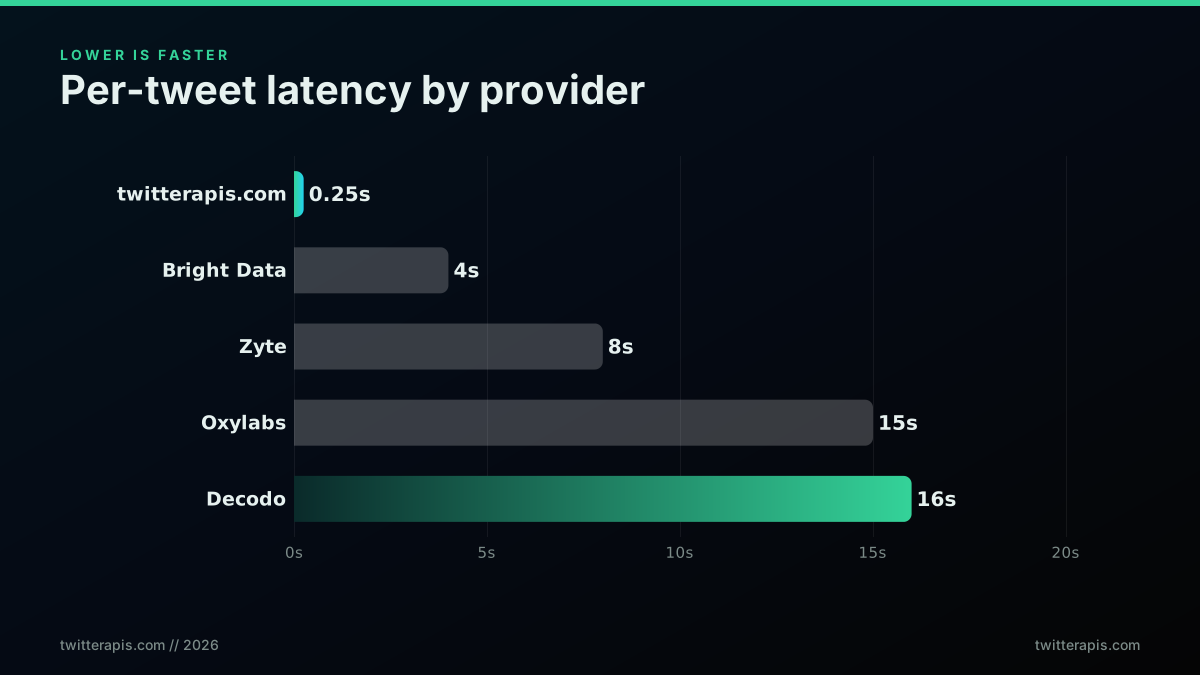
Per-tweet latency, lower is faster, measured and benchmarked
Here is each provider, in ranked order, with what its number means and where it comes from.
1. TwitterAPIs: 0.25 seconds per tweet, measured
Speed source: first-party measurement. A median of 4.91 seconds per call returning about 20 tweets is roughly 0.25 seconds per tweet, the fastest effective rate here because the batch return amortizes the round trip across many objects. There is no developer account to apply for and no tier to manage, so time-to-first-tweet is minutes, not an approval cycle. Reads are 0.0008 dollars per call, about 0.04 dollars per 1,000 tweets, and the response is parsed JSON, so there is no client-side HTML parsing step to add latency. Because billing is per call, running the same pull with 10 parallel workers finishes roughly 10 times sooner at the identical price. A single search read looks like this:
curl "https://api.twitterapis.com/twitter/tweet/advanced_search?query=web3%20lang:en&product=Latest" \
  -H "x-api-key: $TWITTERAPIS_KEY"   # one call, $0.0008, up to 20 parsed tweets
To keep the round trips low on a big pull, page with the cursor the previous response returns instead of firing a fresh query each time, so every request keeps returning a full page rather than restarting:
# page 2 onward: pass the cursor from the previous response, still 20 tweets per call
curl "https://api.twitterapis.com/twitter/tweet/advanced_search?query=web3%20lang:en&product=Latest&cursor=$NEXT_CURSOR" \
  -H "x-api-key: $TWITTERAPIS_KEY"
2. TwitterAPI.io: sub-second per tweet at scale, self-reported
Speed source: self-reported. This provider advertises over 1,000 requests per second and a global CDN with servers in 12 or more regions for low latency, plus auto-scaling for spikes. If those numbers hold in production, raw throughput is very high. We rank it second rather than first because the figure is self-reported and not independently benchmarked for per-tweet latency, and because per-tweet effective speed depends on how many objects each request returns, which is not published alongside the requests-per-second claim. High ceiling, unverified atom. Our migration guide covers moving a workload between the two if you are comparing directly.
3. Bright Data: about 4 seconds per tweet, benchmarked
Speed source: independent benchmark. In a benchmarked scraper study, Bright Data finished each tweet in about 4 seconds, the fastest among the residential-proxy scraper providers tested, and returned structured JSON with 33 metadata fields per tweet, so no client-side parsing was needed. Because the data arrives already structured, there is no client-side parse step to add latency, unlike raw HTML scraping paths covered in how to scrape tweets. That is fast for a proxy-based scraper, but it is a per-tweet architecture, so a 100,000-tweet job inherits the 4-seconds-per-tweet cost unless heavily parallelized. Strong for structured enterprise collection; slower per object than a batch API.
4. Zyte: about 8 seconds per tweet, benchmarked
Speed source: independent benchmark. Zyte came in around 8 seconds per tweet in the same study, twice Bright Data's time. It is a capable general scraping platform, but on Twitter data specifically the per-tweet latency puts it mid-pack, and a large backfill will feel the difference against a batch API.
5. Oxylabs: about 15 seconds per tweet, benchmarked
Speed source: independent benchmark. Oxylabs measured near 15 seconds per tweet, toward the slow end of the group. It is positioned for enterprise-scale, high-volume collection where breadth and compliance features matter more than raw per-object speed, so the latency reflects a different design goal rather than a defect.
6. Decodo: about 16 seconds per tweet, benchmarked
Speed source: independent benchmark. Decodo was the slowest provider in the benchmarked scraper study at roughly 16 seconds per tweet. For a small one-off pull that is tolerable; for anything at volume it is the difference between a job that finishes overnight and one that runs for weeks on a single worker.
7. Official X API v2: no published latency, tier-capped throughput
Speed source: none published. The official X API is the first-party source, but it publishes no per-tweet latency SLA and gates throughput behind tier rate limits and a monthly read ceiling rather than raw speed. On the pay-per-use plan the read ceiling caps a workload well before latency becomes the binding constraint, and passing the cap forces an enterprise negotiation, a tradeoff the X API v2 comparison and the is the Twitter API free breakdown cover in full. Editorial note on cost, not ours: the official standard read rate is 0.005 dollars per resource on the pay-per-use tier, which is the platform's own price. For read and search jobs, a third-party pay-per-call API returns data at least as fast without the account approval and tier management.
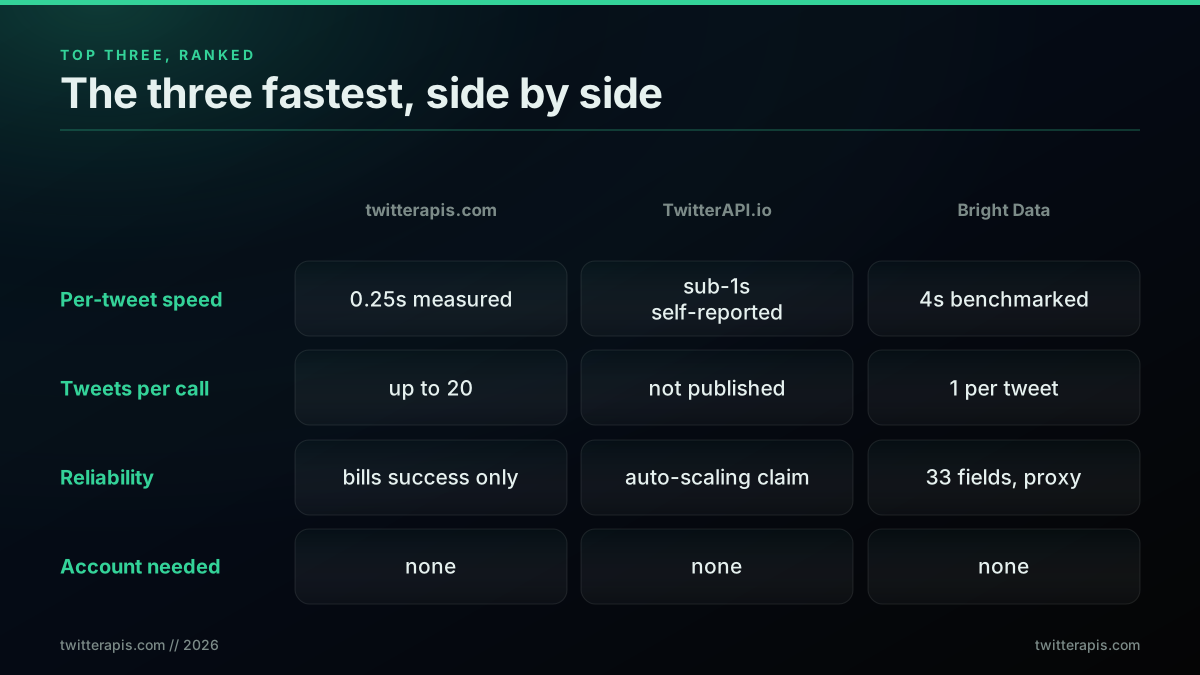
The top three ranked, side by side
The pattern across the ranking is that architecture beats brand. A batch API that returns many objects per request beats a per-tweet scraper on effective speed, and a pay-per-call model beats a tiered one on the ability to buy speed with concurrency instead of dollars.
Why Tweets-Per-Call Is the Hidden Speed Lever
The single biggest driver of effective speed is how many tweet objects come back per request, because network round trips dominate the clock on a well-run API. One request that returns 20 tweets in 5 seconds is 0.25 seconds per tweet. Twenty requests that each return one tweet in even 1 second each is 1 second per tweet, four times slower, before you count the extra connection overhead. This is why a batch API can post a slower-looking single-request time and still win the job.
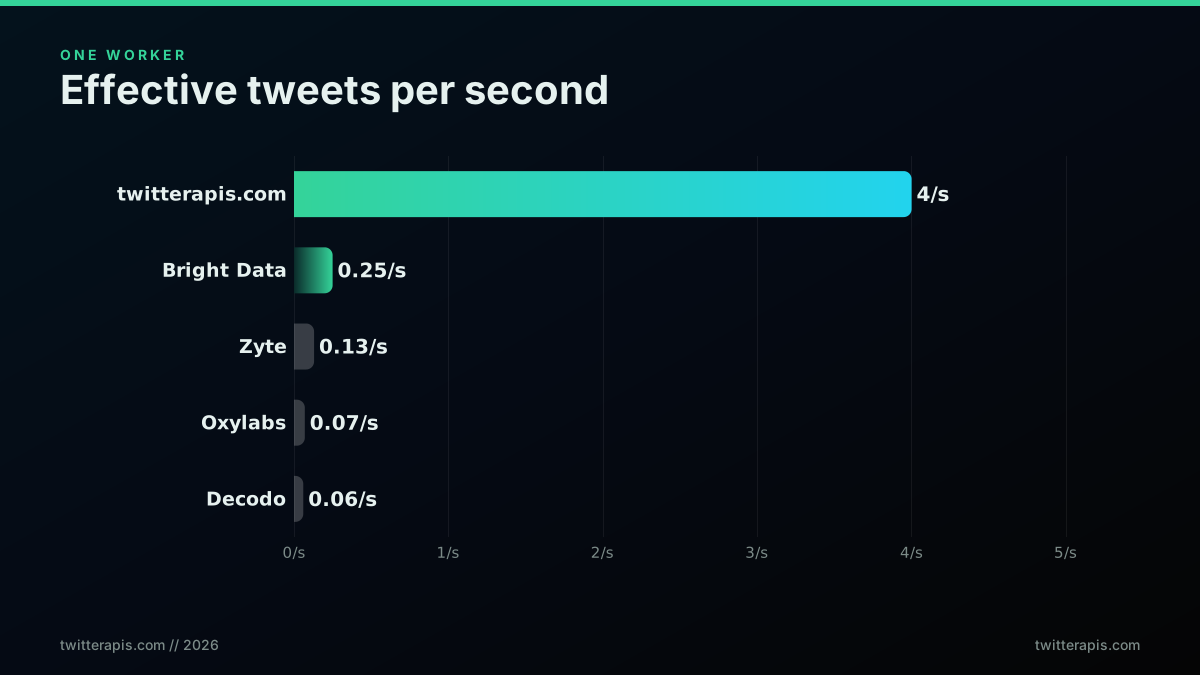
Effective tweets per second on one worker, the throughput lever
Converted to tweets per second on a single worker, a batch API at 0.25 seconds per tweet delivers about 4 tweets per second, while a 4-seconds-per-tweet scraper delivers 0.25 per second and a 16-second one delivers about 0.06 per second. That is a 60-fold spread on the same single worker, driven almost entirely by batch return, not by any exotic infrastructure. The normalization is a one-liner you can run against any provider's real numbers:
def tweets_per_second(call_seconds, tweets_per_call):
    """Effective throughput on one worker, the number that actually ranks providers."""
    return tweets_per_call / call_seconds

print(round(tweets_per_second(4.9, 20), 2))  # batch API: 20 tweets / 4.9s -> 4.08
print(round(tweets_per_second(4.0, 1), 2))   # per-tweet scraper: 1 / 4.0 -> 0.25
The practical takeaway is to always request the largest page your endpoint allows and to prefer endpoints that return arrays over endpoints that return single objects. The full set of read endpoints and their page sizes is documented in the rate limits guide.
Developers who have poked at the underlying platform notice that the ceiling is the rate limit, not anti-bot friction, which is exactly why batch efficiency and concurrency, rather than evasion, are the real speed levers.

David Buchanan does not tweet anymore
@David3141593
Something that surprised me while doing this, was that twitter has none of the most obvious anti-bot mitigations. I aggressively scraped the graphql API, right at the rate limit, impersonating the web client but with a default Python useragent - and the API didn't seem to mind?
The lesson embedded in that observation is that once you are inside the rate limit, speed is an engineering problem you control: batch size and worker count. It is not a cat-and-mouse game. A structured API hands you that control directly instead of making you rebuild a browser session, which is the topic of our best Twitter API for scraping breakdown.
Start building with TwitterAPIs
$0.0008 a call, about $0.04 per 1,000 tweets at 20 tweets a page. $0.50 free credits. No credit card required.
Throughput: Requests Per Second and the Monthly Ceiling
Throughput is the second half of the speed pair, and it is where self-reported and measured numbers diverge most. Requests per second sets how many parallel calls the service will accept; the monthly ceiling sets how much total volume a tier allows before it cuts you off. A high requests-per-second number is useless if a low monthly cap stops the job halfway, which is the exact failure the official pay-per-use ceiling produces at scale.
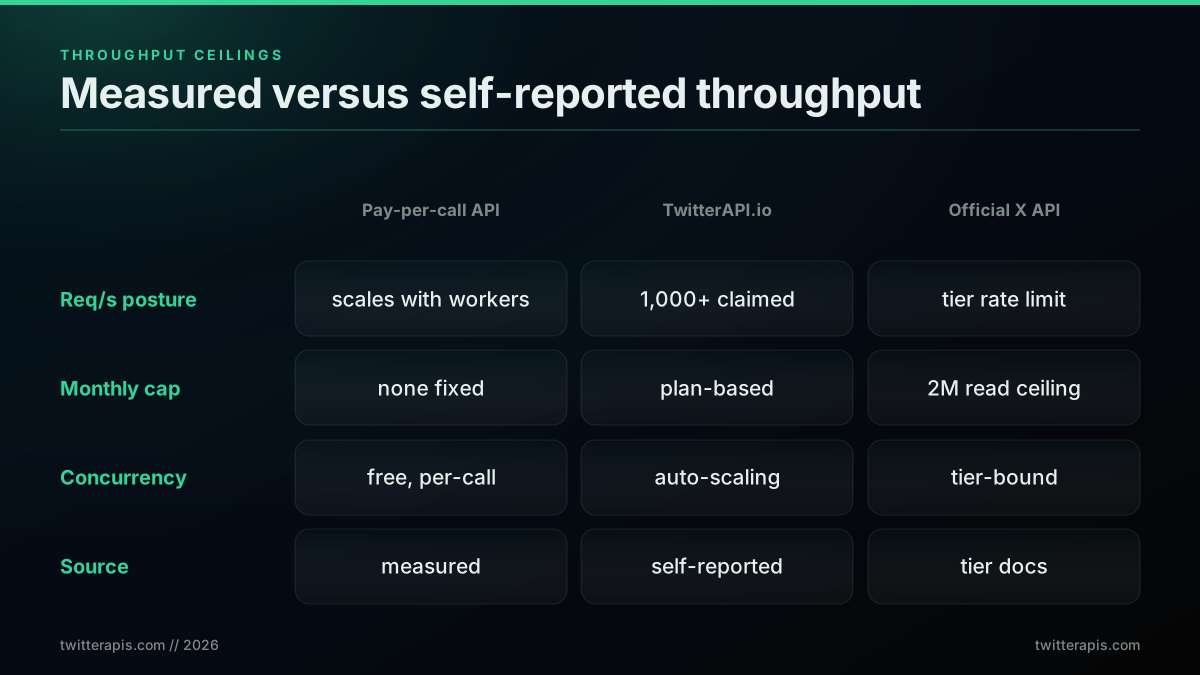
Throughput ceilings, and which numbers are measured versus self-reported
The practical reading of that grid is to trust monthly ceilings more than requests-per-second claims, because the ceiling is the number that actually ends jobs. A pay-per-call API with no fixed monthly cap and per-call billing lets throughput scale with your worker pool up to the platform rate limit, which is the friendliest posture for a large pull. The community consensus is that raw throughput on a marketplace listing can be surprisingly good for the money, which is worth weighing against reliability.

Stat Arb
@quant_arb
In case anyone doesn't know... if you want to scrape Twitter, or any site that doesn't let you scrape it, but has an expensive API: Use RapidAPI. Anyone can create their own API and sell it. I can get all the public functions of the Twitter API for $50/mo and 100k requests p.m.
That 100,000 requests per month framing is the right unit to think in, because it is a monthly ceiling, not a per-second boast. The question is always whether the ceiling clears your job, and whether the requests behind it are reliable, which is the next section.
From Speed to Wall-Clock: Time to Finish 100K Tweets
Job time is the number you actually pick a provider on, and it is per-tweet latency times tweet count, divided by concurrency. On a single worker, a batch API at 0.25 seconds per tweet finishes 100,000 tweets in about 25,000 seconds, close to 7 hours. A 4-seconds-per-tweet scraper needs about 111 hours for the same job on one worker, and a 16-second one needs about 444 hours. Concurrency changes all of these by dividing by the worker count, and on a pay-per-call model the price does not move when you add workers.
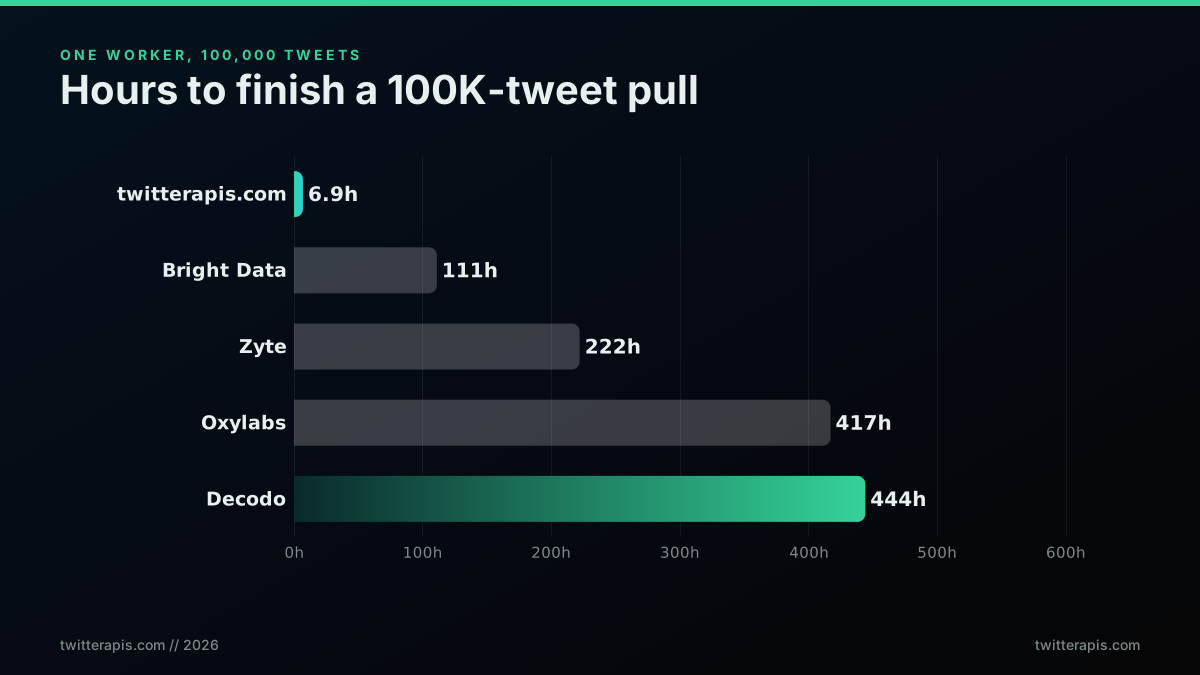
Time to finish a 100,000-tweet pull on a single worker
The single-worker numbers are the honest baseline, but nobody runs a big pull serially. A worker pool divides the job time by the number of concurrent workers until you reach the rate limit, so the batch API's 7-hour serial job becomes about 41 minutes with 10 workers. Here is that arithmetic in code, so the claim is reproducible rather than asserted:
def job_time_hours(seconds_per_tweet, tweets, workers=1):
    """Wall-clock hours to finish a pull, given per-tweet latency and concurrency."""
    serial_seconds = seconds_per_tweet * tweets
    return serial_seconds / workers / 3600

print(round(job_time_hours(0.25, 100_000), 1))          # batch API, 1 worker -> 6.9
print(round(job_time_hours(0.25, 100_000, 10) * 60, 1)) # batch API, 10 workers -> 41.2 minutes
print(round(job_time_hours(4.0, 100_000), 1))           # 4s/tweet scraper, 1 worker -> 111.1
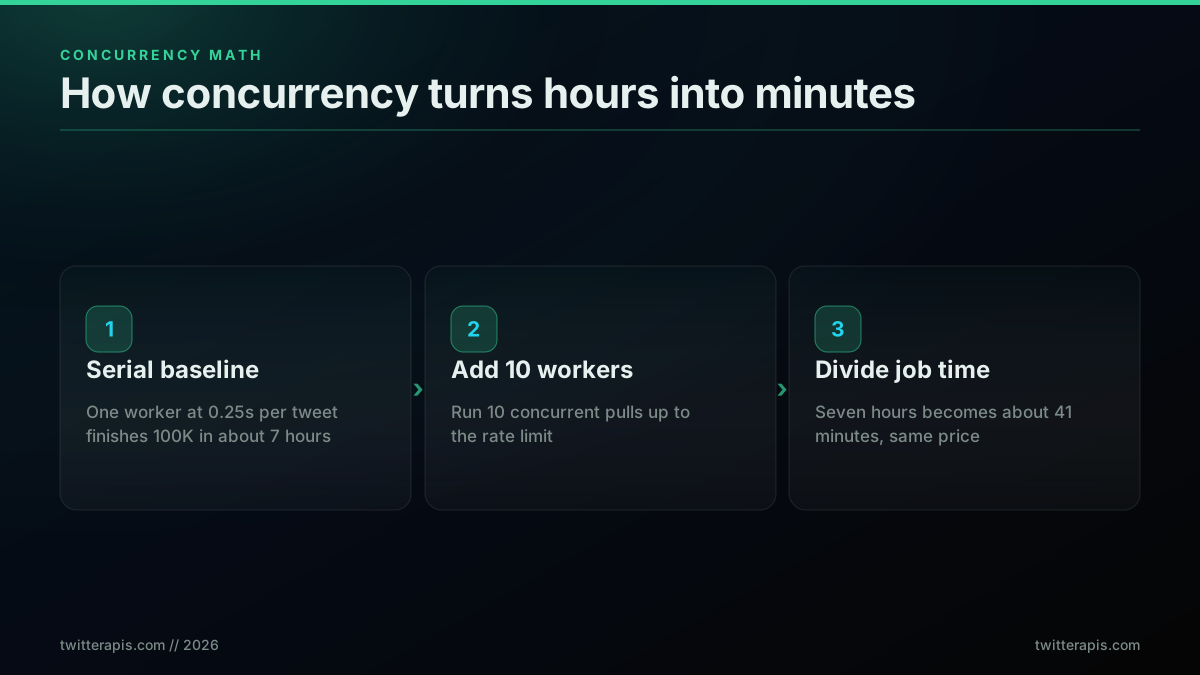
How concurrency turns hours into minutes
The reason this is the section that matters is that it collapses every other number into a decision. A provider with a scary-looking single-request time can still win the job on batch return and concurrency, and a provider with a flashy requests-per-second claim can still lose it on a low monthly ceiling. Model your own workload with the function above using your real tweet count, and let job time, not a marketing figure, pick the provider. A historical backfill is the job where this math bites hardest, which is why scraping tweet history at scale lives or dies on tweets-per-call and concurrency. For the money side of the same model, the Twitter API cost guide projects 12-month spend for a single workload, and the Apify head-to-head shows how failed-run billing quietly inflates a scraper's effective speed-per-dollar.
Speed Is Nothing Without Reliability
A fast API that fails one call in three is slower than a steady one, because every failure is a retry, and on some providers a failed attempt is still billed. Reliability has three parts that interact with speed: whether you pay for failed attempts, how the provider behaves at the rate limit, and whether your uptime depends on a fragile scraping session. A structured pay-per-call API that only bills successful calls and returns a clean 429 you can back off from is faster in practice than a scraper that silently returns partial pages you have to detect and refetch.
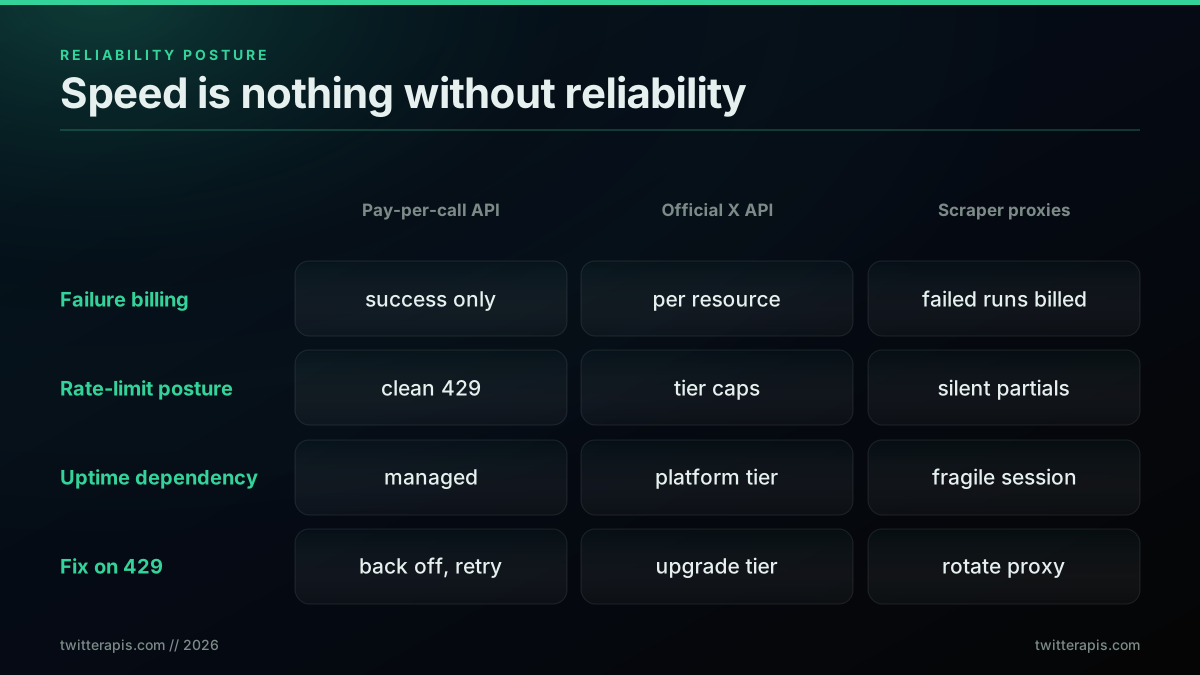
Speed is nothing without reliability: the three postures
The reliability tax is real and developers keep hitting it, especially when they build on the official tier and then get cut off by a policy or price change mid-project.

gavin leech (Non-Reasoning)
@gleech
List of Twitter degradations since October 2022: * paying for bait * effectively banning S*bstack and B*sky * killing links * idiotic checkmark spoofing * nerfing the block button * vast API price hike and rate limit * (reversed): removing titles from link cards
That instability is why teams increasingly move the read path off the official tier and onto a pay-per-call service they can reason about. The switch is usually framed as a cost decision, but it is really a reliability-and-speed decision, because a predictable per-call service removes both the surprise bill and the surprise cutoff.
X / Twitter data is too expensive, so I fixed it
The correct way to handle the rate limit for speed is to run concurrent workers up to the limit, then back off cleanly on a 429 rather than hammering, which keeps your effective throughput high without tripping penalties. A retry with exponential backoff, using the standard requests library or an async client like httpx, is the whole reliability layer most jobs need:
import time, requests

def get_with_backoff(url, headers, tries=5):
    """Retry on 429 with exponential backoff so a rate-limit never kills the job."""
    for attempt in range(tries):
        r = requests.get(url, headers=headers, timeout=20)
        if r.status_code != 429:
            return r
        time.sleep(2 ** attempt)   # 1s, 2s, 4s, 8s, 16s
    raise RuntimeError("rate limited after retries")
For concurrency, a worker pool from concurrent.futures or an asyncio gather is all it takes to run many of these calls in parallel up to the limit. Our best practices guide covers the concrete backoff and pagination patterns, and the rate limit guide covers where the ceilings actually sit.
Twitter/X API Provider Types Compared for AI Agent Development in 2026
Speed stops being an abstract number the moment an AI agent is the caller, because an agent does not issue one request and wait patiently. It issues a request, reads the result, decides what to ask next, and repeats. Latency lands inside a reasoning loop rather than inside a batch job, so a four-second call is not four seconds of cost, it is four seconds multiplied by however many turns the agent takes.
That changes which provider type fits. The seven providers in the ranking above collapse into three architectural categories once you judge them as agent tooling.
Synchronous REST APIs. One request, one response, sub-second to a few seconds. This is the only category that works inside an agent turn, because the agent is blocked while it waits and a tool call that takes a minute breaks the interaction. TwitterAPIs, TwitterAPI.io, and the official X API all sit here.
Managed scraping platforms. You submit a job, poll for completion, fetch a dataset. Bright Data, Zyte, Oxylabs, Decodo and Apify are in this group. The benchmarked per-tweet figures earlier in this post, between roughly 4 and 16 seconds, are job-time figures rather than request-latency figures, and inside an agent loop that is not a slow tool, it is a broken one. These platforms are the right choice for a nightly corpus build that an agent later reads from storage, and the wrong choice for a tool the agent calls live.
Native tool interfaces. The newest category, and the one that did not exist when most of these comparisons were written. Instead of the agent framework wrapping an HTTP client you wrote, the provider ships a tool server the agent connects to directly. The TwitterAPIs MCP server is a Model Context Protocol server that gives Claude Desktop, Cursor, Cline, and any MCP-compatible client native access to the same endpoints, installed with npx -y @twitterapis/mcp@latest and authenticated with the same bearer token as the REST API. Read calls bill at the same rate, so the tool layer is a packaging difference rather than a pricing tier.
The distinction that matters is not speed within a category, it is which category you are in. A synchronous API that is twice as fast as another synchronous API is a tuning decision. A batch platform in an agent loop is an architecture error, and no amount of provider tuning fixes it.
The Comparison Criteria That Matter Most for Twitter/X Agent Workflows
The four speed numbers defined earlier still apply, but agent workloads reorder their importance and add criteria that a batch pipeline never has to think about. Here are the ones that decide the build, roughly in order of how often they are the thing that breaks.
Per-call latency, weighted by turn count. Estimate the number of tool calls in a typical agent run, then multiply. An agent that makes six calls to answer one question turns a 5-second API into a 30-second answer. This is the single largest determinant of whether the experience feels usable.
Tweets returned per call. Batch return matters more for agents than for pipelines, because it collapses turns. If one call returns 20 tweets with author data and engagement counts already attached, the agent has what it needs after one turn. If it returns one tweet and requires a separate profile lookup, the same task becomes several turns, and each turn costs latency plus model tokens.
Response shape and token cost. This criterion does not exist outside agent work and it is frequently the expensive one. Every field in the response goes into the model's context and is billed as tokens. A flat, parsed JSON object costs fewer tokens than a deeply nested envelope carrying fields the agent will never read. When you compare providers for agent use, look at a real response body, not just the latency.
Determinism of errors. An agent handles a clean, typed error far better than an empty result. A provider that returns a structured not-found lets the agent branch. A provider that returns an empty array on both "no results" and "rate limited" gives the agent no way to tell a real answer from a failure, and the usual outcome is a confidently wrong response.
Auth and setup friction. For an agent that a non-developer will install, an approval cycle is a hard stop rather than an inconvenience. This is the criterion where the official X API's Project-and-review model is most costly, because a developer account review cannot be automated away by the agent.
Cost per resolved question, not per call. The unit that matters is what it costs to answer one user question end to end, including the turns the agent wasted. A cheaper per-call rate on a provider that needs three times the turns is not cheaper.
Brand Monitoring and Customer Support Agents Using Twitter/X Data
Two agent workloads dominate real deployments, and they have opposite latency profiles, which is a useful way to see the criteria above applied.
Brand monitoring agents run on a schedule rather than in a conversation. The agent wakes on a cron, sweeps mentions of a set of terms and handles since the last run, classifies what it finds, and writes somewhere a human reads. Nothing is blocked on the response, so per-call latency is nearly irrelevant and throughput plus cost per 1,000 tweets is what decides. This is the one agent workload where a managed scraping platform is defensible, because the job runs unattended and completion rate may matter more than speed. In practice most teams still use a synchronous API here, because the same sweep at 0.25 seconds per tweet finishes in minutes rather than hours and costs less, and because the classification step wants clean JSON rather than scraped HTML.
The shape is a bounded search per interval, walked with a cursor until it returns nothing:
# Sweep mentions since the last watermark, then hand the batch to the model once.
def sweep(term, since_id, key):
    out, cursor = [], None
    while True:
        page = search(f'"{term}" -is:retweet', cursor, key)
        fresh = [t for t in page["tweets"] if t["id"] > since_id]
        out += fresh
        cursor = page.get("next_cursor")
        if not cursor or len(fresh) < len(page["tweets"]):
            return out   # caught up to the watermark
Classify the whole batch in one model call rather than one call per tweet. That single decision usually cuts both the latency and the token bill of a monitoring agent by more than any provider swap.
Customer support agents are the opposite. A person is waiting. The agent needs the mention, the conversation thread above it, and the author's profile, and it needs all three before it can draft anything. Naively that is three sequential calls and three round trips inside a live interaction. Two things fix it: fetching the thread in one call rather than reconstructing it by walking replies, and issuing the independent lookups concurrently rather than in sequence. Full thread expansion in a single call is the specific capability that collapses the worst case here, because reply-walking is where a support agent's latency usually goes.
For support work the error-determinism criterion also bites hardest. A deleted tweet, a protected account, and a rate limit all look like "no data" to a naive client, and an agent that cannot distinguish them will tell a customer something untrue. Branch on the status, not on whether the array is empty.
The cheapest pay-as-you-go Twitter API. Try it free.
$0.0008 a call, about $0.04 per 1,000 tweets at 20 tweets a page. $0.50 free credits. No credit card required.
Twitter/X API Providers Versus Traditional Multi-Tool Integration
The alternative to a purpose-built provider is the pattern most teams start with: wire the agent to a general automation layer, a workflow tool, or a stack of separate scrapers, and let it reach Twitter through that. It is worth being fair about the tradeoff rather than dismissing it, because the multi-tool route wins in some real cases.
What multi-tool integration genuinely buys you. One authentication surface across many services, a visual builder that non-engineers can change, and connectors to systems that have nothing to do with Twitter. If your agent's job spans a CRM, a spreadsheet, an email system and Twitter, the integration layer is doing real work and the Twitter connector is one node among many.
What it costs. Every hop adds latency, and hops compound in an agent loop the same way calls do. A direct API call at roughly 5 seconds becomes noticeably slower once it is routed through a workflow engine that polls for step completion. You also inherit whatever the connector's author decided about response shape, page size, and error handling, and those decisions are usually optimized for a human reading a workflow output rather than for a model consuming tokens. When a connector flattens a rich response into a summary string, the agent loses the fields it needed and makes another call to get them.
Where the line falls. If Twitter data is incidental to the agent's job, use the integration layer and accept the overhead. If Twitter data is the agent's job, the extra hop is pure cost, and connecting the provider directly, whether through plain HTTP or a native tool server, removes a category of failure rather than just some milliseconds.
There is a middle position worth naming. Keep the integration layer for orchestration, the parts that fan out to other systems, and connect the data-heavy Twitter calls directly. Agents rarely need all their tools to arrive through the same door, and the one tool that dominates the latency budget is the one worth wiring directly.
FAQ: Twitter/X APIs and AI Agents
Does API latency actually matter for an AI agent, given the model itself is slow? Yes, and more than for a batch job, because latency multiplies by turn count. A model that takes 3 seconds to reason plus an API that takes 5 seconds is 8 seconds for one turn and 48 seconds for a six-turn task. The model half is roughly fixed. The API half is the part you can choose.
Can an agent use a scraping platform like Apify or Bright Data as a live tool? Not comfortably. Those platforms return a job, not a response, so the agent has to submit and poll. That works for a scheduled corpus build the agent reads afterward from storage. It does not work as a tool the agent calls mid-conversation, and the benchmarked seconds-per-tweet figures in the ranking above are job times rather than response times.
What is an MCP server and why does it matter for Twitter data? Model Context Protocol is a standard interface between an agent client and a tool provider. Instead of writing an HTTP wrapper and describing each endpoint to the model yourself, the provider ships a server the client connects to and the tools appear natively. For Twitter data the practical benefit is that the tool descriptions, parameter schemas and response shapes are maintained by whoever maintains the API, so they do not drift out of sync with it. The TwitterAPIs MCP server works with Claude Desktop, Cursor, Cline and any MCP-compatible client, and bills at the same rates as the REST API.
Should an agent use the official X API? For writing, yes, when writing through an approved app matters for your compliance posture. For reading inside an agent loop, the access model is the bigger obstacle than the price: a developer account, a Project, a stated use case and a review sit between installing an agent and its first call, and none of that can be automated away by the agent itself.
How many tool calls should a Twitter agent make per question? Fewer than most first implementations do. The two reliable reductions are choosing endpoints that return complete objects rather than references, so a tweet arrives with its author attached instead of requiring a second lookup, and expanding a whole thread in one call rather than walking replies. Both cut turns rather than milliseconds, which is where the real time goes.
What is the cheapest way to run a monitoring agent continuously? Batch the model work, not the API work. Sweep with a tight query on a cursor, accumulate the results, and classify the whole batch in one model call. Most of the cost in a naive monitoring agent is one model invocation per tweet, and that is a design choice rather than a provider limitation.
How to Pick the Fastest API for Your Job
There is no single fastest Twitter API; there is a fastest one for each job, because the binding constraint changes. For a bulk backfill, tweets-per-call and concurrency decide the winner, so a batch pay-per-call API with a worker pool is fastest. For a real-time monitor, per-request latency decides it, so a fast search endpoint polled on a tight interval wins, with a stream reserved for genuine firehose volume. For a one-off pull, setup friction decides it, so an API with no developer account and free credits gets you data soonest.
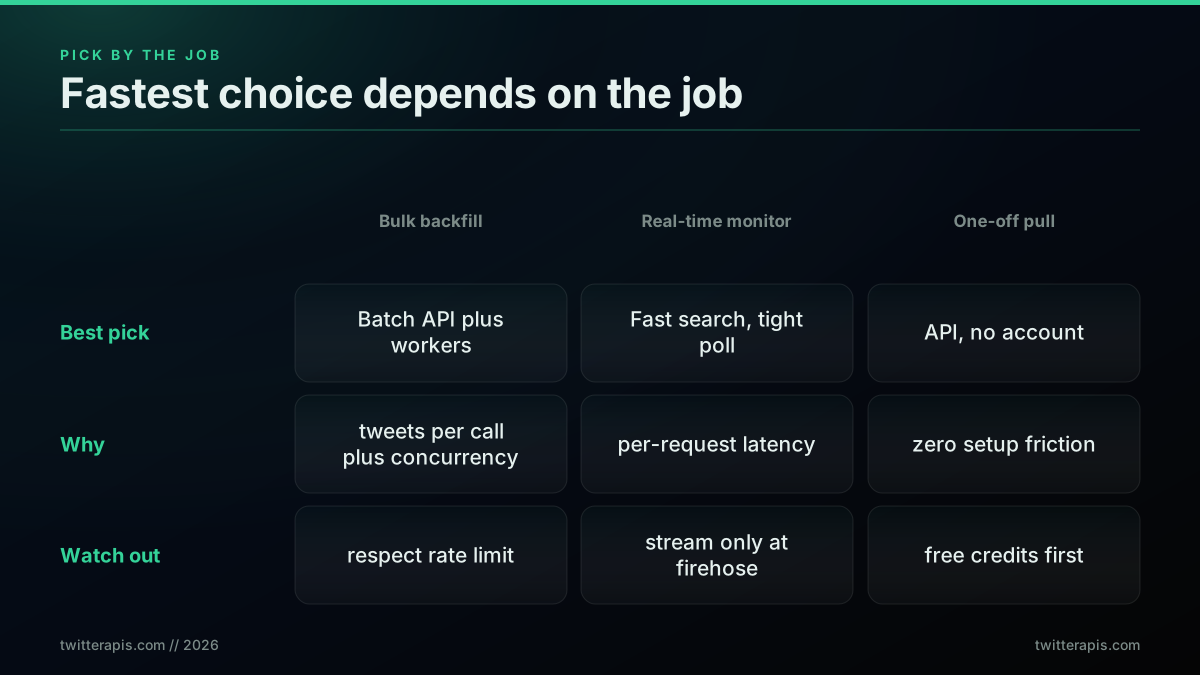
Pick by the job, not by the headline number
The one architecture that serves all three well is a batch pay-per-call API, because it returns many objects per request for backfill, answers a single query fast enough for monitoring, and needs no account for a one-off. Watching how developers actually wire these jobs together, from a first request to a full pull, is easier to follow in a walkthrough than in prose.
https://www.youtube.com/watch?v=fHHDM2-If9g
That kind of end-to-end build is where the speed levers in this post become concrete: batch page size, a worker pool, and a clean backoff. If you have never made a single call yet, start with how to get an API key and the is the Twitter API free breakdown, then come back and apply the concurrency math above to your own tweet count. For a head-to-head against the official platform specifically, the X API v2 comparison covers the tradeoffs beyond speed.
What It Costs to Run at Speed
Speed and price are decoupled on a pay-per-call model, which is the fact that ties this whole ranking together. Reads cost 0.0008 dollars per call, each call returns up to 20 tweets, and that works out to about 0.04 dollars per 1,000 tweets. Writes such as retweet, follow, bookmark, and delete are the same 0.0008 dollars per call; posting a tweet is 0.0016 dollars per call. Signup includes 0.50 dollars in free credits with no card, roughly 625 calls or 12,500 tweets, which is enough to benchmark your own job before you spend anything. Crucially, running that job with 10 parallel workers finishes it about 10 times faster for the exact same total price, because you are billed per call, not per hour of compute.
Compare that to a tiered model where going faster means buying a bigger plan, and the pay-per-call advantage on speed becomes obvious: concurrency is free. You can model your own spend against your own tweet count with the cost calculator, and see the full per-endpoint rates on the pricing page. For the provider-by-provider money ranking that mirrors this speed ranking, the cheapest Twitter API post does for cost what this one does for time.
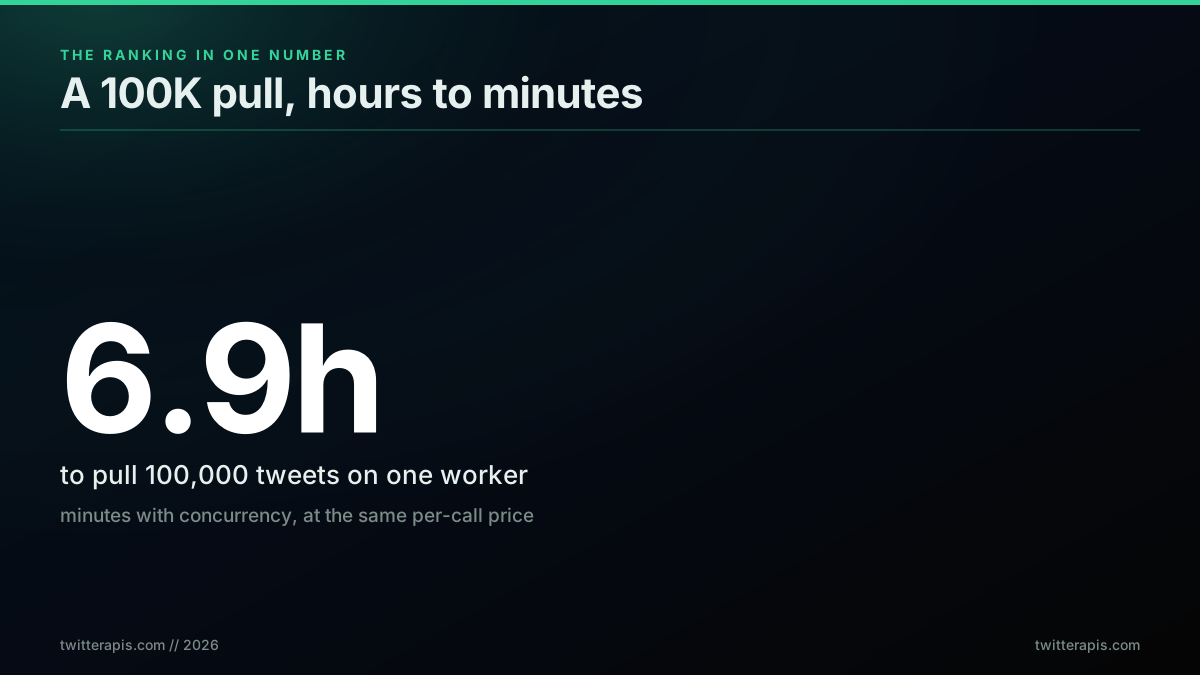
The whole ranking in one number: a 100K pull, hours to minutes, at pennies
The bottom line is that the fastest Twitter API in 2026 is not the one with the biggest requests-per-second banner. It is the one that returns the most tweets per call, lets you run calls in parallel without a price penalty, and stays up when you push it. Measured on that standard, a batch pay-per-call API finishes a 100,000-tweet pull in hours on one worker and minutes with concurrency, at pennies per thousand, which is why the ranking leads with it. You can sign up and reproduce the 4.9-second-per-call number yourself with the free credits before committing to anything.
When the Official X API Is Still the Right Choice
This ranking puts the official API last on speed, and it would be dishonest to leave it there without saying where it wins, because for a real share of readers it is the correct answer regardless of latency.
When you need to write. Posting, replying, direct messages, and any authenticated action taken on behalf of a user are first-party capabilities. No read-focused provider substitutes for them, and if writing is your product then the official API is a requirement you budget for rather than an option you benchmark.
When you need push instead of poll. Real-time delivery through webhooks beats any polling loop on latency at any price, because polling's floor is your interval and a webhook's floor is the network. If your product reacts to events within seconds, no amount of read throughput closes that gap.
When compliance is the constraint. A first-party agreement is an answer to a procurement questionnaire in a way that a third-party data provider is not. For regulated buyers, enterprise security reviews, or anything where data lineage must be auditable, that contract is the product and the price is the cost of it.
When your volume is genuinely tiny. Under a few thousand reads a month the entire cost argument in this post collapses to rounding error, and pay-per-usage removed the monthly floor that used to make small official-API usage absurd. At that scale, pick on whatever is least work.
What the official API is not good for is bulk reading at speed, which is what this post measures. That is not a criticism of the product, it is a statement about what it is priced and rate-limited to do.
Which Twitter/X Data API Should You Choose?
Speed is one axis and it is rarely the only one that decides. Here is the choice framed by what you are building rather than by which number is smallest.
A live product feature that calls X while a user waits. You need a synchronous REST provider, and per-call latency multiplied by calls-per-request is your whole budget. Managed scraping platforms are architecturally wrong here regardless of their reliability numbers.
A scheduled analytics or monitoring pipeline. Per-call latency barely matters because nothing is blocked. Optimize for cost per 1,000 tweets and for completion rate, in that order, and use concurrency to buy back wall-clock time rather than paying for a faster tier.
A research corpus where completeness is the finding. Completion rate outranks everything. This is the one workload where the reliability premium on a managed platform is straightforwardly worth paying, and where a silently partial dataset is the expensive failure.
An AI agent calling X as a tool. Latency multiplies by turn count, so the agent sections above are the relevant ones. Prioritize tweets returned per call and a clean response shape, because both reduce turns, and turns are where agent latency and token cost actually go.
Anything that posts. Split the workload. Use the official API for the write path and a cheaper, faster provider for reads. Teams that buy one provider to cover both usually overpay on the larger half.
If you cannot place yourself in one of those five, the tiebreaker is the free credit. Every provider worth considering has one, the benchmark loop in this post is a dozen lines, and an hour of measuring your own workload settles what a table can only frame.
Final Takeaway
The fastest Twitter API is not the one with the largest requests-per-second figure on its homepage. It is the one that returns the most tweets per call, lets you run those calls in parallel without a price penalty, and keeps returning them when you push it.
That reframing changes the ranking. A provider doing 5 requests a second at 20 tweets each moves more data than one doing 1,000 requests a second at one tweet each, and the second one has the better banner. Batch size is the lever almost nobody advertises and it is the single largest term in effective speed.
Three things to carry out of this post. Measure job time rather than request time, because job time is the number you actually experience and it is derived from latency and batch size together. Check where a speed claim comes from before you weight it, since a first-party measurement, an independent benchmark, and a vendor's self-report are three different grades of evidence and this ranking contains all three. And verify on your own workload, because a dozen lines of curl and an hour of your time beat every comparison table, including this one.
// sources
Where these numbers come from
Each row is a figure in this post and the artefact it was read from. Prices and limits on this platform move, so check the date on the source before you plan against it.
- Percentile reference
- Backs the measurement method the ranking rests on, reporting median and 90th percentile rather than the mean, because one 9.7-second call out of twelve drags an average away from the typical response.
- TwitterAPI.io alternatives article, 2026
- Source of the self-reported throughput claim used in the second-place ranking, over 1,000 requests per second with servers in 12 or more regions, which the post flags as not independently benchmarked.
- AIMultiple benchmarked scraper study
- The independent benchmark behind the roughly 4 seconds per tweet figure, the fastest result among the residential-proxy scraper providers tested.
- Bright Data Twitter data provider post
- Backs the claim that the provider returns structured JSON with 33 metadata fields per tweet, which is why the post credits it with no client-side parse cost.
- httpx async client documentation
- The async HTTP client named in the retry-with-backoff pattern the post gives as the reliability layer for keeping throughput high without tripping a 429 penalty.
- Python concurrent.futures documentation
- Backs the concurrency recipe for finishing a large job faster, a worker pool run in parallel up to the rate limit rather than serially.
Frequently Asked Questions
On effective per-tweet latency, a pay-per-call API is fastest for bulk pulls because one call returns about 20 tweets. We measured a median of 4.9 seconds per call on our own advanced-search endpoint, which is roughly 0.25 seconds per tweet. Independent benchmarks put single-tweet scraper providers at about 4 seconds per tweet for the fastest, so a batch-return API finishes a large job far sooner even when a single request looks slower. The official X API publishes no per-tweet speed number, only tier rate limits.
For volume, yes. A per-tweet scraper that returns 4 seconds per tweet needs 400,000 seconds to fetch 100,000 tweets on one worker. A pay-per-call API that returns 20 tweets in about 5 seconds needs roughly 25,000 seconds for the same job, then falls to minutes once you add parallel workers. The lever is tweets returned per request. One request that returns 20 objects beats twenty requests that return one object each, on both speed and cost.
Three levers, in order of impact. First, pick an endpoint that returns many objects per call so you make fewer round trips. Second, run requests concurrently with a worker pool instead of one at a time, which divides job time by your worker count until you hit the rate limit. Third, request only the fields you need so each response is smaller. A 100,000-tweet job that takes about 7 hours serially finishes in well under an hour with 10 workers, and the cost does not change because you pay per call, not per hour.
Raw HTML scraping through residential proxies is usually slower per tweet than a structured API, because each page load carries proxy handshake and parsing overhead, and benchmarked scraper providers land between 4 and 16 seconds per tweet. A structured pay-per-call API returns parsed JSON with engagement counts and author data already attached, so there is no client-side parsing step and the effective per-tweet time is a fraction of a second. Scraping wins only when you need a surface no API exposes.
There are four different numbers people call speed, and they are not interchangeable. Per-tweet latency is the wall-clock time to get one tweet object into your database. Throughput is how many requests per second the service accepts. The monthly ceiling is the hard cap a tier allows before it cuts you off. Job time is how long a real pull, say 100,000 tweets, takes end to end. The only number that matters for choosing a provider is job time, and it is derived from per-tweet latency divided by how many requests you can run in parallel.
No. The official X API is a first-party source, but it publishes no latency SLA and gates throughput behind tier rate limits and a monthly read ceiling rather than raw speed. On the pay-per-use plan the read ceiling caps a workload well before speed becomes the bottleneck, and hitting the cap forces an enterprise negotiation. For most read and search jobs a third-party pay-per-call API returns data at least as fast and without the account approval and tier management overhead.
A pay-per-call API charges 0.0008 dollars per read call, and each call returns up to 20 tweets, which works out to about 0.04 dollars per 1,000 tweets. Writes such as retweet, follow, and delete are the same 0.0008 dollars per call; posting a tweet is 0.0016 dollars. Signup includes 0.50 dollars in free credits with no card, roughly 625 calls or 12,500 tweets. Speed and cost are decoupled here: running the same job with more parallel workers finishes sooner at the exact same total price, because you are billed per call rather than per hour of compute.
For real-time monitoring, latency per request matters most, so a fast search endpoint polled on a tight interval is the right tool, and a stream only when volume is very high. For bulk backfill, throughput and tweets-per-call matter most, so a batch API with concurrent workers wins. For a one-off pull, setup friction matters most, so an API with no developer account and free credits gets you data in minutes. The same pay-per-call API serves all three because it decouples price from speed.
Check out similar blogs
More guides on the Twitter/X API, scraping, and pricing.
Official X API vs Third-Party Twitter APIs: The 2026 Decision Guide
A neutral, seven-axis decision framework for choosing between the official X API and a third-party Twitter API in 2026, with a runnable decision matrix and the cases where each route genuinely wins.
Build vs Buy: Should You Build Your Own Twitter/X Monitoring Tool? (2026)
Buying a listening seat costs $29 to $2,000 a month depending on the vendor. Building costs real engineering hours plus a data bill. Here is the real math behind the twitter monitoring tool build vs buy decision, priced both ways.

How to Track a Tweet's Performance in Real Time with the X API
Poll a tweet's engagement counts over time with the X API, compute a views-to-likes ratio, and read the quote-tweet layer to tell an organically growing launch tweet from a boosted one. Tested Python and curl.
What "Rate Limited" Actually Means on X (Every Limit, Measured)
"Sorry, you are rate limited" is one message covering two different systems: a consumer action ceiling and a developer API window. Here is what the term means, the current numbers for both, where it came from, and how long it actually lasts.
The Twitter API Developer Reference (2026): Endpoints, Rate Limits, Error Codes and Pagination
A single indexed reference for the Twitter/X API in 2026: the endpoint catalog, how authentication and bearer tokens work, the rate limits behind every 429, what error codes 401, 403, and 429 mean, cursor pagination, response shapes, and the real per-call cost of each call.
How to Choose a Twitter/X API in 2026: The Complete Buyer's Guide
A decision framework for choosing a Twitter/X API in 2026: the seven criteria that actually matter (pricing model, data coverage, rate limits, auth, reliability, compliance, migration cost), a use-case decision tree, and where each path wins.
What You Can Build With the Twitter/X API: 20+ Real Use Cases (2026)
A 2026 field guide to what you can actually build with the Twitter/X API: 24 real use cases across listening, monitoring, audience graph, research, and bots, each mapped to the endpoint that powers it and the real per-call cost.
Fetch a Full Twitter Thread via API in One Call (2026)
How to pull an entire Twitter thread, the root tweet plus every connected tweet in the chain, in a single API call with the tweet/thread endpoint, instead of walking replies by hand. Live-tested code in curl, Python, and Node.js, with the real per-call cost.