GUIDE
How to Scrape Tweets in 2026: Build a Collector That Does Not Break
A production engineering guide to collecting tweets in 2026: the tweet object, search operators, cursor pagination, rate-limit math, deduplication, storage, and live-tested code.
Per our own spec, 70 of 123 endpoints bill $0.0008, 26 are free, and 27 sit between $0.0016 and $0.01. Every price ships inside our published OpenAPI document as an x-cost-usd field, so any figure in this post can be checked against the contract that bills it rather than taken on trust.

Scraping tweets means collecting public post data from X at scale and turning it into structured records you can query, count, and analyze. In 2026 the durable way to do this is not a headless browser but a read API: you authenticate with a bearer token, send an HTTP GET to a documented search or timeline endpoint, parse the JSON that comes back, and follow a pagination cursor until the results run out. Because there is no logged-in session of yours in the loop, there is nothing for the platform to challenge, block, or ban, which is the whole reason a read endpoint outlasts a scraper.
TL;DR: Point a headless browser at X and it works for an afternoon, then the markup shifts, a login wall appears, or an anti-automation check locks you out. The collection method that lasts is a read API. Authenticate with a bearer token, GET a documented endpoint, parse clean JSON, and walk a cursor to the end. This guide builds a production collector piece by piece: the tweet object, query operators, cursor pagination, a rate-limit budget that never trips a 429, deduplication, storage from JSON Lines to SQLite, a failure taxonomy, and worked cost math at $0.0008 per read call. Every snippet targets a live endpoint.
import requests

API_KEY = "YOUR_API_KEY"  # free key, no card, at twitterapis.com/signup
BASE = "https://api.twitterapis.com/twitter/tweet/advanced_search"

def latest(query, key):
    r = requests.get(
        BASE,
        params={"query": query, "product": "Latest"},
        headers={"Authorization": f"Bearer {key}"},
        timeout=20,
    )
    r.raise_for_status()
    return r.json().get("tweets", [])

for tw in latest("data engineering lang:en", API_KEY)[:10]:
    print(tw["id"], tw["text"][:90])
Run that with a real key and you have the ten most recent public tweets for your query as clean objects, no browser anywhere. That is the seed. The rest of this guide grows it into a collector that paginates to the end of a result set, paces itself under the rate limit, deduplicates as it goes, checkpoints so a long pull can resume, and lands the data in a store you can actually query. If you want the packaged product and its pricing rather than the build, the Twitter scraper page has it, and to compare every collection tool before you commit, the best Twitter scraper comparison lays them side by side.
Pick your collection method: a comparison table of the four routes
Before you write a paginator you have to pick how the tweets arrive, and the choice collapses to a single question: does anything in your pipeline hold a logged-in session against the web interface. If the answer is yes, you inherit an arms race; if no, you inherit a stable contract. There are four routes people take in 2026, and each fails or holds on that one axis, so it is worth walking them in the order a team usually reaches for them.
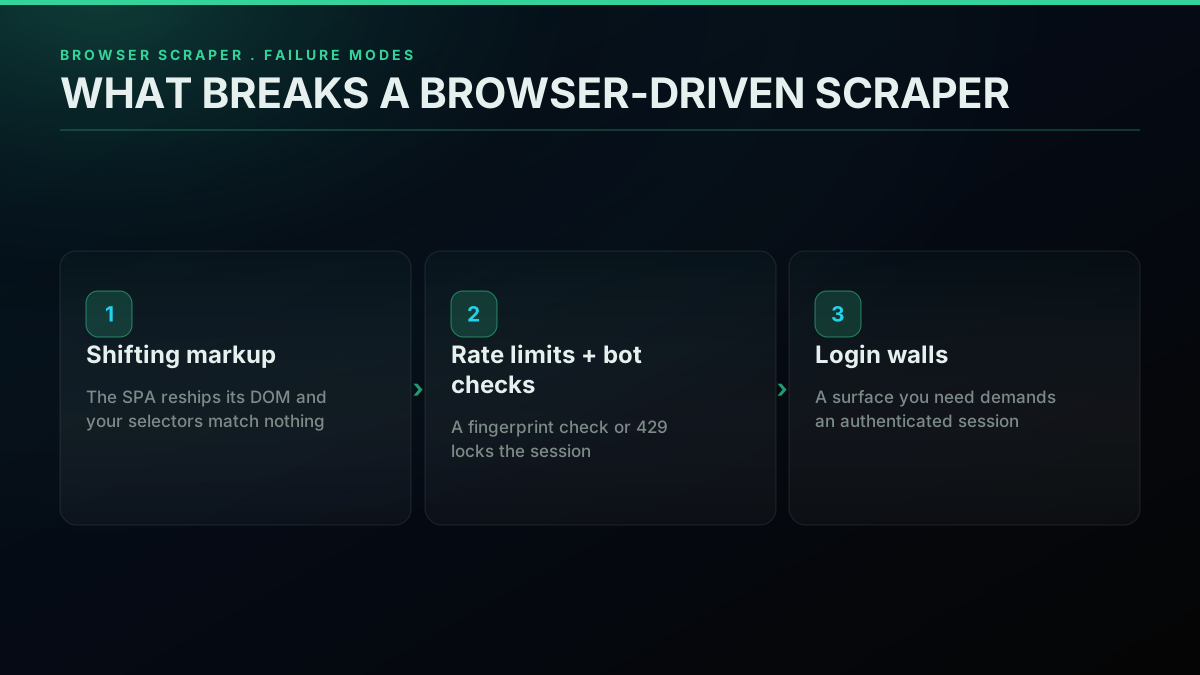
The first route is a headless browser driving the site directly. It is the instinct because it needs no API and mirrors what a human sees, and it does work at first. Then the single-page application reships its markup, your selectors match nothing, and the pipeline returns empty results while looking healthy. Add a login wall on a surface you need, add a bot check that fingerprints the runtime, and you are maintaining proxies, timing randomizers, and session handling on top of the selectors. The Twitter bot detection guide walks through exactly which signals flag a headless session, and none of them have a clean workaround from inside a logged-in browser.
The second route is a marketplace actor, a pre-built scraper you rent by the run. It removes the initial build, which is real value, but it bills per run with a proxy line item underneath and hands you a vendor-shaped payload you then reshape into your own model. The tradeoff is spelled out in the marketplace actor versus read API comparison, and the short version is that you have traded your maintenance for someone else's opaque fetch mechanism plus a cost that does not shrink when your read volume does. If a browser route is what you inherit anyway, you will end up shopping for residential IPs, and the best residential proxies for scraping guide shows what that adds to the bill.
The third route is the official developer API. It returns clean data on a channel the platform sanctions, which matters, but read access bills per call on pay-per-use, behind app registration and an OAuth flow, and there is no free tier in 2026. If you are trying to work out whether the free path reads anything useful for you, the is the Twitter API free walkthrough covers what the old zero-cost tier did and did not return, and the how to get a Twitter API key guide covers the registration flow if you decide to go that way.
The fourth route is a per-call read API. You send a bearer token to a documented endpoint and get structured JSON, priced per call so the bill tracks reads rather than a subscription floor. It is the route this guide builds on because it is the only one that stays off the logged-in surface while still costing in proportion to what you actually pull. The reason people keep converging on it is not marketing, it is fatigue with the alternatives, and you can watch that fatigue play out in public. Here is a developer reaching for a scraping workaround simply because the official pricing did not fit a small project:
https://x.com/sabeshbharathi/status/2052689012054507780
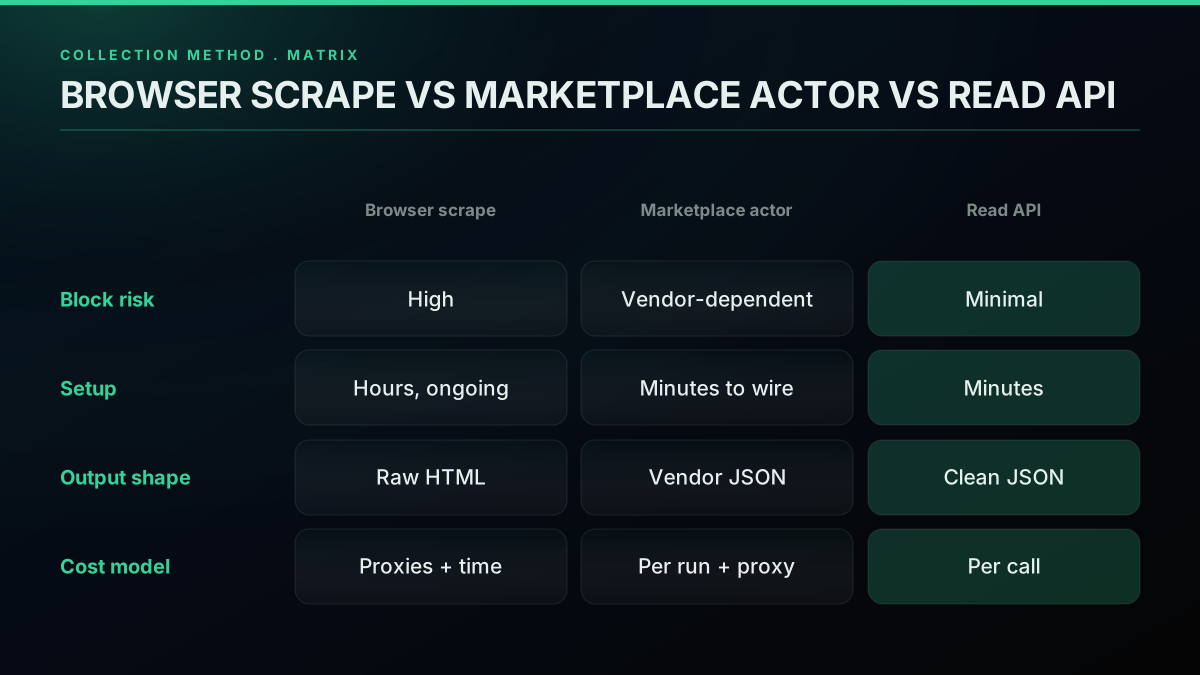
That instinct, scrape because the official-API tier is too expensive for the job, is the exact tension a per-call read API resolves. You get a documented channel without a subscription floor. The same axes laid out as a table make the tradeoff concrete, so you can point at the row that matches your constraints:
| Route | Session held | Setup | Output shape | Cost model | Fails when |
|---|---|---|---|---|---|
| Headless browser | Yes, logged-in | Hours, then ongoing | Raw HTML you parse | Proxy pool plus your time | Markup shifts, bot check fires, login wall |
| Marketplace actor | Vendor-dependent | Minutes to wire | Vendor JSON you reshape | Per run plus proxy overhead | Actor breaks, cost floor stays |
| Official developer API | No | Hours, app review plus OAuth | Clean JSON | Pay-per-use, from $0.005 a post read | No free tier, approval queue |
| Per-call read API | No | Minutes | Clean JSON | Per call, tracks reads | Almost nothing structural to break |
The community keeps arriving at the same conclusion in threads about search-scraping specifically, where the recurring question is not how to write cleverer selectors but where to find a path that simply stays up:
Reliable way to scrape X (Twitter) Search?
With the route chosen, the rest of this guide assumes a per-call read endpoint and builds the collector on top of it. The endpoint we call throughout is the advanced-search read, which takes a query, a result type, and an optional cursor, and returns a page of tweets plus the next cursor. Everything else is engineering around that one contract.
How to choose the right Twitter scraper
The comparison table settles the route; choosing a specific tool inside it comes down to five questions, asked in this order because each one rules options out cheaply before the next one costs you time.
First, what volume and how steady? A one-off pull of a few thousand tweets fits any metered option and the signup credit alone, while a steady monitor running every fifteen minutes makes the monthly arithmetic the deciding number, so price your real call count rather than the headline rate. Second, which surfaces do you need? Search and timelines are table stakes; replies, quote tweets, retweeters, threads, followers and media are not, and a tool that only returns timelines will force a second vendor the moment your analysis needs the reaction to a post. Third, how fresh does the data have to be? Daily batch work tolerates polling, but alerting on new posts wants push delivery, such as a webhook monitor, so you are not paying for empty polls. Fourth, who holds the account risk? Anything that logs in to X with accounts you own puts the suspension on you; a hosted read API keeps it off your books. Fifth, can you leave cheaply? Prefer plain HTTPS and JSON over a vendor SDK or a proprietary run format, keep your parsing layer separate from the client, and switching later is a base URL and a field map rather than a rewrite.
Run a candidate through all five with a real workload before you commit. A day of your actual queries against the free credit tells you more about rows per call, gaps and latency than any comparison page, this one included.
What tweet data you can collect: the shape of a tweet
A tweet is not a string, it is a structured object, and understanding its fields before you write a parser saves you from re-pulling data later because you stored too little. A read response hands you an array of these objects, and each one carries far more than the visible text: a stable id, the author as a nested object, engagement counters, timestamps, language, and references to any quoted or replied-to tweet. Deciding which of those fields you keep is a design decision, not an afterthought, because it sets both your storage cost and what questions your dataset can answer.
Start with the fields you will touch on almost every project. The id is the primary key of the whole tweet universe: globally unique, never reused, and the value you deduplicate and join on. The text is the post body. The created_at timestamp lets you window, sort, and bucket by time. The nested author object carries the poster's id, username, display name, verified flag, and follower count, which is why a single search response is often enough to build a basic influence view without a second call. Engagement counters like reply_count, retweet_count, favorite_count, quote_count, bookmark_count, and view_count are what turn a raw capture into something you can rank.
def extract(tweet):
    author = tweet.get("author", {})
    return {
        "id": tweet["id"],
        "text": tweet.get("text", ""),
        "created_at": tweet.get("created_at"),
        "lang": tweet.get("lang"),
        "author_id": author.get("id"),
        "username": author.get("username"),
        "followers": author.get("followers_count"),
        "replies": tweet.get("reply_count", 0),
        "retweets": tweet.get("retweet_count", 0),
        "likes": tweet.get("favorite_count", 0),
        "quotes": tweet.get("quote_count", 0),
        "bookmarks": tweet.get("bookmark_count", 0),
        "views": tweet.get("view_count", 0),
        "is_retweet": tweet.get("is_retweet", False),
        "is_quote": tweet.get("is_quote", False),
    }
That flat record is a sane default for most analysis: it keeps everything you sort or aggregate on and drops the deep nesting you rarely query. Notice the two boolean flags at the end. A collector that ignores is_retweet and is_quote quietly double counts, because a retweet carries the original text and a quote wraps another tweet, so a naive count of a query treats one underlying post as several. If your analysis is about original authorship, filter retweets out at extraction time; if it is about spread, keep them and mark them. Deciding this once, at the object level, prevents a whole class of wrong numbers downstream.
Profile info and follower stats
The author block inside every tweet already carries the profile fields most projects need: the username, the numeric id and followers_count, which the extractor above keeps as followers. Store them on each row rather than looking the profile up later, because a follower count is a moment in time, and the value at the time of the tweet is the one that weighs a mention.
Media and referenced tweets are the fields people forget until they need them. When a tweet has images or video, the payload includes an extended_entities.media array with type and URL for each attachment, and when a tweet quotes another, the quoted object rides along inside the parent. If your project only measures text sentiment you can drop both and save storage, which is the data minimization posture worth defaulting to. If you are building a media archive or a quote graph, you keep them deliberately. The point is that the object gives you the choice, and a rendered HTML page would have forced you to reverse-engineer all of it from markup. For the request mechanics from scratch, the Python Twitter API tutorial builds the same fetch step by step, and Node developers can follow the Node.js Twitter API tutorial for the same contract in JavaScript.
Authentication and the two credential models
Authentication for a read collector is a single bearer token, and understanding why it is so much simpler than the official OAuth dance is worth thirty seconds because it is the reason your collector has no session to lose. The official developer API requires a developer account, an app registration, and an OAuth credential exchange before a single read. A per-call read API issues a bearer token at signup with no approval queue, and every request carries that token in an Authorization header. There is no token-refresh loop, no callback URL, and no elevated-access form to clear first.
curl "https://api.twitterapis.com/twitter/tweet/advanced_search?query=machine%20learning%20lang%3Aen&product=Latest" \
  -H "Authorization: Bearer YOUR_API_KEY"
That one request returns a page of recent public tweets as JSON. If you are migrating from the official v2 endpoints, the practical change is small: swap the base URL and the auth header, and the tweet data you parse is the same underlying platform data. The full field-by-field mapping is in the Twitter API v2 versus TwitterAPIs guide, and if you are coming off a RapidAPI listing the RapidAPI Twitter alternative walkthrough covers that switch.
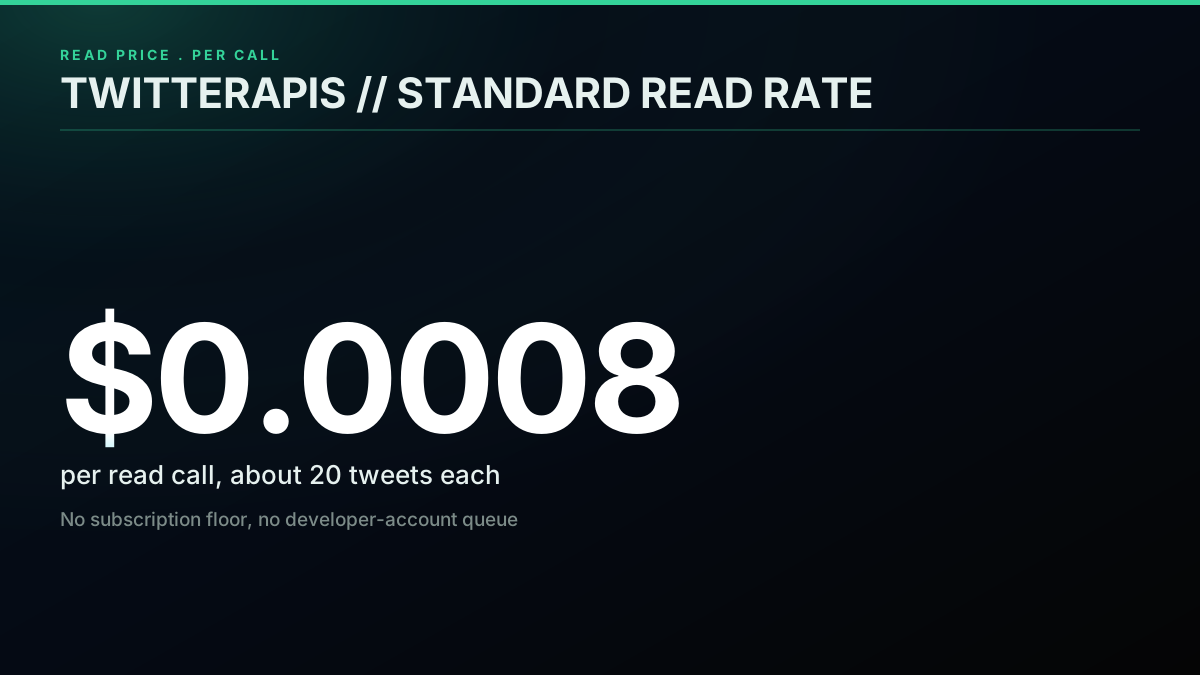
There is a second credential model worth naming even though a pure scrape does not touch it, because it shapes how you reason about safety. Read endpoints need only your provider bearer token. Write actions, the ones that act as an account rather than read public data, use a bring-your-own credential: you pass an auth_token and ct0 value for the acting account with each write request, and the provider never stores them. That separation is why reading is low risk and writing is scoped to exactly the account you supply. On pricing, reads and the simple engagement writes like favorite, retweet, bookmark, and follow all bill at the standard $0.0008 per call, while composing a new tweet is a premium $0.0016 per call. A tweet collector lives entirely in the read half of that model, so your only credential is the bearer token above.
Keep the token out of your code. Read it from an environment variable, never commit it, and rotate it if it ever leaks into a log or a shared notebook. A leaked read token is a metered spend risk rather than an account-takeover risk, but it is still your credit, so treat it like any other secret. The rest of the collector assumes the token lives in an environment variable and is loaded once at startup.
Keyword search extraction: scrape less by asking better
The cheapest tweet is the one you never request, so the highest-leverage optimization in any collector is a tight query, and the advanced-search operators are what let you push filtering to the server instead of pulling a broad result and discarding most of it. Every operator you add is fewer pages to paginate, fewer calls to pay for, and less noise to clean, which means query craft is not a nicety, it is the first cost control you reach for.
The operators fall into a few families. Author scoping with from:username restricts a search to one account, and to:username restricts it to replies aimed at one account. Time scoping with since:YYYY-MM-DD and until:YYYY-MM-DD bounds the window, which is the foundation of the historical-depth technique later in this guide. Engagement floors like min_faves:100 and min_retweets:25 drop low-signal posts before they ever reach you, which is how you turn a firehose into a shortlist. Content filters like filter:links, filter:images, and filter:videos keep only tweets with a given attachment, and the negation form -filter:replies strips replies so you collect original posts. Language scoping with lang:en keeps the result monolingual, and a quoted "exact phrase" matches a literal string.
# a firehose you will regret paginating
broad = "python"

# a shortlist you can actually store and analyze
tight = 'python "data pipeline" min_faves:20 -filter:replies lang:en'
The difference between those two queries is the difference between a hundred pages of noise and three pages of signal, at a fraction of the cost. Compose operators freely: they combine with an implicit AND, so from:handle filter:links since:2026-01-01 min_faves:5 returns links posted by one account this year that cleared a small engagement floor. The advanced search operators reference is the full catalog, and it pays to build your query interactively against a small count before you turn on pagination, because a query that returns junk on page one returns junk on all fifty pages.
One habit separates cheap collectors from expensive ones: filter on the server, not in your code. It is tempting to pull python and drop the noise locally, but you paid for every one of those noise tweets on the way in. Push the language, the engagement floor, and the reply filter into the query string so the server never sends what you would only throw away. When you cannot express a filter as an operator, apply it in extract before you store, but reach for the operator first every time. This single discipline is often the largest line-item difference between two teams pulling the same data.
Pagination that does not lose rows: cursors versus offsets
A single call returns one page, so collecting a full result set means pagination, and the way you paginate decides whether your dataset is complete or quietly full of gaps. The read endpoint uses cursor pagination: each response includes a next_cursor token that points at the exact next slice of results, and you re-request with it until it comes back empty. The reason this matters is that the obvious alternative, numbered pages, is broken for data that changes while you read it.
Picture requesting page=1, then page=2. Between those two calls a handful of new tweets arrive at the top of the result set. Now everything has shifted down by a few positions, so page=2 re-serves rows you already saw on page=1, or skips rows that slid across the boundary. You either duplicate or miss, and you cannot tell which from the outside. A cursor sidesteps this entirely because it is an opaque pointer to a position in the result set, not an arithmetic offset. New data landing above your cursor does not move your cursor, so the next page is always the true next slice. This is why every serious data API paginates with cursors for anything that changes over time.
def paginate(query, key, max_pages=50):
    cursor = None
    for _ in range(max_pages):
        params = {"query": query, "product": "Latest"}
        if cursor:
            params["cursor"] = cursor
        r = requests.get(
            BASE,
            params=params,
            headers={"Authorization": f"Bearer {key}"},
            timeout=20,
        )
        r.raise_for_status()
        data = r.json()
        page = data.get("tweets", [])
        if not page:
            break
        yield page
        cursor = data.get("next_cursor")
        if not cursor:
            break
Two design choices in that generator matter. It yields each page rather than accumulating everything in memory, so a caller can write pages to disk as they arrive instead of holding a million tweets in RAM. And it stops on two conditions, an empty page or an empty cursor, so it terminates cleanly whether the data runs out or the cursor does. The max_pages ceiling is a safety valve, not a real stop condition: it caps a runaway query so a mistake does not paginate forever and run up spend. Set it to whatever depth your use case needs and treat it as a circuit breaker, not a limit you expect to hit.
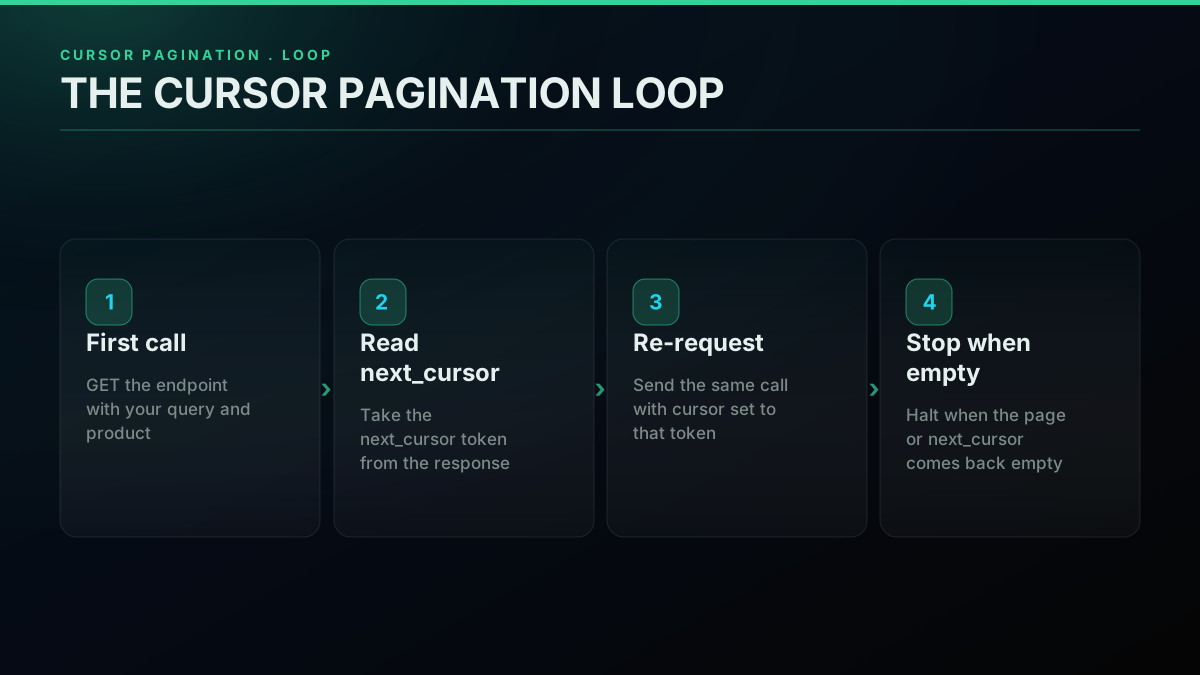
The rule that keeps cursor pagination correct is to treat the cursor as a black box. Do not decode it, do not try to rebuild it, do not skip ahead by guessing a value. Store the exact string you were handed and send it back unchanged. The moment you manipulate a cursor you reintroduce the offset bug you were avoiding. There is one more habit that turns a fragile long pull into a resumable one: checkpoint the cursor to disk as you go. If you write each page and record the last cursor beside it, a run that dies on page four hundred restarts from page four hundred rather than page one. For a few hundred tweets this is irrelevant; for a multi-hour archive pull it is the difference between a thirty-second retry and losing an afternoon. The assembled collector later in this guide bakes that checkpoint in.
Start building with TwitterAPIs
$0.0008 a call, about $0.04 per 1,000 tweets at 20 tweets a page. $0.50 free credits. No credit card required.
How many tweets you can collect per day: rate-limit math that never trips a 429
A collector that sprints hits a rate limit, waits out a penalty, and finishes slower than one that paces itself, so the goal is not to react to 429 responses but to size a request rate that never provokes one. This is arithmetic, not guesswork, and doing the math once at the top of a run is worth more than any amount of retry cleverness. The mental model is a token bucket: your plan refills request capacity at a steady rate, and as long as your average request rate stays under that refill rate, the bucket never empties and you never see a 429.
The formula is short. Take your plan's sustained request ceiling in requests per minute, call it C. Pick a safety factor S below one, say 0.8, so you deliberately run under the ceiling. Your safe delay between requests is then sixty divided by the product of C and S. If your ceiling is 300 requests per minute and you run at 80 percent of it, that is 60 divided by 240, which is 0.25 seconds between pages. Since each read page returns about twenty tweets, that pace pulls roughly eighty tweets per second, or a bit under five thousand a minute, without ever touching the ceiling. Recompute this whenever your plan changes and you have a rate that is fast and quiet.
import time
import random

class RateBudget:
    def __init__(self, requests_per_minute, safety=0.8):
        self.delay = 60.0 / (requests_per_minute * safety)
        self._last = 0.0

    def wait(self):
        elapsed = time.monotonic() - self._last
        gap = self.delay - elapsed
        if gap > 0:
            # small jitter avoids a synchronized stampede across workers
            time.sleep(gap + random.uniform(0, self.delay * 0.1))
        self._last = time.monotonic()
Call wait() once before every request and your collector self-paces to the budget, with a touch of jitter so that if you ever run several workers they do not fire in lockstep and spike the endpoint on the same tick. That handles the steady state. You still need a fallback for the genuine blip, the transient network reset or the occasional 429 that slips through when a shared window is busy, and the right fallback is exponential backoff with jitter rather than a fixed sleep.
def get_with_backoff(params, key, max_retries=5):
    for attempt in range(max_retries):
        try:
            r = requests.get(
                BASE, params=params,
                headers={"Authorization": f"Bearer {key}"},
                timeout=20,
            )
            if r.status_code == 429:
                retry_after = r.headers.get("Retry-After")
                nap = float(retry_after) if retry_after else (2 ** attempt)
                time.sleep(nap + random.uniform(0, 1))
                continue
            r.raise_for_status()
            return r.json()
        except requests.RequestException:
            time.sleep((2 ** attempt) + random.uniform(0, 1))
    return {}
Two details make that helper correct rather than merely present. It reads the Retry-After header before falling back to a doubling interval, because a well-behaved server tells you exactly how long to wait and guessing wastes time; the header is part of the HTTP spec for a 429, documented in RFC 6585 and the MDN reference for status 429. And it adds random jitter to every wait so that a fleet of retrying clients does not converge on the same retry instant, which is the thundering-herd failure that turns one busy moment into a sustained one. The token-bucket idea underneath all of this is a classic, and the token bucket model is worth reading if you want the theory behind the delay you just computed. For how the read windows are actually sized so you can pick a real C, the Twitter API rate limit guide has the numbers.
Deduplication: the seen-set every collector needs
Any collector that runs more than once, or stitches multiple queries together, will encounter the same tweet twice, so deduplication is not optional cleanup, it is a core component you build in from the start. The key is the tweet id. It is globally unique and never reused, so a tweet appearing in two pages, two overlapping date windows, or two runs is the same row every time, and the dedup rule is simply: before you store an id, check whether you have already stored it, and skip if so.
For a run that fits in memory, a Python set is the entire implementation. You hold the ids you have written, test membership before writing, and add on write. This is constant time per check and costs a few dozen bytes per id, which is trivial for tens of thousands of tweets and fine into the low millions on a normal machine.
class SeenSet:
    def __init__(self):
        self._ids = set()

    def is_new(self, tweet_id):
        if tweet_id in self._ids:
            return False
        self._ids.add(tweet_id)
        return True

def dedup(pages):
    seen = SeenSet()
    for page in pages:
        for tweet in page:
            if seen.is_new(tweet["id"]):
                yield tweet
Two scaling paths open up when the id set no longer fits comfortably in memory or must survive a restart. The first is a database UNIQUE constraint: put a UNIQUE index on the id column and let INSERT OR IGNORE drop repeats at the storage layer, which moves dedup out of your process entirely and makes it durable across runs. The second, for very large streams where you only need a probabilistic pre-check, is a Bloom filter, a memory-cheap structure that tells you an id is definitely new or probably seen, which you pair with the UNIQUE constraint as the authoritative backstop. Most collectors never need the Bloom filter; the in-memory set plus a UNIQUE column covers the vast majority of real workloads.
Boundary duplicates deserve a specific mention because they surprise people. When you reconstruct a long history by querying contiguous date windows, a tweet posted right at a window edge can legitimately appear in both adjacent windows, since the boundaries are inclusive on both sides. That is not a bug in your paginator, it is expected, and the id set is exactly what absorbs it. Deduplicate on id after you concatenate windows and the overlap vanishes without any special-case edge logic. This is why the seen-set sits at the center of the collector rather than bolted on at the end: every other component, pagination, date windows, re-runs, can produce a duplicate, and the id set is the one place that guarantees the final dataset holds each tweet exactly once.
Somewhere to put the scraped data: from JSON Lines to a queryable table
Where you put the tweets determines what you can do with them, so storage is a design choice matched to the run rather than a default you never revisit. The pattern that scales across almost every project is two stages: append the raw objects to JSON Lines first as an immutable capture, then load them into a table when you want to query. That order means a parsing mistake never costs you a re-pull, because the raw JSONL is still on disk to reprocess.
JSON Lines, one JSON object per line, is the right raw format because it preserves the full tweet object, appends cheaply as pages arrive, and streams back without loading the whole file into memory. You can write it during pagination so a long run is durable page by page rather than all-or-nothing at the end.
import json

def append_jsonl(tweets, path):
    with open(path, "a", encoding="utf-8") as f:
        for tweet in tweets:
            f.write(json.dumps(tweet, ensure_ascii=False) + "\n")
The ensure_ascii=False flag matters more than it looks. Without it, non-Latin characters and emoji get escaped into ASCII sequences that survive but read badly and bloat the file; with it, the text round-trips as real Unicode. The Python json module documentation covers the serialization options worth knowing, including how to handle objects the encoder does not natively serialize. Appending in text mode keeps the file greppable and streamable, which is exactly what you want for a raw capture you may reprocess several times.
When you want to query rather than stream, load the capture into SQLite, which gives you a single-file database with SQL, indexing, and a UNIQUE constraint for dedup, all with no server to run. The schema extracts the columns you filter and sort on and keeps the raw JSON in a column so nothing is lost.
import sqlite3

def make_store(path="tweets.db"):
    conn = sqlite3.connect(path)
    conn.execute("""
        CREATE TABLE IF NOT EXISTS tweets (
            id TEXT PRIMARY KEY,
            author_id TEXT,
            username TEXT,
            created_at TEXT,
            lang TEXT,
            likes INTEGER,
            retweets INTEGER,
            text TEXT,
            raw TEXT
        )
    """)
    conn.execute("CREATE INDEX IF NOT EXISTS idx_created ON tweets(created_at)")
    return conn

def store(conn, tweets):
    rows = []
    for t in tweets:
        e = extract(t)
        rows.append((e["id"], e["author_id"], e["username"], e["created_at"],
                     e["lang"], e["likes"], e["retweets"], e["text"], json.dumps(t)))
    conn.executemany(
        "INSERT OR IGNORE INTO tweets VALUES (?,?,?,?,?,?,?,?,?)", rows
    )
    conn.commit()
The id TEXT PRIMARY KEY plus INSERT OR IGNORE is dedup at the storage layer: a repeated id is silently dropped rather than duplicated or raising, which the Python sqlite3 documentation describes as the conflict-resolution behavior of an ignore clause. Now a question like the top ten authors by like count in a date range is one SQL statement rather than a scripting exercise. Move to Postgres only when the access pattern outgrows a single writer, for instance when a dashboard reads the table while a collector writes it, or when several pipelines share one dataset. Until then SQLite is faster to stand up and easier to move, and the two-stage JSONL-then-table pattern means the upgrade is just a different loader over the same raw capture.
Main challenges of scraping X: every error class and its one fix
Every long scrape eventually hits an error, and the difference between a five-minute diagnosis and a lost afternoon is knowing which class of failure you are looking at, because each class has a distinct signature and a single correct fix. Reading the signature is the skill; once you can name the failure, the response is short. Here is the field guide as a table, then the reasoning behind the two that trip people most.
| Symptom | Class | Root cause | Fix |
|---|---|---|---|
| Burst of HTTP 429 | Rate | Requests faster than the window allows | Pace to the RateBudget delay, honor Retry-After |
| HTTP 200 with empty tweets, cursor still set | Cursor bug | Cursor mutated or query too narrow | Store and resend the cursor verbatim, log it |
| Response time creeps up across pages | Latency | Deeper, less-cached positions, or tight timeout | Raise timeout to twenty seconds, let backoff handle real stalls |
| Final count lower than expected | Partial pull | Hit max_pages, exhausted retries, or over-filtered | Raise the ceiling, raise max_retries, loosen the query |
| Connection reset mid-run | Network | Transient socket or DNS blip | Backoff and retry the same request |
| KeyError on a field you expected | Schema drift | A field was absent on some tweets | Use .get with a default in extract, never bracket access |
The empty-page-with-a-live-cursor case is the one that looks like a bug and usually is not, or is a very specific one. A request returns HTTP 200 with an empty tweets array even though you know more data exists. It is almost always one of two things. Either the query genuinely has no more matches, in which case the run is simply done and the empty page is your stop signal, or the cursor you sent back was altered somewhere between receiving and resending it. Confirm which by logging the exact cursor string and the returned count on every request. If the count goes to zero while the cursor is still non-empty and the query is broad, you have a cursor-handling bug, and the fix is the black-box rule from the pagination section: store the token verbatim and send it back untouched.
The partial-pull case is the failure that browser scraping hides and a read API exposes cleanly, which is a feature. The run completes, but the total is lower than you expected, and because there was no error you might not notice for days. Check three things in order. First, did pagination hit its max_pages ceiling before the cursor emptied, in which case raise the ceiling. Second, did a call exhaust its retries and return an empty dict that ended a page early, in which case raise max_retries and confirm your backoff is actually sleeping rather than spinning. Third, did your query filter more aggressively than you meant, in which case loosen a min_faves floor or a lang constraint. Logging the page count and the cursor on every request turns all six rows of that table from a guessing game into a one-line read of the logs.
Building a tweet data pipeline: the production collector, assembled
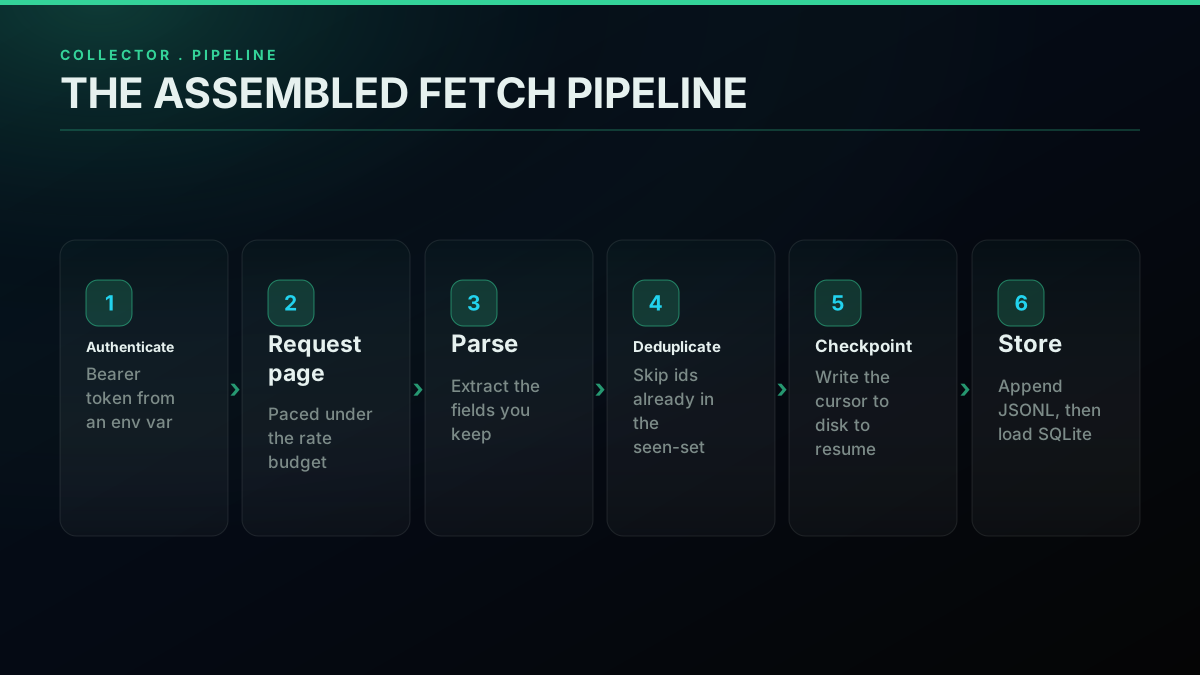
With each piece built in isolation, assembling them into one collector is mostly wiring, and seeing them together shows how pagination, rate budgeting, deduplication, checkpointing, and storage compose into something you can run unattended. The class below reads a query, paces itself, deduplicates on id, checkpoints its cursor so it can resume, and writes to both the raw JSONL capture and the SQLite table in one pass.
import os

class TweetCollector:
    def __init__(self, key, jsonl="capture.jsonl", db="tweets.db",
                 rpm=300, max_pages=200):
        self.key = key
        self.jsonl = jsonl
        self.conn = make_store(db)
        self.budget = RateBudget(rpm)
        self.max_pages = max_pages
        self.seen = SeenSet()
        self.ckpt = jsonl + ".cursor"

    def _resume_cursor(self):
        if os.path.exists(self.ckpt):
            return open(self.ckpt).read().strip() or None
        return None

    def collect(self, query):
        cursor = self._resume_cursor()
        for _ in range(self.max_pages):
            self.budget.wait()
            params = {"query": query, "product": "Latest"}
            if cursor:
                params["cursor"] = cursor
            data = get_with_backoff(params, self.key)
            page = data.get("tweets", [])
            if not page:
                break
            fresh = [t for t in page if self.seen.is_new(t["id"])]
            if fresh:
                append_jsonl(fresh, self.jsonl)
                store(self.conn, fresh)
            cursor = data.get("next_cursor")
            if not cursor:
                break
            with open(self.ckpt, "w") as f:
                f.write(cursor)
        return self.conn

# run it
collector = TweetCollector(os.environ["TWITTERAPIS_KEY"])
collector.collect('llm evaluation min_faves:10 -filter:replies lang:en')
Read the collect loop against the components it uses. self.budget.wait() paces every request to the rate you computed, so the collector never provokes a 429. get_with_backoff rides out the transient blip that slips through anyway. The fresh list comprehension runs the seen-set so a tweet is written exactly once even if pages overlap or you re-run the job. Writing the cursor to a checkpoint file after each page means a crash on page one hundred and eighty resumes from page one hundred and eighty. And because writes go to JSONL first and the table second, a parsing change never costs you the raw data. This is the whole implementation of a durable collector, and it is a few dozen lines because every hard part lives in a component you already understand.
Watching the request, parse, and store steps run end to end makes the moving parts concrete, so if you prefer to see a Python collection loop execute before you adapt this one, this walkthrough covers the same shape against the platform data:
https://www.youtube.com/watch?v=fHHDM2-If9g
From here the collector is a foundation you extend rather than rewrite. Point it at a from:username query and it becomes an account monitor. Wrap collect in a scheduler and it becomes a live keyword tracker. Feed the resulting table into a model and it becomes the input to a tweet sentiment pipeline, or into a notifier and it becomes the read half of a Twitter bot. The collection layer stays the same; only the query and the downstream analysis change. For the production-hardening details once it is doing real work, the scraping best practices guide covers backoff tuning, checkpoint cadence, and pagination depth in more detail.
Running the collector unattended
A collector earns its keep when it runs on a schedule without you watching it, and turning the one-shot build into an unattended job comes down to three additions: a trigger that fires it on a cadence, an incremental stop so each run pulls only what is new, and a concurrency rule so parallel workers stay under one shared rate budget. Get those three right and the same few dozen lines run for months, quietly appending to the store while you look at the data instead of the pipeline.
Scheduling is the easy part, because the id-based deduplication already makes repeated runs safe. Fire the collector from cron, a systemd timer, or any job scheduler, and each run appends to the same JSONL capture and the same SQLite table. If two runs overlap and pull some of the same tweets, the seen-set and the UNIQUE id column absorb the repeats, so there is no coordination to get wrong. The one rule is to make sure only one instance of a given query runs at a time, with a lock file or a scheduler that skips if the previous run is still going, so you do not paginate the same query twice in parallel and waste calls.
Incremental collection is what keeps a scheduled monitor cheap. A naive scheduled run re-walks the whole result set every time and pays for tweets it already has. The fix is a high-water mark: remember the newest tweet id you stored, request newest-first, and stop paginating the moment a page contains an id you have already seen, because everything past that point is older and already captured. That turns each run into a pull of just the delta since the last run.
def newest_stored_id(conn):
    row = conn.execute("SELECT MAX(id) FROM tweets").fetchone()
    return row[0] if row and row[0] else None

def collect_incremental(collector, query):
    high_water = newest_stored_id(collector.conn)
    cursor = None
    for _ in range(collector.max_pages):
        collector.budget.wait()
        params = {"query": query, "product": "Latest"}
        if cursor:
            params["cursor"] = cursor
        data = get_with_backoff(params, collector.key)
        page = data.get("tweets", [])
        if not page:
            break
        # stop as soon as we reach tweets we already have
        if high_water and any(t["id"] <= high_water for t in page):
            fresh = [t for t in page if t["id"] > high_water]
            if fresh:
                append_jsonl(fresh, collector.jsonl)
                store(collector.conn, fresh)
            break
        append_jsonl(page, collector.jsonl)
        store(collector.conn, page)
        cursor = data.get("next_cursor")
        if not cursor:
            break
The id comparison works because tweet ids are monotonic over time: a larger id is a newer tweet, so a page holding any id at or below your high-water mark is where the new data ends. That single early-stop condition is often a ten-to-one cost reduction on a busy monitor, because most refreshes find only a handful of new tweets and stop after the first page instead of walking to the end.
Concurrency is the last addition, and the rule is simple: parallel workers must share one rate budget, not one each. If you run five queries in five threads and each has its own RateBudget sized to the full ceiling, your aggregate request rate is five times the ceiling and you will trip a 429 constantly. Either give all workers a single shared budget behind a lock, or divide the ceiling by the number of workers when you construct each one. The jitter already built into the budget and the backoff keeps the workers from firing in lockstep. Remember too that the in-memory seen-set is per process, so once you run several workers the authoritative deduplication has to be the UNIQUE id column in the shared database, which is exactly why the storage layer owns dedup rather than the Python set alone.
What teams build with collected tweets
The collector above is the same whatever the data is for; what changes is the query and how often it runs. These are the four workloads that account for most tweet collection, and the part of this guide each one leans on.
Brand and reputation monitoring
A brand query (the product name, its handle, common misspellings) run on a short interval, with the seen-set from the deduplication section so a mention is counted once. The hard part is recall, not volume: a monitor that misses the one angry thread is worse than none, so pair the search with the account's own mentions timeline.
Competitive intelligence
The same collector pointed at competitors' handles and product names, run daily rather than every few minutes. Store the author's follower count with each row (the tweet object section shows where it lives) so a mention from a large account is not weighed the same as one from a new account.
AI training and LLM pipelines
Large, deduplicated, language-filtered corpora: lang:en, -filter:replies and an engagement floor like min_faves:10 in the query, as in the assembled collector, keep the set clean before it reaches a tokenizer. Public data only, and keep the tweet id with every row so a deletion can be honored later.
Extract trending topics
Trends are their own endpoint rather than a search: one call per location returns the current topics, which you then feed back into keyword search to collect the tweets behind each one. Poll on a schedule and store each snapshot with its timestamp, because a trend list is only meaningful against the one before it.
The cheapest pay-as-you-go Twitter API. Try it free.
$0.0008 a call, about $0.04 per 1,000 tweets at 20 tweets a page. $0.50 free credits. No credit card required.
Cost modeling: three real pipelines, with the arithmetic
Per-call pricing is only useful if you can compute your own bill, so rather than one abstract example here are three concrete pipelines with the arithmetic worked all the way through, using the standard read rate of $0.0008 per call at roughly twenty tweets per call. Model your own numbers the same way and you will know your spend before you write a line of code, which is the whole advantage of a metered read API over a subscription you pay whether you use it or not.
The first pipeline is a one-time archive backfill. Say you want the full public history of an account that has posted fifty thousand tweets. At about twenty tweets per read call that is fifty thousand divided by twenty, or two thousand five hundred calls. At $0.0008 each that is two dollars, and adding roughly ten percent overhead for sparse or empty date windows brings it to about two dollars and twenty cents, paid once. If you use the premium full-history endpoint for the deepest pulls, that path bills at $0.0024 per call, which the full history scraping guide covers, but for most accounts the standard search path reconstructs the archive at the two-dollar order of magnitude. A finished archive then needs no ongoing spend at all.
The second pipeline is a live keyword monitor. Suppose you track five keywords, refresh every fifteen minutes around the clock, and each refresh pulls two pages of about forty tweets. Two pages is two calls, so five keywords is ten calls per refresh. Four refreshes an hour across twenty-four hours is ninety-six refreshes a day, which is nine hundred and sixty calls a day, or about seventy-seven cents a day, which lands near twenty-three dollars a month. The bill scales linearly with how often you refresh and how many keywords you track, so halving the cadence halves the cost, and you can price any variation by hand.
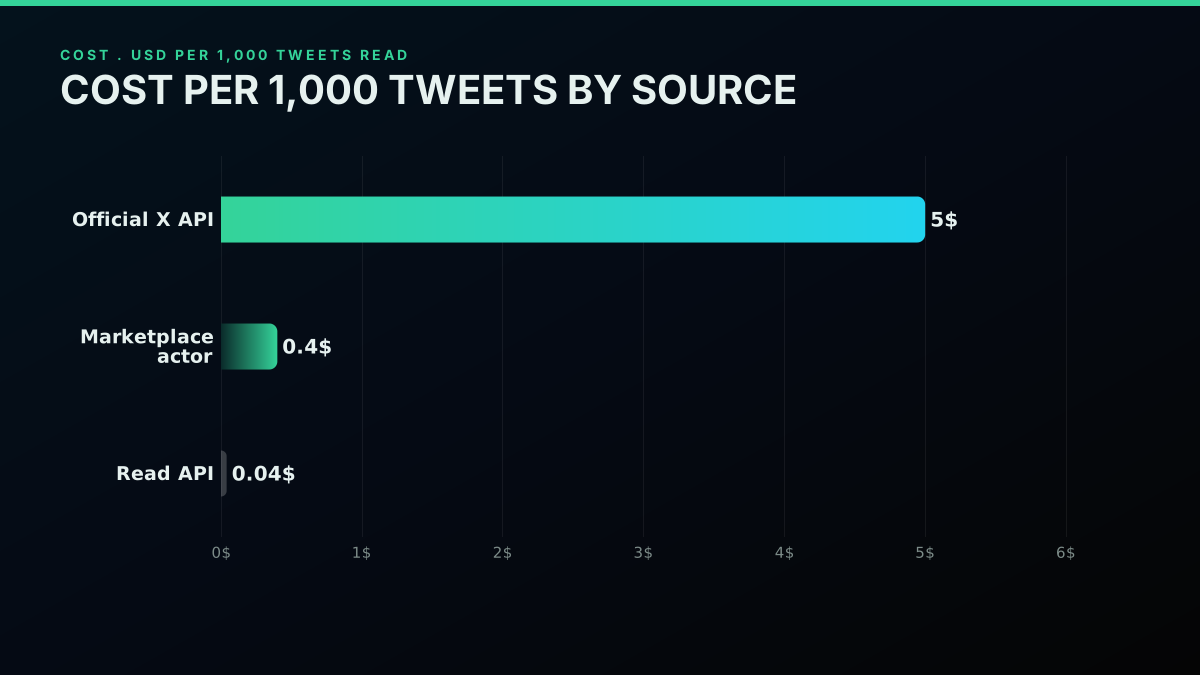
The third pipeline is a follower-graph snapshot. Say you want a one-time snapshot of the followers of an account with one hundred thousand followers. Follower reads bill at the same standard $0.0008 per call, and pulling a hundred thousand ids across paginated pages costs on the order of dimes rather than dollars, a fraction of a monitor's monthly bill for a one-off structural capture. The mechanics of that specific pull are in the export Twitter followers guide. Across all three, the shape is the same: the cost is a function you compute from your own call volume, not a floor you pay regardless of use, and the free signup credit of $0.50 covers about six hundred and twenty-five standard calls, roughly twelve thousand five hundred tweets, before you spend anything. The cost calculator does this arithmetic interactively, and the full Twitter API cost breakdown and the cheapest Twitter API ranking compare the per-call model against the alternatives across realistic scenarios.
Historical depth: reaching past the timeline window
A collector aimed at one account eventually meets a wall that has nothing to do with rate limits: the timeline serves only an account's most recent tweets and stops, so pulling a full history needs a second retrieval path. The user-timeline endpoint exposes a bounded window of recent posts, and no amount of paging reaches past it, because it is a serving limit rather than a rate limit. To go deeper you switch from the timeline to date-window search, which is not bound by that window.
The technique is to slice the account's lifespan into contiguous date ranges and query each one with the time operators from the query-craft section. A window like from:handle since:2025-01-01 until:2025-02-01 returns that account's tweets inside that month, and search does not cap at the recent window the way the timeline does, so walking month by month across the account's active years reconstructs the archive that the timeline alone cannot reach. You paginate inside each window with the same cursor loop, then concatenate the windows and deduplicate on id, which is exactly the boundary-duplicate case the seen-set already handles. Match the window size to the account's volume: a high-volume account may need weekly windows to page cleanly, while a quiet account can use yearly ones. The full tweet history guide goes deep on sizing those windows and stitching them together, and the complete API tutorial covers the timeline and search endpoints side by side.
Two related decisions come up once you are pulling history. Deletions and edits mean a tweet you captured can later vanish or change, so if your dataset must stay current you periodically re-fetch recent tweets and reconcile against what you stored, marking rows that disappeared and updating text that changed; the recover a deleted tweet guide covers what is and is not retrievable once a tweet is gone. And threads are their own retrieval: when you need a full conversation rather than isolated tweets, the thread-expansion endpoint reconstructs it, billed at the premium $0.004 per call, which the fetch full thread guide walks through. Knowing up front whether you need a point-in-time snapshot or a live-reconciled dataset saves you from either over-building a static analysis or under-building a monitor.
Is scraping Twitter legal in 2026? A practitioner's read
The legal question is the one teams skip and then worry about, so it is worth a direct and honest treatment, with the caveat up front that this is a practitioner's read and not legal advice. The short version is that collecting public tweets is largely defensible in the United States when you stay on public data and respect privacy law, but legality is not a single switch, and a handful of separate questions each deserve their own answer.
The anchor in the United States is the hiQ Labs v. LinkedIn line of cases, where the Ninth Circuit held that scraping data which is publicly available, meaning visible without logging in, does not by itself violate the Computer Fraud and Abuse Act, the main federal anti-hacking statute. The reasoning is summarized by the Electronic Frontier Foundation, and the full procedural history, including how the dispute eventually resolved, is traced on the hiQ Labs v. LinkedIn overview. The practical effect is that reading public data is not treated as unauthorized access the way breaking into a private system is. That is the load-bearing point, and it is why a read API that serves public tweet data through an authenticated, documented channel sits on firmer footing than a logged-in browser session pretending to be a person.
Three separate questions live alongside the CFAA one, and conflating them is where teams get into trouble. Terms of service are a contract, not a computer-crime statute, so a platform can allege you breached its agreement even where no hacking law was broken, which is one more reason a documented API channel beats accepting and then violating a user agreement written for human use. Copyright still covers the content of a tweet, so wholesale republication is a different problem from counting and analysis. And privacy law engages the instant a tweet contains personal data about an identifiable person. If any of your subjects are in the European Union, the GDPR personal-data rules require a lawful basis for processing even public personal data, and the enumerated bases, most relevantly legitimate interest, are set out in Article 6 of the GDPR; public availability is not a free pass, and legitimate interest calls for a documented balancing test rather than an assertion.
That leaves a short operating posture that keeps most teams clear, and it doubles as good engineering. Collect only public data. Never log in to scrape. Never circumvent an access control. Minimize what you keep, because storing full profiles and media you will never analyze raises both privacy exposure and cost for no benefit, so if you only need text and timestamps to measure sentiment, keep only those. Have a lawful basis ready if personal data is in scope. And read the platform's own terms directly rather than secondhand, since the X developer agreement and policy states what the platform permits, and aligning to an authenticated, documented channel keeps you clear of the contract questions that a logged-in session invites. None of this is legal advice, and your jurisdiction and use case change the analysis, but the framing that keeps teams out of trouble is consistent across all of it: public data, no logged-in scraping, minimize, and use a sanctioned channel.
Handling X's anti-bot measures: when a headless browser is still the right call
The login wall
The login wall is the first anti-bot measure a browser scraper meets: after a few anonymous page views X asks for a session, and every route past that point needs a logged-in account the platform can rate-limit or lock. A read API sidesteps it because the request authenticates with an API key, not a browser session on the site.
For all the reasons a read API wins on public data, there is one narrow case where a headless browser is genuinely the correct tool, and it is worth naming so the recommendation stays honest rather than absolute. If you need data that only renders for a logged-in account, your own private bookmarks, a direct-message thread you own, a setting visible only to you, there is no public read endpoint for it because it is not public, and automating your own authenticated session may be the only path. Even then you take on the maintenance, the account risk, and the terms questions that come with driving a logged-in session, and you confine the automation strictly to your own data.
This is also where the broader shift in access shows up. The affordable, durable path for public tweet data in 2026 is a metered read channel, and developers keep noticing that the free-or-scrape framing has quietly been replaced by pay a fraction of a cent per read, which changes what small projects can justify:
https://x.com/israfill/status/2065868713895829991
For anything involving public tweets at any scale, the read API wins on every axis that decides a production choice: it does not break when the markup moves, it does not put an account at risk, it returns clean structured objects, and it costs in proportion to what you read. The build in this guide is the whole implementation, and it is a few components rather than an open-ended arms race. Even people who build their own extractors tend to land on the same conclusion about where the real difficulty lives:
I built my own social-media media extractor because all the existing sites are full of ads.
The lesson those threads keep reaching is the one this guide is built on: the hard part was never the parsing, it was staying off a hostile, shifting surface, and a documented read endpoint moves you off it entirely.
Are Nitter and snscrape still working?
Mostly no, and it is worth knowing why before you build on either. Both depended on reading X without an account. snscrape's Twitter module stopped returning results in 2023, when X began requiring a logged-in session to view search and timelines, and the project has not restored it. Twint, the older library in the same family, was archived around the same time. Nitter, the privacy-friendly front end, lost its footing in early 2024 when the guest access it relied on was closed off, and its maintainer announced the end of the public project; the instances still running today mostly do so by feeding real X accounts into the backend, which brings back exactly the login and suspension risk the tool used to avoid. A few forks and private instances work for a while and then stop without notice.
The pattern is the lesson. Every free tool in this family worked by borrowing an access path X did not intend to keep open, and when the platform closed the path the tool broke for everyone at once. If a project still depends on one of them, plan the migration now, while it is a choice, rather than on the morning the collector returns nothing.
Can ChatGPT or Claude scrape Twitter?
Not by themselves, and the reason is the same login wall. A chat assistant that browses the web reaches X as an anonymous visitor, sees a sign-in prompt after a few pages, and cannot read search results or a full timeline, so asking it to "pull the last 500 tweets about a topic" gets you a polite refusal or, worse, a confident summary of a handful of posts it happened to see. What does work is giving the assistant a tool. Through the Model Context Protocol, an assistant such as Claude can call a read API directly: it sends the search or timeline request, gets structured tweets back, and works with real data rather than guessing. TwitterAPIs publishes an MCP server for exactly this, so an assistant can run searches, expand threads and read engagement with your key, billed at the same per-call rates as the REST API. The same applies to any agent framework that supports tool calls: the model plans the queries, and the API does the collection.
Next steps for your scraper
Scraping tweets in 2026 is one architectural decision followed by a handful of engineering habits, so it helps to close on a durable-collection checklist that separates a collector you can leave running from a script you babysit. The decision is to read public data through a documented, authenticated channel rather than driving a logged-in browser. The habits are what make that decision hold up over a long run and across many pulls.
Build the query tight, so the server filters before you pay for a page. Paginate with the cursor as a black box, never an offset. Pace requests to a computed budget so you never provoke a 429, and back off with jitter for the blips that slip through. Deduplicate on the tweet id at the center of the pipeline, because pagination, date windows, and re-runs all produce repeats. Capture raw JSON Lines first and load a queryable table second, so a parsing change never costs you a re-pull. Checkpoint the cursor so a crash resumes rather than restarts. Keep only the fields you will use, both for cost and for privacy. And keep the whole thing on public data with a lawful basis ready, because the legal and the engineering considerations point the same direction.
When you are ready to run it against live data, grab a free key, drop it into the quickstart at the top, and the collector grows from there one component at a time. The pricing page shows the per-call model so you can size a run before it starts, and once your collector is doing real work the best practices guide covers the production details that keep it quiet, cheap, and complete.
// sources
Where these numbers come from
Each row is a figure in this post and the artefact it was read from. Prices and limits on this platform move, so check the date on the source before you plan against it.
- RFC 6585, additional HTTP status codes
- Defines the 429 status and the Retry-After header that the post's backoff helper reads before falling back to a doubling interval.
- MDN reference for HTTP 429
- The second source the post pairs with the RFC for Retry-After semantics on a rate-limited response.
- EFF analysis of the hiQ Labs v LinkedIn ruling
- Backs the legal section claim that the Ninth Circuit held scraping publicly available data, meaning data visible without logging in, does not by itself violate the Computer Fraud and Abuse Act.
- GDPR Article 6, lawfulness of processing
- The provision behind the post's instruction to have a lawful basis ready when collected tweets contain personal data about identifiable people in the European Union.
- X developer agreement and policy
- The platform terms the post tells readers to read directly rather than secondhand, and the basis for its point that a documented API channel beats violating a user agreement written for human use.
- Python sqlite3 module documentation
- Documents the conflict-resolution behavior of INSERT OR IGNORE that the post relies on for storage-layer dedup, where a repeated id is dropped silently rather than raising.
Frequently Asked Questions
The most reliable path is a read API rather than a headless browser. You authenticate with a bearer token, send an HTTP GET to a documented search or timeline endpoint, parse the JSON response, and follow a pagination cursor until it returns empty. Because you never drive a logged-in session against the web interface, there is no anti-automation surface to trip and no account to suspend. Browser scraping still works for a short while, but it breaks whenever the markup changes, the timeline personalizes, or a bot check fires, so production collectors move to a read endpoint that returns structured data on a stable contract.
Do not race the limit. Measure your plan's request ceiling, divide sixty seconds by that ceiling times a safety factor, and sleep that long between pages so you stay under the window by design. When a 429 does arrive, read the Retry-After header if present, otherwise back off with a doubling interval plus a little random jitter, and retry the same request. A collector that paces itself to a fixed inter-request delay finishes faster end to end than one that sprints into the ceiling and then waits out a penalty on every burst.
Match the store to the run. JSON Lines, one JSON object per line, is the right default for a raw capture because it preserves the full tweet object and streams back without loading the whole file into memory. When you want to query the data, load it into SQLite with a UNIQUE id column and a few extracted columns like author, created_at, and text, which gives you dedup and SQL for free in a single local file. Move to Postgres only when several writers or a dashboard need concurrent access. The pattern that scales is append raw JSONL first, then load into a table for analysis.
Collecting public tweets is largely defensible in the United States when you gather only data visible without logging in and you respect privacy law, though legality is not a single yes or no. Courts in the hiQ v. LinkedIn line held that scraping publicly available data does not by itself violate the Computer Fraud and Abuse Act. Platform terms of service are a separate contract question, copyright still covers the content of a tweet, and privacy regimes like the GDPR apply the instant a tweet contains personal data about an identifiable person. The practical posture most teams adopt is public data only, no logged-in scraping, minimize what you keep, and have a lawful basis ready. None of this is legal advice.
Follow the cursor. Each response includes both a tweets array and a next_cursor token that points at the next page. You send the same request again with that cursor set, append the new page to your results, and stop when either the page comes back empty or the cursor comes back null. Treat the cursor as an opaque black box: store it verbatim and send it back unchanged rather than trying to compute page offsets, because offsets shift the moment new tweets arrive between requests and cause missed or duplicated rows.
Deduplicate on the tweet id, which is globally unique and never reused. Keep a set of ids you have already written and skip any id already in the set before you store it. For small runs an in-memory Python set is enough. For large or resumable runs, back the dedup with a UNIQUE constraint on the id column in your database so an INSERT OR IGNORE silently drops repeats, or use a Bloom filter as a memory-cheap pre-check. Boundary duplicates are normal when you stitch date windows together, so the id set is what keeps the final dataset clean.
On a per-call read API the bill tracks how many tweets you read, not a monthly plan. A standard read call costs $0.0008 and returns roughly twenty tweets, which works out to about $0.04 per one thousand tweets before any caching. A free signup credit of $0.50 covers around six hundred and twenty-five standard calls, or about twelve thousand five hundred tweets, with no card required. Premium reads are priced separately: full account-history pagination is $0.0024 per call and full thread expansion is $0.004 per call. Because there is no subscription floor, a small project pays cents and a large one scales in proportion to what it reads.
Check out similar blogs
More guides on the Twitter/X API, scraping, and pricing.
Twitter Scraping in Python (2026): Pick a Route Before You Write Code
Four ways to collect X data in Python, priced honestly: the official X API v2 pay-per-use rate, an account-pool scraper, a headless browser, and a managed read API. What each one actually costs to run for a year.
How to Get Everyone Who Retweeted a Tweet via API (2026)
Pull the full list of accounts that reposted any tweet with a real 2026 API. Runnable Python and Node.js, cursor pagination for the whole list, a real amplifier ranking over live data, a bot filter, and the honest per-call cost.
How to Get All Replies to a Tweet via API (2026)
Pull the replies under any tweet with a real 2026 API. Runnable Python and Node.js, cursor pagination, the conversation_id tail sweep for the long tail, nested replies-to-replies, signal-versus-noise filtering over live data, and the honest per-call cost.
Twitter API Pagination 2026: How next_token Works (and a Simpler Alternative)
How Twitter API pagination works in 2026. The official next_token loop explained field by field, a simpler single-cursor alternative, runnable Python and Node code, and the real per-call cost of a paginated pull.
How to Search Tweets by Hashtag via API 2026 (Python + Node.js)
Search tweets by hashtag with a real 2026 API in Python and Node.js. Runnable code for the hashtag operator, engagement filters, cursor pagination, deduping retweets, counting authors, and the real per-call cost.

Twitter API Tutorial 2026: The Complete Developer Guide
The 2026 Twitter API tutorial built after the pricing collapse. Auth, endpoints, code, rate limits, real costs, and the alternative when official gets too expensive.

How to Use the Twitter API with Python, 2026 Tutorial
A practical 2026 walkthrough for calling the Twitter API from Python. Runnable code for profile lookups, search, followers, replies, pagination, retries, async, and a tweepy port.
Connect Twitter/X to n8n Without Fighting the Official API (2026)
Two working ways to get Twitter/X data into n8n: a polling HTTP Request node and a native webhook push, both with runnable code, no OAuth handshake either way.