GUIDE
Can You Recover a Deleted Tweet via API in 2026?
The honest answer: no API un-deletes a tweet the author removed. Here is what actually works in 2026, checking whether it is really gone, finding an archived copy, and the capture-before-delete pattern that prevents the loss, with live-tested code.
No API un-deletes a tweet the author removed. Once a tweet is deleted from the platform and no copy survives, it is gone, and there is no Twitter or X endpoint, official or third-party, that reverses that, because the data no longer exists to serve. That is the honest answer, and any tool promising to un-delete an arbitrary tweet is selling a copy that was made before the deletion, not a recovery of the original. What you can genuinely do splits into three practical routes, and this guide walks each one with runnable code: confirm whether the tweet is actually gone or just hidden, find a copy if one was archived or cached before it was removed, and prevent the loss entirely by capturing tweets through an API before anyone can delete them.
TL;DR: You cannot recover a deleted tweet after the fact if no copy of it survives, and no API changes that, because a deleted tweet no longer exists on the platform to be fetched. Three things do work. First, check whether the tweet is really gone with a single lookup by id, because a live tweet you simply lost the link to returns full data. Second, if it is genuinely deleted, look for a copy someone made beforehand in the Wayback Machine or archive.today, knowing the hit rate is partial and depends on prior capture. Third, and the only reliable route, use the capture-before-delete pattern: poll an account on an interval, store every tweet with its id and text, diff each snapshot, and keep the copy the moment a tweet disappears. Reads cost 0.0008 dollars per call, about 0.04 dollars per 1,000 tweets, so monitoring one account on a 15-minute poll runs about 2.30 dollars a month, and signup includes 0.50 dollars in free credits with no card.
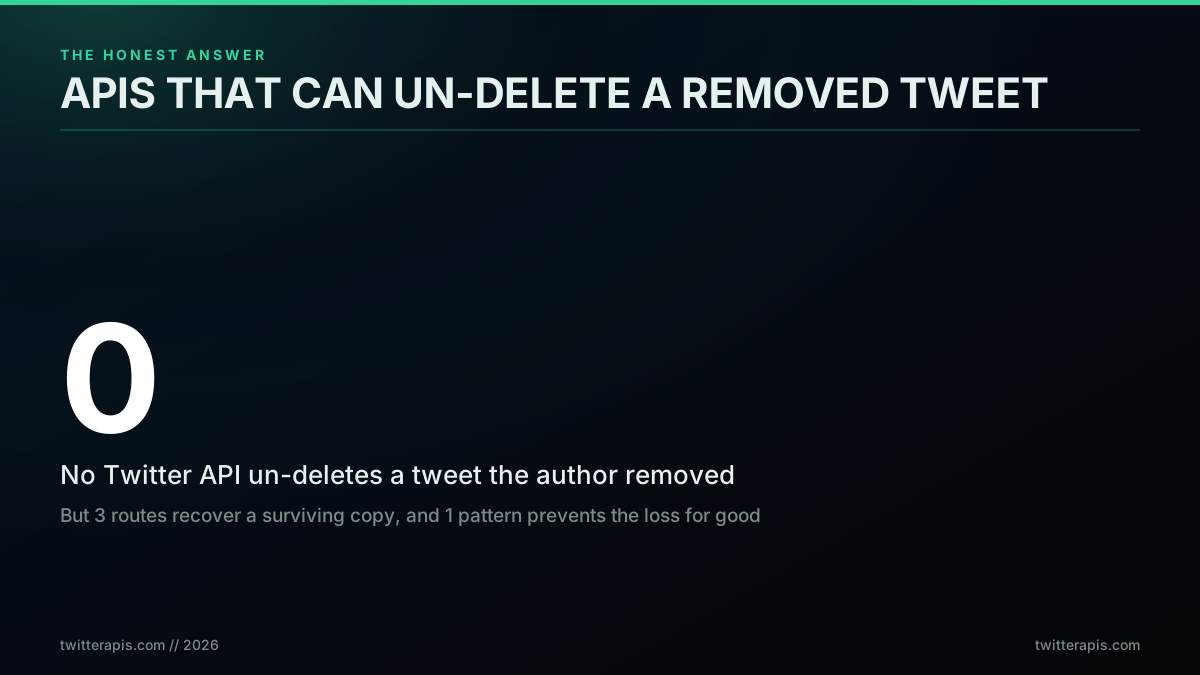
The honest headline: no API un-deletes a removed tweet
Most people arrive at this question holding one of two wrong beliefs, and the useful answer sits between them. One belief is that a deleted tweet is gone forever and nothing can be done, which gives up too early because a still-live tweet or an archived copy is often recoverable. The other belief is that some clever tool or endpoint can pull back any deleted tweet on demand, which is simply false and leads people to trust services that cannot deliver. The truth is that recovery is entirely a question of whether a copy exists, and the rest of this post is about how to find one, or better, how to guarantee one exists before you ever need it.
The Honest Answer: What "Recover a Deleted Tweet" Really Means
Recovery is not one problem, it is three, and naming which one you have is most of the work. A tweet you think is deleted can be in one of three states, and only one of them is a genuine deletion. It may have been deleted by its author, in which case the content is gone from the platform. Its whole account may be suspended or removed, which takes every tweet with it. Or it may be perfectly alive and you simply lost the URL, mistook a rate-limited empty view for a deletion, or were looking at a tweet a block made invisible to you. Each state has a different answer, so the first move is always to diagnose, not to reach for a recovery tool.
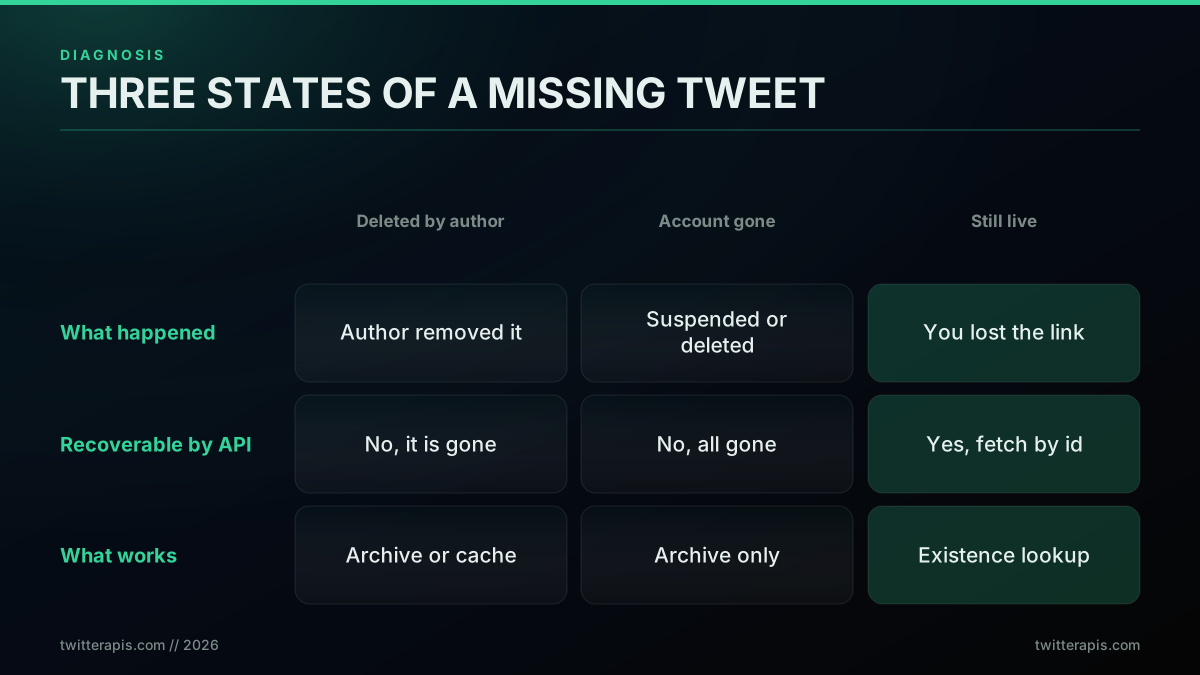
Diagnose first: which of the three states is your missing tweet in
The reason this matters is that the internet is full of confusing cases where a supposedly deleted tweet turns out to be reachable, which fuels the myth that deletion can be undone. What is actually happening is usually that a copy existed somewhere, or the tweet was never truly gone. Real users hit this constantly and are baffled by it, because nothing in the interface explains the difference between hidden and deleted. One person on r/Twitter asked exactly the question that starts most recovery attempts:
How was someone able to access my deleted Tweet?
The answer in cases like that is almost never that someone reversed a deletion. It is that a cached copy, a screenshot, an archive snapshot, or a quote of the original survived independently of the tweet. Deletion removes the original from the platform; it does not reach out and erase every copy that already left it. Holding that distinction clearly is what keeps you from wasting time on tools that promise the impossible, and points you at the routes that can actually produce a copy. If you are new to reading tweet data at all, the complete Twitter API tutorial covers the basics this post builds on.
Step 1: Check Whether the Tweet Is Actually Gone
Before any recovery attempt, confirm the tweet is genuinely deleted with one API call, because a large share of "deleted" tweets are still live and only the link was lost. A tweet lookup by id returns full JSON, its text, author, and engagement counts, when the tweet exists, and a not-found response when it does not. That single request separates a still-live tweet you can simply refetch from a truly gone one that needs an archived copy, and it costs one read call. Skipping this step is the most common mistake, because people assume deletion and go hunting for archives when the tweet was reachable the whole time.
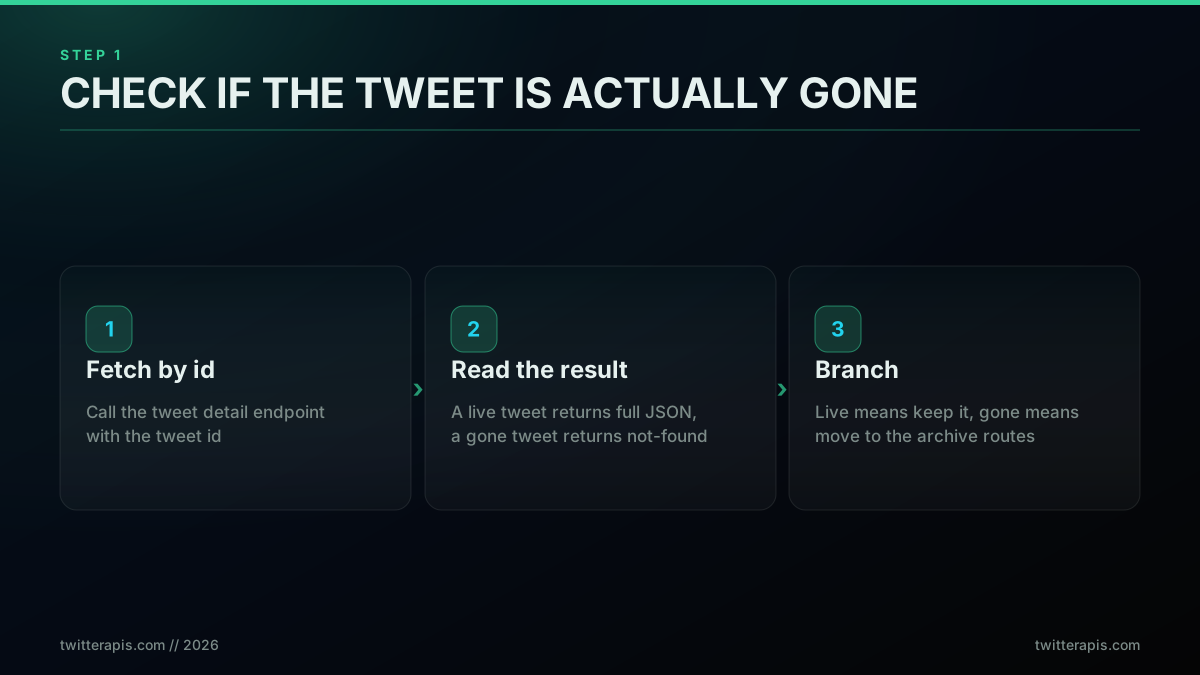
Step 1 is a single API call that tells you if recovery is even needed
The check is a single request against the tweet detail endpoint. Pass the tweet id and read the status: data means live, not-found means gone. Here it is with curl, the fastest way to test one id:
# Look up a single tweet by id. Data back means it is live; not-found means gone.
curl -s "https://api.twitterapis.com/twitter/tweet/detail?id=2030233126845243589" \
  -H "x-api-key: $TWITTERAPIS_KEY"
In code, the branch is explicit. A 200 with a tweet body means you never needed recovery, so save what you got. A not-found means the tweet is gone from the platform and you move on to the archive routes. This small function is the whole of Step 1:
import requests

def tweet_state(tweet_id, key):
    """Return 'live' with the tweet, or 'gone', in a single lookup."""
    r = requests.get(
        "https://api.twitterapis.com/twitter/tweet/detail",
        params={"id": tweet_id},
        headers={"x-api-key": key},
        timeout=20,
    )
    if r.status_code == 200 and r.json().get("tweet"):
        return "live", r.json()["tweet"]   # you lost the link, not the tweet
    return "gone", None                    # genuinely deleted, try archives next
The lesson developers keep relearning is that "gone" and "hidden" look identical in a browser but are one status code apart through an API. A tweet can vanish from your view because of a block, a suspension you did not notice, or a rate-limited empty timeline, none of which is a deletion. The lookup cuts through all of that. For the full set of read endpoints and how they page, the complete Twitter API tutorial and the Python tutorial walk through the response shape in detail, and if you have not made a call yet, start with how to get an API key.
Where Deleted Tweets Survive: Caches and Archives
If the lookup confirms a tweet is genuinely gone, your only hope is a copy that was made before deletion, and a few public archives are where such copies live. The Wayback Machine crawls and stores snapshots of web pages, so a tweet on a popular or frequently linked account may have been captured at some point. Archive.today freezes user-submitted page captures, keeping the visible tweet even after the original is removed. OSINT tools and specialized cache services index public posts with varying reach. Every one of these depends on the same precondition: someone or some crawler saved that specific tweet before it was deleted. None can produce a copy that was never made.
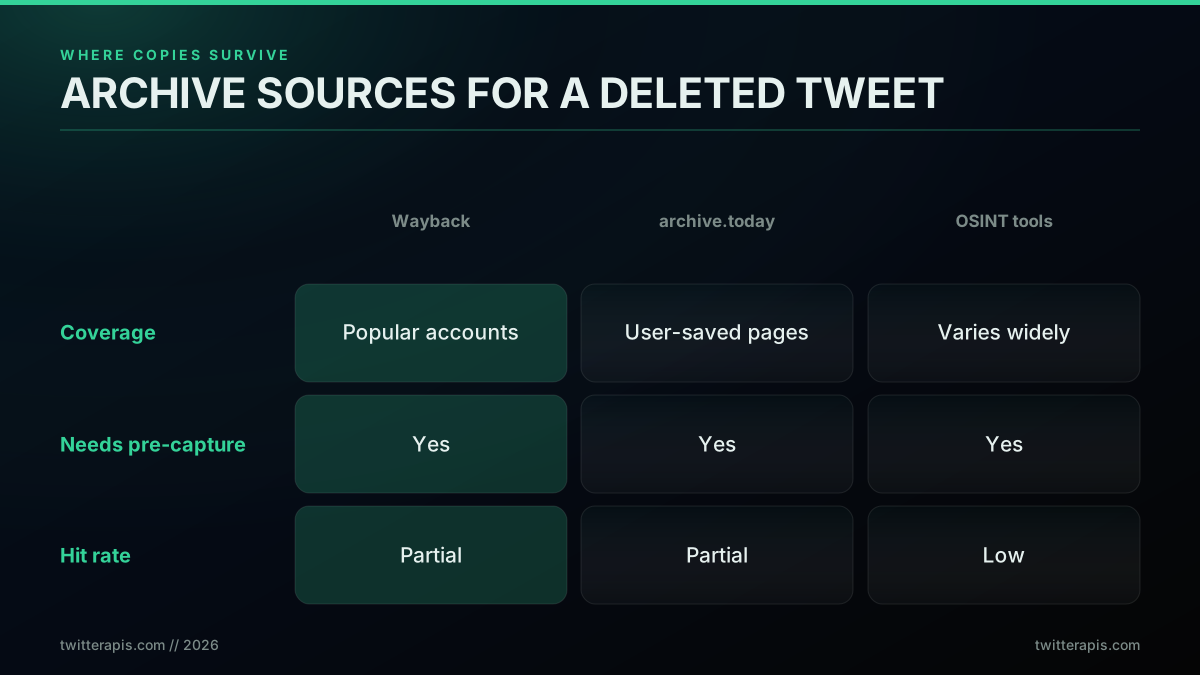
Where copies survive, and why every route needs a copy made beforehand
It helps to name what this actually is. Searching archives for a gone tweet is web archiving in reverse, a practice built entirely on the premise that pages get captured before they change or disappear, and it inherits that premise's hard limit: no capture, no result. Every route in this post reaches the same conclusion from a different direction: what works is finding a prior copy, not reversing a deletion. That is worth stating plainly rather than selling past it, because the ceiling is real and no tool moves it. The archive routes are copy-finders, not un-deleters.
The persistence of copies is real enough that people are routinely surprised by it, which is where the "deleted tweets are never really gone" folklore comes from. It is not that deletion fails; it is that a tweet that mattered often left copies before it went. A widely shared observation captured the sentiment:

Ramzy 🇵🇰🇬🇧
@Ramz_004
Deleted tweets are never really gone, are they? Players often retract under pressure; it's sadly predictable. Tweet bhi gayi, proof bhi geya, bandey ka check kar lo koi... @iamusamamir
That intuition is right for prominent tweets and wrong for obscure ones. A tweet from an account nobody archives, deleted quickly, usually leaves no trace, which is why the community keeps asking the same practical question without a satisfying answer:
Any way to find deleted tweets?
The honest reply to that thread is: only if a copy was archived first, and here is how to check the places copies live. OSINT practitioners have built a whole toolkit around exactly this search across archives and caches, and it is worth watching one work through the methods end to end rather than reading a list:
https://www.youtube.com/watch?v=rwuXOL5W0gE
What that walkthrough makes clear is that finding a deleted post is archive archaeology, not recovery. You are searching for a snapshot someone else made, and your success depends on whether they made one. The advanced search operators can help you locate quotes and replies that reference a gone tweet, which sometimes reconstruct its content indirectly, but that is inference from surviving fragments, not retrieval of the original.
How to Search Historical Tweets With the API
Archives are one route to a copy. The other, and the one most people skip, is that the post you are looking for may still be reachable through search even though the permalink is dead, because search indexes and timelines expose the same object through different paths.
Two distinctions decide what you can reach.
Recent search versus full-archive search. Recent search covers roughly the last seven days on most surfaces, the official X API included. Anything older needs a full-archive surface; on the official API that is the full-archive search endpoint, open to pay-per-use and Enterprise and billed per post it returns. Through a per-call read API, the advanced search endpoint accepts date bounds directly, so a historical query is a parameter rather than a plan upgrade.
Search index versus timeline. A user timeline stops at X's 3,200-post ceiling regardless of who is asking. Search does not have that ceiling, it has a different one: it returns what the index holds for your query. So for an old post on a prolific account, a dated search query frequently reaches something the timeline never will.
The practical recipe is to bound the query tightly and let the operators do the work:
import requests

def search_history(query, since, until, key, cursor=None):
    """Search a dated window. since/until are YYYY-MM-DD."""
    params = {"query": f"{query} since:{since} until:{until}", "product": "Latest"}
    if cursor:
        params["cursor"] = cursor
    r = requests.get(
        "https://api.twitterapis.com/twitter/tweet/advanced_search",
        params=params, headers={"x-api-key": key}, timeout=30,
    )
    r.raise_for_status()
    body = r.json()
    return body.get("tweets", []), body.get("next_cursor")

# Narrow by author and date, then page until the cursor stops coming back.
tweets, cursor = search_history("from:nasa artemis", "2026-01-01", "2026-02-01", KEY)
Two habits make this work in practice. Bound the window narrowly and walk it in slices rather than issuing one huge query, because a tight window returns a cleaner index slice and costs less. And search on distinctive text rather than on the ID, since the ID is exactly what you do not have when a link is dead. The advanced search operators guide lists the full operator set, and the pagination guide covers the cursor contract.
The honest limit: if the post was deleted before the index saw it, or the account was suspended, search returns nothing and you are back to the archive routes. Search widens the window on what is still live. It does not resurrect what is gone.
Twitter API Using Python: Setup for a Recovery Job
Everything above is one HTTP call at a time, so the Python side is deliberately small. This section is the setup you need before running any of the code in this post, written out rather than assumed.
Start building with TwitterAPIs
$0.0008 a call, about $0.04 per 1,000 tweets at 20 tweets a page. $0.50 free credits. No credit card required.
Installing the Python Library
There is no special SDK to install for a recovery workflow. The lookups, the search calls, and the snapshot writes are all plain HTTP, so the only hard dependency is an HTTP client:
python3 -m venv .venv && source .venv/bin/activate
pip install requests
Two optional additions earn their place on a real job. python-dateutil parses the mixed date formats that archive services return, and pandas is worth having once you are diffing two snapshots of a timeline rather than checking one ID:
pip install requests python-dateutil pandas
If you would rather use an existing client library, note what you are choosing. tweepy is a client for the official X API, not a scraper, so picking it means picking the official route and its pricing. For a per-call read API the plain requests path above is fewer moving parts and one less thing to keep current.
Put the key in the environment rather than in the file, because a recovery script is exactly the kind of one-off that gets pasted into a gist:
export TWITTERAPIS_KEY="your_key_here"
python3 -c "import os,requests;print(requests.get('https://api.twitterapis.com/twitter/tweet/detail',params={'id':'2030233126845243589'},headers={'x-api-key':os.environ['TWITTERAPIS_KEY']},timeout=20).status_code)"
A 200 means the setup is done. Signup includes credit with no card, which covers several hundred lookups, so the confirmation call above costs nothing meaningful. See how to get an API key if you do not have one yet.
Using Jupyter Notebook for the Investigation
A notebook is a genuinely better environment than a script for this particular job, and it is worth saying why rather than treating it as a preference.
Recovery work is investigative. You look up an ID, get a not-found, try a dated search, get forty candidates, narrow by author, compare two snapshots, and only then know what you were looking for. In a script, each of those steps means a re-run and a re-fetch, which costs both time and calls. In a notebook the fetched data stays in memory between cells, so you pay for each API call once and then explore the result as many times as you like.
pip install notebook
jupyter notebook
Two practical notes. Keep the API key out of the notebook file itself, because notebooks are the single most-shared artifact in this kind of work and they carry their output cells with them. Read it with os.environ exactly as above. And write anything you actually recover to disk in the same cell that fetches it, rather than relying on the kernel staying alive, since a notebook that loses its kernel loses a copy you may not be able to fetch again.
For a scheduled monitor, move the code out of the notebook and into a script once it works. A notebook is the right tool for finding the answer and the wrong tool for running unattended overnight.
Retrieving Hashtags and Entities From a Recovered Tweet
Once you have a copy, the next question is usually not "do I have the text" but "what was in it", and the entity fields are what most downstream work actually needs: hashtags, mentions, URLs and media.
Where those come from depends on which route produced the copy, and the difference matters.
From a live API lookup or a snapshot you captured yourself, entities arrive already parsed. You read them off the object rather than re-deriving them, which is the reliable path because the platform did the tokenizing:
def entities(tweet):
    """Pull hashtags, mentions and links off a tweet object."""
    ent = tweet.get("entities") or {}
    return {
        "hashtags": [h["text"] for h in ent.get("hashtags", [])],
        "mentions": [u["screen_name"] for u in ent.get("user_mentions", [])],
        "urls":     [u.get("expanded_url") or u.get("url") for u in ent.get("urls", [])],
    }
From an archive capture or a screenshot, you have rendered text and no entity block, so you have to parse. That is where accuracy drops, and it is worth knowing why before you trust the output. A naive #\w+ over the text will happily match a hashtag inside a URL fragment, a Markdown heading pasted into a quote, and a channel reference that was never a hashtag. Anchor on a word boundary and exclude the cases you can enumerate:
import re
HASHTAG = re.compile(r"(?:^|[^\w&/])#(\w{1,139})\b")

def hashtags_from_text(text):
    """Best-effort parse for archived copies with no entity block."""
    return [m.group(1) for m in HASHTAG.finditer(text or "")]
Treat a parsed result as lower-confidence than a delivered one and record which it was, because an analysis that mixes both without a flag cannot explain its own error bars later. If you are building a capture-before-delete monitor as described above, store the raw entity block alongside the text at capture time. It costs nothing extra and it removes the parsing question entirely for anything you captured yourself.
One honest limit: a deleted tweet's engagement counts and its entity block are snapshots of a moment. If your copy was taken an hour after posting, the hashtags are right and the like count is not the final one. Say which you are reporting.
Converting Recovered Tweets From JSON to CSV
Recovery work almost always ends in a spreadsheet, because the person who needed the tweet is rarely the person who wrote the script. Tweet objects are nested and CSV is flat, so the conversion is where data quietly gets lost if you let a library guess.
The rule is to choose your columns explicitly rather than dumping whatever keys the object happens to carry, because the key set differs between a live lookup, an archive record and a snapshot you wrote yourself, and an implicit column set silently changes shape between runs.
import csv, json

COLUMNS = ["id", "created_at", "author", "text", "likes", "retweets",
           "hashtags", "urls", "source", "captured_at"]

def flatten(t, source, captured_at):
    """One tweet object to one flat row, with fixed columns."""
    e = entities(t)
    return {
        "id": t.get("id"),
        "created_at": t.get("created_at"),
        "author": (t.get("author") or {}).get("username"),
        "text": (t.get("text") or "").replace("\r", " ").replace("\n", " "),
        "likes": t.get("favorite_count"),
        "retweets": t.get("retweet_count"),
        "hashtags": "|".join(e["hashtags"]),   # pipe, not comma, inside a CSV cell
        "urls": "|".join(u for u in e["urls"] if u),
        "source": source,                       # 'live' | 'archive' | 'snapshot'
        "captured_at": captured_at,
    }

def write_csv(tweets, path, source, captured_at):
    with open(path, "w", newline="", encoding="utf-8") as fh:
        w = csv.DictWriter(fh, fieldnames=COLUMNS, extrasaction="ignore")
        w.writeheader()
        for t in tweets:
            w.writerow(flatten(t, source, captured_at))
Four details in that function are the whole job. Newlines are stripped from the text, because a raw newline inside a quoted CSV field is legal and still breaks a surprising number of downstream readers. Multi-value fields join on a pipe rather than a comma, so they survive a naive re-split. source and captured_at are columns rather than filename conventions, because a spreadsheet gets renamed and a column does not. And IDs are written as strings, since tweet IDs exceed the precision a spreadsheet applies to numbers and will silently round the last digits if a tool decides the column is numeric.
That last one is the failure people hit most and notice latest: open the file in a spreadsheet, and IDs ending in different digits collapse to the same value. If the CSV is going to a non-technical colleague, prefix the ID column or hand them a file where that column is explicitly text.
How Reliable Is Each Recovery Route?
Ranked by how often they actually produce the tweet, the routes are not close, and being honest about the odds saves you from chasing the weak ones. A still-live check succeeds nearly always when the tweet was never really deleted, which is a large fraction of cases, so it belongs first. Archive lookups succeed only when a copy exists, so their hit rate is partial and skewed toward prominent accounts. OSINT and cache tools are lower still because coverage is spotty. And un-deleting through an API succeeds zero percent of the time, because it is not a thing that exists. The chart below puts rough numbers to that ordering; treat them as estimates of relative likelihood, not measured rates.
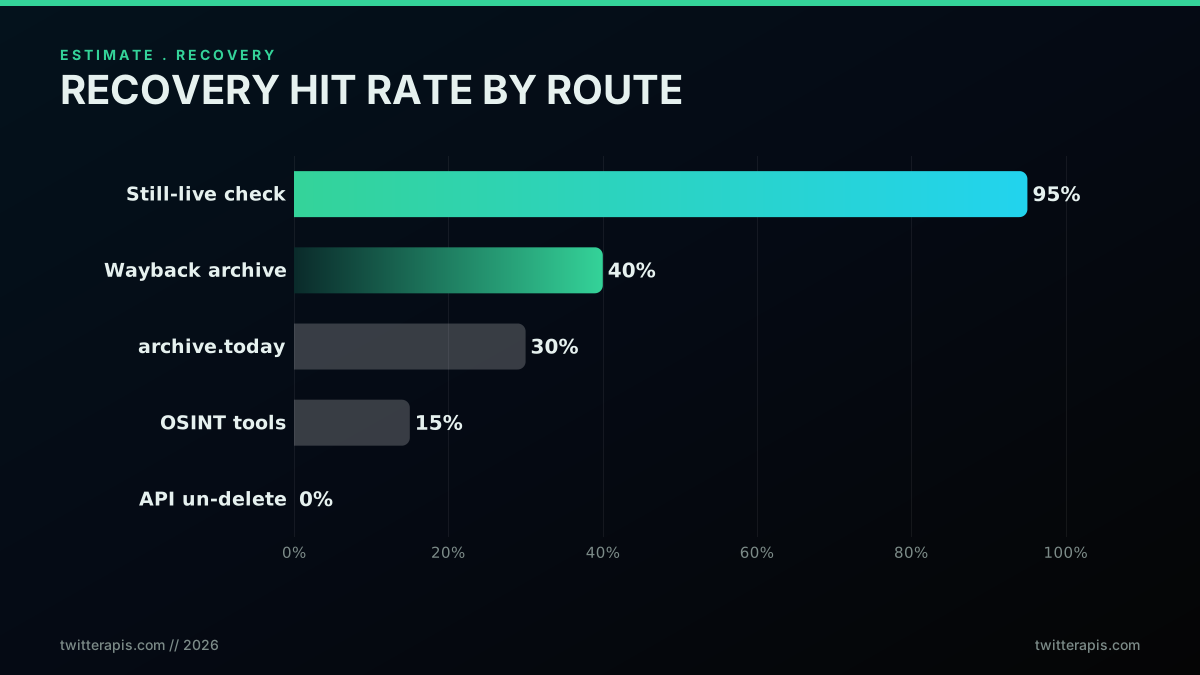
Estimated recovery hit rate by route, with API un-delete at zero
The practical reading is to run the cheap, high-yield check first and only escalate to archives if it fails. Spend your effort where the odds are, not where the marketing is. The tool landers that rank for "recover deleted tweets" tend to blur this ordering, presenting an archive search as if it were a guaranteed un-delete, and the one thing they rarely say plainly is the thing you most need to know: if no copy was made, the tweet is unrecoverable. Knowing that up front changes your strategy from hunting for a magic endpoint to either accepting the loss or, far better, making sure a copy always exists going forward, which is the next section.
There is also a survivorship trap hiding in these numbers. The deleted tweets people successfully find are, almost by definition, the ones that were prominent enough to be archived, which makes recovery look more possible than it is. For every high-profile tweet that resurfaces from an archive, there are countless ordinary ones that were deleted quietly and left no snapshot at all, and those never make it into a success story. So when you read that a deleted tweet was found, read it as evidence that a copy existed, not as evidence that deletion can be reversed. The distinction is the whole reason a monitoring approach beats a hunting one: hunting relies on someone else having captured the tweet, while monitoring guarantees you did.
The cheapest pay-as-you-go Twitter API. Try it free.
$0.0008 a call, about $0.04 per 1,000 tweets at 20 tweets a page. $0.50 free credits. No credit card required.
The Pattern That Actually Works: Capture Before Delete
The only reliable way to have a deleted tweet later is to store it before it is deleted, and that is a pattern you can build in an afternoon. You poll the account you care about on an interval, write every tweet you see to your own database, and compare each new pull against the last. When a tweet that was there disappears, it was deleted, and because you already saved it, you hold the full copy. This flips the entire problem: instead of gambling that someone else archived the tweet, you guarantee that you did. It is how newsrooms, researchers, and accountability projects keep records of public figures' tweets that later vanish.
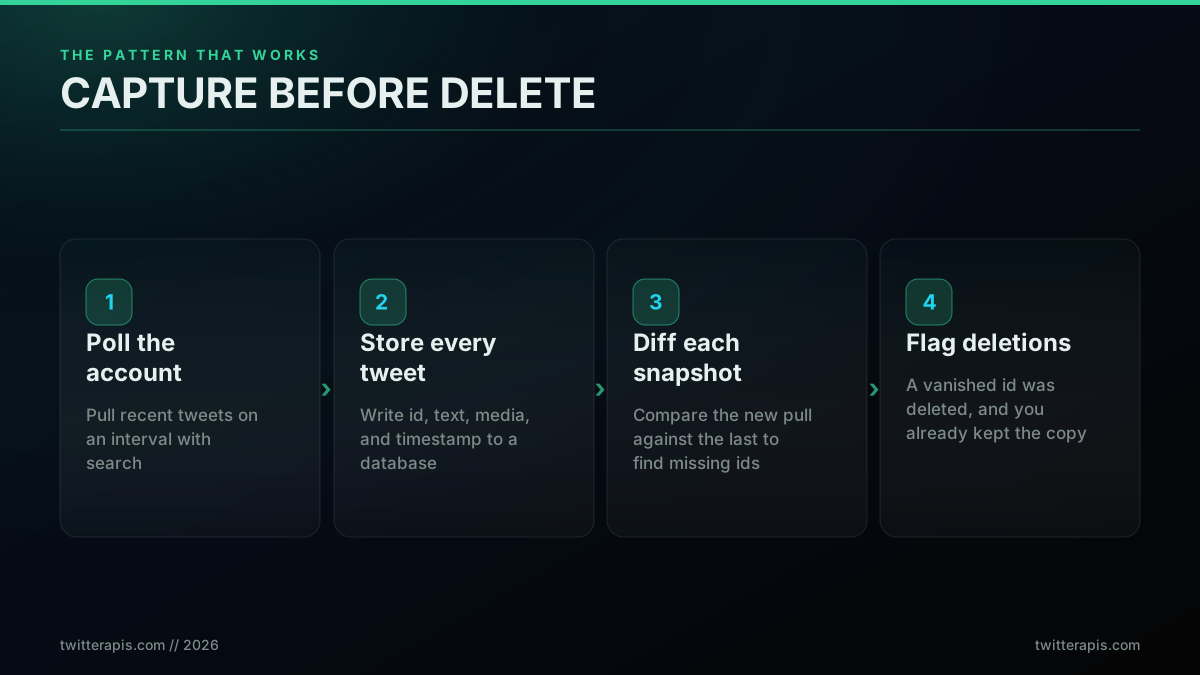
The pattern that actually works: capture tweets before they can be deleted
People discover the power of prior capture by accident all the time, usually when a tweet they thought was long gone resurfaces because a copy existed somewhere:

Pete Weishaupt
@peteweishaupt
This post from @ScottAdamsSays was life-changing for me. I deleted my account and then restarted it in Oct 2020 and thought this tweet was gone forever, but @grok found it in < 5 seconds. He referenced the famous (to me) incident later in a video when talking about 'Loserthi…


The systematic version of that lucky resurfacing is a monitor you control. Pulling an account's recent tweets is a single search call, and the loop that captures them is short. This pulls the latest tweets for one account and hands them to your storage step:
import requests

def pull_recent(username, key, cursor=None):
    """Fetch a page of an account's recent tweets, about 20 per call."""
    params = {"query": f"from:{username}", "product": "Latest"}
    if cursor:
        params["cursor"] = cursor
    r = requests.get(
        "https://api.twitterapis.com/twitter/tweet/advanced_search",
        params=params, headers={"x-api-key": key}, timeout=20,
    )
    data = r.json()
    return data.get("tweets", []), data.get("next_cursor")
Because each call returns about 20 tweets, watching an active account takes very few calls per poll, which is what keeps the cost low. The mechanics of the search query, including the from: operator and date windows, are covered in the advanced search operators guide, and for pulling a full back catalog rather than just recent tweets, scraping tweet history past the 3,200 limit is the companion technique.
Building a Capture-Before-Delete Monitor
A working monitor is three moving parts: a store, a poller, and a diff, and none of them is complicated. The store is any database keyed by tweet id, so a saved tweet is written once and never lost even if the original is deleted. The poller runs the pull on a schedule. The diff compares the ids you just saw against the ids you saw last time for that account, and any id that was present before but is absent now is a deletion you have already captured. Keeping the store keyed on tweet id is what makes the diff trivial and the copy permanent.
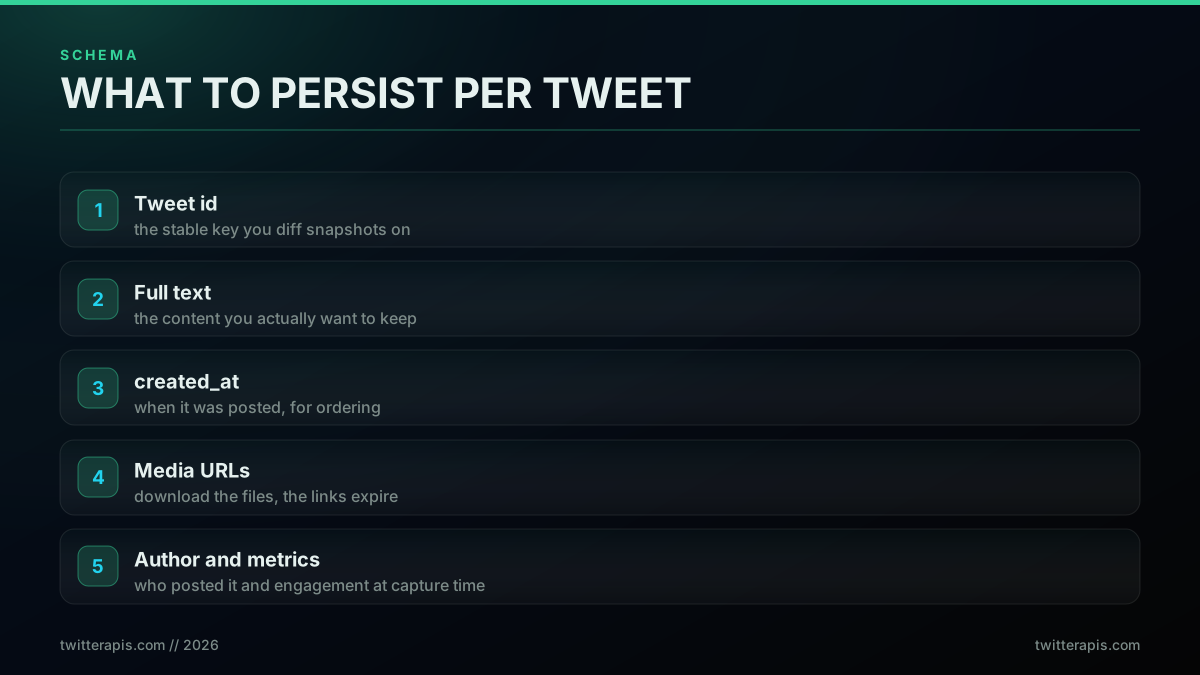
What to store per tweet so a captured copy is complete
Store more than the text, because a complete copy needs the media and metadata too. Save the tweet id as the key, the full text, the created_at timestamp, any media URLs (and ideally download the files, since those links expire), and the author with the engagement counts at capture time. A tiny SQLite table is enough for a personal monitor, and it upgrades to Postgres without changing the shape:
import sqlite3

def save_tweets(db, tweets):
    """Persist each tweet once, keyed on id, so a later deletion cannot erase it."""
    con = sqlite3.connect(db)
    con.execute("""CREATE TABLE IF NOT EXISTS tweets(
        id TEXT PRIMARY KEY, text TEXT, created_at TEXT,
        author TEXT, media TEXT, seen_at TEXT)""")
    for t in tweets:
        con.execute(
            "INSERT OR IGNORE INTO tweets VALUES (?,?,?,?,?,datetime('now'))",
            (t["id"], t.get("text"), t.get("created_at"),
             t.get("author", {}).get("username"),
             ",".join(m.get("media_url_https", "") for m in
                      t.get("extended_entities", {}).get("media", []))),
        )
    con.commit()
    con.close()
The INSERT OR IGNORE on the id primary key is the whole durability story: a tweet is written the first time you see it and untouched afterward, so a deletion in the future cannot reach back and remove your row. Retry logic and clean backoff at the rate limit, covered in the best practices guide and the rate limit guide, keep the poller alive over long runs.
Detecting a Deletion by Diffing Two Snapshots
A deletion is just an id that was in your last pull and is missing from this one, so detection is a set difference. Take the set of tweet ids you captured on the previous poll for an account, take the set from the current poll, and any id in the old set but not the new set is a candidate deletion. The word candidate matters, because a tweet can also fall out of a recent-tweets view by aging past the window rather than being deleted, so you confirm a true deletion with the same existence check from Step 1: look the id up, and a not-found confirms it is gone. Because you saved it when you first saw it, the confirmed deletion leaves you holding the copy.
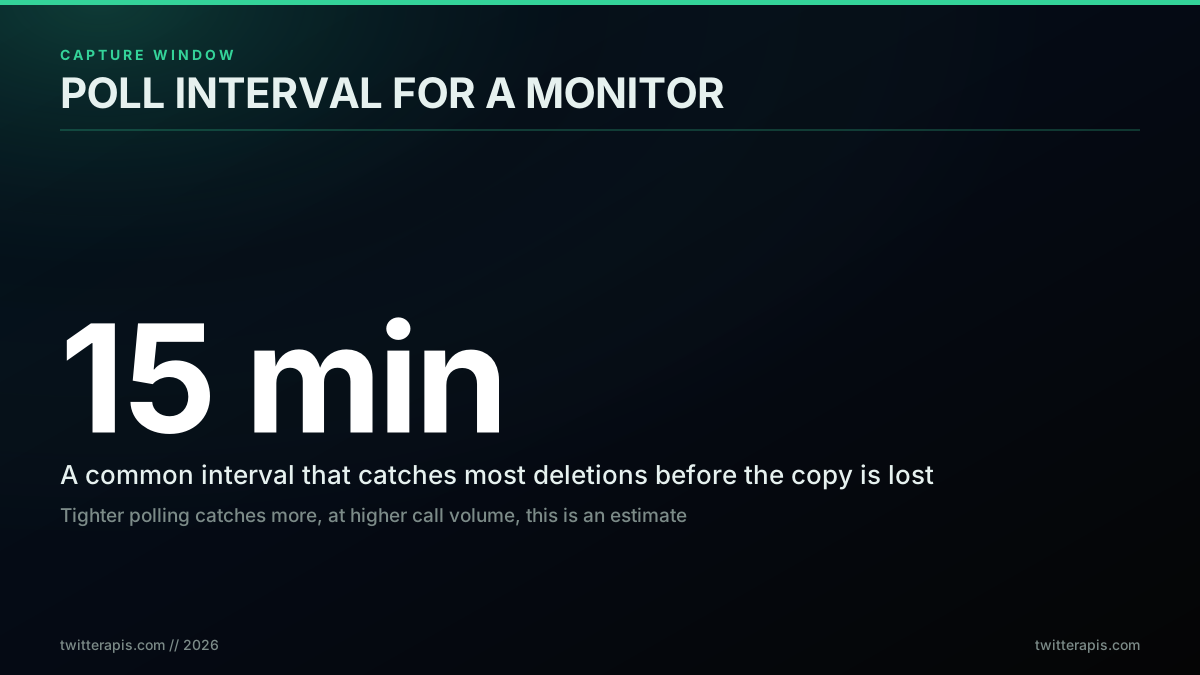
Poll interval is the lever between coverage and call volume
The diff itself is a few lines, and pairing it with a confirmation lookup keeps false positives out:
def find_deletions(prev_ids, current_ids):
    """Ids present last poll but absent now are candidate deletions."""
    return set(prev_ids) - set(current_ids)

# For each candidate, confirm with the Step 1 lookup before flagging:
#   state, _ = tweet_state(cand_id, key)
#   if state == "gone": record_deletion(cand_id)   # you already saved the copy
Your poll interval is the one real tuning knob, and it trades coverage against call volume. Poll every 15 minutes and you catch deletions within a quarter hour, which is enough for most monitoring because you already stored the tweet at first sight; the interval only affects how quickly you notice the deletion, not whether you kept the content. Tighten to every few minutes for high-stakes accounts, loosen to hourly for low-volume ones. Since you pay per call, the interval is a direct cost lever, which the next section quantifies.
In production, a deletion monitor is really just a small scheduled bot, and the same operational habits apply that any long-running job needs: run the poll on a cron or a scheduler, make each run idempotent so a retry never double-writes, and log what you saw so a gap in the schedule is visible rather than silent. The mechanics of standing up a scheduled poller are the same ones covered in how to build a Twitter bot, and the monitoring-specific angle, watching mentions or accounts in near-real-time, overlaps heavily with the patterns in the broader read pipeline. The only piece unique to deletion detection is the diff, and because it runs against your own stored ids rather than against the network, it stays fast and cheap no matter how many tweets an account has posted over its life.
What It Costs to Monitor at Scale
Monitoring is cheap on a pay-per-call model because one read call returns up to about 20 tweets, so a poll of a single account is usually one call. Reads are 0.0008 dollars per call, which works out to about 0.04 dollars per 1,000 tweets, and each poll of an account is a single read. Polling one account every 15 minutes is 4 calls an hour, about 2,880 calls a month, which is roughly 2.30 dollars a month for that account. Scale that across accounts and the arithmetic stays linear: twenty accounts on the same interval is about 46 dollars a month, and fifty is about 115 dollars, with no subscription tier gating any of it.
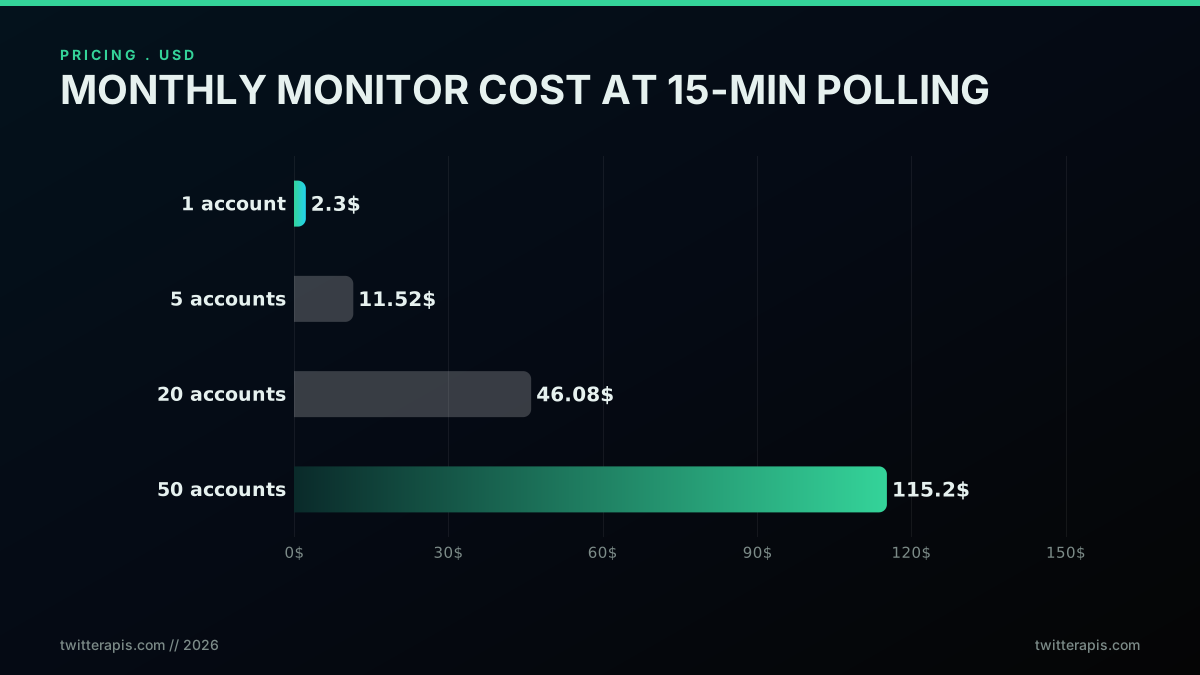
Monthly cost to monitor accounts for deletions at 15-minute polling
The math is worth seeing directly because it lets you model your own watchlist against your own interval:
def monthly_cost(accounts, minutes_between_polls, price_per_call=0.0008):
    """Monthly monitor cost: one call per account per poll, per-call billing."""
    polls_per_month = (60 / minutes_between_polls) * 24 * 30
    return accounts * polls_per_month * price_per_call

print(round(monthly_cost(1, 15), 2))    # one account, 15 min -> 2.3
print(round(monthly_cost(20, 15), 2))   # twenty accounts     -> 46.08
print(round(monthly_cost(50, 15), 2))   # fifty accounts      -> 115.2
What makes this affordable is the per-call model rather than any trick, and it is worth putting next to the alternatives. A subscription tier charges you the same whether you poll once a day or once a minute, so a light monitor overpays and a heavy one hits a ceiling, while per-call billing tracks exactly what you use. The provider-by-provider money math is laid out in the Twitter API cost benchmark and the cheapest Twitter API ranking, both of which normalize spend to a per-1,000-tweet figure the same way this section normalizes a monitor to dollars per account. The takeaway for a deletion monitor specifically is that the cost is bounded and predictable: it scales with accounts times poll frequency, nothing else, so you can size a watchlist to a budget in advance instead of discovering the bill after a busy month.
Signup includes 0.50 dollars in free credits with no card, roughly 625 calls, which is enough to build the monitor and watch an account for days before spending anything. Writes such as retweet, follow, bookmark, and delete are the same 0.0008 dollars per call, and posting a tweet is 0.0016 dollars, though a deletion monitor is read-only and never touches those. You can model your own spend against your own account count on the cost calculator, see every per-endpoint rate on the pricing page, and compare the model against the official tier in is the Twitter API free and the X API v2 comparison.
The Legal and Terms-of-Service Line
Archiving public tweets you accessed lawfully is broadly accepted, but what you do with a recovered or captured tweet is where care is required, and this is not legal advice. Storing public data you pulled through an API within its terms of service is ordinary practice, and it is what web archives, researchers, and accountability projects do openly. Re-publishing content that someone deliberately removed is a different question, especially if the content is private, sensitive, or subject to a takedown, because privacy and erasure rules such as the right to be forgotten and the right to erasure can apply to how personal data is handled. The UK's data protection regulator spells out that right in practice: individuals can ask an organization to delete their personal data under defined conditions. Public once does not always mean republishable forever.
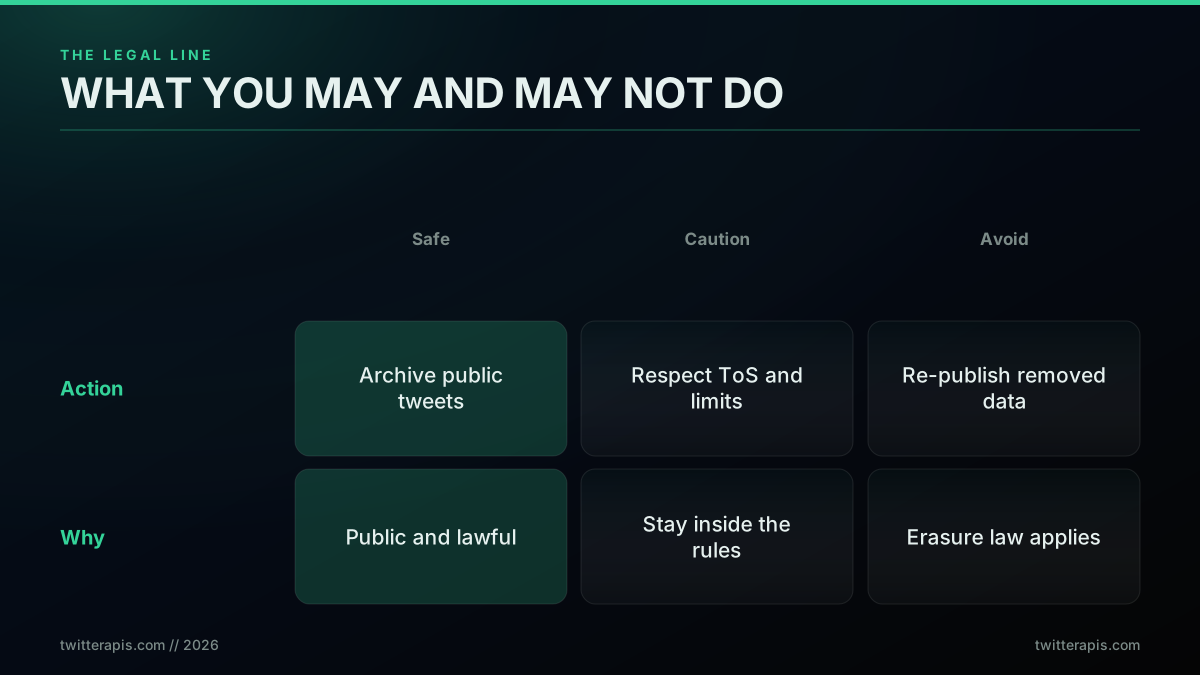
The legal line: archive responsibly, respect the terms, do not republish removed content
Two practical guardrails keep you on the right side of the line. First, respect the platform terms and the rate limits, and access data through documented, permitted means rather than by evading protections; using a compliant pay-per-call API rather than a fragile scraper is the low-friction way to do that, as the best practices guide lays out. Second, treat removed content with judgment: keeping a private archive for research or record-keeping is very different from broadcasting a deleted tweet to embarrass someone, and the Streisand effect is a reminder that republishing removed content carries its own consequences. When in doubt about a specific case, especially anything involving personal data or a legal request, get actual legal advice rather than relying on a blog post.
The reason this section sits next to the technical one is that the two are not separable in practice. The capability to capture and keep any public tweet arrives the moment you stand up a monitor, and capability without judgment is how well-intentioned archiving turns into a problem. Journalists and accountability researchers navigate this every day by holding a clear purpose for what they store and by distinguishing the public record of a public figure from the private post of an ordinary person. Adopt the same discipline: know why you are keeping a given tweet, keep only what serves that purpose, and let the fact that content was deliberately removed weigh on the decision to surface it again rather than treating a saved copy as an unconditional license.
What to Do Right Now
Your next move depends on which problem you have, and there are only two. If you need a specific tweet that is already gone, run the existence check first to confirm it is truly deleted rather than merely hidden, then search the Wayback Machine and archive.today for a surviving copy, and accept that if no one archived it, it is unrecoverable, no matter what a tool lander claims. If instead you want to never lose a tweet again, stand up a capture-before-delete monitor today, because the only guaranteed way to have a deleted tweet later is to have stored it beforehand.
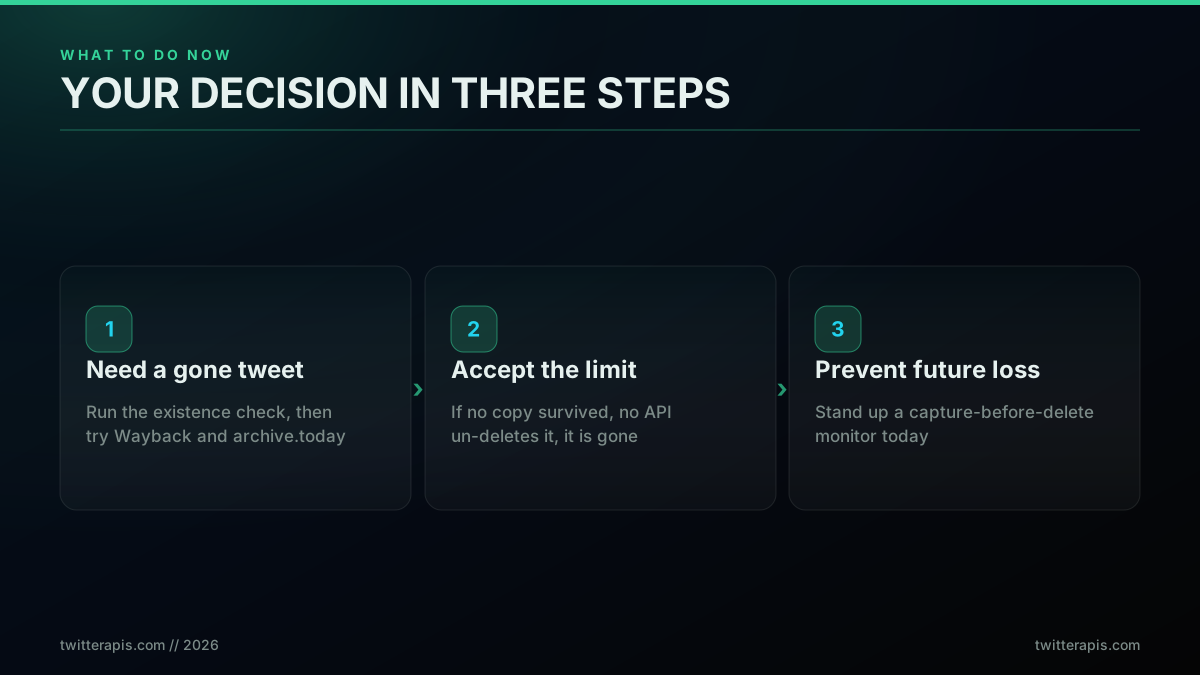
Your decision in three steps, whether you need a tweet now or want to never lose one again
The whole subject collapses to one durable truth: recovery is a question of whether a copy exists, and the only copy you can count on is the one you made. No API un-deletes a removed tweet, the official platform included, because the data is gone once it is deleted; a lookup for a deleted tweet returns not-found from every provider. The official platform does emit deletion events on its streaming products, which notify you that a tweet was removed but never return its content, so even the first-party path confirms the same rule: you had to have the tweet before it went to keep it. But an API is exactly the right tool for the two things that do work, confirming whether a tweet is really gone and capturing tweets before they can ever be deleted. If you want to build the monitor, the complete Twitter API tutorial and how to read tweet data cover the calls, the best Twitter API for scraping and MCP server show the tooling, and the cost guide projects the spend. You can sign up with 0.50 dollars in free credits and have a deletion monitor watching your first account within the hour.
// sources
Where these numbers come from
Each row is a figure in this post and the artefact it was read from. Prices and limits on this platform move, so check the date on the source before you plan against it.
- X enterprise compliance overview
- Backs the closing claim that the official platform emits deletion events on its streaming products, notifying you a tweet was removed while never returning its content.
- GDPR Article 17, right to erasure
- The provision the post cites when it separates lawful archiving of public tweets from republishing content someone deliberately removed.
- UK ICO guidance on getting your data deleted
- The regulator page the post points to for how that erasure right works in practice for an individual whose removed content you hold.
- Internet Archive Wayback Machine
- One of the two public archives the post names as the place to look for a copy captured before deletion, with the caveat that the hit rate is partial and depends on prior capture.
- archive.today page capture service
- The second archive in that pair, which freezes user-submitted captures so a visible tweet survives after the original is removed.
- Python sqlite3 module documentation
- The store behind the capture-before-delete pattern in the post, where tweet id, full text, created_at, media URLs, author, and engagement counts at capture time are written to a small table.
Frequently Asked Questions
Not if the author deleted it and no copy survives. Once a tweet is removed from the platform it is gone, and no Twitter or X API un-deletes it, because the data no longer exists to serve. What an API can still do is confirm whether the tweet is actually gone versus merely hidden, fetch it if it is in fact still live and you only lost the link, and pull a monitored account's tweets on an interval so you store them before they can ever be deleted. Recovery after the fact depends entirely on whether a copy was captured or archived beforehand, not on any special endpoint.
Fetch it by id through a tweet lookup endpoint. A tweet that still exists returns full JSON with its text, author, and engagement counts. A tweet that was deleted, or whose account was suspended or removed, returns a not-found response instead. That single call distinguishes a genuinely gone tweet from one that is still live but that you lost the URL for, which is a common confusion. If the lookup returns data, you never needed recovery. If it returns not-found, the tweet is gone from the platform and only an archived copy can bring it back.
On a pay-per-call API, monitoring is inexpensive because one read call returns up to about 20 tweets. Polling a single account every 15 minutes is 4 calls an hour, roughly 2,880 calls a month, which at 0.0008 dollars per call is about 2.30 dollars a month for that account. Twenty accounts on the same interval is about 46 dollars a month, and fifty is about 115 dollars. Signup includes 0.50 dollars in free credits with no card, enough to build and test a monitor before spending anything, and the cost scales with how many accounts you watch and how often, not with a subscription tier.
No. The official X API serves tweets that currently exist, and a lookup for a deleted tweet returns a not-found error just as a third-party read API does, because the platform no longer holds the data to return. The official API does emit deletion events on some streaming products, which tell you that a tweet was removed but do not hand back its content, so even there you need to have stored the tweet beforehand to keep it. No tier and no endpoint reverses a deletion. The practical takeaway is the same across every provider: capture the tweet before it is deleted or accept that it may be unrecoverable.
Only where a copy was made before the deletion. The Wayback Machine holds snapshots of pages that were crawled or manually saved, so a popular account's tweet may survive there. Archive.today keeps user-saved page captures with the visible content frozen. OSINT tools index or cache public posts with varying coverage. None of these can retrieve a tweet that was never captured, so their hit rate is partial at best and depends on whether someone archived that specific tweet in time. The reliable version of recovery is to have stored the tweet yourself through an API before it was deleted.
It is the only reliable way to have a deleted tweet later, and it works by storing tweets before they can be removed. You poll an account on an interval, write every tweet you see to your own database with its id, text, media, and timestamp, then compare each new pull against the previous one. When a tweet id that was present disappears from the account, it was deleted, and because you already saved it, you keep the full copy. This turns recovery from a gamble on whether someone else archived the tweet into a guarantee that you did.
Archiving public tweets you accessed lawfully is generally accepted, and it is what web archives and researchers do every day, but this is not legal advice and the line depends on what you do next. Storing public data you pulled through an API within its terms of service is one thing. Re-publishing content someone deliberately removed, especially anything private or subject to a takedown, is a different matter, because privacy and erasure rules such as the right to be forgotten can apply. Access public data responsibly, respect the platform terms and rate limits, and treat removed content with care rather than assuming that public once means republishable forever.
Check out similar blogs
More guides on the Twitter/X API, scraping, and pricing.

Build vs Buy: Should You Build Your Own Twitter/X Monitoring Tool? (2026)
Buying a listening seat costs $29 to $2,000 a month depending on the vendor. Building costs real engineering hours plus a data bill. Here is the real math behind the twitter monitoring tool build vs buy decision, priced both ways.

How to Track a Tweet's Performance in Real Time with the X API
Poll a tweet's engagement counts over time with the X API, compute a views-to-likes ratio, and read the quote-tweet layer to tell an organically growing launch tweet from a boosted one. Tested Python and curl.
What "Rate Limited" Actually Means on X (Every Limit, Measured)
"Sorry, you are rate limited" is one message covering two different systems: a consumer action ceiling and a developer API window. Here is what the term means, the current numbers for both, where it came from, and how long it actually lasts.

The Twitter API Developer Reference (2026): Endpoints, Rate Limits, Error Codes and Pagination
A single indexed reference for the Twitter/X API in 2026: the endpoint catalog, how authentication and bearer tokens work, the rate limits behind every 429, what error codes 401, 403, and 429 mean, cursor pagination, response shapes, and the real per-call cost of each call.

How to Choose a Twitter/X API in 2026: The Complete Buyer's Guide
A decision framework for choosing a Twitter/X API in 2026: the seven criteria that actually matter (pricing model, data coverage, rate limits, auth, reliability, compliance, migration cost), a use-case decision tree, and where each path wins.
What You Can Build With the Twitter/X API: 20+ Real Use Cases (2026)
A 2026 field guide to what you can actually build with the Twitter/X API: 24 real use cases across listening, monitoring, audience graph, research, and bots, each mapped to the endpoint that powers it and the real per-call cost.
Fetch a Full Twitter Thread via API in One Call (2026)
How to pull an entire Twitter thread, the root tweet plus every connected tweet in the chain, in a single API call with the tweet/thread endpoint, instead of walking replies by hand. Live-tested code in curl, Python, and Node.js, with the real per-call cost.
Fastest Twitter API in 2026: 7 Providers Ranked by Real Response Time and Throughput
Which Twitter (X) API is actually fastest in 2026? We measured our own response time, pulled every published benchmark, and ranked 7 providers by real per-tweet latency, throughput, and the wall-clock time to finish a 100,000-tweet job.