GUIDE
Twitter API Pagination 2026: How next_token Works (and a Simpler Alternative)
How Twitter API pagination works in 2026. The official next_token loop explained field by field, a simpler single-cursor alternative, runnable Python and Node code, and the real per-call cost of a paginated pull.
Per our own spec, 70 of 121 endpoints bill $0.0008, 24 are free, and 27 sit between $0.0016 and $0.01. Every price ships inside our published OpenAPI document as an x-cost-usd field, so any figure in this post can be checked against the contract that bills it rather than taken on trust.
TL;DR: Twitter API pagination's
next_tokenis the cursor the official X API v2 returns inside a response'smetablock. Readresponse.meta.next_token, send that exact string back as thepagination_tokenparameter on your next request, and stop once a response no longer includesnext_token, that is the whole loop. In Twitter API cursor pagination, the two names for the same opaque cursor, read one field and write another, are what trip up most developers. A pay-per-call direct API like TwitterAPIs uses a singlenext_cursorthat you read and send straight back ascursor, which removes the two-name token plumbing. Either way, always add amax_pagescap so a bug cannot run forever, and size the pull first: pages equal total records divided by page size, and at the standard read rate of $0.0008 per call a thousand-page pull costs about $0.80.
Pagination is the part of a Twitter API integration that looks trivial in the docs and then eats an afternoon in practice. You get the first page of tweets, feel productive, and then realize you have no clean way to walk the other forty pages without either an infinite loop or a silently truncated dataset. The confusion is not your fault. The field you read to advance is not the field you send, the stop condition is not where you would guess, and the official reference explains the pieces without ever showing a complete loop.
This guide fixes that. It defines the next_token cursor precisely, shows a full runnable loop in both Python and Node.js with a safety cap, contrasts it with a simpler single-cursor model, and gives you the per-call cost math so you can size a paginated pull before you ship it. For the wider integration picture, the complete Twitter API tutorial covers auth and first calls, and this post drills into the one loop that every read workload depends on.
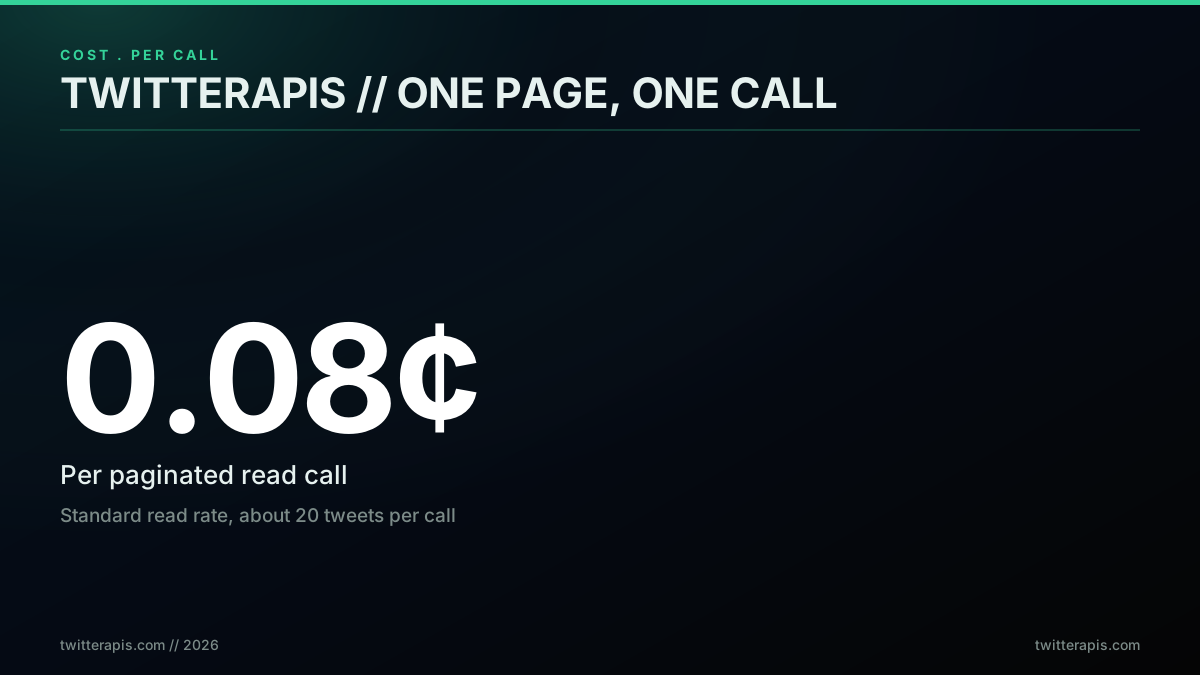
The number above is the unit you multiply. Every page you fetch is one call, so once you know your page size you know your bill before the loop runs. That framing is the whole point of this guide.
What Twitter API pagination actually is
Twitter API pagination is a cursor loop: each response hands you a token that points at the next page, and you keep calling until no token comes back. It is not offset pagination, where you ask for page 3 or records 200 through 299. A Twitter feed changes every second as new posts arrive, so an offset would skip or repeat records the moment the underlying set shifts. A cursor instead marks a stable position in the result stream, which is why you never see a page number in a Twitter data response and why you must follow the token rather than compute the next page yourself.
Developers hit this wall constantly. The r/n8n community has a thread titled exactly "X API Pagination" that ranks on the first page of Google for the term, which tells you how many people arrive at the same question.
X API Pagination
The mechanics are the same whether you call the official API or a third party. A response splits into two parts: the data array with your records, and a meta block with pagination state. Your records live in data. The cursor that advances the loop lives in meta. Reading the cursor from the wrong place is the first mistake, and it is why so many first loops either stop early or never stop at all.
One measured detail that shapes every loop below: a search page returns 20 rows regardless of the count you request, on 5 of 5 queries tested in why X advanced search misses posts you know exist. Reading page one and stopping is the most common way a pull silently returns a tenth of the data.
Why cursor pagination and not page numbers
A live social feed is a moving target, so cursor pagination exists to give you a stable read across a set that never stops changing. Imagine you asked for records 1 through 100, processed them, then asked for records 101 through 200 with an offset. If forty new posts were published in the seconds between those two calls, every record shifted forty positions. Your second page would repeat forty records you already saw and skip nothing, or in the reverse case miss records entirely. On a feed that produces thousands of posts per second at peak, an offset is simply wrong.
A cursor sidesteps this by pointing at a position in the result stream rather than at a numeric index. When the API hands you next_token, that token encodes where you are in the ordered set. New posts arriving after your cursor do not renumber anything, because the cursor is anchored to a record, not a count. This is why you never build a cursor yourself and never do arithmetic on it. It is opaque on purpose, so the server is free to change how it encodes position without breaking your loop. This is the same conclusion the wider API-design community reaches: as engineer Yan Cui argues in a widely-shared piece on pagination design, cursor pagination is the correct default for any changing dataset. Understanding this is what turns pagination from a mysterious ritual into an obvious contract: the server tells you where the next page starts, and you ask for it.
How next_token works on the official X API v2
On the official X API v2, next_token is the opaque cursor returned inside the meta block of a paginated response, and pagination_token is the parameter you send back to fetch the following page. You read one, you write the other, and they carry the same value. According to X's own pagination documentation, the token is opaque, so you never construct or decode it, you simply pass it forward until the API stops returning one, a pattern the search integration docs restate for the recent-search endpoint. When a response omits meta.next_token, you are on the last page and the loop ends. The same question turns up again and again on Stack Overflow, for instance in this thread on next_token behavior.
A minimal response makes the split obvious. Your records are in data, and the cursor is in meta:
{
  "data": [
    { "id": "1712...", "text": "first tweet on this page" },
    { "id": "1712...", "text": "second tweet on this page" }
  ],
  "meta": {
    "result_count": 100,
    "next_token": "7140dibdnow9c7btw482z5j9suw3m",
    "newest_id": "1712...",
    "oldest_id": "1712..."
  }
}
Read meta.next_token, send it back as pagination_token, and stop when it is gone.
This asymmetry between the read field and the write field is the single most stumbled-on detail of the whole API. One developer summed up the first-contact experience of it precisely.

Oscar Valerock
@OValerock
This is what #PowerBI pagination looks like in the backend. Twitter API was a bit trickier than others as it uses the concept of "next_token" for pagination and this is the first time I wrote a code using this concept. https://t.co/vbyCiLzbbD

The flow itself is short once the field names are clear. Send a first request, read meta.next_token from the response, set pagination_token to that value on the next request, and repeat until no token comes back.
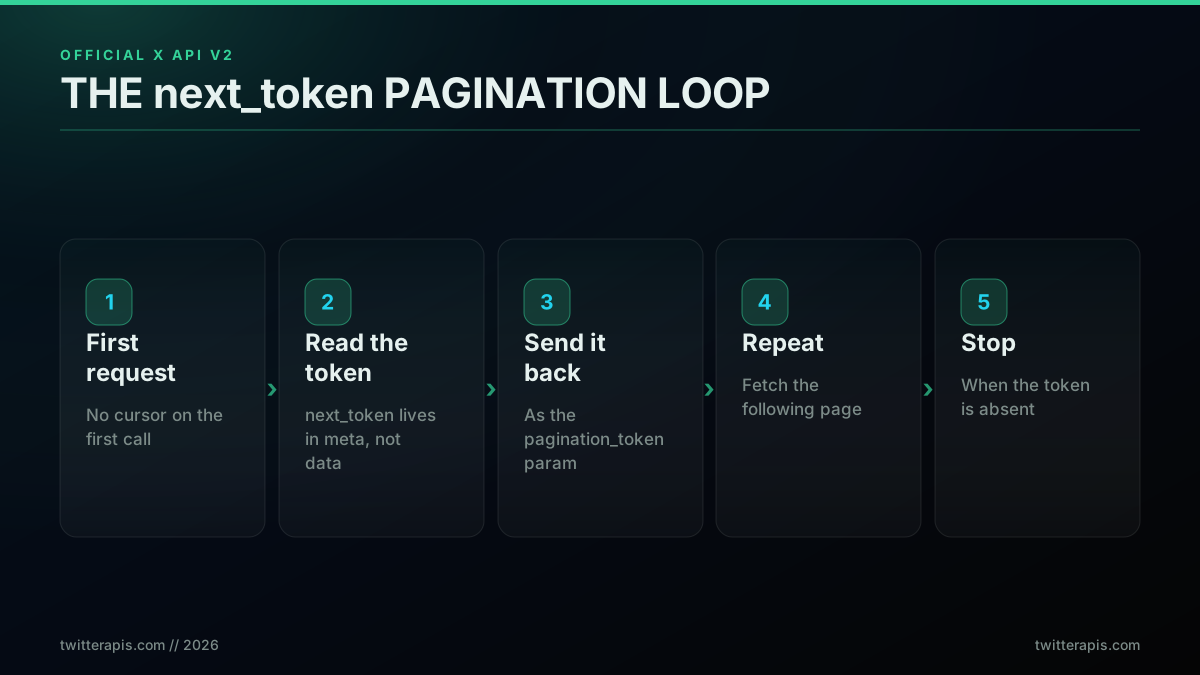
Note the stop condition in the last step. You stop when the token is missing, not when the data array is short. A final page can hold a full batch of records and still be the last page, so keying your exit on an empty data array will drop records. The rate limits reference covers how fast you can run this loop, which matters once a pull spans hundreds of pages.
The exact fields: next_token, pagination_token, and max_results
Three fields govern official pagination and it is worth pinning down which is read, which is written, and which sets page size. meta.next_token is read from the response. pagination_token is written to the request to advance. max_results is written to the request to set how many records a page returns, within the documented range for that endpoint. Legacy v1.1 endpoints and some data shapes instead expose a next_cursor and previous_cursor pair, so always confirm the field names for the exact endpoint you call rather than assuming every route is identical.
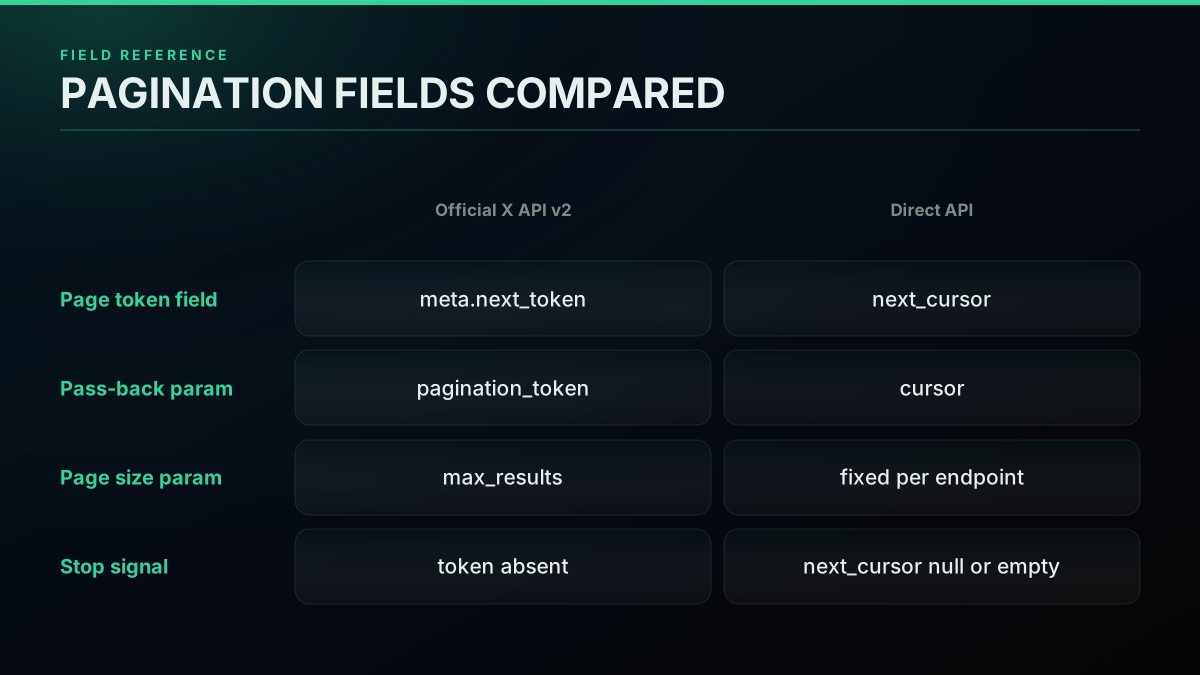
The table makes the asymmetry concrete: the name you read and the name you write are deliberately different on the official API, while a direct API keeps a single cursor concept end to end. Getting these field names wrong is the root cause of most "my loop never ends" bug reports, a pattern visible across the X developer community pagination threads where the same confusion recurs. When you are choosing a data source, the official X API versus third-party comparison weighs these ergonomics alongside cost.
What the meta block contains
The meta block is where pagination state lives on the official X API v2, and it holds more than just the cursor. Alongside next_token, a response typically carries a result_count field telling you how many records this page returned, and on many endpoints a newest_id and oldest_id that bound the page. Some responses also include a previous_token so you can page backward through a result set you have already walked forward. Knowing these fields exist saves you from re-deriving information the API already handed you.
The practical use of result_count is a sanity check: if it comes back as zero yet next_token is still present, you are on a sparse page rather than the end, and you should keep going. This is the exact edge case that breaks a loop keyed on an empty data array. The oldest_id field is useful for incremental sync, because on your next scheduled run you can pass it as a floor so you only pull records newer than the last batch. Reading the whole meta block, not just the cursor, is what separates a loop that merely works from one that is efficient and resumable. The tweepy library documentation wraps some of this bookkeeping in a Paginator helper, which exists precisely because the raw fields are numerous enough to be worth abstracting.
Start building with TwitterAPIs
$0.0008 a call, about $0.04 per 1,000 tweets at 20 tweets a page. $0.50 free credits. No credit card required.
A complete next_token loop in Python
Here is the whole loop against the official X API v2, with the safety cap that the docs never show. Read the cursor, pass it forward, stop when it is gone, and bound the page count so a bug cannot run forever. The Python Twitter API tutorial covers the surrounding setup; this is the paginator itself.
import os
import time
import requests

BEARER = os.environ["X_BEARER_TOKEN"]
SEARCH_URL = "https://api.x.com/2/tweets/search/recent"

def paginate_search(query, max_pages=50):
    headers = {"Authorization": f"Bearer {BEARER}"}
    params = {"query": query, "max_results": 100}
    pages = 0
    while pages < max_pages:
        resp = requests.get(SEARCH_URL, headers=headers, params=params, timeout=15)
        resp.raise_for_status()
        payload = resp.json()
        for tweet in payload.get("data", []):
            yield tweet
        # The cursor lives in meta, NOT in data.
        next_token = payload.get("meta", {}).get("next_token")
        if not next_token:
            break                      # last page reached, stop.
        params["pagination_token"] = next_token
        pages += 1
        time.sleep(1)                  # be polite between pages.

for tw in paginate_search("from:openai -is:retweet"):
    print(tw["id"], tw["text"][:80])
Three details make this correct. The cursor is read from payload["meta"]["next_token"], not from the data array. The exit fires when that token is absent. And max_pages guarantees the loop is bounded even if the API keeps returning tokens or a bug never clears one. A veteran engineer put the danger of skipping pagination bluntly.

Mohit Gupta
@staffsignal
Tech Lead says: Just return all results. Pagination is over-engineering for most apps. You pause. Your API now returns 47,000 records on a simple GET /users call. Do you agree or push back? When should you introduce pagination - and what’s the right default limit?
Pagination is not optional at scale, and neither is the cap that keeps it from becoming a runaway. If you want to see the loop built up interactively, this walkthrough covers the Python cursor pattern step by step.
Watch the Twitter API cursor and pagination walkthrough in Python on YouTube
A complete pagination loop in Node.js
The Node.js version is identical in shape, using the global fetch that ships in Node 18 and later, so it needs no SDK. Read the cursor, advance, and stop on absence. The Node.js Twitter API tutorial covers the request basics; this focuses on the loop.
const BEARER = process.env.X_BEARER_TOKEN;
const SEARCH_URL = "https://api.x.com/2/tweets/search/recent";

async function paginateSearch(query, maxPages = 50) {
  const out = [];
  const params = new URLSearchParams({ query, max_results: "100" });
  let pages = 0;
  while (pages < maxPages) {
    const res = await fetch(`${SEARCH_URL}?${params}`, {
      headers: { Authorization: `Bearer ${BEARER}` },
    });
    if (!res.ok) throw new Error(`HTTP ${res.status}`);
    const payload = await res.json();
    out.push(...(payload.data || []));
    const nextToken = payload.meta?.next_token;
    if (!nextToken) break;             // last page, stop.
    params.set("pagination_token", nextToken);
    pages += 1;
  }
  return out;
}

paginateSearch("from:openai -is:retweet").then((tweets) =>
  console.log(`fetched ${tweets.length} tweets`)
);
Same three rules apply: read the token from meta, break when it is missing, and cap the pages. The optional-chaining on payload.meta?.next_token guards the case where a response has no meta block at all, which returns undefined and cleanly ends the loop.
The simpler alternative: a single cursor
A pay-per-call direct API removes the read-field-versus-write-field split entirely. Instead of a next_token you read and a pagination_token you write, you get one next_cursor string that you pass straight back as the cursor parameter. The stop condition is one check: keep paging while next_cursor comes back with a value, and stop the moment it comes back null or empty. There is no second field name to remember, the same token you read is the one you send.
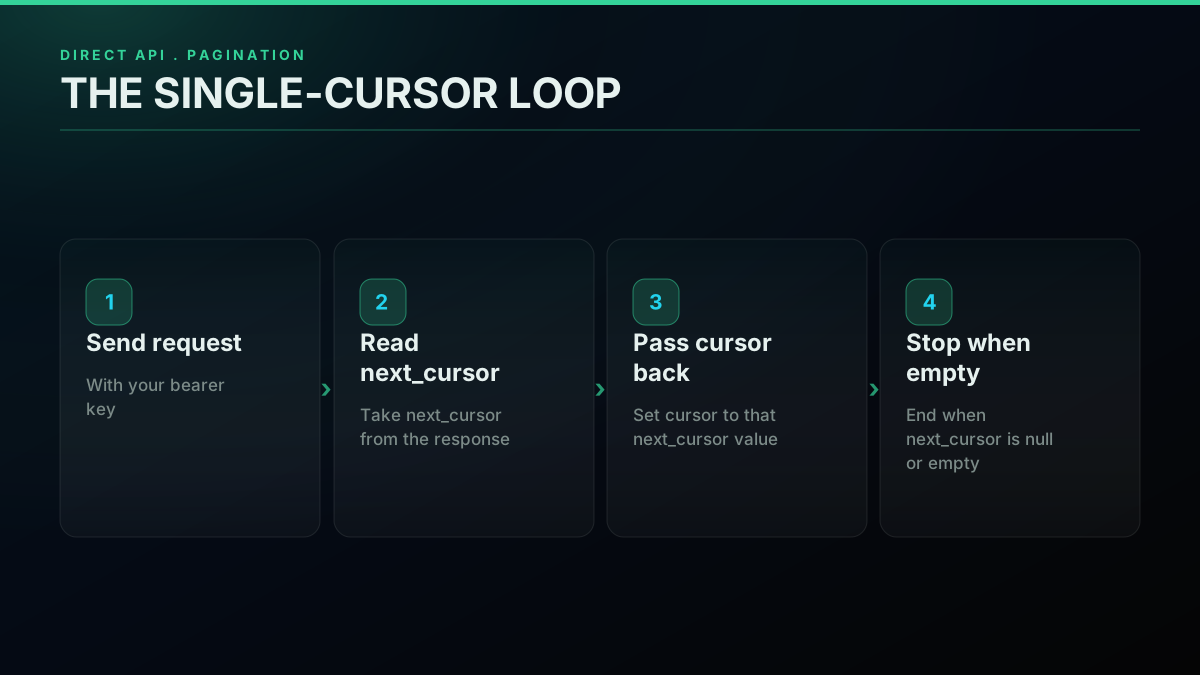
The pattern in Python is a few lines. This calls the advanced search endpoint and walks every page:
import os, requests

KEY = os.environ["TWITTERAPIS_KEY"]
URL = "https://api.twitterapis.com/twitter/tweet/advanced_search"

def paginate(query, max_pages=50):
    headers = {"Authorization": f"Bearer {KEY}"}
    params = {"query": query, "product": "Latest"}
    pages = 0
    while pages < max_pages:
        r = requests.get(URL, headers=headers, params=params, timeout=15)
        r.raise_for_status()
        data = r.json()
        for tweet in data.get("tweets", []):
            yield tweet
        cursor = data.get("next_cursor")
        if not cursor:
            break                          # explicit stop signal.
        params["cursor"] = cursor
        pages += 1
The same call is a one-liner from the shell, which is handy for confirming the field names before you write any loop. Note how the cursor comes straight off the response:
curl -s "https://api.twitterapis.com/twitter/tweet/advanced_search?query=from:openai&product=Latest" \
  -H "Authorization: Bearer $TWITTERAPIS_KEY" | jq '{count: (.tweets|length), next_cursor}'
# -> { "count": 20, "next_cursor": "DAABCgABF..." }
The single next_cursor is what makes this cleaner than the official token dance. You read one field and send that same value back, instead of mapping a next_token you read onto a pagination_token you write. The pull toward a simpler, more accessible source is a real and current signal from the developer community.
how many n8n users ACTUALLY want X/Twitter data in their workflows?
next_token versus cursor: which model should you use
Use next_token when you are already committed to the official X API v2 and need OAuth user-context features. Use the single-cursor model when you want the least code and pay-per-call pricing on read-heavy work. Both are cursor pagination under the hood, so the correctness rules are identical, but the ergonomics differ: the official model splits one cursor across two field names, while the direct model keeps a single next_cursor you read and resend and ends when that cursor comes back null or empty.
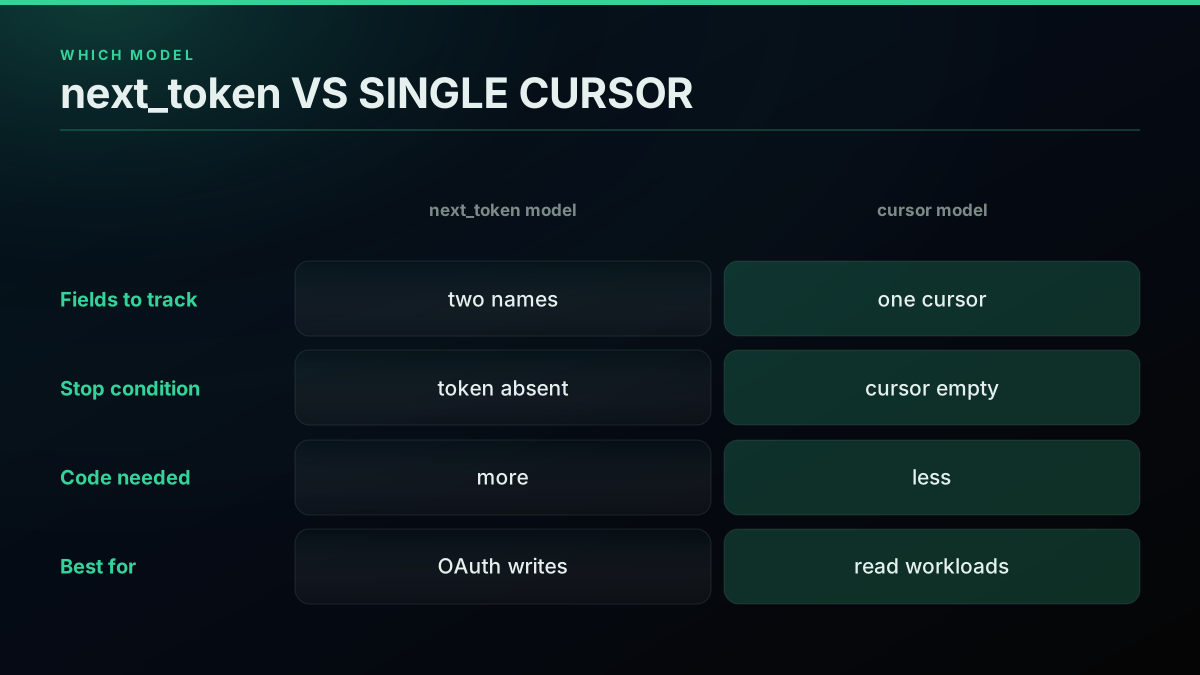
The honest read is that the direct model wins on developer ergonomics for read workloads, which is what the highlighted column reflects. The official model wins when you specifically need write actions or user-context OAuth. For a full side-by-side of the two data sources beyond pagination, the X API v2 versus TwitterAPIs breakdown covers auth, endpoints, and limits.
Migrating a loop between the two models is mostly a rename, which is a good sign that they share the same underlying shape. You swap the meta.next_token read for a next_cursor read, change the write parameter from pagination_token to cursor, and keep the same stop condition in spirit, since both loops end when the cursor stops coming back, an absent next_token on the official API and a null or empty next_cursor on the direct one. The loop skeleton, the max_pages cap, and the retry wrapper stay exactly the same. If you already have a working official-API paginator, porting it to a direct API is usually a ten-minute job, and the reverse is equally mechanical. That portability is worth keeping in mind when you pick a source, because it means the pagination code you write today is not a lock-in decision. The migration guide from twitterapi.io to TwitterAPIs shows a comparable field-level swap for a full integration.
How page size drives call count and cost
Page size is the multiplier that decides how many calls a full pull needs, and therefore what it costs. On the official API, max_results sets page size within a documented range. On a direct API the page size is fixed per endpoint: a standard search call returns about 20 tweets, and the followers endpoint returns about 70 records on the first page and fewer after that. Divide your total records by the page size and you have your call count before you write a line of the loop.
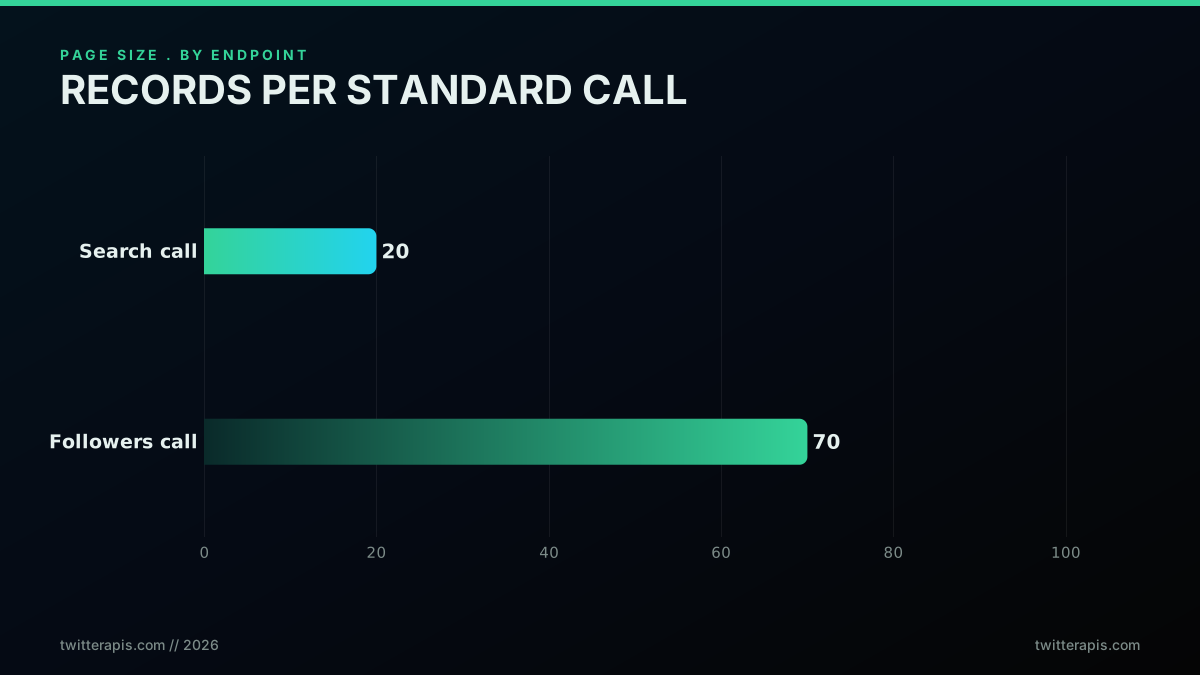
That per-endpoint page size is why the same total record count can cost very different amounts depending on which route you page. Larger pages mean fewer round trips, which means fewer calls and a smaller bill. The best-practices guide goes deeper on tuning page size and concurrency for production pulls.
Work the arithmetic once and the whole loop becomes predictable. If you need 500,000 tweets and each call returns about 20, that is 25,000 calls. If you need 500,000 follower records and each call returns about 50 on average, that is 10,000 calls, well under half the round trips for the same record count. The endpoint you choose therefore has a bigger effect on your bill than almost any other decision, because it sets the divisor. Always estimate the call count from total records divided by page size before you write the loop, then treat that number as your budget line. A pull that looks cheap per call can still be expensive in aggregate if the page size is small and the volume is large, which is exactly why the estimate comes first.
What one paginated pull actually costs
On a pay-per-call direct API the cost of a paginated pull is exactly page count times the per-call rate. At the standard read rate of $0.0008 per call, a pull that needs 1,000 pages costs about $0.80, and a 10,000-page pull costs about $8.00. The $0.50 free signup credit covers roughly 625 standard calls before any card is needed, and at $0.0008 a call over a full 20-tweet page the effective read cost lands near $0.04 per 1,000 tweets. A few endpoints price higher because they do more work per call: full account history through user/tweets/complete is $0.0024 per call, and full thread expansion through tweet/thread is $0.004 per call.
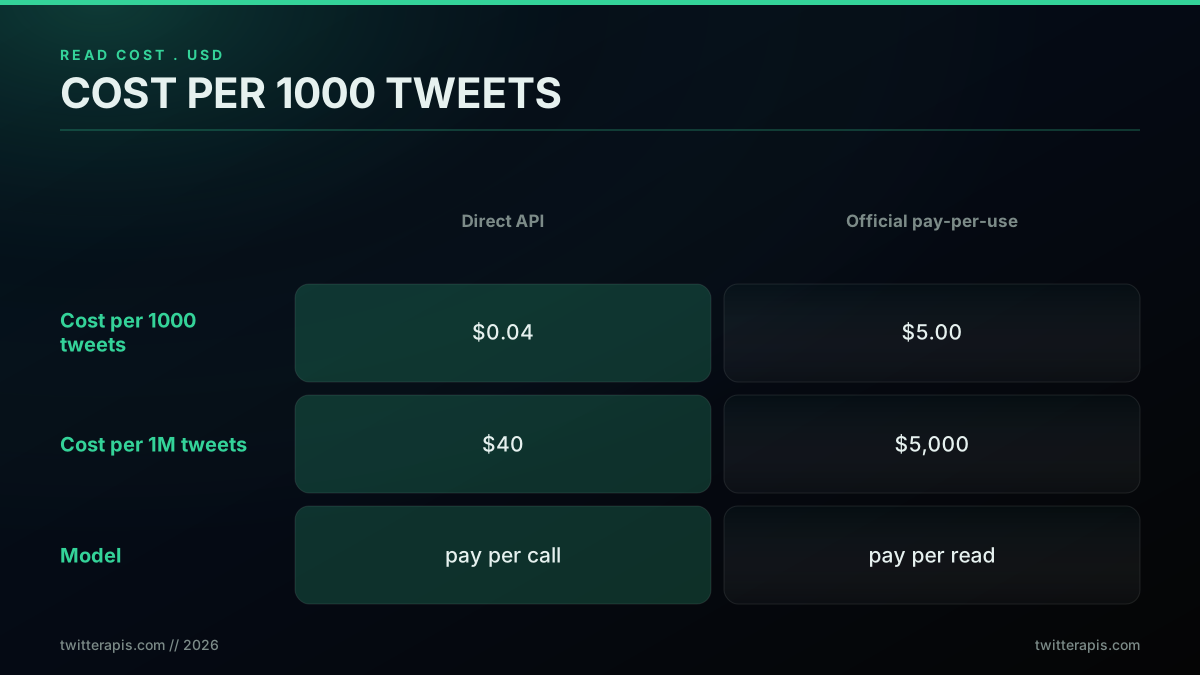
Cost is exactly where developers get surprised, because a paginated loop quietly multiplies a small per-call number into a real bill. One founder flagged the pay-per-use math the moment the official API moved to it.

Jon Yongfook
@yongfook
Had to fix something because the Twitter API switched to Pay As You Go. Is anyone else using this for production? Pricing seems a little off... 25 cents for 2 requests? This is just for a basic post search. https://t.co/2EK93szHCc

The lesson is to price the loop before you run it. Multiply your estimated page count by your per-call rate and you will never be surprised by a paginated bill. The cost calculator does this arithmetic for you, and the Twitter API cost breakdown covers how the rates compare across providers.

That free credit is enough to page through a mid-size dataset end to end while you validate your loop, which is the right time to confirm your stop condition works before you scale up.
The cheapest pay-as-you-go Twitter API. Try it free.
$0.0008 a call, about $0.04 per 1,000 tweets at 20 tweets a page. $0.50 free credits. No credit card required.
Handling rate limits and 429s while paginating
While paginating, retry only on 429 and 5xx, and resume with the exact cursor you were about to use, never advancing it on a failed call. On the official X API v2, each response carries x-rate-limit-remaining and x-rate-limit-reset headers per 15 minute window, so you can pace the loop to stay under the ceiling. On a 429, read the Retry-After header when it is present and sleep that long, otherwise fall back to exponential backoff starting near one second and doubling to a cap. The critical rule specific to pagination is that a failed page must be retried with the same cursor, because advancing past it skips a whole page of records.
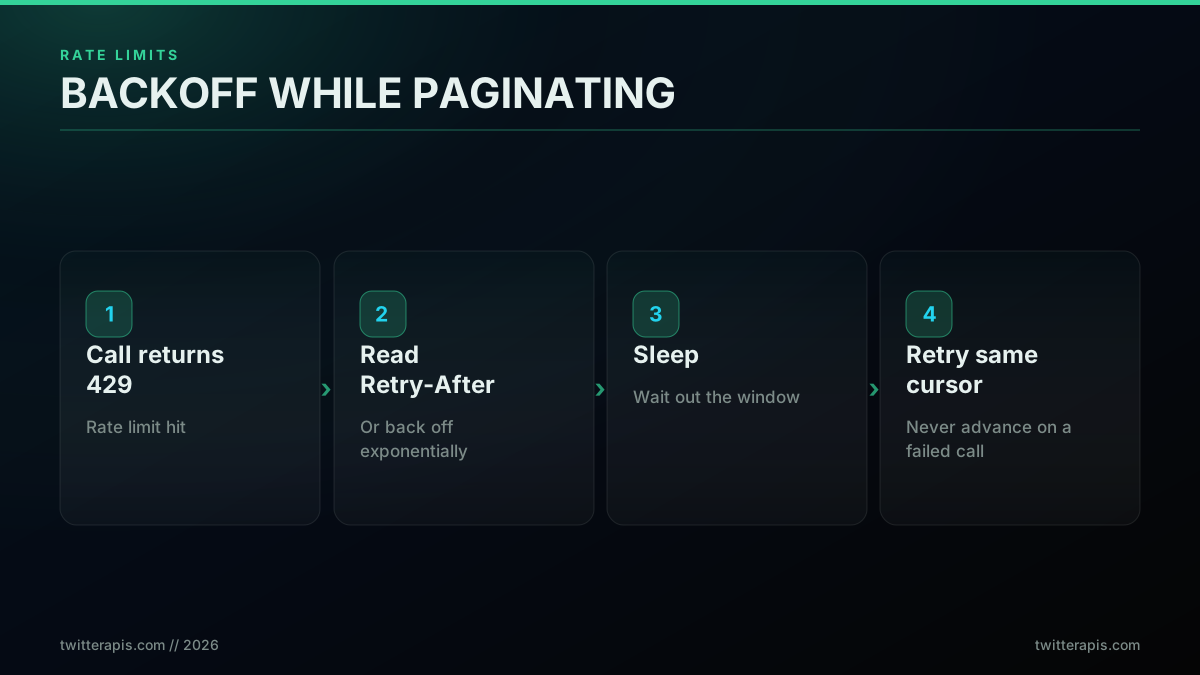
A direct API with no per-endpoint call ceiling still deserves the same retry wrapper for transient network errors and upstream 5xx responses, because correctness under a flaky connection matters regardless of rate policy. The rate limits reference and the guide on whether the Twitter API is free both cover how these ceilings shape a real workload.
Storing and resuming a paginated pull
Persist the cursor to disk after every page and a large export becomes resumable: if the process dies at page 800 of 1,000, you restart from the saved cursor instead of paying for the first 800 pages again. This is the single most valuable habit for any pull that runs longer than a few minutes, and it costs almost nothing to add. Because the cursor is just an opaque string, you can write it to a file, a database row, or an environment variable, and read it back on the next run.
The pattern is to treat the cursor as your checkpoint. After yielding each page of records, write the current cursor and a running count somewhere durable. On startup, check for a saved cursor and seed the loop with it if one exists. A crash, a deploy, a rate-limit lockout, or a machine reboot then costs you at most one page of rework rather than the entire export. The follower export guide walks through a checkpointed resume in full, and the same shape applies to any endpoint that pages.
import json, os, requests

STATE_FILE = "pull_state.json"

def load_cursor():
    if os.path.exists(STATE_FILE):
        return json.load(open(STATE_FILE)).get("cursor")
    return None

def save_cursor(cursor, count):
    json.dump({"cursor": cursor, "count": count}, open(STATE_FILE, "w"))

def resumable_pull(query, key, max_pages=1000):
    url = "https://api.twitterapis.com/twitter/tweet/advanced_search"
    headers = {"Authorization": f"Bearer {key}"}
    params = {"query": query, "product": "Latest"}
    cursor = load_cursor()
    if cursor:
        params["cursor"] = cursor          # resume where we stopped.
    total, pages = 0, 0
    while pages < max_pages:
        data = requests.get(url, headers=headers, params=params, timeout=15).json()
        rows = data.get("tweets", [])
        total += len(rows)
        cursor = data.get("next_cursor")
        if not cursor:
            break
        params["cursor"] = cursor
        save_cursor(params["cursor"], total)   # checkpoint every page.
        pages += 1
    return total
The one rule that makes resume safe is to save the cursor for the NEXT page only after the current page has been fully processed and stored. Save too early and a crash mid-write can leave you pointing past unstored records. Save after processing and the worst case is reprocessing one page you already have, which deduplication handles cleanly.
Paginating multiple queries at once
Because pagination is I/O bound, you can run several independent paginated pulls concurrently and finish far faster than looping them one after another. Each query keeps its own cursor, so there is no shared state to coordinate. In Python you fan out with a thread pool or async tasks, in Node.js you use Promise.all over an array of paginators, and the total wall-clock time drops to roughly the slowest single query rather than the sum of all of them.
// Page several queries at once; each keeps its own cursor.
const queries = ["from:openai", "from:anthropic", "from:google"];
const results = await Promise.all(
  queries.map((q) => paginateSearch(q))   // reuse the loop from earlier.
);
console.log(results.map((r, i) => `${queries[i]}: ${r.length} tweets`));
The same fan-out idea is what developers wiring pagination into other tools reach for too, as seen in this Microsoft Q&A on the Twitter pagination rule.
The caution is that concurrency multiplies your call rate, so on the official X API v2 you must keep the combined rate under the per-window ceiling or every parallel worker will start returning 429s at once. A small concurrency limit, often a semaphore capping in-flight requests, keeps a burst from tripping the rate limit across the whole batch. On a direct API with no per-endpoint ceiling this scales more freely, but you still cap concurrency to stay polite and to keep memory bounded when many pages land at once. The best-practices guide and the scrape tweets collector both cover concurrency tuning for production pulls.
Common pagination mistakes and how to avoid them
Most pagination bugs come from four mistakes: keying the stop condition on an empty data array instead of an absent cursor, forgetting to pass the cursor forward so every call returns page one, advancing the cursor after a failed request and skipping a page, and omitting a max_pages cap so a logic error runs unbounded. Each one is cheap to prevent and expensive to debug in production, and each shows up repeatedly in developer forums.
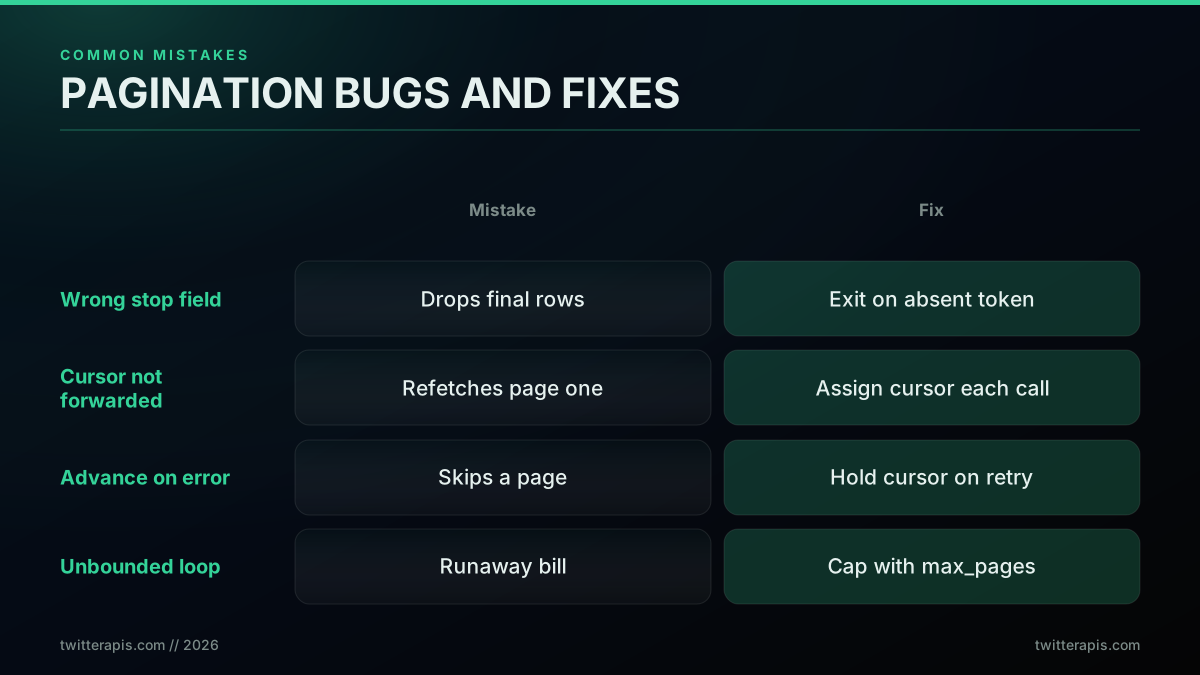
The fixes are mechanical. Read the cursor from meta and exit on its absence, assign the cursor to your request parameter and confirm the value changes between calls, hold the cursor steady across a retry, and always bound the loop. These four habits turn pagination from a source of silent data loss into a solved problem. The scrape tweets guide applies them to a durable collector.
A fifth mistake is subtler and only shows up at volume: assuming every endpoint paginates the same way. Some routes cap the number of pages regardless of your cursor, some return a fixed maximum record count and then stop, and a few older endpoints omit pagination entirely and silently truncate. The developer forums are full of these surprises, from bookmark folders that quietly limit downloads to search routes that behave differently from timelines. The defense is to read the Twitter API reference for the specific endpoint you call, log the record count per page during a first test run, and confirm the totals match what you expect before you trust the loop in production. Treat the first full pull as a verification pass, not just a data pull, and you will catch a truncating endpoint before it costs you a silently incomplete dataset.
Pagination across specific endpoints
The cursor pattern is the same everywhere, but the field names and page sizes vary by endpoint, so it helps to see them mapped. Followers page through next_cursor at about 70 records on the first page and fewer after it, threads page through a cursor returned by the thread endpoint, search pages through next_cursor until it comes back empty, and full account history uses date-window search plus a cursor to get past the timeline cap.
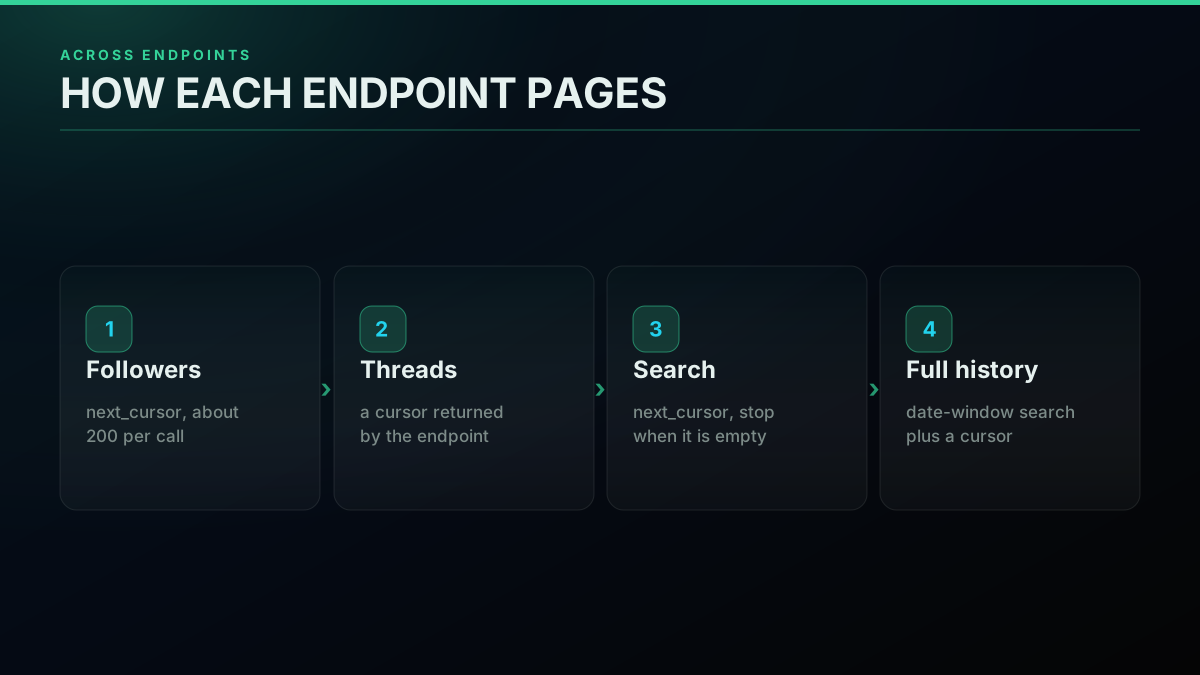
Two endpoints deserve a specific note. Full history is bounded by the platform timeline cap, so the scrape tweet history guide uses date-window search with a cursor to walk past it. And mention monitoring pages a live feed, so the real-time mentions monitor pages by cursor plus a since marker to pull only new records. For the cheapest way to run any of these at volume, the cheapest Twitter API ranking compares real per-1000-tweet costs.
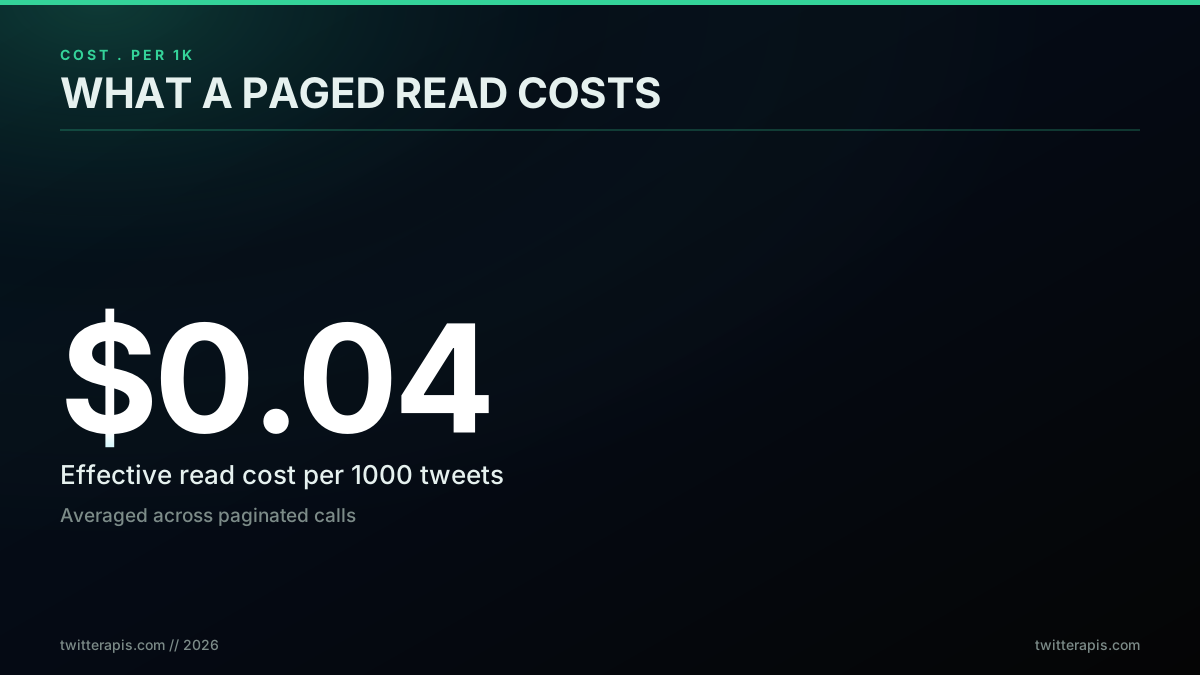
That effective rate is what a fully paginated read workload actually costs once you average across pages, and it is the number to plug into your own volume estimate.
The verdict
Twitter API pagination is a cursor loop with three rules: read the cursor from meta, stop when it is absent, and cap the page count. The official X API v2 splits that cursor across next_token and pagination_token and infers the end from a missing field, which is why so many first loops misbehave. A direct pay-per-call API keeps a single next_cursor you read and resend, and ends the loop when that cursor comes back null or empty, which is less code and fewer surprises for read-heavy work.
Whichever you choose, size the pull first by dividing total records by page size, multiply by your per-call rate, and you will ship a paginator that never loops forever and never surprises you with a bill. Persist the cursor after every page so a long export is resumable, hold it steady across a retry, and read the full meta block rather than just the token so your loop is efficient as well as correct. Those habits are the whole discipline, and they carry over unchanged whether you page the official API or a direct one. When you are ready to run it cheaply, sign up for free credits and page a real dataset end to end before you scale.
// sources
Where these numbers come from
Each row is a figure in this post and the artefact it was read from. Prices and limits on this platform move, so check the date on the source before you plan against it.
- X API pagination documentation
- The source for the official model the article explains field by field, that next_token is an opaque cursor returned in the meta block and must be passed forward rather than constructed or decoded.
- X search pagination integration guide
- Restates the same cursor pattern for the recent-search endpoint, which is the specific route the article's paginated pull runs against.
- Tweepy v2 pagination documentation
- The library reference for the Paginator that wraps the meta-block bookkeeping the article walks through by hand, including result_count and oldest_id.
- Node.js global fetch reference
- Backs the claim that the Node version of the loop needs no SDK, because fetch is global from Node 18 onward.
- X developer community pagination thread
- The community evidence cited for the article's claim that mixing up the read name and the write name is the root cause of most loop-never-ends bug reports.
- Yan Cui essay on pagination design
- The outside design argument the article leans on for preferring an opaque cursor over an offset, since new records arriving mid-pull renumber an index but not a cursor.
Frequently Asked Questions
next_token is the pagination cursor the official X API v2 returns. It lives in the meta block of every response, not the data array. When a result set has more records than one page holds, the response carries a meta.next_token string. You take that string, send it back on your next request as the pagination_token parameter, and the API returns the following page. When the API omits meta.next_token from a response, you have reached the last page and the loop stops. The token is opaque, which means you never build or parse it yourself, you only hand it back. This is a cursor model rather than an offset model, so pages stay stable even when new posts arrive between your calls.
Loop on the cursor and stop when it is gone. On the official X API v2, send your first request, read response.meta.next_token, and if it is present send the next request with pagination_token set to that token. Repeat until a response has no next_token. Always add a max_pages counter so a bug or an unexpectedly large result set cannot run the loop forever and burn quota. On a pay-per-call direct API the shape is the same but simpler: read next_cursor from the response, pass it back as the cursor parameter, and stop when next_cursor comes back null or empty. Either way the rule is identical, follow the cursor and cap the page count.
The most common cause is checking the wrong field for the stop condition. On the X API v2 you must stop when meta.next_token is absent, not when the data array is empty, because the last page can still contain records. On a direct API stop when next_cursor comes back null or empty. The second common cause is not passing the cursor forward correctly, so every request returns the first page again and the loop appears infinite. Read the cursor from the response, assign it to your request parameter, and confirm the value changes between calls. Add a max_pages safety cap so a logic error costs you a bounded number of calls rather than an unbounded bill.
Cursor pagination. The X API v2 uses an opaque next_token cursor rather than a numeric page or offset, and legacy v1.1 endpoints used a next_cursor and previous_cursor pair. Cursor pagination is the right model for a live feed because records shift constantly as new posts arrive. An offset of 100 would skip or repeat records whenever the underlying set changes between calls, but a cursor points at a stable position in the result stream, so you never double count or miss a record. A direct pay-per-call API follows the same cursor model with a single next_cursor field, which is why you never see page numbers in a Twitter data response.
They are two ends of the same cursor. next_token is what the X API v2 sends you inside the meta block of a response. pagination_token is what you send back on the next request to fetch the following page. In practice you read response.meta.next_token, then set the pagination_token query parameter to that exact value on your next call. The naming trips up almost every developer on their first integration because the field you read and the field you write have different names for the same opaque cursor. Some endpoints instead expose a v1.1 style cursor pair through the next_cursor and previous_cursor fields, so always check the reference for the endpoint you call.
It depends on the endpoint. On the official X API v2 the max_results parameter controls page size within a documented range, commonly up to 100 for recent search and timelines. On a direct API like TwitterAPIs the page size is fixed per endpoint: the followers endpoint returns about 70 records on the first page and fewer after that, and a standard search call returns about 20 tweets. The followers endpoint ignores the count parameter, so page size is fixed regardless of what you request. Page size matters for cost and speed because it decides how many round trips a full pull needs. A 100,000 record follower export is roughly 2,000 calls, so at the standard read rate of $0.0008 per call that pull costs about $1.60. Always divide your total records by the page size to estimate call count before you run the loop.
On a pay-per-call direct API the cost is simply the number of pages times the per-call rate. At the standard read rate of $0.0008 per call, a pull that needs 1,000 pages costs about $0.80, and a pull that needs 10,000 pages costs about $8.00. The $0.50 in free signup credits covers roughly 625 standard calls before any card is required. Effective read cost lands near $0.04 per 1,000 tweets. On the official X API pay-per-use model a post read is roughly $0.005 per resource, so the same volume costs meaningfully more. The practical rule is to estimate pages first by dividing total records by page size, then multiply by your per-call rate before you ship a polling loop.
Retry on 429 and 5xx only, and stop on other 4xx errors because a bad request will not fix itself. On the official X API v2 each response carries x-rate-limit-remaining and x-rate-limit-reset headers per 15 minute window, so read them and pace your loop to stay under the ceiling. On a 429, read the Retry-After header when present and sleep that long, otherwise use exponential backoff starting near one second and doubling to a cap. Crucially, resume with the SAME cursor you were about to use, never advance it on a failed call, or you will skip a page. A direct API with no per-endpoint call ceiling still deserves the same retry wrapper for transient network and 5xx errors.
Check out similar blogs
More guides on the Twitter/X API, scraping, and pricing.

Twitter API Tutorial 2026: The Complete Developer Guide
The 2026 Twitter API tutorial built after the pricing collapse. Auth, endpoints, code, rate limits, real costs, and the alternative when official gets too expensive.

How to Get Image URLs from X Tweets via API in 2026 (Full Resolution, Python and Node)
Pull image URLs out of X tweets with runnable Python and Node.js, then get the full-resolution original instead of the scaled copy the API hands you by default. Measured on 14 live images, with the video poster-frame trap and the per-call cost.
Twitter API Authentication in 2026: OAuth, Bearer Tokens, and Fixing 401
How Twitter (X) API authentication works in 2026: the four credential types, OAuth 1.0a versus OAuth 2.0, generating and using a bearer token, runnable Python and Node.js, and a fix for every 401 Unauthorized and 403 error, plus the one-header alternative.
How to Get Everyone Who Retweeted a Tweet via API (2026)
Pull the full list of accounts that reposted any tweet with a real 2026 API. Runnable Python and Node.js, cursor pagination for the whole list, a real amplifier ranking over live data, a bot filter, and the honest per-call cost.
How to Get All Replies to a Tweet via API (2026)
Pull the replies under any tweet with a real 2026 API. Runnable Python and Node.js, cursor pagination, the conversation_id tail sweep for the long tail, nested replies-to-replies, signal-versus-noise filtering over live data, and the honest per-call cost.
How to Search Tweets by Hashtag via API 2026 (Python + Node.js)
Search tweets by hashtag with a real 2026 API in Python and Node.js. Runnable code for the hashtag operator, engagement filters, cursor pagination, deduping retweets, counting authors, and the real per-call cost.
Fetch a Full Twitter Thread via API in One Call (2026)
How to pull an entire Twitter thread, the root tweet plus every connected tweet in the chain, in a single API call with the tweet/thread endpoint, instead of walking replies by hand. Live-tested code in curl, Python, and Node.js, with the real per-call cost.
Twitter API Node.js Tutorial 2026: Fetch Tweets in 10 Lines
The 2026 Node.js Twitter API tutorial: fetch tweets in 10 lines with fetch or axios, no SDK and no OAuth dance. Search, profiles, cursor pagination, retries, async, and real per-call costs in working code.