GUIDE
Twitter API Tutorial 2026: The Complete Developer Guide
The 2026 Twitter API tutorial built after the pricing collapse. Auth, endpoints, code, rate limits, real costs, and the alternative when official gets too expensive.
Per our own spec, 70 of 123 endpoints bill $0.0008, 26 are free, and 27 sit between $0.0016 and $0.01. Every price ships inside our published OpenAPI document as an x-cost-usd field, so any figure in this post can be checked against the contract that bills it rather than taken on trust.

If your bookmarked Twitter API walkthrough is more than a season old, the screens it shows no longer exist. The free tier vanished three years back. The monthly subscription plans that took its place were switched off in February 2026. What runs today is consumption billing, and almost nobody learning the API in 2026 started on it.

Developers
@XDevelopers
Officially launching X API Pay-Per-Use The core of X developers are indie builders, early stage products, startups, and hobbyists It’s time to open up our X API ecosystem and instill a new wave of next generation X apps We’re so back. https://t.co/FS66GuIYJD
Most people who type "twitter api tutorial" into Google open an old guide, click into the X developer console, and find that none of the buttons line up with the article.
So this guide starts from where the platform actually is now. The Twitter API, branded the X API officially but still searched five times more often under its old name, is an HTTP interface for reading tweets, running searches, pulling profiles, and publishing posts from code, gated behind a Bearer Token or an OAuth credential, as the official X API introduction lays out. Every block of code here runs. Every dollar figure reflects June 2026. Nothing is hypothetical.
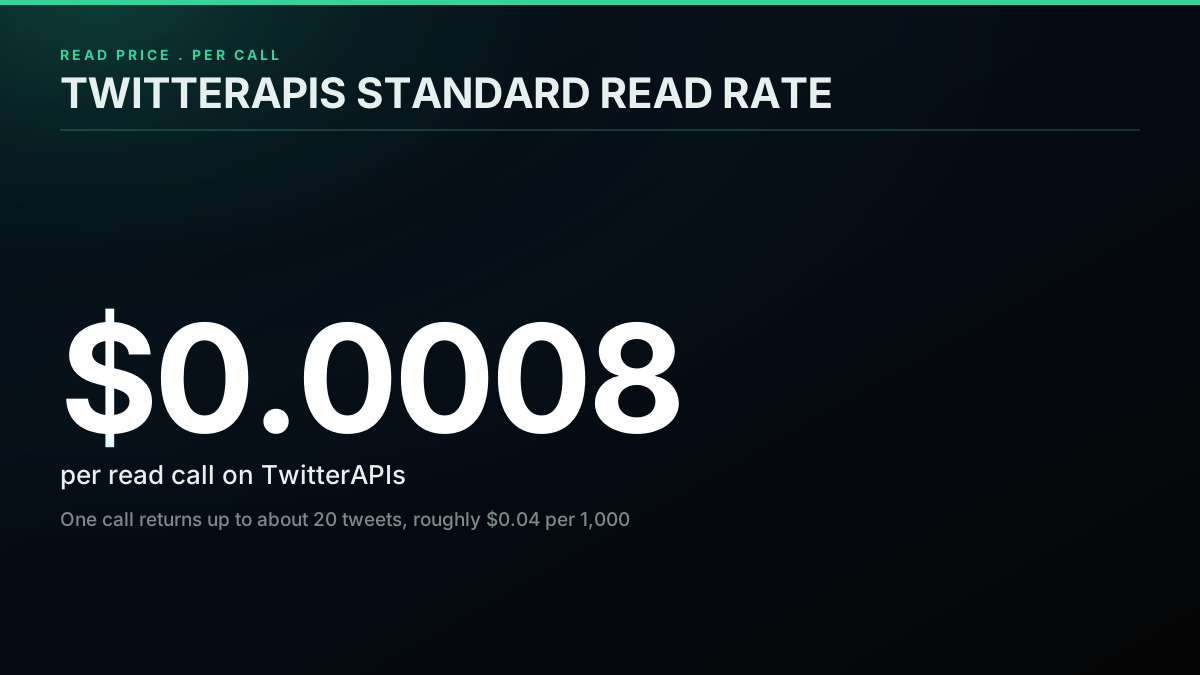
TL;DR: Official X API rates are about $0.005 per post read, $0.01 per profile, $0.015 to post, and $0.015 per DM (X API pricing), and there is no free tier. Your three real options are the X developer console (one to three days to set up), a Python client like XDK or Tweepy, or a direct REST provider such as TwitterAPIs at $0.0008 a call, about $0.04 per 1,000 tweets on a full 20-tweet page, that you wire up in under five minutes. The sections below open up each one.
Developers
@XDevelopers
API Posting will increase to $0.015 per post from $0.01. API Posting URL will be $0.20 except for summoned replies. This will remain at $0.01. Following, Likes, and Quote-Posts via API Writes will be removed from all self-serve tiers. More details: https://t.co/vdqTnQxJil
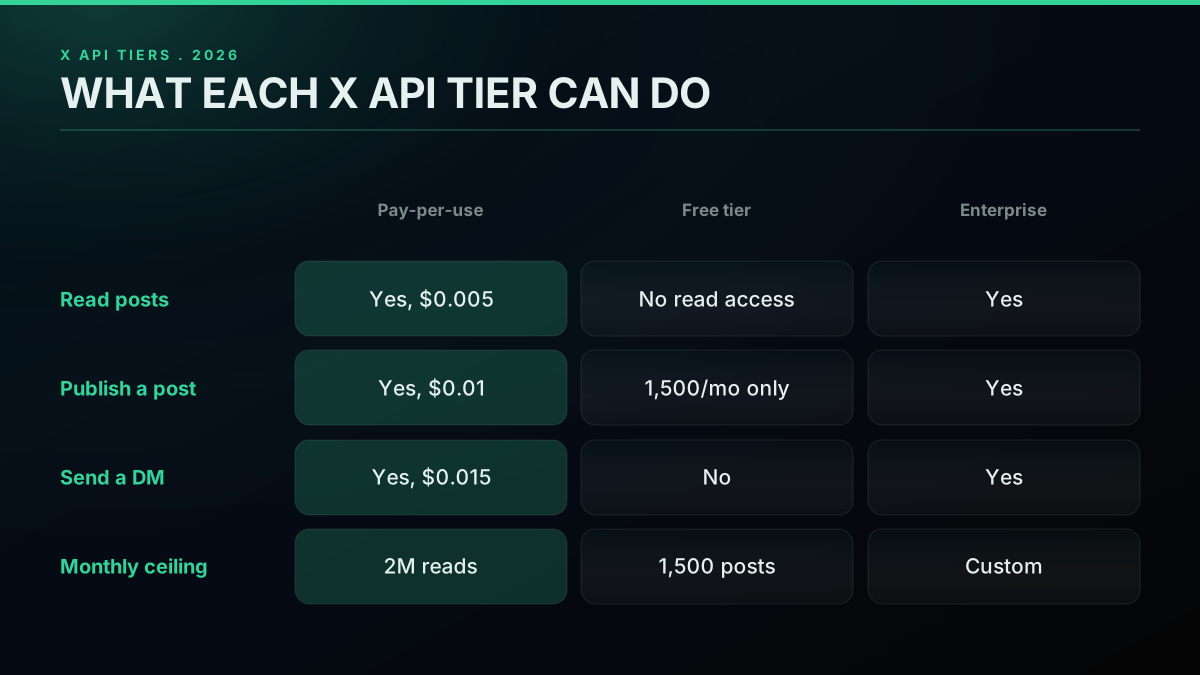
The capabilities you actually get from the Twitter API v2, grouped by endpoint family
Developers
@XDevelopers
Important update for X API developers: Legacy Basic plans (monthly & annual) are being deprecated. All Basic subscribers will be automatically migrated to the new Pay-Per-Use plan after June 1, 2026. Full details: https://t.co/X3GJ2wvFC2
What the X API Actually Costs in 2026
Money is the part that changed most, so it goes first. Billing is now consumption based. You load credits up front and each call draws them down. There is no fixed monthly floor once you clear the tiny signup voucher.
The current per-call rate card, checked in June 2026 against X developer pricing:
| Operation | Per-call price | Notes |
|---|---|---|
| Read a post by ID | $0.005 | One tweet object, expansions included, equals one read |
| Look up a user profile | $0.01 | Carries follower and following counts plus metadata |
| Search recent posts | $0.005 per result | A query that returns 100 results bills as 100 reads |
| Create a plain-text post | $0.015 | Standard publish |
| Create a post with a URL | $0.20 | April 2026 anti-spam surcharge on link posts |
| Send a DM | $0.015 | Both one-to-one and group segments bill per send |
| Like or retweet | $0.005 | Per engagement action |
| Stream connection | Free to connect, billed per delivered post | Filtered stream charges the read rate per matching post |
The hard wall is the 3-million-read monthly ceiling. Cross three million reads inside one billing cycle and your account is moved onto Enterprise, which X does not price publicly and which runs through its sales team.
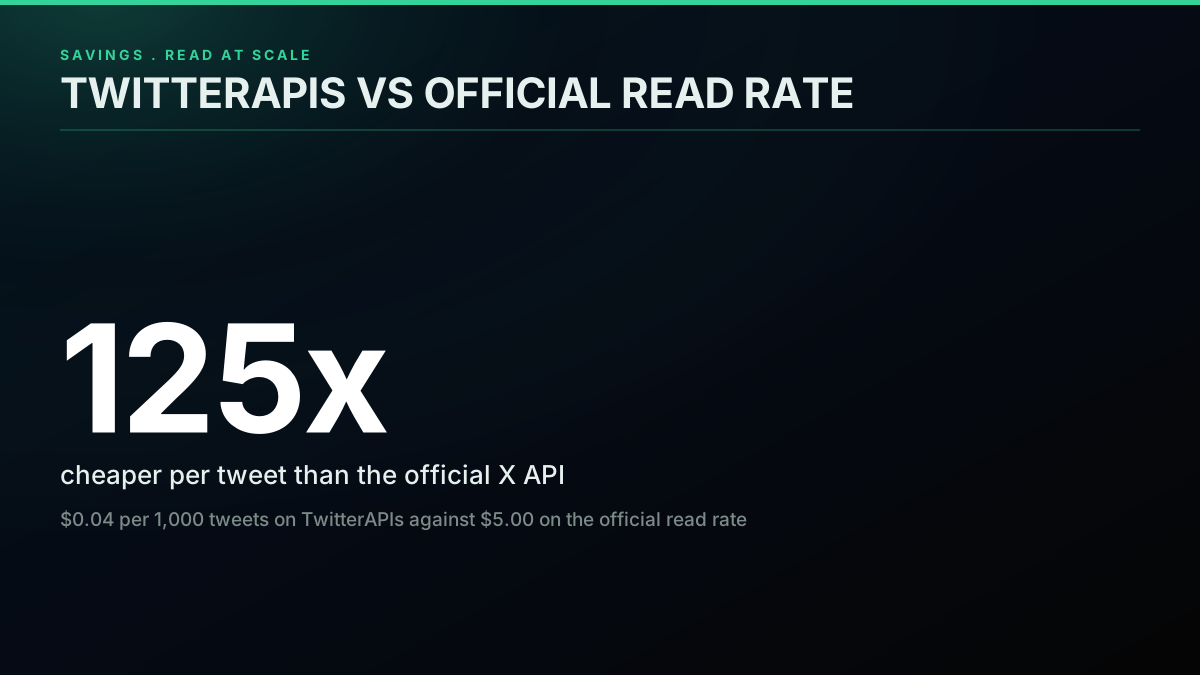
Where the official rate card stings is volume. Reading at $0.005 per post (X API pricing), the cost per thousand tweets is $5.00. A direct provider like TwitterAPIs reads at $0.0008 per call, and one call returns up to roughly 20 tweets, which lands at $0.04 per 1,000 tweets. The per-tweet gap is more than a hundred to one. Forecast that across common monthly read volumes:
| Tweets read per month | Official X API | TwitterAPIs (est.) |
|---|---|---|
| 50,000 | $250 | $2 |
| 500,000 | $2,500 | $20 |
| 1,000,000 | $5,000 | $40 |
| 2,000,000 | $10,000 | $80 |
| 3,000,000 (official cap) | $15,000 | $120 |
| 5,000,000 | Enterprise, price not published | $200 |
TwitterAPIs figures are modeled at the published $0.04 per 1,000 tweets read rate; verify your own mix on the pricing page. For how these rates compound across team sizes and workloads, the Twitter API cost guide goes deeper, and the Twitter API cost calculator will price any blend of read, write, and engagement volume on the spot. For a per-1,000-tweet benchmark across providers, the Twitter API cost benchmark runs the raw numbers, and the cheapest Twitter API providers ranked lines up eight options by real per-1,000-tweet cost.
Twitter API plans are a joke!
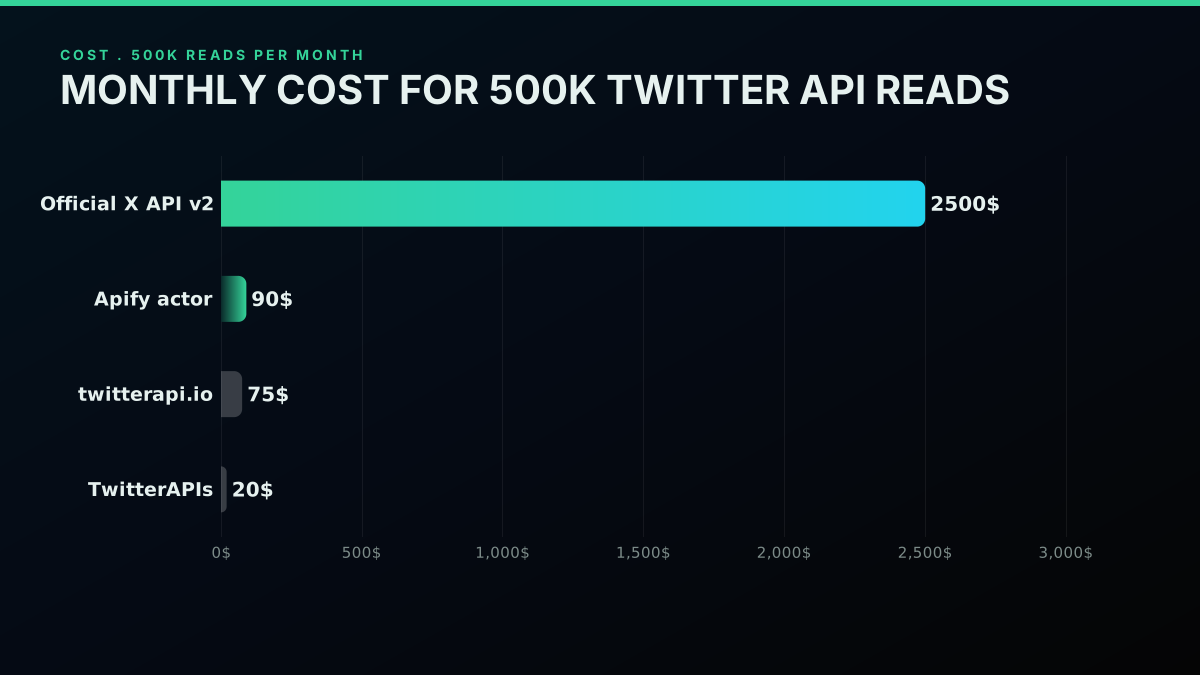
Monthly read cost, official X API set against TwitterAPIs
How the Twitter API Got Here: Four Eras
The Twitter API is the official REST and streaming surface that X (once Twitter, Inc.) opens to outside developers. It is the same interface that drives the X apps internally, the same one third-party clients like Tweetbot leaned on before the 2023 shutdown, and the same one verified academics still reach through the research product.
The API has existed since 2006, roughly half a year after Twitter went live. Its pricing has moved through four distinct chapters:
- 2006 to 2023, the open years. A free public API. An email got you a developer app, a key, and calls. The only ceiling was rate limits. This is the era nearly every stale tutorial still walks you through.
- March 2023 to February 2026, the subscription years. The free tier closed in February 2023 and fixed monthly plans replaced it: Basic at $100 a month for 10K reads, Pro at $5,000 a month for 1M reads (X API pricing), and a custom-priced Enterprise. Cheap data buyers liked it, small projects hated it.
- February 2026 onward, consumption billing. X folded the plans into per-call pricing. You prepay credits and pay as you call: $0.005 a read, $0.01 a post, $0.015 a DM (X API pricing). The 3-million-read monthly ceiling still routes heavy users to Enterprise, which X does not publish a price for.
- April 2026, the link surcharge. Posts containing a URL jumped to $0.20 per create, against $0.015 for plain text (X API pricing), aimed at slowing automated link spreading. It touches write endpoints only.
Consumption billing is the reality new developers are coding against today. Any guide that says "Basic tier" or "$100 a month" without noting that those retired in February 2026 is stale. The full breakdown of the February 2026 shift sits in the 2026 X API pricing change writeup. The complete tier history sits in the official X API access levels overview.
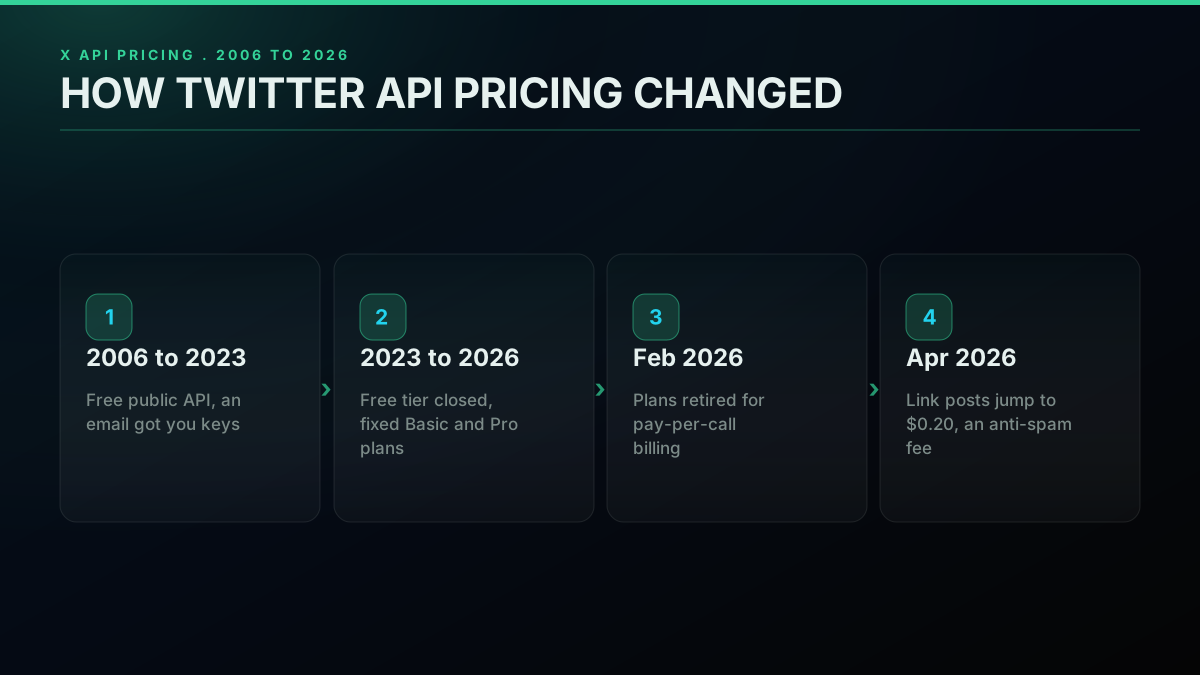
Twitter API pricing timeline, 2006 to 2026
What the v2 surface can do
The live API (v2) breaks into four capability groups:
- Read. Recent search, tweet-by-ID, user timelines, profile lookups, follower and following lists, plus poll and Space metadata.
- Write. Publish posts with or without media, delete, like and unlike, retweet and unretweet, reply, quote, send DMs, follow and unfollow.
- Stream. A rule-filtered real-time firehose, a low-volume sampled stream, and a high-tier volume stream.
- Compliance. Batch jobs that flag deleted, suspended, or geo-restricted content so a warehouse stays in sync with X.
Where the official API runs out of road
Three situations push developers off the official path:
- Cost at volume. At $0.005 a read (X API pricing), a million tweets is $5,000 and ten million is $50,000, and the 3M ceiling forces Enterprise above that.
- Onboarding drag. Application review, terms, app and project creation, a payment method, and OAuth key generation. New accounts sometimes sit one to three days in review.
- Verbose payloads. The v2 response splits across
data,includes, andexpansions, so assembling one full object means stitching blocks together. Handy for big pulls, heavy for small ones.
When any of those bite, a direct REST provider becomes the rational move.
What a direct provider gives you
A direct API such as TwitterAPIs maintains its own stabilized pipeline to the same data X surfaces, presents it through one REST endpoint, and bills per call. Standing it up takes under five minutes: register, copy the key, call. Reads run at $0.04 per 1,000 tweets, roughly two orders of magnitude under the official rate, under one flat ceiling of 600 requests a minute per key. You pay per call, and past that ceiling the cap is your credit balance.
The catch is that a direct provider is not the system of record, X is. For read-led work such as sentiment dashboards, social listening, lead sourcing, and feeding AI agents, that is a fine trade. For writes that must act as a specific signed-in user, the official API with OAuth 1.0a or PKCE stays the cleaner route, though TwitterAPIs also runs its 51 write actions through a per-request auth_token and ct0 rather than the OAuth handshake. For a field-by-field split of the official surface against a direct provider, see Twitter API v2 versus TwitterAPIs, and for read-heavy harvesting specifically, the best Twitter API for scraping ranks the options.
Authentication: Bearer Token, OAuth 1.0a, and OAuth 2.0 PKCE
The official X API ships three credentials, and the right one depends on whether your code acts as an app or as a signed-in user.
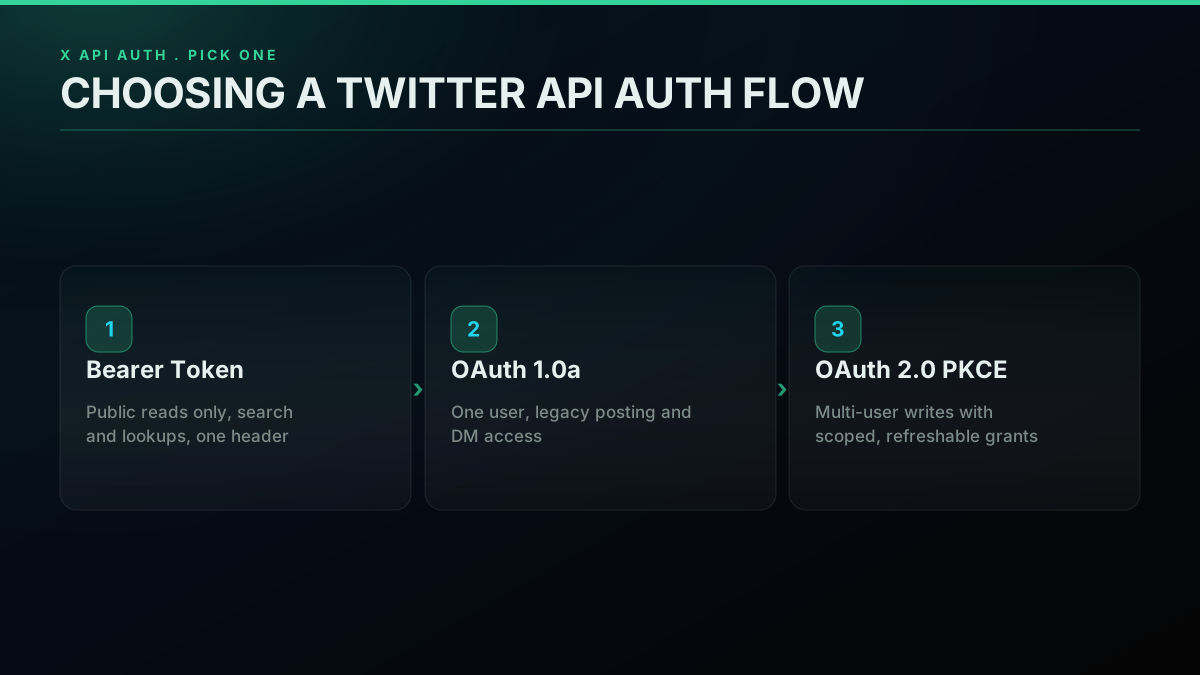
Picking the right Twitter API auth flow
| Auth method | Reach for it when | Header shape | Examples |
|---|---|---|---|
| Bearer Token (OAuth 2.0 App-Only) | You only read public data | Authorization: Bearer ABC... | Search, user lookup, public timeline reads |
| OAuth 1.0a | One user, simple legacy flow | Authorization: OAuth oauth_consumer_key=..., oauth_token=..., oauth_signature=... | Legacy posting, DM access for a single account |
| OAuth 2.0 PKCE | Multi-user writes with scoped grants | Authorization: Bearer USER_ACCESS_TOKEN (via PKCE) | New apps with delegated writes, refresh tokens, scope control |
Start with the Bearer Token if you can. You mint it once in the developer console, stash it as X_BEARER_TOKEN, and attach it to every request. It reads public data and nothing else, no posting, liking, retweeting, or DMing on a user's behalf.
OAuth 1.0a is the credential every pre-2021 Twitter app ran on. It survives and is still mandatory for a handful of endpoints, including DM access and some v1.1 calls. The signing is fussy, defined in RFC 5849 and walked through in X's guide to obtaining user access tokens, but every client library does it for you.
OAuth 2.0 PKCE is the modern delegated path. A user opens your page, taps "Connect with X," gets bounced to X's authorization server, approves the scopes you asked for, and returns with an authorization code. Your backend swaps that code for an access token and a refresh token, you persist the access token, refresh it on expiry, and call with Authorization: Bearer USER_ACCESS_TOKEN. The scope model means a user can grant a narrow grant such as read-only with no DM access. The underlying framework is OAuth 2.0 (RFC 6749), the PKCE mechanism is specified in RFC 7636, and X documents its variant at docs.x.com OAuth 2.0 Authorization Code with PKCE.
For most read work the Bearer Token is plenty. For posting on behalf of many users at scale, OAuth 2.0 PKCE is the answer.
A direct provider squeezes the read side behind one header. With TwitterAPIs the same Authorization: Bearer YOUR_KEY resolves every read endpoint, and you never run the OAuth flow for reads at all. For the write actions that need user context, you pass your own session auth_token and ct0 on each request and the provider never stores them.
Firing Your First Request
The call almost everyone wants first is a recent search: hand me the latest matching tweets, the recent search endpoint in X's own docs. Below is one query, written four ways: official curl, official Python with the requests library, official Node.js with the Fetch API, and the direct route.
Official API, curl
curl -X GET "https://api.x.com/2/tweets/search/recent?query=ai+agents&max_results=10&tweet.fields=created_at,public_metrics,author_id" \
  -H "Authorization: Bearer $X_BEARER_TOKEN"
You get back JSON with a data array of tweet objects and a meta block holding the result count and a next_token cursor.
Official API, Python (requests)
import os
import requests

TOKEN = os.environ["X_BEARER_TOKEN"]

search = requests.get(
    "https://api.x.com/2/tweets/search/recent",
    params={
        "query": "ai agents",
        "max_results": 10,
        "tweet.fields": "created_at,public_metrics,author_id",
    },
    headers={"Authorization": f"Bearer {TOKEN}"},
)
search.raise_for_status()
hits = search.json()["data"]

for row in hits:
    print(row["created_at"], row["text"][:80])
Official API, Node.js (fetch)
const TOKEN = process.env.X_BEARER_TOKEN;

const qs = new URLSearchParams({
  query: "ai agents",
  max_results: "10",
  "tweet.fields": "created_at,public_metrics,author_id",
});

const reply = await fetch(
  `https://api.x.com/2/tweets/search/recent?${qs}`,
  { headers: { Authorization: `Bearer ${TOKEN}` } }
);

if (!reply.ok) throw new Error(`HTTP ${reply.status}`);
const { data: hits } = await reply.json();
for (const row of hits) console.log(row.created_at, row.text.slice(0, 80));
Direct route, TwitterAPIs
import os
import requests

KEY = os.environ["TWITTERAPIS_KEY"]

search = requests.get(
    "https://api.twitterapis.com/twitter/tweet/advanced_search",
    params={"query": "ai agents", "product": "Latest"},
    headers={"Authorization": f"Bearer {KEY}"},
)
search.raise_for_status()
hits = search.json()["tweets"]

for row in hits[:10]:
    print(row["created_at"], row["text"][:80])
Identical query, one-header auth, and the payload arrives already flattened. The full Python Twitter API tutorial extends this across search, user lookups, followers, posting, and pagination on all four methods. To sharpen a query with operators like from:, since:, and lang:, the Twitter advanced search operators guide lists the full set. To export an entire follower graph, the Twitter followers API hands back about 70 profiles on the first page and fewer after that with cursor paging, and the export Twitter followers walkthrough shows the full loop.
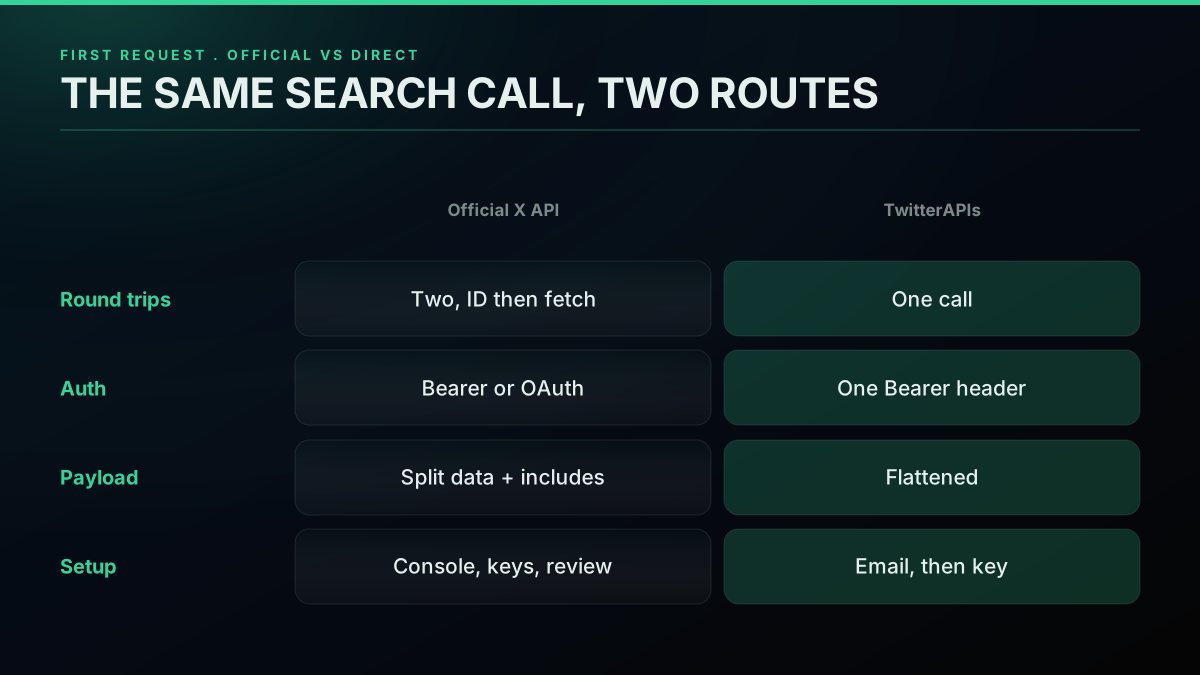
The same call across Python, Node.js, and curl
Reading the response
A clean recent-search reply looks like this, trimmed for space:
{
  "data": [
    {
      "id": "1797234567890123456",
      "text": "Just shipped a new ML inference endpoint, 30ms p99",
      "created_at": "2026-06-04T14:23:01.000Z",
      "author_id": "1234567890",
      "public_metrics": {
        "retweet_count": 12,
        "reply_count": 4,
        "like_count": 87,
        "quote_count": 2
      }
    }
  ],
  "meta": {
    "newest_id": "1797234567890123456",
    "oldest_id": "1797234567890100000",
    "result_count": 10,
    "next_token": "b26v89c19zqg8o3fpdwgupj0eovv9qwxgwlzr5h0qu521"
  }
}
meta.next_token is your paging cursor. Pull the following page by repeating the call with pagination_token=b26v89c19zqg8o3fpdwgupj0eovv9qwxgwlzr5h0qu521, and stop once next_token no longer appears.
Start building with TwitterAPIs
$0.0008 a call, about $0.04 per 1,000 tweets at 20 tweets a page. $0.50 free credits. No credit card required.
The Same Pull in Python, Node.js, and curl
Because the official X API is plain HTTP, any language that speaks HTTP works. Python, Node.js, and curl cover almost every integration in the wild. Here is one task, grab the 20 most recent posts for a username, in all three.
Python
import os, requests

TOKEN = os.environ["X_BEARER_TOKEN"]
HANDLE = "nasa"

# First: resolve the username to a numeric ID
profile = requests.get(
    f"https://api.x.com/2/users/by/username/{HANDLE}",
    headers={"Authorization": f"Bearer {TOKEN}"},
).json()["data"]
uid = profile["id"]

# Then: pull recent posts for that ID
recent = requests.get(
    f"https://api.x.com/2/users/{uid}/tweets",
    params={"max_results": 20, "tweet.fields": "created_at,public_metrics"},
    headers={"Authorization": f"Bearer {TOKEN}"},
).json()["data"]

for row in recent:
    print(row["created_at"], row["text"][:80])
For Tweepy, XDK, and the direct route, the dedicated Python Twitter API tutorial has the rest.
Node.js
const TOKEN = process.env.X_BEARER_TOKEN;
const HANDLE = "nasa";

// First: resolve the username
const idCall = await fetch(
  `https://api.x.com/2/users/by/username/${HANDLE}`,
  { headers: { Authorization: `Bearer ${TOKEN}` } }
);
const { data: profile } = await idCall.json();

// Then: pull recent posts
const qs = new URLSearchParams({
  max_results: "20",
  "tweet.fields": "created_at,public_metrics",
});
const feedCall = await fetch(
  `https://api.x.com/2/users/${profile.id}/tweets?${qs}`,
  { headers: { Authorization: `Bearer ${TOKEN}` } }
);
const { data: recent } = await feedCall.json();

for (const row of recent) console.log(row.created_at, row.text.slice(0, 80));
For the full Node.js path with pagination, posting, and error handling, the Node.js Twitter API tutorial carries the complete build.
curl
HANDLE="nasa"

UID=$(curl -s -H "Authorization: Bearer $X_BEARER_TOKEN" \
  "https://api.x.com/2/users/by/username/$HANDLE" \
  | jq -r '.data.id')

curl -s -H "Authorization: Bearer $X_BEARER_TOKEN" \
  "https://api.x.com/2/users/$UID/tweets?max_results=20&tweet.fields=created_at,public_metrics" \
  | jq '.data[] | {created_at, text: .text[:80]}'
The curl path leans on jq to slice the JSON response on the command line.
The same task through TwitterAPIs
import os, requests

KEY = os.environ["TWITTERAPIS_KEY"]
HANDLE = "nasa"

# One call, no separate ID lookup
recent = requests.get(
    "https://api.twitterapis.com/twitter/user/tweets",
    params={"userName": HANDLE, "limit": 20},
    headers={"Authorization": f"Bearer {KEY}"},
).json()["tweets"]

for row in recent:
    print(row["created_at"], row["text"][:80])
One round trip instead of two. The handle resolves to an ID internally, so you skip the lookup. Same data, half the requests.
Prefer to watch it
If a video clicks faster than docs:
Watch this Twitter API walkthrough on YouTube
Staying Inside the Rate Limits
The official X API meters by endpoint, by auth type, and by 15-minute window. Trip a limit and you get a 429 plus three headers that explain what happened:
x-rate-limit-limit, the budget for the windowx-rate-limit-remaining, what is left in this windowx-rate-limit-reset, the Unix timestamp when it refills
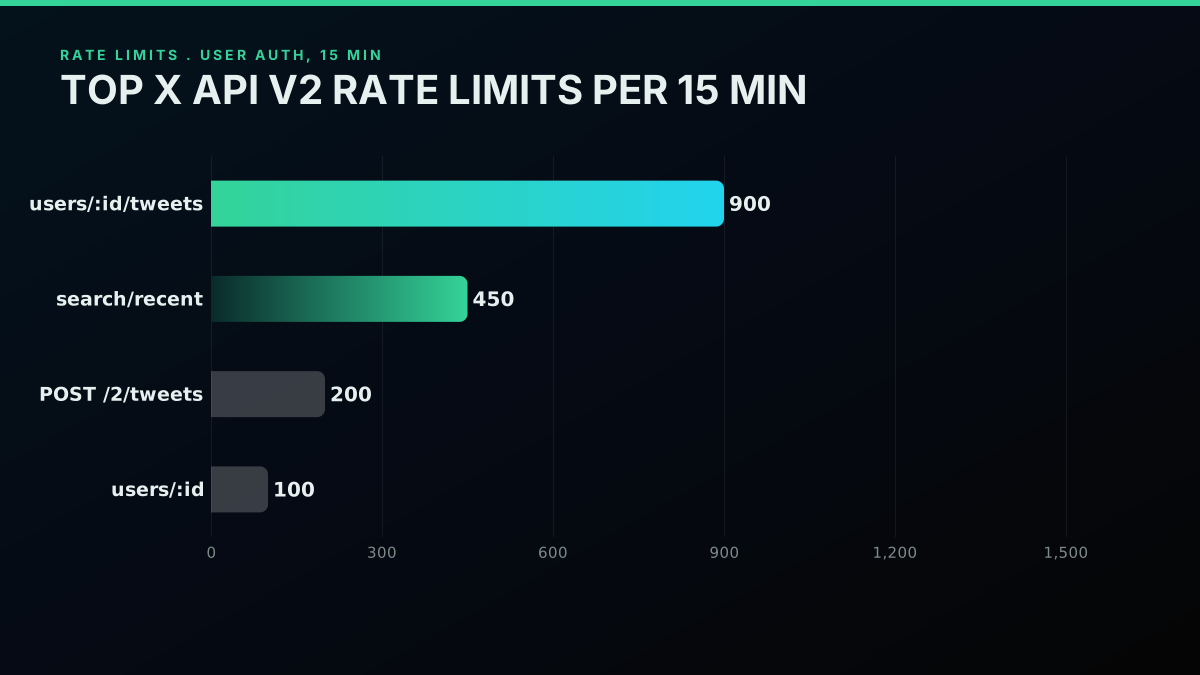
Per-endpoint rate limits on 15-minute windows
The headline limits on the busiest v2 endpoints, checked June 2026 against the X API rate limits reference:
| Endpoint | App-only auth | User auth | Window |
|---|---|---|---|
GET /2/tweets/search/recent | 300 req | 450 req | 15 min |
GET /2/users/:id | 300 req | 100 req | 15 min |
GET /2/users/:id/tweets | 1500 req | 900 req | 15 min |
POST /2/tweets | n/a (user auth required) | 200 req | 15 min |
POST /2/dm_conversations/:id/messages | n/a | 200 req | 24 hrs |
GET /2/tweets/sample/stream | 50 req | n/a | 15 min |
The complete per-endpoint table lives in the Twitter API rate limits reference. For a deeper playbook, the Twitter API rate limit guide and the TwitterAPIs best practices writeups carry the retry and caching patterns end to end.
Patterns that keep you inside the windows:
- Watch the headers. Log
x-rate-limit-remainingper response and alert under 10 percent of the budget. - Back off on 429. Begin at one second, double each retry up to 60 seconds, then raise the error.
- Cache hard. Profiles barely move, so cache them five minutes or more. A tweet body is immutable, cache it indefinitely, but treat
public_metricsas live. - Smear the calls. With 450 search calls in 15 minutes, do not dump all 450 in the first half minute. Pace them out.
- Lean on both buckets. App-only and user auth keep separate budgets on most endpoints, so using both roughly doubles your effective limit.
Direct providers handle this layer for you. TwitterAPIs sets no platform-level call ceiling, so the only constraint is your credit balance. It absorbs the upstream rate-limit machinery and shows you a flat per-call price.
v1.1 Against v2: What Moved
Any Twitter API tutorial from before 2022 most likely describes v1.1. Today the bulk of v1.1 is deprecated or pulled for new apps. v2 is the standard.
The differences that matter:
The same tweet, v1.1 response against v2 response
Response shape. v1.1 returned a flat tweet with every field at the top level. v2 normalizes into data, includes, and meta, with expanded fields (author, media, referenced tweets) parked in includes and joined by ID.
// v1.1 response shape (flat)
{
  "id_str": "...",
  "text": "...",
  "user": { ... full user object inline ... },
  "entities": { "urls": [...], "media": [...] }
}

// v2 response shape (normalized)
{
  "data": [{ "id": "...", "text": "...", "author_id": "..." }],
  "includes": {
    "users": [{ "id": "...", "username": "...", "name": "..." }],
    "media": [...]
  },
  "meta": { "result_count": 1 }
}
Field names. v1.1 leaned on snake_case and an id_str for tweet IDs, because JavaScript mangles 64-bit ints. v2 keeps snake_case in places, dropped the _str suffix on most IDs, and serializes IDs as strings by default.
Threading. v2 stamps conversation_id on every tweet, so rebuilding a thread is one field lookup. v1.1 made you walk in_reply_to_status_id recursively, which gets expensive fast.
Auth. v1.1 demanded OAuth 1.0a on every call. v2 promoted OAuth 2.0 PKCE and the App-Only Bearer Token to first-class options.
Streaming. v2 introduced the rule-driven filtered stream (rule.add({ value: "from:elonmusk" })), retiring the static track parameter from v1.1.
Deprecation. Most v1.1 endpoints now answer 410 Gone for new apps, the exceptions being media upload (still v1.1) and a few legacy DM routes. New code targets v2.
Migrating off v1.1 today means rewriting each call to its v2 twin, switching the parser to walk data and includes, and wiring in conversation_id wherever threading matters.
Getting an Official API Key, Step by Step
The credential the X API wants is either a Bearer Token (app-only reads) or the consumer-key, consumer-secret, access-token, access-secret bundle (user-context actions). All of them come out of the X Developer Console at console.x.com, which replaced developer.twitter.com in early 2026. X documents the project-and-app model in its developer apps overview.
The path, top to bottom:
- Sign in at
console.x.comwith the X account that should own the app. - Create a Project. Projects hold one or more Apps and are how X scopes rate limits.
- Create an App inside the Project. Name it and set the auth type, OAuth 2.0 PKCE recommended for new builds.
- Open the App's "Keys and Tokens" tab and generate:
- Bearer Token (app-only read)
- API Key and API Key Secret (OAuth 1.0a consumer credentials)
- Access Token and Access Token Secret (OAuth 1.0a user context, optional)
- OAuth 2.0 Client ID and Client Secret (PKCE flow, if chosen at creation)
- Add a payment method under Billing. Credit balance must sit above zero or calls fail.
- Copy the Bearer Token into your environment variables.
The full walkthrough, including the common rejection patterns, the payment-method gotchas, and the 30-second shortcut, lives in the how to get a Twitter API key tutorial. For runnable reference code straight from X, the Twitter API v2 sample code repo covers each endpoint.
Your first Twitter API call, request by request
To skip the console, the direct route is three steps:
- Register on the Twitter API key page with just an email.
- Copy the Bearer token from the dashboard.
- Call
https://api.twitterapis.comwithAuthorization: Bearer YOUR_KEY.
No Project, no App, and no payment method to claim the trial credits.
Is the Twitter API Free in 2026?
No. The official X API has no free tier today, for reads or writes. The old write-only free tier, 1,500 posts a month with zero read access, is gone, and the legacy subscription plans are retired. Every GET against search, timelines, profiles, or followers needs pay-per-use credits, from $0.005 a post read.
The free public API ended for new developers in February 2023. The Basic and Pro plans that followed were retired in February 2026 for consumption billing. Today every official call draws against your prepaid balance.
Three free-adjacent doors are still open:
- The signup voucher. New developer accounts receive a small credit after payment setup, enough for a handful of test calls, useful to confirm the wiring and nothing more.
- Academic Research product. X keeps a separate research API for verified academics at accredited institutions. Application required, volume capped near 10 million tweets a month, non-commercial only, and the queue runs months long.
- Direct-provider trial credits. Providers like TwitterAPIs grant $0.50 in free credits at signup with no card, roughly 625 read calls or about 12,500 tweets, enough to evaluate before you commit.
For anyone searching "twitter api for free" or "twitter api without developer account," the direct route is the only one that ships working code in under five minutes with no payment setup. The official path wants a payment method on file before any call resolves, even with the voucher. The full breakdown of what is and is not free sits in is the Twitter API free in 2026.
The cheapest pay-as-you-go Twitter API. Try it free.
$0.0008 a call, about $0.04 per 1,000 tweets at 20 tweets a page. $0.50 free credits. No credit card required.
What People Actually Build on the Twitter API
People's-also-ask data clusters Twitter API demand into six recurring builds, each with its own read-and-write profile and its own cost curve.
- Social listening and sentiment. Read-led. Pull brand mentions, classify tone, chart the trend, the exact build the Twitter sentiment analysis in Python walkthrough covers. Volume tracks mention rate, usually 10K to 500K a month.
- Lead sourcing. Read-led. Search for intent signals such as job moves, raises, or competitor complaints, enrich with profile data, push to a CRM. Volume scales with audience size.
- Content automation. Write-led. Schedule posts, cross-post from a CMS, auto-reply, automate quotes, the territory the how to build a Twitter bot guide covers end to end. Needs user-context auth, OAuth 1.0a or PKCE.
- AI agent training and inference. Read-led and the heaviest of the set, often past a million reads a month. Pull corpora for fine-tuning, stream live tweets into an LLM loop, build agents that watch and react to X.
- Academic research. Read-only. Historical pulls for linguistics, political science, public health, usually through the Academic Research product or a third-party data vendor. For pulling older posts past the recent-search window, the scrape tweet history API guide maps the options, and the Twitter trends API guide covers pulling trending topics alongside them.
The right API depends on your read-and-write mix and monthly volume. The matrix sums it up:
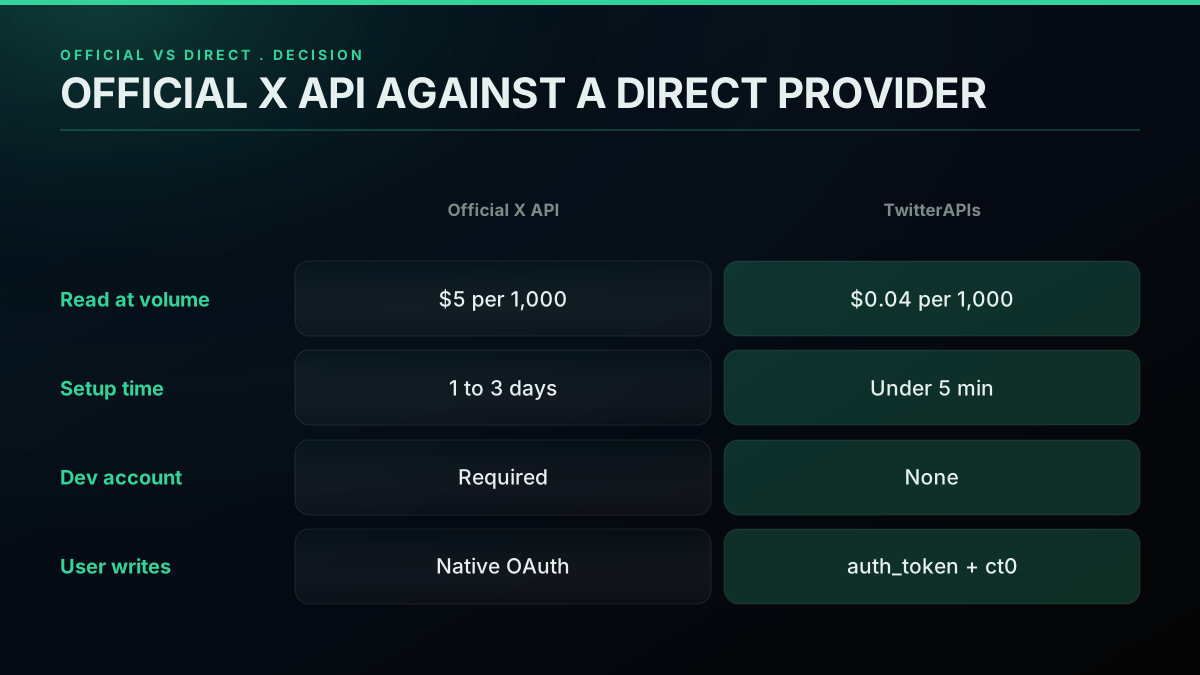
Official against direct, a decision matrix
| Use case | Read or write | Monthly volume | Best fit |
|---|---|---|---|
| Social listening (single brand) | Read | 50K to 500K | Direct ($2 to $20/mo, estimated) or official ($250 to $2,500/mo, estimated) |
| Social listening (agency, multi-brand) | Read | 1M to 10M | Direct ($40 to $400/mo, estimated); official forces Enterprise |
| Lead sourcing | Read | 10K to 100K | Direct (under $5/mo, estimated); official viable |
| Content scheduling (one account) | Write | 100 to 1K posts | Official (OAuth 1.0a is fine) |
| Content scheduling (SaaS multi-tenant) | Write | 10K to 100K posts | OAuth 2.0 PKCE on official; direct for the read side |
| AI agent inference | Read and write | 100K to 5M | Direct for cost; OAuth 2.0 PKCE on writes |
| Academic research | Read | 1M to 10M | Academic Research product (free if approved) or third-party |
Errors and Production Patterns
Three error classes account for most 4xx responses you will meet in production, and each has a specific fix that retrying alone will not solve.
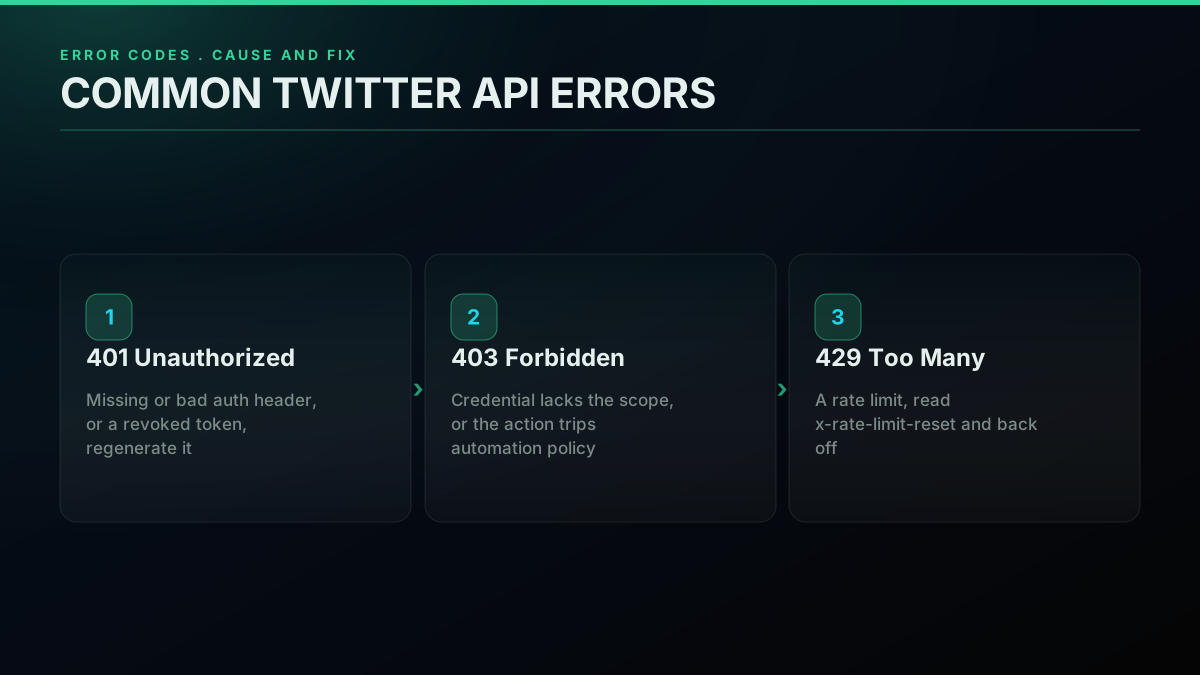
Common Twitter API error codes and what they mean
401 Unauthorized
Usual cause: a missing or malformed Authorization header. Rarer: a Bearer Token revoked after a security event on the account. Fix: regenerate the token in the console and update the environment variable.
A second cause: an OAuth 1.0a signature with clock skew over five minutes. The signature carries a timestamp, so sync the server clock to NTP.
403 Forbidden
Usual cause: a valid credential that lacks the scope the endpoint wants. Posting needs user-context auth, not a Bearer. Reading DMs needs the dm.read scope on OAuth 2.0 PKCE.
A second cause: the user account behind the token is suspended or restricted, or the action trips X's automation policy, such as liking 100 tweets in a minute.
429 Too Many Requests
A rate limit. Read the x-rate-limit-reset header for the reset timestamp, then back off exponentially or sleep until it clears.
Production pattern:
import time, requests

def fetch_with_backoff(url, headers, params=None, attempts=5):
    for _ in range(attempts):
        r = requests.get(url, headers=headers, params=params)
        if r.status_code == 429:
            reset = int(r.headers.get("x-rate-limit-reset", time.time() + 60))
            pause = max(reset - int(time.time()), 1)
            time.sleep(min(pause, 60))
            continue
        r.raise_for_status()
        return r.json()
    raise RuntimeError("retries exhausted")
Runaway spend
This one is not a status code, it lands on the invoice. The classic case is a polling bug that fires the same call every 100ms instead of every 60 seconds, quietly burning an estimated $50 in credits over a weekend. Defend with a hard daily spend cap in the console, dashboard alerts above a threshold, and a budget circuit breaker in code that halts calls once monthly spend passes a ceiling.
The Twitter API cost calculator takes your expected daily call volume and projects the monthly bill in seconds. Run it before you launch a pipeline, not after the first invoice.
Pagination
For endpoints that hand back more than max_results, walk the next_token cursor:
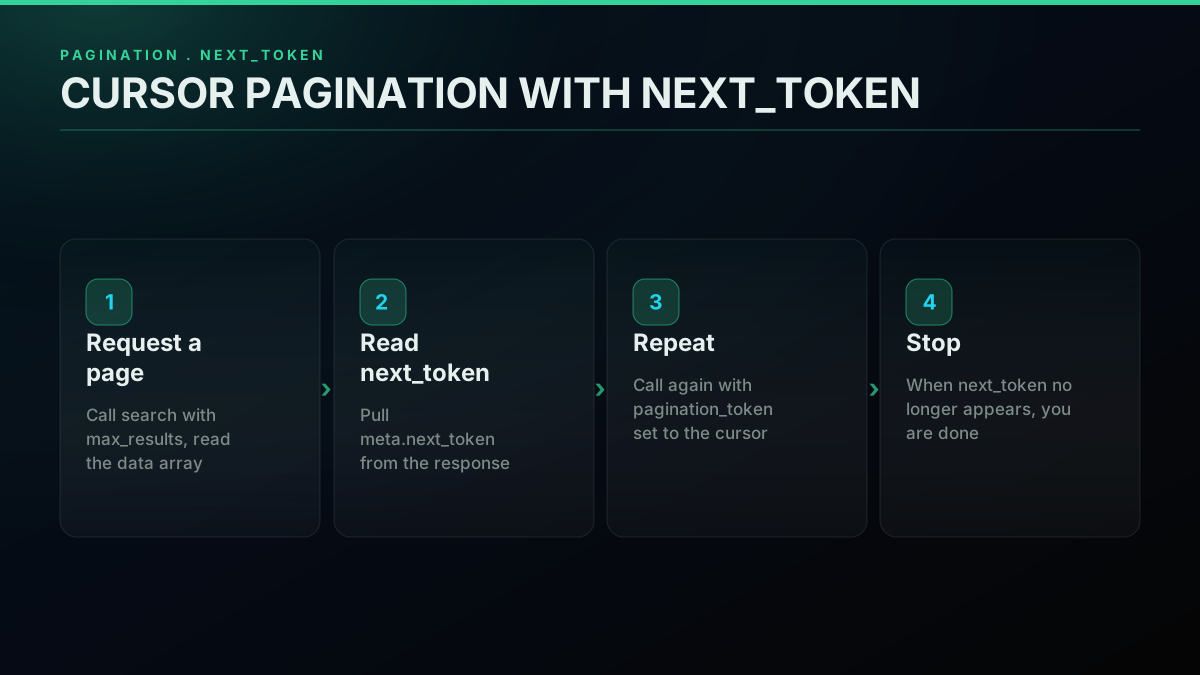
Pagination with next_token, the request-response cycle
def collect_pages(query, headers, page_cap=10):
    endpoint = "https://api.x.com/2/tweets/search/recent"
    params = {"query": query, "max_results": 100}
    gathered = []
    for _ in range(page_cap):
        r = requests.get(endpoint, params=params, headers=headers)
        r.raise_for_status()
        payload = r.json()
        gathered.extend(payload.get("data", []))
        cursor = payload.get("meta", {}).get("next_token")
        if not cursor:
            break
        params["pagination_token"] = cursor
    return gathered
When the Official Path Stops Making Sense
Consumption billing keeps the official X API reasonable at low volume, under 50K reads a month, and a tough sell at high volume. The 3M-read ceiling drops any heavy read workload onto Enterprise, which X does not publish a price for.
When the arithmetic breaks, the alternatives split three ways:
- Direct providers. TwitterAPIs, OpenTweet, and others run their own access pipeline to X data and expose a stable REST surface, priced per call, often 10 to 100 times under official. The trade is they are not the system of record. Moving an existing integration over is mechanical, and the migrate from twitterapi.io to TwitterAPIs guide maps the endpoint swaps.
- Marketplace listings. RapidAPI carries dozens of Twitter-flavored APIs from independent publishers.
Twitter’s API is expensive, and I’m done with Apify and RapidAPI - so I built my own.
Signup is quick, one account and one billing profile, but reliability rides on the publisher. The RapidAPI Twitter alternative comparison breaks down reliability against cost, and the Apify Twitter scraper versus TwitterAPIs comparison covers the actor-based route. 3. Self-built scrapers. Run your own Puppeteer or Playwright fleet against the X web frontend, the path the how to scrape tweets guide details. Doing it at scale leans on rotating IPs, so the best residential proxies for Twitter scraping roundup matters, and the Twitter bot detection guide covers the fingerprinting you will fight.
Looking for a reliable Twitter/X scraping API for a small automation project
Your cost is infrastructure plus engineering time, and your risk is endless maintenance against frontend changes and IP-level rate limiting.
For most production work above 50K reads a month, the direct route wins on cost and reliability. The pricing page puts TwitterAPIs per-call rates beside the official rates.
How the endpoints line up
The other axis is coverage. The official X API v2 spreads dozens of endpoints across tweets, users, lists, spaces, DMs, and compliance. A direct provider needs to cover at least the major reads to earn the slot.
TwitterAPIs ships 123 endpoints today, 72 read and 51 write, as of June 2026:
| Resource | Read endpoints | Write actions |
|---|---|---|
| Tweets | search (recent and advanced), by ID, by user, replies, quotes, retweeters, thread | create, delete, retweet, unretweet, media upload |
| Users | profile, followers, following, last tweets, mentions, verified followers | follow, unfollow |
| Engagement | bookmark search | favorite, unfavorite, bookmark, unbookmark |
| Direct messages | conversation, list | send |
| Spaces | by ID, audio | n/a |
| Lists | get, members | n/a |
The 51 write actions are favorite and unfavorite, retweet and unretweet, bookmark and unbookmark, follow and unfollow, tweet create and delete, media upload, and DM send. The simple write actions are billed at $0.0008 per call, with tweet creation and DM send at $0.0016. Writes take a per-request auth_token and ct0 from your own session, which the provider never stores. DM send runs on that same bring-your-own model, so account-to-account messaging is covered alongside the tweet, user, and engagement writes.
The whole read side, advanced search, tweet and user lookups, replies, retweeters, threads, follower and following lists, verified followers, and list members, stands up on one flat key with no developer-account approval, each call at $0.0008, with the full thread expansion at $0.004.
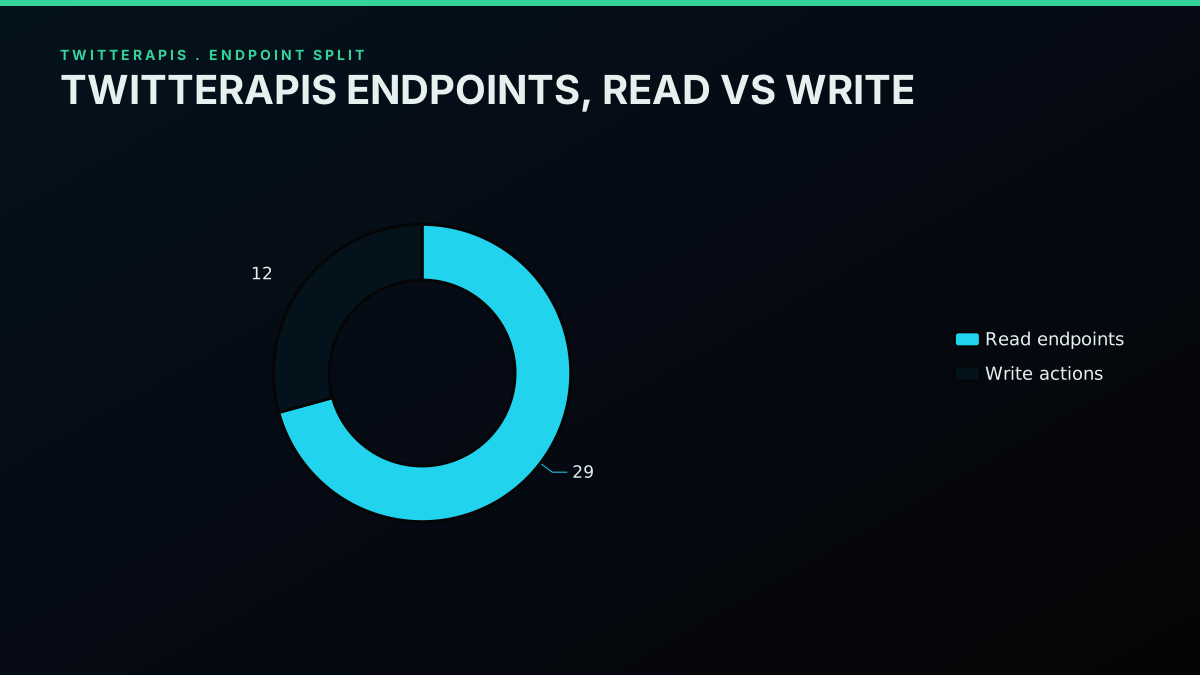
Twitter API v2 endpoint map by resource family
Where to Go Next
That covers the whole base: what the API is, how the money changed in 2026, how to mint a key, the three auth flows, the first request, rate limits, the v1.1-to-v2 jump, Python and Node examples, the six core builds, the common errors, and when a direct provider earns its place. The links below dig into each path.
You have the foundation. To go further:
- For the key walkthrough, including the console screens and the rejection patterns, read the how to get a Twitter API key tutorial.
- For Python code with Tweepy, XDK, plain
requests, and the direct route side by side, read the Python Twitter API tutorial. - For per-endpoint rate-limit numbers and the playbook for staying inside the windows, read the Twitter API rate limits reference.
- For a monthly cost projection at your volume, run your numbers through the Twitter API cost calculator.
- For the marketplace-versus-direct-versus-official comparison, read the RapidAPI Twitter alternative breakdown.
Watch this Twitter API setup walkthrough on YouTube
Get Your API Key in 30 Seconds
The shortest path from this guide to running code is the direct API. Register at twitterapis.com, claim $0.50 in free credits with no card (around 625 calls or 12,500 tweets), copy your Bearer token, and fire your first request:
import requests

profile = requests.get(
    "https://api.twitterapis.com/twitter/user/info",
    params={"userName": "nasa"},
    headers={"Authorization": "Bearer YOUR_KEY"},
)
data = profile.json()["user"]
print(data["name"], "followers:", data["followers_count"])
Under a minute from signup to your first JSON. For rates across reads and writes, see the pricing page.
// sources
Where these numbers come from
Each row is a figure in this post and the artefact it was read from. Prices and limits on this platform move, so check the date on the source before you plan against it.
- X API pricing page
- The published pay-per-use rate card the TL;DR figures come from: about $0.005 per post read, $0.01 per profile, $0.015 to post, and $0.015 per DM, plus the absence of any free tier.
- X API rate limits reference
- The per-window ceilings on the busiest v2 endpoints, which the post says it checked against this reference in June 2026 before publishing its rate-limit table.
- RFC 5849, the OAuth 1.0a protocol
- The signing specification behind the OAuth 1.0a credential the post says is still mandatory for DM access and some v1.1 calls.
- RFC 6749, the OAuth 2.0 authorization framework
- The underlying framework for the delegated Connect with X flow the post walks through, including the authorization code exchange and the refresh-token loop.
- RFC 7636, OAuth 2.0 PKCE
- Specifies the PKCE mechanism the post names as the modern delegated path, where a user approves scopes such as read-only with no DM access.
- X API recent search endpoint documentation
- The endpoint the post writes four ways in curl, Python, Node.js, and the direct route, and the source for its request parameters.
Frequently Asked Questions
No general read tier. X dropped the free public tier for new developers back in February 2023, then moved everyone to consumption billing in February 2026. You top up credits and get charged per call: roughly $0.005 to read a post, $0.01 for a profile lookup, $0.015 to publish a post, $0.015 to send a DM, and $0.20 for a post carrying a URL. A few third-party providers hand out trial credits so you can test without a card. TwitterAPIs starts you with $0.50 in free credits, around 625 calls or 12,500 tweets, no card required, so your first request goes out in about a minute.
The official X API offers three credentials. The App-Only Bearer Token (OAuth 2.0) is the lightweight one for public reads such as search and user lookup. OAuth 1.0a (consumer key plus access token) covers user-context writes like posting, DMs, or following for a specific account. OAuth 2.0 PKCE is the modern delegated flow for new apps that need scoped, refreshable user write access. A direct provider like TwitterAPIs folds reads behind one Bearer header and takes a per-request auth_token plus ct0 for writes, so there is no developer-console dance.
Not on the official path. X requires a developer account, a project, an app, and OAuth credentials before a single call resolves. A direct provider removes all of that. With TwitterAPIs you register with an email, copy a Bearer token from the dashboard, and hit api.twitterapis.com behind one Authorization header. No project, no app, no portal review. The cost is that you read X data through the provider rather than straight from X.
On the official X API at $0.005 per post read, one million tweets is $5,000 in call spend. The 3-million-read monthly cap then pushes any heavier read workload onto Enterprise, which X does not publish a price for. TwitterAPIs reads at $0.0008 a call, about $0.04 per 1,000 tweets on a full 20-tweet page, so the same million tweets is $40 rather than $5,000, with no platform-level volume ceiling. The Twitter API cost calculator runs the side-by-side for your own numbers.
v2 is the version under active development and the one you should target. It shipped in 2021 and now carries normalized JSON: a top-level data block plus an includes block for expanded objects, native conversation_id threading, native poll objects, and the cleaner OAuth 2.0 PKCE flow. v1.1 is retired for most use cases and is the wrong target for new code. Any tutorial pointing you at statuses/show.json on v1.1 is describing a deprecated surface, read it as history.
Limits are set per endpoint and per access tier under consumption billing. Recent search, for example, allows 450 requests per 15 minutes on user auth and 300 per 15 minutes on app-only auth. Crossing a limit returns 429 along with an x-rate-limit-reset header marking the next window. The durable pattern is to watch x-rate-limit-remaining on each response, back off exponentially (1s, 2s, 4s, 8s) when you hit a 429, and cache whatever you can. The Twitter API rate limits reference carries the full per-endpoint table.
Three routes on the official API. Tweepy is the widely used community client, covers v2 and both OAuth flows, and is still maintained. XDK (pip install xdk) is X's own SDK, thinner than Tweepy with fewer abstractions. Plain requests with a Bearer Token is the most flexible and adds nothing to your dependency tree. For a direct provider you always use plain requests with one Authorization header. The Python Twitter API tutorial walks all four paths with working code.
Check out similar blogs
More guides on the Twitter/X API, scraping, and pricing.
Twitter API Authentication in 2026: OAuth, Bearer Tokens, and Fixing 401
How Twitter (X) API authentication works in 2026: the four credential types, OAuth 1.0a versus OAuth 2.0, generating and using a bearer token, runnable Python and Node.js, and a fix for every 401 Unauthorized and 403 error, plus the one-header alternative.
How to Get Everyone Who Retweeted a Tweet via API (2026)
Pull the full list of accounts that reposted any tweet with a real 2026 API. Runnable Python and Node.js, cursor pagination for the whole list, a real amplifier ranking over live data, a bot filter, and the honest per-call cost.
How to Get All Replies to a Tweet via API (2026)
Pull the replies under any tweet with a real 2026 API. Runnable Python and Node.js, cursor pagination, the conversation_id tail sweep for the long tail, nested replies-to-replies, signal-versus-noise filtering over live data, and the honest per-call cost.
Twitter API Pagination 2026: How next_token Works (and a Simpler Alternative)
How Twitter API pagination works in 2026. The official next_token loop explained field by field, a simpler single-cursor alternative, runnable Python and Node code, and the real per-call cost of a paginated pull.
How to Search Tweets by Hashtag via API 2026 (Python + Node.js)
Search tweets by hashtag with a real 2026 API in Python and Node.js. Runnable code for the hashtag operator, engagement filters, cursor pagination, deduping retweets, counting authors, and the real per-call cost.
Twitter API Node.js Tutorial 2026: Fetch Tweets in 10 Lines
The 2026 Node.js Twitter API tutorial: fetch tweets in 10 lines with fetch or axios, no SDK and no OAuth dance. Search, profiles, cursor pagination, retries, async, and real per-call costs in working code.

How to Get Image URLs from X Tweets via API in 2026 (Full Resolution, Python and Node)
Pull image URLs out of X tweets with runnable Python and Node.js, then get the full-resolution original instead of the scaled copy the API hands you by default. Measured on 14 live images, with the video poster-frame trap and the per-call cost.
Fetch a Full Twitter Thread via API in One Call (2026)
How to pull an entire Twitter thread, the root tweet plus every connected tweet in the chain, in a single API call with the tweet/thread endpoint, instead of walking replies by hand. Live-tested code in curl, Python, and Node.js, with the real per-call cost.