GUIDE
Apify Twitter Scraper vs TwitterAPIs: The Real 2026 Numbers
The honest 2026 breakdown of Apify Twitter Scraper against the TwitterAPIs REST API: what each billing model really costs per 1,000 tweets, latency, failure modes, and a 60-minute bake-off you can run before you commit.

Most comparisons of Apify Twitter Scraper against a REST API open with a scary multiplier. You have probably seen the claim that a hosted Twitter API is more than one hundred times cheaper than Apify. That number is stale, and starting there sends you into the decision with the wrong mental model.
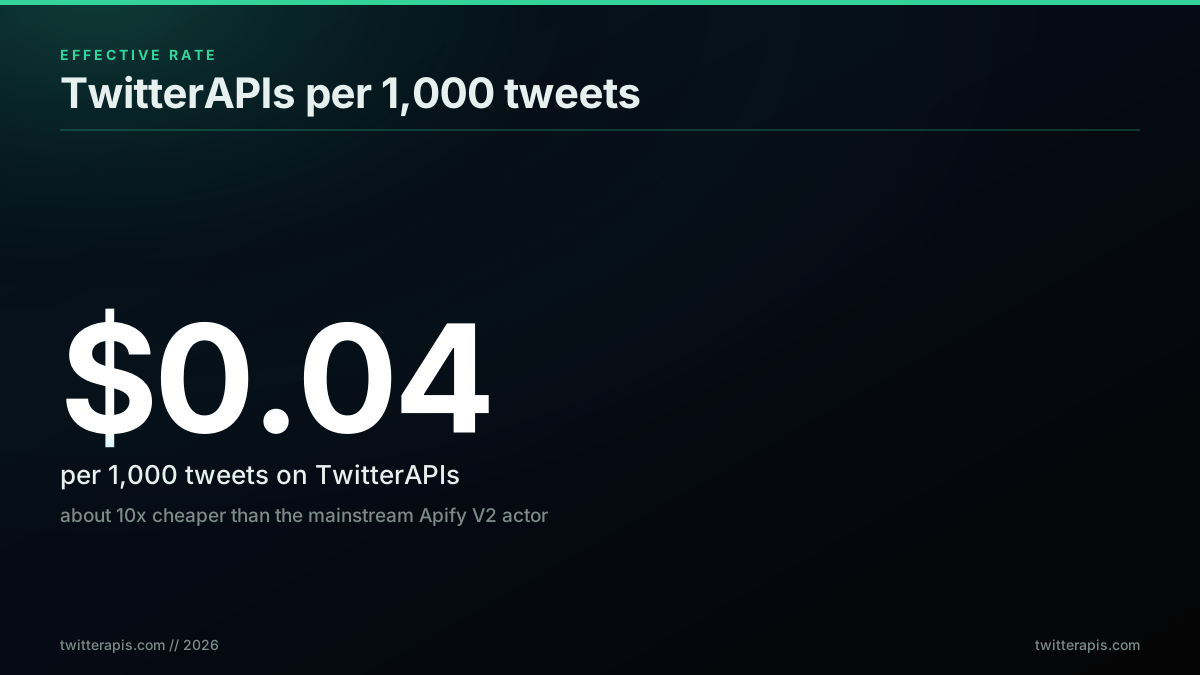
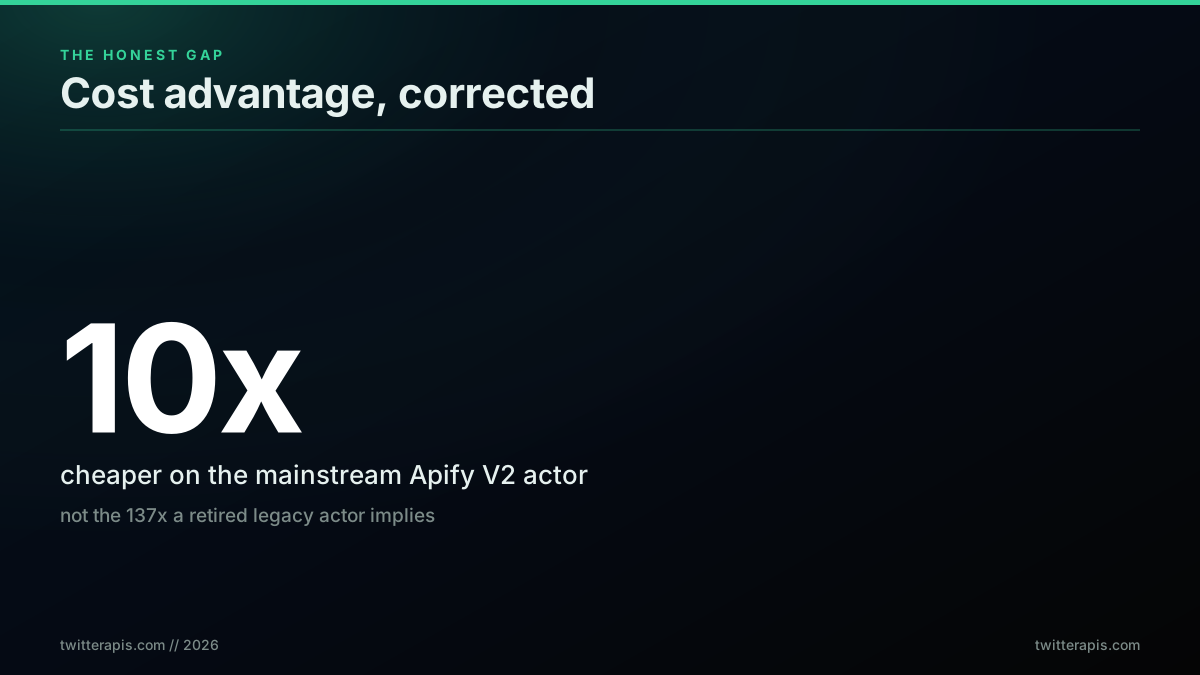
Here is the honest version. The Apify Tweet Scraper V2 that teams actually reach for in 2026 is priced at about 0.40 dollars per 1,000 tweets, per its own Apify Store listing. TwitterAPIs charges 0.0008 dollars per call, and each call returns roughly 20 tweets, which works out to 0.04 dollars per 1,000 tweets (see the full pricing page). That is a real, defensible 10x gap on the headline price, and it grows once you count proxy traffic, failed-run billing, and engineer hours. This post walks the actual line items, the latency difference, the failure modes, and a bake-off you can run in an hour before you pick.
TL;DR: Apify Twitter Scraper is a managed headless-browser actor billed per result (about 0.40 dollars per 1,000 tweets on the mainstream V2, more on legacy or self-hosted actors once proxies are counted). TwitterAPIs is a synchronous REST API at 0.0008 dollars per call, roughly 0.04 dollars per 1,000 tweets, with sub-two-second responses and no proxy or browser to run. For Twitter-only data collection at volume, TwitterAPIs is about 10x cheaper and far faster. Apify still wins when you need browser rendering, multi-site pipelines, or very low volumes. The old 137x figure comes from a retired Pay-Per-Result actor and is not the number to plan around.
The one number everyone quotes, and why it is wrong
The 137x claim is not invented out of nothing. It traces back to a legacy Pay-Per-Result actor that billed around 5.50 dollars per 1,000 results. Divide that by a REST API at 0.04 dollars per 1,000 and you land near 137. The problem is that almost nobody runs that legacy actor today. The actor most teams use, Tweet Scraper V2, publishes an event price of about 0.40 dollars per 1,000 tweets on its store page.
So the comparison that matters is 0.40 dollars against 0.04 dollars. That is 10x, not 137x. It is still a large gap, and at scale it compounds into real money, but planning around an inflated number leads to bad decisions.
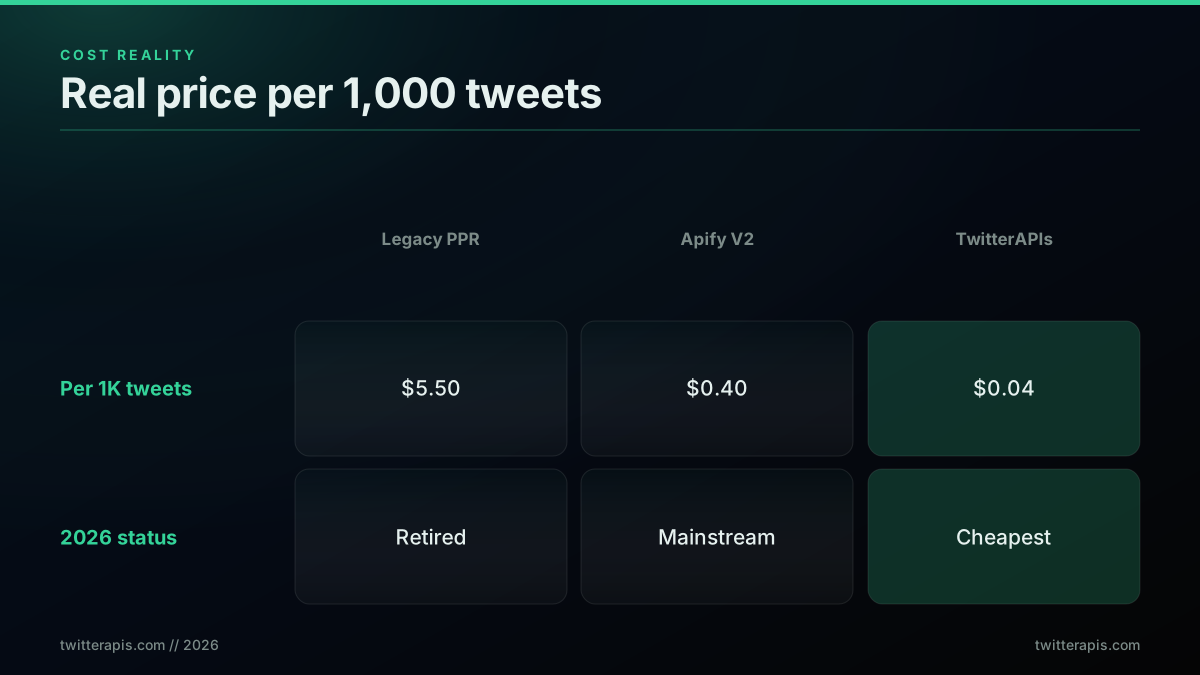 If you budgeted for a 100x saving and got 10x, you might feel misled and switch back. If you plan around the honest 10x and then find the proxy and maintenance savings on top, the decision holds up.
The rest of this guide sticks to the real 2026 numbers. Where a figure is a range or an estimate, it says so. If you want the multi-provider view rather than a two-way comparison, the 8-provider cost benchmark ranks TwitterAPIs against the rest of the market on real per-1,000-tweet cost.
Features of the Apify Twitter Scraper
Before the money argument, it is worth being precise about what the tool actually does, because a fair comparison needs the competitor described accurately rather than as a strawman. The Apify Twitter Scraper is an actor, meaning a containerized job you configure and run on Apify's platform, and its feature set splits into three layers.
What you can ask it for. The actor accepts search terms, hashtags, handles, and direct tweet or profile URLs as input, and it accepts date bounds to window a query. You submit that configuration as JSON, either from the Apify console or through the API, and the run collects matching tweets until it hits your result cap. The Tweet Scraper V2 store listing is the reference for the exact input schema, and it also documents the 50-tweet minimum charged per query, which matters more than it sounds for workloads made of many small lookups.
What you get back. Results land in an Apify dataset rather than in the HTTP response, which is the single biggest structural difference from a REST API. A dataset is a stored collection you read afterward, and it can be exported as JSON, CSV, or a spreadsheet format, or pulled through the platform API. That storage step is why the actor is asynchronous: the run finishes, then you fetch.
What the platform adds around it. Because the actor runs on Apify rather than standing alone, it inherits the platform's operational features. You get scheduled runs, webhooks that fire when a run completes, run history with logs for debugging a failed job, JavaScript and Python SDKs, and routing through Apify's proxy pool so requests do not all leave from one address. Apify documents how runs consume memory and compute in its usage and resources guide.
Read that list and the shape of the tool is clear. It is a scheduled batch job with managed infrastructure around it. That is a genuinely good design for crawling many sites on a cadence. It is a poor fit for a request that a user is waiting on, and the rest of this comparison is largely a consequence of that one architectural fact.
Two billing philosophies, not two price tags
The deeper reason these tools cost different amounts is that they bill on different philosophies. Understanding both is more useful than memorizing a single multiplier, because your own workload decides which philosophy is cheaper.
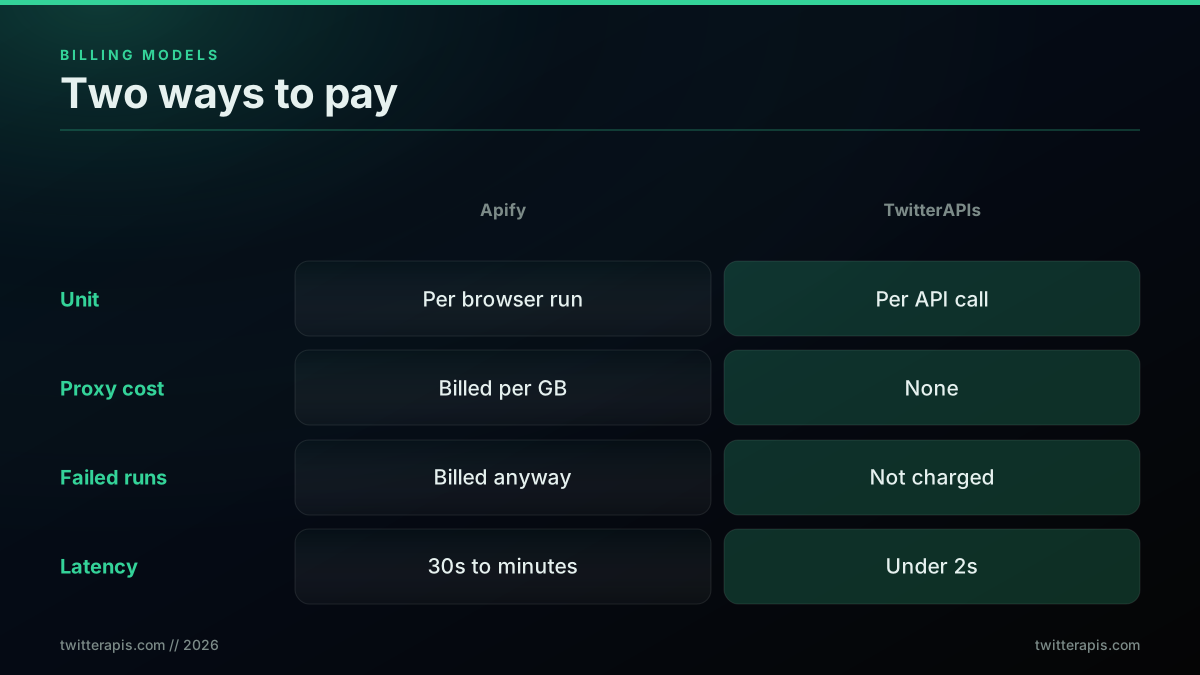
Apify bills for work performed
Apify is a compute platform first and a data source second. The mainstream Tweet Scraper V2 simplifies this with a flat event price, but the platform underneath still thinks in terms of work done. Depending on the actor and how you run it, you can pay for any of the following:
- Event or per-result fees. Tweet Scraper V2 charges about 0.40 dollars per 1,000 tweets as a fixed event price, with a 50-tweet minimum per query.
- Compute units. Actors run on allocated memory and CPU for a duration, and older or self-hosted configurations bill by compute unit. Apify documents the formula in its usage and resources guide.
- Residential proxy traffic. To avoid IP blocks, browser actors route through residential proxies billed per gigabyte transferred.
For the flat-price V2 actor you mostly see the first line. For anything you assemble yourself, all three stack up. That is the honest source of the wide cost ranges you see quoted for Apify: people are describing different actors and different run configurations.
TwitterAPIs bills per call
TwitterAPIs collapses that into one line. You pay 0.0008 dollars per API call on standard endpoints, and each call returns about 20 tweets, so the effective rate is 0.04 dollars per 1,000 tweets. There are no compute units and no proxy bytes because you are not running a browser. The pricing is per-endpoint with a small premium band for heavier calls, and the current rates are published on the pricing page.
Here is the model in plain terms so a comparison table is not the only reference:
- Standard calls: 0.0008 dollars. All reads (search, user info, timelines, followers, replies) plus the simple write actions (favorite, retweet, bookmark, follow, and their undos, and delete).
- Premium calls: 0.0016 dollars. Posting a tweet, and the two direct-message read endpoints.
- Deep-history call: 0.0024 dollars. The paginated full-account history endpoint.
- Thread expansion: 0.004 dollars. Full thread reconstruction in one call.
- Free credits: 0.50 dollars at signup, roughly 625 standard calls or about 12,500 tweets, with no card required. Grab a key on the signup page.
Because the unit is a call, not a browser run, your cost is a simple multiplication you can predict to the cent. Developers in automation communities have documented how Apify's per-run accounting compares in practice:
https://www.reddit.com/r/n8n/comments/1lrkam5/minitutorial_how_to_easily_scrape_data_from/
The blended cost at real volumes
Putting both philosophies on one axis, here is what each approach costs at four common monthly volumes. The Apify column uses the V2 event price for the low end and a proxy-and-compute self-hosted estimate for the high end, because both are real ways teams run it.
| Monthly volume | Apify Tweet Scraper V2 | Apify self-hosted (compute + proxy est.) | TwitterAPIs |
|---|---|---|---|
| 1,000 tweets | 0.40 dollars | 2 to 4 dollars | 0.04 dollars |
| 10,000 tweets | 4 dollars | 15 to 30 dollars | 0.40 dollars |
| 100,000 tweets | 40 dollars | 80 to 150 dollars | 4 dollars |
| 1,000,000 tweets | 400 dollars | 500 to 900 dollars | 40 dollars |
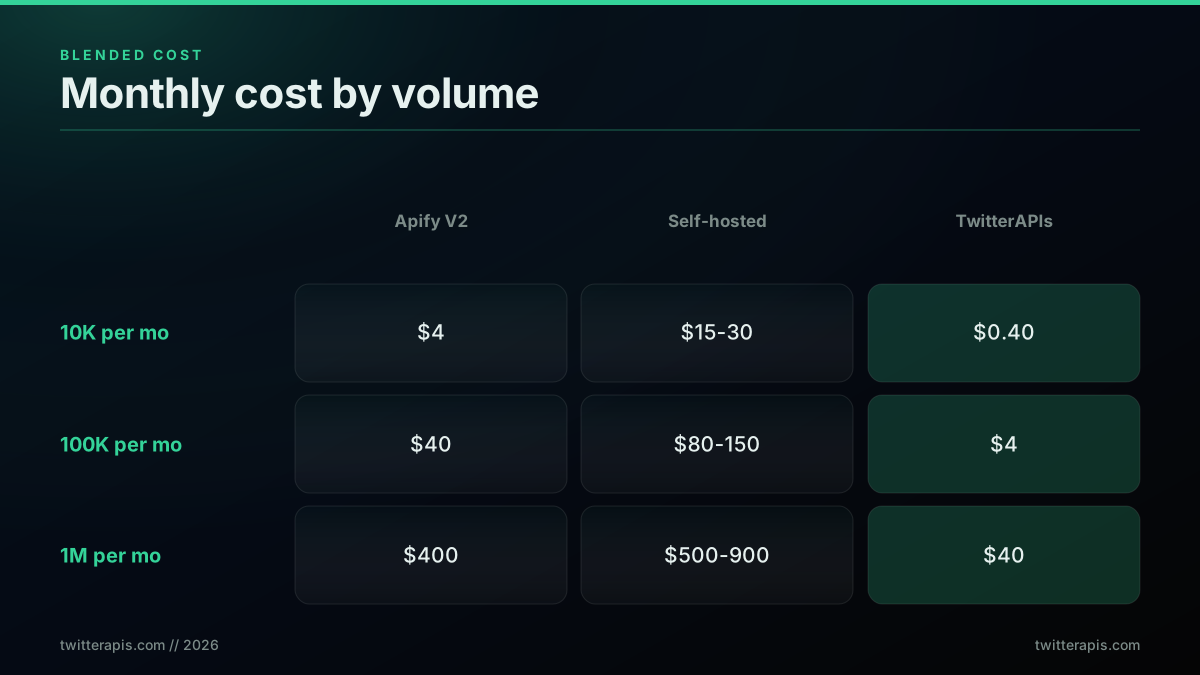
The pattern is steady: about 10x cheaper against the managed V2 actor, and 20x to 100x cheaper against a self-hosted proxy configuration. For a fuller cost landscape, the Twitter API cost benchmark and the Twitter API cost overview both break the math down further, and is the Twitter API free covers the no-cost entry points.
Where your money actually leaks
The table above is direct cost. The reason teams underestimate Apify is that several real expenses never show up as a clean line item. None of these apply to a per-call REST API, so they are pure differential.
Failed-run billing. When a browser actor run fails on a proxy timeout or a bot-detection wall, Apify still bills for the compute and proxy traffic consumed before the failure. On high-volume browser jobs, failure rates of 5 to 10 percent are common, so you pay for roughly one in ten runs that returned nothing usable.
The minimum-query floor. Tweet Scraper V2 requires at least 50 tweets per query. If your job is many small lookups, say one profile's latest five tweets across thousands of handles, you can end up paying the floor repeatedly. A per-call API charges only for the call you made.
Free-tier ceilings that force an upgrade early. The V2 free tier caps at 5 runs of 10 items. That is fine for a demo and useless for evaluation at any real scale, so your test budget starts on day one. TwitterAPIs gives 0.50 dollars of credit, enough for about 12,500 tweets, which is a genuine trial.
Engineer hours on maintenance. This is the biggest hidden cost and the hardest to see on an invoice. Every time X ships a frontend change, a browser actor can break, and someone spends 2 to 8 hours diagnosing the failure, finding a patched actor version, testing it, and redeploying. At 3 to 5 such incidents a year and 150 to 200 dollars per engineer hour, that is 10 to 40 hours and 1,500 to 8,000 dollars of time that a maintained REST API absorbs for you.
Add those together and the effective gap is wider than the sticker prices suggest, especially for small teams where one engineer's afternoon is expensive relative to the API bill.
Start building with TwitterAPIs
$0.0008 a call, about $0.04 per 1,000 tweets at 20 tweets a page. $0.50 free credits. No credit card required.
Latency: batch runs versus synchronous calls
Cost gets the attention, but for a lot of products latency is the deciding factor, and the two tools are not in the same class here.
An Apify actor run is a batch job. You submit a run, the platform allocates compute, launches a headless browser, warms up a proxy, renders pages, and returns results when the run completes. Depending on scope that is anywhere from about 30 seconds to several minutes. TwitterAPIs returns synchronously: you make an HTTP request and the JSON comes back in the same response, typically under two seconds.
That difference decides whether a use case is even possible, not just how fast it feels.
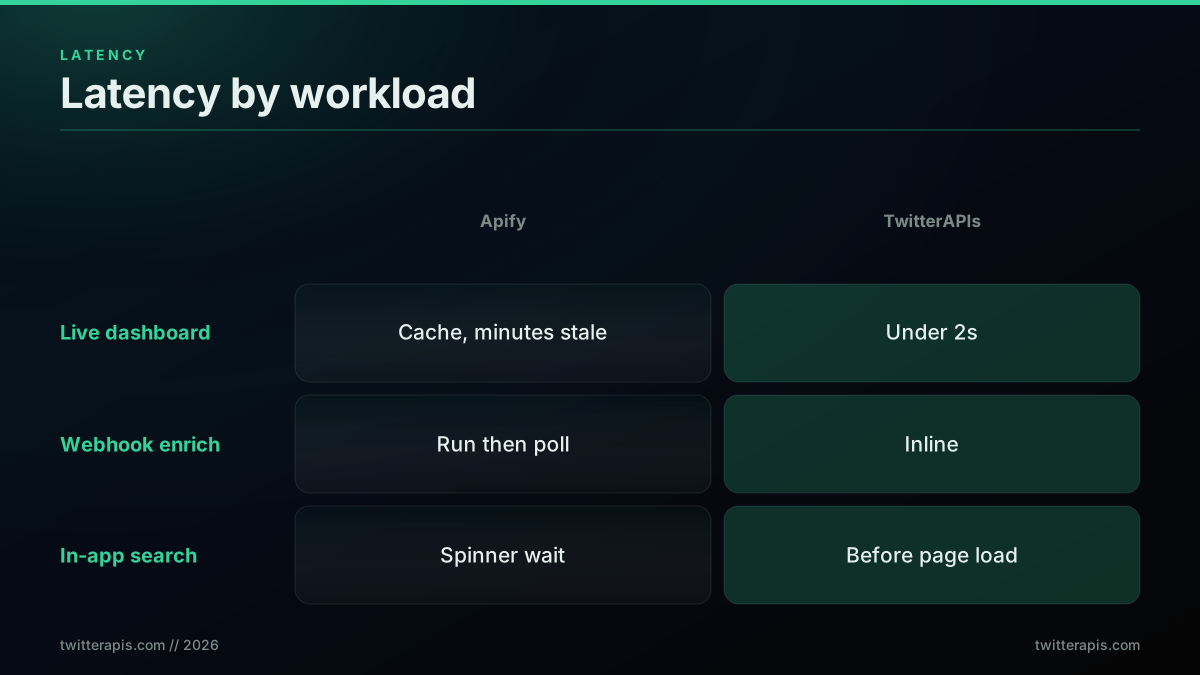
| Workload | Apify (batch) | TwitterAPIs (synchronous) |
|---|---|---|
| Live keyword dashboard, refresh every 60s | Needs pre-scheduled runs plus a cache; data is minutes stale | One call per refresh, fresh in under 2s |
| Webhook that enriches a new signup with their tweets | Kick off a run, then poll for completion | Handled inline in the webhook handler |
| In-app search over Twitter data | User waits behind a loading spinner | Results return before the page finishes loading |
| Overnight bulk export of 500K tweets | A natural fit for batch | Fan out concurrent calls, still finishes fast |
The honest read is that batch and synchronous each have a home. If your job is a nightly export, batch is fine and the latency never matters. If a human or a live system is waiting on the data, synchronous is the only comfortable option, and putting a cache in front of Apify to fake it adds its own complexity and staleness. This is exactly the tradeoff the Twitter API v2 comparison digs into for the official endpoints.
Here is the sentiment from builders working in this space, where the pull toward real-time structured data keeps showing up:
https://x.com/dimitarangg/status/2022410074593939657
Reliability: the four ways a browser actor breaks, and how to catch each
A browser-based scraper is fragile by construction because it depends on three moving systems staying compatible at once: your code, the browser environment, and the target site. When any of the three shifts, the pipeline can break. With Twitter that middle and third layer move often. Per Apify's status page, the most popular Twitter actor logged multiple multi-day outages after X frontend updates. These are the four common failure modes, each with a detection recipe you can wire into your pipeline today.
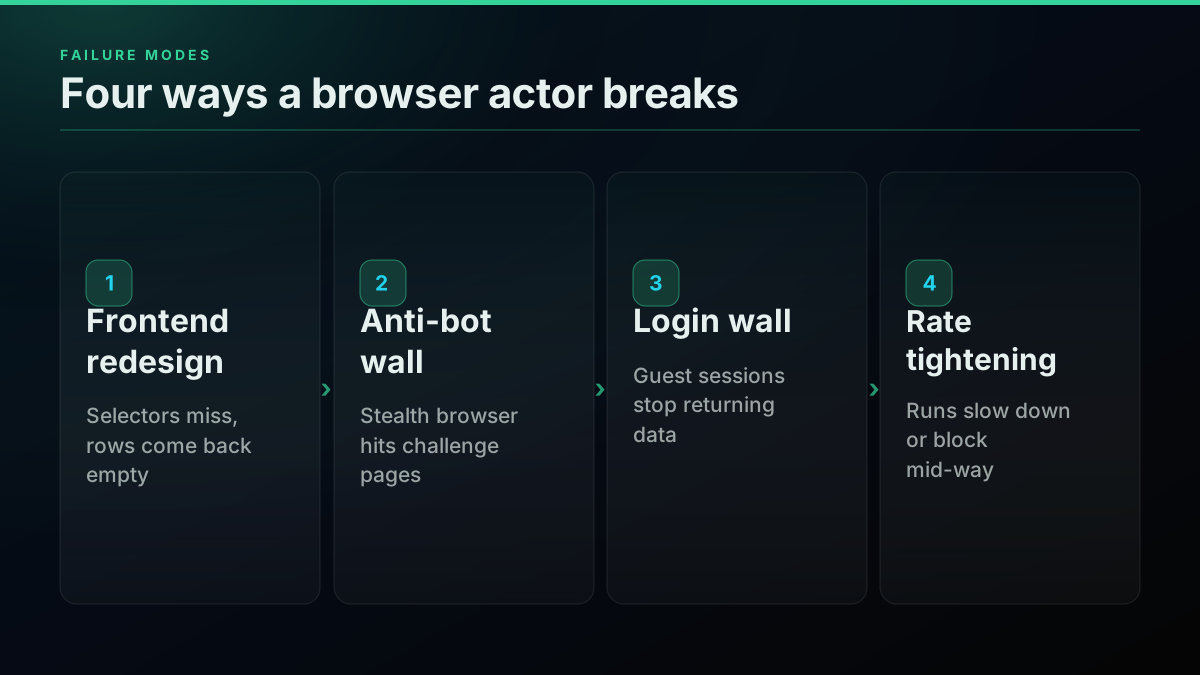
1. Frontend redesign. X ships a UI change and the actor's selectors stop matching. Rows come back empty or malformed. Typical lag to a fix is 2 to 7 days. Detect it with a schema-shape assertion on every run: if a field your parser depends on is suddenly null across the batch, alert.
2. Anti-bot escalation. X tightens detection, often after a press cycle about scraping, and the stealth browser starts hitting challenge pages. The Playwright library that these actors sit on documents just how many surfaces the target can fingerprint. Detect it with a spike alert on run duration and compute units: challenge loops make runs slow and expensive before they fail.
3. Login-wall expansion. X moves previously public content behind authentication and guest-session actors stop returning it. Detect it with an items-per-run baseline: a sharp drop against your historical average means content moved out of reach.
4. Rate-limit tightening. X reduces requests allowed per IP or session, so runs slow down or get blocked mid-way. Detect it the same way, plus watching partial-result flags.
TwitterAPIs absorbs all four server-side. When X changes something, the provider patches the adapter and your code does not move. That is the practical meaning of a maintained API: the maintenance is someone else's on-call rotation, not yours. The Twitter bot detection guide and the rate-limit guide go deeper on how X's defenses behave.
For a working video walkthrough of the no-API scraping approach these actors emulate, this covers the browser path end to end:
https://www.youtube.com/watch?v=PhEKFtq05G8
Capability matrix, framed by the job you are doing
Feature tables are easy to skim and easy to misread. Here is the same information organized around what you are actually trying to do, so you can find your row fast.
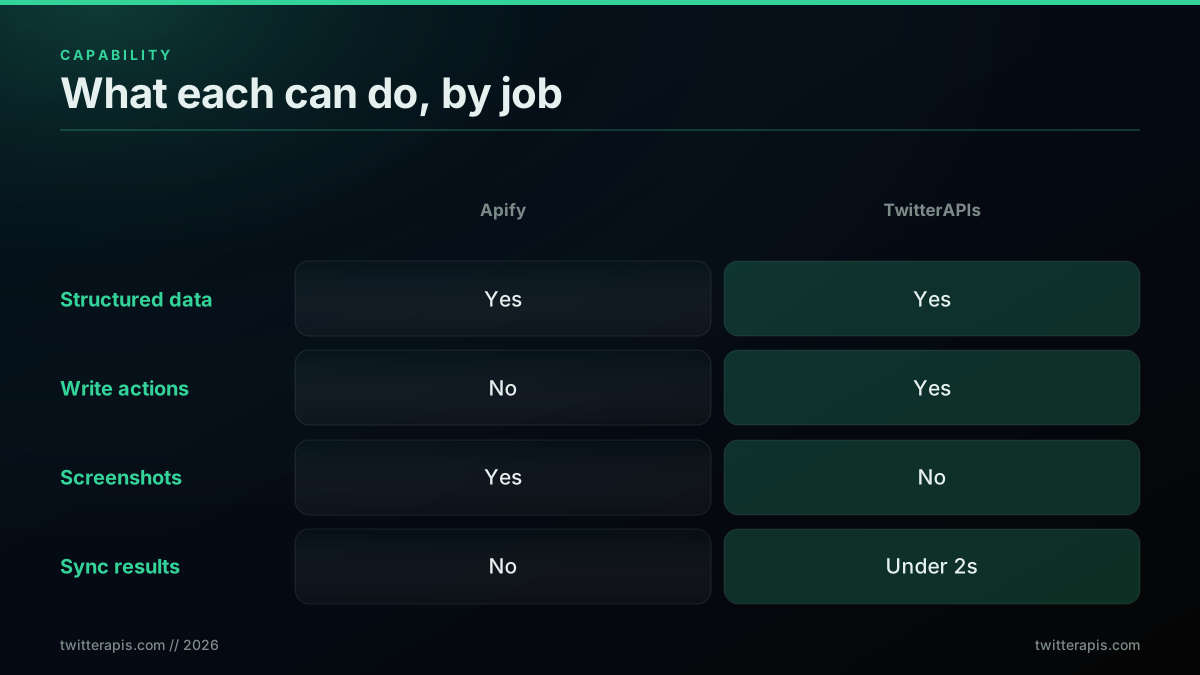
| The job | Apify Twitter Scraper | TwitterAPIs |
|---|---|---|
| Pull search results | Yes | Yes |
| Read a user profile or timeline | Yes | Yes |
| Export followers and following | Yes | Yes |
| Reconstruct a reply thread | Yes | Yes |
| Post a tweet or write action | No | Yes, premium 0.0016 dollars for creation |
| Use full advanced-search operators | Limited to the query string | Full: date, engagement, geo, media type |
| Capture a rendered screenshot | Yes, browser output | No |
| Scrape non-Twitter sites in one pipeline | Yes, hundreds of actors | No, Twitter and X only |
| Get results synchronously | No, batch plus polling | Yes, under two seconds |
| Run without managing proxies | No, proxy pool required | Yes, none needed |
| Call from any language | JavaScript and Python SDKs | Any language, plain REST |
Where Apify keeps the edge: browser-rendered artifacts, multi-site pipelines, and webhook-on-completion async flows. Where TwitterAPIs wins: cost, latency, write actions, full search operators, and integrating with any existing HTTP stack. The advanced search operators guide shows what the full operator set unlocks, and best Twitter API for scraping puts the tradeoff in a broader field.
One row deserves a note, because it flips the usual assumption. People reach for a browser scraper thinking it can see more than an API. For public Twitter data that is rarely true today. The fields a browser can read off a rendered timeline are the same fields a maintained API returns as clean JSON, minus the parsing work. The genuine browser-only cases are narrow: a pixel-accurate screenshot of a tweet, a view that only renders after a specific JavaScript interaction, or content on a site that has no API at all. If your job is none of those, the browser is extra machinery buying you nothing. That is the quiet reason so many Twitter-only pipelines migrate off actors once someone audits what the browser is actually doing for them. Builders keep landing on the same conclusion in public:
https://x.com/heyrobinai/status/2025144875419672791
Score your own workload
Rather than a generic recommendation, score the workload in front of you. Give one point to the column that fits each row, then read the total.
| Question | Point to Apify if | Point to TwitterAPIs if |
|---|---|---|
| Is Twitter your only target? | It is one of several sites | It is the only site |
| Do you need a browser artifact? | Yes, screenshots or JS views | No, structured data only |
| Does a human or live system wait on the data? | No, batch is fine | Yes, needs sub-2s |
| What is your monthly volume? | Under 5,000 tweets | Over 20,000 tweets |
| Do you need write actions? | No, read only | Yes, post or follow |
| Who owns scraper maintenance? | A team that already runs actors | You, and you want it off your plate |
Four or more points to TwitterAPIs means the REST API is almost certainly the right call. Four or more to Apify means the browser platform earns its premium for your case. A split means run the bake-off in the next section before you commit either way. If your answer leans toward high-volume structured pulls, the how to scrape tweets walkthrough and the Python tutorial show the REST path in code.
Run a 60-minute bake-off before you commit
Do not decide on a table alone. Both tools have free starting credit, so run the same job through each and measure. Here is a protocol that fits in an hour.
Step 1. Pick one representative query. Choose the single query that dominates your real workload, for example a keyword search returning a few hundred tweets, and hold it fixed across both tools.
Step 2. Run it on Apify and record the numbers. Note wall-clock time, items returned, and the run's reported cost.
// Apify: submit a run, wait for it to finish, then read the dataset
import { ApifyClient } from 'apify-client';
const client = new ApifyClient({ token: process.env.APIFY_TOKEN });

const started = Date.now();
const run = await client.actor('apidojo/tweet-scraper').call({
  searchTerms: ['machine learning'],
  maxItems: 300,
});
const { items } = await client.dataset(run.defaultDatasetId).listItems();
console.log({
  seconds: (Date.now() - started) / 1000,
  itemsReturned: items.length,
});
Step 3. Run the same query on TwitterAPIs and record the same numbers.
// TwitterAPIs: one synchronous request per page
const started = Date.now();
const res = await fetch(
  'https://api.twitterapis.com/twitter/tweet/advanced_search?query=machine+learning&count=20',
  { headers: { Authorization: `Bearer ${process.env.TWITTERAPIS_KEY}` } }
);
const data = await res.json();
console.log({
  seconds: (Date.now() - started) / 1000,
  itemsReturned: data.tweets.length,
});
Step 4. Estimate the monthly bill at your real volume. Plug both measured per-unit costs into a tiny estimator so you compare apples to apples.
def monthly_cost(tweets_per_month, dollars_per_1000):
    return round(tweets_per_month / 1000 * dollars_per_1000, 2)

volume = 200_000
print("Apify V2:   ", monthly_cost(volume, 0.40))   # -> 80.0
print("TwitterAPIs:", monthly_cost(volume, 0.04))   # -> 8.0
Step 5. Weigh latency against your use case. If a human waits on the data, the wall-clock numbers from steps 2 and 3 matter as much as the cost. If it is a nightly batch, ignore latency and decide on price and maintenance.
An hour of measured data beats any comparison table, including this one. When the numbers are in front of you, the decision usually makes itself.
The cheapest pay-as-you-go Twitter API. Try it free.
$0.0008 a call, about $0.04 per 1,000 tweets at 20 tweets a page. $0.50 free credits. No credit card required.
Migrating an existing Apify pipeline
If the bake-off points you toward the REST API, the migration is mechanical. It is four moves, and a single-endpoint job is usually done in under an hour.
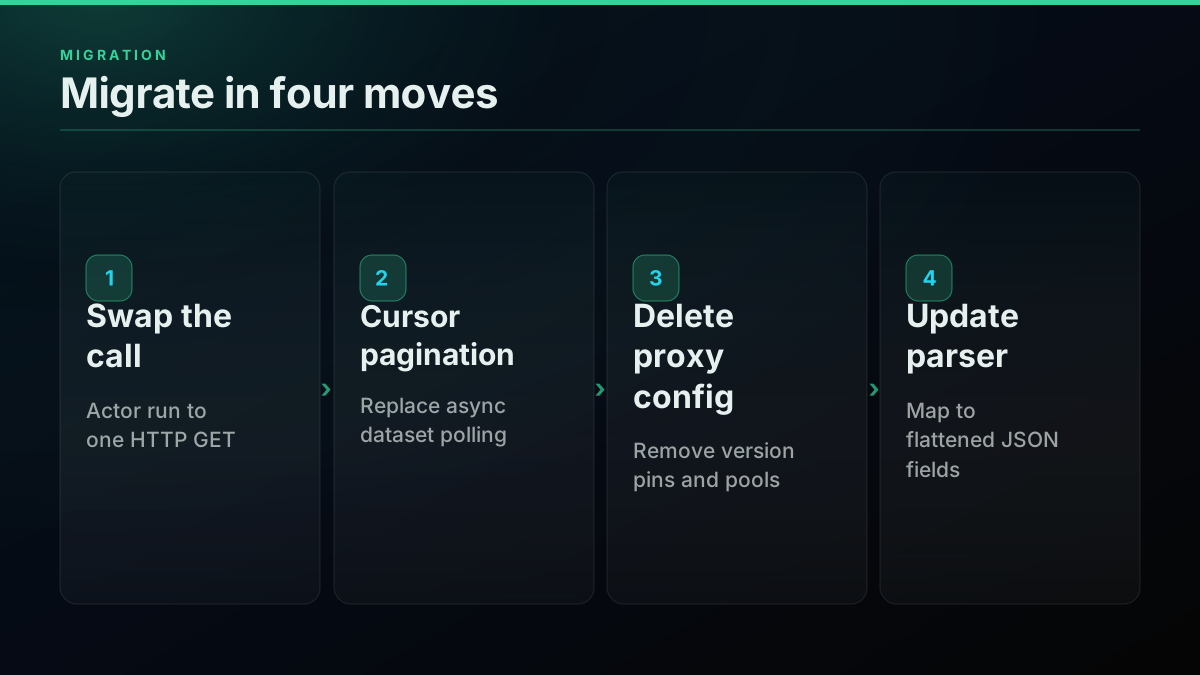
Move 1: swap the actor call for an HTTP request
The actor call becomes a plain fetch with a Bearer token. Grab a key on the signup page; the 0.50 dollars of free credit covers about 12,500 tweets.
import os, requests

# Before: an Apify actor run plus dataset read
# After: one synchronous request
resp = requests.get(
    "https://api.twitterapis.com/twitter/tweet/advanced_search",
    params={"query": "machine learning", "count": 20},
    headers={"Authorization": f"Bearer {os.environ['TWITTERAPIS_KEY']}"},
    timeout=15,
)
tweets = resp.json()["tweets"]
Move 2: replace dataset polling with cursor pagination
Apify hands you an async dataset you poll for completion. TwitterAPIs paginates synchronously with a cursor, which is simpler to reason about and debug.
def fetch_all(query):
    out, cursor = [], None
    while True:
        params = {"query": query, "count": 20}
        if cursor:
            params["cursor"] = cursor
        r = requests.get(
            "https://api.twitterapis.com/twitter/tweet/advanced_search",
            params=params,
            headers={"Authorization": f"Bearer {os.environ['TWITTERAPIS_KEY']}"},
            timeout=15,
        ).json()
        out.extend(r["tweets"])
        cursor = r.get("next_cursor")
        if not cursor:
            return out
Move 3: delete proxy and actor-version config
Remove the proxy pool setup, the actor-version pin, and the webhook-on-completion handler. The REST API needs none of them, which is a chunk of code and configuration you get to throw away.
Move 4: update the parser for flattened fields
Apify returns raw Twitter objects with nested structures. TwitterAPIs returns flattened JSON. Most names line up; a few differ.
| Data point | Apify field | TwitterAPIs field |
|---|---|---|
| Tweet text | full_text or text | text |
| Author handle | user.screen_name | author.username |
| Like count | favorite_count | favorite_count |
| Created at | created_at string | created_at ISO 8601 |
Validate the response shape on your most critical query before you cut over production traffic. That single check catches the pagination and nested-object edge cases that otherwise fail silently. For framework-specific patterns after the switch, the Node.js tutorial and the twitterapi.io migration guide cover the same moves in their stacks.
Keep reliability and cost checks in the pipeline
Once you are on a per-call API, two small habits keep it efficient at volume. Retry on the right status codes with backoff, and never retry a 4xx, because it means your request is wrong.
import time

def get_with_backoff(url, params, headers, tries=4):
    for attempt in range(tries):
        r = requests.get(url, params=params, headers=headers, timeout=15)
        if r.status_code == 200:
            return r.json()
        if r.status_code in (429, 500, 502, 503):   # retryable
            time.sleep(2 ** attempt)
            continue
        r.raise_for_status()   # 4xx: your request is the problem, stop
    raise RuntimeError("exhausted retries")
Deduplicate on tweet id when search windows overlap across days, and poll the account endpoint to watch your credit so a runaway job cannot surprise you. The best practices guide and the follower export guide cover both patterns at production scale, and the tweet history guide handles deep backfills.
Teams pulling Twitter data at scale keep asking the same practical questions in public, which is a good sanity check on whether your plan matches how others solve it:
https://www.reddit.com/r/datasets/comments/1qju57e/best_way_to_pull_twitterx_data_at_scale_without/
A worked cost of ownership over a year
Direct API cost is only part of total cost of ownership. Here is a realistic twelve-month view for a mid-size team running 200,000 tweets a month, counting both the bill and the engineer time.
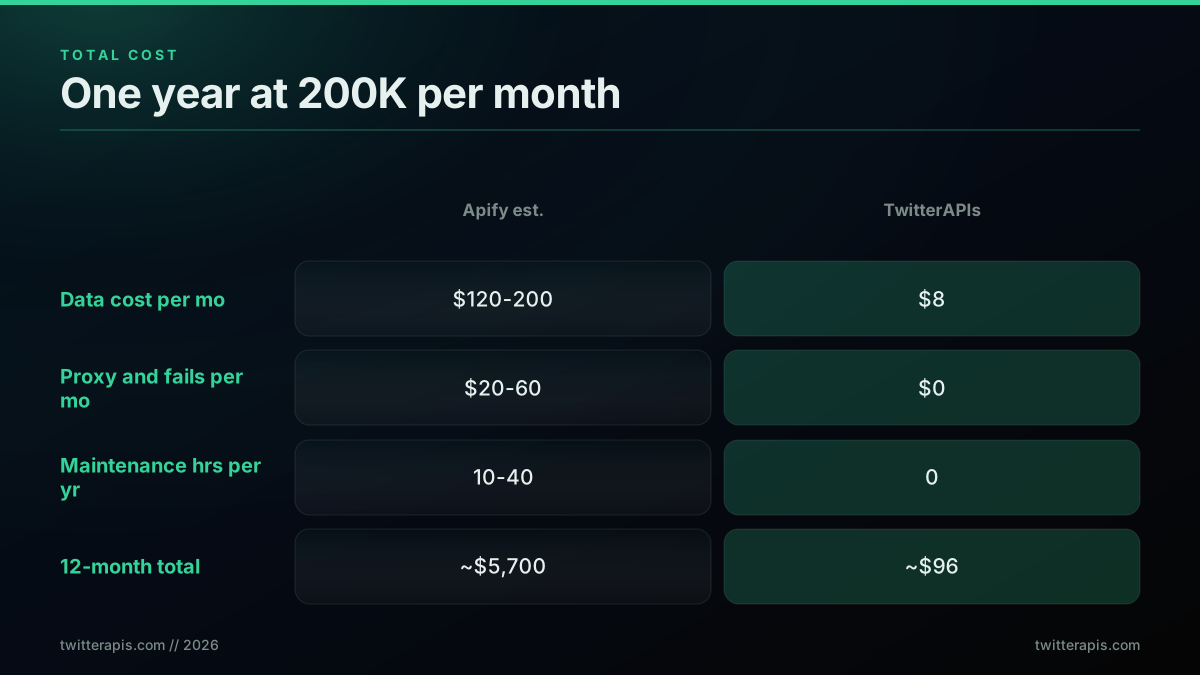
| Line item | Apify (self-hosted est.) | TwitterAPIs |
|---|---|---|
| Direct data cost per month | 120 to 200 dollars | 8 dollars |
| Failed-run and proxy overhead per month | 20 to 60 dollars | 0 dollars |
| Maintenance hours per year | 10 to 40 hours | 0 hours |
| Maintenance cost per year at 175 dollars per hour | 1,750 to 7,000 dollars | 0 dollars |
| Twelve-month total, midpoint | roughly 5,700 dollars | roughly 96 dollars |
Even setting maintenance aside and using the cheap managed V2 actor at 40 dollars a month for 100,000 tweets, the direct-cost gap against 4 dollars on TwitterAPIs is 10x every month, forever. Add the maintenance line back and the total-cost gap for a small team is stark. This is the quarterly-cost-review moment that pushes most teams to switch: the cumulative number finally becomes visible. The X API pricing change guide explains how the broader market got here.
A few caveats keep this honest. If your volume is genuinely small, a few thousand tweets a month, the whole calculation collapses to a rounding difference and you should pick on convenience, not price. If you already operate a fleet of Apify actors for other sites, the marginal cost of one more Twitter actor is low because the platform, proxies, and monitoring are already paid for, and standardizing on one billing surface has real operational value. And if your team has deep browser-automation expertise sitting idle, the maintenance line is cheaper for you than the 175-dollar-per-hour figure assumes. The point of the worked numbers is not to declare a universal winner. It is to make the real tradeoffs visible so you can price them against your own situation instead of a marketing multiplier. Run the numbers with your actual volume, your actual failure rate, and your actual cost of engineer time, and the answer for your team will be clear. For a wider market view before you lock in, the cheapest Twitter API ranking and the best residential proxies guide frame the self-hosted alternative honestly, and the fetch full thread guide covers the one call that replaces a whole page of browser scraping.
The best Twitter scrapers: quick comparison
A two-way comparison answers a two-way question, and plenty of teams arrive here still holding a longer shortlist. This section widens the field to the tools that come up most often, priced on the same axis so the rows are comparable. Every figure below is the effective cost per 1,000 tweets at a mid-volume workload of roughly 100,000 tweets a month, which is where the differences stop being rounding error.
| Scraper | Effective per 1,000 tweets | Model | The reason to pick it |
|---|---|---|---|
| TwitterAPIs | 0.04 dollars | Synchronous REST | Lowest unit cost, sub-two-second responses, no proxy layer |
| TwitterAPI.io | 0.15 dollars | Pay-per-read REST | Broad endpoint list, no read ceiling |
| SocialData.tools | 0.20 dollars | Per-item REST | Failed requests are explicitly not billed |
| Apify Tweet Scraper V2 | 0.40 dollars plus platform overhead | Browser actor, batch | Multi-site pipelines and browser artifacts |
| RapidAPI listings | 0.50 to 5.50 dollars | Marketplace resale | One bill across many unrelated APIs |
| Bright Data | 1.50 dollars plus proxy | Managed scraper plus proxy network | Highest measured completion rate |
| Official X API | 5.00 dollars | First-party pay-per-read | Write access, webhooks, compliance posture |
Two notes keep that table honest. The Apify row carries platform overhead that the sticker price does not include, which is the whole argument of this post. The Bright Data row excludes residential proxy traffic, billed separately, and that add-on is not small.
Bright Data Twitter Post No-Code Scraper
Bright Data deserves its own paragraph because it is the option most often set against Apify, and because the tradeoff it offers is genuinely different from a cheaper API. Its no-code Twitter post scraper is configured from a web interface rather than a script, which puts it in the same category as an Apify actor from a user's point of view: you describe the job, it runs, you collect a dataset.
Where it separates is reliability. In an independent benchmark of 11 Twitter data providers run in 2026, Bright Data posted a 98.44 percent average success rate, the highest of any provider tested, against a field where most scraping competitors landed between 63 and 95 percent. That gap is the product. The price reflects it: 1.50 dollars per 1,000 records on pay-as-you-go, with the residential proxy network billed on top at 8.40 dollars per gigabyte at pay-as-you-go rates.
So the honest framing is a three-way split rather than a two-way one. Bright Data is the completeness option, and you pay roughly 37x the TwitterAPIs rate for it. Apify is the breadth option, and you pay roughly 10x for a platform that also crawls everything else you own. TwitterAPIs is the cost-and-latency option for work that is Twitter-only and structured. A research team that cannot tolerate a data hole should look hard at the first. A team running twelve crawlers across six sites should look hard at the second. A product that calls for tweets while a user waits is the third case, and no amount of reliability premium fixes a batch job's latency.
The bottom line, by workload
There is no single winner, only a winner per job. Apify is a general-purpose scraping platform that happens to support Twitter. TwitterAPIs is a purpose-built Twitter data API. Match the tool to the work:
- High-volume structured data collection: TwitterAPIs, on cost and latency, by a wide margin.
- Live or in-app features that wait on data: TwitterAPIs, because batch plus polling cannot serve a synchronous request comfortably.
- Multi-site pipelines or browser artifacts: Apify, because the actor ecosystem and managed browser are the whole point.
- Occasional low-volume pulls: either, since at a few thousand tweets a month the price difference is rounding error.
If Twitter data is your primary need and you are pulling at any real volume, the honest 10x cost advantage, the sub-two-second latency, and the maintenance you never have to do all point the same direction. If Twitter is one stop in a larger browser-driven workflow, Apify's breadth earns its premium.
Start with the free credit and measure your own numbers. Grab a key on the signup page with 0.50 dollars of credit and no card, estimate your bill with the cost calculator, and if you are weighing more than two options, the alternatives overview and the RapidAPI marketplace comparison widen the field. For the classic developer context on why any of this exists, Hacker News mapped the fallout when X closed free API access, and the official X developer docs remain the reference for the first-party endpoints. Under the hood, both browser paths still lean on tools like Puppeteer and aiohttp for concurrency, and the long tail of integration questions lives in the Stack Overflow twitter-api tag. If you build bots on top of the data, the Twitter bot guide covers the full stack.
If you are sizing this decision on cost, we priced what a million tweets costs through every route with every figure sourced.
If you are sizing this decision on cost, we priced building competitor tracking against buying a dashboard with every figure sourced.
Start scraping
If you have read this far, the decision is probably already made and the remaining question is what to do in the next fifteen minutes. Here is the shortest honest path for each answer.
If Twitter is your only target and you are pulling at volume, get a key and measure your own workload rather than trusting anyone's table, including this one. Sign up on the signup page for 0.50 dollars of credit with no card, which is roughly 625 standard calls or about 12,500 tweets, enough to run a real query rather than a toy one. Point it at the search or user-timeline endpoint your pipeline actually uses, record the wall-clock time and the field coverage, and compare that against the same query on whatever you run today. The Python tutorial has the first request in copy-pasteable form, and the cost calculator turns your monthly tweet count into a bill before you commit to anything.
If you are already on an Apify actor, do not rewrite the pipeline to find out. Run both against the same query for one day, using the bake-off protocol earlier in this post, and compare cost per usable record rather than cost per run. The migration section above covers the four mechanical moves once the numbers justify it, and the RapidAPI marketplace comparison covers the same reasoning if a reseller listing is what you are actually leaving.
If your workload is genuinely multi-site or needs browser artifacts, stay on Apify and stop shopping. The premium is buying you something real, and swapping in a Twitter-only API would leave you maintaining two systems to save a few dollars a month. That is a worse outcome than the bill you have now.
If you are not sure yet, the cheapest way to find out is to run one query through both and read the numbers. Both have free starting credit, the bake-off takes an hour, and an hour of measurement settles an argument that a comparison table can only frame.
// sources
Where these numbers come from
Each row is a figure in this post and the artefact it was read from. Prices and limits on this platform move, so check the date on the source before you plan against it.
- Apify Store listing for Tweet Scraper V2
- The vendor listing behind the headline figure of about 0.40 dollars per 1,000 tweets, and the 50-tweet minimum charged per query.
- Apify usage and resources documentation
- Documents the compute-unit formula the post uses to explain the second billing line, where actors bill on allocated memory and CPU over a run duration.
- Apify status page
- The source for the claim that the most popular Twitter actor logged multiple multi-day outages after X frontend updates.
- Playwright library documentation
- The browser automation layer these actors sit on, cited in the anti-bot failure mode for how many surfaces a target site can fingerprint.
- Official X developer documentation
- Named as the first-party reference for the API surface both routes ultimately read, in the closing section on choosing between them.
Frequently Asked Questions
The mainstream Apify Tweet Scraper V2 uses event pricing at roughly 0.40 dollars per 1,000 tweets, with a minimum of 50 tweets per query and a free tier capped at 5 runs of 10 items. Older Pay-Per-Result actors and any actor you run on your own compute plus residential proxies land higher, often 2 to 5 dollars per 1,000 once proxy traffic and failed runs are counted. TwitterAPIs charges 0.0008 dollars per call returning about 20 tweets, which is 0.04 dollars per 1,000 tweets. So the honest modern gap is around 10x on the per-result price, not the 137x figure that older posts quote from a legacy actor.
No. TwitterAPIs is a hosted REST API. You send an HTTP GET with a Bearer token and read JSON back, usually in under two seconds. There is no headless browser to launch, no residential proxy pool to rent, and no actor version to pin. The provider runs the request infrastructure, so your servers never touch twitter.com directly. That removes the proxy line item and the browser-maintenance burden that dominate the real cost of an Apify pipeline at volume.
For a single-endpoint job most teams finish in under an hour. You swap the actor call for an HTTP request to api.twitterapis.com, replace dataset polling with synchronous cursor pagination, delete the proxy and actor-version configuration, and update your parser for the flattened JSON field names. The hardest part is usually validating response shapes on your most critical query before you cut over, not writing the new call itself. See the migration section below for a step by step.
Watch three signals: a sudden drop in items returned per run against your historical baseline, a spike in run duration or compute units consumed, and an empty or malformed field that your parser used to populate. Browser actors fail quietly when X changes its frontend, so a schema-shape assertion on every run plus an alert on items-per-run variance catches most breakage days before you would notice missing rows in your warehouse. The reliability section includes a health-check pattern.
No, and it is worth correcting. The 137x number comes from comparing a legacy Pay-Per-Result actor priced near 5.50 dollars per 1,000 results against a cheap REST API. The Apify Tweet Scraper V2 that most teams use in 2026 is priced at about 0.40 dollars per 1,000 tweets. Measured against TwitterAPIs at 0.04 dollars per 1,000, that is roughly a 10x gap on the headline price. The gap widens once you add Apify proxy traffic, failed-run billing, and engineer maintenance hours, but leading with 137x is misleading.
Apify wins when Twitter is one platform inside a larger multi-site scrape, when you need browser-rendered artifacts like screenshots or JavaScript-gated content, when your volume is low enough that any price difference is rounding error, or when you already run other actors and want one billing surface. For those jobs the actor ecosystem and the managed browser layer are real advantages that a Twitter-only REST API does not try to match.
For structured Twitter data the coverage overlaps almost entirely: search, user profiles, timelines, followers, following, replies, and threads. TwitterAPIs adds write actions like posting, follow, and bookmark that browser actors do not offer, and full advanced-search operators. Apify keeps the edge on browser-only outputs such as page screenshots and rendering of JavaScript-gated views. For raw data collection the two return equivalent fields; the difference is delivery, not coverage.
Yes, and some teams do. A common split is TwitterAPIs for high-volume structured pulls like search, timelines, and follower exports, and Apify for the small share of work that needs a real browser, such as archiving a rendered tweet as an image or scraping a non-Twitter site in the same pipeline. Routing each job to the cheaper or more capable tool for that specific task usually beats standardizing on one.
Check out similar blogs
More guides on the Twitter/X API, scraping, and pricing.

Best Twitter Scraper 2026: API, Browser and Python Compared
Compare the best Twitter scrapers in 2026, official API, third-party APIs, browser scrapers, and Python libraries. What works, what gets you sued, what each costs.
Twitter/X API Access Without a Developer Account: What Actually Works in 2026
The official X API still gates every call behind a reviewed developer account and OAuth 2.0. Here is what real developers use instead, and what each route actually costs.
How to Choose a Twitter/X API in 2026: The Complete Buyer's Guide
A decision framework for choosing a Twitter/X API in 2026: the seven criteria that actually matter (pricing model, data coverage, rate limits, auth, reliability, compliance, migration cost), a use-case decision tree, and where each path wins.

Cheapest Twitter API 2026: 8 Providers Ranked by Real Per-1,000-Tweet Cost
Every major Twitter API provider ranked by what 1,000 tweets actually cost in 2026, measured from live pricing pages across three volume tiers, with the billing traps comparison posts leave out.

Scrape Full Tweet History of Any Account in 2026 (Beyond the 3,200 Limit)
Why the X timeline stops at 3,200 tweets and how to pull an account's full history with date-window search, cursor pagination, and dedup. Live-tested code in Python and curl.

RapidAPI Twitter Alternative: Direct API vs Marketplace
Weighing a RapidAPI Twitter alternative? See how marketplace listings stack up against the official X API and TwitterAPIs on cost, uptime, billing, and switching effort.

Twitter Scraping, Best Practices for Production in 2026
Production-grade Twitter scraping patterns, retry logic, pagination, proxy strategy, rate-limit handling, and cost optimization for any third-party API.
Build vs Buy: Should You Build Your Own Twitter/X Monitoring Tool? (2026)
Buying a listening seat costs $29 to $2,000 a month depending on the vendor. Building costs real engineering hours plus a data bill. Here is the real math behind the twitter monitoring tool build vs buy decision, priced both ways.