GUIDE
What "Rate Limited" Actually Means on X (Every Limit, Measured)
"Sorry, you are rate limited" is one message covering two different systems: a consumer action ceiling and a developer API window. Here is what the term means, the current numbers for both, where it came from, and how long it actually lasts.
Per our own spec, 70 of 123 endpoints bill $0.0008, 26 are free, and 27 sit between $0.0016 and $0.01. Every price ships inside our published OpenAPI document as an x-cost-usd field, so any figure in this post can be checked against the contract that bills it rather than taken on trust.

"Sorry, you are rate limited. Please wait a few moments then try again." It shows up when you try to follow one account too many in a row, when you change your username twice in a week, or when a script calling the X API crosses a number nobody told you existed. So what does rate limit exceeded mean on X? The phrase gets thrown around loosely enough that most people assume it means one thing. It does not. X runs at least two entirely separate rate-limiting systems under this one name, a consumer account ceiling and a developer API window, and conflating them is why so much advice about "fixing" a rate limit is wrong for whichever situation you are actually in. This is the full picture: what the term means, where it came from, the real numbers X publishes today for both systems, and how long each kind of limit actually lasts.
TL;DR
"Rate limited" on X is one phrase covering two different mechanisms. As a regular user, it is the in-app message "Sorry, you are rate limited" when you follow, DM, or post too fast against a daily ceiling X publishes: 50 posts, 200 replies, 500 DMs, and 400 follows a day, read live from X's own Help Center. As a developer, it is an HTTP 429 on the API when a 15-minute or 24-hour request window empties, with headers telling you exactly when it resets. The term dates to a 2008 TweetDeck-era explainer, was briefly stretched to cover a daily reading cap in July 2023, and today means neither a ban nor a bug, only a counter waiting to roll over.
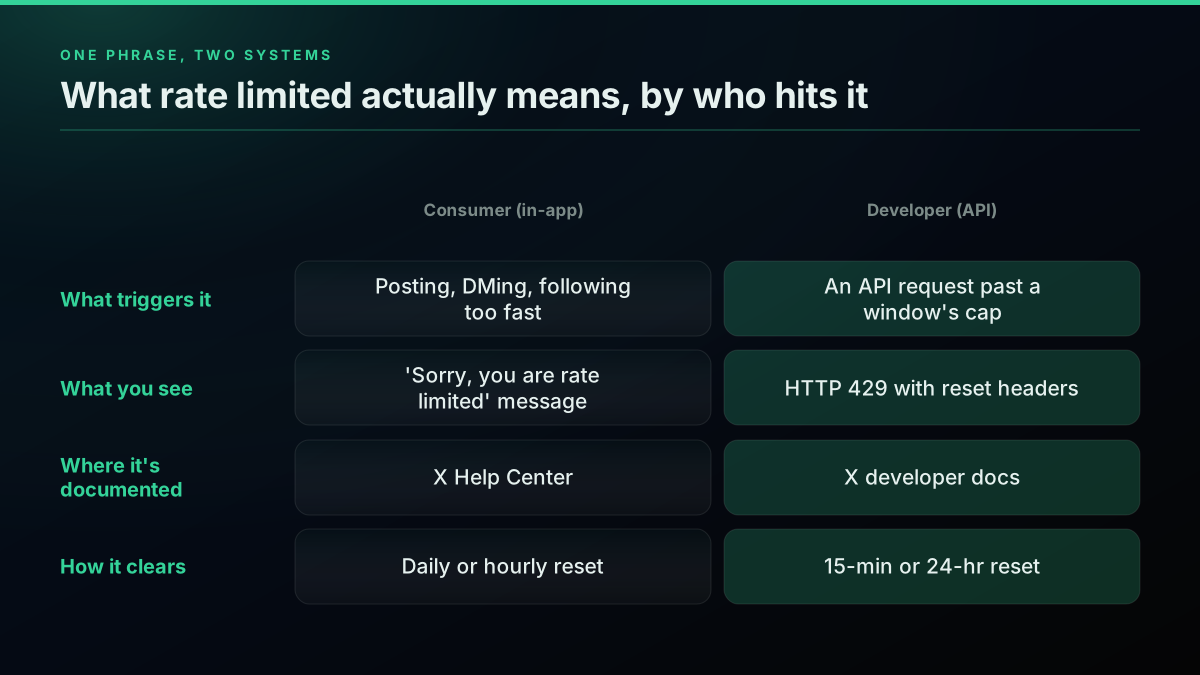
One phrase, two systems: an account-level action ceiling and an API request window
Being rate limited means an action-counter tied to your account or your API key has hit its ceiling for the current time window, and the platform is refusing the next request until that window resets. It is a self-clearing timing block, never a judgment on your account, and it is the single most common source of confusion in the X Help Center and the X developer forum alike, because the platform reuses the same phrase for two mechanisms that behave, and get fixed, completely differently.
The Short Answer, At a Glance
Rate limiting on X is a ceiling on how many times you can do something in a given window, tracked separately depending on whether you are a person using the app or software calling the API. For a regular account, the ceiling covers actions like posting, replying, DMing, and following, and it resets daily or, for finer-grained bursts, every half hour. For a developer, the ceiling covers API requests to a specific endpoint, tracked in rolling 15-minute or 24-hour windows depending on whether the call reads or writes data. Cross either ceiling and you get told to wait: the consumer sees a plain-language message, the developer sees an HTTP 429 with a reset timestamp in the response headers. Nothing about hitting a rate limit means your account did anything wrong. It means a number was crossed, and the system is designed to let you continue once the clock runs out. The full developer-side index, every endpoint and every credential type, lives in the Twitter API reference hub.
Where Does the Term "Rate Limited" Come From?
"Rate limit exceeded" is not a term X invented recently. The earliest documented explanation of it on this platform is a TweetDeck-era post from Tuesday, October 28, 2008, written when TweetDeck was a third-party desktop client and Twitter capped how often any single account's data could be pulled through its API. The original rule was blunt: 100 API calls per hour, tracked per account rather than per application, meaning every third-party client sharing your login pulled from the same bucket. The post spelled out something that still trips people up 18 years later: the ceiling applied only to third-party applications reading data through the API. Twitter's own website did not use its own API, so browsing directly on twitter.com carried no such limit at all.
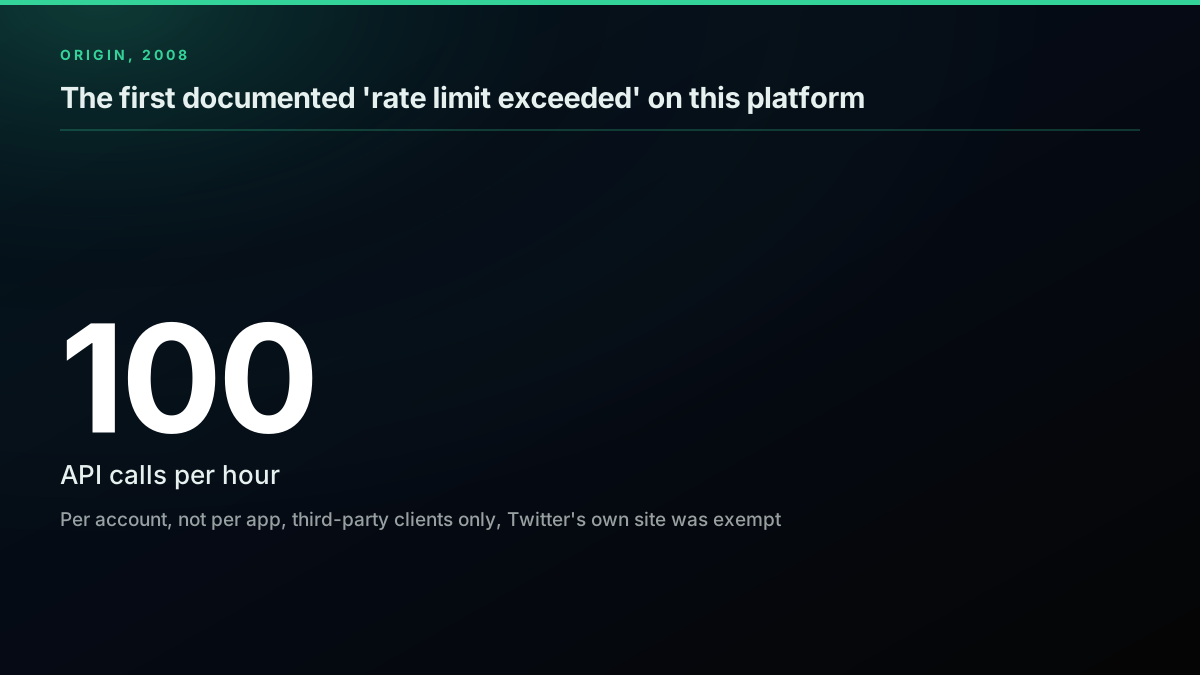
The exact 2008 rule: 100 calls per hour, per account, third-party apps only
That asymmetry, a limit for outside software but not for the first-party client, is the direct ancestor of the split that still exists today. The numbers have changed by orders of magnitude and the platform has been renamed twice, but the core shape, one ceiling for people using X directly and a separate one for software calling its API, is the same idea TweetDeck's developers were explaining in 2008. Getting an API key at all today is a different process than it was then, covered step by step in the how to get a Twitter API key guide.
The Two Different Things People Mean by "Rate Limited"
Search for "what does rate limited mean" and you land in a pile of Reddit threads, Quora answers, and vendor listicles, almost none of which distinguish the two systems clearly. Here is the actual split.
The consumer system governs actions taken by a logged-in person, through the web app, the mobile app, or any client connected to that account. It covers posting, replying, DMing, following, and account settings changes like your email or username. When you cross one of these ceilings, X shows the in-app message: "Sorry, you are rate limited. Please wait a few moments then try again."
The developer system governs requests made against the X API, tracked per endpoint, per credential type, inside rolling 15-minute or 24-hour windows. When a script crosses one of these ceilings, the API responds with HTTP 429 Too Many Requests and a set of headers telling the caller exactly when the window refills.
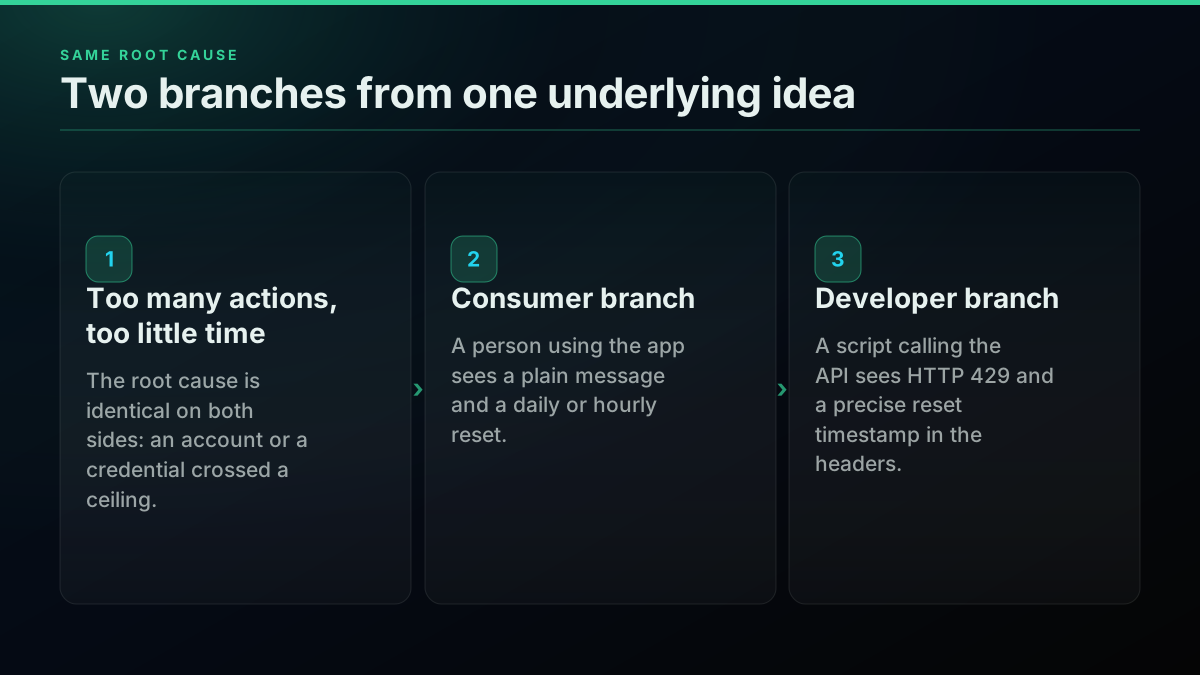
Same root cause, two branches: what a person sees versus what a script sees
They share a root cause, too many actions in too little time, but they are tracked by different systems, documented on different pages, and fixed differently. X's own Help Center covers the consumer numbers. X's developer documentation covers the API numbers. Almost nothing online puts both in one place, which is exactly the gap this page exists to close.
https://www.youtube.com/watch?v=N7VArSPKz5I
What Do You See as a Regular User?
If you are not writing code against the API, the version of "rate limited" you will run into is the plain in-app message, and it shows up for a narrower set of actions than most people expect.

Just Dave now
@justdavenow89
Sorry, you are rate limited. Please wait a few moments then try again. when trying to follow back like more than 8 people come on x i should be able to follow people back
That is the most common trigger by far: following too many accounts back in a short burst, especially on a newer account. It is not a punishment for being popular. It is a burst detector, and the fix is almost always pacing rather than waiting out a fixed timer.
I want to change my username on X (Twitter) but I can't. why?
Username and email changes trip the same generic message even though they are governed by a much smaller, separate ceiling than the daily post or follow limits. The message text does not tell you which specific limit you hit, which is the single biggest source of confusion in threads like this one: the wording is identical whether you burned through 400 follows or made your second email change of the hour. A new or automated-looking account trips these ceilings faster than an established one, the same pattern-detection logic covered from the opposite side in the Twitter bot detection guide.
Every Consumer Account Limit X Publishes Today, Measured
X's Help Center page, "About X limits," is the closest thing to an authoritative source for the consumer side, and reading it live produces a short, specific list rather than the vague "you're doing too much" most fix-it articles settle for.
X's published consumer account limits, read live 2026
| Action | Daily limit | Notes |
|---|---|---|
| Original posts | 50 per day | Unverified accounts; broken into smaller per-half-hour intervals |
| Replies | 200 per day | Same semi-hourly breakdown as original posts |
| Direct messages sent | 500 per day | Counted across every device and connected app |
| Follows | 400 per day | Technical cap; tightens further past 5,000 total follows |
| Email address changes | 4 per hour | Separate from the daily action ceilings |
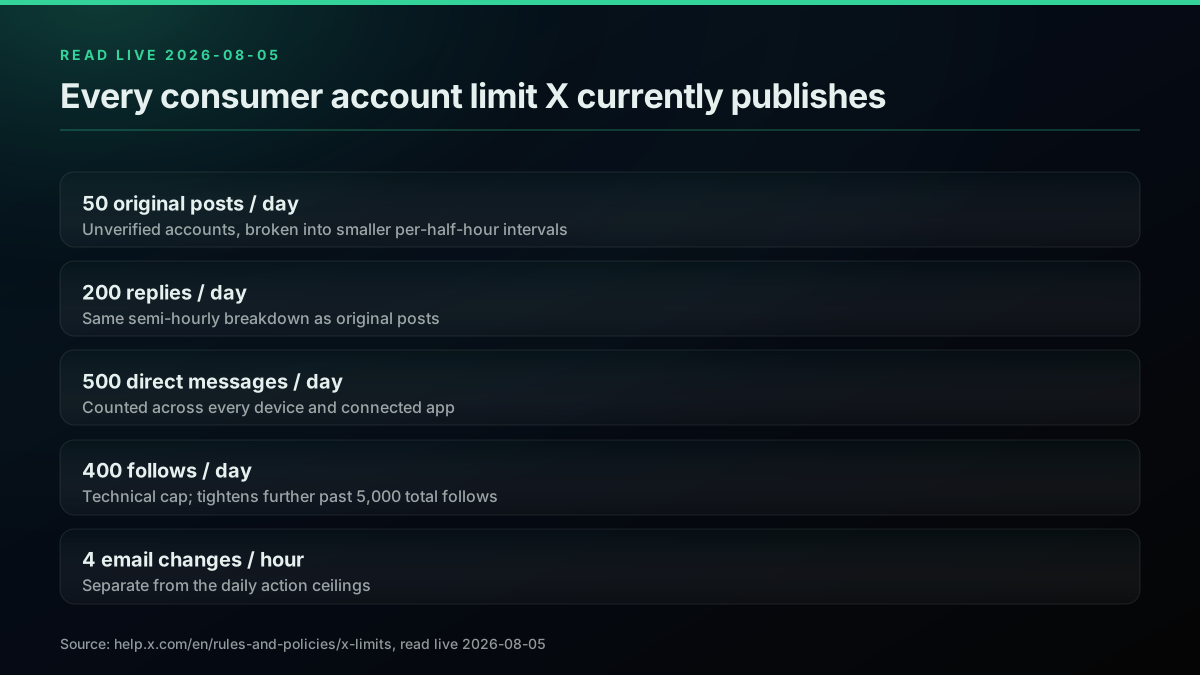
Five numbers, one page, read live on 2026-08-05
A few details matter beyond the raw numbers. The 50-post and 200-reply daily ceiling is further broken into smaller intervals across the day rather than being available as one lump sum you can spend all at once, so posting all 50 in the first hour will still get you throttled even though you technically have not exceeded the daily total yet. The 400-follow ceiling is described by X as a "technical account limit only," meaning it is a hard cap, but there are additional, undisclosed rules against aggressive following behavior that can throttle you well before you reach 400 if the pattern looks automated. And once an account already follows 5,000 others, further follows are governed by an account-specific ratio rather than the flat daily number, a detail covered in more depth on X's follow limit troubleshooting page. None of these limits are per-app. X states plainly that they apply "across all devices, including web, mobile, phone, API, etc.", so spreading activity across multiple clients does not create extra headroom.
Start building with TwitterAPIs
$0.0008 a call, about $0.04 per 1,000 tweets at 20 tweets a page. $0.50 free credits. No credit card required.
The Page X Itself Can't Keep Straight
Here is a detail almost nobody has written about, because it requires actually reading X's current documentation rather than trusting an old screenshot: the same Help Center page that states the current 50-post-and-200-reply ceiling also still contains, further down, a leftover reference to a 2,400-updates-per-day limit as though it were a separate, currently active rule.
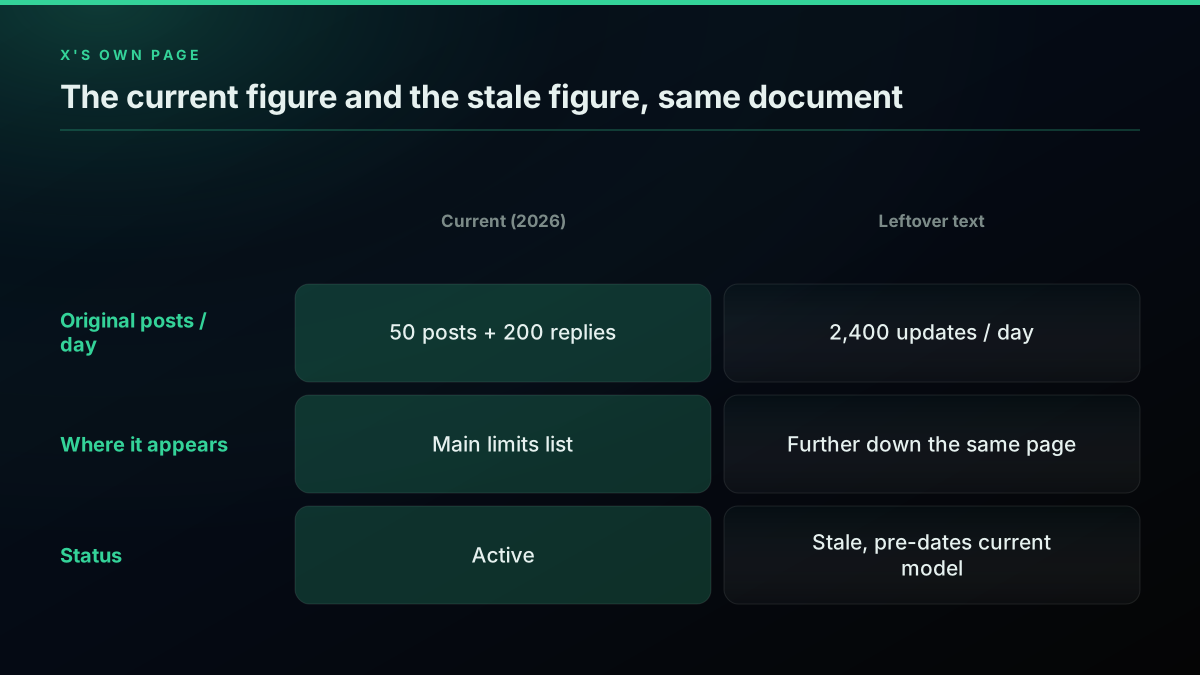
Read live 2026-08-05: the current number and the stale one, on the same page
That 2,400 figure is the OLD daily post ceiling from before the current, much tighter 50-and-200 model, and it appears to be a documentation artifact from an incomplete update rather than a second live limit stacked on top of the first. It is worth knowing this exists, because if you go looking for X's official numbers yourself and land on that paragraph first, you will come away with a figure that is roughly 34 times too generous for what unverified accounts actually get today. Trust the 50-original-posts, 200-replies figure; the 2,400 number is legacy text X has not fully retired. If your own workflow involves scheduled or automated posting anywhere near this ceiling, the scheduler tools versus API comparison covers how that daily budget plays out in practice.
What Developers See: The API 429
Calling the X API instead of using the app surfaces the same underlying idea in a completely different shape: an HTTP status code plus response headers, not a sentence. X's own developer forum has fielded this exact confusion from working developers since at least 2022, a thread covered in more depth further down this page.
When an endpoint's window empties, the API returns HTTP 429 Too Many Requests, the same status code covered in the MDN HTTP status reference. RFC 6585, the standard that defines the status code, describes it as plainly as a specification ever gets:
The 429 status code indicates that the user has sent too many requests in a given amount of time ("rate limiting").
Three response headers carry the information a developer actually needs, and they arrive on every metered response, not just the 429 that finally trips:
HTTP/1.1 429 Too Many Requests
x-rate-limit-limit: 450
x-rate-limit-remaining: 0
x-rate-limit-reset: 1785945600
content-type: application/json

{"title":"Too Many Requests","detail":"Rate limit exceeded","status":429}
x-rate-limit-limit is the ceiling for that endpoint in the current window, x-rate-limit-remaining counts down to zero, and x-rate-limit-reset is a Unix timestamp for the exact second the window refills. A 429 is always recoverable by waiting; it is a timing block, not an access block, a distinction the Twitter API error codes reference covers against every other status the API can return, including the 403 that means the opposite (a permanent access wall, not a timer). For the full breakdown plus a runnable retry-with-backoff pattern, the Twitter API rate limits guide covers that ground in depth, and the credential types referenced throughout this page, app Bearer tokens versus user OAuth tokens, are explained in the Twitter API authentication guide.
Every Developer Rate Limit, Measured
Pulling the current numbers straight from X's own API rate limits documentation on 2026-08-05 gives a concrete floor to plan around, rather than the "it varies" most articles settle for.
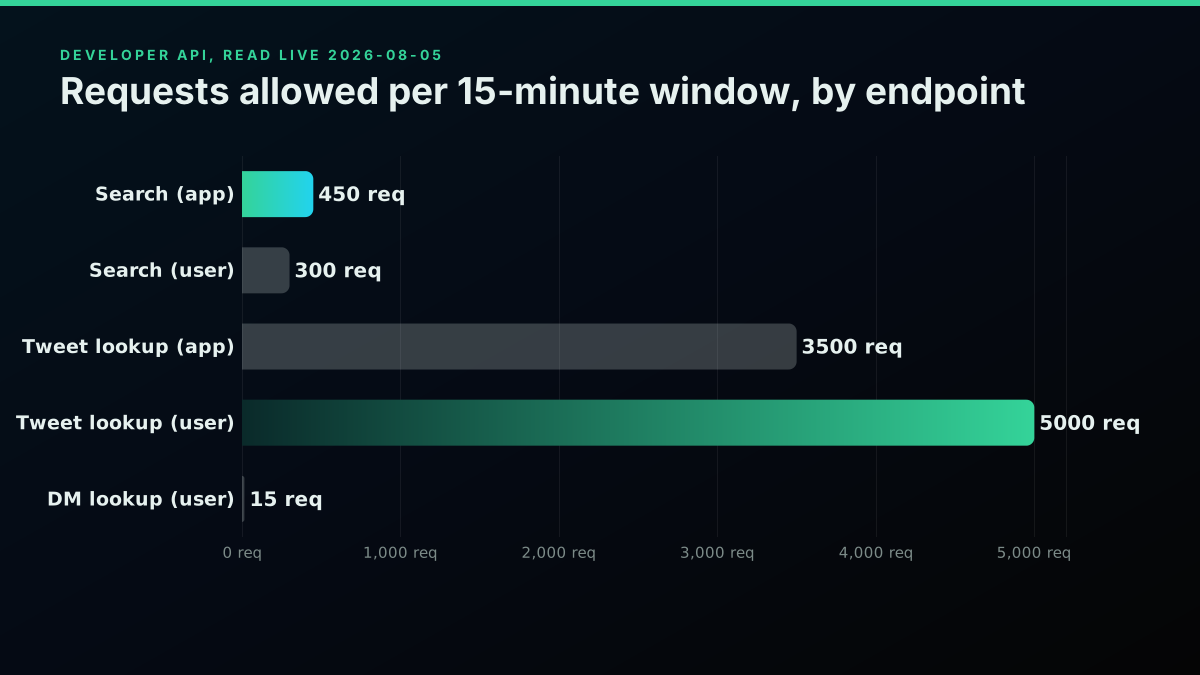
Five endpoint families, read live, both credential types shown where they differ
Recent search sits at 450 requests per 15 minutes on an app-level Bearer token and 300 on a user OAuth token, the tightest common ceiling most integrations actually hit in practice, a ceiling covered in more depth for building real queries in the advanced search operators guide. Bulk tweet lookup, pulling up to 100 tweet IDs in one call, is far roomier at 3,500 per 15 minutes on a Bearer token and 5,000 on a user token, and paging through a large ID list efficiently is exactly what the pagination guide walks through. Post creation runs on a 24-hour window instead of 15 minutes, capped at 10,000 writes a day on an app token or 100 per 15 minutes on a user token. Likes are limited to 50 per 15 minutes and 1,000 per 24 hours on a user token. Direct message lookups are the tightest of the common endpoints at just 15 per 15 minutes, a ceiling the DM API guide covers alongside the rest of that endpoint family. Every one of these is a rolling window, the clock starts on your first call rather than snapping to a fixed clock boundary, and the authoritative figure for your own account is always whatever the live x-rate-limit-limit header reports, since X adjusts tiers and thresholds over time. Confirming your own live ceiling on any endpoint takes one request:
curl -sI "https://api.x.com/2/tweets/search/recent?query=test" \
  -H "Authorization: Bearer $TOKEN" \
  | grep -i x-rate-limit
This is a working subset for planning purposes; the rate limits guide carries the fuller per-endpoint table plus retry code.
The Mechanic That Trips Up Almost Every Integration
There is one detail about the developer-side rate limit that catches nearly everyone building against the API for the first time, and it is not documented prominently: account-level rate limits are pooled across every application that account has authorized, not tracked separately per app.
There is a fundamental flaw in X's logic: I created a new account and wanted to quickly follow people and build my network, but X stopped me.
@BondDollar
X's own developer community documented this confusion years ago: if a user likes 20 posts through one app and 20 more through a second, unrelated app inside the same 15-minute window, both sets of actions draw from the identical shared allowance for that user, not two independent buckets. One developer put it plainly on the forum: they could not understand why their own app would get throttled by usage happening entirely inside a different app the same user had separately authorized. The shared-bucket idea is simple once you see it as a counter keyed on the user, not the app:
bucket_key = f"{user_id}:{endpoint}:{window_start}"
# App A's 20 likes and App B's 20 likes both increment THIS SAME counter.
# Neither app can see the other app's share of it.
From the platform's side the logic is defensible, the limit protects server capacity per user regardless of which client is asking, but from a single app's perspective it means a well-behaved integration can get punished for a ceiling another, unrelated app pushed the user past. If you are building anything that reads or writes on a user's behalf, budget for the fact that you do not control, and usually cannot see, what else is drawing from the same bucket, a design constraint worth weighing alongside the broader tradeoffs in the official X API versus third-party access guide and the how to choose a Twitter API decision framework.
Is Rate Limited the Same as Suspended or Shadowbanned?
Search interest around "rate limited" regularly bleeds into these two related but structurally different terms, and mixing them up sends people chasing the wrong fix.
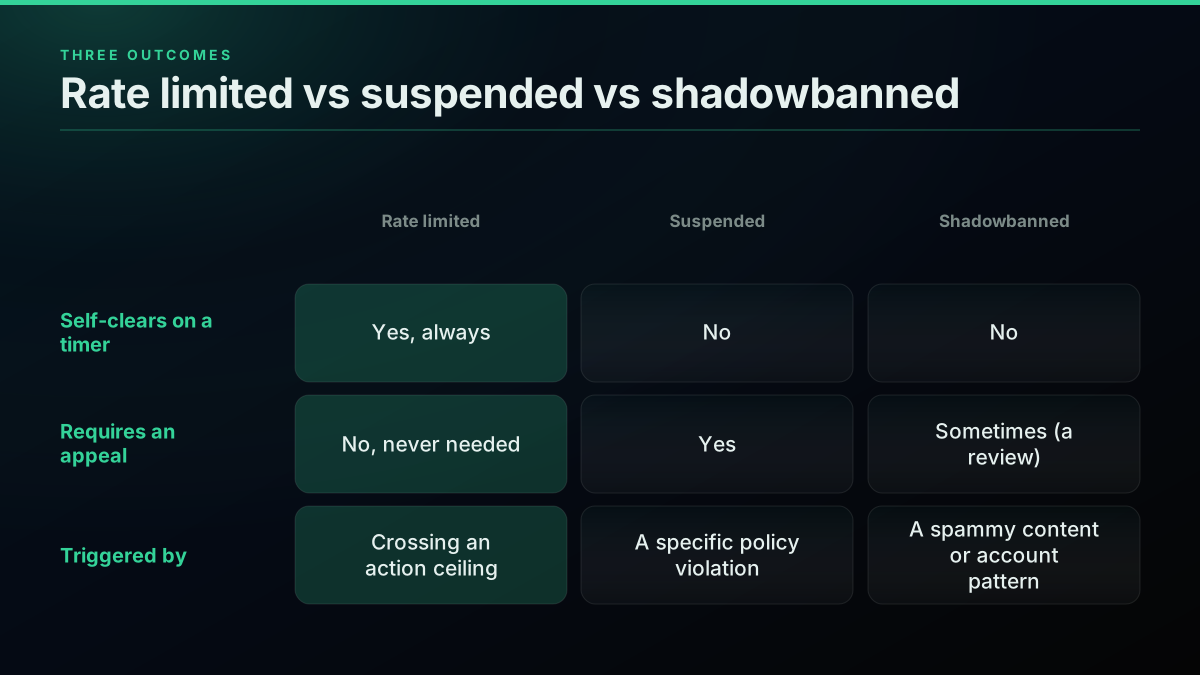
Three outcomes that look similar from the outside and are not the same thing
A rate limit is a counter. It self-clears the moment the window resets, there is nothing to appeal, and it says nothing about the content or intent behind the actions that tripped it. A suspension is a platform enforcement decision, usually tied to a specific policy violation, and it does not clear on any timer, it requires a review or an appeal to lift. Shadowbanning, which X itself describes more precisely as reduced visibility filtering, is a reach or ranking penalty applied to specific posts or an account pattern that looks spammy or manipulative, and like a suspension it does not clear on a fixed schedule, it eases when the triggering pattern stops or a review reverses it. The practical test: if waiting a few hours or a day genuinely fixes it, you were rate limited. If a day passes and nothing changes, you are almost certainly looking at one of the other two, and the pacing advice in this guide will not help. Automated or high-volume account behavior is the pattern most likely to escalate past a simple rate limit into one of these two harder states, a line covered in more detail in the Twitter API v2 versus TwitterAPIs comparison where access-tier restrictions come up alongside rate limits.
The cheapest pay-as-you-go Twitter API. Try it free.
$0.0008 a call, about $0.04 per 1,000 tweets at 20 tweets a page. $0.50 free credits. No credit card required.
The July 2023 Reading-Limit Event: What Actually Happened
One historical episode explains why so many people associate "rate limited" with reading tweets rather than posting them, even though that is not what today's published limits cover. On July 1, 2023, users were abruptly blocked mid-scroll with the now-familiar message, and the hashtag #TwitterDown began trending as people assumed the platform was simply broken.
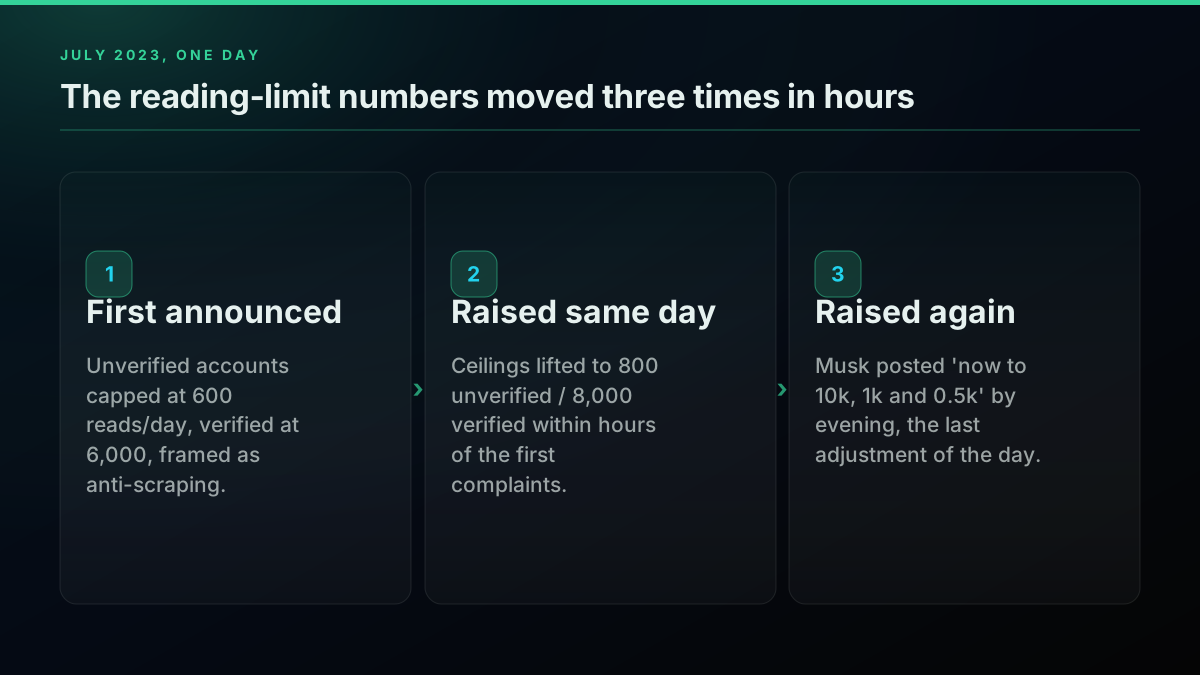
The numbers moved three times in a single day
Elon Musk explained afterward, via a post rather than any advance notice, that the limits were applied "to address extreme levels of data scraping and system manipulation." The initial numbers were blunt: unverified accounts could read 600 posts a day, verified accounts 6,000, with a tighter, separate ceiling for brand-new unverified accounts. Within hours the caps were raised to 800 and 8,000, then again the same day to 1,000 and 10,000, with Musk offering little formal explanation for the adjustments beyond a retweet of a joke account (covered in detail by TechHQ). It is worth being precise about the current state of this: as of 2026, X's own Help Center page on account limits does not mention a reading cap at all, only the posting, DM, follow, and email-change ceilings covered earlier. Whether the mechanism was quietly folded into a different system, tied to Premium subscription gating, or dropped entirely is not something X's current public documentation states one way or the other, so treat any claim that specific 2023-era reading numbers are still active today with real skepticism. It happened, it was real, and it is not what the term "rate limited" refers to on X's current documentation. The pricing and tier restructuring that followed in the years after is its own story, covered in the X API pricing change 2026 writeup.
How Long Does "Rate Limited" Actually Last?
The honest answer is that it depends entirely on which limit you tripped, because X runs several clocks at once rather than a single universal timer, and the wait for a follow ceiling looks nothing like the wait for a daily post ceiling or an API window.
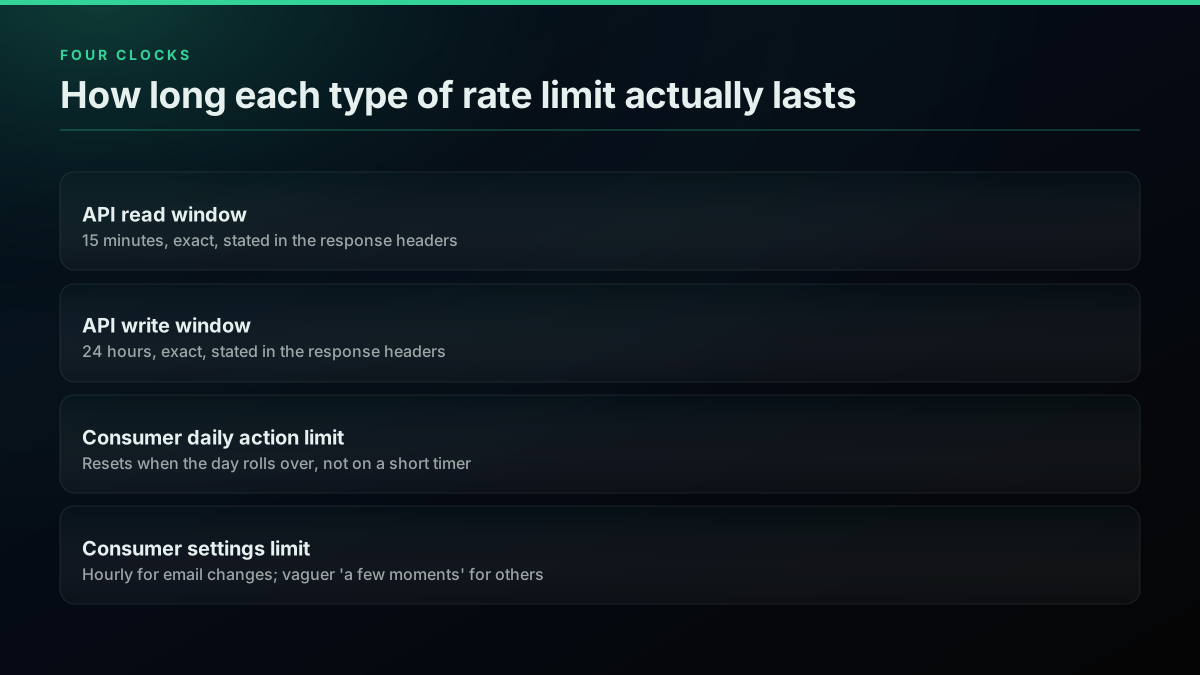
Four different clocks, four different waits
On the developer side, the wait is exact and stated in the response, never estimated:
wait_seconds = int(resp.headers["x-rate-limit-reset"]) - time.time()
print(f"Window refills in {max(wait_seconds, 0):.0f}s")
A read window clears 15 minutes after your first call in that window, a write window clears 24 hours after. On the consumer side, X's own wording, "a few moments," is deliberately vague, and in practice that has meant anywhere from a few minutes for a single blocked follow attempt to the rest of the day for anyone who hit a daily post, reply, or DM ceiling, since those reset only when the day rolls over rather than on a short rolling timer. If you have waited what feels like a reasonable amount of time, an hour or more for a single blocked action, and the message persists unchanged, the more likely explanation is not a simple rate limit anymore. It is an account-level restriction, and those require a different kind of fix entirely, usually a support ticket rather than patience. If your integration needs predictable timing rather than a variable "few moments," the is the Twitter API free walkthrough and the fastest Twitter API providers ranked by speed both cover latency and access predictability in more depth.
How to Avoid Getting Rate Limited
Most of the advice circulating for this problem amounts to "do less," which is true but not actionable. The pattern that actually works, on both the consumer and the developer side, is pacing rather than stopping outright, and the same five habits cover almost every version of the problem covered above.
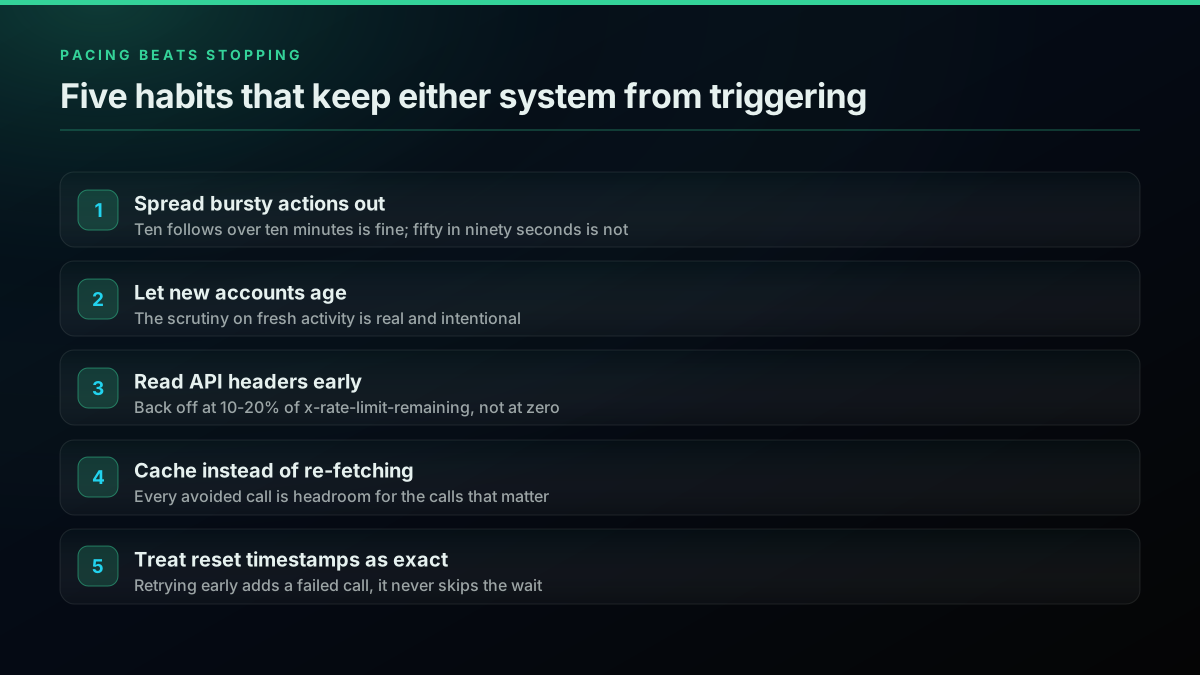
Pacing beats stopping: five habits that keep either system from ever triggering
- Spread bursty actions out. Following ten accounts over ten minutes rarely trips anything. Following fifty in ninety seconds almost always does, on a new account especially.
- Let a new account age before acting like an old one. The scrutiny on fresh accounts is real and intentional; the same action pattern that is fine on a two-year-old account can trip a limit on a two-day-old one.
- On the API, read the headers before you need to.
x-rate-limit-remainingtells you how much room is left before the request that fails. Back off at a small buffer above zero rather than after the failure:
remaining = int(resp.headers.get("x-rate-limit-remaining", 1))
if remaining <= 5:
    reset_at = int(resp.headers["x-rate-limit-reset"])
    time.sleep(max(reset_at - time.time(), 1))
- Cache instead of re-fetching. A read you already have does not need to be pulled again inside the same window; every avoided call is headroom for the calls that matter.
- Treat Retry-After and the reset timestamp as instructions, not suggestions. Retrying immediately after a 429 does not skip the wait, it just adds another failed call and, on some setups, extends how long the block feels.
These same pacing habits are the backbone of the twitterapis.com best practices guide, and if you are choosing between building the polling and pacing logic yourself versus reaching for a scraper, the best Twitter API for scraping comparison walks through what each path actually costs in engineering time.
Why Per-Call Access Sidesteps Part of the Problem
The developer-side windowed model exists because X allocates a shared read budget per credential, and every call against that budget draws it down regardless of whether the data behind it changed. TwitterAPIs takes a different approach for the read side specifically: standard reads are billed per call, $0.0008 each, roughly 20 tweets' worth of data, under one flat ceiling of 600 requests a minute per key rather than a different window per endpoint. Because there is no per-endpoint window to exhaust, the specific failure mode covered in the developer sections above, a 15-minute search ceiling or a shared per-user bucket getting drained by an app you do not control, does not apply to reads made through a per-call key:
resp = requests.get(
    "https://api.twitterapis.com/twitter/tweet/advanced_search",
    params={"query": "rate limited", "product": "Latest"},
    headers={"Authorization": f"Bearer {TOKEN}"},
)
# One ceiling to track on X-RateLimit-Remaining: 600 req/min per key
# to code around. A slow response or a network error is still possible;
# an empty budget is not.
resp.raise_for_status()
Free signup includes $0.50 in credits, about 625 standard calls, enough to build and test against real data before any billing decision. This does not remove every limit discussed in this guide: the consumer-side account action ceilings covered earlier apply to any account you use to write data, on any API, because those are enforced at the account layer X controls directly, not at the API layer. What changes is specifically the read-side windowed ceiling, the part of "rate limited" that has nothing to do with your account's standing and everything to do with a shared allowance running out. Full current rates are on the pricing page; the cost calculator estimates a real workload, and the API alternatives comparison lines this model up against the official API and other providers directly. Teams moving off a marketplace vendor specifically can see the direct before-and-after in the marketplace migration guide, and the what to build with the Twitter API hub covers the use cases where read volume, not access friction, is the real constraint.
Recap
Rate limiting on X, at every layer, from the 2008 hourly cap through the 2023 reading-limit episode to the numbers published today, has always been the same basic tradeoff: a platform protecting shared capacity by metering how fast any single account or credential can draw on it. The consumer numbers, 50 posts, 200 replies, 500 DMs, 400 follows a day, are stable and documented, even if the same Help Center page has not fully cleaned up its own old figures. The developer numbers move with tier and policy changes, which is why the live headers on your own calls always beat a cached table, including this one. What almost never changes is the fix: pace the action, read what the response actually tells you, and wait out the specific clock you tripped rather than guessing at a generic one. For the deeper technical walkthrough of headers, retry code, and the full per-endpoint table, the Twitter API rate limits guide picks up exactly where this page leaves off, and the Twitter API reference hub indexes every other developer topic covered across this site.
Frequently Asked Questions
It means an action-counter tied to your account, or to your API key, has hit its ceiling for the current time window, and the platform is refusing the next request until that window resets. On the consumer side you will see the in-app message 'Sorry, you are rate limited. Please wait a few moments then try again.' when you follow, DM, or change settings too fast. On the developer side the same underlying idea returns as an HTTP 429 status code with headers telling you exactly when the ceiling clears. Neither means you did anything wrong or that your account is in trouble. It means you crossed a number X set in advance, and the fix in both cases is the same: wait for the window to reset, then continue at a slower pace.
No, and mixing them up leads to the wrong fix. A rate limit is a counter that resets on its own: you hit a ceiling, you wait, normal service resumes, with zero manual appeal needed. A suspension is a platform decision that a specific post or account violated policy, it does not self-clear, and it usually requires an appeal. A shadowban, more precisely described by X as reduced visibility filtering, is a ranking or reach penalty applied to specific content or an account pattern, and it also does not clear on a timer, it clears when the triggering pattern stops or a review lifts it. If waiting a day does not fix the problem, you are very likely not looking at a rate limit anymore.
A rate limit is the underlying rule, a maximum number of actions in a given window. An HTTP 429 Too Many Requests is the specific error code a developer sees when a request crosses that rule on the API. RFC 6585, the standard that defines 429, describes it plainly as the server indicating the user has sent too many requests in a given amount of time. The consumer-facing 'Sorry, you are rate limited' message is the same concept wearing a friendlier UI, X translates the same underlying throttle into plain language instead of a status code for people using the app directly rather than calling the API.
Yes, and this is the part almost every developer eventually gets confused by. X's own developer forum has documented this since at least 2022: your account-level rate limit is a single shared bucket across every app you have authorized, official and third-party alike. If you like 20 posts through the X app and then 20 more through a scheduling tool within the same window, both draw from the same allowance, not two separate ones. That means an app you barely use can still be the one that pushes you over a ceiling another app set off, and there is no way to see that breakdown from inside any single app.
Pace yourself instead of bursting. Spread follows, DMs, and posts across the day rather than firing them in a tight cluster, since most consumer limits are really burst detectors wrapped around a daily total. On the developer side, read the response headers on every call, back off before you hit zero rather than after, and cache anything you would otherwise fetch repeatedly. If you consistently need more read volume than the windowed model allows, a per-call provider like TwitterAPIs removes the windowed ceiling entirely for reads, since you are billed per call rather than metered against a shared allowance, though the platform-level consumer action limits on any account you use to write still apply regardless of which API reads the data.
It depends entirely on which limit you hit, because X runs several different clocks. The developer API's read and write windows are 15 minutes and 24 hours respectively, and the wait is exact: the response carries a reset timestamp, so you know the precise second the ceiling clears. The consumer in-app message is vaguer by design. X's own guidance is to try again after 'a few moments,' and in practice that has ranged from a few minutes for a single blocked follow to several hours for a account-level daily post or DM ceiling, which only clears when the day rolls over. If the message persists well past a reasonable wait, the more likely cause is an account-level restriction rather than a simple rate limit, and those need a different fix.
Per X's own Help Center, read live in 2026: 50 original posts and 200 replies per day for an unverified account, broken into smaller per-half-hour intervals rather than one lump allowance; 500 direct messages sent per day; a technical follow ceiling of 400 accounts per day, tightening further once an account already follows 5,000 others; and 4 email address changes per hour. These limits apply across every device and client you use, web, mobile, and any third-party app connected to your account, they are not per-app allowances.
New accounts often hit limits faster than established ones because X applies extra scrutiny to fresh activity as an anti-spam measure, on top of the standard daily ceilings every account carries. Following, DMing, or posting aggressively in the first hours or days of a new account is one of the most common ways to trip a rate limit, because that exact pattern, rapid outbound actions from a brand-new account, is what spam and bot behavior looks like from the platform's side. The fix is not a workaround, it is pacing: spread actions out, interact like a real account would, and the tighter early ceiling typically eases as the account ages.
Yes, briefly, and it is worth knowing as history even though it is not what current published limits cover. On July 1, 2023, Elon Musk announced a temporary cap on how many posts an account could view per day, an unusual move because it throttled reading rather than the more typical posting or messaging actions. The numbers changed within hours, unverified accounts moved from 600 to 800 to 1,000 reads a day, verified accounts from 6,000 to 8,000 to 10,000, with an even tighter ceiling for brand-new unverified accounts. X framed it as an anti-scraping measure. As of 2026, X's own Help Center page on account limits does not list a reading limit at all, so if that mechanism still exists in any form, it is no longer part of the limits X documents publicly.
Check out similar blogs
More guides on the Twitter/X API, scraping, and pricing.

Twitter API Rate Limits Explained: Windows, 429s and How to Avoid Them
The X API enforces 15-minute and 24-hour rate limit windows per endpoint. This guide covers the per-endpoint table, 429 response headers, retry-with-backoff patterns, and how pay-per-use changes (and does not change) your limits.

The Twitter API Developer Reference (2026): Endpoints, Rate Limits, Error Codes and Pagination
A single indexed reference for the Twitter/X API in 2026: the endpoint catalog, how authentication and bearer tokens work, the rate limits behind every 429, what error codes 401, 403, and 429 mean, cursor pagination, response shapes, and the real per-call cost of each call.
Twitter API Error Codes: The Complete 2026 Reference
The complete 2026 reference to X (Twitter) API error codes. What every code means (32, 88, 187, 226, 401, 403, 429, 453 and the rest), the real cause behind it, and the exact fix, plus the HTTP status versus error code distinction that trips up most developers.

Build vs Buy: Should You Build Your Own Twitter/X Monitoring Tool? (2026)
Buying a listening seat costs $29 to $2,000 a month depending on the vendor. Building costs real engineering hours plus a data bill. Here is the real math behind the twitter monitoring tool build vs buy decision, priced both ways.

How to Track a Tweet's Performance in Real Time with the X API
Poll a tweet's engagement counts over time with the X API, compute a views-to-likes ratio, and read the quote-tweet layer to tell an organically growing launch tweet from a boosted one. Tested Python and curl.
How to Choose a Twitter/X API in 2026: The Complete Buyer's Guide
A decision framework for choosing a Twitter/X API in 2026: the seven criteria that actually matter (pricing model, data coverage, rate limits, auth, reliability, compliance, migration cost), a use-case decision tree, and where each path wins.

What You Can Build With the Twitter/X API: 20+ Real Use Cases (2026)
A 2026 field guide to what you can actually build with the Twitter/X API: 24 real use cases across listening, monitoring, audience graph, research, and bots, each mapped to the endpoint that powers it and the real per-call cost.

Fetch a Full Twitter Thread via API in One Call (2026)
How to pull an entire Twitter thread, the root tweet plus every connected tweet in the chain, in a single API call with the tweet/thread endpoint, instead of walking replies by hand. Live-tested code in curl, Python, and Node.js, with the real per-call cost.