GUIDE
Auto-Posting to Twitter (X) in 2026: 7 Scheduler Tools vs the API, Priced Per Tweet
Every way to auto post to Twitter (X) in 2026, priced in one honest unit: cost per tweet. Seven scheduler tools with live pricing, X's own per-post API rate, the volume where each route wins, and what X's automation rules actually forbid.
Per our own spec, 70 of 123 endpoints bill $0.0008, 26 are free, and 27 sit between $0.0016 and $0.01. Every price ships inside our published OpenAPI document as an x-cost-usd field, so any figure in this post can be checked against the contract that bills it rather than taken on trust.
Search for how to auto post to Twitter and you get two kinds of page, as the complete API tutorial notes about most X guidance. One sells you a subscription. The other hands you a free bot script. Neither tells you the number that actually decides between them, which is what a single automated tweet costs you.
That gap is not an accident. Every scheduler quotes a flat monthly fee, and a flat fee hides its own unit economics: $99 a month is cheap at 3,000 posts and absurd at 30. The same trap applies on the read side, which the Twitter API cost breakdown prices in detail. Every API quotes a per-call rate, which looks trivially small until you multiply it. The two models cannot be compared until you convert both into the same unit.
This guide does that conversion. It prices seven scheduler tools from their own live pricing pages, puts X's official per-post API rate beside them, and reduces all of it to cost per tweet at real posting volumes. It also names the exact volume where each route stops being the cheap one, and covers the compliance question that the most-recommended free method quietly fails.
TL;DR: Auto-posting to X costs wildly different amounts depending on route and volume. Scheduler tools charge flat monthly fees, from $5 for Buffer Essentials and Publer Professional up to $199 per seat for Sprout Social Standard. X's own API charges per request: $0.015 to create a post, and $0.200 if the post contains a URL. A direct API like TwitterAPIs charges $0.0016 per
tweet/createcall with no subscription. Below about 3,100 tweets a month the per-call route is cheapest, because 300 posts costs $0.48 total against $5 for the cheapest flat plan. Above roughly 3,125 tweets a month, a $5 flat plan wins on price alone. One method to avoid entirely: X's automation rules state that scripting the X website "may result in the permanent suspension of your account."
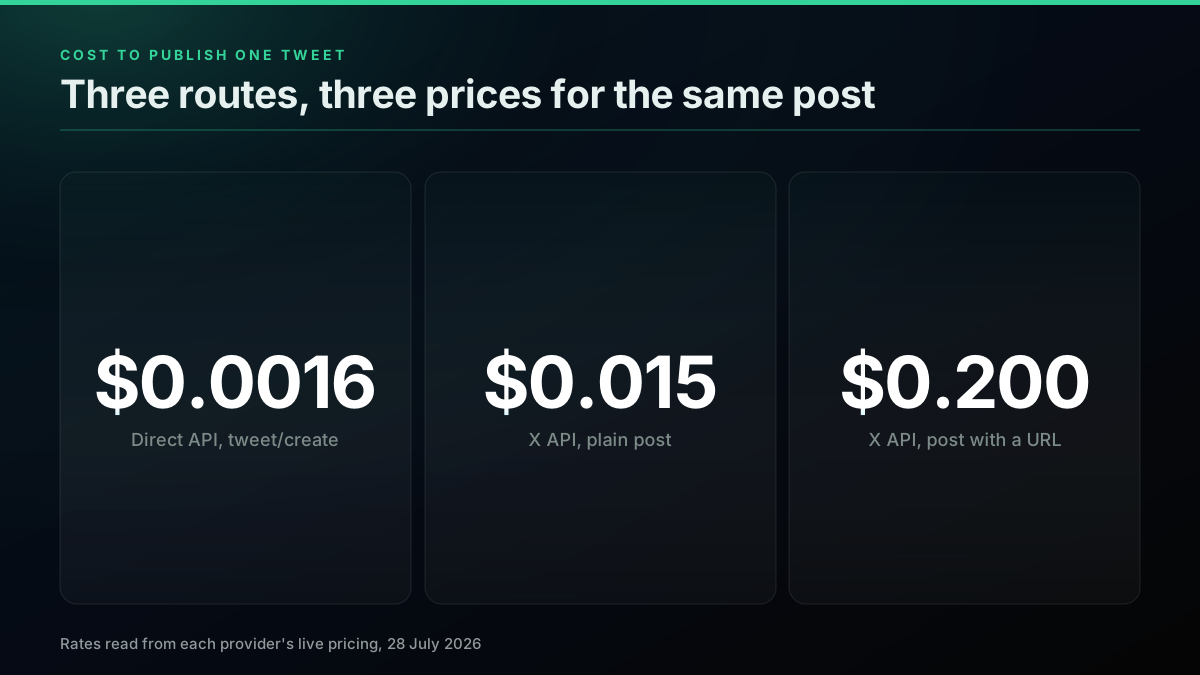
Three routes to the same tweet, priced in the only unit that compares them
What Does Auto-Posting to X Actually Mean in 2026?
Auto-posting means a tweet leaves your account without a human pressing the button at that moment, a pattern the Twitter bot guide treats as its core loop. That single outcome has three completely different implementations underneath, and the confusion in most buying decisions comes from treating them as one thing.
The first route is a scheduler tool. You write posts in a dashboard, pick times, and the vendor's servers publish for you. You are renting a queue, a calendar, and, importantly, the vendor's own relationship with X. The second route is X's official API, where you register a developer app, fund a balance, and call the endpoint that creates a post. The third route is a direct third-party API, where a provider handles the connection to X and exposes a plain HTTP endpoint you call from your own code.
All three end with an identical published post. They differ in who supplies the scheduling logic, who holds the developer relationship, and how you get billed. Understanding that split is the whole decision, and it is why the what to build with the Twitter API guide treats posting as an infrastructure choice rather than a feature.
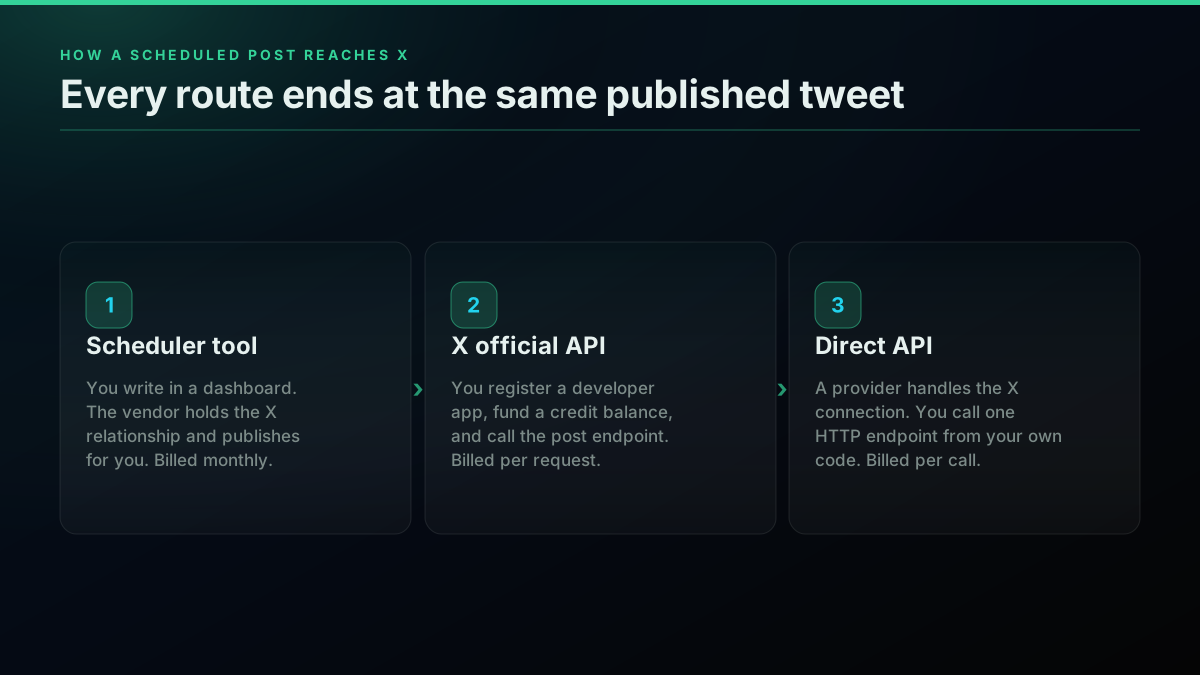
Every route ends at the same place, and bills you differently to get there
The uncertainty about whether any of this still works is real and recent. A developer opening a thread on r/webdev put it plainly: "I used to rely on third-party tools and scripts to automatically post to Twitter, but since the transition to X and all the API changes, I'm not sure what still works." The top reply captures the second half of the anxiety: "I believe the API is so expensive that you won't be able to do it unless you are willing to spend some?"
Both halves of that worry deserve a direct answer. Posting automation is permitted, and it is considerably cheaper than the thread assumes, but only on some routes. The rest of this guide supplies the numbers.
The 7 Scheduler Tools, Priced From Their Own Pages
These seven were chosen because they rank on the auto-posting terms, they publish their prices, and they actually post to X. Every figure below was read from the vendor's live pricing page on 29 July 2026. Prices change, so the date matters more than the number.
One tool that ranks well was left out on purpose. Postpone's pricing page sits behind a login, and Circleboom's pricing URLs returned a 404 at the time of writing, so neither price could be verified. An unverifiable price does not belong in a cost comparison.
| Tool | Entry paid plan | Billing unit | Notable limit |
|---|---|---|---|
| Publer | $5.00/mo ($4.00 billed yearly) | Per social account | Free plan excludes X entirely |
| Buffer | $5.00/mo | Per channel | Free plan covers 3 channels |
| Hypefury | $6.00/mo | Per channel | 7-day trial, no card required |
| Typefully | $8.00/mo billed yearly | Per social set | Free plan capped at 15 posts/mo; Pro at 1,000/mo |
| dlvr.it | $14.99/mo | Per account | Agency plan $199.99/mo for 250 profiles |
| Hootsuite | $99/mo per user, billed annually | Per user seat | Trial capped at 10-20 posts per org |
| Sprout Social | $199/mo per seat | Per seat | Essentials tier $79/seat billed annually |
Two details in that table matter more than the headline prices.
First, Publer's free plan cannot connect X at all. The pricing page lists "3 social accounts (except 𝕏)" and states outright that "You cannot connect Twitter / X accounts in the free version." If your plan was to auto post to X for free on Publer, there is no such plan. X access begins at the paid tier.
Second, the billing unit differs across every row. Buffer bills per channel, Hootsuite per user seat, Publer per social account, Typefully per social set. A $5 tool managing six accounts is not a $5 tool. This is where agency costs detonate, as the is the Twitter API free breakdown shows on the read side too. It is the objection a social media manager raised directly: the big US tools "are often too expensive for her smaller clients or just overcomplicated."
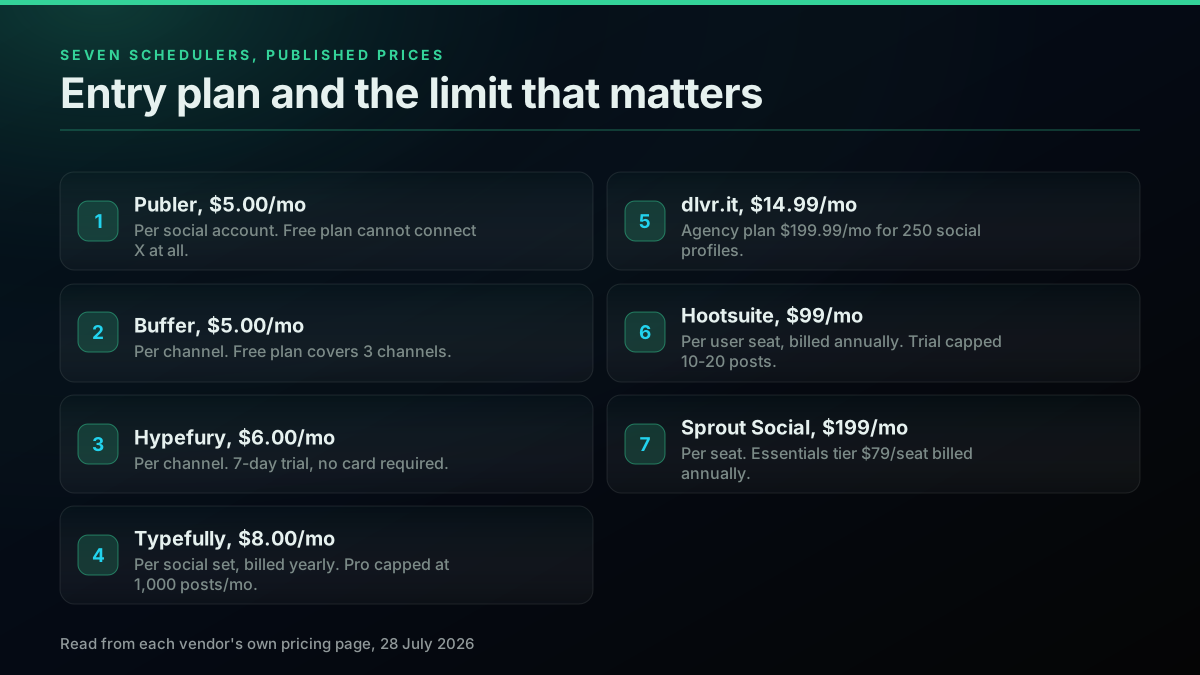
The seven tools, on their own published numbers
The spread between the cheapest and most expensive entry plan is roughly 40x, for software that performs the same mechanical action. That spread is not buying you a better tweet. It is buying analytics, approval workflows, team permissions, and multi-network reach, none of which help if you only need posts to go out on X reliably.
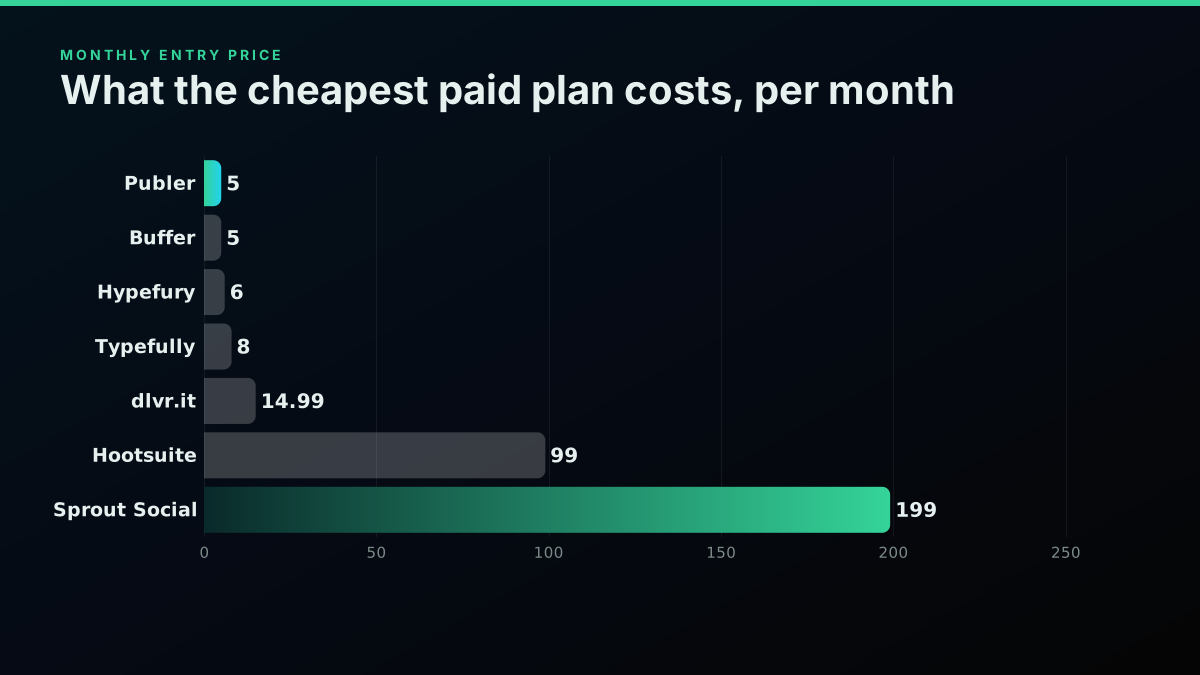
Entry price per month, cheapest to most expensive
It is worth noting that the scheduler category itself is drifting toward the API model. Postiz, a scheduling tool, grew by exposing its own API and a command-line wrapper to AI agents rather than by selling more dashboard seats:

Andrew Warner
@AndrewWarner
This guy's boring company took off once he sold to agents. He says anyone can do it in 3 steps. That's @wickedguro, who runs Postiz, the social media scheduling tool. The 3 steps: 1) CLI wrapper for his API A CLI turns a 20-line API request into a 5-word command, which…

When the schedulers themselves conclude that programmatic access is the product, the tool-versus-API framing starts to look less like a rivalry and more like a question of who writes the scheduling loop.
What Does X's Own API Charge to Post?
This is the part where most published guidance is out of date, including the guidance developers give each other.
X has moved to pay-per-usage pricing with no subscriptions. Its documentation states this directly: "The X API uses pay-per-usage pricing. No subscriptions, pay only for what you use." You buy credits in the developer console and they are deducted per request.
For posting, the rates that matter are on the write side of X's official rate card:
| X API write action | Unit cost |
|---|---|
| Post: Create | $0.015 per request |
| Post: Create (with URL) | $0.200 per request |
| Post: Create (summoned) | $0.010 per request |
| Interaction: Delete | $0.010 per request |
| Content: Manage | $0.005 per request |
The second row is the one to sit with. A post containing a URL costs $0.200 on X's own API, more than thirteen times a plain post. That is not an obscure edge case. Link distribution is the single most common auto-posting use case in existence, and it is the entire product category dlvr.it occupies, where new blog and RSS items are pushed to X automatically. Running that workload on X's official API costs 20 cents per link posted, which is $60 a month at 10 links a day, against a few cents on the rates in the API alternatives comparison.
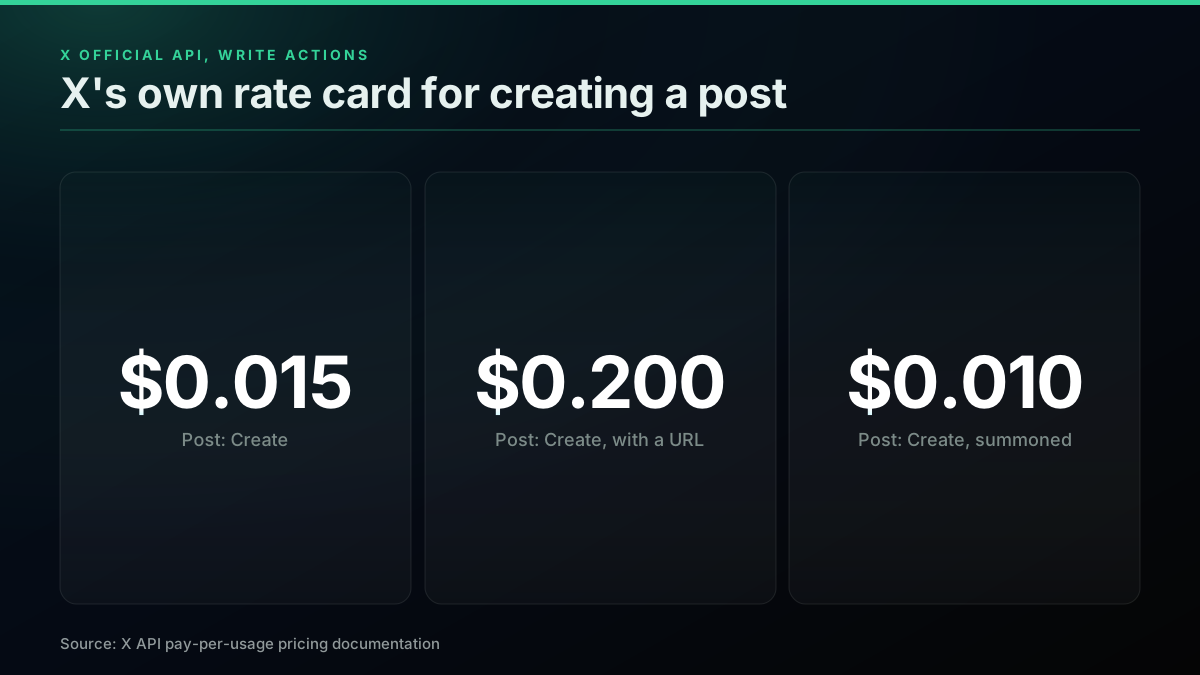
X's own write rates, and the URL surcharge almost nobody prices in
Note also that X's pay-per-usage plans are "capped at 3 million Post reads per monthly billing cycle," with enterprise plans above that. That cap applies to reads rather than writes, but it is a reminder that the pay-per-usage tier is a metered product with ceilings, not an open tap.
The community has not caught up to any of this. In the same r/webdev thread, a developer confidently explained that "posting to Twitter by API is still free for up to 500 posts/month. (The next tier is $200/month for 10,000 reads/writes)." That described the old subscription tiers, as recorded in that thread. It is no longer how X bills, and anyone budgeting from that model will be wrong in both directions: there is no $200 tier to buy, and there is no clean free 500 to rely on. The official X API versus third party comparison tracks the same shift.
What operators running real volume report instead is a hard practical ceiling. One builder automating posts through free access documented it precisely: "Twitter's free API limits you to ~17 posts daily." When the workflow hits that wall, the fallback is manual:
Never stop posting on X
That same operator's verdict on the official route was blunt: "official Twitter API is unusable in terms of costs." That judgment is worth testing rather than repeating, which is what the next section does.
Start building with TwitterAPIs
$0.0008 a call, about $0.04 per 1,000 tweets at 20 tweets a page. $0.50 free credits. No credit card required.
What Does a Direct API Charge Per Tweet?
TwitterAPIs prices per call, with no subscription and no developer account, as the pricing page sets out. The rate that matters for auto-posting is tweet/create, billed at $0.0016 per call.
The wider rate card is per-endpoint across four tiers. Standard reads and simple write actions, meaning likes, retweets, bookmarks, follows, their undos, deletes, and media upload, all bill at $0.0008 per call. Tweet creation and DM send are $0.0016. Full account history is $0.0024, and full thread expansion is $0.004. New accounts start with $0.50 in free credits and no card, which is about 625 standard calls or 312 tweet/create calls. Full detail sits on the pricing page.
Put the three write rates side by side and the gap is stark:
| Route | Cost to publish one tweet |
|---|---|
TwitterAPIs tweet/create | $0.0016 |
| X API, plain post | $0.015 (9.4x more) |
| X API, post containing a URL | $0.200 (125x more) |
A link-carrying post costs 125 times more through X's own API than through a direct one. For the RSS-to-X workload that whole scheduler categories are built on, that multiple is the entire economics of the decision.
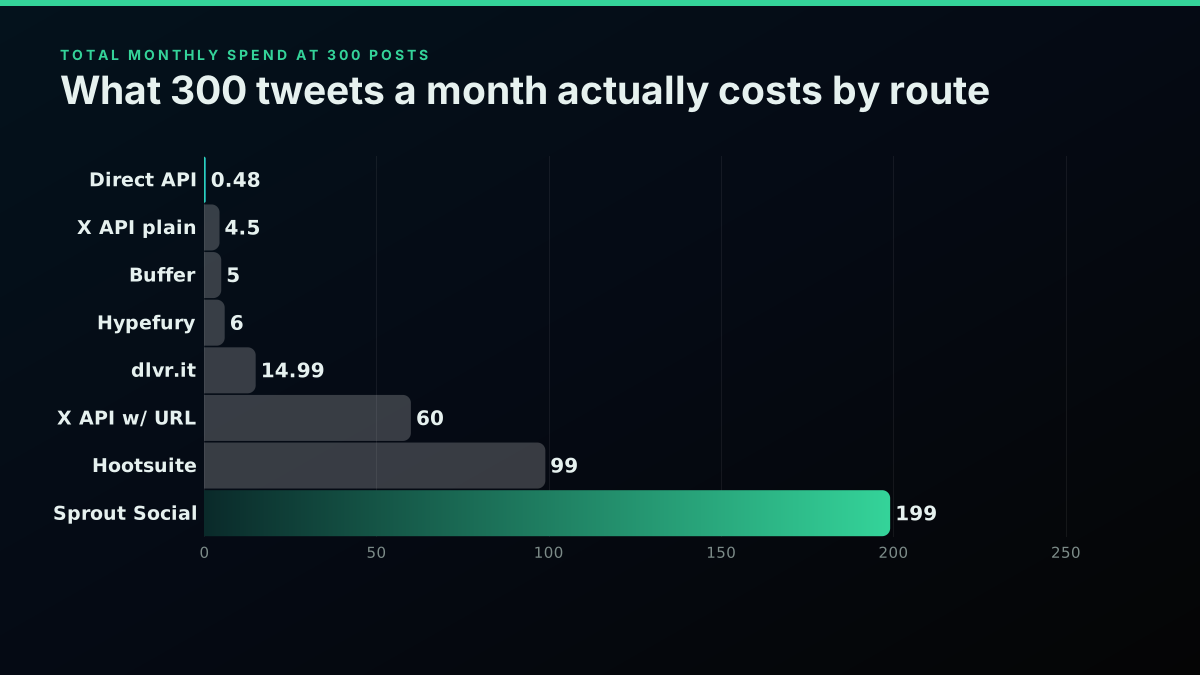
Cost per tweet at 300 posts a month, the volume most active accounts actually hit
Real Cost Per Tweet, Across Every Route
Here is the table that none of the ranking pages publish. Every cell is the cost of one tweet at that monthly volume. Flat-fee tools divide their subscription by the volume; per-call routes stay constant.
| Route | 30/mo | 150/mo | 300/mo | 1,000/mo | 3,000/mo |
|---|---|---|---|---|---|
| TwitterAPIs | $0.0016 | $0.0016 | $0.0016 | $0.0016 | $0.0016 |
| X API, plain post | $0.0150 | $0.0150 | $0.0150 | $0.0150 | $0.0150 |
| X API, post with URL | $0.2000 | $0.2000 | $0.2000 | $0.2000 | $0.2000 |
| Publer Professional | $0.1667 | $0.0333 | $0.0167 | $0.0050 | $0.0017 |
| Buffer Essentials | $0.1667 | $0.0333 | $0.0167 | $0.0050 | $0.0017 |
| Hypefury Essentials | $0.2000 | $0.0400 | $0.0200 | $0.0060 | $0.0020 |
| Typefully Pro | $0.2667 | $0.0533 | $0.0267 | $0.0080 | capped at 1,000 |
| dlvr.it Pro | $0.4997 | $0.0999 | $0.0500 | $0.0150 | $0.0050 |
| Hootsuite Standard | $3.3000 | $0.6600 | $0.3300 | $0.0990 | $0.0330 |
| Sprout Social Standard | $6.6333 | $1.3267 | $0.6633 | $0.1990 | $0.0663 |
Monthly fees behind those per-tweet figures, all read from the pages linked in each row: Publer and Buffer $5.00, Hypefury $6.00, Typefully $8.00, dlvr.it $14.99, Hootsuite $99.00 per user, Sprout Social $199.00 per seat.
Read the 30-a-month column first, because that is one post a day, which is what most accounts actually sustain. At that volume a tweet costs $0.0016 through a direct API and $6.63 through Sprout Social, per the pricing page and Sprout Social respectively. The total monthly spend on the API route is 5 cents.
At 300 posts a month, roughly ten a day, the API route totals $0.48 for the month on the published per-call rate. Buffer costs $5, Hootsuite $99, Sprout Social $199 for identical published output.
Now read the 3,000 column, because it tells the opposite story honestly. At 100 posts a day, Buffer and Publer land at $0.0017 per tweet, effectively tied with the API's $0.0016. The flat fee has finally amortised. Anyone claiming the API is always cheaper is not reading their own table.
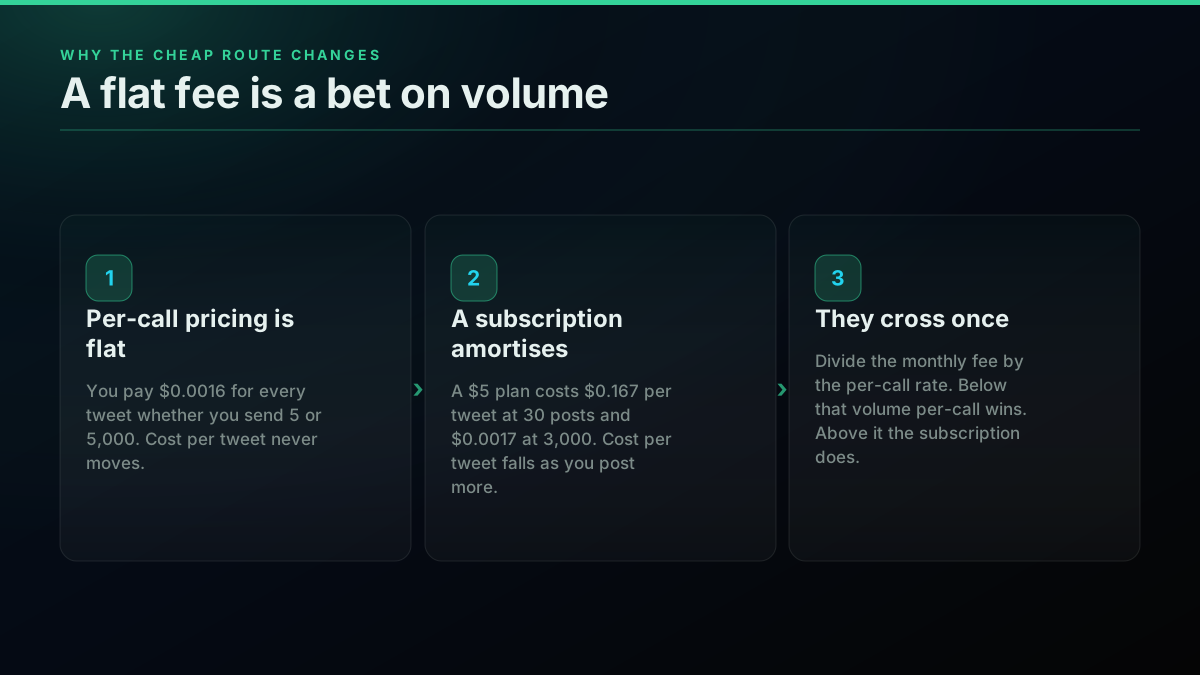
Why a flat fee is a bet on volume you may not be placing
Where Exactly Does Each Tool Break Even?
A flat monthly fee and a per-call rate cross at one computable volume: the subscription divided by the per-call price. Below it, per-call wins. Above it, the subscription does.
| Tool | Monthly fee | Breaks even at | Per day |
|---|---|---|---|
| Publer Professional | $5.00 | 3,125 tweets/mo | 104/day |
| Buffer Essentials | $5.00 | 3,125 tweets/mo | 104/day |
| Hypefury Essentials | $6.00 | 3,750 tweets/mo | 125/day |
| Typefully Pro | $8.00 | 5,000 tweets/mo | 167/day |
| dlvr.it Pro | $14.99 | 9,369 tweets/mo | 312/day |
| Hootsuite Standard | $99.00 | 61,875 tweets/mo | 2,062/day |
| Sprout Social Standard | $199.00 | 124,375 tweets/mo | 4,146/day |
The practical meaning is easy to state. You need to publish more than 100 tweets a day before the cheapest scheduler subscription beats paying per call. For Hootsuite you need over 2,000 a day, and for Sprout Social over 4,100 a day, from a single seat.
Those upper numbers are not real workloads for one account. They are also, in several cases, not even permitted: X's rules prohibit posting "duplicative or substantially similar posts," which is the only way most operators could generate that volume. So for Hootsuite and Sprout Social the break-even is effectively unreachable on posting economics alone, which means you are correctly paying them for something else entirely, namely approval workflows, analytics, and team governance.
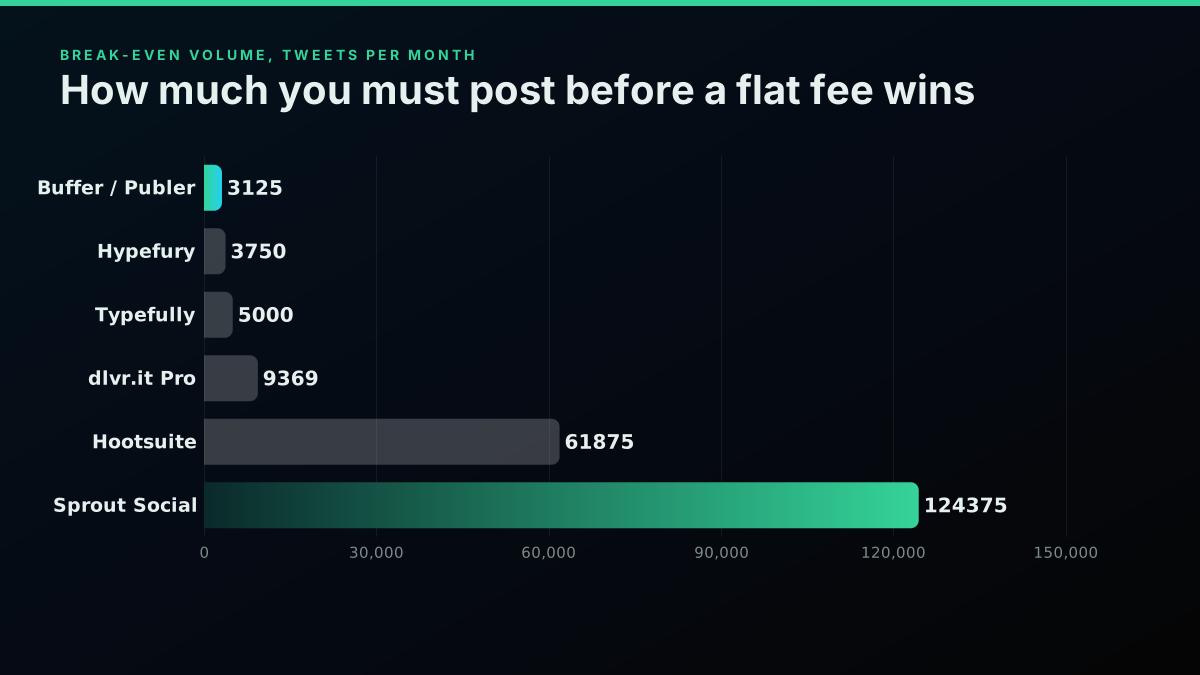
The volume each tool needs before its flat fee beats paying per call
What the Sticker Price Hides on Both Sides
A cost comparison that stops at the price tag is dishonest, so here is what each column leaves out.
The API route makes you the scheduler. The $0.0016 buys the publish action, not the queue. You supply the cron job or worker that decides when to fire, the retry logic when a call fails, the storage for drafts, the media upload step for images and video, and the session token handling for the acting account. If you have a server and a scheduler already, that is a small amount of glue. If you do not, that is the actual project, and a $5 subscription starts looking reasonable.
The tool route makes you a tenant. You inherit the vendor's posting caps, their outage windows, their roadmap, and their per-seat multiplication. Hootsuite's own plans page notes that trial accounts carry "daily posting limits (10-20 posts per organization, depending on plan)". Caps are normal in this category, and they are rarely on the pricing page in large type.
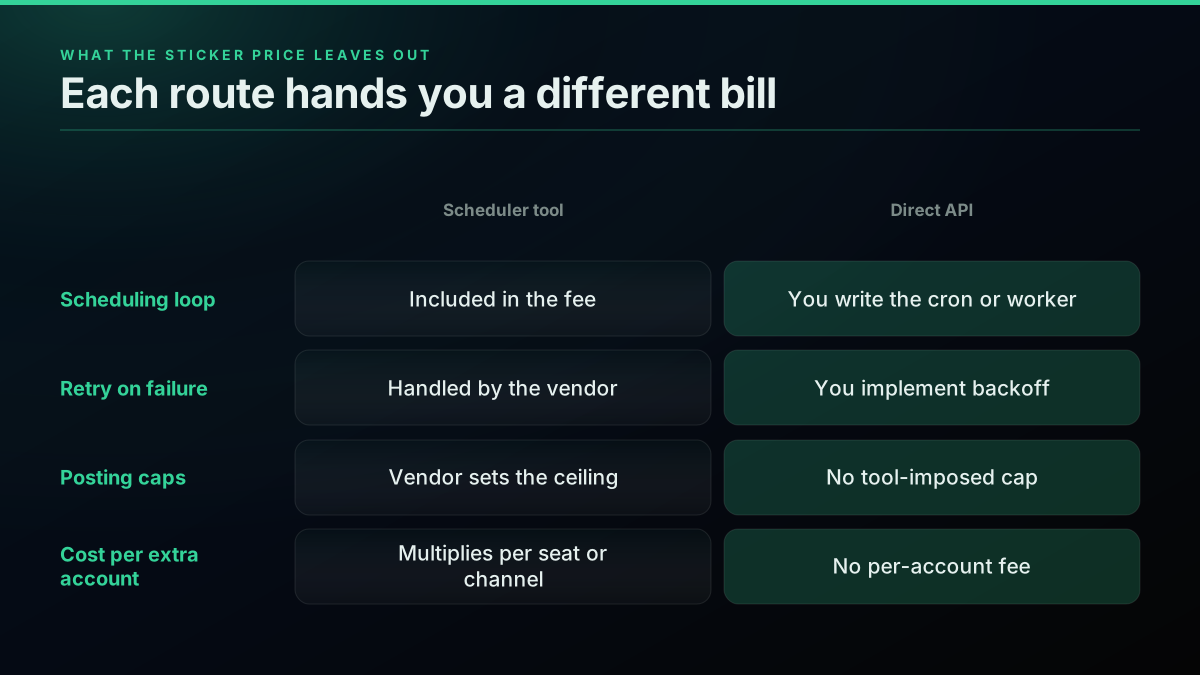
What neither price tag includes
There is a middle path that many teams land on, which is running the scheduling layer in a workflow tool and calling an API for the publish step. That is what the n8n community has largely converged on, and it is why RSS-to-X pipelines are a well-worn pattern:
Never stop posting on X (source code included)
Teams building their own tooling on the API rather than renting a dashboard is now a common enough pattern to be a business model in itself:

NeilXbt
@neil_xbt
A client drove over $3 million in revenue using three internal tools built on the X API and Claude! One hunts for outlier tweets, posts that beat a creator's own average by 10x, then reverse-engineers the hook, structure, and length automatically. One scores a video frame by h…

That claim is the operator's own, posted here, and it describes read-side tooling rather than a posting stack. It is included because it shows where the build-versus-buy line is moving, not as a revenue benchmark. The what to build guide and the mentions monitoring walkthrough cover that read side properly.
The cheapest pay-as-you-go Twitter API. Try it free.
$0.0008 a call, about $0.04 per 1,000 tweets at 20 tweets a page. $0.50 free credits. No credit card required.
The Compliance Question Nobody in the SERP Answers
Search the head term and X's own automation rules page ranks third. Read the community threads on the same term and the most upvoted practical advice is to drive the X website with a headless browser. Those two facts are in direct conflict, and nobody publishing on this topic reconciles them.
X permits API-based posting automation explicitly. The rules invite you to "build solutions that automatically broadcast helpful information in posts." Automated posting is a sanctioned use of the platform.
What is not permitted is the browser route. The rules list, under things you may not do:
Use non-API-based forms of automation, such as scripting the X website. The use of these techniques may result in the permanent suspension of your account.
That sentence directly contradicts the advice circulating in developer threads, where suggestions include "I use a headless browser puppeteer to automatically do stuff from x" and "You can script anything you like using playwright... there is not much they can do about that." The cost saving is real. So is the stated penalty, and it applies to the account, not the script.
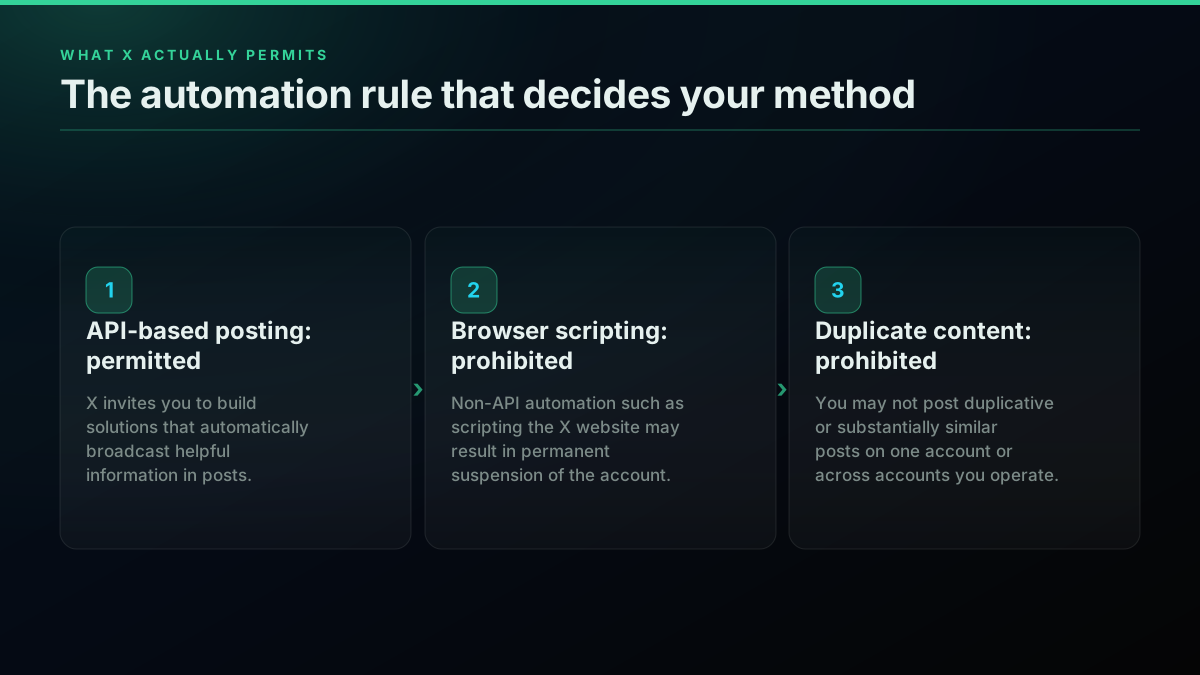
The one route that is cheap because it is against the rules
Two more rules shape any posting schedule you design. You may not post "duplicative or substantially similar posts on one account or over multiple accounts you operate," which rules out the classic recycle-evergreen-content-across-brands pattern. And you may not "automatically post about trending topics," which rules out the trend-jacking bot. Automating multiple accounts is allowed where the use cases are related but not duplicative.
The practical read: pick a route that uses an API, keep content distinct per account, and stay off trends automation. Those three constraints keep you inside the rules regardless of which vendor you pay. The rate limits guide covers the throughput side of the same question.
How a Post Actually Goes Out Through the API
The mechanics are smaller than the surrounding decision. Posting is a single authenticated POST.
On TwitterAPIs, writes run as your own X session, so the sequence is: register a session for the acting account, then call tweet/create. Reads need only the API key.
Here is a live read call, which is the request shape every endpoint follows. This one was executed against the production API before publishing and returned HTTP 200:
curl -s "https://api.twitterapis.com/twitter/user/info?userName=XDevelopers" \
  -H "Authorization: Bearer $TWITTERAPIS_KEY"
{
  "user": {
    "id": "2244994945",
    "username": "XDevelopers",
    "name": "Developers",
    "is_blue_verified": true,
    "created_at": "Sat Dec 14 04:35:55 +0000 2013"
  }
}
The publish call follows the same header pattern. One detail catches people out: write actions read their parameters from the query string, not from a form-encoded request body. Sending text as a POST body returns 400 bad_request with the message Provide 'text' for the tweet, which looks like an auth problem and is not one.
curl -s -X POST "https://api.twitterapis.com/twitter/tweet/create?text=Shipped%20a%20new%20build%20today" \
  -H "Authorization: Bearer $TWITTERAPIS_KEY"
It returns the created post's ID and canonical URL:
{
  "ok": true,
  "tweet_id": "<numeric id of the new post>",
  "url": "https://x.com/i/status/<numeric id of the new post>"
}
The optional parameters are the ones that turn a single post into a real posting system: media_ids attaches images or video uploaded through media/upload, reply_to builds threads, and quote quote-posts an existing tweet. Media upload bills at the standard $0.0008 rate on the same rate card, so an image post costs $0.0016 plus $0.0008. The endpoint reference lists every path and its tier.
Wrapping that in a scheduler is ordinary application code. In Python, a queue of due posts and a loop is the whole publishing layer:
import os, requests

API = "https://api.twitterapis.com/twitter"
HEADERS = {"Authorization": f"Bearer {os.environ['TWITTERAPIS_KEY']}"}

def publish(text, reply_to=None):
    params = {"text": text}          # query string, not a form body
    if reply_to:
        params["reply_to"] = reply_to
    r = requests.post(f"{API}/tweet/create", headers=HEADERS, params=params, timeout=30)
    r.raise_for_status()
    return r.json()

for post in due_posts():             # your queue, your schedule
    result = publish(post["text"])
    mark_published(post, result["tweet_id"])
The same loop in Node.js needs no SDK either, since Node 18 and later ship a global fetch. The parameters go on the URL exactly as they do in the curl and Python versions:
const API = "https://api.twitterapis.com/twitter";
const headers = { Authorization: `Bearer ${process.env.TWITTERAPIS_KEY}` };

async function publish(text, replyTo) {
  const qs = new URLSearchParams({ text });
  if (replyTo) qs.set("reply_to", replyTo);
  const res = await fetch(`${API}/tweet/create?${qs}`, { method: "POST", headers });
  if (!res.ok) throw new Error(`create failed: ${res.status}`);
  return res.json();                 // { ok, tweet_id, url }
}
That loop is the part a subscription is really selling you. If writing it is a weekend of work you do not want, pay the $5. If you already run a worker, the same behaviour costs fractions of a cent per post. The Python tutorial covers the request layer in more depth, and the Node.js tutorial ports the same pattern.
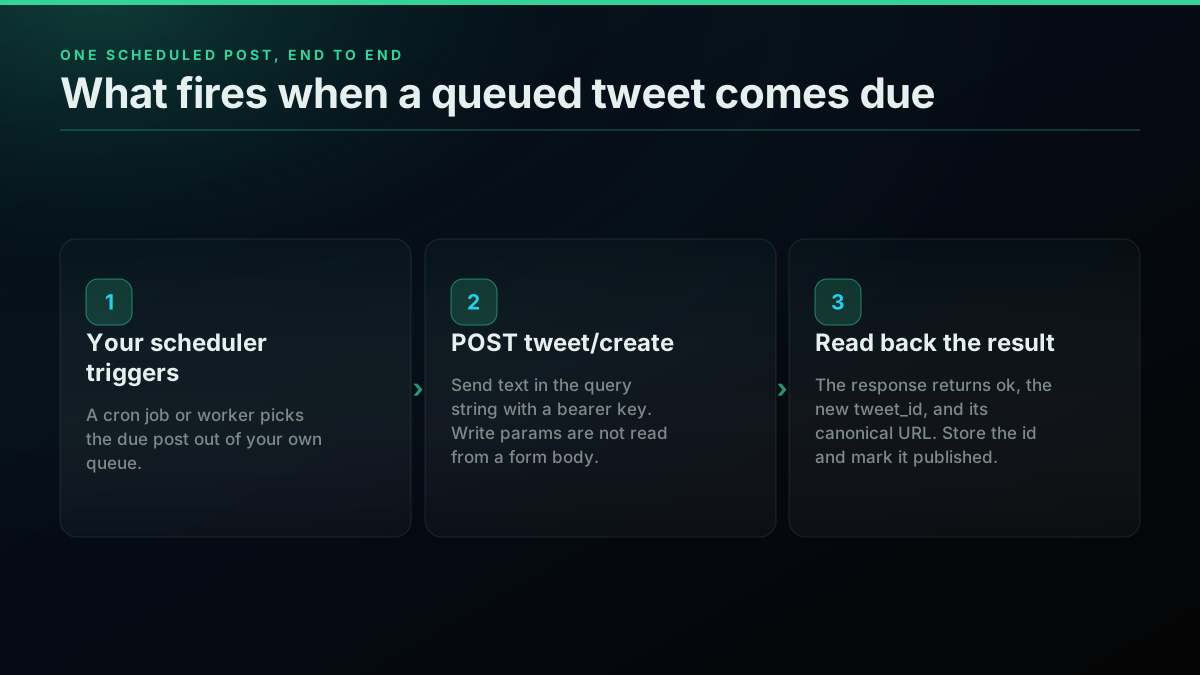
What actually happens when a scheduled post fires through the API
Handle failures properly and the system stops needing attention. Post creation can fail on an expired session, a duplicate-content rejection, or a transient upstream error, so retry with backoff and treat a repeated failure as a session problem rather than a content problem. The error codes reference maps each response, and the authentication guide covers credential handling.
For a walkthrough of the RSS-to-X pattern in a visual workflow tool, this build covers the same pipeline end to end without code.
Which Route Should You Actually Pick?
The honest answer depends on two variables: how many posts you publish, and whether you already run infrastructure.
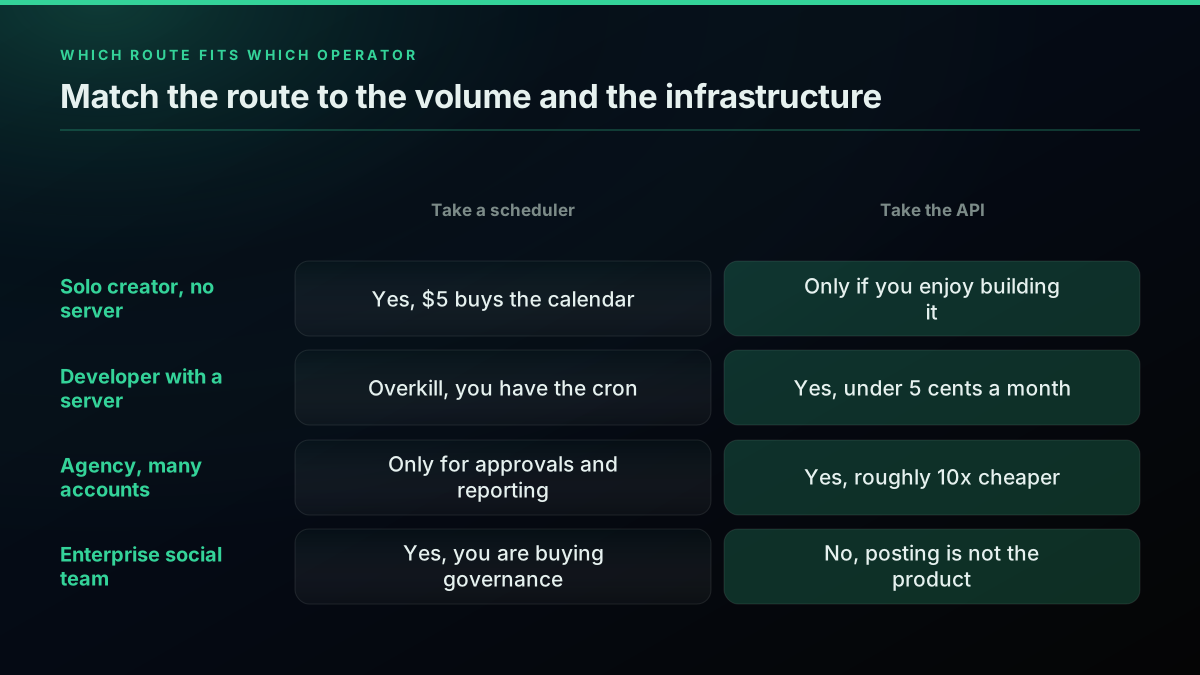
Solo creator, 1 to 10 posts a day, no server. Take a cheap scheduler. Buffer or Publer at $5 buys a calendar, a mobile app, and previews you would otherwise build. The API would cost 5 to 48 cents a month, but you would be writing the queue yourself for a saving of a few dollars. Note Publer's free tier excludes X, so budget for the paid plan.
Developer or indie hacker with a server. Take the API. You already have the cron, the database, and the deploy pipeline. Posting is one HTTP call at $0.0016, so the entire posting cost of a daily-posting account is under 5 cents a month, against $60 a year for the cheapest subscription. The complete tutorial covers the surrounding setup.
Agency managing many client accounts. Run the numbers on billing unit, not headline price, because per-seat and per-account multiplication is what actually bills you. Ten client accounts on a $5 per-account tool is $50 a month; the same ten accounts posting 10 times a day each through the API is $4.80 a month on the per-call rate. The rate limit guide covers the throughput ceiling on that volume. If clients need approval workflows and white-labelled reporting, pay for the tool. If they need posts to go out, the API is an order of magnitude cheaper.
Enterprise social team. Keep Hootsuite or Sprout Social, and stop pretending the decision was about posting. At 2,000 to 4,100 posts a day just to break even on publishing economics, you are buying governance, permissions, audit trails, and compliance review. Those are real products. Posting is the cheapest thing they do.
Which route fits which operator
A useful sanity check before committing: the cost calculator prices your actual monthly volume, and the API alternatives comparison covers providers side by side. If you are choosing a data provider as well as a posting route, the how to choose a Twitter API framework runs the wider decision, and the cheapest Twitter API ranking prices the read side the same way this guide prices the write side.
If you are sizing this decision on cost, we priced the same build-versus-buy arithmetic for competitor tracking with every figure sourced.
The Number That Decides It
Auto-posting to X is not expensive in 2026, as the cost calculator will confirm against your own numbers. It is expensive on some routes and nearly free on others, and the entire spread comes down to whether you are renting a scheduling dashboard or calling an endpoint.
Publishing one tweet a day costs about 5 cents a month through a per-call API, $5 through the cheapest subscription, and $199 through an enterprise suite. Publishing a link costs $0.200 per post on X's own API and $0.0016 on a direct one, a 125x gap on the single most common automation workload there is. And the flat-fee route does not win on price until you are posting more than 100 times a day, which almost nobody legitimately is.
Work out your real monthly volume, decide whether you want to own the scheduling loop, and pick accordingly. If the answer is the API route, $0.50 in free credits covers 312 posts with no card, which is enough to run a month of daily posting before you spend anything.
// sources
Where these numbers come from
Each row is a figure in this post and the artefact it was read from. Prices and limits on this platform move, so check the date on the source before you plan against it.
- X API official rate card
- The write-side rates the post prices the API route against: $0.015 to create a post and $0.200 when the post contains a URL.
- Buffer pricing page
- Source for the $5.00 a month Essentials entry plan billed per channel, and the free plan covering 3 channels, in the scheduler comparison table.
- Sprout Social pricing page
- Source for the $199 per seat Standard plan that sets the top of the flat-fee range in the post.
- Hypefury pricing page
- Source for the $6.00 a month per-channel entry plan and the 7-day trial with no card required, in the same table.
- Typefully pricing page
- Source for the $8.00 a month billed-yearly plan and the posting caps the post records, 15 posts a month on free and 1,000 a month on Pro.
- dlvr.it pricing page
- Source for the $14.99 a month per-account plan and the $199.99 a month agency plan covering 250 profiles.
Frequently Asked Questions
It depends entirely on the route and your volume. A scheduler tool charges a flat monthly fee, so its cost per tweet falls as you post more: Buffer Essentials and Publer Professional start at $5 a month, dlvr.it Pro is $14.99, Hootsuite Standard is $99 per user, and Sprout Social Standard is $199 per seat. X's own API charges per request instead, at $0.015 to create a post and $0.200 if that post contains a URL. TwitterAPIs charges $0.0016 per tweet/create call with no monthly fee. At 300 tweets a month that works out to $0.48 in total on TwitterAPIs, versus $5 for Buffer and $199 for Sprout Social.
Below roughly 3,100 tweets a month, posting through a per-call API is cheapest, because you pay only for what you send. At $0.0016 per tweet, 30 posts a month costs about 5 cents and 300 posts costs 48 cents, while the cheapest flat-rate schedulers are $5 a month regardless of whether you post once or a thousand times. Above about 3,125 tweets a month a $5 flat-rate plan wins on raw price. That crossover assumes you already have somewhere to run a scheduler, since the API route means you supply the scheduling layer yourself.
There is no published rate limit or ranking penalty from X that applies specifically to posts sent through an approved API or scheduler, and X's own automation rules describe automated posting as a permitted use. What the rules do penalize is behaviour rather than tooling: posting duplicative or substantially similar posts on one account or across multiple accounts you operate is prohibited, as is automatically posting about trending topics. A scheduler that recycles the same content across accounts creates real risk. The same scheduler posting distinct content does not.
Yes, through the API. X's automation rules explicitly permit building solutions that automatically broadcast helpful information in posts. What changed is the pricing model, not the permission. X moved from subscription tiers to pay-per-usage credits, so the widely repeated claim that posting is free up to 500 posts a month with a $200 tier above it is now out of date. The one method that is not permitted is browser automation. X's rules state that using non-API-based automation, such as scripting the X website, may result in permanent suspension of your account.
Only in limited ways, and the free routes have hard ceilings. Operators running automated posting through X's free access report a practical limit of about 17 posts a day before they hit the wall and have to post manually. Several scheduler tools also exclude X from their free plans specifically: Publer's free tier allows three social accounts but states you cannot connect Twitter or X accounts in the free version. Free tiers are fine for testing a workflow and unreliable as a foundation for consistent publishing.
For X's own API, yes. You create a developer account, register an app inside a project, add a payment method, and buy credits before your first post goes out, because pay-per-usage billing requires a funded balance. Scheduler tools remove that requirement by holding the developer relationship themselves, which is a large part of what their subscription buys. A direct API removes it a third way: with TwitterAPIs you sign up with an email, pass your own X session token per request, and post with no developer app and no project, on $0.50 of free credits.
Check out similar blogs
More guides on the Twitter/X API, scraping, and pricing.
How to Choose a Twitter/X API in 2026: The Complete Buyer's Guide
A decision framework for choosing a Twitter/X API in 2026: the seven criteria that actually matter (pricing model, data coverage, rate limits, auth, reliability, compliance, migration cost), a use-case decision tree, and where each path wins.
Why X Advanced Search Misses Posts You Know Exist (2026)
A query that returns nothing is not proof that nothing exists. We searched for 17 posts confirmed to exist, published between 2015 and 2026, and measured which query forms found them and which did not.
Build vs Buy: Should You Build Your Own Twitter/X Monitoring Tool? (2026)
Buying a listening seat costs $29 to $2,000 a month depending on the vendor. Building costs real engineering hours plus a data bill. Here is the real math behind the twitter monitoring tool build vs buy decision, priced both ways.

How to Track a Tweet's Performance in Real Time with the X API
Poll a tweet's engagement counts over time with the X API, compute a views-to-likes ratio, and read the quote-tweet layer to tell an organically growing launch tweet from a boosted one. Tested Python and curl.
How to Search Tweets by Date on X in 2026 (Operators, API, and the Limits Nobody Documents)
How to search tweets by date on X in 2026: the since:/until: operators, the API parameters, and the exact historical limits X's own docs bury, tested live against a real endpoint.
What "Rate Limited" Actually Means on X (Every Limit, Measured)
"Sorry, you are rate limited" is one message covering two different systems: a consumer action ceiling and a developer API window. Here is what the term means, the current numbers for both, where it came from, and how long it actually lasts.
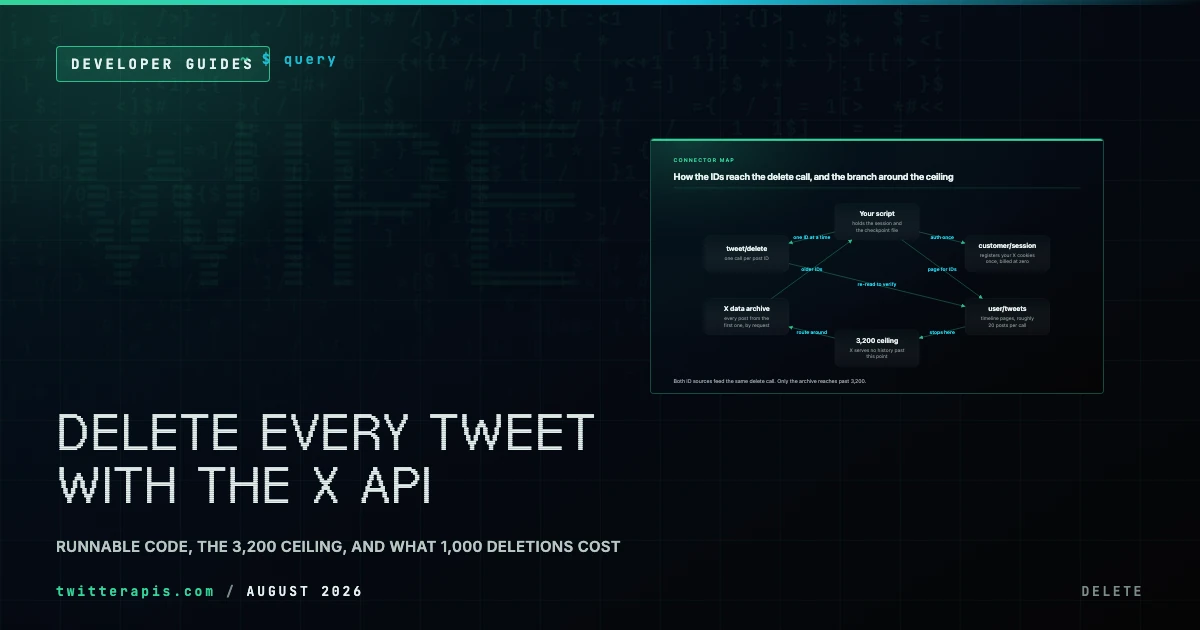
Delete All Your Tweets With the X API (2026): Runnable Code, the 3,200 Ceiling, and Real Costs
How to bulk delete tweets through an API instead of a subscription tool: the enumerate-then-delete loop in Python, X's 3,200 history ceiling, the archive-export route past it, and what 1,000 deletions actually cost.
Twitter Scraping in Python (2026): Pick a Route Before You Write Code
Four ways to collect X data in Python, priced honestly: the official X API v2 pay-per-use rate, an account-pool scraper, a headless browser, and a managed read API. What each one actually costs to run for a year.