GUIDE
Delete All Your Tweets With the X API (2026): Runnable Code, the 3,200 Ceiling, and Real Costs
How to bulk delete tweets through an API instead of a subscription tool: the enumerate-then-delete loop in Python, X's 3,200 history ceiling, the archive-export route past it, and what 1,000 deletions actually cost.
Per our own spec, 70 of 123 endpoints bill $0.0008, 26 are free, and 27 sit between $0.0016 and $0.01. Every price ships inside our published OpenAPI document as an x-cost-usd field, so any figure in this post can be checked against the contract that bills it rather than taken on trust.
Deleting every post on an X account is a loop, not a button. X exposes deletion one post ID at a time and nothing wider, so every product that advertises bulk deletion, paid or free, is running the same two steps underneath: collect the IDs, then call delete on each one. This guide writes those two steps out in full, prices them per call, and is specific about the two places the job goes wrong, which are the 3,200-post history ceiling on the timeline endpoints and the fact that replies and retweets are not on the timeline you are reading.
TL;DR: There is no single call that empties an account. Enumerate the post IDs, then delete them one at a time.
POST /twitter/tweet/deletecosts approximately $0.0008 per call, so 1,000 deletions is roughly $0.80 and the full 3,200 the timeline can reach is roughly $2.56. X's own API bills the same operation at $0.010 per request. Anything older than the most recent 3,200 posts is unreachable from any timeline endpoint, including X's own, so pull those IDs from your downloaded archive. Replies need a second pass on a different endpoint, retweets need an unretweet rather than a delete, and none of it is reversible.
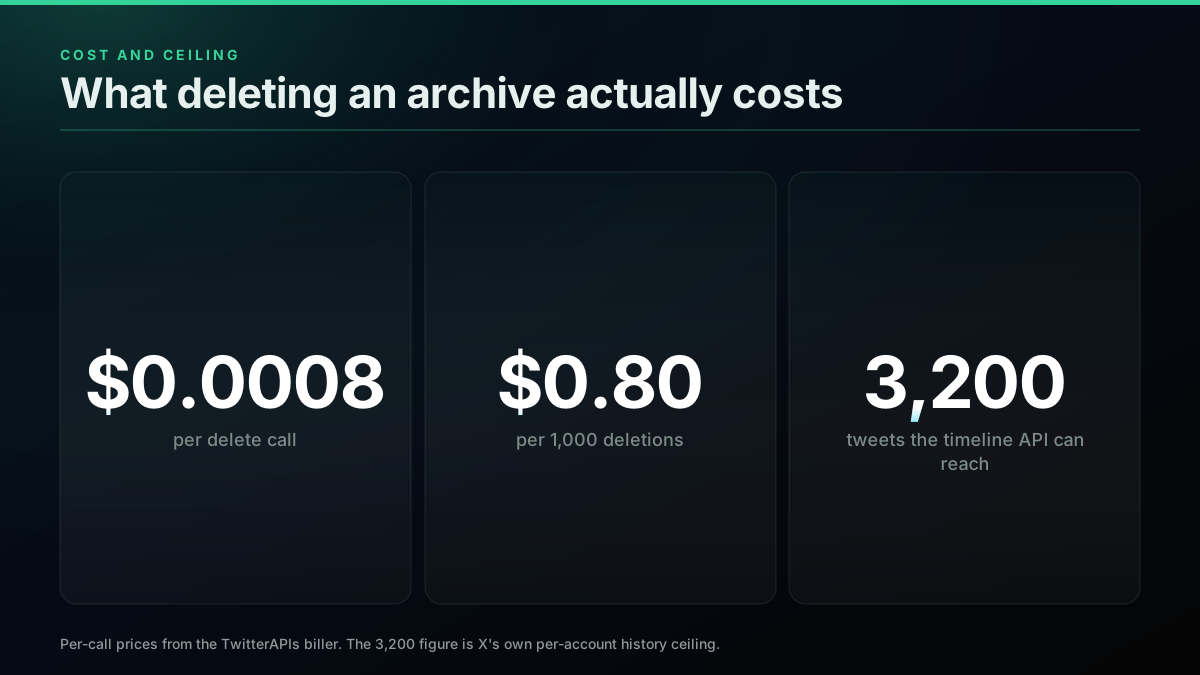
The two numbers that decide the job: what a delete costs, and how far back you can see
Who actually wants this
The demand here is not niche and it is not developers being tidy. delete all tweets runs at approximately 880 searches a month and how to bulk delete tweets at approximately 590, measured through DataForSEO on 2 August 2026. The people behind those queries are mostly not looking for a script. They are looking for a way out of a decade of posts before a job search, a funding round, or a rebrand.

Margiela 💋
@WITHNO100S
how can i delete all my tweets at once i dont wanna be perceived anymore
That post carries roughly 1,726 likes against 101,181 views, which is a high like rate for a request for technical help and a fair read on how many people share the problem. What the search results offer them is a row of subscription tools that want their account credentials. What a developer wants instead is the list of steps and the bill, which is what follows.
What our API actually does, and what it does not
Before any code, the honest inventory, read from the router rather than from a marketing page.
We serve POST /twitter/tweet/delete. It takes an id or a full status url, in the query string or a JSON body, and it acts as your own account through a registered session. We also serve the reads you need to build the ID list: GET /twitter/user/tweets, GET /twitter/user/tweets_and_replies, and GET /twitter/user/tweets/complete, which paginates internally and hands back a large slice of history in one call.
What we do not serve is a bulk endpoint. There is no delete_all, no ID array, no job queue you hand a username to. Anyone who tells you otherwise about any provider is describing a loop with a nicer wrapper on it.
We also do not raise X's history ceiling, and neither does anyone else. That is the next section, and it is the part most guides skip.
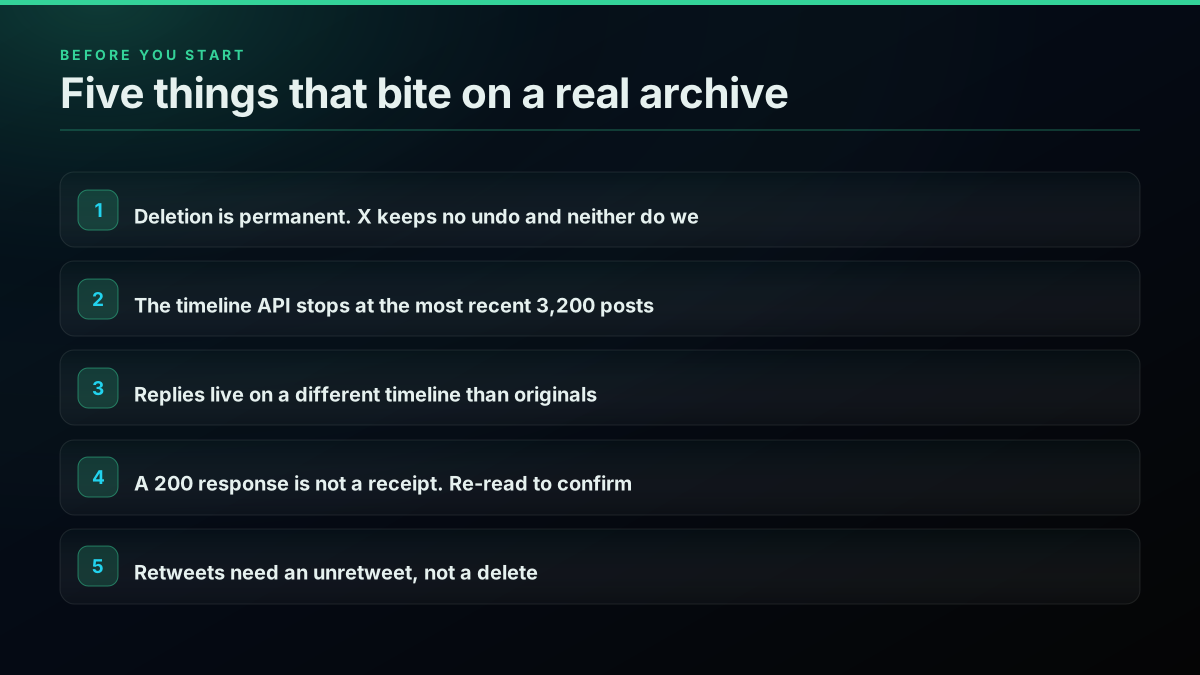
Read this list before you write the loop, not after
The 3,200 ceiling, which is the real problem
X serves at most the 3,200 most recent posts for any account through its timeline endpoints. Page past roughly thirty-two pages of one hundred and the cursor stops returning anything, whatever the account's actual post count is. This is X's behaviour, not a limit of any API sitting in front of it, and it applies identically to X's own web client.
The size of the gap is easy to see. A live GET /twitter/user/info?username=nasa on 2 August 2026 reports tweet_count: 74283. The timeline endpoints will hand you 3,200 of those. The other 71,000 exist, they are visible on individual permalinks, and they are unreachable by paging a timeline.
For most personal accounts the ceiling is generous enough to finish the job. For a decade-old account that posted daily, it is not. That is precisely the case the person searching this usually has, so a guide that stops at the timeline loop leaves them with the newest 3,200 gone and twelve years of older posts still live, which is arguably worse than not starting.
The route past the ceiling is your data archive. X's help documentation states that downloading your archive "allows you to browse a snapshot of your X information, starting with your first post," and walks through requesting it from Settings, Account, Your X data, Request data. The archive arrives as a file containing every post with its ID. Those IDs feed the same delete loop. The enumeration source changes; the deletion code does not.
That last sentence is the whole architecture, and it is worth seeing as a shape rather than a list, because the branch is the part a linear set of steps cannot show:
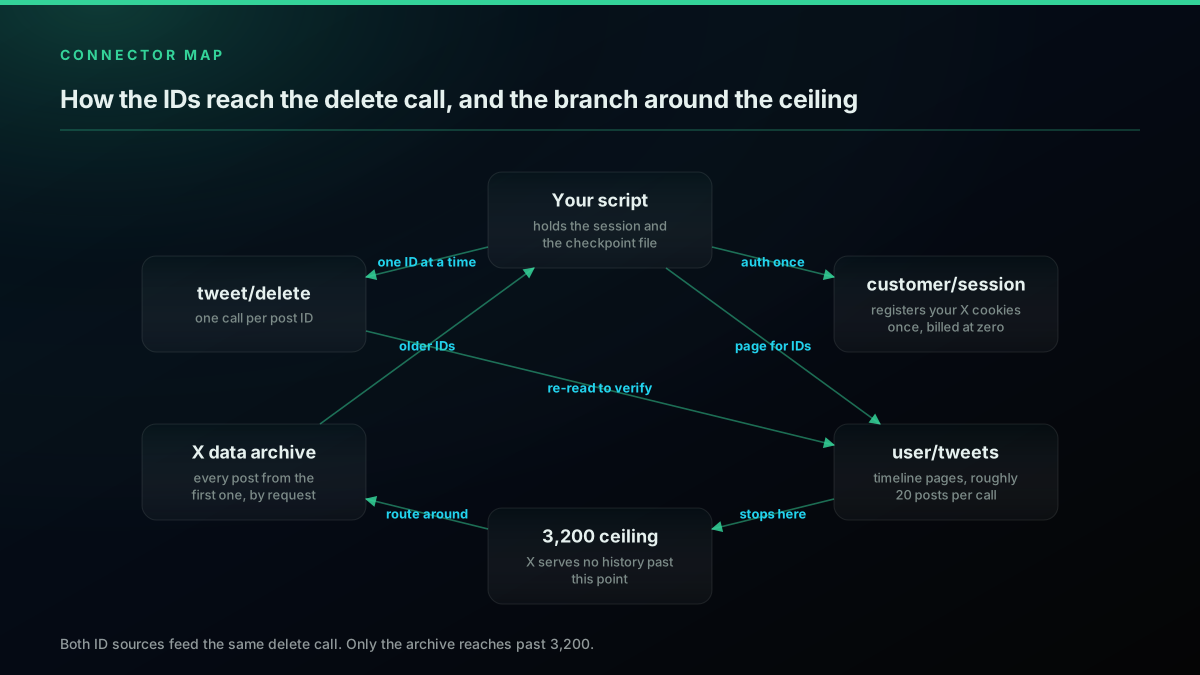
Two ways in, one way out. Only the archive edge reaches past 3,200
Read the edges rather than the boxes. customer/session is a one-time authentication that everything else runs under. The timeline and the archive are two independent sources of the same thing, post IDs, and they converge on one delete call. The archive edge is the only one that crosses the ceiling. And the edge from tweet/delete back to user/tweets is the verification pass, which is a loop rather than a final step, and is the edge most implementations leave out.
The most-upvoted community answer to this problem reached the same conclusion independently. The author of the script that ranks first for this query on Google added an update to their own post after shipping it:
I made a script to delete all your tweets. No need to pay for that anymore
Two independent implementations arriving at the same architecture is usually a sign the architecture is forced. It is.
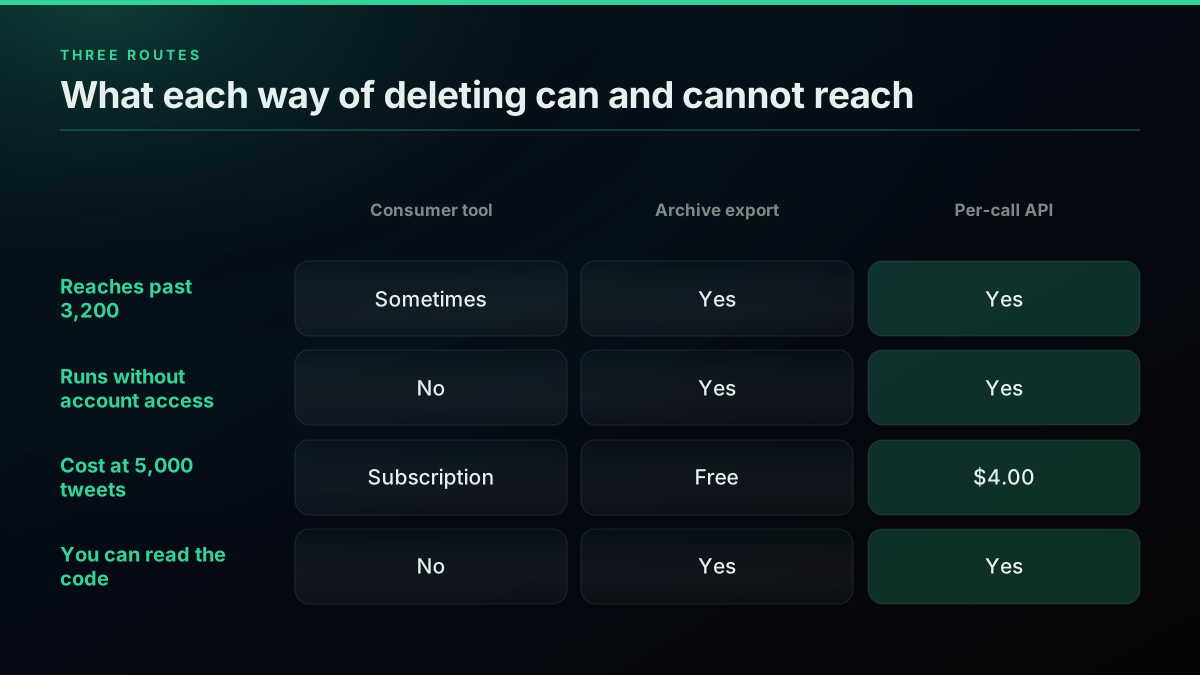
Three routes, and the row that usually decides it is the first one
Step 1: register your session once
Deletion acts as your account, so the API needs your account. POST /twitter/customer/session stores your X auth_token and ct0 cookies against your API key, and it is billed at zero. After that, every write runs as you, which is the only sane design for an operation this destructive.
curl -X POST "https://api.twitterapis.com/twitter/customer/session" \
  -H "Authorization: Bearer $TWITTERAPIS_KEY" \
  -H "Content-Type: application/json" \
  -d '{"auth_token": "YOUR_AUTH_TOKEN", "ct0": "YOUR_CT0"}'
You can also pass the same two values per request as x-auth-token and x-ct0 headers if you would rather not store them. Both cookies come from a logged-in x.com session in your browser's developer tools.
There is no developer application to file and no project to create. On X's own API you do need a developer account with a funded credit balance before the first request, because pay-per-usage billing will not run against an empty balance.
Step 2: get the IDs
Two ways in, depending on how far back you need to reach.
Under 3,200 posts, or you only care about recent history. Use user/tweets/complete. It pages internally and returns the batch in one response.
import requests

BASE = "https://api.twitterapis.com/twitter"
H = {"Authorization": f"Bearer {API_KEY}"}

def own_user_id(username):
    r = requests.get(f"{BASE}/user/info", params={"username": username}, headers=H, timeout=30)
    r.raise_for_status()
    return r.json()["user"]["id"]

def recent_history(user_id, want=3200):
    """Walk user/tweets/complete to the ceiling, returning post IDs newest first."""
    ids, cursor = [], None
    while len(ids) < want:
        params = {"user_id": user_id, "max": 800}
        if cursor:
            params["cursor"] = cursor
        r = requests.get(f"{BASE}/user/tweets/complete", params=params, headers=H, timeout=120)
        r.raise_for_status()
        page = r.json()
        ids.extend(t["id"] for t in page.get("tweets", []))
        cursor = page.get("next_cursor")
        if not cursor:            # history exhausted, or the ceiling was reached
            break
    return ids
One behaviour worth knowing before it surprises you: max is a floor, not a cap. A live call with max=40 against NASA on 2 August 2026 returned count: 59. Pages arrive in whole chunks and the walk stops after the chunk that crosses your target, so you get at most one page more than you asked for. That is deliberate. Slicing back to max while returning the cursor of the last page fetched would drop the overshoot into a gap the resume point skips over, which loses posts silently. Ask for a number, budget for a bit more.
Past 3,200 posts. Request the archive, wait for the email, download it, and read the IDs out of data/tweets.js. That file is not JSON. It is JavaScript: a single assignment of a JSON array to a window.YTD global, so the prefix has to come off before anything will parse.
import json, pathlib

def archive_ids(path="data/tweets.js"):
    raw = pathlib.Path(path).read_text(encoding="utf-8")
    body = raw[raw.index("=") + 1:]              # drop the "window.YTD... =" prefix
    return [row["tweet"]["id_str"] for row in json.loads(body)]
Cutting at the first = rather than matching the literal prefix is deliberate, because the prefix itself is not stable. Exports in circulation use window.YTD.tweet.part0 and window.YTD.tweets.part0, and the deleted-posts file uses window.YTD.deleted_tweets.part0. The x-archive-parser project documents the shape it handles, which is a list of { tweet: { id_str, full_text, created_at, ... } } objects. Print one row before you trust the parse on your own export. The IDs themselves are stable, and they are the only thing this step needs to produce.
Start building with TwitterAPIs
$0.0008 a call, about $0.04 per 1,000 tweets at 20 tweets a page. $0.50 free credits. No credit card required.
Step 3: the delete loop
The loop itself is short. Everything that makes it survivable is the handling around it.
import json, pathlib, time
import requests

BASE = "https://api.twitterapis.com/twitter"
H = {"Authorization": f"Bearer {API_KEY}"}
STATE = pathlib.Path("delete-state.json")

def load_state():
    return json.loads(STATE.read_text()) if STATE.exists() else {"done": [], "failed": []}

def delete_all(ids, pause=1.0):
    state = load_state()
    done = set(state["done"])
    for tweet_id in ids:
        if tweet_id in done:
            continue
        r = requests.post(f"{BASE}/tweet/delete", params={"id": tweet_id},
                          headers=H, timeout=60)
        if r.status_code == 200 and r.json().get("deleted"):
            state["done"].append(tweet_id)
        elif r.status_code == 429:
            time.sleep(60)                        # backed off, retry on the next run
            break
        else:
            state["failed"].append({"id": tweet_id, "status": r.status_code,
                                    "body": r.text[:200]})
        STATE.write_text(json.dumps(state))       # checkpoint every call
        time.sleep(pause)
    return state
Four decisions in there are the difference between a job that finishes and a job you restart from zero:
Checkpoint after every call, not every batch. The state file is the only thing standing between an interrupted run and re-walking the whole archive. Writing it per call is cheap next to the request you just made.
Treat 429 as a stop, not a retry. Back off and let the next run pick up from the checkpoint. Grinding against a throttle on your own account is how a cleanup job turns into an account problem.
Record failures with their status code. A 422 means the delete did not apply, which usually means the post is not yours or is already gone. A 400 means the ID never parsed. Those are different problems and you want to tell them apart afterwards.
Pace it. Our delete route imposes no per-day cap of its own. The limiter you will meet is X's, on your own account, and X does not publish that threshold. A one-second pause is a starting point rather than a tuned value, and a few thousand posts is comfortably an overnight job.
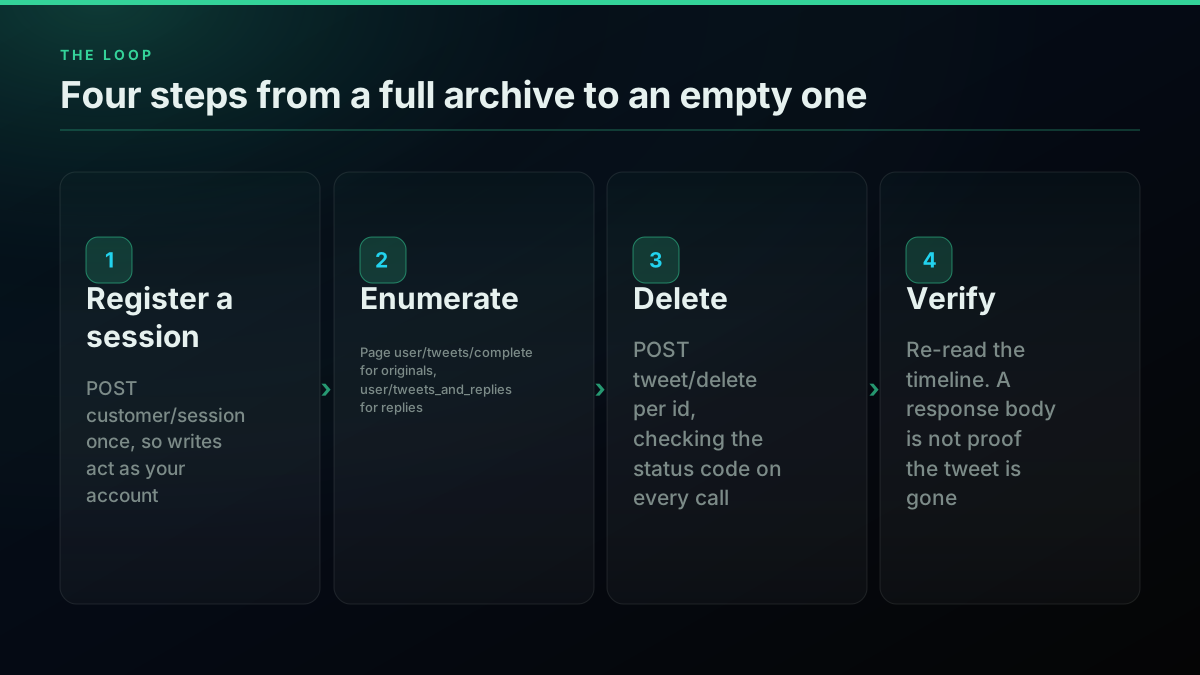
The loop is four steps, and the fourth one is the one people skip
Step 4: verify, because a response body is not a receipt
Re-read the timeline when the run finishes and confirm the IDs are gone. This is not paranoia about any particular API, it is what the response can and cannot tell you.
A 200 from a delete call means the request reached X and X did not return an error. That is a weaker statement than "the post no longer exists." We tested this directly: POST /twitter/tweet/delete?id=1 returns 200 with deleted: true, for an ID that is not a real post and is not ours. A well-formed ID that does not exist behaves correctly and comes back 422 with ok: false, which is the case you will actually hit, but the lesson holds either way. Validate that your IDs are real 18-to-19-digit post IDs before the loop, and confirm the outcome by reading rather than by trusting.
def verify(user_id, expect_gone):
    r = requests.get(f"{BASE}/user/tweets/complete",
                     params={"user_id": user_id, "max": 800},
                     headers=H, timeout=120)
    r.raise_for_status()
    still_live = {t["id"] for t in r.json().get("tweets", [])} & set(expect_gone)
    return sorted(still_live)
An empty return is your finish condition. A non-empty one is a re-run list, not a failure.
The passes most cleanups forget
Running the loop above on user/tweets and calling it done leaves two categories live.
Replies. They are not on the plain user timeline. GET /twitter/user/tweets and GET /twitter/user/tweets_and_replies are separate endpoints returning separate sets, and user/tweets/complete walks the originals timeline. On a conversational account the replies outnumber the originals by a wide margin, and they are the posts most likely to be the ones you wanted gone. Run a second enumeration pass against user/tweets_and_replies and feed those IDs through the same delete loop.
Retweets. A retweet is not a post you can delete, because the underlying post is not yours. Undo it with POST /twitter/tweet/unretweet against the original ID. A delete call there will fail, and it will fail in a way that looks like a permissions problem rather than a category error, which wastes an afternoon if you have not read this paragraph.
Likes are a third category, and worth a decision rather than an assumption. They are visible on your profile and are removed with POST /twitter/tweet/unfavorite, one at a time, at the same per-call rate.
What it costs
Deletion is billed as a simple write action at approximately $0.0008 per call, the same rate as a standard read. The arithmetic is unusually easy because there is no plan and no minimum.
| Archive size | Delete calls | Cost at approximately $0.0008 |
|---|---|---|
| 500 posts | 500 | approximately $0.40 |
| 1,000 posts | 1,000 | approximately $0.80 |
| 3,200 posts (the timeline ceiling) | 3,200 | approximately $2.56 |
| 10,000 posts (archive route) | 10,000 | approximately $8.00 |
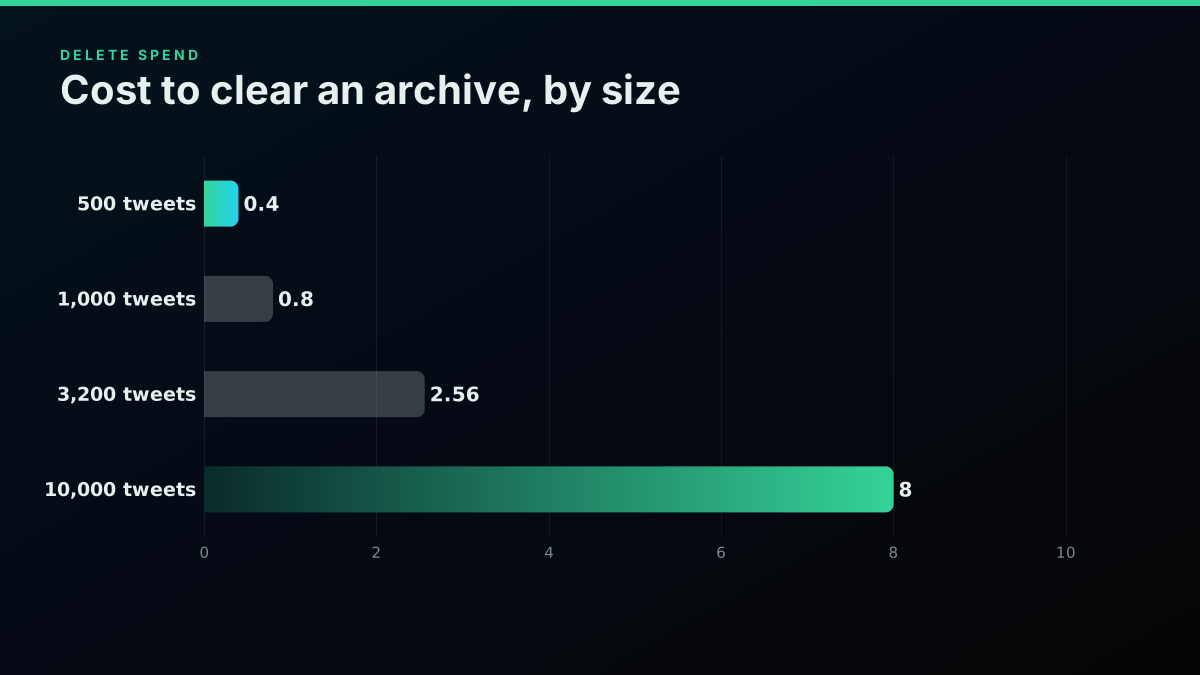
Total spend to clear an archive, by size
Enumeration barely registers next to the deletes. user/tweets/complete is a premium read at approximately $0.0024 per call and returns hundreds of posts per call, so building the ID list for a 3,200-post account costs a couple of cents. Signup includes approximately $0.50 in credit with no card, which covers roughly 625 deletions before you pay anything at all.
The comparison that matters is X's own rate card, which is published per request and confirms pay-per-usage with no subscriptions. Its Interaction: Delete row is $0.010 per request. Clearing 3,200 posts on X's own API is therefore $32.00 against approximately $2.56 here, before counting the developer account and the funded balance you need to make the first call. Per call, and with no monthly commitment on either side, that is a twelve-and-a-half times difference on the identical operation.
Against the subscription tools that currently occupy this search result, the comparison is different in kind rather than degree. They charge monthly whether you delete one post or forty thousand, and they ask for account access to do it. If you are deleting once and never again, a per-call bill of a few dollars against a recurring plan is not a close call. If you want a standing rule that deletes anything older than thirty days, the loop above is the same code with a date filter, and it runs on a cron for cents a month.
Real-world cost examples
The table above prices archive sizes in the abstract. Here are four accounts shaped like the ones people actually clean up, with the full bill including enumeration.
The job-search cleanup: 1,400 posts, four years, no replies to worry about. One user/tweets/complete call at approximately $0.0024 builds most of the ID list, plus a couple of paging calls. Then 1,400 delete calls at approximately $0.0008. Total: approximately $1.13, and the whole thing finishes inside the $0.50 signup credit plus about sixty cents. Wall-clock is a couple of hours of unattended running because of pacing, not because of cost.
The rebrand: 3,200 posts at the timeline ceiling, plus roughly 900 replies. Replies live on a separate timeline, so this is two enumeration passes and 4,100 deletes. Enumeration runs a few cents. Deletes come to approximately $3.28. Total: approximately $3.35. This is the shape most guides implicitly assume, and it is the one where the ceiling has not yet become a problem.
The decade-old account: 22,000 posts, archive route required. The timeline endpoints cannot reach past 3,200, so the ID list comes from the downloaded X archive rather than from any API. Enumeration cost is therefore zero, because you are reading a file. 22,000 deletes at approximately $0.0008 is approximately $17.60. Total: approximately $17.60, and realistically two to three overnight runs with a checkpoint file.
The standing rule: delete anything older than 30 days, on a cron. An account posting 15 times a day deletes roughly 450 posts a month. One enumeration call a day at approximately $0.0008 plus 450 deletes at approximately $0.0008 comes to approximately $0.38 a month. That is the case where a per-call bill decisively beats a subscription, because the recurring cost is proportional to what you actually delete rather than to a plan you bought once.
For comparison, the same four jobs on X's own API at its published Interaction: Delete rate of $0.010 per request cost approximately $14.00, $41.00, $220.00, and $4.50 a month respectively, before the developer account and funded balance you need to make the first call at all.
The cheapest pay-as-you-go Twitter API. Try it free.
$0.0008 a call, about $0.04 per 1,000 tweets at 20 tweets a page. $0.50 free credits. No credit card required.
What changed in 2026 (updated August 2026)
Two things moved this year, and both affect the bill rather than the method.
X made pay-per-usage the default for new developers. Rates are now published per request with no subscription and no minimum spend. For a one-off deletion job this is a genuine improvement over the tier structure it replaced, because you no longer have to buy a monthly plan to run a task that takes one evening. The Interaction: Delete row sits at $0.010 per request, which is what produces the twelve-and-a-half times gap in the section above.
Nothing changed about the 3,200 ceiling. This is worth stating explicitly because it is the question people keep asking after each pricing announcement. The limit is a property of X's timeline endpoints, not of any pricing tier, and no amount of spending raises it. If a provider implies that a higher plan reaches further back through a timeline, that claim is about their own cache, not about X.
The method in this post is unchanged from earlier in the year: enumerate, loop, verify, and use the downloaded archive when the ceiling bites. What moved is that the arithmetic got simpler on both sides, because neither route now has a subscription floor hiding inside it.
Is there still a free X (Twitter) API tier in 2026?
Yes, and it cannot do this job on its own, which is the part that catches people out.
There is no free tier any more: pay-per-use bills every call, per X's pricing page. The old free tier was write-oriented, a capped volume of posts a month through the v2 POST /tweets endpoint and effectively no read access, per X's own API overview. Deletion is a write, so in principle a free-tier app could issue deletes. The problem was the step before it. To delete a post you need its ID, and building the ID list means reading your own timeline, which the free tier never let you do.
That leaves three real options if you are trying to do this at zero or near-zero cost. You can download your X archive, which is free and contains every post ID including the ones past the 3,200 ceiling, then feed those IDs to a delete loop. You can use the free credit on a per-call API to cover enumeration, which for most personal accounts costs a few cents. Or you can pay X's read rate to enumerate, which is the most expensive of the three by a wide margin.
The archive route is the honest answer for anyone whose priority is cost rather than convenience. It costs nothing, it is the only route that reaches your whole history, and its downside is that you wait for X to prepare the file, which can take a day or more. Request it before you need it.
Already on legacy Basic or Pro?
If you remember the old subscription tiers, it is worth knowing why that shortcut is gone.
Basic ran at $200 a month for roughly 15,000 reads and Pro at $5,000 a month for roughly 1 million, and both were closed to new signups when pay-per-use became the default in February 2026. On one of those plans you had already paid for the read quota, and enumerating a 3,200-post timeline consumed a rounding error of it. Both are now retired, and X moved the remaining Basic subscribers onto pay-per-use from 1 June 2026, so the job bills per read like any other.
One caution carries over: deletes meter separately as interactions on the current rate card, so budget them alongside the reads that build the ID list. The pay-per-use model exists partly because a large share of legacy subscribers were paying a floor they never reached, and that floor is now gone for everyone.
Did X kill the Twitter API? What changed since 2023
Not killed, repriced, twice, and the sequence explains why this guide exists in the shape it does.
Twitter ended free API access in February 2023, then the following month announced a Free, Basic, and Enterprise tier structure. The immediate casualty was the class of small utility that a tweet-deletion tool belongs to. Before 2023, clearing your own archive was a weekend script against a free endpoint. After it, the same script needed a funded developer account, which is why a row of paid subscription services now occupies this search result.
The second move came in 2026, when pay-per-usage became the default for new developers, which Social Media Today covered as a usage-based access charge. For a task like this one that is a real improvement, because there is no longer a monthly floor standing between you and a job that takes one evening.
What did not come back is free read access to your own timeline, and that single absence is why every route in this post either pays for enumeration or reads it from the downloaded archive. The deletion itself was never the hard part.
The parts that are genuinely annoying
Written out plainly, because a guide that pretends this is easy gets abandoned at step three.
It is not reversible. X has no undo and neither do we. Request the archive first, download it, and keep it. Do not start the loop until that file is on disk.
The ceiling will probably bite you. If your account has more than 3,200 posts, and the accounts whose owners search this usually do, the timeline route cannot finish the job. Plan for the archive route from the start rather than discovering it at post 3,199.
It takes real time. Not because the API is slow but because you are pacing against a throttle nobody publishes. Build for unattended overnight running with a checkpoint, and stop thinking about wall-clock.
Protected and suspended states change the answer. A locked or restricted account may not accept writes at all, and no client-side loop fixes that.
Search engines and archives are a separate problem. A deleted post can survive in third-party archives, in screenshots, and in caches you do not control. Deleting your posts removes them from X. It does not remove them from the internet, and any product that suggests otherwise is selling something.
Where to go next
If the enumeration half is the part you care about, the complete tweet history walkthrough covers cursor handling in more depth, and the pagination guide covers the cursor contract across every endpoint that has one. The inverse problem, recovering a post that is already gone, is in recovering deleted tweets. Every endpoint named here is listed with its parameters and per-call price in the API reference, and the write actions are on the docs site with copy-paste examples in three languages.
// sources
Where these numbers come from
Each row is a figure in this post and the artefact it was read from. Prices and limits on this platform move, so check the date on the source before you plan against it.
- x-archive-parser project
- Documents the archive object shape the parsing step targets, a list of tweet records carrying id_str, full_text, and created_at, and backs the warning that the file prefix varies across exports.
- X API pricing rate card
- The published per-request rate card confirming pay-per-usage with no subscriptions, and the source of the Interaction Delete row at $0.010 per request behind the $32.00 figure for clearing 3,200 posts.
Frequently Asked Questions
There is no single call that empties an account. Every route, whether a paid tool or your own script, deletes one post at a time, because X exposes deletion per post ID and nothing else. What differs between routes is how they get the list of IDs and how much they charge you for the loop. A per-call API deletes at approximately $0.0008 per post on TwitterAPIs, so 1,000 deletions costs roughly $0.80 with no subscription. The harder problem is not the deleting, it is the enumerating: X's own timeline endpoints stop at the most recent 3,200 posts per account, so anything older has to come from your downloaded archive.
That is X's per-account history ceiling on the timeline endpoints, and it applies to every client that reads a user timeline, including X's own web app. Page past roughly thirty-two pages of one hundred posts and the cursor runs out, no matter how many posts the account actually has. It is not a limit any third-party API can raise, because no further history is served. The way past it is your data archive, which X states covers a snapshot of your information starting with your first post. Read the post IDs out of the archive file and feed those into the delete loop.
No. X provides no undo for a deleted post and neither does any API in front of it. A deleted post ID stops resolving, and the text, media, and engagement counts are not recoverable from us or from X. Request and download your data archive before the first delete call runs, not after, and keep it. That archive is the only copy you will have, and it is also the source of the post IDs you need to reach anything older than the most recent 3,200 posts.
Slower than the arithmetic suggests, and the limiter is X rather than the API in front of it. Each deletion is one round trip against your own account, and X throttles account-level write activity without publishing the threshold, so a loop that fires as fast as the network allows will start collecting errors. Build the job to run unattended instead of fast: persist the cursor and the last deleted ID after every batch, back off when a call fails, and resume from the checkpoint. A few thousand posts is comfortably an overnight job rather than a one-minute one.
On TwitterAPIs, tweet/delete is billed at approximately $0.0008 per call, which works out to about $0.80 per 1,000 deletions and about $2.56 to clear the full 3,200 posts the timeline API can reach. Enumeration is close to free by comparison: user/tweets/complete is approximately $0.0024 per call and pulls hundreds of posts at once. Signup includes approximately $0.50 in credit with no card, enough for roughly 625 deletions before you pay anything. X's own API bills the same operation at $0.010 per request under the Interaction: Delete row of its published rate card.
No, and treating them as one set is the most common way a cleanup job leaves half the account behind. Replies do not appear on the plain user timeline; they are on the tweets-and-replies timeline, which is a separate endpoint and a separate pass. Retweets are not deletions at all: a retweet is undone with an unretweet call, and issuing a delete against the original post ID will fail because you do not own it. A complete cleanup runs three passes rather than one.
Not on a per-call API. TwitterAPIs works by registering your own X session once through customer/session, after which write actions run as your account. There is no developer application to file, no project to create, and no monthly plan. On X's own API you do need a developer account with a funded credit balance, because pay-per-usage billing requires a positive balance before the first request goes out.
Check out similar blogs
More guides on the Twitter/X API, scraping, and pricing.

How to Track a Tweet's Performance in Real Time with the X API
Poll a tweet's engagement counts over time with the X API, compute a views-to-likes ratio, and read the quote-tweet layer to tell an organically growing launch tweet from a boosted one. Tested Python and curl.
Twitter Scraping in Python (2026): Pick a Route Before You Write Code
Four ways to collect X data in Python, priced honestly: the official X API v2 pay-per-use rate, an account-pool scraper, a headless browser, and a managed read API. What each one actually costs to run for a year.

Fetch a Full Twitter Thread via API in One Call (2026)
How to pull an entire Twitter thread, the root tweet plus every connected tweet in the chain, in a single API call with the tweet/thread endpoint, instead of walking replies by hand. Live-tested code in curl, Python, and Node.js, with the real per-call cost.

Why X Advanced Search Misses Posts You Know Exist (2026)
A query that returns nothing is not proof that nothing exists. We searched for 17 posts confirmed to exist, published between 2015 and 2026, and measured which query forms found them and which did not.

Build vs Buy: Should You Build Your Own Twitter/X Monitoring Tool? (2026)
Buying a listening seat costs $29 to $2,000 a month depending on the vendor. Building costs real engineering hours plus a data bill. Here is the real math behind the twitter monitoring tool build vs buy decision, priced both ways.

How to Get Image URLs from X Tweets via API in 2026 (Full Resolution, Python and Node)
Pull image URLs out of X tweets with runnable Python and Node.js, then get the full-resolution original instead of the scaled copy the API hands you by default. Measured on 14 live images, with the video poster-frame trap and the per-call cost.

How to Search Tweets by Date on X in 2026 (Operators, API, and the Limits Nobody Documents)
How to search tweets by date on X in 2026: the since:/until: operators, the API parameters, and the exact historical limits X's own docs bury, tested live against a real endpoint.

What "Rate Limited" Actually Means on X (Every Limit, Measured)
"Sorry, you are rate limited" is one message covering two different systems: a consumer action ceiling and a developer API window. Here is what the term means, the current numbers for both, where it came from, and how long it actually lasts.