GUIDE
How to Get Image URLs from X Tweets via API in 2026 (Full Resolution, Python and Node)
Pull image URLs out of X tweets with runnable Python and Node.js, then get the full-resolution original instead of the scaled copy the API hands you by default. Measured on 14 live images, with the video poster-frame trap and the per-call cost.
Per our own spec, 72 of 125 endpoints bill $0.0008, 26 are free, and 27 sit between $0.0016 and $0.01. Every price ships inside our published OpenAPI document as an x-cost-usd field, so any figure in this post can be checked against the contract that bills it rather than taken on trust.
TL;DR: Read
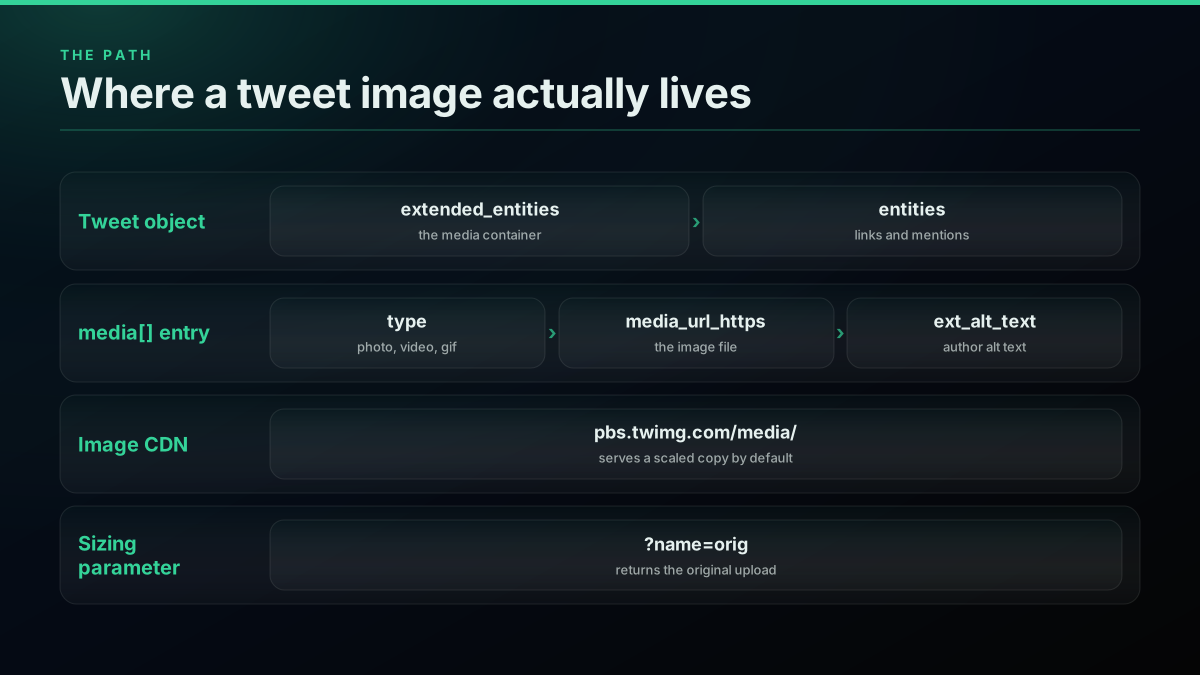
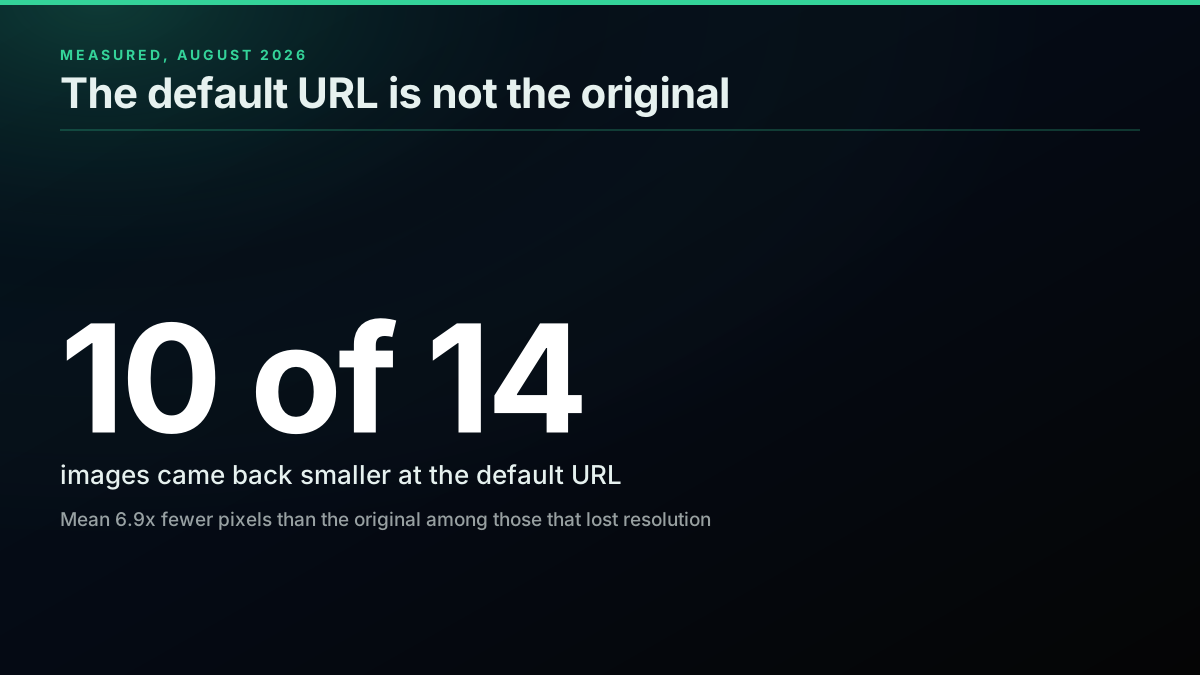
extended_entities.media[]on the tweet, filter totype == "photo", and takemedia_url_https. That gives you the image URL. It does not give you the original file. The URL the API returns is a display copy capped at 1200 pixels on the long edge, so append?name=origto get the upload. Measured across 14 live images, 10 came back smaller than the original at the default URL, and the biggest original was 4129 pixels wide against a 1200 pixel default. Videos also carrymedia_url_https, but it points at a poster frame, so always branch ontype. Every endpoint that returns media is a standard read at $0.0008 per call.
Getting an image out of a tweet is two separate jobs, and almost every guide covers only the first one. Job one is extraction: find the media object in the API response and read its URL. Job two is resolution: recognise that the URL you just read is not the original file, and fix it with a sizing parameter. Skip job two and you will ship a pipeline that quietly saves scaled-down copies of every image it touches, which is exactly the complaint that fills the official X developer forum.
This guide covers both halves in one place, with runnable Python and Node.js, and with the sizing behaviour measured against live images rather than repeated from a 2014 answer. If you are new to the platform generally, the Twitter API tutorial is the better starting point, and the developer reference indexes every endpoint.
What Does the API Actually Return for an Image?
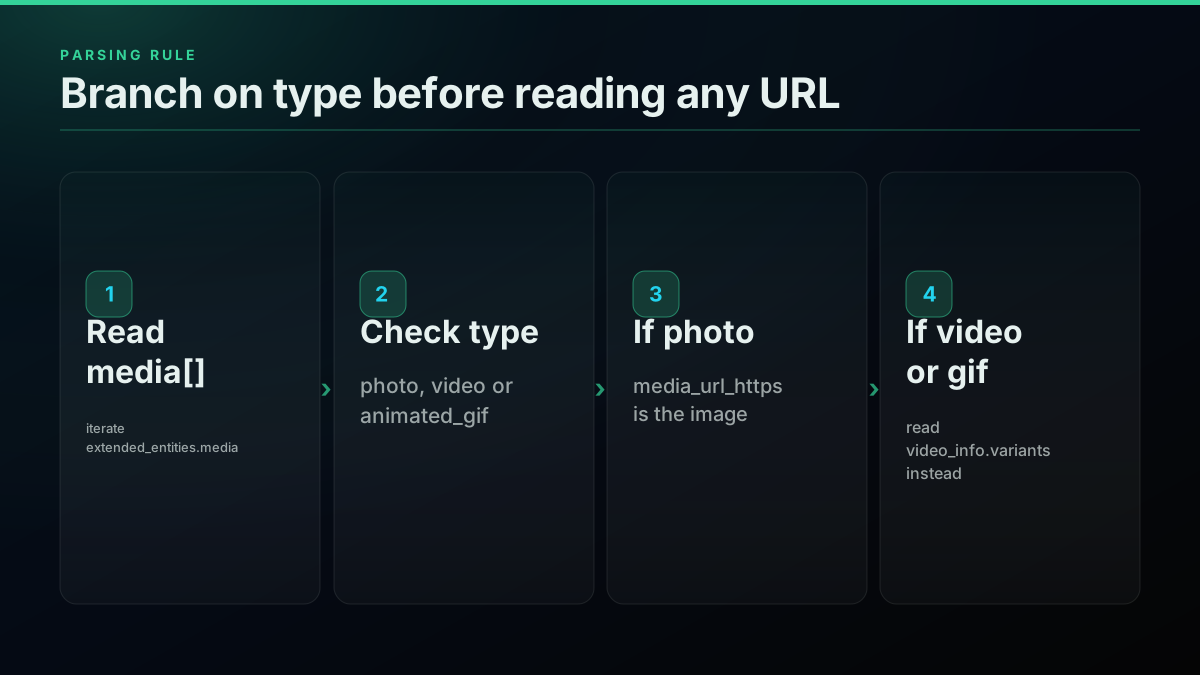
A tweet that contains media carries an extended_entities object, and inside it a media array. Each entry in that array is one attached image or video, and the field holding the image itself is media_url_https, which points at the pbs.twimg.com CDN. A tweet can carry up to four photos, so the array is the unit you iterate, never a single field.
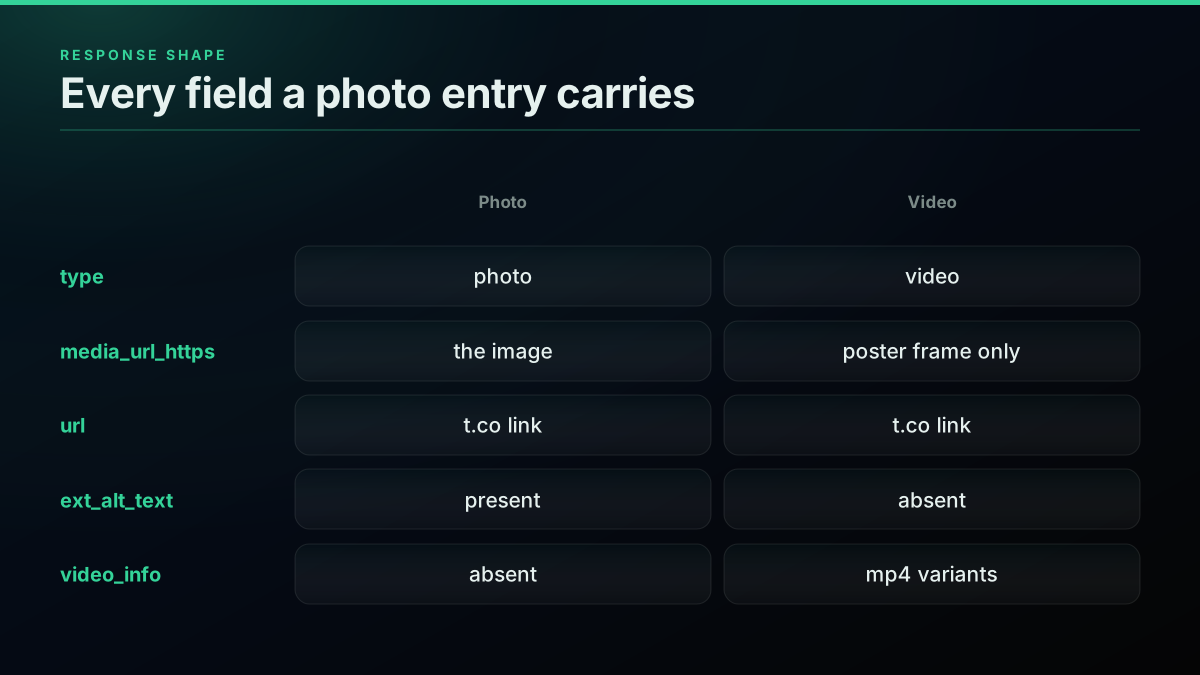
Here is the exact shape of a photo entry, read from a live user/media response on 8 August 2026:
{
  "type": "photo",
  "media_url_https": "https://pbs.twimg.com/media/HPIGsX5WcAE0ilP.jpg",
  "url": "https://t.co/pidNDkf9MH",
  "ext_alt_text": "Colorful nebula in space with a white haze throughout..."
}
Four fields, and only one of them is the image. The distinction matters more than it looks:
media_url_httpsis the actual image file on the CDN. This is what you want.urlis thet.coshortlink that appears in the tweet text. It resolves to the tweet, not to the image. Fetching it gets you an HTML page.typeisphoto,video, oranimated_gif. Branch on it. Always.ext_alt_textis the author-supplied alt text, present when the author wrote one. It is genuinely useful for captioning, indexing, and accessibility work, and most extraction scripts throw it away.
One thing worth flagging because it contradicts a lot of older material: there is no sizes object in this response. The classic v1.1 shape nested a sizes dictionary with thumb, small, medium, and large entries, each with width and height. Code written against that shape, and there is a lot of it, will throw a KeyError here. You do not need it anyway, because the sizing is done on the URL rather than read from the payload.
The media array is nested identically across every endpoint that returns tweets, but the envelope around it differs. user/media returns {count, next_cursor, has_more, tweets[]}, so you iterate tweets. tweet/detail returns {id, tweet}, so the tweet is a single object under tweet. That difference bites when you refactor a function from one endpoint to the other.
How this differs from the official X API v2
If you have read the official media object documentation, you will have met a different shape, and knowing why matters when you port code between them. The official v2 API keeps media in a separate include block that you must explicitly request, joined back to the tweet by a key, whereas the shape used here arrives already attached to the tweet.
The official v2 API does not attach media to the tweet by default. Media lives in a separate includes.media block, and you only get it if you ask twice: once with expansions=attachments.media_keys to pull the objects into includes, and again with media.fields=url,preview_image_url,alt_text,width,height to say which properties you want on them. Then you join the two together yourself by matching each tweet's attachments.media_keys against the media_key on each include.
That join is the step people get wrong, and it is the direct cause of the most-viewed complaint on the topic. A developer on the official X developer forum reported pulling a set of tweets where "only 6 actually showed they had images using the API," which is the signature of a request that never asked for the expansion in the first place. Without the expansion parameter the media simply is not in the payload, and the tweets look image-free.
There is a second sharp edge in the v2 shape. For a photo, the field carrying the image is url. For a video or animated GIF, url is absent entirely and you get preview_image_url instead. So the v2 equivalent of the poster-frame trap is not a wrong value, it is a missing key, and naive code raises rather than silently mis-saving. That is arguably the friendlier failure of the two, but it still means you branch on type either way.
You can watch that expansion step fail in the wild. A developer on r/learnpython had the tweet-fetching half working and still could not reach the images:
TWEEPY API: Help with extracting images from Twitter
Their description is precise about where it broke: they "tried expansion= attachment.media_keys and then media_feilds to get the media fields that are required but, didn't have any success." Both the parameter name and the join have to be right, and the failure mode when either is wrong is an empty result rather than an error, which is the hardest kind of bug to chase.
The shape used throughout this guide flattens all of that. Media arrives on the tweet under extended_entities.media, already joined, with no expansion parameter to remember and no media_key bookkeeping. One field, media_url_https, carries the image for photos and the poster for videos. The tradeoff is that you lose the v2 width and height fields, which is a real loss if you needed dimensions without fetching the file. In practice, if you are going to request ?name=orig anyway, you are fetching the file, and you can read true dimensions from the bytes.
Why the answers you find are contradictory
Search this problem and you will get four confidently different answers, because the correct answer has genuinely changed several times. It is worth knowing the history so you can date any snippet you inherit.
The canonical Stack Overflow thread was opened in 2014 and is still ranking today. Reading its answers in order is reading a changelog:
- The earliest guidance pointed at Tweet Entities, described at the time as the place that "provide structured data from Tweets including expanded URLs and media URLs." A later commenter noted flatly that the "link to tweet entities is dead as of 20171128."
- A separate answer established that on the older REST endpoints you had to pass
tweet_mode=extendedto getmedia_urlback at all, and that this applied "across multiple endpoints (eg. /statuses/show, /statuses/user_timeline ..)." - For profile images specifically, one answer said to "get rid of the
_normalcompletely," while another, updated in 2017, observed that the platform was "now scaling images down to 400x400 and then delete the original file." My measurement above confirms the 400x400 ceiling is still where profile images sit today. - One respondent noted that none of this is documented, saying they "simply figured it out by myself: Just go on your Twitter profile, click on your profile image and copy image address."
That last remark explains the whole mess. The sizing behaviour of the image CDN has never been formally documented, so the public record is a decade of reverse-engineering, and answers from different years contradict each other without anyone marking which era they belong to. A 2021 DEV Community walkthrough written by an X staff engineer is one of the few dated, authoritative treatments, and it predates the current parameter set.
The practical rule: any snippet that manipulates a filename suffix is about profile images, and any snippet that manipulates a query parameter is about tweet media. Date-check anything else.
Getting image URLs in Python
This is the whole extraction, and it runs exactly as written against a live key. It requests one page of a user's media timeline, walks every media entry on every returned tweet, keeps only the photos, and emits both the display URL and the full-resolution variant for each one.
import os
import requests

API_KEY = os.environ["TWITTERAPIS_KEY"]
BASE = "https://api.twitterapis.com/twitter"


def full_res(media_url_https: str) -> str:
    """pbs.twimg.com serves a resized copy by default. name=orig returns the upload."""
    return f"{media_url_https}?name=orig"


def image_urls_from_user(username: str, count: int = 20):
    r = requests.get(
        f"{BASE}/user/media",
        headers={"X-API-Key": API_KEY},
        params={"username": username, "count": count},
        timeout=30,
    )
    r.raise_for_status()

    out = []
    for tweet in r.json().get("tweets", []):
        media = tweet.get("extended_entities", {}).get("media", [])
        for m in media:
            # A video's media_url_https is its POSTER FRAME, not the video.
            if m.get("type") != "photo":
                continue
            out.append(
                {
                    "tweet_id": tweet["id"],
                    "display_url": m["media_url_https"],
                    "full_res_url": full_res(m["media_url_https"]),
                    "alt": m.get("ext_alt_text"),
                }
            )
    return out


if __name__ == "__main__":
    for img in image_urls_from_user("NASAHubble", count=5):
        print(img["tweet_id"], img["full_res_url"])
Running that against a live key prints:
2085736944193986806 https://pbs.twimg.com/media/HPIGsX5WcAE0ilP.jpg?name=orig
2085093987199676764 https://pbs.twimg.com/media/HO-IVM0XMAEjlN4.jpg?name=orig
2084641002778751269 https://pbs.twimg.com/media/HO4h8YIWoAAdEqh.jpg?name=orig
2082194383063875634 https://pbs.twimg.com/media/HORbwF6WkAA5Tnr.jpg?name=orig
Five tweets requested, four image URLs returned. The missing one is a video, correctly filtered out by the type check. That silent gap is the behaviour you want, and it is exactly what breaks when the check is missing.
For the wider Python surface, the Python tutorial covers authentication and error handling in more depth, and Twitter scraping in Python compares the routes available.
Getting image URLs in Node.js
Same job, same response shape, and no dependencies at all beyond the built-in fetch available on Node 18 or newer. The only real difference from the Python version is that flatMap flattens the per-tweet media arrays into one flat list of images in a single pass.
const API_KEY = process.env.TWITTERAPIS_KEY;
const BASE = "https://api.twitterapis.com/twitter";

// pbs.twimg.com serves a resized copy by default. name=orig returns the upload.
const fullRes = (mediaUrlHttps) => `${mediaUrlHttps}?name=orig`;

async function imageUrlsFromUser(username, count = 20) {
  const url = new URL(`${BASE}/user/media`);
  url.searchParams.set("username", username);
  url.searchParams.set("count", String(count));

  const res = await fetch(url, { headers: { "X-API-Key": API_KEY } });
  if (!res.ok) throw new Error(`${res.status} ${res.statusText}`);

  const { tweets = [] } = await res.json();

  return tweets.flatMap((tweet) =>
    (tweet.extended_entities?.media ?? [])
      // A video's media_url_https is its POSTER FRAME, not the video.
      .filter((m) => m.type === "photo")
      .map((m) => ({
        tweetId: tweet.id,
        displayUrl: m.media_url_https,
        fullResUrl: fullRes(m.media_url_https),
        alt: m.ext_alt_text ?? null,
      }))
  );
}

const images = await imageUrlsFromUser("NASAHubble", 5);
for (const img of images) console.log(img.tweetId, img.fullResUrl);
Verified on Node v22.12.0, this prints byte-identical output to the Python version. The Node.js tutorial covers the rest of the surface in the same style.
Start building with TwitterAPIs
$0.0008 a call, about $0.04 per 1,000 tweets at 20 tweets a page. $0.50 free credits. No credit card required.
The full-resolution problem, measured
This is the part the ranking pages skip, so here is real measurement instead of folklore. The short version is that the URL the API hands you is a display copy, not the file the author uploaded, and the difference is large enough to matter for any archival or print use.
The claim is simple: media_url_https as returned is not the original file.
To test it, I pulled 14 live images from a public account on 8 August 2026 and fetched each one three ways, at the bare URL, at ?name=large, and at ?name=orig, recording pixel dimensions and byte size for each.
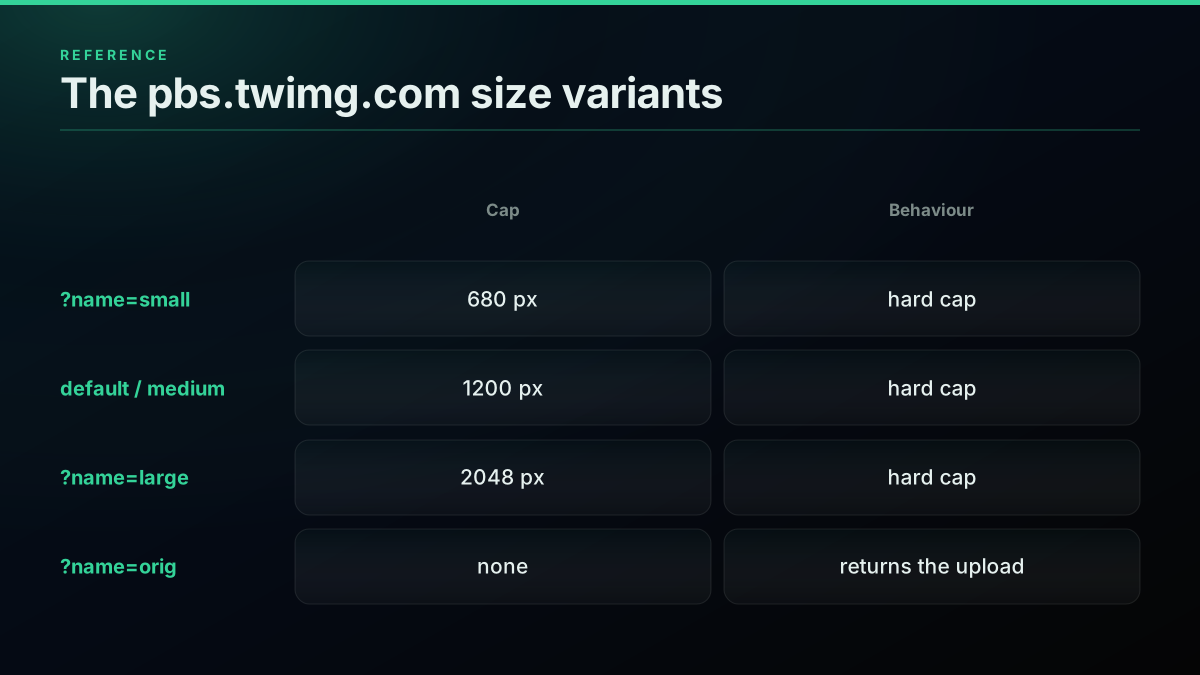
| Variant | Max long edge observed | Behaviour |
|---|---|---|
| Bare URL (as returned) | 1200 px | Hard cap at 1200 |
?name=small | 680 px | Hard cap at 680 |
?name=medium | 1200 px | Identical to bare URL |
?name=large | 2048 px | Hard cap at 2048 |
?name=orig | 4129 px | No cap, returns the upload |
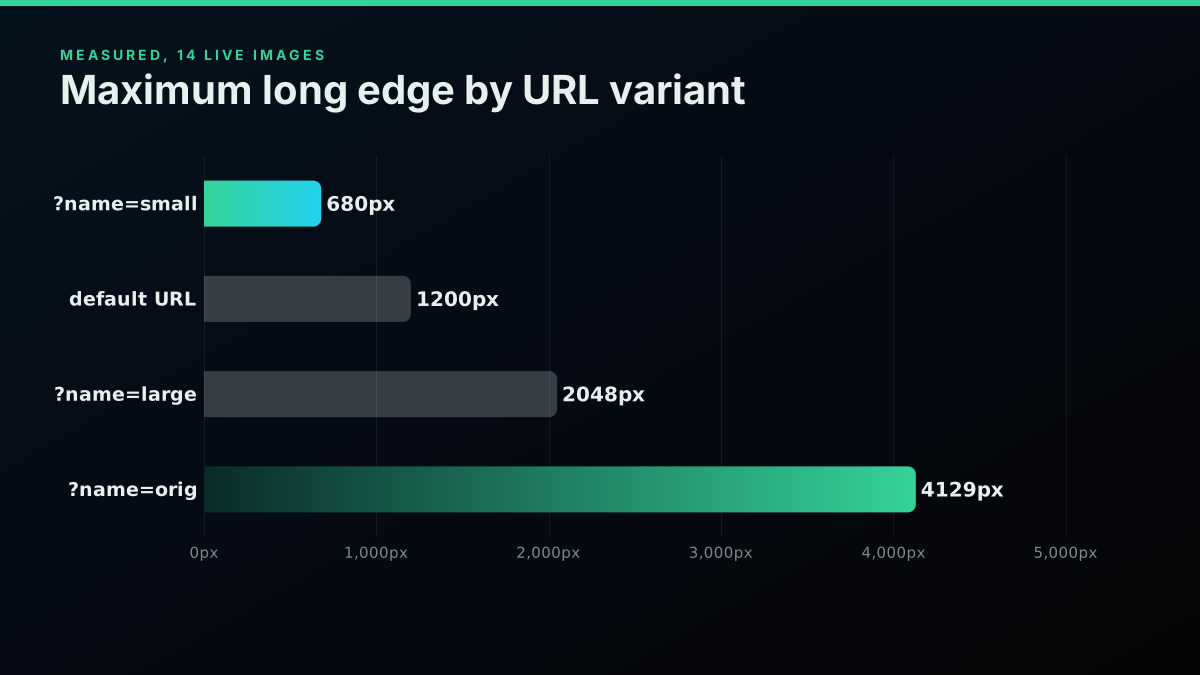
The results, across 14 images:
- 10 of the 14 images came back smaller at the bare URL than at
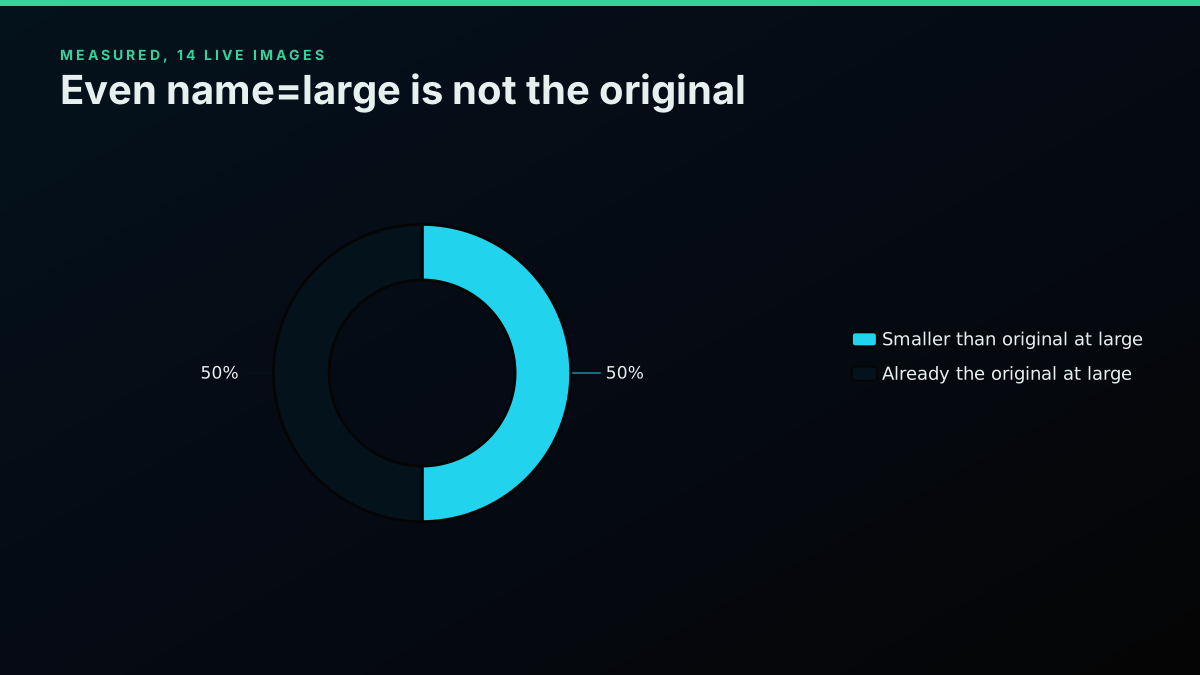
?name=orig. - 7 of the 14 images were still smaller at
?name=largethan at?name=orig, so even the large variant is not the original for half the sample. - Among the 10 images that lost anything, the original carried a mean 6.9 times the pixel count of the default URL.
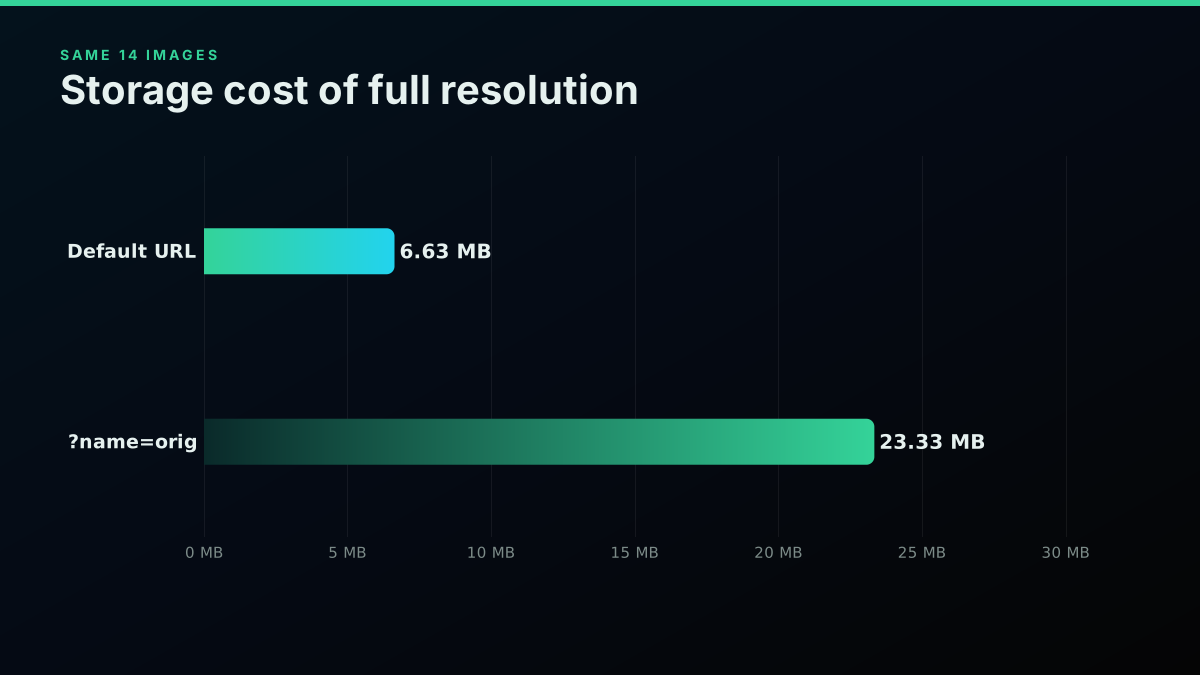
- Across the whole sample the originals totalled 23,329,333 bytes against 6,629,786 at the default, a 3.52x difference.
- The single worst case went from 1200x1200 at 169,817 bytes to 2152x2152 at 4,853,922 bytes, 28.6 times the bytes.
- The largest original in the sample was 4056x4129, against a 1200 pixel default.
The four images that did not change were simply uploaded at or below the cap. That is the important safety property: when the original is smaller than the size you request, every larger variant returns the identical file rather than upscaling it. So ?name=orig is never worse than the default. There is no case where asking for the original costs you quality, only bytes.
A second syntax also works. The legacy colon form, https://pbs.twimg.com/media/ABC.jpg:orig, still returned HTTP 200 and the identical original when tested. So did ?format=jpg&name=orig and the numeric ?name=4096x4096. The query-parameter form is the current convention and the one to write in new code, but if you inherit a codebase using :orig, it is not broken.
How Do I Use Python Iterators to solve Rest API Pagination Problem?
The reply that thread needed is the one line above: you already have the actual URL to the image, so you never needed to scrape the page at all. As one commenter put it bluntly, "Again, I don't understand why you need to 'scrape'; you have the actual URL to the image itself."
Why Does media_url_https Return a Thumbnail for a Video?
This one is quiet and costly, so it gets its own section. A video entry carries a media_url_https field that looks identical to a photo's, returns a real image when fetched, and is not the video. It is the poster frame, and nothing in the response warns you about the substitution.
A video entry in the media array still has a media_url_https field. It looks exactly like a photo's. It returns a real image when you fetch it. And it is not the video.
Here is a live video entry:
{
  "type": "video",
  "media_url_https": "https://pbs.twimg.com/media/HO_SOR-WYAAVT4J.jpg",
  "url": "https://t.co/AMkUR50Fo7",
  "video_info": {
    "variants": [
      { "content_type": "video/mp4", "bitrate": 288000,  "url": ".../480x270/...mp4" },
      { "content_type": "video/mp4", "bitrate": 832000,  "url": ".../640x360/...mp4" },
      { "content_type": "video/mp4", "bitrate": 2176000, "url": ".../1280x720/...mp4" }
    ]
  }
}
Note the .jpg extension on media_url_https for something typed video. That is the poster frame. A harvest loop that reads media_url_https without checking type will collect a thumbnail for every video in the set, write it to disk with a plausible filename, and report success. Nothing errors. You find out weeks later when someone asks why the video assets are all 1280x720 stills.
If you want the video, read video_info.variants, keep the video/mp4 entries, and pick the highest bitrate:
def best_video_url(media_entry):
    variants = media_entry.get("video_info", {}).get("variants", [])
    mp4s = [v for v in variants if v.get("content_type") == "video/mp4"]
    if not mp4s:
        return None
    return max(mp4s, key=lambda v: v.get("bitrate", 0))["url"]
Note that animated_gif is a third type, and X stores those as silent mp4 files, so they carry video_info too and go down the same branch rather than the photo one.
For a walkthrough of the same photo-and-video split from a tooling perspective, this one covers pulling both kinds of media out of an account in a single pass:
Watch how to download all Twitter media at once, images and videos, on YouTube
It is a useful sanity check on the branch logic above: the moment a tool stops separating photos from videos, the output folder fills with poster frames that look like successful downloads.
Do Profile Pictures Use the Same Full-Resolution Trick?
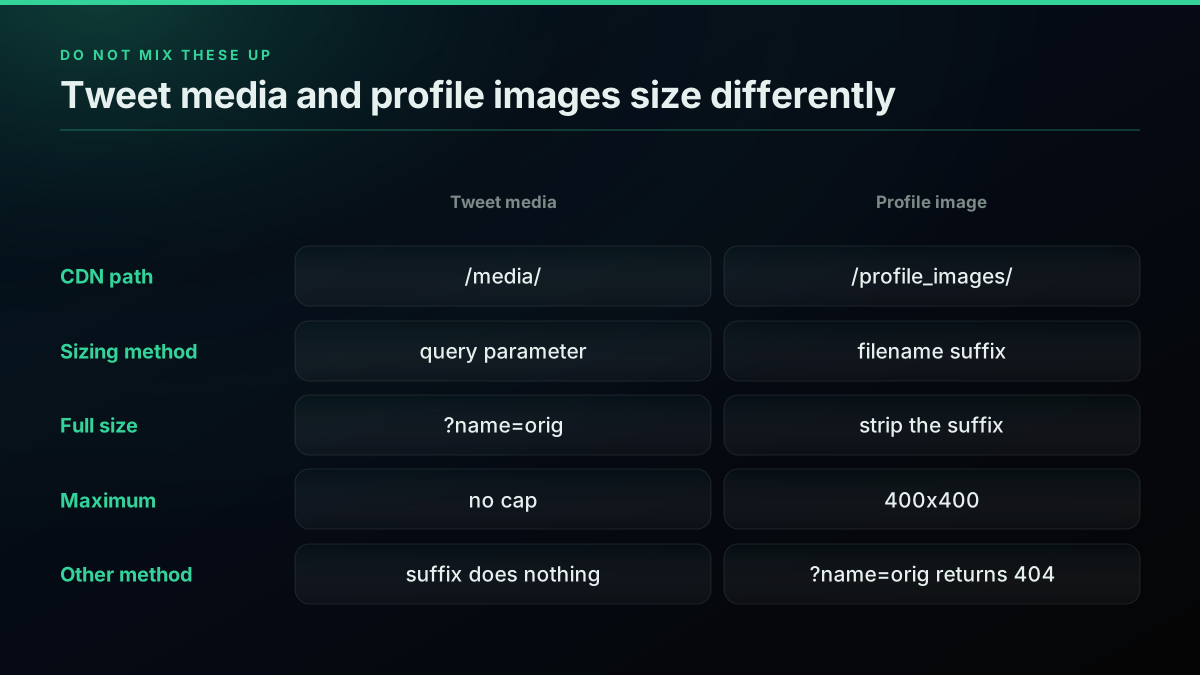
Search for "twitter image full resolution" and you will get answers about stripping _normal from a filename. Those answers are correct, and they are about a different thing. Applying them to tweet media will not work, and applying the tweet-media trick to a profile image returns a 404.
Profile images live under /profile_images/ and are sized by filename suffix. Measured on 8 August 2026:
| Profile image URL form | Result |
|---|---|
..._normal.jpg | 48x48 |
..._bigger.jpg | 73x73 |
..._400x400.jpg | 400x400 |
....jpg (suffix stripped) | 400x400 |
..._normal.jpg?name=orig | HTTP 404 |
Two things follow. First, stripping the suffix does give you the largest available profile image, but that maximum is now 400x400, which matches what developers observed when the platform began scaling profile uploads down and discarding the originals. Do not expect a 4096px avatar. Second, the query-parameter mechanism does not exist on this path at all, which the 404 proves outright.
So the rule is: tweet media at /media/ uses query parameters, profile media at /profile_images/ uses filename suffixes, and the two never interchange. Most of the confusion in the search results for this topic comes from answers that do not say which of the two they are about.
Pulling an entire media history
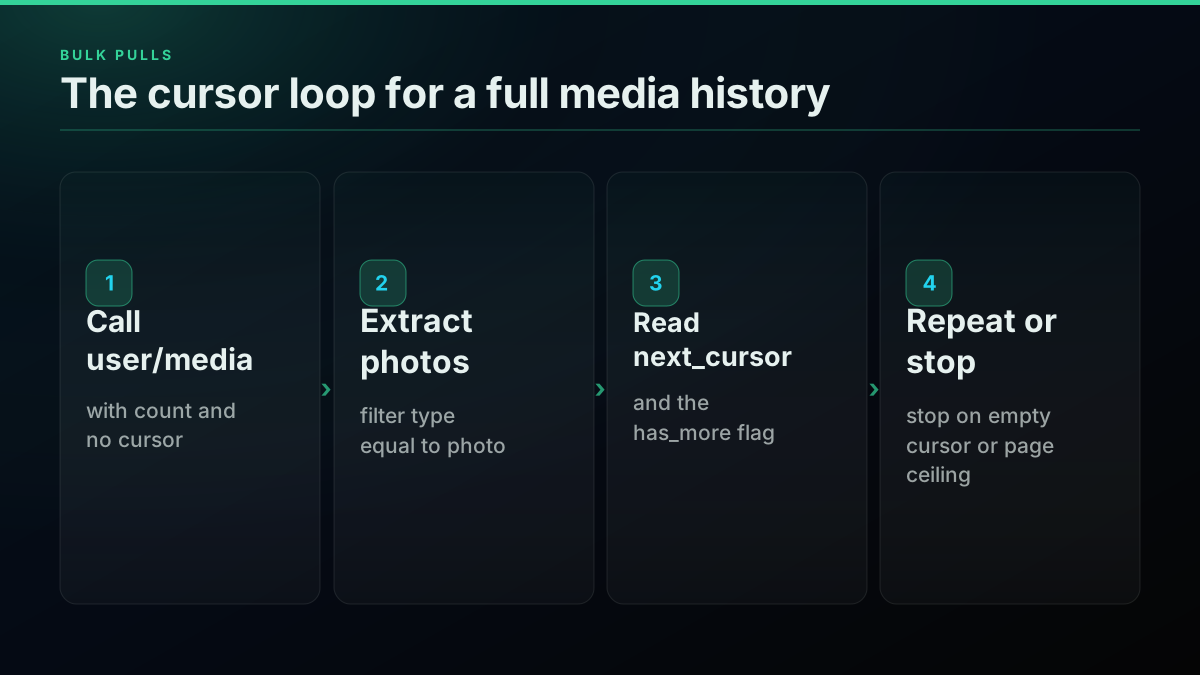
One call returns one page of results. For a full back-catalogue you walk the cursor, passing the next_cursor value from each response back into the next request until the API stops returning one. The loop below also carries a hard page ceiling so a large account cannot drain your balance unattended.
def all_image_urls(username: str, page_size: int = 100, max_pages: int = 50):
    cursor, pages, seen = None, 0, []
    while pages < max_pages:
        params = {"username": username, "count": page_size}
        if cursor:
            params["cursor"] = cursor
        r = requests.get(
            f"{BASE}/user/media",
            headers={"X-API-Key": API_KEY},
            params=params,
            timeout=30,
        )
        r.raise_for_status()
        body = r.json()

        for tweet in body.get("tweets", []):
            for m in tweet.get("extended_entities", {}).get("media", []):
                if m.get("type") == "photo":
                    seen.append(f'{m["media_url_https"]}?name=orig')

        cursor = body.get("next_cursor")
        pages += 1
        if not body.get("has_more") or not cursor:
            break
    return seen
The loop stops on either has_more going false or the cursor going empty, and it carries a max_pages ceiling so a runaway account cannot spend your balance without limit. Always set that ceiling. The pagination guide covers cursor semantics across the other endpoints, and the rate limit guide covers what to do when a page fails.
If you need images matching a topic rather than an account, swap the endpoint for advanced search with filter:images in the query. The media array parses identically, so the extraction function above is unchanged.
Finding image tweets by topic instead of by account
Everything so far pulls from one account's media timeline. If the job is topical, "every image posted about a product launch," you want search instead, and the extraction code does not change at all.
The tweet/advanced_search endpoint accepts the standard operator set, including filter:images, which restricts results to tweets carrying at least one photo:
def image_tweets_for(query: str, count: int = 100):
    r = requests.get(
        f"{BASE}/tweet/advanced_search",
        headers={"X-API-Key": API_KEY},
        params={"query": f"{query} filter:images -filter:retweets", "count": count},
        timeout=30,
    )
    r.raise_for_status()
    return r.json().get("tweets", [])
Two operators are doing real work there. filter:images is the inclusion filter. -filter:retweets is the one people forget, and without it a popular image comes back once per retweet, inflating your result count and your dedupe workload for no benefit.
Be aware that filter:images and the related has:images operator have a documented history of imprecision, and one of the official forum threads ranking for this topic is a report of exactly that. Treat the operator as a useful narrowing heuristic rather than a guarantee, and keep the type == "photo" check in your parsing loop regardless. The operator filters which tweets you receive; your code still decides which media inside them is an image.
The advanced search operator guide covers the full set, and searching tweets by date covers windowing a topical pull.
The cheapest pay-as-you-go Twitter API. Try it free.
$0.0008 a call, about $0.04 per 1,000 tweets at 20 tweets a page. $0.50 free credits. No credit card required.
Downloading the files, and proving you got the original
Extraction gives you URLs. If the job is to archive the images rather than link them, there is one more step, plus one verification worth building in from the start, because nothing in the CDN response tells you which size variant you actually received and a wrong guess fails silently.
import io
import os
import requests
from PIL import Image


def download_original(media_url_https: str, dest_dir: str) -> dict:
    """Fetch the original and record what actually came back."""
    url = f"{media_url_https}?name=orig"
    r = requests.get(url, headers={"User-Agent": "Mozilla/5.0"}, timeout=60)
    r.raise_for_status()

    width, height = Image.open(io.BytesIO(r.content)).size
    name = media_url_https.rsplit("/", 1)[-1]
    path = os.path.join(dest_dir, name)
    with open(path, "wb") as fh:
        fh.write(r.content)

    return {"path": path, "bytes": len(r.content), "width": width, "height": height}
The reason to read dimensions back out of the bytes rather than trusting the request is that nothing in the response tells you which variant you received. Ask for a size that does not exist and the CDN does not error, it serves you something. That is a silent-failure surface, and the only way to close it is to measure what landed.
If you want to be certain a pipeline is genuinely pulling originals, fetch both variants for a sample and compare:
def variant_gap(media_url_https: str) -> dict:
    def dims(suffix):
        r = requests.get(media_url_https + suffix, headers={"User-Agent": "Mozilla/5.0"}, timeout=60)
        r.raise_for_status()
        return Image.open(io.BytesIO(r.content)).size, len(r.content)

    (bw, bh), bb = dims("")
    (ow, oh), ob = dims("?name=orig")
    return {
        "default": f"{bw}x{bh}",
        "original": f"{ow}x{oh}",
        "upgraded": (ow, oh) != (bw, bh),
        "byte_ratio": round(ob / bb, 2) if bb else None,
    }
That function is the exact instrument behind the 14-image measurement in this guide. Run it over a sample of your own corpus before committing to a storage estimate, because the ratio varies enormously by account: a design-heavy account posting large PNG exports will skew far above the 3.52x average, while an account posting screenshots at 1200px wide will show almost no gap at all.
Deduplicating across tweets
One image can appear many times. Retweets carry the original's media, quote tweets can surface it again, and accounts routinely repost the same asset. If you are building a corpus rather than a timeline view, dedupe or you will pay storage for the same file repeatedly.
The filename on the CDN is the stable identity. In https://pbs.twimg.com/media/HPIGsX5WcAE0ilP.jpg, the HPIGsX5WcAE0ilP portion is the media identifier and it is consistent across every tweet surfacing that image, so it is a better dedupe key than the tweet ID:
def media_key(media_url_https: str) -> str:
    return media_url_https.rsplit("/", 1)[-1].split(".")[0]


seen, unique = set(), []
for img in image_urls_from_user("NASAHubble", count=200):
    k = media_key(img["display_url"])
    if k in seen:
        continue
    seen.add(k)
    unique.append(img)
Deduping on the URL string alone fails, because the same image can arrive with and without a size parameter, and with .jpg or .png depending on the original format. Deduping on bytes works but requires downloading first, which defeats the point. The identifier is free and available before any fetch.
How Much Does Extracting Tweet Images Cost?
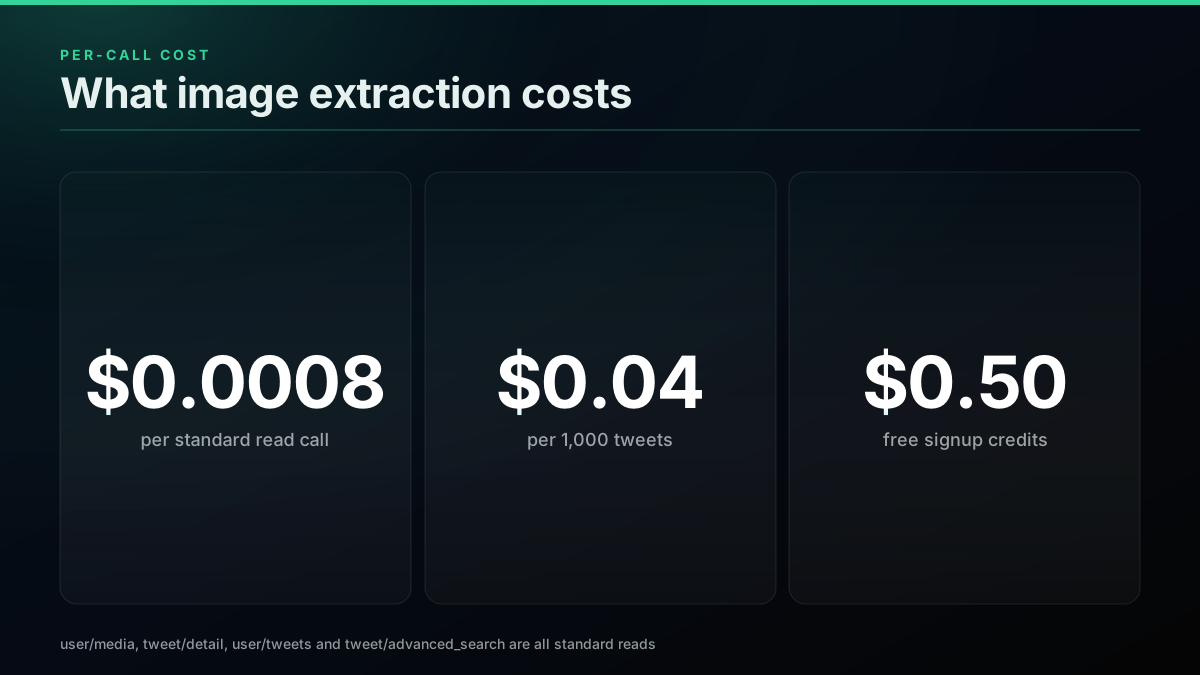
Every endpoint that returns tweet media is a standard read at $0.0008 per call. That covers user/media, tweet/detail, user/tweets, and tweet/advanced_search, verified against the deployed per-endpoint cost table.
A media timeline call returns roughly 20 tweets, so:
| Job | Calls | Cost |
|---|---|---|
| Image URLs for 1,000 tweets | ~50 | ~$0.04 |
| Image URLs for 10,000 tweets | ~500 | ~$0.40 |
| One tweet's media by ID | 1 | $0.0008 |
Signup credits of $0.50 cover about 625 standard calls, which is roughly 12,500 tweets, enough to run a real extraction job before paying anything.
Downloading the image files themselves is worth stating plainly: fetching pbs.twimg.com is not an API call and is not billed by the API. Your only cost there is bandwidth and storage, and that is where the 3.52x figure from the measurement section becomes a budgeting input rather than a curiosity. Ten thousand full-resolution images is a meaningfully different storage line than ten thousand display copies.

NASA
@NASA
Total solar eclipses provide a unique opportunity to study the Sun, and on Aug. 12, we'll take to the skies to learn more. NASA-funded teams will study the eclipse with a high-flying research jet and scientific balloons: https://t.co/ec9MqxTSAS https://t.co/c0mIAC1szU

That tweet is one of the live photo posts used in the measurement above. Its attached image carries the alt text describing the Moon's shadow on Earth, which is exactly the ext_alt_text field most extraction scripts discard.
Once the URLs are cheap to get, the interesting work moves downstream. Turning tweet media into something else, a rendered card, a dataset, a thumbnail grid, is a well-worn pattern, and the API call is the smallest part of it:

Jon Yongfook
@yongfook
Sometimes when I’m by myself I just plug tweet urls into Tweetagram and my mind is blown that in a few seconds: - it grabs data from the Twitter API - data is sent to/from Rails - several images are generated by AWS lambda Technology is cool! https://t.co/3ecnHLiPlS
That pipeline is exactly the shape this guide feeds: one cheap read to get the media URLs, then whatever you do with the files afterwards. The extraction is rarely the bottleneck once you stop paying per-seat for it.
For a fuller cost picture across providers, the cost benchmark and the cheapest provider ranking both break the per-call maths down further, and is the Twitter API free covers what the official free tier does and does not allow.
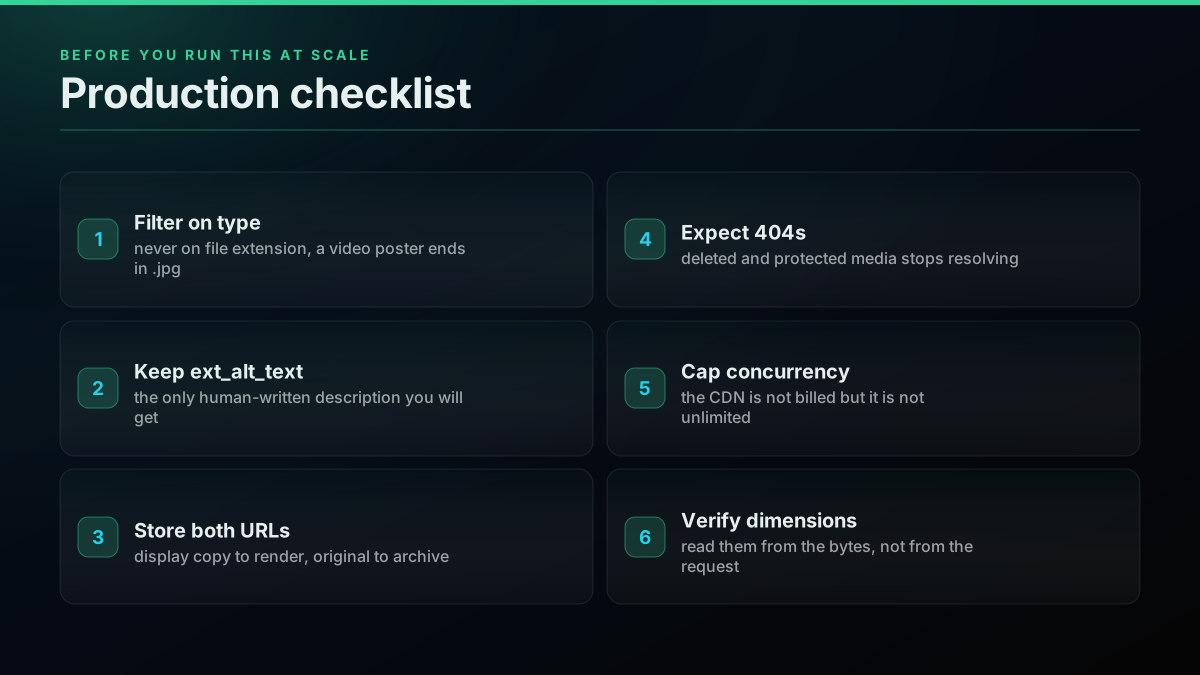
Production notes
A few things separate a throwaway script from a job you can leave running unattended for a week. None of them are difficult, and every one of them is easier to build in at the start than to retrofit after you have already written several thousand files to disk.
Filter on type, not on file extension. A video's poster frame ends in .jpg, so extension sniffing puts videos in your photo bucket. This is the single highest-frequency defect in the extraction code you will find in public repositories.
Keep ext_alt_text. It costs nothing, it is already in the response, and it is the only human-written description of the image you will ever get. If the pipeline feeds a search index, a dataset, or anything that needs captions, discarding it means paying a vision model later to regenerate something the author already wrote.
Store both URLs. Keep the display copy and the ?name=orig form. The display copy is the right thing to render in a UI, and the original is the right thing to archive. Deriving one from the other later is trivial, but only if you kept the base.
Expect some media to be gone. Deleted tweets, suspended accounts, and protected accounts all produce media entries that no longer resolve. Treat a 404 from the CDN as an expected outcome and record it rather than retrying forever. The error codes reference covers the API-side statuses.
Do not hammer the CDN in parallel without a limit. The API has a documented per-call cost and the CDN does not, which makes it tempting to fan out hard. Keep concurrency modest and add a retry with backoff. If you are in Python, requests supports this cleanly through a mounted HTTPAdapter with a Retry policy, and in Node the built-in fetch pairs with an AbortSignal timeout. The best practices guide covers the production patterns in more depth.
Verify dimensions with a real image library. Reading width and height from the bytes needs a decoder, and Pillow is the standard choice in Python. Do not infer dimensions from the size parameter you requested, because as noted above the CDN will happily serve a different variant than the one you asked for without signalling it.
Respect what you are allowed to do with the images. Extraction is a technical question, licensing is not. Photographs in tweets belong to the author, and a pipeline that archives them for redistribution sits in a very different position than one that indexes them for analysis. Check the terms that apply to your use before you build on top of a bulk archive.
Where this fits
If you are choosing an approach rather than writing the code, the decision guide compares the official API against third-party options, and how to choose a Twitter API walks the evaluation. If you already have a key and want the next task, scraping tweet history and monitoring mentions in real time both reuse the same response shape this guide parses, and what to build with the Twitter API collects the use cases. For authentication specifics, see the authentication guide and how to get an API key.
The short version, one more time: extended_entities.media[], filter type == "photo", read media_url_https, append ?name=orig. Four steps, two of which most guides leave out.
// sources
Where these numbers come from
Each row is a figure in this post and the artefact it was read from. Prices and limits on this platform move, so check the date on the source before you plan against it.
- X API data dictionary, media object
- Backs the comparison against the official v2 shape: media is returned under includes.media only when expansions=attachments.media_keys is requested, media.fields must be asked for explicitly, photos carry url while videos and animated GIFs carry preview_image_url instead, and width, height and alt_text are available fields.
- X Developer Community, Twitter API images thread
- The source for the reported symptom that only a fraction of fetched tweets appeared to have images, which is the signature of a request missing the media_keys expansion entirely.
- Stack Overflow, how to get image url from tweets using the Twitter API
- Documents the decade-long drift in the sizing answer that this guide reconciles: the tweet-entities route, the tweet_mode=extended requirement, stripping the _normal suffix for profile images, and the later observation that profile uploads are scaled to 400x400 and the original discarded.
- DEV Community, analyzing images using the Twitter API v2
- A dated, X-staff-authored walkthrough of pulling media out of v2 responses, cited as one of the few authoritative treatments and as evidence that the documented parameter set predates the current one.
- X Developer Community, has:images and has:media thread
- Backs the caution that the image-filter operators are a narrowing heuristic rather than a guarantee, which is why the type equals photo check stays in the parsing loop even when the query already filters.
- Requests documentation
- Backs the recommended retry-with-backoff pattern for CDN downloads, via a mounted HTTPAdapter carrying a Retry policy.
- MDN Fetch API reference
- Documents the global fetch the Node.js extraction example calls with no dependency installed, and the AbortSignal timeout pairing referenced in the production notes.
- Pillow documentation
- Backs the dimension-verification step: reading width and height back out of the downloaded bytes is the only way to confirm which size variant the CDN actually served, since the response does not say.
Frequently Asked Questions
Read the media array on the tweet object. Each photo carries a media_url_https field pointing at pbs.twimg.com, and that string is the image URL. On TwitterAPIs the media array lives at extended_entities.media on any tweet returned by user/media, tweet/detail, user/tweets, or tweet/advanced_search, and each entry carries type, media_url_https, url, and ext_alt_text. Filter on type equal to photo, then read media_url_https. The whole extraction is two lines once you have the response, and a standard read call costs $0.0008.
Four named sizes work as a name query parameter on a tweet media URL: small, medium, large, and orig. Measured in August 2026, small returns 680 pixels on the long edge, the bare URL and medium both cap at 1200, large caps at 2048, and orig returns the original upload with no cap. If the original is smaller than the cap you asked for, every larger variant returns the identical file rather than upscaling it, so name=orig is always safe. A numeric form such as name=4096x4096 also resolves and behaves as a cap.
Not the way most people expect. A video entry still carries a media_url_https value, but it points at a .jpg poster frame, not the video file. If you harvest media_url_https without filtering on type you will silently collect thumbnails for every video in the set and never notice, because the URLs look correct and return real images. For a video, read video_info.variants instead and pick the mp4 variant with the highest bitrate. Filter on type equal to photo whenever you specifically want images.
On TwitterAPIs every endpoint that returns tweet media is a standard read at $0.0008 per call, including user/media, tweet/detail, user/tweets, and tweet/advanced_search. A media timeline call returns roughly 20 tweets, so pulling the image URLs for 1,000 tweets costs about $0.04. Downloading the image files themselves from the CDN is not an API call and is not billed by the API at all. Signup credits of $0.50 cover roughly 625 standard calls before you pay anything.
Append the query parameter name=orig to the media_url_https value. The bare URL the API returns is not the original upload, it is a resized copy capped at 1200 pixels on the long edge. Adding ?name=orig returns the file as uploaded. Measured across 14 live images in August 2026, 10 of the 14 came back smaller than the original at the default URL, and the largest original in that sample was 4129 pixels on the long edge against a 1200 pixel default. The legacy colon syntax :orig still resolves as well, but the query-parameter form is the current one.
Because you used media_url_https exactly as the API returned it. That URL is a display copy capped at 1200 pixels on the long edge, not the original file. It is the single most common cause of blurry or undersized saved images. Add ?name=orig to the same URL and you get the upload. In a 14-image sample, the default URL lost resolution on 10 of them, with a mean pixel count 6.9 times smaller than the original among the images that lost anything, and one image where the original was 28.6 times larger in bytes.
No, and mixing the two is a common failure. Profile images live under a profile_images path and are sized with a filename suffix, not a query parameter. Measured in August 2026, the _normal suffix returns 48x48, _bigger returns 73x73, _400x400 returns 400x400, and stripping the suffix entirely also returns 400x400, which is the current maximum. Adding ?name=orig to a profile image URL returns HTTP 404. Tweet media uses query parameters, profile media uses filename suffixes, and the two do not interchange.
Check out similar blogs
More guides on the Twitter/X API, scraping, and pricing.
Twitter API Authentication in 2026: OAuth, Bearer Tokens, and Fixing 401
How Twitter (X) API authentication works in 2026: the four credential types, OAuth 1.0a versus OAuth 2.0, generating and using a bearer token, runnable Python and Node.js, and a fix for every 401 Unauthorized and 403 error, plus the one-header alternative.
How to Get Everyone Who Retweeted a Tweet via API (2026)
Pull the full list of accounts that reposted any tweet with a real 2026 API. Runnable Python and Node.js, cursor pagination for the whole list, a real amplifier ranking over live data, a bot filter, and the honest per-call cost.
How to Get All Replies to a Tweet via API (2026)
Pull the replies under any tweet with a real 2026 API. Runnable Python and Node.js, cursor pagination, the conversation_id tail sweep for the long tail, nested replies-to-replies, signal-versus-noise filtering over live data, and the honest per-call cost.
Twitter API Pagination 2026: How next_token Works (and a Simpler Alternative)
How Twitter API pagination works in 2026. The official next_token loop explained field by field, a simpler single-cursor alternative, runnable Python and Node code, and the real per-call cost of a paginated pull.
How to Search Tweets by Hashtag via API 2026 (Python + Node.js)
Search tweets by hashtag with a real 2026 API in Python and Node.js. Runnable code for the hashtag operator, engagement filters, cursor pagination, deduping retweets, counting authors, and the real per-call cost.
Fetch a Full Twitter Thread via API in One Call (2026)
How to pull an entire Twitter thread, the root tweet plus every connected tweet in the chain, in a single API call with the tweet/thread endpoint, instead of walking replies by hand. Live-tested code in curl, Python, and Node.js, with the real per-call cost.

Twitter API Tutorial 2026: The Complete Developer Guide
The 2026 Twitter API tutorial built after the pricing collapse. Auth, endpoints, code, rate limits, real costs, and the alternative when official gets too expensive.

How to Track a Tweet's Performance in Real Time with the X API
Poll a tweet's engagement counts over time with the X API, compute a views-to-likes ratio, and read the quote-tweet layer to tell an organically growing launch tweet from a boosted one. Tested Python and curl.