GUIDE
Twitter API Error Codes: The Complete 2026 Reference
The complete 2026 reference to X (Twitter) API error codes. What every code means (32, 88, 187, 226, 401, 403, 429, 453 and the rest), the real cause behind it, and the exact fix, plus the HTTP status versus error code distinction that trips up most developers.
Per our own spec, 70 of 121 endpoints bill $0.0008, 24 are free, and 27 sit between $0.0016 and $0.01. Every price ships inside our published OpenAPI document as an x-cost-usd field, so any figure in this post can be checked against the contract that bills it rather than taken on trust.
You called the X API, the service most developers still say Twitter for, and instead of data you got back a number. Maybe it was a clean HTTP 403, maybe it was a JSON body carrying code: 89, maybe it was both at once, and the message beside it told you almost nothing about what to actually do next. That gap is the whole problem with X API errors. The official docs split the numeric codes from the HTTP statuses across separate pages, the community answers cover five codes and stop, and nobody puts the meaning, the real cause, and the exact fix for every code in one place. This reference does. Every code you are likely to hit in 2026 is below, grouped by the class of problem it belongs to, with the underlying cause spelled out and the fix stated plainly. Read the section that matches your status code, or jump to the complete table near the end.
TL;DR: X API failures come in two layers. The HTTP status (401, 403, 404, 429, 503) is the category, and the numeric error code in the body (32, 88, 187, 226, 261, 453 and the rest) is the specific reason. A 429 is a timing block that fixes itself once the rate limit window refills. A 403 is an access block that never clears by waiting and needs a real change: app permissions, access tier, or a different endpoint. Authentication errors (32, 89, 215) mean your credentials or OAuth signature are wrong. The 2026 access tier collapse made 453 the new default wall. Below is every code with cause and fix, plus how a per-call read provider like TwitterAPIs removes whole error classes, the OAuth failures, the tier 403s, and the rate window 429s, so they never reach your code.
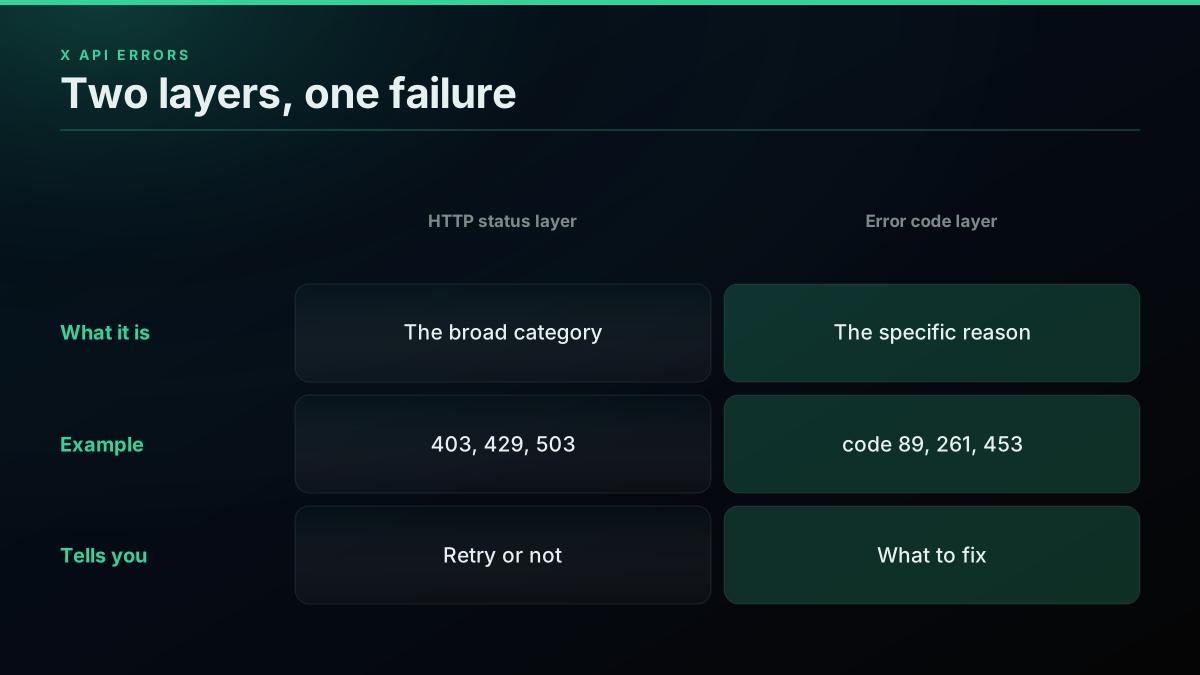
Every failure has a status layer and a code layer, and the fix lives in the code layer
The mistake almost everyone makes at the start is treating the HTTP status as the whole story. It is not. The status tells you which shelf the error sits on, and the code tells you which item on that shelf broke. A 403 with code 261 and a 403 with code 453 arrive looking identical and need completely different fixes. Get comfortable reading both layers and most of the confusion evaporates.
HTTP Status Codes Versus Error Codes: The Distinction That Trips Everyone
The X API reports failure on two layers, and mixing them up is the single most common source of wasted debugging time. The outer layer is the HTTP status code, the standard 4xx or 5xx number every web request carries, and it puts your failure into a broad category. The inner layer is X's own error code, a number that rides inside the JSON response body and names the exact reason. The status is the category. The code is the diagnosis. A handler that branches only on the status will keep confusing a permission problem with a rate problem, because both can share one status.
On the older v1.1 surface, the body is a JSON object holding a list of errors, each with a numeric code and a message. On the v2 surface, the shape changed to a set of title, detail, type, and status fields, sometimes alongside a partial errors array. Your handler needs to read whichever shape it gets and branch on the specific reason, not the status alone. The authoritative status meanings are documented on the official X API response codes reference, and the transport-level definitions trace back to the HTTP semantics specification in RFC 9110.
| HTTP status | Category | What it usually means on X | Recoverable? |
|---|---|---|---|
| 200 / 201 / 204 | Success | Request worked (204 = success, no body, on deletes) | n/a |
| 400 Bad Request | Client error | Malformed query, bad parameter, invalid JSON | No, fix the request |
| 401 Unauthorized | Auth error | Missing or invalid credentials (codes 32, 89, 135, 215) | No, fix the auth |
| 403 Forbidden | Access error | Valid auth, no permission (codes 87, 261, 326, 453) | No, fix access |
| 404 Not Found | Client error | Resource or user does not exist (codes 34, 50, 144) | No |
| 429 Too Many Requests | Throttle | Rate window or usage cap spent (code 88) | Yes, wait for reset |
| 500 / 502 | Server error | Internal error on X's side (code 131) | Yes, retry |
| 503 Service Unavailable | Server error | X is over capacity (code 130) | Yes, retry |
The v1.1 surface returns a list of errors, each carrying a numeric code and a human message. This is the shape most older libraries and code samples expect:
{
  "errors": [
    { "code": 89, "message": "Invalid or expired token." }
  ]
}
The v2 surface dropped the numeric code and moved to a problem-details shape built around a detail string, a type URI, and the HTTP status. Your parser has to handle whichever one it receives:
{
  "title": "Forbidden",
  "detail": "You are not permitted to access this resource.",
  "type": "https://api.twitter.com/2/problems/not-authorized-for-resource",
  "status": 403
}
If you want to see both layers at once while debugging, capture the status and the body in a single call and read them together:
# Capture the HTTP status and the error body in one request
curl -sS -o body.json -w "status=%{http_code}\n" \
  "https://api.x.com/2/tweets/search/recent?query=from:x" \
  -H "Authorization: Bearer $X_BEARER_TOKEN"
cat body.json   # the numeric code (v1.1) or the detail string (v2) lives here
The practical rule that falls out of this is short. Read the status to know whether the failure is worth retrying at all, then read the code or the detail to know what to change. A 429 and a 503 are the only two categories where waiting and retrying is the right move. Every 4xx below them, except 429, is telling you the request or the credentials are broken, and no amount of retrying will fix a broken request. If the status layer itself is still fuzzy, this short walkthrough of every HTTP status code is a good primer before you map them onto X's error codes:
https://www.youtube.com/watch?v=nb0xQUcxVj4
Once the status layer clicks, it helps to hold the error codes in their families rather than as a flat list of numbers, because the family is what tells you which kind of fix you are reaching for.
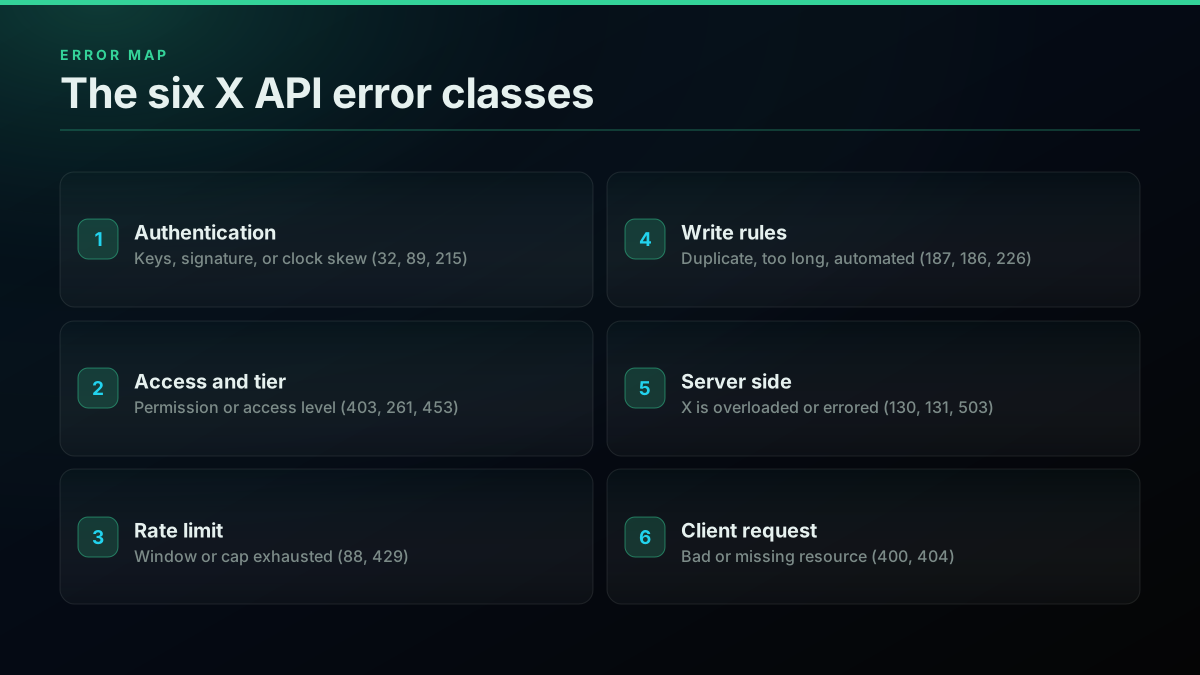
Grouping the codes into six families is what turns a random number into a known fix
Keep those six families in mind as you read the sections below, because every code that follows belongs to exactly one of them, and the family is the fastest route to the fix.

kyle (reddit AI agents)
@sellingshovels
@RhysSullivan and 429 is the error code for rate limits https://t.co/DYV6B0riZA

Authentication and Token Errors: 32, 89, 135, 215, 401
Authentication errors are the first wall almost every developer hits, and they all say roughly the same thing in different words: X could not confirm who you are before it even looked at what you asked for. These arrive with HTTP 401 and carry codes like 32, 89, and 135. The cause is nearly always one of three things: keys that are wrong or have been regenerated, an OAuth 1.0a signature that was built incorrectly, or clock skew where your system time has drifted far enough from the server that the request timestamp is rejected. Work through those three in order and you clear the vast majority of auth failures.
Code 32, Could not authenticate you, is the generic authentication miss. It shows up when the signature does not validate, which can be a rotated key, a wrong token secret, or a bad signature base string. Code 89, Invalid or expired token, is more specific: the token itself is no longer valid, usually because it was revoked, expired, or minted before an app permission change. Code 135 is code 32's timestamp cousin, thrown when your request time is too far from X's server time, which points straight at a clock sync problem. Code 215, Bad authentication data, means the request arrived with no usable auth header at all or a malformed one, and unlike the other three it returns HTTP 400 rather than 401.
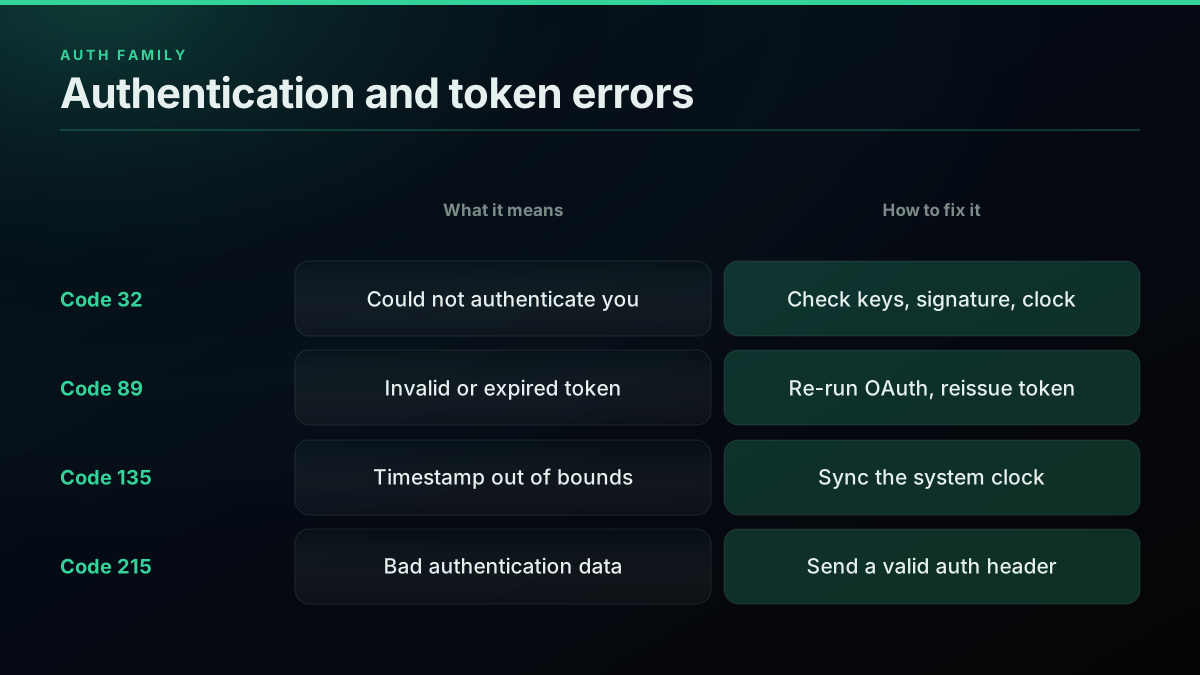
The auth error family almost always comes down to keys, signature, or clock skew
| Code | HTTP | Meaning | Real cause | Fix |
|---|---|---|---|---|
| 32 | 401 | Could not authenticate you | Wrong keys, bad signature, or clock skew | Regenerate keys, verify signature base string, sync clock |
| 89 | 401 | Invalid or expired token | Token revoked, expired, or permissions changed | Re-run the OAuth flow and reissue the token |
| 135 | 401 | Could not authenticate you (timestamp) | System clock drifted from server time | Sync your clock over NTP |
| 215 | 400 | Bad authentication data | No or malformed Authorization header | Send a valid header for the correct auth type |
| 99 | 403 | Unable to verify your credentials | Wrong secret on verify_credentials | Recheck consumer and token secrets |
There is one auth trap worth calling out because it wastes hours: regenerating the access token after you change an app's permission level. Tokens carry the permissions they were minted with, so if your app was Read-only when you generated the token and you later flip it to Read and Write, the old token still behaves as Read-only until you reissue it. If your auth suddenly works but your writes fail, this is usually why. The step-by-step credential setup lives in the how to get a Twitter API key walkthrough, and the language-specific request signing that these errors depend on is covered in the Python Twitter API tutorial and the Node.js Twitter API tutorial. The canonical meaning of the 401 status itself is defined in MDN's 401 Unauthorized reference.
Still got api key and secret setup tweepy don't let me authenticate
Access, Permission, and Tier Errors: 403, 87, 261, 453, 326
Access errors are where 2026 changed the game. These arrive as HTTP 403 Forbidden, and the crucial thing to understand is that a 403 means your credentials are valid. X knows who you are. It is refusing the specific thing you asked for because your app, your permission level, or your access tier is not allowed to touch that resource. Waiting does nothing here. A 403 is a wall you have to change something to get past, not a timer you wait out. The code inside the 403 tells you which wall you hit, and there are four common ones.
Code 87, Client is not permitted to perform this action, means the endpoint is not in your client's allowed set, often because it was retired or was never available to your app type. Code 261, Application cannot perform write actions, is the Read-only-permission wall described above: your app can read but not write, and the fix is to set it to Read and Write in the portal and reissue the token. Code 453, You currently have access to a subset of X API v2 endpoints, is the big one for 2026: after the legacy access tiers were collapsed, an account without a paid plan or billing configured reaches only a thin slice of endpoints, and any endpoint above that tier throws 453. Code 326 means the account was temporarily locked for looking spammy and needs a verification challenge completed through the web app.
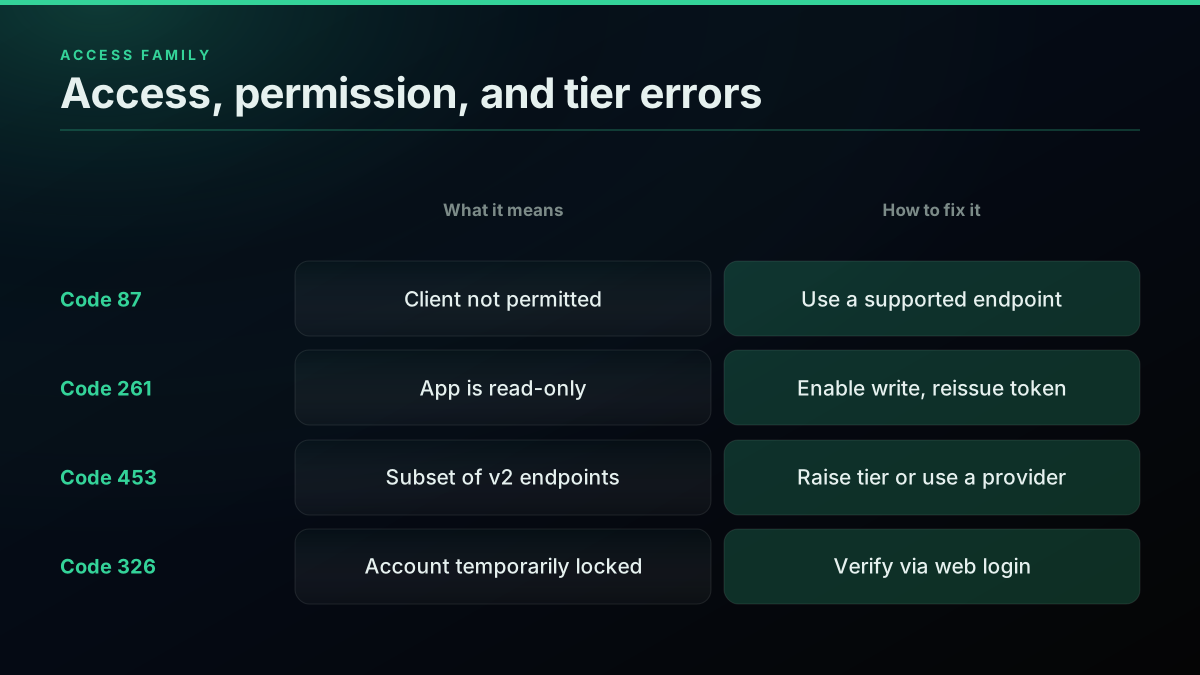
A 403 is an access wall, and the code inside it tells you which wall you hit
| Code | HTTP | Meaning | Real cause | Fix |
|---|---|---|---|---|
| 403 | 403 | Forbidden (generic) | Valid auth, no permission for the resource | Read the code or detail to find the specific wall |
| 87 | 403 | Client not permitted to perform this action | Retired endpoint or wrong app type | Use a supported endpoint or the correct app |
| 261 | 403 | Application cannot perform write actions | App has Read-only permission | Set app to Read and Write, then reissue the token |
| 453 | 403 | Access to a subset of v2 endpoints | No pay-per-use access after the 2026 tier collapse | Set up pay-per-use credits or Enterprise, or use a provider |
| 326 | 403 | Account temporarily locked | Account flagged as spammy | Log in via web and complete verification |
| 63 | 403 | User has been suspended | The target user is suspended | None; the user is gone |
| 64 | 403 | Your account is suspended | Your developer account is suspended | Appeal through the portal |
| 179 | 403 | Not authorized to see this status | Protected or blocked tweet | None for that tweet |
The 453 error deserves the extra attention it now gets, because it is the direct consequence of the 2026 pricing overhaul. When X collapsed the older subscription tiers into pay-per-use, an account that has not moved onto pay-per-use reaches only a thin slice of endpoints. Call anything outside that slice and you get 453. The official explanation lives on the X developer community thread on error 453, and the fuller story of the tier changes is in the 2026 X API pricing change explainer. The broader question of what the official tiers cost against outside providers is covered in the official X API versus third-party comparison and the Twitter API cost breakdown. The 403 status meaning itself is defined in MDN's 403 Forbidden reference.
Twitter/X Bookmarks API returns 403 Forbidden - "You weren't able to give access to the App" error
Start building with TwitterAPIs
$0.0008 a call, about $0.04 per 1,000 tweets at 20 tweets a page. $0.50 free credits. No credit card required.
Rate Limit Errors: 88 and 429
Rate limit errors are the friendliest failures on this list because, unlike the access errors above, they fix themselves. A 429 Too Many Requests means you exhausted the rolling window or usage cap for the endpoint you were calling, and once that window refills the endpoint answers again with nothing required from you. On the older v1.1 surface the same condition also carries code 88, Rate limit exceeded. The single rule that matters: read the x-rate-limit-reset header, which is a Unix timestamp for when your budget returns, wait until wall-clock time passes it, and retry. Do not retry instantly, and do not treat a 429 as an access problem, because it is purely a timing problem. This is the developer-side half of the story; for how it relates to the "Sorry, you are rate limited" message regular users see in the app, and the daily consumer ceilings behind it, see what "rate limited" actually means on X. And for how often each of these codes actually fires in production rather than what it means, the measured failure distribution across 5.16 million calls breaks the corpus down by status code, by endpoint and by week.
The reason a 429 feels sudden is that X meters each endpoint separately against its own sliding window, so a script that hums along at ten requests can fall off a cliff the moment one endpoint's budget hits zero. The three response headers that turn a confusing 429 into an exact countdown, x-rate-limit-limit, x-rate-limit-remaining, and x-rate-limit-reset, are the same ones the retry logic keys off, and the full per-endpoint window model is laid out in the Twitter API rate limit guide. The platform-neutral definition of the status is in MDN's 429 Too Many Requests reference, and the specification origin is section 4 of RFC 6585.
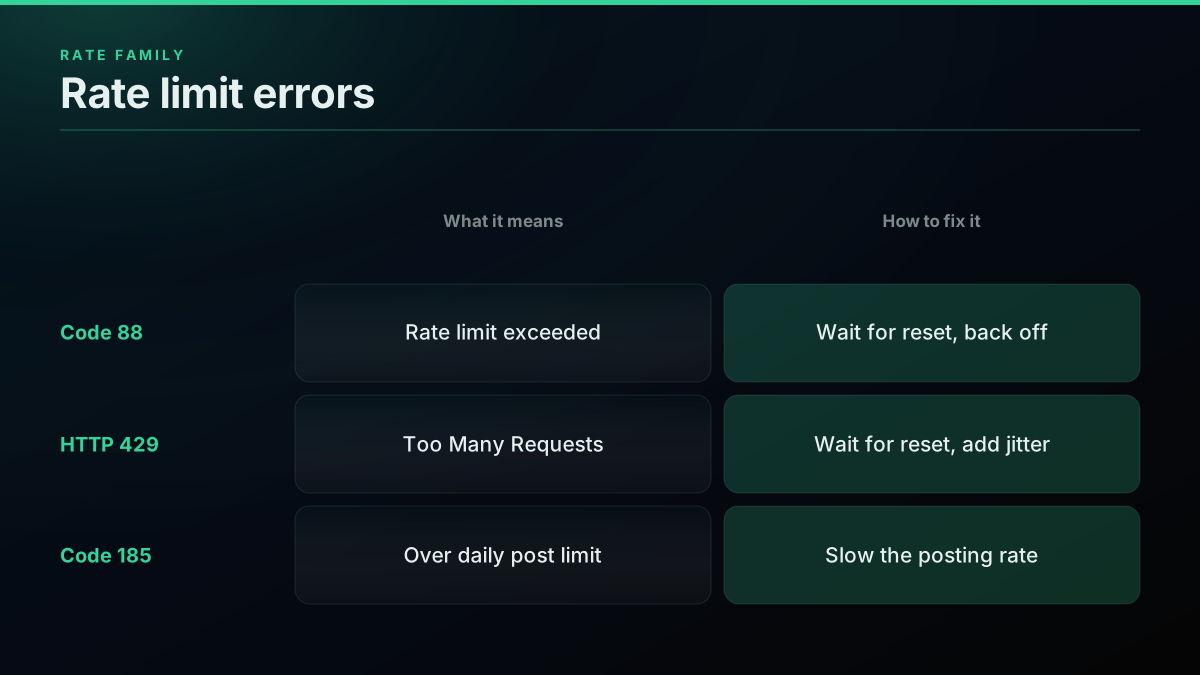
A 429 is a timer, not a wall; read the reset header and wait it out
| Code | HTTP | Meaning | Real cause | Fix |
|---|---|---|---|---|
| 88 | 429 | Rate limit exceeded (v1.1) | Endpoint window budget hit zero | Honor x-rate-limit-reset, back off, retry |
| 429 | 429 | Too Many Requests | Window or monthly usage cap spent | Wait for reset; retry with backoff and jitter |
| 185 | 403 | User is over daily status update limit | Too many posts in 24 hours | Slow the posting rate |
You can read the reset timing directly off the response headers without pulling a full body, which is the cheapest way to know exactly when your budget returns:
# Inspect the rate-limit headers with a HEAD request
curl -sI "https://api.x.com/2/tweets/search/recent?query=from:x" \
  -H "Authorization: Bearer $X_BEARER_TOKEN" \
  | grep -i 'x-rate-limit'
# x-rate-limit-remaining: 0
# x-rate-limit-reset: 1799999999   (Unix time the window refills)
When you do retry, retry politely. Exponential backoff paired with random jitter is the standard cloud-engineering pattern for any throttled API, and it exists to stop a fleet of workers from all waking at the same instant and re-emptying the freshly refilled window. That failure mode has a name, the thundering herd problem, and the canonical mitigation is documented in AWS's guidance on exponential backoff and jitter. If you are pulling data at any real volume and the window math is starting to dominate your run time, the best Twitter API for scraping rundown and the how to scrape tweets guide cover the ways teams get around it.

Sevalla
@sevalla_hosting
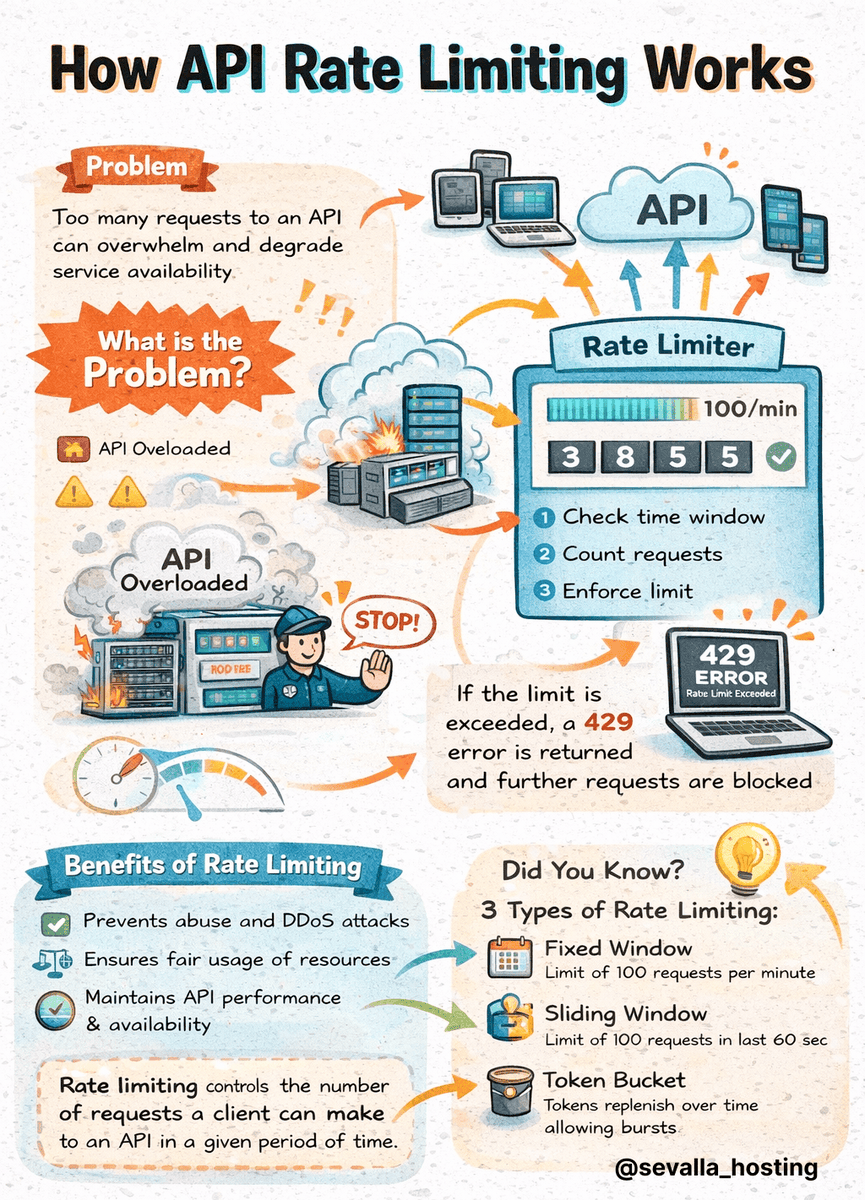
How API rate limiting works: • Rate limiting controls how many API requests a user can make in a time window (e.g., 100 requests per minute) • When you exceed the limit, the API returns a 429 error (Too Many Requests) Common strategies: - Token bucket: Refills tokens at a htt…
Write and Posting Errors: 186, 187, 226, 261, 327, 349
Write errors are their own family because posting, following, liking, and messaging each have rules that reading does not. The most common ones are code 187, Status is a duplicate, and code 226, the automation block. Code 187 means the exact text you tried to post was already tweeted by the account, which trips constantly in bots and schedulers that retry a post without checking whether the first attempt actually landed. Code 226 means the action looked automated and was blocked to protect users from spam, and it is the one that catches new bots that move too fast or too repetitively. Neither is a rate limit in the strict sense, and neither is fixed by waiting.
Code 186 is the simplest: your post is over the 280-character limit, so shorten it. Code 327, You have already retweeted this Tweet, and code 139, You have already favorited this status, are idempotency guards, telling you the action already happened. Code 349, You cannot send messages to this user, means the recipient does not accept direct messages from you, usually because they do not follow you or have DMs closed. Code 261, the Read-only-permission wall, shows up here too whenever an app tries to write without write permission.
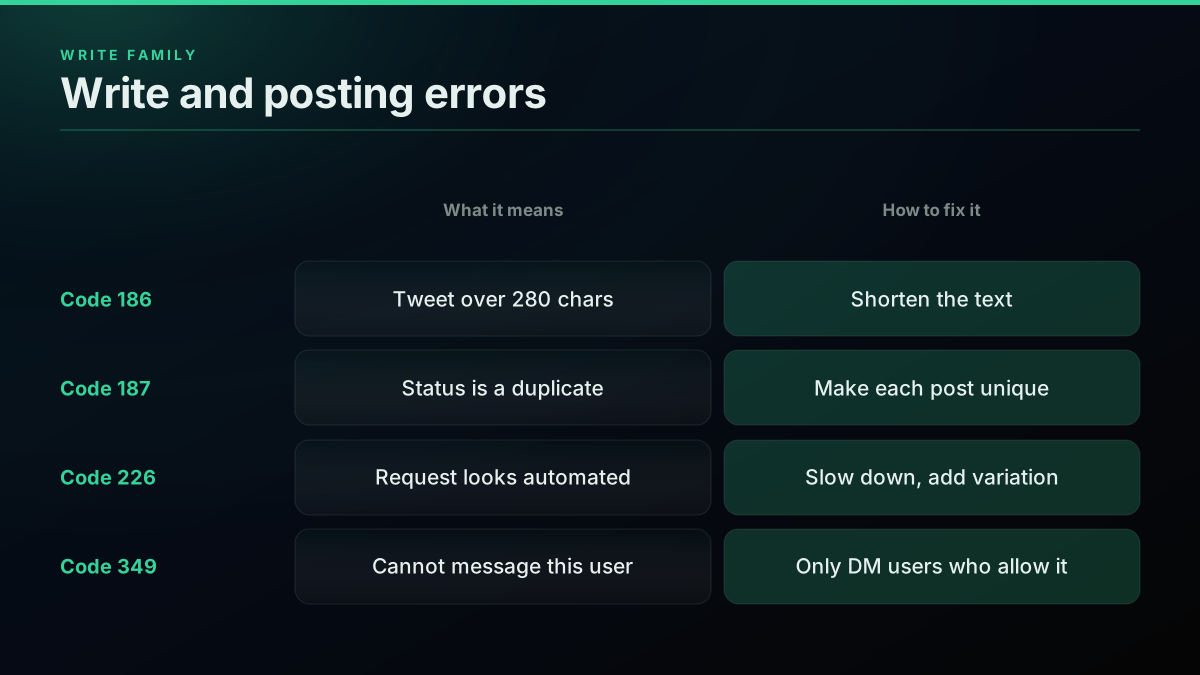
Write errors enforce posting rules that read calls never touch
| Code | HTTP | Meaning | Real cause | Fix |
|---|---|---|---|---|
| 186 | 403 | Tweet needs to be a bit shorter | Post is over 280 characters | Shorten the text |
| 187 | 403 | Status is a duplicate | Identical text already posted | Make each post unique; track what succeeded |
| 226 | 403 | Request looks automated | Bot-like action pattern | Slow down, add variation, warm the account |
| 261 | 403 | Cannot perform write actions | App is Read-only | Set Read and Write, reissue the token |
| 327 | 403 | Already retweeted this Tweet | Duplicate retweet | Unretweet first, or ignore |
| 349 | 403 | Cannot send messages to this user | Recipient does not accept DMs | Only DM users who allow it |
Error 226 is worth understanding at the behavioral level rather than the code level, because you cannot fix it by editing a request. X flags it when the tempo or shape of your actions looks non-human. The defenses are the same ones that keep any automation healthy: pace your actions, vary them, verify the account, and never fire identical repeated actions in a tight loop. If you are building anything that writes, the how to build a Twitter bot in 2026 guide covers the safe patterns, and the Twitter bot detection guide explains what X's automated systems actually look for. For posting the same content across a thread without tripping 187, the fetch full Twitter thread API guide is a useful companion.
Server-Side and Capacity Errors: 130, 131, 503, 92
Server-side errors are the ones that are not your fault. Codes 130 and 131, along with HTTP 500 and 503, mean something went wrong on X's side rather than in your request. Code 130, Over capacity, and HTTP 503, Service Unavailable, both mean X is temporarily overloaded and cannot serve you right now. Code 131, Internal error, and HTTP 500 mean an unexpected failure inside X. The correct response to all of them is the same: retry with plain exponential backoff, do not read the rate-limit headers because these are not throttle errors, and if a 500 persists across several retries, capture the request and report it.
Code 92, SSL is required, is the odd one out here and the easiest to fix: it means you sent the request over plain HTTP instead of HTTPS, so switch the scheme. It is rare in modern clients because most libraries default to HTTPS, but it still turns up in hand-rolled requests and legacy code paths.
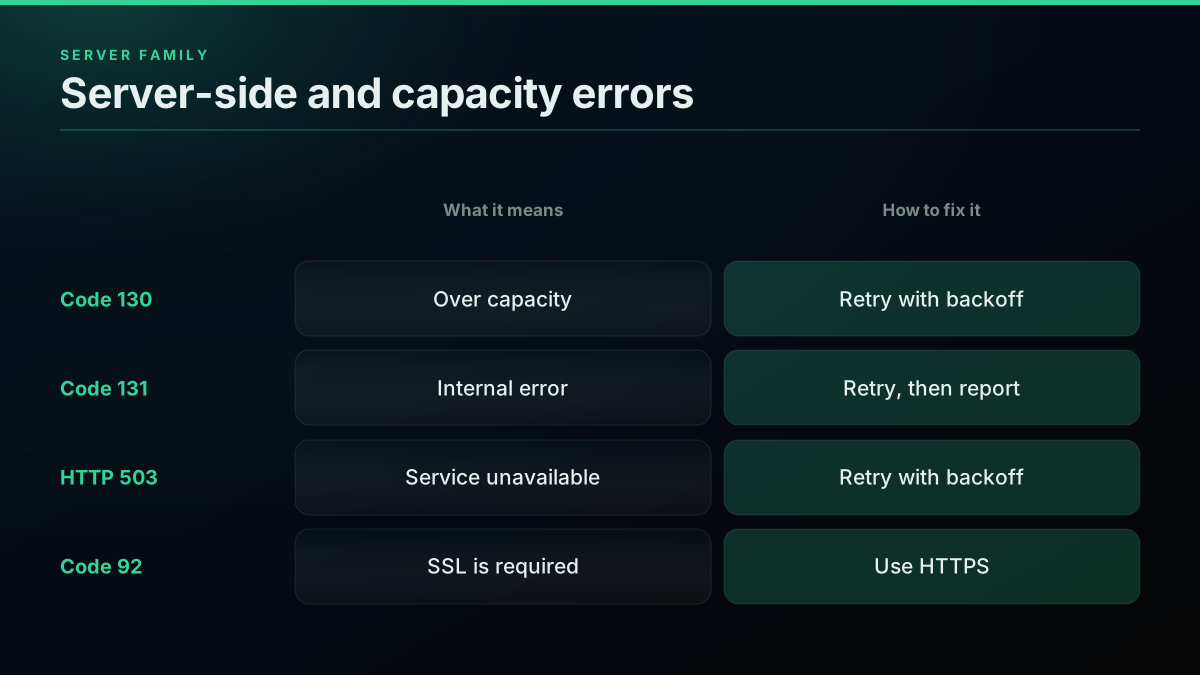
Server errors are transient; retry with backoff and ignore the throttle headers
| Code | HTTP | Meaning | Real cause | Fix |
|---|---|---|---|---|
| 130 | 503 | Over capacity | X is temporarily overloaded | Retry with exponential backoff |
| 131 | 500 | Internal error | Unexpected failure inside X | Retry; if persistent, capture and report |
| 503 | 503 | Service Unavailable | X is over capacity | Retry with backoff |
| 500 | 500 | Internal Server Error | Server-side failure | Retry with backoff |
| 92 | 403 | SSL is required | Request sent over HTTP | Use HTTPS |
The distinction that matters for your retry loop is between a 429 and a 5xx. Both get retried, but a 429 waits on the reset header while a 5xx waits on a plain doubling delay. The status meaning for the capacity case is documented in MDN's 503 Service Unavailable reference. A well-built client treats these transient failures gently and keeps them separate from the terminal 4xx codes, which is exactly what the handler in the next section does.
The cheapest pay-as-you-go Twitter API. Try it free.
$0.0008 a call, about $0.04 per 1,000 tweets at 20 tweets a page. $0.50 free credits. No credit card required.
The Complete X API Error Code Table for 2026
Here is the consolidated reference, every code covered above plus the remaining common ones, sorted by the class of problem so you can scan to the family that matches your failure. Keep in mind that the numeric codes belong to the v1.1 surface and still appear widely, while v2 responses lean on the detail string alongside the HTTP status. When a code and a status disagree in your logs, trust the code for the diagnosis and the status only for the retry decision.
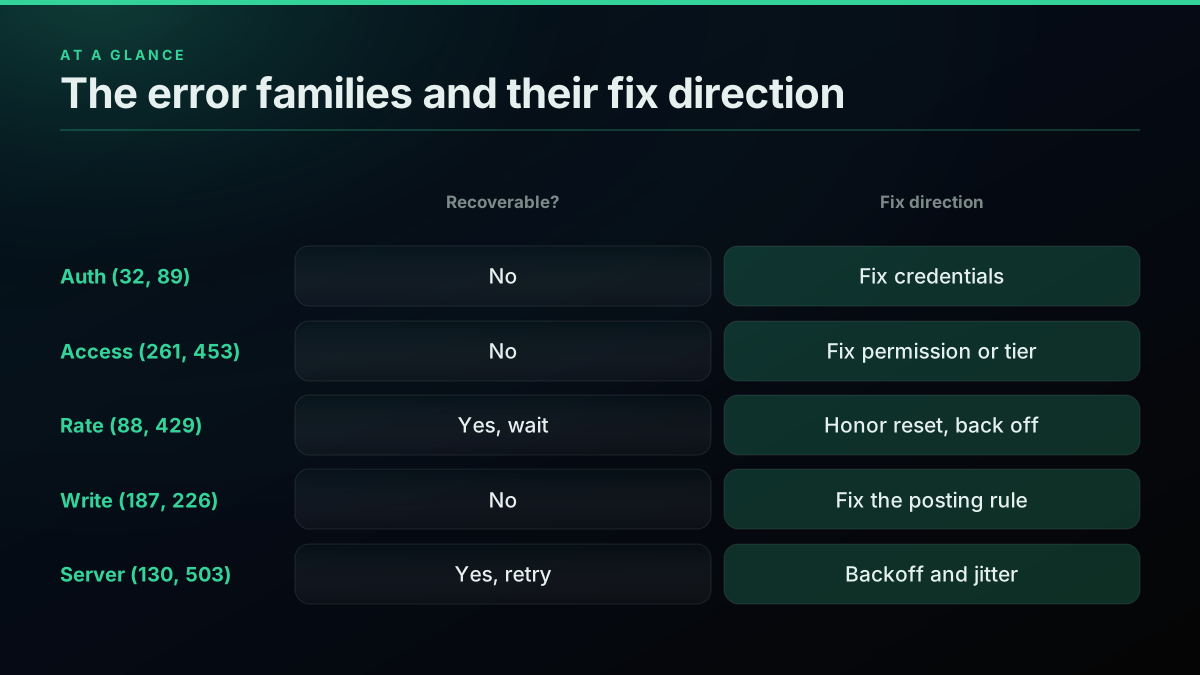
The full reference, grouped so you can scan to your error family fast
| Code | HTTP | Class | Meaning | Fix in one line |
|---|---|---|---|---|
| 32 | 401 | Auth | Could not authenticate you | Check keys, signature, and clock |
| 89 | 401 | Auth | Invalid or expired token | Re-run OAuth, reissue token |
| 135 | 401 | Auth | Timestamp out of bounds | Sync your clock |
| 215 | 400 | Auth | Bad authentication data | Send a valid auth header |
| 99 | 403 | Auth | Unable to verify credentials | Recheck secrets |
| 87 | 403 | Access | Client not permitted | Use a supported endpoint |
| 261 | 403 | Access | Cannot perform write actions | Set Read and Write, reissue token |
| 453 | 403 | Access | Subset of v2 endpoints | Raise access tier or use a provider |
| 326 | 403 | Access | Account temporarily locked | Verify via web login |
| 63 | 403 | Access | User has been suspended | The user is gone |
| 64 | 403 | Access | Your account is suspended | Appeal in the portal |
| 88 | 429 | Rate | Rate limit exceeded | Wait for reset, back off |
| 429 | 429 | Rate | Too Many Requests | Wait for reset, back off with jitter |
| 185 | 403 | Rate | Over daily status update limit | Slow the posting rate |
| 186 | 403 | Write | Tweet over 280 characters | Shorten the text |
| 187 | 403 | Write | Status is a duplicate | Make each post unique |
| 226 | 403 | Write | Request looks automated | Slow down, add variation |
| 327 | 403 | Write | Already retweeted | Unretweet or ignore |
| 349 | 403 | Write | Cannot message this user | Only DM users who allow it |
| 179 | 403 | Access | Not authorized to see status | Protected or blocked tweet |
| 34 | 404 | Client | Page does not exist | Fix the URL or resource |
| 144 | 404 | Client | No status with that ID | The tweet was deleted |
| 130 | 503 | Server | Over capacity | Retry with backoff |
| 131 | 500 | Server | Internal error | Retry, then report |
| 92 | 403 | Client | SSL is required | Use HTTPS |
That grid is the fast lookup. The rest of this guide is about turning it into code: reading the error correctly, deciding whether to retry, and, at the end, sidestepping whole classes of these errors entirely. For the surrounding request syntax these handlers wrap, the full v2 walkthrough is in the Twitter API tutorial for 2026, and the paging behavior that many read errors touch is in the Twitter API pagination guide. The full endpoint catalog these codes attach to, with the rate limit and pagination model for each, is mapped in the Twitter API reference hub.
How to Read and Handle X API Errors in Code
Reading errors correctly comes down to a discipline: branch on the specific code, never on the HTTP status alone. The status tells your retry loop whether to wait, but only the code tells your handler what to change. A single 403 can mean Read-only permission, a locked account, or an insufficient access tier, and each demands a different response. So a careful handler parses the body, pulls the numeric code on v1.1 or the detail on v2, and routes accordingly. The retry decision is the one place where the status is enough: retry on 429 and 5xx, raise on everything else.
Below is a compact Python handler that shows the shape. It separates the two questions that get tangled together, is this recoverable, and what specifically broke, and it treats the terminal codes as terminal instead of retrying them into the ground.
import time
import requests

TERMINAL = {400, 401, 403, 404}  # never retry these; fix the request

def call_x_api(session, url, headers, attempts=4):
    for n in range(attempts):
        resp = session.get(url, headers=headers)
        if resp.status_code == 200:
            return resp.json()

        # Recoverable: rate limit. Wait on the reset header, then retry.
        if resp.status_code == 429:
            reset = resp.headers.get("x-rate-limit-reset")
            pause = max(int(reset) - time.time(), 1) if reset else 60
            time.sleep(pause)
            continue

        # Recoverable: transient server error. Plain backoff.
        if resp.status_code in (500, 502, 503):
            time.sleep(min(2 ** n, 60))
            continue

        # Terminal: read the specific code for a useful message.
        if resp.status_code in TERMINAL:
            code = _error_code(resp)
            raise RuntimeError(f"X API {resp.status_code} code={code}: {_reason(code)}")

    raise RuntimeError(f"gave up after {attempts} attempts on {url}")


def _error_code(resp):
    try:
        body = resp.json()
    except ValueError:
        return None
    if isinstance(body.get("errors"), list) and body["errors"]:
        return body["errors"][0].get("code")   # v1.1 shape
    return body.get("status")                   # v2 shape


def _reason(code):
    return {
        32: "auth failed: check keys, signature, clock",
        89: "token invalid or expired: re-run OAuth",
        261: "app is read-only: enable write, reissue token",
        453: "endpoint above your access tier",
        187: "duplicate post: make it unique",
        226: "action looks automated: slow down",
    }.get(code, "see the error table")
The same split works in Node.js for a JavaScript runtime, with the identical rule: wait on 429 and 5xx, read the code on everything terminal.
const TERMINAL = new Set([400, 401, 403, 404]);

async function callXApi(url, headers, attempts = 4) {
  for (let n = 0; n < attempts; n++) {
    const resp = await fetch(url, { headers });
    if (resp.ok) return resp.json();

    if (resp.status === 429) {
      const reset = resp.headers.get("x-rate-limit-reset");
      const pause = reset ? Math.max(reset * 1000 - Date.now(), 1000) : 60000;
      await new Promise((go) => setTimeout(go, pause));
      continue;
    }
    if ([500, 502, 503].includes(resp.status)) {
      await new Promise((go) => setTimeout(go, Math.min(2 ** n * 1000, 60000)));
      continue;
    }
    if (TERMINAL.has(resp.status)) {
      const body = await resp.json().catch(() => ({}));
      const code = body?.errors?.[0]?.code ?? body?.status;
      throw new Error(`X API ${resp.status} code=${code}`);
    }
  }
  throw new Error(`gave up after ${attempts} attempts`);
}
The decision flow the handler encodes is worth seeing on its own, because it is the mental model to keep whenever an error lands: check the status to decide retry or raise, and if raising, read the code to decide the fix.
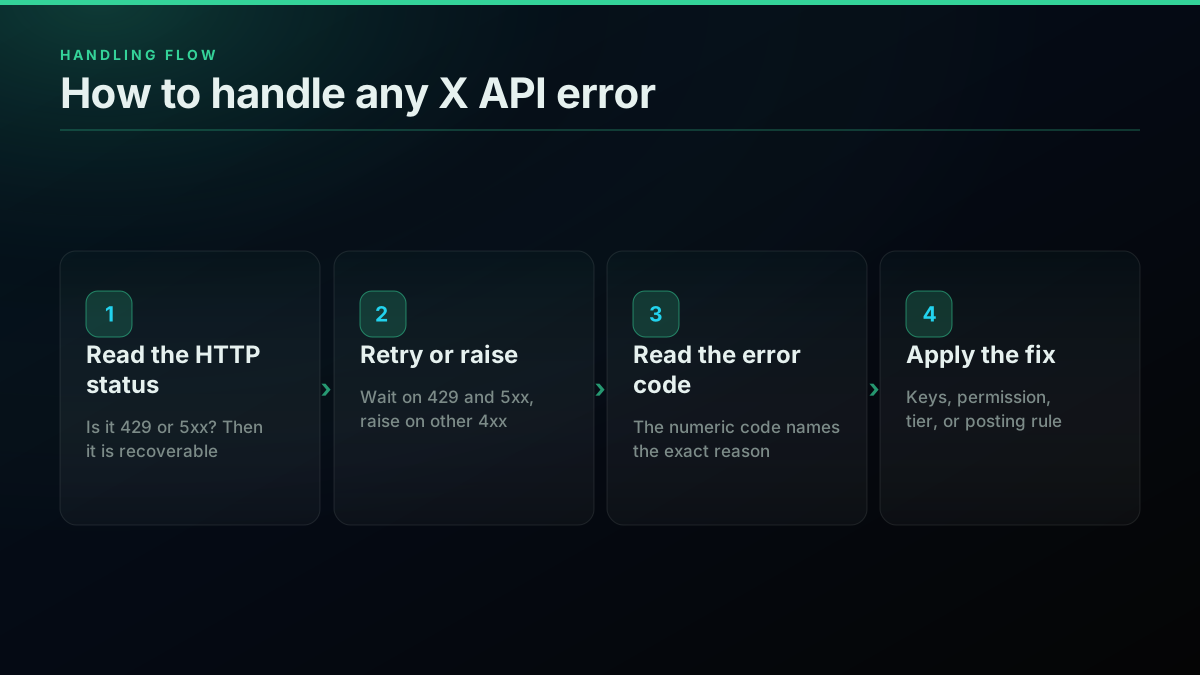
Status decides retry-or-raise; code decides the fix
Two habits make this reliable in production. First, log both the status and the code on every failure, because a status-only log hides the diagnosis and a code-only log hides the retry class. Second, cap your attempts and treat the terminal set as genuinely terminal, since a retry loop that keeps hammering a 403 just adds load without ever succeeding, and on a metered account it can quietly cost you. For the community library that bundles a version of this retry logic on the official API, Tweepy on GitHub is the common Python choice, and the long-running pipeline patterns that sit on top are in the production best practices guide.
How TwitterAPIs Returns Errors on a Per-Call Read API
Everything above is about coping with the official API's error surface. A per-call read provider changes the surface itself, and the interesting part is not that the errors are prettier, it is that entire classes of them stop existing. TwitterAPIs meters reads by the call at $0.0008 per call, with one rate ceiling instead of a per-endpoint window and no access tier gating which endpoints you can touch, so the tier 403s never fire and the only 429 you can see is the per-key one at 600 requests a minute or 20 concurrent, which carries a Retry-After header. You still get ordinary HTTP failures for a genuinely bad request or a transient network hiccup, but the platform-level walls are gone.
Start with the three classes that vanish. First, the OAuth and token errors, codes 32, 89, 135, and 215, disappear because you authenticate with a single API key in a bearer header rather than building an OAuth 1.0a signature, so there is no signature base string to get wrong and no clock skew to reject. Second, the tier and permission 403s, codes 261 and 453 above all, disappear because there are no access tiers, every read endpoint is available on the same key. Third, the rate window 429s, code 88, disappear because there is no per-endpoint 15-minute or 24-hour window to exhaust; your credit balance is the only ceiling, and it does not reset against a clock.
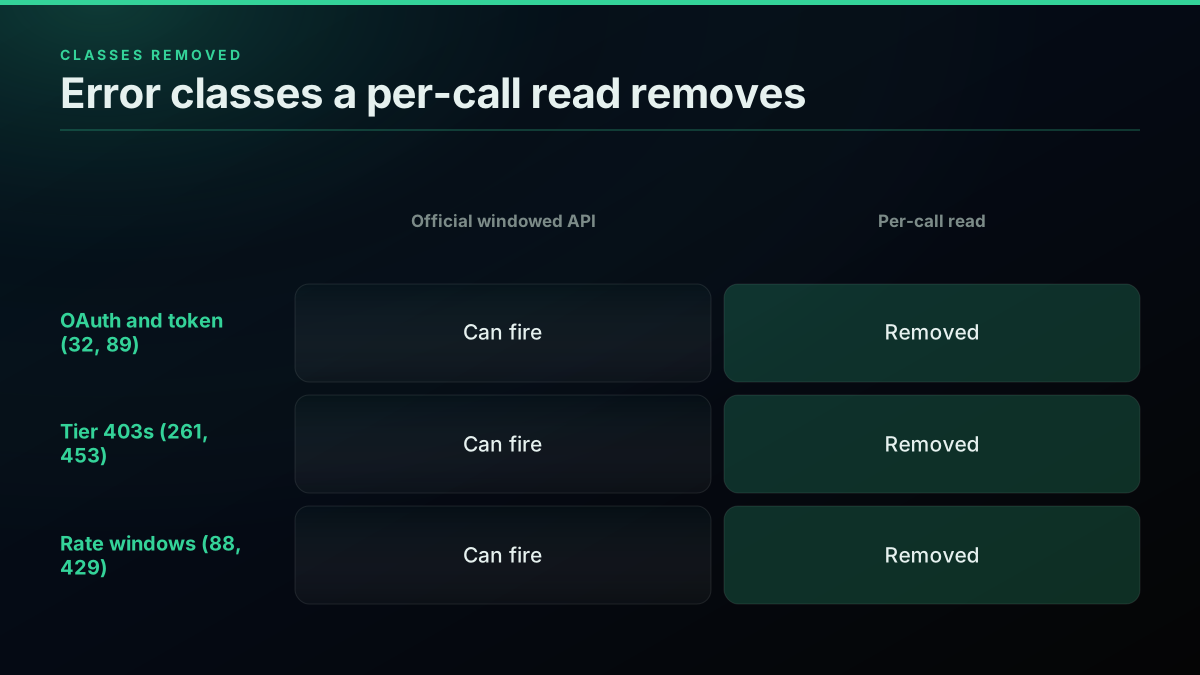
A per-call read model removes the auth, tier, and rate-window error classes at the source
To make the contrast concrete, here is how many of the codes on the master table each model can throw. It is not that the per-call model is error-free, it is that the platform-imposed error classes, the ones you cannot fix by changing your request, are the ones it removes:
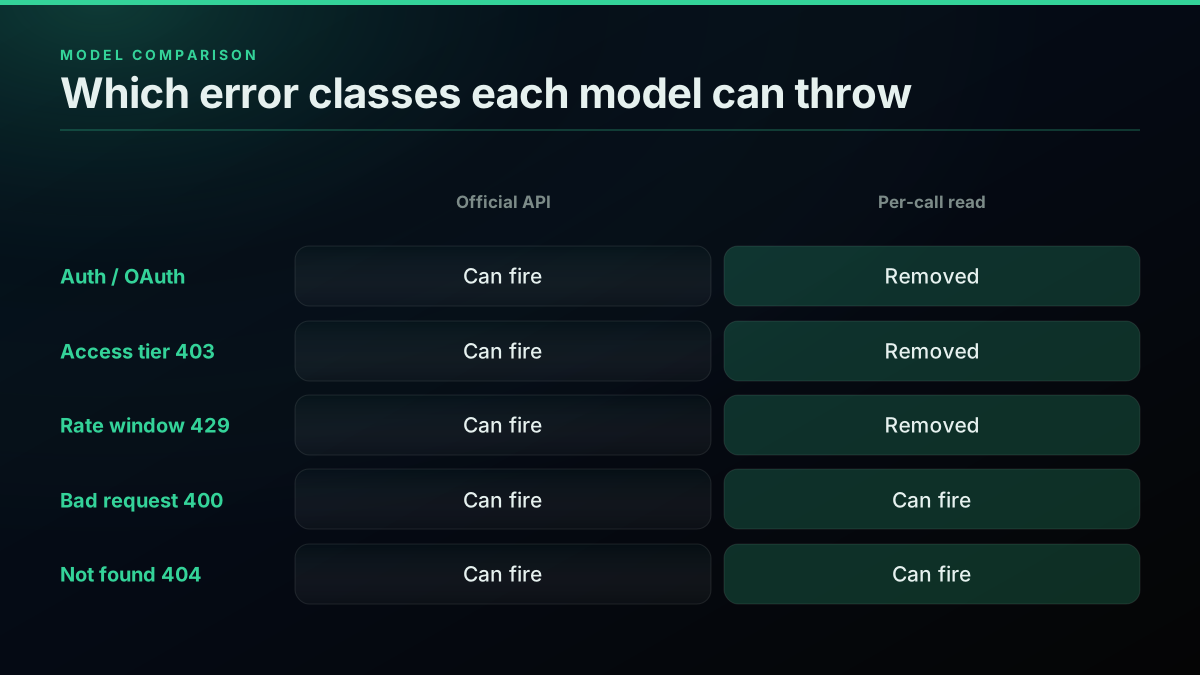
The per-call model removes the error classes you cannot fix by changing your request
What is left on the per-call side is the small set of errors that any HTTP client should handle: a 400 for a genuinely malformed query, a 404 for an ID that does not exist, and the occasional 5xx or network blip that a light retry absorbs. There is no reset header to parse, no window to pace against, and no x-rate-limit-remaining to watch. A read call looks like an ordinary request and comes back with data or a plain error, and around 20 tweets ride back in a single $0.0008 read call, which is where the roughly $0.04 per 1,000 tweets figure comes from. A fresh account starts with $0.50 in free credits, about 625 calls, enough to wire everything up and confirm the error surface before spending anything.
import os
import requests

TOKEN = os.environ["TWITTERAPIS_KEY"]

resp = requests.get(
    "https://api.twitterapis.com/twitter/tweet/advanced_search",
    params={"query": "twitter api error codes", "product": "Latest"},
    headers={"Authorization": f"Bearer {TOKEN}"},
)
# No OAuth signature to fail (no 32/89/215), no tier to gate (no 261/453),
# and no window to exhaust (no 88/429). Just an ordinary HTTP response.
resp.raise_for_status()
for row in resp.json().get("tweets", [])[:5]:
    print(row["created_at"], row["text"][:70])
The write side follows the same model: the nine simple write actions, favorite and unfavorite, retweet and unretweet, bookmark and unbookmark, follow and unfollow, and delete, along with media upload, are billed at the same $0.0008 per call, tweet creation and DM send are $0.0016, and each runs against credentials you pass on the request rather than a long-lived OAuth token you have to keep valid. That removes the token-expiry class from writes too.
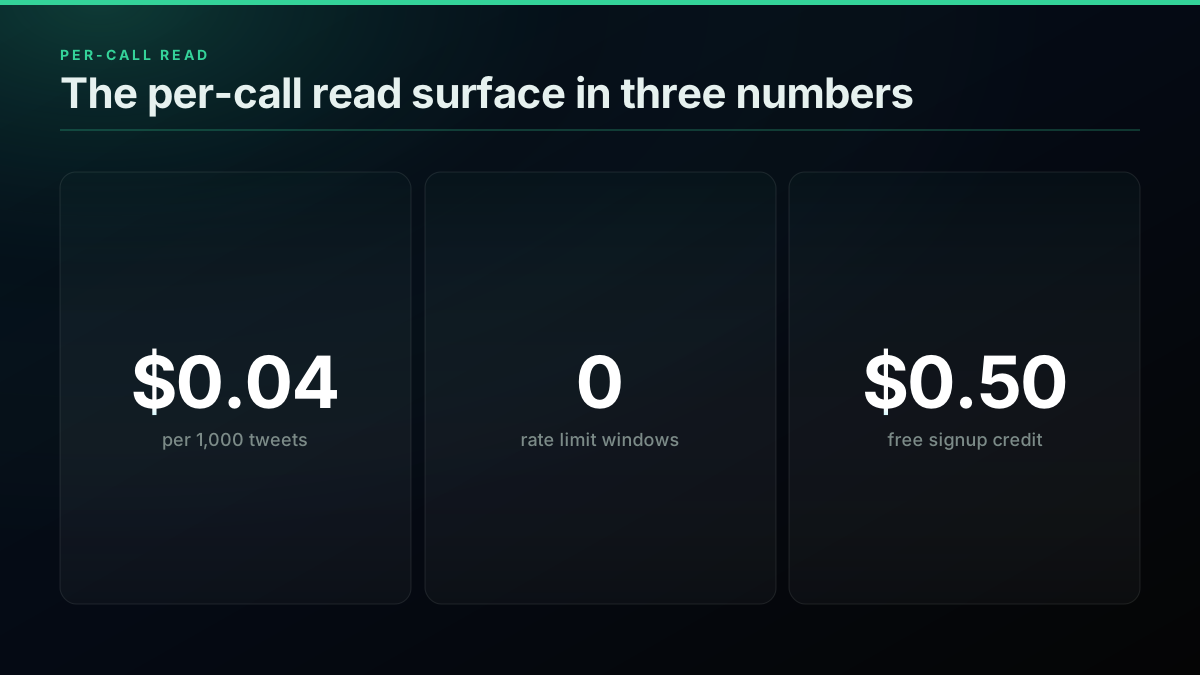
Three numbers that define the per-call read surface, and the reason the window errors never appear
Those three numbers are the whole shape of it: a flat per-call rate, no window to exhaust, and enough free credit to test the error surface before you commit. For a side-by-side of the two models on shape and price, the Twitter API v2 versus TwitterAPIs comparison lays it out, the is the Twitter API free walkthrough covers what the official Free tier actually withholds, and if you are moving off a marketplace vendor the migrating from twitterapi.io guide and the 2026 cost benchmark show where the numbers land. Whether to stay on the official API or move to a per-call read path is not a decision to make on error surface alone, but for a read-heavy workload the disappearance of the 429 and 453 classes is the practical difference between coding around the platform and just reading data.
Recap
X API failures live on two layers, and reading both is the whole skill. The HTTP status (401, 403, 404, 429, 503) sorts the failure into a category and tells your retry loop whether to wait. The numeric error code in the body (32, 88, 187, 226, 261, 453 and the rest) names the exact reason and tells your handler what to change. The two you retry are 429, a timing block that clears when the rate window refills, and the 5xx family, transient server problems. Everything else, the auth codes, the access and tier 403s, the write-rule violations, is terminal, and no amount of retrying fixes a request or a credential that arrived broken.
Group the codes by class and the fixes fall out cleanly. Auth errors mean keys, signature, or clock. Access errors mean permission or tier, with 453 now the default 2026 wall. Rate errors mean wait. Write errors mean a posting rule you broke. Server errors mean retry gently. Handle each on its own terms and the X API stops feeling like a slot machine of opaque numbers. And when your work is read-heavy and the auth, tier, and window classes are the ones eating your time, a per-call read model removes them at the source rather than making you code around each one. Start with the per-call pricing, run your volume through the numbers in the Twitter API cost breakdown, and keep this table nearby for the next number that comes back instead of data.
// sources
Where these numbers come from
Each row is a figure in this post and the artefact it was read from. Prices and limits on this platform move, so check the date on the source before you plan against it.
- X API response codes and errors reference
- The authoritative source for the status meanings across the reference, and for the difference between the v1.1 error body carrying numeric code and message and the v2 shape of title, detail, type and status.
- RFC 9110, HTTP semantics
- The transport-level definitions the post traces its HTTP status meanings back to, which is what separates a status from a platform error code in the handler design.
- X developer community thread on error 453
- The official explanation cited for error 453, that an account not on a paid plan reaches only a thin slice of v2 endpoints after the tier collapse.
- RFC 6585 section 4, status 429
- The specification definition of 429 Too Many Requests behind the post's account of per-endpoint sliding windows and the x-rate-limit headers the retry logic keys off.
- AWS guidance on exponential backoff and jitter
- The canonical mitigation the post prescribes for retries, backoff paired with random jitter so a fleet of workers does not wake together and re-empty a freshly refilled window.
- MDN HTTP 503 status reference
- Backs the capacity case in the retry classifier, where a 5xx waits on a plain doubling delay while a 429 waits on the reset header.
Frequently Asked Questions
A 429 is the HTTP status Too Many Requests. It means the current rate limit window or usage cap for the endpoint you called is spent. On the older v1.1 surface the same condition also carries error code 88, Rate limit exceeded. A 429 is recoverable: it clears by itself once the window refills, so the correct response is to read the x-rate-limit-reset header, wait until that Unix timestamp passes, and retry with exponential backoff. The single most important thing to keep straight is that a 429 is a timing block, not an access block. Waiting fixes it. Retrying instantly does not, and hammering the endpoint the moment it resets just triggers another 429.
Error 226 means the request looked automated, so X blocked the action to protect users from spam and other malicious activity. It usually appears on write actions like posting, following, or liking when the pattern of behavior looks bot-like: too fast, too repetitive, or from an account that has not built trust. It is not strictly a rate limit and not strictly a permission error. The fix is behavioral: slow the action rate, add human-like variation, make sure the account is verified and warmed up, and avoid identical repeated actions. If it persists on a real account, logging in through the web app and completing any verification challenge often clears the flag.
Error 32, Could not authenticate you, arrives with HTTP 401. It means the request failed authentication before X even looked at what you were asking for. The three usual causes are wrong or rotated API keys, a malformed OAuth 1.0a signature, and clock skew where your machine time drifts too far from the server time and the OAuth timestamp is rejected. Work through them in order: confirm the keys match the app in the portal and have not been regenerated, verify your signature base string and encoding, and sync your system clock over NTP. If you recently changed the app permissions, regenerate the access token, because an old token keeps the permissions it was minted with.
Read two things: the HTTP status and the error body. The status (401, 403, 404, 429, 500, 503) gives you the category. The body gives you the specific reason. On the v1.1 surface the body is a JSON object shaped like a list of errors, each with a numeric code and a message, for example code 89 with Invalid or expired token. On v2 the body uses a different shape with title, detail, type, and status fields. Branch your handler on the specific code or detail, not just the status, because a single 403 can carry code 87, 261, 326, or 453, and each one needs a different fix. Retry only 429 and 5xx codes; treat 400, 401, and most 403 codes as terminal.
They look similar because both are the platform refusing your request, but their meaning is opposite. A 429 Too Many Requests is a timing block: you are allowed to call the endpoint, you just called it too often, and waiting for the window to refill fixes it. A 403 Forbidden is an access block: your credentials are valid, but your app, your permission level, or your tier is not allowed to touch that resource at all, and waiting changes nothing. A 403 needs a real fix, usually changing app permissions, applying for a higher access tier, or calling a different endpoint. Retrying a 403 in a loop just burns attempts and adds load without ever succeeding.
Error 453 means you currently have access to only a subset of the X API v2 endpoints, and the endpoint you called requires a higher access level than you have. It became one of the most common errors in 2026 because the legacy tiers were collapsed into pay-per-use: an account without pay-per-use billing configured reaches only a thin slice of endpoints, so any call outside that slice throws 453. The fix is either to set up pay-per-use credits, or Enterprise access where an endpoint requires it, through the developer portal, which raises both your cost and your endpoint access, or to read the data through a per-call provider that does not gate endpoints behind an access tier at all.
Error 187, Status is a duplicate, means the text you tried to post has already been tweeted by the authenticated account. X blocks identical posts to cut down on spam and accidental double submits. It is common in bots and schedulers that retry a failed post without checking whether the first attempt actually went through, which quietly succeeds and then trips 187 on the retry. The fix is to make each post unique, even a trivial difference clears it, and to track which posts already succeeded so a retry does not resend the same text. If you are posting templated content, rotate wording or append a distinct token so no two posts are byte-identical.
Retry only two categories. A 429 Too Many Requests is recoverable once the rate limit window refills, so wait for the x-rate-limit-reset timestamp and try again with backoff. A 500, 502, or 503 is a transient server problem unrelated to your request, so retry with plain exponential backoff and jitter. Everything else is terminal. A 400 Bad Request means the request itself is malformed, a 401 means your credentials are wrong, and a 403 means you lack permission or access, and none of those change by waiting. Retrying a terminal error just wastes attempts and adds load. Build your retry loop so it waits on 429 and 5xx and raises immediately on every other status.
Check out similar blogs
More guides on the Twitter/X API, scraping, and pricing.
What "Rate Limited" Actually Means on X (Every Limit, Measured)
"Sorry, you are rate limited" is one message covering two different systems: a consumer action ceiling and a developer API window. Here is what the term means, the current numbers for both, where it came from, and how long it actually lasts.

Twitter API Rate Limits Explained: Windows, 429s and How to Avoid Them
The X API enforces 15-minute and 24-hour rate limit windows per endpoint. This guide covers the per-endpoint table, 429 response headers, retry-with-backoff patterns, and how pay-per-use changes (and does not change) your limits.
The X Direct Messages API in 2026: Reading, Sending, and the Six Things It Will Not Do
A working guide to the X Direct Messages API: why an API key alone cannot read a DM, what a conversation id refers to, and the limits nobody documents.

The Twitter API Developer Reference (2026): Endpoints, Rate Limits, Error Codes and Pagination
A single indexed reference for the Twitter/X API in 2026: the endpoint catalog, how authentication and bearer tokens work, the rate limits behind every 429, what error codes 401, 403, and 429 mean, cursor pagination, response shapes, and the real per-call cost of each call.
Build vs Buy: Should You Build Your Own Twitter/X Monitoring Tool? (2026)
Buying a listening seat costs $29 to $2,000 a month depending on the vendor. Building costs real engineering hours plus a data bill. Here is the real math behind the twitter monitoring tool build vs buy decision, priced both ways.
Connect Twitter/X to n8n Without Fighting the Official API (2026)
Two working ways to get Twitter/X data into n8n: a polling HTTP Request node and a native webhook push, both with runnable code, no OAuth handshake either way.

How to Track a Tweet's Performance in Real Time with the X API
Poll a tweet's engagement counts over time with the X API, compute a views-to-likes ratio, and read the quote-tweet layer to tell an organically growing launch tweet from a boosted one. Tested Python and curl.
Twitter/X API Access Without a Developer Account: What Actually Works in 2026
The official X API still gates every call behind a reviewed developer account and OAuth 2.0. Here is what real developers use instead, and what each route actually costs.