GUIDE
Connect Twitter/X to n8n Without Fighting the Official API (2026)
Two working ways to get Twitter/X data into n8n: a polling HTTP Request node and a native webhook push, both with runnable code, no OAuth handshake either way.
Per our own spec, 65 of 112 endpoints bill $0.0008, 24 are free, and 23 sit between $0.0016 and $0.01. Every price ships inside our published OpenAPI document as an x-cost-usd field, so any figure in this post can be checked against the contract that bills it rather than taken on trust.
TL;DR: n8n has no built-in way to talk to Twitter/X without either the official API's OAuth and developer-account approval, or a third-party data source. This guide covers two working n8n Twitter API routes that skip that approval wait: a polling HTTP Request node that calls twitterapis.com with one Bearer header, and a native webhook and monitor system that pushes new tweets to n8n the moment they post, no Schedule Trigger required. Both are live-tested and shown with runnable code.
If you have tried to wire Twitter/X into an n8n workflow, you have probably hit the same wall five real builders hit on r/n8n this year: the official X API wants a developer account, an OAuth 2.0 app, and a review before your first HTTP Request node fires, and once you clear that, every post bills per use, since the free tier that used to cap builders at roughly 15 posts or replies a day is gone. This guide skips the wall. It covers two ways to get Twitter/X data flowing into n8n today, a polling HTTP Request node and a native webhook push, both authenticated with a single Bearer key and neither one requiring an X developer account. Every endpoint referenced below, and a full list of the 41 that exist, is documented in the Twitter API reference; if n8n is not your stack, the same Bearer-key pattern is covered directly against the raw API in the Python tutorial and the Node.js tutorial.
Why the official X API fights an n8n workflow
The friction is not imagined. On r/n8n, a builder wrote: "I wanted to automate Twitter/X monitoring in n8n but the official API setup is painful, OAuth 2.0, developer account applications that take days, complex rate limits."
Built a Twitter/X monitoring workflow - no OAuth, no developer account needed
Another builder hit the free-tier write ceiling directly: "I am trying to have daily media posts on X but I am always getting errors in various ways. Sometimes, it says 'Too many attempts'," a wall a reply in the same thread pinned to a real number, "for every account in the free tier you can post only 15 posts/rplies per day."

rehan
@2NSWR
🚀 What if your Twitter could post viral content while you sleep? With n8n + AI, automate trend discovery, whip up engaging tweets, and keep your audience hooked 24/7. Time to turn your feed into an engagement engine no code, just pure workflow magic! #n8n #Automation #NoCode
That demand is real, and n8n's own community reflects it: a builder asking "how many n8n users ACTUALLY want X/Twitter data in their workflows?" got a direct yes in reply, and a separate thread on scraping tweets "without paying for x" pulled 17 comments. The pattern across five independent threads is consistent: developers want Twitter/X data in n8n, and the official path in front of them is slow, capped, or both.
n8n ships a native Twitter node built against that same official API, so it inherits both problems: the node's own setup still routes through an OAuth 2.0 authorization-code exchange and a developer-account application gate before it can make a single call, a friction real enough that n8n's own community forum has a thread on the older OAuth1 flow the node still needs for image posting. It is a fine choice if you already hold developer credentials and are happy paying the official per-post rate. Otherwise you are either paying the official pay-per-use rates, $0.015 a post and $0.005 a post read, or routing the same workflow through a pay-per-call API that was built for exactly this situation.
Two ways to get Twitter/X data into n8n
twitterapis.com authenticates with one static Bearer key, no OAuth handshake, no app review, no callback URL. From there, an n8n workflow can reach it two ways: pull data on a schedule with the HTTP Request node, or receive data pushed to a Webhook node the moment it happens. Both routes hit the same underlying API surface.
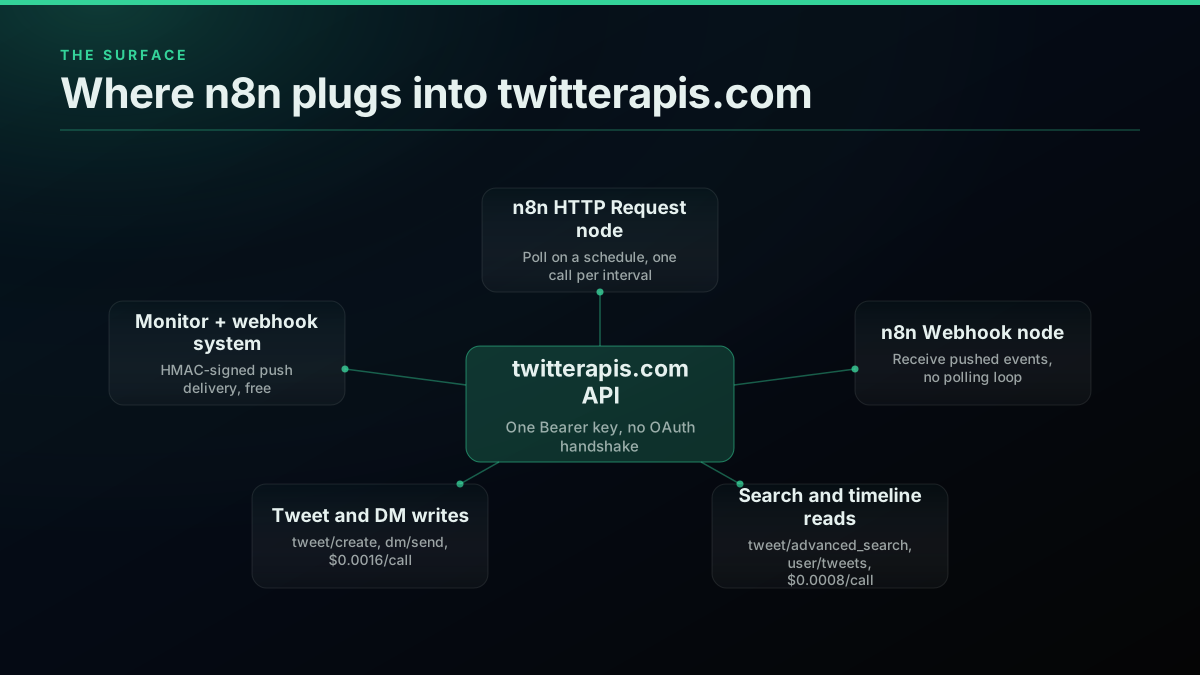
Search and timeline reads (tweet/advanced_search, user/tweets) bill at the standard $0.0008 per call. Writes that post or message on your behalf (tweet/create, dm/send) bill at $0.0016 per call, a premium tier separate from reads. The monitor and webhook system that powers the push method is free and does not consume credits at all; you only pay for the read and write calls your workflow triggers as a result of what it delivers.
Method 1: polling with the HTTP Request node
This is the two-node version. A Schedule Trigger fires on your own interval, and an HTTP Request node calls the search endpoint each time.
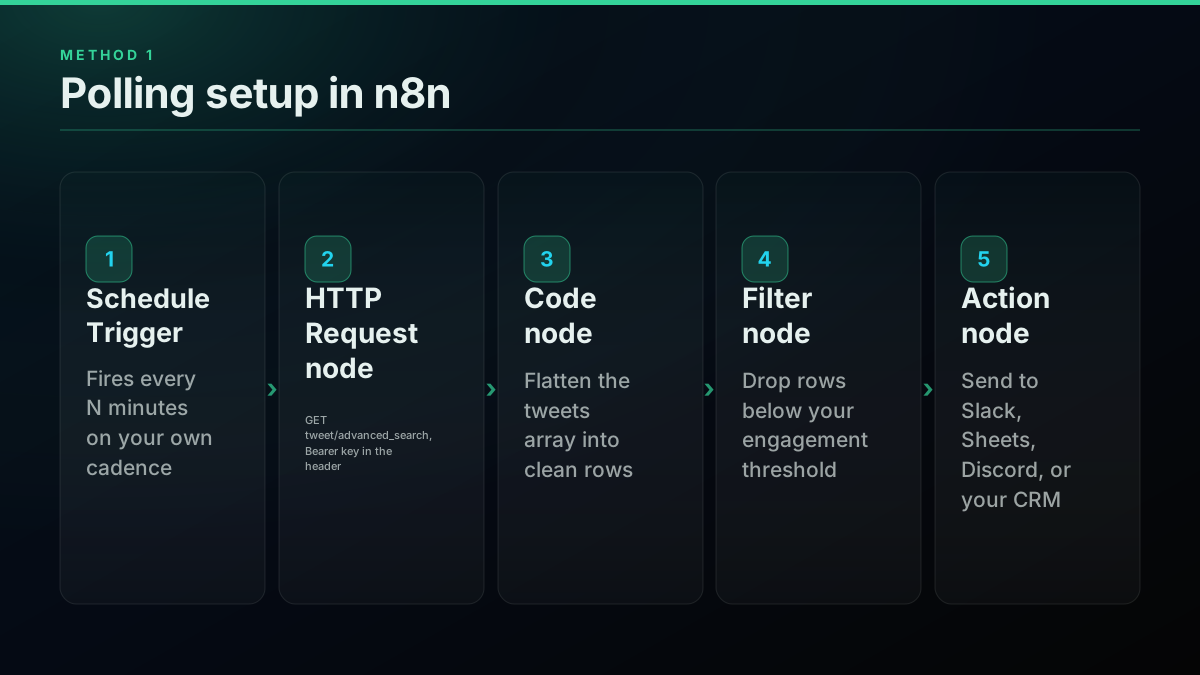
Method 1 answers the question "did anything new match my keyword since the last check", asked on a timer you control. It is the fastest thing to build and the easiest to debug, because every run is a single GET request you can replay by hand. This is close to what one builder described running for a local-LLM experiment:

TΞSSΞRΛCT
@TESSERACT___
What the logs look like for half of the people we're talking to here on X. This was n8n, local Qwen, twitter API with logs sent to Discord. No I don't run these. I made this one for fun and only ran it for a few batches of experiments. https://t.co/WU8l1jXySv

GET https://api.twitterapis.com/twitter/tweet/advanced_search?query=n8n&product=Latest&count=20
Authorization: Bearer $TWITTERAPIS_KEY
That exact call, run live against the production API during this guide's research, returned HTTP 200 with five real tweets on the first try, no OAuth token exchange, no signed request. In an n8n HTTP Request node: set Method to GET, URL to the endpoint above, then add one entry under Headers, Authorization: Bearer $TWITTERAPIS_KEY, and two query parameters, product=Latest and count=20, alongside your search query. The response body is a JSON object with a tweets array; a downstream Code node can flatten it:
const tweets = $input.first().json.tweets || [];
return tweets.map(t => ({
  json: {
    id: t.id,
    text: (t.text || "").slice(0, 280),
    author: t.author?.username || "unknown",
    likes: t.favorite_count || 0,
    retweets: t.retweet_count || 0,
    url: t.url,
    created_at: t.created_at,
  },
}));
Chain a Filter node on likes or retweets to cut noise, then send whatever survives to Slack, a Google Sheet, or your CRM. A Remove Duplicates node before the final action step avoids re-sending the same tweet across two runs whose polling windows overlap, a real gap the same r/n8n workflow author flagged in their own build notes.
Polling is honest about its tradeoff: at a 30-minute interval, a new tweet can sit for up to 30 minutes before your workflow sees it, and tightening that interval means more calls, which means more cost. If your use case tolerates that delay, this is the simplest thing that works. If it does not, the second method removes the delay and the polling cost together.
Method 2: a native webhook push, no polling loop
twitterapis.com's monitor and webhook system exists specifically to remove the Schedule Trigger. You register a webhook once, point a monitor at an X handle and that webhook, and new posts arrive as a signed HTTP POST the moment the polling pool on our side, not yours, detects them.
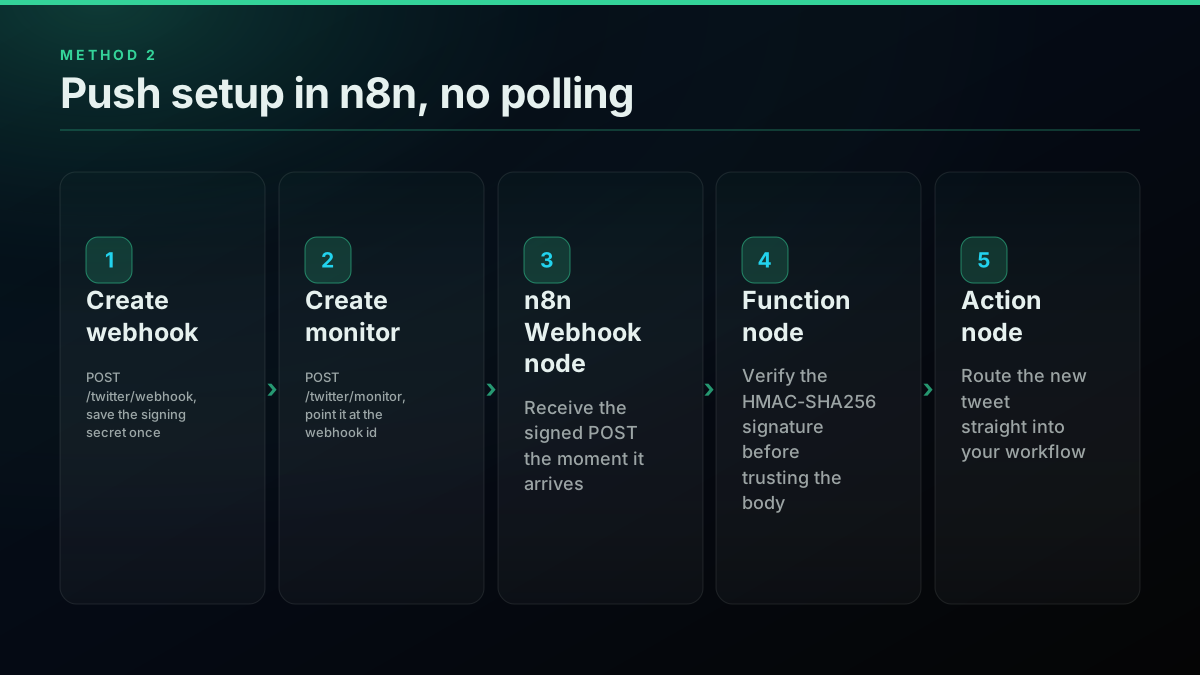
First, create the webhook. This is the one write call in the setup, and its response carries a signing secret shown exactly once:
curl -X POST "https://api.twitterapis.com/twitter/webhook" \
  -H "Authorization: Bearer $TWITTERAPIS_KEY" \
  -H "Content-Type: application/json" \
  -d '{"url": "https://your-n8n-instance.example.com/webhook/twitter-events"}'
{
  "id": "wh_9f2a1c",
  "url": "https://your-n8n-instance.example.com/webhook/twitter-events",
  "status": "active",
  "secret": "whsec_5f8a2e9c1b3d7f4a6e0c2b8d9a1f3e5c",
  "created_at": "2026-08-19T09:00:00Z"
}
Save that secret field somewhere durable immediately, an n8n Set node writing to a credential store or environment variable works. It cannot be retrieved again after this response. Next, create a monitor pointed at the account you want to watch and the webhook id from above:
curl -X POST "https://api.twitterapis.com/twitter/monitor" \
  -H "Authorization: Bearer $TWITTERAPIS_KEY" \
  -H "Content-Type: application/json" \
  -d '{"handle": "jack", "webhook_id": "wh_9f2a1c"}'
In n8n, add a Webhook node set to POST, copy its production URL into the webhook create call above instead of the placeholder, and every new post from the watched account lands there directly as event: "tweet.created". There is no backfill: a monitor created today only delivers posts made after it was created, watching an account with a 10,000-tweet history will not replay any of it.
One real limit worth stating plainly rather than glossing over: our side polls X on roughly a 60-second interval before pushing to your webhook, so this is genuinely faster than a typical Schedule Trigger interval, but it is not sub-second streaming, and we do not present it as such.
Setting up the whole path, start to first event
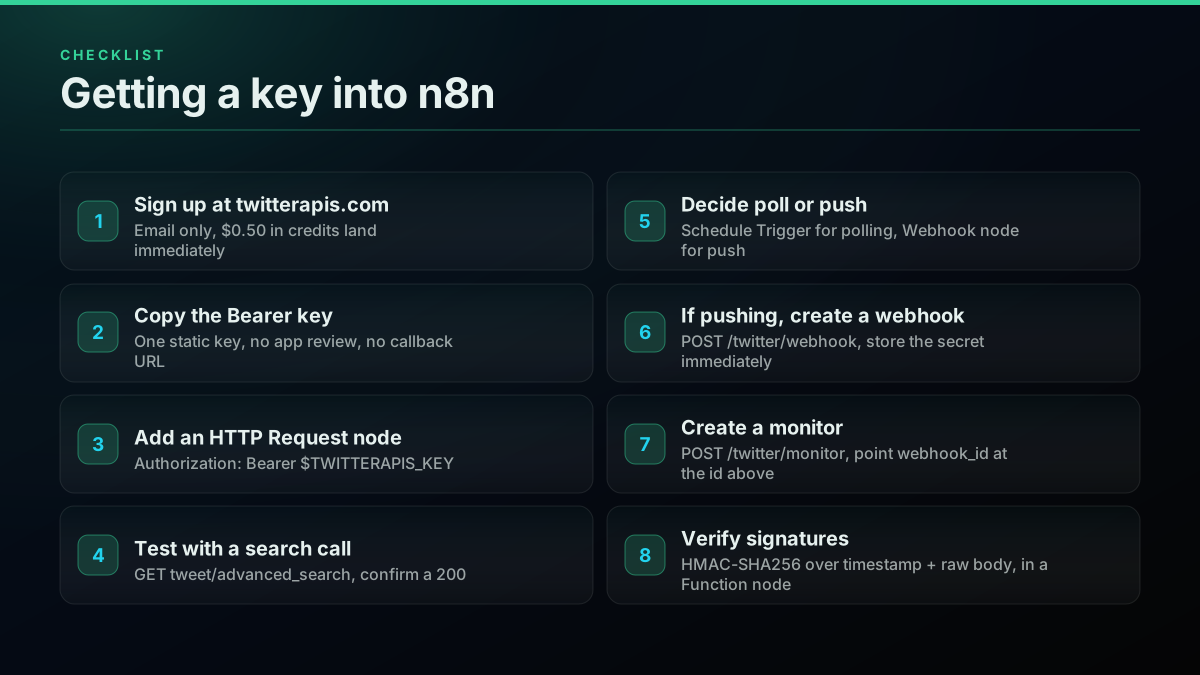
The full setup, whichever method you pick, is eight steps and no waiting period. Sign up with an email at twitterapis.com, and $0.50 in credits land immediately, no card required. Copy the Bearer key from your dashboard; the full walkthrough for getting an API key covers dashboard navigation if this is the first time you have generated one. In n8n, add an HTTP Request node and set the Authorization header to Bearer $TWITTERAPIS_KEY. Test it with a search call and confirm a 200. From there, decide poll or push: a Schedule Trigger for the first method, or a Webhook node plus the create-webhook and create-monitor calls above for the second. Either route, the guide to choosing a Twitter API is worth a read if n8n is one piece of a larger data pipeline rather than the whole project. If you are pushing, verify the delivery's signature before trusting anything in its body, covered next.
Start building with TwitterAPIs
$0.0008 a call, about $0.04 per 1,000 tweets at 20 tweets a page. $0.50 free credits. No credit card required.
Verifying a webhook actually came from twitterapis.com
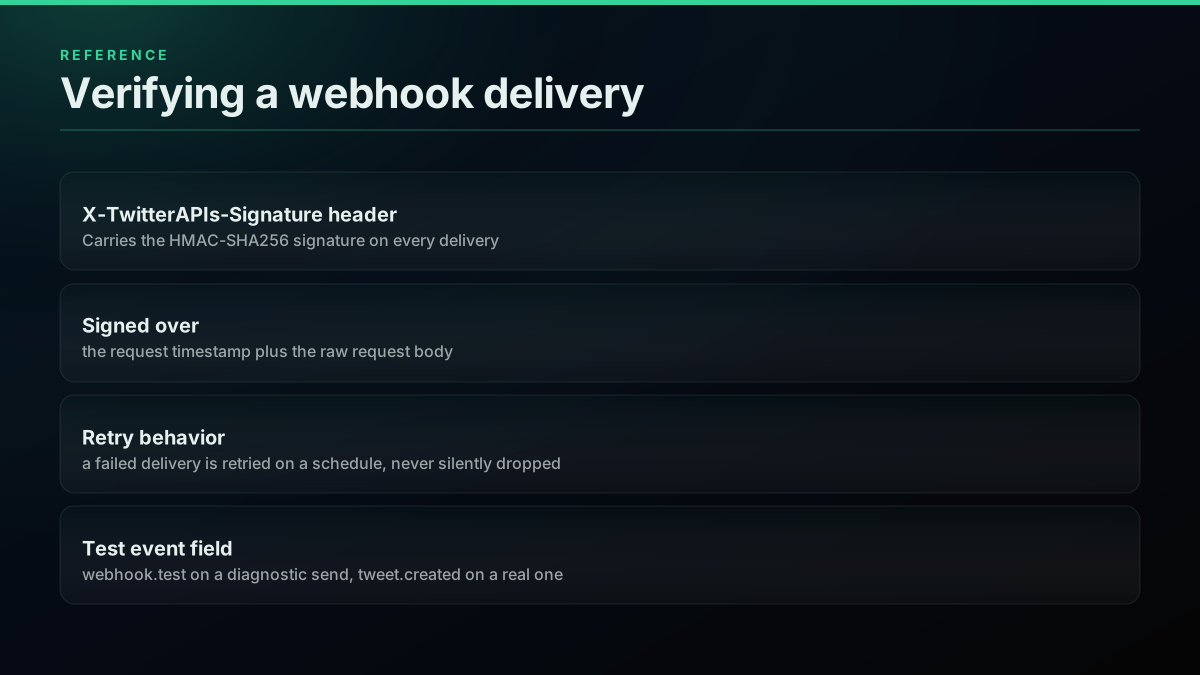
Every delivery carries an X-TwitterAPIs-Signature header, an HMAC-SHA256 signature computed over the request timestamp and the raw request body using the secret from the webhook-create response. In an n8n Function node, recompute the same HMAC and compare it before acting on anything in the payload:
const crypto = require('crypto');

const secret = $env.TWITTERAPIS_WEBHOOK_SECRET;
const timestamp = $input.first().headers['x-timestamp'];
const rawBody = JSON.stringify($input.first().body);
const receivedSignature = $input.first().headers['x-twitterapis-signature'];

const expected = crypto
  .createHmac('sha256', secret)
  .update(timestamp + rawBody)
  .digest('hex');

if (expected !== receivedSignature) {
  throw new Error('Signature mismatch, dropping event');
}

return $input.all();
Two things worth building into that handler from the start. First, a diagnostic test send from the Test Webhook endpoint arrives with event: "webhook.test", not event: "tweet.created", so a handler that checks the event field before acting will not mistake a diagnostic ping for a real tweet. Second, a failed delivery is retried on a schedule rather than dropped silently; if your n8n instance is down when an event fires, List Monitors will show that monitor's degraded flag and an events_possibly_missed count once it comes back, which is worth alerting on if this workflow matters.
What it actually costs
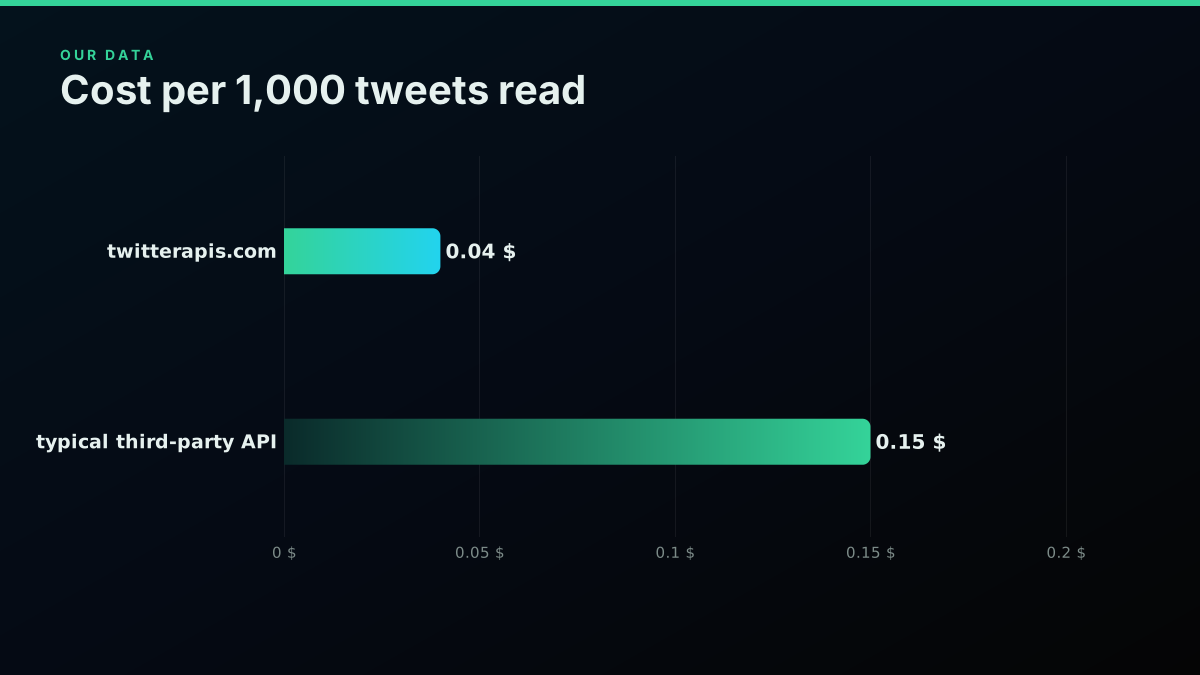
Reads on twitterapis.com run $0.0008 per call, and a search or timeline call typically returns around 20 tweets, so the effective rate lands near $0.04 per 1,000 tweets read (the full cost breakdown covers every endpoint tier if your workflow reaches past search and timeline reads). For comparison, a typical third-party Twitter/X data API such as twitterapi.io charges a credit-based rate that works out to roughly $0.15 per 1,000 tweets for the same read volume, close to 4x higher. Writes (posting a tweet, sending a DM) are a separate premium tier at $0.0016 per call on twitterapis.com.
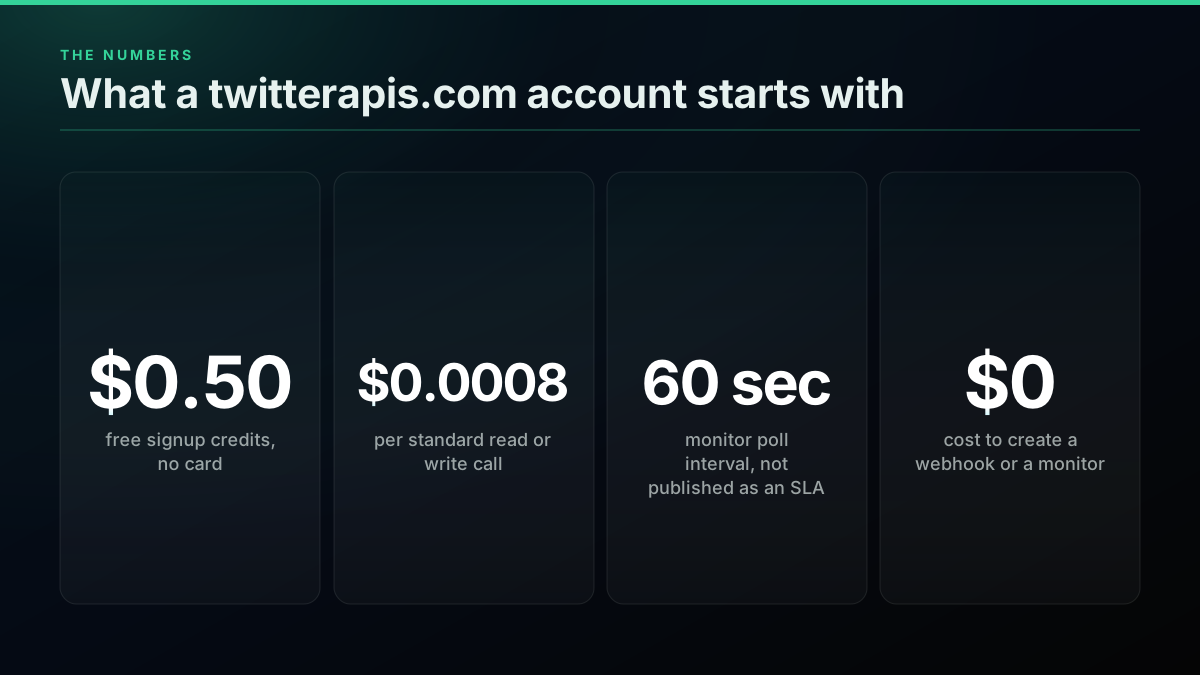
The monitor and webhook system itself costs nothing to set up or run: creating a webhook, creating a monitor, listing either, and deleting either are all free and do not consume credits. The only spend in a webhook-driven workflow is whatever read or write calls fire once your n8n workflow acts on a delivered event, the delivery itself is free.
At real scale this compounds. A workflow polling every 5 minutes for a keyword match, 288 times a day, at 20 tweets per call, moves roughly 5,760 tweets through the API daily just in polling overhead, on top of whatever the results actually need. At $0.0008 per call, that is 288 calls a day, about $0.23, purely to check for something new, whether or not anything new exists. Over a 30-day month that is roughly $6.90 in polling cost alone, before counting a single action taken on a match. Switching that same watch to a webhook-backed monitor removes the polling calls entirely: you pay zero for the delivery mechanism itself, and only for the read or write calls your workflow makes once it actually acts on a matched event, typically a small fraction of the polling total because most poll cycles on a low-volume account return nothing new.
A worked monthly budget makes the difference concrete. Say you are watching 5 competitor handles for new posts and forwarding matches to Slack. Polled every 10 minutes across all 5 accounts, that is 720 calls a day, about $0.58, roughly $17.30 a month, and every one of those calls fires whether or not any account posted. The same 5 accounts on 5 monitors, each pointed at one webhook, cost nothing to watch: the only calls that hit your bill are the Slack-forwarding writes themselves, one per real post, which for 5 moderately active accounts might be 10 to 30 tweets a day, well under a dollar a month. The gap widens further the more accounts or keywords a workflow tracks, since polling cost scales with how often you check, and webhook cost scales with how much actually happens.
A worked example: watching a competitor's account for launches
Concretely, say the goal is to catch a competitor's product-launch announcements the moment they post, without paying for every empty poll cycle in between. The webhook route from Method 2 fits this directly. Create one webhook pointed at an n8n Webhook node, then a monitor with handle set to the competitor's X username and include_replies set to false, since a launch announcement is a top-level post, not a reply thread. The domain_filter parameter narrows delivery further if you only care about posts linking to their own domain: pass a bare hostname like example.com and posts with no matching link still advance the monitor's cursor but are filtered out of delivery, so you never see them.
From there, the n8n side of the workflow after the signature-verification Function node is ordinary: a Filter node checking the tweet text for launch-shaped keywords, an OpenAI or Claude node summarizing the post if it matches, and a final Slack or email action node. The entire pipeline from "competitor posts" to "your team gets a summary in Slack" runs with zero polling calls and a total steady-state cost of whatever the summarization step charges, since the monitor and webhook layer itself is free. Compare that to a polling equivalent checking every 5 minutes, 288 calls a day just to watch one account, and the webhook route is both cheaper and faster to see the actual post.
Going past reads: replying and sending DMs from the same workflow
Everything above covers reads. Once the monitor or the polling loop has caught something worth acting on, a lot of n8n workflows want to close the loop and post a reply or send a DM without leaving n8n. That is a write call, a separate premium tier at $0.0016 per call, and it needs the same Bearer key already sitting in your HTTP Request node's Authorization header, no second credential to manage.
POST https://api.twitterapis.com/twitter/tweet/create
Authorization: Bearer $TWITTERAPIS_KEY
Content-Type: application/json

{
  "text": "Thanks for flagging this, we're on it.",
  "reply_to_tweet_id": "1975436897909629320"
}
Wire that as a second HTTP Request node downstream of the Filter node from the worked example above: method POST, the same Authorization header, and a JSON body built in a Set node from the matched tweet's id and your generated reply text. The full guide to building a reply or posting bot on the API covers the moderation and rate-pacing choices worth making before this runs unattended, and the DM API guide covers the equivalent dm/send call if the action step is a direct message instead of a public reply. Both endpoints sit in the same premium pricing tier as tweet/create, and both work from the identical n8n HTTP Request node pattern already built for reads, just a different method, path, and body.
One n8n-specific gotcha worth flagging here: reply_to_tweet_id and any other string-shaped ID field must be sent as a JSON string, not a bare number. n8n's Set node sometimes infers a numeric type from a value that looks like a number, and a tweet ID re-typed as a JS number loses precision past 2^53, silently corrupting the ID on a small fraction of requests. Force the field to string type in the Set node explicitly rather than trusting the inferred type.
The cheapest pay-as-you-go Twitter API. Try it free.
$0.0008 a call, about $0.04 per 1,000 tweets at 20 tweets a page. $0.50 free credits. No credit card required.
The official API's real limits, from real builders
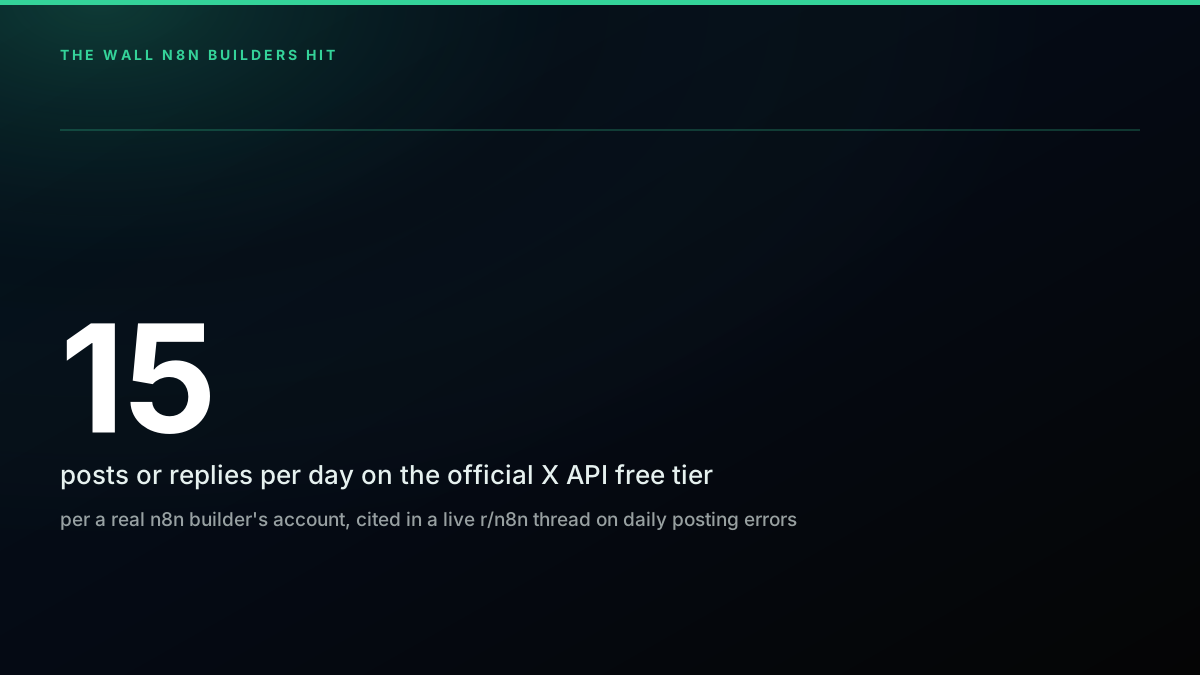
Reading five real n8n community threads rather than the official pricing page tells a more specific story than "the free tier is limited." One builder hit a roughly 15-posts-or-replies-per-day ceiling and got intermittent "Too many attempts" and parameter-validation errors once they approached it. Another, trying to automate 50 relevant replies a day, about 1,000 to 1,500 a month, ran the arithmetic against the free tier's roughly 100-posts-a-month cap and found it was not close:
How to auto-reply 50 tweets/day with ChatGPT persona? X API limits are annoying
a community reply put it bluntly, "the volume you're proposing is not possible... and it would even be difficult on the $200 tier."
How To Setup and Connect X / Twitter API With n8n (Step-by-Step) (No Code)
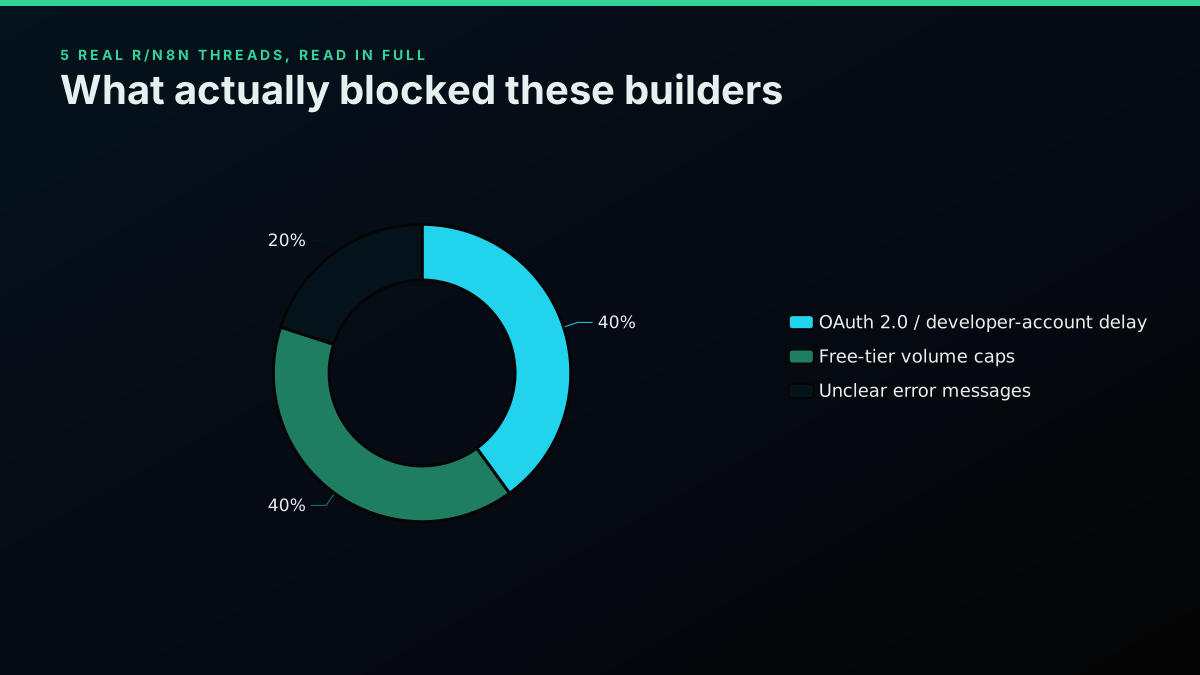
Across the five threads this guide draws on, two frictions dominate in roughly equal measure: the OAuth 2.0 and developer-account approval delay before a first call can even fire, and the free-tier volume caps that block realistic posting or reply cadences once a workflow is live. A smaller share comes down to unclear error messages, the "Too many attempts" and "One of more parameters is wrong" errors one builder described as arriving "randomly," with no clear signal of which limit had actually been hit.
Two honest counterpoints surfaced in the same research and deserve a direct answer rather than a skip. One reply to a polling-based n8n workflow post called it out plainly: "You're building on top of an unofficial scraping API that's piggybacking on shared accounts. That's not simpler, it's just pushing all the hard problems somewhere else and pretending they don't exist." Another warned that "these third party twitter apis tend to have pretty aggressive rate limiting once you scale past hobby usage... the costs add up faster than you'd expect." Both are fair points about third-party APIs in general. The response to the first is architectural, not evasive: a monitor and webhook system that removes polling removes the specific failure mode being described (a scraper hammering an endpoint on a tight loop). The response to the second is the actual published rate: 600 requests a minute and 20 concurrent per key on standard endpoints, the same ceiling on every route, documented on the rate limits guide rather than left to be discovered by trial and error, a stricter but more predictable ceiling than the official API's own rate limits, which vary by endpoint and access level.
twitterapis.com vs the official X API vs n8n's native Twitter node
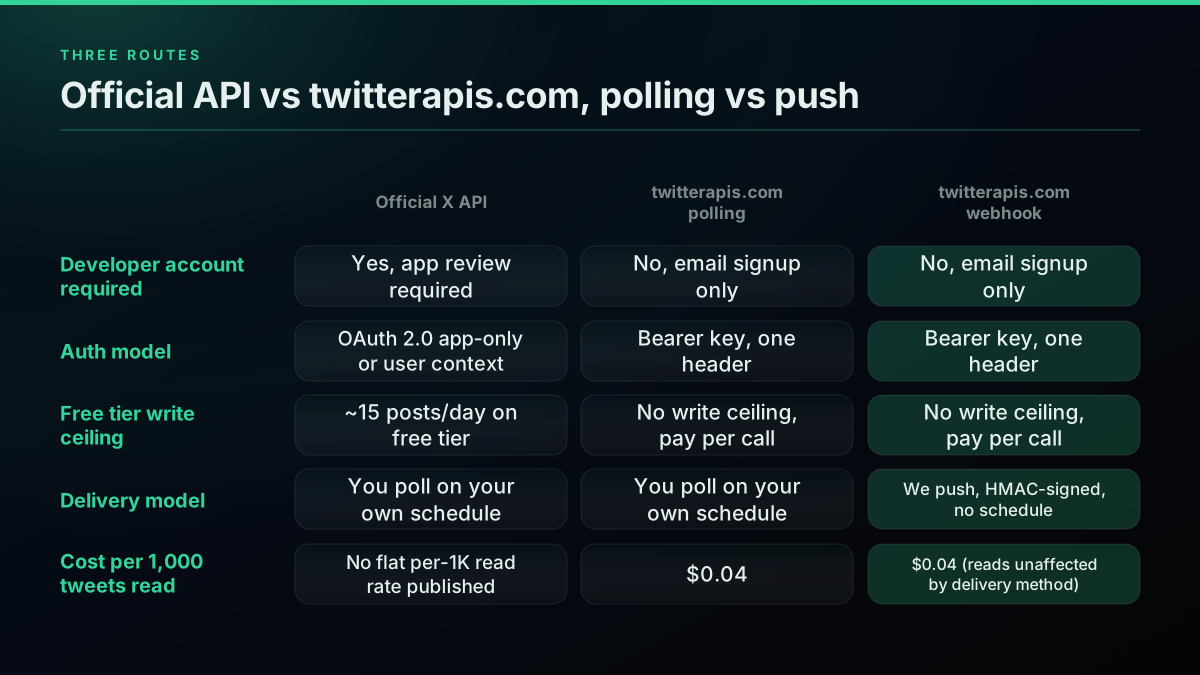
The choice is not really twitterapis.com versus n8n's native Twitter node in the abstract, it is a question of what your workflow needs to do and how fast you need it live. If you already hold official X developer credentials, accept the official per-post billing, and do not mind the OAuth setup, the native node works fine as-is. If not, or before you have developer credentials at all, a Bearer-key API removes the setup entirely.
| Criterion | Official X API | twitterapis.com polling | twitterapis.com webhook |
|---|---|---|---|
| Developer account required | Yes, app review required | No, email signup only | No, email signup only |
| Auth model | OAuth 2.0 app-only or user context | Bearer key, one header | Bearer key, one header |
| Write billing | No free tier, $0.015 per post | No write ceiling, pay per call | No write ceiling, pay per call |
| Delivery model | You poll on your own schedule | You poll on your own schedule | Pushed to you, HMAC-signed, no schedule |
| Cost per 1,000 tweets read | $5.00 ($0.005 per post read) | $0.04 | $0.04 (unaffected by delivery method) |
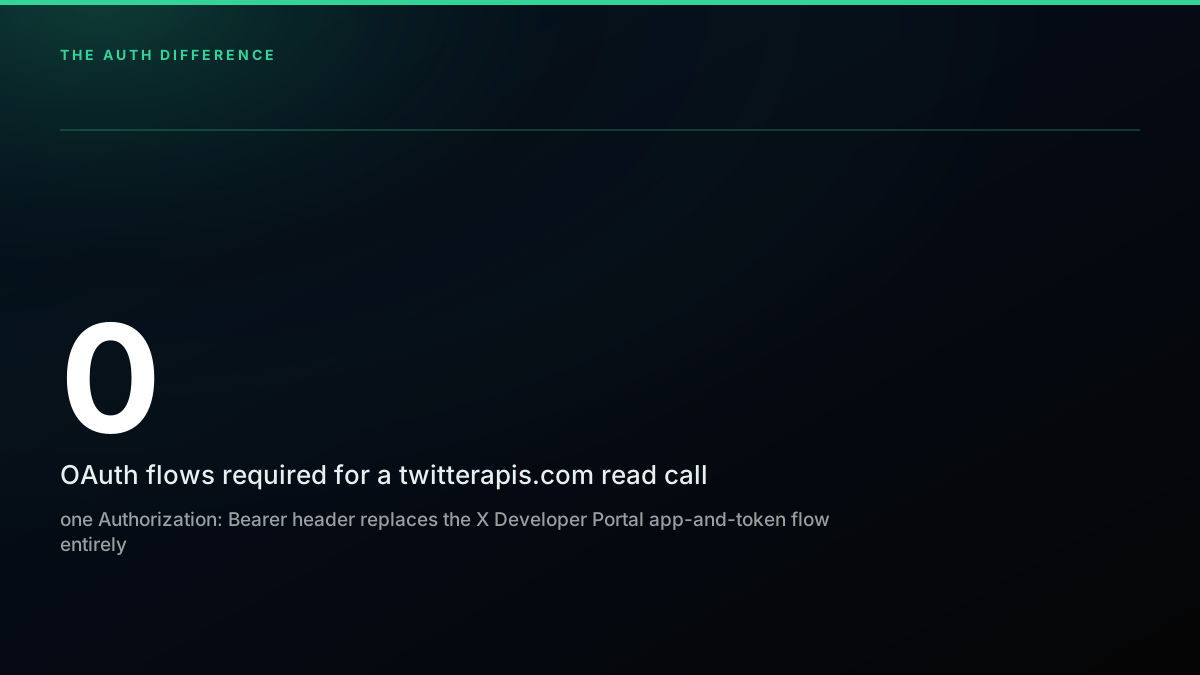
A full accounting worth comparing against the official API alternatives page and the twitter API cost calculator for your own volume: zero OAuth exchanges required for a read call on twitterapis.com, one Bearer header instead. That single difference is why the migration guide for switching from a legacy scraping-based API and the full authentication reference both walk through the same header-swap pattern this guide uses for n8n specifically.
Common errors and how to fix them
A 401 Unauthorized almost always means the Bearer key is missing or malformed in the header, check for a stray space or a key copied with a trailing newline; the twitter API error codes reference covers the full set including the official API's own OAuth-specific codes if you are running the native node side by side. A 429 on twitterapis.com means you have crossed 600 requests a minute or 20 concurrent connections on one key, and the response includes a Retry-After header, wire that into an n8n Wait node rather than a fixed delay.
A 422 with an empty or oddly-shaped tweets array on the search endpoint is usually a query syntax problem, not an auth or rate-limit problem, an unescaped operator in the query parameter (a bare # before a hashtag needs URL-encoding when it is passed as a query string rather than typed into a search box) most commonly. Log the raw request URL an HTTP Request node actually sent, not just the response, before assuming the API itself is behaving oddly; an n8n expression that concatenates a hashtag from upstream data can silently drop the %23 encoding if it was built with a template literal instead of the node's own query-parameter fields. And a workflow that appears to work in manual testing but produces empty results on a schedule almost always traces back to a credential stored in one n8n environment (say, a personal instance) that never made it into the deployed one, check the Bearer key is set as an actual n8n credential or environment variable in whatever instance is running the schedule, not hardcoded into a node that only exists in your local editor session.
A webhook that stops delivering usually means the destination URL is unreachable or returning a non-2xx status; use the Test Webhook endpoint to fire one diagnostic event and confirm your n8n instance's public URL and signature check are both correct before assuming the monitor itself is broken. Two things trip up a first attempt specifically. The webhook create call rejects a URL that does not resolve to a public address, so a monitor pointed at localhost or a private IP during local n8n development will fail at creation, test with a tunneled URL (ngrok or n8n's own webhook test URL) before deploying to a real host. And include_replies and any boolean parameter must be sent as an actual boolean, a string "false" or the number 0 is rejected with a 400 rather than silently coerced, because a guessed-wrong value here would otherwise look identical to the watched account simply not having posted, an invisible failure mode the API deliberately refuses to allow.
If you are monitoring hashtag or keyword volume rather than a single account, the hashtag search API guide covers the query-parameter shape for that endpoint specifically, and the same polling-versus-webhook tradeoff from this guide applies: a hashtag search has no monitor equivalent today, so a keyword watch still runs on the polling method from earlier, while an account watch can use either.
Where to go from here
Both methods described here use the same pay-per-use pricing, the same signup flow, and the same API reference as every other twitterapis.com endpoint, including the ones covered in the complete Twitter API tutorial and the MCP server if your n8n workflow eventually needs to hand data to an AI agent rather than a fixed pipeline. If your workflow's next step is sentiment scoring on what comes through, the Twitter sentiment analysis guide picks up exactly where this one's Code node leaves off, and the best-practices guide is worth a read before this workflow goes from a personal experiment to something a team depends on. Start with the twitter API cost calculator to model your own call volume before committing to a poll interval, then build the two-node version first, it is the fastest way to confirm the whole path works before adding the webhook layer on top.
Frequently Asked Questions
Yes. The official X API requires a developer account, an app, and an OAuth 2.0 flow before your first call. twitterapis.com skips all of that: sign up with an email, copy a Bearer key, and an n8n HTTP Request node can call a search or timeline endpoint immediately. There is no app-review wait and no callback URL to register.
n8n ships a Twitter node built against the official X API, so it inherits the official API's OAuth setup and its billing. Real n8n builders on r/n8n reported hitting a roughly 15 posts-or-replies-per-day cap and 'Too many attempts' errors on the old free tier; that tier is now gone, and the official API bills every post at $0.015 on pay-per-use. It is a reasonable choice if you already hold X developer credentials and are happy paying per post; otherwise you are routing writes through a pay-per-call alternative instead.
Yes, twitterapis.com's monitor and webhook system does this natively. Register a webhook (a plain HTTPS URL, free), then create a monitor pointed at an X handle and that webhook id. New posts arrive as an HMAC-signed POST to your n8n Webhook node the next time the polling pool checks that account, no Schedule Trigger and no manual interval tuning required on your side.
Every delivery carries an X-TwitterAPIs-Signature header, an HMAC-SHA256 signature computed over the request timestamp and the raw request body using the secret you were shown once at webhook creation. In an n8n Function node, recompute that same HMAC over the incoming timestamp and raw body and compare it to the header. A test send from the Test Webhook endpoint arrives with an event field of webhook.test, so your handler can tell it apart from a real tweet.created event.
A Schedule Trigger feeding an HTTP Request node that calls tweet/advanced_search with your Bearer key in the Authorization header. That is a two-node workflow you can build in under five minutes. It works, but it polls on your own schedule, so it is not the lowest-latency option; a webhook-backed monitor removes the polling loop entirely, at the cost of one extra setup step.
Add an HTTP Request node, set the method to GET, the URL to https://api.twitterapis.com/twitter/tweet/advanced_search, and add one header: Authorization: Bearer $TWITTERAPIS_KEY. Pass query, product, and count as query parameters. The response returns a tweets array you can flatten in a Code node. A live test of this exact call during this guide's research returned HTTP 200 with real tweet data.
Reads on twitterapis.com are $0.0008 per call, roughly $0.04 per 1,000 tweets on a 20-tweet page. Creating and running a webhook or a monitor is free and does not consume credits; you only pay for the read and write calls your workflow actually makes. A new account starts with $0.50 in free credits, about 625 calls, enough to build and test either method end to end before spending anything.
A failed delivery is retried on a schedule rather than dropped, and List Monitors reports a degraded flag plus an events_possibly_missed count so you can see whether anything was lost while your endpoint was unreachable. There is no backfill on monitor creation either: watching an account with 10,000 existing tweets does not replay them, only posts made after the monitor was created are ever delivered.
Check out similar blogs
More guides on the Twitter/X API, scraping, and pricing.
How to Export Tweets to Google Sheets Automatically in 2026
Pull a search query or a user's tweets into a Google Sheet with Google Apps Script and a per-call data API, then auto-refresh on a time-driven trigger. Full runnable code, pagination, dedup, a no-code path, and the cost math.
How to Get Everyone Who Retweeted a Tweet via API (2026)
Pull the full list of accounts that reposted any tweet with a real 2026 API. Runnable Python and Node.js, cursor pagination for the whole list, a real amplifier ranking over live data, a bot filter, and the honest per-call cost.
How to Get All Replies to a Tweet via API (2026)
Pull the replies under any tweet with a real 2026 API. Runnable Python and Node.js, cursor pagination, the conversation_id tail sweep for the long tail, nested replies-to-replies, signal-versus-noise filtering over live data, and the honest per-call cost.
How to Search Tweets by Hashtag via API 2026 (Python + Node.js)
Search tweets by hashtag with a real 2026 API in Python and Node.js. Runnable code for the hashtag operator, engagement filters, cursor pagination, deduping retweets, counting authors, and the real per-call cost.
Twitter API Node.js Tutorial 2026: Fetch Tweets in 10 Lines
The 2026 Node.js Twitter API tutorial: fetch tweets in 10 lines with fetch or axios, no SDK and no OAuth dance. Search, profiles, cursor pagination, retries, async, and real per-call costs in working code.

How to Build a Twitter Bot in 2026: The Complete Guide
Build a Twitter bot in 2026 with no-code or Python. Working Tweepy code, auth explained, and the cheap path: $0.0008 a call, 20 tweets a page.

How to Scrape Tweets in 2026: Build a Collector That Does Not Break
A production engineering guide to collecting tweets in 2026: the tweet object, search operators, cursor pagination, rate-limit math, deduplication, storage, and live-tested code.

Twitter API Tutorial 2026: The Complete Developer Guide
The 2026 Twitter API tutorial built after the pricing collapse. Auth, endpoints, code, rate limits, real costs, and the alternative when official gets too expensive.