GUIDE
The Twitter API Developer Reference (2026): Endpoints, Rate Limits, Error Codes and Pagination
A single indexed reference for the Twitter/X API in 2026: the endpoint catalog, how authentication and bearer tokens work, the rate limits behind every 429, what error codes 401, 403, and 429 mean, cursor pagination, response shapes, and the real per-call cost of each call.
Per our own spec, 70 of 121 endpoints bill $0.0008, 24 are free, and 27 sit between $0.0016 and $0.01. Every price ships inside our published OpenAPI document as an x-cost-usd field, so any figure in this post can be checked against the contract that bills it rather than taken on trust.
Most developers do not read a Twitter/X API reference end to end. They arrive mid-problem, needing one specific answer: which endpoint returns this data, why the last call came back 429, what a 403 actually means, or how to fetch the second page of a result set. The official documentation answers each of those in a different place, and the third-party landscape scatters them further. This reference pulls the whole surface into one indexed page. It catalogs the endpoints, explains how authentication and rate limits behave, decodes the error codes, shows how cursor pagination walks a large result, and, unlike the platform docs, it puts a real per-call cost next to each family so you can size a build from the reference itself. Where a topic has a deep dive, this page routes you straight to it.
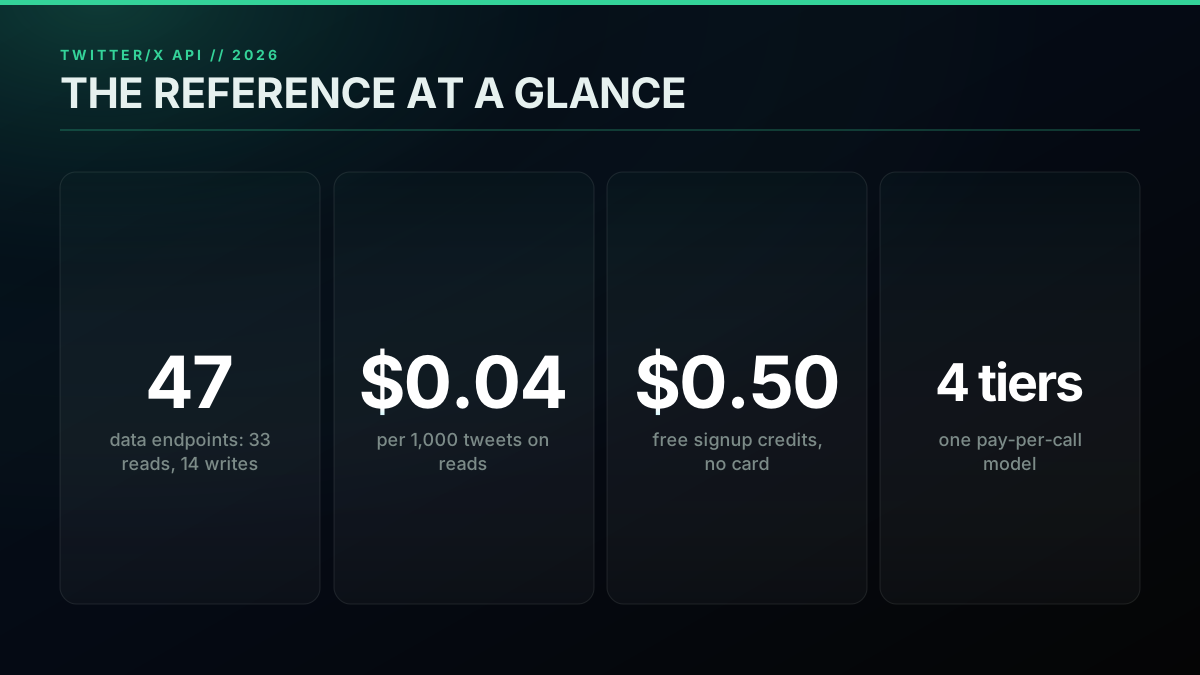
TL;DR: The Twitter/X API is a set of HTTP endpoints for reading and writing X data. The surface is 121 endpoints (71 reads, 50 writes). You authenticate with a key, calls are capped by rate limits (cross one and you get a 429), errors come back as HTTP status codes (401, 403, 429), and large results are walked with cursor pagination. On a pay-per-call API like TwitterAPIs a standard read is $0.0008 per call and brings back up to 20 tweets (about $0.04 per 1,000 tweets on a full page), posting a tweet is $0.0016, full history is $0.0024, and full thread expansion is $0.004, with $0.50 in free signup credits and no card. Use this page as the index, then follow the link to each spoke.
One reference, one honest cost per call
What Is the Twitter API Reference?
A reference is the contract, written down. It tells you what you can ask for, how to ask, what you get back, and what the server does when you ask wrong. For the Twitter/X API that contract has five moving parts: the endpoints (what data you can reach), authentication (how you prove you are allowed), rate limits (how often you may ask), error codes (what the server says when something is off), and pagination (how you page through more data than fits in one response). Learn those five and the whole surface becomes legible, because every specific question is really a question about one of them.
The framing is worth holding onto, because it is easy to treat an API like a magic box and then get surprised by its edges. A widely shared post puts the mental model cleanly.

Dr Milan Milanović
@milan_milanovic
𝗪𝗵𝗮𝘁 𝗶𝘀 𝗔𝗣𝗜? An API is a contract between software systems 🤝. It defines how one application requests data or actions from another, using structured payloads (JSON, XML, Protobuf) over secure transport (HTTPS/TLS). Think of it like a restaurant: the menu (API docs) ht…

That is exactly what this reference indexes: the request, the structured JSON payload, and the transport. The Twitter/X API is a REST API, so every call is an HTTP request to a URL, carrying a key and some parameters, and every response is JSON. If you have called any REST API before, you already know the shape, because the only Twitter-specific parts are the endpoint paths, the limits, and the field names, and all three are on this page. What remains is learning the specific endpoints, the specific limits, and the specific error meanings, which is what the rest of this page covers. When you want to go from reference to hands-on build, the complete Twitter API tutorial walks the same surface as a step-by-step integration.
The endpoint catalog: six families to know
The Twitter API Endpoint Catalog
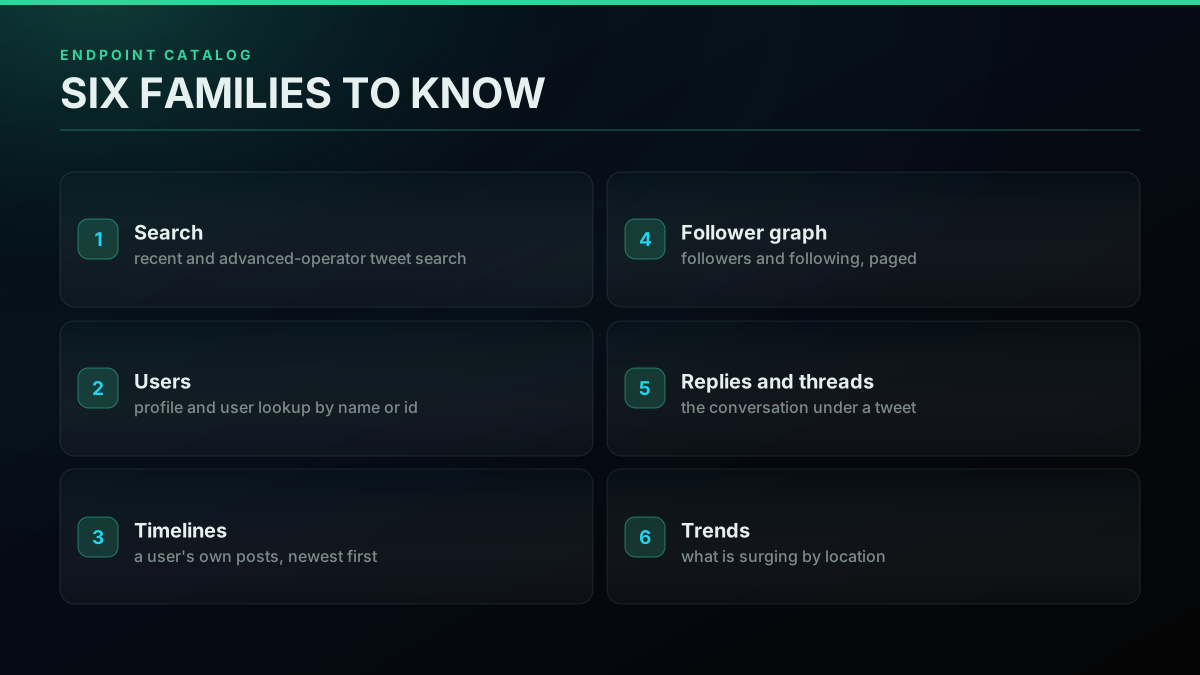
The endpoints group into a handful of families, and once you see the grouping the surface stops feeling large. On the read side there is search (recent search and advanced-operator search), single-tweet lookup, user lookup and profiles, user timelines and a user's own tweets, the follower graph (followers and following), replies and full thread expansion, retweeters, and trends. On the write side there is posting a tweet, liking and unliking, retweeting and unretweeting, bookmarking and unbookmarking, following and unfollowing, deleting, media upload, and sending a direct message. Counted end to end, that is 121 endpoints, 71 reads and 50 writes, across 121 documented paths. Most builds touch three or four of these, not all of them.
It helps to know what each family returns before you call it. Search takes a query string (plain text or advanced operators) and returns a page of matching tweets. User lookup takes a username or an id and returns the profile plus its counts. A timeline call takes a user and returns that account's own posts in reverse-chronological order. The follower graph endpoints take a user and return a paged list of accounts, which is where large pulls and pagination matter most. Replies and thread expansion take a tweet id and return the conversation beneath or around it. Trends take a location and return what is currently surging. Knowing the input and the output of each family up front means you can pick the right endpoint on the first try instead of discovering mid-build that the one you called does not return the field you needed.
Endpoint reliability is a real concern that pushes developers toward a single stable surface rather than stitching several together, and experienced builders say so bluntly.

andi (twocents.com)
@Nexuist
The Twitter employee purge was supposed to be followed by le BASED talent acquisition but that hasn’t seemed to have happened. Big disappointment. Key endpoints - search, list recommendations, v2 APIs - seem to either be totally broken or barely hit 2 9’s uptime. DMs and GCs
Each family has its own deep dive, and the point of this catalog is to route you there. For search, the advanced search operators guide covers the query grammar (the single largest search head on the platform), and the Twitter search API product page is the endpoint itself. For users, the user API and the followers API cover profiles and the graph, and the export Twitter followers guide shows a real pull. For a user's posting history there is the timeline API and the scrape tweet history guide. Replies and threads have the tweet replies guide and the full thread expansion guide; retweeters have the retweeters guide; mentions have the mentions API and the realtime mentions guide; and trends have the trends API guide. The one call every catalog test starts from is search, because if search returns clean JSON the rest of the surface usually behaves the same way:
# Search is the canonical read: one key, one call, flat JSON back
curl -s "https://api.twitterapis.com/twitter/tweet/advanced_search?query=yourbrand" \
  -H "Authorization: Bearer $TWITTERAPIS_KEY"
Anatomy of a single request
Authentication: Keys, Bearer Tokens, and OAuth
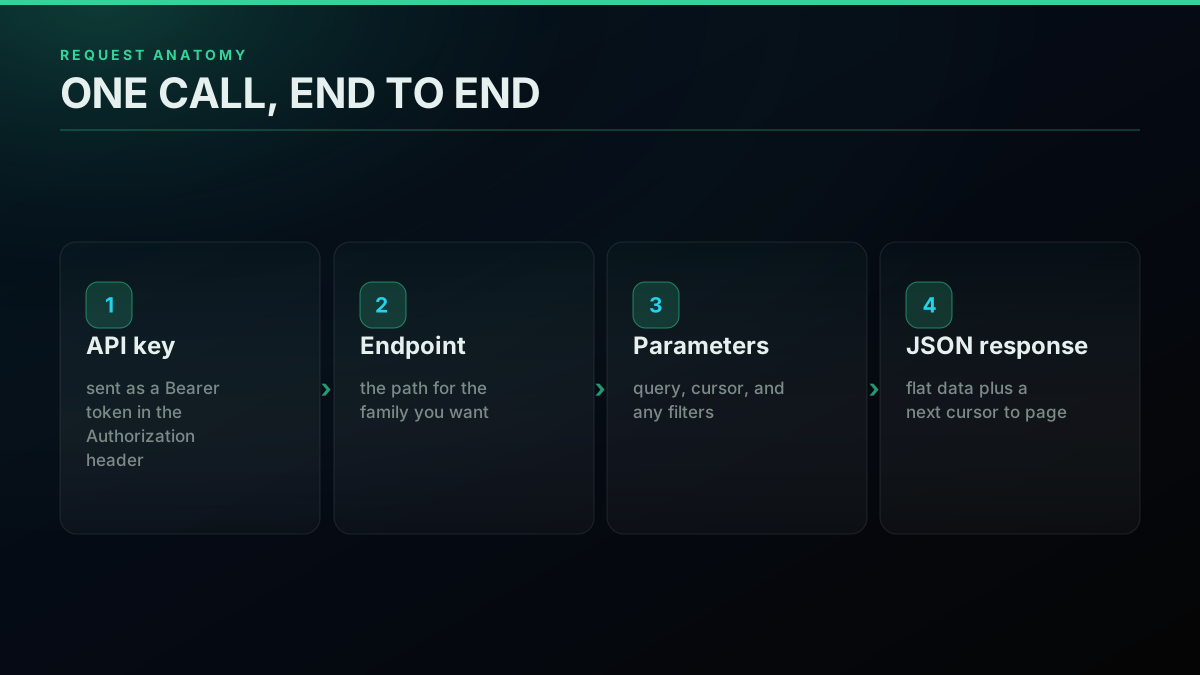
Authentication is how you prove a request is allowed, and it splits cleanly by what the request does. A read against public data needs nothing but your API key, sent as a Bearer token in the Authorization header. A write acts on a real account, so it needs a credential that speaks for that account, which on a direct pay-per-call API is a bring-your-own auth pair you pass per request and that is never stored. Anything requiring official partner status (ads, certain privileged actions) runs through the official OAuth flow on the platform's own API. The practical takeaway: reads are a single header, and most reference lookups you run are reads.
The friction difference between the two paths is large. The official flow wants a developer account, an approved app, and a token before your first call, which is where new builders get stuck for days. A direct key-and-call flow compresses that to an email, a key, and a request. If you want to see the setup end to end, this Tweepy walkthrough covers the library and key setup on the official side.
Watch a Tweepy setup walkthrough for the Twitter API on YouTube
Auth is also the most common source of a first failed call, because a missing or wrong key surfaces as a 401 or an intermittent 403 rather than as a clear "your key is bad" message. Developers hit exactly this and cannot tell why it works sometimes and not others.
Making API call with Bearer token, get 403 error but only sometimes
The mechanics of a correct authenticated call are a single header, and getting that header right removes most of these mysteries. For the full onboarding path on both the official and direct sides, the how to get a Twitter API key guide covers key acquisition, and the Twitter API key page is the direct signup route:
# Auth is a header, not a petition: key in, data out
curl -s "https://api.twitterapis.com/twitter/user/info?userName=someaccount" \
  -H "Authorization: Bearer $TWITTERAPIS_KEY"
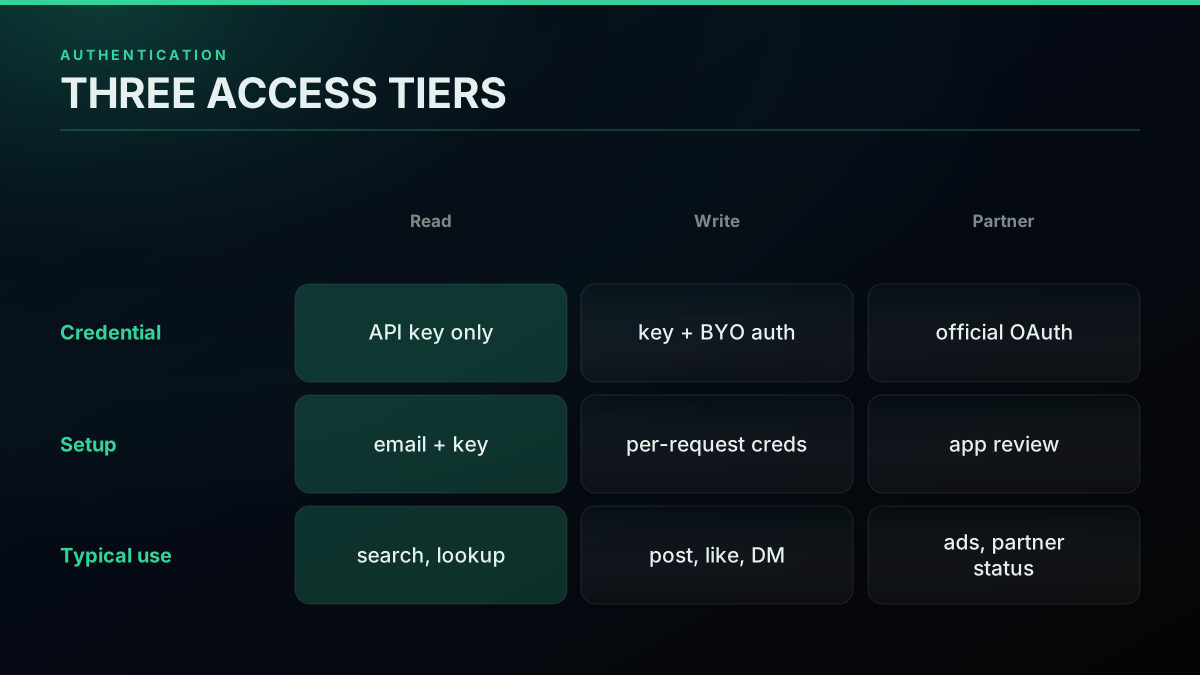
Authentication, mapped by what you are doing
Start building with TwitterAPIs
$0.0008 a call, about $0.04 per 1,000 tweets at 20 tweets a page. $0.50 free credits. No credit card required.
Rate Limits: Windows, Headers, and the 429
A rate limit is a cap on how many requests you may make inside a fixed time window, and the 429 status code is the server telling you that you crossed it. Two things set the ceiling: the plan or model you are on, and the specific endpoint. The official X API gates throughput with per-endpoint windows and bills every call on pay-per-use, with no free tier left. A pay-per-call model behaves differently: it meters by the call, so instead of hitting a hard wall you scale reads by paying for them, which turns a throughput problem into a budgeting one. Either way, the reference number you care about is requests per window per endpoint, and the header the server returns tells you how much of the window is left. A window is just a rolling clock: an endpoint might allow some number of requests every fifteen minutes, and when the clock resets your budget refills. The header names to watch report the ceiling, the remaining count, and the reset time, so a client that reads them never has to guess. The mistake that triggers most 429s is spending the whole budget in a burst at the top of the window and then sitting blocked until it resets, when pacing the same calls evenly would have stayed under the ceiling the entire time.
The free-tier ceilings on the official side are small enough that developers cannot even test with them, a complaint that shows up constantly.

port
@port_dev
Twitter api free tier is a joke: "The rate limit for the POST /2/tweets endpoint under the Free plan is 17 req / 24 hrs." what can i freakin test with 17 reqs /24hr? https://t.co/2ZPQtFaaBb

The other side of the same coin is the 429 you get when you exceed a limit, which is one of the most common first-hand support questions in the whole cluster. A developer running a small bot on the free plan hits it and cannot find the ceiling.
I keep getting error 429: too many requests (twitter API)
The fix is always the same three moves: read the rate-limit headers to see your remaining budget, honor any Retry-After value the server sends, and back off exponentially before retrying instead of hammering. A well-behaved client does this automatically:
import time, requests

def get_with_backoff(url, headers, tries=5):
    delay = 1
    for _ in range(tries):
        r = requests.get(url, headers=headers)
        if r.status_code != 429:      # 429 = rate limited
            return r
        time.sleep(delay)             # wait, then retry
        delay *= 2                    # exponential backoff
    return r
For the full ceiling-by-ceiling breakdown, the rate limits guide covers windows and headers, and the rate limits reference is the endpoint-level table. Sizing a pull against the ceiling is also a page-size question, because page size sets how many calls a job needs.
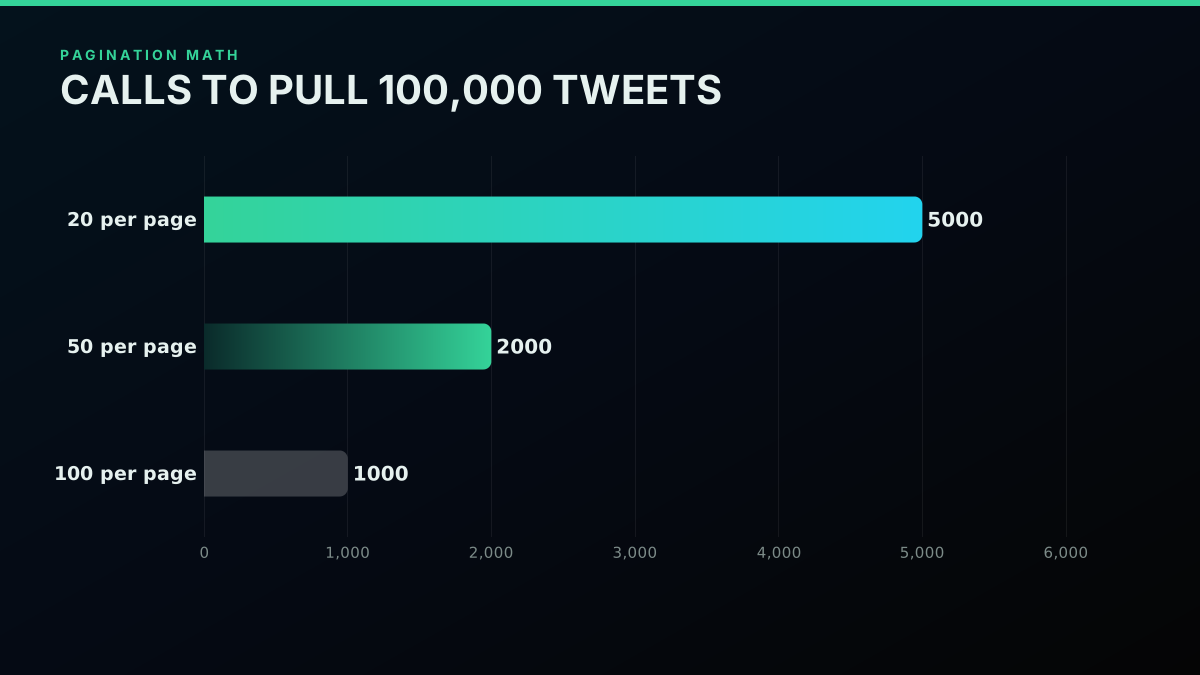
Why page size sets how many calls a big pull needs
The Rate-Limit Playbook
Reading a 429 correctly is one habit; not triggering it in the first place is a better one. The playbook is short. First, respect the window: if an endpoint allows N requests per window, pace your calls so you spend the budget evenly rather than in a burst. Second, cache aggressively, because the cheapest call is the one you do not make, and a monitor that re-fetches unchanged data is burning budget for nothing. Third, choose the largest sensible page size so a bulk pull needs fewer calls. Fourth, batch where the workflow allows it, treating a group of items as one job instead of one call each.
That last move, batching, is a genuine mindset shift that experienced automation builders lean on to cut call volume dramatically, treating a group of items as one job rather than one call each.

Harley Lewis Foote
@harleyfoote_
How to save an absolute fortune on API calls with X / social media automations. Batch all comments [1 API call] > draft replies [tokens] > send replies to your approver = 2 calls - not 100. Treat individual messages as one task, not as individual messages. More reach, le…

The playbook matters more than any single limit number because limits change and the discipline does not. A client that reads headers, honors Retry-After, caches, and paginates with a sane page size will survive a tightened ceiling that breaks a naive one. There is also a design lesson buried in the free-tier complaints: the tightest limits fall on the write endpoints, not the reads, so a read-heavy build (listening, monitoring, research, export) rarely feels a wall that a posting bot hits immediately. Structuring your work to lean on reads and to write only when you truly must is itself a rate-limit strategy. For the deeper treatment of what to build on top of the API once your read loop is stable, the what you can build with the Twitter API use-case hub maps the common projects, and the best practices guide collects the operational habits.
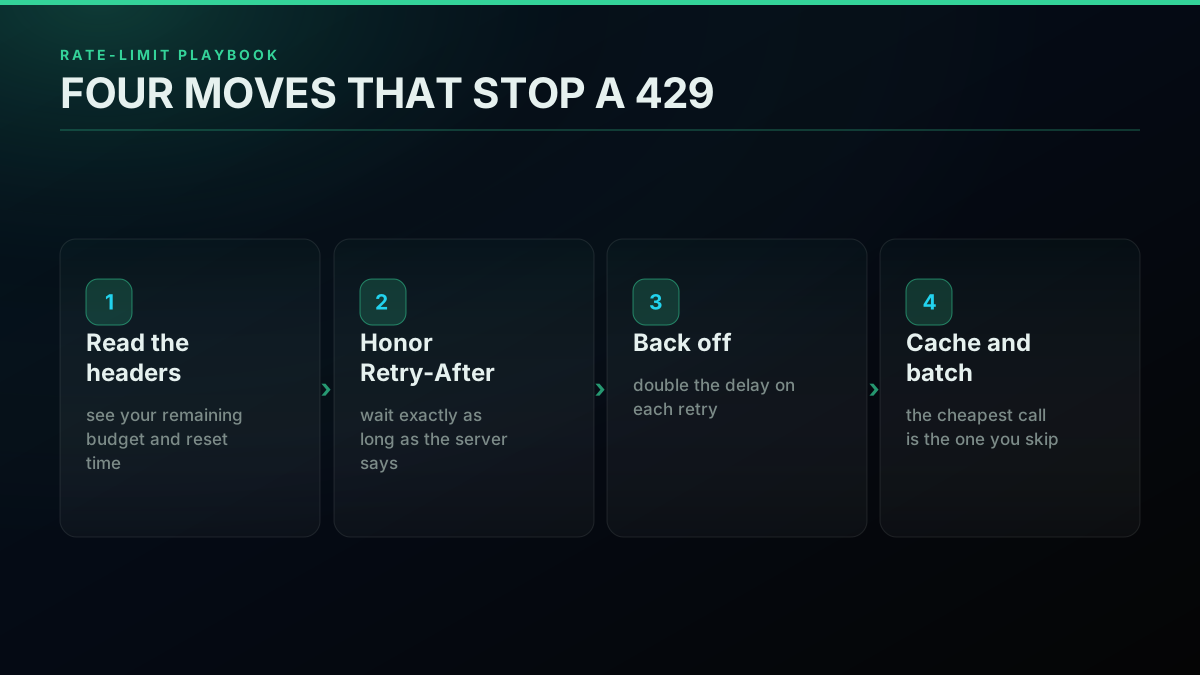
The rate-limit playbook: four moves that stop a 429
Error Codes: 401, 403, 429, and What They Mean
Every failed call comes back as an HTTP status code, and reading the code correctly is the difference between a five-minute fix and an afternoon of guessing. A 401 Unauthorized means your credential is missing, malformed, or expired, so the request never cleared authentication; the fix is your key or token, not your code. A 403 Forbidden means you authenticated fine but are not allowed to do this specific action, usually a plan or permission boundary. A 429 Too Many Requests means you crossed a rate limit and should back off. A 404 means the resource does not exist or is not visible to you. A 200 is success. The trick is to map the status to the category of cause, because 401 is a credential problem, 403 is a permission problem, and 429 is a pace problem, and each has a different fix.
The reason error handling deserves its own section is that the same status can appear intermittently, which is what makes it confusing. Auth that worked yesterday can throw a 403 Forbidden or a 401 today with no code change on your side, because the credential expired, a plan changed, or the platform tightened something. When that happens the instinct to reread your own code is usually wrong; the status is telling you the problem is on the credential or the plan, not the logic. Treat the status code as a diagnosis, not a nuisance, and you will spend your debugging time in the right place.
The defensive pattern is to branch on the status code and handle each class distinctly rather than treating every non-200 as the same failure:
r = requests.get(url, headers=headers)
if r.status_code == 200:
    data = r.json()                      # success
elif r.status_code == 401:
    raise SystemExit("check your API key")   # credential problem
elif r.status_code == 403:
    raise SystemExit("not permitted on this plan")  # permission problem
elif r.status_code == 429:
    pass                                 # rate limited: back off and retry
For the complete table of every status you can hit and its specific fix, the Twitter API error codes reference is the deep dive, and the is the Twitter API free explainer covers which errors are really free-tier limits in disguise.
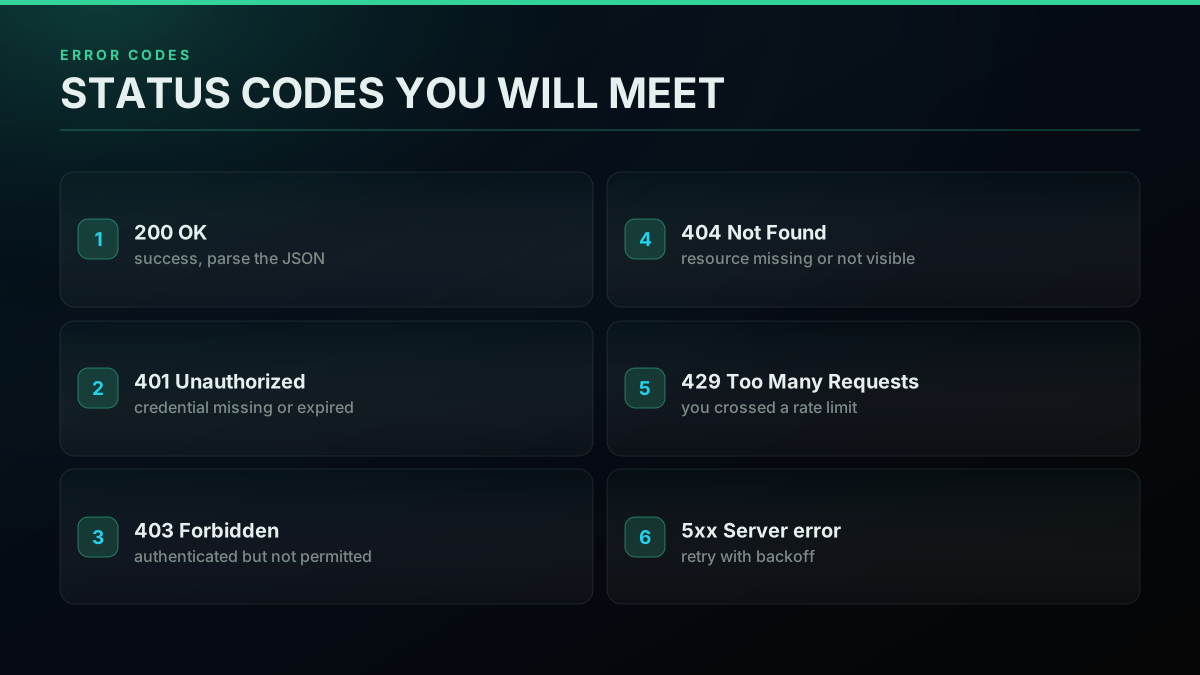
The status codes you will actually meet
Pagination: Cursors and next_token
A single response only carries one page of results, so anything larger is walked with a cursor. Pagination on the Twitter/X API works by token: the first call returns a page of data plus a cursor (often called next_token or a cursor value) in the response body. To fetch the next page you repeat the same call with that cursor passed back in, and you keep going until the response returns no cursor, which means you have reached the end of the set. The whole thing is a loop, and the only state you carry between calls is the cursor string.
Pagination is where a surprising number of developers stall, because the mechanic is simple to describe but easy to get wrong in code, and the same question recurs across communities.
How Do I Use Python Iterators to solve Rest API Pagination Problem?
The correct loop is short once you see it: call, read the cursor, pass it back, and stop when it is empty. This pulls every page of a search result without any special machinery:
cursor = ""
all_tweets = []
while True:
    r = requests.get(
        "https://api.twitterapis.com/twitter/tweet/advanced_search",
        headers=headers,
        params={"query": "yourbrand", "cursor": cursor},
    )
    page = r.json()
    all_tweets += page.get("tweets", [])
    cursor = page.get("next_cursor")     # empty when done
    if not cursor:
        break
For the full treatment of cursor pagination, terminal conditions, and how to keep memory flat on a very large pull, the Twitter API pagination guide is the deep dive. Pagination also sets the arithmetic of a bulk job: page size decides how many calls a target volume needs, which is the number that drives your cost.
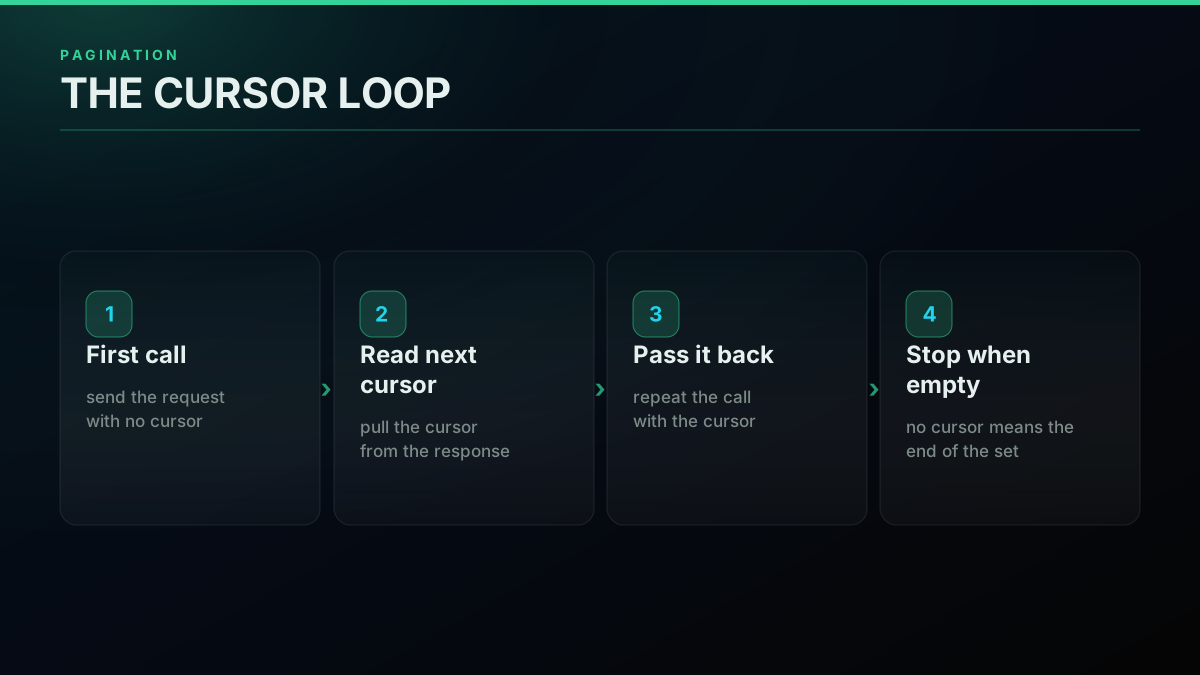
The cursor loop: call, read cursor, repeat, stop
The cheapest pay-as-you-go Twitter API. Try it free.
$0.0008 a call, about $0.04 per 1,000 tweets at 20 tweets a page. $0.50 free credits. No credit card required.
Response Shapes and Data Fields
Knowing an endpoint exists is only half the reference; the other half is knowing what it returns. Across the read surface the shapes are consistent. A tweet object carries an id, the text, the author (with the author's profile fields), a created_at timestamp, and public metrics (likes, retweets, replies, quotes, views). A user object carries an id, a username, a display name, a description, follower and following counts, and the profile image. A paged response wraps a list of these objects alongside the cursor field you use to page. Because the JSON is flat and predictable, mapping it into your own model is a small job, which is also what keeps switching costs low if you ever change providers.
The practical skill is pulling the two or three fields you actually need rather than storing the whole blob. A search result, for instance, usually reduces to a handful of columns:
rows = []
for t in page.get("tweets", []):
    rows.append({
        "id":        t["id"],
        "text":      t["text"],
        "author":    t["author"]["username"],
        "created":   t["created_at"],
        "likes":     t["favorite_count"],
    })
The one place to watch is nesting: the author of a tweet is itself an object with its own fields, so reaching the username goes one level deep, and the public metrics live in their own block. Once you know which fields sit at the top level and which are nested, parsing is mechanical, and the habit that saves the most time is to log one full response early, read its structure once, and then write your extraction against the two or three paths you actually care about rather than against a mental model of the shape that may be slightly wrong. Clean, flat response shapes are not a small thing; they are what makes a build maintainable and a migration cheap. For the language-specific handling of these responses, the Python Twitter API tutorial and the Node.js Twitter API tutorial walk parsing in each stack, and the Twitter MCP server exposes the same endpoints as agent-callable tools when your consumer is an AI agent rather than a script.
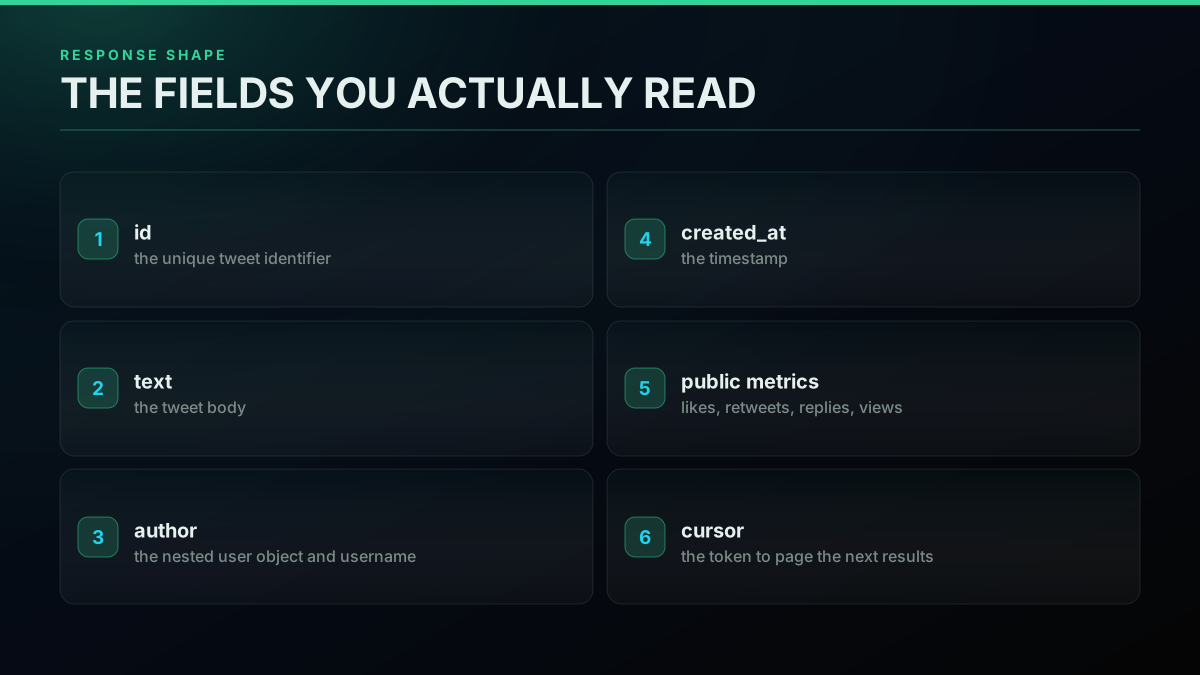
The response shape: the fields you actually read
Cost Reference: What Each Call Costs
A reference that skips cost is only half a reference, because for most builds the deciding number is what a call costs at your volume. On a pay-per-call model the pricing is per endpoint and narrow. A standard read is $0.0008 per call, and one search call returns roughly 20 tweets, so the effective rate is about $0.04 per 1,000 tweets. The simple write actions (like and unlike, retweet and unretweet, bookmark and unbookmark, follow and unfollow, delete, and media upload) also bill at the standard $0.0008. The premium tiers are the only exceptions and they only bite when you use them: posting a tweet and direct-message reads are $0.0016 per call, full account history is $0.0024, and full thread expansion is $0.004. Free signup credits of $0.50 cover about 12,500 tweets before you spend anything, with no card required.
Cost is the through-line under almost every reference lookup, because people read the spec while sizing a build against a budget. The per-call model is what makes that sizing honest: a dead experiment costs nothing the moment you stop calling, an idle month bills zero, and a runaway loop shows up as a line item you can trace rather than a surprise tier upgrade. That is the opposite of a subscription, where you pay the tier whether you make ten calls or ten thousand, and it is why per-call pricing suits the read-heavy, variable, and experimental work most reference readers are actually building.
Sizing a build is arithmetic you can do before you spend a dollar, using your real volume rather than a pricing-page guess:
# Size a build before you buy: calls * rate = monthly cost
tweets_per_day = 5000
tweets_per_call = 20          # a search call returns roughly 20 tweets
read_rate = 0.0008           # standard per-call read
calls_per_day = tweets_per_day / tweets_per_call
monthly = calls_per_day * read_rate * 30
print(f"~${monthly:.2f}/month for {tweets_per_day} tweets/day")
The four tiers line up cleanly, and the whole point of a per-call model is that you pay the premium only on the calls that need it.
| Endpoint tier | Per call | What it covers |
|---|---|---|
| Standard | $0.0008 | All reads plus the 10 simple writes (like, retweet, bookmark, follow, delete, media upload) |
| Premium (create + DM read) | $0.0016 | Posting a tweet, direct-message reads |
| Full history | $0.0024 | A user's complete account history |
| Full thread expansion | $0.004 | Expanding a full thread or conversation |
For the full economics, the Twitter API cost explainer walks the math, the pricing page lists every tier and covers the per-call billing model, and the cost calculator sizes your own build in a browser. If cost is what pushed you off the official path, the how to choose a Twitter API buyer's guide and the Twitter API alternatives comparison rank the options on the same axes.
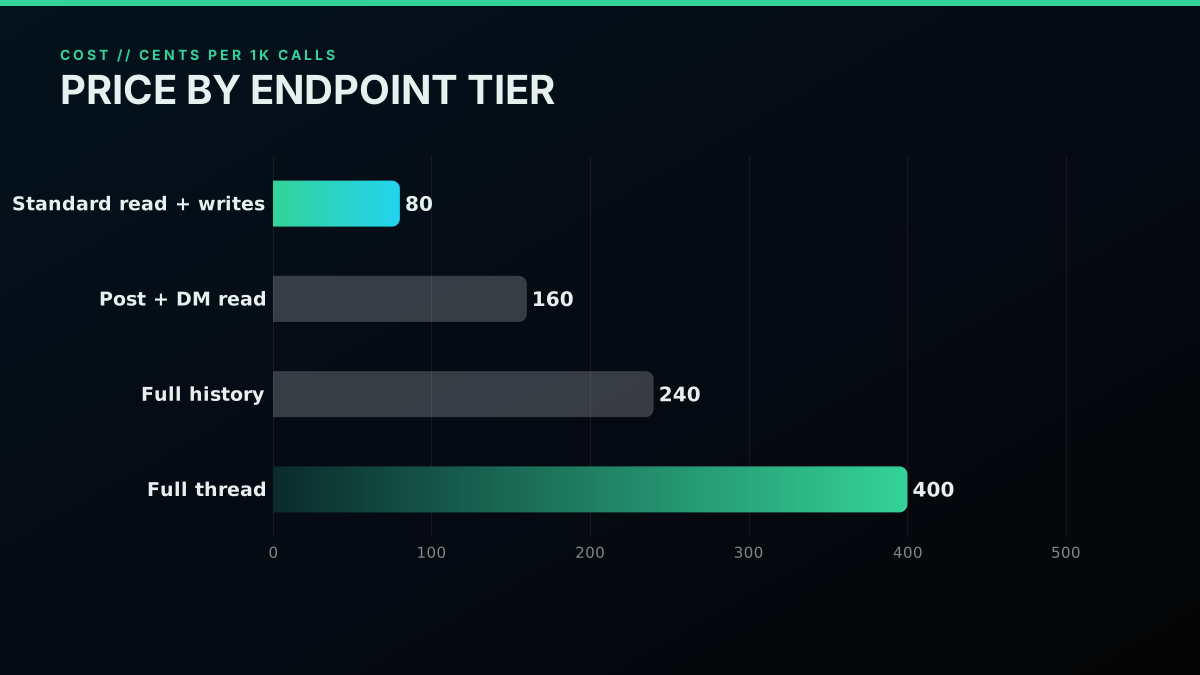
Cost per 1,000 calls, by endpoint tier
Quickstart: Your First Call
The fastest way to make a reference concrete is to make one real call, because a call settles more questions than any table. The path is four steps: sign up for the free credits, copy your API key, send a search request, and read the JSON that comes back. There is no developer-account review and no app approval in the way, so the whole loop is minutes, not days. Start read-only against your own query so you can see the exact response shape you will be parsing, then build outward from there.
If you prefer to watch the pattern before you type it, this walkthrough pulls Twitter data from Python end to end using the same request-and-parse loop.
Watch a Python walkthrough of pulling data from the Twitter API on YouTube
Here is the whole first call, ready to paste. Swap in your key and your query and you have a working read against live data:
# The whole first call: key in, tweets out
export TWITTERAPIS_KEY="your_key_here"
curl -s "https://api.twitterapis.com/twitter/tweet/advanced_search?query=yourbrand" \
  -H "Authorization: Bearer $TWITTERAPIS_KEY"
If the JSON looks right and the latency is acceptable, you have validated the endpoint, the auth, and the response shape in one shot, and you have spent nothing to do it. From there the complete Twitter API tutorial builds a full integration, the how to scrape tweets guide covers the bulk-read path, and the quickstart and docs pages carry the endpoint-by-endpoint detail.
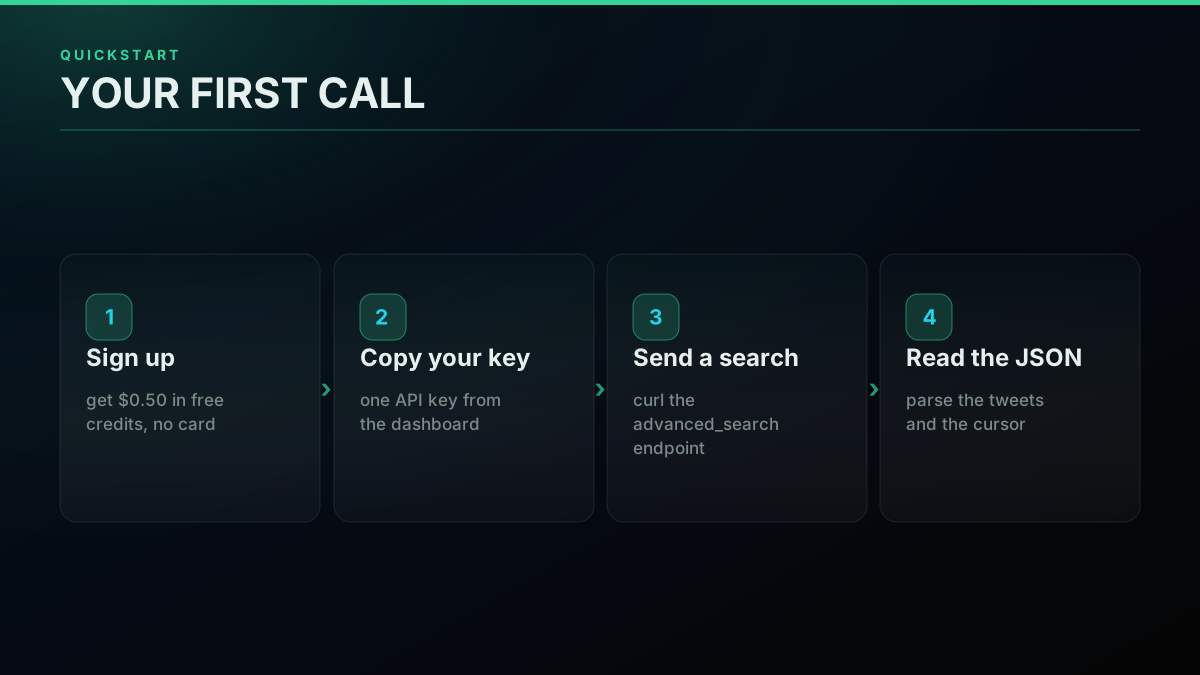
Your first call, in four steps
The Full Developer-Guides Map
This reference is the hub of a larger set of guides, and the fastest way to use it is to jump straight to the spoke that matches your question. For access and setup, read how to get a Twitter API key. For the limits behind every 429, read the rate limits guide. For decoding a failed call, read the error codes reference. For walking a large result set, read the pagination guide. For the query grammar behind the biggest search head on the platform, read the advanced search operators guide. For live trend data, read the trends API guide. Each of these links UP to this page and DOWN to the endpoint it documents, so you can move between the index and the detail without losing your place.
The reference exists because the alternative, stitching the answer together from scattered docs, is exactly the pain that pushes developers to look for one stable, indexed surface in the first place. Bookmark this page as the front door, use the endpoint catalog to find the family you need, use the rate-limit and error sections to keep your client healthy, and use the cost reference to size the build before you commit. When you are ready to move from reading the reference to running against it, the signup gives you $0.0008-per-call reads and $0.50 in free credits to test the whole surface, and the use-cases page shows what teams build once the read loop is solid. A reference is only useful when it routes you to an answer fast, and that is the one job this page is built to do.
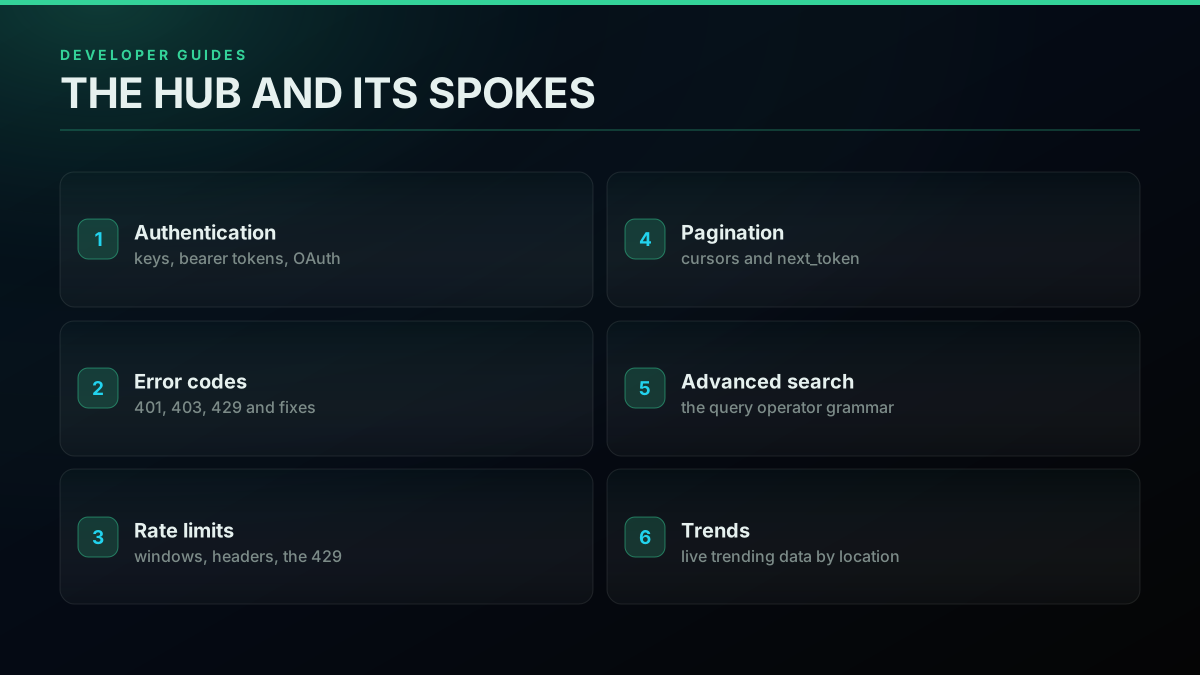
The developer-guides map: hub and spokes
// sources
Where these numbers come from
Each row is a figure in this post and the artefact it was read from. Prices and limits on this platform move, so check the date on the source before you plan against it.
- MDN reference for HTTP 401 Unauthorized
- Backs the error-code entry saying a 401 means the credential is missing, malformed, or expired, so the request never cleared authentication.
- MDN reference for HTTP 403 Forbidden
- Backs the entry saying a 403 means authentication succeeded but the specific action is not allowed, usually at a plan or permission boundary.
- MDN reference for HTTP 429 Too Many Requests
- Backs the entry that a 429 is the server reporting a crossed rate limit, which the reference treats as a pacing problem rather than a code bug.
- List of HTTP status codes
- The general catalog behind the section arguing that reading the returned status correctly is what separates a five-minute fix from an afternoon of guessing.
- Rate limiting overview
- Defines the cap-per-window model the reference uses to explain why the number that matters is requests per window per endpoint, and how a metered per-call model turns a throughput wall into a budgeting question.
- Pagination overview
- The general model behind the cursor section, where a first call returns a page plus a next_token and the loop repeats until no cursor comes back.
Frequently Asked Questions
The Twitter API reference is the indexed spec for programmatic access to X data: the list of endpoints you can call, what each returns, how you authenticate, the rate limits that cap how often you can call, the error codes you get when something is wrong, and how pagination walks a result set larger than one page. On a pay-per-call API like TwitterAPIs the same reference carries a cost per endpoint family, with a standard read at $0.0008 per call returning up to 20 tweets, about $0.04 per 1,000 tweets on a full page, and $0.50 in free credits so you can test the whole surface before you pay. Read the reference to find the endpoint, the limit, and the error meaning fast.
A rate limit is a cap on how many requests you may make inside a fixed time window, and a 429 status code (Too Many Requests) is the server telling you that you crossed it. The official X API caps throughput with per-endpoint windows and bills every call on pay-per-use, with no free tier left. A pay-per-call API meters by the call instead, so you scale reads by paying for them rather than hitting a hard wall. Either way, the fix for a 429 is the same: read the rate-limit headers, honor any Retry-After value, and back off exponentially before retrying.
Large result sets are returned one page at a time, and you walk them with a cursor. The first call returns a page of data plus a next cursor token (often called next_token or a cursor value) in the response. To get the next page you repeat the same call with that cursor passed in, and you keep going until the response returns no cursor, which means you have reached the end. The pattern is a simple loop: call, read the cursor, pass it back, stop when it is empty. Set a sane page size so a big pull does not need more calls than necessary.
The read surface groups into a few families: tweet search (recent and advanced-operator search), single tweet lookup, user profile and user lookup, user timelines and tweets, the follower graph (followers and following), replies and full thread expansion, retweeters, and trends. There are also write endpoints for posting, liking, retweeting, bookmarking, following, and sending direct messages. In total the surface is 121 endpoints, 71 reads and 50 writes across 121 documented paths. Each family maps to a specific route, and a per-endpoint deep dive covers the parameters and response for each one.
A 401 Unauthorized means your credential is missing, malformed, or expired, so the request never got past authentication. A 403 Forbidden means you authenticated but are not allowed to do this specific thing, often a plan or permission limit. A 429 Too Many Requests means you crossed a rate limit and should back off. A 404 means the resource does not exist or is not visible to you. A 200 is success. Match the status to the cause: 401 is a credential problem, 403 is a permission problem, and 429 is a pace problem, and each has a different fix.
On a pay-per-call model the cost depends on the endpoint. A standard read is $0.0008 per call, and one search call returns roughly 20 tweets, which works out to about $0.04 per 1,000 tweets. The simple write actions (like, retweet, bookmark, follow, and their undos, plus delete and media upload) also bill at the standard $0.0008. The premium tiers are narrow: posting a tweet and direct-message reads are $0.0016, full account history is $0.0024, and full thread expansion is $0.004 per call. Free signup credits of $0.50 cover about 12,500 tweets before you pay anything.
Check out similar blogs
More guides on the Twitter/X API, scraping, and pricing.

Build vs Buy: Should You Build Your Own Twitter/X Monitoring Tool? (2026)
Buying a listening seat costs $29 to $2,000 a month depending on the vendor. Building costs real engineering hours plus a data bill. Here is the real math behind the twitter monitoring tool build vs buy decision, priced both ways.
What "Rate Limited" Actually Means on X (Every Limit, Measured)
"Sorry, you are rate limited" is one message covering two different systems: a consumer action ceiling and a developer API window. Here is what the term means, the current numbers for both, where it came from, and how long it actually lasts.
How to Choose a Twitter/X API in 2026: The Complete Buyer's Guide
A decision framework for choosing a Twitter/X API in 2026: the seven criteria that actually matter (pricing model, data coverage, rate limits, auth, reliability, compliance, migration cost), a use-case decision tree, and where each path wins.

How to Track a Tweet's Performance in Real Time with the X API
Poll a tweet's engagement counts over time with the X API, compute a views-to-likes ratio, and read the quote-tweet layer to tell an organically growing launch tweet from a boosted one. Tested Python and curl.
What You Can Build With the Twitter/X API: 20+ Real Use Cases (2026)
A 2026 field guide to what you can actually build with the Twitter/X API: 24 real use cases across listening, monitoring, audience graph, research, and bots, each mapped to the endpoint that powers it and the real per-call cost.
Twitter API Error Codes: The Complete 2026 Reference
The complete 2026 reference to X (Twitter) API error codes. What every code means (32, 88, 187, 226, 401, 403, 429, 453 and the rest), the real cause behind it, and the exact fix, plus the HTTP status versus error code distinction that trips up most developers.
Twitter API Pagination 2026: How next_token Works (and a Simpler Alternative)
How Twitter API pagination works in 2026. The official next_token loop explained field by field, a simpler single-cursor alternative, runnable Python and Node code, and the real per-call cost of a paginated pull.
Fetch a Full Twitter Thread via API in One Call (2026)
How to pull an entire Twitter thread, the root tweet plus every connected tweet in the chain, in a single API call with the tweet/thread endpoint, instead of walking replies by hand. Live-tested code in curl, Python, and Node.js, with the real per-call cost.