GUIDE
Twitter (X) MCP Server: Connect Claude, Cursor and AI Agents to Live X Data (2026)
Connect Claude, Cursor, Windsurf, and any AI agent to live Twitter/X data with one MCP server. Copy-paste config for every client, 52 read and write tools, the auth model, and real per-call cost.
Your AI agent is only as useful as the data it can reach. Ask Claude or Cursor about a trending topic, a competitor account, or a live conversation on X and it guesses, because the model stops at its training cutoff and has no window into what was posted an hour ago. A Twitter MCP server closes that gap. It hands your agent a set of typed tools that read and write real X data on demand, so the agent stops guessing and starts calling.
This guide is the complete setup. You get a one-line definition, a one-command install, and then the exact configuration block for every major client: Claude Desktop, Cursor, Windsurf, VS Code, and Claude Code. After setup you get the full tool catalog split into reads and writes, the auth model in plain language, real per-call cost, and a troubleshooting section for the errors you will actually hit.
TL;DR: A Twitter MCP server exposes the X API as Model Context Protocol tools so Claude, Cursor, and any agent can search tweets, read profiles, and post, all through natural language. The fastest path is the @twitterapis/mcp package: sign up at twitterapis.com/signup for an API key with 0.50 dollars in free credits and no card, add one
mcpServersblock that runsnpx -y @twitterapis/mcp@latestwith yourTWITTERAPIS_KEY, and restart the client. You get 116 tools, 70 reads and 46 writes. Reads and simple writes are 0.0008 dollars per call, which is 0.04 dollars per 1,000 tweets. No X developer account is required for the read path.
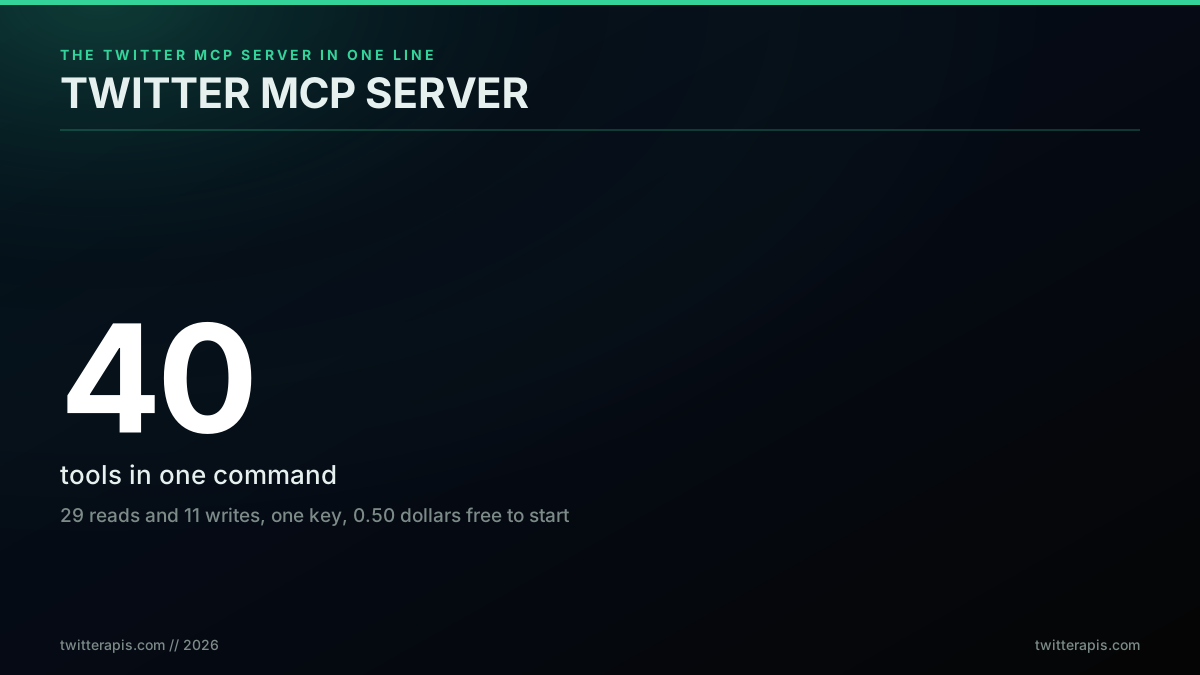
The Twitter MCP server in one line: 116 tools, one key, free to start
What Is a Twitter MCP Server
A Twitter MCP server is a lightweight process that exposes the Twitter/X API as typed Model Context Protocol tools, so any MCP client can search, read, and post X data through natural language with no integration code. The Model Context Protocol is an open standard that Anthropic introduced in November 2024 to connect AI clients to external tools and data through one consistent interface. An MCP server advertises a list of tools with typed inputs and outputs, and any compliant client, Claude Desktop, Cursor, Windsurf, or a custom agent, can call those tools during a conversation.
The Twitter version of that pattern wraps X endpoints. Instead of writing a fetch call, parsing JSON, and handling pagination yourself, you install the server once and your agent calls a tool like twitter_advanced_search on its own when the conversation needs live data. The protocol specification lives at modelcontextprotocol.io, and the reference implementations are maintained in the Model Context Protocol GitHub organization. MCP is no longer a bet. As the AI engineer Swyx put it in a 2025 review, MCP "is already the presumptive winner" of the agent open-standard contest (Vellum, MCP hype versus reality), which is why every major client now ships native support. The server itself is stateless. It forwards your API key to the REST endpoints at api.twitterapis.com on each call and returns the result to the client.
The reaction below captures why this matters now. A hosted, ready-to-call data layer is becoming a default agent building block rather than something every team wires up by hand.

Mustafa Ergisi
@mustafaergisi
@XDevelopers A hosted MCP server lets agents pull live X data with zero setup, no key juggling or OAuth glue. The real-time layer is becoming a default agent primitive, not a custom build. How fast do other platforms ship hosted endpoints of their own?
That is the shift. The hard part of agent work is no longer the model. It is giving the model trustworthy, current data without a custom integration for every source. An MCP server is how you do that for X.
The same pattern is showing up across every tool category, not just data reads. When a service exposes its actions through MCP, an agent can operate the service directly rather than draft text for a human to paste.

Tuck Ross
@tuckross
Buffer connected to Claude through MCP. Claude can now see your channels and your queue and act on them directly. Not 'write me a caption.' Closer to 'draft this week across X, LinkedIn, and Threads in my voice, then line up the slots.'
That is the read-and-act loop in one sentence. The agent sees live state through read tools and changes it through write tools, with the MCP server as the bridge. For X data, the read half is the part most teams start with, because it powers monitoring, research, and analysis without touching an account.
Mechanically, the loop is simple. The client launches the server as a subprocess over stdio, the server advertises its tool list with JSON schemas, and from then on the model decides when to call a tool, fills in the arguments, and reads the structured result back into the conversation. There is no webhook to host and no server to deploy, because the client manages the process lifecycle. That is why a one-line npx command is the entire install. If you have only ever used the raw HTTP interface, the complete Twitter API tutorial and the how to get a Twitter API key guide cover the request layer the MCP server wraps.
How to Set Up a Twitter MCP Server in Four Steps
Setup is four steps and takes about two minutes: get an API key, copy the config block, set the key, and restart your client. There is no package to install globally and no build step. The npx command pulls and runs the server on demand, so the only prerequisite is Node 18 or later. Confirm your runtime first, because an old Node is the most common reason the server fails to start:
node --version
# v18.x or higher is required. Below 18, upgrade Node before continuing.
You can read the official client-side walkthrough in the MCP user quickstart if you want the protocol-level view. The server itself needs no clone and no local build, which is the main reason a hosted package is faster to adopt than the self-hosted community servers covered later.
Here is the flow before the per-client detail.
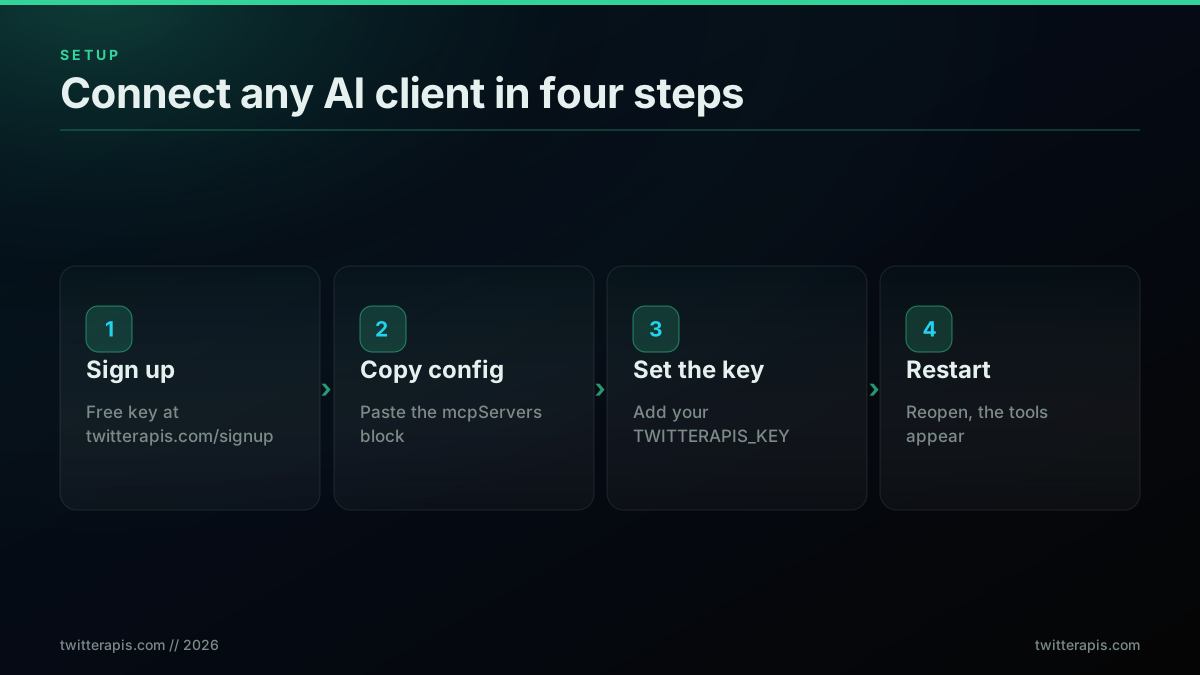
The four-step setup, signup to working tools
First, get a key. Sign up at twitterapis.com/signup, open the dashboard, and copy your API key. The account starts with 0.50 dollars in free credits and needs no card. Second, copy the configuration block for your client from the sections below. Third, paste your key into the TWITTERAPIS_KEY field. Fourth, restart the client so it loads the server at startup. After the restart, the twitter_* tools appear in the tool picker and your agent can call them.
The config file location is the only thing that changes between clients. The block itself is nearly identical everywhere.
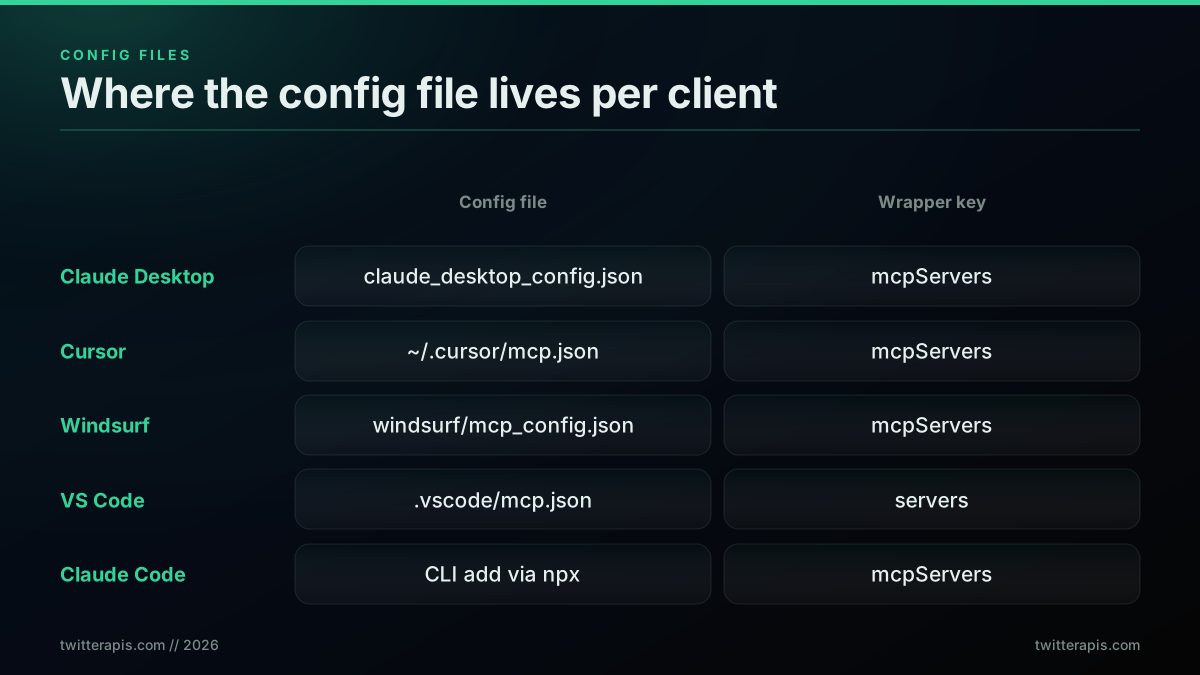
Where the config file lives for each MCP client
Claude Desktop Setup
For Claude Desktop, edit claude_desktop_config.json through Settings, then Developer, then Edit Config, and add the mcpServers block below. Claude Desktop is the most common MCP host and supports the full read and write tool set. After you save the file, fully quit and reopen Claude Desktop, because it loads MCP servers only at startup.
{
  "mcpServers": {
    "twitterapis": {
      "command": "npx",
      "args": ["-y", "@twitterapis/mcp@latest"],
      "env": { "TWITTERAPIS_KEY": "YOUR_API_KEY" }
    }
  }
}
Replace YOUR_API_KEY with the key from your dashboard. When Claude restarts, open the tool picker and you will see the twitter_* tools. Ask it something like "find the most liked tweets about AI agents this week" and it will call twitter_advanced_search on its own. Anthropic documents the desktop config path in detail in the Claude Code MCP docs, which share the same configuration shape.
Cursor Setup
For Cursor, add the same block to ~/.cursor/mcp.json, or use Settings, then MCP, then Add New Server. Cursor reads the identical mcpServers shape, so the only difference from Claude Desktop is the file path. The Twitter tools then appear in the Composer and Agent panels.
{
  "mcpServers": {
    "twitterapis": {
      "command": "npx",
      "args": ["-y", "@twitterapis/mcp@latest"],
      "env": { "TWITTERAPIS_KEY": "YOUR_API_KEY" }
    }
  }
}
Cursor supports both a global config at ~/.cursor/mcp.json and a project-level config inside a workspace, which is handy when only one repository needs X access. The full reference is in the Cursor MCP documentation. Restart Cursor after editing the file.
Start building with TwitterAPIs
$0.0008 a call, about $0.04 per 1,000 tweets at 20 tweets a page. $0.50 free credits. No credit card required.
Windsurf Setup
For Windsurf, edit ~/.codeium/windsurf/mcp_config.json with the same mcpServers block. Windsurf follows the same protocol, so once the file is saved and Windsurf is restarted, the tools surface in Cascade.
{
  "mcpServers": {
    "twitterapis": {
      "command": "npx",
      "args": ["-y", "@twitterapis/mcp@latest"],
      "env": { "TWITTERAPIS_KEY": "YOUR_API_KEY" }
    }
  }
}
The Windsurf config lives under the .codeium directory in your home folder. If you manage several MCP servers, keep them as sibling keys inside the one mcpServers object rather than separate files. The Windsurf MCP documentation covers the UI path as well.
VS Code and Claude Code Setup
For VS Code agent mode, create .vscode/mcp.json in your workspace and use the servers shape with a type of stdio. For Claude Code in the terminal, you can add the same server through the CLI. Both run the identical npx command under the hood.
{
  "servers": {
    "twitterapis": {
      "type": "stdio",
      "command": "npx",
      "args": ["-y", "@twitterapis/mcp@latest"],
      "env": { "TWITTERAPIS_KEY": "YOUR_API_KEY" }
    }
  }
}
VS Code uses a slightly different wrapper key, servers rather than mcpServers, and an explicit type field, which is documented in the VS Code MCP guide. Claude Code and the Cline extension both read MCP servers too, so the same package works across the terminal and the editor. The wider language-agnostic background on calling X programmatically lives in the complete Twitter API tutorial.
The 116 Tools: Reads and Writes
The @twitterapis/mcp server exposes 116 tools, 70 reads and 46 write actions, and every tool maps to one REST endpoint in the Twitter API reference. Reads cover search, profiles, timelines, followers, likes, replies, threads, and list members. Writes cover posting, replying, liking, retweeting, bookmarking, and following, plus the matching undo actions. Most user endpoints accept a username or a numeric user_id, tweet endpoints accept an id or a full url, and paginated endpoints return a cursor you pass back to fetch the next page.
The split matters when you choose tools for an agent, because the read tools are the safe, cheap, no-auth-friction core, while writes act on a real account.
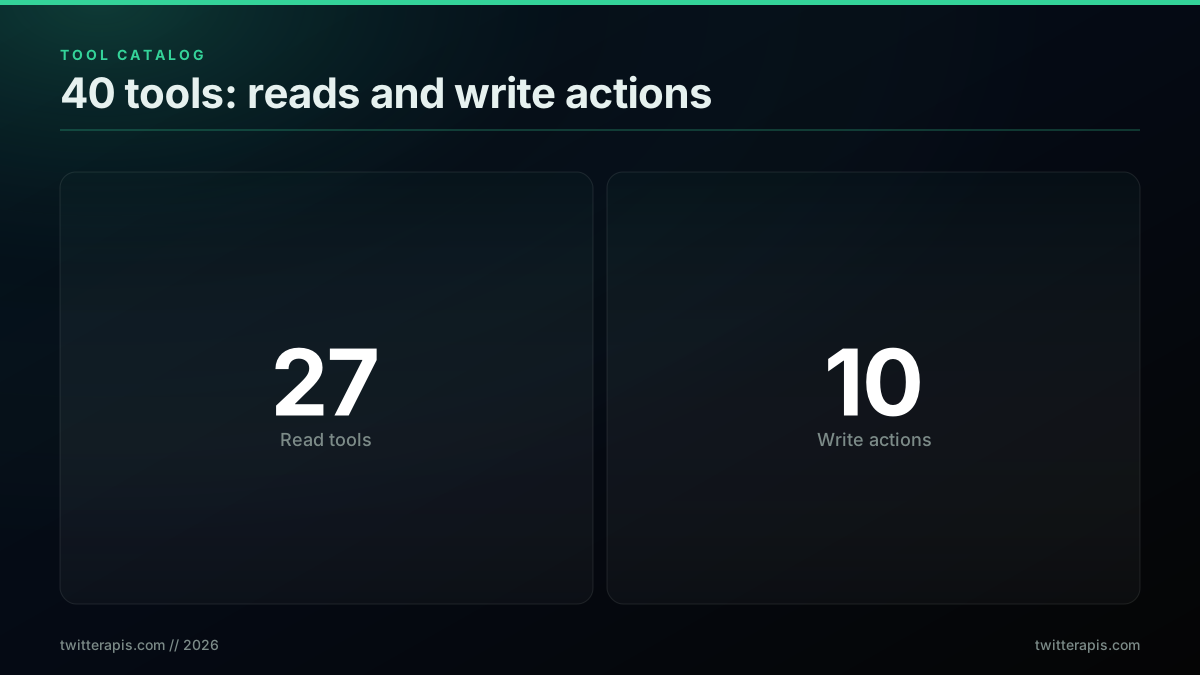
70 reads and 46 writes across the tool catalog
A focused tool set is the point. Wrapping a giant raw API one to one into MCP tends to hurt agents rather than help them. As fastmcp contributor Jeremiah Lowin warns, "context pollution is the silent killer of contemporary agentic workflows" (jlowin.dev), because every extra tool and field the model has to reason about dilutes its attention. A tight set of named, single-purpose Twitter tools keeps the agent fast and accurate. The most used read tools are twitter_advanced_search for operator-based search, twitter_user_tweets for a user's recent posts, twitter_user_followers and twitter_user_following for graph data, twitter_tweet_detail and twitter_tweet_replies for a single conversation, and twitter_user_mentions for monitoring. The write tools are twitter_create_tweet, twitter_delete_tweet, the like and unlike pair, the retweet and unretweet pair, the bookmark pair, and the follow and unfollow pair. The reversing actions carry a destructive hint in their tool annotation, so a well-behaved client can prompt before it runs a delete or an unfollow.
You never call these tools by hand. The agent does, in response to a plain instruction. When you ask Claude "get the last 5 tweets from @sama," it selects twitter_user_tweets, fills the arguments, and reads back a structured result like this:
{
  "tweets": [
    { "id": "189...", "text": "shipping today", "created_at": "...",
      "favorite_count": 4210, "retweet_count": 311 }
  ],
  "next_cursor": "DAABCg..."
}
Because the response is already flattened, the model reads text, favorite_count, and created_at straight off each object with no expansion blocks to join, which keeps its reasoning cheap and accurate. Most user endpoints accept a username or a numeric user_id, and paginated tools return the next_cursor you see above so an agent can walk a large result set on its own. The full operator syntax for search lives in the advanced search operators reference, and if you want the raw HTTP version of the same call, the Python tutorial shows it line by line.
The Auth Model: When You Need a Session
Public reads work with just your API key. Account-only reads and all write actions act as a specific X account, so they need either a linked session or per-call credentials. Public data, search, profiles, tweets, followers, likes, is readable with nothing but your TWITTERAPIS_KEY. The account-only reads, your bookmarks, your DMs, your home timeline, and the followers-you-know lookup, plus every write, act as a real account, so they return HTTP 409 until you link a session.
There are two ways to provide that account context, and the decision tree is short.
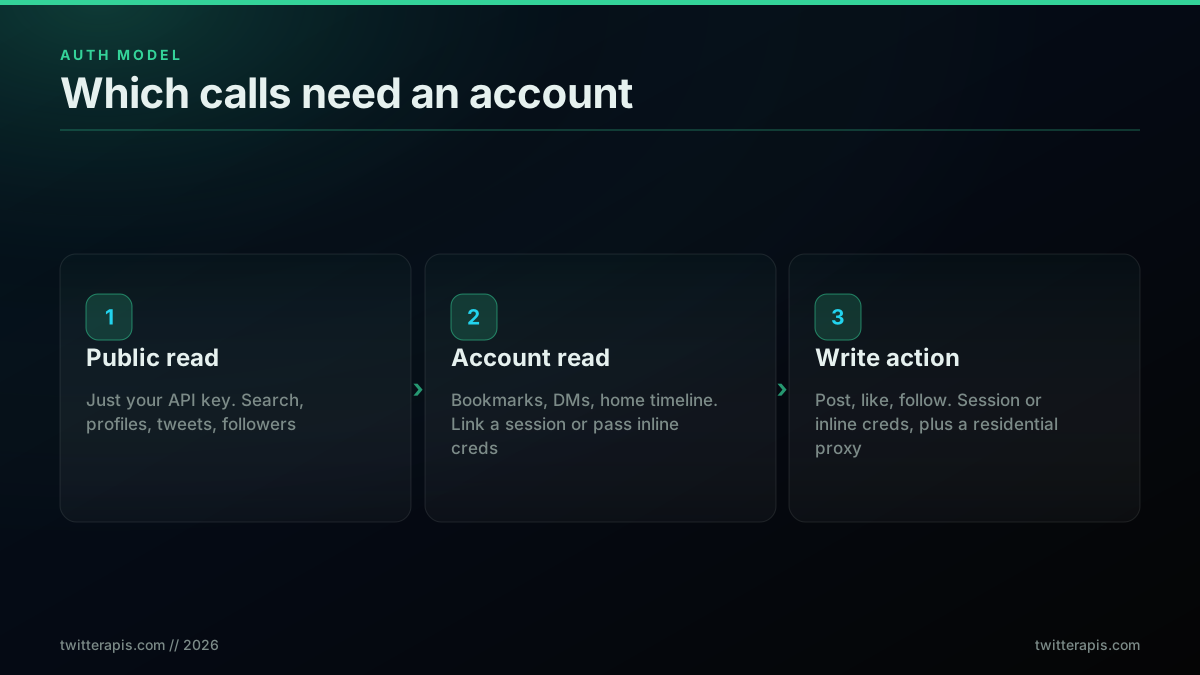
Which calls need an account, and which just need a key
The first option is to link a session to your key once, after which the account-only tools work without extra parameters. The second option is to pass inline credentials on the call itself, an auth_token and a ct0 value, with an optional proxy_url and user_agent, so one API key can act as many accounts without pre-registering anything. For write actions, set proxy_url to a residential proxy, because X soft-blocks writes that egress from datacenter addresses. This is the single most common reason a write returns a flagged response, and it is covered in more depth in the rate limits guide. Credentials passed inline are used for that one call and never stored.
The inline-credential path matters most for multi-account work. A scheduling tool, an agency dashboard, or a support inbox often acts on behalf of many X accounts under one billing relationship. Rather than register a separate key per account, you keep one TWITTERAPIS_KEY for billing and pass each account's auth_token and ct0 on the calls that act as that account. The server treats those credentials as request-scoped, so the same agent can read your mentions, then post from a client account, then like a tweet from a third, without any stored session bleeding across them. For pure read agents you can ignore all of this, because public reads never need an account at all. The practical rule is simple: if the data is something only a logged-in user could see, or the action changes state, you need account context; otherwise your API key is enough.
The cheapest pay-as-you-go Twitter API. Try it free.
$0.0008 a call, about $0.04 per 1,000 tweets at 20 tweets a page. $0.50 free credits. No credit card required.
What You Can Build on the Read Tools
Most agent workflows are read-only, and the read tools alone power four common agent types: social listening, competitive intelligence, brand monitoring, and research. The pattern is the same in each case. You describe the job in natural language, the agent picks the right tool, paginates if needed, and synthesizes the result. No glue code sits between the model and the data.
These four are the ones teams build first.
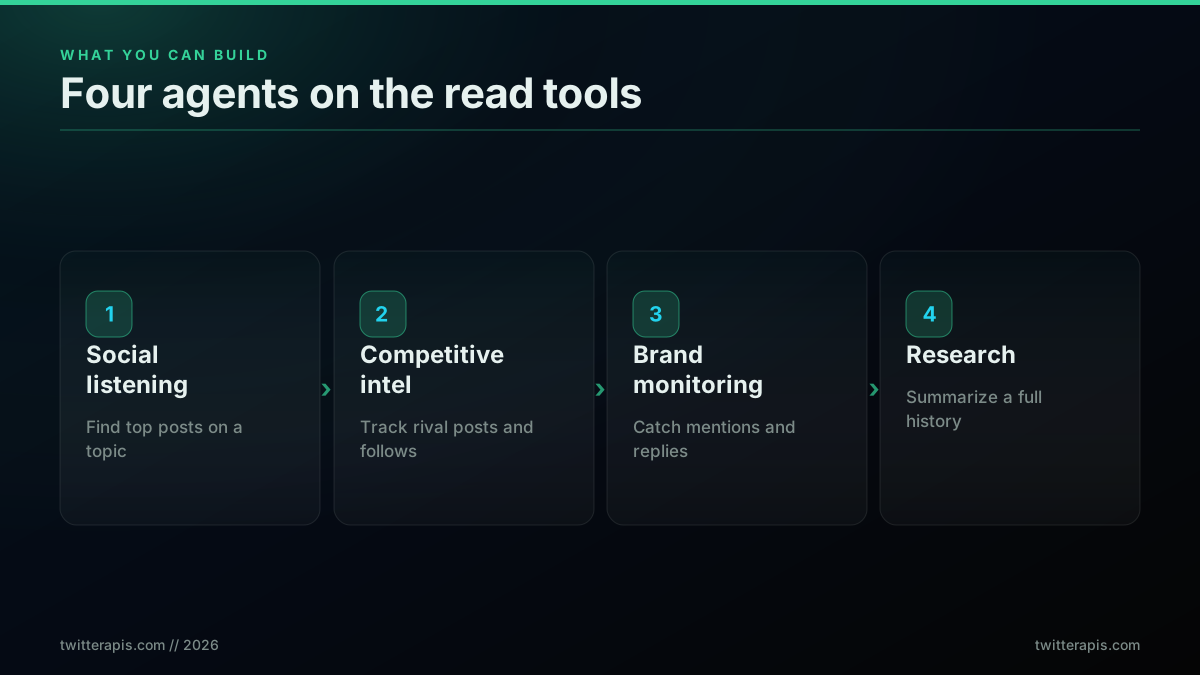
Four agents you can build on the read tools
A social listening agent uses twitter_advanced_search with operators like min_faves and since to surface the highest-signal posts on a topic each day. A competitive intelligence agent runs twitter_user_tweets and twitter_user_followers across a list of rival accounts to track what they ship and who follows them. A brand monitoring agent polls twitter_user_mentions and twitter_tweet_replies to catch every mention and the sentiment around it. A research agent pulls twitter_user_tweets_complete for a near-full account history and feeds it into a summary. Real developers are actively asking which MCP servers are worth wiring into a daily workflow, which is exactly the gap a focused data server fills.
Clade Code + MCP
The answer that thread is searching for is a server that does one job well and is cheap enough to leave running. A Twitter data server fits that description, because the read tools are inexpensive and the value compounds the more the agent calls them. If you want to build a posting agent rather than a reading one, the Twitter bot guide covers the write path end to end.
In practice you do not script these workflows. You describe them. A social listening run is one sentence to the agent:
"Find the 10 most-liked tweets about MCP servers from the past week,
 then summarize the top three themes."
The agent translates that into a twitter_advanced_search call with min_faves and since operators, paginates if it needs more, and writes the summary, all in one turn. Swap the prompt and the same tools power a trend report off the trends API, a sentiment pass like the one in the Twitter sentiment analysis guide, or a follower export of the kind covered in how to export Twitter followers.
The one real concern with any server you leave running is who hosts it and how much you trust it. That worry is exactly what developers raise about the wider MCP landscape.
MCP eco-system is getting weird.
A stateless server answers that worry directly. The @twitterapis/mcp process holds no data, stores no credentials, and forwards your key to the REST API on each call, so there is no third party sitting on your account context between requests. The trust surface is just your API key and the underlying API, the same surface you would have calling the REST endpoints yourself.
What a Twitter MCP Server Costs
The read tools and the simple write actions cost 0.0008 dollars per call, which is 0.04 dollars per 1,000 tweets, and new accounts start with 0.50 dollars in free credits. Because each read call returns about 20 tweets, the per-tweet cost stays low even at high volume. Your first 0.50 dollars is free, which is roughly 625 calls, enough to build and test an agent before you spend anything. There is no subscription and no tier gate on the read path.
The contrast with metered alternatives is the reason agent builders pick a pay-per-call API.
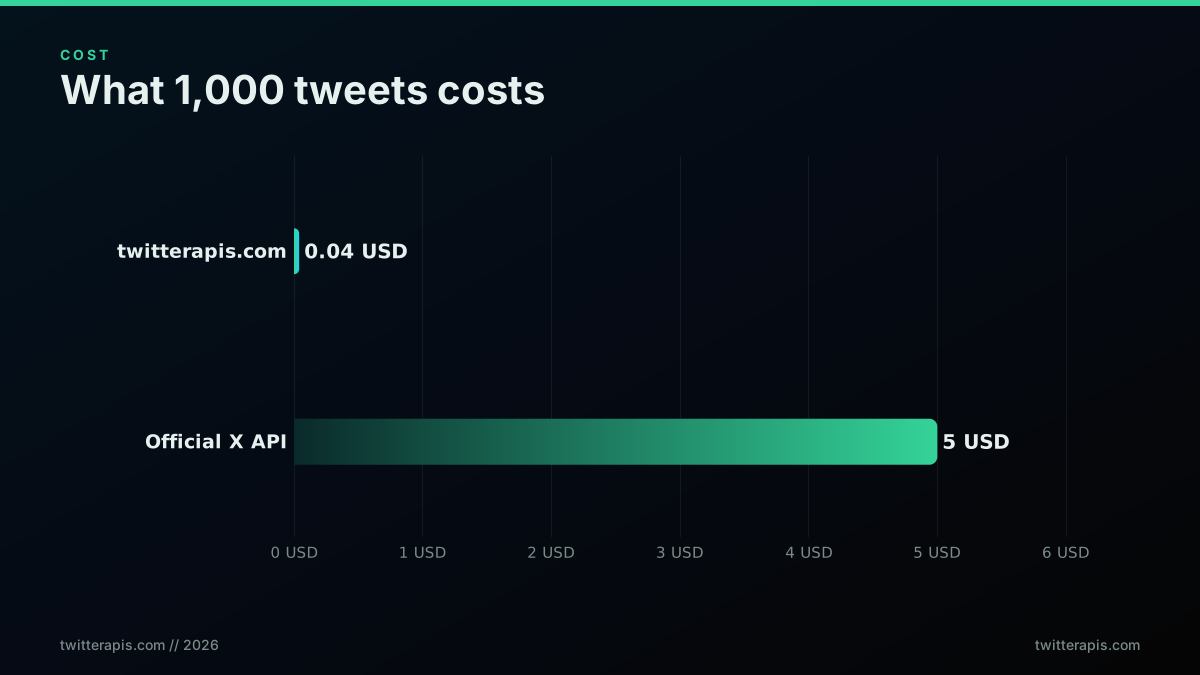
What 1,000 tweets costs through the MCP server
A few endpoints cost more because they do more work per call. Tweet creation and the two DM read tools, twitter_dm_list and twitter_dm_conversation, are 0.0016 dollars per call. The full account history tool, twitter_user_tweets_complete, is 0.0024 dollars per call because it auto-paginates a large history in one request. The full thread tool, twitter_tweet_thread, is 0.004 dollars per call. Everything else, all reads and the simple writes, stays at the 0.0008 dollar rate.
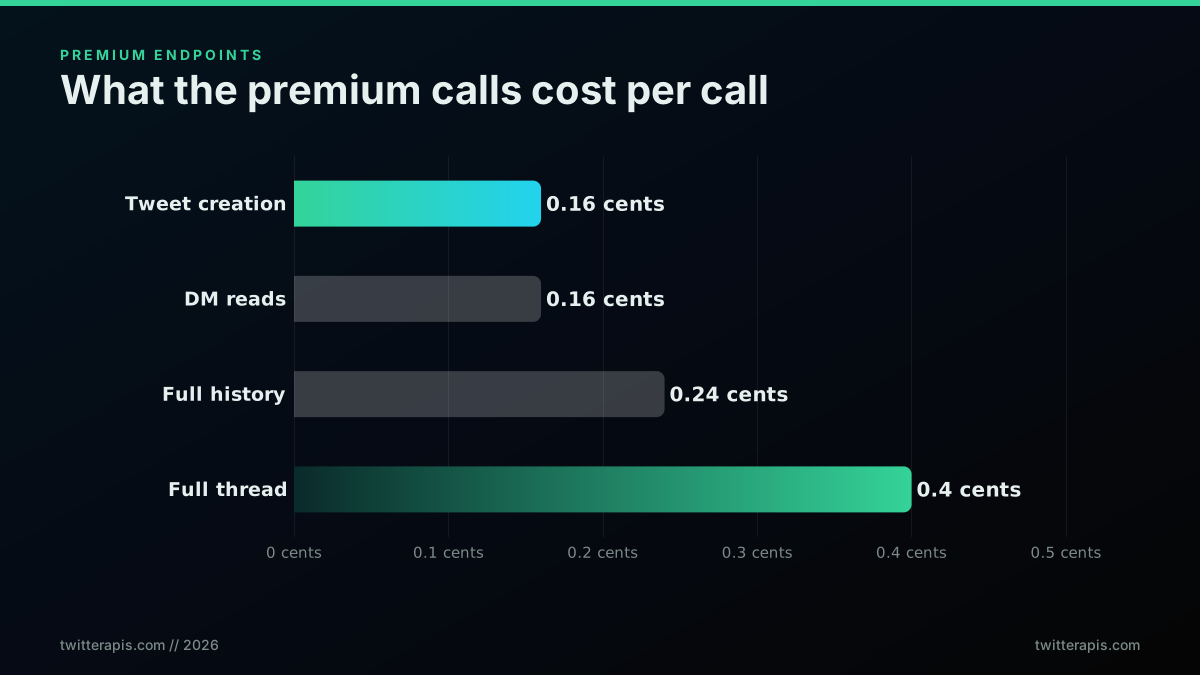
The premium endpoints and what each costs per call
To size a real workload, multiply your expected daily calls by the rate and check it against the free credits first. A monitoring agent that runs 200 searches a day costs about 0.16 dollars a day after the free tier, which is roughly five dollars a month for a continuously running listening agent. Even a busy research agent rarely crosses a few dollars a month at the read rate, so cost is almost never the constraint that stops an agent project. You can model your own numbers with the cost calculator and see the full table on the pricing page. For a plain-language take on what is and is not free across providers, see is the Twitter API free.
Twitter MCP Server vs the Official X API
The biggest practical difference between MCP options is the credential barrier: a pay-per-call API needs only an email and a key, while the official X MCP and community servers need a full X developer account. The official X Developer Platform MCP exposes a large set of endpoints but requires approved developer credentials, a paid API tier, and self-hosting. Community GitHub servers are open source and free to run, but you still bring your own X developer app and handle OAuth yourself.
Here is how the three options compare on what you must have before the first call works.
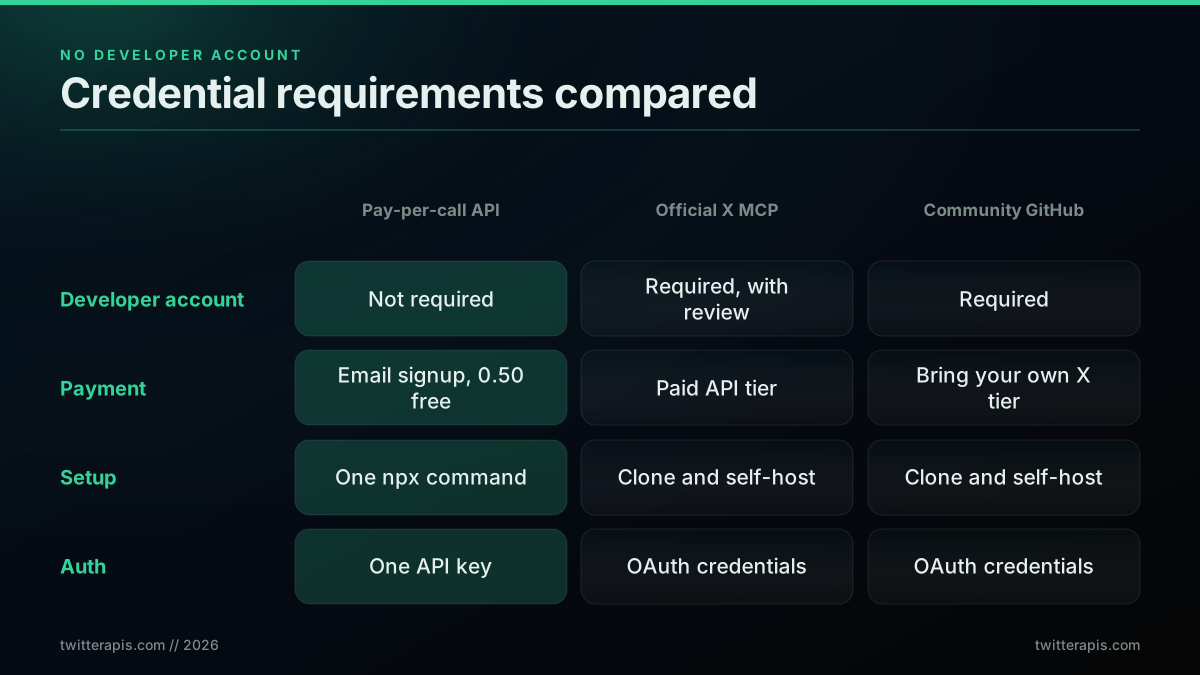
Credential requirements across Twitter MCP options
For read-heavy agent work, the pay-per-call path is faster to ship because it removes the developer-account review entirely. You trade direct-from-X sourcing for speed and cost, which is the right trade for search, profile lookups, monitoring, and research. When you do need the official write surface with user-context OAuth, that is a different tool for a different job, and the Twitter API alternatives page lays out when each surface is the correct choice. The deeper comparison of response shapes and migration sits in the Twitter API v2 versus TwitterAPIs post.
The official platform is genuinely the better pick in a few cases, and it pays to name them. If your product posts at high volume as a verified business, needs official compliance guarantees, or relies on endpoints only the platform exposes, the official API earns its cost and its setup burden. The pay-per-call route is built for the opposite shape of work: read-dominant agents that need breadth and low marginal cost, where a single missed call is not a compliance event and the value is in volume and speed of iteration. Most AI-agent use cases, monitoring, research, enrichment, and analysis, sit firmly in that second category, which is why the friction and cost gap matters so much for them. Choosing well is mostly a question of whether your workload is write-heavy and compliance-bound or read-heavy and iteration-bound.
Every MCP client that follows the protocol can use any of these servers, so your client choice and your server choice are independent.
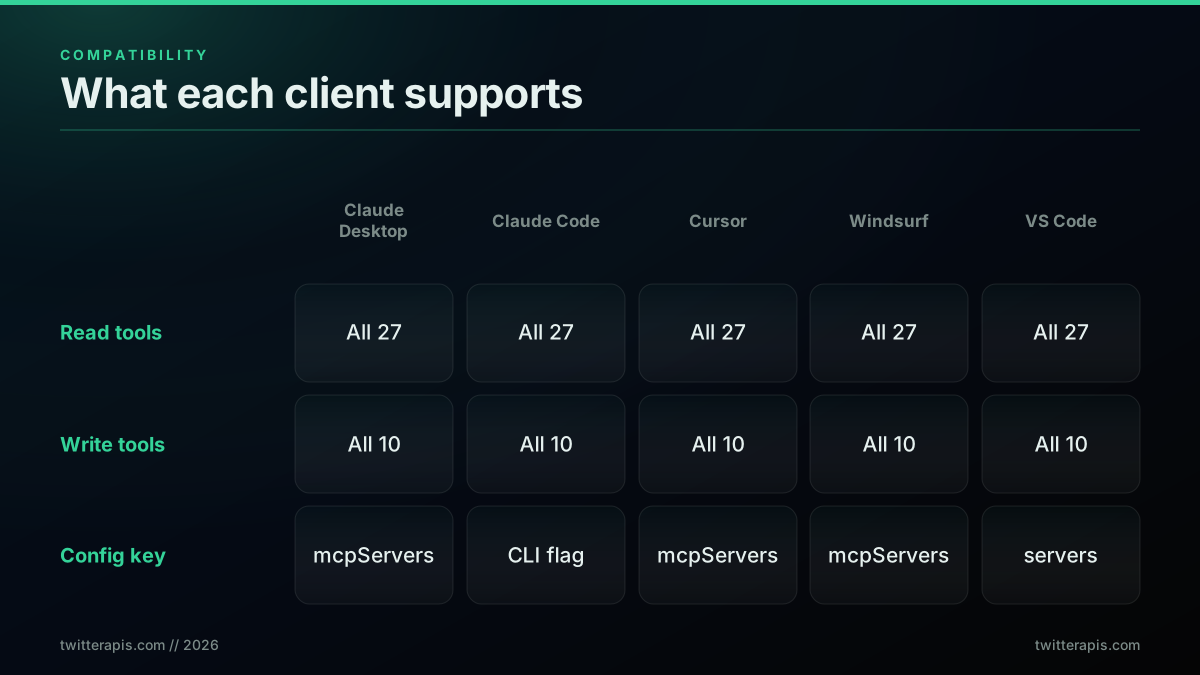
Client compatibility at a glance
Troubleshooting Common Errors
Most setup failures map to one of four HTTP codes, and each has a direct fix. A 401 means the API key is wrong or missing, so check that TWITTERAPIS_KEY matches your dashboard key exactly. A 402 means you are out of credits, so top up in the dashboard. A 409 means a write or account-only read ran without a linked session, so link a session or pass inline credentials. A 429 means you are being rate limited, so wait a few seconds and space out bulk requests.
The full list, including the timeout case, is below.
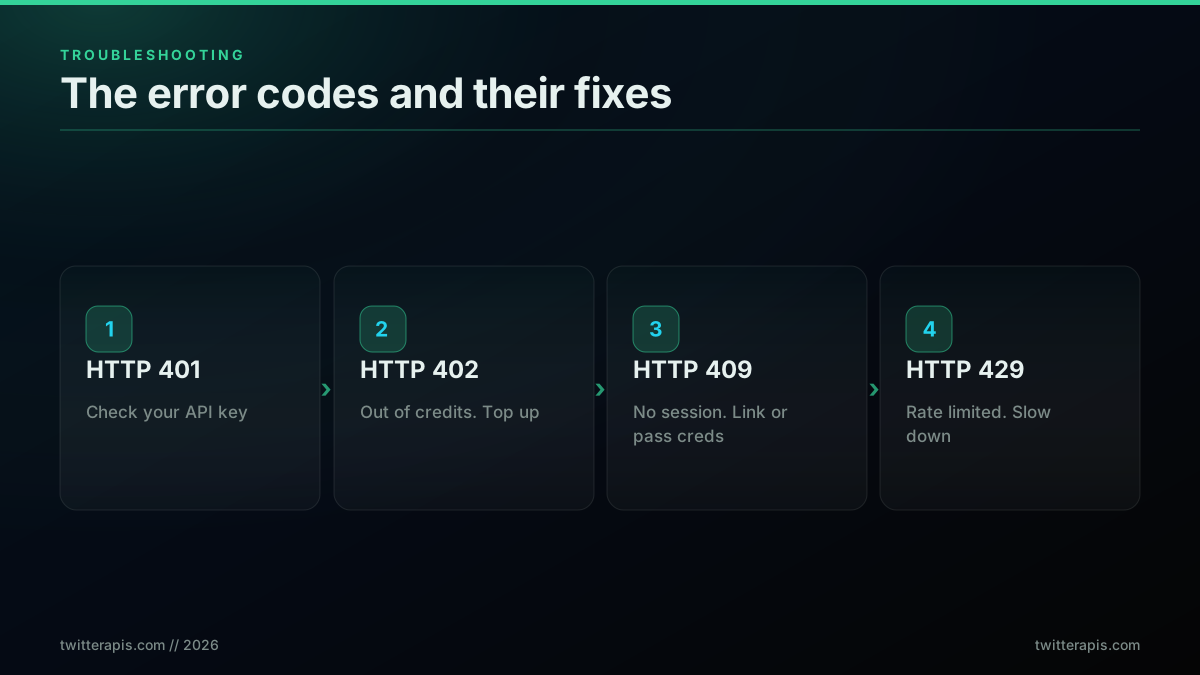
The error codes you will hit, and the fix for each
Two non-HTTP problems are common too. If the tools do not appear after setup, confirm npx is on your PATH and you are on Node 18 or later, then check that the JSON in your config has no trailing comma, then restart the client fully. A single misplaced comma silently invalidates the whole config file, so the server never launches and no error surfaces in the chat window. The fastest way to catch it is to paste the file into any JSON validator before you restart. If the tools still do not load, open the client MCP logs, which record the server startup line and any crash, and confirm the npx command runs on its own in a terminal. If a large paginated fetch times out, the default request timeout is 30 seconds, so set TWITTERAPIS_TIMEOUT_MS to a higher value like 60000 in the same env block, and have the agent request smaller pages so each call returns before the limit. Most issues reduce to one of three causes: a bad key, a malformed config, or a missing account session, and the error code tells you which. For deeper code-level patterns on search syntax, see the advanced search operators reference, and for language-specific calls outside MCP, the Python and Node.js tutorials cover the raw HTTP path. The short setup walkthrough below shows the protocol mechanics end to end, and walks through building and wiring an MCP server from scratch, which is useful background before you connect a hosted one.
https://www.youtube.com/watch?v=RhTiAOGwbYE
Where to Go Next
The sections above cover setup for every major client, the full tool catalog, the auth model, real cost, and the errors you will hit. The decision is now about which client you use and whether your agent needs the read path, the write path, or both. For a read-only monitoring or research agent, you can be calling live X data inside Claude or Cursor in the next two minutes on free credits. For a posting agent, plan for the session and residential-proxy step the auth section covered.
If you are still choosing a data layer, three comparisons help. The Twitter API cost benchmark puts per-call pricing side by side across providers, the cheapest Twitter API ranking ranks eight options by real per-1,000-tweet cost, and the how to scrape tweets guide weighs an API against browser scraping for a data pipeline. If you are moving off another provider, the migration guide walks the swap, and if bot and spam filtering matters for your reads, the bot detection guide covers the signals to watch. For throughput planning on a polling agent, the rate limit guide sizes safe call rates.
When you are ready, sign up, copy your key into the config block for your client, restart, and ask your agent its first question about live X data. The structured answers below summarize the highest-intent questions in one place.
// sources
Where these numbers come from
Each row is a figure in this post and the artefact it was read from. Prices and limits on this platform move, so check the date on the source before you plan against it.
- Model Context Protocol specification site
- Where the protocol the server implements is specified, backing the description of how an agent calls a named tool instead of writing fetch, parse, and pagination code.
- MCP user quickstart
- The official client-side walkthrough the post points to for the protocol-level view of installing a server.
- Anthropic Claude Code MCP documentation
- Documents the desktop configuration path and file shape the copy-paste Claude config in this post follows.
- Cursor MCP documentation
- Backs the Cursor section: a global config at the home directory path and a project-level config inside a workspace, with a restart required after editing.
- Vellum review of MCP hype versus reality
- The source of the 2025 quote calling MCP the presumptive winner of the agent open-standard contest, used to argue the protocol is settled rather than speculative.
- Jeremiah Lowin on converting REST APIs to MCP
- The context-pollution warning behind the argument for a focused tool set, that wrapping a large raw API one to one into MCP hurts agents by diluting attention.
Frequently Asked Questions
A Twitter MCP server is a small process that exposes the Twitter/X API as typed Model Context Protocol tools, so any MCP client such as Claude Desktop, Cursor, or Windsurf can search tweets, read timelines, pull user data, and post content through natural language without you writing integration code. The server holds no state. It forwards your API key to the underlying REST API on each call. The @twitterapis/mcp server ships 116 tools, 70 reads and 46 write actions, and runs with one command through npx.
It depends on the server. The official X MCP and community GitHub servers require an X Developer Platform account, which means an application review, an approved API tier, and a card on file. A pay-per-call API like TwitterAPIs removes that step. You sign up with an email, copy a key, and start calling read endpoints in seconds on free credits. There is no project, no app review, and no developer console for the read path.
The @twitterapis/mcp server does both. Of its 116 tools, 70 are reads and 46 are write actions: post a tweet, reply, quote, like, retweet, bookmark, follow, send a DM, and the matching undo actions. Reads of public data work with just your API key. Write actions and account-only reads act as a specific X account, so they need a linked session or per-call credentials, and writes should egress through a residential proxy because X soft-blocks writes from datacenter addresses.
The Twitter API is the raw HTTP interface. You call it from code, handle auth, and parse JSON yourself. A Twitter MCP server wraps that API and exposes it as typed tools your AI client calls on its own during a conversation, so you write no integration code. Under the hood the MCP server still calls the same REST endpoints at api.twitterapis.com, so the cost and the data are identical. The MCP layer is the agent-friendly front door, not a separate data source.
Open Claude Desktop settings, edit claude_desktop_config.json, and add an mcpServers block that runs npx -y @twitterapis/mcp@latest with your TWITTERAPIS_KEY in the env object. Save the file and restart Claude Desktop. The twitter tools appear in the tool picker automatically. You get the API key by signing up at twitterapis.com/signup, which includes 0.50 dollars in free credits with no card. The same config block works in Cursor, Windsurf, and VS Code with only the file path changing.
The @twitterapis/mcp server includes 0.50 dollars in free credits at signup, which is roughly 625 read calls, with no card required. After that, reads and the simple write actions cost 0.0008 dollars per call, which works out to 0.04 dollars per 1,000 tweets since each read returns about 20 tweets. There is no monthly subscription and no tier gate on the read endpoints. A few premium endpoints cost a little more per call.
Any client that implements the Model Context Protocol works. Confirmed setups include Claude Desktop on every platform, Claude Code in the terminal, Cursor, Windsurf, and the VS Code agent mode through .vscode/mcp.json. Each client reads the same mcpServers configuration shape and only the config file location differs. The Claude web app does not run local stdio MCP servers, so use the desktop app or another client listed above.
First confirm npx is on your PATH and you are on Node 18 or later by running node --version. Then check that the JSON in your config file is valid, since a trailing comma silently breaks the whole file. Restart the client fully after any config change, because MCP servers load at startup. If a tool returns HTTP 401, your TWITTERAPIS_KEY is wrong or missing. If it returns HTTP 402, top up credits in the dashboard. Check the client MCP logs for server startup errors if tools still do not load.
Check out similar blogs
More guides on the Twitter/X API, scraping, and pricing.
Build vs Buy: Should You Build Your Own Twitter/X Monitoring Tool? (2026)
Buying a listening seat costs $29 to $2,000 a month depending on the vendor. Building costs real engineering hours plus a data bill. Here is the real math behind the twitter monitoring tool build vs buy decision, priced both ways.

How to Track a Tweet's Performance in Real Time with the X API
Poll a tweet's engagement counts over time with the X API, compute a views-to-likes ratio, and read the quote-tweet layer to tell an organically growing launch tweet from a boosted one. Tested Python and curl.
What "Rate Limited" Actually Means on X (Every Limit, Measured)
"Sorry, you are rate limited" is one message covering two different systems: a consumer action ceiling and a developer API window. Here is what the term means, the current numbers for both, where it came from, and how long it actually lasts.
The Twitter API Developer Reference (2026): Endpoints, Rate Limits, Error Codes and Pagination
A single indexed reference for the Twitter/X API in 2026: the endpoint catalog, how authentication and bearer tokens work, the rate limits behind every 429, what error codes 401, 403, and 429 mean, cursor pagination, response shapes, and the real per-call cost of each call.
How to Choose a Twitter/X API in 2026: The Complete Buyer's Guide
A decision framework for choosing a Twitter/X API in 2026: the seven criteria that actually matter (pricing model, data coverage, rate limits, auth, reliability, compliance, migration cost), a use-case decision tree, and where each path wins.
What You Can Build With the Twitter/X API: 20+ Real Use Cases (2026)
A 2026 field guide to what you can actually build with the Twitter/X API: 24 real use cases across listening, monitoring, audience graph, research, and bots, each mapped to the endpoint that powers it and the real per-call cost.
Fetch a Full Twitter Thread via API in One Call (2026)
How to pull an entire Twitter thread, the root tweet plus every connected tweet in the chain, in a single API call with the tweet/thread endpoint, instead of walking replies by hand. Live-tested code in curl, Python, and Node.js, with the real per-call cost.
Can You Recover a Deleted Tweet via API in 2026?
The honest answer: no API un-deletes a tweet the author removed. Here is what actually works in 2026, checking whether it is really gone, finding an archived copy, and the capture-before-delete pattern that prevents the loss, with live-tested code.