GUIDE
What You Can Build With the Twitter/X API: 20+ Real Use Cases (2026)
A 2026 field guide to what you can actually build with the Twitter/X API: 24 real use cases across listening, monitoring, audience graph, research, and bots, each mapped to the endpoint that powers it and the real per-call cost.
Per our own spec, 70 of 121 endpoints bill $0.0008, 24 are free, and 27 sit between $0.0016 and $0.01. Every price ships inside our published OpenAPI document as an x-cost-usd field, so any figure in this post can be checked against the contract that bills it rather than taken on trust.
Ask "what can I build with the Twitter API" and the honest answer is that the platform is a firehose of public human behavior with a programmable tap on it, and almost any product that needs to read the room, track a topic, map an audience, or act on a signal can be built on top of it. The problem has never been ideas. It has been that the official documentation reads like a reference manual, nobody tells you what a given feature actually costs, and half the tutorials online were written for an API tier that no longer exists. This guide fixes that. It is a catalog of 24 real, buildable use cases organized into five families, and for every one it names the exact endpoint that powers it and the real per-call price, so you can go from "what could I build" to "here is the call and here is what it costs" without guessing.
TL;DR: The Twitter/X API supports five families of product: listening and sentiment, monitoring and alerts, audience and graph, research and data, and bots and automation. Each use case maps to a specific endpoint. On a pay-per-call API like TwitterAPIs, every standard read is $0.0008 per call returning up to 20 tweets (roughly $0.04 per 1,000 tweets on a full page), posting a tweet is $0.0016, full account history is $0.0024, and full thread expansion is $0.004, with $0.50 in free credits at signup and no card. The cheapest and best first build is a read-only brand monitor. Writes use a bring-your-own token so a bot acts as a real account.
One API, five families of product, one honest per-call price
What Can You Actually Build With the Twitter/X API?
You can build anything that reads, measures, or acts on public conversation, and the surface is wider than the marketing use cases suggest. The API exposes search, user profiles and their tweets, the follower graph, replies and threads, mentions, trends, and a set of write actions like posting, liking, and following. Combine those primitives and you get monitoring tools, sentiment dashboards, audience CRMs, research datasets, trading signals, and bots. The reason people underestimate it is that the official platform frames itself as a reference, not an inspiration, and the most-read community answer on the topic is a forum thread asking, essentially, what can you actually do here without paying enterprise money.
What CAN you actually do with the Free tier of Twitter's API now?
That thread captures the real starting point for most builders: not "is it possible" but "is it possible on a budget, without a developer-account gauntlet." It is, and the rest of this guide assumes exactly that constraint. Everything below runs on plain HTTP reads and writes, needs no elevated permission for the read-only builds, and is priced so a side project does not turn into a surprise invoice. For the full endpoint reference and auth walkthrough, the complete Twitter API tutorial covers setup end to end, and the pricing page lists every endpoint tier. If you want the productized, sales-ready version of this catalog, the Twitter API use cases page frames the same builds for buyers rather than builders.
One distinction is worth internalizing up front because it shapes every build here. Read endpoints (search, users, followers, replies, mentions) need nothing but your API key, which is why every listening, monitoring, audience, and research build ships without any account permissions or app review. Write endpoints (posting, replying, liking, following) act on a real account, so they take a bring-your-own credential pair passed with each request. That single line splits this guide cleanly: the first four families are read-only and instant to start, and only the fifth, bots and automation, touches writes at all.
The mental model that makes the whole surface legible is simple: there are read endpoints and write endpoints, reads are cheap and need only a key, and every named use case is a small recipe that chains a few reads together (and, for bots, adds a write at the end). The map below groups the endpoints by the kind of product they unlock, and the five sections that follow walk each group in turn.
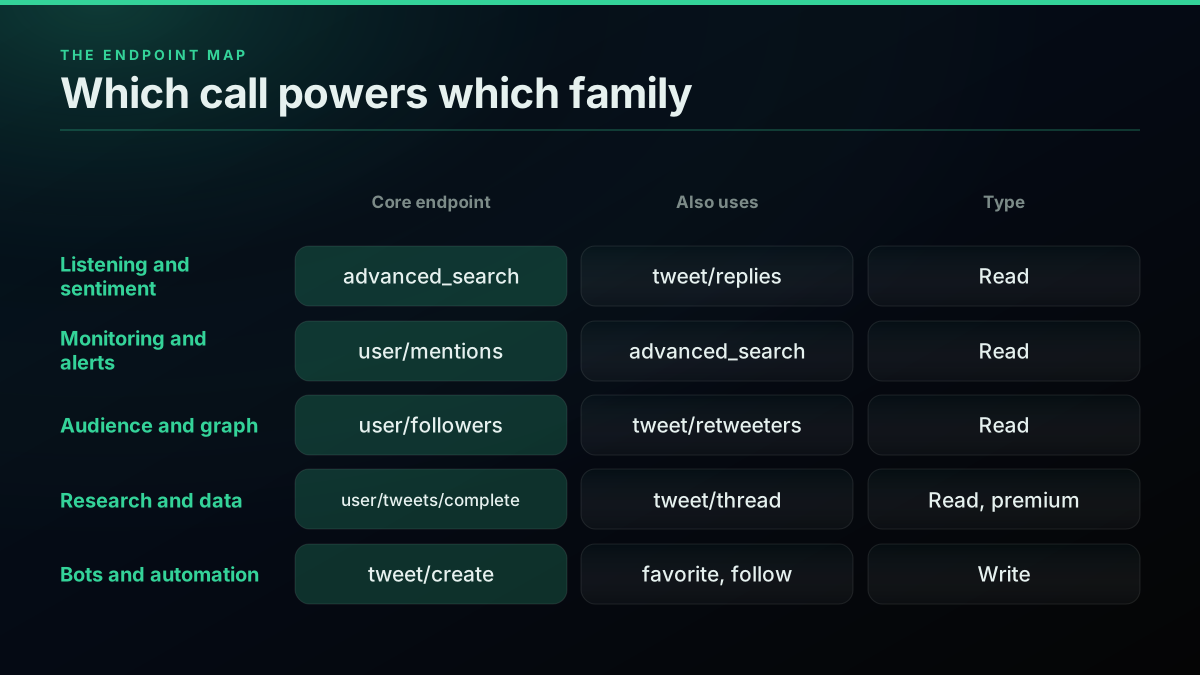
The endpoint map: which API call powers which family of use case
Listening and Sentiment: What Is the Market Saying?
Listening tools turn the raw stream of public posts into a read on how people feel, and they are the single most common thing developers build on Twitter/X data. The pattern is always the same: run a search for a brand, product, competitor, or topic, collect the matching tweets, then score or aggregate them. Because it leans entirely on the cheapest read endpoints, a listening tool is also the easiest first build with a real payoff. The one call every listening build starts from is an advanced search, which takes your query and returns a page of matching tweets plus a cursor to page the rest:
# Listening: pull tweets mentioning your brand
curl -s "https://api.twitterapis.com/twitter/tweet/advanced_search?query=yourbrand" \
  -H "Authorization: Bearer $TWITTERAPIS_KEY"
Swap yourbrand for any query, add operators like min_faves: or lang:en to tighten it, and you have the raw material for all five of the builds below. Here are five you can ship.
1. Brand sentiment analysis. Pull every tweet mentioning your brand or product, run each through a sentiment model, and roll the scores into a daily line so you can see mood shift before it shows up in support tickets. The read is an advanced search on your brand terms, and the scoring is a standard natural language processing step; the Twitter sentiment analysis in Python guide has the runnable pipeline. Sentiment analysis, the task of classifying text as positive, negative, or neutral, is a well-worn field, so the modeling side is not where the difficulty lives; getting the tweets is.
2. Product feedback mining. The richest feedback is not in the tweet, it is in the replies under it. Pull the reply tree under your launch tweet or a competitor's, and you get unsolicited, unfiltered reactions. The get all replies to a tweet guide shows the two-call pattern (the ranked reply window plus a conversation-id sweep for the long tail) that reconstructs a full reply thread.
3. Competitor share of voice. Search for two or three competing brands over the same window, count and compare mention volume and sentiment, and you have a share-of-voice tracker that would cost four figures a month as a social-media analytics subscription. It is three searches and some arithmetic.
4. Trend and topic detection. Watch what is spiking in a place or a niche and you can catch a wave early, whether you are a marketer, a journalist, or a trader. The Twitter trends API guide covers pulling trending topics, and pairing trends with a keyword search tells you not just what is trending but what people are saying about it.
5. Hashtag campaign tracking. If you run a campaign hashtag, you need to know reach, top posts, and who amplified it. A search on the hashtag, paged over the campaign window, gives you every post; the Twitter hashtag search API guide has the query and pagination pattern.
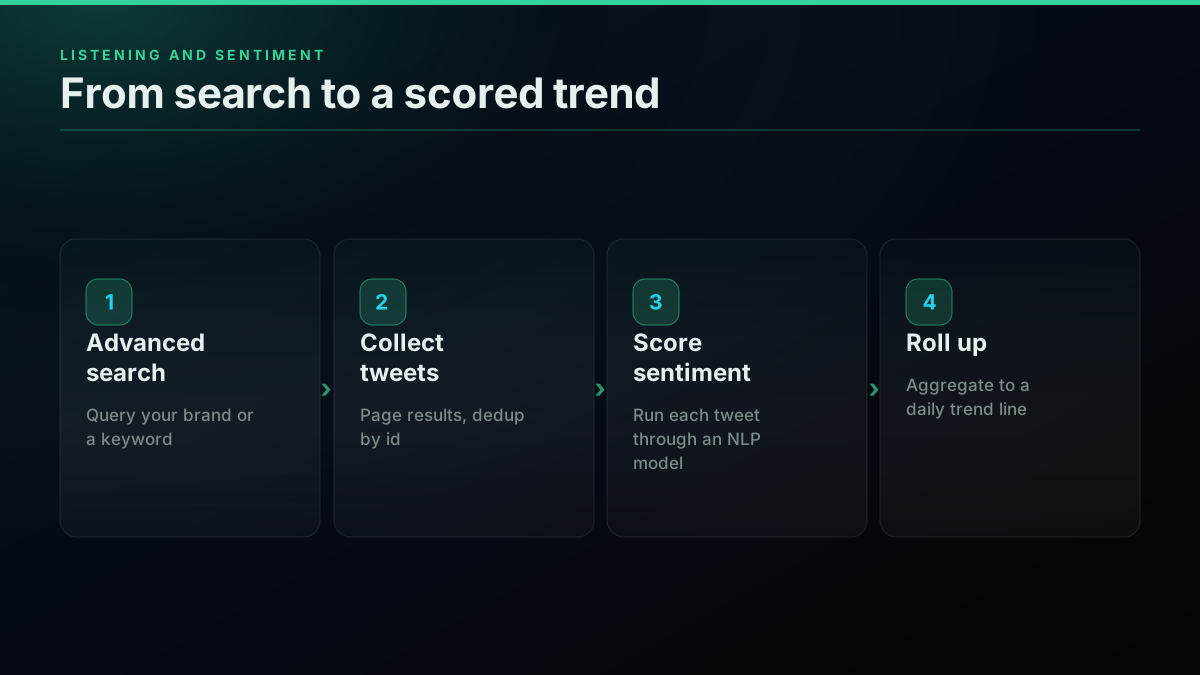
How a listening and sentiment tool flows from search to scored trend
The economics are what make listening tools worth building rather than buying. Every one of those five uses only the standard search endpoint, which is $0.0008 per call and returns roughly 20 tweets, so the effective rate is about $0.04 per 1,000 tweets. A brand monitor pulling a few thousand tweets a day costs cents, and the $0.50 of free signup credit covers about 12,500 tweets before you spend a dollar. The chart below shows what a daily listening pull costs at three realistic volumes.
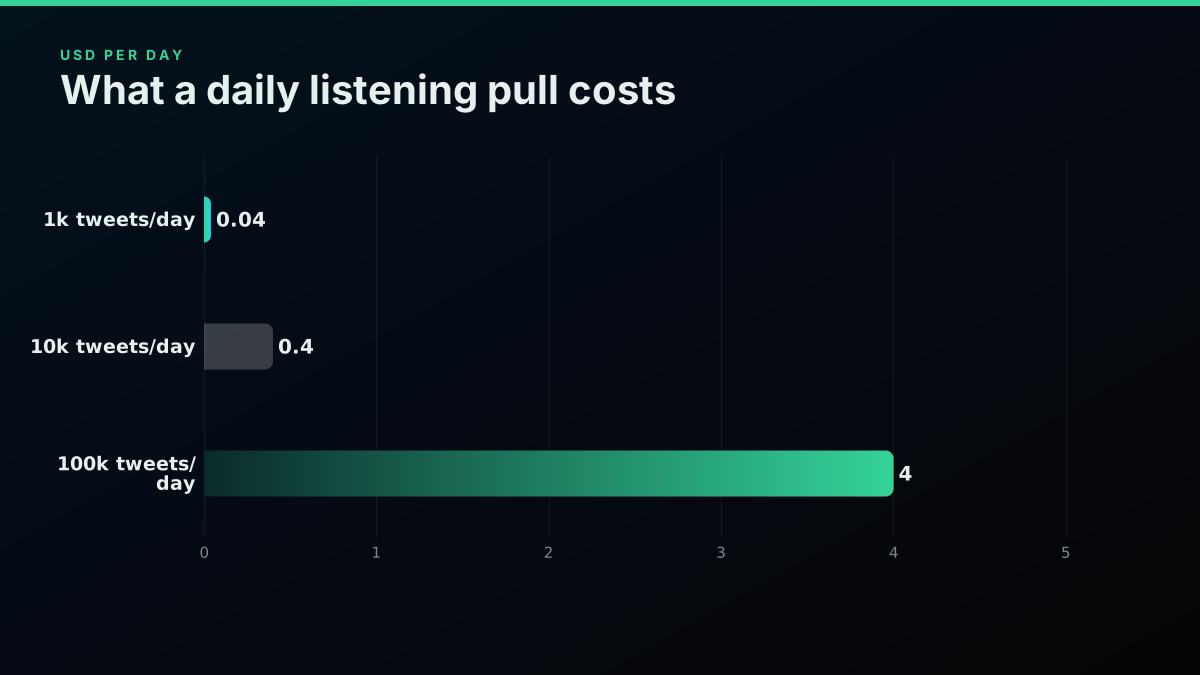
What a daily listening pull actually costs at three volumes
Start building with TwitterAPIs
$0.0008 a call, about $0.04 per 1,000 tweets at 20 tweets a page. $0.50 free credits. No credit card required.
Monitoring and Alerts: What Just Happened?
Monitoring is listening with a clock on it. Instead of building a picture over a day, you poll on a short interval, diff against what you have already seen, and fire an alert the moment something new or unusual appears. This is the second-most-common build, and it is what X itself has been pushing developers toward with real-time mention delivery.

Developers
@XDevelopers
Real-time customer service on X has never been easier. Mention events are now available in the X Activity API and X API Pay-Per-Use, giving you sub-second webhook delivery for @ mentions. Docs: https://t.co/TS0C6zRs2L https://t.co/Re3UKo60Zx

Four monitoring products fall straight out of that pattern, and the read at the center of all of them is the mentions endpoint, which returns the recent posts that tag a handle:
# Monitoring: read the latest @ mentions of your handle
curl -s "https://api.twitterapis.com/twitter/user/mentions?username=yourhandle" \
  -H "Authorization: Bearer $TWITTERAPIS_KEY"
Poll that on a short interval, keep a set of ids you have already seen, and you have the spine of a monitor. The four products below are variations on which query you poll and what you do when a new hit lands.
6. Real-time mention monitoring. Watch every @ mention of your handle and route it to Slack, a dashboard, or a support queue within seconds. Whether you use a webhook or poll the mentions endpoint on an interval, the shape is the same; the monitor Twitter mentions in real time guide has the polling loop and the dedup logic.
7. Keyword and crisis alerts. A brand does not only get tagged, it gets talked about. Poll a search for your brand terms plus risk words, and alert when volume spikes or a high-follower account posts, so a brewing problem reaches a human before it trends.
8. Support-inbox triage. Public @ mentions plus your direct-message inbox are your real support surface. You can read DM conversations through the dm/list and dm/conversation endpoints, merge them with mentions, and auto-triage by urgency. These DM reads are a premium tier at $0.0016 per call because a conversation carries more payload than a single tweet.
9. Event and price alerts. Traders, sports fans, and news teams all want the same thing: tell me the instant a specific account posts, or the instant chatter about a ticker spikes. A tight poll on a user's timeline or a cashtag search, wired to a push notification, is the whole build.
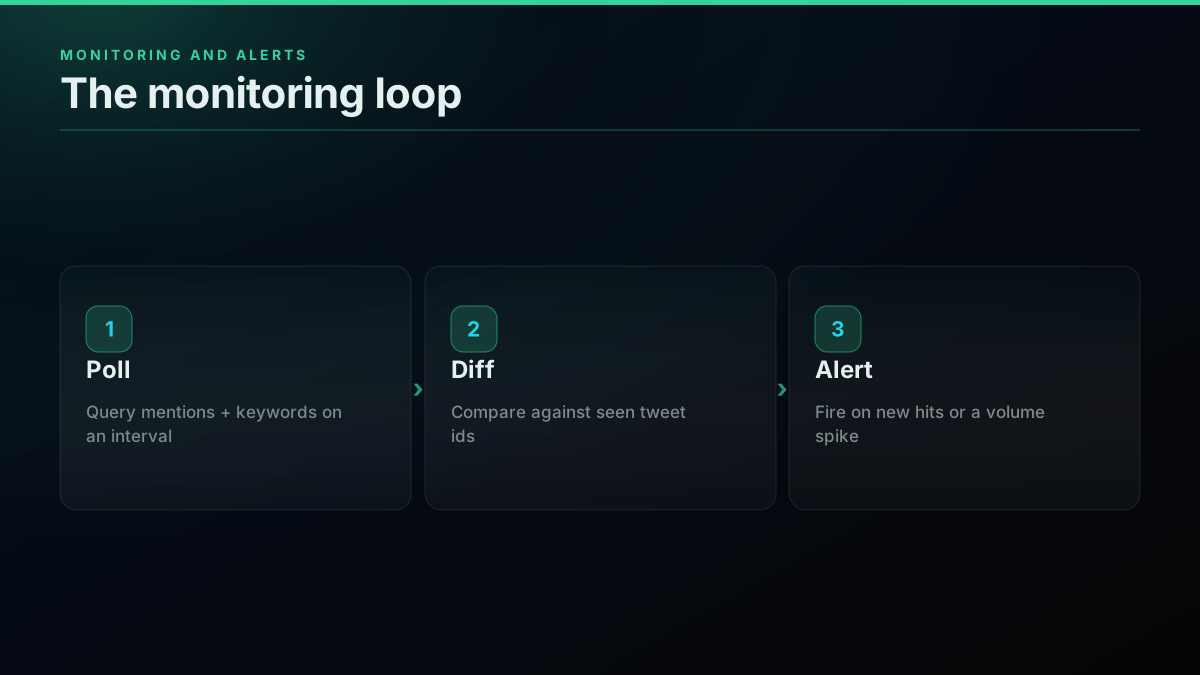
The monitoring loop: poll, diff, alert
The one thing to get right in a monitor is not to re-alert on tweets you have already seen, which means keeping a set of seen ids and diffing each poll against it. That, plus a sane poll interval so you respect rate limits, is the difference between a useful alerter and a noisy one. Everything else is the same cheap read you used for listening.
Audience and Graph: Who Is Connected to Whom?
The follower graph is the most underused surface on the API, and it powers a whole class of tools that marketers and growth teams pay dearly for. Every use case here reads a list of accounts (your followers, someone's followers, the people who retweeted a post) and then enriches or analyzes them. The base read is the followers endpoint, which returns a page of follower profiles and a cursor for the next page:
# Audience: read a follower list, one page at a time
curl -s "https://api.twitterapis.com/twitter/user/followers?userName=yourhandle" \
  -H "Authorization: Bearer $TWITTERAPIS_KEY"
Page it to the end and you have the whole graph as data. Four builds stand out.
10. Follower export and audience CRM. Export your full follower list with profile fields into a spreadsheet or CRM, so your audience is a real asset you own rather than a number on a page you rent. The export Twitter followers via API guide walks the paginated pull and the fields you get back.
11. Follower growth analytics. Snapshot your follower list on a schedule, diff the snapshots, and you can see exactly who followed and unfollowed and when, which is the analytics the native app hides. It is the same follower read, stored over time.
12. Influencer and KOL discovery. To find the right people to work with in a niche, pull the followers or the engaged audience of an anchor account, filter by follower count and bio keywords, and rank. The follower and user-search endpoints turn "who matters in this space" into a query.
13. Retweeter and amplifier analysis. When a post goes big, the interesting question is who carried it. Pull the list of accounts that retweeted it and you can see your real amplifiers and the audience overlap between them. The get all tweet retweeters via API guide has the retweeters pull and pagination.
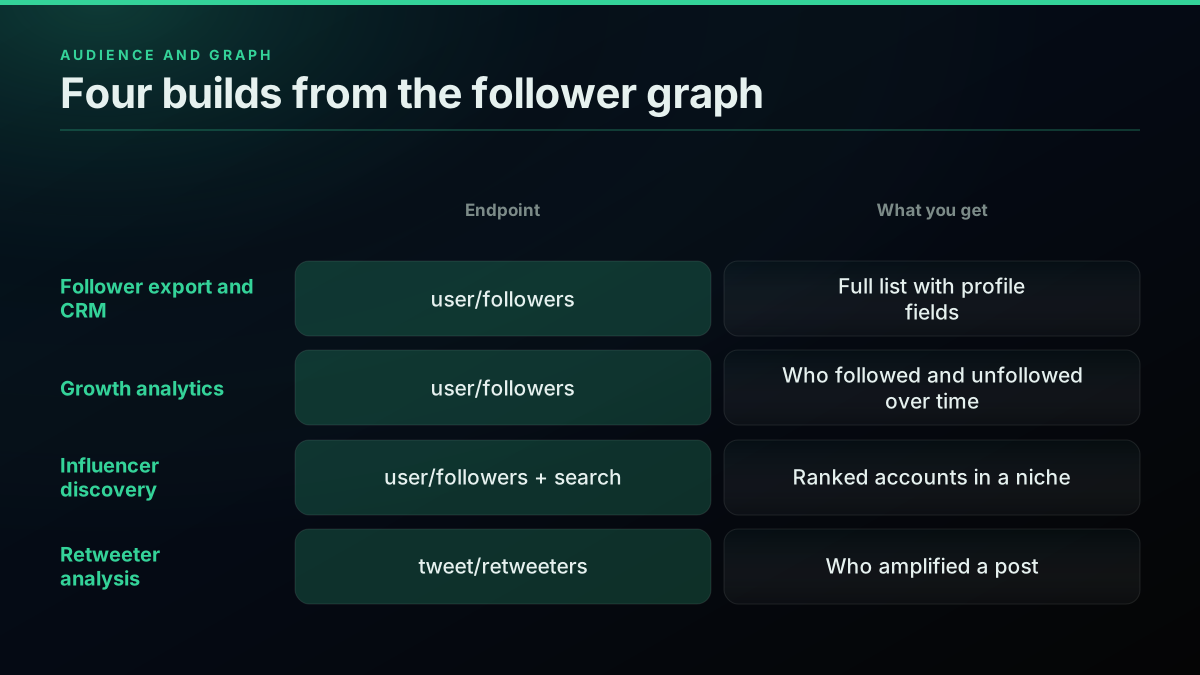
Four things to build from the follower graph
Graph reads are the same $0.0008 per call as any other standard read, and they page, so the cost of a build here scales with audience size rather than with any premium fee. Exporting a 50,000-follower account is a few dozen paged calls, well under a dollar. That is the kind of thing the official tiers gate behind expensive plans and a direct API simply meters by the call.
Research and Data: What Does the Record Say?
Researchers, journalists, and quantitative teams do not want a dashboard, they want the underlying data as a clean dataset they can query offline. The API is a collection instrument for exactly that, and this is where the deeper, premium endpoints earn their slightly higher price. Robert Scoble described the shape of a modern data build, and the cost of doing it on the official firehose, in one post.

Robert Scoble
@Scobleizer
I've improved the NotebookLM script on my news site: https://t.co/kiuZ7QXLzb The pattern? Have my AI agent grab all posts from the AI community here on X via the X API. About 30,000 every day. Costs about $150 a day. This is why lists on X are so important (I have the most htt…

Thirty thousand posts a day at $150 a day is the official-tier reality, and it is exactly the workload a pay-per-call read rate is built to undercut. When a build needs the deep archive rather than the recent timeline, the complete-history endpoint pages an entire account, which is the premium read the depth is worth paying for:
# Research: page a full account history
curl -s "https://api.twitterapis.com/twitter/user/tweets/complete?userName=someaccount" \
  -H "Authorization: Bearer $TWITTERAPIS_KEY"
That call is $0.0024 rather than the standard $0.0008 because it walks the deep archive, and you only reach for it when you actually need the full record. Five research and data builds live here.
14. Academic and social-science datasets. Collect tweets by topic, hashtag, or time window into a labeled corpus for a study on discourse, misinformation, public health, or elections. Searches paged over a period give you the raw data; the honest caveat, which any dataset build must state, is that deleted and protected content is never returnable and your set is the visible record, not a census. The student researchers weighing this tradeoff (paid API versus a scraper that no longer works) are a good reminder that access, not analysis, is the hard part.
Collecting Twitter/social media data for transit O-D research: what's the best approach in 2026?
15. Full account history archive. To study or back up an account's entire output, you need more than the recent timeline. The user/tweets/complete endpoint pages a full account history and is a premium read at $0.0024 per call because it walks the deep archive; the scrape tweet history via API guide covers the pagination that reaches the tail.
16. Thread capture and knowledge archiving. Long threads are how a lot of real knowledge gets published on X, and they are fragile. Expanding and archiving a full thread as structured text is the tweet/thread endpoint, a premium call at $0.004 because it reconstructs the whole chain in one shot; the fetch a full Twitter thread via API guide shows the expansion.
17. Deleted-tweet accountability tracking. Watchdogs and journalists track what public figures post and then delete. Snapshot a target's timeline on an interval, diff the snapshots, and a tweet that vanishes between two reads is a deletion you have captured; the recover a deleted tweet via API guide explains what is and is not recoverable.
18. Financial and alt-data signals. Cashtag chatter and account-level sentiment feed quantitative models as alternative data. A cashtag search plus a sentiment score, aggregated per ticker per hour, is a signal pipeline, and it reuses the same listening reads with a finance filter on top.
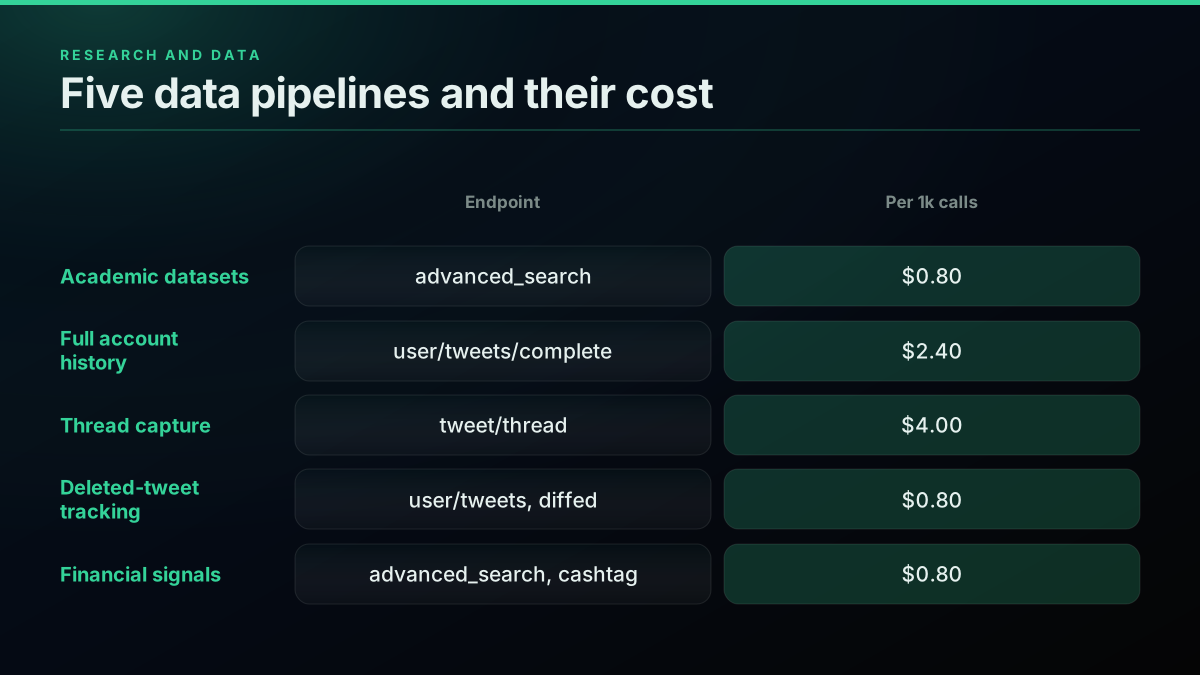
Five research and data pipelines you can build
The premium tiers here (history at $0.0024, thread expansion at $0.004) are still a fraction of enterprise firehose pricing, and you only pay them on the calls that actually need the deep read. Everything shallow stays at the $0.0008 standard rate. That mixed cost profile is what makes an ambitious research build affordable: pay premium only where the depth is the point.
The cheapest pay-as-you-go Twitter API. Try it free.
$0.0008 a call, about $0.04 per 1,000 tweets at 20 tweets a page. $0.50 free credits. No credit card required.
Bots and Automation: What Can Act on Your Behalf?
Everything so far has been read-only. The last family adds writes, which means the product can post, reply, like, follow, and repurpose content on a real account's behalf. Writes work differently from reads: you pass a bring-your-own auth_token and ct0 cookie pair with the request, so the action runs as a genuine account and is never stored on the provider's side. Here is what to build.
19. Reply and engagement bots. The classic build: watch for tweets matching a topic, decide which are worth engaging, and post a reply or a like. It is one read (find the tweets) plus one write (act on them). Posting the reply is a single call to the create endpoint, with an in-reply-to id so your answer threads under the original rather than posting into the void:
# Bots: post a reply as a real account (bring-your-own auth_token and ct0)
curl -s -X POST "https://api.twitterapis.com/twitter/tweet/create" \
  -H "Authorization: Bearer $TWITTERAPIS_KEY" \
  -H "Content-Type: application/json" \
  -d '{"text": "glad it helped", "in_reply_to": "1234567890", "auth_token": "YOUR_AUTH_TOKEN", "ct0": "YOUR_CT0"}'
The auth_token and ct0 are the cookie pair from the account you are acting as, passed per request and never stored. The how to build a Twitter bot guide has the full read-then-write loop, and the video below walks a bot build end to end.
Watch a Twitter bot build walkthrough on YouTube
20. Auto-posting and scheduling. A scheduler that publishes threads, cross-posts from another platform, or drips a content calendar is the tweet/create endpoint on a timer. Posting is a premium write at $0.0016 per call, which is still a fraction of a cent per post.
21. Bot detection and spam filtering. The flip side of building bots is filtering them. To keep your own mentions or dataset clean, score each author on account age, follower-to-following ratio, and posting cadence, and flag the likely automated ones. The Twitter bot detection guide covers the signals that separate a real account from an internet bot.
22. Content repurposing pipelines. Turn a high-performing thread into a blog post, a newsletter, or a set of quote graphics automatically. Read the thread with the thread endpoint, transform it, and either publish it elsewhere or schedule it back to X. This is a read-plus-transform build that only adds a write if you post the result.
23. Auto-follow and list curation. Grow a targeted following or maintain a curated list by following accounts that match a rule (bio keyword, niche, engagement with an anchor account). The follow action is a simple write at the standard $0.0008 rate, the same as a read, because it carries almost no payload.
24. Cross-platform automation and agents. The newest category wires X reads and writes into an agent or an automation platform, so an assistant can search, summarize, and post as part of a larger workflow. If you work through a model-context server, the Twitter MCP server exposes these same endpoints as agent-callable tools.
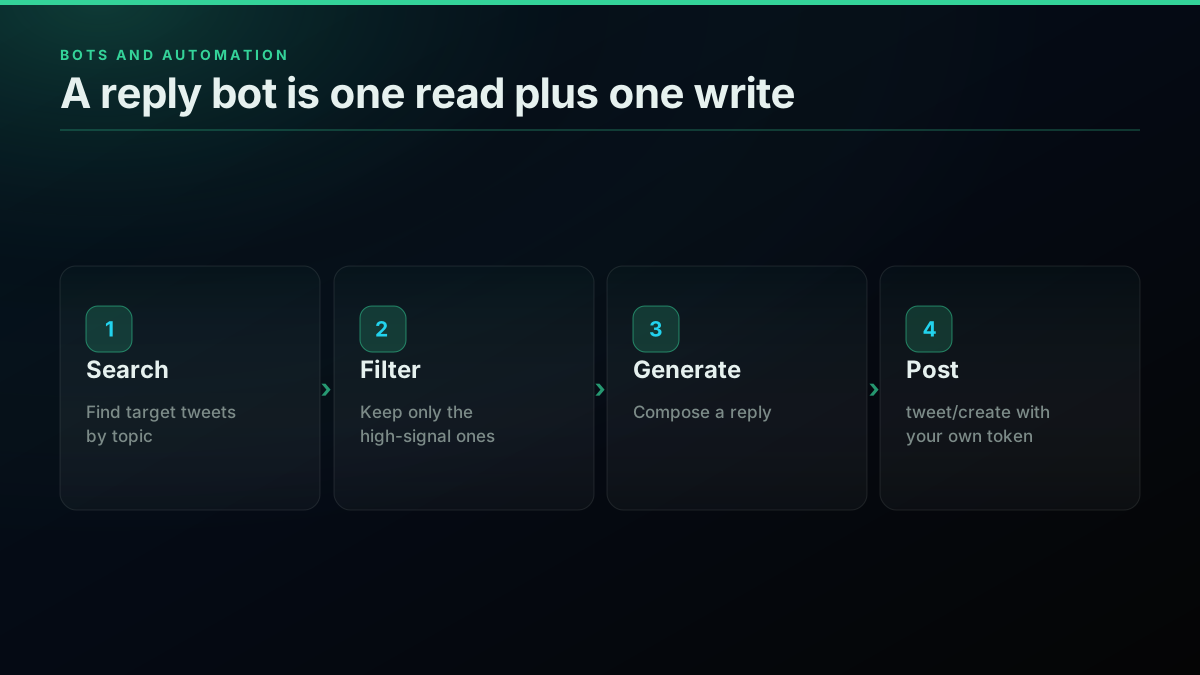
A reply bot is one read plus one write
The write side is where the "do I need a developer account" question actually bites, because the official X developer platform gates write access behind app review and elevated permissions. A direct API sidesteps the review by having you supply the account credentials per request, which is why a hobbyist can ship a working reply bot in an afternoon rather than after a week of approvals.
What Does Each Use Case Actually Cost?
Nothing on this list is expensive, and the reason is the flat, per-call pricing model. There are exactly four price tiers, and most use cases only ever touch the cheapest one. Standard reads and the simple write actions (like, retweet, bookmark, follow, their undos, delete, and media upload) are $0.0008 per call. Posting a tweet and reading DM conversations are $0.0016. Full account history is $0.0024. Full thread expansion is $0.004. That is the entire price list.
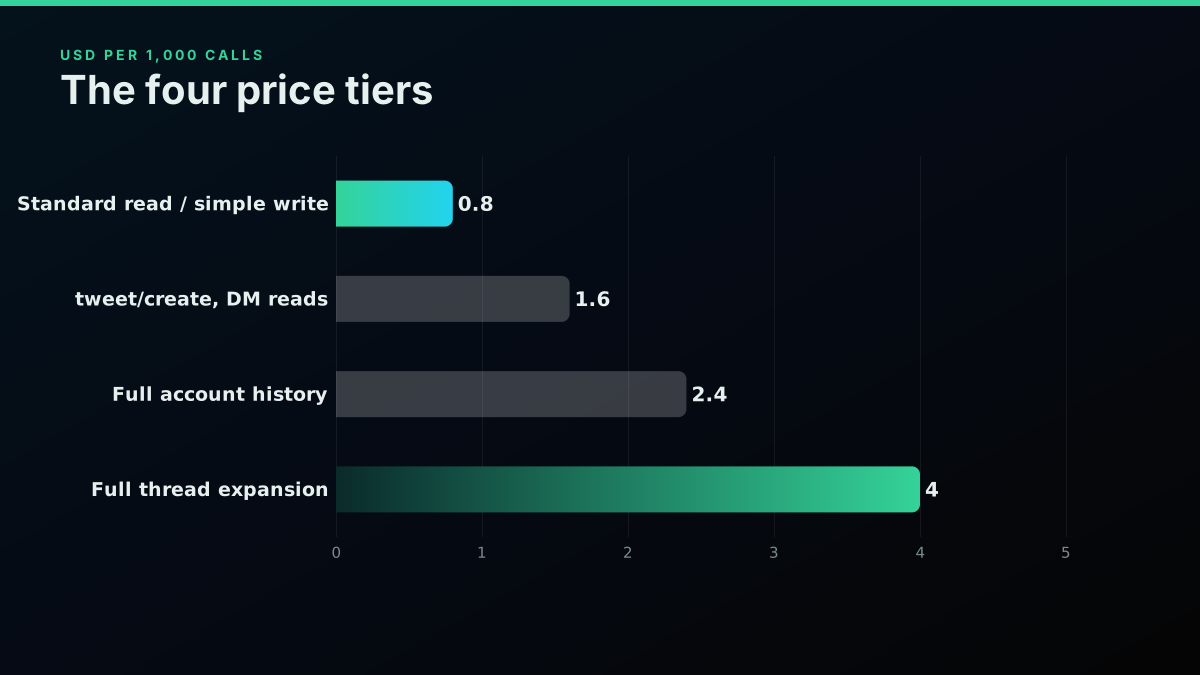
The four price tiers, shown per 1,000 calls
Translate the tiers into real builds and the numbers stay small. The table below maps six representative products to their primary endpoint and a realistic monthly cost at hobby-to-small-business volume.
| Build | Primary endpoint | Tier | Rough monthly cost |
|---|---|---|---|
| Brand mention monitor (5k tweets/day) | tweet/advanced_search | $0.0008 | ~$6 |
| Sentiment dashboard (10k tweets/day) | tweet/advanced_search | $0.0008 | ~$12 |
| Follower export (50k followers, weekly) | user/followers | $0.0008 | under $1 |
| Thread archiver (500 threads/month) | tweet/thread | $0.004 | ~$2 |
| Reply bot (200 reads + 100 replies/day) | advanced_search + tweet/create | $0.0008 / $0.0016 | ~$9 |
| Research dataset (100k tweets one-off) | tweet/advanced_search | $0.0008 | ~$4 |
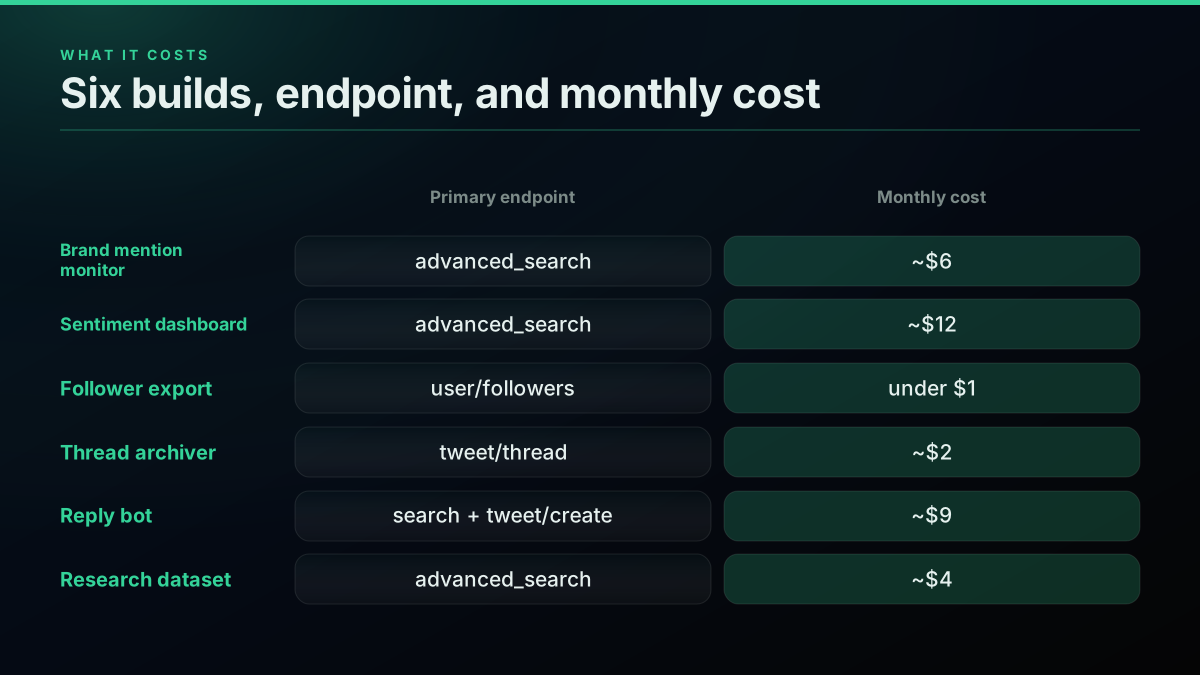
Use case, endpoint, and a realistic monthly cost for six builds
The difference that matters for a builder is not the headline rate but the shape of the bill. A subscription tier charges the same whether you make ten calls or ten thousand, so an idea you are still testing costs as much as one in production, and an experiment you abandon still bills for the month. Per-call pricing inverts that: you pay for exactly the calls you make, a dead experiment costs nothing once you stop calling, and a build that takes off scales its cost in line with its value instead of jumping to the next tier. That is why the free credits matter more than they look, because $0.50 is enough to fully prototype most of the builds in this guide before you have entered a card.
For context, the official X API meters reads per resource and gates them behind paid developer tiers, and its own April 2026 pricing update put owned reads at $0.001 per resource on the pay-per-use plan, with third-party reads higher. A per-call model that returns roughly 20 tweets for $0.0008 is what turns a "someday" project into a weekend one. If you want to size a specific build before you start, the cost calculator does the arithmetic, and the Twitter API cost breakdown explains the model in depth.
How Do You Choose What to Build First?
Start read-only, then earn your way to writes. The lowest-risk, highest-payoff first build is a monitor, because it uses only the cheapest reads, touches no write scope, needs no elevated permission, and delivers something useful on day one. From there, each next step reuses the auth and the read patterns you already have: add sentiment scoring to the monitor, add a follower export to understand your audience, and only then add writes for a bot once you have a reason to act rather than just observe.
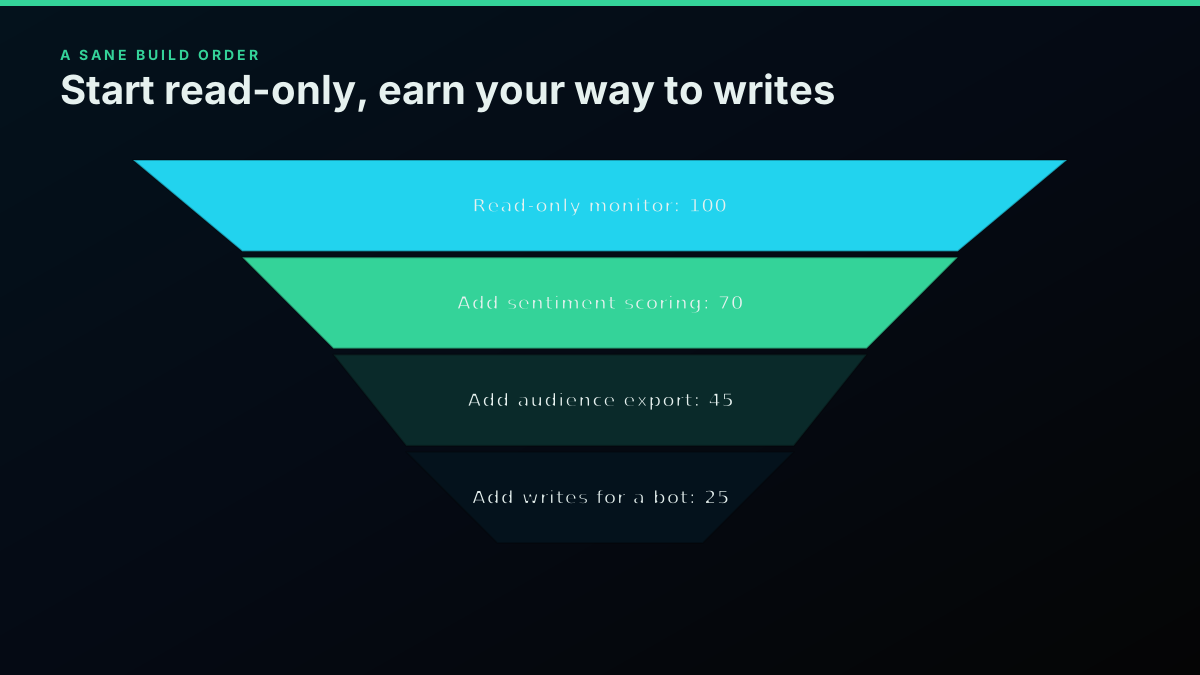
A sane build order, from read-only monitor to write-enabled bot
The practical on-ramp is three steps. First, sign up and get a key, which takes a minute and comes with $0.50 in free credits and no card. Second, make one read call, an advanced search on your brand or a keyword, to confirm the data looks the way you expect:
# Your first call: export the key and search
export TWITTERAPIS_KEY="your_key_here"
curl -s "https://api.twitterapis.com/twitter/tweet/advanced_search?query=from:yourhandle" \
  -H "Authorization: Bearer $TWITTERAPIS_KEY"
The Python Twitter API tutorial and the get a Twitter API key guide cover the same first request in both the direct and official paths. Third, wrap that call in the smallest loop that does something, store the results, and alert on change. That is a working monitor, and every other use case in this guide is a variation on it.
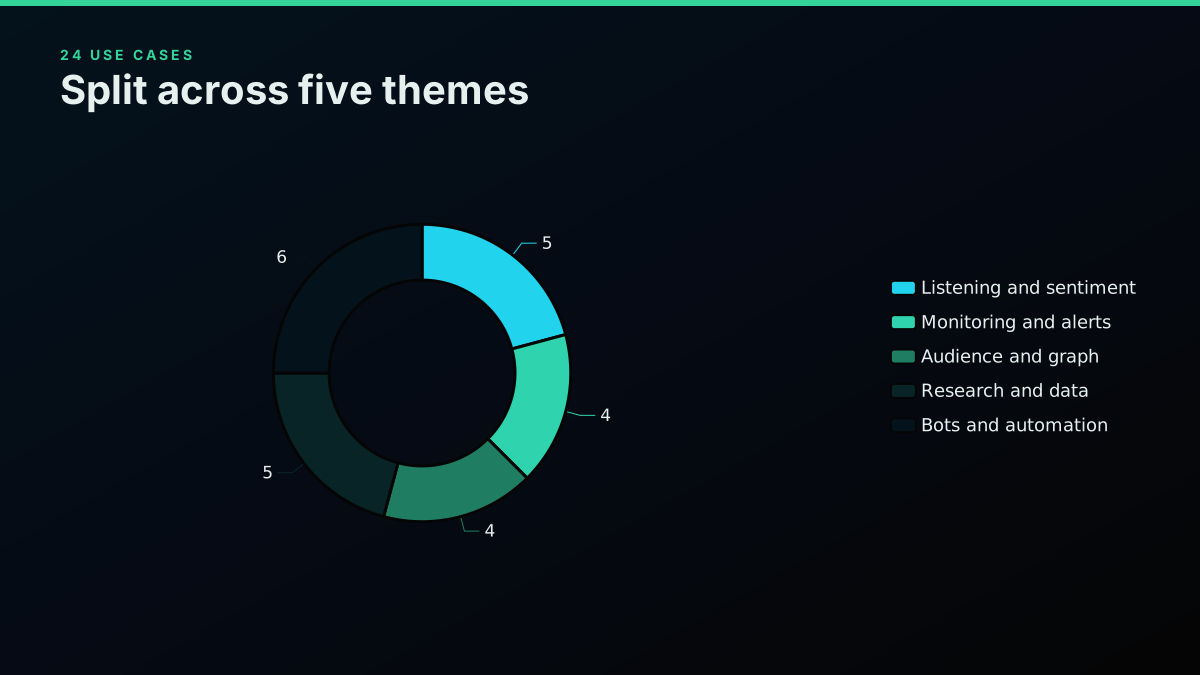
The 24 use cases, split across five themes
The through-line of all 24 builds is that Twitter/X data is only valuable when it is programmable, and the two things that historically blocked builders, a punishing developer-account process and opaque cost, are the two things a direct pay-per-call API removes. Pick the read-only build that scratches your own itch, ship it on the free credits, and let the invoice, measured in cents per thousand tweets, tell you whether it is worth scaling. If you are still deciding between providers for the job, the Twitter API alternatives comparison lays out the tradeoffs, and the complete tutorial is the reference to keep open while you build.
// sources
Where these numbers come from
Each row is a figure in this post and the artefact it was read from. Prices and limits on this platform move, so check the date on the source before you plan against it.
- X API introduction
- The official reference the post names in its framing, the endpoint manual that lists what exists without saying what a given feature costs to run.
- X Developer Community April 2026 pricing update
- Backs the closing cost comparison: the April 2026 update put owned reads at $0.001 per resource on the pay-per-use plan, with third-party reads higher.
- X developer platform
- Backs the claim that write access on the official route is gated behind app review and an approved permission level, which is why the post separates read use cases from write ones.
- Wikipedia entry on sentiment analysis
- Defines the positive, negative, or neutral classification step the brand sentiment and competitor share-of-voice use cases are built on.
- Wikipedia entry on alternative data
- Backs the framing of use case 18, where cashtag chatter and account-level sentiment are treated as alternative data feeding quantitative models.
Frequently Asked Questions
A lot more than most people expect. The Twitter/X API powers five broad families of product: listening and sentiment tools (brand sentiment, reply mining, share-of-voice, trend and hashtag tracking), monitoring and alerts (real-time mention watching, keyword and crisis alerts, support triage), audience and graph tools (follower export, growth analytics, influencer discovery, retweeter analysis), research and data pipelines (academic datasets, account archives, thread capture, deleted-tweet tracking, financial signals), and bots and automation (reply bots, scheduled posting, bot detection, content repurposing). Each maps to a specific read or write endpoint, and on a pay-per-call API a read is $0.0008 per call returning up to 20 tweets, roughly $0.04 per 1,000 tweets on a full page.
Less than most first-timers assume. On a pay-per-call model, every standard read (search, user lookup, followers, replies, mentions) is $0.0008 per call, and one search call returns roughly 20 tweets, which works out to about $0.04 per 1,000 tweets. A daily brand-mention monitor pulling a few thousand tweets a day costs pennies. Free signup credits of $0.50 cover about 625 calls or 12,500 tweets before you pay anything. Full account history is $0.0024 per call and full thread expansion is $0.004 per call.
For most people it is a brand or keyword monitor, because it delivers value on day one and uses only the cheapest read endpoints. You run an advanced search on your brand name or a keyword, store the new tweets, and alert yourself when volume spikes or sentiment turns. It touches no write scope, needs no elevated permission, and costs about $0.04 per 1,000 tweets. From there, sentiment scoring, a follower export, or a reply bot are natural next steps that reuse the same auth and the same read patterns.
It depends on the path. The official X API requires a developer account, an approved app, a payment method, and a Bearer token before your first request, plus tier limits like the 7-day recent-search window on lower plans. A direct pay-per-call API like TwitterAPIs skips that: you sign up with an email, copy a key, and call any of the read endpoints immediately on $0.50 of free credits with no card and no app review. Write actions (posting, liking, following) use a bring-your-own auth_token and ct0 that are passed per request and never stored.
Yes. Posting a tweet is the tweet/create endpoint at $0.0016 per call, and the simple write actions (like, retweet, bookmark, follow and their undos, and delete) are $0.0008 per call, the same as a read. Writes need a bring-your-own auth_token and ct0 cookie pair passed with the request so the action runs as a real account. A reply or engagement bot combines a read (find the tweets to act on) with a write (post the reply or like), and the full walkthrough lives in the how-to-build-a-twitter-bot guide.
An API is almost always the better path for anything you plan to run more than once. Home-rolled scrapers break constantly because X changes its markup and undocumented endpoints, and older tools like snscrape stopped working reliably after the platform locked down. A pay-per-call API gives you a stable HTTP contract, flat JSON, and pagination that does not shift under you, so your build keeps working. The tradeoff is that a direct API reads X data through a provider rather than from X itself, and that you pay per call, though at $0.0008 per read and $0.50 in free credits the cost is rarely the deciding factor. For a full comparison of the paths, the Twitter API alternatives guide lays out the options.
Check out similar blogs
More guides on the Twitter/X API, scraping, and pricing.
Build vs Buy: Should You Build Your Own Twitter/X Monitoring Tool? (2026)
Buying a listening seat costs $29 to $2,000 a month depending on the vendor. Building costs real engineering hours plus a data bill. Here is the real math behind the twitter monitoring tool build vs buy decision, priced both ways.

How to Track a Tweet's Performance in Real Time with the X API
Poll a tweet's engagement counts over time with the X API, compute a views-to-likes ratio, and read the quote-tweet layer to tell an organically growing launch tweet from a boosted one. Tested Python and curl.
What "Rate Limited" Actually Means on X (Every Limit, Measured)
"Sorry, you are rate limited" is one message covering two different systems: a consumer action ceiling and a developer API window. Here is what the term means, the current numbers for both, where it came from, and how long it actually lasts.
The Twitter API Developer Reference (2026): Endpoints, Rate Limits, Error Codes and Pagination
A single indexed reference for the Twitter/X API in 2026: the endpoint catalog, how authentication and bearer tokens work, the rate limits behind every 429, what error codes 401, 403, and 429 mean, cursor pagination, response shapes, and the real per-call cost of each call.
How to Choose a Twitter/X API in 2026: The Complete Buyer's Guide
A decision framework for choosing a Twitter/X API in 2026: the seven criteria that actually matter (pricing model, data coverage, rate limits, auth, reliability, compliance, migration cost), a use-case decision tree, and where each path wins.
How to Get All Replies to a Tweet via API (2026)
Pull the replies under any tweet with a real 2026 API. Runnable Python and Node.js, cursor pagination, the conversation_id tail sweep for the long tail, nested replies-to-replies, signal-versus-noise filtering over live data, and the honest per-call cost.
Fetch a Full Twitter Thread via API in One Call (2026)
How to pull an entire Twitter thread, the root tweet plus every connected tweet in the chain, in a single API call with the tweet/thread endpoint, instead of walking replies by hand. Live-tested code in curl, Python, and Node.js, with the real per-call cost.
Can You Recover a Deleted Tweet via API in 2026?
The honest answer: no API un-deletes a tweet the author removed. Here is what actually works in 2026, checking whether it is really gone, finding an archived copy, and the capture-before-delete pattern that prevents the loss, with live-tested code.