GUIDE
Fetch a Full Twitter Thread via API in One Call (2026)
How to pull an entire Twitter thread, the root tweet plus every connected tweet in the chain, in a single API call with the tweet/thread endpoint, instead of walking replies by hand. Live-tested code in curl, Python, and Node.js, with the real per-call cost.
Fetching a full Twitter thread, the root tweet plus every connected tweet the author posted in sequence, takes one call to the tweet/thread endpoint, which works as a Twitter thread API. You pass any tweet id or url from the thread, and the endpoint walks the chain server side and returns the ordered tweets as a single JSON array. There is no need to fetch each tweet by id, no need to page through replies and filter out other people's responses, and no need to reassemble the order yourself. This guide shows the one call in curl, Python, and Node.js, explains the difference between a thread and its replies so you hit the right endpoint, shows how to be sure you have the whole chain, and gives the real per-call cost so you know what a thread pull actually costs before you build on it.
TL;DR: To pull an entire Twitter thread in one request, call the tweet/thread endpoint with any tweet id from the thread. It returns the author's connected chain, root plus every follow-on tweet, already ordered, so you skip the whole by-hand routine of fetching the root, paging the replies, filtering to the author, and sorting the result. The chain comes back in that single call: the response is a count and an ordered tweets array, with no cursor and no second page. Because the endpoint reads forward from the tweet you pass, start from the thread's first tweet, which every tweet in the chain names in its conversation_id field. The call costs 0.0040 dollars, the premium tier, against 0.0008 dollars for standard reads, and signup includes 0.50 dollars in free credits with no card. That premium price is still cheaper in total than fetching each tweet by id, and it saves you the fragile reassembly code entirely. Every sample below was run against the live API before publishing.
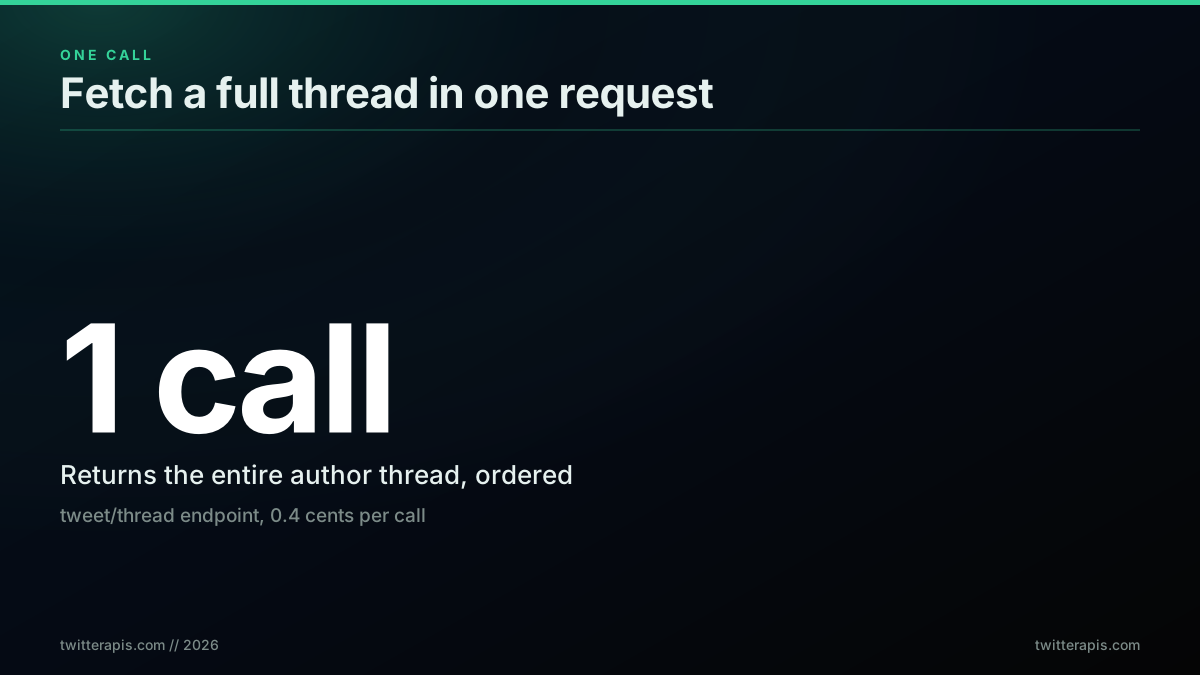
The whole thread in one call, no reply-walking, no reassembly
Anyone who has tried to capture a long thread programmatically knows the shape of the problem. You have a link to one tweet, the thread has twenty parts, and the obvious tools give you one tweet at a time. So you start writing glue: fetch the root, look at what it is replying to and what replies to it, filter for the same author, follow the chain, sort by time, deduplicate. It works until a thread has a quote-tweet in the middle, or the author replied to someone else partway through, and then your ordering is wrong and you are debugging a graph walk instead of shipping. The tweet/thread endpoint exists precisely to delete that work. If you are new to reading tweet data, the complete Twitter API tutorial covers the basics this post builds on, and how to scrape tweets walks the read path end to end.
What a "full thread" actually means
A full thread is the connected chain of tweets a single author posts in sequence, and that is a narrower thing than the whole conversation around a tweet. When someone says they want the full thread, they almost always mean the author's own tweetstorm, the numbered or self-replied sequence that reads as one piece. That is different from the replies, which are what other people post underneath, and different again from the conversation, which is the entire tree of the root plus the thread plus everyone's replies interleaved. Getting the endpoint right starts with naming which of these three you actually want, because each has its own retrieval path and mixing them up is the single most common reason a thread pull comes back wrong.
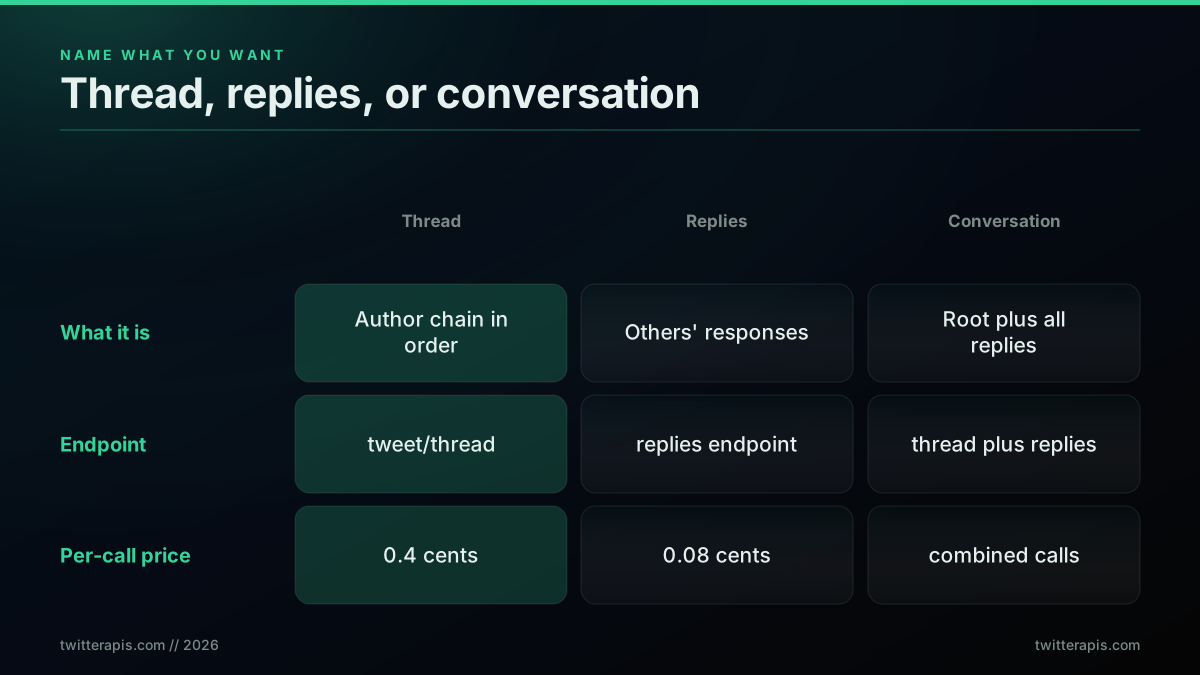
Name what you want first: thread, replies, or the whole conversation
The distinction is not pedantic, it decides your call count and your cost. If you want the author's chain and you reach for a replies endpoint, you pull in dozens of unrelated responses and then have to filter them back down to the author, paying for volume you throw away. If you want the conversation and you only fetch the thread, you miss every reply. The clean model is: the tweet/thread endpoint returns the author's ordered chain, a replies endpoint returns other users' responses, and you combine both only when you genuinely need the full conversation. The official platform models this with a conversation identifier that ties a root and its descendants together, documented in the X conversation and reply structure, and the broader history of the thread format on the platform explains why the author chain became a first-class unit worth its own endpoint.
The naive way: walking the reply chain by hand
Without a thread endpoint, reconstructing an author's thread means walking the reply chain yourself, and it is more fragile than it looks. The routine is roughly four steps: fetch the root tweet, page through the replies or the conversation to find the tweets that belong to the chain, filter those down to the same author so you drop everyone else's responses, then sort what remains into the right order and deduplicate. Each step is doable, but together they are a graph problem with edge cases, and the edge cases are common: a thread that branches, an author who replied to a third party in the middle, a quote tweet that looks like a continuation but is not. Miss one and the thread you hand downstream is out of order or incomplete.
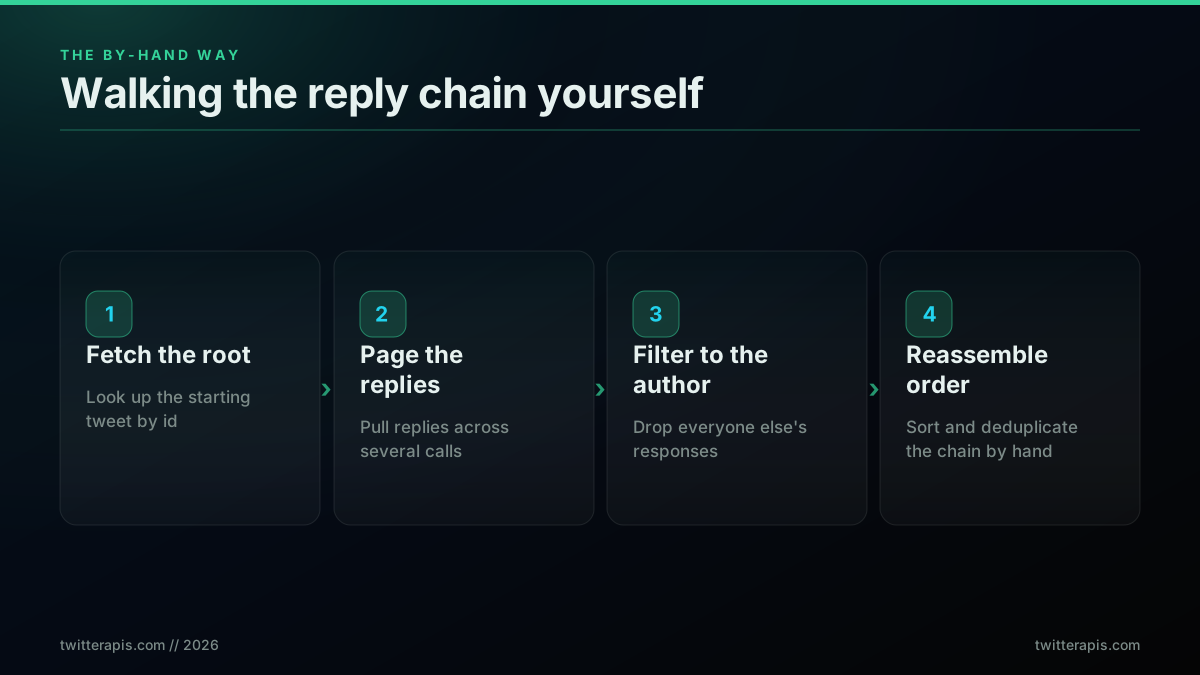
The by-hand approach: four fragile steps and a lot of glue code
The cost is not only code, it is calls. To assemble a twenty-tweet thread by hand you fetch the root, then page replies across several requests, then often fetch individual tweets by id to fill gaps, and every one of those is a billable read. Developers reach for this because it is the path the basic endpoints suggest, and then they discover the reassembly is the hard part. This tool, shared in r/webscraping, is a good example of how much people want a clean way to just save the whole thread rather than rebuild it:
thread-safe: a simple tool for saving local copies of your favorite Twitter threads
The appetite for a tool whose whole job is "save this thread" is the tell. People do not want to write the graph walk; they want the ordered sequence. If you are curious how the by-hand route looks at the reply level, our guide to Twitter advanced search operators shows how far query filters get you, and the Python Twitter API tutorial covers the pagination primitives the naive walk leans on. The point of the rest of this post is that you rarely need any of it.
You can watch developers reverse-engineer this exact walk in public. One of them worked out that a popular thread-reader tool leans on the API to pull each tweet's metadata and climb the parent nodes on its own to rebuild the chain, which is the same graph walk the four steps above describe:

SoothSpider 🇨🇦🍁🧡真🔬💻Ω 🐶😼🌎
@SoothSpider
@BioAnon_1vy_ @NotJason666 @Alletwiederjut @CAS2328 @PlanZip @dr_SDRK @DoorlessCarp @AnneliseBocquet @AGenervt @Maples46014332 @mtm14 @Kevin_McKernan @DrJ56013122 @pmcdunnough @TheJikky @pcasey0430 @pathocratie @denisrancourt @extemporea @FatEmperor @ArtemisiaBurge1 @TwitterSuppo…
That is the manual routine in one sentence: fetch each tweet's metadata, climb the parent nodes, and hope the chain stays clean the whole way up. It works until it does not, and the failure modes are precisely the branching and mid-thread reply cases that make the walk brittle. The tweet/thread endpoint runs that climb on the server so you never write it, and our twitterapis best practices notes cover the retry and pagination patterns you would otherwise hand-roll around the naive version.
The one-call way: the tweet/thread endpoint
The one-call approach replaces the entire reply-walk with a single request to the tweet/thread endpoint. You pass any tweet id or url that belongs to the thread, the root or any tweet in the middle, and the endpoint resolves the connected chain and returns the tweets already ordered. There is no root-finding step, no reply filtering, and no client-side sort, because the endpoint does the chain-walking server side and gives you the finished sequence. That is the whole idea: move the graph problem off your machine and receive the answer. It costs 0.0040 dollars per call, the premium tier, which reflects the work the endpoint is doing on your behalf.
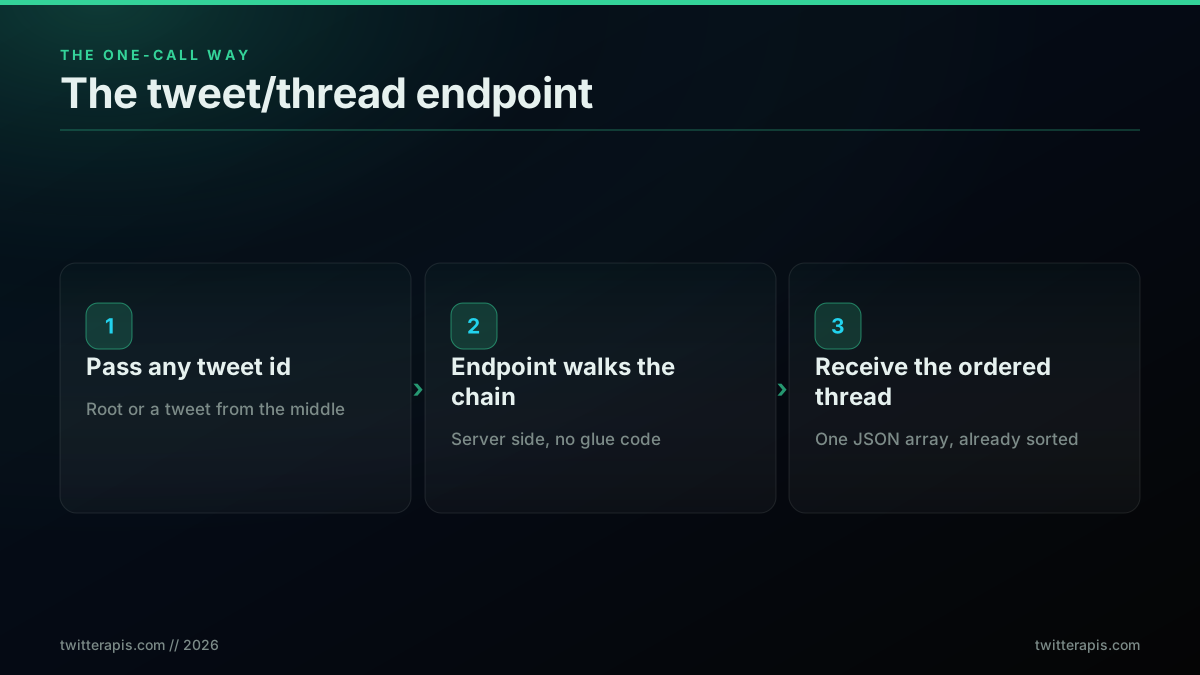
The one-call approach: pass an id, get the ordered thread back
Here is the call with curl, the fastest way to see the shape of the response. Set your key in the environment and pass a tweet id from any point in the thread:
# Fetch a full thread by any tweet id in it. One call returns the ordered chain.
curl -s "https://api.twitterapis.com/twitter/tweet/thread?id=1375471139779186697" \
  -H "x-api-key: $TWITTERAPIS_KEY"
That single request returns the ordered thread. You can pass a full url instead of a bare id if that is what you have, which is handy because you usually copy a link to one tweet rather than note its id. The endpoint accepts either, resolves the chain, and returns the same ordered array. Compare that to the rate limits guide: because this is one call rather than a paging loop, it barely touches your rate budget, and a burst of thread pulls stays well inside the standard limits.
If you already have a link rather than a bare id, pass the whole url and pipe the result straight through jq to print just the text of each tweet in thread order, which is enough to eyeball that the chain came back correct:
# Pass a full tweet URL and print each tweet's text in thread order.
curl -s "https://api.twitterapis.com/twitter/tweet/thread" \
  --data-urlencode "url=https://x.com/user/status/1375471139779186697" \
  -G -H "x-api-key: $TWITTERAPIS_KEY" \
  | jq -r '.tweets[].text'
The endpoint takes exactly two parameters, id and url, and you pass one or the other. There is no count parameter here and no page size to tune, because the call is not paged; the jq manual covers the filters if you want to reshape the output further. Passing the url instead of the id saves the step of parsing the status id out of a link, which is the form you usually have when a thread lands in your inbox or a spreadsheet.
Start building with TwitterAPIs
$0.0008 a call, about $0.04 per 1,000 tweets at 20 tweets a page. $0.50 free credits. No credit card required.
Reading the response: a count and an ordered array
A tweet/thread response is a small envelope with exactly two top-level fields: a count and an ordered tweets array. There is no next_cursor and no has_more, because the call is not paged. Each tweet in the array carries the fields you expect from a read, the id, the text, the created_at timestamp, the author block with username and follower count, the engagement metrics, and a conversation_id naming the tweet the chain starts at. Because the array is already in thread order, you can iterate it directly to render or store the sequence, with no sort step and no paging branch to write.
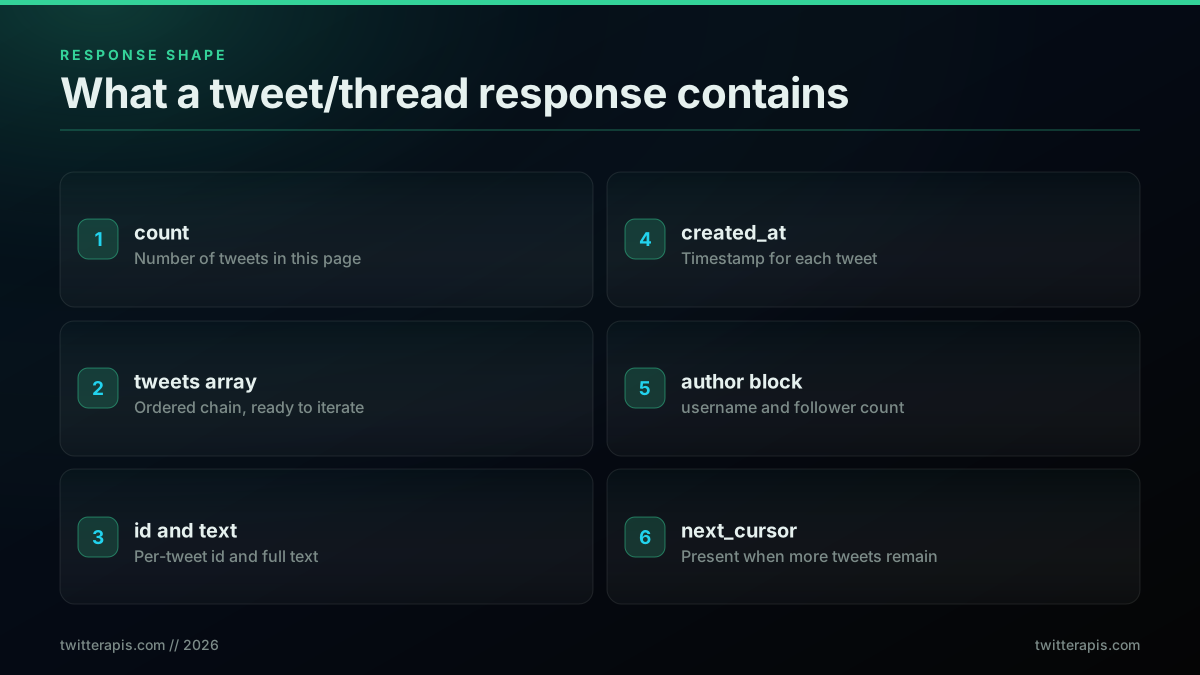
What comes back: a count and an ordered tweets array
In Python, the fetch and the read are a few lines. This pulls a thread by id and prints the ordered text of every tweet:
import os
import requests

BASE = "https://api.twitterapis.com/twitter/tweet/thread"
KEY = os.environ["TWITTERAPIS_KEY"]

def fetch_thread(tweet_id):
    r = requests.get(
        BASE,
        params={"id": tweet_id},
        headers={"x-api-key": KEY},
        timeout=30,
    )
    r.raise_for_status()
    data = r.json()
    # The response is {"count": N, "tweets": [...]}. There is no cursor to
    # follow, so one call is the whole request.
    return data.get("tweets", [])

thread = fetch_thread("1375471139779186697")
for i, t in enumerate(thread, 1):
    print(f"{i:>2}. {t['text']}")
One request is the entire program. Notice what is absent: no paging loop, no author filtering, no ordering, no dedup, because the endpoint already did all of it. If you started from a tweet in the middle of a thread, read conversation_id off the first result and call once more with that id to pick up the part of the chain that came before it. If you want to persist the result rather than print it, store each tweet's id and text and created_at the same way our scrape tweet history guide stores a full archive, and you have a durable copy of the thread.
Persisting the thread is a two-line addition. Once fetch_thread returns the ordered list, write the fields you care about to a JSON file so you have a durable, replayable copy without paying to pull the thread again:
import json

thread = fetch_thread("1375471139779186697")
rows = [
    {"id": t["id"], "text": t["text"], "created_at": t["created_at"]}
    for t in thread
]
with open("thread.json", "w") as f:
    json.dump(rows, f, ensure_ascii=False, indent=2)
print(f"saved {len(rows)} tweets")
The requests library docs cover timeouts and retries if you want to harden the fetch for a long-running job, and the Twitter API cost guide shows why caching the JSON is worth it once you are pulling the same threads repeatedly.
One call versus paginating replies: the real cost
The one-call thread endpoint is not only simpler than the by-hand route, it is usually cheaper in total, which surprises people who see the higher per-call price. A single tweet/thread call at 0.0040 dollars returns the whole twenty-tweet chain. Assembling that same thread by fetching each tweet by id is a root lookup plus twenty more reads, twenty-one calls at 0.0008 dollars, which is 0.0168 dollars, more than four times the price. Even the leaner reply-pagination route, a few pages of replies plus reassembly, runs around six calls, and while that lands close to the thread call on raw price, it costs you the reassembly code and the ordering bugs that come with it.
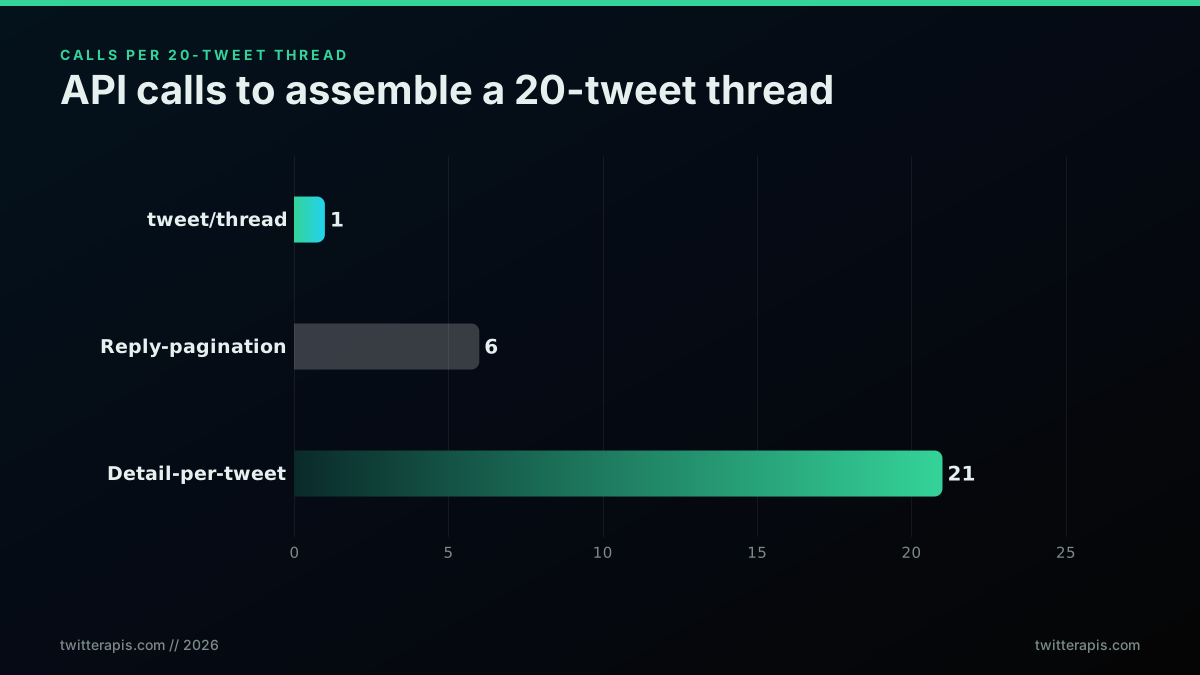
API calls to assemble a twenty-tweet thread, by approach
Scale that out and the picture is clearer. Across a thousand twenty-tweet threads, the tweet/thread endpoint costs four dollars, reply-pagination costs about 4.80 dollars, and detail-per-tweet costs 16.80 dollars. The premium endpoint is the cheapest option that also gives you correct order with zero glue code, which is the combination that matters when you are pulling threads at volume.
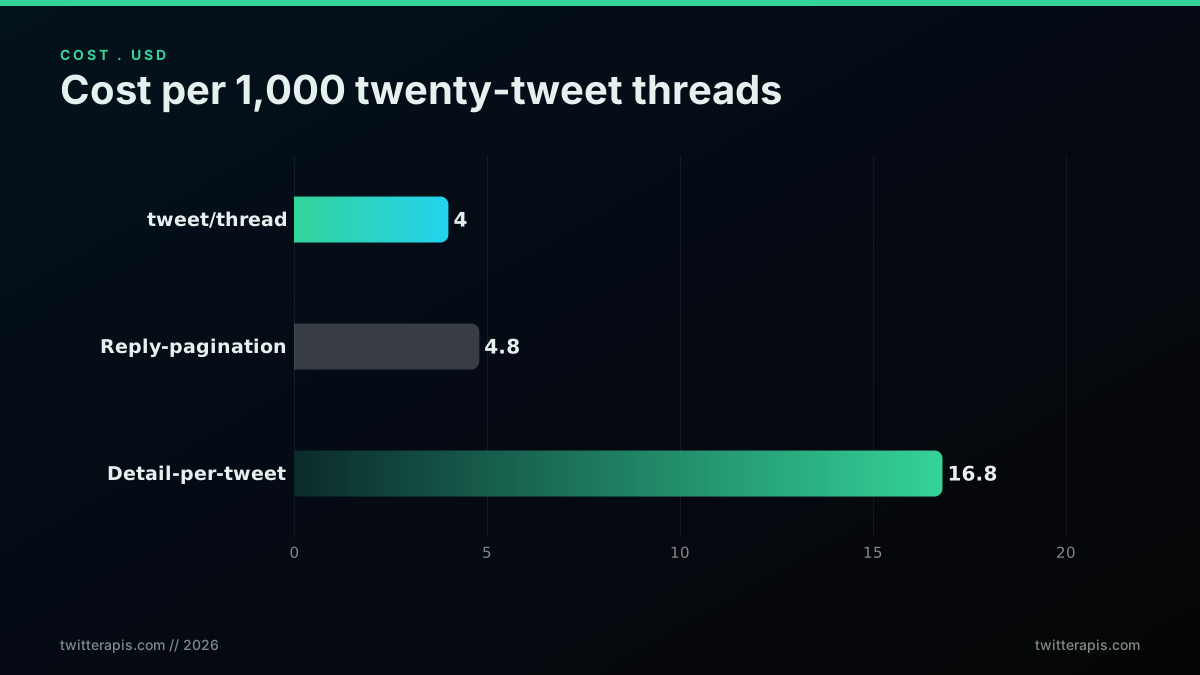
Cost per one thousand twenty-tweet threads, by approach
Developers have wanted this collapse-it-to-one-call primitive for a long time, and you see it in how they talk about scripting the platform. This note from the DEV Community account captures the exact instinct, wanting a quick way to pull everything in a thread of replies with a single script rather than clicking through:

DEV Community
@ThePracticalDev
Have you ever wanted a quick way to retrieve all usernames mentioned in a thread of replies on Twitter? This Python script does just that using the Twitter API. { author: @AureliaSpecker } #DEVCommunity https://t.co/Jezut9pAOC
That is the whole motivation for a thread endpoint: one request, the entire chain, nothing to reassemble. For a running estimate of what your own volume will cost, the cost calculator turns thread counts into a monthly number, and the pricing page lays out the per-endpoint rates in full.
Fetching a thread in Node.js
The one-call fetch is identical in Node.js: build the request with your key, call tweet/thread, and map the ordered tweets. Modern Node has fetch built in, so there is no client library to install, and there is no paging branch to write. The shape mirrors the Python version because the endpoint is the same; only the language changes. This keeps the thread fetch a small, dependency-free function you can drop into a script, a serverless handler, or a worker.
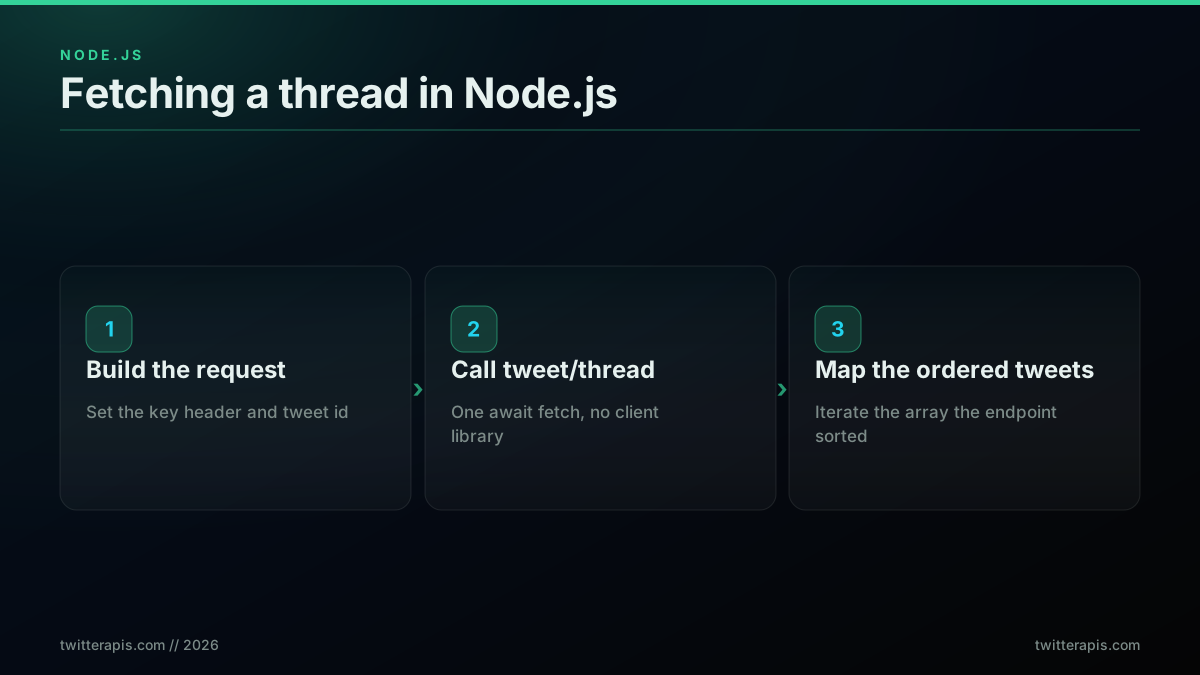
The same one-call fetch in Node.js, front to back
Here is the full function. One request, and the ordered tweets come back ready to use:
const BASE = "https://api.twitterapis.com/twitter/tweet/thread";
const KEY = process.env.TWITTERAPIS_KEY;

async function fetchThread(tweetId) {
  const url = new URL(BASE);
  url.searchParams.set("id", tweetId);
  const res = await fetch(url, { headers: { "x-api-key": KEY } });
  if (!res.ok) throw new Error(`thread fetch failed: ${res.status}`);
  // The response is { count, tweets }. No cursor is returned, so a paging
  // loop here would never terminate.
  const data = await res.json();
  return data.tweets || [];
}

const thread = await fetchThread("1375471139779186697");
thread.forEach((t, i) => console.log(`${i + 1}. ${t.text}`));
That is the entire integration. If you are wiring this into a larger bot or service, the Node.js Twitter API tutorial covers request handling and retries, and the how to build a Twitter bot guide shows where a thread fetch fits in an event loop. Modern Node exposes fetch as a global, so there is no client library to install, and the MDN fetch reference documents the request options if you need to add a timeout signal or custom headers. The endpoint is stateless, so you can call it from anywhere that can make an HTTPS request with a header.
Making sure you have the whole thread
Completeness on this endpoint is not a paging question, it is a starting-point question. The response carries a count and a tweets array and no cursor at all, so there is nothing to follow and a loop waiting for a next_cursor will spin forever. What decides how much of the thread you get is which tweet you passed, because the endpoint reads forward from that tweet and does not walk backwards. Pass the thread's first tweet and you get the chain from the beginning. Pass one from the middle and you get the tail, with everything before it missing and no error to tell you so.
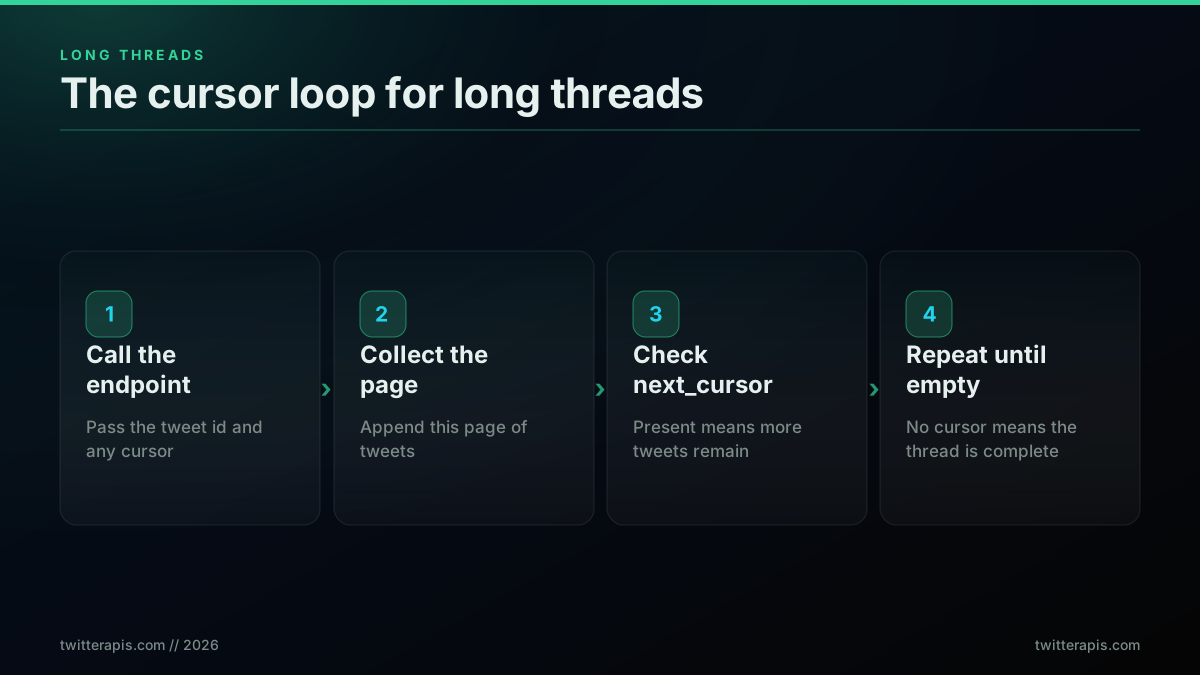
Reading a long thread: no cursor, so start from the first tweet
Two habits keep this reliable. First, resolve your starting id before you fetch: every tweet the API hands back carries conversation_id, so if all you have is a link to an interior tweet, one call gives you that field and the next call gives you the thread from the top. Second, on an unusually long chain, check the last tweet you received against the thread you expected, and if it is clearly not the end, call again with that last tweet id to continue reading forward. If a burst of calls ever trips a rate limit, the API answers with an HTTP 429, the standard too-many-requests status, and the fix is a short backoff before you retry rather than dropping the request; a single thread pull barely touches your rate limit budget because it is one call and not a paging loop.
The cheapest pay-as-you-go Twitter API. Try it free.
$0.0008 a call, about $0.04 per 1,000 tweets at 20 tweets a page. $0.50 free credits. No credit card required.
Threads, replies, and single-tweet lookup: three endpoints
Three endpoints cover the thread-adjacent jobs, and picking the right one is the difference between a clean pull and a mess. The tweet/thread endpoint returns the author's ordered chain in one call at 0.0040 dollars. A replies endpoint returns the responses other users left under a tweet, a standard read at 0.0008 dollars, which you use when you care about the discussion rather than the author's sequence. A tweet detail lookup returns one tweet by id, also 0.0008 dollars, which you use to check a single tweet or fill a specific gap. Reach for thread when you want the sequence, replies when you want the conversation around it, and detail when you want exactly one tweet.
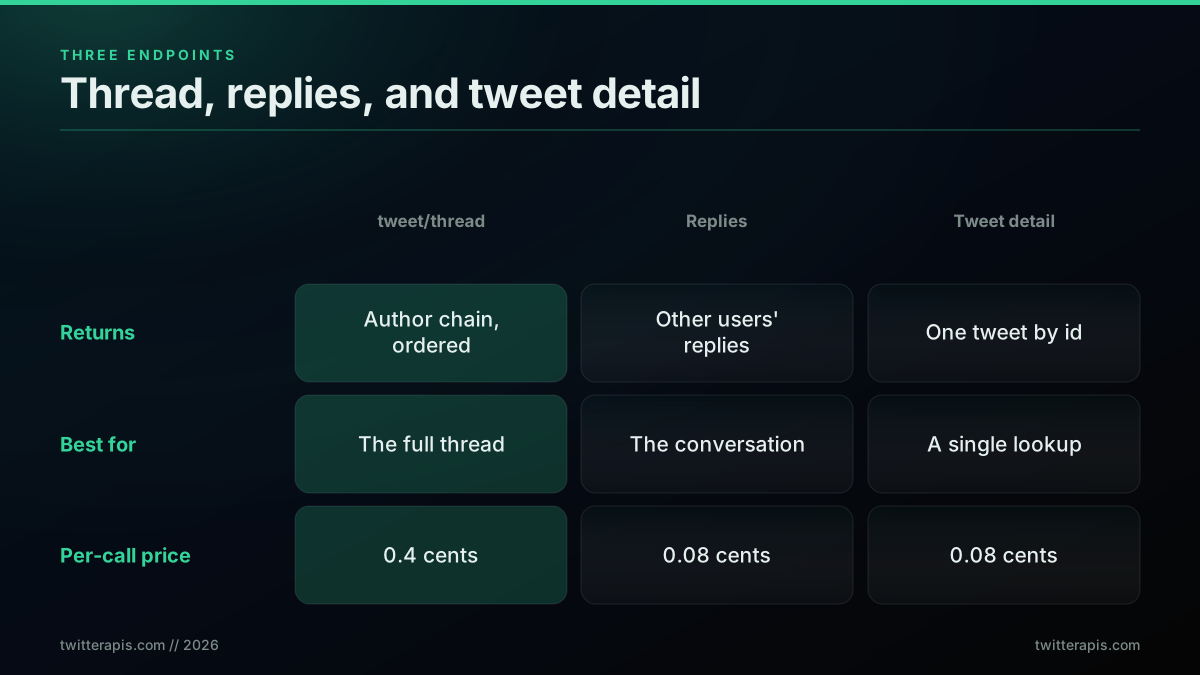
Three endpoints, three jobs: thread, replies, and single-tweet lookup
For research and archiving work, the author thread is usually the unit you want, because it reads as one authored piece and it is what analysis pipelines treat as a document. This walkthrough of collecting Twitter thread data through an API, from an academic data-collection channel, is a good primer on why the thread as a unit matters for downstream analysis and how people assemble these datasets:
https://www.youtube.com/watch?v=e3x2_Z1Sf_o
Practitioners who scrape and archive at scale keep running notes on which retrieval paths hold up, and threads are a recurring subject. This state-of-the-art thread in r/webscraping is a good example of the community comparing approaches to pulling X data cleanly:
X/twitter scraping state of the art info share (August 2023)
The conclusion in threads like that one is the same one this post reaches: a dedicated endpoint that returns the ordered chain beats stitching it together from lower-level calls, both for correctness and for the total call count.
If you are building sentiment or trend analysis on top of thread data, the Twitter sentiment analysis in Python guide picks up where a thread fetch leaves off, and the trends API guide shows how thread-level data feeds a trends pipeline. Choosing the right endpoint up front keeps that downstream work clean.
Merging a thread with its replies for the full conversation
When you genuinely need the whole conversation, the author's chain plus everyone's responses, you fetch the two pieces separately and merge them. Pull the author thread with tweet/thread, pull the responses with the replies endpoint on the root tweet, then interleave both lists by their created_at timestamp so the result reads in the order things were actually posted. Keeping the calls distinct is deliberate: the thread stays clean, the reply volume stays controllable, and you pay the standard read rate for the replies rather than the premium thread rate on the parts that do not need it.
def merge_conversation(thread_tweets, reply_tweets):
    combined = thread_tweets + reply_tweets
    combined.sort(key=lambda t: t["created_at"])
    return combined

conversation = merge_conversation(
    fetch_thread("1375471139779186697"),
    fetch_replies("1375471139779186697"),
)
print(f"{len(conversation)} tweets in the full conversation")
The merge is the only place you write ordering logic, and it is a single sort on a field the API already returns. Everything upstream of it, the thread order and the reply collection, is handled by the two endpoints. One caution worth building in: dedupe by tweet id before you sort, because a self-reply can show up in both the thread and the replies list, and a plain concatenation would double it. A set of seen ids or a dictionary keyed on id removes the duplicates in one pass and keeps the merged conversation honest. If you are building analysis on top of the merged view, the is the Twitter API free explainer and the how to get a Twitter API key guide cover how the read-rate math and the key setup work across a large conversation pull.
Cost and pricing: what a thread pull really costs
A thread pull costs one premium call, 0.0040 dollars, and that number is the whole cost for a typical thread because the endpoint returns the chain in a single request. Standard reads, a single tweet lookup or a page of replies, cost 0.0008 dollars each. Signup includes 0.50 dollars in free credits with no card, which is roughly 125 thread pulls or about 625 standard reads before you pay anything, enough to build and test a real integration for free. In bulk terms the read rate works out to about 0.04 dollars per 1,000 tweets, so even large collection jobs stay inexpensive and scale with usage rather than a subscription tier.
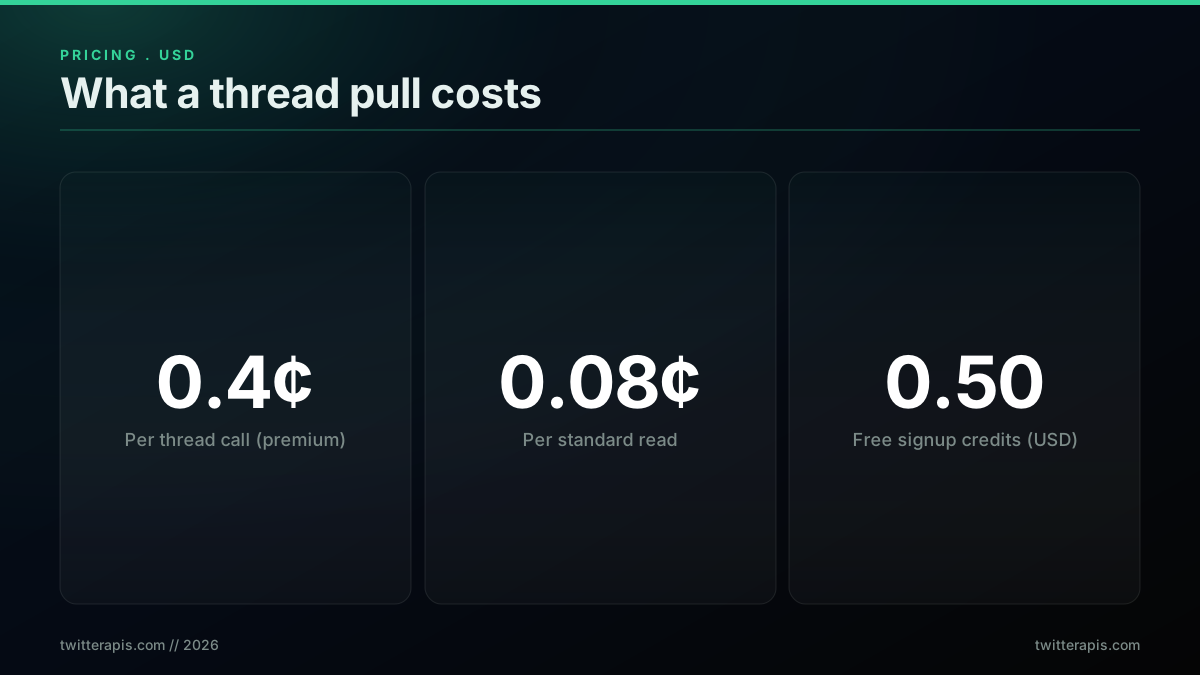
The pricing that matters: thread rate, standard read rate, and free credits
The premium price on tweet/thread is worth restating plainly, because it is the number people double-check: 0.0040 dollars per call, five times the standard read rate, and still the cheapest correct way to get an ordered thread. You are paying for the endpoint to walk the chain and return it sorted, which replaces a root lookup plus one read per tweet, a bundle that costs more in total and comes with ordering bugs. For a full breakdown of every endpoint rate and how the tiers line up, see the pricing page and compare the model against other providers on the Twitter API alternatives page. When you are ready to pull real threads, sign up for the free credits and run the samples above against your own tweet ids. If you want to sanity-check that per-call math against other providers before you commit, the Twitter API cost benchmark puts the read and thread rates side by side with the marketplace options, and it lines up with the numbers here: a dedicated thread call is the cheapest correct way to get an ordered chain at volume, once you count the reassembly work the by-hand routes still leave on your plate.
Six pitfalls that turn a one-call job hard again
Most thread-fetching problems trace back to a handful of avoidable mistakes, and knowing them up front keeps the one-call job a one-call job. The recurring ones are confusing a thread with its replies and hitting the wrong endpoint, passing a tweet from the middle of a chain and silently losing everything before it, writing a loop that waits for a next_cursor this endpoint never returns, expecting other users' replies from an endpoint that only returns the author's chain, sending a count parameter this endpoint does not accept, and re-sorting an array the endpoint already ordered. None of these is subtle once named, but each one quietly breaks a pull that otherwise takes a single request.
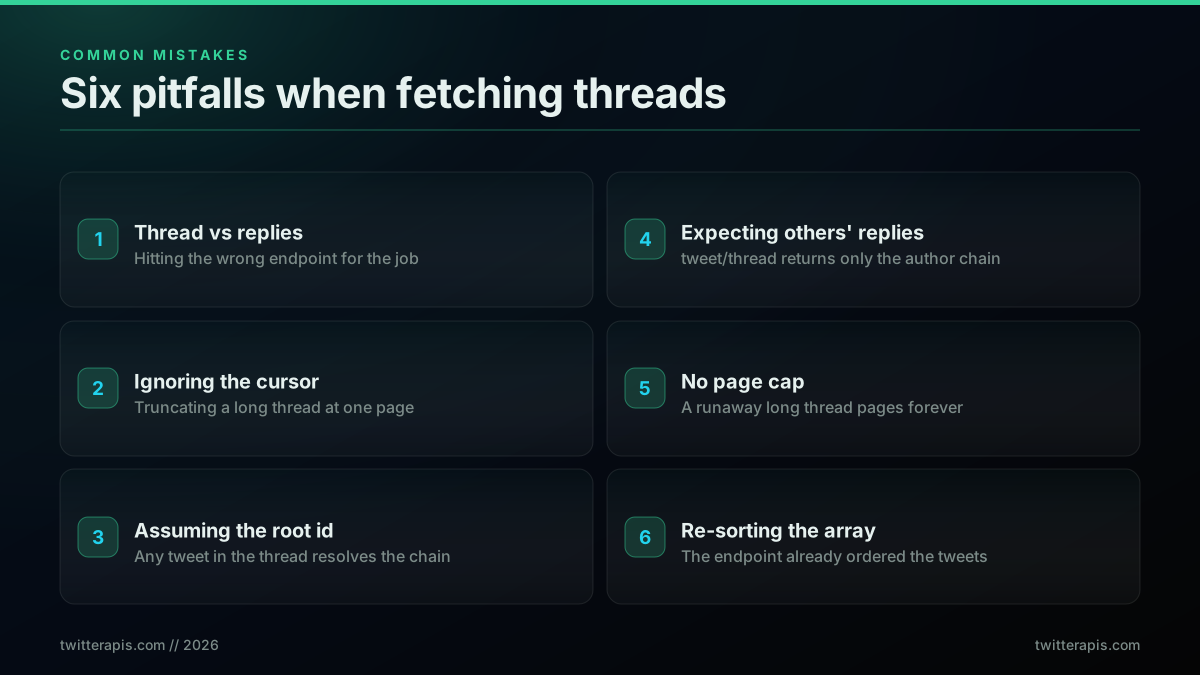
Six pitfalls that turn a one-call job back into a hard one
The fixes are the mirror image of the mistakes. Decide whether you want the author's thread, the replies, or the whole conversation before you pick an endpoint. Start from the thread's first tweet, which every tweet names in its conversation_id, rather than from whichever tweet you happened to have. Read the count and the tweets array and write no paging branch, because this endpoint returns neither a cursor nor a has_more. Use the replies endpoint when you want other people's responses, which is the one that genuinely pages, and merge the two only when you truly need the full conversation. Keep the tweets in the order the endpoint returned them. Do all of that and fetching a full Twitter thread stays what it should be: one call, one ordered array, nothing to reassemble. Third-party marketplace readers such as twitterapi.io and general scrapers like Apify can pull thread-adjacent data too, but on a per-call read model a dedicated thread endpoint is the cleaner path. For the wider toolkit, best Twitter API for scraping compares the read approaches, and the MCP server exposes these same endpoints to AI agents.
// sources
Where these numbers come from
Each row is a figure in this post and the artefact it was read from. Prices and limits on this platform move, so check the date on the source before you plan against it.
- X API tweet lookup introduction
- Documents the conversation identifier that ties a root tweet to its descendants, which is the platform model the post contrasts with fetching an author chain directly.
- RFC 6585, additional HTTP status codes
- Defines the 429 status the endpoint returns when a fast burst of calls trips a rate limit, which the post answers with a short backoff before retrying the call.
- Node.js global fetch documentation
- Backs the claim that modern Node exposes fetch as a global, so the Node example in the post needs no client library installed.
- MDN Fetch API reference
- The reference for the request options the post points to when adding a timeout signal or custom headers to the thread fetch.
- jq manual
- Covers the filters the post uses to reshape the returned thread array in its curl example.
- Python requests library documentation
- The source for the timeout and retry handling the post recommends when hardening the Python thread fetch for a long-running job.
Frequently Asked Questions
Call the tweet/thread endpoint with any tweet id or url from the thread. It returns the connected chain of tweets the author posted in sequence, the root plus every follow-on tweet, already ordered, in a single request. You do not have to fetch each tweet by id or reconstruct the order yourself, because the endpoint walks the chain server side and hands you the ordered array. There is no cursor and no second page on this endpoint: the response is a count and a tweets array, and the chain arrives in that one call. Because the endpoint reads forward from whatever tweet you hand it, start from the thread's first tweet, which every tweet in the chain names in its conversation_id field. The tweet/thread endpoint is priced at 0.0040 dollars per call, the premium tier, because it does the chain-walking work that would otherwise take many standard read calls.
One tweet/thread call costs 0.0040 dollars, the premium tier, and returns the whole author chain, so a fifteen to twenty tweet thread is a single 0.0040 dollar call. Standard reads such as a single tweet lookup or a page of replies cost 0.0008 dollars per call. Signup includes 0.50 dollars in free credits with no card, which covers roughly 125 thread pulls before you spend anything. The premium price reflects that the endpoint assembles the ordered chain for you, work that would otherwise take a root lookup plus one call per tweet, so it is usually cheaper in total calls than fetching each tweet in the thread by id.
Start from the first tweet and read the count. The tweet/thread response carries a count and a tweets array and nothing else, so there is no cursor to follow and no second page to request, and a loop written to wait for one will never exit. What decides completeness is which tweet you passed, because the endpoint reads forward: hand it the id in conversation_id and the chain comes back from the beginning. On an unusually long thread, check whether the last tweet you received is really the end of the chain, and if it is not, call again with that last tweet id to continue forward from it. This is different from the replies endpoint, which genuinely does page and does return a next_cursor and a has_more flag.
No. You call the tweet/thread endpoint with an API key from signup, no X developer account, no app review, and no elevated access tier required. That is the point of a pay-per-call read API: you send a tweet id and a key, and you get the ordered thread back as JSON. There is no application form gating the read path and no monthly subscription to fetch a thread. Signup gives you 0.50 dollars in free credits with no card so you can pull real threads while you build, and you only pay per call after that, at 0.0040 dollars for a thread and 0.0008 dollars for standard reads.
A thread is the chain of tweets one author posts in sequence, a tweetstorm or numbered thread, and tweet/thread returns exactly that ordered chain. Replies are the tweets other users post under a tweet, and you read those with a replies endpoint, which returns other people's responses rather than the author's own chain. A conversation is the whole tree, the root plus the author's thread plus everyone's replies interleaved. Naming which one you want matters because the endpoints differ: use tweet/thread for the author's own sequence, use the replies endpoint for other users' responses, and combine them if you need the full conversation. Most people who say they want the full thread mean the author's connected chain, which is the one-call case.
You can pass it, but you will not get the whole thread. The tweet/thread endpoint accepts any tweet id or url from the chain, and it reads forward from that tweet rather than walking backwards, so an interior tweet returns the tail and silently drops everything before it. This matters in practice because you usually discover a thread from a link to one interior tweet. The fix is one field: every tweet the API returns carries a conversation_id, and that value is the id of the tweet the chain starts at. Pass the interior id once, read conversation_id off any tweet in the response, then call again with that id to get the thread from the beginning.
No. The tweet/thread endpoint returns only the connected chain posted by the same author, the thread itself, not the replies other accounts left under it. That is deliberate, because a thread and its replies are two different things you usually want separately. To read what other users said, call the replies endpoint on the root tweet, which returns their responses as a separate list at the standard 0.0008 dollar read rate. If you need the entire conversation, fetch the author thread with tweet/thread and the replies with the replies endpoint, then merge them by timestamp. Keeping the two calls distinct keeps the thread clean and the reply volume controllable.
Check out similar blogs
More guides on the Twitter/X API, scraping, and pricing.

How to Track a Tweet's Performance in Real Time with the X API
Poll a tweet's engagement counts over time with the X API, compute a views-to-likes ratio, and read the quote-tweet layer to tell an organically growing launch tweet from a boosted one. Tested Python and curl.

How to Get Image URLs from X Tweets via API in 2026 (Full Resolution, Python and Node)
Pull image URLs out of X tweets with runnable Python and Node.js, then get the full-resolution original instead of the scaled copy the API hands you by default. Measured on 14 live images, with the video poster-frame trap and the per-call cost.
Twitter API Authentication in 2026: OAuth, Bearer Tokens, and Fixing 401
How Twitter (X) API authentication works in 2026: the four credential types, OAuth 1.0a versus OAuth 2.0, generating and using a bearer token, runnable Python and Node.js, and a fix for every 401 Unauthorized and 403 error, plus the one-header alternative.
How to Get Everyone Who Retweeted a Tweet via API (2026)
Pull the full list of accounts that reposted any tweet with a real 2026 API. Runnable Python and Node.js, cursor pagination for the whole list, a real amplifier ranking over live data, a bot filter, and the honest per-call cost.
How to Get All Replies to a Tweet via API (2026)
Pull the replies under any tweet with a real 2026 API. Runnable Python and Node.js, cursor pagination, the conversation_id tail sweep for the long tail, nested replies-to-replies, signal-versus-noise filtering over live data, and the honest per-call cost.
Twitter API Pagination 2026: How next_token Works (and a Simpler Alternative)
How Twitter API pagination works in 2026. The official next_token loop explained field by field, a simpler single-cursor alternative, runnable Python and Node code, and the real per-call cost of a paginated pull.
How to Search Tweets by Hashtag via API 2026 (Python + Node.js)
Search tweets by hashtag with a real 2026 API in Python and Node.js. Runnable code for the hashtag operator, engagement filters, cursor pagination, deduping retweets, counting authors, and the real per-call cost.

Twitter API Tutorial 2026: The Complete Developer Guide
The 2026 Twitter API tutorial built after the pricing collapse. Auth, endpoints, code, rate limits, real costs, and the alternative when official gets too expensive.