GUIDE
Twitter API Rate Limits Explained: Windows, 429s and How to Avoid Them
The X API enforces 15-minute and 24-hour rate limit windows per endpoint. This guide covers the per-endpoint table, 429 response headers, retry-with-backoff patterns, and how pay-per-use changes (and does not change) your limits.
Per our own spec, 70 of 123 endpoints bill $0.0008, 26 are free, and 27 sit between $0.0016 and $0.01. Every price ships inside our published OpenAPI document as an x-cost-usd field, so any figure in this post can be checked against the contract that bills it rather than taken on trust.

Typing "Twitter API rate limit" into a search bar in the hope of getting back one tidy figure is where most developers go wrong. X, the service nearly everyone still refers to by its old name, assigns each endpoint its own allowance, tracks that allowance against a pair of sliding clocks, and the second you burn through it the API quits handing back data and replies with 429 Too Many Requests. Usually nothing warns you first. Code that hummed along at ten requests keels over once it hits four hundred, the response body tells you next to nothing, and the reference grid you want is locked behind a developer sign-in. Consider this the grid that ought to have been open all along. Below you will find the two kinds of clock, the per-endpoint figures documented for 2026, what a 429 actually looks like coming down the wire, the retry routine that obeys the reset timestamp, and the single thing the move to pay-per-use billing left exactly as it was. If you landed here chasing a broader definition of the term, including the separate consumer-side ceilings X enforces in the app itself, what "rate limited" actually means on X covers both systems side by side. If you want to know how often a 429 actually arrives in production, rather than what the documented ceiling is, the measured error distribution across 5.16 million calls puts rate limiting at 0.023 percent of traffic and fourth on the list of failure classes.
TL;DR
The X API operates on two sliding clocks, a 15-minute one covering the read calls (search, lookups, timeline pulls) and a 24-hour one covering the write side (posting). Every endpoint gets a private allowance within its window, and that allowance depends on your credential: an app-level Bearer token and a user OAuth token sit on separate buckets. Exhaust a window and back comes a 429 bearing an x-rate-limit-reset header, a Unix timestamp marking when your allowance returns. The correct response is to honor that header and retreat with jitter, not to keep pounding the endpoint. Going pay-per-use rewrote the bill, not the windows, so every ceiling below is still live. When your work leans read-heavy and the window math grates, a metered-by-the-call service like TwitterAPIs sheds the platform window completely.
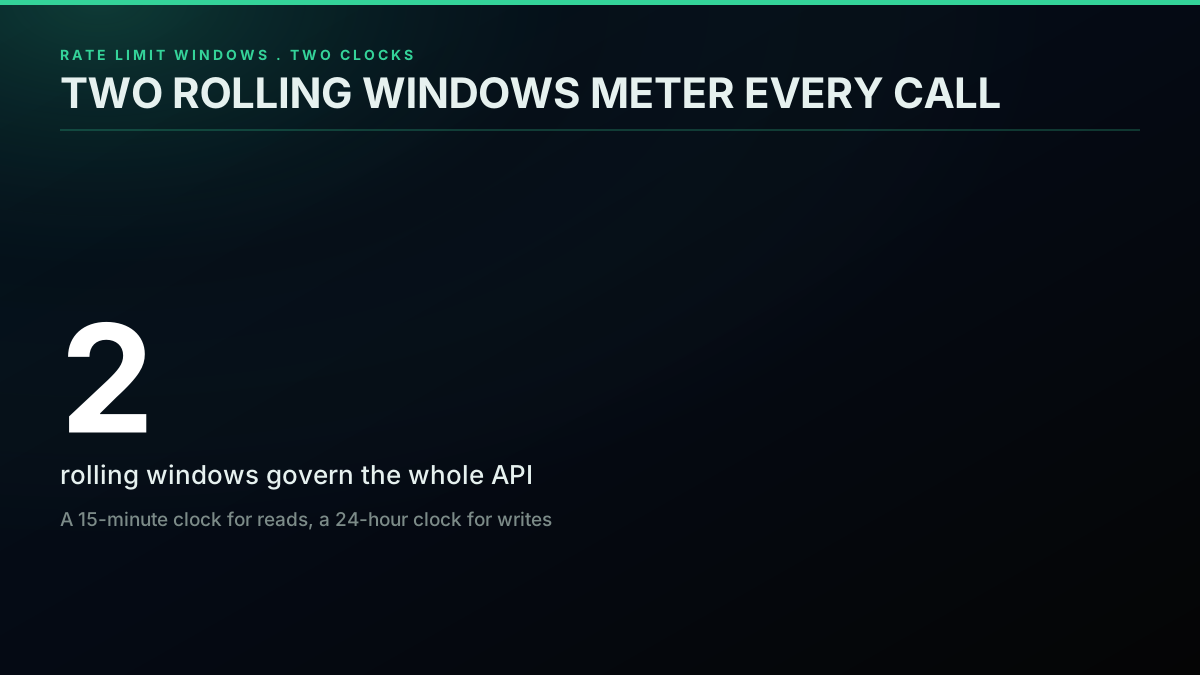
Both windows together cover every request you send
There is one idea that dissolves most of the confusion here, so we lead with it: the clock is sliding rather than anchored. Counting begins the moment you fire your first call, never at some neat mark on the wall clock. Anyone who expects the allowance to top up on the hour will hit limits at moments that feel arbitrary, right up until the sliding behavior clicks.
Two Clocks, Not One: The 15-Minute and 24-Hour Windows
Every endpoint on the X API belongs to one of two scheduling buckets, and figuring out which bucket a given call sits in is step one before any budgeting makes sense. Requests that retrieve data are governed by a 15-minute span. Requests that publish content are governed by a 24-hour span. There is nothing more to the classification than that.
On the read side sits any GET that pulls material off the platform: a search over recent posts, a single tweet grabbed by ID, a profile fetch, a timeline scroll, a pull of DM events. All of those tick down a 15-minute counter. A write, by contrast, is any request that alters state, which in real terms means publishing posts via POST /tweets, and that one is tallied over a rolling 24 hours.
Everything hinges on that word, rolling. The clock for a window begins at the first call you place within it, never at a tidy boundary on the wall clock. Send your opening search at 09
and the window shuts at 09, not at 09 and not at 10. A lot of engineers picture the allowance resetting on the quarter hours, the and and and marks, spend it against that imaginary schedule, and walk straight into a 429 nobody warned them about. Replenishment happens strictly when real time moves past whateverx-rate-limit-reset reports, and not an instant before.
The old free tier sat outside this entirely as a tidy special case. With no read access granted whatsoever, a 15-minute read clock was not even a thing to picture, and its single ceiling was the monthly limit on creating posts. That tier is gone: the official API has no free tier today, so every developer runs the full window model. The free Twitter API page covers what replaced it, while the is the Twitter API free walkthrough lays out what the old write-only tier handed you and what it withheld.
Since all the tallying happens on X's servers, the rolling model is a thing you keep in your head, never something your code executes. Here it is spelled out as a comment:
# The read window slides; it does not snap to the clock.
#
#   first_call    = 09:42:30
#   window_closes = 09:57:30   (first_call + 15 minutes)
#
# The budget refills when the wall clock passes x-rate-limit-reset,
# never at the next quarter-hour mark (09:45, 10:00, and so on).
#
# So compute the gap from the header, never from the clock:
#   seconds_to_wait = x_rate_limit_reset - time.time()
That captures the whole timing idea in a few lines of comment. From here on, the guide is really about pulling the live figures out of the response headers and responding to them sensibly.
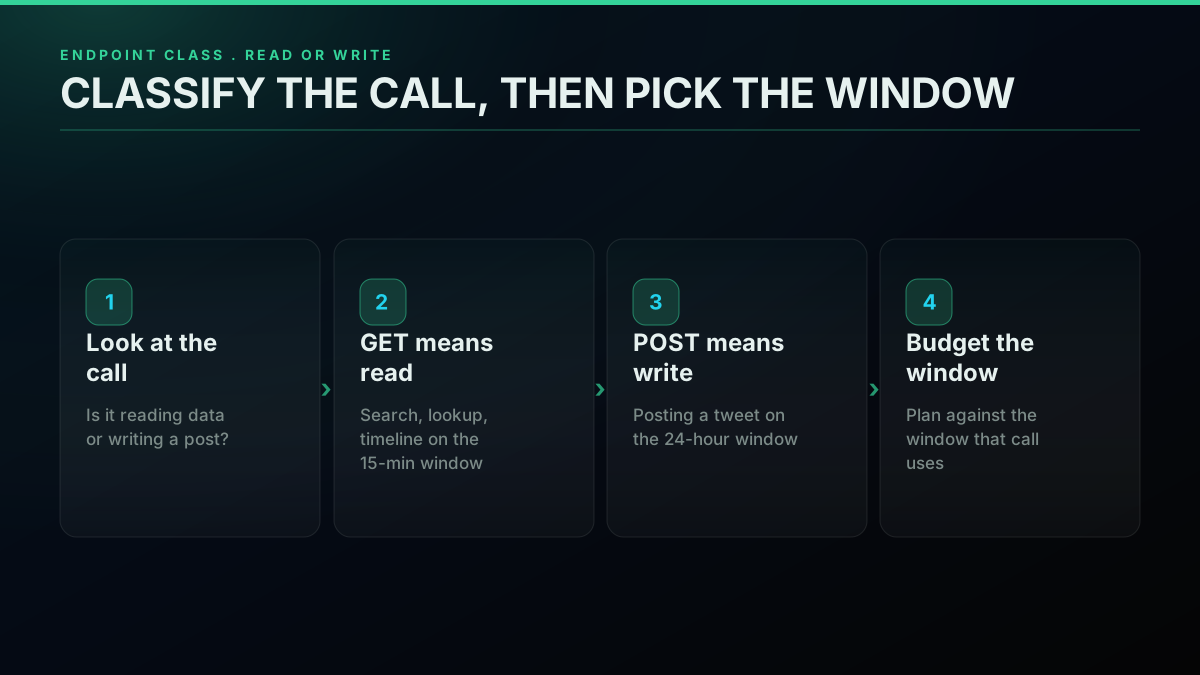
Reads refill every 15 minutes; writes refill once a day
Decoding a 429: The Three Headers That Tell You When to Retry
Burn through what an endpoint allows and the API responds with HTTP 429 Too Many Requests. Its body is almost bare, which trips people up, since the part you genuinely need rides in the headers. Once you can parse them, a confusing failure turns into a precise countdown.
The 429 status code indicates that the user has sent too many requests in a given amount of time ("rate limiting").
Every metered request comes back stamped with three headers. x-rate-limit-limit reports the cap for that endpoint during the active window, identical to the value in the table below except pulled straight from the server in real time. x-rate-limit-remaining slides down toward zero with each call and lands on 0 for whichever response sets off the 429. x-rate-limit-reset holds a Unix epoch timestamp marking the precise second your budget comes back, and it is the single most useful figure anywhere in the response. A handful of 429s tack on a Retry-After header given in seconds, though not every endpoint sends one, so write your client to grab the reset timestamp first and fall back to Retry-After only if needed. You will find the complete roster of header names on the X API rate limits reference, consistent with the canonical 429 Too Many Requests definition in the HTTP specification.
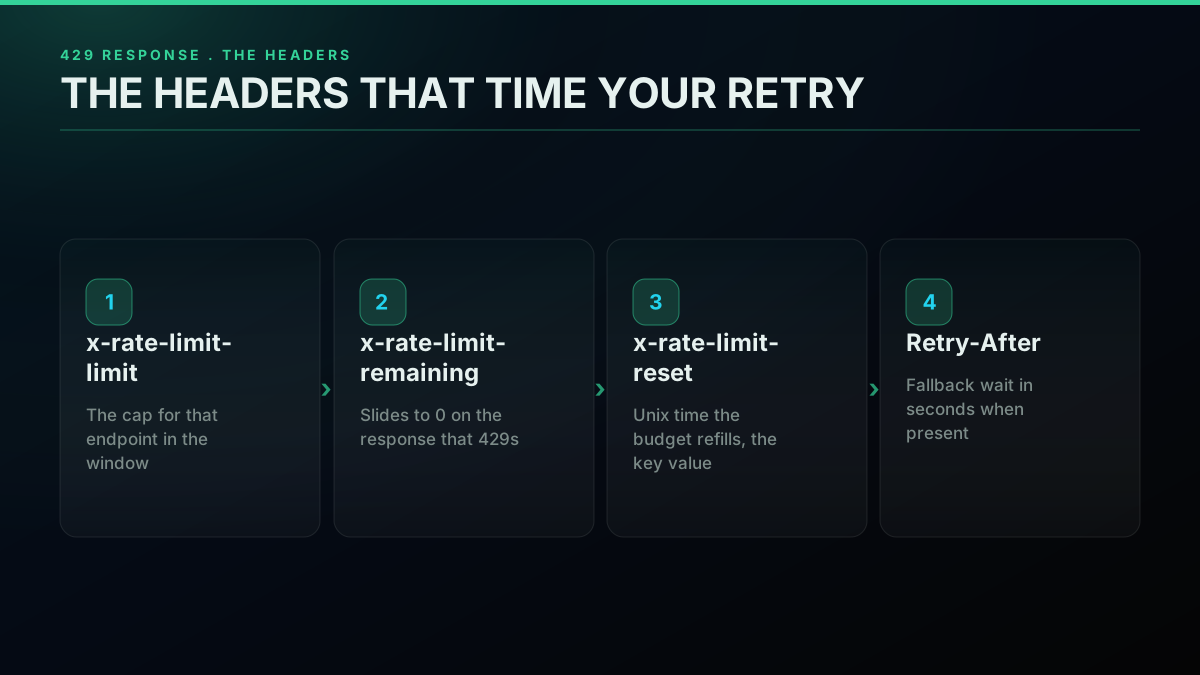
Three headers that convert a 429 into an exact wait
The most pared-down useful snippet is a helper that takes a 429 and returns how many seconds to sleep, leaning on the reset timestamp and only resorting to Retry-After when that timestamp is absent:
import time
import requests


def seconds_until_retry(resp):
    headers = resp.headers
    if "x-rate-limit-reset" in headers:
        reset_epoch = int(headers["x-rate-limit-reset"])
        return max(reset_epoch - time.time(), 1)
    if "Retry-After" in headers:
        return float(headers["Retry-After"])  # already in seconds
    return 60  # nothing to read, so wait a conservative minute


response = requests.get(ENDPOINT, headers=AUTH_HEADERS)
if response.status_code == 429:
    pause = seconds_until_retry(response)
    print(f"Hit the cap. Sleeping {pause:.0f}s for the window to refill.")
    time.sleep(pause)
That max(..., 1) floor earns its place. Because your machine's clock and X's drift apart, the reset can appear to have elapsed already, and putting a thread to sleep for a negative interval is a bug in the making. Pin the minimum wait to a single second and keep going.
Which Status Codes Are Worth a Retry (and Which Never Are)
Each pass through a retry loop turns on a single call it must make for every response that failed: should this be attempted once more, or is the request broken beyond saving? Misjudge it and you either pour retries into requests that have no path to success, or you bail on ones a brief pause would have saved. Roughly four status codes account for nearly everything the X API hands back to a reading loop, and they fall neatly into two camps.
Only the 429 is a real throttling notice, and it always merits another attempt once the x-rate-limit-reset interval has elapsed. A 503 Service Unavailable signals a server that is momentarily overwhelmed, unrelated to any allowance of yours, so you retry it with ordinary exponential backoff and ignore the throttle headers completely. Both of those bounce back. The opposite group does not: a 403 Forbidden tells you the resource lies outside what your tier may touch, and patience will not move it; a 401 Unauthorized flags bad credentials, equally immune to waiting; a 400 Bad Request flags a malformed query. Nothing in the 4xx range besides 429 deserves a retry, because a request that arrives broken remains broken.
Where people stumble is handling a 403 as though it were a 429. On the surface they echo each other, both being the platform's way of refusing you, yet their meanings diverge entirely: a 429 amounts to "hold on a moment," a 403 amounts to "never, not on the tier you hold." Retry a 403 in a loop and it will grind through every attempt you allow, heap on extra load, and fail anyway, whereas retrying a 429 sorts itself out. The backoff routine further down encodes that distinction outright: a 429 or a 503 earns a wait, and anything else throws immediately.
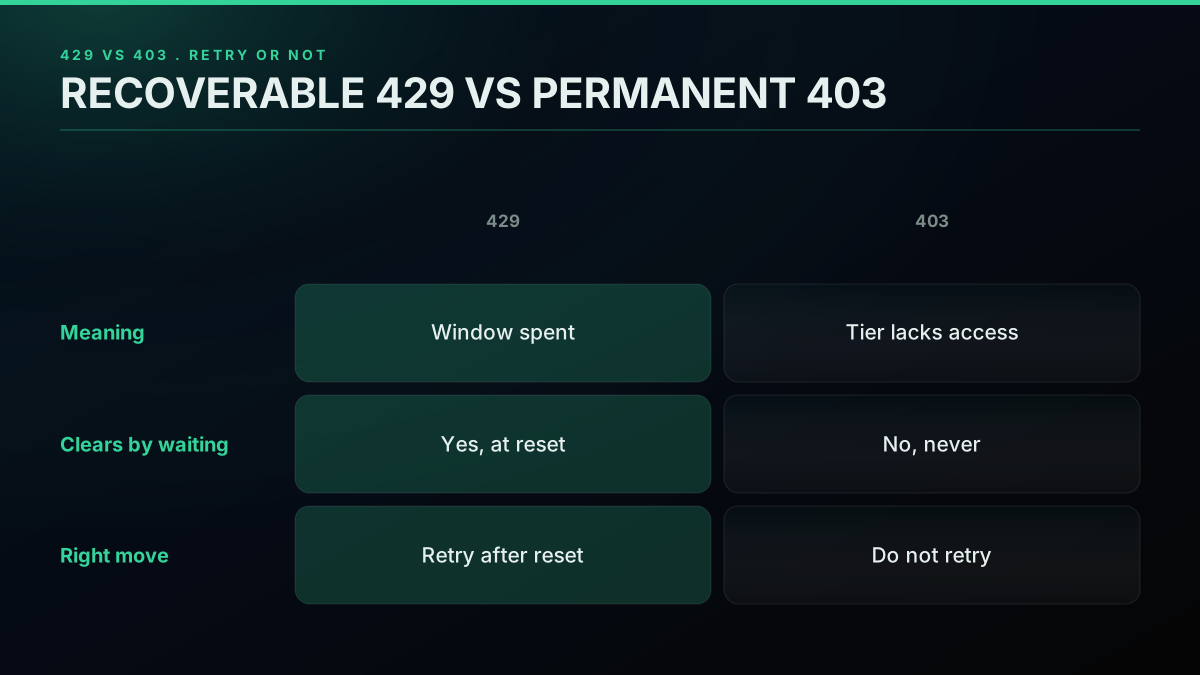
Wait out 429 and 503; raise immediately on 400, 401, and 403
The Per-Endpoint Budget Table (2026 Figures)
No lone Twitter API rate limit exists, which is precisely the reason the question keeps coming back. Every endpoint holds a separate allowance, and that allowance changes with how you sign the request, an app-level Bearer token versus a user OAuth token. What follows pulls the documented per-endpoint figures from the X API rate limits reference, checked against the values TwitterAPIs keeps in the Twitter API v2 vs TwitterAPIs comparison. The rows run from the roomiest allowance down to the most cramped, which is more or less the order they will matter to you.
| Call | Credential | Window | Ceiling | What to know |
|---|---|---|---|---|
| POST /tweets | Bearer (app) | 24 hr | 10,000 req | The lone write endpoint here |
| GET /tweets/ (lookup) | OAuth (user) | 15 min | 5,000 req | Even roomier in user context |
| GET /tweets/ (lookup) | Bearer (app) | 15 min | 3,500 req | Bundles up to 100 IDs per call |
| GET /users//tweets | Bearer (app) | 15 min | 1,500 req | Reading a user timeline |
| GET /users/ | OAuth (user) | 15 min | 900 req | Profile read, per-user bucket |
| GET /tweets/search/recent | Bearer (app) | 15 min | 450 req | The search path most teams hit |
| GET /users/ | Bearer (app) | 15 min | 300 req | Profile read, shared app bucket |
| GET /tweets/search/recent | OAuth (user) | 15 min | 300 req | Same search on a user token |
| GET /dm_events | OAuth (user) | 15 min | 15 req | DM-event reads, famously tight |
Those figures are the usual documented caps around the middle of 2026. Because X keeps nudging per-endpoint numbers as tiers and policy evolve, lean on the table only as a starting estimate and trust the live x-rate-limit-limit header for the real number on whatever call you are making. If you cannot verify a figure against current docs for your own tier, default to the smaller value and plan with margin to spare.
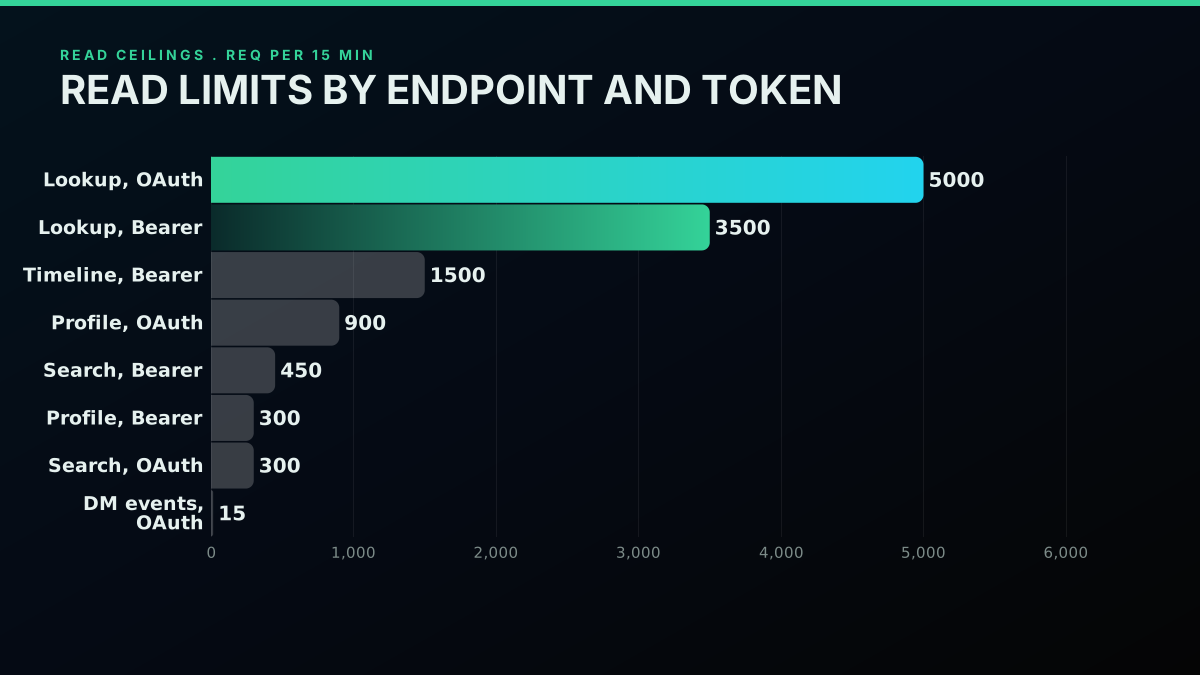
The same call can show two ceilings depending on the token
Here is one takeaway worth lifting off the table: lookup overwhelms search. On a Bearer token you get 3,500 lookup calls in a window versus just 450 searches, and because each lookup can bundle as many as 100 IDs, holding the IDs means you can pull hundreds of thousands of tweet records inside a quarter hour. Whenever your read flow can resolve IDs up front and then collect them in bulk, you dodge nearly all of the search cap. The advanced search operators guide explains how to sharpen a query so every page returns denser, while the wider Twitter API tutorial covers the entire v2 surface from start to finish, and the Twitter API reference hub maps every endpoint alongside the limit that governs it.
The single most telling entry on this table is the absent one: nowhere does a row show pay-per-use billing raising or erasing a ceiling. Switching to per-call charging rewrote your bill, not your request allowance. Search holds at 450 per window on a Bearer token however many credits you prepaid, just as it did on the retired plans. The pay-per-use section circles back to this, since it ranks as the most frequent 2026 misunderstanding.

Shreyas
@shreyassihasane
Rate Limiting Explained ever tried to hit an API too many times and got blocked with "429 Too Many Requests"? that's rate limiting. here's why it exists and how it works The problem: without rate limiting, one user (or bot) can spam your API with thousands of requests per htt…

Start building with TwitterAPIs
$0.0008 a call, about $0.04 per 1,000 tweets at 20 tweets a page. $0.50 free credits. No credit card required.
One Endpoint, Two Limits: Why Bearer and OAuth Disagree
One of the murkier corners of rate limiting is that a lone endpoint can report two distinct caps based on the way you authenticate. A user OAuth token and an app-level Bearer token pull from buckets that stay wholly independent of each other, and once that lands you can lean on it to scale your actual throughput upward.
Think of a Bearer token as living at the application layer. A single bucket sits behind it, and whatever you call with it all pulls from one common reservoir. Aim one Bearer token at a thousand users and the whole thousand crowd into the same 450-request search allotment. An OAuth token, by contrast, belongs to an individual user. Every signed-in user's token carries its own bucket running on its own clock. Hand those same thousand users a personal OAuth token apiece and each one enjoys a separate 300-request search allotment.
In practice that matters a lot. Per call, OAuth gives you less (300 searches to Bearer's 450), yet because each bucket stands alone, your ceiling grows in step with how many users you have rather than being trapped inside one app-wide pool. A product serving lots of users at volume should reach for per-user OAuth tokens to stack throughput; a lone backend service has an easier time on the fatter per-bucket cap of a Bearer token. That same per-bucket reasoning extends to reads tied to a specific account, follower lists among them, which the export Twitter followers guide walks through.
Recent search budget by credential type
| Token type | Search budget / 15 min | Who shares the bucket |
|---|---|---|
| Bearer (app) | 450 req | One pool behind the app token, shared across all calls |
| OAuth 1.0a (user) | 300 req | One private window per authenticated user token |
x-rate-limit-limit header returns on the call you are making.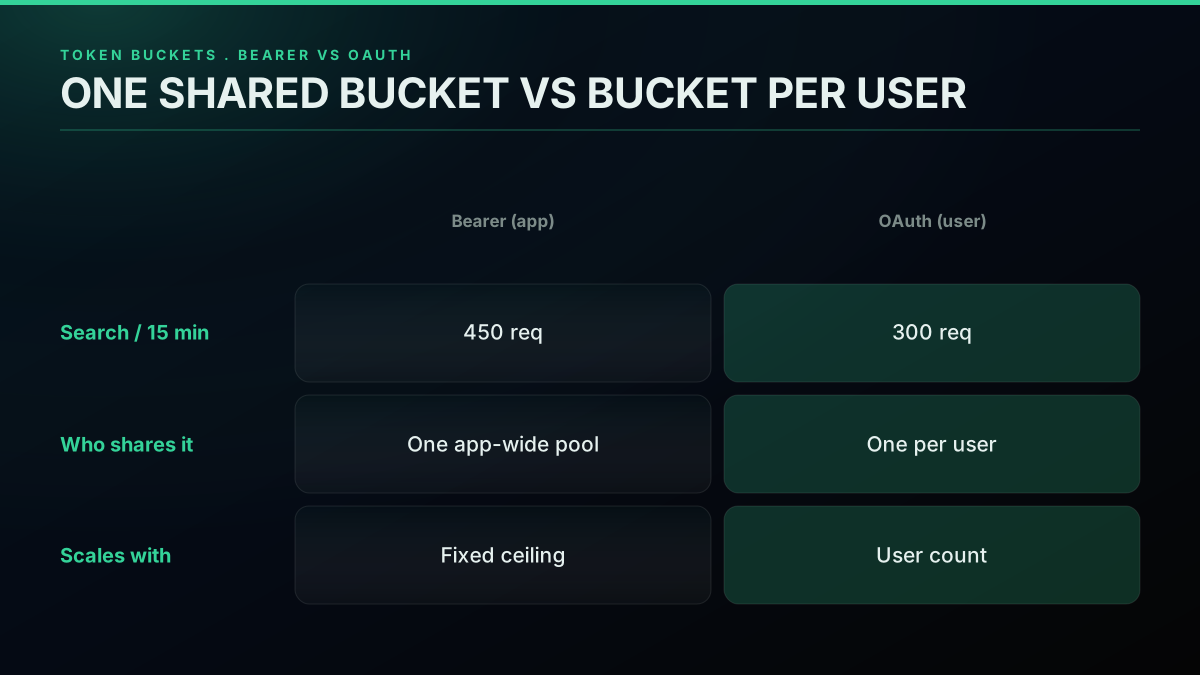
Per-user OAuth tokens turn one window into many
It also settles the question that comes up more than any other on Reddit here: why does a search start throwing 429s at 300 calls when the documentation promises 450? Nearly always, the script is authenticating through user OAuth, which is the 300 bucket, while the developer reads the 450 figure meant for Bearer tokens. Budget against whichever ceiling belongs to the credential you are genuinely using. For the authentication flows themselves, the how to get a Twitter API key walkthrough and the Twitter API key page lay them out, and the bucket divide comes up once more in the Twitter API v2 vs TwitterAPIs comparison.

Faizan Ali
@devfaizanali
Getting “rate limit exceeded” on X API. Does anyone know what’s the issue?
Throttling Before Zero: Pacing Against x-rate-limit-remaining
Reacting to a 429 after the fact is the defensive option. The smarter approach gets ahead of it: check x-rate-limit-remaining on each response you receive, not just the ones that fail, and back off well before the count bottoms out. One 429 buys you an entire window of idle time. A throttle that runs ahead of trouble costs only a few stray milliseconds of sleep sprinkled over many calls and never sets the error off in the first place.
There is nothing complicated about how it works. Each response that succeeds hands back both how many calls remain and when the window resets. Once that remaining figure drops beneath a threshold you set, quit blasting requests at network speed and instead pace whatever calls are left across the window's remaining time. Surrendering a thin slice of throughput up front spares you the whole-window hit down the line.
The wrapper below pulls that off. On every response it reads how much budget is left, and the moment that figure falls under the floor it pauses just enough to stretch the remainder of the window:
import time
import requests


def throttled_get(url, headers, floor=50, spread=2):
    resp = requests.get(url, headers=headers)
    left = int(resp.headers.get("x-rate-limit-remaining", 9999))
    reset = int(resp.headers.get("x-rate-limit-reset", time.time() + 900))

    if resp.status_code == 200 and left < floor:
        time_left = max(reset - time.time(), 1)
        per_call = time_left / max(left, 1)
        time.sleep(per_call * spread)

    return resp
Those defaults skew cautious deliberately. Leaving 50 requests in reserve as the floor gives you slack to soak up a sudden burst, and a spread of 2 stretches the gap between calls enough that jitter rarely pushes you into the ceiling. Raise the floor when a crowd of workers shares one bucket at high concurrency, and lower it for a single-threaded script that has the entire budget to itself. On real-time jobs that cannot stop reading, put a request queue in front of this throttle so the backlog grows gracefully rather than throwing. The Twitter trends API guide describes a polling setup that gains immediately from pacing like this.
Backoff With Jitter: The Retry Loop That Recovers
Working out the wait is only half the battle. The remaining half is retrying in a way that doesn't dig the hole deeper, and that is the job of exponential backoff paired with jitter. With backoff, every successive attempt holds off a little longer than the one before. With jitter, each attempt's delay gets nudged by a random amount so a whole fleet of workers won't fire again on the very same tick.
Skipping jitter is not an option, and the thundering herd problem is why. Imagine a hundred workers all behind a single Bearer token, every one of them slamming into the search ceiling at the identical moment. Without any jitter, all hundred pick up the same reset value, doze for the same length of time, and then strike again within the same millisecond, emptying the just-replenished window on impact and touching off another wave of 429s. Sprinkle in a bit of randomness and those retries fan out over a handful of seconds, letting the window deplete in an orderly way. This is run-of-the-mill distributed-systems practice, and it marks the line between a loop that settles down and one that keeps swinging.
It boils down to four guidelines. First, favor x-rate-limit-reset ahead of any interval you calculate yourself, since the server holds the real answer while your arithmetic is only an estimate. Second, put a ceiling on the interval you do calculate so a large attempt number can't park a thread asleep for some ridiculous length. Third, scale the jitter to match the size of the wait. And fourth, quit fast on dead-end responses: a 400, 401, or 403 is never going to turn around, so throw right away instead of spending attempts on a request that was broken from the start.
Below is the complete Python loop, built on the Requests library and written the way you would really put it into a production read path:
import time
import random
import requests


def fetch_with_backoff(url, headers, attempts=5, floor_delay=5):
    for n in range(attempts):
        resp = requests.get(url, headers=headers)
        if resp.status_code == 200:
            return resp
        if resp.status_code == 429:
            reset = resp.headers.get("x-rate-limit-reset")
            if reset:
                pause = max(int(reset) - time.time(), 1)
            else:
                pause = min(floor_delay * (2 ** n), 900)
            pause += random.uniform(0, pause * 0.1)  # jitter
            print(f"Attempt {n + 1} drew a 429; pausing {pause:.1f}s.")
            time.sleep(pause)
        elif resp.status_code in (502, 503):
            time.sleep(min(floor_delay * (2 ** n), 60) + random.uniform(0, 2))
        else:
            resp.raise_for_status()  # 400 / 401 / 403 are terminal
    raise RuntimeError(f"Gave up after {attempts} attempts on {url}")
The identical logic, now in Node.js for a JavaScript runtime, using axios as the HTTP client:
const axios = require("axios");

async function fetchWithBackoff(url, headers, attempts = 5, floorDelay = 5000) {
  for (let n = 0; n < attempts; n++) {
    try {
      const resp = await axios.get(url, { headers });
      return resp.data;
    } catch (err) {
      const code = err.response?.status;
      if (code === 429) {
        const reset = err.response.headers["x-rate-limit-reset"];
        const pause = reset
          ? Math.max(parseInt(reset) * 1000 - Date.now(), 1000)
          : Math.min(floorDelay * 2 ** n, 900000);
        const jitter = Math.random() * pause * 0.1;
        await new Promise((go) => setTimeout(go, pause + jitter));
      } else if (code === 502 || code === 503) {
        await new Promise((go) => setTimeout(go, floorDelay * 2 ** n));
      } else {
        throw err;
      }
    }
  }
  throw new Error(`Gave up after ${attempts} attempts on ${url}`);
}
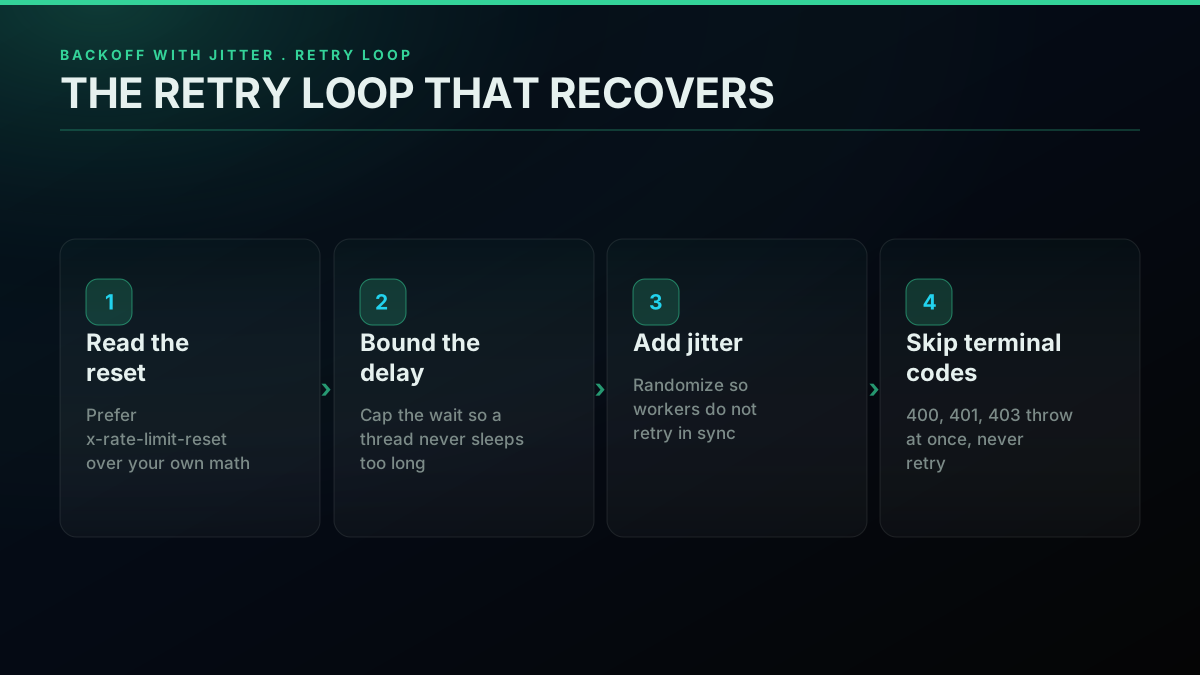
Reset header first, bounded delay, proportional jitter, no retries on terminal codes
Each implementation converts the reset stamp into a sleep, holds the fallback delay to a 15-minute ceiling (the most a read window could ever stretch to), folds in jitter sized to the wait, and point-blank declines to retry structural failures. If you are building on the official API in Python, the community Tweepy library bundles a variant of this already. The production scraping best practices guide shows how to thread the same approach through a long-running pipeline, and for the request syntax these loops sit on top of, the Python Twitter API tutorial is the partner walkthrough.
I keep getting error 429: too many requests (twitter API)
Checking Where Your Credentials Stand
Ahead of writing even one read call, it is worth learning which tier you fall under and which limit regime your keys answer to. The fastest check is a HEAD request, which sends back the throttle headers without hauling down an entire response body, so you can size up your allowance for next to nothing:
# Peek at the rate-limit headers without downloading a full response body
curl -sI "https://api.x.com/2/tweets/search/recent?query=from%3Ax&max_results=5" \
  -H "Authorization: Bearer $X_BEARER_TOKEN" \
  | grep -iE 'x-rate-limit|x-access-level'
Along with the three headers already discussed, the reply includes an x-access-level field that signals your access level. Should reads hand back a 403 while that field shows write-only, the token has no read access, and the per-window read caps simply do not apply because no reads exist for the meter to track; reading anything means pay-per-use credits. Should reads go through, then the x-rate-limit-limit header gives you the definitive per-window allowance, trustworthier than any grid in the docs since it mirrors the precise state of your account. Those header conventions trace back to the standard HTTP rate-limit header conventions, and the retry rules under them rest on the 429 status definition in RFC 6585. Checking your live standing up front spares you from budgeting around a figure that never applied to your tier, which is about the cheapest error to sidestep in the whole field.
And while the topic is open: that backoff-and-jitter approach from a moment ago is nothing Twitter dreamed up. It is the going cloud-engineering advice for any throttled API, laid out in the AWS architecture guidance on exponential backoff and jitter, the Google Cloud retry strategy reference, and Google's SRE book chapter on handling overload, which makes the same case for client-side throttling from the server operator's side of the connection. Matching the behavior X expects keeps your client courteous against every API you hit, this one included but hardly alone.
The cheapest pay-as-you-go Twitter API. Try it free.
$0.0008 a call, about $0.04 per 1,000 tweets at 20 tweets a page. $0.50 free credits. No credit card required.
The Pay-Per-Use Myth: Billing Changed, Windows Did Not
No, going pay-per-use does not lift the rate limits. It is the misunderstanding I see most often about the 2026 X API, and the belief gets expensive once a team assumes that being charged per request unlocks unlimited throughput. What pay-per-use rewrote is the way you are invoiced, not the speed at which your requests can leave the door.
With pay-per-use you load credits ahead of time and every call subtracts its own per-operation cost. That is purely an accounting arrangement. The 15-minute and 24-hour windows continue to ride above it, just as they did across the old subscription tiers. A Bearer-token search remains capped at 450 per window however much you topped up. Windows will still run dry and hand you 429s, and you will still want the backoff loop laid out a moment ago.
There is, however, one extra constraint pay-per-use introduces: a read cap measured over the calendar month. Think of the contrast this way, a 429 is a clock-based block you shake off after a few minutes of waiting, while the monthly cap is a solid wall that stays up until your next billing cycle opens. They break on you differently. Drain a window and out comes a 429 carrying a reset stamp. Edge up against the monthly figure and the system steers your account toward Enterprise pricing instead. A pay-per-use build therefore needs to cover two fronts: backoff to absorb the per-window 429s, plus spend tracking to watch the monthly wall. The pay-per-use pricing model page and the Twitter API cost breakdown chart where each one bites, and the cost calculator projects the spend curve before you commit a single line.
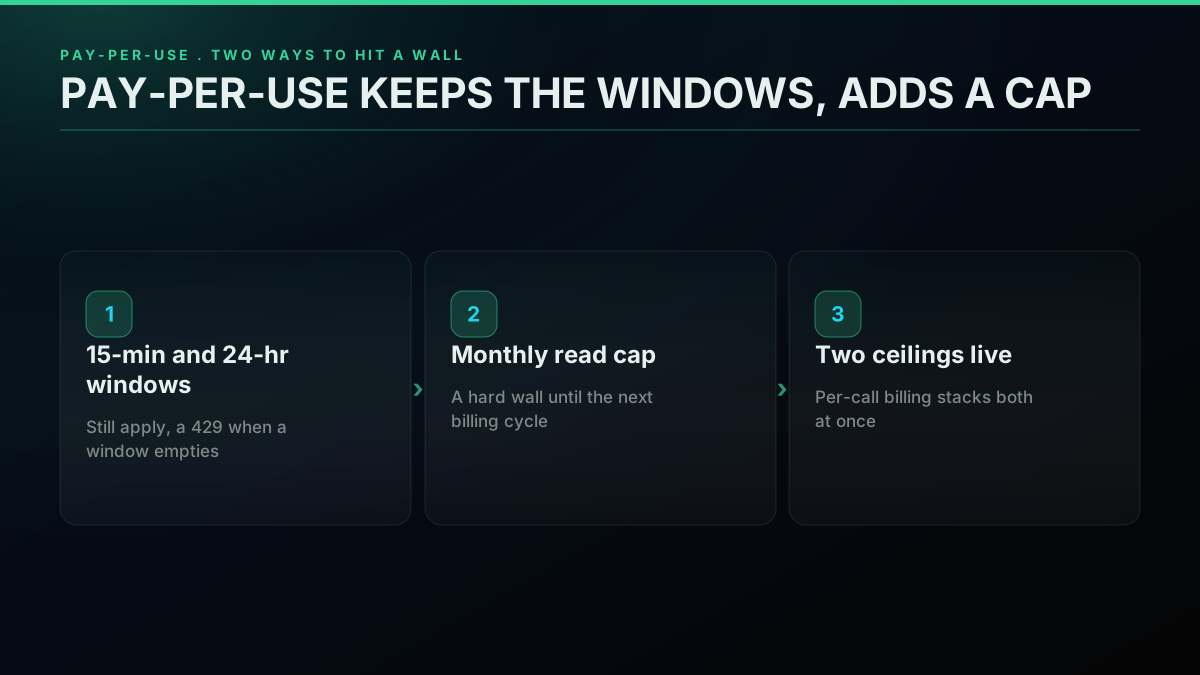
Per-call billing keeps both windows and stacks a monthly read wall on top
Put plainly: pay-per-use is no shortcut around rate limiting. If anything, it piles on an additional ceiling. The genuine exit from the per-window headache is to walk away from the official window model altogether, which is exactly where this guide finishes.
Where Limits Land Across the 2026 Tier Ladder
Rate limits never stand on their own; they live within the tier structure, and that structure was overhauled in a big way during 2026. Pin down your tier and you immediately know which limits are in force and which never come near you.
| Tier | Status | Per-endpoint windows | Monthly billing cap | Write allowance |
|---|---|---|---|---|
| Free | Retired, no free tier today | None (reads were blocked) | 1,500 posts / month (was) | Post only (was) |
| Pay-per-use | Active, new default | Yes, standard 15-min / 24-hr | 3M post reads / cycle | Billed per call |
| Basic | Retired (closed Feb 2026) | Yes (legacy) | 15K reads / month | 50K posts / month |
| Pro | Retired (closed Feb 2026) | Yes (legacy) | 1M reads / month | 300K posts / month |
| Enterprise | Active | Negotiated | Custom | Custom |
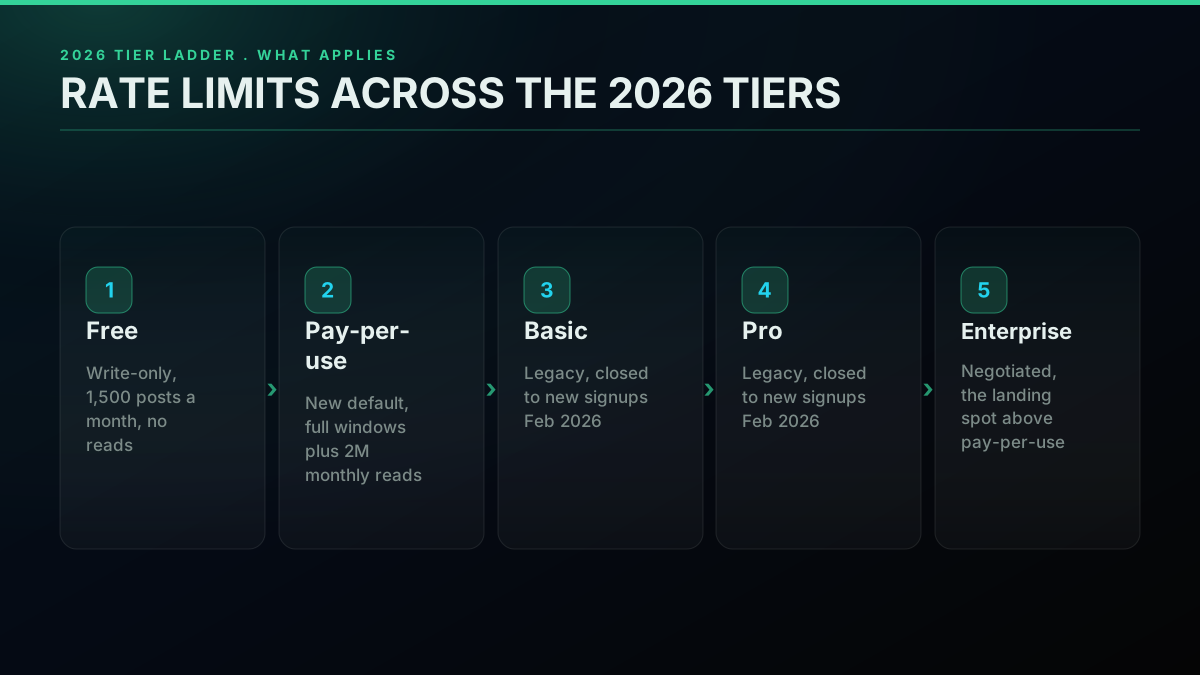
Which limits apply, tier by tier
Take them top to bottom. Free is gone: it never had read windows to monitor, since it granted no read access, and its lone limit was the 1,500-post monthly write cap. Pay-per-use, the standing default for anyone new, runs the complete window model and stacks the 3-million-read monthly ceiling on top. Basic and Pro, the subscription tiers that came with fixed quotas baked in, shut their doors to fresh signups in February 2026, so nobody new can purchase them; the people already on them got shifted over to pay-per-use. Enterprise is still open on negotiated terms and becomes the mandatory landing spot the moment you overrun the pay-per-use read ceiling. The detail on that legacy shutdown sits on the Twitter API pricing page and in the Twitter API cost breakdown, while the 2026 X API pricing change explainer covers the departure from Basic and Pro in full; double-check the live month-cap figures against docs.x.com for your particular account, given that X has tweaked them through the transition.
The planning rule is brief. Anyone who registered in 2026 is, in all likelihood, on pay-per-use, so both the per-window 429s and the monthly read ceiling are live for them. Any older write-up walking you through Basic or Pro quotas is quoting figures that simply do not hold for a brand-new account. Plan around the pay-per-use truth. For a side-by-side of the official tiers and outside read providers, the Twitter API alternatives comparison and the best Twitter API for scraping rundown spell out the choices, while the Apify Twitter scraper vs TwitterAPIs and RapidAPI Twitter alternative pieces explain how marketplace vendors price identical reads.
Best way to pull Twitter/X data at scale without getting rate limited to death?
Stepping Outside the Window Model: Per-Call Reads
All of the above is about coexisting smoothly with the official window model. One route abandons it completely: an outside read API that charges per call and imposes one flat rate ceiling instead of a window per endpoint per tier. For workloads that read a lot, that wipes out the 429 problem instead of merely coping with it.
TwitterAPIs runs on exactly that model. It has 72 read endpoints priced at $0.0008 per call, with the full thread expansion at $0.004, and because one read brings back around 20 tweets, the math lands near $0.04 for every 1,000 tweets. Its writes span 34 actions, favorite and unfavorite, retweet and unretweet, bookmark and unbookmark, follow and unfollow, plus delete, tweet creation, media upload, and DM send, with the simple actions at $0.0008 per call and tweet creation and DM send at $0.0016 per call, executed against credentials you supply on each request: your own auth_token and ct0, used for that single call and never retained. A fresh account starts with $0.50 in free credits, roughly 625 read calls or somewhere near 12,500 tweets, plenty to plumb everything together and try it out before spending a cent. Tallied up, the surface is 123 endpoints, 72 for reading and 51 for writing, DM send included among them. Here is the piece that counts for this guide: not one of those calls sits behind a 15-minute or 24-hour platform window. There is one flat ceiling instead, 600 calls a minute per key, reported on X-RateLimit-Remaining with Retry-After on a 429. Your credit balance is the sole ceiling.
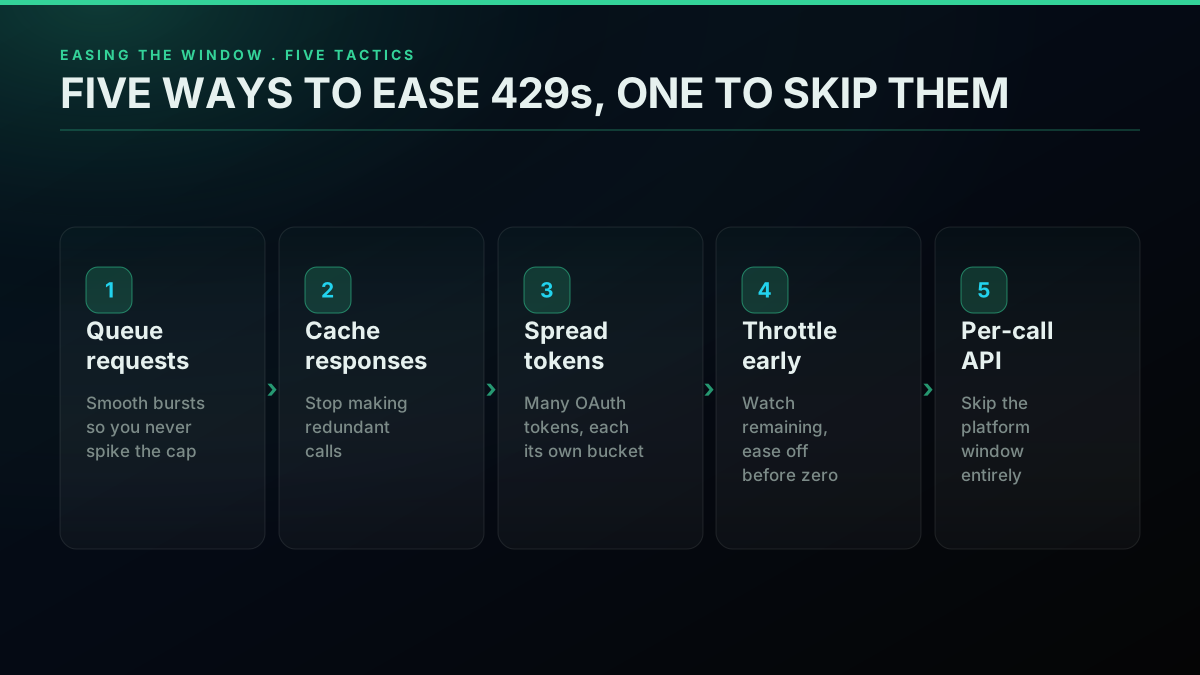
Five tactics to ease the window, plus one that skips it outright
Your code looks different as a result. All that intricate retry-and-throttle machinery from the sections above shrinks down to an ordinary request wrapped in a light guard for the occasional flaky network error. There are no timing gates left to wrestle, because none exist. Three kinds of workload notice the shift most sharply. First, read-heavy pipelines, sentiment scoring across a few thousand tweets at a time being the classic case, where the platform's 450-calls-per-window search limit means you pace without stop. Second, live monitoring, where the request rhythm spikes unpredictably and a 429 landing mid-spike silently costs you data. Third, one-off research grabs, where the window arithmetic balloons what would otherwise be a five-minute pull into an hour of idle waiting. What you trade for it is the pricing structure, per-call rates set against a flat subscription, which the pricing page and the cost calculator let you measure against the volume you expect. Read the example that follows as a rough illustration rather than a measured benchmark; your actual figures hinge on your call mix and your volume.
Below is that identical recent-search call, the one that saddles you with window juggling on the official API, this time pointed at the per-call route stripped of every bit of rate-limit scaffolding:
import os
import requests

TOKEN = os.environ["TWITTERAPIS_KEY"]

resp = requests.get(
    "https://api.twitterapis.com/twitter/tweet/advanced_search",
    params={"query": "twitter api rate limit", "product": "Latest"},
    headers={"Authorization": f"Bearer {TOKEN}"},
)
resp.raise_for_status()
data = resp.json()

print("tweets returned:", data["count"])
for row in data["tweets"][:5]:
    print(row["created_at"], "@" + row["author"]["username"], row["text"][:70])
# One ceiling to pace against: 600 req/min per key, on X-RateLimit-Remaining.
That response hands you no rate-limit headers to read and no window to pause for. A long-running job still deserves a modest retry around transient 5xx network hiccups, the ordinary care any HTTP client warrants, but the per-window 429 and the whole reset-timestamp dance have vanished. If you are mapping a migration off subscription and marketplace providers, the TwitterAPIs vs twitterapi.io comparison and the migrating from twitterapi.io guide cover it, and for a complete read pipeline the Twitter sentiment analysis tutorial puts the pattern to work in context.
For the deeper why, the system-design logic that pushes platforms to throttle traffic at all, this video lays it out:
https://www.youtube.com/watch?v=9CIjoWPwAhU
Recap
The whole topic condenses to a handful of points worth keeping nearby. Reading happens against a 15-minute rolling window and writing against a 24-hour one, with each window starting from your first call rather than from any mark on the clock. Each endpoint holds its own allowance, divided between a single shared Bearer bucket and the separate OAuth bucket each user carries, which is the reason a lone call can post two different caps. Treat a 429 as a recoverable timing hiccup: pull x-rate-limit-reset, hold off, and retry under backoff and jitter so no thundering herd ever forms. Pay-per-use reworked the billing rather than the windows, and tacked on a monthly read ceiling besides, so every one of these limits is still very much in force.
In the end it comes down to what your workload looks like. If your writes outnumber your reads, the official windows seldom get in the way, and a plain backoff loop covers you. If instead you read in bulk, on a live feed, or in jagged bursts, wrangling the 15-minute window turns into a steady tax, and that is where a per-call API carrying no window erases the trouble rather than easing it. Begin at the pricing page for the per-call rates, run your read and write volume through the cost calculator, and see where the per-call route wins over the windowed one on the rate limits comparison. If you landed here because something returned a 429 and you just want the short version, what rate limited means on Twitter answers it directly, including why the code can appear while a monthly quota is barely touched.
// sources
Where these numbers come from
Each row is a figure in this post and the artefact it was read from. Prices and limits on this platform move, so check the date on the source before you plan against it.
- X API rate-limits reference
- The published per-endpoint window caps the article's rate-limit table is drawn from, and the source for the x-rate-limit-limit, x-rate-limit-remaining, and x-rate-limit-reset response headers.
- MDN reference for HTTP 429 Too Many Requests
- The status code the retry loop keys on, and the reference for what a 429 response carries back to the client.
- RFC 6585 section 4, HTTP status 429
- The standards definition of the 429 status behind the header conventions the post tells you to read before trusting any table in the docs.
- MDN Retry-After header reference
- Backs the fallback rule: some 429 responses add a Retry-After value in seconds and some do not, so a client reads the reset timestamp first and falls back to this header.
- AWS architecture guidance on exponential backoff and jitter
- The engineering source behind the backoff-and-jitter loop implemented in both the Python and Node examples, cited to show the pattern is standard practice rather than an X quirk.
- Google SRE book chapter on handling overload
- Backs the same argument from the server operator's side, making the case for client-side throttling against a throttled API.
Frequently Asked Questions
There is no single number. The X API meters each endpoint separately inside one of two rolling windows: 15 minutes for the data-reading calls and 24 hours for post creation. The ceiling you get also depends on how you signed the request. Recent search comes in around 450 requests per 15 minutes when you authenticate with a Bearer (app) token and roughly 300 on a user OAuth token, whereas tweet lookup gives you several thousand inside the same window. Cross any endpoint's budget and the response switches to 429 Too Many Requests until that window refills. Because X shifts these figures alongside its tier model, the authoritative value for your account is whatever the live x-rate-limit-limit header reports, and the published grid on docs.x.com is only a planning baseline.
Two lengths, depending on what the call does. Reading data runs on a 15-minute window; creating posts and other writes run on a 24-hour window. Both are rolling, which means the clock starts the instant you make your first request inside the window rather than snapping to a fixed boundary like the top of the hour. Once that span elapses the limit refills by itself, with nothing required on your end. The free tier sidesteps the read window altogether, since it grants no read access at all; the only ceiling it tracks is a monthly post-creation count.
Pull the x-rate-limit-reset header, treat it as a Unix timestamp, and work out how long to sleep with reset_time minus time.time() before you try again. When a Retry-After header shows up instead, you can use its value as-is because it is already counted in seconds. Keep the attempt count modest, three to five, and layer exponential backoff with random jitter on top so a pool of workers hitting the ceiling together does not stampede the endpoint the instant it refills. One hard rule: a 400, 401, or 403 is permanent, so retrying it just wastes attempts. The complete retry decorator lives in the backoff section above.
There are none, because the official X API no longer has a free tier: every call bills on pay-per-use and runs the standard 15-minute and 24-hour windows. The old free tier was write-only, so the one limit that bit was post creation, 1,500 posts across a calendar month, and every read path answered with 403 Forbidden because the tier never opened read access at any volume. Today you budget the per-window caps plus the per-call bill, from $0.005 a post read and $0.015 a post.
It is the platform telling you the current window for that endpoint is spent. Three response headers spell out the situation precisely: x-rate-limit-limit is the cap for the endpoint, x-rate-limit-remaining has dropped to 0, and x-rate-limit-reset is a Unix timestamp for the moment the budget refills. No retry will land until wall-clock time passes that reset value, so the correct move is to wait it out. The thing to keep straight is that a 429 always clears on its own once the window rolls over, which is the opposite of a 403: a 403 means your tier was never granted access to that resource, and waiting changes nothing.
The endpoint decides. Run recent search flat out on a Bearer token at roughly 450 requests per 15 minutes and you approach a theoretical ceiling near 43,200 calls across 24 hours. Tweet lookup is far roomier at several thousand per 15-minute window, and post creation on app auth runs around 10,000 writes in a 24-hour span. The free tier is the narrow case: its only live endpoint is tweet creation, hard-capped at 1,500 posts a month. Worth noting separately, pay-per-use accounts carry a calendar-month read ceiling that sits on top of the per-window caps and pushes you toward Enterprise pricing once you reach it.
It does. Switching to per-resource billing leaves every per-endpoint window in place. The same 15-minute and 24-hour ceilings govern the official X API whether you prepay credits or sit on a legacy subscription, because pay-per-use rewrote the invoice, not your request throughput. It actually layers on a second constraint: a calendar-month read ceiling stacked above the per-window caps. So a pay-per-use integration can hit a wall two distinct ways, a 429 the moment a window empties, and a hard monthly stop once the read ceiling is reached.
Not on the official X API; the windows live at the platform level and bind every account equally. What you can do is blunt the pain: queue your requests, cache responses so you stop making redundant calls, spread load across several user OAuth tokens so each draws from its own bucket, and watch x-rate-limit-remaining so you ease off before it reaches zero. A per-call read provider sidesteps the model instead of managing it. Services such as TwitterAPIs meter by the call under one flat ceiling of 600 requests a minute per key, so per-endpoint window-exhaustion 429s never enter the picture; you keep a small retry around transient network errors and the per-window problem disappears for read-heavy work.
Check out similar blogs
More guides on the Twitter/X API, scraping, and pricing.

What "Rate Limited" Actually Means on X (Every Limit, Measured)
"Sorry, you are rate limited" is one message covering two different systems: a consumer action ceiling and a developer API window. Here is what the term means, the current numbers for both, where it came from, and how long it actually lasts.
Twitter API Error Codes: The Complete 2026 Reference
The complete 2026 reference to X (Twitter) API error codes. What every code means (32, 88, 187, 226, 401, 403, 429, 453 and the rest), the real cause behind it, and the exact fix, plus the HTTP status versus error code distinction that trips up most developers.

The Twitter API Developer Reference (2026): Endpoints, Rate Limits, Error Codes and Pagination
A single indexed reference for the Twitter/X API in 2026: the endpoint catalog, how authentication and bearer tokens work, the rate limits behind every 429, what error codes 401, 403, and 429 mean, cursor pagination, response shapes, and the real per-call cost of each call.

Build vs Buy: Should You Build Your Own Twitter/X Monitoring Tool? (2026)
Buying a listening seat costs $29 to $2,000 a month depending on the vendor. Building costs real engineering hours plus a data bill. Here is the real math behind the twitter monitoring tool build vs buy decision, priced both ways.
Connect Twitter/X to n8n Without Fighting the Official API (2026)
Two working ways to get Twitter/X data into n8n: a polling HTTP Request node and a native webhook push, both with runnable code, no OAuth handshake either way.

How to Track a Tweet's Performance in Real Time with the X API
Poll a tweet's engagement counts over time with the X API, compute a views-to-likes ratio, and read the quote-tweet layer to tell an organically growing launch tweet from a boosted one. Tested Python and curl.
Twitter/X API Access Without a Developer Account: What Actually Works in 2026
The official X API still gates every call behind a reviewed developer account and OAuth 2.0. Here is what real developers use instead, and what each route actually costs.

How to Get Image URLs from X Tweets via API in 2026 (Full Resolution, Python and Node)
Pull image URLs out of X tweets with runnable Python and Node.js, then get the full-resolution original instead of the scaled copy the API hands you by default. Measured on 14 live images, with the video poster-frame trap and the per-call cost.