GUIDE
Twitter/X API Access Without a Developer Account: What Actually Works in 2026
The official X API still gates every call behind a reviewed developer account and OAuth 2.0. Here is what real developers use instead, and what each route actually costs.
Per our own spec, 65 of 112 endpoints bill $0.0008, 24 are free, and 23 sit between $0.0016 and $0.01. Every price ships inside our published OpenAPI document as an x-cost-usd field, so any figure in this post can be checked against the contract that bills it rather than taken on trust.
The honest answer up front: X itself will not let you skip the developer account, not for a single official endpoint, free or paid. What changed is that you no longer have to go through X to get X data. A layer of pay-per-call APIs, posting-only bridges, and browser-cookie tools now sits between "I need tweet data" and "I have to fill out a use-case form and wait," and which one fits depends entirely on whether you need to read, write, or both.
TL;DR: Every official X API call still requires a reviewed developer account, an approved app, and OAuth 2.0, per X's own developer account support docs. Third-party pay-per-call APIs skip all three: sign up with an email, copy a key, call an endpoint. TwitterAPIs prices standard reads at $0.0008 per call, about $0.04 per 1,000 tweets at a full 20-tweet page, against $5.00 per 1,000 on X's own pay-per-use rate, with $0.50 in free credit on signup and no card required.
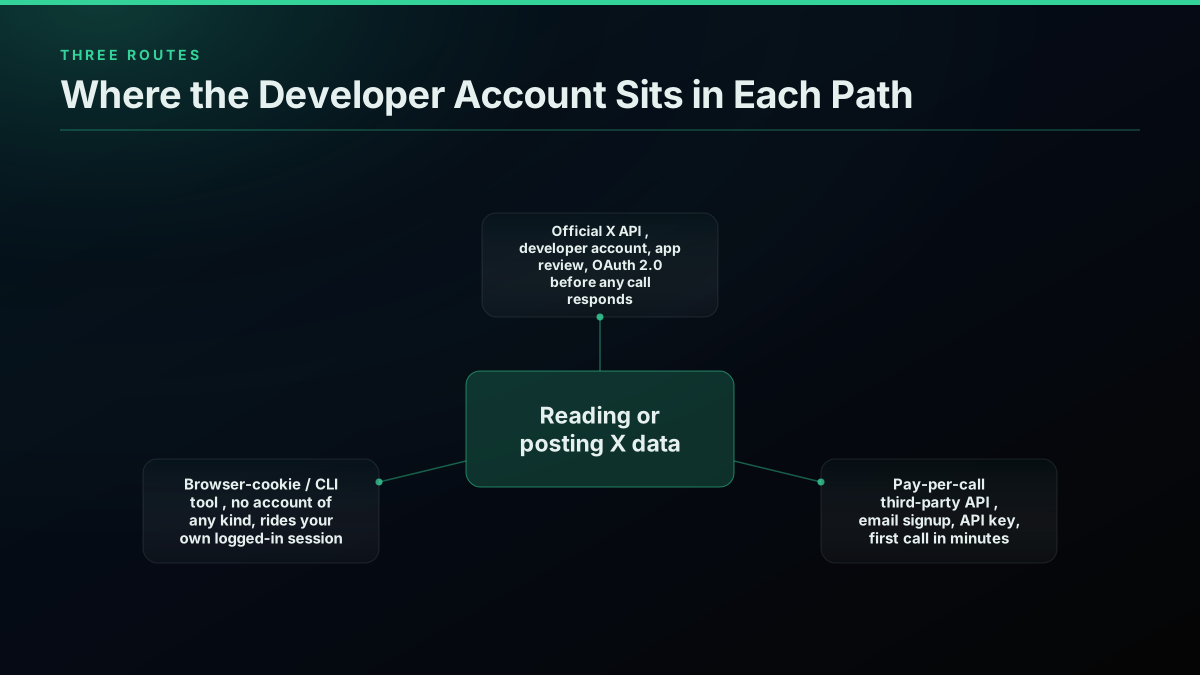
This is not a hypothetical gap. Developers are actively routing around the official process right now, in public, with working code. A recent r/n8n post walks through a no-code Twitter/X monitoring workflow built specifically because "the official API setup is painful, OAuth 2.0, developer account applications that take days, complex rate limits," using a REST API that needs nothing but a key in the header. A separate open-source project posted to r/buildinpublic ships a Go CLI that reads and posts to X from the command line using nothing but your own browser cookies, explicitly pitched as "without a developer account or API key." This guide lays out every real route, what each one actually requires, what it costs, and where it breaks down. For one worked example of a third-party route, our Uneed launch post prices a per-call API against the official one.
The reaction to the application itself is its own small genre of complaint. One developer summed up the moment plainly:

❁ Official
@garru
Not sure how to name this feeling I just had after applying for a twitter api developer account
Why X Still Requires a Developer Account for Everything
X's own developer platform draws a hard line: no call reaches any endpoint, free or paid, without a project tied to an approved app and a working OAuth 2.0 client, per the developer account support reference. That gate exists to enforce per-app rate limits and to have a paper trail when something needs to be shut down, not because the underlying tweet or profile data is sensitive.
The mechanism is consistent whether you are reading or writing. A read call, like a search or a timeline pull, still needs the app-and-OAuth pair even though nothing is being posted anywhere. A write call, like publishing a tweet, needs the exact same reviewed app plus a completed OAuth 2.0 authorization flow with a real X account attached, because that is the step that proves the app is not just an automated poster with no accountable owner. The X API access levels reference documents what unlocks at each tier once you clear that gate, but the gate itself is identical at every tier.
What this means practically: there is no free-tier shortcut, no "just for testing" bypass, and no undocumented endpoint that skips review. If your plan involves calling api.x.com or api.twitter.com directly, you are filling out the developer account application, whatever tier you eventually land on, and every call after that still carries the full OAuth 2.0 exchange, a token request before a single tweet is fetched:
curl -s -X POST "https://api.x.com/2/oauth2/token" \
  -H "Content-Type: application/x-www-form-urlencoded" \
  -u "CLIENT_ID:CLIENT_SECRET" \
  -d "grant_type=client_credentials"
That call, per RFC 6749, is step one of the official flow, not the whole thing: the returned bearer token still has to be attached to every subsequent request, and a user-context write action needs the fuller authorization-code exchange on top of it.
How Long Does the Developer Account Review Actually Take?
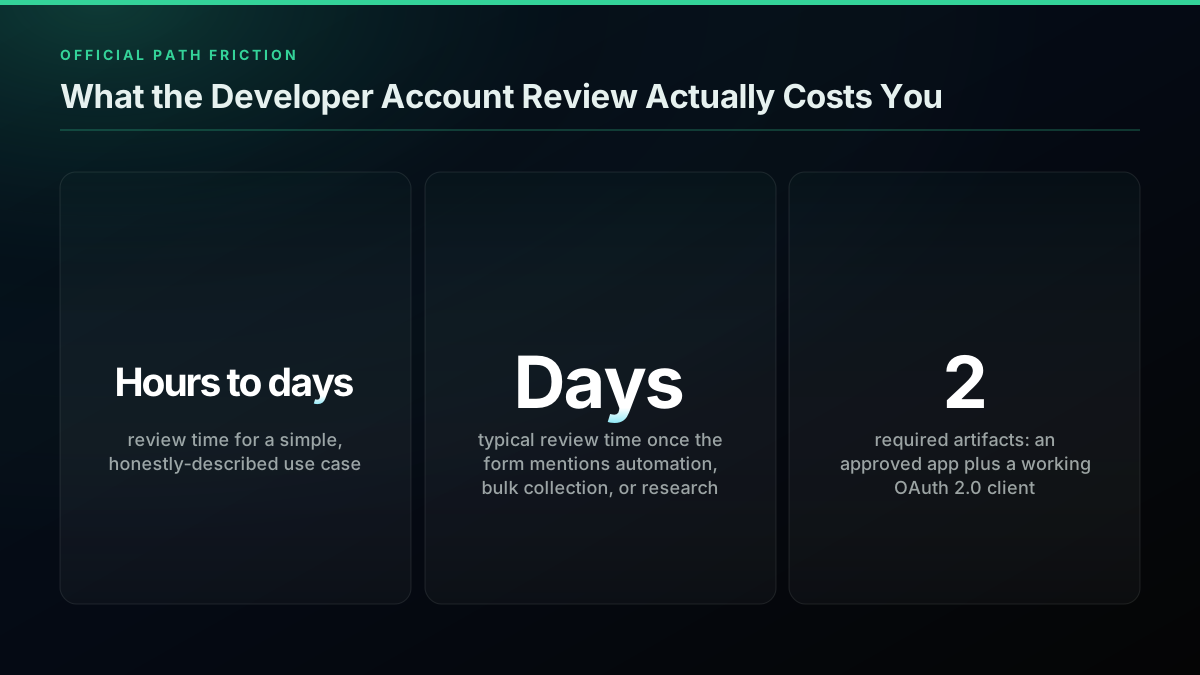
There is no published SLA for developer account approval, which is itself informative: X does not commit to a number because the real driver is what you write, not a queue position. A short, specific, read-only use case can clear in hours to the same day. The moment the form mentions automation, bulk collection, monitoring, or research, expect a manual review, and per patterns discussed on X's own developer community forum, that review commonly runs days rather than hours.
That distinction catches people off guard because most legitimate integrations, a sentiment pipeline, a brand-monitoring dashboard, a research corpus, describe exactly the kind of use case that triggers the slower path. Nobody builds a data pipeline and describes it as "just testing," so the honest description is usually the one that gets flagged for the longer queue.
There is also a second, quieter cost: a rejected or stalled application blocks the entire project behind it, not just the API call. If a demo, a client deliverable, or a hackathon has a fixed date, a multi-day review with no guaranteed outcome is a real scheduling risk, and it is the single biggest reason developers move to a route that does not depend on X's review calendar at all.
The Pay-Per-Call Route: No Application, No Waiting
This is the route both cited Reddit threads independently landed on, and it is the most direct substitute for what X's own API does. A pay-per-call third-party API maintains its own pool of authenticated access to X's data layer, so your signup creates an account with that provider, not with X, and X's developer account requirement simply never applies to you.
The setup path is short by design: create an account with an email and password, the dashboard issues an API key immediately, and that key authenticates every subsequent request as a bearer token in the header. No redirect URI, no consent screen, no app review queue. The first call against a read endpoint, tweet search, user lookup, timeline pull, returns real data on the first attempt.
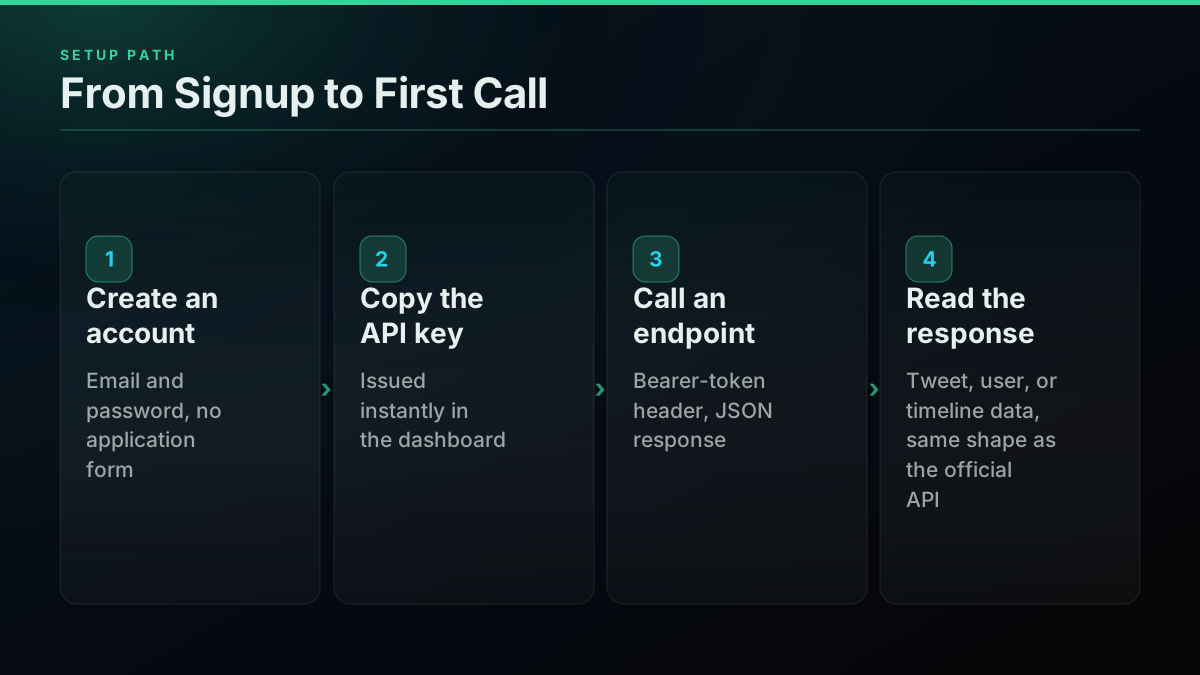
TwitterAPIs runs on this model with 112 documented endpoints, 68 reads and 44 writes, none of which require a developer account. Standard reads and the simple write actions, favoriting, retweeting, bookmarking, following, their inverses, deleting a tweet, and media upload, bill at $0.0008 per call, roughly 20 tweets returned per call on a search or timeline read. New signups get $0.50 in free credit with no card required, around 625 calls or roughly 12,500 tweets before any charge lands. Full current rates live on the pricing page.
Here is a real call against a search endpoint, the same shape you would run for the r/n8n workflow's monitoring use case:
curl -s "https://api.twitterapis.com/twitter/tweet/advanced_search?query=developer%20account&product=Latest" \
  -H "X-API-Key: YOUR_API_KEY"
That request needs nothing beyond the key itself, no OAuth handshake, no app object to reference, no scopes to request in advance. The response returns tweet objects in a comparable shape to X's own v2 search endpoint, so existing parsing code from an official-API integration mostly carries over unchanged:
{
  "tweets": [
    {
      "id": "1888124315557855299",
      "text": "Do you know anyone with a Twitter developer account?...",
      "created_at": "2025-02-08T07:14:51Z",
      "author": { "username": "pobedeen", "followers_count": 29130 },
      "like_count": 10,
      "retweet_count": 1
    }
  ],
  "next_cursor": "opaque-pagination-token"
}
The same call in Node.js looks like this, no OAuth client library required, just a single header on a standard fetch:
const res = await fetch(
  "https://api.twitterapis.com/twitter/tweet/advanced_search?query=developer%20account&product=Latest",
  { headers: { "X-API-Key": process.env.TWITTERAPIS_KEY } },
);
const { tweets } = await res.json();
console.log(`${tweets.length} tweets returned`);
What You Give Up, and What You Don't
The tradeoff is not "no strings attached." A pay-per-call API is a real third party sitting between you and X's data, which means uptime, rate posture, and data freshness depend on that provider's own infrastructure, not X's directly. What you do keep is full read coverage: search, timelines, user profiles, followers, media, the same categories of data the official API exposes, without the review gate in front of any of it.
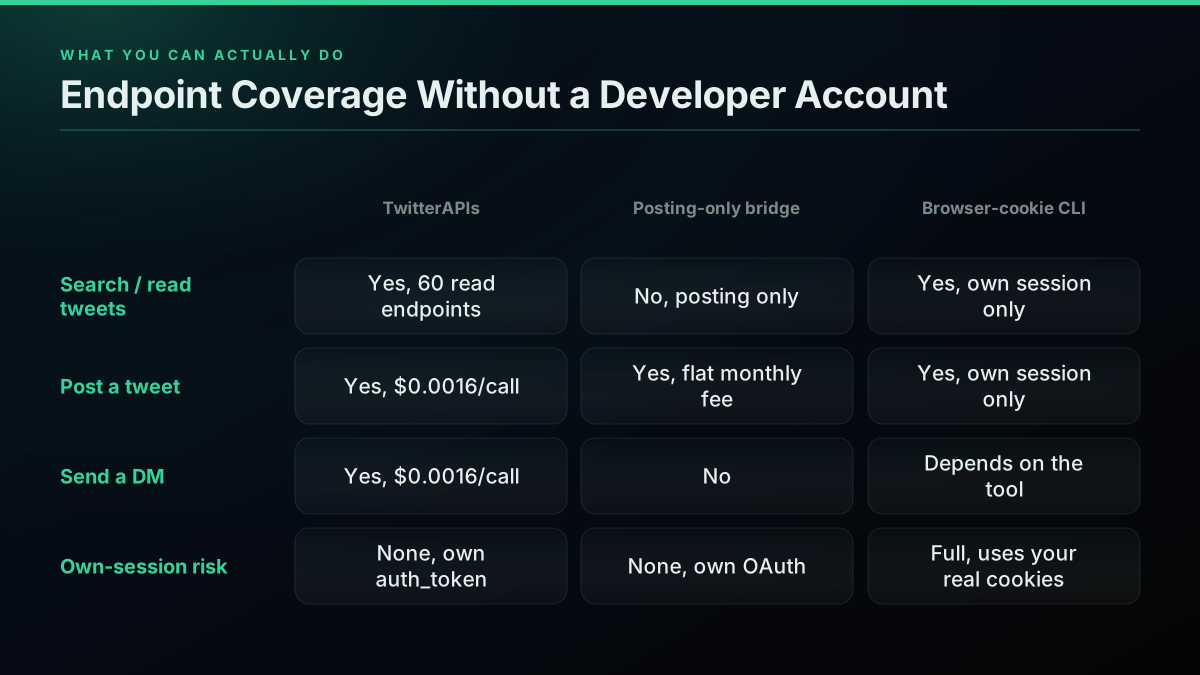
Write access is where providers diverge sharply, and this is the detail that trips up the most people comparing options. TwitterAPIs treats writes as first-class: tweet creation and DM send are live endpoints at $0.0016 per call (rate confirmed on the pricing page), using an auth_token and ct0 cookie pair supplied per request rather than a stored, provider-managed credential, so nothing about your account sits in a third party's database between calls. That is a meaningfully different trust model from a provider that stores your OAuth token permanently. The TwitterAPIs best practices guide covers how to structure calls so a per-request credential like this never ends up logged or cached anywhere it shouldn't.
A write call carries the two extra fields alongside the API key, since the request needs to prove it can act as your account:
curl -s -X POST "https://api.twitterapis.com/twitter/tweet/create" \
  -H "X-API-Key: YOUR_API_KEY" \
  -H "Content-Type: application/json" \
  -d '{"auth_token": "YOUR_AUTH_TOKEN", "ct0": "YOUR_CT0", "text": "Posted without a developer account."}'
The Posting-Only Bridge: Tools That Skip Read Access Entirely
A second category exists specifically for the "I just need to post" use case, and skips read access entirely. A handful of these bridges are active in the market right now: a flat monthly fee buys an OAuth connection to your own X account, done once at setup, then a simple, provider-issued API key that any script or agent can call to publish. Their marketing tends to converge on the same pitch, because it is the same real friction every one of them is solving: no application form, no OAuth flow to implement yourself, no developer account.

pobedeen ⚫️
@pobedeen
Do you know anyone with a Twitter developer account? I need paid assistance to create a bot that connects to the Twitter API and integrates with a Telegram bot to track activity and collect statistics 🆘
That tweet is worth sitting with, because it is not marketing copy, it is real demand: someone offering to pay a stranger for access to a developer account rather than apply for one themselves. That is the exact friction the posting-only bridges and pay-per-call APIs both exist to remove, from opposite ends of the read/write split. A posting-only bridge is the narrower answer, purpose-built for automating your own account's outbound activity rather than reading anyone else's.
The limitation with a posting-only bridge is symmetrical to its strength: if your project needs to read anything, search a hashtag, pull a timeline, check follower counts, a posting-only tool cannot help, and you are back to either the official API or a pay-per-call provider for that half of the work. Most real projects need both eventually, which is why a provider that covers reads and writes under one key tends to be the simpler long-term choice over stitching two separate providers together.
Start building with TwitterAPIs
$0.0008 a call, about $0.04 per 1,000 tweets at 20 tweets a page. $0.50 free credits. No credit card required.
The Browser-Cookie Route: CLIs That Ride Your Own Session
The third route skips the concept of an API key entirely. Tools in this category, like the open-source CLI shipped to r/buildinpublic and r/coolgithubprojects, authenticate by reading the same session cookies your browser already holds when you are logged into x.com, then replay requests as if your browser made them. No developer account, no API key of any kind, because from X's perspective these are just ordinary logged-in browser requests.
This is genuinely the fastest route to zero setup cost: if you are already logged in, the tool works immediately. It is also the route with the most concentrated risk, because every request rides your real, personal X account rather than a disposable API key. A rate-limit trip, a flagged automation pattern, or a tool bug does not cost you an API key you can regenerate, it puts your actual account's standing at risk. That tradeoff makes browser-cookie tools a reasonable fit for a personal script you run occasionally and a poor fit for anything running on a schedule, at scale, or on behalf of a client.
Built a Twitter/X monitoring workflow - no OAuth, no developer account needed
Real Cost Comparison, Per 1,000 Reads
Cost is where the gap between routes becomes concrete rather than procedural. X's own pay-per-use standard read rate is $0.005 per post read, per the official pricing reference, which puts 1,000 standard reads at $5.00 on that same official rate card, even after you clear the developer account review. Third-party pay-per-call providers undercut that by roughly two orders of magnitude on the read side.
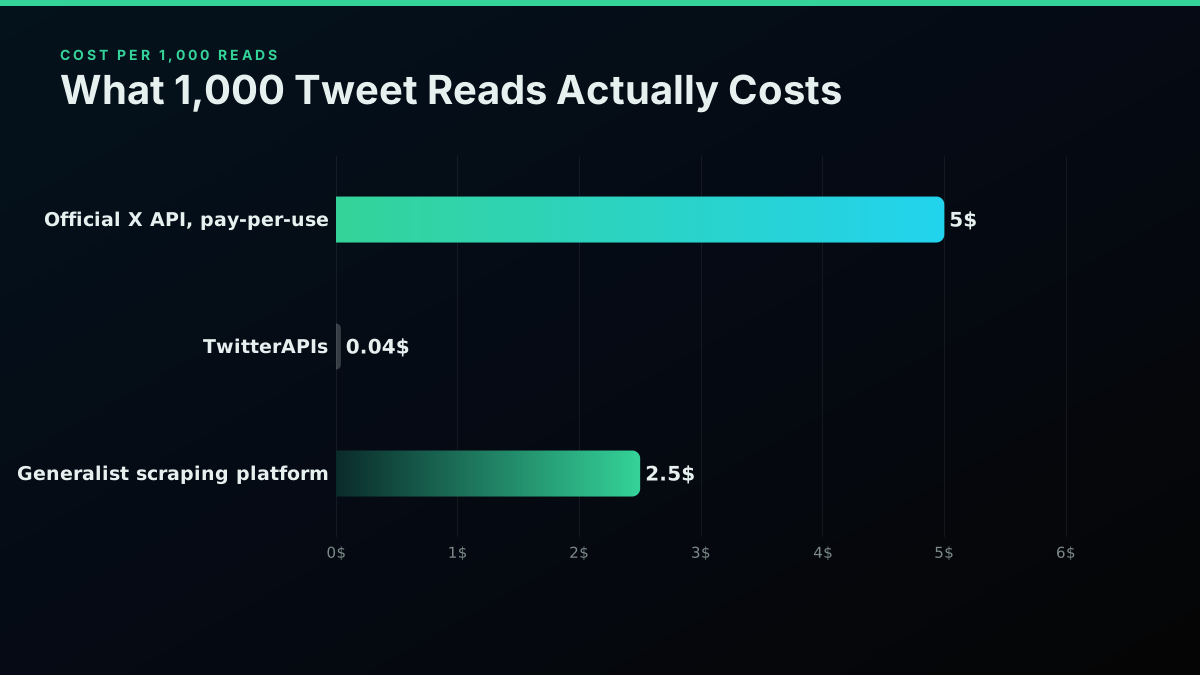
TwitterAPIs prices standard reads at $0.0008 per call, and since a single call on a search or timeline endpoint typically returns around 20 tweets, that works out to $0.04 per 1,000 tweets, a fraction of a cent per tweet, per the full rate card. Generalist scraping platforms land in between: a pay-per-actor-run platform such as Apify meters usage per run rather than per tweet, which lands at $2 to $3 per 1,000 tweets against the TwitterAPIs cost benchmark depending on the actor and page depth, and a residential-proxy-based scraping platform sits in a similar band. None of these require a developer account; all of them require an account with that specific provider instead.
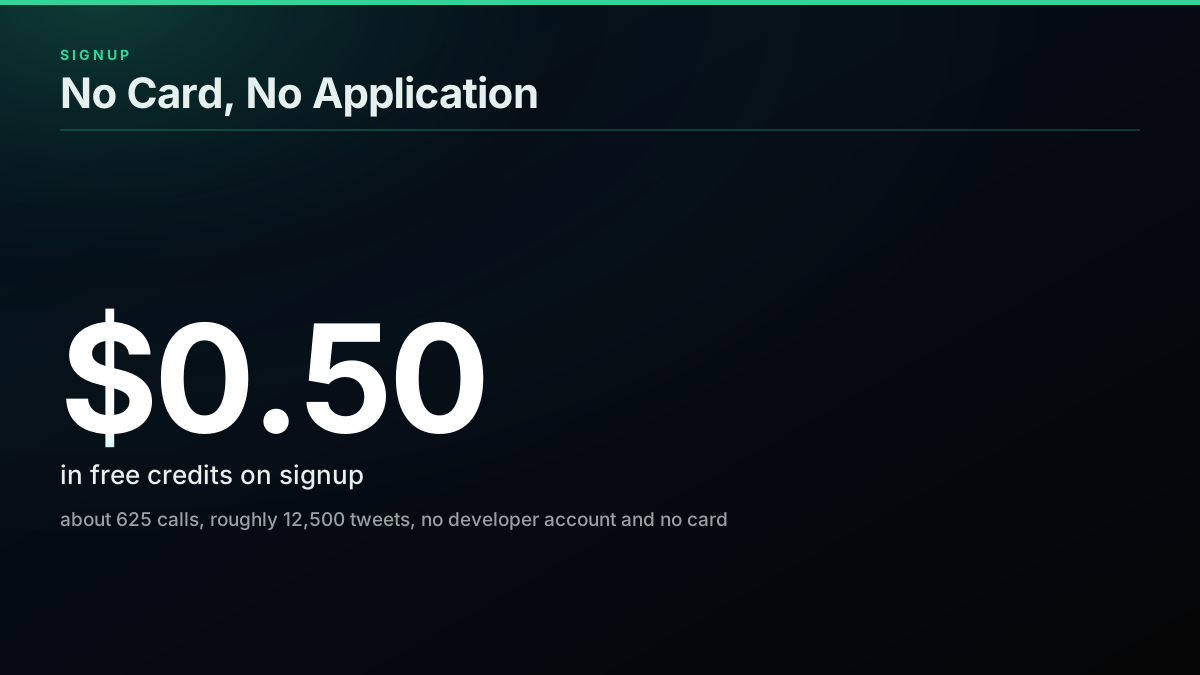
The free credit matters more than it looks on paper. $0.50 sounds trivial next to a custom-quoted Enterprise tier, but at $0.0008 per call it is enough to fully prototype a workflow, the exact kind of validation step a multi-day developer account review makes expensive to iterate on, before spending a cent.
Endpoint Coverage: What You Can Actually Build
The practical question is rarely "can I make one call," it is "can I build the thing I actually want." TwitterAPIs' 112 endpoints break down as 68 reads and 44 writes, covering tweet search, user and profile lookups, timelines, followers and following, media, threads, and the write side: posting, favoriting, retweeting, bookmarking, following, deleting, media upload, and direct messages.
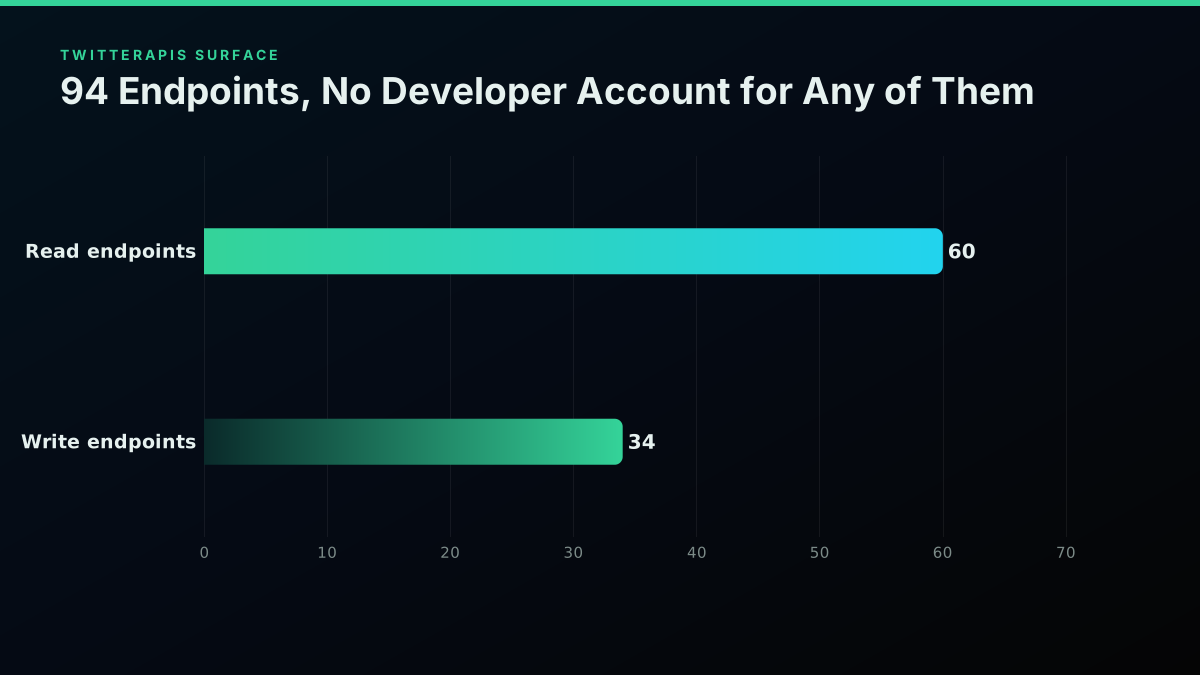
That range covers most of what a developer-account-avoiding project actually needs: a sentiment pipeline needs search and timeline reads. A brand-monitoring dashboard needs search, user lookups, and engagement metrics. A scheduling bot needs the tweet-create write endpoint. A lead-gen workflow, like the one described in the n8n integration guide, needs search plus filtering on engagement thresholds, both plain reads. The gap only opens up for use cases that specifically require the official-API-only signals, like certain account-level analytics X reserves for its own dashboard, which no third-party provider replicates because X does not expose the underlying data to any API tier.
import requests

headers = {"X-API-Key": "YOUR_API_KEY"}
params = {"query": "no developer account needed", "product": "Latest"}
resp = requests.get(
    "https://api.twitterapis.com/twitter/tweet/advanced_search",
    headers=headers,
    params=params,
    timeout=15,
)
resp.raise_for_status()
tweets = resp.json().get("tweets", [])
print(f"{len(tweets)} tweets returned, first: {tweets[0]['text'][:80] if tweets else 'none'}")
Where Do People Actually Get Stuck on the Official Path?
It helps to be specific about what breaks a first-time application, since "the review is slow" undersells the real friction. OAuth 2.0 client setup accounts for the single largest share of stalled applications, developers who clear the account review only to get blocked wiring up the redirect URI, the client secret, and the token refresh flow correctly on the first try. A rejected or flagged use-case description is the second-largest cause, usually because the honest description of an automation or monitoring project reads, to an automated reviewer, identically to a spam pattern. Pure review wait time and post-approval tier confusion split the remainder.
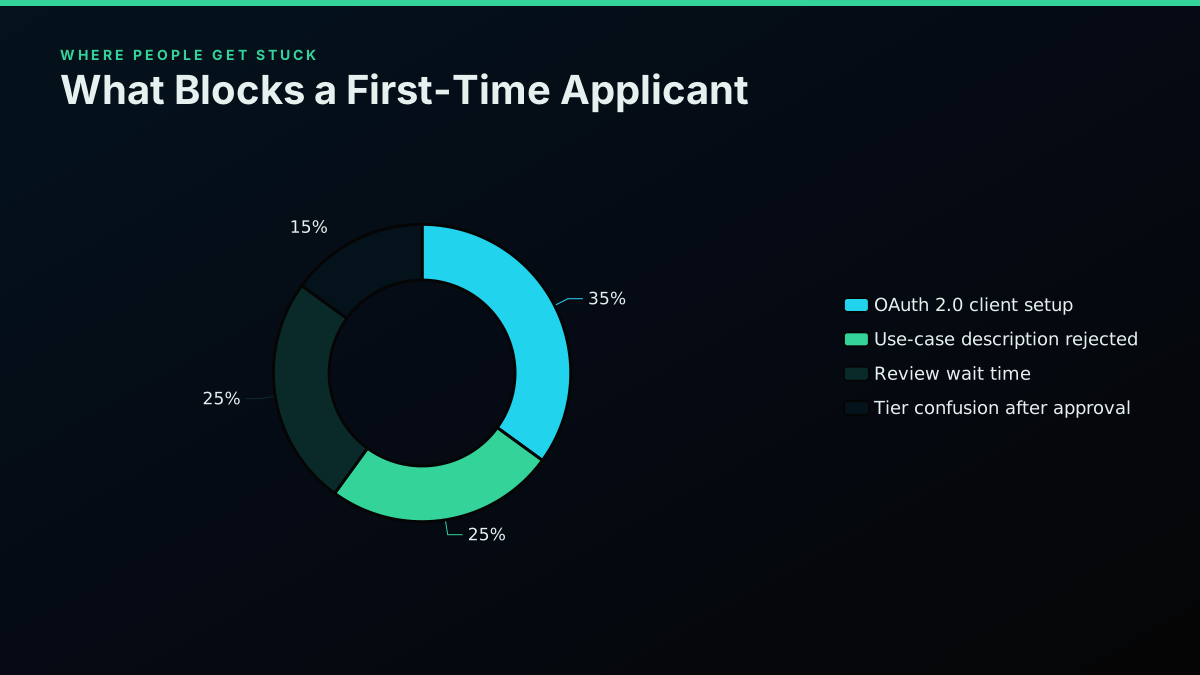
None of these four failure points exist on a pay-per-call route, because there is no OAuth client to misconfigure for read access, no use-case description to write and have judged, and no review queue to wait behind. The tier confusion issue does not fully disappear, since a pay-per-call provider still has its own pricing tiers to understand, but the stakes are lower: getting a rate wrong costs you a slightly bigger bill, not a stalled project.
Want a visual walkthrough of pulling Twitter/X data outside the official API before wiring this into your own project? This video covers the same pay-per-call pattern described above.
Watch how to get Twitter data without the official API
Rate Limits Work Differently Once You Skip the Review
X's own rate limits are per-app and per-endpoint, communicated through three response headers, x-rate-limit-limit, x-rate-limit-remaining, and x-rate-limit-reset, and they scale with the reviewed access tier your app was approved for. Miss a limit and the API answers with a 429 until the reset window passes. The Twitter API rate limit guide and the what rate-limited actually means on X post both cover that header contract in depth, since reading it correctly is what keeps an integration from silently stalling.
A pay-per-call provider throws that whole model out. There is no fixed request-per-window ceiling tied to an approval tier, because the meter is the spend itself: every call costs money, so the practical limit is your budget, not a quota X assigned during review. That is a real trade. It removes the "approved for X calls a day" ceiling entirely, which is genuinely freeing for a bursty workload, a research pull that needs 50,000 tweets in one sitting rather than trickled across a rate window. It also means a bug that loops on a failed request can burn through a budget fast, since nothing external throttles it the way X's own 429 response does. Build a hard spend cap into anything you automate against a metered endpoint, the same discipline you would apply to any pay-as-you-go infrastructure bill.
The cheapest pay-as-you-go Twitter API. Try it free.
$0.0008 a call, about $0.04 per 1,000 tweets at 20 tweets a page. $0.50 free credits. No credit card required.
Error Handling Looks Different Without OAuth in the Loop
Official API errors carry a specific shape tied to the OAuth and review model: a 401 usually means the token expired or the OAuth flow needs to run again, a 403 means the app's approved tier does not cover that endpoint, and a 429 means the rate window tripped. The Twitter API error codes reference walks the full list X documents.
A pay-per-call API collapses most of that into a smaller, simpler set. A 401 means the API key itself is wrong or revoked, full stop, there is no token-refresh step to debug because there is no token to refresh. A 403 on a write endpoint usually means the auth_token or ct0 cookie pair supplied for that specific request is stale or invalid, since those are what verify the request is actually authorized to act as your X account, not a provider-level permission tier. Insufficient balance returns its own explicit error rather than a generic 402, so a script can catch it and stop cleanly instead of retrying into a wall. That narrower error surface is a direct consequence of removing OAuth's multi-step token lifecycle from the picture, one credential to check instead of an access token, a refresh token, and an app-level scope to reconcile.
Agents and MCP Tools Hit This Wall First
Autonomous agents and MCP-based tools surface this exact friction faster than a human developer does, because an agent cannot click through an OAuth consent screen or wait days for a use-case review to clear before it can act. That is precisely why a developer posted an MCP server built around a third-party API specifically to give an agent framework Twitter/X access without touching X's own developer console at all. The Twitter MCP server guide covers wiring an agent up to a pay-per-call provider directly, which sidesteps the review problem structurally rather than working around it case by case: the agent authenticates with a static key the same way a script does, and there is no interactive consent step anywhere in the loop for it to get stuck on.
That pattern extends past MCP specifically. Any workflow tool that needs to act autonomously, a scheduled n8n run, a cron job, a Zapier-style automation, a Claude or GPT agent, runs into the same OAuth-and-review wall the moment it needs Twitter/X access with nobody present to click through a login prompt. A pay-per-call key removes the human-in-the-loop requirement entirely, which is a structural fit for automation in a way the official reviewed-app model was never designed around.
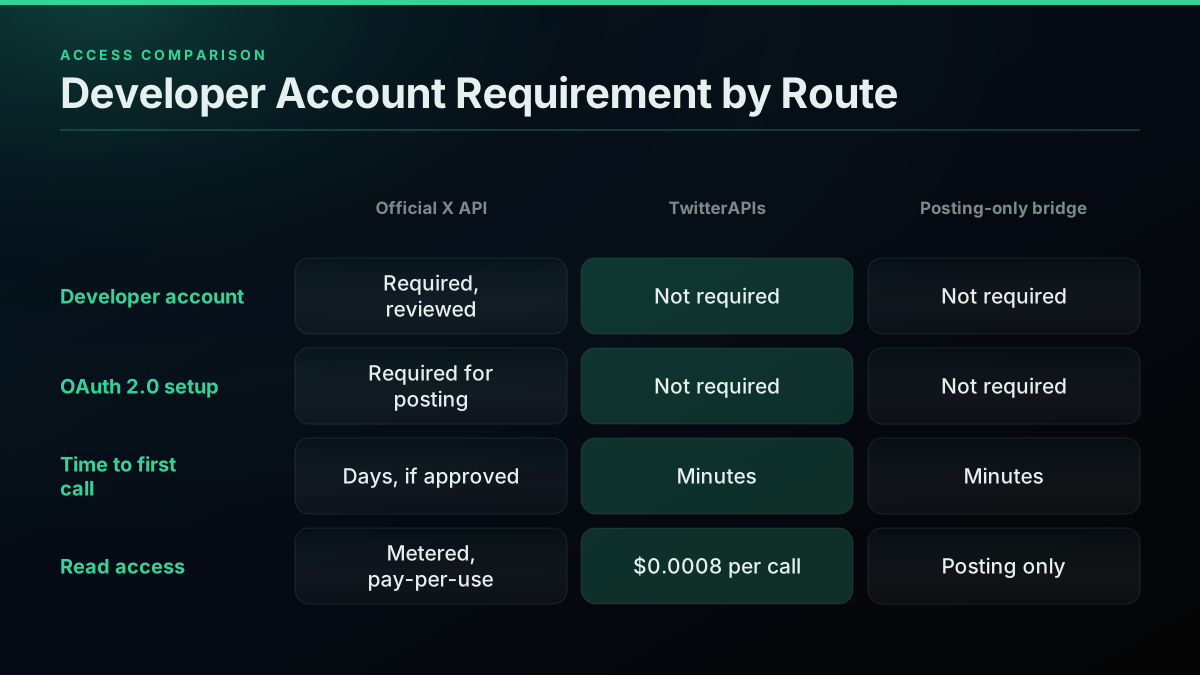
The three routes stack up like this, side by side:
| Route | Developer account | Setup time | Best for |
|---|---|---|---|
| Official X API | Required, reviewed | Hours to days | X-verified partnerships, X-exclusive analytics |
| Pay-per-call API | Not required | Minutes | Reads and writes, agents, automation |
| Browser-cookie CLI | Not required | Minutes, if already logged in | A personal script, occasional use |
Which Route Fits Your Project?
Six signals reliably point toward skipping the official developer account entirely, drawn from the actual use cases developers describe when they hit this wall.
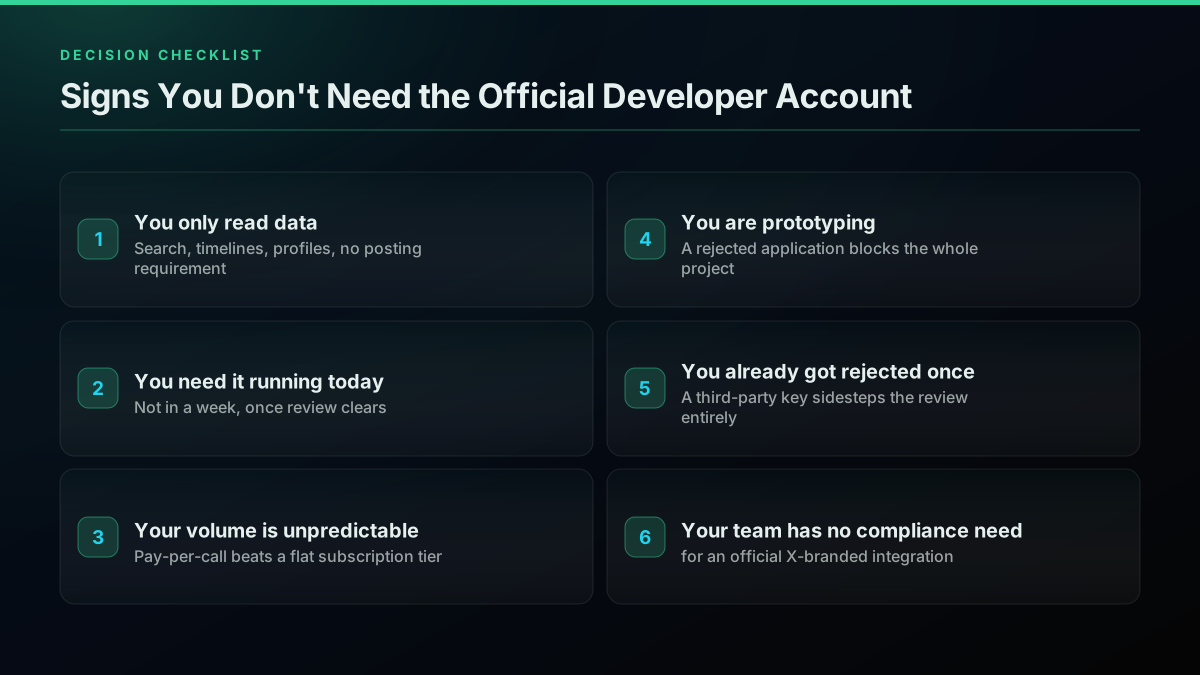
If you only need to read data, search, timelines, profiles, with no posting requirement, a pay-per-call read endpoint covers the whole project without ever touching OAuth. If the project needs to be running today rather than in a week once review clears, that timeline pressure alone rules out the official path for anything beyond the simplest use case. Unpredictable volume favors pay-per-call pricing over a flat subscription tier you might outgrow or underuse. A prototyping phase, where the shape of the project is still changing, is a bad fit for a process where a rejected application can block the whole thing. And if you have already been rejected once, or your team genuinely has no requirement for an official X-branded integration (the kind a partnership or app-directory listing might require), a third-party key sidesteps the review entirely rather than asking you to reapply and hope for a different outcome.
Building It Into an Existing Workflow
Both real threads cited at the top of this guide describe wiring a no-developer-account API into an existing tool rather than a standalone script, and that is the more common real-world shape. The r/n8n workflow runs on a recurring schedule, calling a search endpoint with only an API-key header, filtering results by engagement, and forwarding matches to Discord, entirely inside n8n's visual builder, no code beyond a small parsing step. That pattern generalizes cleanly: the how to choose a Twitter API guide walks the broader decision tree for wiring a provider into an automation platform, and the Twitter API cost and cost benchmark posts carry the full per-call math if you are budgeting a workflow that will run continuously rather than as a one-off pull.
For anyone building the read side in Python or Node rather than a no-code tool, the Python Twitter API tutorial and the Node.js tutorial both start from the same bearer-token pattern shown above, no OAuth flow to implement first. If the project needs authenticated write actions specifically, the Twitter API authentication guide covers the auth_token and ct0 cookie pattern in depth, and how to build a Twitter bot walks a full posting loop end to end.
How Does This Compare to the Official API Long-Term?
None of this makes the official X API obsolete, and it is worth being direct about when it is still the right call. An integration that needs to be an official, X-verified partner, that requires X-exclusive analytics no third party replicates, or that is building something X itself distributes (an embedded timeline widget, for instance) has no substitute for the reviewed path. The official X API vs third-party comparison and the Twitter API v2 vs TwitterAPIs breakdown both go deeper on that specific decision.
For everything else, and that is most projects, the developer account review is friction with no corresponding benefit to the developer. It exists for X's rate-control and abuse-prevention needs, not because reading public tweet data requires a special credential. If your project fits the six signals above, a pay-per-call route gets you from signup to real data in minutes, at roughly two orders of magnitude less cost per call than X's own metered rate, without ever filling out a use-case description for someone else to judge.
Anyone migrating an existing integration off a scraping library that just broke, rather than starting fresh, should also read the provider-migration guide, since the underlying "skip the developer account" logic is the same whether you are starting new or replacing a provider that stopped working.
// sources
Where these numbers come from
Each row is a figure in this post and the artefact it was read from. Prices and limits on this platform move, so check the date on the source before you plan against it.
- X developer account support
- Source of the claim that every official X API call, on any tier, sits behind a reviewed developer account, an approved app, and OAuth 2.0 before it responds.
- X API access levels reference
- Backs the description of the free, pay-per-use, and enterprise access tiers and what a reviewed app unlocks at each level.
- X API pricing reference
- Source of the official pay-per-use rate used in the cost comparison, $0.005 per standard post read on X's own metered tier.
- X developer community forum, developer account approval time thread
- Backs the claim that review time scales with how the use-case field is written, from same-day for a simple description to a multi-day manual review once automation or bulk collection is mentioned.
- RFC 6749, the OAuth 2.0 authorization framework
- The standard behind the app-review-plus-OAuth flow this guide contrasts against a static bearer-token key.
- r/n8n, live Reddit thread
- A developer's own account of building a Twitter/X monitoring workflow specifically to avoid OAuth and a developer account, cited as first-hand evidence of the demand this guide addresses.
- r/buildinpublic, live Reddit thread
- A shipped open-source CLI built explicitly to read and post to X from the command line without a developer account or API key, cited as evidence a browser-cookie route is a real, actively-maintained category.
- @garru, live tweet
- A real developer's reaction to applying for a Twitter API developer account, cited as first-hand evidence of application friction.
Frequently Asked Questions
Yes, but not through X directly. Every official X API call, free or paid, still sits behind a reviewed developer account, an approved app, and an OAuth 2.0 client, per X's own developer account support docs. What changes the picture is that pay-per-call third-party APIs read the same public tweet, user, and timeline data through their own account pool, so you sign up with an email, copy an API key, and start calling in minutes. TwitterAPIs works this way: no application form, no review queue, a bearer-token header on every request.
It depends entirely on what you write in the use-case field. A short, honest description for a simple read-only project can clear in hours to same-day. The moment the form mentions automation, bulk collection, research, or anything resembling a bot, expect a manual review that runs days rather than hours, per patterns reported directly on X's own developer community forum. There is no published SLA, so days is the safer planning assumption for anything beyond a trivial use case.
Some can, some cannot, and the difference matters. TwitterAPIs exposes both: tweet creation and DM send are live write endpoints at $0.0016 per call (see the pricing page for the full rate card), using an auth_token and ct0 cookie pair you supply per request rather than a stored credential. A posting-only bridge tool, by contrast, typically charges a flat monthly fee and does not expose read endpoints at all. A browser-cookie CLI tool can technically do both, but it rides your own live session, so a mistake or a flagged pattern risks your real account, not a disposable API key.
A pay-per-call API, measured in minutes rather than days. Create an account with an email, the dashboard issues an API key instantly, and the first authenticated request against a read endpoint like tweet or user lookup returns real data on the first try, no app review, no OAuth redirect flow, no waiting on a queue. The n8n integration guide walks the same setup inside a no-code workflow tool if you are wiring this into automation rather than a script.
Rate control and abuse prevention, mostly. A reviewed account lets X tie every call to a real project with a stated use case, which is how it enforces per-app rate limits and can suspend a bad actor without touching every other integration. The review also gates access to write actions, since an unreviewed account posting automatically is the exact abuse pattern the process exists to catch. The tradeoff is that a legitimate read-only use case waits behind the same gate as a spam bot.
A pay-per-call third-party API, on a per-1,000-tweet basis. TwitterAPIs charges $0.0008 per call (roughly 20 tweets per call), which works out to about $0.04 per 1,000 tweets, against $5.00 per 1,000 on X's own pay-per-use standard read rate. New accounts also get $0.50 in free credit on signup, no card required, good for around 625 calls or roughly 12,500 tweets before any charge lands. The full endpoint list and current rates sit on the pricing page.
This guide is not legal advice, and X's terms change independently of anything written here. What is true today: third-party APIs that read public data are a well-established category, several with years of operating history, and the practice long predates any single vendor. The safer operational rule is the one that applies regardless of provider: read public data for legitimate analysis, respect the platform's rate posture, and avoid anything that resembles account takeover or credential sharing at scale. Automating your own account's actions carries different risk than touching someone else's.
Not for read access. A pay-per-call API authenticates every request with a static bearer-token key in the request header, which is the same shape as calling any other REST API, no redirect URI, no consent screen, no refresh-token rotation to manage. OAuth 2.0 only re-enters the picture for actions that require acting AS a specific X account, like posting or sending a DM, where the provider needs your own auth_token and ct0 values rather than a shared app credential.
Check out similar blogs
More guides on the Twitter/X API, scraping, and pricing.
How to Choose a Twitter/X API in 2026: The Complete Buyer's Guide
A decision framework for choosing a Twitter/X API in 2026: the seven criteria that actually matter (pricing model, data coverage, rate limits, auth, reliability, compliance, migration cost), a use-case decision tree, and where each path wins.

Cheapest Twitter API 2026: 8 Providers Ranked by Real Per-1,000-Tweet Cost
Every major Twitter API provider ranked by what 1,000 tweets actually cost in 2026, measured from live pricing pages across three volume tiers, with the billing traps comparison posts leave out.

RapidAPI Twitter Alternative: Direct API vs Marketplace
Weighing a RapidAPI Twitter alternative? See how marketplace listings stack up against the official X API and TwitterAPIs on cost, uptime, billing, and switching effort.

Apify Twitter Scraper vs TwitterAPIs: The Real 2026 Numbers
The honest 2026 breakdown of Apify Twitter Scraper against the TwitterAPIs REST API: what each billing model really costs per 1,000 tweets, latency, failure modes, and a 60-minute bake-off you can run before you commit.
Build vs Buy: Should You Build Your Own Twitter/X Monitoring Tool? (2026)
Buying a listening seat costs $29 to $2,000 a month depending on the vendor. Building costs real engineering hours plus a data bill. Here is the real math behind the twitter monitoring tool build vs buy decision, priced both ways.
Connect Twitter/X to n8n Without Fighting the Official API (2026)
Two working ways to get Twitter/X data into n8n: a polling HTTP Request node and a native webhook push, both with runnable code, no OAuth handshake either way.

How to Track a Tweet's Performance in Real Time with the X API
Poll a tweet's engagement counts over time with the X API, compute a views-to-likes ratio, and read the quote-tweet layer to tell an organically growing launch tweet from a boosted one. Tested Python and curl.
How to Get Image URLs from X Tweets via API in 2026 (Full Resolution, Python and Node)
Pull image URLs out of X tweets with runnable Python and Node.js, then get the full-resolution original instead of the scaled copy the API hands you by default. Measured on 14 live images, with the video poster-frame trap and the per-call cost.