GUIDE
Build vs Buy: Should You Build Your Own Twitter/X Monitoring Tool? (2026)
Buying a listening seat costs $29 to $2,000 a month depending on the vendor. Building costs real engineering hours plus a data bill. Here is the real math behind the twitter monitoring tool build vs buy decision, priced both ways.
Per our own spec, 65 of 112 endpoints bill $0.0008, 24 are free, and 23 sit between $0.0016 and $0.01. Every price ships inside our published OpenAPI document as an x-cost-usd field, so any figure in this post can be checked against the contract that bills it rather than taken on trust.
Somebody on your team asked whether the company should just build its own Twitter monitoring instead of paying for one. It is a fair question, and almost every answer to it online is a vendor comparison pretending to be neutral. This one prices both sides honestly: what five real listening vendors actually charge, and what building the same thing actually costs once engineering hours are counted alongside the data bill. This piece sits as a spoke of the what to build with the Twitter/X API hub, and pairs with the full API reference for anyone who ends up on the build side of the decision.
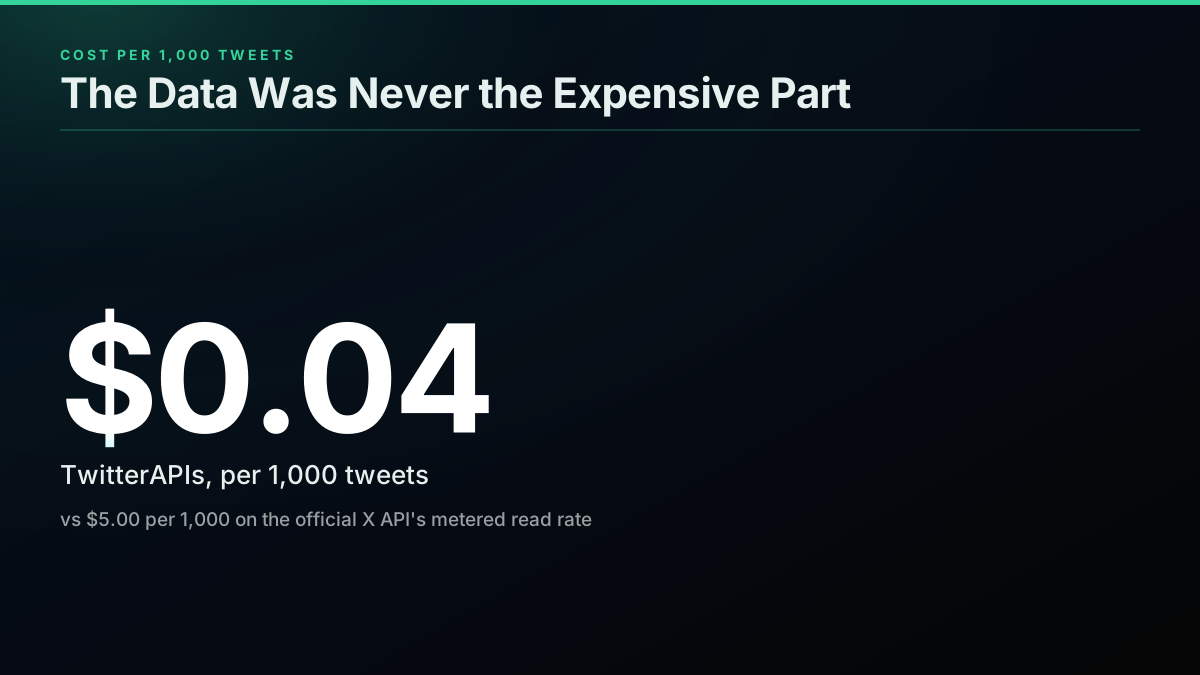
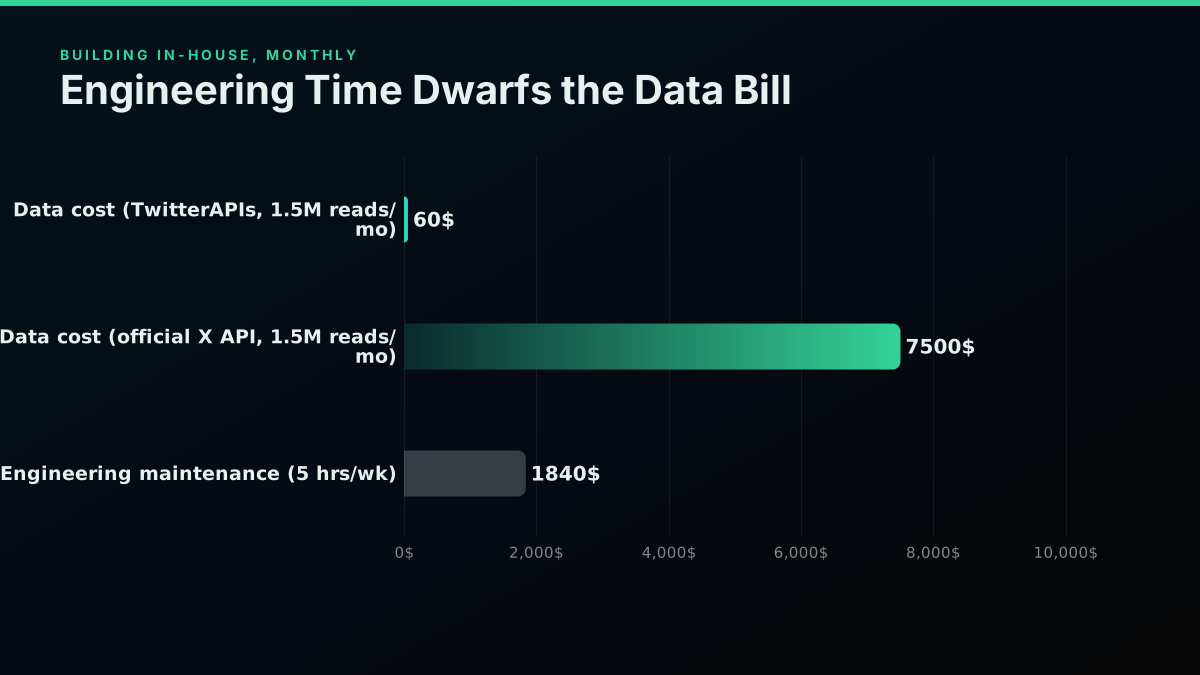
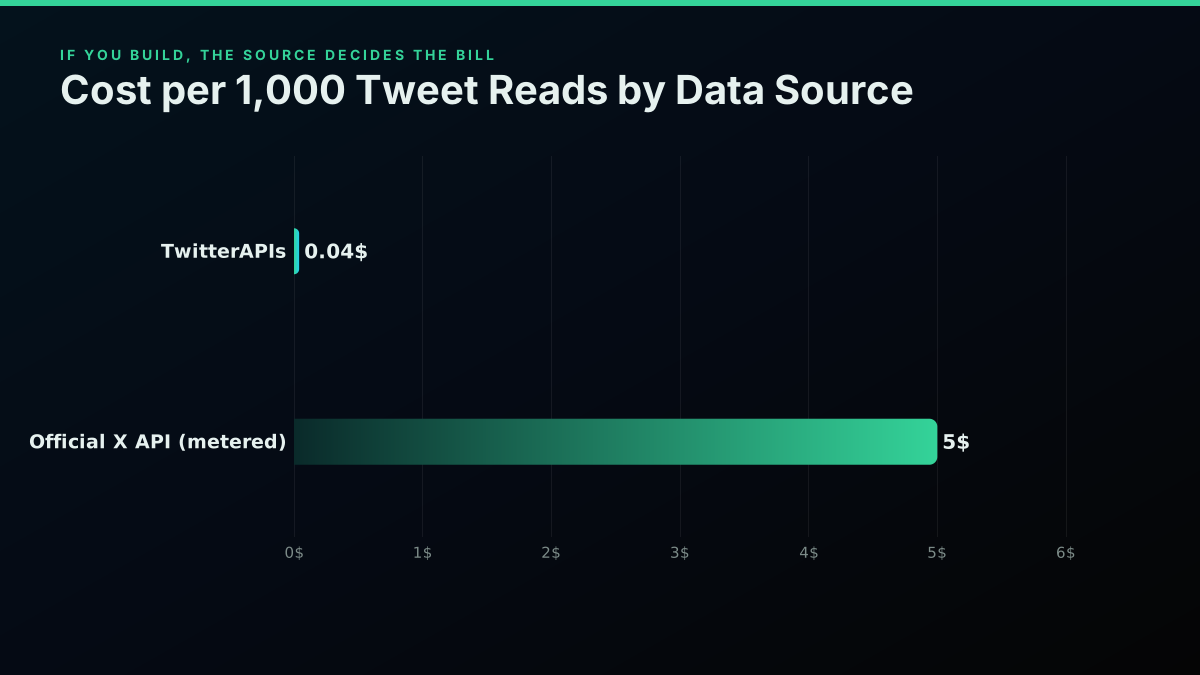
TL;DR: Buying a Twitter/X monitoring seat costs $29 a month at the low end (Awario Starter) up to $1,500 to $2,000 a month for an enterprise listening suite like Brandwatch or Meltwater, neither of which publishes a price. Building your own costs about $12,000 in one-time engineering time at a $85-an-hour fully loaded rate (140 hours for a minimal keyword-ingestion, dedup, and alerting pipeline), plus about $1,840 a month in ongoing maintenance, plus a data bill that is genuinely cheap if you source it right: about $60 a month for 1.5 million tweet reads through TwitterAPIs at $0.0008 per call, $0.04 per 1,000 tweets at a full 20-tweet page, versus $7,500 a month for the same volume on the official X API's $0.005-per-read metered rate. Buy for a dashboard a human reads. Build when the output needs to feed a system you already run.
What "Build vs Buy" Actually Means for Twitter/X Monitoring
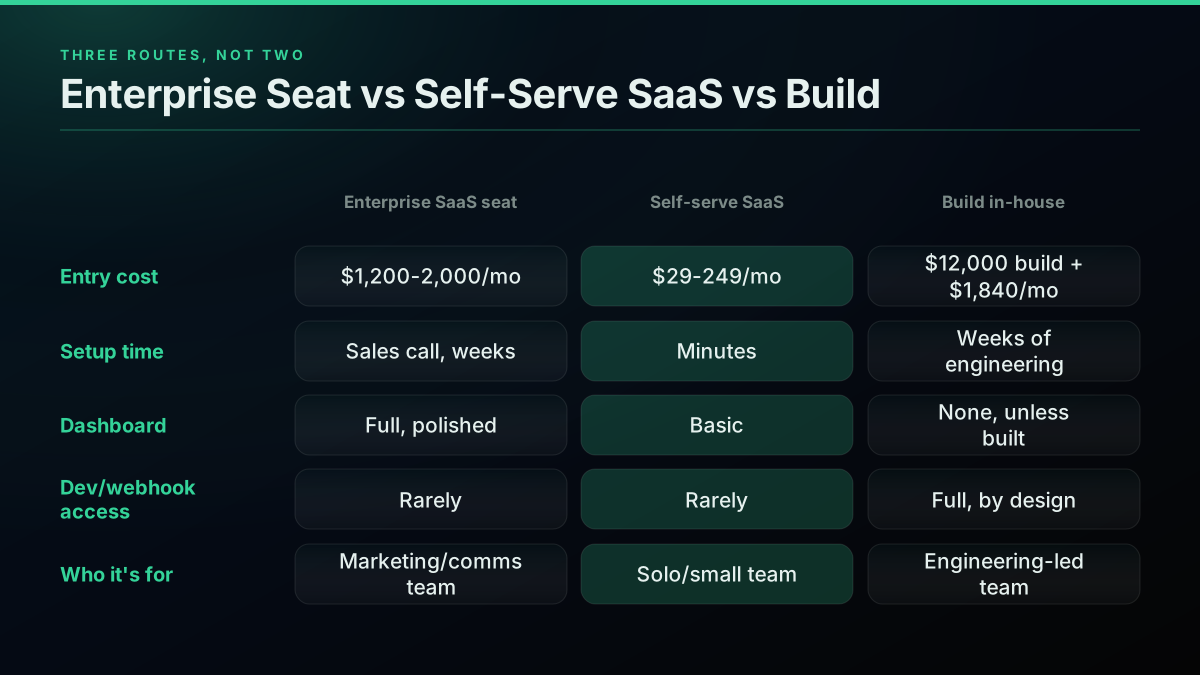
The question sounds binary and isn't. There are really three routes, not two, and conflating them is why most build-vs-buy comparisons for social monitoring give a useless answer.
Route one: an enterprise listening seat. Brandwatch, Meltwater, Talkwalker, Sprout Social's Listening add-on. We priced Sprout Social and Brandwatch against a metered Twitter data API in dollars per 1,000 mentions, which is the only unit that compares a seat quote to a call rate. Sold to a marketing or comms team, priced per seat or per contract, sales-gated, built around a dashboard, sentiment scoring, and a share-of-voice report a human reads once a week.
Route two: a self-serve monitoring SaaS. Awario, YouScan, Brand24, and newer entrants like Octolens and Buska, one of which a real developer flagged this pass for near-identical pricing-page design between the two, "down to the 'For growing brands' / 'For viral brands' labels," a tell that this tier has become commoditized fast. Published pricing, monthly, no sales call, built for a smaller team or a solo operator.
Route three: build it yourself, on top of a data API you buy. This is the one people mean when they say "build," and it is where the real decision lives, because nobody sane builds their own tweet-ingestion pipeline against X's raw firehose from scratch. The build decision is really: buy the DATA (from the official X API or a cheaper third-party one) and build the LOGIC (filtering, dedup, alerting, storage) on top of it.
What Buying Actually Costs: Five Real Vendors, Priced
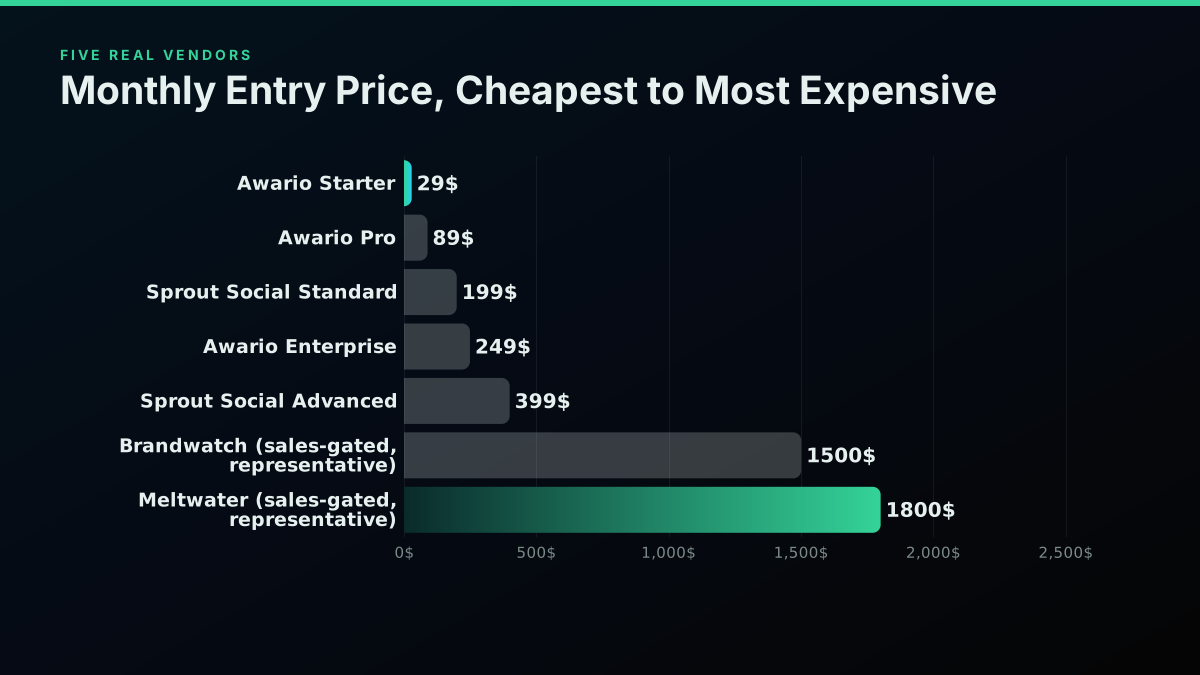
Here is what five real vendors charge today, pulled from their own pricing pages where published.
| Vendor | Entry tier | Entry price | Listening included? |
|---|---|---|---|
| Awario | Starter | $29/mo | Yes, core product |
| Awario | Pro | $89/mo | Yes, core product |
| Awario | Enterprise | $249/mo | Yes, core product |
| Sprout Social | Standard | $199/seat/mo | No, separate unpriced add-on |
| Sprout Social | Professional | $299/seat/mo | No, separate unpriced add-on |
| Hootsuite | Standard | $99/mo (annual) | No, listening is an Enterprise-tier feature |
| Brandwatch | (sales-gated) | ~$1,500/mo | Yes, core product |
| Meltwater | (sales-gated) | ~$1,800/mo | Yes, core product |
The Awario pricing page publishes all three self-serve tiers with no sales call required. The Sprout Social pricing page and the Hootsuite plans page are just as direct about their seat prices. Brandwatch and Meltwater are different: the Brandwatch pricing page routes every prospect straight to a demo request with zero public number on the page, which is itself the finding. A social media operator who has actually shopped this category put it plainly in a live Reddit thread: enterprise listening does the job well, "but it's four figures a month and a sales call before you even see a price. Total overkill if all you need is 'ping me when someone mentions my brand or a competitor.'" The two sales-gated figures above are representative of what that category commonly lands at once a real deployment is scoped, not a quoted vendor price.
Why the Cheap Middle of This Market Thinned Out
There used to be more small, cheap, X-specific tools filling the gap between "free and manual" and "enterprise and sales-gated." A lot of them are gone, and the reason is upstream of any listening vendor: X's own API pricing. The same Reddit thread that supplied the enterprise-pricing quote above names the mechanism directly: "X priced its API into orbit (the useful tier runs around $5k/month), so the small third-party tools that used to fill that gap can't afford to exist."
That claim checks out against X's own published rate. The official X API's standard pay-per-use tier charges $0.005 per post read. A monitoring tool watching even a modest set of keywords across a modest follower base can burn through a million reads a month without trying, and at X's own $0.005-per-read rate that is $5,000 before the vendor has paid for a server, a dashboard, or a single engineer. Every small monitoring tool still alive today, and every enterprise listening suite quietly underneath its dashboard, sources its raw data from somewhere cheaper than X's own metered rate. That fact matters just as much on the build side of this decision as it does on the buy side, which is the next section. For the full breakdown of what X charges across every read and write endpoint, see the Twitter API cost guide and the cost benchmark across providers.
What the Official X API Charges to Monitor a Keyword Stream
If "build" means building against X's own official API directly, the data bill alone makes the decision for you before engineering time is even counted. Neither route is priced by the interval it runs at, which is the term that actually moves the bill: what every poll cadence actually bills prices seven of them against a fixed fifty account roster.
At $0.005 per read, monitoring 1.5 million tweets a month, a realistic volume for a handful of brand and competitor keywords across an active niche, costs about $7,500 a month in raw data cost. That is more than Brandwatch. More than Meltwater. More than the highest Sprout Social seat tier by a wide margin. Nobody who has actually priced this route builds directly against the official metered API for a monitoring use case at any real scale, which is exactly why the DIY tools that exist (the free Chrome-extension scraper a frustrated developer built and gave away after finding the official pricing unworkable, or the open-source CLI tools that read a session cookie instead of an API key) exist specifically to route around this number, not because engineers enjoy building scrapers for fun.
What Building Actually Takes: The Pipeline, Not Just the API Call
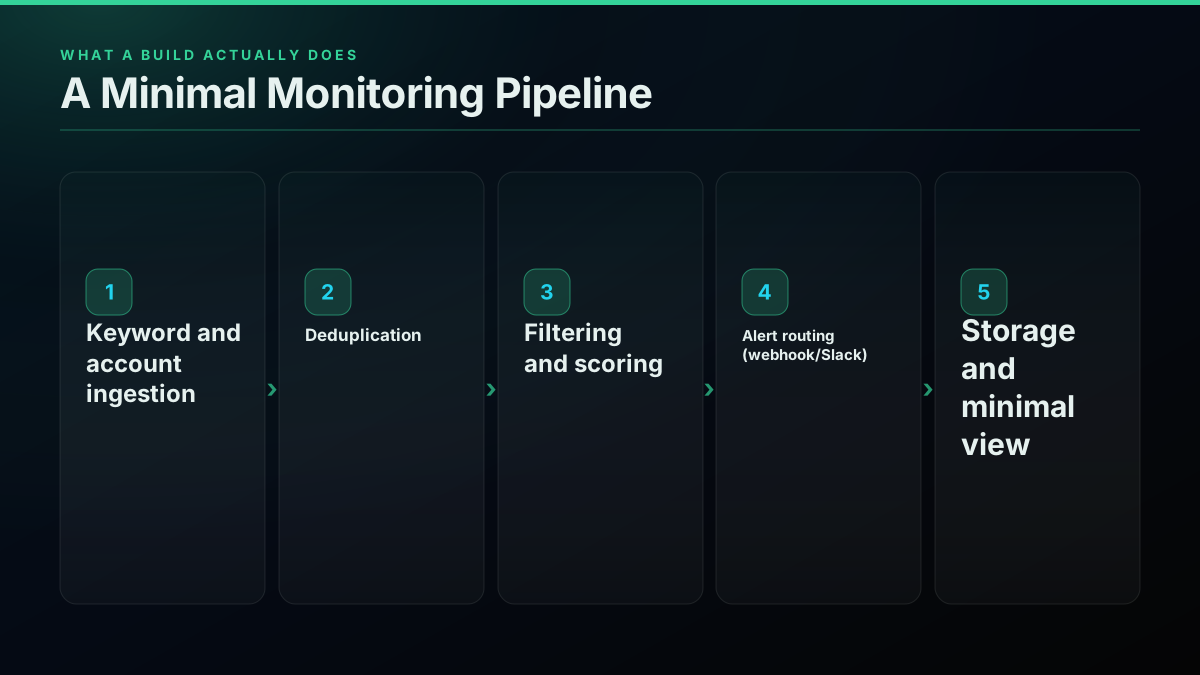
A monitoring tool is not one API call. It is a small system, and skipping straight to "hit the search endpoint on a timer" is how a weekend project turns into a permanent maintenance burden. A minimal, production-safe build needs five real components.
Keyword and account ingestion. A scheduled job that queries the data API on a cadence, handling pagination, rate limits, and the gap between what the API considers "recent" and what your monitoring window actually needs.
Deduplication. The same mention, retweet, or quote-tweet surfaces multiple times across different query angles. Without a dedup layer, every alert downstream is noisy, and noisy alerts get ignored within a week regardless of how good the underlying data is.
Filtering and scoring. Raw keyword matches are mostly noise. A real system needs follower-count floors, language filters, and usually a spam/bot heuristic (the bot detection guide covers the signals worth checking), echoing a real complaint from developer research for this piece: contributors wanted filters combining "keywords + cashtags + languages + follower range," not a raw firehose.
Alert routing. Webhook delivery to Slack, email, or a downstream system. This is the step a SaaS dashboard structurally cannot do for you, because a dashboard is built to be looked at, not to trigger another system.
Storage and a minimal view. Somewhere to keep what was captured, and at minimum a simple way to review it later, even if it never becomes a polished dashboard. If the monitor also needs to seed itself with history at startup rather than only watching forward, the scrape tweet history guide covers paging backward through a timeline.
Start building with TwitterAPIs
$0.0008 a call, about $0.04 per 1,000 tweets at 20 tweets a page. $0.50 free credits. No credit card required.
What That Pipeline Actually Costs to Build
At a $85-an-hour fully loaded engineering rate (salary, benefits, and overhead folded in, a standard way to price internal engineering time against an external subscription), the five components above run to 140 hours for a single engineer to reach something that will not fall over on day two: ingestion and pagination handling, a real dedup strategy, basic filtering, one working alert channel, and a place to store results. That works out to about $12,000 in one-time build cost.
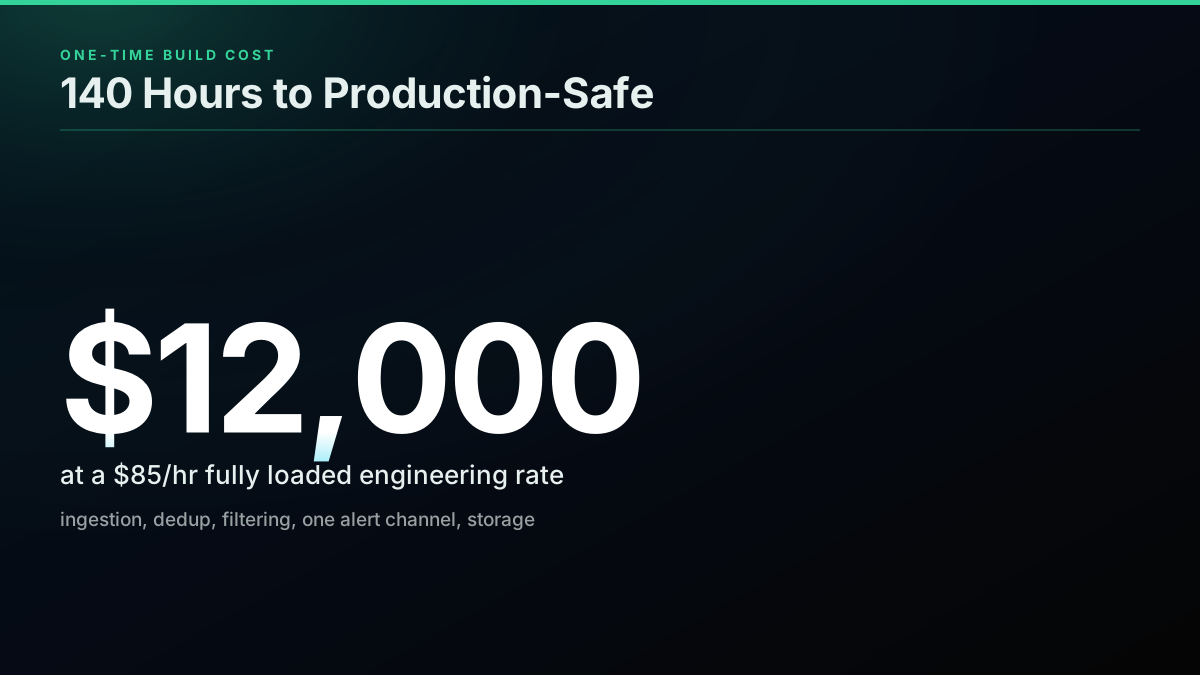
That number alone already changes the decision for most teams: $12,000 buys more than four years of Awario Enterprise at $249 a month, or over five years of Sprout Social Standard for a single seat. The build only starts to make financial sense at either very high monitoring volume, or when the requirement is something no vendor sells, which is the actual argument for building, covered further down.
The Bill That Doesn't Stop After Launch
The build cost is a one-time number. The real ongoing cost of owning a monitoring pipeline is maintenance, and it is easy to underprice because nothing about it shows up on an invoice the way a SaaS subscription does.
A developer maintaining a comparably scoped internal pipeline (not Twitter-specific, but the same shape of "small system that quietly needs to keep working") described the real pattern directly: "it's maybe 4k lines of code that I spend a few hours a week keeping alive. Works fine but it's plumbing that adds zero product value." At 5 hours a week and the same $85-an-hour rate, that is about $1,840 a month in ongoing engineering time, every month, for as long as the pipeline stays in production. That figure does not appear on any invoice. It appears as an engineer's calendar quietly filling up with API-change fixes, edge cases, and the occasional 2 a.m. page when a rate limit gets hit unexpectedly.
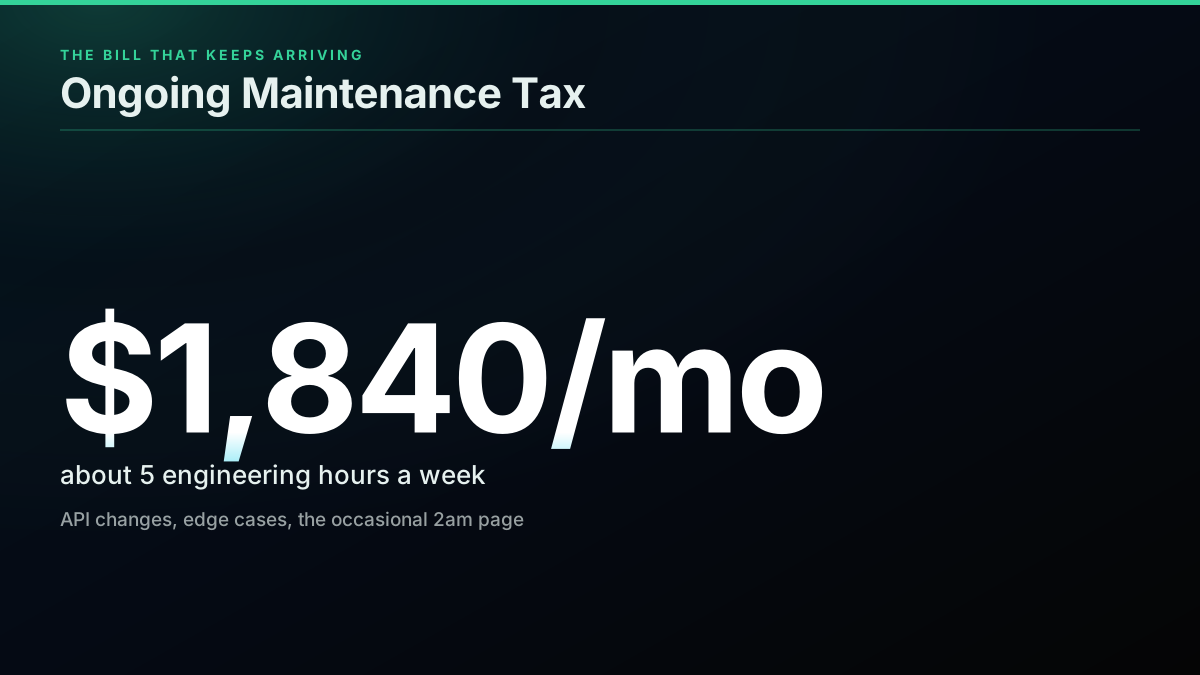
Stack the one-time build against twelve months of that maintenance tax ($12,000 plus $1,840 times 12 months) and a self-built pipeline's first-year true cost lands at about $34,000 in engineering time alone, before a single dollar of data cost is added. That is the number a "just build it, the API is cheap" pitch usually leaves out.
If You Build, the Data API You Pick Decides Most of What's Left
Assuming the build happens, the data source underneath it is the single biggest remaining cost lever, and the gap between options is not small.
| Data source | Cost per 1,000 tweet reads |
|---|---|
| Official X API (standard metered) | $5.00 |
| TwitterAPIs | $0.04 |
At 1.5 million monthly reads, that gap is the difference between a $7,500-a-month data bill on the official API and a $60-a-month data bill on TwitterAPIs' $0.0008-per-call, $0.04-per-1,000-tweets rate. New signups also get $0.50 in free credit with no card required, enough to prototype the ingestion layer before committing to a monthly spend at all. This is the part of "build vs buy" that gets skipped in most comparisons: the DATA layer of a build is a solved, cheap problem if you buy it from the right source instead of the official metered API. The expensive part of building was never the data. It was always the 140 hours and the 5 hours a week after that. The full per-provider breakdown, including where cheaper third-party APIs land relative to X's own rate, is in the cheapest Twitter API ranking, and the tradeoffs of the official route specifically are covered in official X API vs third-party.
What a SaaS Seat Gives You That a Build Never Will
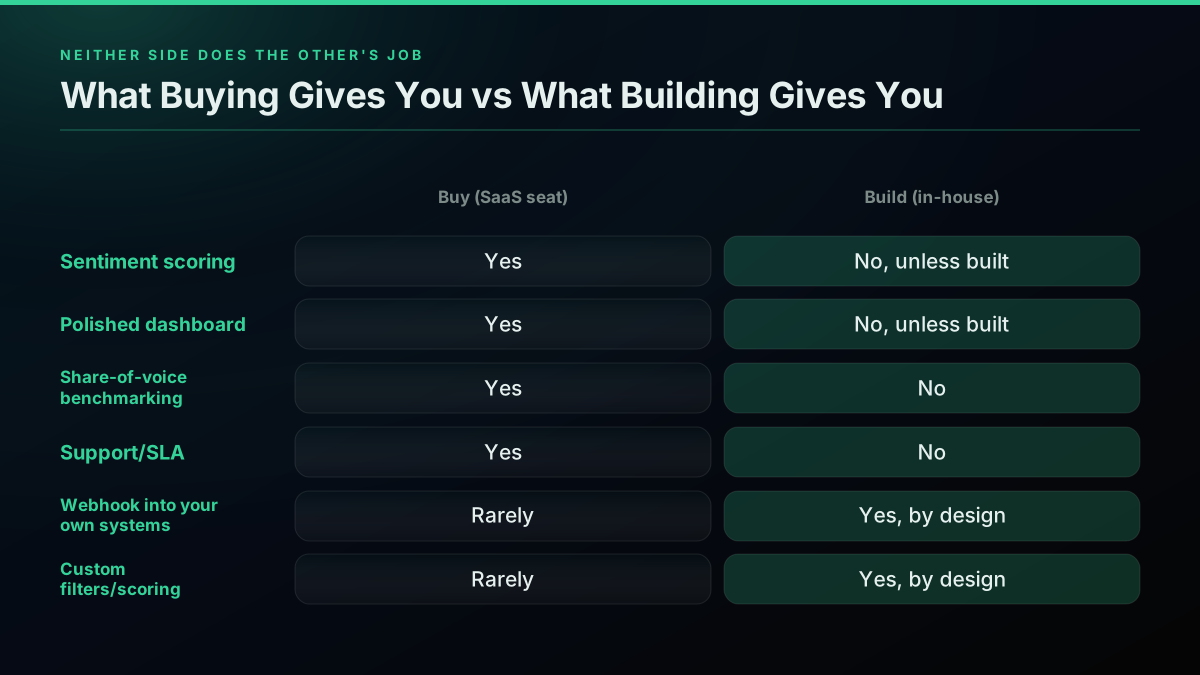
Buying isn't just "less work." A real SaaS listening tool ships things that are genuinely hard to justify building from scratch:
- Sentiment scoring tuned across languages and slang, which is its own ongoing machine-learning problem, not a weekend feature.
- A polished dashboard a non-technical stakeholder can open and understand without reading a README.
- Share-of-voice and competitor benchmarking, which requires the vendor's OWN broad data collection across competitors you don't control access to.
- Support and an SLA, so when something breaks at 2 a.m. it is someone else's pager, not yours.
- Approval workflows and multi-seat access, which matters the moment more than one person on a team needs to see or act on what's found.
None of that is trivial to replicate, and a team that actually needs it should buy it rather than reinvent a worse version over six months.
What Building Gives You That No SaaS Seat Ever Will
The reverse is just as real, and it's the honest reason teams build despite the cost math above. Real developer research for this piece surfaced the gap directly: a contributor evaluating exactly this category wrote that "most tools (TweetDeck, Hootsuite, AgoraPulse) do basic keyword streams but not developer-friendly, or with filterable JSON outputs wired to webhooks."
That is the actual dividing line. A SaaS dashboard is built to be READ. A build can be wired to ACT: pipe a filtered stream directly into an incident-response queue, a lead-scoring model, a Discord bot, or another internal system's trigger logic, with no human required to open a dashboard at all. A security team wants exactly this, per a real use case surfaced in the same research: alerting "when verified accounts or journalists mention your org with negative sentiment or security-related keywords," restricted to the right internal audience, which is not a feature any general-purpose listening dashboard is priced or built to do well.
If the requirement is genuinely "feed this into a system we already run," no vendor's dashboard was ever going to satisfy it regardless of price, and that is when the $12,000 and the 5 hours a week become a real, defensible engineering investment rather than reinventing what $29 a month already buys. That same read pipeline also powers adjacent use cases without extra build cost: trend tracking for what's rising around a keyword, and, if the monitor also needs to reply or escalate automatically, the write path covered in the Twitter bot guide.
The cheapest pay-as-you-go Twitter API. Try it free.
$0.0008 a call, about $0.04 per 1,000 tweets at 20 tweets a page. $0.50 free credits. No credit card required.
Where the Cost Argument for Building Actually Breaks Down
Run the math on cost alone and building rarely wins. A $29-a-month Awario subscription costs $348 a year. Against a $12,000 one-time build cost, that subscription would need to run for 34 years before it caught up to the initial engineering spend, and that is before counting a single month of the ~$1,840 ongoing maintenance tax a build carries and a subscription does not.
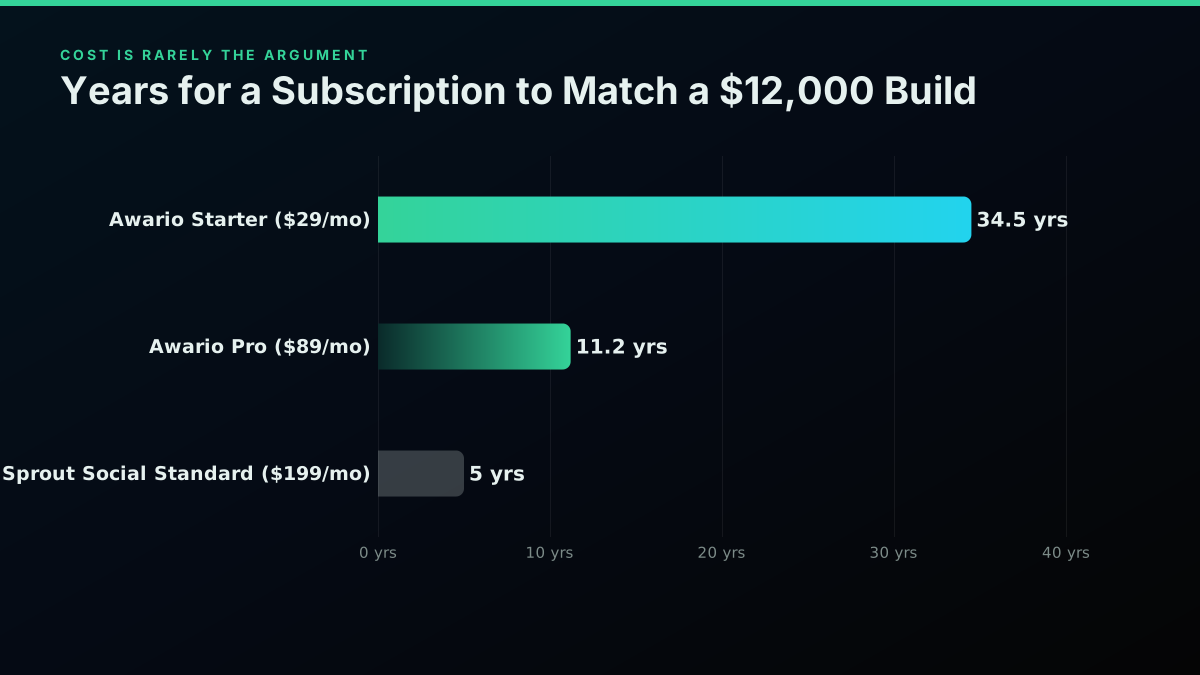
That framing sounds like a decisive case for buying, and for most teams it is. But it only holds if the honest requirement is "a dashboard that tells a human when something happens." The moment the real requirement is programmatic, wired into another system, or scoped to data access no vendor sells at any price, the cost comparison above is answering a question nobody actually asked.
Which Route Fits Your Team
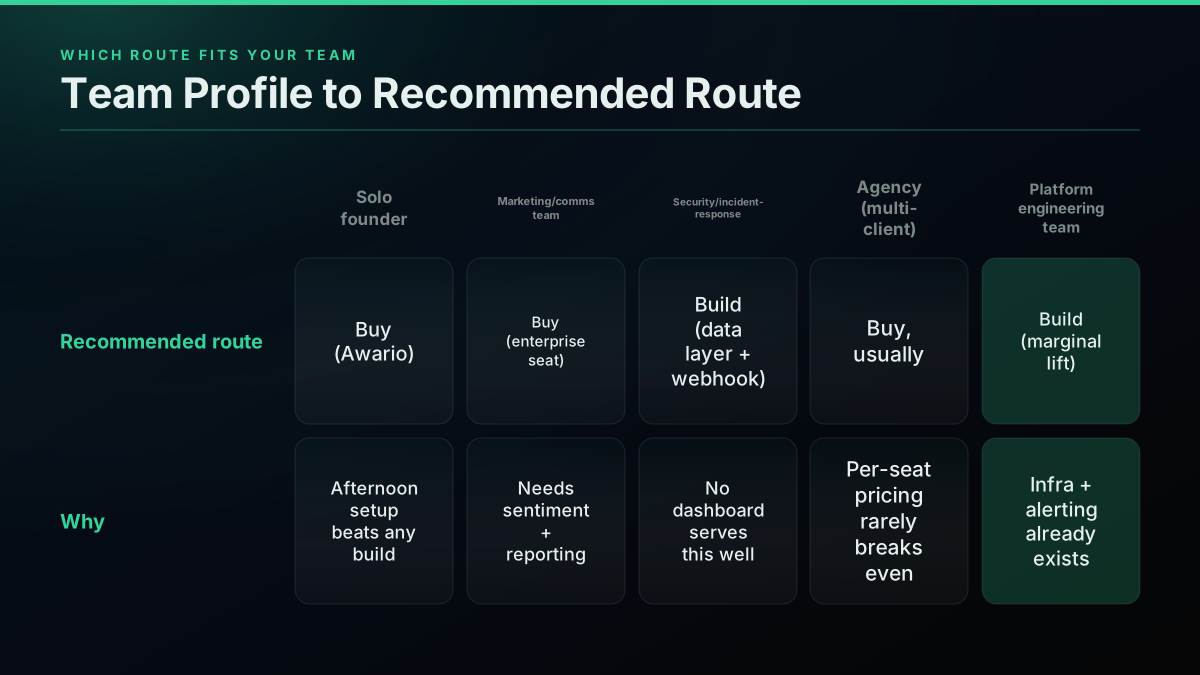
- Solo founder or small marketing team, watching brand and competitor mentions: buy. Awario at $29 to $89 a month solves this in an afternoon, and no engineering time is a rational tradeoff against a subscription this cheap.
- Marketing or comms team needing sentiment, share-of-voice, and executive reporting: buy, and expect to budget for an enterprise tier. This is exactly what Brandwatch, Meltwater, and Sprout Social's Listening add-on are built and priced for.
- Security or incident-response team needing alerts wired into an existing paging system: build, on a cheap data layer. No general-purpose listening dashboard is built to serve this use case well, and the integration requirement outweighs the engineering cost.
- Agency running monitoring across many client accounts: usually buy, unless the volume across clients is high enough that per-seat SaaS pricing multiplies past the build-plus-maintenance cost, which happens at real scale.
- A team already running its own data pipelines and internal tooling: build is a smaller relative lift here, since the ingestion and alerting infrastructure likely already exists in some form, and the marginal cost of adding one more data source is lower than the 140-hour estimate above assumes for a team starting from zero.
The Real Decision Isn't Build vs Buy. It's Data vs Logic.
The framing that actually resolves this decision is not "build or buy," it's separating the two things a monitoring tool does: fetching the data, and doing something useful with it. Buying a SaaS seat buys both, bundled, at a price that reflects the dashboard, the sentiment model, and the support contract on top of the raw data feed. Building means buying the data separately, cheaply, and writing the logic yourself, which is only worth the 140 hours and the ongoing maintenance tax when that logic needs to plug into something a dashboard structurally cannot.
If that's the actual requirement, the data layer does not have to be the expensive part of the decision. TwitterAPIs prices tweet and user data at $0.0008 a call, about $0.04 per 1,000 tweets, with $0.50 in free credit to prototype the ingestion layer before committing to anything, no developer account review, and a bearer-token key that works on the first request. Check the pricing page for the full endpoint list, or read the complete API tutorial for how the ingestion side of a build like this actually gets wired up.

Xitoring
@xitoring
Build vs buy in monitoring isn't "can you?" You can. It's "should you spend months not shipping your actual product?" https://t.co/TA9ri0Xjlt
That framing from a monitoring-tools vendor on X captures the buy-side case in one line: the cost that matters most is rarely the dollar figure, it's the months of engineering attention that don't go into whatever the team was actually trying to ship. The build-side case is just as real when the requirement genuinely can't be bought, which is the entire point of separating "data" from "logic" instead of treating this as one binary choice.

Radix IoT
@RadixIot
Build vs. buy on monitoring integration: custom code means owning maintenance forever. A vendor-agnostic platform doesn't lock clients into one hardware roadmap. #RadixIoT https://t.co/HKgPOTOSmM
That same "owning maintenance forever" tradeoff applies directly to a self-built X monitoring pipeline. It isn't a reason to avoid building. It's a reason to be honest about the $1,840-a-month bill that keeps arriving after launch, and to make sure whatever gets built is solving a problem a $29-a-month subscription genuinely couldn't.
What Real Teams Are Actually Asking For
A live thread on Reddit asked developers directly what they'd want from X/Twitter monitoring if they were building it themselves, and the answers map almost exactly onto the gap SaaS tools leave open.
What would you actually use X/Twitter monitoring for?
One reply wanted "saved searches, but smarter," combining "keywords + cashtags + languages + follower range" into one view with a daily digest instead of constant pings. Another, working in security, wanted incident-response alerts scoped to verified accounts and journalists, "but please make it easy to restrict access." A third pointed out that most existing tools "do basic keyword streams but not developer-friendly, or with filterable JSON outputs wired to webhooks," the exact gap this piece has been building the cost case around.
None of those are dashboard features. They're integration requirements, which is precisely the signal that separates a team that should build from a team that should buy.
Monitoring X/Twitter mentions in 2026 without the enterprise price tag. What's actually working for you?
The same operator behind that second thread ended up building their own tool after pricing the enterprise options, which is the pattern this whole comparison keeps surfacing: the buy side is genuinely strong for a dashboard a human reads, and the build side only wins when the real requirement was never a dashboard at all.
What the Build Actually Looks Like in Code
If the decision lands on building, here is the honest shape of it, condensed to the parts that decide whether the 140-hour estimate holds. This is a sketch, not the full implementation; the complete monitoring walkthrough covers the whole build end to end with the durable-cursor and production-hardening pieces this section only summarizes.
Start by confirming the endpoint works before writing a loop around it.
curl -s "https://api.twitterapis.com/twitter/user/mentions?username=yourbrand" \
  -H "Authorization: Bearer YOUR_API_KEY"
# Returns the most recent mentions as JSON.
# HTTP 401 means a bad or missing key; 402 means out of credits.
The response is already flattened, so the fields that matter (id for dedup, text and author for the alert) sit right on each object:
{
  "tweets": [
    {
      "id": "2071806356164902939",
      "text": "great support from @yourbrand today, fixed in minutes",
      "author": { "username": "a_customer", "followers_count": 1820 }
    }
  ]
}
The poll loop itself is where the ingestion and dedup components from the pipeline breakdown above actually live: fetch on an interval, track the highest id seen, and skip anything already processed.
import time, requests

API, KEY, HANDLE, INTERVAL = "https://api.twitterapis.com/twitter", "YOUR_API_KEY", "yourbrand", 15

def get_mentions(since_id=None):
    params = {"username": HANDLE}
    if since_id:
        params["since_id"] = since_id
    r = requests.get(f"{API}/user/mentions",
                     headers={"Authorization": f"Bearer {KEY}"}, params=params, timeout=30)
    r.raise_for_status()
    return r.json().get("tweets", [])

def run():
    since_id, seen = None, set()
    while True:
        for t in reversed(get_mentions(since_id)):
            if t["id"] in seen:
                continue
            seen.add(t["id"])
            since_id = max(since_id or "0", t["id"], key=int)
            alert(t)
        time.sleep(INTERVAL)
Keyword monitoring, the higher-value case for most brand and competitor tracking, swaps the endpoint and adds a query, covered in full in the advanced search operators reference:
def get_keyword_mentions(query, since_id=None):
    params = {"query": query, "product": "Latest"}
    if since_id:
        params["since_id"] = since_id
    r = requests.get(f"{API}/tweet/advanced_search",
                     headers={"Authorization": f"Bearer {KEY}"}, params=params, timeout=30)
    r.raise_for_status()
    return r.json().get("tweets", [])
This is the filtering and alert-routing layer from the pipeline breakdown: detection alone is not the job, the mention has to reach a human or a system, which is why an incoming webhook rather than a dashboard is the natural destination for a build.
def alert(tweet):
    author = tweet["author"]["username"]
    text = f":bell: New mention by *@{author}*\n> {tweet['text']}"
    requests.post("https://hooks.slack.com/services/XXX/YYY/ZZZ", json={"text": text}, timeout=10)
And storage, the last pipeline component, is what turns a script into a service rather than a demo that loses state on every restart:
import json, os
STATE_FILE = "monitor_state.json"

def save_since_id(since_id):
    json.dump({"since_id": since_id}, open(STATE_FILE, "w"))
A production version of this loop wraps every call in error handling that treats an HTTP 429 as "slow down" rather than "crash," using the Python requests library's own exception types to back off and retry. None of that is difficult code. What it demonstrates is that the 140-hour estimate earlier in this piece is not padding, it is the gap between "a script that works in a demo" and something that survives a restart, a rate limit, and six months of production without silently dropping a mention. For the request layer underneath (pagination, error codes, retries) the complete API tutorial goes deeper, and the Python and Node.js tutorials cover the same shape in each language. If the monitoring feed also needs a sentiment score layered on top, the same search call powers the sentiment analysis workflow, and a rate-limit backoff strategy, including the official published limits, is covered in the rate limit guide. The operational defaults for running this as a long-lived service, not just a script, live in the best practices guide.
Watching a build like this actually get wired up end to end, from the search call to the Slack alert, makes the shape of it concrete faster than reading code in isolation.
https://www.youtube.com/watch?v=jpV1B2N4IxY
That walkthrough covers exactly the ingestion component from the pipeline breakdown above: authenticating against an API, querying on a schedule, and handling what comes back. The dedup, filtering, and alert-routing layers on top of it are what turn a single API call into an actual monitoring tool, and are the part of the 140-hour estimate that a raw API tutorial never covers.
The Bottom Line
Buying a Twitter/X monitoring seat is the right call for most teams, at a real range of $29 to about $2,000 a month depending on how much dashboard, sentiment scoring, and support you need, per the vendor pricing table earlier in this piece. Building is the right call only when the output has to feed a system you already run, and even then, the honest cost is closer to about $34,000 in the first year of engineering time than the "just hit the API" pitch usually admits. The one mistake that costs real money either way: building against the official X API's $0.005-per-read metered rate instead of a purpose-priced data layer. If a build is genuinely the right call, price the data at $0.04 per 1,000 tweets on TwitterAPIs, not about $5.00, and spend the 140 hours on the filtering and alert-routing logic that a subscription was never going to give you anyway.
Before committing to any monitoring product, it is worth knowing what a monitor should tell you when it is failing, because a dead collector and a quiet week produce the same empty inbox.
// sources
Where these numbers come from
Each row is a figure in this post and the artefact it was read from. Prices and limits on this platform move, so check the date on the source before you plan against it.
- Awario pricing page
- Source for the self-serve tier prices cited throughout: Starter $29/mo, Pro $89/mo, Enterprise $249/mo, all published without a sales call.
- Sprout Social pricing page
- Source for the per-seat prices in the vendor comparison: Standard $199/seat/mo, Professional $299/seat/mo, Advanced $399/seat/mo, and the confirmation that Listening ships as an unpriced add-on to Standard and up.
- Hootsuite plans page
- Source for the annual-billed entry prices: Standard $99/mo, Professional $199/mo, Advanced $399/mo.
- Brandwatch pricing page
- Confirms Brandwatch publishes no self-serve price and routes every prospect through a demo request, the basis for treating its real-world monthly cost as a sales-gated estimate rather than a quoted figure.
- X API official pricing reference
- Source of the $0.005 per post read metered rate used throughout the cost comparisons.
- r/socialmedia, live Reddit thread
- A social media operator's own breakdown of the enterprise listening tier ('four figures a month and a sales call before you even see a price') and the claim that X's API pricing killed the mid-market third-party tool tier, cited as first-hand market evidence.
- r/WebScrapingInsider, live Reddit thread
- Real developer responses on what existing monitoring tools miss, including the direct quote that TweetDeck, Hootsuite, and AgoraPulse are 'not developer-friendly, or with filterable JSON outputs wired to webhooks,' the basis for the developer-access argument in this piece.
Frequently Asked Questions
It depends on volume and who is asking. A solo founder or a small team watching a handful of keywords is almost always better off buying: Awario starts at $29 a month and a subscription beats even a single day of engineering time. A team that needs custom filters, webhook delivery into an existing pipeline, or monitoring wired into a product rather than a dashboard usually ends up building, because no SaaS listening tool ships a developer-first API at a price that scales down to a side project. The deciding question is not budget, it is whether the output needs to live inside a dashboard a human reads, or inside a system that acts on it automatically.
Two separate costs stack: the build and the data. At a $85-an-hour fully loaded engineering rate, a minimal monitoring pipeline (keyword ingestion, deduplication, alert delivery, a basic dashboard) runs about 140 hours to reach something production-safe, $12,000 in one-time engineering cost. After that, ongoing maintenance runs about 5 hours a week keeping the pipeline alive against API changes and edge cases, which is close to $1,840 a month in engineering time alone, before any data bill. The data itself is the cheap part: monitoring 1.5 million tweets a month through TwitterAPIs at $0.0008 per call, which is $0.04 per 1,000 tweets at a full 20-tweet page, costs about $60 a month, against $7,500 a month for the same volume on the official X API's metered read rate.
Ship data where a dashboard cannot go. A real developer complaint surfaced directly in research for this piece: 'Most tools (TweetDeck, Hootsuite, AgoraPulse) do basic keyword streams but not developer-friendly, or with filterable JSON outputs wired to webhooks.' A SaaS seat is built to be read by a human inside its own UI. A build can pipe a filtered, deduplicated stream straight into Slack, a database, a security incident queue, or another system's trigger logic, without a human ever opening a dashboard. That gap is exactly where the build side of this decision earns its engineering cost back.
It ranges from $29 a month to well over $1,500 a month depending on tier. Awario runs Starter at $29/mo, Pro at $89/mo, and Enterprise at $249/mo, all self-serve with published pricing. Sprout Social's Standard plan is $199 per seat per month, Professional is $299, and Advanced is $399, with Listening sold as a separate add-on Sprout does not publish a price for. Hootsuite's Standard plan runs $99 a month, Professional $199, Advanced $399, billed annually. Brandwatch and Meltwater do not publish pricing at all and route every prospect through a sales demo, which is itself a signal: enterprise social listening in 2026 commonly lands between $1,200 and $2,000 a month once a real deployment is scoped.
The official X API's standard pay-per-use tier charges $0.005 per post read. That figure looks trivial until it is multiplied by monitoring volume: a keyword stream pulling 1.5 million reads a month costs about $7,500 a month on the official rate alone, before a single line of dashboard or alerting code is written. That number is why almost every third-party monitoring tool, from the enterprise listening suites down to a solo developer's side project, sources its data through a cheaper third-party API rather than X's own metered tier.
Rarely on cost alone, and that is the point most build-vs-buy comparisons miss. A $29-a-month Awario subscription pays for itself against 140 hours of build time for 34 years. Building wins on CAPABILITY, not price: when the requirement is a live webhook into an existing system, a custom scoring model wired to first-party data, or a feature no vendor sells at any price. If the honest requirement is 'alert me when someone mentions my brand,' buy it. If the requirement is 'feed this into a system I already run,' the SaaS dashboard was never going to be the answer regardless of price.
Check out similar blogs
More guides on the Twitter/X API, scraping, and pricing.
The Twitter API Developer Reference (2026): Endpoints, Rate Limits, Error Codes and Pagination
A single indexed reference for the Twitter/X API in 2026: the endpoint catalog, how authentication and bearer tokens work, the rate limits behind every 429, what error codes 401, 403, and 429 mean, cursor pagination, response shapes, and the real per-call cost of each call.
How to Choose a Twitter/X API in 2026: The Complete Buyer's Guide
A decision framework for choosing a Twitter/X API in 2026: the seven criteria that actually matter (pricing model, data coverage, rate limits, auth, reliability, compliance, migration cost), a use-case decision tree, and where each path wins.
What You Can Build With the Twitter/X API: 20+ Real Use Cases (2026)
A 2026 field guide to what you can actually build with the Twitter/X API: 24 real use cases across listening, monitoring, audience graph, research, and bots, each mapped to the endpoint that powers it and the real per-call cost.

How to Track a Tweet's Performance in Real Time with the X API
Poll a tweet's engagement counts over time with the X API, compute a views-to-likes ratio, and read the quote-tweet layer to tell an organically growing launch tweet from a boosted one. Tested Python and curl.
What "Rate Limited" Actually Means on X (Every Limit, Measured)
"Sorry, you are rate limited" is one message covering two different systems: a consumer action ceiling and a developer API window. Here is what the term means, the current numbers for both, where it came from, and how long it actually lasts.
Fetch a Full Twitter Thread via API in One Call (2026)
How to pull an entire Twitter thread, the root tweet plus every connected tweet in the chain, in a single API call with the tweet/thread endpoint, instead of walking replies by hand. Live-tested code in curl, Python, and Node.js, with the real per-call cost.
Can You Recover a Deleted Tweet via API in 2026?
The honest answer: no API un-deletes a tweet the author removed. Here is what actually works in 2026, checking whether it is really gone, finding an archived copy, and the capture-before-delete pattern that prevents the loss, with live-tested code.
Fastest Twitter API in 2026: 7 Providers Ranked by Real Response Time and Throughput
Which Twitter (X) API is actually fastest in 2026? We measured our own response time, pulled every published benchmark, and ranked 7 providers by real per-tweet latency, throughput, and the wall-clock time to finish a 100,000-tweet job.