GUIDE
How to Monitor Twitter (X) Mentions in Real Time with an API (2026)
Track Twitter/X mentions in real time with an API. The three mention endpoints, copy-paste polling code with since_id dedup, a Slack alert recipe, and what it actually costs per month.
Someone just posted about your product on X. A potential customer asked which tool to buy. A competitor announced a price cut. Each of these is a mention, and each one has a short window where a reply or a decision actually matters. Miss it by a day and the conversation has moved on. The job of a mention monitor is to close that window: detect the post within seconds and route it somewhere you will see it. This guide shows how to build that with an API, in code you can copy, at a cost you set with one dial: tens of dollars a month for continuous monitoring, not the thousands an enterprise stream costs.
You get the three endpoints that return mentions and when to use each, a working poll loop with deduplication so you never alert twice, a Slack and webhook recipe, an honest cost table by volume, and the production details, gap recovery, backoff, and cursors, that separate a demo from something you can leave running. Pricing throughout reflects the pay-per-call model, not the old enterprise tiers.
TL;DR: Monitor X mentions in real time by polling a fast search endpoint on a short timer and pushing new matches to Slack. Use the user mentions endpoint to watch one account, keyword search to track a brand or topic, and a filtered stream only for high volume. Pass
since_idso you only get new posts, dedup against a seen set, then POST each match to a Slack incoming webhook. With a pay-per-call API, reads are 0.0008 dollars per call, about 0.04 dollars per 1,000 tweets, and signup includes 0.50 dollars in free credits with no card. Polling detects within seconds; a stream is sub-second but costs more.
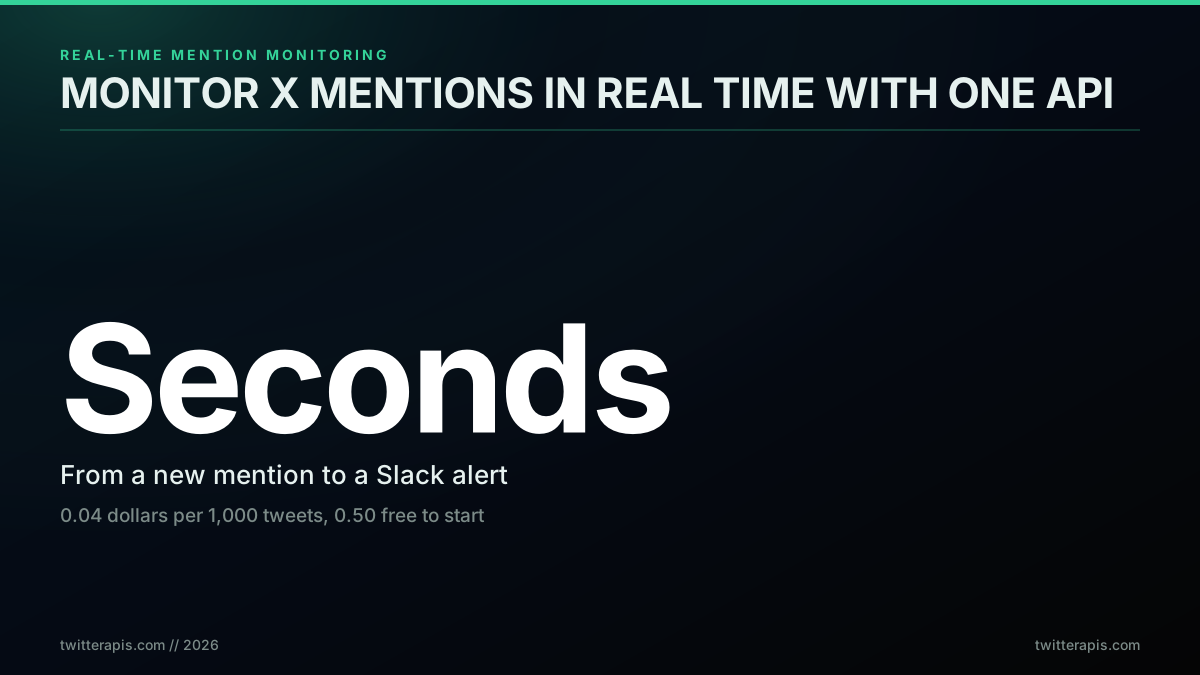
Real-time mention monitoring in one line: seconds of latency, pennies per thousand posts
What Real-Time Mention Monitoring Actually Means
Real-time mention monitoring is the practice of detecting new posts that reference a handle, brand, or keyword within seconds of them being published, then routing each one to an alert channel so a human or an agent can act. The "real-time" part is a latency target, not a single technology. You can hit it two ways: poll an endpoint on a tight interval, or hold open a stream that pushes matches to you. Polling within seconds is real-time enough for almost every business case; a stream is real-time in the sub-second sense that matters for trading and breaking news.
The reason this is worth automating is that mentions are time-sensitive and easy to miss. A buyer asking "what is the best X for Y" is in-market for minutes, not weeks. A complaint that goes unanswered for a day reads as neglect; answered in ten minutes it reads as great support. The builder below put the whole job in one sentence, and it doubles as a perfect spec for what you are about to build.
A founder describing the swap, via @WorkflowWhisper on X:

Alton Syn
@WorkflowWhisper
i replaced a $8,200 "social listening system" quote yesterday. the agency wanted 4 weeks. i described it in one paragraph: "monitor twitter and reddit for mentions of my brand and competitors, summarize sentiment daily, alert slack immediately if anything negative trends"
That paragraph is the entire product: watch for mentions, judge them, alert immediately. The expensive part was never the engineering. It was access to the data. For years that access was the wall, priced for enterprises and unstable for everyone else, which is the context every mention monitor is built against today. The cost of the data, not the code, is still the load-bearing decision, and it is the one this guide keeps returning to.
The stakes are concrete. When you do not monitor, the conversations that could grow the business happen without you, and your competitors answer the questions you never saw.

Timothy Bramlett
@TimothyBramlett
Stop missing conversations that could grow your business Every day potential customers ask "What's the best [your product]?" on Reddit, Twitter, forums. Your competitors jump in. You don't even know it happened. This is revenue walking out the door. Most builders have no clue…

That is the cost of no monitor, stated plainly. The fix is a loop that watches the right surface and pushes every match to where you work. Here is the shape of that loop before we build it.
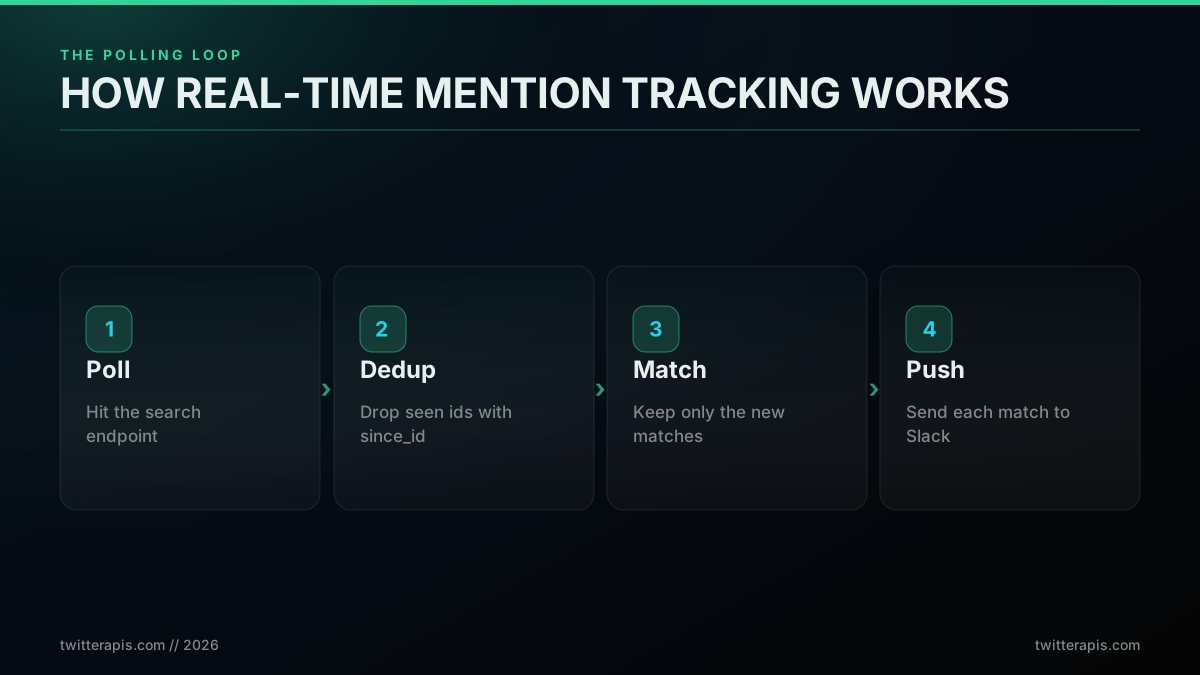
The polling loop: poll, dedup, match, push
The loop has four moves. Poll the API for recent posts that match your terms. Dedup against what you already processed using since_id so you never see the same post twice. Keep the new matches. Push each one to your channel. Everything else in this guide is detail on top of those four steps: which endpoint to poll, how to dedup correctly, how often to run, and what it costs. If you have never called the X API at all, the complete Twitter API tutorial and the how to get an API key guide cover the request layer this monitor sits on.
Why Monitoring Got Harder After 2023
If you last looked at this before 2023, the ground has shifted. The free, generous Twitter API that powered a generation of monitoring tools is gone. After the platform became X, read access moved behind paid tiers, and the entry price became the story. The pain is not a 2026 surprise; it is years deep, and it is the single most common complaint from people who build in this space. Access has been, in one developer's words, "prohibitively expensive and cumbersome" for a long time, and the enterprise quotes that circulate, five figures a month for real data access, put serious monitoring out of reach for most teams that tried the official path. The change that bit hardest is that there is no free read path at all: the old free tier never read, and pay-per-use bills every read, as developers keep rediscovering the moment they try to build a mention bot.
Twitter bot reply to mentions
The top answer in that thread states the constraint exactly: the free tier only lets you post, and reading tweets, the very thing a monitor depends on, requires at least the basic paid plan. That single fact, covered in depth in is the Twitter API free, is why every mention monitor now starts with a pricing decision before a single line of code. The official tiers and what each unlocks are listed in the X API documentation.
That pricing shift had a second-order effect: it killed the third-party ecosystem that used to do this for you.

wiiiimm
@wiiiimm
@Niwrax @XDevelopers you know how Twitter API became so expensive after becoming X? that was why all the 3rd party Twitter apps died
When the apps died, the build-it-yourself path came back, and with it the same engineering question every monitor has to answer: how fresh does the data need to be, and what will that freshness cost. That tradeoff is the whole game, and the cheapest honest answer is usually "poll, do not stream." A pay-per-call API changes the math underneath all of this, because you stop paying a flat enterprise tier and start paying only for the calls you make, which for a focused mention monitor is a tiny number. The current pricing reality is simple to state: reads are 0.0008 dollars per call, each call returns about 20 posts, and signup includes 0.50 dollars in free credits with no card. That is the backdrop for every cost number below.
Polling vs Streaming: Pick the Right Approach
The first real decision is polling versus streaming, and most teams overthink it. Polling asks the API for new posts on a fixed interval and compares the results to what it has already seen. Streaming holds a connection open and receives each matching post the instant it is published. Polling is simpler, cheaper, and detects a mention within seconds. Streaming is sub-second but needs an always-on consumer, reconnect logic, and a higher pricing tier. Here is the latency difference in plain numbers.
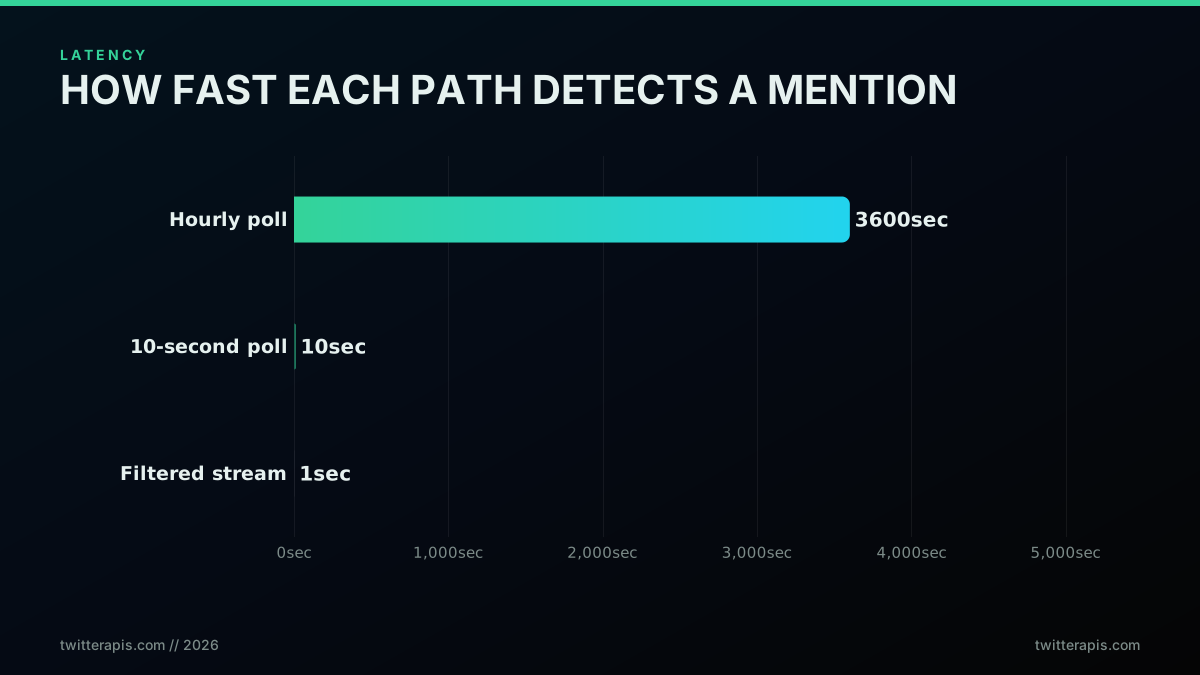
How fast each path detects a new mention
The gap between hourly and ten-second polling is enormous; the gap between ten-second polling and streaming is small for most uses. That is why the right default is a tight poll, not a stream. A founder who actually shipped a monitoring product described the tradeoff exactly, and why he chose the cheaper side of it: hourly checks keep the product affordable, but they are not ideal, and tightening the interval is what costs money. That is the decision in one sentence, and it applies to your build too. Choose your interval by how fast you genuinely need to react, then pay for that and no more.
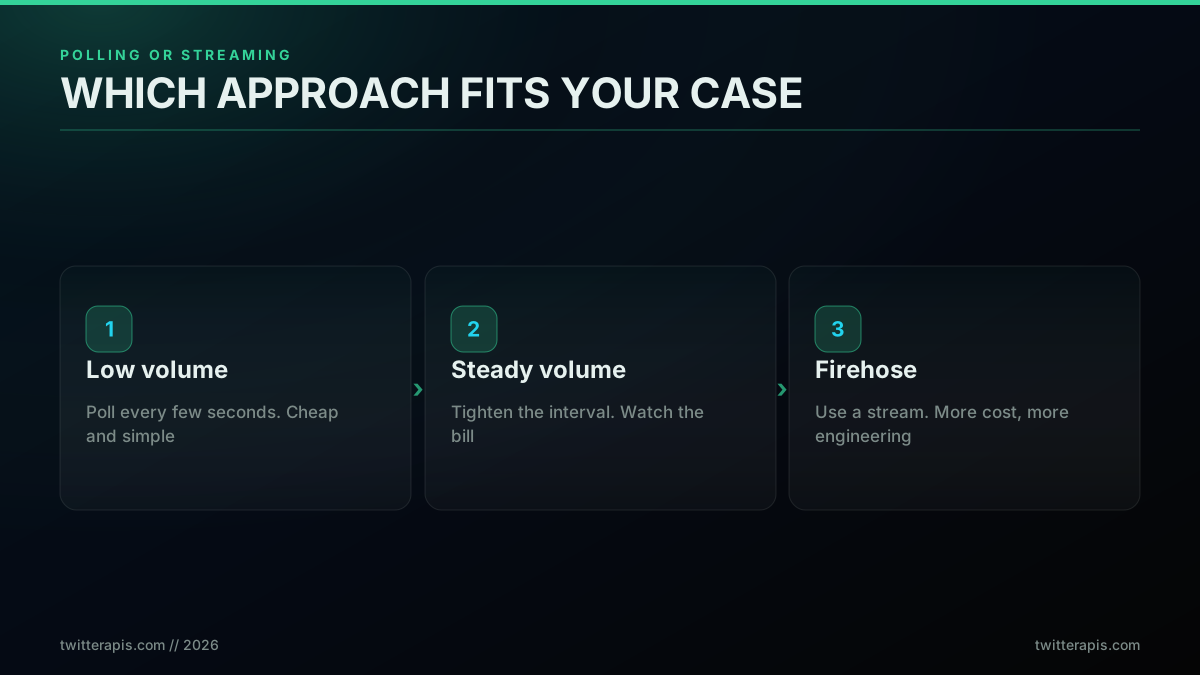
Polling or streaming, by mention volume
The rule of thumb: low and steady mention volume should poll, because a poll loop is a few lines of code and the cost is trivial. Only a genuine firehose, thousands of matching posts an hour where a multi-second gap would lose data, justifies the engineering of a stream. For brand monitoring, support, and lead gen, polling within seconds wins on every axis that matters. The honest framing matters here, because vendor copy often conflates "real time" with "streaming." Polling within seconds is real time for a human workflow; reserve the word "streaming" for the cases that truly need sub-second delivery.
Pick the Right Endpoint: Three Mention Surfaces
A mention is not one thing, so there is not one endpoint. There are three surfaces, and choosing the right one is most of the battle. The user mentions timeline returns posts that tag a specific account. Keyword search returns any post containing your terms, with or without an @ handle. A filtered stream pushes high-volume matches in real time. Match the surface to the job.
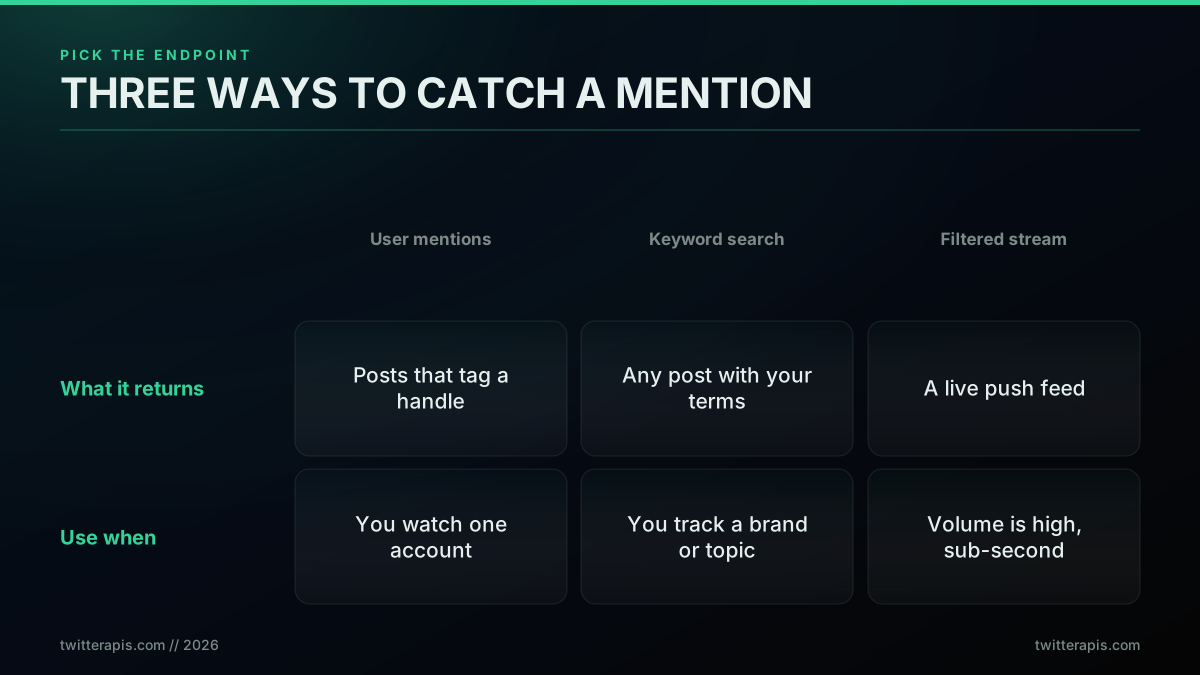
Three ways to catch a mention, and when to use each
Use the user mentions timeline when you watch a single account, usually your own. The official endpoint is GET /2/users/{id}/mentions, and a pay-per-call API exposes the same concept through a dedicated mentions tool. It returns posts that explicitly tag the handle, which is exactly what you want for "who is talking to me." That endpoint takes a numeric user ID rather than a handle, so if you only have the @handle, the free Twitter ID Finder resolves it in one lookup with no key required. Use keyword search when you track a brand name, product, hashtag, or topic that people mention without the @ handle, which is the majority of brand conversation. This is the advanced search endpoint, and it is the workhorse of most monitors because it catches the mentions the mentions-timeline misses. Use a filtered stream only when volume is high enough that polling cannot keep pace; the official filtered stream tutorial covers the rule syntax. For the vast majority of monitors, keyword search on a tight poll is the right and cheapest core.
The keyword path is also what powers social listening for sales, not just brand defense. The pattern is to watch for the question your product answers and reply when intent shows.

Akhilesh Maheshwari
@ak2maheshwari
Everyone is fighting for attention on LinkedIn. Meanwhile, buyers are on Reddit and Twitter asking very specific questions. We stopped chasing leads and started listening. We use social listening at Boomerang to track keywords and mentions and reply the moment intent shows up.…
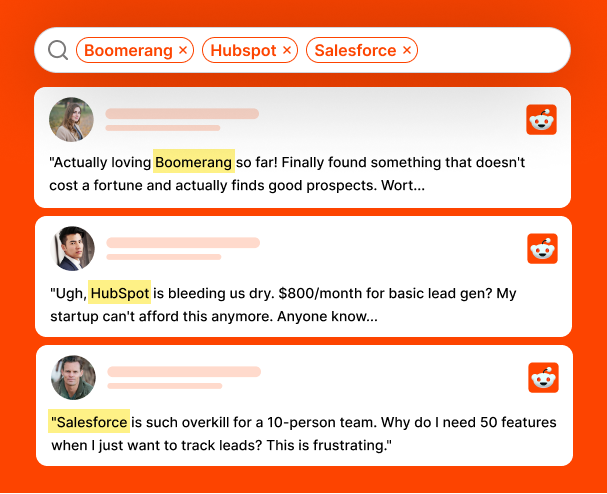
That is keyword monitoring as a growth channel rather than a defensive one. The same loop that catches complaints catches buying signals; only the search terms change.
Start building with TwitterAPIs
$0.0008 a call, about $0.04 per 1,000 tweets at 20 tweets a page. $0.50 free credits. No credit card required.
Implementation: Track @Handle Mentions
Start with the simplest case: watch one account for new mentions. The loop calls the mentions endpoint, keeps the highest post id it has seen, and passes that id back as since_id on the next call so the API only returns newer posts. Before writing the loop, confirm the endpoint works with a single call. A quick curl is the fastest way to check your key and see the shape of the data.
curl -s "https://api.twitterapis.com/twitter/user/mentions?username=yourbrand" \
  -H "Authorization: Bearer YOUR_API_KEY"
# Returns the most recent mentions as JSON.
# HTTP 401 means a bad or missing key; 402 means out of credits.
The response is already flattened, so you read the fields you need straight off each object without joining expansion blocks. A single mention looks like this:
{
  "tweets": [
    {
      "id": "2071806356164902939",
      "text": "great support from @yourbrand today, fixed in minutes",
      "created_at": "Tue Jun 30 04:01:42 +0000 2026",
      "author": { "username": "a_customer", "followers_count": 1820 },
      "favorite_count": 12,
      "reply_count": 1
    }
  ],
  "next_cursor": "cur-8f21ba..."
}
The id field drives deduplication, text and author are what you alert on, and next_cursor tells a backfill loop whether to keep paging: a non-empty cursor means another page, and a null or empty one means you have reached the end. With the shape confirmed, here is the complete Python poll loop with deduplication.
import time
import requests

API = "https://api.twitterapis.com/twitter"
KEY = "YOUR_API_KEY"          # from twitterapis.com/signup
HANDLE = "yourbrand"          # the account to watch
INTERVAL = 15                 # seconds between polls

def get_mentions(since_id=None):
    params = {"username": HANDLE}
    if since_id:
        params["since_id"] = since_id
    r = requests.get(f"{API}/user/mentions",
                     headers={"Authorization": f"Bearer {KEY}"}, params=params, timeout=30)
    r.raise_for_status()
    return r.json().get("tweets", [])

def run():
    since_id = None
    seen = set()
    while True:
        try:
            tweets = get_mentions(since_id)
            # API returns newest first; process oldest first so alerts are in order
            for t in reversed(tweets):
                if t["id"] in seen:
                    continue
                seen.add(t["id"])
                since_id = max(since_id or "0", t["id"], key=int)
                alert(t)
        except requests.HTTPError as e:
            print("api error, backing off:", e)
            time.sleep(INTERVAL * 2)
        time.sleep(INTERVAL)

def alert(tweet):
    print(f"@{tweet['author']['username']}: {tweet['text']}")

run()
Two details make this correct rather than just functional. First, since_id is the server-side filter: the API only returns posts newer than that id, so you transfer and pay for less data on every poll after the first. Second, the seen set is a client-side safety net for the edge where two posts share the boundary id or a retry overlaps a window. Together they guarantee each mention is processed exactly once. The same call in raw HTTP for other languages is covered in the Python tutorial and the Node.js tutorial.
Implementation: Track Brand-Keyword Mentions
Most brand conversation never tags your handle, so keyword search is the higher-value loop. The structure is identical; you swap the mentions endpoint for advanced search and pass a query. The query is where you encode precision, because a noisy query produces noisy alerts.
def get_keyword_mentions(query, since_id=None):
    params = {"query": query, "product": "Latest"}
    if since_id:
        params["since_id"] = since_id
    r = requests.get(f"{API}/tweet/advanced_search",
                     headers={"Authorization": f"Bearer {KEY}"}, params=params, timeout=30)
    r.raise_for_status()
    return r.json().get("tweets", [])

# Examples of precise queries:
#   '"your brand" -filter:retweets lang:en'   brand name, no retweets, English
#   '(yourbrand OR "your brand") -from:yourbrand'  exclude your own posts
#   '"best crm" OR "recommend a crm"'         buying-intent listening
QUERY = '"your brand" -filter:retweets lang:en'
Use product: "Latest" for monitoring so results come back newest-first by time, not by engagement. Exclude retweets and your own account to cut the two biggest sources of noise. Quote multi-word brand names so you match the phrase, not the loose words. The full operator set, the from:, since:, min_faves:, and filter syntax, is in the advanced search operators reference, and the same search powers the sentiment analysis and trends workflows if you want to score or rank what you catch.
A short walkthrough of the build, from the search call to the alert, is below.
https://www.youtube.com/watch?v=TUBbpiSHENs
The video covers the same poll-and-route shape end to end, which is useful background before you wire it into your own stack.
Push New Mentions to Slack, Discord, or a Webhook
Detection is only half the job; the mention has to reach you. The cleanest pattern is an incoming webhook: a URL that posts a message to a channel when you send it JSON. Replace the alert function from earlier with one that formats the mention and POSTs it.
SLACK_WEBHOOK = "https://hooks.slack.com/services/XXX/YYY/ZZZ"

def alert(tweet):
    author = tweet["author"]["username"]
    url = f"https://x.com/{author}/status/{tweet['id']}"
    text = (f":bell: New mention by *@{author}*\n"
            f"> {tweet['text']}\n{url}")
    requests.post(SLACK_WEBHOOK, json={"text": text}, timeout=10)
The identical shape works for a Discord webhook (post to the channel webhook URL) and for any custom HTTP endpoint that kicks off downstream automation, a ticket, a CRM note, an agent run. Keep the alert payload small and include the direct post link so a human can open the conversation in one click. If you want the agent to also reply, the write path, posting and replying as an account, is covered in the Twitter bot guide; for monitoring alone you never need write access, which keeps setup to a single read key.
The broader point is that this used to be an enterprise purchase and is now a paragraph of code plus a webhook. The deflation of "social listening system" from a four-figure quote to a short script is the whole reason to build rather than buy for the alerting layer.
Poll Frequency and What It Costs
Cost on a pay-per-call API is a direct function of two things: how often you poll, and how many posts you process. Reads are 0.0008 dollars per call, and one call returns about 20 posts. The poll interval sets your call count, and it is the only dial that meaningfully moves the bill. For the full per-call breakdown and how it compares to other providers, see the Twitter API cost page and the cost benchmark.
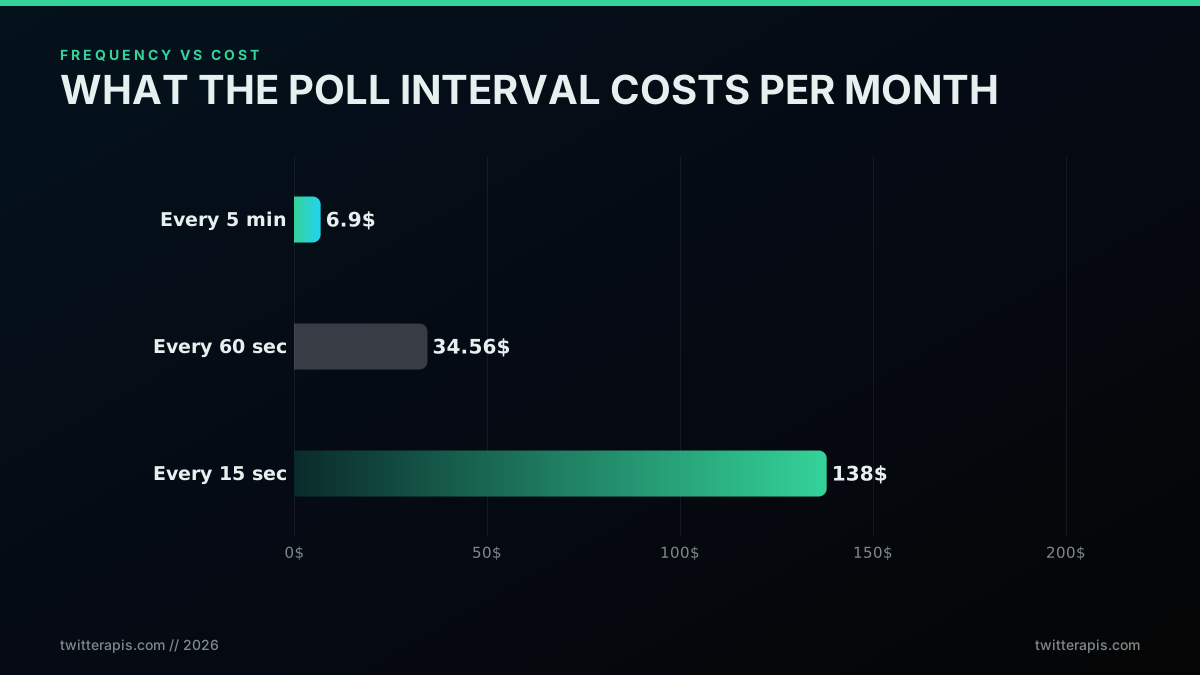
What the poll interval costs per month
The arithmetic is easy to do yourself, and it is per call, not per mention. Polling once every 60 seconds is about 43,200 calls a month, which at 0.0008 dollars per call is about 34.56 dollars. Stretch the interval to once every five minutes and it falls to about 6.90 dollars; tighten it to every 15 seconds and it climbs to about 138 dollars, or about 415 dollars at every five seconds. Those numbers assume one query; if you watch several brands or terms, multiply by the number of queries. The point stands: the poll interval is the price dial. A relaxed five-minute monitor runs single-digit dollars a month, a standard 60-second monitor is a few tens of dollars, and only an aggressive sub-15-second monitor reaches the hundreds, still an order of magnitude under an enterprise stream. The free credits cover all of your building and testing. Now compare a continuous 60-second monitor against the alternatives.
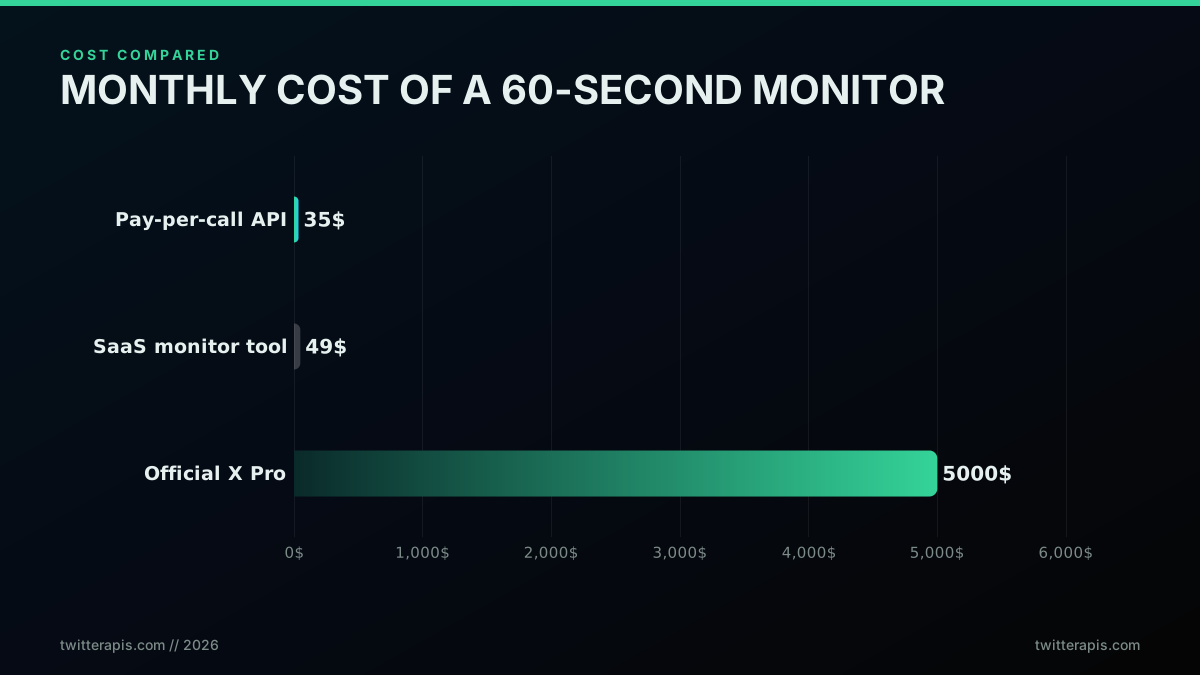
What a continuous 60-second monitor costs across three options
At a 60-second poll the pay-per-call API is about 35 dollars a month, a hosted SaaS monitor is a comparable few tens of dollars with seat and volume limits, and the official X Pro tier for equivalent real-time access runs into the thousands. The pay-per-call edge is control and scaling, not just headline price: you tune the interval down to single-digit dollars when minute-latency is fine, you add queries without buying seats, and you only pay for the calls you actually make. This is the same pressure that makes builders ration their own apps; one developer noted he had to add rate limiting precisely because "twitter api is so costly." A per-call tier lets you manage that pressure directly with one number, the interval, instead of a fixed monthly bill.
The same calculus is what pushes people to build instead of buy at the high end of volume, where the enterprise tools get genuinely expensive.
[deleted by user]
In that thread a builder tracking more than a thousand keywords compares his own polling tool against an enterprise listening platform quoted in the thousands of dollars a month for the same coverage. That is the build-versus-buy line in practice: at low volume a SaaS seat is fine, but as keyword count climbs the flat enterprise fee balloons while a pay-per-call poll loop scales with usage, not with a sales contract.
The cheapest pay-as-you-go Twitter API. Try it free.
$0.0008 a call, about $0.04 per 1,000 tweets at 20 tweets a page. $0.50 free credits. No credit card required.
Build vs Buy: API, SaaS Tool, or Official Stream
The build-versus-buy decision comes down to four factors, and the right answer depends on which you weight most. A pay-per-call API gives you the lowest cost, full control, and custom routing for a few lines of code. A hosted SaaS monitor gives you a dashboard and zero code for a flat fee and fixed limits. The official filtered stream gives you sub-second delivery at the highest cost and the most engineering. Here is the comparison on the axes that decide it.
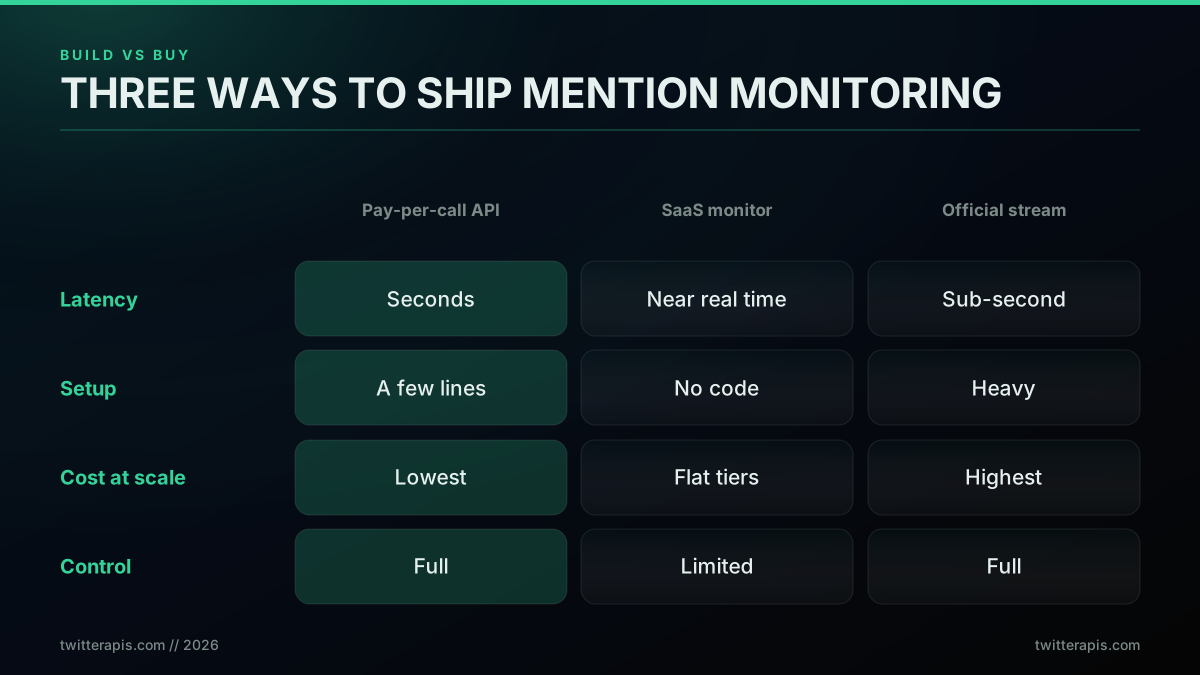
Build versus buy across the three approaches
Choose the API when you want alerts wired into your own systems, the lowest cost at scale, and control over exactly what you match and where it goes, and you can spend an afternoon on it. Choose a SaaS tool when you need a reporting dashboard and built-in sentiment more than you need control, and the monthly fee is acceptable. Choose the official stream only for genuine sub-second, high-volume needs with a budget to match. A common and sensible pattern is to build the API-based alerting yourself, because alerting is where speed and cost matter, and add a SaaS tool later only for executive reporting. The use cases below all run on the same read path, so building once covers most of them.
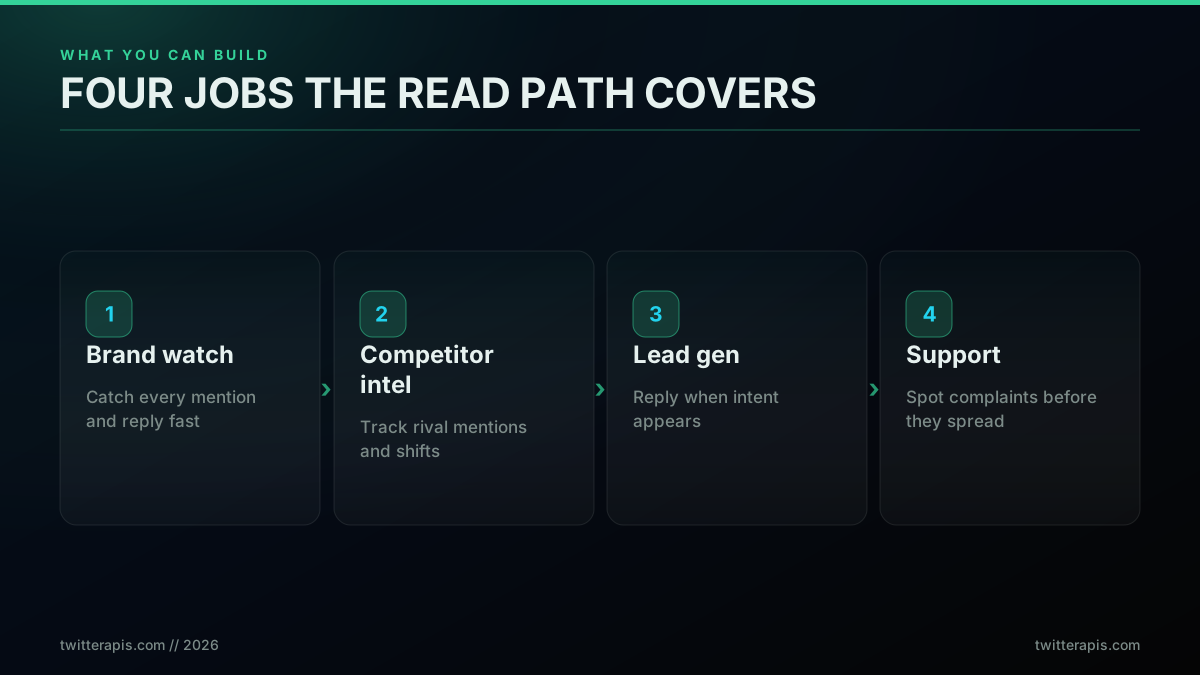
Four jobs the read path covers
Brand watch catches every mention and lets you reply fast. Competitor intel tracks rival mentions and surfaces shifts in how people talk about them. Lead gen turns the keyword loop into a buying-intent radar. Support spots complaints before they spread. One monitor, four jobs, and only the query changes between them. In practice most teams run several queries through the same loop at once, one for the brand handle, one for the brand name without the handle, and one for each competitor or buying-intent phrase, and tag each alert with which query matched so the right person sees it. Layering a sentiment score on top, using the same text you already pulled, turns a raw feed into a triaged one where negative mentions jump the queue and praise routes to marketing.
Production Hardening for Mention Monitors
A demo polls once and prints. A production monitor runs for months without double-alerting, losing mentions on a crash, or getting rate-limited into silence. Three problems account for almost every failure, and each has a standard fix.
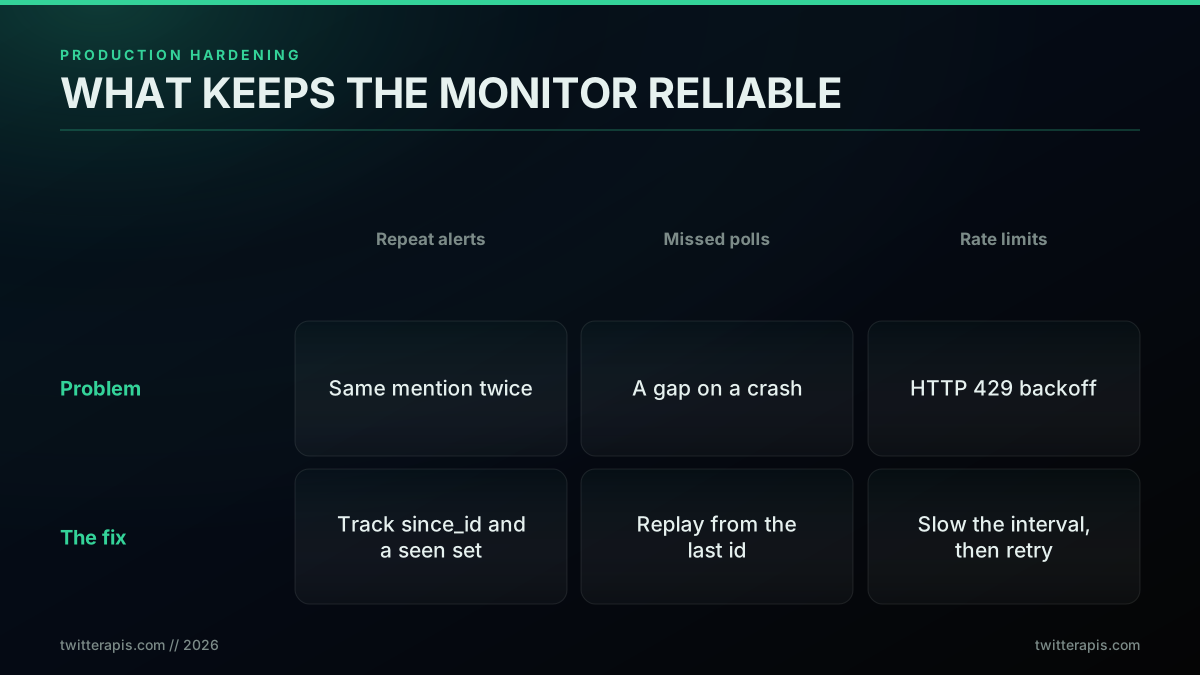
What keeps a monitor reliable in production
First, repeat alerts. The fix is durable dedup: persist the highest processed post id (your since_id) and a small seen set to disk or a database, not just memory, so a restart resumes exactly where it left off instead of re-alerting the last window. Second, missed polls on a crash or deploy. Because since_id is durable, recovery is automatic: on restart you pass the last saved id and the API replays every mention posted while you were down, so a five-minute outage costs you nothing but a short delay. Third, rate limits. When a call returns HTTP 429, back off, double the interval, retry, then ease back to normal once calls succeed. Wrap every API call in a try/except that treats a 429 as "slow down" rather than "crash." The Python requests library makes this straightforward, and the per-endpoint limits and headers are documented in the official X API rate limits reference and summarized in the rate limit guide. These three habits, durable cursors, replay on restart, and exponential backoff, are what let you leave the monitor running and trust it. The broader set of operational defaults lives in the best practices guide.
import json, os

STATE_FILE = "monitor_state.json"

def load_since_id():
    if os.path.exists(STATE_FILE):
        return json.load(open(STATE_FILE)).get("since_id")
    return None

def save_since_id(since_id):
    json.dump({"since_id": since_id}, open(STATE_FILE, "w"))
Persisting the cursor in four lines is the difference between a script and a service. For the request layer underneath, error codes, retries, and pagination, the complete API tutorial goes deeper, and if you later want to export the accounts that mention you for outreach, the follower export guide reuses the same paginated-read pattern.
Where you run the loop matters less than that it runs continuously. A long-lived poll fits a small always-on process supervised by systemd or a container, while an interval-based check fits a cron schedule or a serverless timer. The only hard requirement is that the durable since_id survives restarts, so a crash or a deploy never drops or repeats a mention. If you also need to pull older mentions once at startup to seed the seen set, the scrape tweet history guide covers paging backward through a timeline.
Common Errors and Their Fixes
Most failures in a mention monitor resolve to one of four signals, and the HTTP response code tells you exactly which one you are looking at. Build the four responses in once, at the start, and the monitor mostly runs itself from then on.
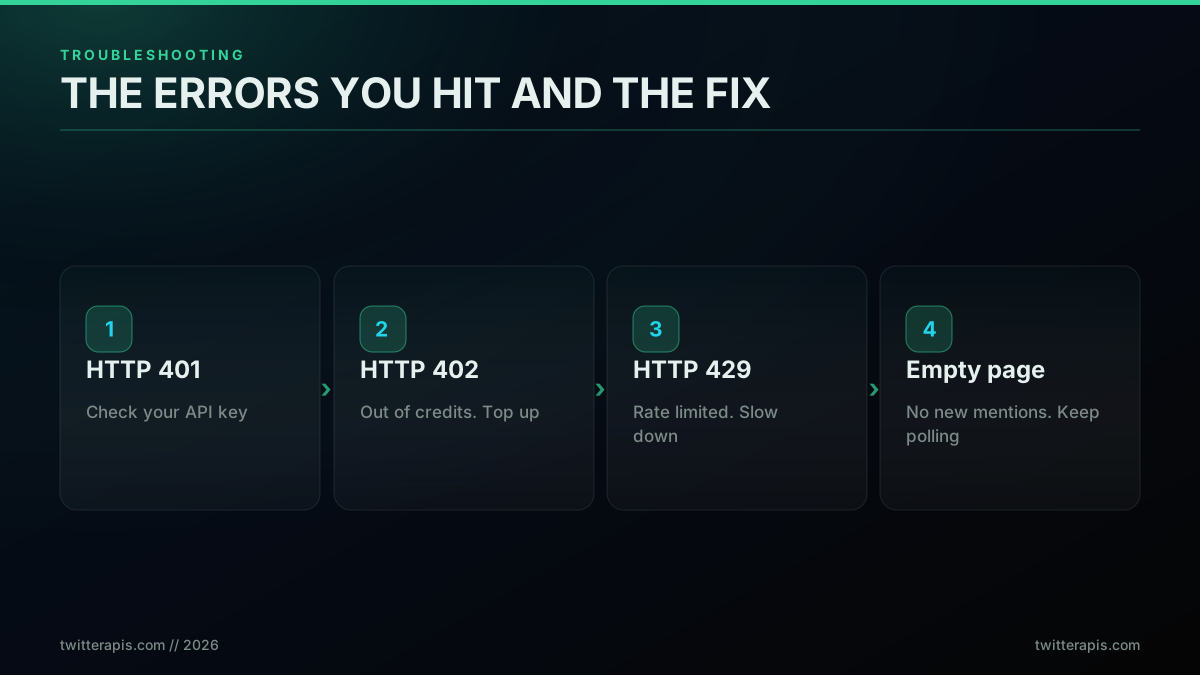
The errors you hit, and the fix for each
An HTTP 401 means your API key is missing or wrong; check the Authorization: Bearer header and the key in your dashboard. An HTTP 402 means you are out of credits; top up in the dashboard, since the read path stops when the balance hits zero. An HTTP 429 means you are polling too fast for your tier; back off and lengthen the interval as described above. An empty result page is not an error at all; it means there are no new mentions since your last since_id, which is the normal state most of the time, so keep polling. One more non-HTTP issue worth naming: if alerts stop but no error appears, confirm your Slack or Discord webhook URL is still valid, because a revoked webhook fails silently on the receiving end. Beyond these, the same key, balance, and rate-limit triad covers nearly every monitor incident, and the error code points straight at the cause.
Where to Go Next
You now have the full picture: the three mention surfaces and when to use each, working poll loops for handle and keyword monitoring with correct dedup, a Slack and webhook recipe, the real cost by interval and volume, the build-versus-buy call, and the production habits that keep it running. The decision in front of you is which surface you need and how fast you need it. For brand defense and lead gen, a 15-second keyword poll routed to Slack will catch what matters for a few dollars a month, and you can have it running on free credits this afternoon.
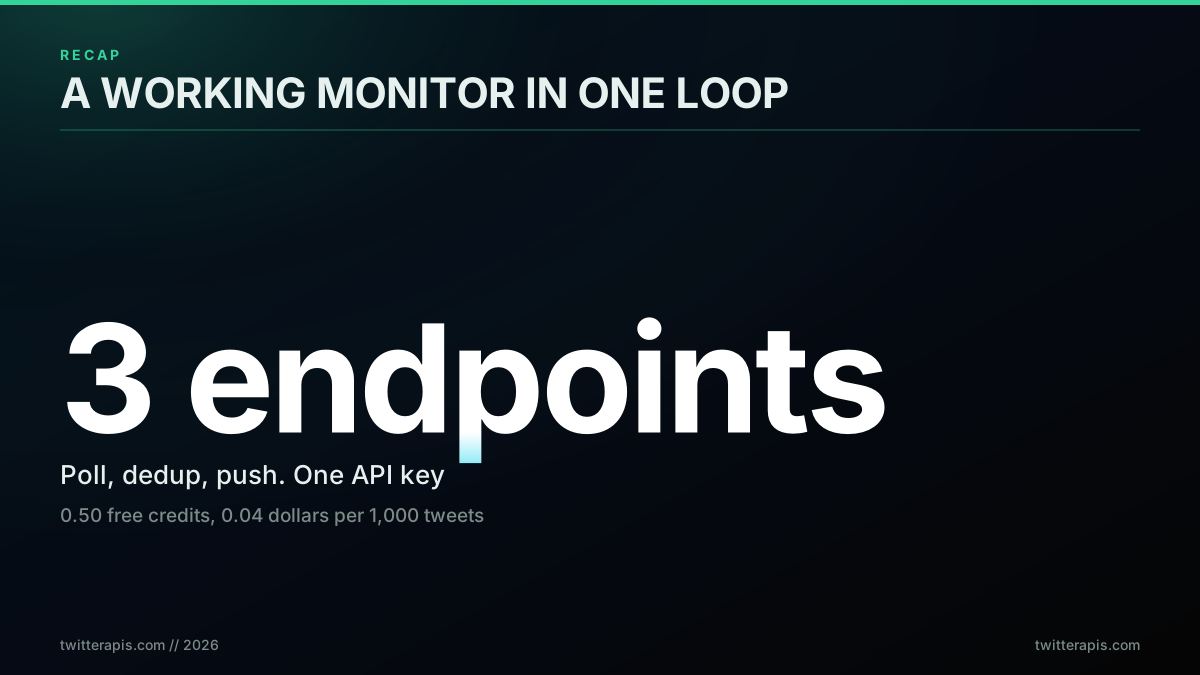
A working monitor in one loop: three endpoints, one key
Start with a key from twitterapis.com/signup, point the keyword loop at your brand, and send the matches to a channel you actually watch. If you want the monitor to act on what it finds and not just report it, pair this with the Twitter bot guide, and if you want your AI agent to run the whole loop through natural language, the Twitter MCP server wraps these same endpoints as tools.
The same loop works for accounts instead of mentions. The crypto Twitter tracker in Python polls a watchlist of crypto accounts, extracts EVM and Solana contract addresses from each new post, and prices the watch for 25 and 100 accounts.
// sources
Where these numbers come from
Each row is a figure in this post and the artefact it was read from. Prices and limits on this platform move, so check the date on the source before you plan against it.
- X API get mentions endpoint
- The user mentions timeline endpoint the post recommends when watching a single account, returning only posts that explicitly tag the handle.
- Slack incoming webhooks documentation
- The alert target in the recipe, where each new match found by the polling loop is POSTed as a message.
- X API about page
- Lists the official tiers and what each one allows, backing the history that the old free tier only allowed posting while reading tweets needed a paid plan, before pay-per-use replaced both.
- X filtered stream tutorial
- The streaming path the post reserves for high volume, contrasted with polling for detection within seconds.
- X API rate limits documentation
- Backs the third failure mode in the troubleshooting section, where a 429 response triggers a backoff, a doubled interval, and a retry before easing back.
- Discord webhook resource documentation
- Backs the claim that the identical alert payload shape works against a Discord channel webhook as well as Slack.
Frequently Asked Questions
You poll a fast search endpoint on a short timer and push new matches to your own alert channel. Call the API every few seconds for posts that mention your handle or keyword, pass the since_id of the last post you saw so you only get new ones, then forward each new mention to Slack, Discord, or a webhook. Polling detects a mention within seconds and needs no enterprise contract. For very high volume you can switch to a filtered stream, which is sub-second but costs more and takes more engineering. With a pay-per-call API the whole loop runs on 0.50 dollars of free credits to start and about 0.04 dollars per 1,000 tweets after that.
The official endpoint is GET /2/users/{id}/mentions, which returns the most recent posts that tag a specific user id. A pay-per-call API exposes the same concept through a user mentions endpoint plus a general advanced-search endpoint. The mentions endpoint is best when you watch one account, and keyword search is best when you track a brand name, product, or topic that people type without the @ handle. Both accept a since_id or cursor so you only pull posts newer than the last one you processed.
There is free credit to start. A pay-per-call API gives you 0.50 dollars in free credits at signup with no card, which is roughly 625 read calls or about 12,500 posts scanned, enough to build and test a working monitor. After the credits run out you pay per call at 0.0008 dollars, so a light monitor stays under a few dollars a month. The official X API has no free tier; its old free tier was post-only and never supported the search and mention reads you need for monitoring, and today every read bills on pay-per-use, which is why most monitors run on a pay-per-call service.
With polling, detection latency equals your poll interval. Poll every 10 seconds and you catch a mention within about 10 seconds of it being posted, plus a second or two of API and network time. Tighten the interval to catch mentions faster, at a higher call cost. A true filtered stream delivers each matching post in under a second because the platform pushes it to you rather than waiting for your next request. For brand monitoring and support, a 10 to 30 second poll is fast enough; for trading or breaking-news use cases, a stream is worth the extra cost.
Polling means your code asks the API for new mentions on a fixed interval, for example every 10 seconds, and compares the results against what it already saw. It is simple, cheap, and detects a mention within seconds. Streaming means the platform pushes each matching post to you over a held-open connection the instant it is posted, which is sub-second but requires an always-on consumer, reconnection handling, and a higher pricing tier. Most teams should start with polling and only move to a stream when mention volume is high enough that the poll interval cannot keep up.
It depends entirely on how often you poll, not on a flat subscription. On a pay-per-call API, reads cost 0.0008 dollars per call and each call returns about 20 posts, which is roughly 0.04 dollars per 1,000 tweets. Because you pay per call, the poll interval is the price dial: polling once a minute is about 43,200 calls a month, or roughly 34.56 dollars; stretch the interval to every five minutes and it drops to about 7 dollars; tighten it to every five seconds and it rises to a few hundred. The official X API charges a flat Pro tier that runs into thousands of dollars a month for comparable real-time access, and hosted social-listening tools charge tens of dollars a month with limits. Signup includes 0.50 dollars in free credits with no card.
Run a small loop that polls the mentions or search endpoint, filters to posts you have not seen using since_id, and for each new post sends a POST request to a Slack incoming webhook URL with the text, author, and link. The same pattern works for Discord webhooks and any custom HTTP endpoint. Keep the loop running on a cron job, a small always-on server, or a serverless schedule. Add the post id to a seen set before you alert so a restart never double-posts the same mention.
Build it when you want full control, the lowest cost at scale, custom routing, and data that flows into your own systems, and you have a few hours to wire up a poll loop. Buy a hosted social-listening tool when you want zero code, a dashboard, and built-in sentiment and reporting, and you can accept its limits and monthly fee. A pay-per-call API sits between the two: you write a small amount of code but pay only for what you use, which is usually far cheaper than a SaaS seat once you are past a basic setup. Many teams start with the API for alerting and add a tool later only for reporting.
Check out similar blogs
More guides on the Twitter/X API, scraping, and pricing.
Build vs Buy: Should You Build Your Own Twitter/X Monitoring Tool? (2026)
Buying a listening seat costs $29 to $2,000 a month depending on the vendor. Building costs real engineering hours plus a data bill. Here is the real math behind the twitter monitoring tool build vs buy decision, priced both ways.

How to Track a Tweet's Performance in Real Time with the X API
Poll a tweet's engagement counts over time with the X API, compute a views-to-likes ratio, and read the quote-tweet layer to tell an organically growing launch tweet from a boosted one. Tested Python and curl.
What "Rate Limited" Actually Means on X (Every Limit, Measured)
"Sorry, you are rate limited" is one message covering two different systems: a consumer action ceiling and a developer API window. Here is what the term means, the current numbers for both, where it came from, and how long it actually lasts.
The Twitter API Developer Reference (2026): Endpoints, Rate Limits, Error Codes and Pagination
A single indexed reference for the Twitter/X API in 2026: the endpoint catalog, how authentication and bearer tokens work, the rate limits behind every 429, what error codes 401, 403, and 429 mean, cursor pagination, response shapes, and the real per-call cost of each call.
How to Choose a Twitter/X API in 2026: The Complete Buyer's Guide
A decision framework for choosing a Twitter/X API in 2026: the seven criteria that actually matter (pricing model, data coverage, rate limits, auth, reliability, compliance, migration cost), a use-case decision tree, and where each path wins.
What You Can Build With the Twitter/X API: 20+ Real Use Cases (2026)
A 2026 field guide to what you can actually build with the Twitter/X API: 24 real use cases across listening, monitoring, audience graph, research, and bots, each mapped to the endpoint that powers it and the real per-call cost.
Fetch a Full Twitter Thread via API in One Call (2026)
How to pull an entire Twitter thread, the root tweet plus every connected tweet in the chain, in a single API call with the tweet/thread endpoint, instead of walking replies by hand. Live-tested code in curl, Python, and Node.js, with the real per-call cost.
Can You Recover a Deleted Tweet via API in 2026?
The honest answer: no API un-deletes a tweet the author removed. Here is what actually works in 2026, checking whether it is really gone, finding an archived copy, and the capture-before-delete pattern that prevents the loss, with live-tested code.