GUIDE
Build a Crypto Twitter Tracker in Python: Watch a KOL List and Catch Contract Addresses
A runnable Python watcher that polls a named list of crypto accounts, pulls every new post, finds EVM and Solana addresses, and alerts you, with the monthly bill for 25 and 100 accounts.
Per our own spec, 62 of 109 endpoints bill $0.0008, 24 are free, and 23 sit between $0.0016 and $0.01. Every price ships inside our published OpenAPI document as an x-cost-usd field, so any figure in this post can be checked against the contract that bills it rather than taken on trust.
TL;DR: A crypto Twitter tracker is about 150 lines of Python. Poll each account's timeline, skip post ids you have already seen, match EVM and Solana addresses across the text, any retweeted or quoted post and every expanded link, then send an alert. Polling 25 accounts one by one every minute costs $864.00 a month at $0.0008 a call. Reading the same accounts as one public X List costs about $34.56 at the same interval. In our 276 post sample from 14 crypto accounts, 6 percent carried an address, and most were wallets rather than new tokens.
The pages ranking for this search are tool homepages. They show you a feed and a buy button and never show you the loop underneath. This guide builds that loop in plain Python, tests every function against real responses, and prices it for a 25 account and a 100 account watchlist so you know the bill before you start it.
The short answer
A crypto Twitter tracker is about 150 lines of Python: poll each account's timeline, skip post ids you have seen, run two regular expressions for EVM and Solana addresses across the text, any retweeted or quoted post and every expanded link, then post an alert. Polling 25 accounts one by one every minute costs $864.00 a month at $0.0008 a call, and 100 accounts cost $3,456.00. Reading the same accounts as one public X List costs about $34.56 a month at the same interval, whatever the size. In our sample of 276 recent posts from 14 crypto accounts, 6 percent carried an address, and most of those were wallets in explorer links rather than new tokens.
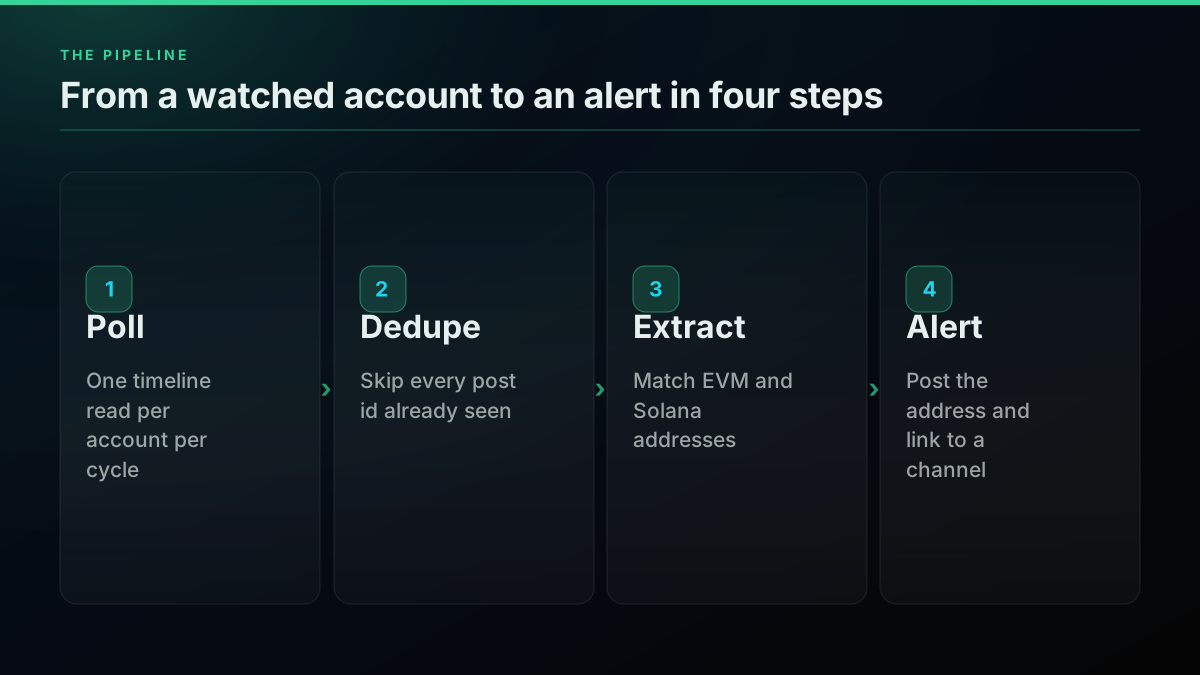
The whole thing reads posts and prints alerts. It does not trade, sign transactions or touch a wallet, and it should not. What you do with an alert is a separate decision, and the last third of this post is about why that decision deserves more care than the code.
What does a crypto Twitter tracker actually do?
A crypto Twitter tracker is a loop with four steps: read the newest posts from a list of accounts, throw away the posts you have already processed, look for on-chain addresses in what is left, and tell someone. Every tool on the results page for this query is that loop plus a user interface, and the loop is the part worth understanding.
The reason people build one is speed. One tool announcement in September put the motivation plainly: by the time you see a post and paste the address, the move has already happened.
https://x.com/TheMayorOfIfe/status/2100675242808988013
Those who lose money following traders on X did not follow the wrong trader. They followed the right one and simply arrived late.
That framing is half right. Arriving late is real. But arriving early to a bad call is worse than arriving late to a good one, and a tracker cannot tell you which one you are looking at. Keep that in mind as the code gets faster.
If you have not pulled X data from Python before, the Python Twitter API tutorial covers authentication and the first request, and the hub guide to scraping tweets maps the other routes. This post assumes you can make an HTTP request and read JSON.
What data does a timeline read return?
Each call to the timeline endpoint returns one page of about twenty posts as JSON, with a cursor for the next page and a flag that says whether one exists. The shape is stable enough to parse with the standard library, and it carries every field the tracker needs: the post id, the text, the author, the timestamp, and nested objects for retweets and quotes.
Here is a trimmed post from a real response pulled on 2026-09-28. The fields shown are the ones the tracker reads. This post had no links, so the tracker finds nothing to scan under entities.urls; a post with links lists them there, and a retweet or quote adds the nested post object with its own entities.
{
  "count": 20,
  "next_cursor": "DAAHCgABHTVLFUc__-4LAAIAAAATMj...",
  "has_more": true,
  "tweets": [
    {
      "id": "2103287465650077704",
      "url": "https://x.com/bonk_inu/status/2103287465650077704",
      "text": "solana:DezXAZ8z7PnrnRJjz3wXBoRgixCa6xjnB7YaB1pPB263 is officially tradeable on Phoenix❗️❗️❗️",
      "created_at": "Fri Sep 25 00:56:23 +0000 2026",
      "is_retweet": false,
      "is_reply": false,
      "is_quote": false,
      "author": { "username": "bonk_inu", "followers_count": 455505 },
      "retweeted_tweet": null,
      "quoted_tweet": null
    }
  ]
}
Three details in that response shape the code. First, is_retweet and is_reply are flags, not filters: the endpoint returns retweets and the account's own replies alongside original posts, so filter on them yourself if you want originals only. Paging past the first twenty uses the cursor, covered in the pagination guide. Second, a retweet's text is truncated with an RT @handle: prefix, and the full original sits in retweeted_tweet. Third, links arrive as t.co short links in the text, with the real destination in entities.urls[].expanded_url when X provides it.
The count parameter is advisory on this endpoint. We asked for three posts and got twenty. Page with the cursor if you need more, and do not rely on page size for anything.
Set up the project
The tracker uses only the Python standard library, so there is nothing to install beyond Python 3.9 or later. It reads your API key from an environment variable, reads the watchlist from a text file, and keeps its memory of processed posts in a JSON file next to the script.
mkdir crypto-tracker && cd crypto-tracker
export TWITTERAPIS_KEY="your-api-key"          # never commit this
export INTERVAL_SECONDS=60                      # poll interval
export ALERT_WEBHOOK_URL=""                     # optional Discord or Slack webhook
printf "lookonchain\nCryptoKaleo\nbonk_inu\n" > watchlist.txt
The key goes in the Authorization header as a bearer token on every request, which the authentication guide covers in more depth. Never paste it into the script. A key in source control is a key someone else is using by the end of the week.
Fetch one account's recent posts
One function makes every API call, so every billed request passes through a single place you can log, rate limit or mock. It builds the URL, adds the bearer token, retries on rate limits and server errors, and turns a 404 into a skip rather than a crash.
import json, os, time, urllib.error, urllib.parse, urllib.request

API_BASE = "https://api.twitterapis.com"
API_KEY = os.environ.get("TWITTERAPIS_KEY", "")


class SkipAccount(Exception):
    """The account cannot be read right now (renamed, suspended, private)."""


def api_get(path, params):
    """One GET against the API. Every call bills, so every call goes through here."""
    req = urllib.request.Request(
        f"{API_BASE}{path}?{urllib.parse.urlencode(params)}",
        headers={"Authorization": f"Bearer {API_KEY}"},
    )
    for attempt in range(3):
        try:
            with urllib.request.urlopen(req, timeout=30) as resp:
                return json.load(resp)
        except urllib.error.HTTPError as err:
            if err.code == 404:
                raise SkipAccount(f"{path} {params} returned 404")
            if err.code in (429, 500, 502, 503, 504):
                time.sleep(2 * (attempt + 1))
                continue
            raise
        except (urllib.error.URLError, TimeoutError) as err:
            print(f"network error on {path}: {err}")  # DNS, refused, timeout
            time.sleep(2 * (attempt + 1))
    raise SkipAccount(f"{path} {params} kept failing, skipped this cycle")


def get_timeline(username):
    """One page (about 20 posts) of an account's recent posts. One billed call."""
    return api_get("/twitter/user/tweets", {"username": username})
The 404 branch is not hypothetical. While building the sample for this post, three crypto handles we tried came back as not_found, whether renamed, removed or simply mistyped by us. A tracker that crashes on the first dead handle stops watching the other 24. Treat a missing account as a skip, log it, and keep going. The full list of status codes and what to do with each is in the error codes guide.
Retries use a short backoff and give up after three tries. A cycle that skips one account is better than a cycle that stalls for a minute waiting on it, because the next cycle arrives soon anyway. The rate limit guide goes further if you run large watchlists.
Find EVM and Solana addresses in a post
Address extraction is two regular expressions and one sanity check. EVM addresses are 0x followed by 40 hexadecimal characters. Solana addresses are base58 strings of 32 to 44 characters, which match a lot of noise on their own, so the check requires a mix of upper case, lower case and digits before accepting one. Even then it will also match a Bitcoin legacy address and some long mixed-case tokens inside URLs, so treat a Solana hit as a candidate, not a confirmed mint.
The EVM format comes straight from the protocol: an account address is the last 20 bytes of a hash, written as 40 hex characters after 0x. Mixed case in an EVM address is a checksum defined in EIP-55, so the regex accepts both cases and the code lowercases the result for deduplication. Solana accounts are identified by a 32 byte address, shown in base58, an alphabet that drops 0, O, I and lowercase l to avoid visual confusion.
import re

EVM_RE = re.compile(r"(?<![0-9A-Za-z])0x[a-fA-F0-9]{40}(?![0-9A-Za-z])")
SOL_RE = re.compile(r"(?<![0-9A-Za-z])[1-9A-HJ-NP-Za-km-z]{32,44}(?![0-9A-Za-z])")

IGNORE = {
    "So11111111111111111111111111111111111111112",  # wrapped SOL
}


def post_texts(tweet):
    """Every place an address can hide: the text, a retweeted or quoted post, and expanded links."""
    parts = [tweet.get("text") or ""]
    for key in ("retweeted_tweet", "quoted_tweet"):
        inner = tweet.get(key)
        if inner:
            parts.append(inner.get("text") or "")
    for post in (tweet, tweet.get("retweeted_tweet") or {}, tweet.get("quoted_tweet") or {}):
        for link in (post.get("entities") or {}).get("urls") or []:
            parts.append(link.get("expanded_url") or "")
    return "\n".join(parts)


def looks_like_solana(candidate):
    # Real base58 addresses mix upper case, lower case and digits. English words do not.
    return (
        re.search(r"\d", candidate) is not None
        and re.search(r"[a-z]", candidate) is not None
        and re.search(r"[A-Z]", candidate) is not None
    )


def find_addresses(tweet):
    text = post_texts(tweet)
    found = []
    for addr in EVM_RE.findall(text):
        found.append(("evm", addr.lower()))
    for addr in SOL_RE.findall(text):
        if looks_like_solana(addr):
            found.append(("solana", addr))
    unique = []
    for chain, addr in found:
        if addr not in IGNORE and (chain, addr) not in unique:
            unique.append((chain, addr))
    return unique
The lookarounds matter. Without them, the EVM pattern happily matches the first 42 characters of a longer hex string such as a transaction hash, and you alert on something that is not an address at all. The Python re documentation covers lookbehind syntax if the pattern looks unfamiliar.
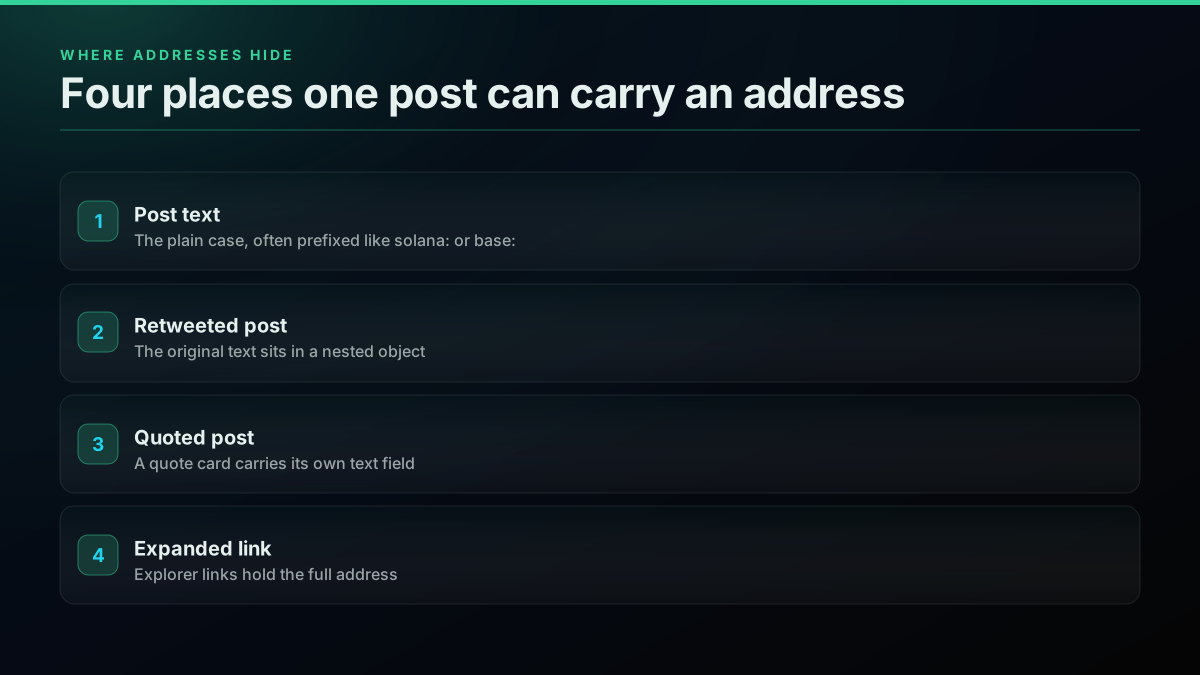
post_texts is where most trackers go wrong. In our sample, one on-chain analytics account wrote wallets in the text as 0xec90 and put the full address only in an explorer link. A tracker that reads text alone saw nothing in any of those posts. Retweets have the same problem in a different place, because the retweet text is cut short and the original words sit in retweeted_tweet.
The wrapped SOL mint is on the ignore list because it is the native mint every Solana program shares, and traders paste it into price chart posts constantly. In our sample it accounted for three of the 20 raw hits on its own. Add any address you never want an alert for, such as the stablecoins you already hold, and your channel stays readable.
Start building with TwitterAPIs
$0.0008 a call, about $0.04 per 1,000 tweets at 20 tweets a page. $0.50 free credits. No credit card required.
Skip posts you have already seen
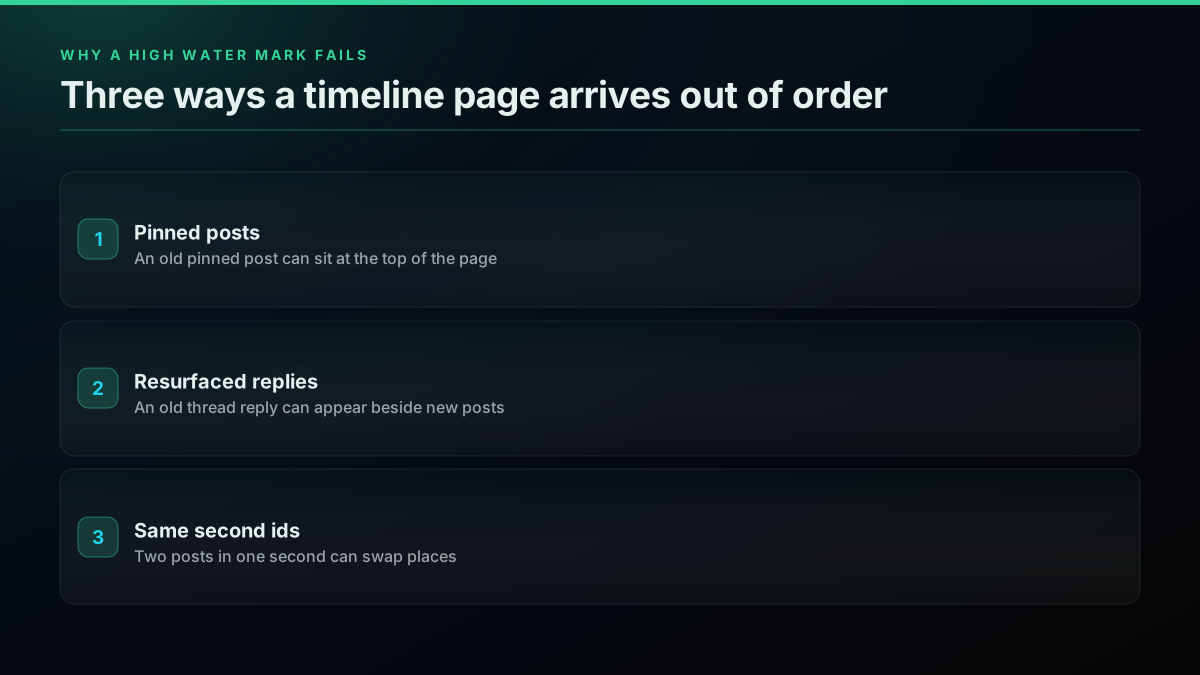
The tracker remembers every post id it has processed and ignores anything older than its age window: thirty minutes, or two poll intervals if your interval is longer, so an hourly poll never drops a post that landed between cycles. That second rule matters more than it looks. The timeline endpoint returns the account as X shows it, which can include a pinned post from years ago or an old reply that resurfaced, so a fresh id is not always a fresh post.
from datetime import datetime, timedelta, timezone

STATE_FILE = "seen.json"
POLL_SECONDS = int(os.environ.get("INTERVAL_SECONDS", "60"))
# The window must cover at least two poll intervals, or a slow poll drops real posts.
MAX_AGE = max(timedelta(minutes=30), 2 * timedelta(seconds=POLL_SECONDS))


def load_seen():
    try:
        with open(STATE_FILE) as fh:
            return set(json.load(fh))
    except FileNotFoundError:
        return set()


def save_seen(seen):
    with open(STATE_FILE, "w") as fh:
        json.dump(sorted(seen), fh)


def posted_at(tweet):
    return datetime.strptime(tweet["created_at"], "%a %b %d %H:%M:%S %z %Y")


def new_posts(page, seen, now=None):
    """Posts we have not alerted on yet, newer than MAX_AGE, oldest first."""
    now = now or datetime.now(timezone.utc)
    fresh = []
    for tweet in page.get("tweets") or []:
        if tweet["id"] in seen:
            continue
        if now - posted_at(tweet) > MAX_AGE:
            continue  # a pinned post or an old reply resurfacing, not news
        seen.add(tweet["id"])  # only after it passed the age check
        fresh.append(tweet)
    return sorted(fresh, key=lambda t: int(t["id"]))
Do not replace the seen set with "remember the highest id and skip anything below it." In our sample, 6 of 14 first pages were not in strict id order, and the page for one account we checked, @cobie, opened with a post from December 2017 before its recent activity. A high water mark would either miss posts or alert on history, depending on which way the page was out of order.
Sorting the fresh posts oldest first keeps alerts in the order things happened, which is the order a human reading the channel expects. It also makes deduplication cheap, because a set lookup is constant time however long the watch runs.
Send the alert somewhere you will see it
An alert is a short message with the account, the chain, the address and the post URL. The function prints it and, if a webhook URL is set, posts the same text to it. The body carries the message under both content and text, which covers Discord and Slack incoming webhooks with one payload.
ALERT_URL = os.environ.get("ALERT_WEBHOOK_URL", "")


def alert(tweet, addresses):
    lines = [f"@{tweet['author']['username']} posted {len(addresses)} address(es)"]
    for chain, addr in addresses:
        lines.append(f"  {chain}: {addr}")
    lines.append(f"  {tweet['url']}")
    message = "\n".join(lines)
    print(message)
    if ALERT_URL:
        body = json.dumps({"content": message, "text": message}).encode()
        req = urllib.request.Request(
            ALERT_URL, data=body, headers={"Content-Type": "application/json"}
        )
        try:
            urllib.request.urlopen(req, timeout=10).close()
        except (urllib.error.URLError, TimeoutError) as err:
            print(f"alert webhook failed, alert printed only: {err}")
Discord webhooks read content and Slack incoming webhooks read text, and each ignores the field it does not know. If you would rather route alerts through a workflow tool, the n8n guide shows how to receive them there instead.
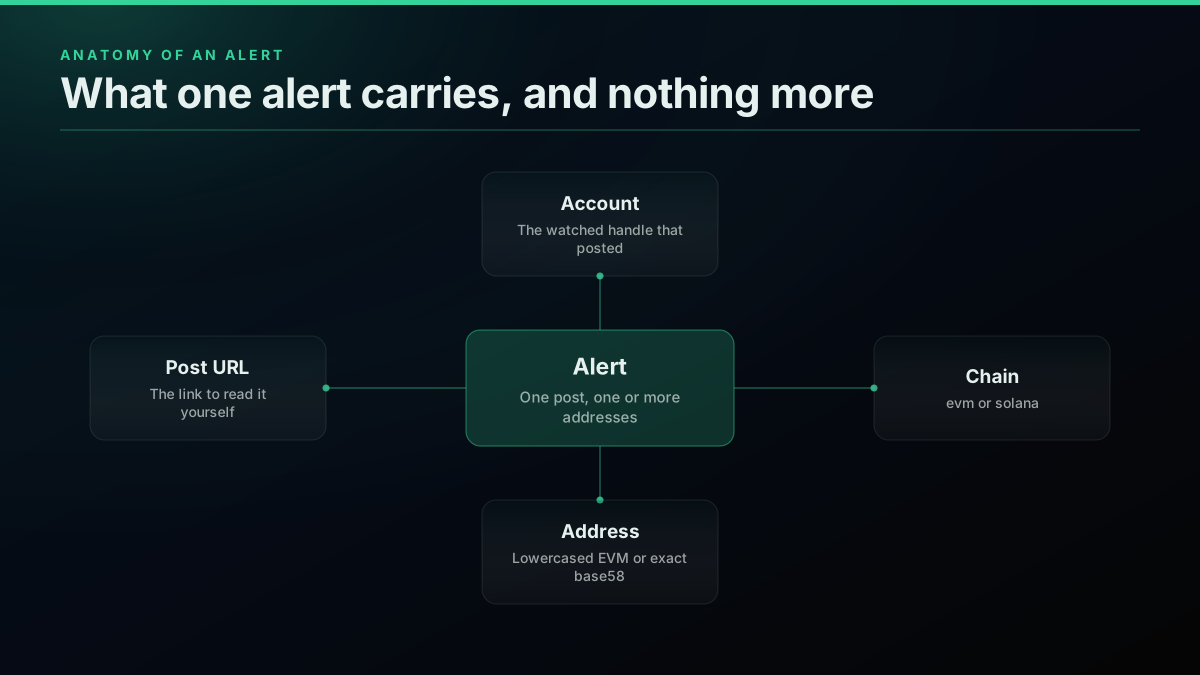
Keep the alert plain. It is tempting to add a price, a chart link or a buy button, and every one of those pushes the alert from "someone posted this" toward "you should do this." The tracker does not know the second thing.
Put the loop together
The main loop primes the seen set on the first run, then polls every account once per cycle, parses the fresh posts, sends alerts and sleeps until the next cycle. Priming matters: without it, the first cycle treats the last twenty posts from every account as new and floods your channel.
WATCHLIST = [
    line.strip().lstrip("@")
    for line in open("watchlist.txt")
    if line.strip() and not line.startswith("#")
]
INTERVAL_SECONDS = int(os.environ.get("INTERVAL_SECONDS", "60"))


def run_cycle(seen):
    calls = 0
    for username in WATCHLIST:
        try:
            page = get_timeline(username)
            calls += 1
        except SkipAccount as why:
            print(f"skip: {why}")
            continue
        for tweet in new_posts(page, seen):
            addresses = find_addresses(tweet)
            if addresses:
                alert(tweet, addresses)
    save_seen(seen)
    return calls


def main():
    seen = load_seen()
    if not seen:
        # First run: remember what is already there so we only alert on new posts.
        for username in WATCHLIST:
            try:
                for tweet in get_timeline(username).get("tweets") or []:
                    seen.add(tweet["id"])
            except SkipAccount as why:
                print(f"skip: {why}")
        save_seen(seen)
    while True:
        started = time.monotonic()
        calls = run_cycle(seen)
        print(f"cycle done: {calls} calls, ${calls * 0.0008:.4f}")
        time.sleep(max(0, INTERVAL_SECONDS - (time.monotonic() - started)))


if __name__ == "__main__":
    main()
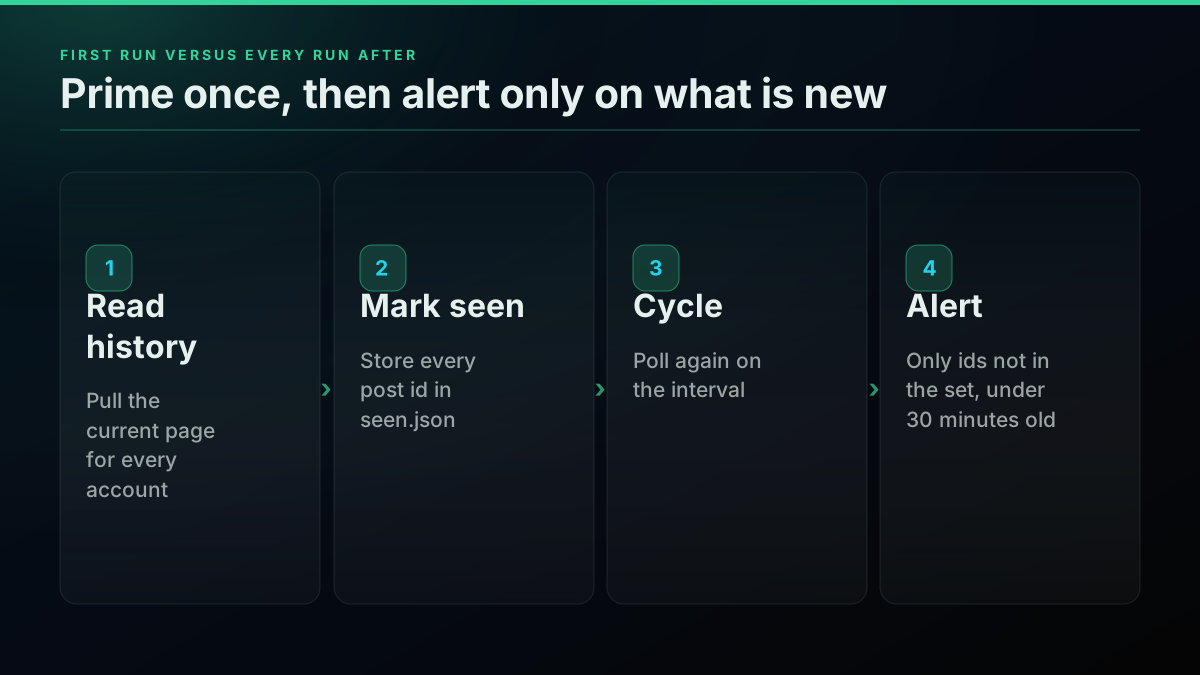
The cycle prints its own cost. That line is the cheapest monitoring you will ever add. If a change to the watchlist or the interval moves the bill, you see it in the terminal the same minute, not on an invoice four weeks later.
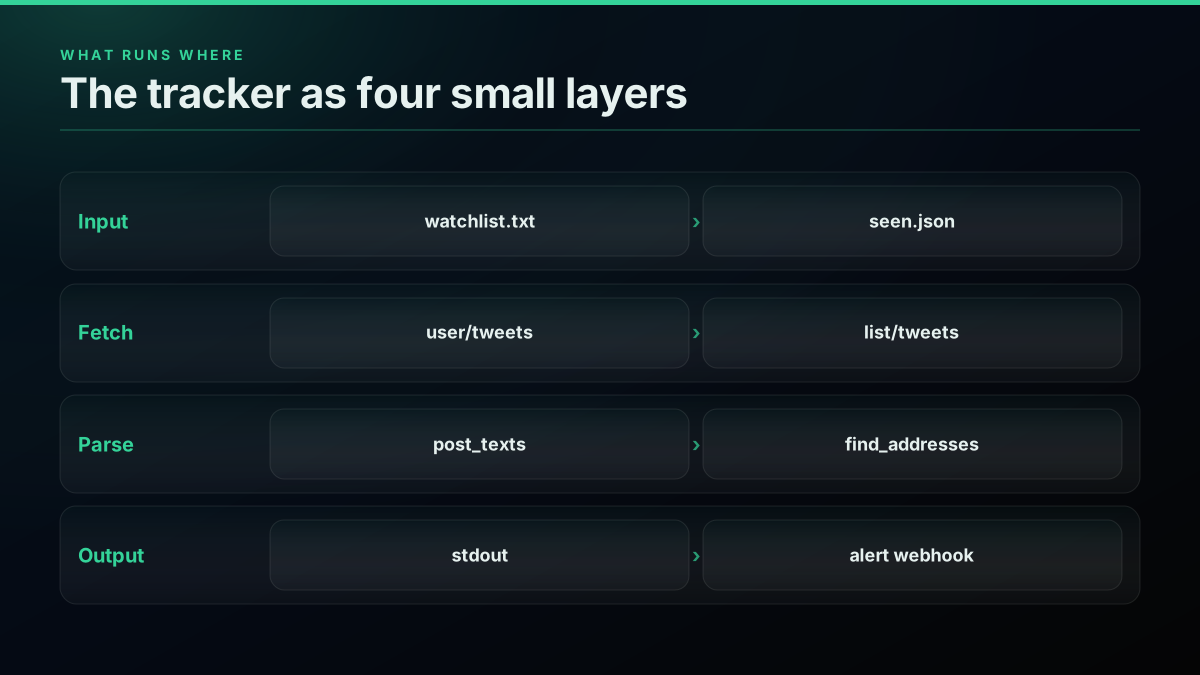
Save everything above as tracker.py and run python3 tracker.py. On the first run it primes and then prints a line per cycle. If you want the loop to behave like a background service, the Twitter bot guide covers process managers and restarts.
Test it against real responses before you trust it
Every function in this post was run against real timeline responses before it was published. The test replays saved JSON from 14 crypto accounts through the tracker with the network call swapped out, so the parsing, deduplication, age filter and alert logic all run on the exact shape the API returns, including a 404.
import json, io, contextlib
from datetime import timedelta
import tracker

def fake_get(username):
    if username == "ghostaccount404":
        raise tracker.SkipAccount(f"@{username} returned 404")
    return json.load(open(f"sample/{username}.json"))   # saved real responses

tracker.get_timeline = fake_get
original_new_posts = tracker.new_posts

# Prime on real data, forget one known post, set the clock two minutes after it.
seen = {t["id"] for u in tracker.WATCHLIST if u != "ghostaccount404"
        for t in fake_get(u)["tweets"]}
target = next(t for t in fake_get("bonk_inu")["tweets"] if t["id"] == "2103287465650077704")
seen.discard(target["id"])
clock = tracker.posted_at(target) + timedelta(minutes=2)
tracker.new_posts = lambda page, seen: original_new_posts(page, seen, now=clock)

out = io.StringIO()
with contextlib.redirect_stdout(out):
    calls = tracker.run_cycle(seen)
assert "status/2103287465650077704" in out.getvalue()      # the alert fired
assert calls == len(tracker.WATCHLIST) - 1                 # the 404 was skipped, not fatal
print(out.getvalue())
The run printed the alert below and skipped the unresolvable handle without stopping, after 14 billed reads that would have cost $0.0112 live. A second case forgot a post with no address and asserted that nothing fired, which is the check people leave out and the one that catches a regex that matches too much.
@bonk_inu posted 1 address(es)
  solana: DezXAZ8z7PnrnRJjz3wXBoRgixCa6xjnB7YaB1pPB263
  https://x.com/bonk_inu/status/2103287465650077704
skip: @ghostaccount404 returned 404
Worked example
One cycle across a 15 handle watchlist
Calls this cycle: 14 · Cost this cycle: $0.0112 · Alerts: 1
☑ Thirteen accounts returned nothing new · ☑ One new post carried a Solana address in the text · ☑ One handle returned 404 and was skipped, the loop kept going · ☐ The alert says nothing about whether the token is safe
Save a handful of real responses the first time you run the tracker and keep them in a sample/ folder. When you change the regex or the age filter later, rerun the test and you will know within a second whether you broke something, without spending a call.
How often do crypto accounts actually post an address?
Most posts from crypto accounts carry no address at all. We pulled the first page from 14 well-known crypto accounts on 2026-09-28, 276 posts in all, and ran them through the find_addresses function above. Seventeen posts carried an address. That is the base rate your alert channel will see, and it shapes every decision after this one.
6% of the 276 most recent posts from a sample of 14 crypto accounts carried an on-chain address.
Our data · Dataset:
crypto-account-contract-addresses· Source: public X posts, pulled through our API · Query:twitter_user_tweets {"pages": 1, "usernames": ["CryptoKaleo", "HsakaTrades", "JupiterExchange", "MeteoraAG", "MustStopMurad", "Pentosh1", "Pumpfun", "blknoiz06", "bonk_inu", "dexscreener", "frankdegods", "jessepollak", "lookonchain", "solana"]}· Pulled: 2026-09-28 · n = 276 · Method: share of items whose _has_addr matches /^yes$/i; frame: 276 unique items from 1 page(s), deduplicated by id; one first page per account; each post scanned across its text, the text of any retweeted or quoted post and every expanded link, with the find_addresses() function this tutorial ships (EVM 0x plus 40 hex, Solana base58 of 32 to 44 characters with mixed case and a digit, wrapped SOL ignored)
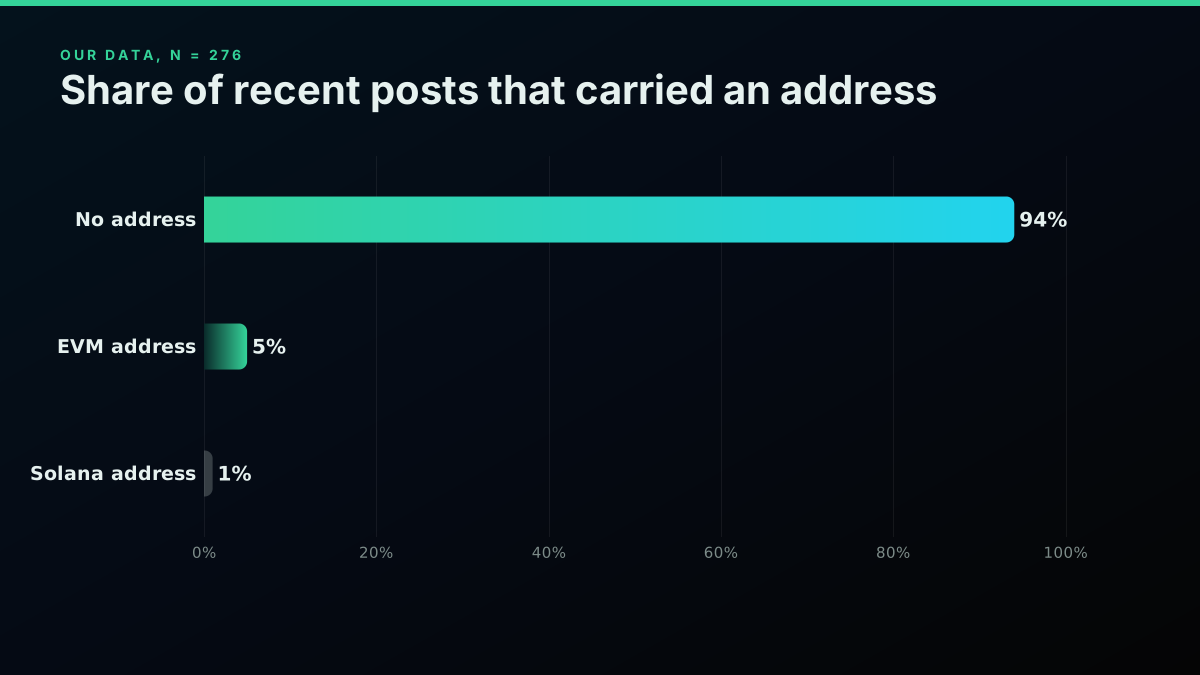
Which chain the addresses in 276 crypto-account posts belonged to
| Address found | items | share |
|---|---|---|
| none | 259 | 94% |
| evm | 13 | 5% |
| solana | 4 | 1% |
Our data · Dataset:
crypto-account-address-chains· Source: public X posts, pulled through our API · Query:twitter_user_tweets {"pages": 1, "usernames": ["CryptoKaleo", "HsakaTrades", "JupiterExchange", "MeteoraAG", "MustStopMurad", "Pentosh1", "Pumpfun", "blknoiz06", "bonk_inu", "dexscreener", "frankdegods", "jessepollak", "lookonchain", "solana"]}· Pulled: 2026-09-28 · n = 276 · Method: items grouped by _chain, top values; frame: 276 unique items from 1 page(s), deduplicated by id; one first page per account; each post scanned across its text, the text of any retweeted or quoted post and every expanded link, with the find_addresses() function this tutorial ships (EVM 0x plus 40 hex, Solana base58 of 32 to 44 characters with mixed case and a digit, wrapped SOL ignored)
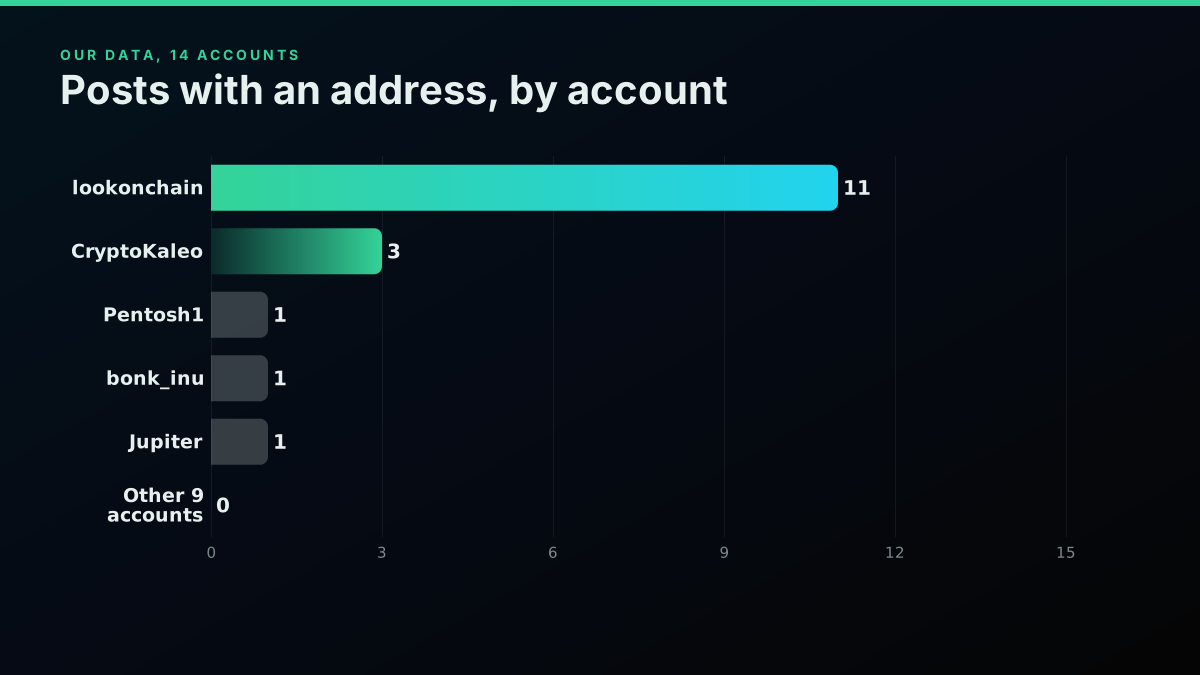
The hits were concentrated. One on-chain analytics account produced 11 of the 17, and nine of the 14 accounts produced none. The accounts people think of as callers mostly post commentary, charts and replies, and put an address in a small share of posts.
Address hits in the first page of 14 crypto accounts
| Account | Posts read | Posts with an address | Days covered by 20 posts | Source |
|---|---|---|---|---|
| lookonchain | 20 | 11 | 2.5 | measured |
| CryptoKaleo | 20 | 3 | 0.7 | measured |
| Pentosh1 | 20 | 1 | 10.3 | measured |
| bonk_inu | 20 | 1 | 13.0 | measured |
| JupiterExchange | 20 | 1 | 4.0 | measured |
| Nine other accounts | 176 | 0 | 0.8 to 650.5 | measured |
Most address hits were wallets, not new tokens
In our 14 account sample, 11 of the 17 posts that carried an address came from one on-chain analytics account, and nearly all of those addresses were whale or trader wallets sitting in explorer links. Only a handful pointed at token mints. A tracker that treats every address as a token call will mostly alert on wallets, so decide up front which one you want and filter for it.
Our data, 276 posts, pulled 2026-09-28
The chain prefix is the other pattern worth building for. A trader posting a token on a newer chain wrote it as robinhood: followed by the address, and a Solana project announcing a listing wrote solana: followed by its mint:
https://x.com/bonk_inu/status/2103287465650077704
Some accounts now tag the chain in front of the address
Several posts in the sample wrote the address as solana: or robinhood: followed by the address. That prefix is a gift to a parser, because it names the chain for you and removes the guesswork between an EVM chain and Solana. Seven of the 20 raw address hits used a prefix like this, so capture it when it is there and fall back to the regex when it is not.
Our data, 276 posts, pulled 2026-09-28
The same prefix shows up on posts you do not want. This one carries the wrapped SOL mint, which is why that address sits on the ignore list:
The cheapest pay-as-you-go Twitter API. Try it free.
$0.0008 a call, about $0.04 per 1,000 tweets at 20 tweets a page. $0.50 free credits. No credit card required.
How much does a crypto Twitter tracker cost to run?
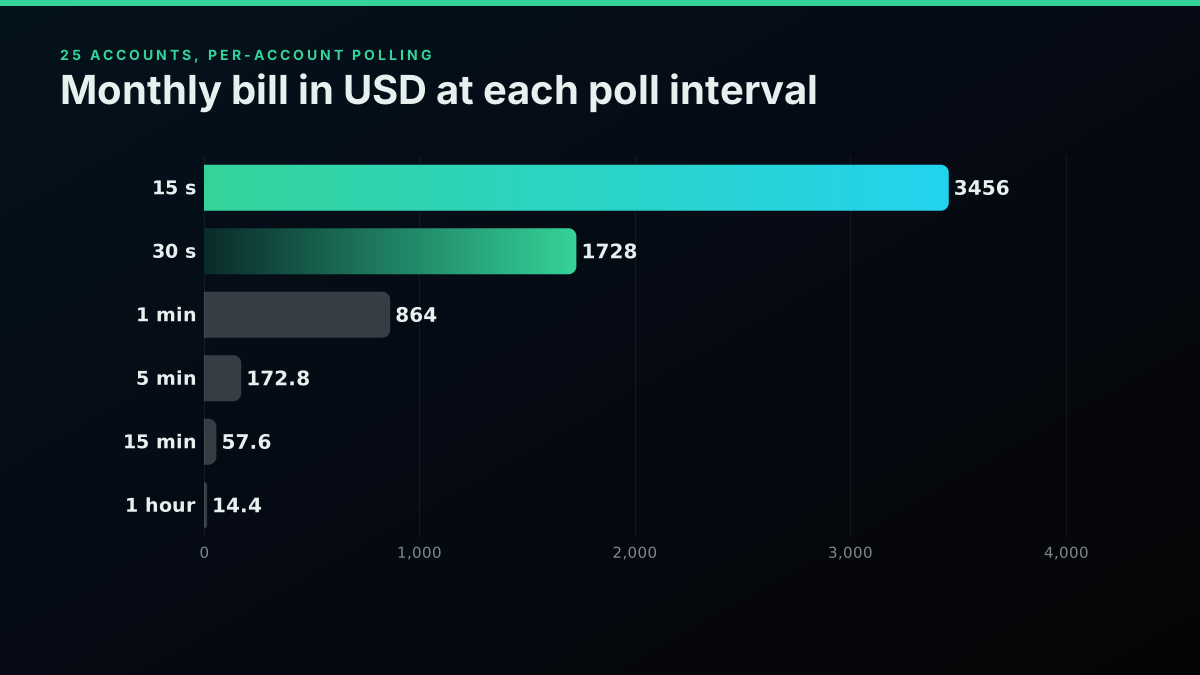
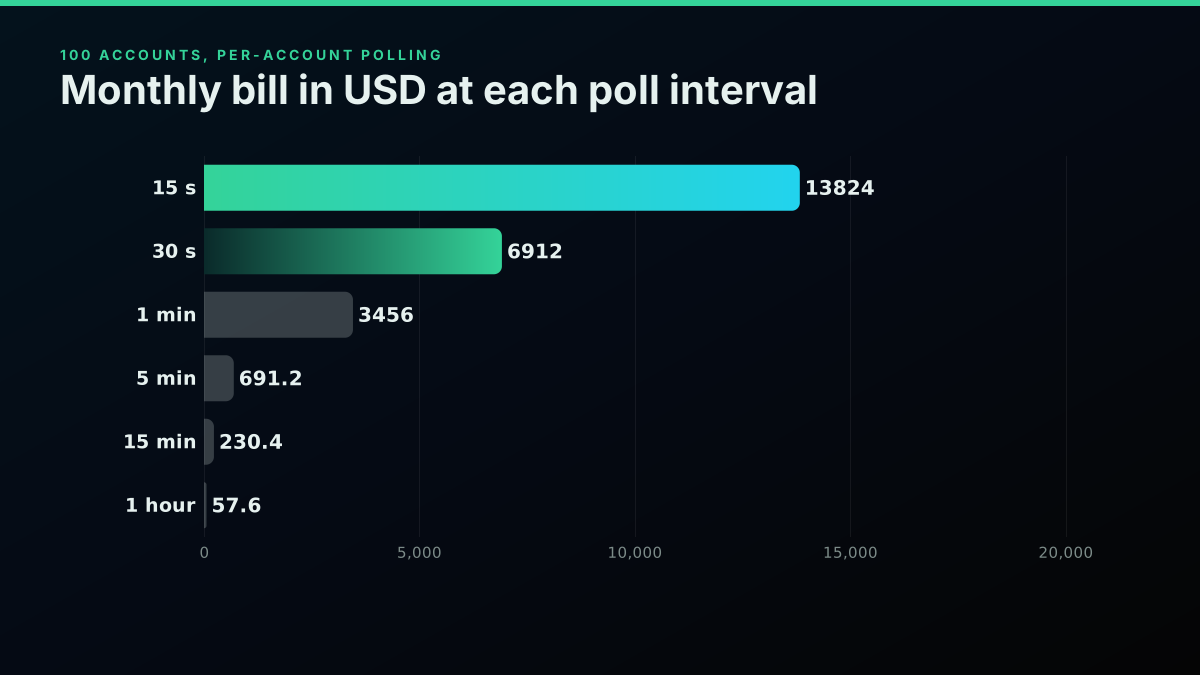
Per account polling bills one call per account per cycle, so the monthly bill is accounts times cycles times $0.0008. At a one minute interval, 25 accounts cost $864.00 a month and 100 accounts cost $3,456.00. The interval sets the average alert delay at half its length, so every halving of delay doubles the bill.
Monthly bill for per-account polling, 25 and 100 accounts
| Poll interval | Average alert delay | 25 accounts | 100 accounts | Source |
|---|---|---|---|---|
| Every 15 seconds | 7.5 seconds | $3,456.00 | $13,824.00 | derived |
| Every 30 seconds | 15 seconds | $1,728.00 | $6,912.00 | derived |
| Every minute | 30 seconds | $864.00 | $3,456.00 | derived |
| Every 5 minutes | 2 min 30 s | $172.80 | $691.20 | derived |
| Every 15 minutes | 7 min 30 s | $57.60 | $230.40 | derived |
| Hourly | 30 minutes | $14.40 | $57.60 | derived |
Price your own watchlist before you run it
Put your account count and interval into the calculator and see the monthly bill for per-account polling before the first cycle runs.
We have already written the full cadence arithmetic for a generic roster in what every poll cadence actually bills, including cost per captured post and how much of each cycle returns nothing. The short version for a crypto watchlist: most cycles return nothing new, because even busy accounts post a few times an hour, and you pay the same $0.0008 for an empty page as a full one.
The costing function is short enough to keep next to the tracker:
def monthly_bill(accounts, interval_seconds, rate=0.0008, days=30):
    cycles = 86_400 / interval_seconds * days
    return round(accounts * cycles * rate, 2)

for n in (25, 100):
    for s in (15, 60, 300, 900):
        print(n, s, monthly_bill(n, s))
# 25 60 -> 864.0   100 60 -> 3456.0   25 900 -> 57.6
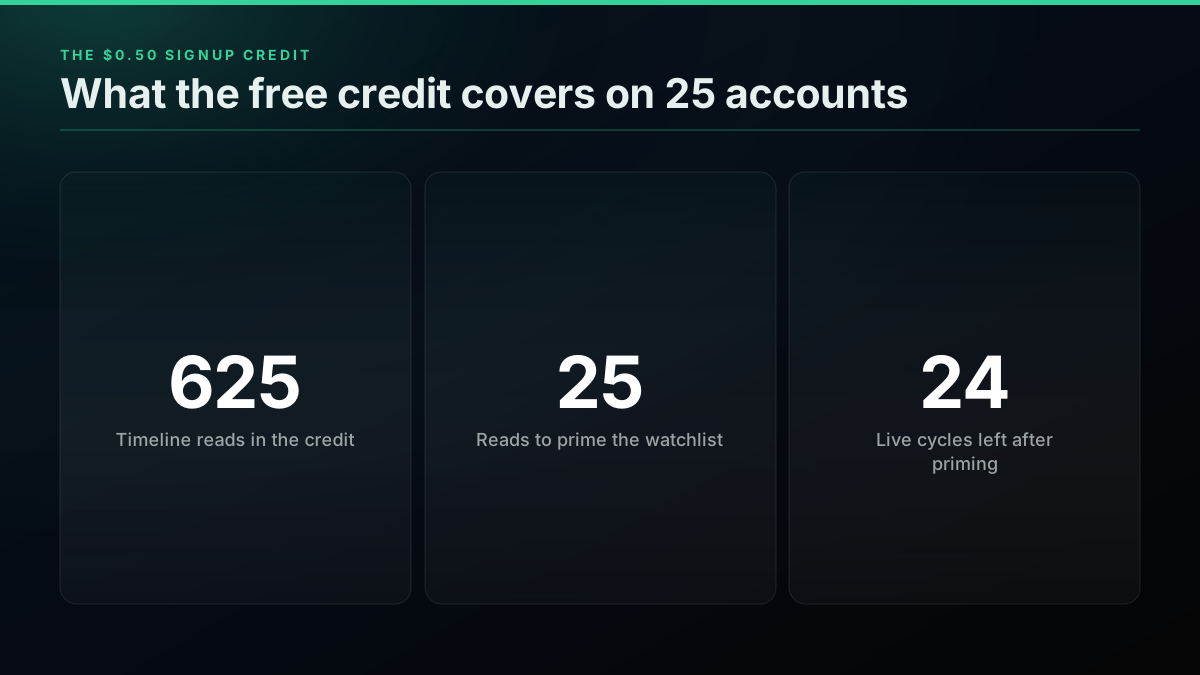
The free signup credit is $0.50, which is 625 timeline reads. That covers priming a 25 account list, running the test suite, and about 24 live cycles. It is enough to prove the tracker works end to end on real data. It is not enough to leave running, and the next section is about the cheaper way to leave it running.
Can one call watch 100 accounts?
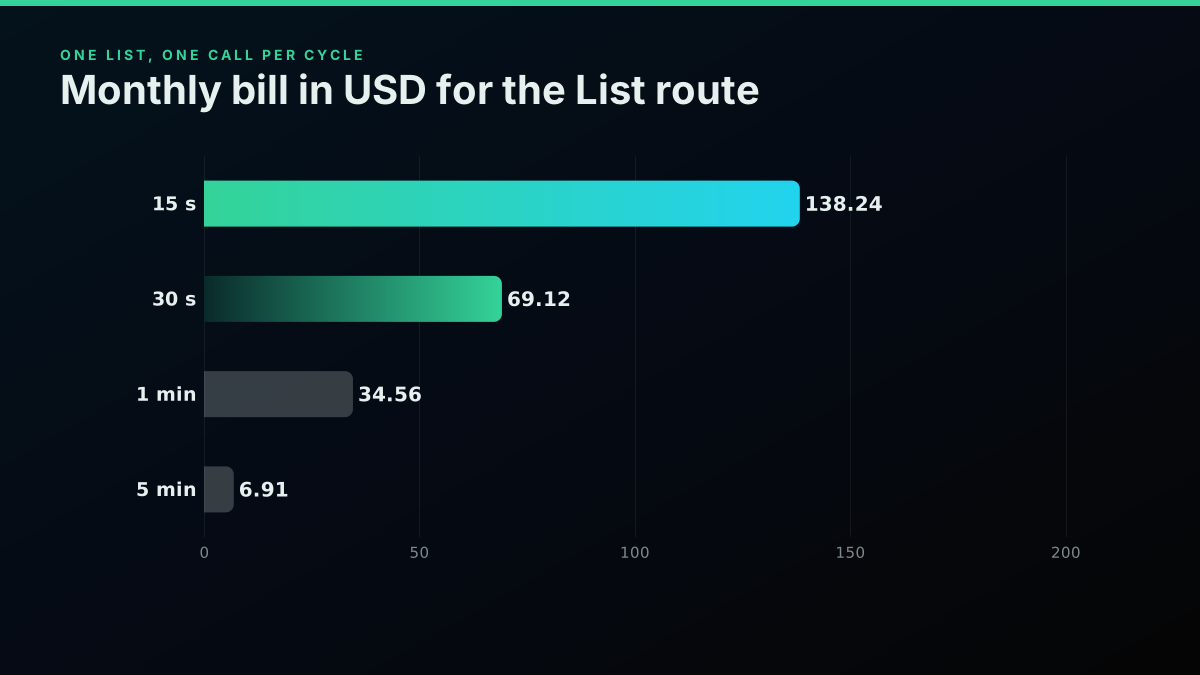
If your accounts live in a public X List, one call to the List endpoint returns the newest posts from every member at once, so the bill stops growing with the size of the watchlist. At a one minute interval that is about $34.56 a month whether the List holds 25 accounts or 100. You page with a cursor until you reach a post you have already processed.
def get_list_posts(list_id, seen, max_pages=5):
    """Newest posts from every member of a public List. One billed call per page."""
    posts, cursor = [], None
    for _ in range(max_pages):
        params = {"list_id": list_id}
        if cursor:
            params["cursor"] = cursor
        page = api_get("/twitter/list/tweets", params)
        batch = page.get("tweets") or []
        posts.extend(batch)
        if not page.get("has_more") or any(t["id"] in seen for t in batch):
            break  # we have reached posts we already processed
        cursor = page.get("next_cursor")
    return {"tweets": posts}

# In run_cycle, replace the per-account loop with:
#   for tweet in new_posts(get_list_posts(LIST_ID, seen), seen): ...
We tested the paging against 276 real posts split into pages of twenty: it stopped after two calls when the second page held a seen id, and walked all five pages when nothing was seen. A live read of one busy public crypto List returned twenty posts covering about seventeen minutes, newest first, even though we asked for a hundred, so plan on twenty per page.
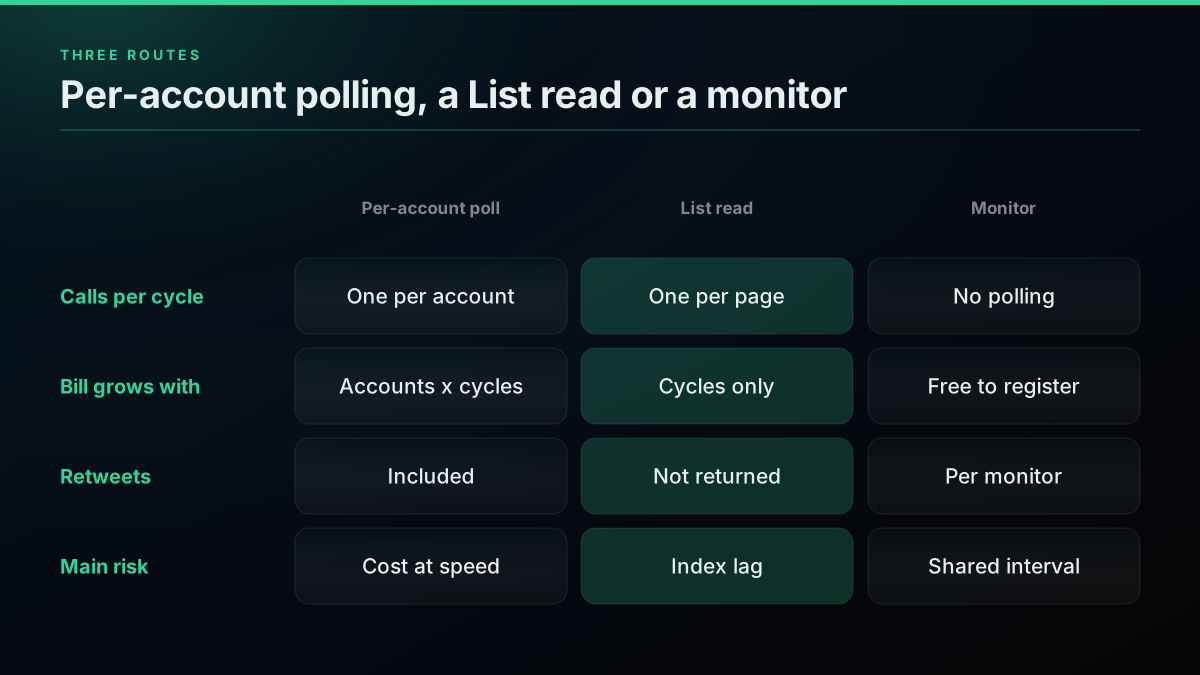
The same watch at a one minute interval, by route
| Route | Calls per cycle | 25 accounts per month | 100 accounts per month | Returns retweets | Source |
|---|---|---|---|---|---|
| Poll each account | 1 per account | $864.00 | $3,456.00 | Yes | derived |
| Read one public List | 1 per page | $34.56 | $34.56 | No | derived |
| Monitor plus webhook | 0 | $0.00 to register | $0.00 to register | Not documented, replies optional | derived |
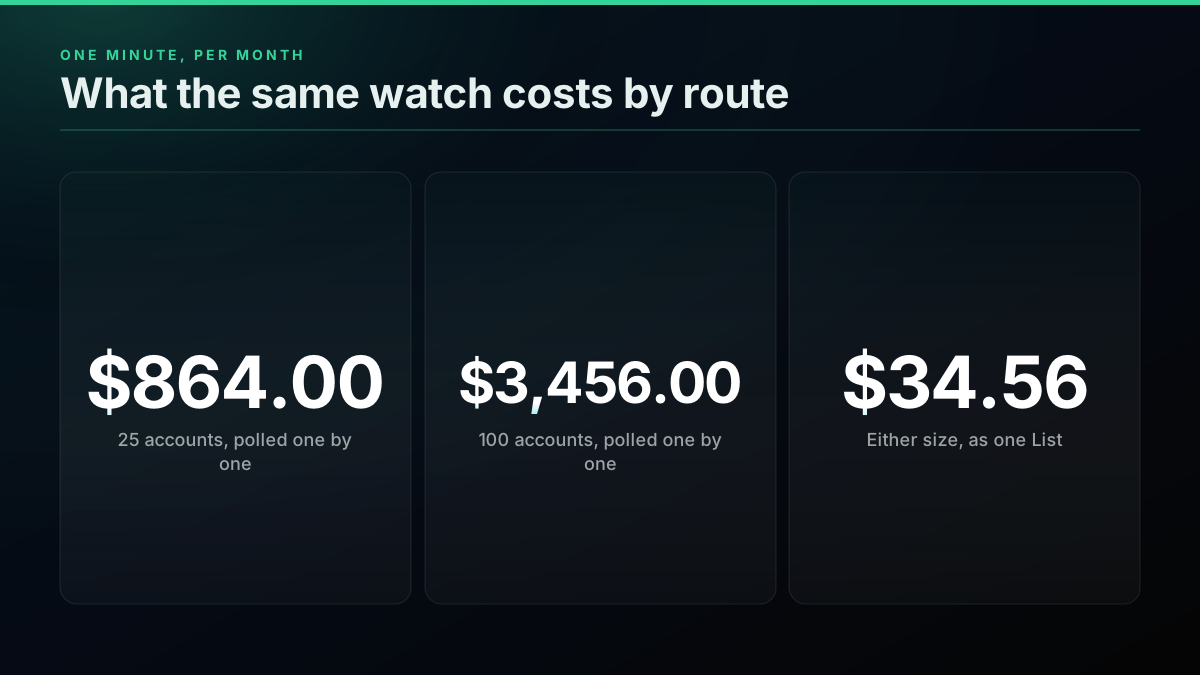
Worked example
Moving a 100 account watch onto one List
Per account, every minute: $3,456.00 · One List, every minute: $34.56 · Calls per cycle: 100 to 1
☑ The bill stops growing with the number of accounts · ☑ Paging stops at the first post already seen · ☐ Retweets are not returned by the List read · ☐ A post made moments ago can be missing briefly
Two limits come with the List route, and both are documented on the endpoint. It does not return retweets, so if a KOL amplifies someone else's contract by retweeting it, the List read will not show it. And it reads through X's search index, so a post made moments ago can be missing briefly. Why X advanced search misses posts explains the index behaviour in more detail. If retweets matter to you, poll the handful of accounts that retweet calls one by one and read the rest as a List.
The third route is a monitor. Registering a monitor and a webhook is free, since both sit in the zero price set, and new posts from the watched handle are delivered to your webhook, HMAC signed, on a shared poll interval. You verify each delivery with the signing secret you get once at creation, using something like Python's hmac module. The real-time mentions guide walks through the setup, and the monitoring coverage post is honest about what a shared interval can and cannot promise. The trade is control: you do not choose the interval, so you do not choose the delay.
Route selection
Three ways to watch a crypto watchlist, and what each one bills
| Poll each account | Read one List | Monitor and webhook | |
|---|---|---|---|
| Bill grows with watchlist size | Yes, linearly | No | No, free to register |
| Returns retweets | Yes | No | Not documented, replies optional |
| You choose the interval | Yes | Yes | No, shared interval |
| 100 accounts, one minute, per month | $3,456.00 | $34.56 | $0.00 to register |
| Main risk | Cost at speed | Search index lag | Less control over delay |
What an address in a post does not tell you
An alert means one thing: a public account posted a string shaped like an address. It does not mean the address is a token, that the token is new, that it is safe, or that the poster believes in it. In our sample most hits were wallets in explorer links, and the most common Solana hit was a mint that appears in posts every day.
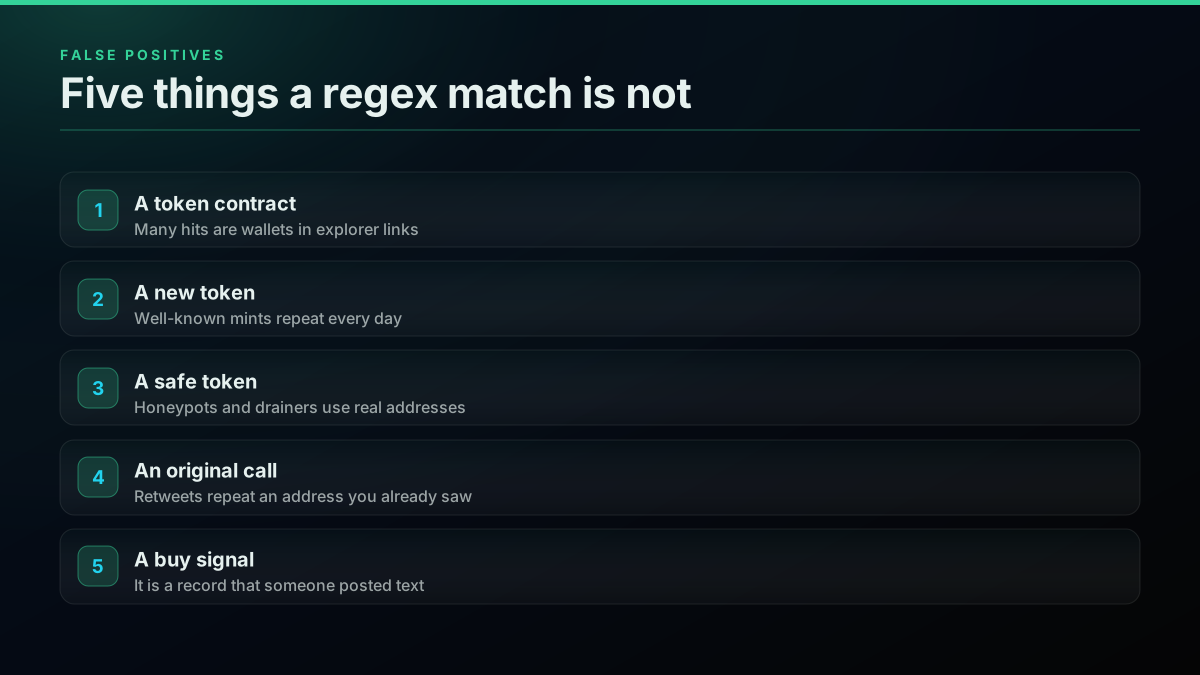
Scam tokens use real addresses too. Honeypot contracts let you buy and then block the sale, copycat tokens reuse a real project's name with a different address, and impersonation accounts post fake addresses under real announcements. Every one of those produces a perfectly valid match for the regex in this post.
Two of those patterns are ones a tracker can make worse. A copycat token looks exactly like a real call in an alert, and an impersonation account posting under a real announcement is designed to be caught by this kind of loop. Alert only on posts written by the accounts on your watchlist, which the author.username field makes easy, and never treat an address in someone else's reply as the project's own.
Paid promotion is the other problem. The SEC's investor education site describes pump and dump schemes, where promoters push a thinly traded asset and sell into the buying they create, and social media is where that pushing happens now. A tracker that fires the moment an account posts puts you at the front of that queue, which is the worst place to be if the post is paid. Our guide to spotting bot activity covers some of the account-level signals worth checking.
Where a beginner build usually goes wrong
The failures we see in homemade trackers are rarely in the regex. They are in the plumbing around it: no priming, no age filter, alerting on retweets of your own watchlist, and nobody noticing the bill until it arrives. Plenty of people learn Python by building exactly this kind of bot. One first project shared on r/Python was a Discord crypto tracker, and its thread is a good picture of where a first version starts:
https://www.reddit.com/r/Python/comments/o4i6d3
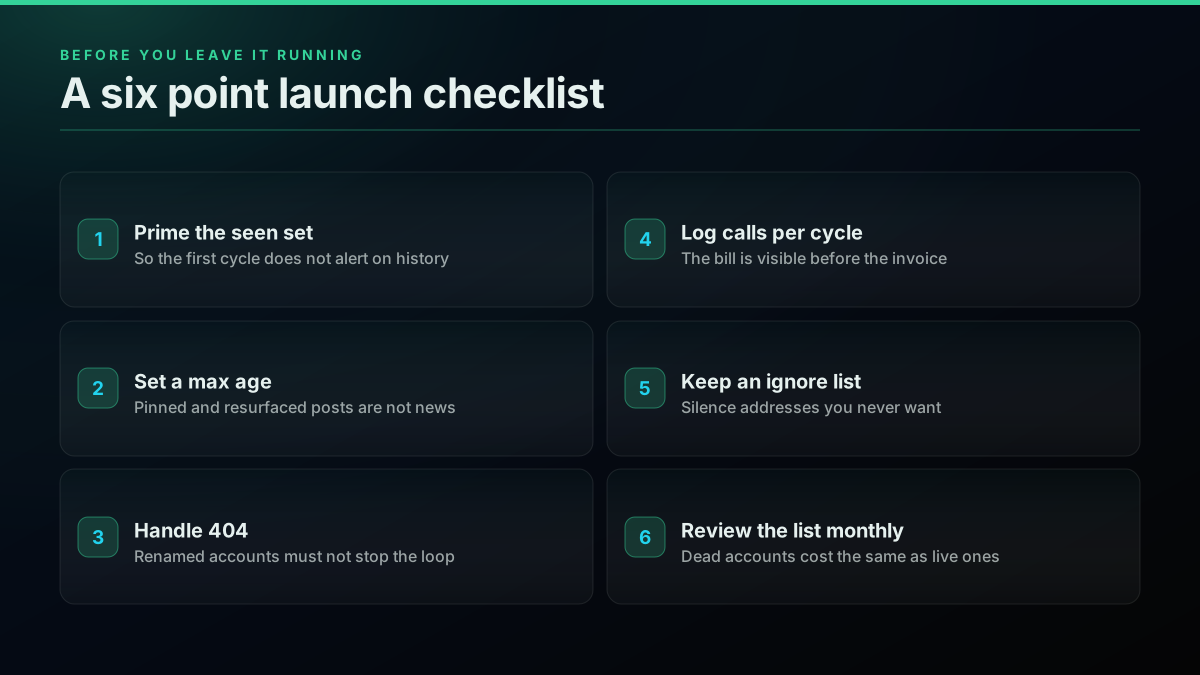
Five fixes cover most of it. Prime the seen set so history does not flood the channel. Keep the age filter so pinned posts stay quiet. Handle 404 so one renamed account does not stop the loop. Print cost per cycle so the bill is visible daily. Review the watchlist monthly, because a dead account costs exactly as much to poll as a live one.
If you want a broader view of these tradeoffs before committing to your own build, build versus buy for X monitoring prices the two paths side by side, and the cost by workload breakdown shows how similar watches bill in other use cases.
Extending the tracker without breaking it
The tracker is deliberately small so it stays readable, and the useful extensions keep that property. Add a ticker regex for cashtags, add keyword alerts, split alerts by chain into separate channels, or log every alert to a CSV for review later. Each one is a few lines in find_addresses or alert, and each one should come with a new case in the test.
A cashtag match is one more pattern in the same function. X also returns cashtags in entities.symbols, which saves you the regex when it is populated:
def find_cashtags(tweet):
    symbols = (tweet.get("entities") or {}).get("symbols") or []
    tags = {s.get("text", "").upper() for s in symbols}
    tags |= {m.upper() for m in re.findall(r"\$([A-Za-z][A-Za-z0-9]{1,9})\b", post_texts(tweet))}
    return sorted(t for t in tags if t)
The most useful extension is one almost nobody builds: record every alert and check it a week later. A developer on r/Python built a bot that stores stock predictions people post and replies with how they actually played out, which is the same idea applied to calls:
https://www.reddit.com/r/Python/comments/kknr91
An alert log with a follow-up column tells you which accounts on your list are worth watching at all, which is a better use of the data than acting faster.
If you would rather watch keywords than accounts, the advanced search operators guide shows how to narrow a search so empty results stay rare, and the scraping in Python guide compares the other ways to collect the same data. For performance tracking on the posts your tracker finds, real-time tweet performance tracking picks up where this post stops.
Here is a short video walkthrough of a related build, a Python bot that posts on-chain whale alerts to X, which is the same loop pointed in the other direction:
https://www.youtube.com/watch?v=8k87nbQMsn4
The blunt answer
A crypto Twitter tracker is a small program, and the hard parts are not the ones people expect. The regex takes ten minutes. Reading the retweeted post and the expanded link, priming the seen set, filtering old posts and handling dead accounts take the rest of the afternoon, and those are what separate a tracker that works from one that looks like it works.
Price it before you run it. Polling 25 accounts one by one every minute is $864.00 a month and 100 accounts is $3,456.00. The same watch as one public List is about $34.56. Start with the List, poll the few accounts whose retweets you need, and slow the interval until the delay you pay for matches the delay you can act on.
Then treat every alert as the start of your research, not the end of it. The loop can tell you something was posted. Only you can decide whether it was worth reading. The pricing page lists every endpoint used here, and the free credit covers building and testing the whole thing on real data.
Frequently Asked Questions
A crypto Twitter tracker is a program that watches a chosen set of X accounts, reads every new post they publish, and flags the ones that matter to you, usually posts that carry a token contract address, a ticker or a keyword. The version in this guide polls each account's timeline on a fixed interval, keeps a record of post ids it has already processed, extracts EVM and Solana addresses with two regular expressions, and sends an alert to your terminal or a chat webhook. It reads and alerts only. It never trades.
Solana addresses are 32 byte public keys written in base58, which comes out as a string of 32 to 44 characters drawn from an alphabet that excludes 0, O, I and lowercase l. A regex for that shape alone matches too much, so add one more test: real addresses mix upper case, lower case and at least one digit, and English words do not. Keep an ignore list for addresses that appear constantly, such as the wrapped SOL mint, or every price chart post will trigger an alert.
Yes, if the accounts are in a public X List. The List endpoint returns the newest posts written by all List members in one response, about twenty per page, and you page with a cursor until you reach a post you have already seen. That makes one call per cycle cover 25 or 100 accounts alike. Two limits come with it. It does not return retweets, so a KOL amplifying someone else's contract will not show up, and it reads through the search index, so a post made moments ago can be missing briefly.
No. The tracker needs one thing, a way to read an account's recent posts as JSON, and any read API that returns a timeline will do. This guide uses a pay per call API with no monthly plan, where a timeline read is $0.0008 and new accounts get $0.50 of free credit, which is 625 calls. That is enough to build the tracker, run the test suite against saved real responses, prime a 25 account list with 25 calls and run about 24 live cycles before you spend anything. The official route works too, with its own pricing and developer account requirements.
Polling each account once per cycle at $0.0008 per call costs $0.02 per cycle for 25 accounts. At a one minute interval that is 1,080,000 calls and $864.00 a month. At five minutes it is $172.80, at fifteen minutes $57.60 and hourly $14.40. Put the same 25 accounts in one public X List and read the List instead, and a one minute poll drops to one call per cycle, about $34.56 a month, because the bill no longer grows with the number of accounts. The trade is that the List read goes through search and can lag a little.
Usually because it only reads the text field. In our sample of 276 recent posts from 14 crypto accounts, most address hits came from explorer links, where the full address sits in the expanded URL while the visible text shows a shortened form like 0xec90. Retweets and quote posts also keep the original words in a nested object. Scan the text, the retweeted post, the quoted post and every expanded link, and the misses mostly disappear. Check your seen set too, because a post id marked seen before parsing will never be parsed.
This guide is not trading advice and the tracker is not a trading tool. It records that a public account posted a string that looks like an address, which is all it can know. An address in a post can point to a honeypot, a drainer or a token the poster is paid to promote, and US regulators describe coordinated social media promotion as a common part of pump and dump schemes. Treat every alert as a prompt to research, check the contract yourself, and follow the rules that apply where you live.
The alert delay is set mostly by your poll interval. A post lands at a random moment inside a cycle, so the average wait is half the interval: thirty seconds on a one minute poll, fifteen on a thirty second poll, seven and a half on fifteen seconds. Parsing and the alert itself add well under a second. Seconds of delay are possible, but per account polling at that speed gets expensive quickly, which is why the List route and a free monitor webhook exist.
Check out similar blogs
More guides on the Twitter/X API, scraping, and pricing.
TwitterAPIs Is Live on Uneed: A $0.0008 Twitter API With No Developer Account
TwitterAPIs launched on Uneed today. What the pay-per-call Twitter API costs next to the official X API, how a Uneed launch day actually works, and what founders say one delivers.
Watching 50 X Accounts: What Every Poll Cadence Actually Bills
Every monitoring page sells you an interval and calls it real time. None of them prices it. Here is what a one minute, fifteen minute and daily poll across a fixed fifty account roster costs per month, and the route where the watch itself bills nothing.
Why X Advanced Search Misses Posts You Know Exist (2026)
A query that returns nothing is not proof that nothing exists. We searched for 17 posts confirmed to exist, published between 2015 and 2026, and measured which query forms found them and which did not.

X/Twitter Statistics in 2026: What an API Can Actually Measure, and What Nobody Can
Most X statistics roundups re-cite the same handful of numbers. We measured what a public API can and cannot see across 34 accounts, printed the query behind every figure, and traced the rest to their real sources.
X API Cost in 2026: Every Tier and Alternative on One Sheet
X bills per resource in 2026. Here is every official rate and every vendor converted to one unit, dollars per 1,000 tweets, with a worked bill.
Sprout Social Alternative 2026: What Twitter Data Really Costs
Sprout is $199 a seat. Brandwatch publishes no price. Here is what Twitter data costs per 1,000 mentions across all three, read live on 2026-09-09.
Twitter API Reliability, Measured: What Actually Fails Across 5.16 Million Calls
Every vendor publishes an uptime promise. Nobody publishes the failure distribution. Here is what broke across 5,155,699 production calls, by status code, by endpoint and by week.
What the Twitter Firehose Actually Was, and What You Get Instead in 2026
The firehose was a real product with a precise meaning: every public post, in realtime, unsampled. It is not what anybody sells you today. Here is what the word meant, what replaced it, and what complete coverage costs on per-call reads.