GUIDE
Twitter Scraping in Python (2026): Pick a Route Before You Write Code
Four ways to collect X data in Python, priced honestly: the official X API v2 pay-per-use rate, an account-pool scraper, a headless browser, and a managed read API. What each one actually costs to run for a year.
Per our own spec, 70 of 123 endpoints bill $0.0008, 26 are free, and 27 sit between $0.0016 and $0.01. Every price ships inside our published OpenAPI document as an x-cost-usd field, so any figure in this post can be checked against the contract that bills it rather than taken on trust.
Twitter scraping in Python means collecting public post data from X and turning it into structured records you can query. The hard part is not the code. Every route has a working Python implementation you can install in one command. The hard part is that the four routes have wildly different running costs, and three of the four hide most of that cost somewhere other than the invoice.
TL;DR: There are four ways to collect X data from Python. The official X API v2 charges $0.005 per post read on pay-per-usage, so a thousand posts is five dollars and there is no subscription to buy. An account-pool library like twscrape is fast and cheap per request, but it runs on X accounts you supply via browser cookies, and its own README warns that X's terms discourage multiple accounts. A headless browser is the slowest and priciest per record. A managed read API moves the account and proxy problem off your side of the line for a metered fee. Choose on volume, latency, write access, and how much terms-of-service exposure your organisation can carry. Then write the code.
We should be direct about our position before the numbers start. TwitterAPIs sells a read API. That is the fourth route below, and we obviously think it is a good answer for a large class of jobs. It is not a good answer for all of them, and this guide names the cases where the official X API is genuinely better and the cases where running your own scraper genuinely wins. If you finish this page and go run your own accounts, the page did its job.
Can You Still Scrape Twitter in 2026?
Yes, and the honest version of that answer has three parts, because the one-word version misleads in both directions.
The old way is gone and is not coming back. Every tutorial built on reading an unauthenticated public surface stopped working in 2023 and nothing has replaced that surface. If your plan is a library that needs no account, no key and no cost, that plan has no working implementation today. This is the part people are surprised by, and the next section walks the evidence.
Collection at scale is routine. Large volumes of X data move every day through account-pool libraries, managed scraping platforms and paid read APIs. Nothing about 2026 made the data unreachable. What changed is that every route now requires you to bring something: an account pool, a funded developer balance, or a vendor's bearer token. The question stopped being whether it is possible and became which of those three you would rather own.
"Scraping" now means four different things. The word covers routes with wildly different costs and risks, and most arguments about whether scraping still works are two people describing different routes. Running a cookie-authenticated account pool and calling a paid read API are both called scraping and share almost nothing operationally.
So the useful reframing is that scraping Twitter in 2026 is not a technical feasibility question, it is a procurement question with a technical shape. You are choosing who absorbs the session problem: you, X, or a vendor. Everything else in this post follows from that choice.
General Guide for Scraping Twitter: The Five Decisions
Before any code, five decisions determine what you build. Getting them in this order saves the most rework, because each one narrows the next.
1. What are you collecting, and how much of it? A few thousand posts a month and a few million are different products, not the same product at different settings. Below roughly 10,000 posts a month every route in this post costs less than a team lunch and you should choose on convenience. Above a few hundred thousand, unit cost becomes the dominant term and the routes separate sharply.
2. Do you need completeness, or a sample? This is the decision people skip and regret. If a missing 10 percent changes your conclusion, you need a route with a documented contract and a way to detect partial success. If you are building a feed or a demo, a sample is fine and the cheapest route wins.
3. Do you need to write, or only to read? Posting, replying, direct messages and any authenticated action on behalf of a user are a different capability from reading, with a different access model. Many pipelines are read-only and are quietly overpaying because they were designed around a write requirement that turned out to be one cron job.
4. Who is going to repair this in six months? Every route except a managed API assumes someone maintains a collector when the underlying response shape moves. That person is usually you. Price their hours before you price the requests, because for most small teams the maintenance line is larger than the data line by a wide margin.
5. What is your tolerance for terms-of-service exposure? Routes that require a pool of authorized accounts carry a category of risk that a vendor relationship does not. That is not a legal judgment, it is a statement about which party's accounts get locked when something goes wrong.
Answer those five and the route is usually already decided by the time you reach the comparison table. Answer them after you have written code and you will rewrite the collector at least once.
How Did We Evaluate Twitter Scrapers?
Every ranking should say what it measured, so here is the method behind the comparisons in this post.
We priced the total cost of running the route for a year, not the per-call rate. That means the published unit price plus the recurring costs each route imposes: residential proxy bandwidth where a route needs proxies, account replacement where a route needs accounts, and engineering hours where a route needs repair. A route whose per-call price is zero and which needs four hours of maintenance a month is not free, and pricing it as free is the single most common error in this category.
We used published rates and dated them. Where a figure comes from a vendor's own pricing page or documentation, it is linked inline and the retrieval date is stated, because the official X API has repriced more than once and any number here has a shelf life. Where a figure is an estimate, it is labelled as an estimate rather than presented as measured.
We checked whether libraries are actually maintained, not whether they are documented. A package's README describes what it did when it was written. The evidence we used instead is release history and issue state: the date of the last PyPI upload, whether the repository's Twitter-broken issues are open or closed as Not planned, and whether recent commits touch the collection path. That is why snscrape appears here as a closed route rather than as an option, and why tweepy appears as a maintained client for the official API rather than as a scraper.
We separated failure modes by whether they are loud or silent. A route that returns an error is easier to operate than one that returns partial data, and we weighted that heavily, because a silent partial result corrupts analysis in a way that no retry logic catches. Any route that cannot tell you it returned less than everything is scored down regardless of price.
What we deliberately did not do is present competitor latency or success rates as our own measurement. Where a third-party benchmark exists it is cited as a third-party benchmark, and where a vendor reports its own number it is labelled self-reported. Our own measured figures are limited to the endpoints we operate.
The evaluation is not a leaderboard, because there is no single winner. Different answers to the five decisions above pick different routes, and the tables in this post exist to make that tradeoff visible rather than to declare one route best.
What actually breaks when you scrape Twitter with Python?
Two things break, and neither is a bug in your code. The first is architectural: the unauthenticated surface that the old loginless libraries read no longer exists, so the approach stops working rather than the function. The second is partial success, where a soft-limited session returns some of the matching posts and your dataset is quietly wrong. Start with the failure, because the failure is what prices the decision.
A Python tutorial from 2022 opens by importing snscrape, running a search, and printing tweets. It is four lines and it is beautiful. It also does not work, and it has not worked for years. The snscrape repository carries issue #865, titled "Snscrape doesn't work for Twitter!", opened on 26 April 2023 by a user reporting that collection "all of a sudden" stopped. The issue was labelled a duplicate and closed as Not planned. The last release on PyPI was uploaded on 22 June 2023. The package still documents an impressive Twitter surface, users, profiles, hashtags, searches, single tweets and surrounding threads, list posts, communities and trends, and none of that documentation is a promise about today.
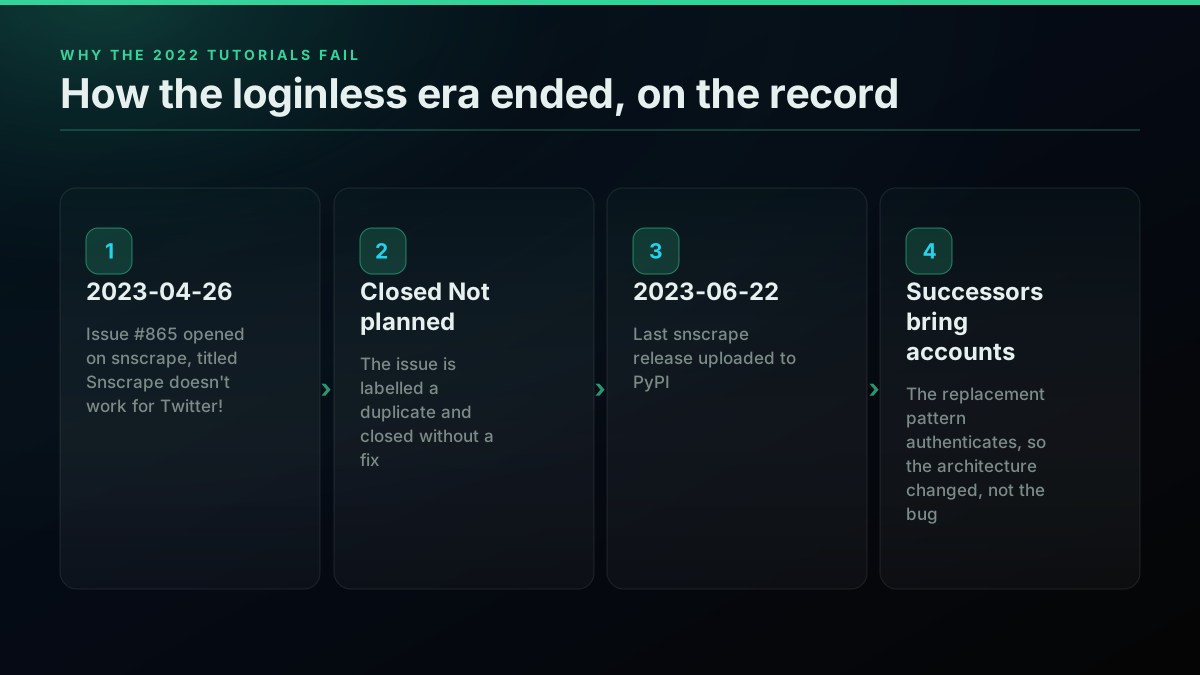
This is the single most useful thing to understand about scraping X in Python: the library shelf is a graveyard with a few survivors, and the survivors survived by changing architecture, not by patching bugs. snscrape worked because it read an unauthenticated surface. When that surface closed, there was no patch available, only a different design. That is why the successor tools all require you to bring accounts. Our tweepy versus twikit versus snscrape breakdown walks the library layer in more detail.
So the real failure mode is not "my code threw an exception". It is "the approach my code was built on stopped existing". A try/except block does not help with that. Only an architecture choice does, and that is a decision you make before you type pip install.
The second failure mode is quieter and more expensive: partial success. A collector that returns nothing is a loud, obvious problem you fix on Tuesday. A collector that silently returns part of the matching posts because your session got soft-limited produces a dataset that looks fine, loads fine, charts fine, and is wrong. Every downstream number you compute from it is wrong by an amount you cannot measure, because you do not know what you did not receive. If your work is analysis rather than archiving, this failure mode is the one that should actually frighten you, and it is the one that most strongly favours a route with a documented contract over a route that reverse-engineers a web surface. Our Twitter API error codes reference covers the loud failures; the silent ones are the reason a route with a spec is worth paying for.
What are your four collection routes in Python, and what does each one demand?
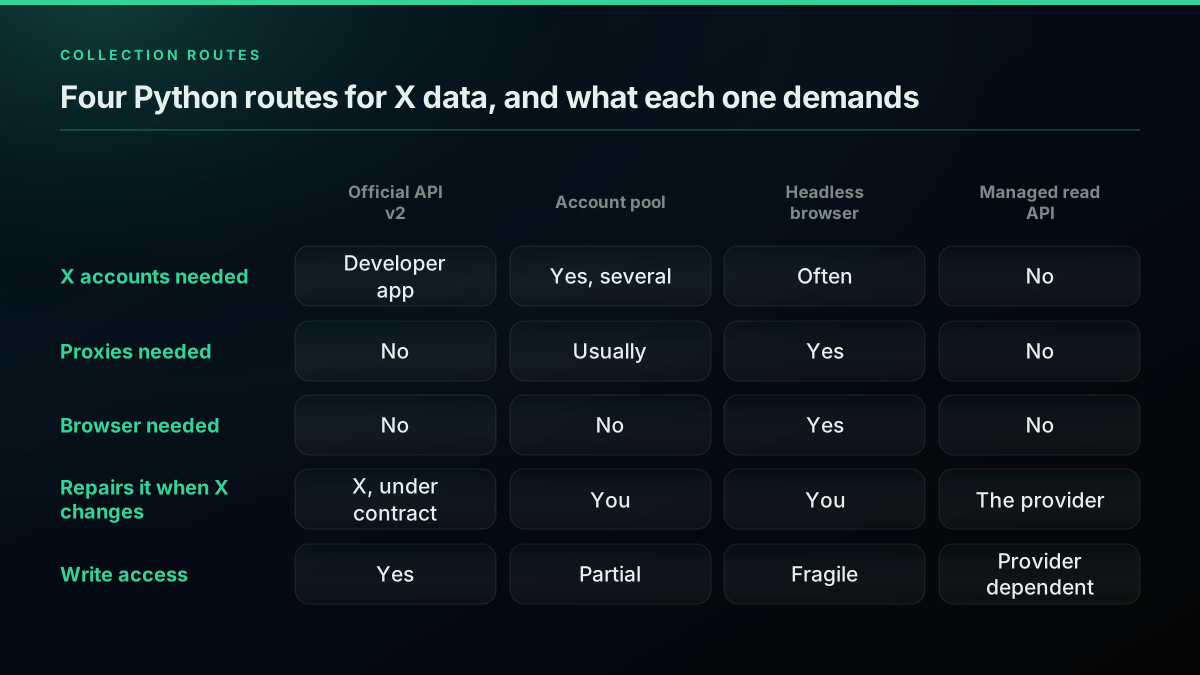
Every Python approach to X data collapses into one of four shapes. They differ on one axis that matters more than all the others: who owns the session that touches X.
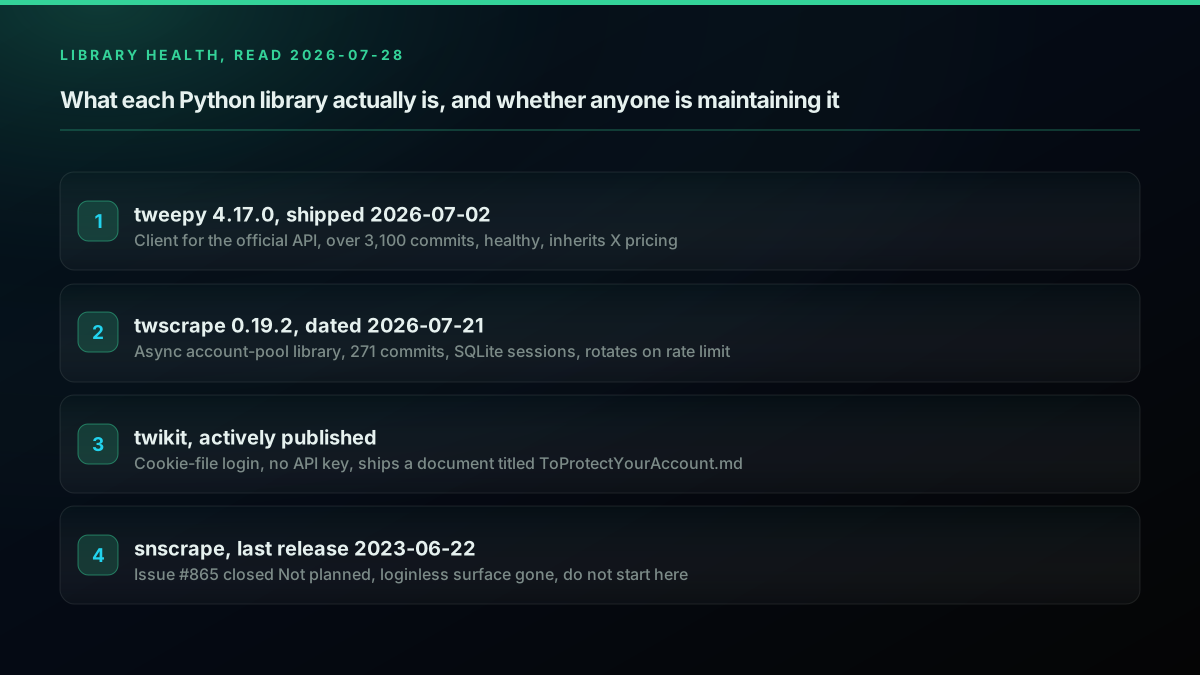
Route one, the official API through a client library. You register a developer app, get credentials, and send authenticated requests to documented endpoints. In Python this usually means tweepy, which is alive and healthy: version 4.17.0 shipped on 2 July 2026 against a repository with more than 3,100 commits. Be precise about what you are choosing here, though. tweepy is a client, not a scraper. It does not get you around anything. Choosing tweepy is choosing the official API, and the cost question is answered by X's rate card, not by the library. If you have never set the credentials up, our Twitter API key guide and authentication walkthrough cover the developer-app half.
The library layer itself is well documented by other people, and watching someone configure the credentials once is usually faster than reading three pages about it. This long-form tweepy walkthrough from 2020 is still the clearest demonstration of the client-library shape, provided you read its free-tier assumptions as history rather than current pricing:
https://www.youtube.com/watch?v=dvAurfBB6Jk
Route two, an account-pool scraper. You supply real X accounts and a library drives the same internal endpoints the website uses. twscrape is the current reference implementation, described by its author as "an async Python library and CLI for X/Twitter Search and GraphQL endpoints" that "runs on your own account pool, keeps sessions in SQLite, rotates accounts when an endpoint is rate-limited". It is actively maintained, with v0.19.2 dated 21 July 2026 across 271 commits. twikit occupies similar ground, advertising that you "can use functions such as posting or searching for tweets without an API key" and logging in from a cookies file. Both are free software and both are competent.
Route three, a headless browser. You drive a real browser with Playwright or Selenium, let the page render, and read the DOM. This is the route people reach for when the other two have failed them, and it is almost always the wrong answer for text data.
Route four, a managed read API. You send a bearer token to a third-party endpoint and get JSON back. Somebody else runs the accounts, the proxies, and the repair work. This is the category we are in, and it is also the category that attracts the sharpest criticism, which we will get to. Our buyer's guide to choosing a Twitter API compares the providers in that category against each other.
The clean way to see the four is by what they require from you:
| Route | Needs X accounts | Needs proxies | Needs a browser | Who repairs it when X changes | Write access |
|---|---|---|---|---|---|
| Official API v2 via tweepy | No, a developer app | No | No | X, under contract | Yes |
| Account pool (twscrape, twikit) | Yes, several | Usually | No | You | Partial |
| Headless browser (Playwright) | Often | Yes | Yes | You | Fragile |
| Managed read API | No | No | No | The provider | Depends on provider |
The "who repairs it" column is the whole article. Two of these routes put a recurring, unpredictable engineering obligation on your team, and that obligation does not appear on any pricing page, including ours.
Start building with TwitterAPIs
$0.0008 a call, about $0.04 per 1,000 tweets at 20 tweets a page. $0.50 free credits. No credit card required.
What does the official X API v2 actually cost a Python job?
The pricing conversation about the X API is full of stale numbers, because the model has moved repeatedly. Anything you read that reasons about a Basic plan at a fixed monthly fee is describing a world that has ended, and even the pay-per-use model itself has been revised since it launched. X's developer account said so directly:

Developers
@XDevelopers
Our X API reached all-time-highs since we upgraded. We are making changes to Pay-Per-Use, effective 4/20.
That is the important context for any tutorial you read: the rate card is a moving target, so check it rather than trusting a number in a blog post, including this one. Our X API pricing change explainer tracks the revisions as they land.
So what does it cost now? X's published pay-per-usage pricing is per resource, not per request, and the rates are:
| Resource | Published rate |
|---|---|
| Posts | $0.005 per resource |
| Users | $0.010 per resource |
| DM events | $0.010 per resource |
| Likes, mutes, blocks | $0.001 per resource |
| Owned reads (your own app, your own data) | $0.001 per resource |
| Post creation | $0.015 per request |
| Post containing a URL | $0.200 per request |
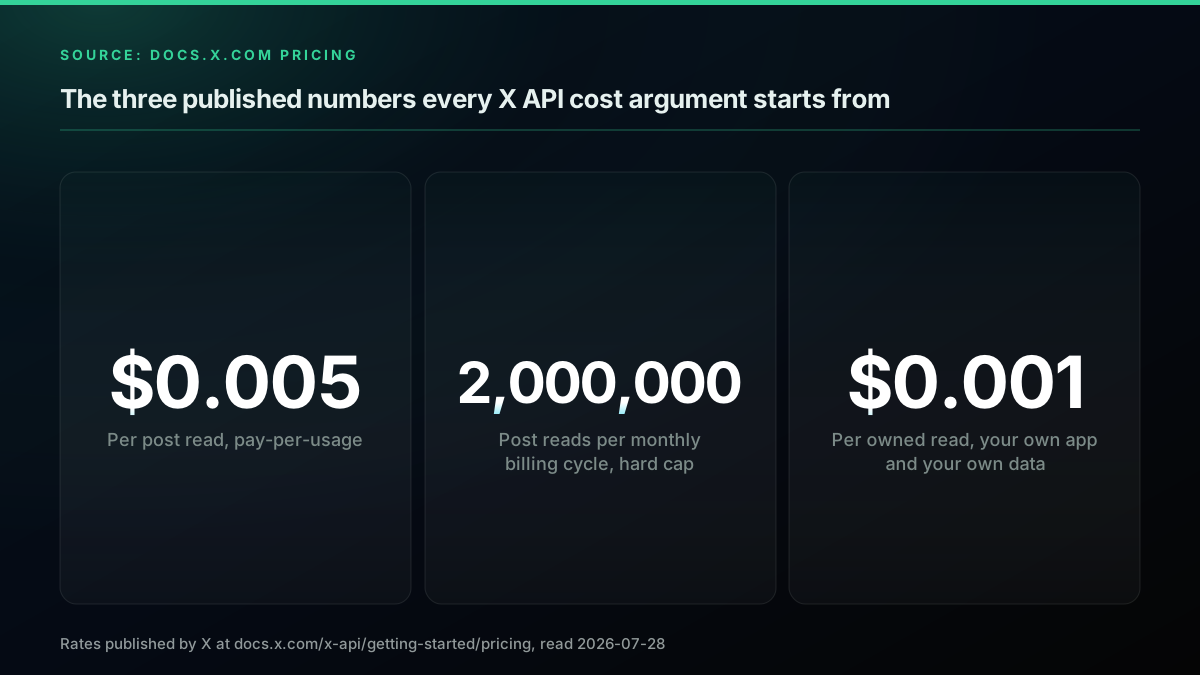
X states there are "no contracts, subscriptions, or minimum spend" and that you can "start and stop anytime". Pay-per-usage plans are "capped at 3 million Post reads per monthly billing cycle". You can set a spending limit per billing cycle, and auto-recharge is limited to one top-up per five-minute window. Our Twitter API cost guide and the is the Twitter API free explainer answer the two questions people usually arrive with.
Now do the arithmetic that no page-one search result does. At the published $0.005 per post read, one thousand posts costs $5.00. One hundred thousand posts costs $500. The three-million-post monthly cap puts a ceiling of roughly $15,000 a month on post reads alone, which is a genuinely useful guard rail if your worry is a runaway loop rather than the unit price.
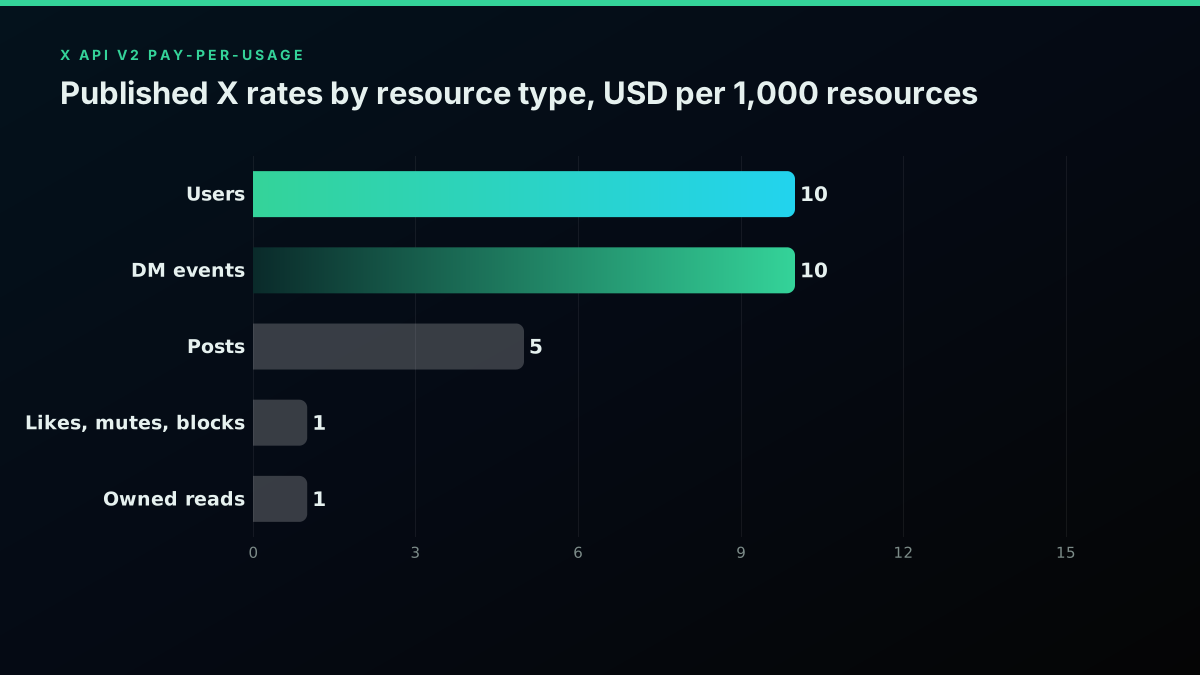
Two things about these numbers deserve saying out loud, because a vendor comparison usually skips both.
First, the pay-per-use model is a real improvement for small projects. Under the old ladder, a hobbyist wanting a few thousand tweets a month had to buy a plan sized for someone else. Under per-resource pricing, a few thousand posts is a few dollars and the meter stops when you stop. If your project reads ten thousand posts a month, the official rate card puts that at fifty dollars, and it comes with a contract, documented endpoints, and no accounts to lose. That is a defensible choice and you should not let anyone talk you out of it on price alone.
Second, the model scales badly for bulk analysis, and that is not a criticism of X so much as a statement about what the product is for. A sentiment pipeline reading five million posts a month lands at $25,000 a month against the published $0.005 per post read, before you account for the three-million cap, which you would still exceed well before the billing cycle is out. The cap is not a pricing detail at that point, it is a hard architectural boundary. High-volume historical analysis is simply not what the pay-per-use tier is built to serve, which is why our scrape tweet history guide treats backfill as a separate problem entirely.
Question... Scraping Social Media Data
The r/webscraping thread above is worth reading in full, because it captures the sentiment precisely. The original poster went looking for a way to monitor brand mentions across social platforms and concluded it "seemed that it is not possible based either on extreme API costs (Twitter/X), performance issues, or API restrictions on scraping for commercial use (Reddit)". A commenter who has clearly done the work replied bluntly that "the official API is insanely expensive", and suggested the account-pool approach instead. That is the market's actual view, and the per-resource rates above explain where it comes from.
That view is not confined to one thread. A student posting in the same subreddit described the constraint in almost identical terms:
Alternatives to the X API for a student project?
The post describes "the new API limitations, which have made access very expensive and restrictive for academic projects without funding", and asks for Python libraries that "can still effectively extract public tweets". The top reply is worth quoting for its honesty rather than its advice: "hell no, the official api is a scam. i rebuke it on principle." The same commenter goes on to describe reverse-engineering X's GraphQL calls and keeping cookies current, which is exactly the architecture the next section is about. Treat that thread as evidence of how developers feel, not as evidence of what is safe.
What does an account-pool scraper actually require of you?
It requires authorized X accounts you own, residential proxies to spread them across addresses, replacement accounts as sessions get locked, engineering hours every time an internal endpoint changes shape, and a terms-of-service exposure you carry yourself rather than transfer. The per-request price is close to zero and every one of those five lines is not. This is the route most Python tutorials point at, and it is the one where the gap between the demo and the production system is widest.
Read what twscrape's own documentation says, because it is admirably direct: "twscrape requires authorized X/Twitter accounts. The most stable setup is to add an account from browser cookies containing auth_token and ct0." The setup instruction is literally to open x.com, press F12, go to Application, Cookies, and copy two values out of your own logged-in session. In code, the setup half looks like this:
import asyncio
from twscrape import API

async def bootstrap():
    api = API()  # sessions persist in accounts.db
    # Two cookie values copied out of a logged-in browser session.
    await api.pool.add_account_cookies("acct_1", "auth_token=xxx; ct0=yyy")
    await api.pool.add_account_cookies("acct_2", "auth_token=zzz; ct0=www")
    print(await api.pool.accounts_info())

asyncio.run(bootstrap())
That is the entire trick, and understanding it tells you everything about the risk. You are not accessing a public surface. You are replaying an authenticated session belonging to a real account. The library then, in its own words, "rotates accounts when an endpoint is rate-limited" and offers "automatic account switching across rate-limited operations". It stores sessions in SQLite and supports per-account proxies.
The README also carries this line, which the tutorials that link to it tend not to quote:
"X/Twitter's Terms of Service discourage using multiple accounts. Use this project responsibly and at your own discretion."
The maintainer is telling you the thing plainly. So is the practitioner in that Reddit thread, who wrote "everything is against ToS" as an ambient fact while recommending the approach. Nobody who actually operates these tools is pretending otherwise, and you should not build a business case that pretends otherwise either.
twikit is the same shape with different ergonomics. It advertises working "without an API key" and being "free to use", and it logs in from a cookies.json. Notably, the repository ships a file called ToProtectYourAccount.md. A library that needs a dedicated document on not getting your account locked is telling you what the operational reality is.
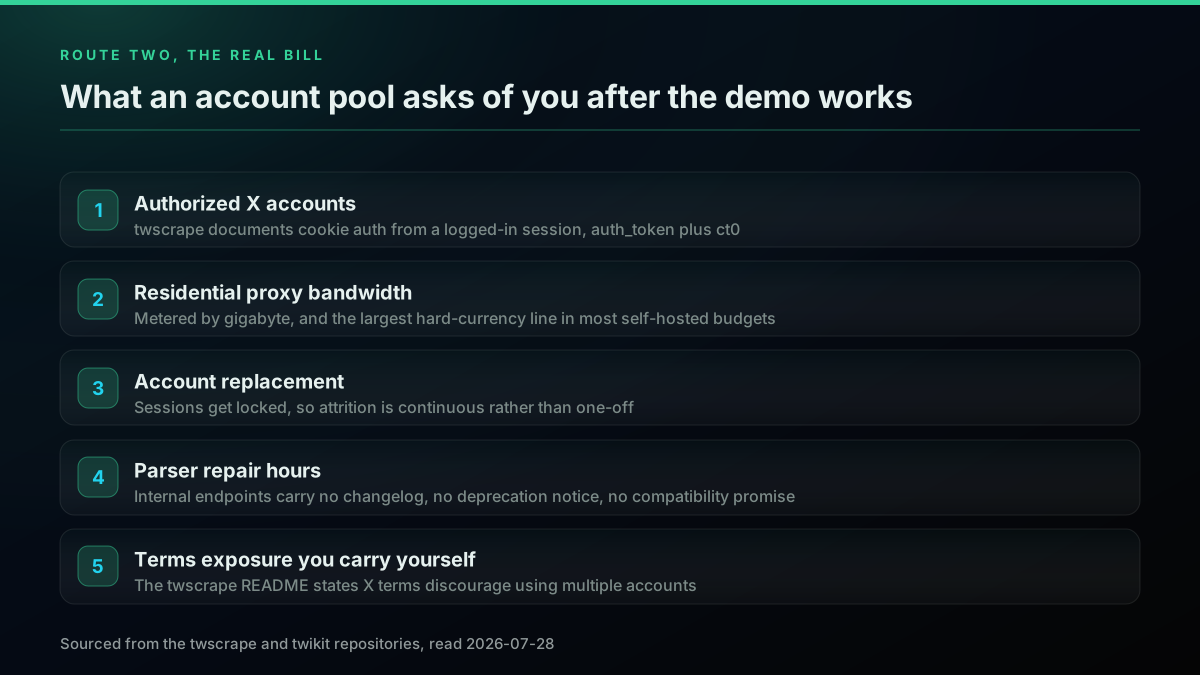
So what does this route actually cost? Not in requests, in operations:
Accounts. You need several, and they degrade. Each locked account is a replacement to source, warm, and load. Whether you create them or buy them, both paths carry their own problems, and the twscrape README itself links to a third-party provider of "ready-to-use cookie accounts" as referral links, which tells you a supply chain exists precisely because attrition is constant.
Proxies. Multiple accounts hitting the same endpoints from one address is the most obvious pattern there is. Residential proxy bandwidth is metered, and practitioners consistently report it as the line that dominates a self-hosted budget. This r/webscraping thread is the clearest statement of the problem we found:
The real costs of web scraping
The author sets out the arithmetic directly: residential proxy prices, in their words, go "from roughly $0.50/1GB of bandwidth to almost $10 in some cases", and the conclusion is that "because of bandwidth, the price starts to quickly add up and it can actually get more expensive than the API solutions". That post drew 88 comments and no one in it argued that proxies were free. Our residential proxy guide for Twitter scraping goes through the provider layer if you decide to carry that line yourself.
Engineering time. The endpoints being driven are internal ones. They carry no compatibility promise, no deprecation notice, and no changelog. When a response shape shifts, your parser breaks, and the fix is somebody reading network traffic to work out what moved. This is the cost that never makes it into the comparison table, and it is the one that dominates.
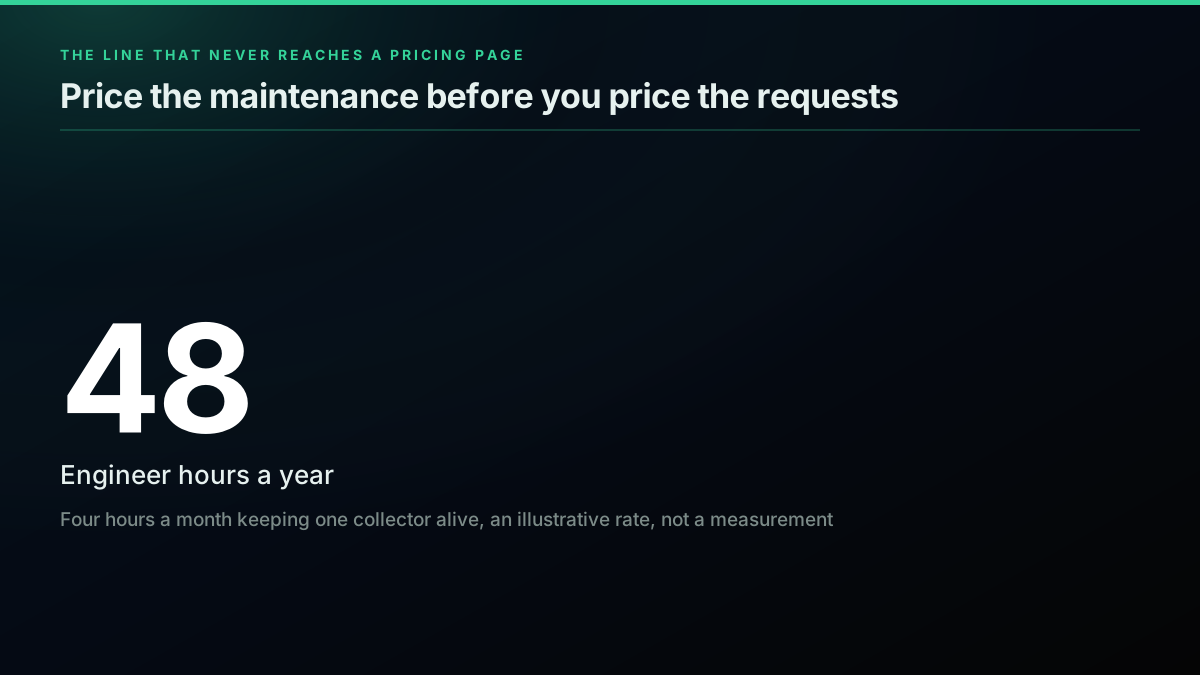
Put a number on that last one, because it is the honest way to compare. One engineer spending four hours a month keeping a collector alive is forty-eight hours a year. That four-hour figure is an illustrative planning rate rather than a measurement, and you should replace it with your own once you have run a collector for a quarter. At any loaded engineering rate you care to pick, forty-eight hours costs more than reading several million posts through a metered endpoint. The self-hosted scraper is cheap per request and expensive per year, and the switch between those two framings is where most build-versus-buy decisions are quietly lost.
None of which means never do it. If you have an existing scraping practice, proxy infrastructure you already pay for, and someone whose job includes maintenance, the marginal cost of adding X to that practice is genuinely low, and route two is the right call. The mistake is starting that practice from zero for one data source.
Why is a headless browser almost always the wrong answer here?
Because a browser downloads an entire rendered page, its JavaScript, its fonts and its images in order to hand you a few kilobytes of text, so your proxy bill is metered against page weight instead of payload and your throughput per machine collapses by orders of magnitude against a plain HTTP client. Route three deserves a short section because it is the one people fall back on by instinct, and it is usually a mistake for text.
Driving a browser with Playwright works. You install the package, install browser binaries, navigate, wait for the timeline to render, and read the DOM. The whole shape is about fifteen lines:
from playwright.sync_api import sync_playwright

with sync_playwright() as pw:
    browser = pw.chromium.launch(headless=True)
    page = browser.new_page()
    page.goto("https://x.com/search?q=data%20engineering&f=live")
    page.wait_for_selector("article", timeout=20000)

    for article in page.query_selector_all("article"):
        text = article.inner_text()
        print(text.replace("\n", " ")[:120])

    browser.close()
For a one-off pull of a few hundred posts that is fine and you will have it working in an afternoon. At scale it inverts every ratio you care about. A browser renders a full page, executes the site's JavaScript, downloads images and fonts and video thumbnails, and holds hundreds of megabytes of memory, all so that you can extract a few kilobytes of text. Your proxy bill is now measured against page weight rather than payload, which is the worst possible unit for what you are doing. Your throughput per machine drops by orders of magnitude against an HTTP client. And you have inherited every anti-automation signal that a real browser exposes, from canvas fingerprinting to timing behaviour, so you end up needing stealth patches on top. Our bot detection guide covers what those signals actually are.
There are two honest cases for the browser route. The first is when you need what only rendering produces, such as a visual snapshot of a post for a compliance archive. The second is a one-time exploratory pull where engineering time matters more than efficiency. Outside those, if you are reading text at volume through a browser, you are paying a very large multiple for a capability you are not using.
Is scraping Twitter legal, and what does the case law actually say?
This section is going to be less satisfying than you want, because the honest answer is that "is scraping legal" is three questions wearing one coat, and they have different answers.
Question one, the United States federal computer-crime statute. This is where the case everyone cites lives. In hiQ Labs v LinkedIn, the Ninth Circuit considered whether continuing to scrape publicly available profiles after receiving a cease-and-desist letter was access "without authorization" under the Computer Fraud and Abuse Act. The panel's opinion concluded that hiQ "raised a serious question as to whether the CFAA 'without authorization' concept is inapplicable where, as here, prior authorization is not generally required but a particular person, or bot, is refused access". The court's policy reasoning is worth reading directly: it agreed that "giving companies like LinkedIn free rein to decide, on any basis, who can collect and use data, data that the companies do not own, that they otherwise make publicly available to viewers, and that the companies themselves collect and use, risks the possible creation of information monopolies that would disserve the public interest."
Read that carefully, and note what it does not say. It is a preliminary-injunction posture, meaning the court was assessing whether there was a serious question to be tried, not delivering a final merits ruling. It concerns the CFAA specifically. And it is Ninth Circuit authority, not a nationwide rule. The popular summary, "scraping public data is legal, hiQ said so", is a compression that loses the parts a lawyer would care about.
Question two, the platform's terms. This is contract, and it is entirely separate from the statute above. A court finding that conduct is not a federal computer crime says nothing about whether it breaches an agreement you accepted. We are not going to characterise the current wording of X's developer terms in this post, because we could not read the page. Our source-collection tooling was refused by the domain, and rather than paraphrase a document we did not open, we will say plainly: read the terms yourself before you build, and note that the twscrape maintainer's own warning that "X/Twitter's Terms of Service discourage using multiple accounts" is the most direct statement on the point that we could actually verify.
Question three, privacy law. This one catches people who thought they were done after question one. A tweet is frequently personal data about an identifiable person, and the moment it is, data-protection law engages independently of any of the above. Under GDPR Article 6, processing personal data is lawful only if you have a lawful basis for it, and "the data was public" is not itself one of the listed bases. If you are collecting posts from EU residents and storing them, you need to have decided which basis you are relying on and be able to say so.
The practical posture most teams end up with is: public data only, no logged-in scraping of private surfaces, keep the minimum you need, define a retention period, and have a lawful basis written down. None of this is legal advice, and if the dataset is going anywhere near a product decision or a customer, this is a conversation for your actual counsel rather than a blog post.
What is the criticism of managed read APIs, and is it fair?
We sell one of these, so let us put the strongest available criticism on the page rather than around it. From that same r/webscraping thread, the practitioner who recommended running your own accounts also said this about our whole category:
"yep, for every unofficial 'api' out there its simply a bot farm underneath sending your requests to a script that organizes the data and commits it to a database"
Is that fair? Partly, and the fair part matters.
The mechanism is real. A third-party read API that returns data the official API does not sell at that price is not conjuring it. It is operating infrastructure against X, at scale, professionally. Anyone selling you the idea that a managed provider is doing something categorically different from route two is selling you a story. The pipes are similar. What differs is who operates them.
That is the actual value proposition, and it should be stated as a transfer rather than a disappearance. When you use a managed read API you are not eliminating the account and proxy problem, you are paying someone to own it, along with the repair work when a response shape shifts. Your side of the line becomes a bearer token and a documented contract. Their side becomes everything else. Our official X API versus third-party comparison puts that trade side by side.
Whether that trade is worth it is a genuine question with a real answer either way. It is worth it when you do not have a scraping practice, when maintenance hours are your scarcest resource, or when you want a per-unit cost you can forecast. It is not worth it when you already run this infrastructure for other sources, in which case the marginal cost of adding X to your existing pipeline is low and you should just do that.
Where the criticism is unfair is the implication that this makes the category illegitimate for the buyer. Your compliance position is genuinely different when you have a commercial contract with a provider than when your own engineers are rotating accounts, and pretending those two are identical is its own kind of dishonesty. It is a different position, not a magic one.
For reference, our own published rate is $0.0008 per standard read call, where a call returns roughly twenty tweets, which works out to about $0.04 per 1,000 tweets, with premium endpoints priced separately (full account history at $0.0024 per call, full thread expansion at $0.004). Set that against the official $0.005 per post read and the ratio is large. Both numbers are published; do the division yourself rather than taking a marketing multiple from either of us, and the cost calculator will run your real volume against both.
The cheapest pay-as-you-go Twitter API. Try it free.
$0.0008 a call, about $0.04 per 1,000 tweets at 20 tweets a page. $0.50 free credits. No credit card required.
What the Official Twitter/X API Looks Like Today
Half the confusion in this category comes from people comparing against a version of the official API that no longer exists, so it is worth describing the current one plainly before weighing it.
Access. Every app lives inside a Project in the developer console, each Project states a use case, and a new developer account goes through a review that clears anywhere from hours to several days. That review is a real step in your timeline and it cannot be automated away.
Pricing. Pay-per-usage is the default for new developers, with no subscription and no minimum spend. The published standard rate is 0.005 dollars per post read, user lookups meter at 0.010 dollars per resource, and owned reads, meaning your own app reading its own data, are 0.001 dollars. Post reads are capped at 3 million per monthly billing cycle.
The metering unit is the resource, not the request. This is the detail that breaks budgets. One search call returning 100 posts is billed as 100 read units, so a paginated sweep multiplies rather than adds. Estimate in objects delivered, never in requests issued.
What you get that no third party offers. Writes: posting, replying, direct messages, and any authenticated action on behalf of a user. Push delivery through webhooks rather than polling. And a first-party agreement, which is the thing that answers a procurement questionnaire.
Rate limits are per endpoint and per window, and they are separate from the price. Paying more does not remove a per-window limit, which surprises people who assume a spend ceiling is the only ceiling.
The short version for route selection: the official API today is a metered, approval-gated, write-capable product with a hard monthly read cap. It is well matched to applications that publish and poorly matched to applications that read in bulk, and that single sentence decides it for most of the projects that end up on this page.
When is the official X API genuinely the better choice?
In four cases, and we would rather say so here than have you discover it after integrating: when you need to write rather than only read, when you need push delivery instead of polling, when you are building agent-shaped tooling that makes occasional real-time lookups, and when your monthly volume is genuinely low enough that optimising the unit cost is a waste of your attention.
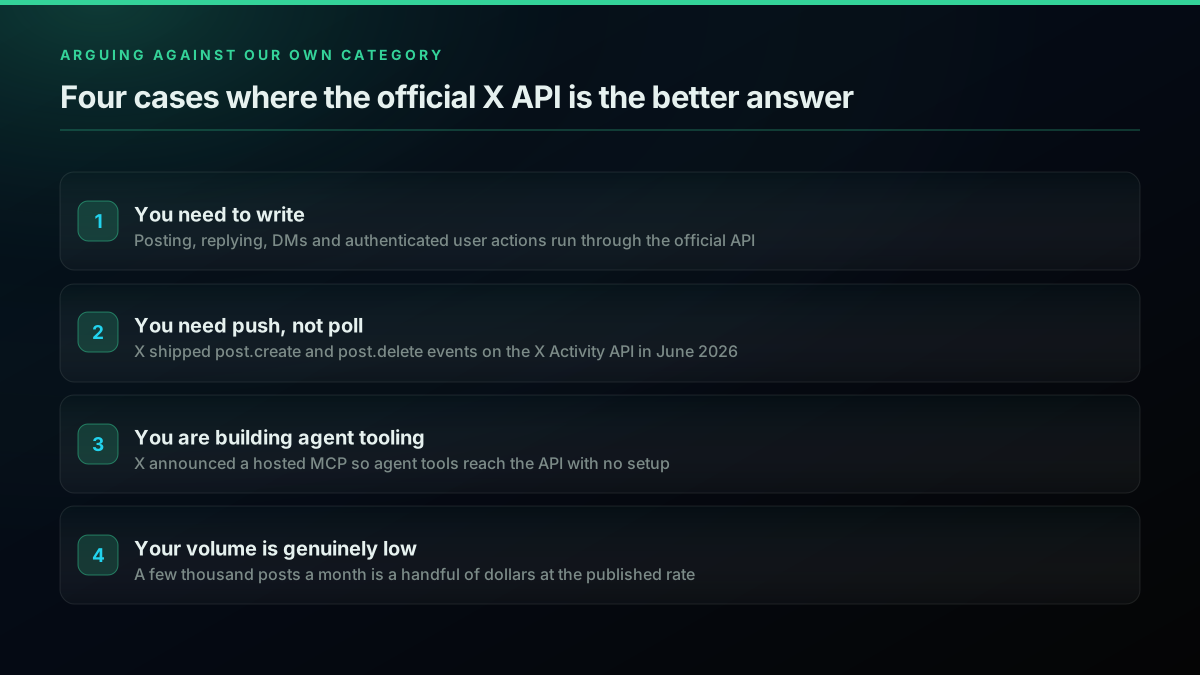
You need to write. Posting, replying, direct messages, likes, follows, any action taken on behalf of a user with their authorisation. The official API is the route X supports for this, and the pay-per-use rate card prices writes explicitly, at $0.015 per post creation and $0.200 for a post containing a URL according to X's published rates. If your application publishes, you are on the official route for that half of your system regardless of how you read.
You need push, not poll. This is the strongest case and it is not close:
Developers
@XDevelopers
Shipped: post.create and post.delete events for the X Activity API! 🚀 Subscribe by user_id to get real-time notifications whenever a user creates or deletes a Post. Perfect for monitoring, archiving & analytics. Details 👇 https://t.co/tEN6i62mkG
Post creation and deletion delivered as events, subscribed by user id, on the X Activity API. No polling architecture matches that. A scraper checking every thirty seconds has a thirty-second worst case and burns requests finding nothing most of the time. If you are building customer-service tooling or anything where reaction time is the product, the official API wins on the merits and price is a secondary consideration. Our real-time mention monitoring guide walks the polling side honestly, including where it stops being good enough.
You are building agent-shaped tooling. X is investing directly here:
Developers
@XDevelopers
Announcing the hosted X MCP. Agents now have access to the best real-time information source in the world. Connect Grok, Cursor, or any MCP-compatible AI tool to the X API without any setup! Check it out here: https://t.co/5MzPYwGFzD
That announcement passed four million views, and the "best real-time information source in the world" line is the platform's own marketing rather than our assessment. If your use case is an assistant that needs occasional real-time lookups rather than a pipeline that needs millions of historical records, the officially hosted path is low-friction and the volumes involved are small enough that per-resource pricing barely registers. We run an MCP server on the same reasoning, for the same shape of workload.
Your volume is genuinely low. Reading a few thousand posts a month costs a handful of dollars under pay-per-usage. At that volume, optimising the unit cost is a waste of your attention. Take the contract, take the documented endpoints, and spend the saved time on your actual product. X's own overview recommends v2 for all new projects, with v1.1 on limited support, so build against v2 if you go this way. Our Twitter API v2 comparison sets out where the two diverge.
How to Choose the Right Twitter Scraper: Four Questions
Ask them in this order, because each one can end the decision on its own: do you need to write or need sub-second delivery, how many posts a month do you actually read, do you already operate scraping infrastructure today, and how much terms-of-service exposure can your organisation carry. Do not start from the library, start from these.
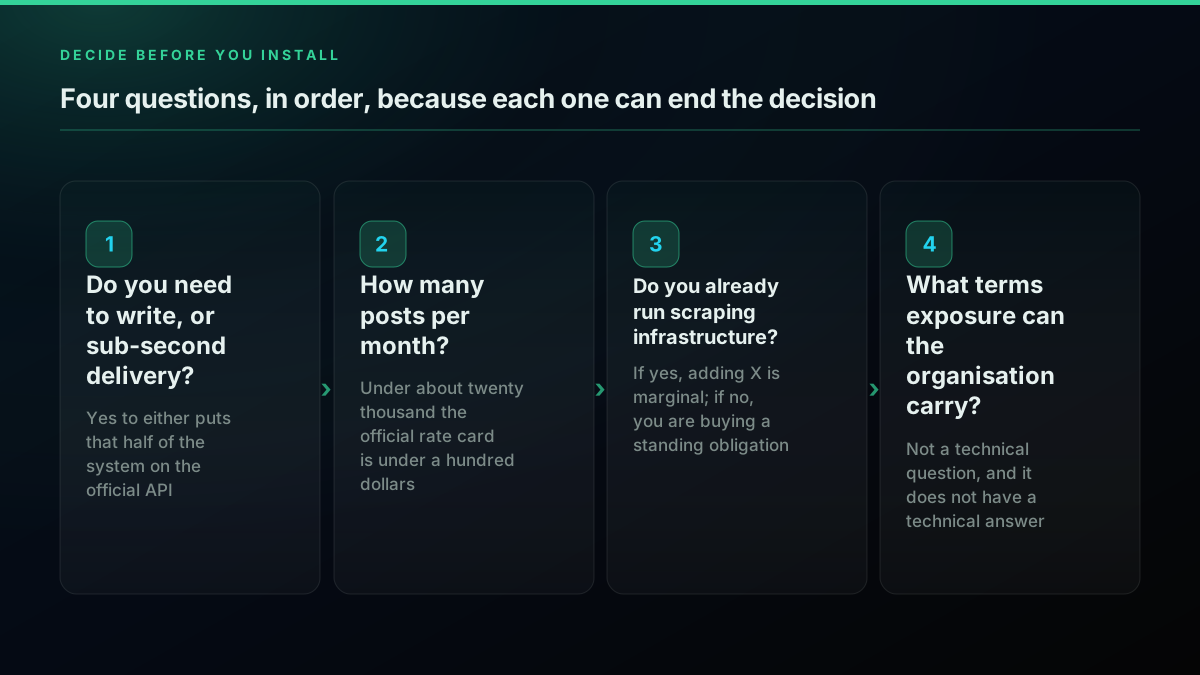
One: do you need to write, or do you need sub-second delivery? If yes to either, you are on the official API for that part of the system. Stop. Build it, then come back and answer the read question separately, because there is no rule that reads and writes must share a route.
Two: how many posts per month? Under about twenty thousand, the published rate card costs you under a hundred dollars and gives you a contract. Take it. Above a few hundred thousand, per-resource pricing becomes the dominant line in your budget and the three-million monthly cap becomes a wall. That is where the other routes earn their complexity, and our Twitter API rate limit guide covers the throughput side of the same question.
Three: do you already operate scraping infrastructure? If you have proxies, an account practice, and an engineer whose remit includes maintenance, route two is a small marginal addition and you should take it. If you would be standing all of that up from zero for one data source, you are about to buy a recurring obligation to save a bill that is smaller than the obligation.
Four: what terms-of-service exposure can your organisation carry? This is not a technical question and it does not have a technical answer. A solo developer on a side project and a funded company answering security questionnaires have genuinely different tolerances, and the honest thing is to name that rather than pretend one answer fits both.
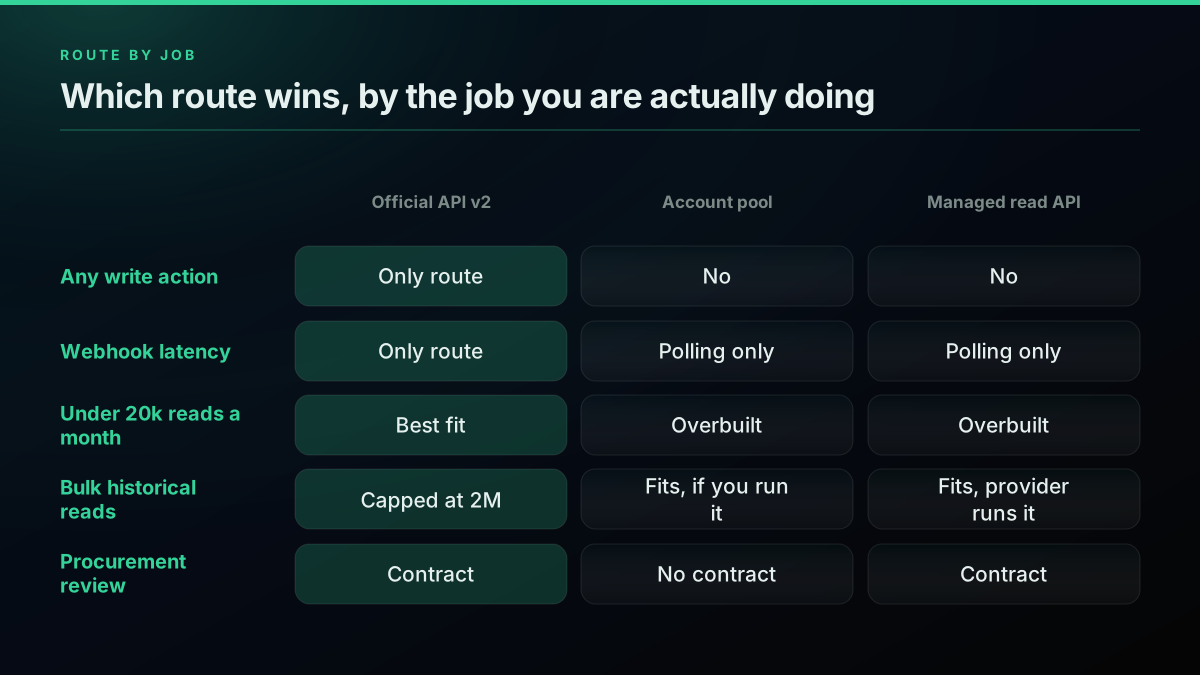
| If this is you | Route | Why |
|---|---|---|
| Any write action, or webhook latency | Official API v2 | Only route X supports, and unmatched on latency |
| Under 20k posts/month | Official API v2 | Roughly $100 or less, contract included |
| Existing scraping practice, high volume | Account pool (twscrape) | Low marginal cost on infrastructure you already run |
| High volume, no scraping practice | Managed read API | Buys the operations you would otherwise have to build |
| Need rendered pages or screenshots | Headless browser | The only route that produces what you need |
| Regulated buyer, procurement review | Official API or managed provider | A contract is an answer, an account pool is not |
How to Scrape Tweets (X Posts) With Python: The Code for Each Route
Roughly the same in all three cases, which is the point. Each route is a client construction, a query, and a loop over results, so the code is not what separates them. What separates them is what sits behind the client: a bill, an operational practice, or a bearer token. Here is each one, short and concrete, so the decision above stays connected to something real.
Official API through tweepy. You have a bearer token from a developer app. Every post you read meters at the published per-resource rate.
import tweepy

client = tweepy.Client(bearer_token="YOUR_BEARER_TOKEN")

resp = client.search_recent_tweets(
    query="data engineering lang:en -is:retweet",
    max_results=100,
    tweet_fields=["created_at", "public_metrics", "author_id"],
)

for tweet in resp.data or []:
    print(tweet.id, tweet.created_at, tweet.text[:90])
Account pool through twscrape. You supply accounts from browser cookies. The pool handles rotation. You now own the accounts, the proxies, and the repairs.
import asyncio
from twscrape import API

async def main():
    api = API()  # sessions persist in accounts.db
    await api.pool.add_account_cookies("acct_1", "auth_token=xxx; ct0=yyy")

    async for tweet in api.search("data engineering lang:en", limit=200):
        print(tweet.id, tweet.date, tweet.rawContent[:90])

asyncio.run(main())
Managed read API. A bearer token and an HTTP call. No accounts, no proxies, no rotation logic on your side.
import requests

resp = requests.get(
    "https://api.twitterapis.com/twitter/tweet/advanced_search",
    params={"query": "data engineering lang:en", "product": "Latest"},
    headers={"Authorization": "Bearer YOUR_API_KEY"},
    timeout=20,
)
resp.raise_for_status()

for tweet in resp.json().get("tweets", []):
    print(tweet["id"], tweet["text"][:90])
Three snippets, roughly the same shape, and the code is not what separates them. What separates them is that the second one comes with an operational practice attached, and the first and third come with a bill. Whichever you pick, the collector you build on top is the same engineering in all three cases: page until the cursor runs out, dedupe on tweet id, checkpoint so a crash does not restart the run, and pace yourself so you do not trip a limit.
import json, pathlib

STATE = pathlib.Path("collector_state.json")

def load_state():
    return json.loads(STATE.read_text()) if STATE.exists() else {"cursor": None, "seen": []}

def save_state(cursor, seen):
    STATE.write_text(json.dumps({"cursor": cursor, "seen": sorted(seen)}))

def collect(fetch_page, query, max_pages=50):
    state = load_state()
    seen, cursor, out = set(state["seen"]), state["cursor"], []
    for _ in range(max_pages):
        page = fetch_page(query, cursor)
        for tweet in page["tweets"]:
            if tweet["id"] in seen:
                continue
            seen.add(tweet["id"])
            out.append(tweet)
        cursor = page.get("next_cursor")
        save_state(cursor, seen)
        if not cursor:
            break
    return out
That loop is route-agnostic. Only fetch_page changes. Our pagination guide covers the cursor semantics per route, and the Python API tutorial walks the whole build end to end.
The last piece is deciding whether the bill is worth it before you commit, which is arithmetic you can run in a few lines rather than a spreadsheet:
OFFICIAL_PER_POST = 0.005     # docs.x.com/x-api/getting-started/pricing
MONTHLY_POSTS = 5_000_000
ENGINEER_HOURS_PER_MONTH = 4  # illustrative, replace with your own
LOADED_HOURLY_RATE = 90       # illustrative, replace with your own

official = MONTHLY_POSTS * OFFICIAL_PER_POST
maintenance = ENGINEER_HOURS_PER_MONTH * LOADED_HOURLY_RATE

print(f"official API, monthly: ${official:,.2f}")
print(f"self-hosted maintenance alone, monthly: ${maintenance:,.2f}")
print("proxies and account replacement are on top of that maintenance figure")
Run it with your real volume. If the second number dominates the first, you are in the territory where a metered endpoint is cheaper than an engineer, and if it does not, build the scraper. For search-heavy workloads the advanced search operators reference will cut your volume before either number matters, and if the destination is analysis, our sentiment analysis walkthrough picks up where collection ends.
Where should you go from here?
If you have not chosen a route yet, run the four questions again with your real volume number in hand, because volume changes the answer more than anything else on this page.
If you are comparing specific Python libraries against each other rather than comparing architectures, the tweepy versus twikit versus snscrape breakdown goes deeper on the library layer, and the tweet collector build guide covers the pipeline you put on top. If you are still scoping what to build at all, what to build with the Twitter API is the wider survey, and the endpoint reference lists what is actually available. For the packaged product and what it does, the Twitter scraper page has it, current per-call rates are on the pricing page, a provider-by-provider breakdown sits on the Twitter API pricing page, and the rate limits reference covers throughput ceilings. If you would rather just try it, signing up gives you free credits with no card.
And if after all of that the answer for your project is that you should run your own account pool, that is a legitimate outcome of a legitimate analysis. Just make sure you priced the forty-eight hours a year, not only the requests.
// sources
Where these numbers come from
Each row is a figure in this post and the artefact it was read from. Prices and limits on this platform move, so check the date on the source before you plan against it.
- X API pricing page
- The source for the $0.005 per post read figure the post uses to price route one, which it converts to five dollars per thousand posts with no subscription.
- snscrape issue 865 on GitHub
- The open report titled Snscrape does not work for Twitter, filed 26 April 2023 and closed as Not planned, which the post uses as evidence the library stopped collecting.
- snscrape release history on PyPI
- Backs the dating of the last snscrape release, uploaded 22 June 2023, which the post pairs with the closed issue to show the package is stale.
- tweepy repository on GitHub
- The source for the post's freshness check on tweepy: version 4.17.0 shipped 2 July 2026 against a repository with more than 3,100 commits.
- Ninth Circuit opinion in hiQ Labs v LinkedIn
- The primary court document the post quotes on whether the CFAA without-authorization concept applies where prior authorization is not generally required but a particular person or bot is refused access.
- GDPR Article 6, lawfulness of processing
- Backs the privacy question in the post, that processing personal data needs a listed lawful basis and that the data was public is not itself one of them.
Frequently Asked Questions
There is no single best way, there are four routes and the right one depends on volume and risk tolerance. The official X API v2 runs on pay-per-usage at $0.005 per post read with no subscription, which suits low volume and any workload needing writes or webhooks. An account-pool library such as twscrape gives you high throughput for the cost of proxies and accounts, but the maintainer's own README warns that X's terms discourage using multiple accounts. A headless browser is the slowest and most expensive per record. A managed read API removes the account and proxy operations from your side. Pick on volume first, then on terms-of-service exposure.
No, and it has not for a long time. The snscrape repository carries issue #865, titled 'Snscrape doesn't work for Twitter!', opened on 26 April 2023 and closed as Not planned with a duplicate label. The last release on PyPI was uploaded on 22 June 2023. Any Python tutorial that opens with snscrape is describing a version of X that stopped existing in 2023. The successor pattern is a cookie-authenticated account pool such as twscrape, which is a different architecture with a different risk profile, not a drop-in replacement.
It depends on the route. An account-pool library such as twscrape explicitly requires authorized X accounts and the most stable setup adds them from browser cookies containing auth_token and ct0. twikit likewise logs in from a cookies file. The official X API v2 needs a developer app and credentials but not a pool of personal accounts. A managed read API needs neither, you send a bearer token and the provider carries the session problem. If you do not want to own accounts that can be locked, the last two routes are the only ones that avoid it.
The per-call price is near zero and that is what misleads people. The recurring costs are residential proxy bandwidth, account replacement as sessions get locked, and engineering hours spent repairing the collector each time the underlying response shape changes. A single engineer spending four hours a month on scraper repair is roughly forty-eight hours a year, which at most loaded rates exceeds the entire annual bill for reading a few million tweets through a paid endpoint. Price the maintenance before you price the requests.
X publishes pay-per-usage pricing at $0.005 per post read as a per-resource charge, so 1,000 post reads costs $5.00 before any other calls. User lookups are $0.010 per resource and likes, mutes and blocks are $0.001. Owned reads, meaning requests your own app makes for your own data, are $0.001 per resource. There are no contracts, subscriptions or minimum spend, and pay-per-usage plans are capped at 3 million post reads per monthly billing cycle, which puts a ceiling of roughly $15,000 a month on post reads alone.
It is not a single yes or no, and it splits into at least three separate questions. On the United States federal computer-crime statute, the Ninth Circuit in hiQ Labs v LinkedIn held that hiQ raised a serious question as to whether the Computer Fraud and Abuse Act's 'without authorization' concept applies where prior authorization is not generally required. That was a preliminary-injunction posture and it addressed the CFAA only. Platform terms are a separate contract question. Privacy law is a third: under GDPR Article 6 you need a lawful basis the moment a post contains personal data. None of this is legal advice.
Yes. tweepy shipped version 4.17.0 on 2 July 2026 and the repository has over 3,100 commits. It is worth being precise about what tweepy is, though: it is a client for the official X API, not a scraper. It sends authenticated requests to documented endpoints, so it inherits the official API's pricing and its access model. Choosing tweepy is choosing the official route, and the cost question is answered by X's published per-resource rates rather than by tweepy itself.
Whenever you need to write, and whenever you need push rather than poll. Posting, replying, direct messages and any authenticated action on behalf of a user are only available through the official API. Real-time delivery is the other clear case: X shipped post creation and deletion events on the X Activity API in June 2026, and no polling scraper matches webhook latency at any price. Compliance-sensitive work is a third case, because an official contract is a defensible answer to a procurement questionnaire in a way that an account pool is not.
Check out similar blogs
More guides on the Twitter/X API, scraping, and pricing.

How to Scrape Tweets in 2026: Build a Collector That Does Not Break
A production engineering guide to collecting tweets in 2026: the tweet object, search operators, cursor pagination, rate-limit math, deduplication, storage, and live-tested code.

How to Track a Tweet's Performance in Real Time with the X API
Poll a tweet's engagement counts over time with the X API, compute a views-to-likes ratio, and read the quote-tweet layer to tell an organically growing launch tweet from a boosted one. Tested Python and curl.
How to Search Tweets by Date on X in 2026 (Operators, API, and the Limits Nobody Documents)
How to search tweets by date on X in 2026: the since:/until: operators, the API parameters, and the exact historical limits X's own docs bury, tested live against a real endpoint.
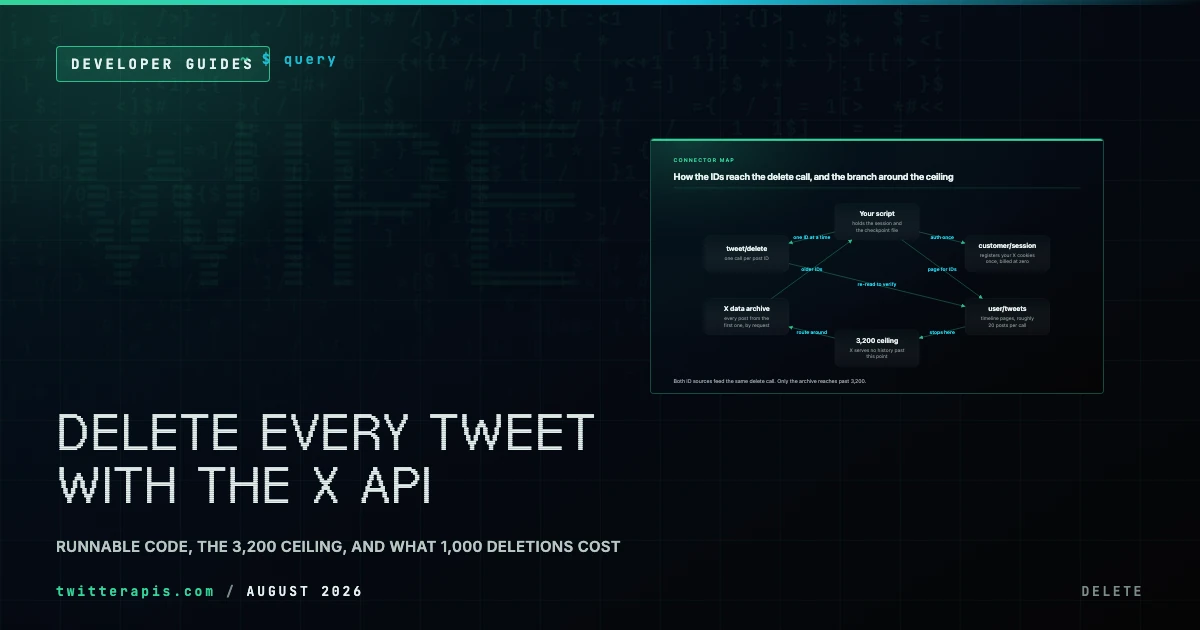
Delete All Your Tweets With the X API (2026): Runnable Code, the 3,200 Ceiling, and Real Costs
How to bulk delete tweets through an API instead of a subscription tool: the enumerate-then-delete loop in Python, X's 3,200 history ceiling, the archive-export route past it, and what 1,000 deletions actually cost.
How to Get Everyone Who Retweeted a Tweet via API (2026)
Pull the full list of accounts that reposted any tweet with a real 2026 API. Runnable Python and Node.js, cursor pagination for the whole list, a real amplifier ranking over live data, a bot filter, and the honest per-call cost.
How to Get All Replies to a Tweet via API (2026)
Pull the replies under any tweet with a real 2026 API. Runnable Python and Node.js, cursor pagination, the conversation_id tail sweep for the long tail, nested replies-to-replies, signal-versus-noise filtering over live data, and the honest per-call cost.
How to Search Tweets by Hashtag via API 2026 (Python + Node.js)
Search tweets by hashtag with a real 2026 API in Python and Node.js. Runnable code for the hashtag operator, engagement filters, cursor pagination, deduping retweets, counting authors, and the real per-call cost.
Fetch a Full Twitter Thread via API in One Call (2026)
How to pull an entire Twitter thread, the root tweet plus every connected tweet in the chain, in a single API call with the tweet/thread endpoint, instead of walking replies by hand. Live-tested code in curl, Python, and Node.js, with the real per-call cost.