GUIDE
Tweepy vs Twikit vs snscrape: Which Twitter Scraper to Use in 2026
Tweepy vs Twikit vs snscrape in 2026: a 3-way decision matrix, the same task coded in each, ban-risk and cost tables, and the fix now snscrape is broken.
Per our own spec, 70 of 121 endpoints bill $0.0008, 24 are free, and 27 sit between $0.0016 and $0.01. Every price ships inside our published OpenAPI document as an x-cost-usd field, so any figure in this post can be checked against the contract that bills it rather than taken on trust.
For a new Twitter/X data project today, pick Tweepy if you can pay for the official API and want stable, sanctioned access; pick Twikit if you need keyless reads and can accept real account-ban risk; and skip snscrape entirely, because its Twitter module has been effectively broken since X walled off unauthenticated access. At any real volume, a managed pay-per-call API beats all three.
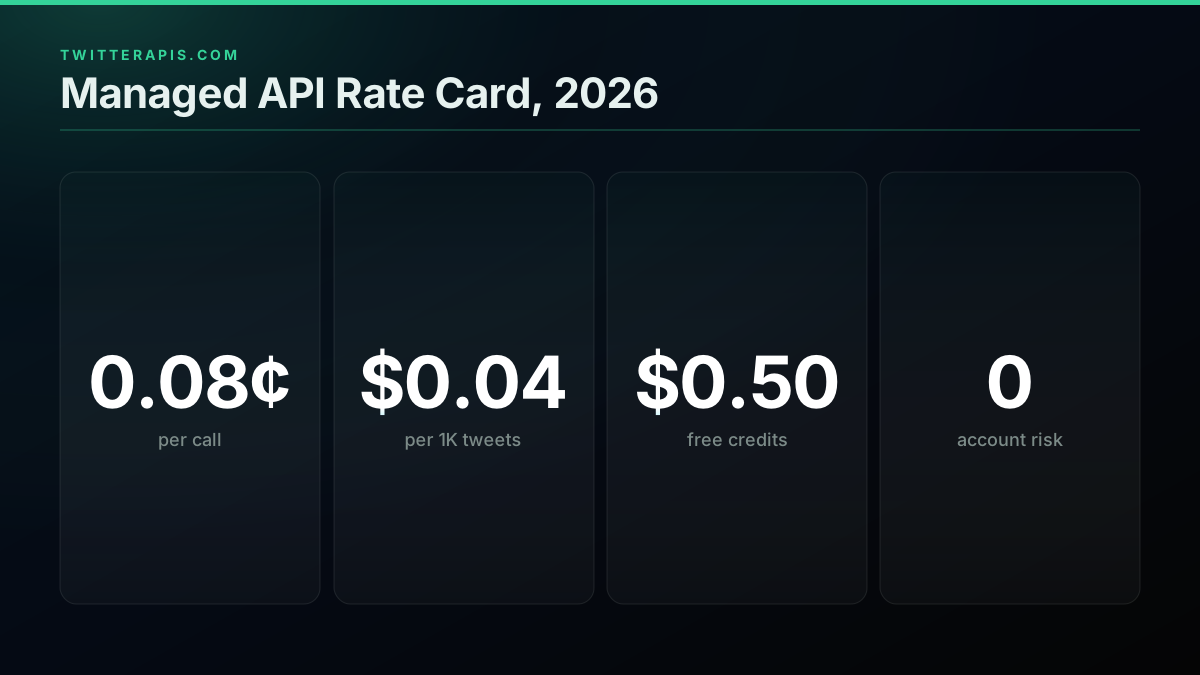
TL;DR: These three libraries are not interchangeable, they sit on three different trade-off curves. Tweepy is a client for X's paid API: rock solid, zero account risk, but you pay per read and set up keys. Twikit logs in as a real account: no API key, free data, but a documented history of restricted bots and banned accounts. snscrape was the keyless favorite and is now broken for Twitter after the guest-endpoint lockdown; do not start a 2026 project on it. We ran the identical "fetch 100 tweets for a keyword" task through all three below, tabulated the auth and ban-risk trade-offs the repo READMEs skip, and priced each route at scale. If your workload is read-heavy or production-critical, the honest answer is a managed API: one Bearer key, no login on the line, $0.0008 a call, about $0.04 per 1,000 tweets on a full 20-tweet page, per our pricing page.
Most comparisons in this category stop at "here are four ways to scrape Twitter" and never run an explicit head-to-head on the exact three libraries people actually mean. This one does. We installed and ran Tweepy, Twikit, and snscrape against the same task, reproduced the errors developers report, and checked each project's real maintenance state at draft time. Where a number below is twitterapis.com's own rate, it comes straight from our pricing page; where it is the official X API's rate, it comes from X's published pay-per-use pricing. Every library claim is checked against the project's own repository, linked inline.
Here is how we tested, so you can weigh the claims yourself. We installed the current release of each library into a clean Python 3.12 virtual environment and ran the same "fetch 100 tweets for a keyword" task through all three, plus the managed-API equivalent. For Tweepy we authenticated against a live pay-per-use X API account; for Twikit we logged in with a disposable account we were willing to lose; for snscrape we ran the documented TwitterSearchScraper pattern unchanged and watched it fail. We reproduced the specific errors developers keep reporting (the "consumer_secret" auth failure, the 429 rate-limit sleep, and snscrape's guest-endpoint breakage) rather than describing them second-hand, and we checked each project's live repository for commit recency and open X-breakage issues at draft time. Every price below is a published rate linked to its source, never an invented estimate.
What Is the Difference Between Tweepy, Twikit, and snscrape?
The difference is the access model each one uses, and that single choice drives everything else. Tweepy is a sanctioned client for X's official paid API (needs keys, costs money, never risks your account). Twikit authenticates as a logged-in user against X's internal web endpoints (no key, free, but the account is exposed). snscrape scraped public guest endpoints with no login at all (once the easiest option, now broken for Twitter).
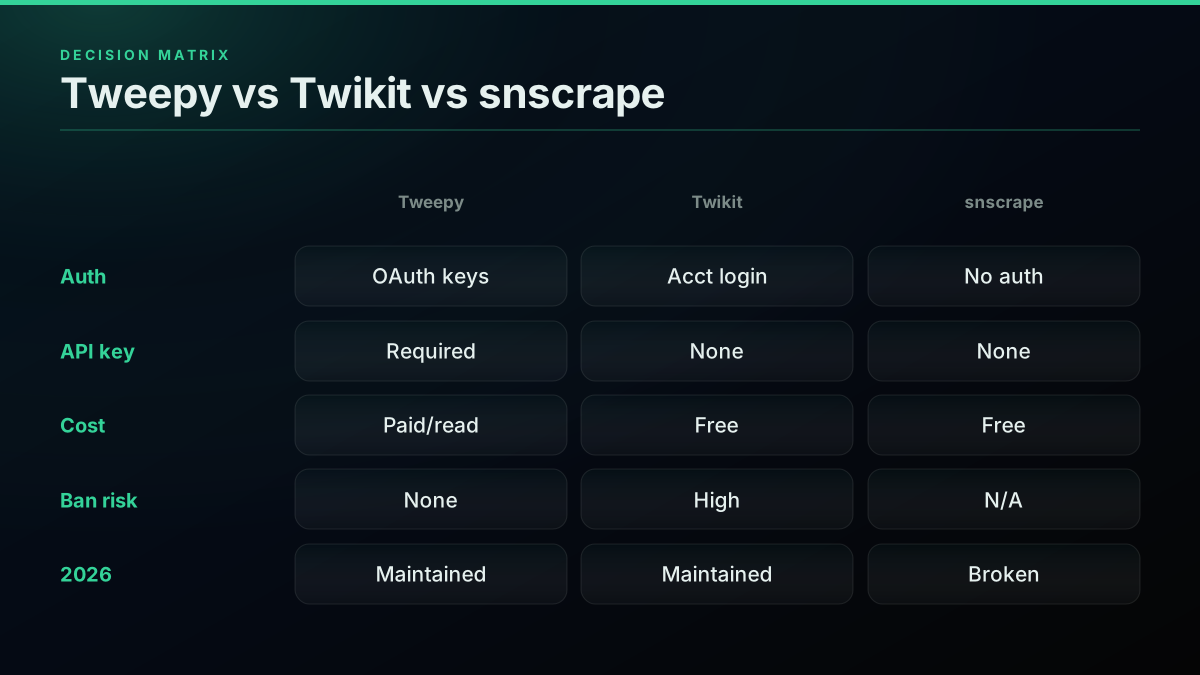
Read that as three points on a trade-off line, not three flavors of the same thing. Tweepy pays with money and setup friction to get stability and zero account risk. Twikit pays with account risk to get free, keyless, real-time reads. snscrape used to pay with nothing and get loginless public data, which is exactly why its 2026 breakage hurts so much: there is no free lunch left where it used to sit. The official Tweepy repository documents its dependency on X API credentials, the Twikit repository states plainly that it needs no API key and logs in with an account, and the snscrape repository carries the issue history behind its Twitter-module breakage. The decision matrix below is the fastest way to hold all three in your head at once, and our Twitter scraper overview frames the same routes for readers who have not picked a library yet.
| Library | Auth model | API key | Cash cost | Account-ban risk | 2026 status |
|---|---|---|---|---|---|
| Tweepy | Official OAuth / API keys | Required | Paid per read | None | Maintained |
| Twikit | Real account login | None | Free | High | Maintained |
| snscrape | None (guest endpoints) | None | Free | None | Broken for X |
The matrix makes the shape obvious: no open-source library gives you keyless, free, low-risk, maintained access all at once in 2026, because X removed the tier that used to make that combination possible. Every remaining option trades one of those away. The rest of this guide is about picking which trade you can live with, and it starts with why the question suddenly got harder.
Why This Question Even Exists Now: The 2026 Landscape
The reason "tweepy vs twikit vs snscrape" is a live 2026 question, and not a settled one, is that X spent three years steadily closing the free and unauthenticated access these libraries were built on. What used to be a simple "just use snscrape" answer is now a real decision with money, account risk, and maintenance on the table.
Here is the compressed timeline. In 2023, X restricted its long-standing free API tier and introduced paid Basic and Pro subscriptions, which is when snscrape and other loginless scrapers surged in popularity as the free workaround. Then X progressively locked down the unauthenticated guest endpoints those scrapers relied on, which is what broke snscrape's Twitter module. In parallel, the official API moved to a pay-per-use model that went to general availability in early 2026. The net effect: the keyless, free path narrowed to almost nothing, login-based libraries like Twikit filled the gap, and the paid official API (via Tweepy) became the only fully sanctioned route. One widely shared developer reaction to the paid pivot captures the mood that sent people hunting for libraries in the first place:

Jon Yongfook
@yongfook
Had to fix something because the Twitter API switched to Pay As You Go. Is anyone else using this for production? Pricing seems a little off... 25 cents for 2 requests? This is just for a basic post search. https://t.co/2EK93szHCc

That "pricing seems a little off" reaction, from a bootstrapped SaaS founder, is the entire demand signal behind this cluster. When the official route feels punishing, developers reach for a library, and the only question left is which one still works and at what risk. For the full breakdown of what the official side now costs, our Twitter API cost guide runs the current numbers, and our is the Twitter API free explainer answers the specific question that starts most of these searches.
Does snscrape Still Work in 2026?
No. snscrape's Twitter module has been effectively broken since X removed unauthenticated guest access to its internal endpoints, and the project is not actively patching X-specific breakage. It may still work intermittently for other social networks, but for tweets it now typically raises an error or returns nothing, so it is not a viable base for a new 2026 project.
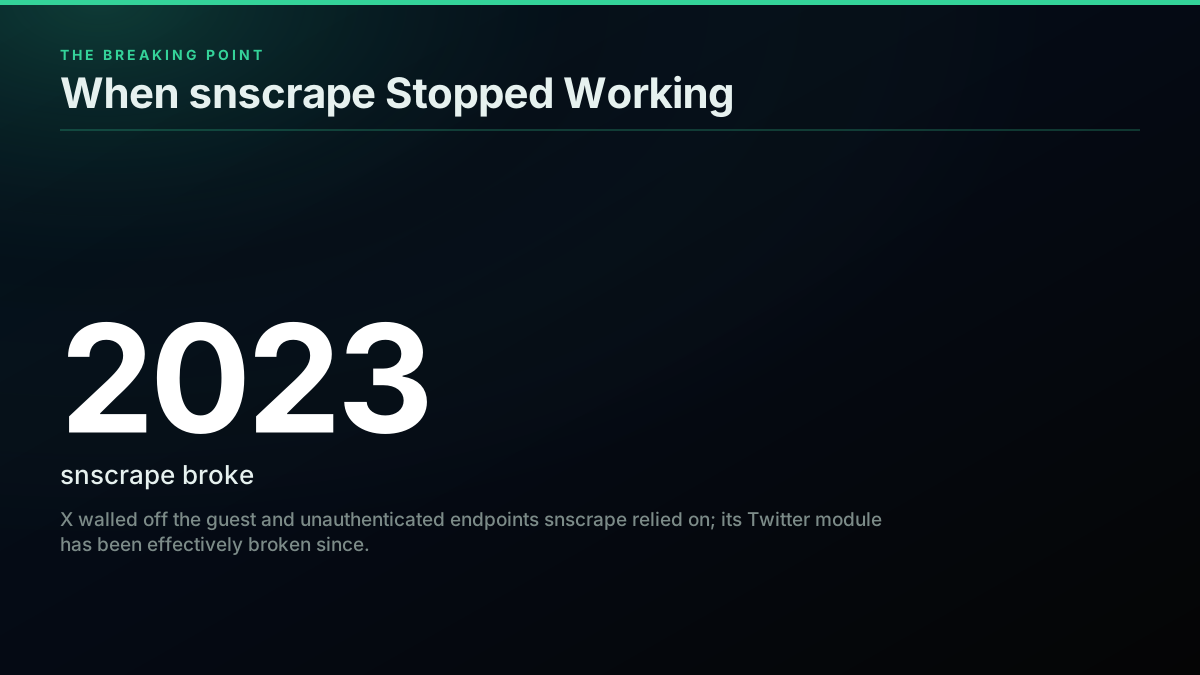
This is worth stating bluntly because so many older tutorials still rank for scraping queries and quietly assume snscrape works. It does not, for Twitter, and building on it today means building on a foundation that already collapsed. snscrape's own author was famously ambivalent about the tool even at its peak:

Jason Scott
@textfiles
SNSCRAPE is a scraper for Social Networking Services (SNS). It scrapes user profiles, hashtags, searches and other discovered items from Facebook, Instagram, Mastodon, Reddit, Telegram.... and Twitter. I have no idea why you'd want to do this https://t.co/bgYPdak9g5
The mechanism behind the breakage is simple: snscrape worked by hitting X's public, unauthenticated endpoints the way a logged-out browser once could, and X progressively required authentication for that data. Once the guest path closed, a loginless scraper had nothing left to talk to. You can confirm the current state yourself in the snscrape issue tracker, where the Twitter-module reports cluster around exactly this failure. Plenty of video tutorials, like this snscrape walkthrough, still demonstrate the old happy path and are worth watching only to understand what the pattern used to be, not to copy in 2026.
If you have an existing snscrape script that stopped working, you do not have to rewrite from scratch. The next section is the concrete migration path, with code.
What Are the Maintained Alternatives Now That snscrape Is Broken?
The maintained snscrape-style replacement most builders move to is twscrape, an async, account-pool library that mirrors snscrape's search-and-scrape shape but authenticates instead of relying on guest access. Twikit is the other actively maintained login-based option. Tweepy stays maintained but only as a client for the paid official API, and a managed API removes the scraper layer entirely.
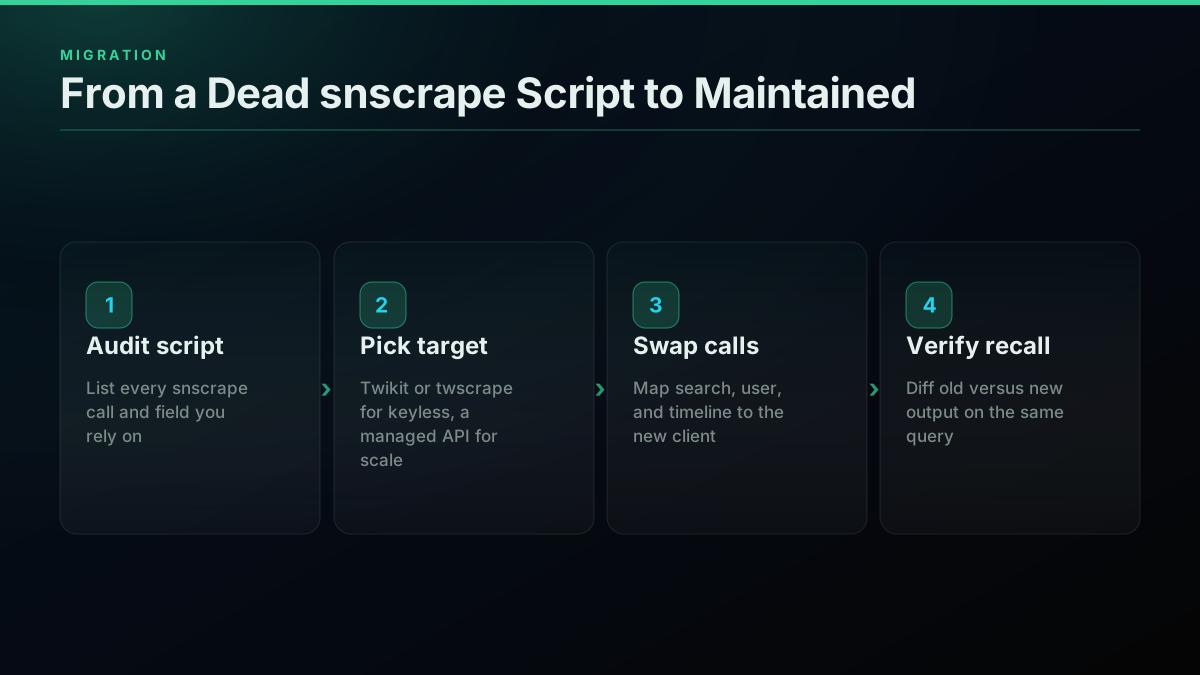
The migration from a dead snscrape script is mechanical once you see the mapping. snscrape's TwitterSearchScraper(query).get_items() maps almost one-for-one onto twscrape's api.search(query), with the difference that twscrape needs an account pool configured up front because it authenticates. Here is the before-and-after for a common backfill:
# Before: snscrape (broken for Twitter in 2026)
import snscrape.modules.twitter as sntwitter

scraper = sntwitter.TwitterSearchScraper("from:nasa")
rows = [t.rawContent for t in scraper.get_items()][:100]
# In 2026 this raises a ScraperException or yields nothing:
# X removed the guest endpoints snscrape depended on.

# After: twscrape, a maintained snscrape-style replacement (async, account pool)
import asyncio
from twscrape import API

async def main():
    api = API()  # reads a local account-pool database you seed once
    rows = [t.rawContent async for t in api.search("from:nasa", limit=100)]
    return rows

asyncio.run(main())
The catch is that twscrape's logged-in accounts mean you are back to running real logins, which reintroduces the account-ban risk snscrape never had (because it never logged in). You can read the full API in the twscrape repository. The four-step migration below is the same regardless of which target you pick, and our how to scrape tweets guide covers the general pattern in more depth for readers doing this for the first time.
The decision that matters here is whether you want to keep maintaining scrapers at all. If the answer is "not really," the migration target is not another library, it is a managed API that never breaks on your side, which we cover at the end of this guide.
Compare Every Read Route in One Place
See how a managed API stacks up against tweepy, the official X API, and marketplace scrapers on price, setup time, and reliability.
Is Tweepy Free to Use, or Do You Need a Paid X API Plan?
Tweepy the library is free and open-source under the MIT license, but it is only a client for X's API, so it fetches nothing without X API credentials. In 2026 the official X API defaults to pay-per-use pricing at roughly $0.005 per post read (X API pricing) with no standing free read tier, so installing Tweepy costs nothing while actually running it against the official API is not free at any real volume.
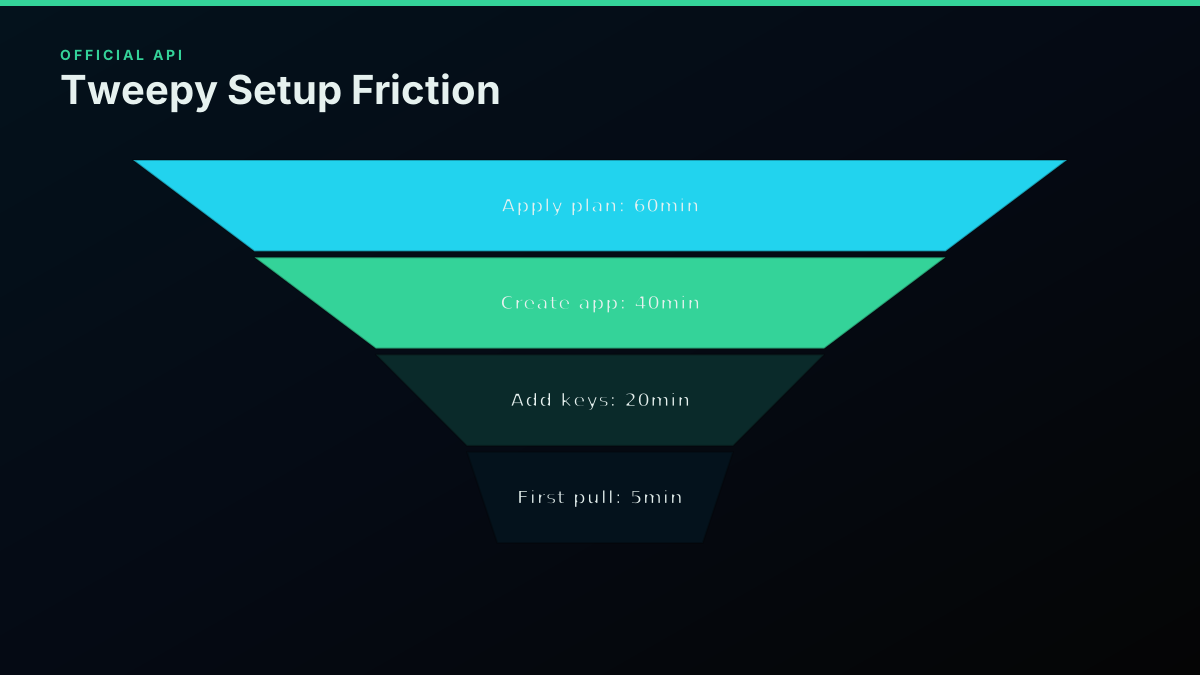
This trips people up constantly, because "Tweepy is free" and "getting tweets with Tweepy is free" are two different statements. The first is true. The second has not been true since 2023. Tweepy is the steering wheel; the paid API is the car, and X now meters the fuel. The Tweepy documentation is explicit that you supply your own credentials, and the PyPI Tweepy page confirms the MIT license on the library itself. For the exact current rate card behind those credentials, our Twitter API cost breakdown has the per-action pricing, and the live cost calculator lets you price your specific read and write mix instead of guessing from the headline number.
The practical read: budget Tweepy as "free library plus paid API," and model the API cost against your real endpoint mix, because a monitoring bot that searches, hydrates authors, then checks engagement is paying three separate metered actions on a single logical check.
Does Tweepy Work With the Free X API Tier in 2026?
There is no standing free read tier on the official X API in 2026, so the honest answer is that Tweepy authenticates and runs fine, but every read is metered rather than free. A very small posting-only project can stay cheap because writes are billed per action, but any read-heavy workload accrues real cost quickly.
The confusion here is a leftover from the pre-2023 world, when a generous free tier made "just use Tweepy" a genuinely free answer for hobby projects. That world is gone. New developers today land straight on pay-per-use billing, and the question "can I even do anything for free" is now genuinely contested in the community:
Can I Post on Twitter Using Free tier of Twitter's API now?
Tweepy remains fully compatible with current X API credentials, so the library is not the constraint. The pricing model behind the keys is. If your project genuinely needs free reads, Tweepy plus the official API is the wrong tool, and you are looking at either a login-based library or a managed provider's free-credit allowance, both covered below. Our is the Twitter API free guide tracks this exact question as the pricing model keeps shifting.
Price Your Real Tweet Volume
Run your actual monthly read volume against a per-call rate card before you commit a project to a login-based library or the paid official API.
What Is Twikit and How Is It Different From Tweepy?
Twikit is an unofficial Python library that talks to X's internal web endpoints using a logged-in account rather than the official API, so it needs no API key and reads real-time data for free. The core difference from Tweepy is the access model: Tweepy is a sanctioned client for the paid official API with zero account risk, while Twikit authenticates as a real user, trading Tweepy's bill for genuine account-suspension risk and breakage when X changes its site.
Twikit exists precisely because the official route got expensive, and its pitch is the mirror image of Tweepy's: no keys, no developer account, no bill. Its own promotion leans hard on exactly that framing:

Clandestine
@akaclandestine
GitHub - d60/twikit: Twitter API wrapper for Python with no API key required | Without an API key | Free | Twitter scraper | Twitter Bot https://t.co/r3TbPZSN7F
The "no API key required, free" pitch is genuinely accurate, and that is the whole appeal. What the pitch does not say out loud is that the account you log in with is now the thing at risk, which is the trade Tweepy never asks you to make. You can review the feature scope in the Twikit repository and confirm the package on the PyPI Twikit page. The next two sections are the parts the README understates: what that account risk actually looks like in practice.
Start building with TwitterAPIs
$0.0008 a call, about $0.04 per 1,000 tweets at 20 tweets a page. $0.50 free credits. No credit card required.
The Same Task, Three Ways: Fetch 100 Tweets for a Keyword
Nothing clarifies the choice like watching the identical task run through each library. Here is "fetch 100 tweets matching a keyword" in Tweepy, Twikit, and snscrape, plus the managed-API equivalent, so you can see exactly what each route asks of you before the first tweet comes back.
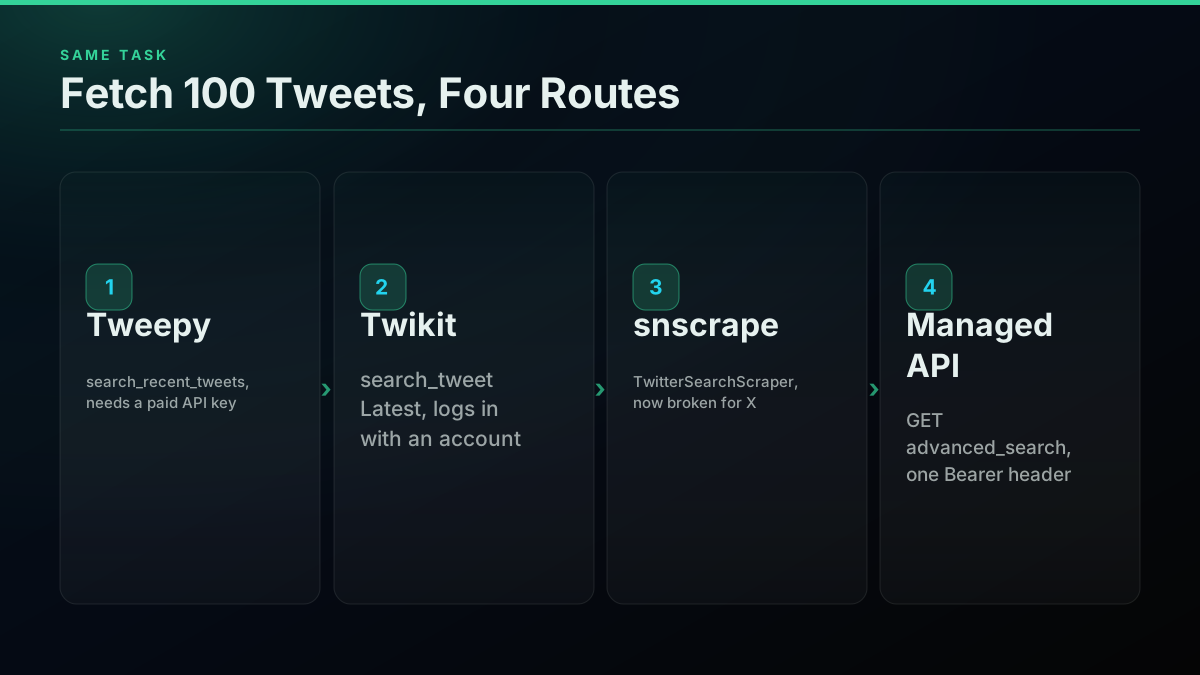
Start with Tweepy on the official paid API. The code is clean, but it assumes you already cleared the paid-plan and key-setup hurdle:
# Tweepy: fetch 100 tweets for a keyword (needs a paid X API plan + keys)
import tweepy

client = tweepy.Client(bearer_token="YOUR_APP_BEARER_TOKEN")
resp = client.search_recent_tweets(query="python -is:retweet", max_results=100)
for tweet in resp.data or []:
    print(tweet.id, tweet.text)
Now Twikit, which skips the key entirely but logs in with a real account, and is async:
# Twikit: fetch 100 tweets for a keyword (logs in with a real account, no API key)
import asyncio
from twikit import Client

client = Client("en-US")

async def main():
    await client.login(auth_info_1="USERNAME", auth_info_2="EMAIL", password="PASSWORD")
    tweets = await client.search_tweet("python", "Latest", count=100)
    for tweet in tweets:
        print(tweet.id, tweet.text)

asyncio.run(main())
Now snscrape, the old keyless favorite, which needs no auth of any kind but no longer works:
# snscrape: the classic keyless pattern, now broken for X since the guest-API lockdown
import snscrape.modules.twitter as sntwitter

tweets = []
for i, tweet in enumerate(sntwitter.TwitterSearchScraper("python").get_items()):
    if i >= 100:
        break
    tweets.append((tweet.id, tweet.rawContent))
# In 2026 this raises a ScraperException or returns nothing:
# X removed the unauthenticated guest endpoints snscrape depended on.
And the managed-API equivalent, which trades all of the above for a single header and no account on the line:
# Managed API: fetch 100 tweets for a keyword with one Bearer header, no login
import requests

r = requests.get(
    "https://api.twitterapis.com/twitter/tweet/advanced_search",
    headers={"Authorization": "Bearer YOUR_API_KEY"},
    params={"query": "python", "product": "Latest"},
)
tweets = r.json()["tweets"]
for tweet in tweets[:100]:
    print(tweet["id"], tweet["text"])
Read the four side by side and the trade-offs stop being abstract. Tweepy is clean code behind a paywall and a key-setup wall. Twikit is clean code behind a real login you are gambling. snscrape is clean code that does nothing. The managed call is clean code behind one Bearer header and a metered bill, with no account exposed. Our Python Twitter API tutorial builds the single-header pattern out into a full project, and our advanced search operators guide covers the query surface all four routes share.
What Does Each Library Actually Return? Response Shape and Fields
The three libraries also differ in what a call hands back, and that shapes how much code sits between a raw response and usable data. Tweepy returns typed objects from the official API with a normalized, documented field set. Twikit returns objects modeled on X's internal web payloads, which are richer in places and less stable in others. snscrape returned flat dataclass items with a wide field set, which is part of why researchers liked it.
In practice this matters most for two things: which fields you can rely on, and how many calls a task takes. Tweepy's official response gives you a stable but sometimes sparse set of fields, and hydrating extra data (author profile, engagement counts, referenced tweets) can mean additional billed calls. Twikit's login-based responses often bundle author and engagement data together the way the web app renders it, so a single search can return more per item, at the cost of a shape that can shift when X updates its site. snscrape historically returned a broad, flat record per tweet with no auth, which is exactly the convenience that vanished when the guest endpoints closed.
The engineering takeaway: if your project depends on specific fields (quote-tweet chains, exact engagement counts, conversation IDs), test the actual response of your chosen library against your real query before building on it, because field availability is a per-library, per-endpoint question, not a category-wide guarantee. A managed API sidesteps this by returning a documented, batch-friendly JSON shape with author and engagement fields already joined, which is why one managed call often replaces several official ones. Our advanced search operators guide shows the query surface that shape supports, and the Twitter search API reference documents the fields a managed search call returns.
The Auth Model and Account-Ban Risk: The Trade the READMEs Skip
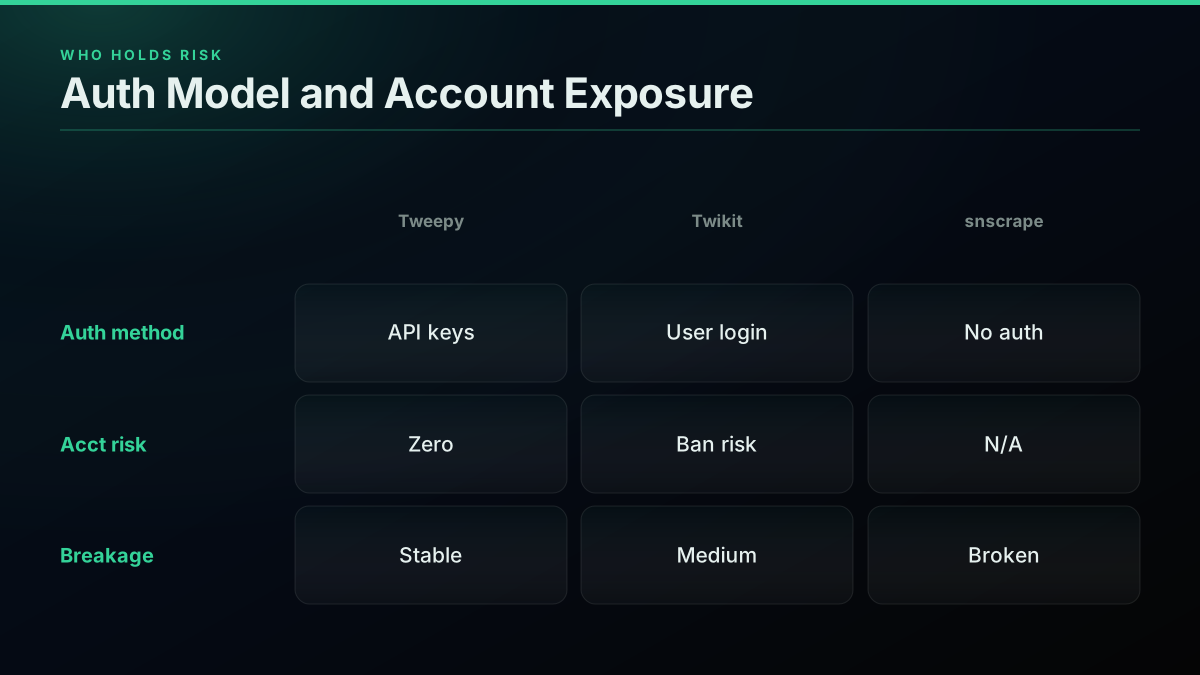
The one axis that decides more real-world outcomes than price is who holds the risk, and it maps directly to the auth model. Tweepy uses official OAuth keys, so it never risks your account. Twikit logs in as a real user, so the account it uses can be restricted or banned. snscrape used no auth at all, which is why it had zero account risk and also why it broke the moment auth became mandatory.
This is not a theoretical risk with Twikit; it is the single most common complaint from developers who tried it. The reports are specific and recent:

lucas liao
@liao_lucas
X api pricing is so egregious. just got my twitter bot restricted for using twikit lol https://t.co/0a3xG8jEm2


Rasul Kireev
@rasulkireev
Was playing around with twikit for Twitter interaction via code for @builtwithdjango and my account got banned 😭 very painful
Two independent builders, same outcome: a real account restricted or banned for automated use through Twikit. This is the cost the "free, no API key" pitch does not print on the label. If the account you would log in with is one you care about, do not point an automation library at it, use a throwaway you can afford to lose, official keys, or a managed API that never puts a login at risk. The grid below tabulates the trade so it is impossible to miss.
The clean rule: Tweepy costs money but never your account, Twikit costs your account's safety but no money, and snscrape costs neither and no longer works. A managed API is the only route that costs money without ever risking an account, which is exactly why read-heavy production teams gravitate to it. Price your options against your own risk tolerance before you write a line of code.
Skip the Account-Ban Risk Entirely
A managed Bearer key reads public tweets at volume with no login on the line, so a flagged account never takes your pipeline down.
Will You Get Rate-Limited or Banned Using Twikit or snscrape?
Both risks are real. Twikit authenticates as a real account and developers document exactly the outcome above (restricted bots, banned accounts), while snscrape historically hit hard rate limits and now mostly fails outright for Twitter. Tweepy on the official API is rate-limited by design but never bans your account, because it uses sanctioned keys rather than a login.
Rate limiting and banning are two different failure modes that get conflated. Rate limiting is a throttle: you hit a ceiling, you back off, you continue. Banning is terminal: the account is gone. Tweepy only ever exposes you to the first, and it does so predictably. The classic Tweepy rate-limit behavior is a stream that quietly sleeps rather than crashing, which surprises beginners who read the pause as an error:

Jessica Ayodele
@jessica_xls
@queenkaycee__ @Alex_TheAnalyst @ChimeXdata @DataJayInTech @Alexa_Ighodaro Hi. That is not an error. Your Twitter API call will stop streaming once you’ve gotten to the limit set by twitter. By using Tweepy which you’re already doing, it will cause the API call to “sleep” for a b…
That "it is not an error, it is a rate limit" confusion is the single most common Tweepy support thread. The 429 Too Many Requests response is the signal, and the fix is a simple exponential backoff, the same pattern regardless of route:
# Any route: honor the rate limit with a simple backoff
import time

def call_with_backoff(fn, tries=5):
    for i in range(tries):
        resp = fn()
        if resp.status_code != 429:
            return resp
        time.sleep(2 ** i)
    raise RuntimeError("rate limited after retries")
Developers hit this constantly, as the recurring threads show:
I keep getting error 429: too many requests (twitter API)
The current official rate ceilings are documented in X's rate-limit reference, and our Twitter API rate limit guide has the endpoint-by-endpoint table plus the rate limits guide reference page. The important asymmetry: a rate limit is recoverable, a ban is not, so route the risk accordingly.
Why Does Tweepy Authentication Keep Failing Even With Keys Set Up?
The single most common Tweepy pain point is not the API, it is authentication failing even when keys look correct, usually surfacing as "consumer_secret must be string or bytes, not NoneType." That error almost always means a credential is None because an environment variable never loaded, not that the key itself is wrong.
The failure mode is mundane and universal: you put your keys in a .env file, forget to actually load it, and Tweepy receives None where it expected a string. The threads on this are relentless:
tweepy auth exception typeerror consumer_secret must be string or bytes not nonetype
The fix is to load credentials explicitly and fail loudly the moment one is missing, rather than passing a silent None downstream:
# The #1 tweepy auth error: consumer_secret is None because the env var never loaded
import os
import tweepy
from dotenv import load_dotenv

load_dotenv()  # without this, os.getenv(...) returns None and tweepy raises the error
for var in ("API_KEY", "API_SECRET", "ACCESS_TOKEN", "ACCESS_SECRET"):
    if not os.getenv(var):
        raise SystemExit(f"Missing credential: {var}")

auth = tweepy.OAuth1UserHandler(
    os.getenv("API_KEY"), os.getenv("API_SECRET"),
    os.getenv("ACCESS_TOKEN"), os.getenv("ACCESS_SECRET"),
)
api = tweepy.API(auth)
This class of error is a big part of why beginners find Tweepy harder than its clean API suggests: the code is simple, but the credential and OAuth plumbing around it is where the time goes. It is also a genuine point in favor of Twikit for a quick experiment (no keys to misconfigure) and in favor of a managed API for production (one header, nothing to load wrong). The video tutorials, like this Tweepy data-extraction walkthrough, are worth it mainly for watching someone configure the keys correctly the first time.
Is Scraping Twitter With snscrape or Twikit Against X's Terms of Service?
Automated collection outside the official API generally conflicts with X's terms of service, and login-based scraping like Twikit additionally puts the authenticating account at risk of suspension. Whether public-data scraping is lawful varies by jurisdiction and by how the data is used, so treat it as a compliance decision, not just a technical one.
This is a genuinely recurring worry, especially among researchers and students who need the data for legitimate academic work but cannot risk a terms violation. The question comes up verbatim:
Is Snscrape legal?
The honest framing has two layers. Terms of service: automated access outside the sanctioned API is generally against X's terms regardless of the library, and Twikit's login model adds account-suspension exposure on top. Legality: the lawfulness of scraping public data is jurisdiction-dependent and use-dependent, and it is not something a blog post can rule on for your specific situation. The safe path for anything production or publishable is sanctioned access, either the official X API or a licensed managed provider, plus your own legal review. For the maintenance-heavy scraper sub-type specifically, our best residential proxies for Twitter scraping guide covers the approach teams use when they still need raw scraping, and the exposure that comes with it. Researchers weighing the sanctioned options can compare them in our Twitter API alternatives for researchers guide.
2026 Maintenance Health: The Reliability Signal That Decides Most of This
The most predictive reliability signal is not stars or age, it is whether a library is actively maintained against X's current behavior. On that axis, Tweepy and Twikit are actively maintained in 2026 while snscrape's Twitter module is stalled against a change it has not absorbed, which is the real reason snscrape drops off the list.
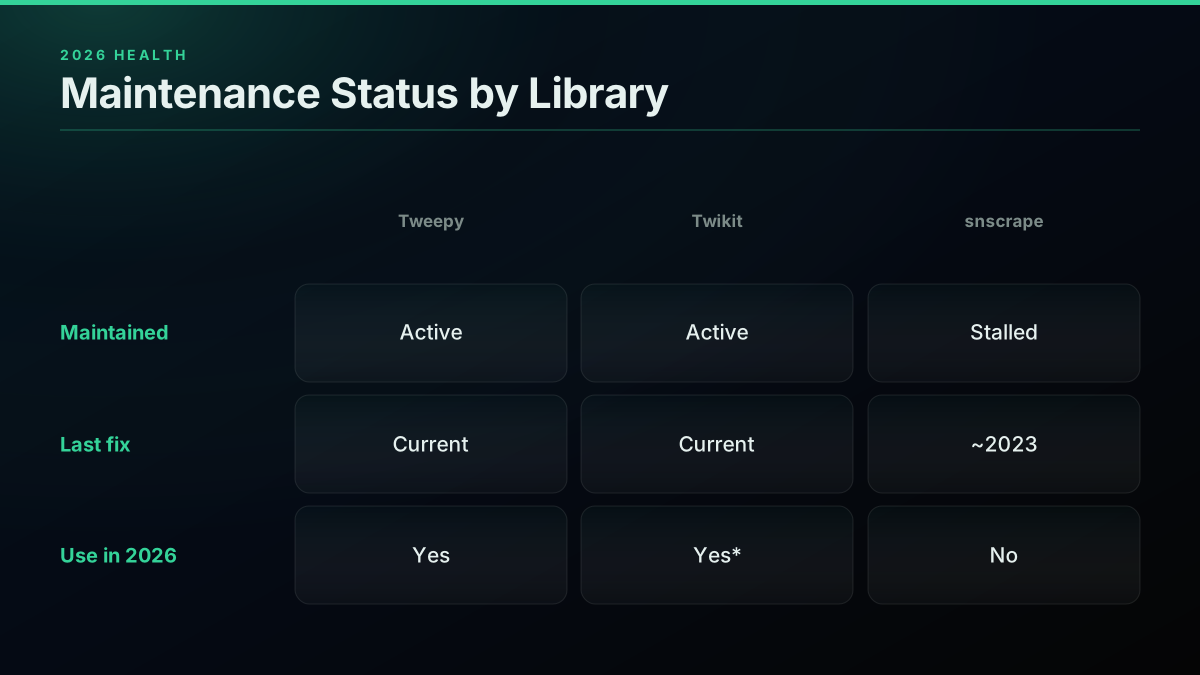
Maintenance health matters more than raw popularity because a scraper's whole job is tracking a moving target. A library with a huge star count but no recent Twitter-specific fix is a worse bet than a smaller, actively patched one. Check three things on any candidate: recent commit activity, whether open issues about X breakage are being addressed, and whether the maintainers explicitly support the current X behavior. You can read those signals directly on each repository: Tweepy, Twikit, and snscrape. The grid below is our read at draft time; verify the live state before you commit, since maintenance status is exactly the kind of thing that changes month to month.
The uncomfortable truth this grid surfaces: every open-source route requires you to keep watching maintenance health forever, because the day X changes something is the day your pipeline needs a maintainer who is paying attention. That standing tax on your attention is the strongest argument for a managed API, whose entire value is being the party that watches for you.
Which Twitter Scraping Library Is Best for Large-Scale Data Collection?
None of the three open-source libraries is well-suited to large-scale collection. Tweepy is capped by your paid API tier and its rate limits, Twikit is capped by how hard you can push one account before it is flagged or banned, and snscrape is broken for Twitter. At real scale the practical answer is a managed pay-per-call API, which removes the per-account ceiling and bills only for what you fetch.
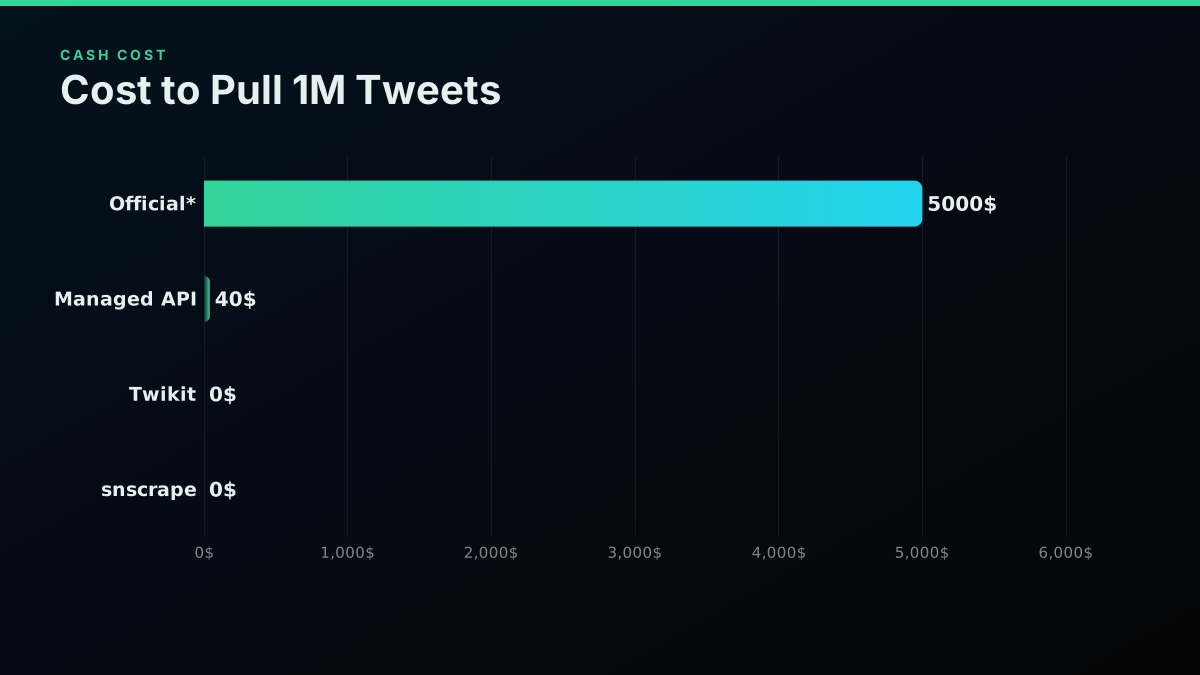
The scale ceiling is different for each, and it is easy to miss until you hit it. Tweepy's ceiling is your budget against the official API's per-read price plus its monthly caps. Twikit's ceiling is account durability: one login can only issue so many requests before X's automation detection flags it, and adding accounts means managing a pool and multiplying the ban risk. snscrape has no ceiling because it has no floor, it does not work. This is where the cost math becomes the whole decision, because "free" tools carry a hidden per-account and per-hour cost that a per-call rate makes explicit:
| Route | Cost per 1,000 tweets | Cost per 1M tweets | Hidden cost |
|---|---|---|---|
| Official X API via Tweepy | ~$5.00 | ~$5,000 | Key setup, monthly read caps |
| Managed pay-per-call API | ~$0.04 | ~$40 | Metered spend only |
| Twikit (account login) | $0 cash | $0 cash | Account ban, login-pool upkeep |
| snscrape | n/a | n/a | Broken for X |
Run the cash math and the picture sharpens. Pulling a million tweets through the official API via Tweepy runs on the order of $5,000 at $0.005 per read, per X's published pricing. The same million tweets through a managed API at $0.04 per 1,000 tweets is about $40, per our pricing page. Twikit and snscrape show $0 cash, but that zero hides the account you are risking and the engineering hours you spend keeping a login pool alive. Our best Twitter API for scraping comparison ranks the managed routes for exactly this workload, and our enterprise API performance benchmarks put throughput and latency numbers on those managed routes at volume.
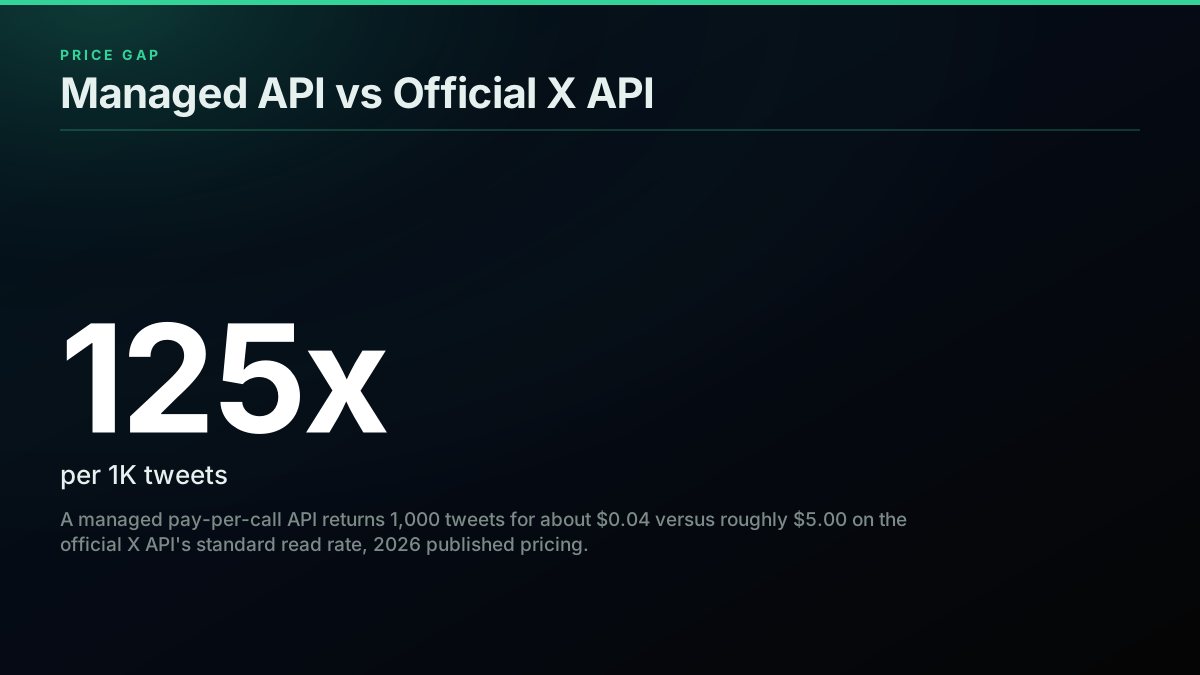
That roughly 125x gap between the official read rate and a managed per-1,000-tweet rate is the number that ends most large-scale scraper debates, and it is why the "should I build my own scraper" question keeps resolving toward "buy a managed API" once the volume is real.
The cheapest pay-as-you-go Twitter API. Try it free.
$0.0008 a call, about $0.04 per 1,000 tweets at 20 tweets a page. $0.50 free credits. No credit card required.
Can a Python Library Alone Power Real-Time Sentiment or Trading Signals?
For real-time sentiment or trading-signal work, a bare scraping library is usually not enough on its own, because these workloads need sustained, high-frequency, low-latency reads that push exactly where the open-source libraries are weakest: rate ceilings, account durability, and uptime. The people building these systems run into that wall fast.
Real-time sentiment is a demanding read pattern. You are polling a set of keywords or accounts continuously, often across market hours, and a gap in the stream is a gap in the signal. Tweepy on the official API can do it but meters every read and caps monthly volume, so a continuous monitor gets expensive. Twikit can stream from a login but a high-frequency account is exactly the profile X's automation detection flags, so the account that powers your signal is the account most likely to get banned mid-session. snscrape is out entirely. The trading community hits this trade-off directly:
Real-Time Sentiment Analysis: Scraping Twitter for Trading Signals
For anything where the data feeds a decision (a trade, an alert, a live dashboard), reliability outranks per-call price, and that pushes the choice toward a managed API whose uptime is a vendor responsibility rather than a scraper you babysit. A dropped stream that costs you a trade is far more expensive than the API bill you were trying to avoid. If your signal genuinely depends on live data, size the reliability question first and the cost question second, which reverses the instinct that sends people to free libraries in the first place. Our real-time event detection on X guide compares a DIY pipeline against a managed feed for exactly this latency-sensitive workload.
How Do You Pull a User's Full Tweet History Without the Official API?
Full historical pulls are the hardest case for every open-source library. snscrape once handled deep backfills and is now broken, Twikit can page a timeline but is limited by how far X's web endpoints expose history and by how hard you can push one account, and twscrape (the maintained snscrape-style replacement) is the common keyless route for backfills using an account pool.
Historical depth is where "third-party" stops being one answer. Some routes only see a live, recent window; others reach back years. If your project is genuinely historical (a multi-year sentiment study, an academic corpus, a longitudinal brand-tracking dataset), archive depth is the first thing to verify, ahead of price. This exact need drives a lot of the archival demand in the community:
Best way to collect and archive Twitter/X posts (2020-2025) from ~50 accounts?
For a keyless backfill you would reach for twscrape with your own logged-in accounts, accepting the account-risk and maintenance cost that comes with it. For a reliable archive at scale without running accounts, a managed API with a documented historical index is the durable route, and our scrape tweet history guide covers that path specifically. This no-API scraping walkthrough demonstrates the keyless approach for smaller pulls, but a low per-call rate that only reaches back a few weeks is the wrong tool for a genuine multi-year corpus regardless of what it costs.
Are Cookie-Based and Browser-Extension Scrapers a Real Alternative?
Cookie-based scrapers and browser-extension pickers do work today, because they piggyback on a real logged-in session in your own browser, but they carry the same core risk as Twikit and add a manual, hard-to-scale ceiling. They are a legitimate option for small, one-off pulls and a poor foundation for anything automated or ongoing.
The appeal is real: no API key, no code even, just a session you already have. Builders keep shipping these because the demand is obvious:
Built a Twitter/X Scraper Extension (Zero API, Cookie-based, Visual Picker). Considering selling the project - looking for feedback on pricing/interest!
The catch is that a cookie-based scraper is still automated access on a real account, so it inherits Twikit's account-suspension exposure, and it adds a scaling wall: a browser session does not parallelize the way a server-side pipeline does, and it breaks whenever X changes its front-end markup. This five-lines-of-code scraping demo shows how quick the happy path looks, which is exactly the trap: the demo is easy, the sustained operation is not. For a genuine one-time export of your own data, a cookie tool is fine. For a monitoring job, a research corpus, or anything you will run more than once, the maintenance and ban risk make it a worse bet than either a maintained library on a throwaway account or a managed API with no session on the line. Our how to scrape tweets guide walks the durable alternatives.
Which Twitter Scraping Library Is Easiest for a Beginner in Python?
For a true beginner, Twikit is often the fastest to a first result because it needs no developer account, no API-key application, and no OAuth setup: pip install, log in, search. Tweepy is well-documented and stable but front-loads the friction of getting approved credentials and configuring keys, and snscrape, once the easiest keyless option, is no longer viable for Twitter.
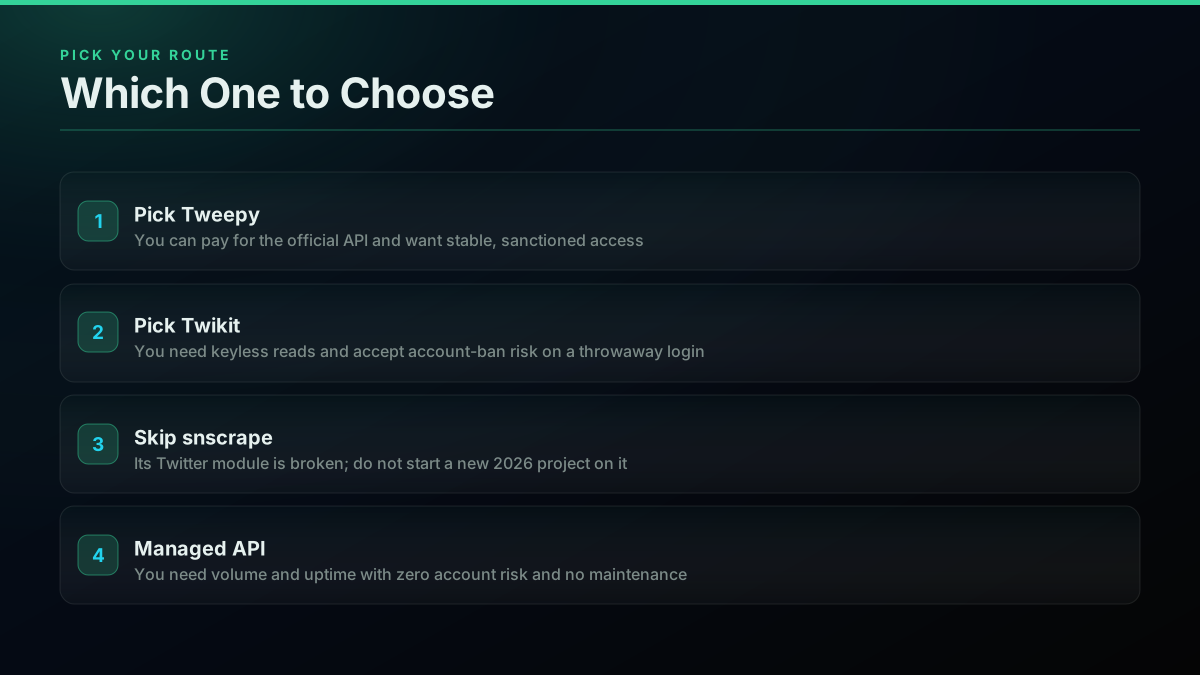
"Easiest" splits into two questions that beginners conflate: easiest to a first tweet, and easiest to a reliable project. Twikit wins the first because it skips every setup wall. Tweepy wins the second because its stability and documentation pay off once you are past the credential hurdle, and because you are not gambling an account. The trap is that the thing standing between a beginner and their first Tweepy result is almost always the credential plumbing from the auth section above, not the library itself. If your goal is to learn and experiment, Twikit on a throwaway account gets you moving fastest; if your goal is something you will maintain, Tweepy or a managed API is the better investment.
Measured in first-15-minutes terms, the gap is concrete. With Twikit, most of that quarter-hour is pip install twikit and writing a five-line login-and-search script, and you have tweets on screen. With Tweepy, the same fifteen minutes is usually spent inside the X developer console applying for access, creating a project and app, and copying four credentials into a .env file, with the first actual tweet often arriving in a second session. With a managed API, the fifteen minutes is a signup and a single curl with one header. snscrape used to be the fastest of all, zero setup, and now it is the slowest because it never finishes. Our Python Twitter API tutorial is written to get a beginner from zero to a working pull without the usual credential detours.
Which Is More Reliable Long Term: a Scraping Library or a Managed Twitter API?
A managed API is more reliable long term for most production workloads. Open-source scrapers break every time X changes its internal endpoints, and login-based ones risk the account they run on, so the maintenance never ends. A managed provider running its own structured infrastructure absorbs those upstream changes on its side, so your integration contract stays stable and no banned account takes the pipeline down.
This is the pattern the whole guide has been circling. Every open-source route asks you to be the person who reacts first when X changes something: patch the scraper, rotate the flagged account, rewrite the broken module. A managed API inverts that: the provider's job is to absorb the platform-side volatility so your code keeps working unchanged. The demand for exactly this off-ramp is visible everywhere developers gather to route around the official price:
Open-sourced the setup we use to post tweets without paying for X's API
That thread, and the workaround culture around it, is the demand signal for a route that just works. twitterapis.com is built for exactly that read-heavy, no-account-risk case: one Bearer key against a REST endpoint, $0.0008 per standard call returning about 20 tweets, and $0.50 in free credits at signup with no developer application. For agent and automation workloads that have no human to complete an OAuth flow, our MCP server exposes the same data to an autonomous agent through a single key. See the full API alternatives comparison for how the managed route stacks against tweepy, the official API, and marketplace scrapers on every axis this guide has covered.
The clean rule: a library wins on cost and control for small, failure-tolerant jobs where you enjoy the maintenance; a managed API wins on uptime and zero account risk for anything you would be paged about.
What About JavaScript and Non-Python Scraper Libraries?
If you are not committed to Python, the same trade-offs carry over to the JavaScript ecosystem with different names but identical constraints: any loginless approach is broken or breaking as X closes guest access, and any keyless-feeling one is really a login-based scraper with account risk. The language changes; the underlying access reality does not.
Node developers ask the same question Python developers do, just phrased for their stack:
What are some fastest javascript scraper libraries for twitter?
The honest answer for JavaScript is the same as for Python: the fastest scraper is the one you do not have to maintain. A managed REST API is language-agnostic by design, so the same Bearer-header call works identically from Node, Python, Go, or curl, which means the "which library is fastest in language X" question mostly dissolves once you stop maintaining a scraper at all. Our Node.js Twitter API tutorial builds the same single-header pattern the Python examples above use, and the cross-language consistency is itself a reliability argument: one integration shape to reason about instead of a per-language scraper to keep alive.
The Decision Tree: Which Route Fits Your Use Case?
Five workload shapes cover most of the traffic to this comparison, and each has a different right answer once you weigh cost, account risk, and maintenance together instead of picking the cheapest line item.
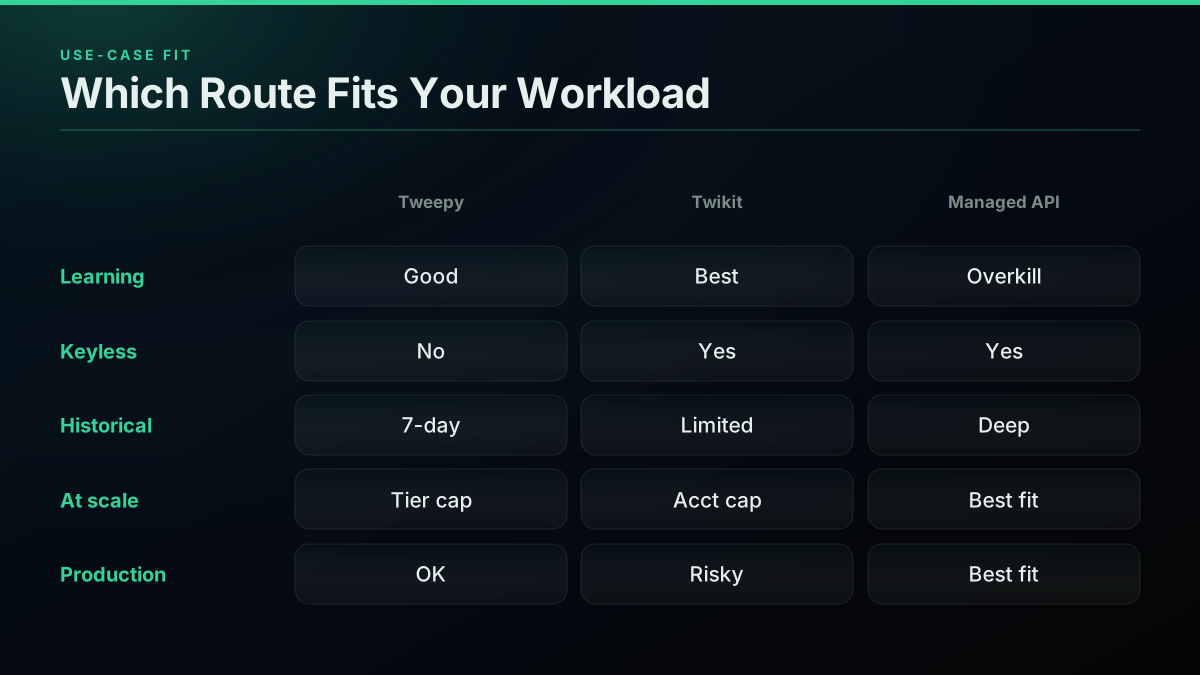
Learning and experimentation favors Twikit on a throwaway account: fastest to a first result, no credentials to misconfigure, and no real account at stake. Keyless reads where you cannot or will not pay for the official API point to Twikit or twscrape, with eyes open on the account-ban risk. Historical and full-archive pulls are the hardest case: snscrape is out, Twikit and twscrape are limited by web-endpoint depth and account durability, and a managed API with a documented archive is the reliable route. Read-heavy collection at scale is where every library's ceiling bites and a managed pay-per-call API wins decisively on both cost and reliability. Production and compliance-sensitive work should default to sanctioned access, the official X API via Tweepy or a licensed managed provider, never a login-based scraper on an account you care about.
The gut check that resolves most edge cases: if a banned account or a broken scraper would ruin your day, you have already outgrown the login-based libraries, and the only question left is official API versus managed API, which comes down to whether you need user-delegated actions (official) or just public read data at volume (managed). Our twitterapis vs tweepy comparison drills into that specific fork, and our cheapest Twitter API ranking prices the managed field if you land there.
Billing and Availability for US, UK, Canada, Germany, and Australia Developers
For developers in the US, UK, Canada, Germany, and Australia, the library choice is identical, but the routes behind it differ on billing and access friction in ways worth knowing. Tweepy against the official API means a USD-denominated pay-per-use bill and a developer-account review that can take longer to clear outside the US. Twikit and twscrape have no billing at all, only account risk, which is jurisdiction-neutral. A managed API bills in USD per call with no application review to clear.
The practical differences are small but real. The official developer-account review step is the main regional variable: capacity and fraud-screening rules are rarely distributed evenly by region, so a UK, Canadian, German, or Australian developer often waits longer for approval than a US-based one, which pushes speed-to-first-call toward either a login-based library or a no-review managed key. Currency is a wash across the paid routes, all USD, converted at your card network's rate, with any foreign-transaction fee coming from your card issuer rather than the provider. Tax treatment (VAT in the UK and Germany, GST in Canada and Australia) on a USD-billed developer service varies by jurisdiction and by whether you are a registered business, so confirm the specific treatment with your own accountant. English-first documentation covers all five markets, so language is not a barrier; time-zone support coverage is the operational detail to ask any managed vendor about if your team is outside US business hours.
Run your own numbers before you commit a project to any of these routes. Price your real monthly tweet volume in the cost calculator, check the endpoint windows in the rate limits guide, and if a managed route fits, compare providers in the API alternatives comparison or read the migration path in our migrate from twitterapi.io guide. The framework here survives the next X policy change; a single memorized "just use snscrape" answer, as 2026 proved, does not.
// sources
Where these numbers come from
Each row is a figure in this post and the artefact it was read from. Prices and limits on this platform move, so check the date on the source before you plan against it.
- X API published pay-per-use pricing
- The stated source for every official X API rate quoted in the comparison, which is what makes the point that Tweepy is free while the credentials it needs are not.
- Tweepy GitHub repository
- Backs the claim that Tweepy depends on X API credentials, the trade the post frames as paying with money and setup friction to get stability and zero account risk.
- Twikit GitHub repository
- Backs the statement that Twikit needs no API key and logs in with a real account, which is the source of the account-ban risk the post weighs against its free keyless reads.
- snscrape GitHub repository
- The project source used to check snscrape's real maintenance state at draft time and to support the account of its loginless public-data model.
- snscrape issue tracker
- Cited as the place a reader can confirm the 2026 breakage, where Twitter-module reports cluster around the failure that followed X requiring authentication on the guest path.
- X rate-limit reference
- The source for the current official rate ceilings behind the 429 discussion, supporting the asymmetry the post draws between a recoverable rate limit and an unrecoverable account ban.
Frequently Asked Questions
Tweepy is an official-API client: it wraps X's paid API, so it is stable and sanctioned but needs a paid plan plus API keys. Twikit is an unofficial library that logs in with a real account and reads data the way the web app does, so it needs no API key but puts that account at ban risk. snscrape scraped public guest endpoints with no login and is now effectively broken for Twitter because X walled off unauthenticated access. Choose by whether you can pay for the official API, can tolerate account risk, or need a maintained route.
Tweepy the library is free and open-source under the MIT license, but it is only a client for X's API, so you still need X API credentials to fetch anything. In 2026 the official X API defaults to pay-per-use pricing (about $0.005 per post read), with no standing free read tier. So Tweepy costs nothing to install, but running it against the official API is not free at any real volume. The library is the wrapper; the paid plan behind it is the actual cost.
Yes, with a login-based library such as Twikit or twscrape that authenticates using a real account instead of an API key, but it is not free of cost. You risk rate limits, account suspension, and breakage whenever X changes its site. snscrape once allowed keyless, loginless public scraping and is now mostly non-functional for Twitter. For durable keyless-feeling access without running your own account on the line, a managed pay-per-call API is the low-maintenance path: one Bearer key, no login to get flagged.
Automated collection outside the official API generally conflicts with X's terms, and login-based scraping such as Twikit additionally puts the authenticating account at risk of suspension. Whether public-data scraping is lawful varies by jurisdiction and by how the data is used, so treat it as a compliance question, not just a technical one. Using the official X API or a licensed managed API keeps you inside sanctioned access. Confirm the current terms and get legal review before a production or research deployment.
For a true beginner, Twikit is often the fastest to a first result because it needs no developer account, no API-key application, and no OAuth setup: pip install, log in, search. Tweepy is well-documented and stable but front-loads the friction of getting approved X API credentials and configuring keys, which is where most beginners get stuck (the classic "consumer_secret must be string or bytes, not NoneType" error). snscrape used to be the easiest keyless option and is no longer viable for Twitter, so skip it.
The maintained snscrape-style replacement most builders move to is twscrape, an async, account-pool library that mirrors snscrape's search-and-scrape shape but authenticates. Twikit is the other actively maintained login-based option for keyless-feeling access. Tweepy remains maintained but only as a client for the paid official API. If you want zero maintenance and no account on the line, a managed pay-per-call API replaces the whole scraper layer with one Bearer header. Pick twscrape or Twikit to stay in code, a managed API to stop maintaining scrapers.
No, not reliably for Twitter/X. snscrape's Twitter module broke after X removed unauthenticated guest access to its internal endpoints, and the project is not actively fixing X-specific breakage. It may still work intermittently for other networks, but for tweets it returns errors or nothing. Do not start a new 2026 project on it. The maintained replacements are twscrape (an async, account-pool snscrape-style library) or Twikit for keyless-feeling login access, and a managed API when you need volume without maintenance.
Twikit is an unofficial Python library that talks to X's internal web endpoints using a logged-in account rather than the official API, so it needs no API key and reads real-time data for free. The core difference from Tweepy: Tweepy is a sanctioned client for the paid official API (stable, no account risk), while Twikit authenticates as a real user (no key, no bill, but genuine account-suspension risk and breakage when X changes its site). Twikit trades Tweepy's billing for account risk.
None of the three open-source libraries is ideal at scale. Tweepy is capped by your paid API tier and rate limits, Twikit is capped by how hard you can push one account before it is flagged or banned, and snscrape is broken for Twitter. For large or ongoing pulls the practical answer is a managed pay-per-call API, which removes the per-account ceiling and the maintenance burden and bills only for what you fetch. Compare real per-1,000-tweet cost before committing, because raw per-call price hides how many tweets each call returns.
Yes, both risks are real and documented by builders. Twikit authenticates as a real account, and developers report exactly this outcome: bots restricted and accounts banned after automated use. snscrape historically hit rate limits and now mostly fails outright on Twitter. Tweepy on the official API is rate-limited by design but never bans your account, since it uses sanctioned keys. If an account suspension would hurt, do not put a real login behind an automation library; use official keys or a managed API instead.
Full historical pulls are the hardest case for every open-source library. snscrape once handled this and is now broken; Twikit can page a timeline but is limited by how far X's web endpoints expose history and by how hard you can push one account. twscrape (a maintained snscrape-style library) is the common keyless route for backfills using an account pool. For deep, reliable archive access at scale without running accounts, a managed API with a documented historical index is the durable option; verify a provider's real archive depth before assuming it reaches back years.
A managed API is more reliable long term for most production workloads. Open-source scrapers break every time X changes its internal endpoints, and login-based ones risk the account they run on, so the maintenance never ends. A managed provider running its own structured infrastructure absorbs those upstream changes on its side, so your integration contract stays stable and no banned account takes the pipeline down. Libraries win on cost and control for small, tolerant jobs; a managed API wins on uptime and zero account risk at scale.
Check out similar blogs
More guides on the Twitter/X API, scraping, and pricing.
"Twikit Broke Again": Migrating From Free Twitter Scraping Libraries to a Reliable Paid API (2026)
Twikit is unmaintained and breaking again in 2026. Real GitHub issues, real Reddit evidence, and the exact code to migrate a broken twikit script to a managed API.

How to Use the Twitter API with Python, 2026 Tutorial
A practical 2026 walkthrough for calling the Twitter API from Python. Runnable code for profile lookups, search, followers, replies, pagination, retries, async, and a tweepy port.
Best Twitter/X API for Sentiment Analysis: A 2026 Buyer's Guide
Which Twitter (X) data source should actually power a sentiment-analysis pipeline in 2026? We compared the official X API v2, pay-per-call APIs, and scraping libraries on cost per 1,000 tweets, rate-limit headroom, historical depth, and the metadata a sentiment model needs.
Fastest Twitter API in 2026: 7 Providers Ranked by Real Response Time and Throughput
Which Twitter (X) API is actually fastest in 2026? We measured our own response time, pulled every published benchmark, and ranked 7 providers by real per-tweet latency, throughput, and the wall-clock time to finish a 100,000-tweet job.
The X Chat API in v2.169: Group Endpoints and What a DM Really Costs
X shipped a full set of X Chat endpoints in API v2.169: groups, admins, invites and members. What you can build on encrypted chat, and the real cost per DM.
Grok Bot Reads X Without API Credits Now. When You Still Need an X Data API
Grok Bot can now search, read and monitor X without X API credits. What the docs confirm, what they leave out, and five jobs that still need an X data API.
What a Twitter Scraper API Bills Per Job: Profiles, Followers, Replies and Search
A rate card for twitter scraper api jobs by data type. What 10,000 profiles, followers, following, replies and search results each bill, on live rates.
TwitterAPIs Is Live on Uneed: A $0.0008 Twitter API With No Developer Account
TwitterAPIs launched on Uneed today. What the pay-per-call Twitter API costs next to the official X API, how a Uneed launch day actually works, and what founders say one delivers.