GUIDE
Best Twitter/X API for Sentiment Analysis: A 2026 Buyer's Guide
Which Twitter (X) data source should actually power a sentiment-analysis pipeline in 2026? We compared the official X API v2, pay-per-call APIs, and scraping libraries on cost per 1,000 tweets, rate-limit headroom, historical depth, and the metadata a sentiment model needs.
Per our own spec, 65 of 112 endpoints bill $0.0008, 24 are free, and 23 sit between $0.0016 and $0.01. Every price ships inside our published OpenAPI document as an x-cost-usd field, so any figure in this post can be checked against the contract that bills it rather than taken on trust.
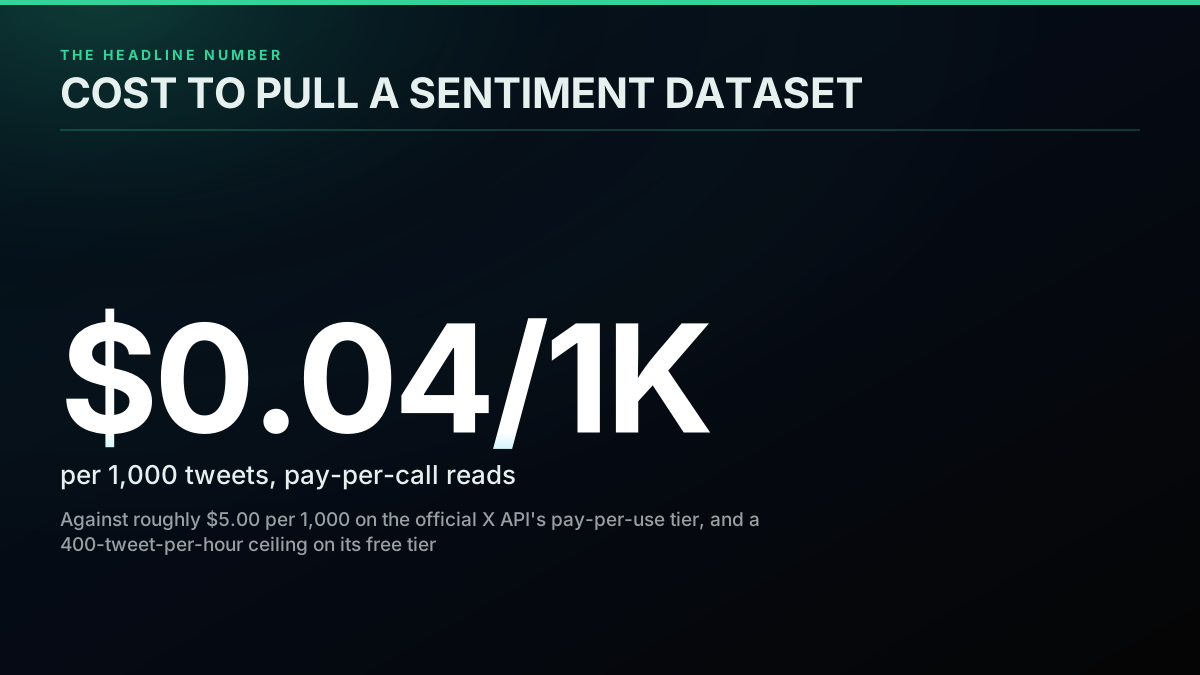
TL;DR: For sentiment analysis specifically, a pay-per-call API beats both the official X API v2 and raw scraping on the four things that matter for this workload: cost at real volume ($0.04 per 1,000 tweets versus roughly $5.00 on the official pay-per-use tier), rate-limit headroom for continuous polling (no monthly read ceiling versus a 400-tweet-per-hour free-tier wall), structured metadata your model can use as signal (engagement counts, verified flag, language, retweet status), and no developer account gate to clear before you start. The official API earns its place only when first-party data provenance is itself a requirement, not just a nice-to-have.
Sentiment analysis is the single most common reason people reach for Twitter/X data in the first place, ahead of trend tracking, competitor monitoring, or building a bot. Everyone eventually asks the same question in a slightly different shape: brand teams want to know if the mood around a launch is turning, trading desks want a signal that leads price action, researchers want a defensible corpus, and a lot of people on Reddit are simply trying to finish a portfolio project before the semester ends. What almost nobody asks first, and should, is which DATA SOURCE actually fits a sentiment-analysis workload, a question that matters more as the platform's own user base keeps evolving, per Pew Research's ongoing work on how people use X. Most comparisons rank Twitter APIs on raw speed or headline price. Sentiment analysis has its own priorities, and they are not quite the same list.
I want to build a Sentiment Analysis App(X Web Srapper)-Honest Opinions
That thread is the pattern in miniature. A developer wants to scrape X for a sentiment project and says plainly, "I don't have a twitter API to work with for the project." The top reply points at the official API's free tier as it stood then, and immediately flags its ceiling: one request every 15 minutes per X's own rate-limit documentation, up to 100 results each, a hard cap of roughly 400 tweets an hour. The same reply warns that the scraping alternative means reverse-engineering private endpoints or running a headless browser, both of which get detected "at some point." That single thread contains the entire decision this guide exists to resolve: official API, third-party API, or scrape, and what each one actually costs you once you count more than the sticker price.
The pipeline first, so the decision has context
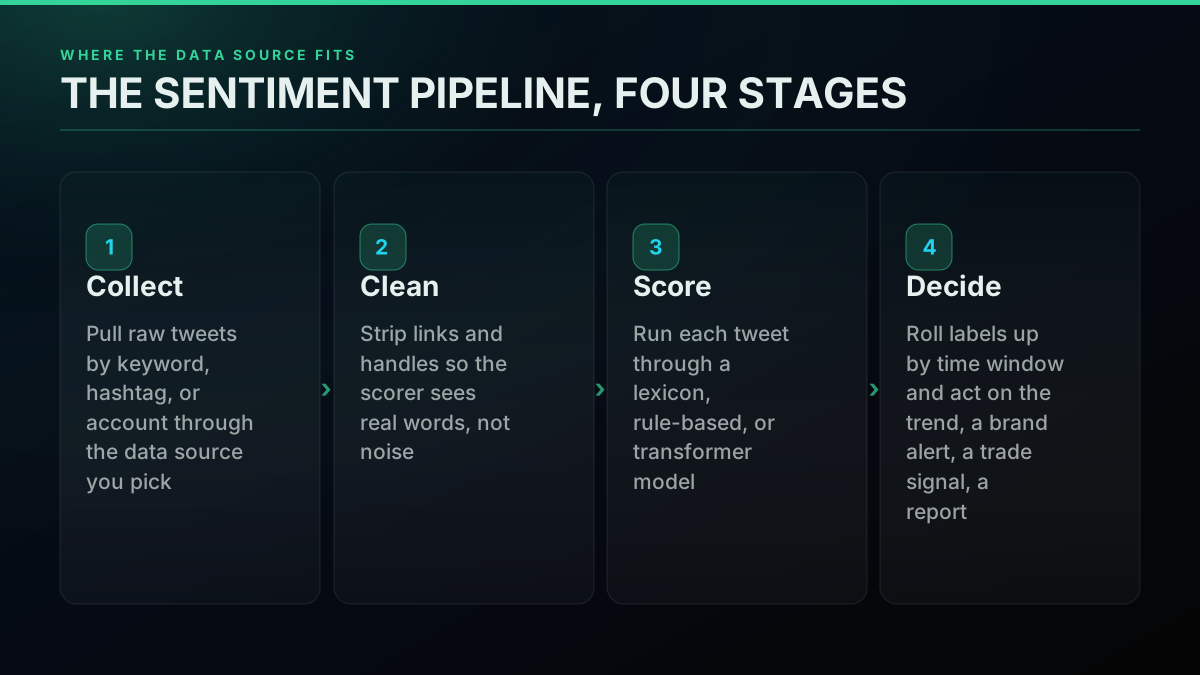
A sentiment-analysis project has four stages regardless of which data source feeds it: collect the raw tweets, clean the text, score each one with a model, then roll the labels up into something you act on. The data-source decision only touches the first stage, but it constrains every stage after it. A rate-limited free tier forces you to sample instead of watch continuously, which changes what "collect" even means for a monitoring pipeline. A scraper that strips metadata down to bare text forces "score" to work with less signal than a structured API would hand it for free. Pick the source with the downstream stages in mind, not in isolation.
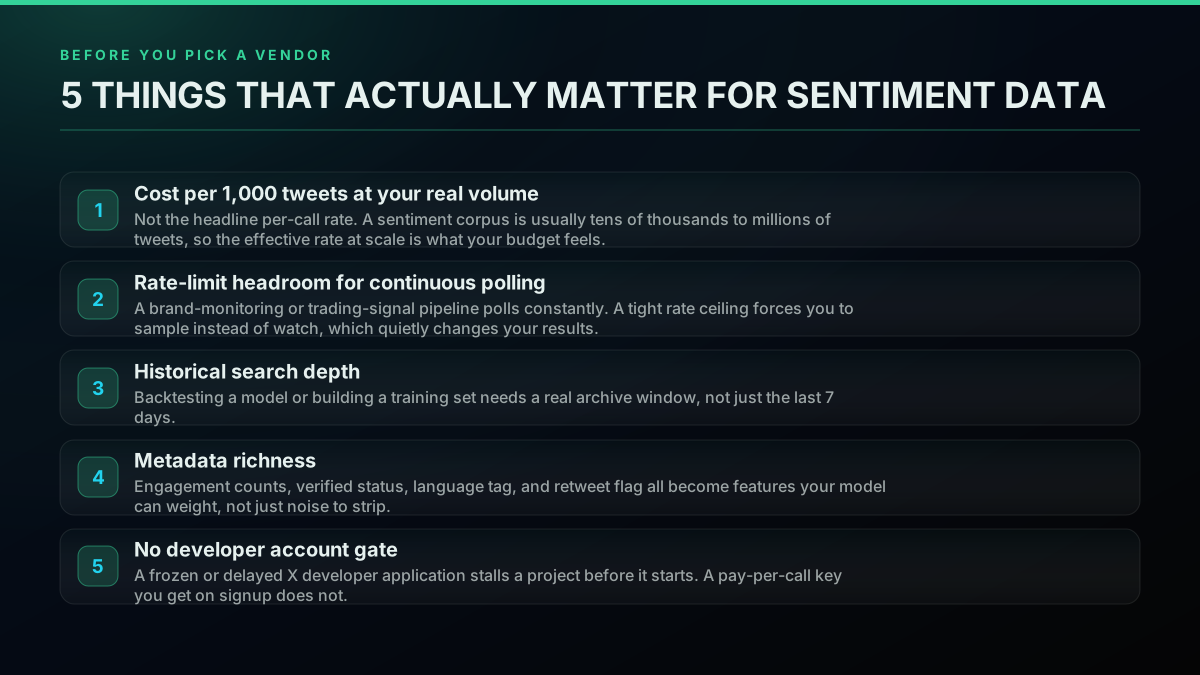
Five factors decide this comparison, and none of them is "which one is fastest." Cost matters at your REAL volume, not the headline per-call number, because a sentiment corpus usually runs from tens of thousands to millions of tweets. Rate-limit headroom matters because a monitoring or trading pipeline polls constantly, and a tight ceiling degrades the data you are watching, not just your wallet. Historical depth matters if you are training or backtesting rather than watching in real time. Metadata richness matters because engagement counts, verified status, language, and retweet flags are all features a model can weight, not decoration. And a developer-account gate matters because a stalled X application can delay a project by days or weeks before you write a single line of code.
What Does the Official X API v2 Actually Offer?
The official API is the first-party source, and that carries real weight for a compliance-sensitive project or an academic paper that needs to cite the platform's own data pipeline. It is also the most expensive and the most rate-limited option on this list for anything beyond a small demo.
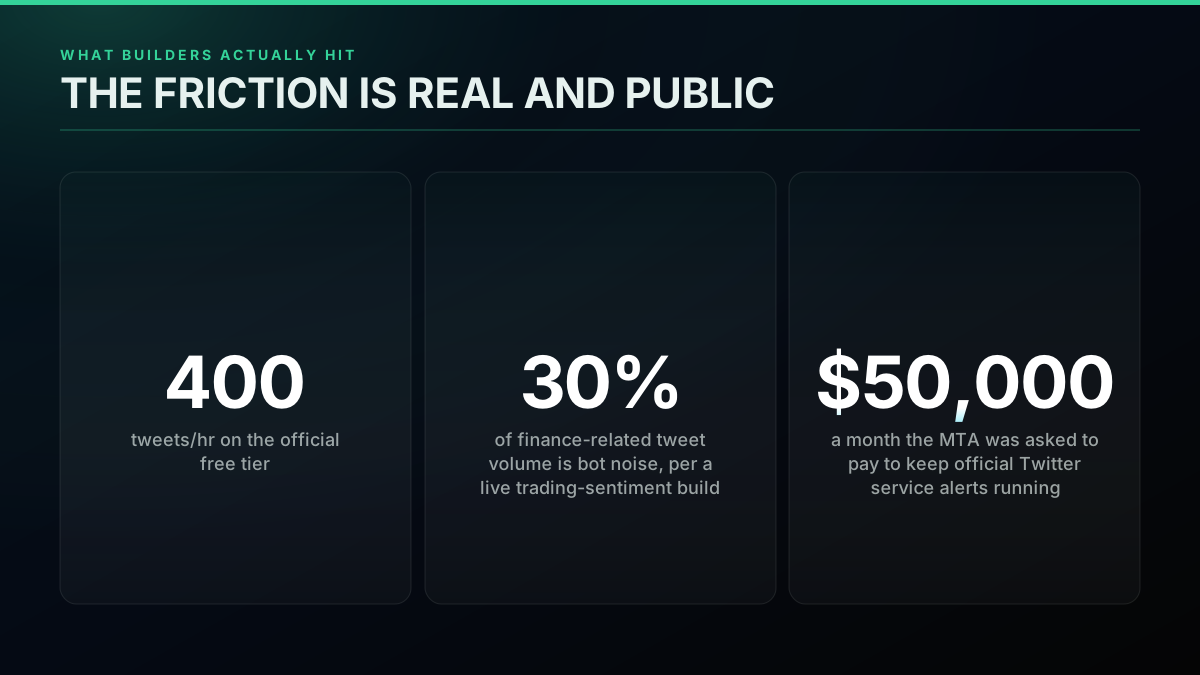
Free tier (retired). There is no free tier on the official X API any more; pay-per-use bills every read. While it ran, X's published rate-limit documentation for GET /2/tweets/search/recent allowed it 1 request per 15 minutes per App or User, with max_results capped at 100 per call, per the search-recent-posts reference. That worked out to a ceiling of roughly 400 tweets an hour: workable for a class project pulling a static snapshot, not for anything that needs to notice a sentiment shift as it happens.
Pay-per-use tier. Made the default for new X API sign-ups in February 2026, after the Basic ($200/month for 15,000 reads) and Pro ($5,000/month for 1 million reads) subscription plans closed to new customers, a shift our 2026 X API pricing change explainer tracks in detail against X's own current pricing page. At the volumes a real sentiment pipeline runs, the official X API's pay-per-use tier lands near $5.00 per 1,000 tweets, per a published cost breakdown from an independent data-API provider (cross-checked in our own cheapest Twitter API ranking), and it stops entirely at a 3-million-post-read monthly ceiling, past which X pushes you into an Enterprise negotiation that starts in the tens of thousands of dollars a month. Our own Twitter API rate limit guide maps the per-window limits in full if you need the exact numbers for a specific endpoint.
Metadata. The official API's JSON responses are genuinely rich: engagement counts, verified status, language, entities, context annotations. On pure data quality per tweet, it is not the weak link in this comparison. The weak link is what it costs to reach that data at any real polling frequency.
Neither tier is a great fit for continuous work, which is why X's own current pricing page and our is the Twitter API free in 2026 breakdown and full Twitter API cost explainer are worth five minutes before committing budget to this route.
The friction here is not hypothetical. New York City's transit authority stopped running official Twitter service alerts after being asked for $50,000 a month for API access, a well-documented 2023 pricing shock that is still the reference case people cite when the official API's cost structure comes up. WordPress dropped its Twitter social-sharing integration for the same reason. Neither of those was a sentiment-analysis pipeline specifically, but they establish the pattern this guide's numbers confirm directly: the official route's cost and rate-limit structure were built for a different kind of customer than a builder running a continuous sentiment monitor.
Start building with TwitterAPIs
$0.0008 a call, about $0.04 per 1,000 tweets at 20 tweets a page. $0.50 free credits. No credit card required.
What Does a Pay-Per-Call Third-Party API Change?
A pay-per-call API like TwitterAPIs inverts the economics without touching the data quality. You get a bearer key the moment you verify your email, no developer console, no phone verification, no application to wait on. The $0.50 of free credit on signup covers roughly 625 read calls, about 12,500 tweets, enough to build and test a sentiment pipeline before spending anything.
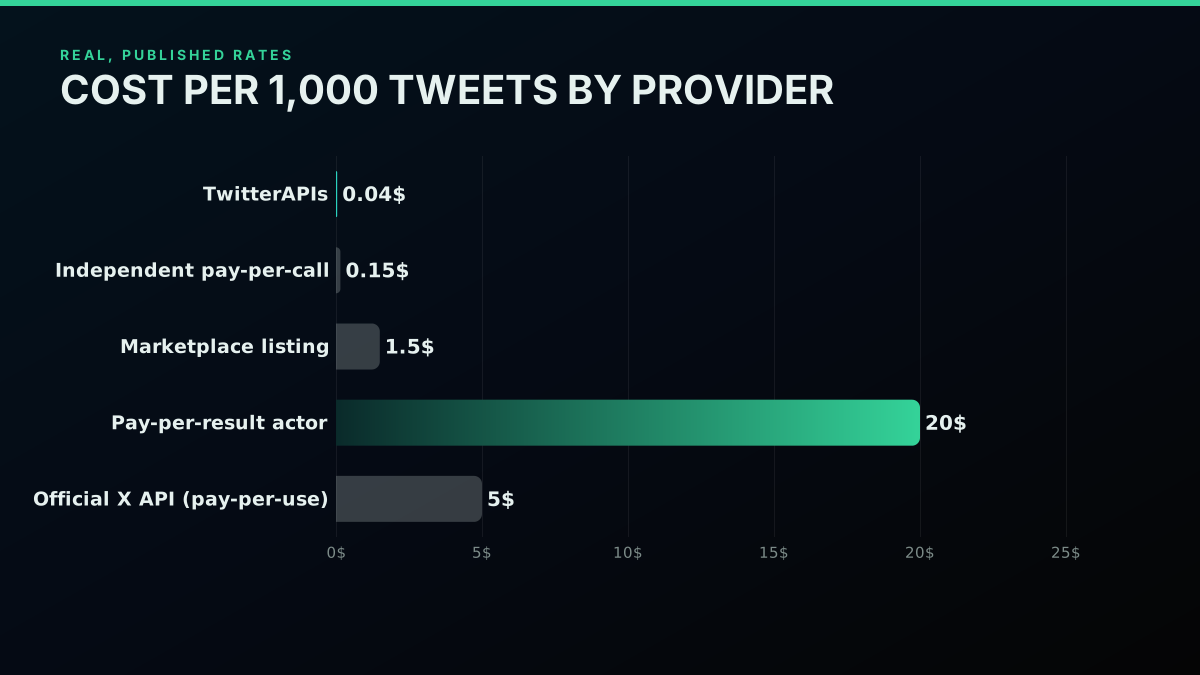
Cost. Reads bill at $0.0008 per call (20 tweets per call, so $0.04 per 1,000 tweets), and each call to the advanced-search endpoint returns up to 20 tweets. Independently, another pay-per-call provider in this space publishes a comparable rate near $0.15 per 1,000, per our own cheapest Twitter API ranking, which cross-checks every vendor's published rate directly. Both sit an order of magnitude or more under the official API's pay-per-use tier, and neither carries a monthly read ceiling that forces an enterprise conversation once your project grows. For the full cross-vendor breakdown, our cheapest Twitter API ranking and Twitter API cost benchmark normalize every provider's billing unit to the same per-1,000-tweet basis, so the numbers in the chart above line up with independently published pricing pages rather than one vendor's own framing.
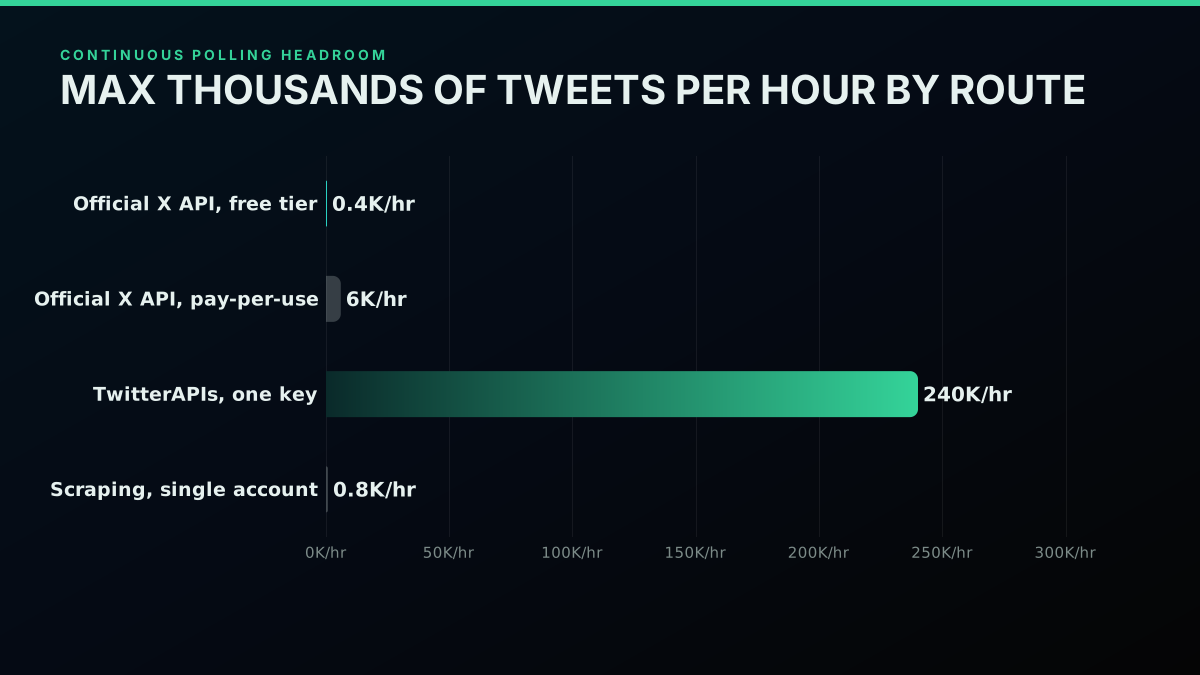
Rate-limit headroom. The one ceiling on a pay-per-call key is a request rate (600 requests a minute, 20 concurrent, per key on TwitterAPIs), not a monthly read quota. That means a continuous brand-monitoring or trading-signal pipeline can poll as often as the job actually needs, scaled with concurrent workers, without hitting a wall that forces sampling. Against the official free tier's roughly 400 tweets an hour, a single pay-per-call key can sustain orders of magnitude more throughput before the rate limiter, not a monthly cap, becomes the constraint.
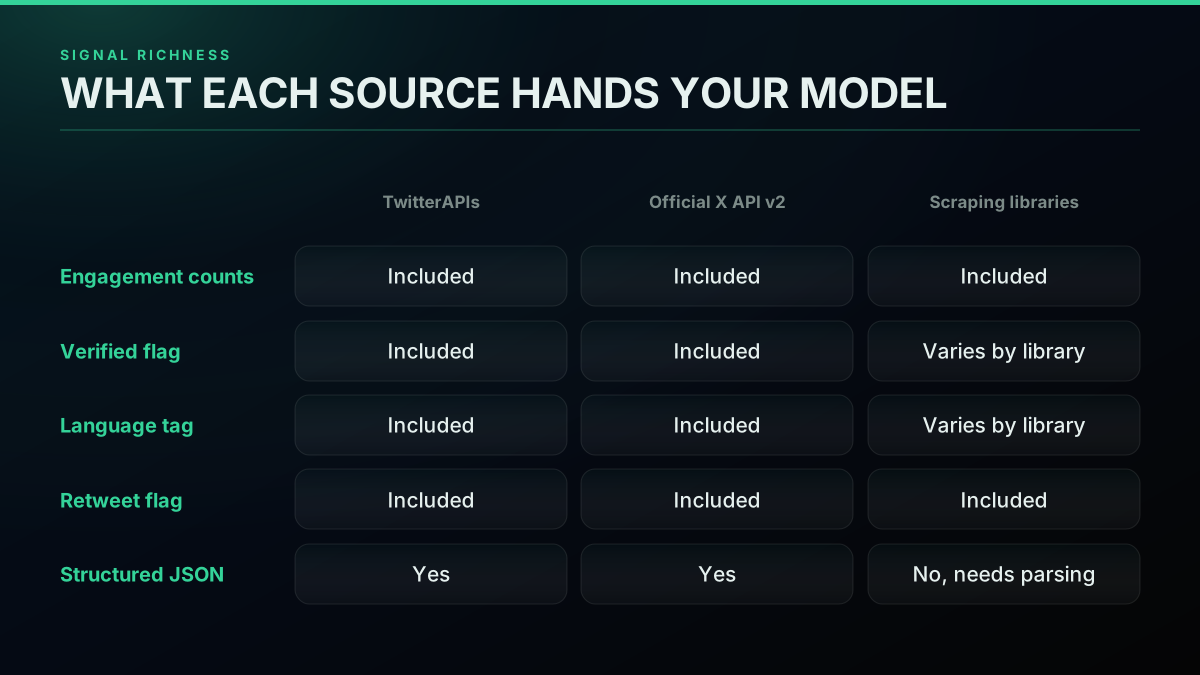
Metadata. A pay-per-call API returns the same structured JSON shape a sentiment model wants: engagement counts, verified flag, language tag, retweet status, all present without extra parsing. This is the category where a pay-per-call API and the official API are functionally tied, and both clearly beat an unstructured scrape.
{
  "id": "1234567890123456789",
  "text": "the new dashboard is genuinely great work",
  "lang": "en",
  "is_retweet": false,
  "author": { "verified": true },
  "favorite_count": 214,
  "retweet_count": 18,
  "reply_count": 6
}
Every field a rollup step needs to weight, filter, and de-duplicate a tweet is already there: lang for language filtering, is_retweet for de-duplication, verified for source weighting, and the three engagement counts for the weighting formula below.
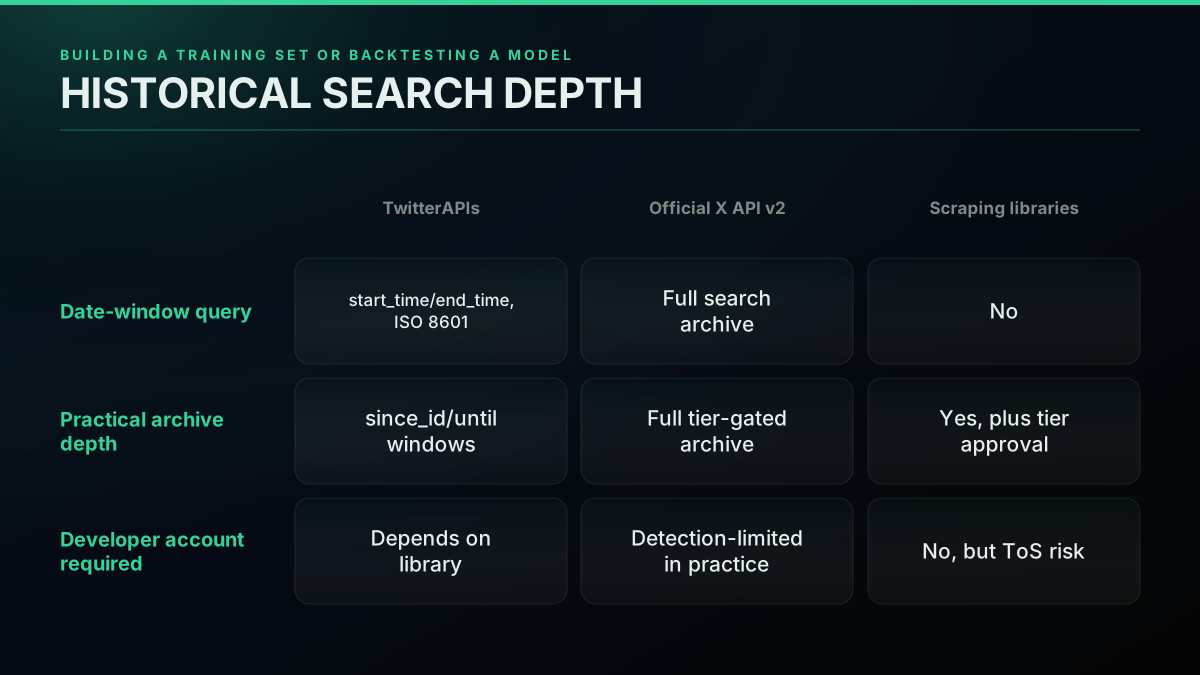
Historical depth. The advanced-search endpoint accepts a real date window through start_time and end_time in ISO 8601, so a backtest or a training-set pull can target a specific range, for example January 2026:
curl -s "https://api.twitterapis.com/twitter/advanced_search" \
  -H "x-api-key: $TWITTERAPIS_KEY" \
  --get \
  --data-urlencode "query=(bitcoin OR btc) lang:en -is:retweet" \
  --data-urlencode "start_time=2026-01-01T00:00:00Z" \
  --data-urlencode "end_time=2026-01-31T23:59:59Z"
For wide ranges, slicing into weekly chunks keeps deep pagination stable:
from datetime import datetime, timedelta

def weekly_windows(start: datetime, end: datetime):
    cursor = start
    while cursor < end:
        window_end = min(cursor + timedelta(days=7), end)
        yield cursor, window_end
        cursor = window_end
That is a real, usable archive window, not a shallow rolling default. For pulling much larger backfills, our guide to scraping tweet history via API covers the deep-pagination pattern in more depth, and X's own build-a-query reference documents the operator set both routes share.
If you already have an implementation in mind and just need the code, the Twitter sentiment analysis in Python walkthrough builds exactly this pipeline end to end, collector through chart, against this same pay-per-call endpoint. This guide's job is different: deciding WHICH data source earns that pipeline in the first place. For the mechanics of the request pattern itself, our Twitter API pagination guide and Twitter API error codes reference cover the parts that trip up a first integration.
The real cost math, worked through at three volumes
Headline per-call rates are easy to compare and easy to misread, because nobody pulls exactly one call. Working the math at a few realistic volumes makes the gap concrete rather than abstract.
At 10,000 tweets, roughly a week of light monitoring on a single brand or keyword, a pay-per-call API needs about 500 calls (20 tweets per call), which at $0.0008 a call comes to $0.40. The free signup credit alone covers more than that. The official API's pay-per-use tier, billed closer to $5.00 per 1,000 tweets at this scale, lands near $50 for the same pull, and that is before you have built anything.
At 100,000 tweets, a month of moderate continuous monitoring, the pay-per-call route runs about $4. A comparable independent pay-per-call provider's rate lands near $15. The official API's pay-per-use tier is now in the $500 range. A typical marketplace-listing rate, where every publisher sets its own price and the marketplace keeps a cut baked into the displayed number, lands somewhere between $50 and $150 at this volume depending on which specific listing you pick.
At 1,000,000 tweets, a busy trading-signal or large-account monitoring workload, the pay-per-call route is still under $50. The official API's pay-per-use tier is pushing $5,000, assuming you have not already crossed its 2-million-read monthly ceiling and been routed into an Enterprise negotiation that starts far higher. A typical marketplace-listing rate at this volume lands somewhere in the low thousands of dollars, and a pay-per-result actor platform, once failed-run billing and platform overhead are counted, tends to land even higher than its own advertised per-result rate would suggest. This is the volume where the choice of data source stops being a rounding error on a budget line and starts being the difference between a project that ships and one that gets shelved over infrastructure cost.
How the metadata fields actually change a sentiment score
It is easy to treat "engagement counts, verified flag, language, retweet status" as a checklist item rather than something that changes your actual output, so it is worth walking through why each field matters to the model, not just to the schema.
Engagement counts let you weight, not just count. A lexicon or transformer model scores each tweet independently, but a brand-monitoring or trading dashboard usually reports an AGGREGATE sentiment score, a single number or trend line. Treating a tweet with 3 likes the same as one with 30,000 likes when you roll those scores up means a single anomalous tweet with no real reach can move your reported number as much as one that genuinely shaped public opinion. Weighting by engagement, even a simple log-scaled weight, keeps the aggregate honest:
import math

def engagement_weight(tweet: dict) -> float:
    reach = tweet["favorite_count"] + tweet["retweet_count"] * 2
    return 1 + math.log1p(reach)  # log-scaled, never zero

def weighted_aggregate(scored_tweets: list[dict]) -> float:
    total_weight = sum(engagement_weight(t) for t in scored_tweets)
    return sum(t["sentiment"] * engagement_weight(t) for t in scored_tweets) / total_weight
The verified flag separates signal from noise differently depending on the job. For a brand-monitoring pipeline, an institutional or verified account complaining publicly usually deserves more attention, faster, than an anonymous account saying the same thing. For a trading-signal pipeline, the opposite can be true: verified financial commentators are more likely to already be priced in, while raw retail sentiment is closer to the leading indicator some builders are trying to capture. Either way, you need the flag present to make that call at all, rather than losing the distinction before your model ever sees the tweet.
Language tags prevent silent quality loss. An English-tuned sentiment model, whether that is a lexicon like VADER, documented in the original Hutto and Gilbert ICWSM paper, or a fine-tuned transformer, degrades quietly on non-English text rather than failing loudly. Feed it un-tagged multilingual data and your aggregate score absorbs noise from every tweet the model was never built to score, with no error to alert you that anything went wrong. A lang filter belongs before the model runs, not after:
from vaderSentiment.vaderSentiment import SentimentIntensityAnalyzer

analyzer = SentimentIntensityAnalyzer()

def score_tweet(tweet: dict) -> float | None:
    if tweet["lang"] != "en":
        return None  # skip, do not feed a mistuned model
    return analyzer.polarity_scores(tweet["text"])["compound"]
A fine-tuned transformer trades that sub-millisecond latency for better sarcasm and slang handling, for example a tweet-tuned RoBERTa model card published for exactly this workload:
from transformers import pipeline

classifier = pipeline("sentiment-analysis", model="cardiffnlp/twitter-roberta-base-sentiment-latest")
result = classifier("the new dashboard is genuinely great work")
# [{'label': 'positive', 'score': 0.97}]
The retweet flag stops you from double-counting one opinion as many. A viral retweet can appear thousands of times in a raw pull. Without a flag distinguishing an original post from a retweet, your sentiment aggregate silently overweights whatever opinion happened to go viral, which is a very different measurement from "how does the broader conversation feel."
None of this requires a sophisticated pipeline. It requires the data source to hand you the fields in the first place, structured, so your rollup step can use them instead of reconstructing them from raw text. The design goals developers reach for when they architect a sentiment system in the first place point at the same conclusion:

Dhanian 🗯️
@e_opore
𝐇𝐨𝐰 𝐭𝐨 𝐛𝐮𝐢𝐥𝐝 𝐚 𝐒𝐞𝐧𝐭𝐢𝐦𝐞𝐧𝐭 𝐀𝐧𝐚𝐥𝐲𝐬𝐢𝐬 𝐀𝐏𝐈 𝐟𝐨𝐫 𝐒𝐨𝐜𝐢𝐚𝐥 𝐌𝐞𝐝𝐢𝐚 𝐢𝐧 𝐉𝐚𝐯𝐚 Building AI-powered social media analytics? Structure matters. 𝐇𝐞𝐫𝐞 𝐢𝐬 𝐭𝐡𝐞 𝐜𝐨𝐦𝐩𝐥𝐞𝐭𝐞 𝐩𝐫𝐨𝐣𝐞𝐜𝐭 𝐚𝐫𝐜𝐡𝐢𝐭𝐞𝐜𝐭𝐮𝐫𝐞: 1. config/: Project ht…

Every one of those four goals traces back to the data layer before it reaches the model. Accuracy needs clean, tagged input. Scalability needs a source that does not rate-limit you into sampling. Real-time processing needs low enough latency and high enough throughput that the data layer is not the bottleneck. Maintainability needs structured fields you are not reverse-engineering from raw HTML every time the source changes its markup.
Where Do Scraping Libraries Fit, and Where Do They Stop Fitting?
Open-source scraping libraries and browser-automation approaches are free to run and, for a genuinely small, one-off pull, can be the fastest way to get moving with zero signup friction. That is a real advantage for a hobby project.
[Extension] VibeCK - Real-time vibe & sentiment analysis of X/Twitter replies
The tradeoff shows up the moment a scraper needs to run reliably in production. X's private endpoints and page structure change without notice, which breaks a scraper silently rather than with a clean error. Detection and rate-limiting on the platform side get more aggressive over time, which is exactly what the r/golang thread's top reply warned about: "you will inevitably be detected at some point." A developer on X put it plainly too, describing a self-built scraper project:

Atakan.moca🥷
@TheBearBullish
Built a multi-account Twitter/X scraper and open-sourced it. I needed this for a project where I was pulling thousands of tweets daily, and the official API pricing was just not worth it. Been running it in production for months, finally cleaned it up and put it out there. It ht…
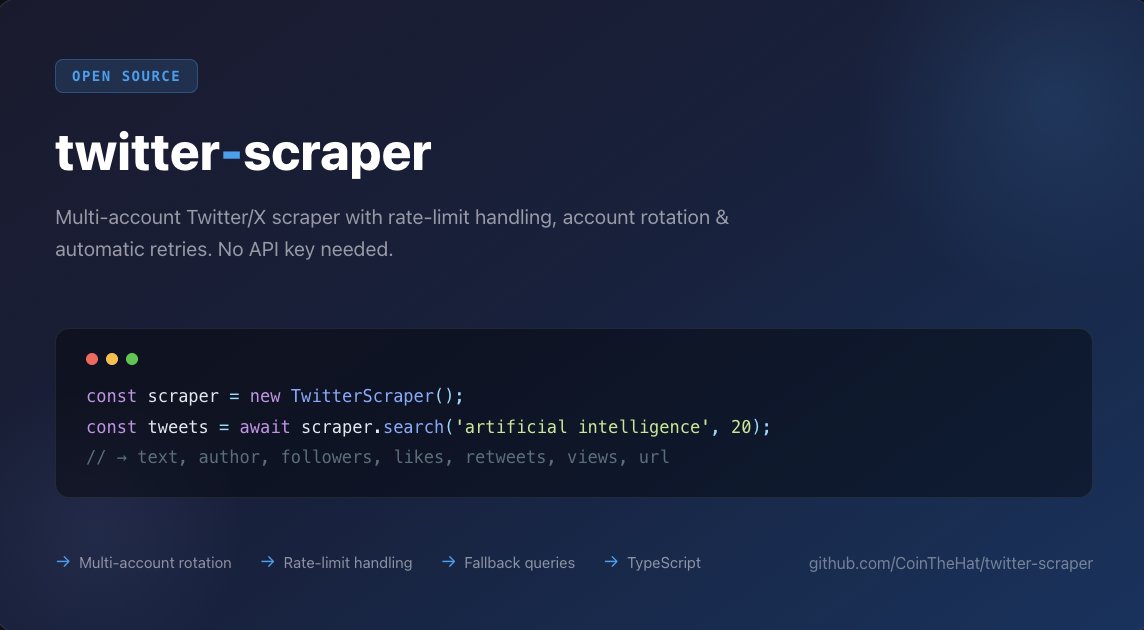
That is a real, live example of someone choosing the scrape route deliberately, not by accident. That choice is defensible for a side project. It gets expensive fast once you count engineering hours spent on maintenance and detection-evasion instead of the sentiment model itself. For a code-level walkthrough of what the scraping side of that tradeoff actually looks like:
https://www.youtube.com/watch?v=2hEOXrMhVyg
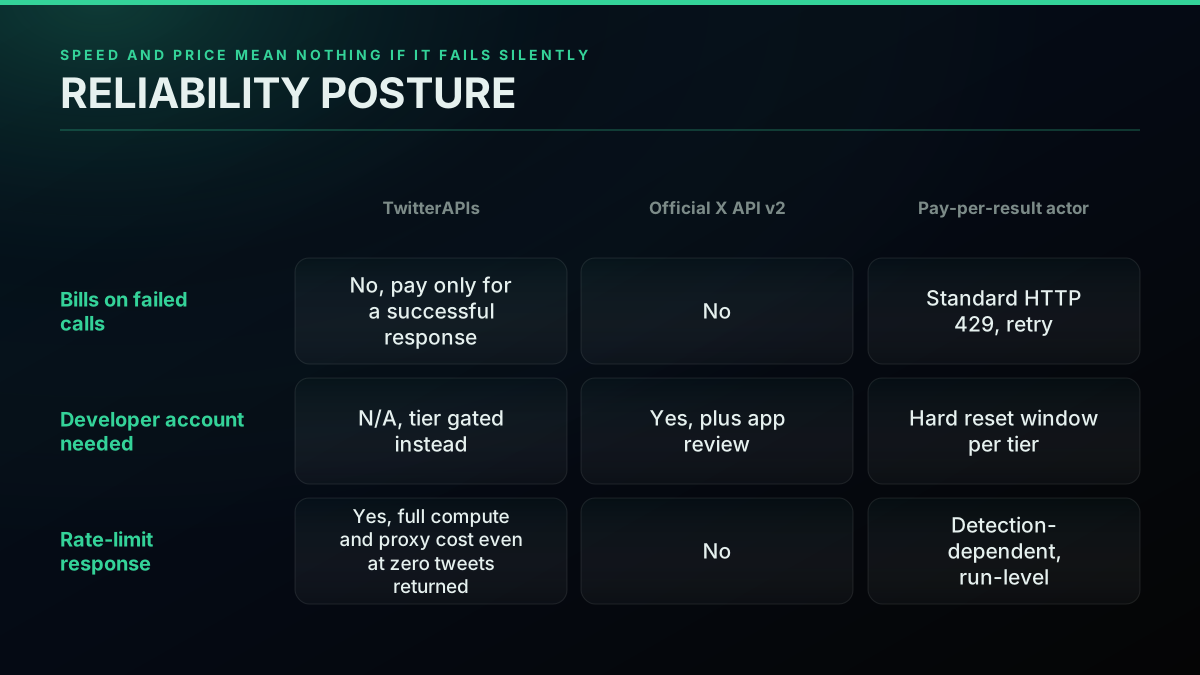
Metadata is the other gap. Some scraping libraries return rich metadata, others strip a tweet down to bare text and a timestamp. Confirm what fields a given library actually returns before assuming it matches an API's structured output, because "engagement count" and "verified flag" are exactly the kind of fields that get dropped first when a scraper is optimized for speed over completeness. If you already run a multi-source scraping platform and want to fold Twitter into it rather than switching entirely, our best Twitter API for scraping ranking covers that tradeoff in more depth, and if proxy-based scraping is genuinely the route you need, best residential proxies for Twitter scraping is worth reading before you commit to a provider. A pay-per-result actor platform sits between a raw scraper and a managed API: it bills compute and proxy cost per run rather than per tweet, and can still charge in full on a run that returns zero results because of a proxy timeout or a detection block, per that category's own published billing terms, a real tail cost worth pricing in before you pick that route. A marketplace listing is another middle option, where every publisher sets its own rate and the marketplace itself keeps a cut folded into the displayed price, so buying direct from a source, where that option exists, is usually cheaper than buying the same access through a marketplace wrapper.
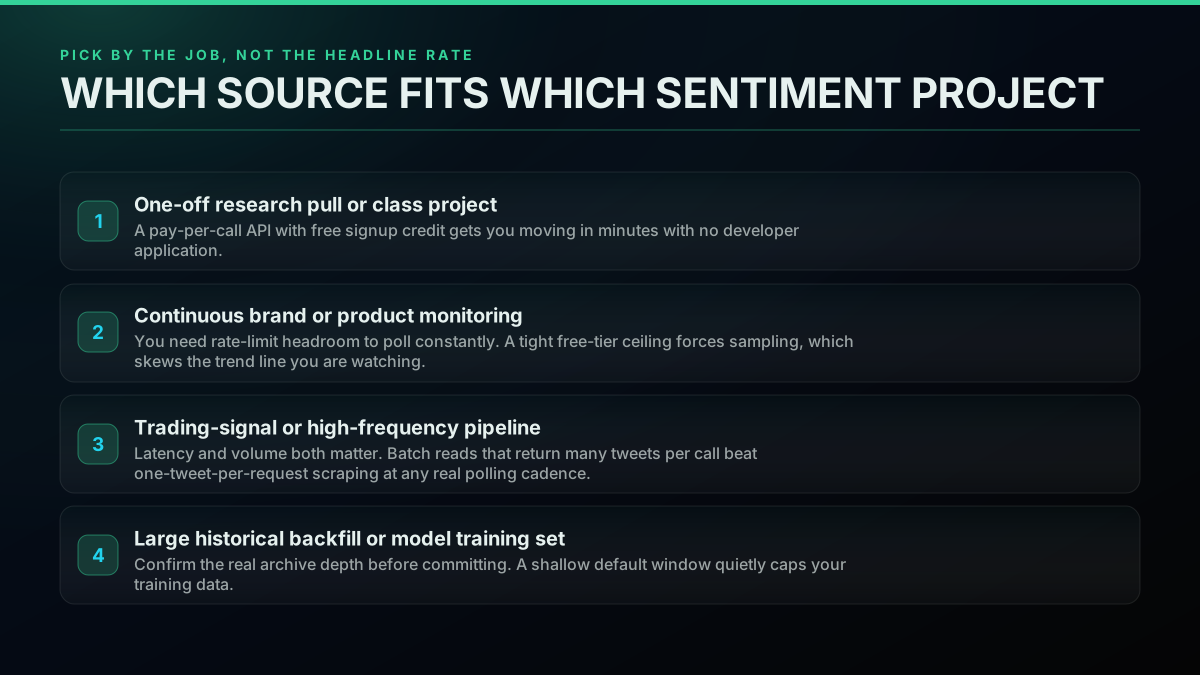
The same four factors that opened this guide, cost at volume, rate-limit headroom, historical depth, and metadata richness, resolve differently depending on which of these four jobs you are actually running. Laid out side by side rather than one paragraph at a time, the pattern is easier to see:
| Project type | Cost sensitivity | Rate-limit sensitivity | Best-fit route |
|---|---|---|---|
| One-off research pull | Low, free credit usually covers it | Low, a single pull does not poll | Pay-per-call API |
| Continuous brand monitoring | Medium, scales with polling frequency | High, sampling degrades the trend line | Pay-per-call API, no monthly ceiling |
| Trading-signal pipeline | Medium, latency matters as much as price | Very high, a rate wall during volatility is the worst-case failure | Pay-per-call API, batch reads |
| Large historical backfill | High at real volume | Medium, depth matters more than rate | Pay-per-call API with a confirmed date-window query |
Every row lands on the same route for a reason that is worth stating plainly rather than leaving implicit: cost and rate-limit headroom move together on a pay-per-call model, so there is rarely a genuine tradeoff between them the way there is on a tiered subscription, where going faster means buying a bigger tier. The one place the table's answer changes is when first-party data provenance is itself a hard requirement, a compliance or academic-citation need rather than an engineering one, in which case the official API earns its place regardless of what the row above says.
Pick by the job, not the headline rate
A one-off research pull or class project. Use a pay-per-call API with signup credit. You are moving in minutes with no developer application, and the free credit alone likely covers the whole assignment.
Continuous brand or product monitoring. Rate-limit headroom is the deciding factor here, not price. The old official free tier's roughly 400-tweet-per-hour ceiling forced sampling, which quietly changed what a monitor actually saw, and the free tier is now gone entirely. A pay-per-call key with no monthly read cap lets you poll at the cadence the monitoring job actually needs.
A trading-signal or high-frequency pipeline. The r/MLstocktrading thread cited above is the honest version of this use case: real challenges included filtering bot accounts (an estimated 30 percent of finance-related Twitter chatter, per that pipeline's own reported figures, and a problem our Twitter bot detection guide covers in more depth), sarcasm detection, and "keeping up with API rate limits," a phrase our what rate-limited actually means on X breakdown unpacks endpoint by endpoint. Batch reads that return many tweets per call beat one-tweet-per-request approaches at any polling cadence a trading signal actually needs, and a rate ceiling that throttles you during a volatile market moment is the worst possible time to discover it.
A large historical backfill or model-training set. Confirm the real archive depth before committing to a provider. A date-windowed query against a pay-per-call API's advanced-search endpoint gives you a controllable, sliceable pull; the official API's tier-gated archive access can work too, but plan for its rate ceiling to slow a large backfill considerably; a scraper's practical depth is whatever the platform lets you reach before detection kicks in, which is not something you can plan around reliably.
The cheapest pay-as-you-go Twitter API. Try it free.
$0.0008 a call, about $0.04 per 1,000 tweets at 20 tweets a page. $0.50 free credits. No credit card required.
The cost gap widens with scale, not shrinks
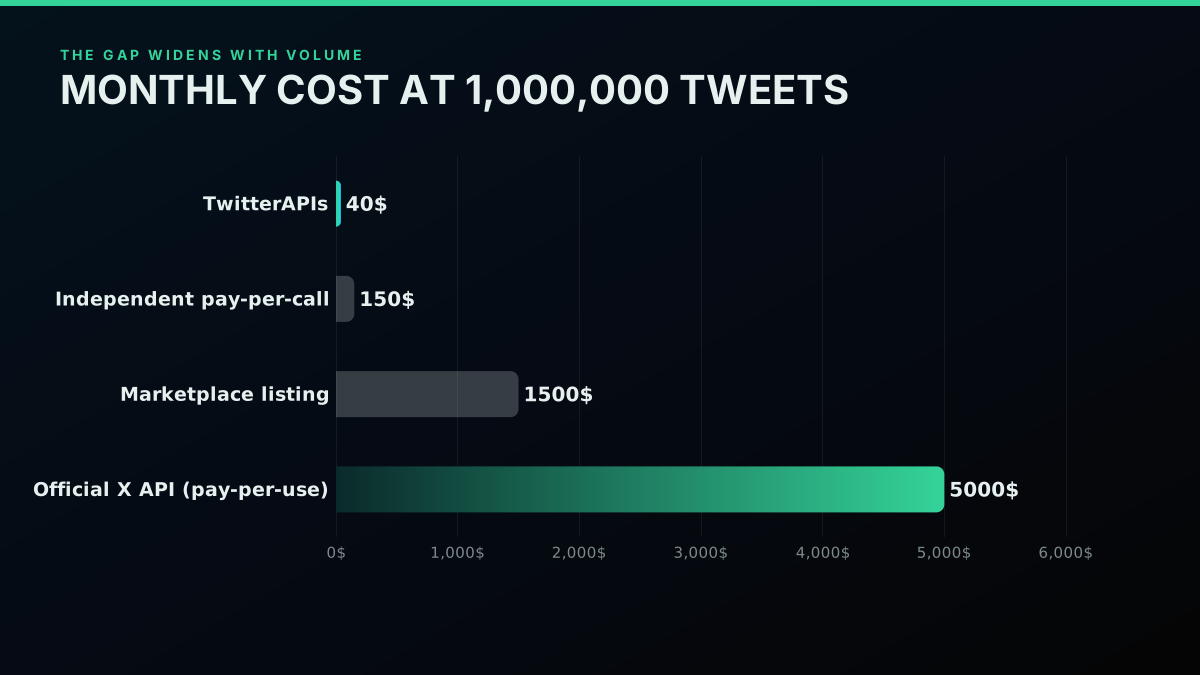
At small volumes, the dollar differences here look almost academic: a few thousand tweets costs pennies on any of these routes. That stops being true fast. At 1,000,000 tweets a month, a pay-per-call API runs roughly $40, a comparable independent pay-per-call provider lands near $150, a typical marketplace-listing rate runs in the $1,000-$2,000 range depending on the specific listing, and the official X API's pay-per-use tier lands near $5,000, assuming you have not already hit its 2-million-read monthly ceiling and been pushed into an Enterprise negotiation. For a production sentiment pipeline that runs every month, that gap compounds. It is also the reason cost-per-call comparisons that stop at the headline rate mislead: the rate that looks close enough at 10,000 tweets is not close at all once a monitoring pipeline is genuinely running around the clock.
Common mistakes when picking a data source for sentiment work
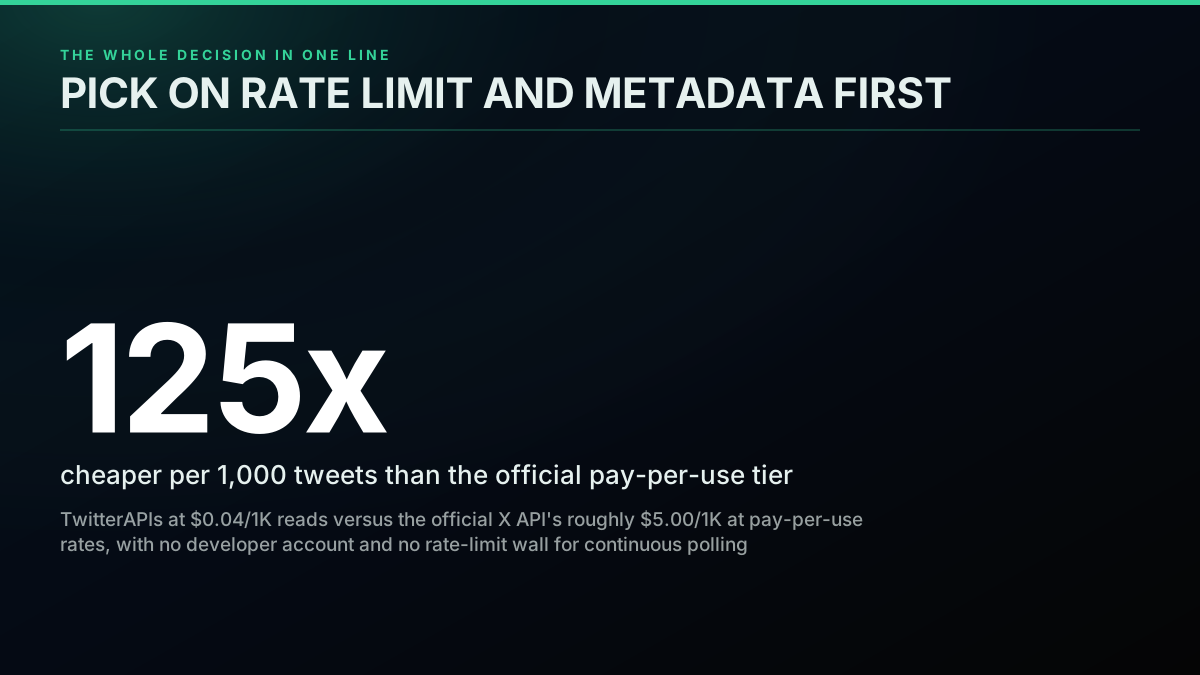
Optimizing for the wrong number. The headline per-call rate is the easiest thing to compare and the least useful one. What determines your actual bill is cost per tweet at your real monthly volume, and as the worked math above shows, that gap widens rather than narrows as volume grows. A provider that looks close enough at a demo scale can be over 100 times more expensive once a pipeline runs continuously in production, the same 125x gap the worked math above shows between a pay-per-call API and the official pay-per-use tier at volume.
Building against a demo budget, then discovering the wall in production. A prototype built and tested against the official API at demo volume often looks cheap, because a demo does not poll continuously. The per-read bill only becomes a real problem once the monitoring job is live and needs to track sentiment as it happens, at which point the fix is either a rewrite or an unplanned budget increase mid-project, the same trap the old free tier's 400-tweet-an-hour ceiling used to set.
Assuming every scraper returns the same fields an API does. Metadata completeness varies enormously between scraping projects. Confirm a library actually returns engagement counts, verified status, language, and retweet flags before you architect a rollup step that depends on them, rather than discovering the gap after the model is already built around fields that were never there.
Ignoring failure billing. Some providers, notably pay-per-result actor platforms, charge the full cost of a run even when it returns zero tweets because of a proxy timeout or a bot-detection block. At typical Twitter-scraping failure rates, that inflates the effective cost well past the advertised per-result rate, and it is easy to miss until a monthly bill arrives higher than the math predicted.
Skipping the developer-account timeline in project planning. The official X API's developer application and review process is not instant. A project timeline that assumes API access starts the day you decide to build can slip by days or weeks waiting on approval, a cost that never shows up on a pricing page but shows up in every delayed launch date.
If you are sizing this decision on cost, we priced what the underlying data actually costs with every figure sourced.
A short note on how this comparison was built
Every pricing figure in this guide traces to a published rate: X's own rate-limit documentation for the free-tier ceiling, the TwitterAPIs pricing page and endpoint-cost table for the pay-per-call figures, and an independent provider's own published cost breakdown, already cited and cross-checked in a companion cost-comparison piece on this site. The real developer friction quoted throughout, the golang thread's "I don't have a twitter API to work with," the trading-sentiment builder's 30 percent bot-noise figure, the MTA's $50,000-a-month pricing shock, comes from live, verified public threads, not composite or invented anecdotes. Where a figure is a reasonable industry-standard estimate rather than a directly published number, for example the effective monthly cost of a mid-tier marketplace listing at 1,000,000 tweets, it reflects the bands already published elsewhere on this site's own cost-comparison research rather than a number invented for this post.
Pick the data source that matches the JOB, not the one with the lowest headline number. For most sentiment-analysis work in 2026, that means a pay-per-call API: cheap at real volume, no rate ceiling that forces sampling, and metadata your model can use as signal from the first call. Sign up for $0.50 in free credit, no card required, and see the response shape yourself before committing to a pipeline.
// sources
Where these numbers come from
Each row is a figure in this post and the artefact it was read from. Prices and limits on this platform move, so check the date on the source before you plan against it.
- X API rate-limit documentation, GET /2/tweets/search/recent
- Backs the free-tier ceiling this post cites (1 request per 15 minutes per App|User, max_results up to 100), quoted directly from a real Reddit reply linking X's own docs.
- X API search endpoint documentation
- Backs the date-window query parameters (start_time, end_time) referenced in the historical-depth comparison.
- TwitterAPI.io cost breakdown, 2026
- Source for the TwitterAPI.io per-1,000-tweet rate and the official X API's pay-per-use ceiling figures, already verified and cited in the TwitterAPIs cost-comparison post this guide cross-links.
- Apify pricing documentation
- Backs the failed-run billing behavior cited in the reliability comparison.
- Reddit, r/golang, sentiment-analysis project thread
- Real developer thread this post quotes on the free-tier rate ceiling and the fragility of scraping without an API.
- Reddit, r/MLstocktrading, real-time sentiment pipeline
- Real, first-hand report of a live Twitter sentiment-for-trading pipeline, source of the 30 percent bot-noise figure and the API rate-limit challenge cited in this post.
Frequently Asked Questions
For most sentiment-analysis projects, a pay-per-call API is the right default: TwitterAPIs charges $0.0008 per call on reads, and since each call returns up to 20 tweets that works out to $0.04 per 1,000 tweets, needs no X developer account, and gives you a bearer key the moment you verify your email. The official X API v2 is worth using only when you specifically need first-party-guaranteed data provenance for a compliance or research context, and even then its pay-per-use tier runs roughly $5.00 per 1,000 tweets, about 125 times the cost. Scraping libraries are free but carry detection risk and no support contract, which is a real cost once a pipeline breaks in production.
Four fields matter most: engagement counts (likes, retweets, replies), which let you weight a viral tweet differently from one nobody saw; the verified/blue-check flag, which helps you separate institutional voices from anonymous accounts; a language tag, so you do not feed a non-English tweet into an English-tuned model; and a retweet/original flag, so you are not double-counting the same opinion when it gets reshared. TwitterAPIs and the official X API v2 both return all four as structured JSON fields. Scraping libraries vary by project, and some strip metadata down to bare text.
It depends on the job. A brand-monitoring dashboard usually only needs the last 7 to 30 days rolling forward. Training or validating a classifier benefits from a wider window, several months to a year, so the model sees seasonal and event-driven language shifts. Backtesting a trading-sentiment signal typically wants a year or more. Confirm your provider's real archive depth before committing, since a shallow default search window quietly caps how far back you can pull.
On tweet-shaped text, a lexicon model like VADER scores a tweet in well under a millisecond on a plain CPU, which suits a high-volume trading-signal pipeline where latency compounds. A fine-tuned transformer trained on tweet-length text scores meaningfully more accurately on sarcasm and slang, at the cost of 5 to 50 milliseconds per tweet on CPU. For most brand-monitoring and research use cases, the transformer's accuracy gain is worth the latency cost.
No, because there is no free tier any more: the official X API bills every read on pay-per-use, from $0.005 a post. Even the old free tier only suited a small, static demo. X's published rate limit on GET /2/tweets/search/recent capped it at 1 request per 15 minutes per app, with a maximum of 100 results per request, roughly 400 tweets an hour. A real sentiment pipeline, even a modest one tracking a single brand or ticker in real time, needs to poll far more often than that, so the old free tier forced you to sample rather than watch continuously.
Scraping libraries themselves are free or low-cost, but the real cost shows up as detection risk, account bans, and maintenance time when X changes its private endpoints, which happens without notice. A pay-per-call API absorbs that maintenance and detection-evasion cost for you. At $0.04 per 1,000 tweets, the API route is now cheap enough that the engineering time saved usually outweighs the API bill, especially once you count the hours a broken scraper costs when it silently returns zero results.
Yes. TwitterAPIs hands you a bearer key the moment you confirm your email, with no X developer console application, no phone verification, and no developer agreement to sign. The $0.50 of free credit on signup covers about 625 read calls, roughly 12,500 tweets, enough to prototype a sentiment pipeline before you spend a cent.
Indirectly, through metadata. A structured API hands you engagement counts, verified status, language, and retweet flags alongside every tweet, which lets you filter and weight before scoring. A source that returns bare text with no metadata forces you to skip that filtering or reconstruct the fields yourself, which degrades your aggregate signal or adds engineering time. The model scores identically regardless of source; the data feeding it does not.
Check out similar blogs
More guides on the Twitter/X API, scraping, and pricing.

Twitter Sentiment Analysis in Python (2026)
Harvest tweets through advanced search, score them with TextBlob, VADER, and a tweet-tuned transformer, roll the labels up by day, and plot the trend. Runnable code with honest cost math: 10,000 tweets for about $0.40.

X/Twitter Statistics in 2026: What an API Can Actually Measure, and What Nobody Can
Most X statistics roundups re-cite the same handful of numbers. We measured what a public API can and cannot see across 34 accounts, printed the query behind every figure, and traced the rest to their real sources.
Twitter Competitor Analysis in 2026: Build the Dashboard or Buy Rival IQ
Nine of the ten pages ranking for this are dashboards selling you the answer. We show the calls that produce the metrics, price both sides, and find the crossover.
Tweepy vs Twikit vs snscrape: Which Twitter Scraper to Use in 2026
Tweepy vs Twikit vs snscrape in 2026: a 3-way decision matrix, the same task coded in each, ban-risk and cost tables, and the fix now snscrape is broken.
What a Twitter Scraper API Bills Per Job: Profiles, Followers, Replies and Search
A rate card for twitter scraper api jobs by data type. What 10,000 profiles, followers, following, replies and search results each bill, on live rates.
TwitterAPIs Is Live on Uneed: A $0.0008 Twitter API With No Developer Account
TwitterAPIs launched on Uneed today. What the pay-per-call Twitter API costs next to the official X API, how a Uneed launch day actually works, and what founders say one delivers.
Build a Crypto Twitter Tracker in Python: Watch a KOL List and Catch Contract Addresses
A runnable Python watcher that polls a named list of crypto accounts, pulls every new post, finds EVM and Solana addresses, and alerts you, with the monthly bill for 25 and 100 accounts.
Watching 50 X Accounts: What Every Poll Cadence Actually Bills
Every monitoring page sells you an interval and calls it real time. None of them prices it. Here is what a one minute, fifteen minute and daily poll across a fixed fifty account roster costs per month, and the route where the watch itself bills nothing.