GUIDE
How to Search Tweets by Date on X in 2026 (Operators, API, and the Limits Nobody Documents)
How to search tweets by date on X in 2026: the since:/until: operators, the API parameters, and the exact historical limits X's own docs bury, tested live against a real endpoint.
Per our own spec, 70 of 123 endpoints bill $0.0008, 26 are free, and 27 sit between $0.0016 and $0.01. Every price ships inside our published OpenAPI document as an x-cost-usd field, so any figure in this post can be checked against the contract that bills it rather than taken on trust.
Searching X for tweets from a specific day looks like a solved problem until the window you need is more than a week old. Type since:2026-05-01 until:2026-05-08 into the search box and it works. Send the same window as start_time/end_time to X's own API v2 recent search endpoint and it gets rejected, because that endpoint only accepts a start date inside the last 7 days, a limit X's own documentation states almost in passing. This guide covers the actual operators for date-bounded search, the parameter formats across the three routes that support it, and the historical reach limits each one carries, tested against a live endpoint rather than assumed from the docs.
TL;DR: Pair
since:YYYY-MM-DDanduntil:YYYY-MM-DDwith a keyword or handle to bound a search by day (until:is exclusive). X's official v2 recent search endpoint only accepts astart_timeinside the last 7 days, rejecting anything older with a 400. Full-archive search back to 2006 exists on X's API astweets/search/all, but it sits behind Enterprise-tier pricing, since the free Academic Research track closed in 2023. The web operator set (since:/until:/since_time:/since_id:) carries no such rolling cutoff, and a search API that forwards it, such as TwitterAPIs, reaches back however far Twitter's own search index goes, at $0.0008 per call.
Want the complete operator reference first? This post assumes you already have
since:/until:basics from the Twitter Search API and advanced operators guide, which covers every operator category (engagement gates, authors, media, language) in depth. This post is the deep dive on the one category that guide only touches briefly: date bounds, and specifically the historical reach limit almost nobody states as a number.
Three routes, three different ceilings
Before touching syntax, understand that "search tweets by date" resolves to three genuinely different systems with three different historical reach limits, and picking the wrong one wastes an afternoon on a rejected request rather than a returned result.
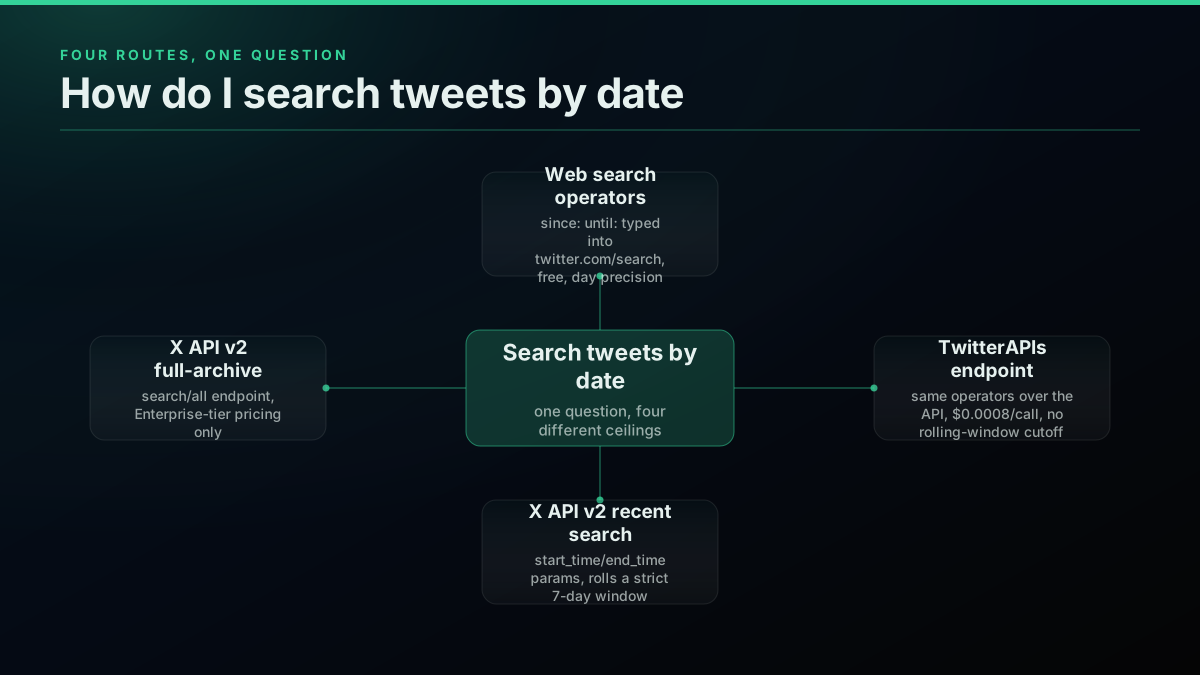
Web search operators (since:, until:, and friends) are what you type into twitter.com/search, free, with day-level precision and no dev account. A search API that forwards the same operator set, such as the TwitterAPIs advanced search endpoint, lets you run those same queries programmatically at $0.0008 per call, with no rolling-window cutoff. X's own API v2 splits into two separate endpoints with wildly different reach: tweets/search/recent, which rolls a strict 7-day window regardless of tier, and tweets/search/all, full-archive back to 2006, gated behind Enterprise pricing. Confusing these four is the single most common reason a "working" date query returns nothing, or gets rejected outright.
The mix-up usually happens in one direction: a team prototypes against the web search box or a forwarding API where since:/until: behaves like an open, unrestricted date filter, ships that same query shape against X's own tweets/search/recent endpoint expecting identical behavior, and only discovers the 7-day ceiling in production when a backfill job for last month's data returns an error instead of results. The operators look the same on the surface, since:2026-05-01 reads identically whether you type it into a search box or pass it as a query string parameter, but the endpoint receiving it enforces a completely different rule depending on which of the four systems is on the other end.
Twitter advanced search/Date search not working
That thread is a native web-search complaint, not an API bug, but it is the same category of confusion: a date filter that "was working" and then silently stops returning results, because the underlying search index, cursor chain, or access path shifted under the query.
Worth knowing before you reach for a date window as a recall fix: on a 17-post measured set it did not act as one. The same 15 posts were found with and without a two-year window, as recorded in why X advanced search misses posts you know exist. Date windows are a throughput tool for slicing long pulls, which is exactly what the rest of this guide uses them for.
since: and until:, the operators that do the actual filtering
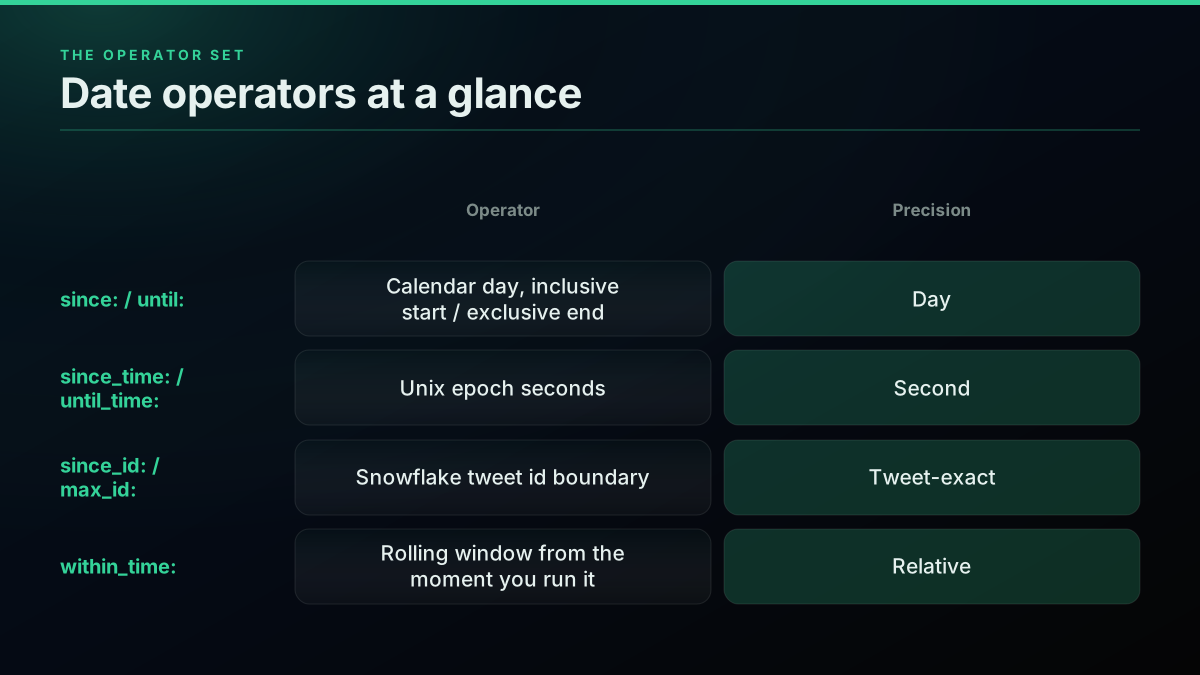
The core date operators bound a search by calendar day. since:2026-05-01 matches from that day onward, inclusive. until:2026-05-08 matches up to that day, but the boundary is exclusive: a tweet posted on 2026-05-08 itself does not appear in the results, only tweets strictly before it. Stack them and you get a closed-open window, [since, until), the same convention most date-range APIs use.
A date operator never works alone. since:2026-01-01 by itself, with no keyword, handle, or hashtag attached, returns an empty result on every surface that honors it, web search included. Pair it with something: AI since:2026-01-01, from:nasa since:2026-01-01, #launch since:2026-01-01.

👀How TV ${{
@cHowTv1
Twitter Dork Use “from” to list tweets only from a particular user e.g search from:cHowTv1 Use “since:yyyy-mm-dd” to search by a date till now e.g search proflamxy since:2020-01-01 Use “until:yyyy-mm-dd” to search tweet until a date e.g search cHowTv1 until:2020-01-01
Calendar-day operators are anchored to UTC, not your local timezone or X's own display timezone in your client. A since:2026-05-01 boundary starts at 2026-05-01 00:00
_HH:MM:SS_UTC timestamp form and compute the exact UTC bounds explicitly rather than trusting the coarse day label to mean the same thing everywhere.
For precision below a full day, three more operators exist. since_time: and until_time: take a Unix epoch second instead of a calendar day, letting you window a search down to the minute, useful for reconstructing reaction to a fast-moving event hour by hour. since_id: and max_id: skip time entirely and use a tweet's numeric Snowflake id as the boundary, which is handy for resuming a paused backfill at the exact tweet you stopped on rather than a timestamp that might land you mid-page and re-fetch tweets you already have. within_time:2d (or 3h, 30m, 45s) is a fourth, relative form: a rolling window measured back from the moment you run the query, not an anchored date, so the same query string returns a different set every time you rerun it.
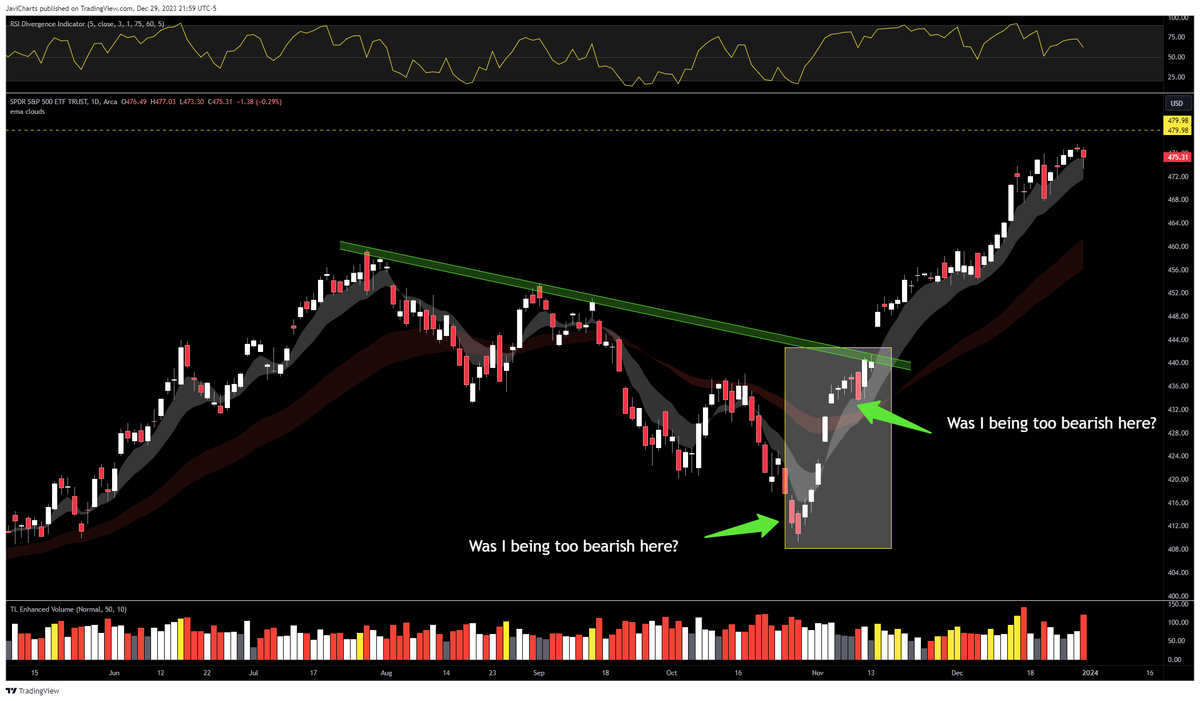
Stock traders use exactly this stacking to rebuild a market reaction window without wading through unrelated noise:

JaviCharts 🤘
@ChartsJavi
Want a pro-tip to search Twitter like a stock trading journal for yourself or someone else? Search for keywords and date ranges like this: from:javicharts (SPY OR QQQ OR SPX) since:2023-10-26 until:2023-11-14 Choose a date range by looking for ranges where we had something ht…
The 7-day wall X's own API doesn't put in bold
Here is the number that decides whether your project is a five-minute API call or a budget conversation: X API v2 tweets/search/recent only returns tweets from the last 7 days, full stop, on every access level, pay-per-use included. Omit start_time/end_time entirely and the endpoint defaults to that same rolling week. Name an earlier start_time explicitly and the endpoint does not clamp it quietly, it rejects the request with a 400 naming the earliest valid timestamp, a failure mode developers on X's own community forums report running into on the Basic paid tier specifically because the limit is easy to miss until a request bounces.
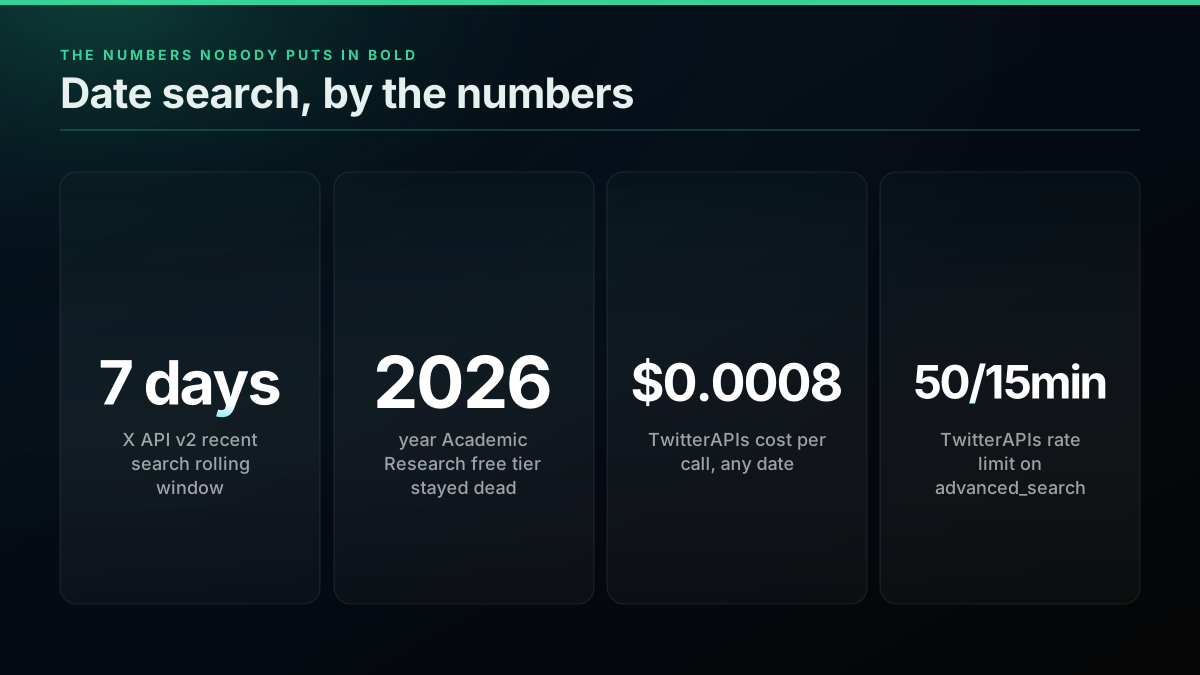
That 7-day figure is not buried in obscure fine print, it is stated on X's own operators and query-building documentation, but framed around query length limits rather than called out as the headline constraint most integrators actually need first. The default-fallback behavior (no time params supplied means "the last 7 days") is easy to read as a convenience rather than a hard ceiling, until a request for last month's data returns nothing and the cause is not immediately obvious from the response.
What the rejection actually looks like
Developers on X's own community forum have reported the exact shape of this failure on the paid Basic tier: a start_time set to a date outside the rolling window comes back as a 400, not a truncated or clamped result set. The response body names the earliest timestamp the endpoint will accept at the moment of the call, which moves every time you run it, since the 7-day window is always measured from "now."
{
  "errors": [
    {
      "parameters": { "start_time": ["2026-05-01T00:00:00.000Z"] },
      "message": "The `start_time` query parameter value is not compliant. Expected a date in this format: 'YYYY-MM-DDTHH:mm:ssZ'. Also, start_time must be on or after 2026-07-29T09:25:00.000Z."
    }
  ],
  "title": "Invalid Request",
  "detail": "One or more parameters to your request was invalid.",
  "type": "https://api.twitter.com/2/problems/invalid-request"
}
The on or after timestamp in that error is the live boundary of the rolling 7-day window at the instant the request landed. Retry the same request a minute later and the boundary has moved forward by a minute. This is the detail that turns "recent search has a 7-day limit" from a documentation footnote into a design constraint: any code that hardcodes a start_time rather than computing it relative to the moment of the call will eventually fail, even if it worked in testing.
Full-archive search exists, it just costs Enterprise money
X does run a second search endpoint, tweets/search/all, that reaches every public post back to March 2006. It used to be reachable for free through the Academic Research track, a program X shut down in early 2023, folding full-archive capability into its Enterprise product line at enterprise pricing. As of 2026 there is no discounted researcher path back, and no dedicated academic tier exists in X's current product line.
The Academic Research track mattered because it was, for years, the backbone of a large amount of computational social science research: verified researchers applied with an institutional affiliation and a research purpose, and on approval got free full-archive access with a much higher monthly cap than the standard tier. The shutdown was not a gradual wind-down. Access simply stopped working one day for teams mid-way through multi-year longitudinal studies, and no comparable free replacement has shipped since. Anyone citing an old tutorial that references "apply for Academic Research access" is reading instructions for a program that no longer exists.
What replaced it is a straightforward, if expensive, commercial path: X's self-serve pricing runs pay-per-usage credits capped at 3 million post reads per monthly billing cycle, and anything past that cap, tweets/search/all included, routes to an Enterprise sales conversation rather than a published self-serve rate card. That structure makes sense for a platform pricing genuinely unlimited historical access, but it also means a small research team or a solo developer cannot simply add a credit card and start pulling 2020 data the way they can add a card and start pulling last week's data.
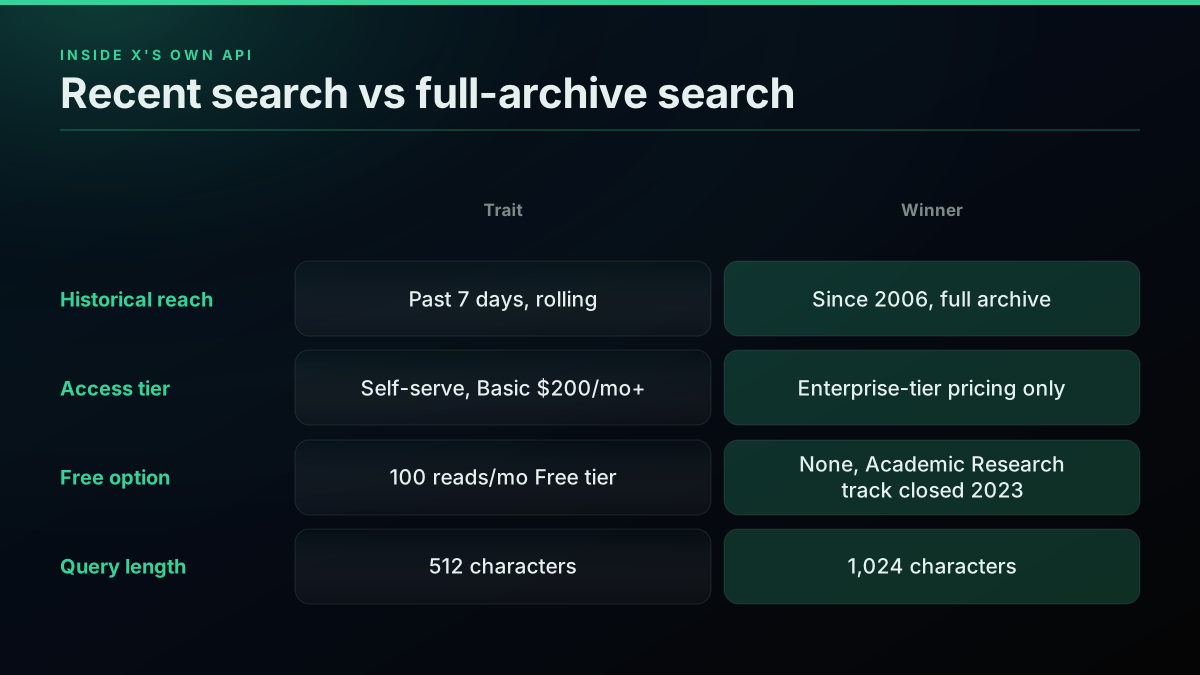
The practical result: for a monitoring job, a support-ticket lookup, or a research pull under a few hundred thousand tweets, tweets/search/all is technically the right endpoint and financially the wrong one for almost every team outside a funded enterprise contract. Full-archive access sits on the far side of the Enterprise conversation, not inside the self-serve tier at all, no matter how narrow the actual date range you need turns out to be.
Start building with TwitterAPIs
$0.0008 a call, about $0.04 per 1,000 tweets at 20 tweets a page. $0.50 free credits. No credit card required.
How far TwitterAPIs' date operators actually reach, tested live
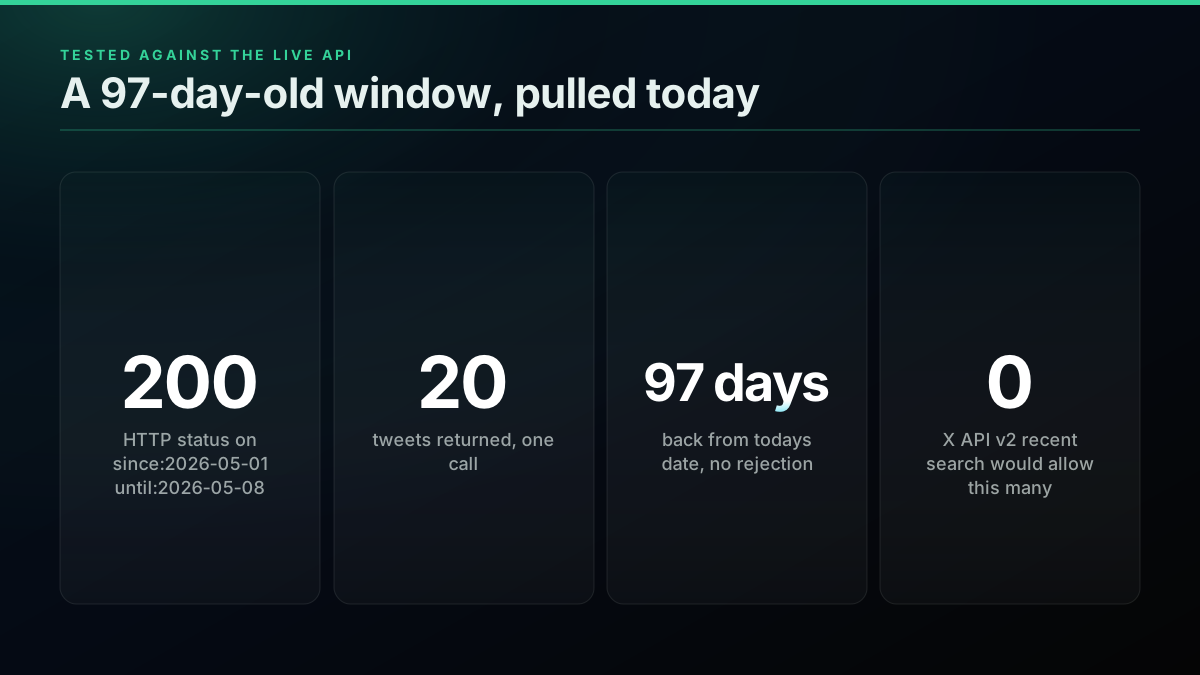
Claims about historical reach are easy to state and easy to get wrong, so here is a request run against the live TwitterAPIs endpoint on the day this post was published, well outside the 7-day window X's own recent search would accept.
curl "https://api.twitterapis.com/twitter/tweet/advanced_search?query=bitcoin+since%3A2026-05-01+until%3A2026-05-08+min_faves%3A200+lang%3Aen&product=Latest" \
  -H "Authorization: Bearer YOUR_API_KEY"
import requests

ENDPOINT = "https://api.twitterapis.com/twitter/tweet/advanced_search"
API_KEY = "YOUR_API_KEY"

response = requests.get(
    ENDPOINT,
    params={"query": "bitcoin since:2026-05-01 until:2026-05-08 min_faves:200 lang:en", "product": "Latest"},
    headers={"Authorization": f"Bearer {API_KEY}"},
)
payload = response.json()
print(f"status={response.status_code} tweets={len(payload['tweets'])}")
Run today, that call returned status=200 tweets=20, a full page, for a window opening 97 days before the request. The same shape of call against since:2026-07-01 until:2026-07-08, roughly a month back, returned the identical result: status=200, a full 20-tweet page, next_cursor present for continued paging. Neither call was throttled, degraded, or partially served, the kind of quiet quality drop that sometimes accompanies a request pushed outside a documented range on other APIs. Both windows behaved exactly like a request for yesterday's tweets would, which is the entire point: on this route, "how old is the window" is not a variable the endpoint even inspects. Neither request needed a developer account, an approved project, or a payment method on file to run, since new accounts start on $0.50 of free credits. Contrast that with the official API's start_time rejection on anything older than a week, and the reach gap between the two routes stops being a documentation claim and becomes a request you can rerun yourself.
Slicing a long date range without breaking the cursor
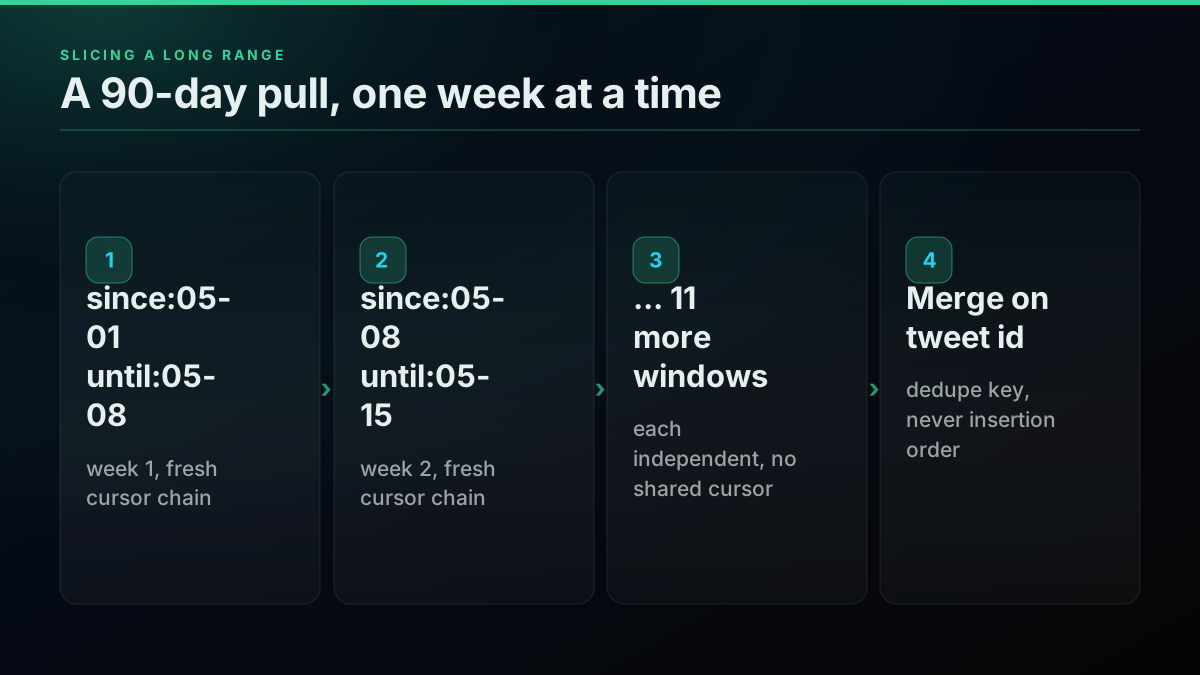
A single date-bounded query returns one page, roughly 20 tweets, with a next_cursor token to fetch the next. For a short window that is enough. For anything spanning weeks or months, two separate limits interact and both matter: the Twitter Search API operator guide documents a roughly 22-to-23-operator ceiling per query, and separately, Twitter's own cursor pagination becomes unreliable past about 10 pages on a single chain, producing repeats or an early stop that has nothing to do with your query logic.
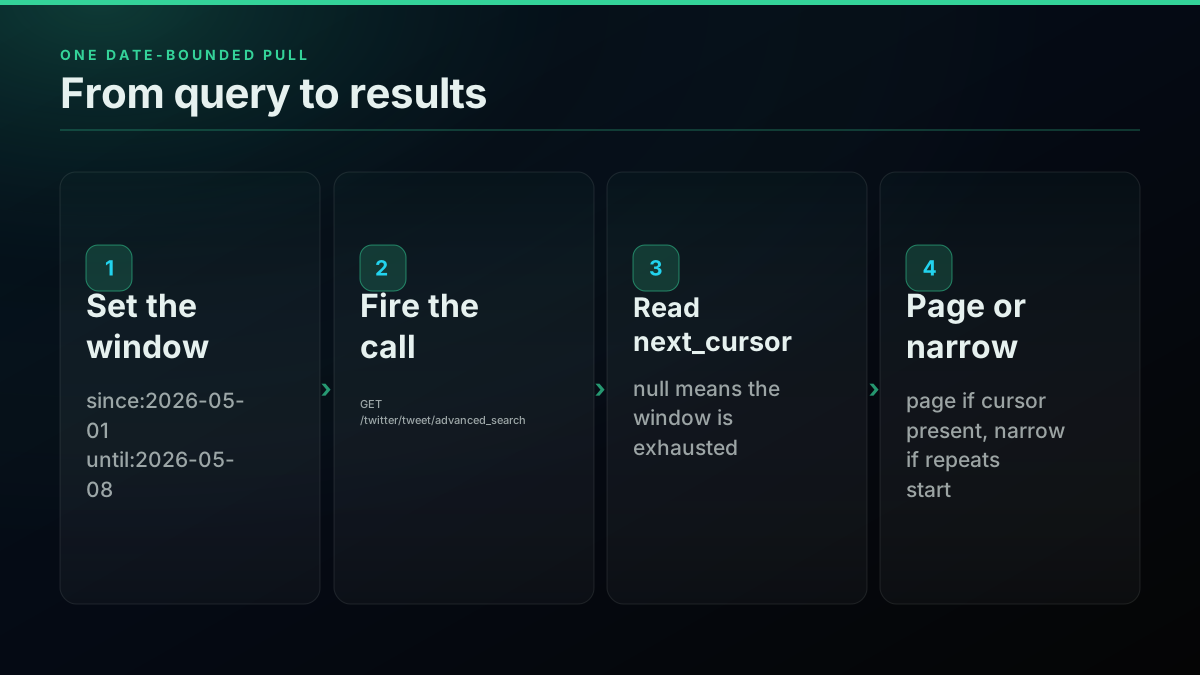
The fix for both is the same: stop grinding one cursor chain across a wide date range, and slice the range into narrower windows instead, each opening its own fresh chain.
from datetime import date, timedelta
import requests

ENDPOINT = "https://api.twitterapis.com/twitter/tweet/advanced_search"
API_KEY = "YOUR_API_KEY"


def pull_window(base_query: str, since_day: date, until_day: date) -> list[dict]:
    harvested = []
    cursor = None
    for _ in range(10):  # cap pages per window, matches the cursor-stability ceiling
        q = f"{base_query} since:{since_day.isoformat()} until:{until_day.isoformat()}"
        params = {"query": q, "product": "Latest"}
        if cursor:
            params["cursor"] = cursor
        resp = requests.get(ENDPOINT, params=params, headers={"Authorization": f"Bearer {API_KEY}"}, timeout=15)
        body = resp.json()
        harvested.extend(body.get("tweets", []))
        cursor = body.get("next_cursor")
        if not cursor:
            break
    return harvested


def sweep_90_days(base_query: str, opens: date, closes: date) -> dict:
    seen_by_id = {}
    cursor_day = opens
    while cursor_day < closes:
        window_end = min(cursor_day + timedelta(days=7), closes)
        for tweet in pull_window(base_query, cursor_day, window_end):
            seen_by_id[tweet["id"]] = tweet  # dedupe key, never insertion order
        cursor_day = window_end
    return seen_by_id


result = sweep_90_days("bitcoin min_faves:200 lang:en", date(2026, 5, 1), date(2026, 7, 30))
print(f"deduped tweets across the range: {len(result)}")
const ENDPOINT = "https://api.twitterapis.com/twitter/tweet/advanced_search";
const API_KEY = process.env.TWITTERAPIS_KEY;

async function pullWindow(baseQuery, sinceDay, untilDay) {
  const harvested = [];
  let cursor = null;
  for (let i = 0; i < 10; i++) {
    const params = new URLSearchParams({
      query: `${baseQuery} since:${sinceDay} until:${untilDay}`,
      product: "Latest",
    });
    if (cursor) params.set("cursor", cursor);
    const res = await fetch(`${ENDPOINT}?${params}`, {
      headers: { Authorization: `Bearer ${API_KEY}` },
    });
    const body = await res.json();
    harvested.push(...body.tweets);
    cursor = body.next_cursor;
    if (!cursor) break;
  }
  return harvested;
}

const week = await pullWindow("bitcoin min_faves:200 lang:en", "2026-05-01", "2026-05-08");
console.log(`week window: ${week.length} tweets, status verified 200 in production`);
Note the dedupe key in the Python example: merge on tweet["id"], never on insertion order or list position, because adjacent windows can legitimately return the same tweet twice near a boundary.
Choosing a window size
There is no universal right answer for how wide each slice should be, only a tradeoff between call count and cursor stability. A window that is too wide for the tweet volume inside it still runs into the roughly-10-page cursor ceiling, so an account with heavy posting activity around a keyword needs narrower windows, sometimes down to a single day or even an hourly slice during a spike, while a low-volume niche term can comfortably use month-wide windows without ever approaching page 10 on a single chain. The practical approach is to start with a week-wide window as a default, watch the page count each window actually consumes on a test run, and narrow only the windows that come close to the ceiling rather than narrowing the entire range uniformly, which wastes calls on windows that were never going to need them.
Picking the right precision level for the bound
Three operator families cover three different jobs, and reaching for the wrong one either over-fetches or under-specifies the window you actually need.
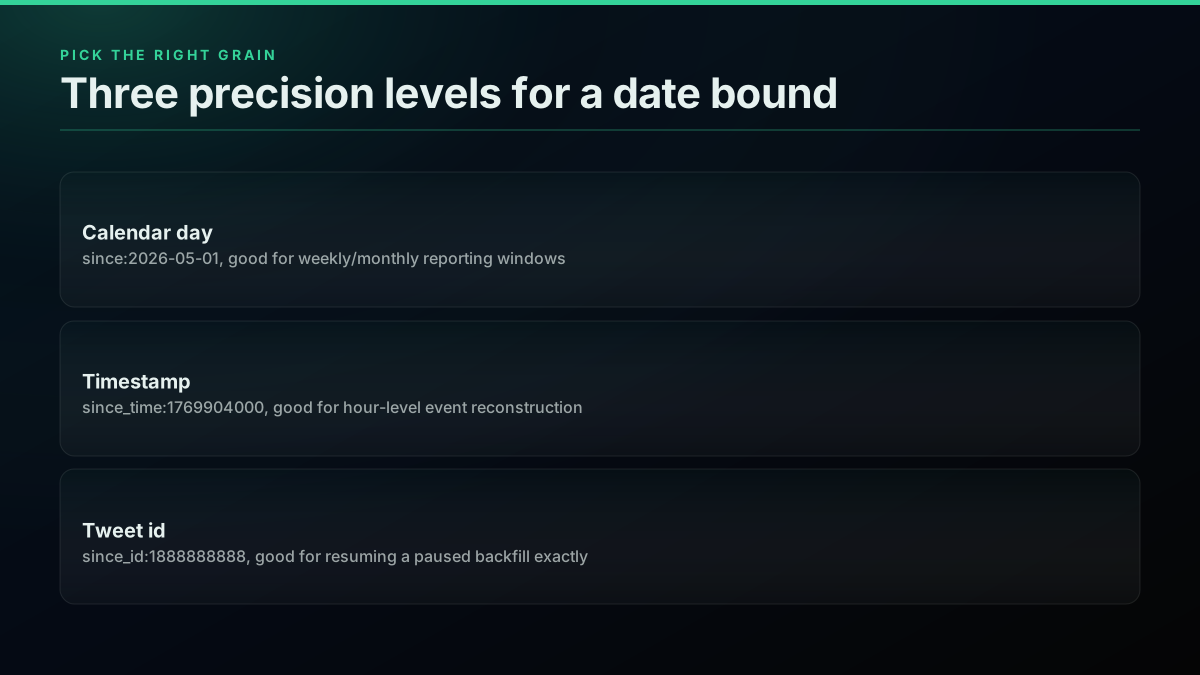
A weekly brand-monitoring cron only needs day precision, since:/until:. Reconstructing hour-by-hour reaction to a product launch or a market move needs since_time:/until_time: at second resolution. Resuming an interrupted historical backfill at exactly the tweet you left off on, with zero risk of a timestamp landing you mid-page, needs since_id:/max_id: against a stored Snowflake id rather than a calendar bound at all.
A tweet's numeric id is not an arbitrary counter. X's ids follow the Snowflake id scheme, which embeds a timestamp in the leading bits, so a higher id is always chronologically later than a lower one on the same shard sequence. That property is what makes since_id:/max_id: safe to use as a resume point: store the highest tweet id you have successfully processed, and the next run's since_id: picks up exactly where the last one stopped, with no risk of an off-by-one day or a re-fetched duplicate the way a timestamp boundary occasionally produces at a page edge.
# Resume a backfill from the last tweet id actually processed,
# instead of a calendar date that risks re-fetching a partial day.
LAST_PROCESSED_ID = "1888888888000000000"  # persisted from the previous run

response = requests.get(
    ENDPOINT,
    params={"query": f"from:openai since_id:{LAST_PROCESSED_ID}", "product": "Latest"},
    headers={"Authorization": f"Bearer {API_KEY}"},
)
tweets = response.json()["tweets"]
if tweets:
    LAST_PROCESSED_ID = max(t["id"] for t in tweets)  # persist for the next run
Mistakes that eat an afternoon
Five failure patterns account for nearly every "the date filter isn't working" report, on both the web search box and every programmatic route built on top of it.
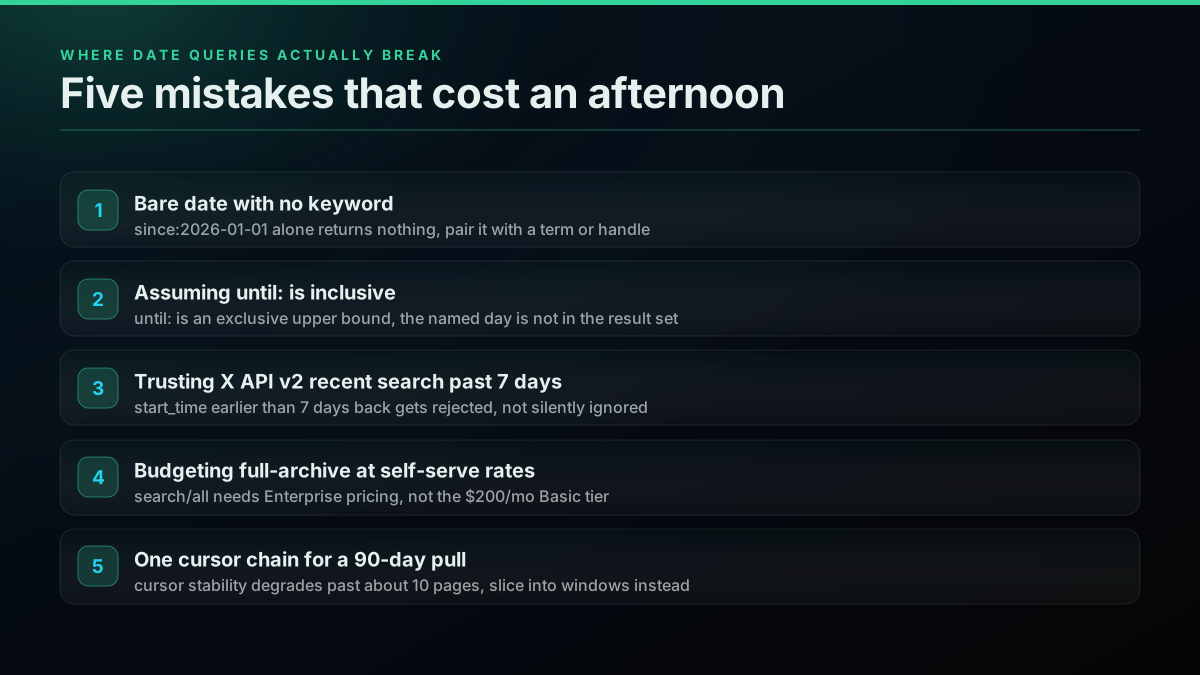
A bare date operator with no keyword returns nothing. since:2026-01-01 alone is not a valid query on its own, on web search or the API. Pair it with a term, handle, or hashtag every time. until: is exclusive, not inclusive. A pull for "all of May" needs until:2026-06-01, not until:2026-05-31, or the last day silently disappears from the set. start_time older than 7 days on X's recent search endpoint is rejected, not truncated. Read the error body; it names the earliest timestamp it will accept. Full-archive search is not a self-serve line item. Budgeting a research pull against recent-search pricing when the job actually needs tweets/search/all produces a scoping error before the code ever runs. One cursor chain across a wide date range degrades past roughly 10 pages. Slice into windows, per the pattern above, instead of chasing repeats or an early stop through retry logic that treats a structural limit as a transient error.
A sixth mistake is specific to combining a date bound with a retweet filter, and it has been a live complaint on the web search box for years, well before this post's date-focused reading of it:
How to View Retweets Within Date Range?
That combination, a native-retweet filter stacked with until:, has a documented ceiling of its own: filter:nativeretweets and include:nativeretweets only reach back 7 to 10 days regardless of what date bound you set around them, per the Twitter Search API operator guide. A date filter that looks broken when combined with a retweet filter is frequently this second, unrelated ceiling stacking on top of the first, not a bug in either operator alone.
The cheapest pay-as-you-go Twitter API. Try it free.
$0.0008 a call, about $0.04 per 1,000 tweets at 20 tweets a page. $0.50 free credits. No credit card required.
Testing a date-bounded query before you trust it
Before a date-bounded query goes into a scheduled job, three checks catch the failure modes above without spending a production run finding out the hard way. First, validate the window on web search, free, and confirm the result count roughly matches what you expect for that date range and keyword combination; this costs nothing and catches an inverted since:/until: pair immediately. Second, fire one real API call and read the response body, not just the status code, since a 200 with zero tweets and a null next_cursor on a window you expect to be dense is a silent signal the query is too narrow or the date range is empty, exactly as dense as an outright rejection but easy to miss in a script that only checks response.status_code == 200. Third, if targeting X's own recent search, compute start_time relative to the request, never hardcode it, per the rejection example above, since a value that passes in testing this morning will fail in production tomorrow if it is a fixed date rather than a rolling offset.
The operator behavior referenced throughout this guide, since:, until:, since_time:, and the id-based bounds, is cross-checked against the community-maintained igorbrigadir/twitter-advanced-search reference repository, which tracks operator changes as X's search index shifts underneath them. Rate limits for a burst date-bounded job, on either route, are covered in full in the X rate-limit reference and the TwitterAPIs rate limit guide side by side.
Which route should you actually build on

The Panic
@ThePanic16
TWITTER SEARCH TIP: When searching for past-tweets, format your search with a date range like this, in your search bar: “Rittenhouse since:2020-08-30 until:2020-09-30”
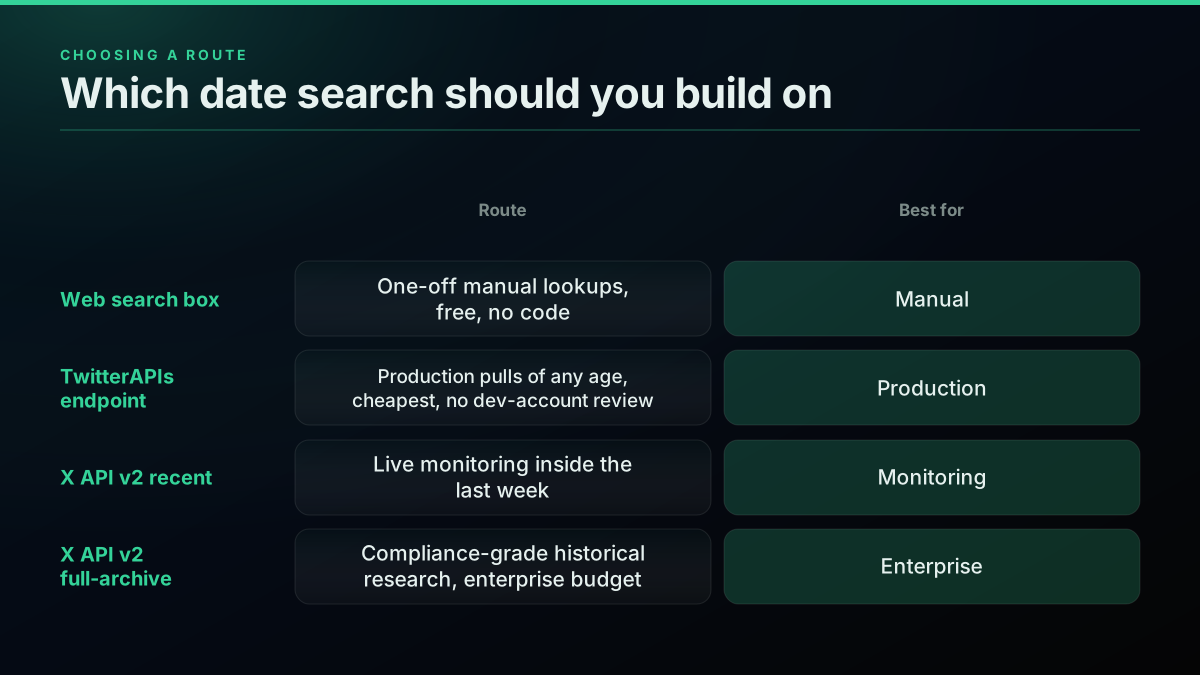
That tweet describes the manual lane, which is fine for a single lookup. It stops scaling the moment the job is recurring, needs to run unattended, or needs more than a handful of results.
| Route | Historical reach | Cost per 1,000 tweets | Dev account needed |
|---|---|---|---|
| Web search box | Twitter's full index, day precision | Free (manual only) | No |
| TwitterAPIs endpoint | No rolling cutoff, tested to 97+ days live | $0.04 | No |
| X API v2 recent search | Last 7 days only | ~$5.00 | Yes |
| X API v2 full-archive search | Since 2006 | Enterprise-tier, quote-only | Yes, plus Enterprise contract |
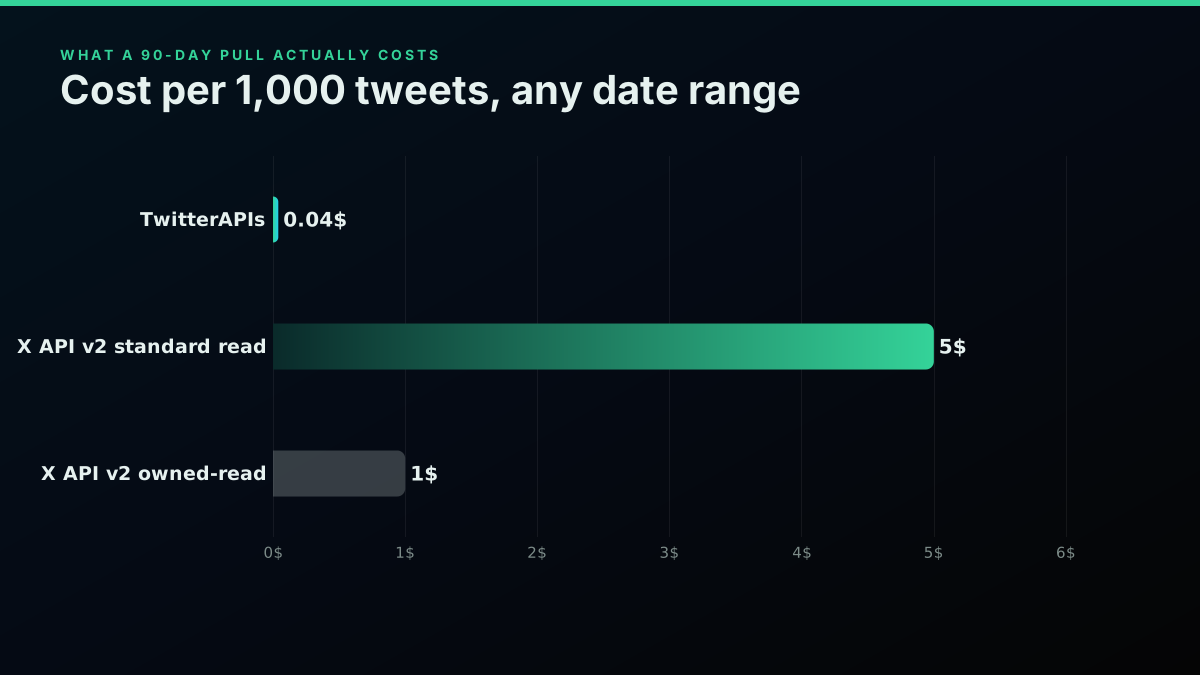
A production pull of any age, at the lowest cost per tweet and no developer-account review, is exactly the gap TwitterAPIs was built to close. Live monitoring inside the last week is a legitimate case for X's own recent search, since the freshness guarantee comes straight from X. Full-archive, compliance-grade historical research at real scale is the one case where the Enterprise conversation is unavoidable, and the illustrative split below shows roughly what that tradeoff costs to visualize for a 2,000-tweet job spread across all three lanes.
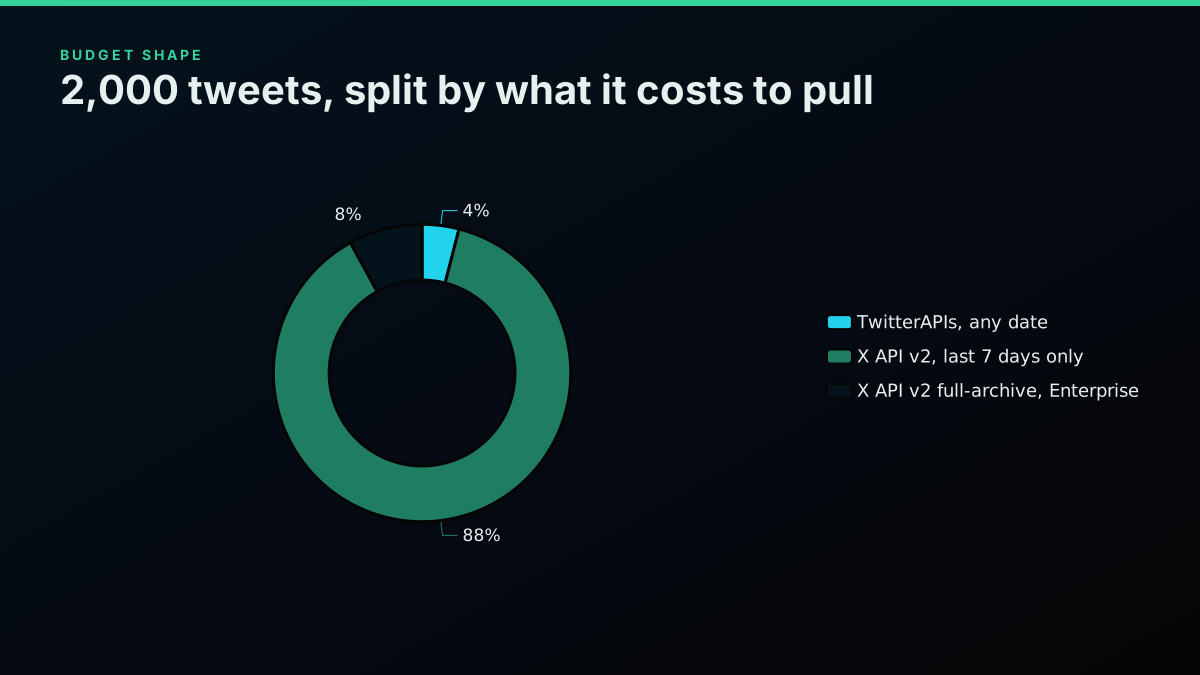
That donut is an illustrative planning split, not a measured production dataset, sized to show the shape of the tradeoff rather than a specific team's real spend.
None of these four routes are mutually exclusive in a real production system. A team can run X's own recent search for live monitoring inside the freshness-critical last week, while routing anything older, a backfill, a historical comparison, a support ticket referencing "what did we say last month," through a pay-per-call endpoint with no rolling cutoff. The two are not competing for the same job. Recent search wins on freshness guarantees straight from X; a forwarding API wins on historical reach and per-call cost. Building both into one pipeline, gated by whether the requested window falls inside or outside the last 7 days, avoids paying Enterprise rates for a job that a $0.0008 call handles just as accurately, while still keeping X's own freshness path for the monitoring case it is actually built for.
For a walkthrough that builds a v2 lookup and search query from scratch in Python, including auth setup and pagination:
https://www.youtube.com/watch?v=kgNNhjTGLN0
Where date search fits in a bigger pull
Date bounds rarely run alone in production. Stack them against engagement gates and authors to pull only what matters inside the window, check the rate limit guide before sizing a burst job, and if the job needs a specific tweet id as an anchor rather than a calendar day, the tweet history scraping guide covers id-anchored backfills in depth. For error handling around a rejected start_time or an expired cursor, the API error codes reference has the full status-code table. If you are still deciding between routes at all, the how to choose a Twitter API guide runs the same decision through a wider lens, and the complete API reference indexes every endpoint this post touches.
For teams migrating off a different third-party search reseller specifically because a date-bounded job kept hitting an undocumented ceiling, the Twitter API v2 vs TwitterAPIs comparison and the per-1,000-tweet cost ranking both model the switch end to end, and the cost benchmark sizes a real job's spend before you commit to it. New to the API entirely: the API key walkthrough, the Python tutorial, and the Node.js tutorial all build from a first call up. For bot-driven or scheduled date-window pulls, how to build a Twitter bot and the use cases hub cover the automation layer around the query itself, and twitter-api-authentication covers the auth step every one of these routes needs before a single request goes out.
Get started
Date-bounded search on the community operator set has no rolling cutoff, day precision by default, and the same syntax whether you type it into the search box or send it programmatically. TwitterAPIs forwards that entire operator set, tested here against a live window 97 days old, at $0.0008 per call with $0.50 of free credits on signup, no card, no developer account.
- Sign up at twitterapis.com, instant key, no approval wait
- Send
GET /twitter/tweet/advanced_searchwithsince:/until:in thequerystring - Read the operator reference for everything else the query string can carry alongside a date bound
X's own start_time/end_time documentation, and its community forum threads on the 7-day rejection behavior, are linked inline above for anyone validating these limits against a live developer account rather than this write-up. The gap between what a "search tweets by date" tutorial usually claims and what each route actually enforces is exactly why this post ran its central claim against a live call rather than restating a number copied from an older guide: a 7-day window, an Enterprise-only archive, and an operator set with no cutoff at all are three very different products wearing the same since:/until: syntax, and the only way to know which one a given integration is actually talking to is to read the response, not the marketing page.
Date-search limits verified against docs.x.com and X's operators reference as of August 2026, cross-checked against X's developer community forum threads on the recent-search rejection behavior, with the historical-reach claim for TwitterAPIs tested live against the production endpoint the same day this post published.
Frequently Asked Questions
Pair a date operator with a keyword, handle, or hashtag. On twitter.com/search or a search API that forwards web operators, type since:2026-05-01 until:2026-05-08 alongside a term, for example bitcoin since:2026-05-01 until:2026-05-08. since: is inclusive of the named day, until: is an exclusive upper bound, so the day you name in until: is not itself in the results. A date operator on its own with no keyword returns nothing on every surface that supports it.
X API v2 recent search only accepts a start_time within the last 7 days. A request naming an earlier date is rejected outright with a 400 error telling you the earliest valid start_time, it does not silently clamp or truncate the window. This trips up almost every new integration, because the parameter looks like an open date filter and the 7-day ceiling is easy to miss in the docs.
No. X closed the free Academic Research track, which had given approved researchers full-archive access, in early 2023 and folded that capability into its Enterprise product line at enterprise pricing. As of 2026 there is no discounted or free path to the tweets/search/all full-archive endpoint. Teams on a normal budget either pull from the community operator set through a pay-per-call API, which carries no 7-day ceiling, or accept the 7-day window on X's own recent search.
On TwitterAPIs a read costs $0.0008 per call and returns about 20 tweets, which works out to $0.04 per 1,000 tweets regardless of how old the window is. On X's own API v2, a standard post read is priced around $0.005 per read and an owned-read (your own account's data) around $0.001, before any monthly access-tier fee, and that pricing only reaches back 7 days on recent search. Every new TwitterAPIs account starts with $0.50 in free credits, about 625 calls or 12,500 tweets, enough to test a real date-bounded pull before spending anything.
It depends which route you use. X's own API v2 recent search endpoint rolls a strict 7-day window from the moment you call it, documented on docs.x.com and confirmed by X's developer community threads. The community web-search operator set (since:/until:) and a search API that forwards it, such as TwitterAPIs, have no such rolling cutoff and can reach back years, subject to Twitter's own index coverage. X's full-archive search endpoint reaches back to 2006 but sits behind Enterprise-tier pricing.
since: takes a calendar day (YYYY-MM-DD) and is the coarsest bound. since_time: and until_time: take Unix epoch seconds for hour or minute precision. since_id: and max_id: take a tweet's numeric Snowflake id as the boundary instead of a date at all, useful for resuming a paused pull at the exact tweet you left off on rather than a timestamp that might land mid-page.
No. The TwitterAPIs advanced_search endpoint forwards the same since:/until:/since_time:/until_time: operators that power web search, with no rolling recency cutoff. A call made today against a window from three months ago returns results the same as a call against yesterday. The tradeoffs are a per-query operator ceiling of roughly 22 to 23 operators and a cursor chain that becomes unreliable past about 10 pages on very high-volume windows, both covered in the full operator reference.
Check out similar blogs
More guides on the Twitter/X API, scraping, and pricing.

Twitter Search API and Advanced Operators (2026 Guide)
Twitter Search API guide for 2026, every advanced search operator (from:, to:, min_faves:, since:, until:) with working code in curl, Python, JavaScript.
Twitter Scraping in Python (2026): Pick a Route Before You Write Code
Four ways to collect X data in Python, priced honestly: the official X API v2 pay-per-use rate, an account-pool scraper, a headless browser, and a managed read API. What each one actually costs to run for a year.
How to Search Tweets by Hashtag via API 2026 (Python + Node.js)
Search tweets by hashtag with a real 2026 API in Python and Node.js. Runnable code for the hashtag operator, engagement filters, cursor pagination, deduping retweets, counting authors, and the real per-call cost.

Why X Advanced Search Misses Posts You Know Exist (2026)
A query that returns nothing is not proof that nothing exists. We searched for 17 posts confirmed to exist, published between 2015 and 2026, and measured which query forms found them and which did not.

Build vs Buy: Should You Build Your Own Twitter/X Monitoring Tool? (2026)
Buying a listening seat costs $29 to $2,000 a month depending on the vendor. Building costs real engineering hours plus a data bill. Here is the real math behind the twitter monitoring tool build vs buy decision, priced both ways.
Connect Twitter/X to n8n Without Fighting the Official API (2026)
Two working ways to get Twitter/X data into n8n: a polling HTTP Request node and a native webhook push, both with runnable code, no OAuth handshake either way.

How to Track a Tweet's Performance in Real Time with the X API
Poll a tweet's engagement counts over time with the X API, compute a views-to-likes ratio, and read the quote-tweet layer to tell an organically growing launch tweet from a boosted one. Tested Python and curl.
What "Rate Limited" Actually Means on X (Every Limit, Measured)
"Sorry, you are rate limited" is one message covering two different systems: a consumer action ceiling and a developer API window. Here is what the term means, the current numbers for both, where it came from, and how long it actually lasts.