GUIDE
How to Get All Replies to a Tweet via API (2026)
Pull the replies under any tweet with a real 2026 API. Runnable Python and Node.js, cursor pagination, the conversation_id tail sweep for the long tail, nested replies-to-replies, signal-versus-noise filtering over live data, and the honest per-call cost.
Per our own spec, 70 of 121 endpoints bill $0.0008, 24 are free, and 27 sit between $0.0016 and $0.01. Every price ships inside our published OpenAPI document as an x-cost-usd field, so any figure in this post can be checked against the contract that bills it rather than taken on trust.
Reading the replies under a tweet is one scroll in the app and a genuinely awkward problem in code. There is no button that hands you the conversation as data, and the endpoint you reach for first, a clean GET /2/tweets/:id/replies, does not exist on the official X API. Without a proper Twitter replies API, developers end up stitching together a recent-search workaround, a 7-day window, and a lot of pagination just to answer a simple question: what did everyone say back to this post. This guide gets you the replies in ten lines, explains why one call returns a ranked window rather than the whole thread, then shows the second call that reaches the long tail, how to rebuild the nested reply-to-reply structure, and how to filter the signal out of the noise.
Everything below was run against the live API before publishing, and the numbers come from real pulls. Two tweets anchor the examples: a viral music prompt with 6,592 replies, and a game-lore tweet with 268 replies whose thread runs several levels deep.
TL;DR: To get a tweet's replies, send the parent tweet id to a replies endpoint. On a pay-per-call API like TwitterAPIs you
GET https://api.twitterapis.com/twitter/tweet/replieswithid=<tweetId>and anAuthorization: Bearerheader. The response is atweetsarray of reply objects plus anext_cursor. That endpoint returns X's relevance-ranked reply window, roughly 35 to 40 replies including some nested ones. To reach the long tail, run an advanced search onconversation_id:<tweetId>and page it. Union the two by reply id to dedup. Each call is $0.0008, with $0.50 in free credits and no card. The official X API has no dedicated replies endpoint, onlyconversation_idrecent search behind a paid developer tier.
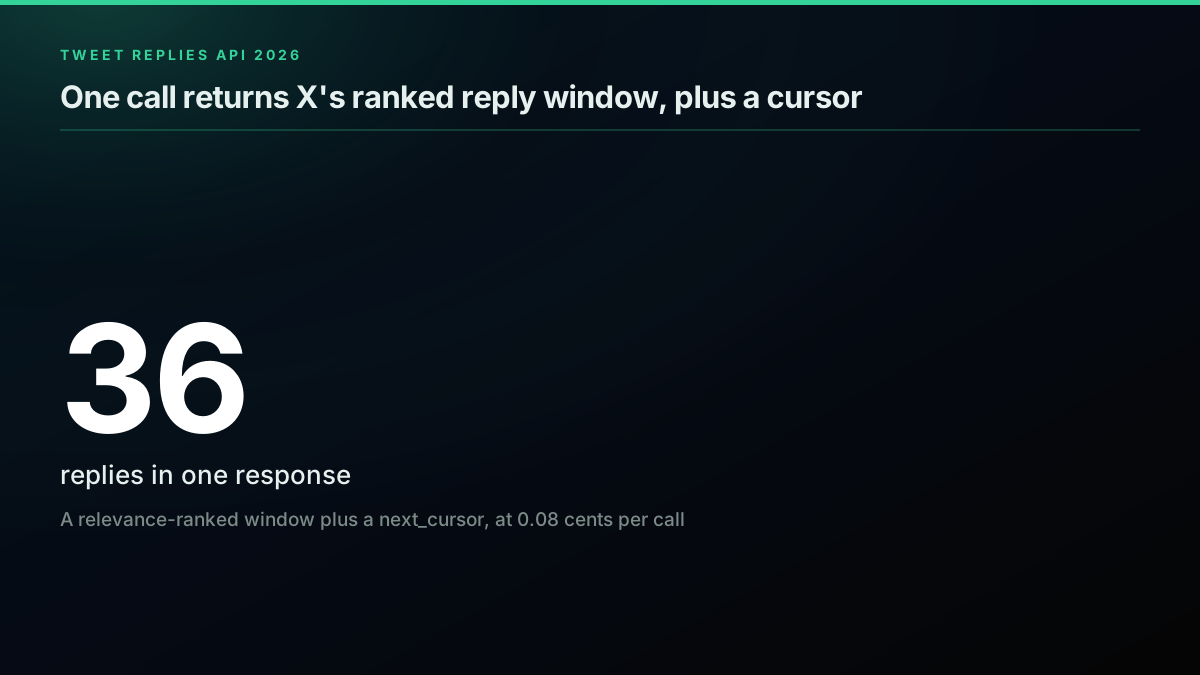
What one replies call returns, and what it costs
Is There an Official X API Endpoint for Tweet Replies?
No, and that surprises people. X API v2 has no GET /2/tweets/:id/replies. The supported route is to search on conversation_id, the identifier every reply in a conversation thread carries to tie it back to the post that started it. You query recent search for tweets whose conversation_id equals the parent tweet id, and those results are the replies. The catch is the window: on the standard and lower tiers, the recent search endpoint only looks back 7 days, so any reply older than a week is simply not returnable that way. That is the gap the official developer forum has been asking about for years, with no first-class answer.
That gap is why a market of paid workarounds exists. Third-party providers such as twitterapi.io and scrapebadger sell a dedicated replies endpoint, and general scrapers price reply data by the result. Cost is the wall developers hit either way, on the official API's access tiers or a scraper's per-result fee:

m0h
@exploraX_
x api is expensive, and tools like apify charge at least $29/month for scraping data from x, YT and other platforms. this alternative tool can scrape any platform or website for you completely FREE. zero api costs. open source. runs locally. 52k+ github stars here’s how to ht…


Because the platform never shipped a dedicated endpoint, two practical methods do the real work in 2026, and this guide uses both. The first is a direct replies endpoint that returns the reply window in a single call over plain HTTP. The second is conversation_id search, which you can run on either the official X API or a direct API to sweep the chronological tail. They are complements, not competitors: the first gives you the replies that matter fast, the second gives you completeness. The rest of this guide wires them together.
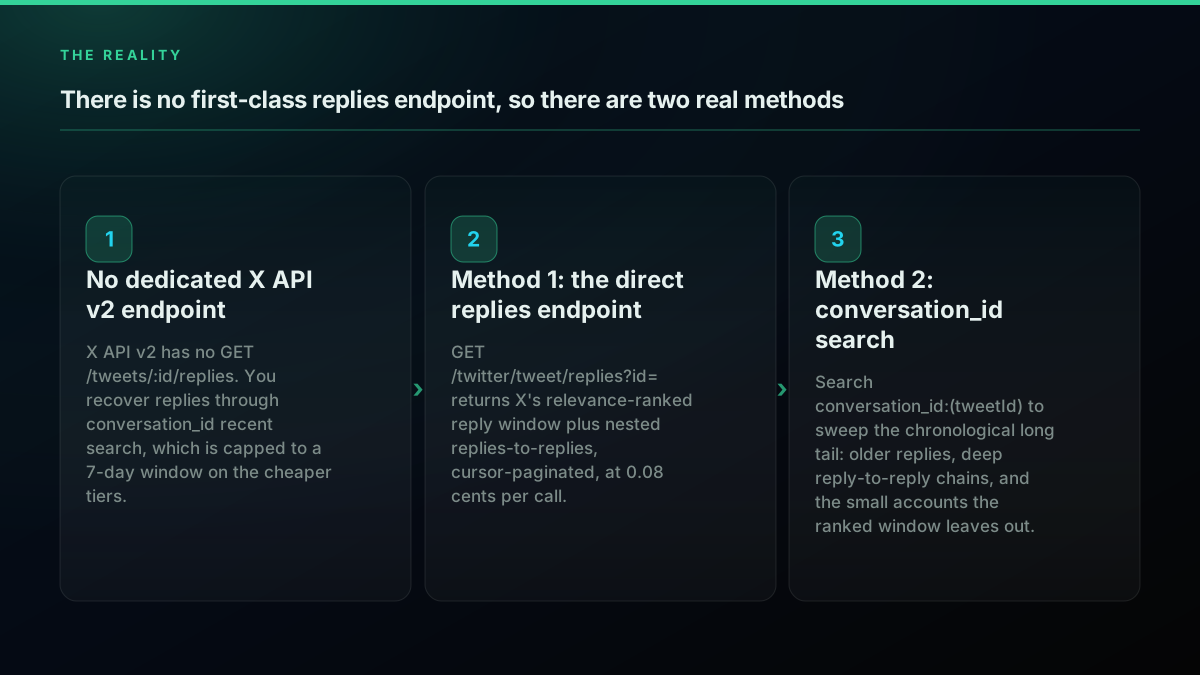
There is no first-class replies endpoint, so there are two real methods
The important mental model is that a reply set is paged and ranked, not returned whole. One call gives you a page of reply objects and a next_cursor, and the ordering follows X's own relevance ranking rather than strict chronology. Hold that in mind and the rest is mechanical: fetch the window, sweep the tail, then rebuild and filter what you collected. For the cursor language that underpins both calls, the Twitter API pagination guide goes deep, and the complete Twitter API tutorial covers auth end to end.
How Do You Get a Tweet's Replies in 10 Lines of Python?
The fastest working replies call in Python is a single GET request. Put the parent tweet id in the id parameter, send your key in an Authorization header, and read the tweets array off the JSON. There is no OAuth handshake, no numeric-id lookup, and no SDK to install. The one dependency is the requests library, and even that is optional if you prefer the standard library.
# replies.py , run with: python replies.py
import os
import requests

API_KEY = os.environ["TWITTERAPIS_KEY"]
TWEET_ID = "1947726497319686509"

resp = requests.get(
    "https://api.twitterapis.com/twitter/tweet/replies",
    params={"id": TWEET_ID},
    headers={"Authorization": f"Bearer {API_KEY}"},
    timeout=15,
)
resp.raise_for_status()
replies = resp.json()["tweets"]

for r in replies:
    author = r["author"]
    print(f'@{author["username"]:18} {author["followers_count"]:>8,}f  {r["text"][:70]}')
Ten lines, no SDK. The id parameter is the parent tweet id, the only required input. Every reply object is flat and useful: text, favorite_count, lang, an author with username, followers_count, and is_blue_verified, and crucially an in_reply_to_status_id that tells you whether the reply is top-level or nested under another reply. The response also carries a next_cursor string for paging.
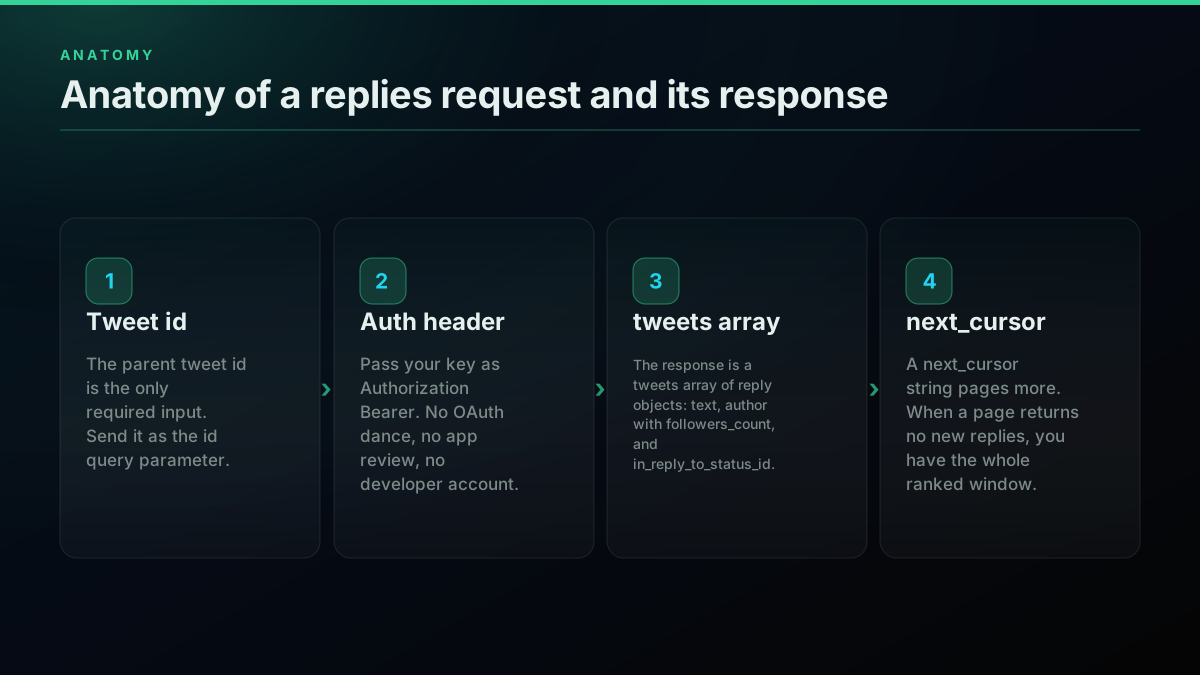
Anatomy of a replies request and its response
To run it, put a key in your environment. Sign up in under a minute at the signup page, which issues $0.50 in free credits with no card, then export the key and run:
export TWITTERAPIS_KEY="your_key_here"
python replies.py
Reading who replied to a tweet touches no write scope and needs no elevated permission, which is exactly the access developers keep asking for when they only need public conversation data, often for sentiment work on a busy thread:
Is there a way to scrape Twitter/ X for replies within a tweet?
That is the whole reason to hit an API: past a few hundred replies, manual reading stops scaling. For the surrounding read patterns in the same style, the Python Twitter API tutorial covers auth and JSON handling, and the how to get a Twitter API key guide walks the official console path if you go that route.
How Do You Get the Same Replies in Node.js?
Node.js needs no SDK for this either. Node 18 and later ship a global fetch, so a plain GET with a URLSearchParams query string and an Authorization header is the whole integration. The id parameter carries the parent tweet id exactly as in Python, and the response shape is identical, so you can port a script between the two languages without changing the logic.
// replies.mjs , run with: node replies.mjs
const API_KEY = process.env.TWITTERAPIS_KEY;
const TWEET_ID = "1947726497319686509";

const url = new URL("https://api.twitterapis.com/twitter/tweet/replies");
url.searchParams.set("id", TWEET_ID);

const resp = await fetch(url, {
  headers: { Authorization: `Bearer ${API_KEY}` },
});
if (!resp.ok) throw new Error(`HTTP ${resp.status}`);

const { tweets: replies, next_cursor } = await resp.json();
for (const r of replies) {
  const a = r.author;
  console.log(`@${a.username} ${a.followers_count.toLocaleString()}f  ${r.text.slice(0, 70)}`);
}
The two versions stay in lockstep: build the URL, add the Bearer header, send a GET, read tweets and next_cursor. That symmetry is deliberate, because it means the pagination loop, the tail sweep, and the filtering later all port between Python and Node with only syntax changes. For the fuller Node read path with retries and concurrency, the Twitter API Node.js tutorial builds it out.
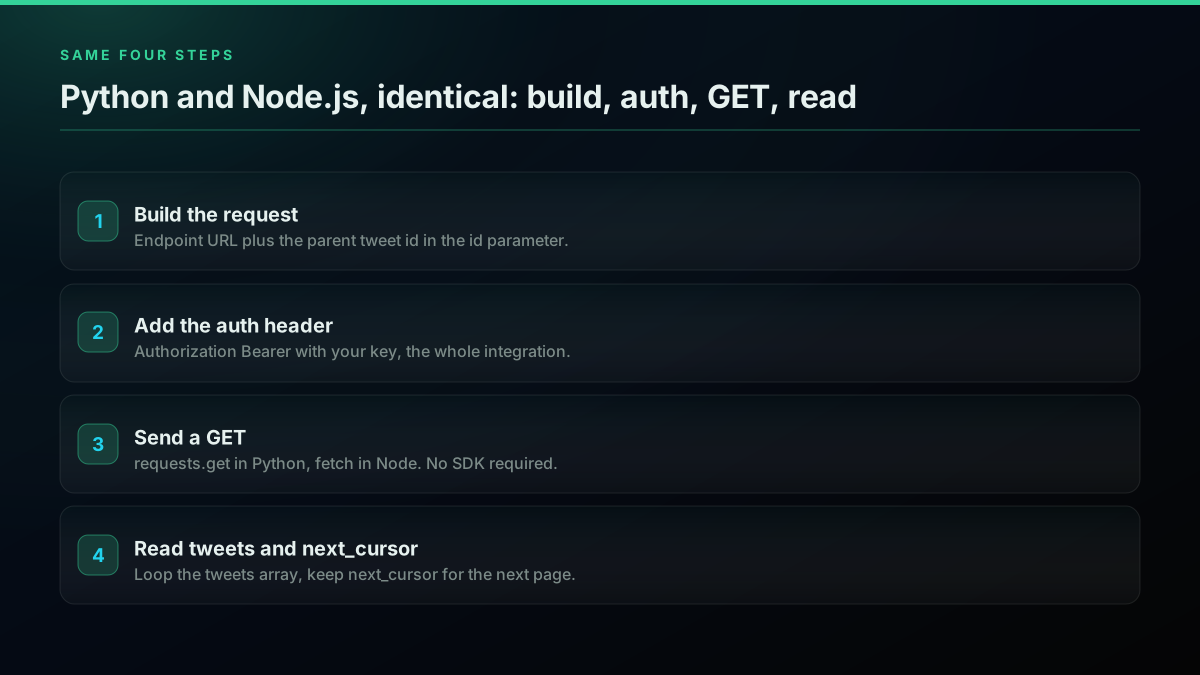
Python and Node.js replies call, same four steps
Why Does the Replies Endpoint Return a Ranked Window, Not Every Reply?
Because the endpoint mirrors X's own default reply view, which is relevance-ranked rather than chronological. In a live pull against the 6,592-reply music tweet, one call returned 36 replies: 35 top-level and 1 nested reply-to-reply. Every one of the 36 was a blue-verified account, the follower reach skewed high, and the top reply carried 758 likes against a median of 19. The endpoint is handing you the replies X itself surfaces first, the ones with engagement behind them, not a raw chronological dump.
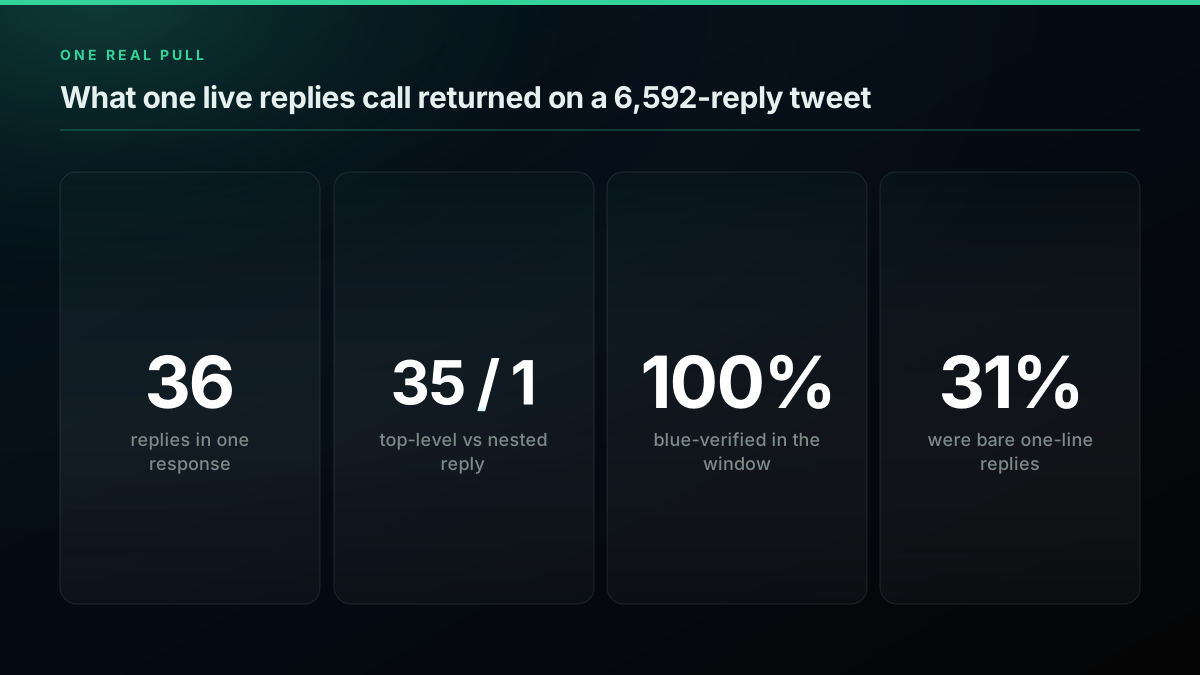
What one live replies call actually returned
The bounded-window behavior is the part to internalize before you write a loop. On both the 268-reply tweet and the 6,592-reply tweet, one response returned about 35 replies, and following next_cursor returned a page that added zero new reply ids. In other words, the cursor does not walk you through thousands of replies one page at a time; it returns the ranked window, and then it is done. That is not a bug, it is what the relevance-ranked reply surface returns, the same set the app shows above the fold. Even inside that curated window the noise is real: 11 of the 36 replies, about 31 percent, were bare one-liners of three words or fewer, the same handful of stock reactions repeated back at the author.
So the ranked window gives you the replies that matter, fast and cheap, but it is a window, not a census. To get the rest, you add a second method. The two together are how you approximate the whole thread.
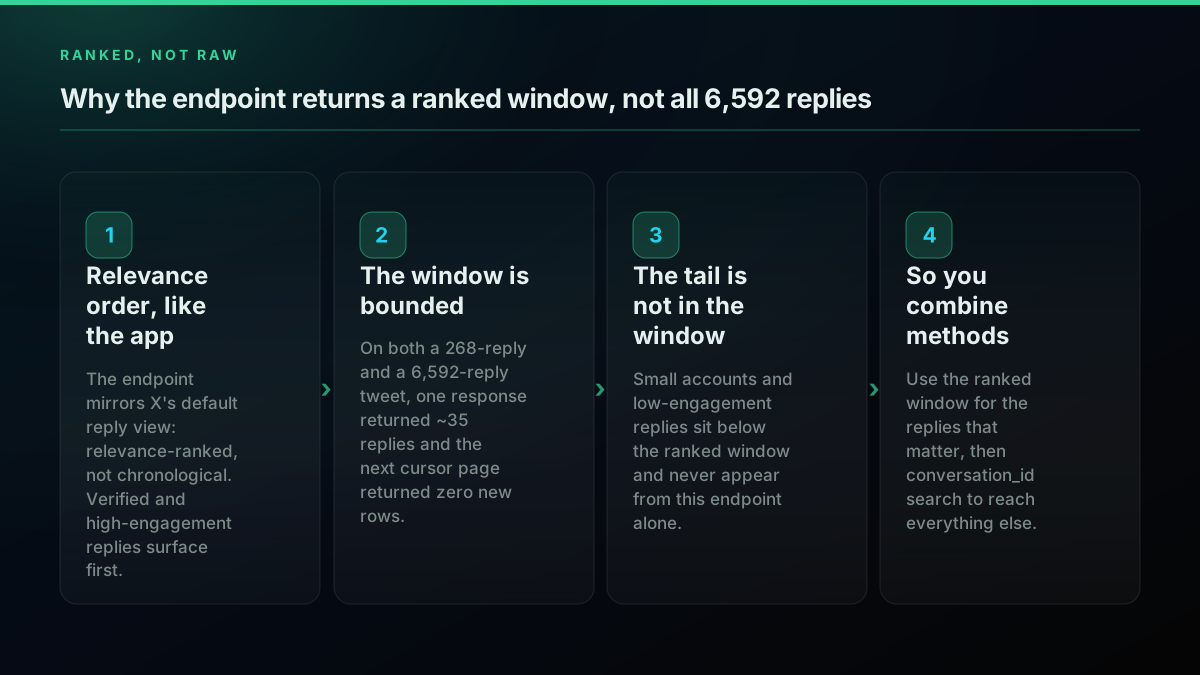
Why the endpoint returns a ranked window, not all 6,592 replies
How Do You Page Through the Reply Window with a Cursor?
You loop on next_cursor, and you stop when a page stops adding new replies. Because the window is bounded, the correct termination condition is not just an empty cursor, it is a page that returns zero reply ids you have not already seen. Keying every reply by its own id in a dict does double duty here: it dedups across pages and it gives you the stop signal for free. Always keep a hard page cap so a runaway loop cannot burn credits.
# walk_window.py , collect the ranked reply window with a safe stop
import os, requests

API_KEY = os.environ["TWITTERAPIS_KEY"]
BASE = "https://api.twitterapis.com/twitter/tweet/replies"

def get_reply_window(tweet_id, max_pages=10):
    seen, cursor = {}, None
    for _ in range(max_pages):
        params = {"id": tweet_id}
        if cursor:
            params["cursor"] = cursor
        data = requests.get(
            BASE, params=params,
            headers={"Authorization": f"Bearer {API_KEY}"}, timeout=15,
        ).json()
        page = data.get("tweets", [])
        new = [r for r in page if r["id"] not in seen]
        for r in new:
            seen[r["id"]] = r
        cursor = data.get("next_cursor")
        if not page or not new or not cursor:
            break                       # window exhausted, cursor looped, or ended
    return list(seen.values())

replies = get_reply_window("1947726497319686509")
print(f"collected {len(replies)} unique replies in the ranked window")
The new check is the load-bearing line. Without it, a cursor that loops back to the same window would spin your loop until the page cap, paying for pages that add nothing. With it, the loop ends the moment the window is exhausted, which in practice is one or two pages for the direct endpoint. This is the same cursor discipline every read endpoint wants, covered language-agnostically in the pagination guide; the only twist for replies is the zero-new stop, because the window is finite by design.
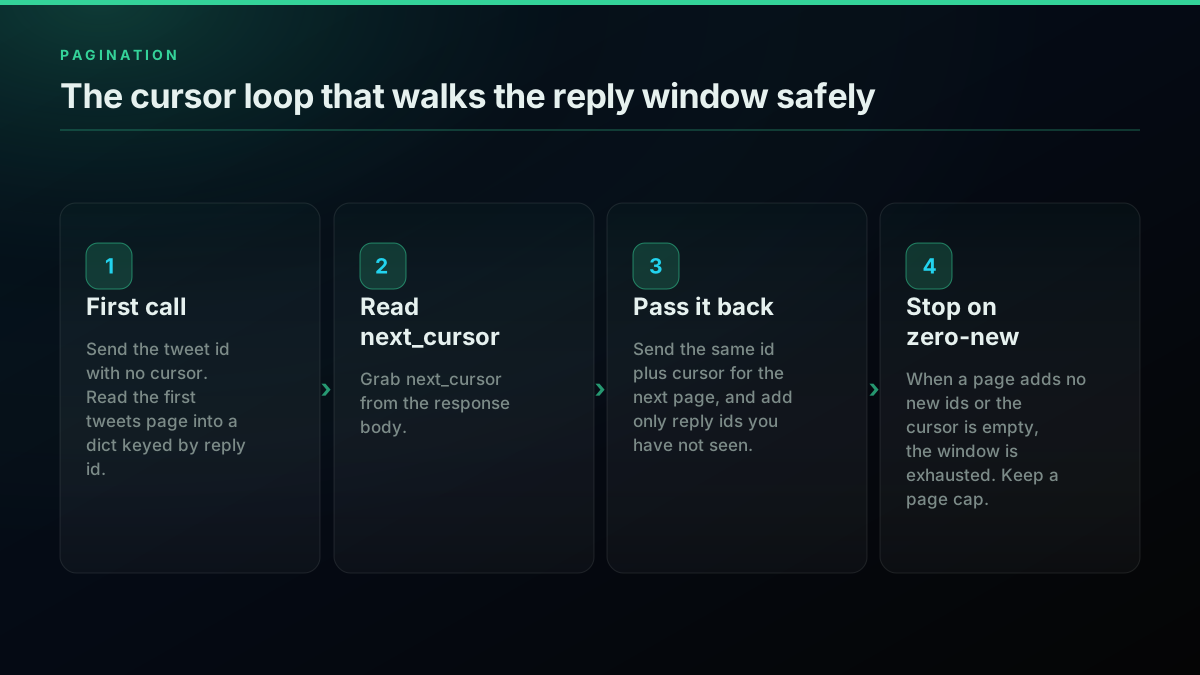
The cursor loop that walks the reply window safely
Start building with TwitterAPIs
$0.0008 a call, about $0.04 per 1,000 tweets at 20 tweets a page. $0.50 free credits. No credit card required.
Who Actually Shows Up in the Ranked Window?
The high-follower, verified accounts, disproportionately. In the 36-reply window, every author was blue-verified and the follower tiers stacked toward the top: 17 accounts in the 10,000 to 50,000 range, 12 above 50,000, 7 between 1,000 and 10,000, and none under 1,000. That distribution is the ranking working as designed, and it matters for what you do with the data. If you report on this window alone, you are describing the loudest, most-followed slice of the conversation, not the median replier.
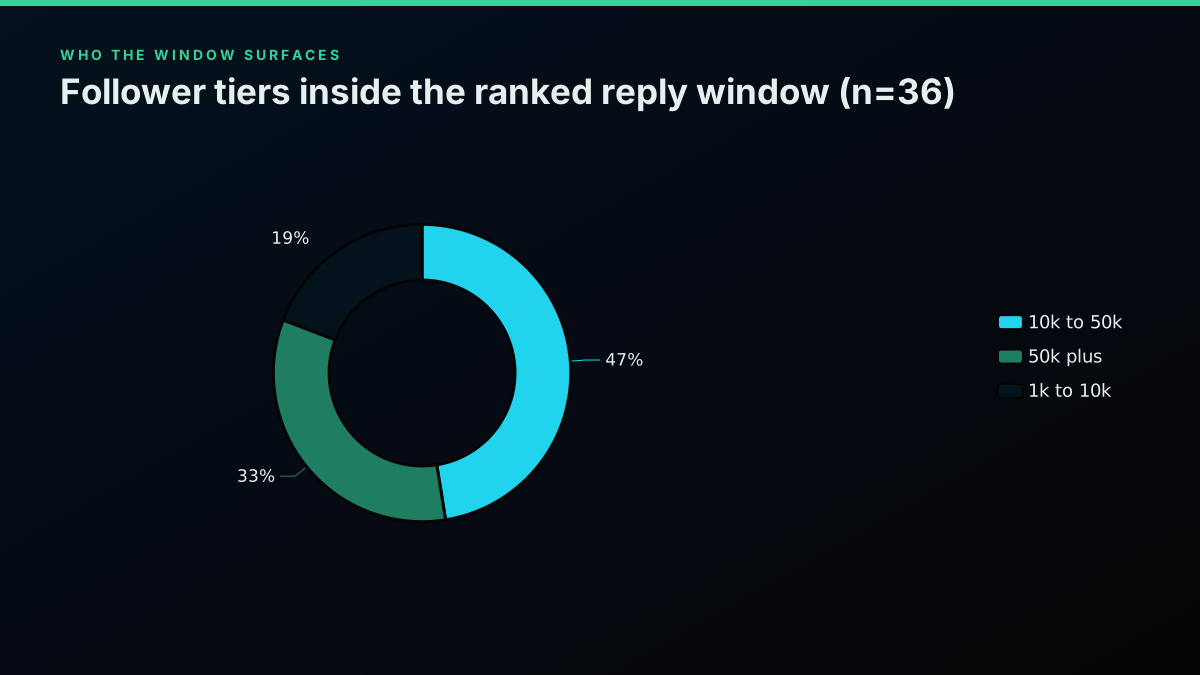
Follower tiers inside the ranked reply window
The engagement spread tells the same story from another angle. The top reply in the window carried 758 likes while the median sat at 19, so a handful of replies own most of the visible traction and the rest trail off fast. For a launch recap or a "top reactions" widget that is exactly what you want, the window hands you the highlights with no sorting required. For anything statistical it is a trap, because the window is a biased sample by construction. It is the replies X chose to show first, weighted by engagement and verification, not a random draw from the thread, so any average you compute over it describes the amplified layer and nothing below it.
This is exactly why the second method is not optional for real analysis. Sentiment, moderation, and community research all need the small accounts too, the replies with 3 likes and 40 followers that never crack the ranked window. Undersampling them biases every conclusion toward the accounts that were already amplified. The fix is to sweep the tail with conversation_id search, which orders by time instead of relevance and reaches straight down into the long tail.
How Do You Reach the Long Tail with conversation_id Search?
Query conversation_id:<tweetId> against the search endpoint with the product set to Latest, and you get the thread in chronological order, tail included. Where the direct endpoint returns the ranked window, this call walks the whole conversation about 20 replies per page, and it surfaces exactly what the window hides: replies from accounts with 20 to 100 followers, and deep reply-to-reply chains three and four levels down. On the game-lore tweet, this sweep pulled sub-threads arguing lore minutiae that the ranked window never showed.
# tail_sweep.py , walk the chronological long tail via conversation_id search
import os, requests

API_KEY = os.environ["TWITTERAPIS_KEY"]
SEARCH = "https://api.twitterapis.com/twitter/tweet/advanced_search"

def get_reply_tail(tweet_id, max_pages=30):
    seen, cursor = {}, None
    for _ in range(max_pages):
        params = {"query": f"conversation_id:{tweet_id}", "product": "Latest"}
        if cursor:
            params["cursor"] = cursor
        data = requests.get(
            SEARCH, params=params,
            headers={"Authorization": f"Bearer {API_KEY}"}, timeout=15,
        ).json()
        page = data.get("tweets", [])
        new = [t for t in page if t["id"] not in seen and t["id"] != tweet_id]
        for t in new:
            seen[t["id"]] = t
        cursor = data.get("next_cursor")
        if not page or not new or not cursor:
            break
    return list(seen.values())

tail = get_reply_tail("2031701874965926059")
print(f"collected {len(tail)} replies from the conversation tail")
Two details keep this honest. First, exclude the parent tweet id itself, since conversation_id search returns the root post alongside its replies. Second, respect the source: on the official X API the same conversation_id query is a recent-search call held to a 7-day window on lower tiers, so older threads need the archive tiers or a direct provider that is not bound by that window. The advanced search operators guide covers conversation_id alongside the rest of the query grammar.
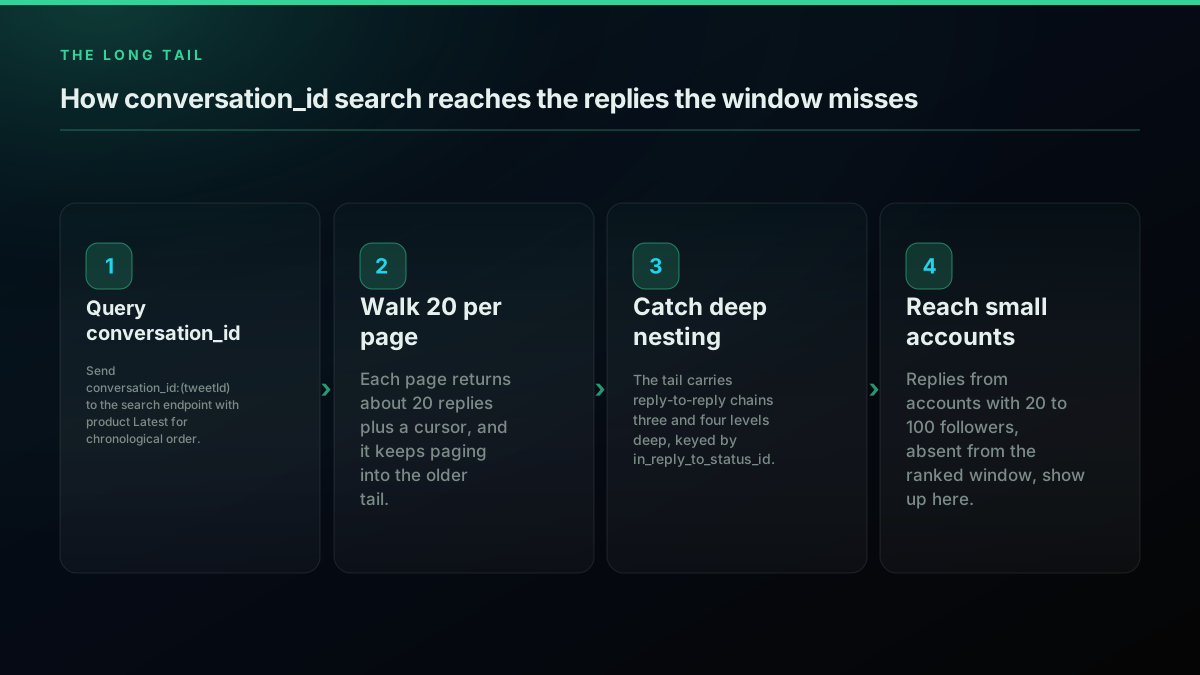
How conversation_id search reaches the replies the window misses
This tail-sweep pattern is the same one people build for keyword and mention monitoring, just scoped to a single conversation instead of a search term:
I built an AI workflow that monitors Twitter (X) for relevant keywords and posts a reply to promote my business (Mention.com + X API)
For a real-time version of the same loop scoped to your own handle, the monitor Twitter mentions guide builds it out, and the how to scrape tweets guide covers the broader read patterns.
How Do You Combine Both Methods to Reconstruct the Whole Conversation?
Union the two result sets by reply id. The ranked window and the tail sweep overlap on the high-engagement replies, so a plain dict keyed by id dedups them and leaves you with the widest reply set X exposes. Run the window first because it is one cheap call and gives you the important replies immediately, then layer the tail on top to fill in everything below the fold.
# full_replies.py , combine the ranked window and the conversation tail
from walk_window import get_reply_window
from tail_sweep import get_reply_tail

def get_all_replies(tweet_id):
    merged = {}
    for r in get_reply_window(tweet_id):       # ranked window, the replies that matter
        merged[r["id"]] = r
    for r in get_reply_tail(tweet_id):          # chronological tail, completeness
        merged.setdefault(r["id"], r)
    return list(merged.values())

replies = get_all_replies("2031701874965926059")
top = [r for r in replies if str(r["in_reply_to_status_id"]) == "2031701874965926059"]
print(f"{len(replies)} unique replies, {len(top)} top-level, {len(replies) - len(top)} nested")
The flow below is the decision you are encoding, in order: pull the window first because it is one cheap call that returns the loudest replies immediately, sweep the tail when you need the full picture, union the two sets by reply id so the overlap dedups itself, then filter before you analyze. Most sentiment and moderation jobs want both halves. A quick "what are the top reactions" dashboard can stop at the window, because the ranked replies are exactly the ones a glance at the app would show. The union step earns its place: because the tail sweep repeats the high-engagement replies that already surfaced in the window, a naive concatenation would double count them, so a dict keyed by reply id, or setdefault as in the code above, is the cheapest way to keep each reply exactly once. Order the merge window-first so that when a reply exists in both sets, you keep the richer object the ranked endpoint returned rather than the search copy.
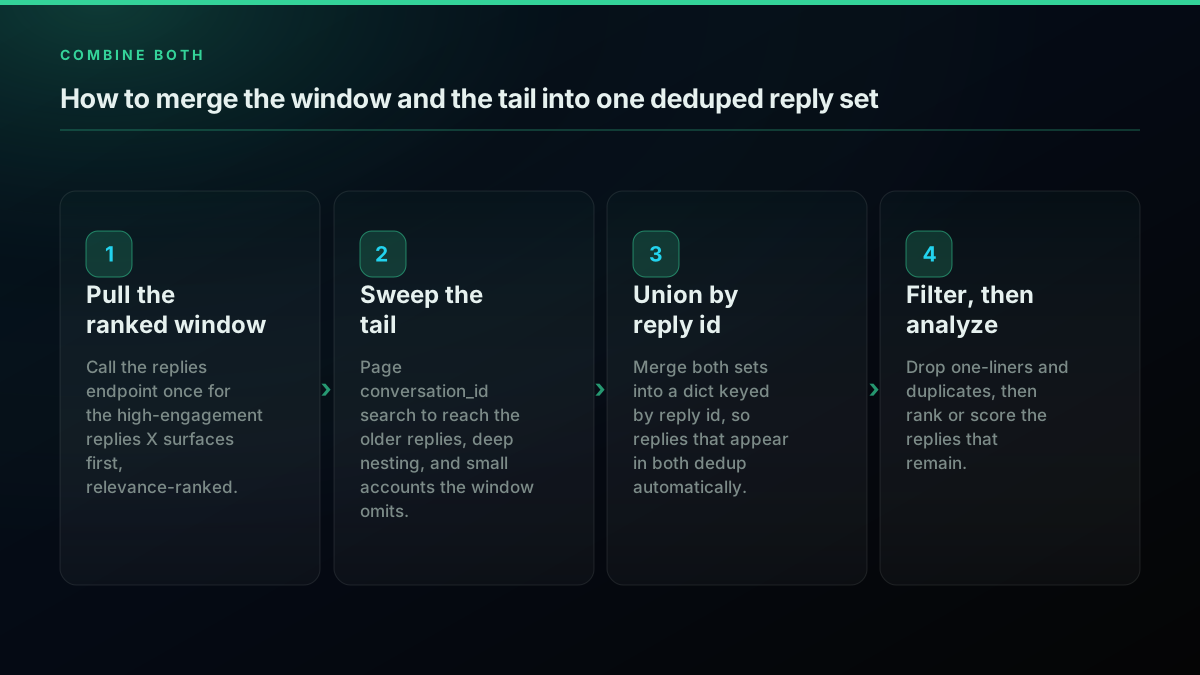
How to merge the window and the tail into one deduped reply set
How Do You Handle Nested Replies-to-Replies?
Read in_reply_to_status_id on every reply and build a tree from it. A reply whose in_reply_to_status_id equals the parent tweet id is top-level. A reply that points at another reply id is nested, one level deeper, and its own id may in turn be the parent of replies deeper still. To reconstruct the thread structure, index every reply by its id, then group children under parents.
# build_tree.py , turn a flat reply list into a parent-to-children tree
from collections import defaultdict

def build_reply_tree(replies, root_id):
    children = defaultdict(list)
    for r in replies:
        parent = str(r["in_reply_to_status_id"])
        children[parent].append(r)

    def walk(node_id, depth=0):
        for child in children.get(node_id, []):
            author = child["author"]["username"]
            print(f'{"  " * depth}@{author}: {child["text"][:60]}')
            walk(child["id"], depth + 1)      # recurse into deeper replies

    walk(root_id)
The defaultdict from Python's collections module groups children under each parent id in a single pass, so the recursive walk just follows the tree it built. Print it with indentation and you get the thread as an outline, top-level replies flush left and each deeper reply stepped in one level, which is usually enough structure to reason about a heated thread without a full graph library.
The reason the tail sweep matters again here is depth. The ranked window returned mostly top-level replies, 35 of 36 on the music tweet, with a single nested one. The conversation_id sweep on the game tweet returned chains three and four levels deep, the back-and-forth arguments that are the real conversation. If nested structure is part of your analysis, moderation context, argument mapping, or thread reconstruction, you need the tail, because the window barely contains it.
How Do You Filter Signal from Noise in Replies?
Filter on length, language, duplication, and engagement, in that order, cheapest first. A large share of any reply set is noise for analysis: bare one-liners, emoji-only reactions, repeated copypasta, and off-topic replies. In the 36-reply sample, 31 percent were three words or fewer, and a handful were non-English or media-only. Dropping those before you run sentiment or feed a model both cleans the result and cuts token cost.
These four filters read the reply text. The noise that survives them is usually about the author instead: reply bots that post plausible-length text from accounts that look thin the moment you check them. Every reply here already arrives with its author object, so followers_count and is_blue_verified are free to filter on. The signals that actually separate automation from a quiet human, account age and posting cadence, need a second lookup against the author rather than the reply, and the bot detection guide covers which ones repay that extra call.
# filter_signal.py , cheap-first filters to keep the useful replies
import re

def is_signal(reply, min_words=4, min_faves=1):
    text = re.sub(r"https?://\S+", "", reply["text"]).strip()      # strip links
    words = [w for w in text.split() if not w.startswith("@")]     # drop @mentions
    if len(words) < min_words:
        return False                          # bare one-liner or name-drop
    if reply.get("lang") not in ("en", None): # scope to your target language
        return False
    if reply["favorite_count"] < min_faves and not reply["author"]["is_blue_verified"]:
        return False                          # no traction and not verified
    return True

def clean(replies):
    seen_text, out = set(), []
    for r in sorted(replies, key=lambda r: r["favorite_count"], reverse=True):
        key = r["text"].strip().lower()
        if key in seen_text:                  # dedup identical copypasta
            continue
        seen_text.add(key)
        if is_signal(r):
            out.append(r)
    return out
Tune the thresholds to the job. A moderation pass wants a low bar so it catches everything; a highlight reel wants a high bar so it keeps only the replies with real traction. On the sample thread, this funnel took 36 raw replies down to 25 after dropping one-liners, 22 after language and duplicate filtering, and about 18 genuinely useful replies. The same length and engagement fields power a reply sentiment analysis in Python once the noise is gone.
Language is the filter people forget. The sample window carried a few replies tagged qme and zxx, X's codes for media-only and undetermined-language posts, which are noise for a text model and cheap to drop on the lang field before you spend a token embedding them. Emoji-only and single-word replies fall out on the word-count check, and near-identical copypasta falls out on the lowercased-text dedup. Run those three, length, language, and duplication, before any engagement threshold, because they are free string operations while an engagement filter leans on the numbers you already paged. What survives is the set actually worth scoring, and it is usually about half of what you pulled.
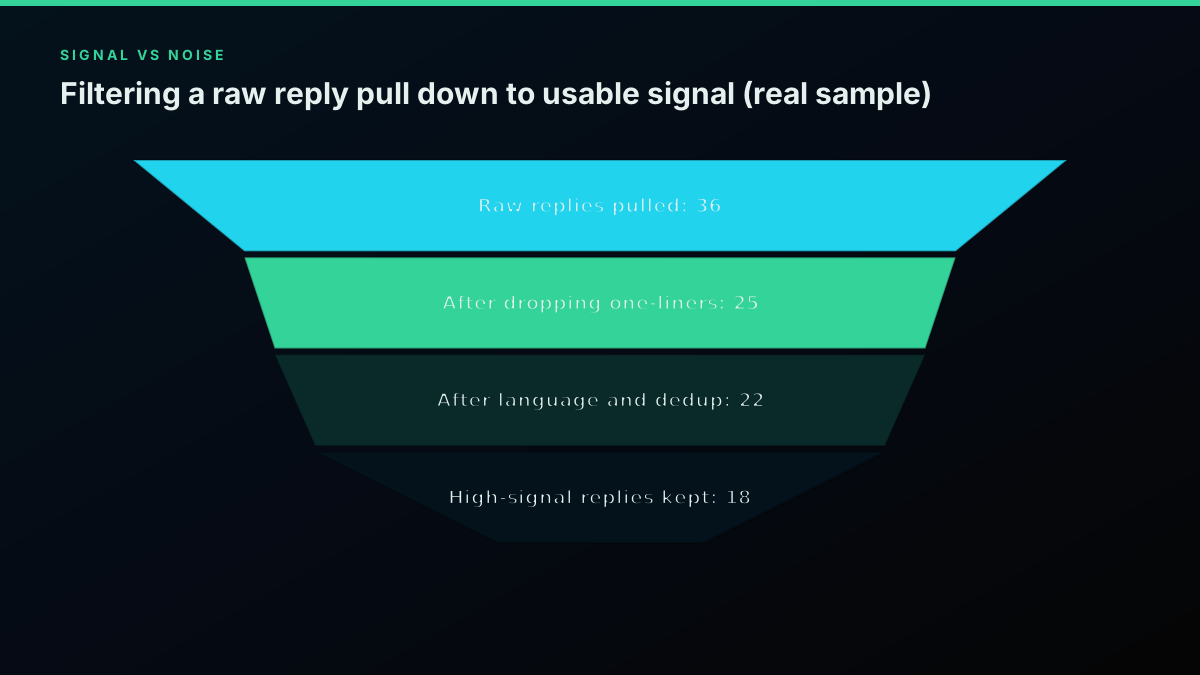
Filtering a raw reply pull down to usable signal
For a hands-on walkthrough of pulling a reply off a tweet and working with it programmatically, this practitioner video builds the pattern by hand:
Watch this walkthrough on picking a reply from a tweet via the API on YouTube
The cheapest pay-as-you-go Twitter API. Try it free.
$0.0008 a call, about $0.04 per 1,000 tweets at 20 tweets a page. $0.50 free credits. No credit card required.
What Does Pulling a Tweet's Replies Actually Cost?
On a pay-per-call API, each replies call and each conversation_id search call is $0.0008, and one call returns a page. The ranked window for a tweet is a single call, roughly 0.08 cents. Reconstructing the 268-reply tree, the window plus about 14 tail pages, is around 15 calls, close to 1.2 cents. Across a workload that reads roughly 20 tweets per call, that lands near $0.04 per 1,000 tweets. New accounts start with $0.50 in free credits, about 625 calls, with no card, which covers a lot of threads before you pay anything.
| What you pull | Direct API calls | Direct API cost |
|---|---|---|
| Ranked reply window (1 tweet) | 1 call | ~0.08 cents |
| 268-reply tree (window + tail) | ~15 calls | ~1.2 cents |
| 6,592-reply window | 1 call | ~0.08 cents |
| 100 tweets' reply windows | 100 calls | ~8 cents |
Free credits cover far more than a test. The $0.50 signup balance is about 625 calls at the standard rate, which is roughly 625 reply windows or a couple dozen fully reconstructed trees before you spend a cent. Because reply objects come back whole, with the author profile attached, you rarely need a follow-up call to hydrate a username or a follower count, so the call count you estimate is close to the call count you pay. If you pull the same popular tweets repeatedly, cache the reply set by tweet id with a short time-to-live and the bill drops again, since a thread's ranked window changes slowly once the tweet is a few hours old. For a fuller breakdown of read pricing, see the Twitter API cost guide.
The official X API prices the same reads differently and gates them harder. It has no dedicated replies endpoint, so you pay for conversation_id recent search behind a paid developer tier, you are held to the 7-day window on lower tiers, and reads are metered per resource rather than per call. The mechanics are similar, the access and pacing are the wall. For a full side-by-side, read the official X API vs third-party comparison and the decision guide, or estimate your own volume with the cost calculator.
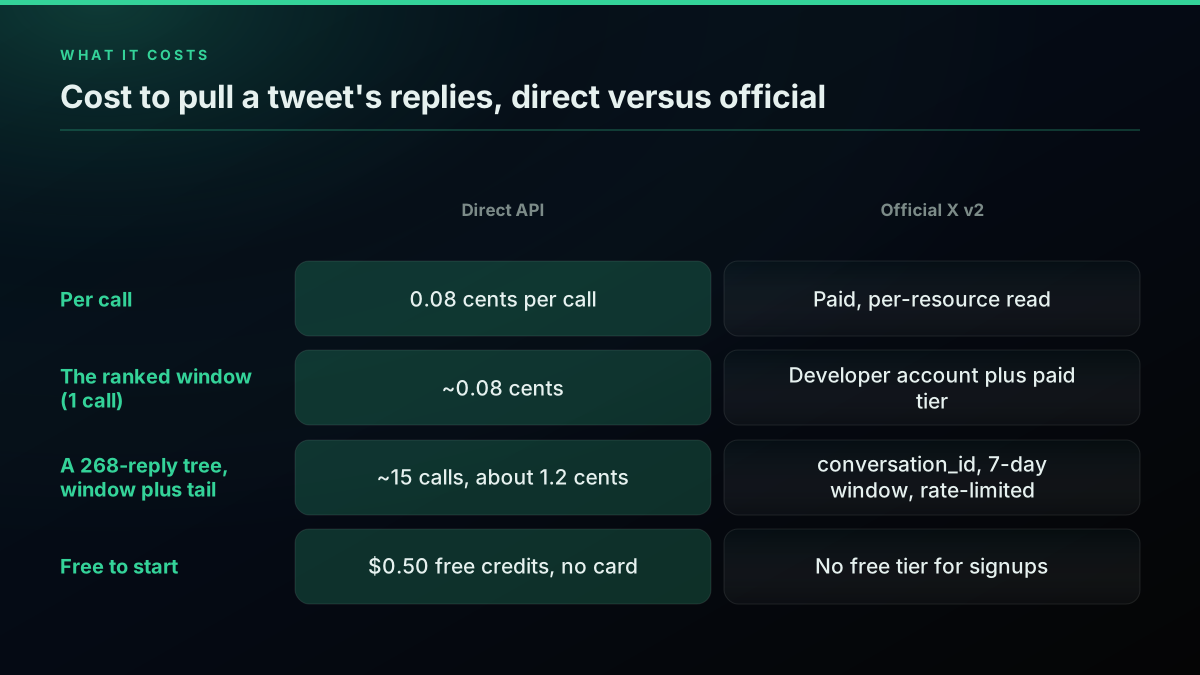
Cost to pull a tweet's replies, direct versus official
Official X API v2: conversation_id Access, Windows, and Rate Limits
On the official X API, replies are a search problem, not an endpoint. You call GET /2/tweets/search/recent with query=conversation_id:<tweetId>, request the fields you need, and page with next_token. It works, and it returns real replies, but three constraints shape every project: you need a developer account and a paid tier before the first call, recent search only reaches the last 7 days on standard access, and the endpoint sits under a per-15-minute rate limit that a busy thread will hit.
# official_x.py , the X API v2 conversation_id recent-search equivalent
import os, requests

BEARER = os.environ["X_BEARER_TOKEN"]

resp = requests.get(
    "https://api.x.com/2/tweets/search/recent",
    params={
        "query": "conversation_id:2031701874965926059",
        "tweet.fields": "in_reply_to_user_id,author_id,created_at",
        "max_results": 100,
    },
    headers={"Authorization": f"Bearer {BEARER}"},
    timeout=15,
)
data = resp.json()
replies = data.get("data", [])
next_token = data.get("meta", {}).get("next_token")
If you prefer an SDK over raw requests, the Tweepy client wraps the same recent-search call with search_recent_tweets, though it inherits every one of the access and window constraints above. Note the differences from the direct call: the account list arrives under data with paging in a meta.next_token, follower and profile fields are not attached by default so you expand them with user.fields and an expansions join, and the 7-day floor means historical threads need the far pricier full-archive tier. Pacing is the part people underestimate, so read the X API rate limits reference and back off against the response headers. The recurring "how do I even get replies" question on the X developer community exists precisely because none of this is a single clean endpoint, and the canonical StackOverflow answer is still the conversation_id workaround. For the rate-limit specifics on the read side, the rate limit guide covers the windows.
Common Tweet-Replies API Mistakes
A handful of mistakes account for most of the wrong reply datasets, and each one is cheap to avoid. The first is treating the ranked window as the whole thread. As the samples showed, one call returns the relevance-ranked window, not every reply, so a report built on it alone describes the loudest accounts and silently drops the tail. The second is looping the cursor forever: because the window is bounded, an empty cursor is not your only stop signal, a page that adds zero new reply ids is, so key replies by id and stop on zero-new.
The third is ignoring nesting. If you flatten every reply and never read in_reply_to_status_id, you lose the difference between a top-level reply and a fourth-level argument, which is exactly the structure that carries meaning in a heated thread. The fourth is forgetting the 7-day window on the official recent-search path, then wondering why a month-old tweet returns nothing; older threads need archive access or a provider not bound by that window. The last is skipping the signal filter and feeding raw replies, one-liners, emoji, and copypasta included, straight into sentiment or a model, which both skews the result and wastes tokens. Filter on length, language, duplication, and engagement first.
Where to Go Next
This guide covered the full replies workflow: why there is no first-class X v2 endpoint, a ten-line quickstart in Python and Node.js, why one call returns a ranked window, the cursor loop with a zero-new stop, the conversation_id tail sweep for the long tail, combining both into one deduped set, rebuilding nested reply trees, filtering signal from noise over live data, the honest per-call cost, and the official v2 route with its window and rate-limit constraints. The links below go deeper on each branch.
- For the cursor mechanics behind both loops, read the Twitter API pagination guide.
- For the
conversation_idoperator and the rest of the query grammar, read the advanced search operators guide. - For scoring replies once the noise is gone, read the Twitter sentiment analysis in Python guide.
- For a related audience pull on the same cursor pattern, read how to get everyone who retweeted a tweet and fetch a full Twitter thread.
- To expose this read to an assistant, wire it through the MCP server, and see the alternatives comparison.
Get a Tweet's Replies in Under a Minute
The fastest path from this guide to working code is the direct API. Sign up at the signup page, get $0.50 in free credits with no credit card, copy your Bearer key into TWITTERAPIS_KEY, and run this against any tweet id:
import os, requests
r = requests.get(
    "https://api.twitterapis.com/twitter/tweet/replies",
    params={"id": "1947726497319686509"},
    headers={"Authorization": f"Bearer {os.environ['TWITTERAPIS_KEY']}"},
    timeout=15,
)
for reply in r.json()["tweets"]:
    print(f'@{reply["author"]["username"]}: {reply["text"][:80]}')
That is the ranked reply window in one call. Add the conversation_id sweep from above when you need the long tail, union by id, and you have the whole conversation as data you can rank, filter, and store. See the pricing page for the per-call rate and free credits, or start with the complete Twitter API tutorial if you want the full read stack first.
// sources
Where these numbers come from
Each row is a figure in this post and the artefact it was read from. Prices and limits on this platform move, so check the date on the source before you plan against it.
- Conversation threading reference
- Backs the core mechanic of the official route, that every reply carries the conversation_id tying it to the post that started the thread, which is what you search on because v2 has no replies endpoint.
- Tweepy client documentation
- The SDK reference for the search_recent_tweets wrapper, backing the described response differences, results under data with paging in meta.next_token and profile fields requiring user.fields plus an expansions join.
- X API rate limits reference
- The pacing reference the post points readers to for the reply-sweep loop, since a conversation_id search fans out across many requests.
- Python requests library documentation
- The only dependency in the Python example, supporting the claim that a working replies call is a single GET with the parent tweet id in the id parameter and no OAuth handshake.
- MDN Fetch API reference
- Backs the Node.js path needing no SDK, because Node 18 and later ship a global fetch, so a GET with URLSearchParams and an Authorization header is the whole integration.
- Python collections module documentation
- Backs the nested-reply section, where defaultdict groups children under each parent id in one pass so the recursive walk can print the thread as an indented outline.
Frequently Asked Questions
No. X API v2 has no dedicated GET /2/tweets/:id/replies endpoint. The official way to recover replies is a recent-search query on conversation_id, which returns tweets that share the parent's conversation thread. On the cheaper tiers that recent search only reaches the last 7 days, so older replies fall outside the window. This is the gap developers keep hitting on the X developer forum, and it is why a direct replies endpoint like the one on TwitterAPIs, which returns the reply window in one call, exists at all.
You get the reply window, then the tail, but not one clean count. The direct replies endpoint returns a bounded relevance-ranked window, in testing about 35 to 36 replies for both a 268-reply and a 6,592-reply tweet, and its cursor stops returning new rows once that window is exhausted. To reach the rest you page conversation_id search, which walks the chronological tail about 20 replies per page. Deleted and hidden replies never appear from either method, so treat your collected set as the visible reply tree, not a guaranteed census of every reply ever posted.
On a pay-per-call API each replies call and each conversation_id search call is $0.0008, and one call returns a page. The ranked window for a tweet is a single call, roughly 0.08 cents. Reconstructing a 268-reply tree, window plus about 14 tail pages, is around 15 calls, close to 1.2 cents. That works out near $0.04 per 1,000 tweets on reads. New accounts start with $0.50 in free credits, about 625 calls, with no card. The official X API meters reads per resource and gates them behind a paid developer tier.
Combine two calls. First hit the direct replies endpoint, GET https://api.twitterapis.com/twitter/tweet/replies with id set to the parent tweet id, which returns X's relevance-ranked reply window plus a next_cursor. Then run an advanced_search on conversation_id:<tweetId> to sweep the chronological long tail, the older replies and deep reply-to-reply chains the ranked window leaves out. Union the two result sets by reply id to dedup, and you have as complete a reply tree as X exposes. Each call is $0.0008, and new accounts get $0.50 in free credits.
Read the in_reply_to_status_id field on every reply object. A reply whose in_reply_to_status_id equals the parent tweet id is a top-level reply. A reply that points at another reply id is a nested reply-to-reply, one level deeper in the thread. To rebuild the tree, index every reply by its own id, then attach each one to its parent using in_reply_to_status_id. The conversation_id search surfaces the deep chains, three and four levels down, that the ranked window does not, so run it if nested threads matter to you.
For the official X API, yes: every conversation_id search needs a developer account, an approved app, a payment method, and a Bearer token before your first request, plus you are held to the 7-day recent-search window on lower tiers. For a direct third-party API you do not. With TwitterAPIs you sign up with an email, copy a Bearer key, and call the replies endpoint immediately on $0.50 of free credits, with no project, no app review, and no card. The tradeoff is that a direct API reads X data through the provider rather than from X itself.
Check out similar blogs
More guides on the Twitter/X API, scraping, and pricing.
How to Get Everyone Who Retweeted a Tweet via API (2026)
Pull the full list of accounts that reposted any tweet with a real 2026 API. Runnable Python and Node.js, cursor pagination for the whole list, a real amplifier ranking over live data, a bot filter, and the honest per-call cost.
How to Search Tweets by Hashtag via API 2026 (Python + Node.js)
Search tweets by hashtag with a real 2026 API in Python and Node.js. Runnable code for the hashtag operator, engagement filters, cursor pagination, deduping retweets, counting authors, and the real per-call cost.

Twitter API Tutorial 2026: The Complete Developer Guide
The 2026 Twitter API tutorial built after the pricing collapse. Auth, endpoints, code, rate limits, real costs, and the alternative when official gets too expensive.

How to Get Image URLs from X Tweets via API in 2026 (Full Resolution, Python and Node)
Pull image URLs out of X tweets with runnable Python and Node.js, then get the full-resolution original instead of the scaled copy the API hands you by default. Measured on 14 live images, with the video poster-frame trap and the per-call cost.
Twitter API Authentication in 2026: OAuth, Bearer Tokens, and Fixing 401
How Twitter (X) API authentication works in 2026: the four credential types, OAuth 1.0a versus OAuth 2.0, generating and using a bearer token, runnable Python and Node.js, and a fix for every 401 Unauthorized and 403 error, plus the one-header alternative.
Twitter API Pagination 2026: How next_token Works (and a Simpler Alternative)
How Twitter API pagination works in 2026. The official next_token loop explained field by field, a simpler single-cursor alternative, runnable Python and Node code, and the real per-call cost of a paginated pull.
Fetch a Full Twitter Thread via API in One Call (2026)
How to pull an entire Twitter thread, the root tweet plus every connected tweet in the chain, in a single API call with the tweet/thread endpoint, instead of walking replies by hand. Live-tested code in curl, Python, and Node.js, with the real per-call cost.
Twitter API Node.js Tutorial 2026: Fetch Tweets in 10 Lines
The 2026 Node.js Twitter API tutorial: fetch tweets in 10 lines with fetch or axios, no SDK and no OAuth dance. Search, profiles, cursor pagination, retries, async, and real per-call costs in working code.