GUIDE
Twitter Keyword Alerts: Send Every New X Match to Slack or a Webhook
Set up Twitter keyword alerts that post new X matches to Slack or any webhook. Query syntax, a working Python loop, poll cadence and the real monthly cost.
Per our own spec, 72 of 125 endpoints bill $0.0008, 26 are free, and 27 sit between $0.0016 and $0.01. Every price ships inside our published OpenAPI document as an x-cost-usd field, so any figure in this post can be checked against the contract that bills it rather than taken on trust.
Twitter keyword alerts are a search that runs on a timer. Every few minutes your code asks X for the newest posts matching a query, throws away the ones it has seen, and pushes the rest to Slack or a webhook. X's own notifications cannot do this, because they follow accounts rather than words. So the job falls to a listening tool or a small loop you own.
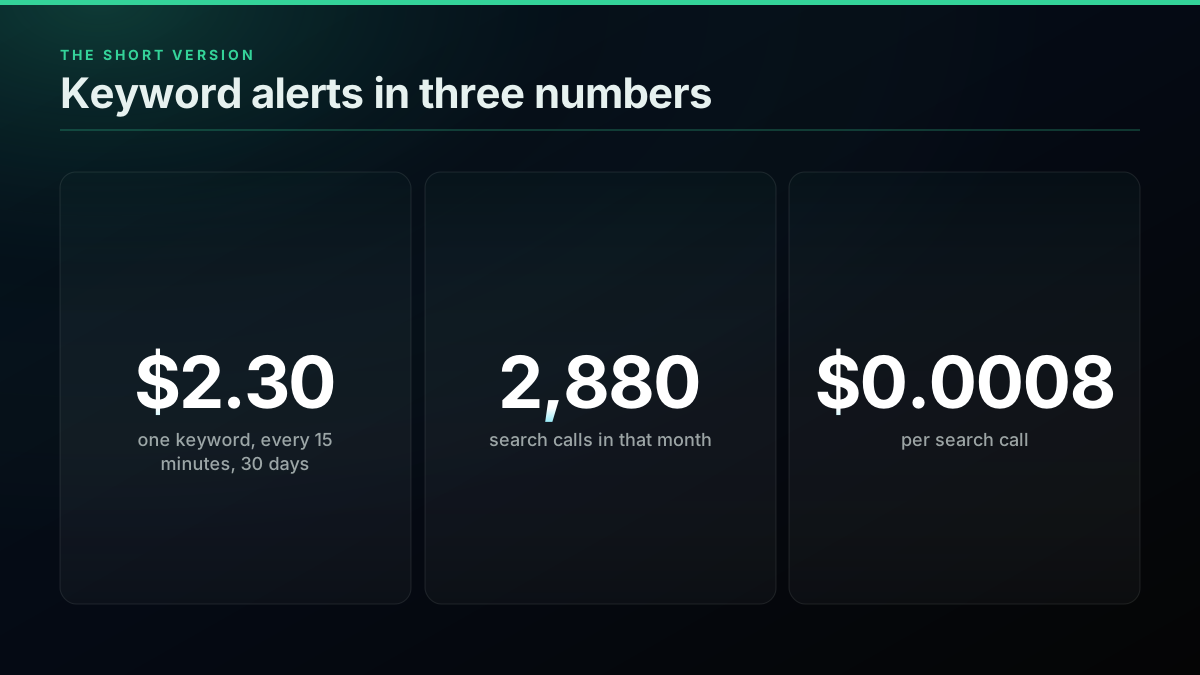
This guide builds the loop. It costs $2.30 a month for one keyword at a 15-minute cadence, and the code below runs today against a per-call search API.
TL;DR: Poll
GET /twitter/tweet/advanced_searchwith your query andproduct=Latest, keep a file of seen post ids, and POST each new match to a Slack incoming webhook. One keyword every 15 minutes is 2,880 calls and $2.30 over 30 days at $0.0008 a call. Treat an empty page as unknown, since 29.6 percent of paying search calls in our measured window returned nothing and a retry often does. Alert a person, never auto-reply: X does not permit automated replies based on keyword searches alone.
Most social listening tools: 24-hour delays. Miss Reddit threads. Ignore Hacker News. No AI reply suggestions.
@kristapsozy view on X
Most founders manually search Reddit, X, and communities for keywords. Every. Single. Day. And still miss: feedback, early intent, competitor moves.
@use_needle view on X
How do Twitter keyword alerts work?
A keyword alert is three parts: a search query, a memory of what you have already seen, and a delivery step. The query finds candidates, the memory stops repeats, and delivery puts the match in front of a person who can act on it.
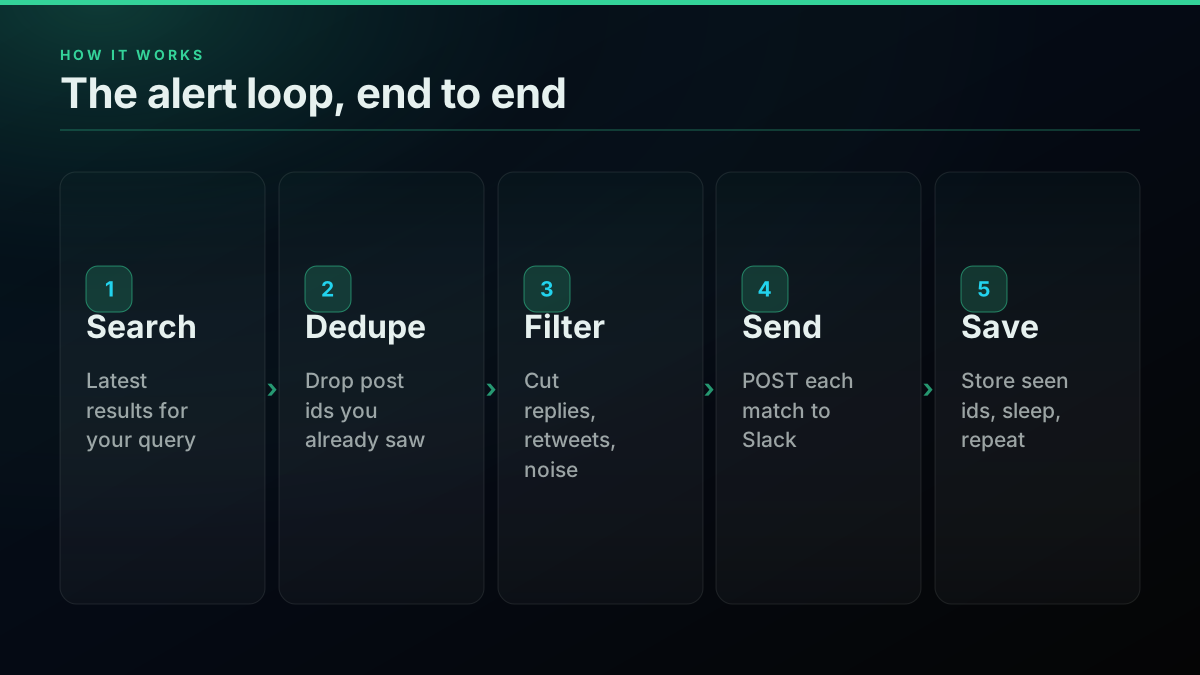
The loop runs on a timer, and that is the whole architecture. There is no stream to hold open and no connection to babysit. Our real-time mentions guide covers the same pattern for one handle, and the coverage notes on monitoring explain what any X search can and cannot promise. The difference here is that the target is a word rather than an account, so to: and from: give way to free text and operators.
People ask for exactly this in public. Here is a thread from someone pricing the options this year:
Monitoring X/Twitter mentions in 2026 without the enterprise price tag. What's actually working for you? from r/socialmedia
Which search query should you alert on?
The query decides whether your channel stays useful or gets muted in a week. A bare word such as a short brand name matches everything, so start with an exact phrase, then remove retweets, then add a language. Most tuning happens here, not in the code.
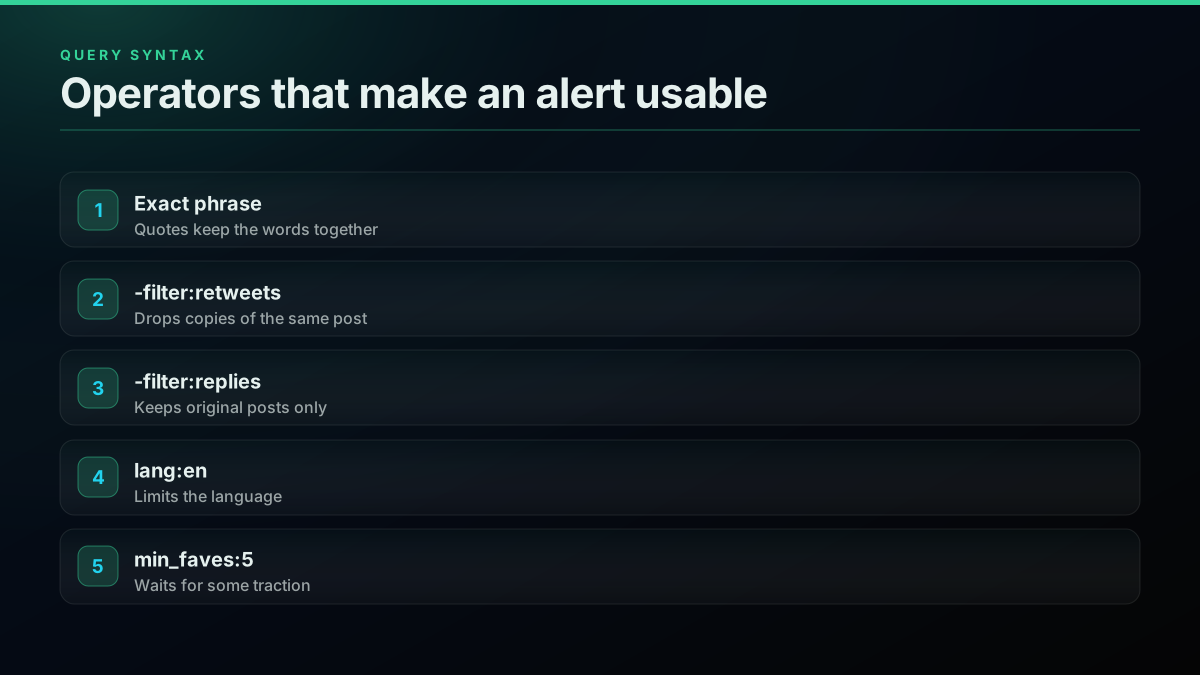
X's search operators all work through the API. These four queries cover most alert jobs:
"acme api" -filter:retweets lang:en
"rivalco" (expensive OR down OR alternative) -filter:retweets
"alternative to rivalco" -filter:replies
"acme" min_faves:5 -filter:retweets
The third line is the most valuable one for sales, because it finds people who have already decided to switch. Our advanced search misses posts piece explains why a narrow query can return fewer posts than you expect.
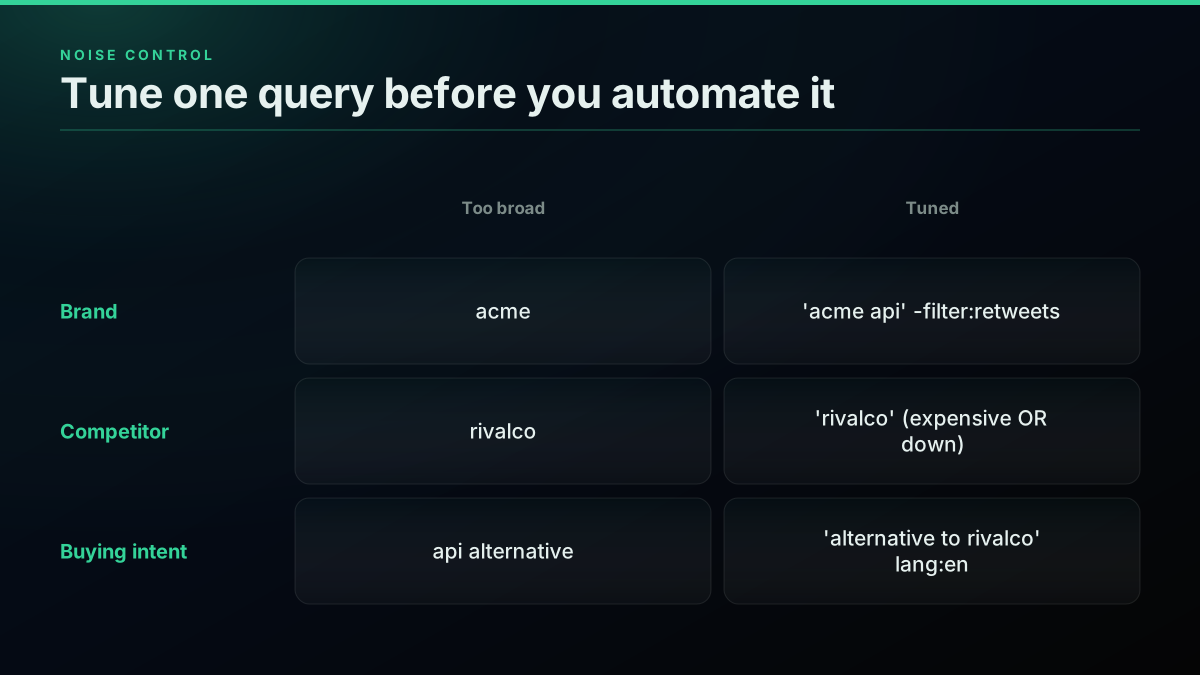
Run each query by hand before you schedule it. If a page of 20 results holds more than a handful you would not act on, tighten it. Fixing a query costs one call. Muting a noisy channel costs you the alert.
The working Python loop
This script searches, dedupes, filters and posts to Slack in about 40 lines. Run it from cron or a scheduler every 15 minutes. It needs a TwitterAPIs key and a Slack webhook URL in the environment, and it stores seen ids in a local file so a restart never re-sends anything.
import json, os, pathlib, time, requests

BASE = "https://api.twitterapis.com/twitter"
KEY = os.environ["TWITTERAPIS_KEY"]
SLACK = os.environ["SLACK_WEBHOOK_URL"]
QUERY = '"acme api" -filter:retweets lang:en'
SEEN = pathlib.Path("seen.json")

def search(query):
    r = requests.get(f"{BASE}/tweet/advanced_search",
                     params={"query": query, "product": "Latest"},
                     headers={"Authorization": f"Bearer {KEY}"}, timeout=30)
    r.raise_for_status()
    return r.json().get("tweets", [])

def search_with_retry(query):
    tweets = search(query)
    if not tweets:             # an empty page is unknown, not "nothing posted"
        time.sleep(20)
        tweets = search(query)
    return tweets

def send(tweet):
    who = tweet["author"]["username"]
    text = f"@{who}: {tweet['text'][:280]}\n{tweet['url']}"
    requests.post(SLACK, json={"text": text}, timeout=10).raise_for_status()

seen = set(json.loads(SEEN.read_text())) if SEEN.exists() else set()
first_run = not seen
for tweet in reversed(search_with_retry(QUERY)):
    if tweet["id"] in seen:
        continue
    seen.add(tweet["id"])
    if not first_run:          # the first run only fills the seen file
        send(tweet)
SEEN.write_text(json.dumps(sorted(seen)[-5000:]))
Save that as alerts.py and schedule it. On a server, one crontab line is enough:
*/15 * * * * cd /opt/alerts && /usr/bin/python3 alerts.py >> alerts.log 2>&1
The first_run guard matters. Without it, the first run floods the channel with a full page of old posts. Reading results in reverse sends the oldest match first, so the channel reads in order. If you prefer Node, our Node.js tutorial covers the same request, and the authentication guide covers the bearer token.
The same call works from the shell, which is the fastest way to test a query:
curl -G "https://api.twitterapis.com/twitter/tweet/advanced_search" \
  --data-urlencode 'query="acme api" -filter:retweets lang:en' \
  --data-urlencode "product=Latest" \
  -H "Authorization: Bearer $TWITTERAPIS_KEY"
Here is a short walkthrough of the no-code version of the same idea, for comparison:
https://www.youtube.com/watch?v=WHNrWjUy81U
How do you connect Slack?
Slack gives you one private URL per channel, and every alert is a single POST to it. Create an app in your workspace, switch on incoming webhooks, choose a channel, and copy the URL it returns. There is no OAuth flow to build for a one-way alert.
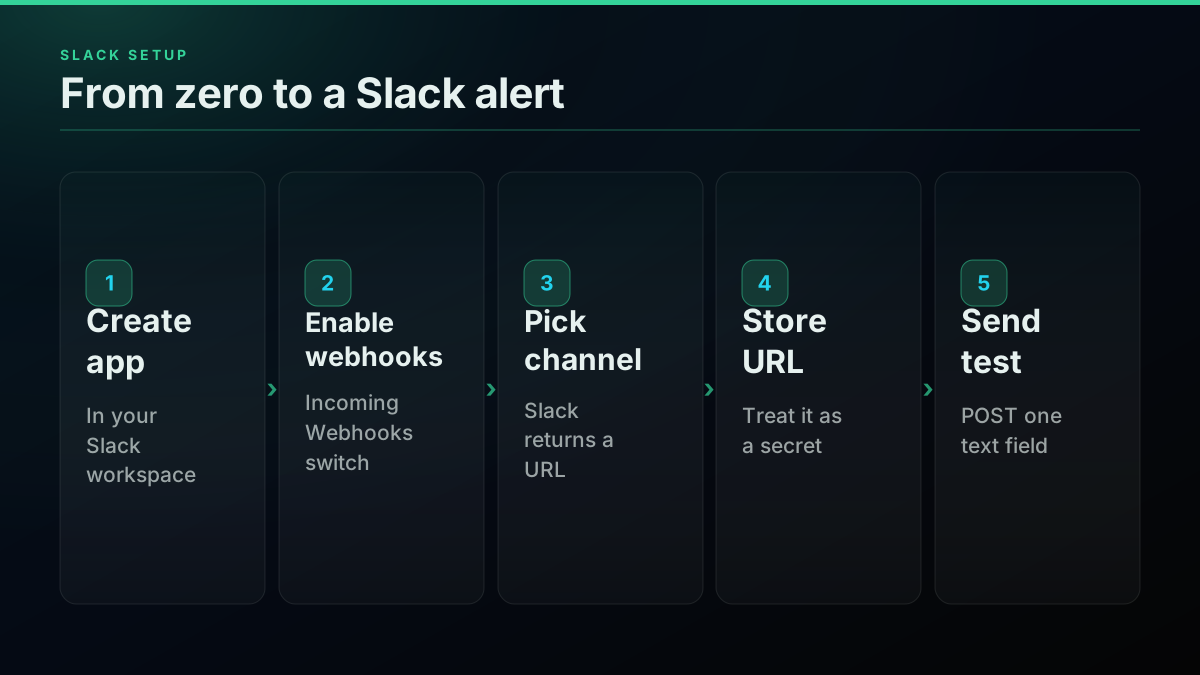
Slack's incoming webhook docs show the shape: a POST to a hooks.slack.com/services/... URL with a JSON body holding a text field. Treat that URL as a secret, because anyone who has it can post to your channel. Other destinations take the same approach. A Discord webhook wants content instead of text, and your own endpoint takes whatever you define:
def send_discord(url, tweet):
    text = f"{tweet['text'][:280]}
{tweet['url']}"
    requests.post(url, json={"content": text}, timeout=10).raise_for_status()
The sample above uses the requests library, which is all you need. For a no-code version of this wiring, the n8n guide gets to the same place.
Start building with TwitterAPIs
$0.0008 a call, about $0.04 per 1,000 tweets at 20 tweets a page. $0.50 free credits. No credit card required.
How often should you poll, and what does it cost?
Poll as often as a late alert would hurt, and no more. Cost scales with cadence and keyword count, never with the number of matches, so a busy term costs the same as a quiet one. One keyword at 15 minutes is $2.30 a month and most teams never need faster.
What one keyword costs at each poll interval
| Poll interval | Calls in 30 days | Cost | Worst-case delay | Source |
|---|---|---|---|---|
| Every 60 minutes | 720 | $0.58 | 60 minutes | derived |
| Every 15 minutes | 2,880 | $2.30 | 15 minutes | derived |
| Every 5 minutes | 8,640 | $6.91 | 5 minutes | derived |
| Every 1 minute | 43,200 | $34.56 | 1 minute | derived |
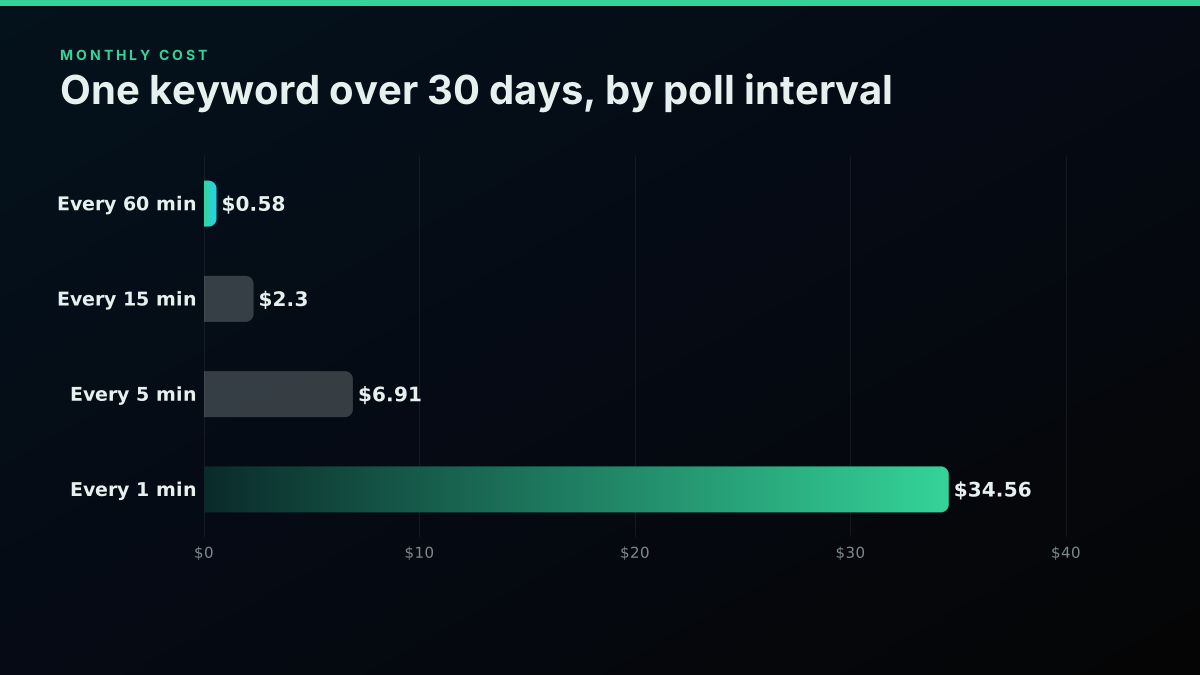
The arithmetic is short enough to keep in the script's comments, and the cost calculator runs the same numbers for other jobs:
polls_per_day = 24 * 60 / 15   # one keyword every 15 minutes
calls = polls_per_day * 30
print(int(calls), round(calls * 0.0008, 2))   # 2880 2.3
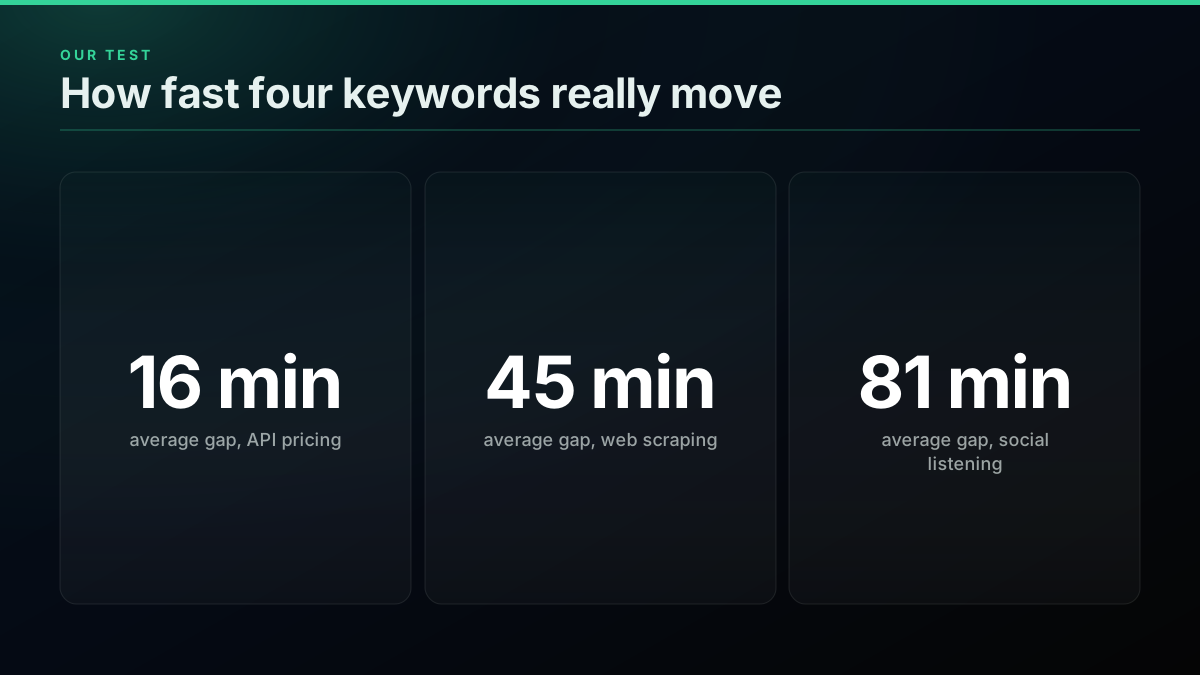
To size a cadence, we pulled one page of Latest results for four ordinary keywords and timed how long each page took to fill.
How fast four sample keywords moved
| Query | Hours to fill a page of 20 | Average gap between posts | Replies in the page | Source |
|---|---|---|---|---|
| "API pricing" | 5.0 | 16 minutes | 11 of 20 | measured |
| "web scraping" | 14.4 | 45 minutes | 7 of 20 | measured |
| "vector database" | 17.4 | 55 minutes | 8 of 20 | measured |
| "social listening" | 25.6 | 81 minutes | 6 of 20 | measured |
Measured
Average minutes between matching posts
| Point | Value |
|---|---|
| API pricing | 16 |
| Web scraping | 45 |
| Vector database | 55 |
| Social listening | 81 |
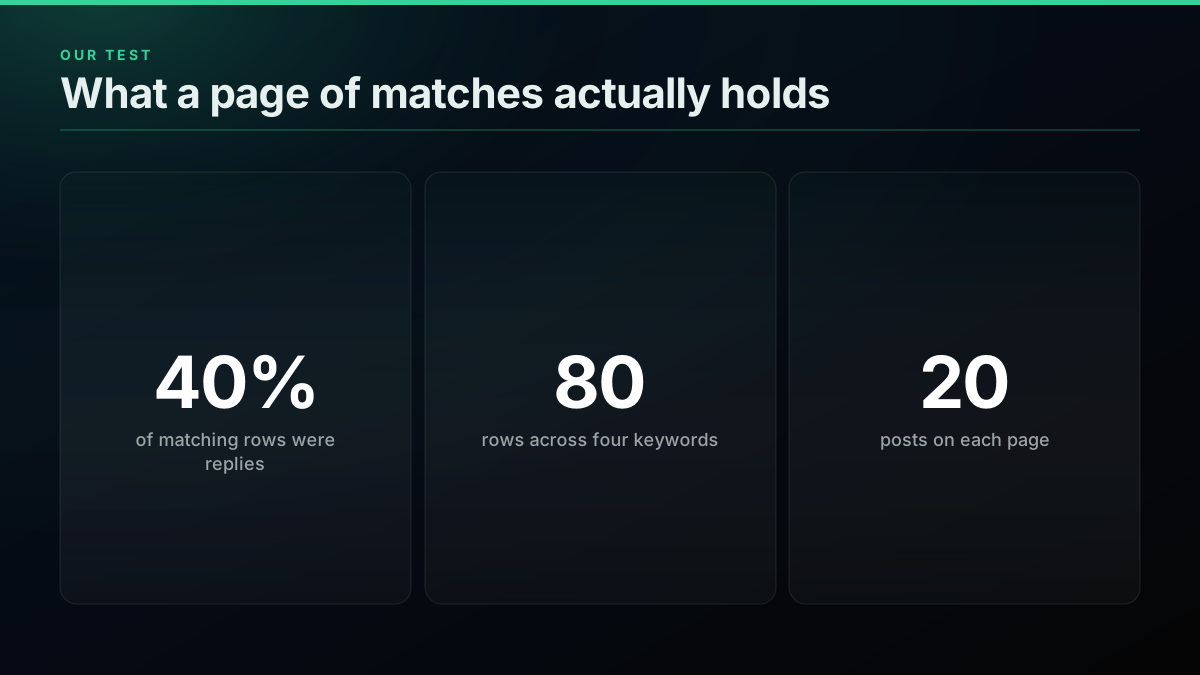
40% of the 80 rows across our four sample keyword pages were replies, so decide up front whether
-filter:repliesbelongs in your query.Our data · Dataset:
x-keyword-alert-sample-2026· Source: public X posts, pulled through our API · Query:GET /twitter/tweet/advanced_search?query=%22API+pricing%22+lang%3Aen&product=Latestplus the same call for "web scraping", "social listening" and "vector database" · Pulled: 2026-11-05 · n = 80 · Method: share of rows with is_reply true across one Latest page of 20 per query.
Even "API pricing", the busiest of the four, averaged 16 minutes between posts. A 15-minute poll catches nearly everything on terms like these, and a 60-second poll mostly returns the same page. The official route prices this differently: X's rate card bills $0.005 per post read, so a term with 200 matches a day is about 6,000 reads and $30 a month, where the per-call loop stays at $2.30. For a wider view of the two billing models, see our price sheet and the cost by workload rundown.
Worked example
A small team's alert budget, priced first
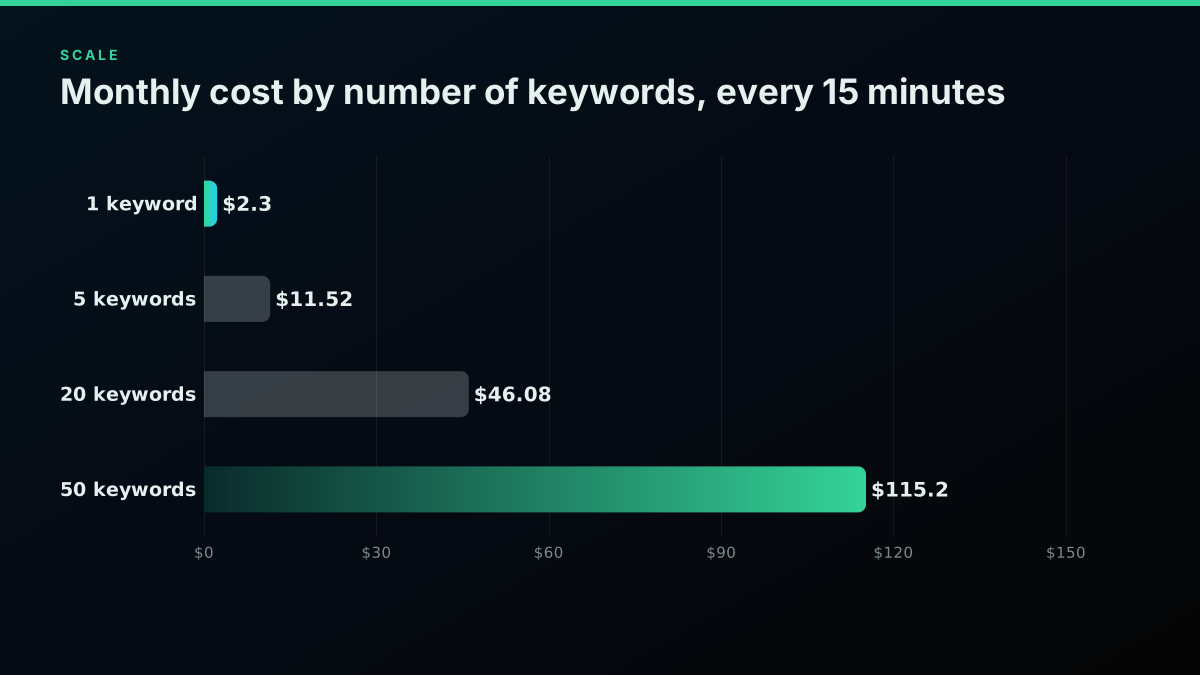
Keywords: 5 · Calls in 30 days: 14,400 · Monthly cost: $11.52
☑ 5 keywords x 2,880 polls x $0.0008 is $11.52 · ☑ Combining the 5 terms with OR drops it to one query at $2.30 (one query, one bill) · ☐ A 1-minute cadence on all 5 would be $172.80 (pay for speed only where it matters)
An illustration at a stated volume, not a customer account. Assumes a 30-day month at $0.0008 a search call.
Why empty pages break naive alerts
An empty page is not proof that nobody posted. X search returns nothing on a meaningful share of calls even when matches exist, so a loop that reads empty as "all quiet" silently misses posts. Retry once after a short wait, and only then treat the run as finished.
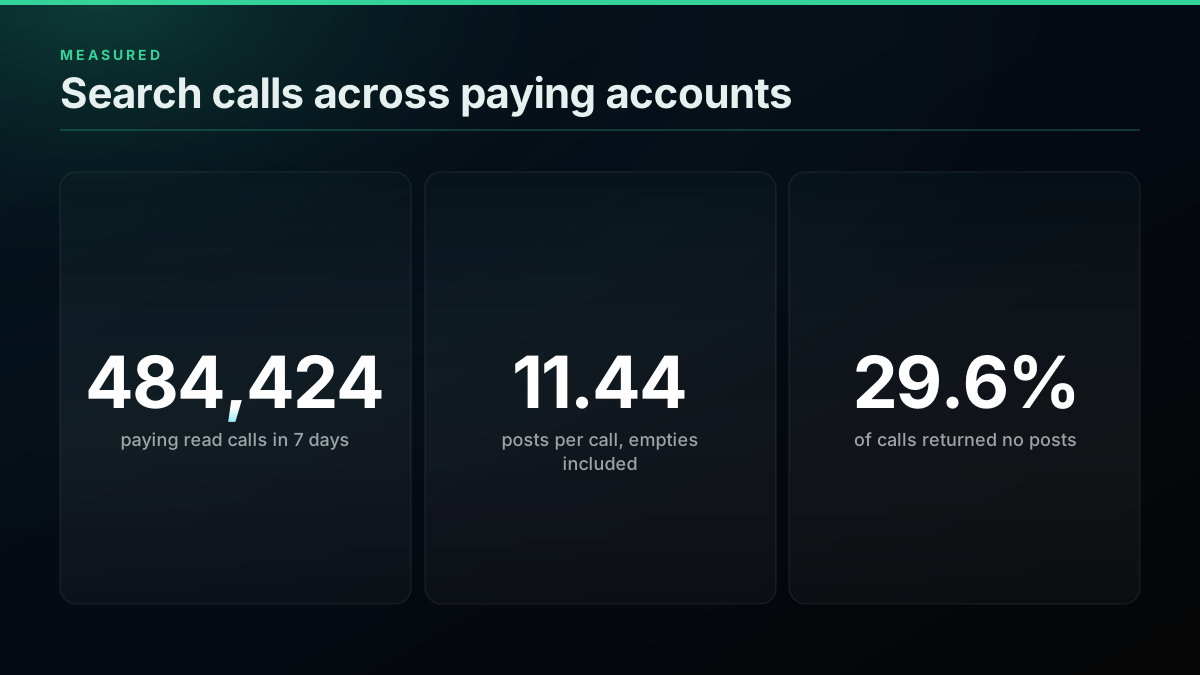
We hit this while writing this guide. Three of our first four test queries returned an empty page, and the identical requests returned 20 posts each on the second try. Across paying accounts the pattern is consistent: in a sample of 484,424 paying read calls between October 22 and 28, 2026, 29.6 percent of search calls came back empty, and the average across all calls was 11.44 posts. The reliability write-up covers how to read those numbers, and the rate limits guide covers what to do on a 429. Since a call costs $0.0008, one retry is cheap insurance.
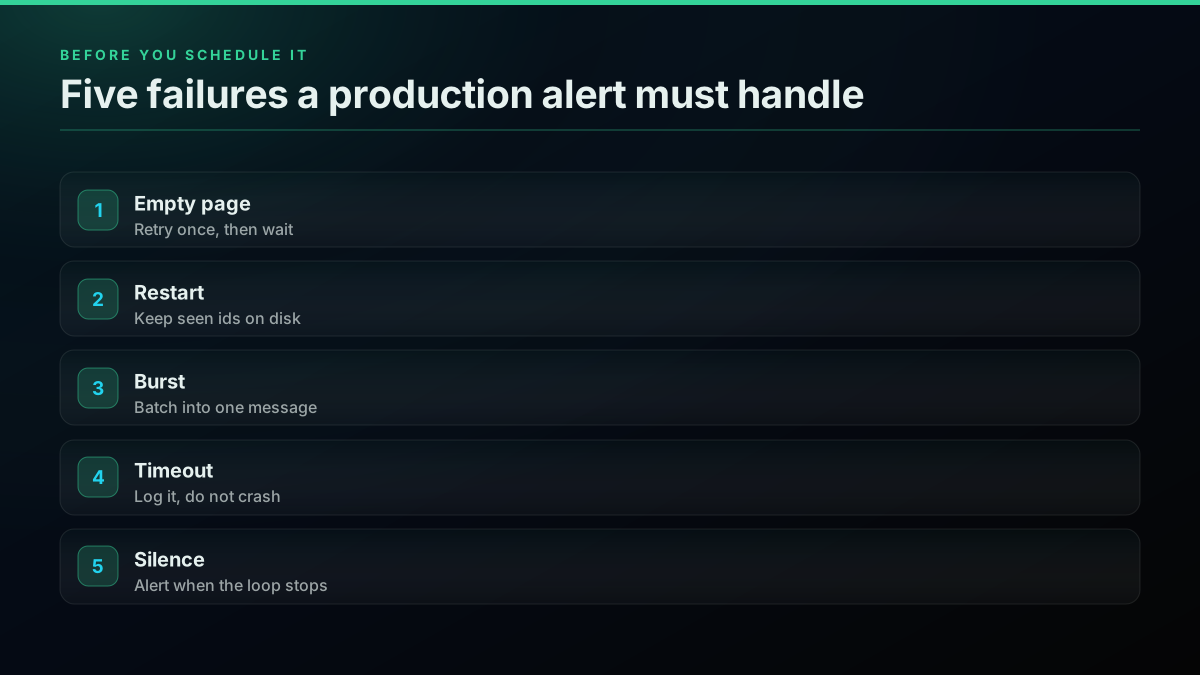
The other failure worth planning for is silence. If your scheduler dies, the channel goes quiet and quiet looks like good news. Send yourself a daily heartbeat message, and alert when one does not arrive.
Which route fits your team?
Pick by who owns the alert. One person watching one word can use a free applet. A marketing team that wants a dashboard should buy a seat. A developer who wants matches inside a product or a workflow should run the search loop, because it is the only route with full control over query, destination and cost.
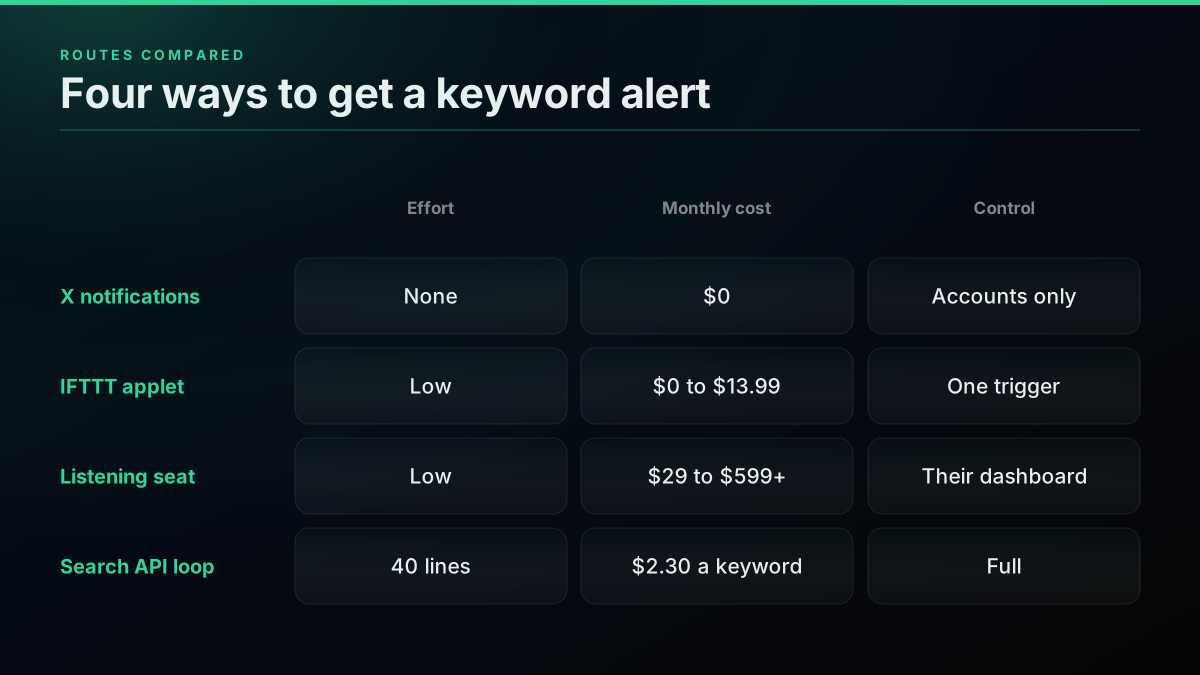
By route
A keyword alert, four ways
| IFTTT applet | Listening tool | Search API loop | |
|---|---|---|---|
| Setup | Minutes | Minutes | An hour, 40 lines |
| Monthly cost | $0 to $13.99 | $29 to $599+ | $2.30 a keyword |
| Destination | Applet actions | Their inbox, Slack | Anything with a URL |
| Query control | Basic | Boolean, varies | Full X operators |
| Best for | One personal alert | A non-technical team | A developer or a product |
Paid options span a wide range. IFTTT plans run from free to $13.99 a month billed annually. Awario starts at $29 a month billed annually, and Syften charges $49.95 for its Standard plan plus a $40 monthly add-on for X. Brand24 starts at $199 billed annually, and G2 lists Mention from $599. Those tools cover more than X, so the comparison is only fair for an X-only job. Our build versus buy breakdown works through that decision in detail.
Free Twitter monitoring workflow for n8n (avoiding the $5k/month API) from r/n8n
When should you use an account monitor instead?
Use a monitor when the thing you care about is an account, not a word. Our monitors watch a handle and push each new post to your webhook, signed, at no per-call cost. They do not match keywords, so a keyword job stays on the search loop.
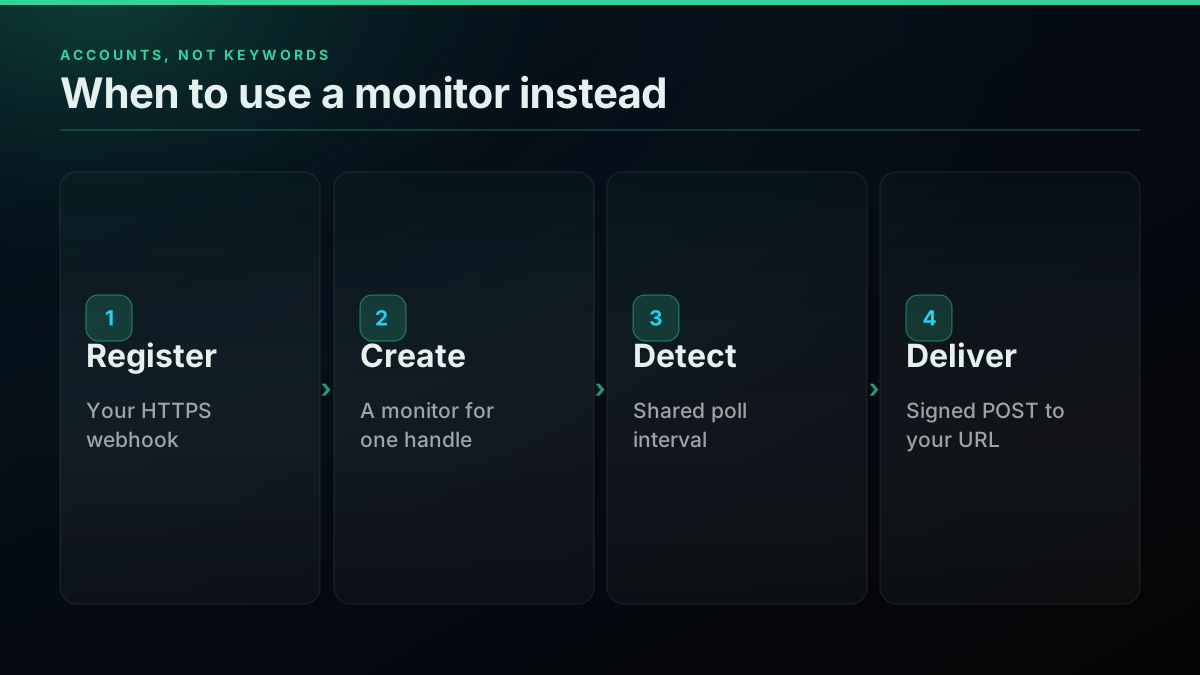
The webhook API page covers the setup: register an HTTPS endpoint, create a monitor for a handle, and receive signed POSTs on a shared 60-second poll interval. You can narrow a monitor to posts linking one domain with domain_filter, which is a useful halfway step for tracking press coverage of your own site from a named account. For choosing a cadence on account polling, see the account monitoring cost guide.
The cheapest pay-as-you-go Twitter API. Try it free.
$0.0008 a call, about $0.04 per 1,000 tweets at 20 tweets a page. $0.50 free credits. No credit card required.
What does X allow you to do with an alert?
Reading and notifying your own team is fine. What X restricts is acting automatically on what you find. The automation rules state that automated replies based on keyword searches alone are not permitted, so a keyword alert should end with a person, not a bot.
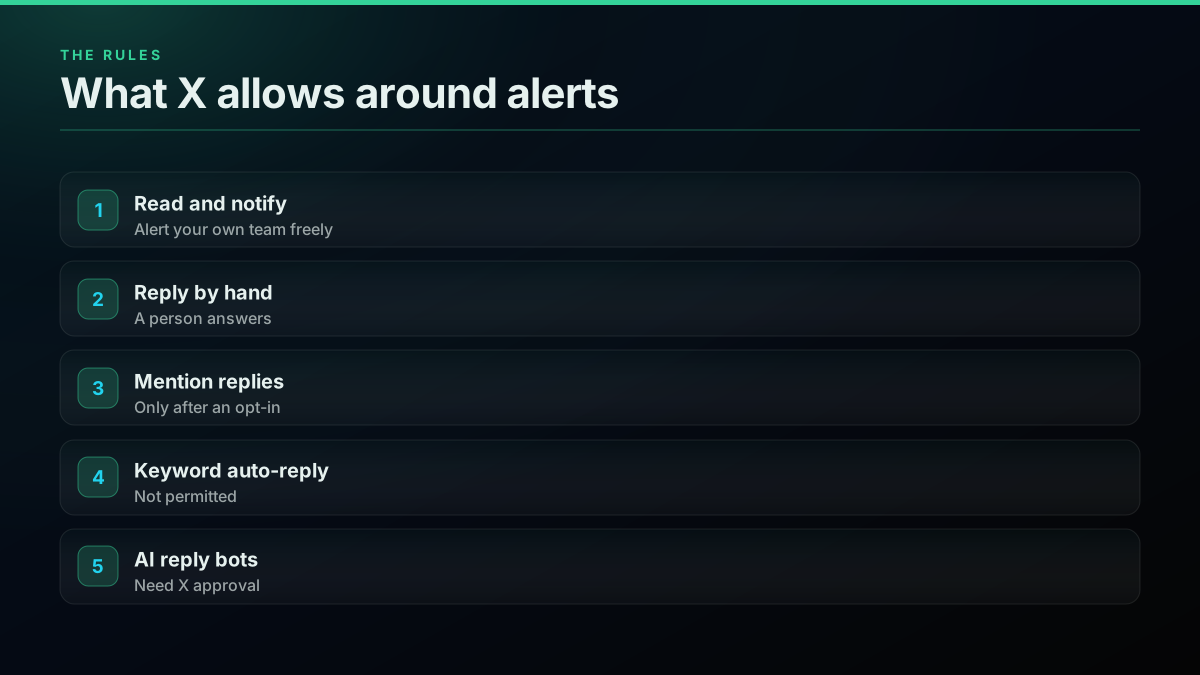
The automation rules allow automated replies only when the recipient opted in, for example by mentioning your account, and any AI reply bot needs prior written approval from X. The practical pattern: alert the channel, let someone read it, and reply by hand if it is worth it. If you do want a reply bot for people who tag you, the chatbot guide walks through that build.
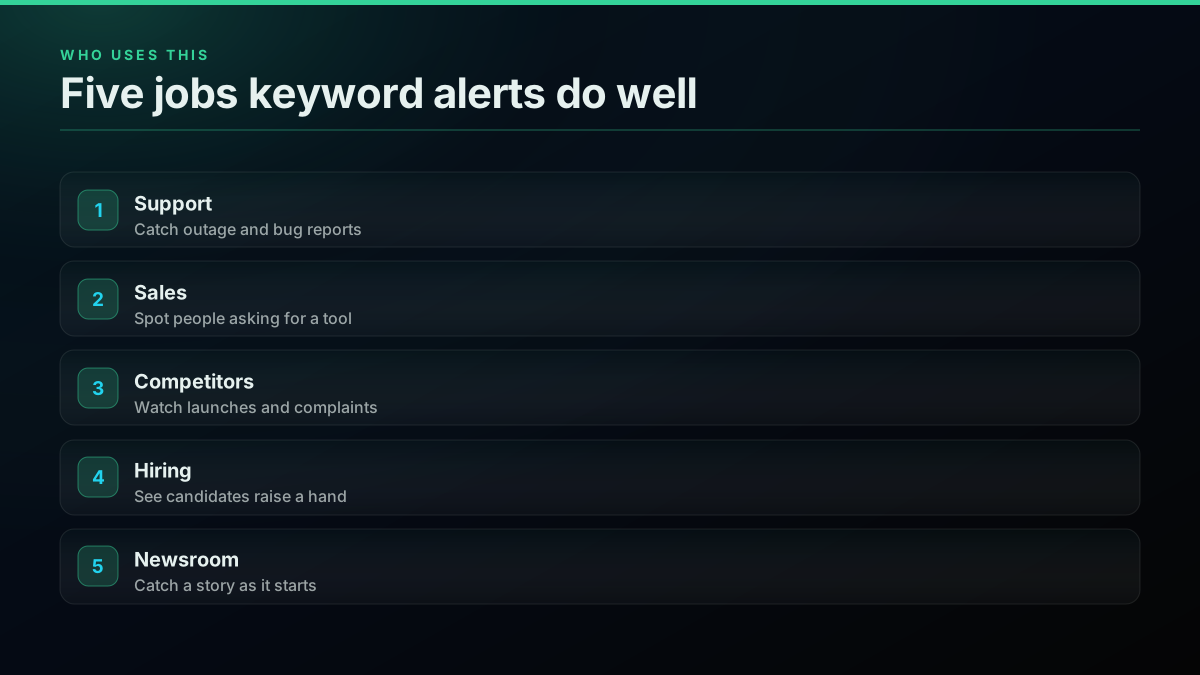
Five jobs keyword alerts do well
Support, sales, competitor tracking, hiring and news all run on the same loop with different queries. The code does not change between them, so once one alert works, adding a team is a new query and a new channel.
Support watches for "acme" (down OR broken OR error). Sales watches for "alternative to rivalco". Competitor tracking watches a rival's name plus launch words, which pairs well with the competitor analysis use case. Recruiters watch for "looking for" "engineer role". Newsrooms watch place names plus earthquake or outage. Keep each query in its own channel, so muting one never hides another.
Where to go from here
Once one alert works, most teams want more of the same data. The complete API tutorial covers the other read endpoints, the Python tutorial goes further on pagination and retries, and what to build with the API collects ideas for the data once it lands in your channel.
The short version
Twitter keyword alerts are a search on a timer with a memory and a delivery step. Forty lines of Python and a Slack webhook get you there for $2.30 a month per keyword, and combining terms with OR keeps that number flat as your list grows.
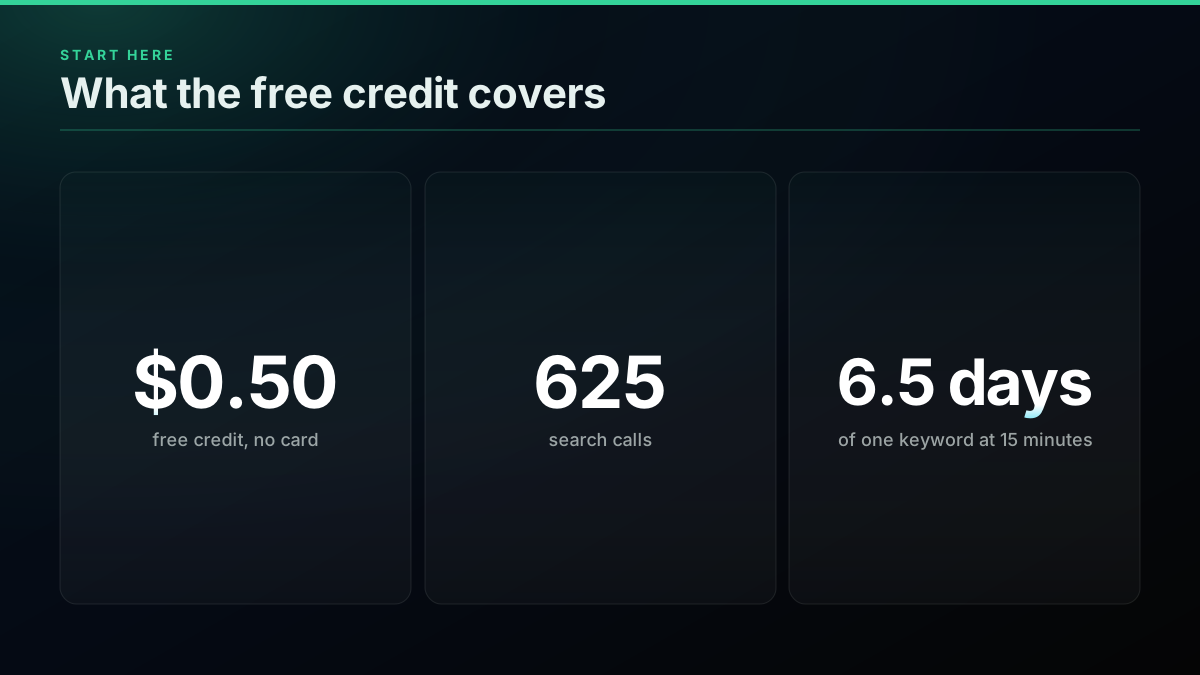
Tune the query by hand first, retry empty pages, and keep a person at the end of the chain. New accounts get a $0.50 credit with no card, enough for about 625 calls or 6.5 days of one keyword at a 15-minute cadence. Sign up, test a query, and check the pricing page when you are ready to scale it.
// sources
Where these numbers come from
Each row is a figure in this post and the artefact it was read from. Prices and limits on this platform move, so check the date on the source before you plan against it.
- Sending messages using incoming webhooks, Slack docs
- The webhook URL format and the JSON body this guide posts.
- Automation rules, X Help Center
- The rule that automated replies based on keyword searches alone are not permitted, plus the approval rule for AI reply bots.
- X API pricing, docs.x.com
- The official per-resource rates, including $0.005 per post read.
- Syften pricing
- The Standard plan at $49.95 a month and the $40 monthly X monitoring add-on.
- IFTTT plans
- Free, Starter, Pro and Pro+ plan prices.
- Awario pricing
- The entry plan at $29 a month billed annually.
- Brand24 pricing
- The Individual plan from $199 a month billed annually.
- Mention pricing on G2
- The Company plan starting at $599 a month.
Frequently Asked Questions
Run an advanced search for the keyword on a timer, keep only post ids you have not seen, and send each new post to a channel you read. X's own notifications only follow accounts, so a keyword needs either a search loop like this one or a paid listening tool that runs the same loop for you.
At $0.0008 a call, one keyword polled every 15 minutes is 2,880 calls and $2.30 over 30 days. Polling every 5 minutes is $6.91 and every minute is $34.56. The bill follows your cadence and your keyword count, not how many posts match.
An empty page does not prove nothing was posted. Across paying calls in our measured window, 29.6 percent of search calls came back empty, and in our own test the same query returned 0 posts and then 20 on a retry. Treat an empty page as unknown and retry once before moving on.
Yes. Create a Slack incoming webhook, then POST a JSON body with a text field to its URL for each new match. It takes about 40 lines of Python, and the same loop works for Discord, Microsoft Teams or your own HTTPS endpoint because each one is a single POST.
Match the cadence to how fast you have to act. Every 15 minutes suits brand and competitor terms. Every minute only makes sense when a late alert costs money, such as an outage keyword or a trading signal. Our four sample keywords averaged 16 to 81 minutes between posts.
Not safely. X's automation rules say automated replies based on keyword searches alone are not permitted. Use keyword alerts to bring a person to the conversation, and let that person decide whether to answer. Automated replies are limited to people who opted in, for example by mentioning your account.
Check out similar blogs
More guides on the Twitter/X API, scraping, and pricing.
How to Monitor Twitter (X) Mentions in Real Time with an API (2026)
Track Twitter/X mentions in real time with an API. The three mention endpoints, copy-paste polling code with since_id dedup, a Slack alert recipe, and what it actually costs per month.
What an AI Twitter Bot Costs to Run: Three Account Sizes, Priced
What an AI Twitter bot costs to run in 2026. Three account sizes priced line by line from live rate cards, plus the X rules that decide what it may do.
Chatbot Training Data: Turn X Reply Threads Into Conversation Pairs
Build chatbot training data from X reply threads: find real questions, pair each with its best answer, clean the pairs and export JSONL for fine-tuning.
How to Compare Twitter Followers and Find the Overlap Between Accounts
Compare Twitter followers between two accounts: free tools, what they miss, and a Python method that finds common followers and overlap at any size.
X Starts Billing API Expansions on Nov 22: What One Request Costs Now
From November 22, X bills every object an API expansion returns. What changes, how the forum answers conflict, and what one request costs before and after.
The X Chat API in v2.169: Group Endpoints and What a DM Really Costs
X shipped a full set of X Chat endpoints in API v2.169: groups, admins, invites and members. What you can build on encrypted chat, and the real cost per DM.
Grok Bot Reads X Without API Credits Now. When You Still Need an X Data API
Grok Bot can now search, read and monitor X without X API credits. What the docs confirm, what they leave out, and five jobs that still need an X data API.

X/Twitter Statistics in 2026: What an API Can Actually Measure, and What Nobody Can
Most X statistics roundups re-cite the same handful of numbers. We measured what a public API can and cannot see across 34 accounts, printed the query behind every figure, and traced the rest to their real sources.